


Why 24 frames per second still rules movies
Walk into any cinema in 2026 and the picture you see on the screen is still flickering at the same rate it has been since the 1920s — twenty-four pictures per second. This is, on the face of it, ridiculous. The screen sitting on your office desk runs at 60. The phone in your pocket runs at 120. The Apple Vision Pro on someone's head runs at 90. But the actual movie at the actual movie theatre — the one that won an Oscar last week — was probably shot and projected at 24. The number has not changed in roughly a century.
The reason is half engineering and half culture. Twenty-four was originally the slowest frame rate Hollywood could get away with while still producing motion that felt smooth on a strip of film — sound-on-film required 24 fps to keep the optical soundtrack readable, and the studios wanted to use as little expensive film stock as possible. Over the next hundred years, audiences came to associate exactly that frame rate, with exactly its specific stutter and motion blur, with "this is a real movie." When director Ang Lee released Billy Lynn's Long Halftime Walk at 120 fps in 2016, audiences described it as "looking like a daytime soap opera". That reaction was not about pixels. It was about the absence of the 24-fps texture they had been trained to recognise as cinema.
For a product team building video, the frame rate decision is more practical: how smooth should motion look, how big are the files, how forgiving is the playback hardware, and what does the audience expect? Pick wrong and you ship videos that judder on pans, eat bandwidth on simple talking heads, or look uncomfortably "fake" in a context where audiences want them to feel filmic.
This article maps the territory. It explains what frame rate actually is, why 24 became the cinema number, what 60 and 120 fps are for, why judder exists and how motion blur fixes it, and which frame rate your product should ship for each kind of content.
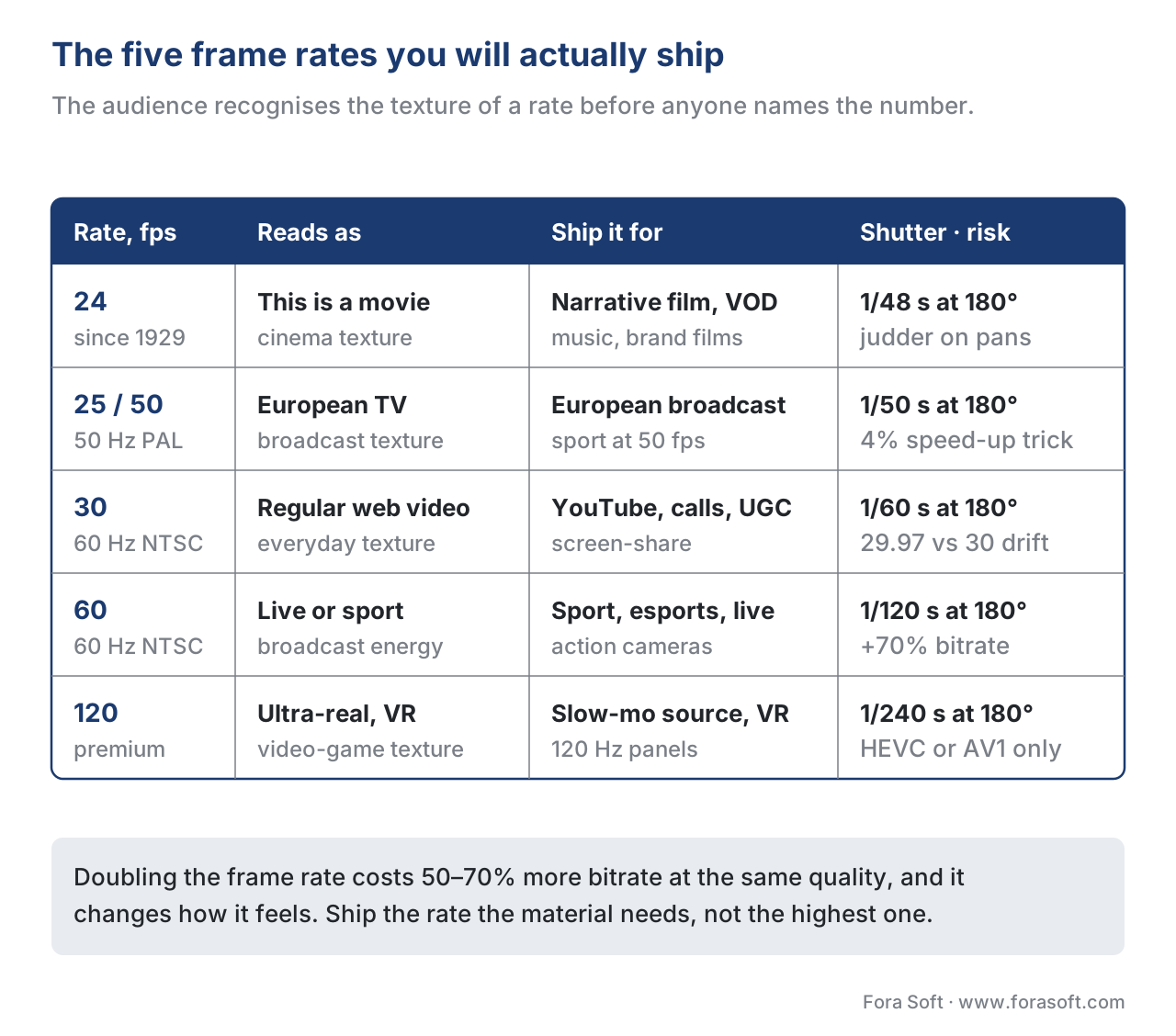
Quick read. 24 fps for cinematic VOD, 25/30 for streaming talking heads, 50/60 for sports and live, 120 fps for premium high-motion and modern displays. Motion blur is your friend at low frame rates; sharpness is your friend at high ones. Get the relationship between shutter angle and frame rate right and judder mostly goes away.
What frame rate is, exactly
A video is a flipbook. The camera captures a fixed number of still photographs per second, and the screen flashes them back at the viewer fast enough that the human visual system stitches them into the perception of continuous motion. The number is the frame rate, measured in fps (frames per second) or Hz (hertz, the same thing measured slightly differently). 24 fps means twenty-four still photographs captured every second. 60 fps means sixty.
Two thresholds matter for how the eye processes this. The flicker fusion threshold sits around 16 fps — below that, the eye sees individual still frames flicking past, like a slideshow. Above it, the brain interprets the sequence as motion. The motion smoothness threshold is higher — somewhere between 30 and 60 fps, depending on what is moving and how fast. Below that range, fast motion feels stuttery; above it, fast motion looks smooth.
24 fps sits just above the first threshold and well below the second. That is not an accident. It is the lowest rate that produces continuous-motion perception, which is exactly why the early film industry chose it — film stock cost money, and you want to spend as little of it as possible while still fooling the eye.
The catch is that 24 fps is fundamentally a compromise. It works for almost everything cinema does (medium-speed actors walking through scenes, talking, gesturing) but it falls apart on the cases where motion is faster than the eye can track without help — fast camera pans, sports action, anything with rapid object movement. The fix for those cases is either to shoot at a higher frame rate, or to introduce enough motion blur that the eye doesn't notice the stutter.
Why 24, and why has it survived
The specific number "24" came from the constraints of 1920s optical sound. The optical soundtrack — a stripe of varying density running along the edge of the film — needed enough physical length per second of audio to be readable by the sound head. Below 24 fps, the audio degraded. Above 24, the film cost rose. Twenty-four fps was the cheapest rate that produced acceptable picture and acceptable sound on the same strip.
What kept 24 fps alive long after sound-on-film became obsolete is cultural association. Audiences who grew up watching films at 24 fps internalised the specific look — a particular kind of motion blur on movement, a slight judder on horizontal pans, a temporal "texture" that signals to the brain "this is a movie, not a soap opera, not a sports broadcast, not a video conference." When productions deviated, audiences reacted negatively even when the technical picture was sharper.
The two famous attempts to break out are The Hobbit (2012, 48 fps) and Billy Lynn (2016, 120 fps). Both got bad press for looking "too real" or "like television". Both pieces of feedback were specifically about frame rate. The studios learned to leave 24 alone except in specific use cases.
This is also why the standards bodies kept 24 fps as the cinema reference rate. UHD Blu-ray, Netflix, Apple TV, and every major film-distribution standard accepts 24 fps natively. The world's display ecosystem now has to work around the fact that 24 doesn't divide evenly into 60 (the most common screen refresh rate) — which leads us to judder.
Judder: what it is and where it comes from
Judder is the visible stutter that appears in moving picture when the frame rate of the source doesn't match the refresh rate of the display.
The classic case is showing 24-fps content on a 60-Hz TV. 60 doesn't divide cleanly by 24 — 60 ÷ 24 is 2.5. The display has two choices, and both look bad. The first choice is 3:2 pulldown: show one frame for 3 refreshes, the next frame for 2, the next for 3, the next for 2, and so on. This gives 24 unique frames per second but with uneven hold times — and your eye sees the unevenness as a small repeating stutter, most visible during slow pans.
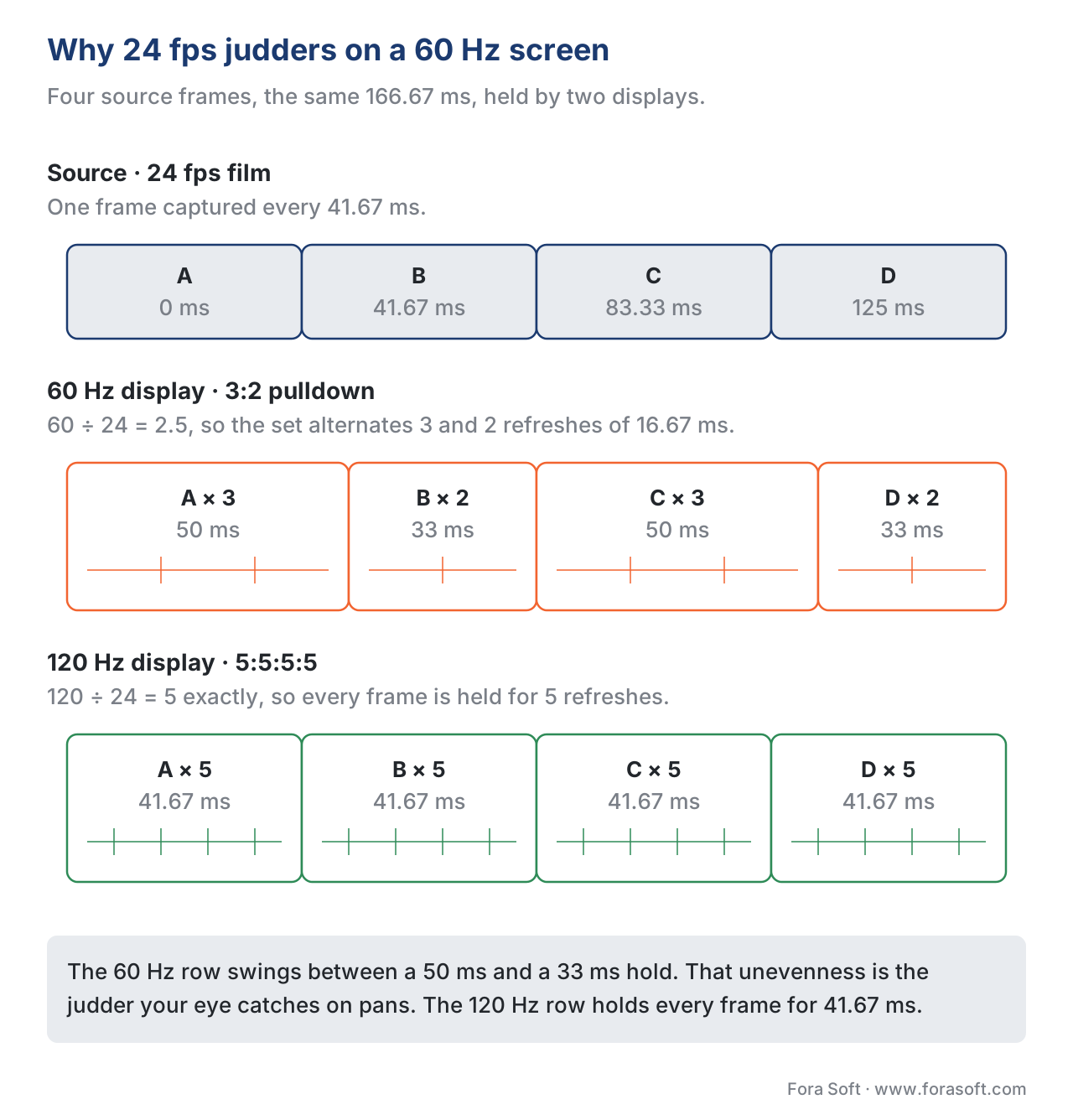
The second choice is motion interpolation — the TV synthesises fake intermediate frames to bridge the gap, producing a 60-fps signal from 24-fps content. This is the "soap opera effect" — the picture is now smooth, but the smoothness is the wrong smoothness, the smoothness of a 60-fps daytime show rather than the smoothness of a 24-fps film. Audiences hate it on movies and love it on sports.
Modern TVs increasingly handle this by matching their refresh rate to the source. A 120-Hz TV can show 24-fps content as 5:5:5:5 — every frame held for 5 refreshes, perfectly even — and the judder disappears without any interpolation. This is why "120 Hz" matters on modern TVs even though almost no content is mastered at 120 fps. The 120 Hz refresh is the smallest multiple that cleanly accommodates both 24-fps cinema and 60-fps sports.
For product teams, the operational lesson is: match the frame rate to the display's most natural multiple, or accept the judder. If your players will run on a mix of 60-Hz and 120-Hz screens, 30 fps and 60 fps both display cleanly on both. 24 fps displays cleanly only where the player chain explicitly handles it.
Motion blur: the cinematographer's secret weapon
If 24 fps is so stuttery in theory, why do most films look smooth? The answer is motion blur — the natural smear that occurs when a camera's shutter is open long enough that fast-moving objects move during the exposure of a single frame.
Take a frame of a car driving past the camera. If the shutter is open for 1/48 of a second (the cinema standard at 24 fps), the car moves several pixels during the exposure, and the resulting frame shows the car as a soft horizontal smear rather than a sharp still. Your eye reads that smear as motion. The next frame shows the car a little further along, again with smear. The brain stitches the two smears together as smooth movement.
Now imagine the same scene shot with a very fast shutter — say 1/1000 of a second. Every frame is sharp. No motion blur. The car appears in a different position each frame with no smear connecting them. The brain sees a sharp stutter — a stop-motion effect. This is exactly the "video game" look, and it is why some early HFR experiments looked uncanny: high frame rate plus short shutter equals too much sharpness.
The relationship is governed by shutter angle, a number cinematographers care about more than they care about shutter speed in raw seconds. Shutter angle is the proportion of each frame's duration during which the shutter is open. The film-industry default is 180° — half of each frame's duration is exposure time. At 24 fps, that gives a 1/48-second shutter. At 60 fps, that gives a 1/120-second shutter. At 120 fps, that gives a 1/240-second shutter.
The 180° default exists because it produces the specific quantity of motion blur the eye expects from "natural" motion at a given frame rate. Going wider (360° at 24 fps means 1/24-second shutter, twice the blur) makes motion feel dreamy and smeared. Going narrower (45° at 24 fps means 1/192-second shutter, a quarter of the blur) makes motion feel sharp and aggressive — the technique Steven Spielberg used in Saving Private Ryan to make the Omaha Beach battle feel jagged and traumatic.
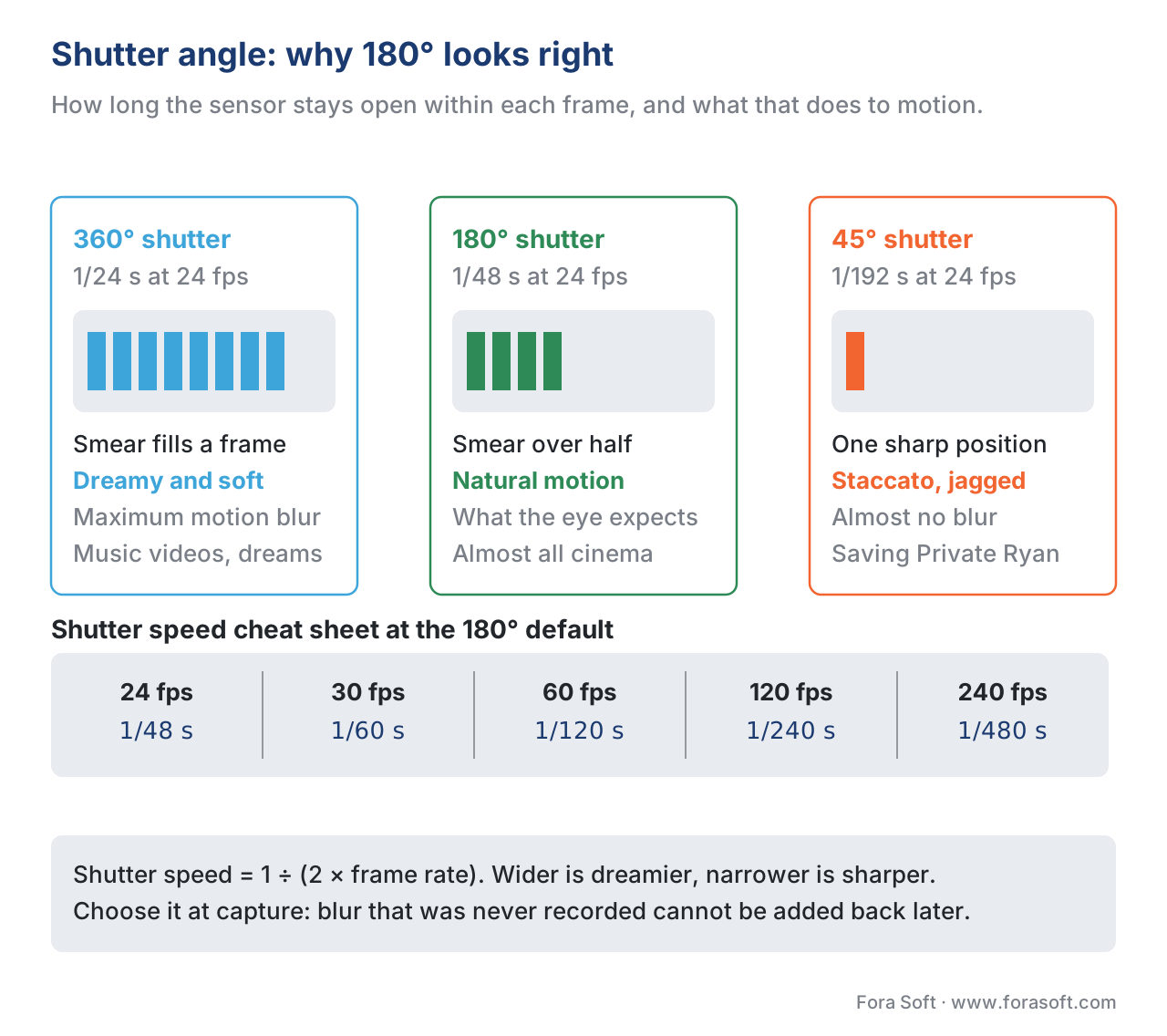
Rule of thumb. Shutter speed ≈ 1 / (2 × frame rate). 24 fps → 1/48. 30 fps → 1/60. 60 fps → 1/120. 120 fps → 1/240. The factor of 2 is the 180° shutter angle. Deviate on purpose, not by accident.
This matters for product teams because the shutter angle is set in the camera at capture time. Once you ship a sharply-shot 60-fps clip, you cannot retroactively add cinematic motion blur in post — or rather, you can, but it looks fake. The decision about how the motion will feel is locked at the moment of recording.
When to use which frame rate
There are five common frame rates in the wild, plus a handful of legacy ones. Here is what each is for.
24 fps. The cinema rate. Use for narrative film, premium scripted VOD, music videos that want a "filmic" look, branded content where the goal is mood rather than information density. Avoid for fast camera movements unless you commit to the 24-fps aesthetic. Audiences read 24 fps as "this is a movie" and forgive the judder if the rest of the production matches.
25 fps (and 50 fps). The European broadcast rate, derived from 50 Hz electrical mains. Used by BBC, every European public broadcaster, and most European-produced television. Effectively interchangeable with 24 fps for cinematic content (cinemas project 24-fps masters at 24 fps and television at 25 fps with an almost imperceptible 4% speed-up). 50 fps is the European sports/live rate.
30 fps (and 60 fps). The North-American broadcast rate, derived from 60 Hz electrical mains. Most YouTube content, most user-generated video, most streaming "non-cinematic" content. 30 fps reads as "regular video" rather than "movie". 60 fps reads as "high-motion" — sports, gaming, action sports. The doubled 60 is also what most monitors render natively, so 30/60 plays back cleanly everywhere without judder.
120 fps. The new premium rate. Used for slow-motion source footage (a 120-fps clip can be slowed down 5× and still play smoothly at 24 fps), for high-end sports, for VR and AR content where head movement makes sub-90-fps content feel uncomfortable. Most modern smartphones now record 120 fps for slow-motion features. Apple's iPhones from the iPhone 15 Pro onward record 4K at 120 fps for "Cinematic Mode" pulls.
240 fps and beyond. Specialist territory — research, scientific imaging, ultra-slow-motion for sports analysis. The Phantom Flex 4K camera shoots 1,000 fps at 4K. Rarely used in delivered content; almost always shot as raw material for slowed-down output.
For most product teams in 2026, the decision matrix collapses to four cases. Talking-head, conferencing, screen-share content: 30 fps (or 25 in Europe), unless you have a specific reason to go higher. Sports, live broadcast, esports: 50 or 60 fps. Narrative video and cinematic content: 24 fps with proper shutter angle. High-end VR, 120-Hz display targeting, premium slow-motion: 120 fps.
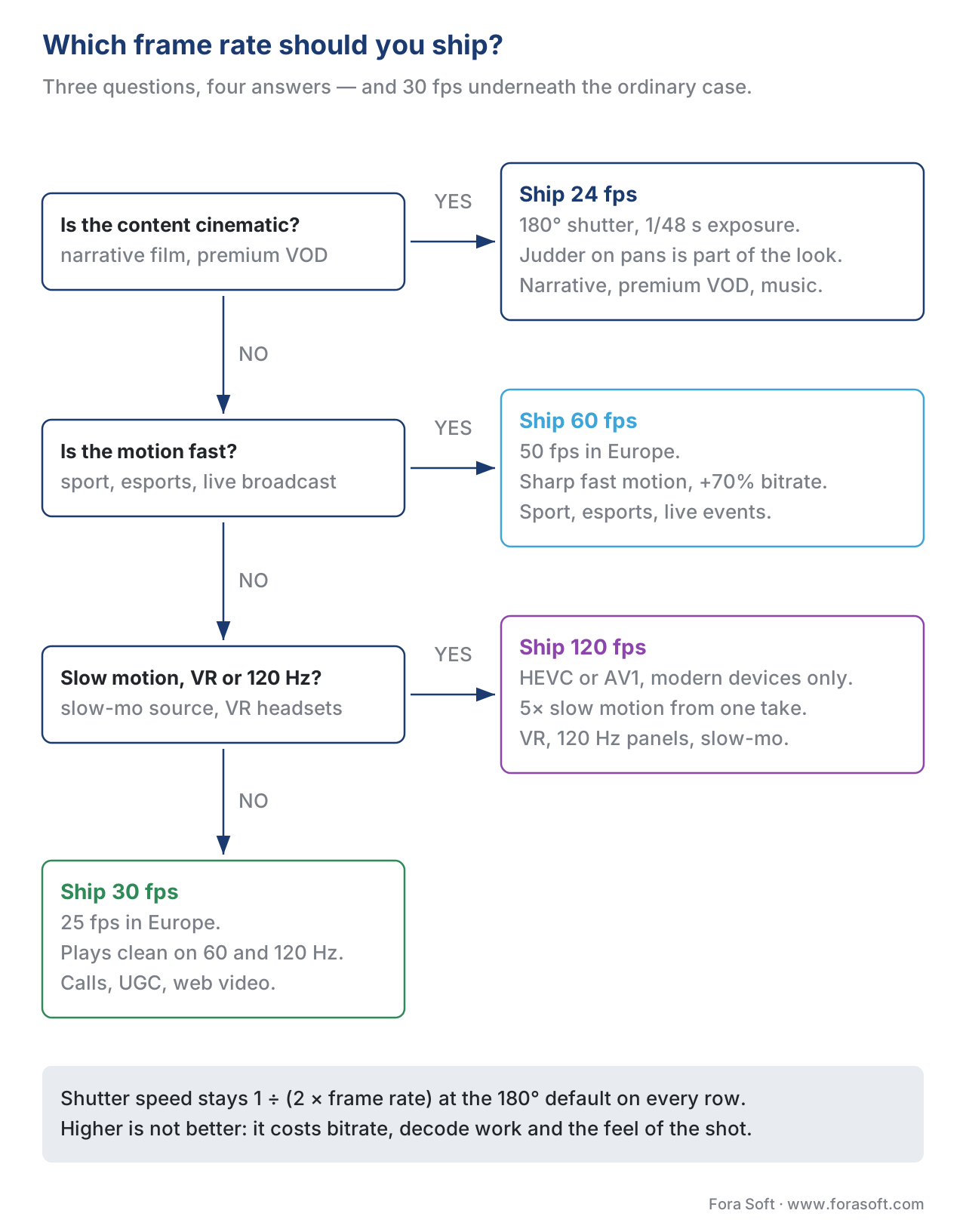
The cost penalty is real: doubling the frame rate roughly doubles the bandwidth needed to maintain quality. A 1-hour 4K HDR cinema master at 24 fps might be 60 GB; the same content at 120 fps is closer to 250 GB. The encoder works harder, the CDN ships more bytes, the player needs more decode horsepower. Pick the highest frame rate the content actually benefits from, not the highest the camera can record.
Why high frame rate gets a bad reputation
We have to address the "soap opera effect" head-on, because it explains a lot of product decisions.
When TVs introduced motion smoothing features in the late 2000s — interpolating extra frames between the real ones to deliver smooth 60-fps motion from 24-fps source — the marketing departments thought they had a clear win. Sharper, smoother, more "modern" picture. What they actually shipped was the death of cinematic feel. Films interpolated up to 60 fps looked like they had been recorded for daytime television.
The "soap opera" label comes from the fact that 60-fps live-to-tape soap operas of the 1980s and 1990s had a specific, instantly recognisable look — bright, smooth, mid-budget, recorded on video rather than film. When motion interpolation turned every movie into something that visually matched that texture, the brain made the association regardless of the source production budget.
The same effect shows up in high-end HFR cinema experiments. Peter Jackson's Hobbit trilogy was the first major HFR cinema release at 48 fps. Audience reaction was hostile. Many viewers reported feeling like they were watching behind-the-scenes footage rather than a finished film. Ang Lee's 120-fps experiments fared worse — Billy Lynn's Long Halftime Walk (2016) and Gemini Man (2019) both received complaints about looking "fake" or "soap-opera-like".
The deeper lesson: frame rate is a stylistic choice as much as a technical one. Audiences associate frame rate with content category — 24 fps means "cinema", 60 fps means "live TV", 120 fps means "video game or sports". Mismatching the frame rate against the audience's expectations produces an uncanny-valley response that no amount of picture quality can compensate for.
Product implications: never apply automatic motion smoothing to cinematic content; offer 60-fps versions only where audiences expect them (sports, live, gaming); and resist the temptation to "upgrade" old 24-fps content to higher frame rates "for modern displays" — the original frame rate is part of the creative work.
How frame rate interacts with the rest of the pipeline
A few practical interactions are worth knowing.
Encoding cost. Higher frame rate means more frames to encode, more inter-frame motion to compress, and more bandwidth in the delivered stream. Doubling frame rate at the same visual quality typically increases bitrate by 50-70% (not 100%, because temporal redundancy between adjacent frames compresses well at higher frame rates). For HDR content this is especially expensive — 4K HDR at 120 fps is one of the most demanding things a modern codec has to handle.
Codec support. H.264 supports up to 60 fps at 4K commercially. HEVC and AV1 both support 120 fps at 4K. Older devices may not decode 120-fps streams at all — the iPhone, for example, only added 4K-120 decode in 2023. If your audience includes 5-year-old smartphones, 60 fps is the safe ceiling.
HDR + high frame rate. Combining HDR (Rec. 2020, 10-bit, PQ) with 120 fps and 4K is the worst case for both bandwidth and decoder complexity. Many streaming services that ship HDR cap frame rate at 60 fps for that reason; Apple TV+ and Netflix selectively offer 4K HDR 120 fps for specific titles (Apple Original sports, some Netflix originals).
Variable frame rate (VFR). Phone-shot video often uses variable frame rate — the camera drops frames when lighting is poor to avoid over-darkening, then catches up. VFR is fine for personal video but causes problems for editing pipelines, which assume constant frame rate. Most product video workflows convert VFR to CFR (constant frame rate) at ingest. Verify with ffprobe -show_entries stream=avg_frame_rate,r_frame_rate file.mp4 — if they don't match, you have VFR.
Slow motion. Shooting at high frame rate and playing back at low frame rate creates slow motion: 120 fps recorded, 24 fps playback, gives 5× slow motion. The motion stays sharp because the original capture has enough temporal samples. This is the right way to do slow motion. Slowing down 24-fps source in post-production produces blurry, juddery output because there are not enough source frames to interpolate cleanly.
Frame rate and shutter timing on phones. Modern phones with "Cinematic Mode" or similar apply a 180° shutter angle by default at the chosen frame rate. iPhones recording at 4K-120 use 1/240 second shutter automatically. If you import this footage into a pipeline that assumes 60-fps source with 1/120 shutter, the motion characteristics will not match what you expect.
The four-line summary for product teams
Frame rate is a creative-and-technical decision pair. Talking heads, web video, conferencing: 30 fps. Sports, live, esports: 60 fps. Cinematic VOD, scripted content: 24 fps with 180° shutter angle. Premium high-motion (slow-mo, VR, 120-Hz display targeting): 120 fps.
Motion blur is what makes low frame rates look smooth — shoot with a 180° shutter angle (shutter speed = 1 / 2× frame rate) and judder mostly goes away. Higher frame rates are not automatically better. They cost more bandwidth and more decoder work, and they fundamentally change how the content feels to the audience.
Audiences associate frame rate with content category. 24 fps says "film". 60 fps says "live broadcast". 120 fps says "ultra-realistic, sports or VR". Match the frame rate to the audience's expectations, or commit to the deviation knowing it is a stylistic choice they will notice.
Free download: Frame Rate Selection ChecklistA one-page A4 audit across content type, shutter angle, audience, pipeline and judder controls that lands you on 24, 30, 60 or 120 fps.Where this fits in the Knowledge Base
Frame rate is the time axis of digital video, complementing the brightness axis covered in HDR, bit depth, and transfer functions. Together with sampling and Nyquist and progressive vs interlaced, it forms the temporal foundation of every video file.
The next article wraps up Block 1 with a glossary of fifty terms every video engineer should know.
Building a product where frame-rate decisions matter — sports streaming, premium VOD, conferencing, capture pipelines? See our work — Fora Soft has been shipping video products since 2005.
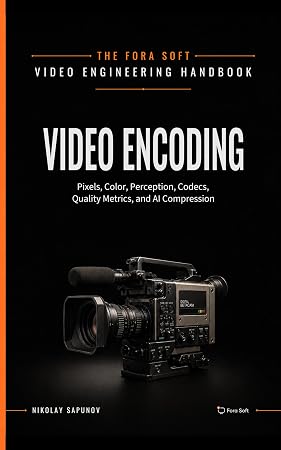
The book
Video Encoding: A Complete Guide to Video Compression
Frame rate is the one setting that changes both how a shot feels and what it costs to ship, and the book follows that second half through the encoder across 1,500+ pages — why doubling the rate adds 50–70% rather than 100% to the bitrate, how temporal prediction and GOP structure absorb the extra frames, and what rate control does when the motion gets fast. It also covers the pipeline traps this article names: variable frame rate at ingest, 29.97 against 30, and the device floor that still caps 4K at 60 fps. Written by Nikolay Sapunov, CEO at Fora Soft.
Not sure which frame rate your product should ship?
Tell us what you capture, what you encode and what your viewers watch on, and we will tell you which rate the content actually needs, what it costs in bitrate and decode, and where your pipeline is quietly changing it. 250+ video products shipped since 2005.
See our case studies
Case study
Worldcast Live
Concert feeds reaching 10,000 simultaneous viewers at 1.5 Gb/s with 0.4–0.5 s latency — the live case where the high-motion rate has to survive the whole chain, not just the camera.
Case study
Speed.Space
Remote production used on Netflix, EA and HBO shoots, where the crew sets resolution, frame rate, codec and bitrate per shoot and records 1080p at 8 Mbps — frame rate as a production decision, made before anything is recorded.
Case study
Mindbox
AI video management in 50+ deployments, pulling RTSP from cameras of every vintage and normalising them through FFmpeg before HLS delivery — the ingest step where variable frame rate has to become constant.
What to read next
Foundations
Progressive vs Interlaced Scan: What You Actually Need to Know
The other half of the time axis: how a frame is drawn, and why 50i is not 50 fps.
Compression
Temporal Pixel Correlation: Redundancy Between Frames
Why doubling the frame rate adds 50–70% to the bitrate instead of 100%.
Rate control
Rate Control: CBR, VBR, CRF, ABR, Capped CRF
Where the extra frames of 60 and 120 fps turn into an actual bitrate number.
Tooling
FFmpeg: A Must-Know Cheat Sheet for Developers
The ffprobe call that catches variable frame rate, and the flags that convert it.
References
- Frame Rates Explained: 24fps vs 30fps vs 60fps vs 120fps — Studio Supplies
- Frame Rate, Motion Blur, and the Cinematic Look — Camera Butter
- Understanding video frame rate and shutter speed — Kevin Lisota Photography
- Frame Rates in Filmmaking — Tools for Film
- How Shutter Speed and Frame Rate Affect Motion — Wolfcrow
- Why Movie Theaters Still Use 24 FPS — urtech.ca
