


Why this matters
If you stream video to viewers, the bitrate ladder you choose decides three things at the same time: how much your content delivery network bill is each month, how clean the picture looks at every connection speed, and how fast your player can recover from a network drop. A fixed ladder picked from a 2017 specification overspends on simple content like webinars and underspends on busy content like sports — both bad outcomes. Product managers and founders need to understand this trade-off because the savings are large enough (10–80% on bandwidth, depending on catalogue) to fund a quarter of new feature work. Engineers need it because the algorithms inside per-title encoding draw on convex-hull math, machine learning, and quality metrics like VMAF in ways the old fixed-ladder mental model never required.
What a Bitrate Ladder Actually Is
Before we get to "per-title", let's make sure we mean the same thing by "ladder". In adaptive streaming — the technology that lets your phone drop from HD to SD when the train enters a tunnel — the service offers the same video at several quality levels in parallel. Each level has a resolution (like 1920×1080 pixels) and an average bitrate (like 5 megabits per second, written 5 Mbps). The full set of (resolution, bitrate) pairs is the bitrate ladder. The player walks up and down this ladder during playback, picking the highest level the current bandwidth can sustain. Think of the ladder like menu sizes at a coffee shop: same product, different sizes, and the customer picks based on what they can drink right now.
The Apple HLS Authoring Specification, which most engineers still treat as the default starting point, recommends roughly nine to twelve rungs for H.264 video — values like 145 kbps at 416×234, 1 Mbps at 768×432, 4.5 Mbps at 1280×720, and 7.8 Mbps at 1920×1080. Apple itself notes these are "initial encoding targets" and that bitrates should be evaluated against specific content, but in practice many video pipelines ship those numbers verbatim. That is the fixed ladder. It does not know whether your input is a cartoon, a Champions League final, or a static slide presentation — and it spends the same bits on all three.
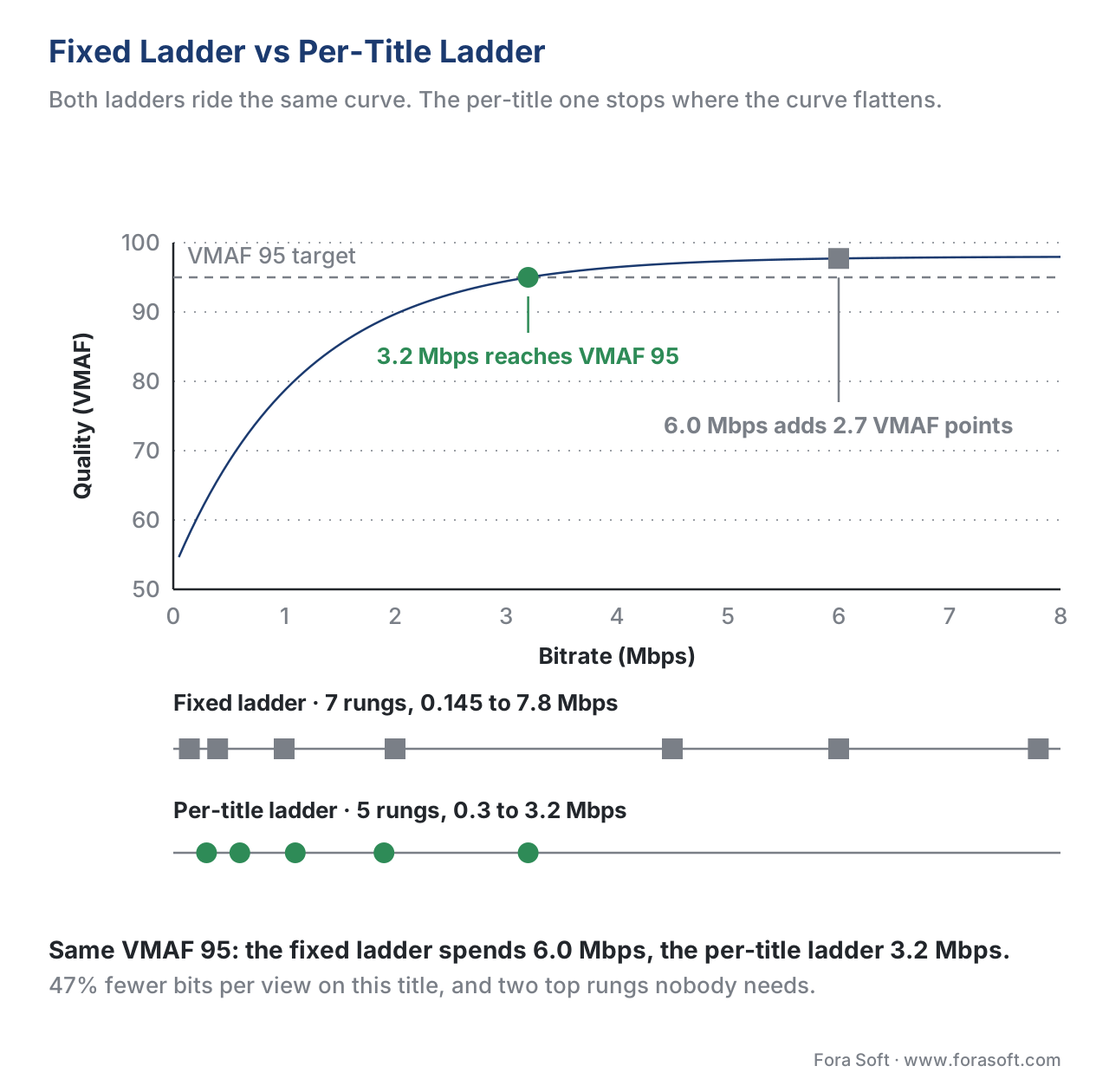 Figure 1. A fixed ladder picks the same rungs for every video. A per-title ladder picks rungs along the actual rate–quality curve of this video, so simple content uses fewer bits and complex content uses more.
The Idea Behind Per-Title Encoding
Per-title encoding throws out the fixed ladder and computes a new one for every video you ingest. The high-level recipe, published by Netflix in a 2015 engineering post that triggered the entire industry, is three steps. First, encode the title at several resolutions and several quality settings, so you get a cloud of (resolution, bitrate, quality) points. Second, draw the curve that connects the best of those points — the highest quality reachable for any given bitrate. That curve is called the convex hull, and it is the mathematical frontier of "you cannot do better than this with this encoder on this content". Third, place your ladder rungs along that curve at the bitrates your audience actually uses.
The quality score in step two is rarely raw peak signal-to-noise ratio, called PSNR, because PSNR correlates poorly with what humans see. Most modern pipelines use Video Multi-method Assessment Fusion, abbreviated VMAF — a metric Netflix open-sourced in 2016 that scores videos on a 0–100 perceptual scale where 93 is broadcast-grade and 95 is approximately indistinguishable from the source. (For a deeper dive, see our article on quality metrics.)
Why does the convex hull matter? Because for a given title, encoding 1080p at 1.5 Mbps may produce a worse-looking picture than encoding 720p at 1.5 Mbps. The extra pixels at 1080p cost bits that the encoder has to take away from the parts that humans actually notice, like edges and faces. The convex hull tells you which resolution wins at each bitrate. For a quiet animation that may mean 1080p starts winning at 1.2 Mbps; for a fast hockey match it may not win until 5 Mbps.
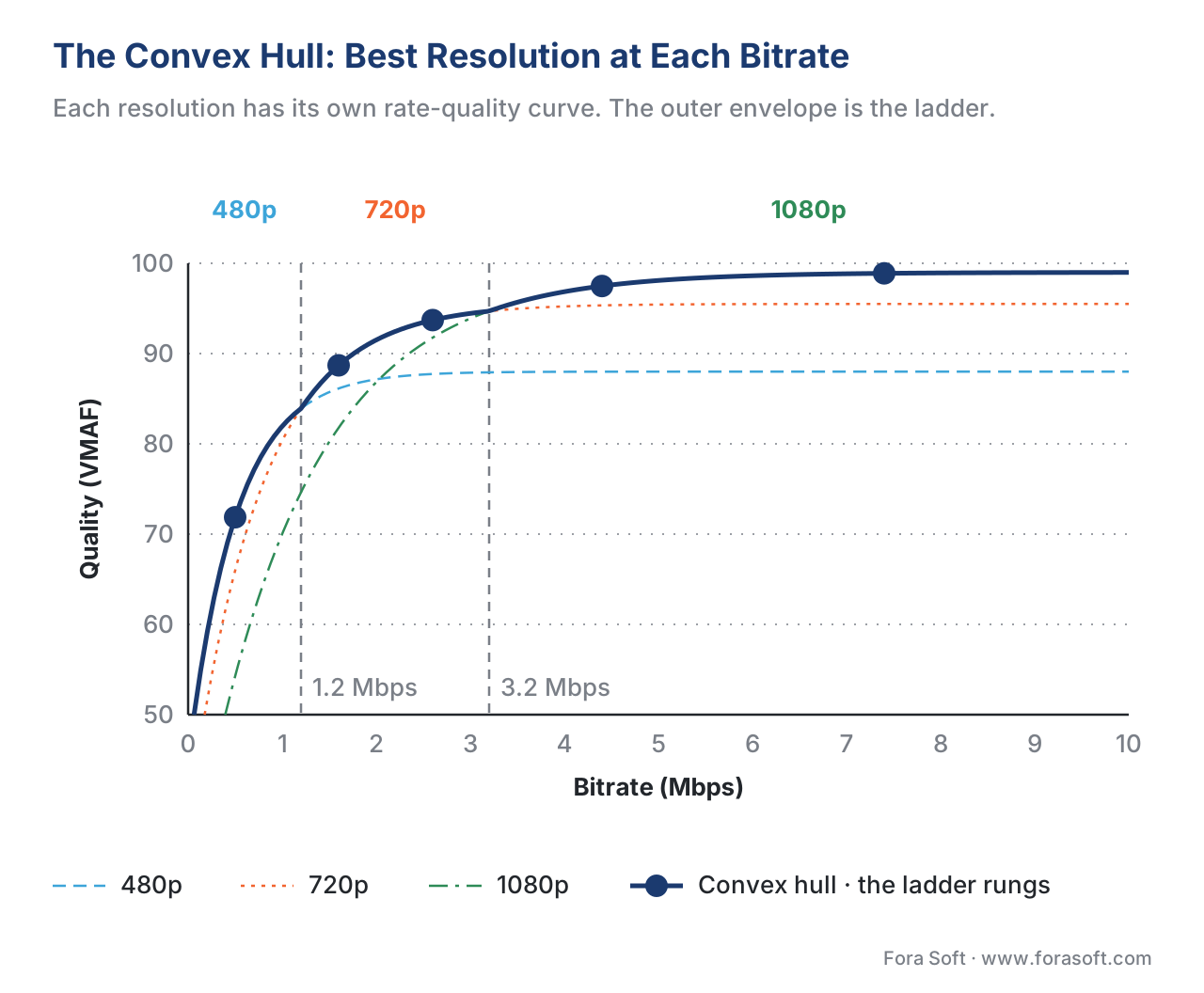 Figure 2. Each resolution gives its own rate–quality curve. The outer envelope of all curves — the convex hull — is the best the encoder can do for this title. Ladder rungs are picked along that envelope.
Math of the Bitrate Savings
Take a typical 90-minute feature with a fixed-ladder 1080p rung at 6 Mbps. The total payload for one viewer watching all the way through is:
size = bitrate × time
     = 6 Mbps × 5,400 seconds
     = 32,400 megabits
     = 4,050 megabytes
     ≈ 4.05 GB
Now suppose per-title analysis discovers that this particular title — say a dialogue-heavy drama — can hit the same VMAF 95 at 3.2 Mbps. The new payload is:
size_new = 3.2 Mbps × 5,400 s
         = 17,280 Mb
         = 2,160 MB
         ≈ 2.16 GB
That is a 47% reduction in egress bandwidth for that title. If your content delivery network charges 1 cent per gigabyte and the title gets 5 million views per year, the savings are:
savings = (4.05 − 2.16) GB × 5,000,000 views × $0.01/GB
        = $94,500 per year per title
That arithmetic — multiply the per-view delta by the view count by the unit cost — is the entire business case for per-title encoding in one expression. It also explains why the savings are concentrated in your most-watched titles: optimisation buys you the same percentage on every title, but the dollar value tracks views.
Where Per-Title Falls Short — and Per-Scene Begins
Per-title makes a single ladder for the whole title, which means every part of the video pays the same per-second bit rate. That works for content where complexity is roughly uniform — a news bulletin, a webinar, a sitcom with steady camera work. It works less well for content with big complexity swings: a thriller that alternates between dark interior dialogue and a chase scene, or a sports stream that cuts from a wide pitch to a close-up of grass.
In a thriller, the dialogue scene needs maybe 1.5 Mbps to look perfect because there is almost no motion and the camera is locked off. The chase scene needs 8 Mbps to avoid blocking on the fast pans and tight crops. A per-title ladder picks one bitrate, say 4 Mbps, that splits the difference — dialogue overspends by 2.5 Mbps and the chase underspends by 4 Mbps and shows artefacts. The viewer's eye fixes on the artefacts, not the savings on the dialogue.
Per-scene encoding (also called shot-based encoding or content-adaptive encoding) fixes that by splitting the title into shots and computing a fresh ladder for each shot. A "shot" is a single continuous camera capture; most professional content averages around 4 seconds per shot, so a 60-minute drama contains roughly 900 shots. Netflix's Dynamic Optimizer, which it deployed in production in 2018, encodes each of those shots at several quality points, runs a Lagrangian optimisation across the whole title to pick the per-shot quality that minimises total bits for a target average VMAF, and stitches them back together. Netflix reported a further 17.1% bitrate saving on top of per-title, with shorter scenes able to drop to lower resolutions and busier scenes claiming back the saved bits.
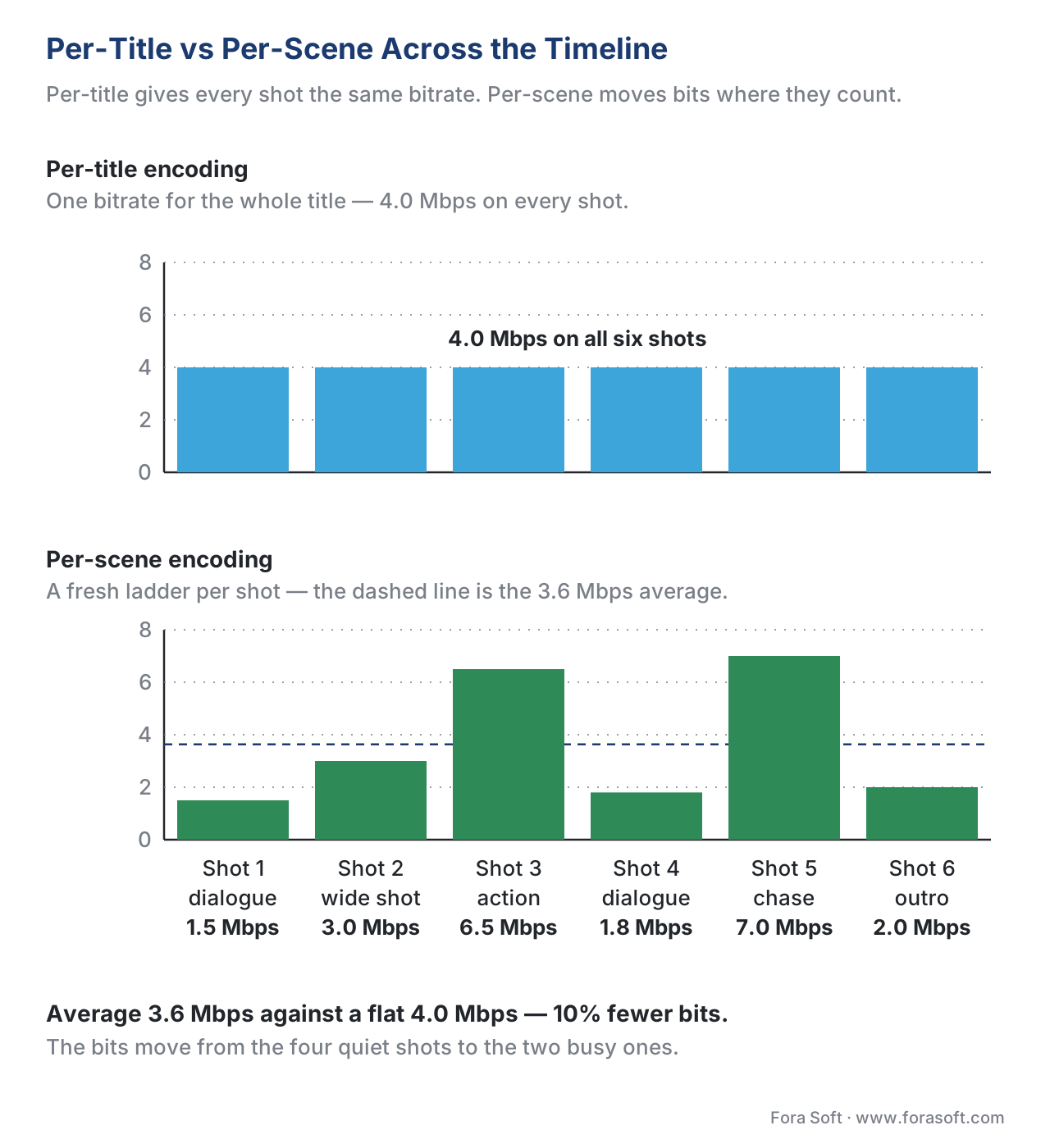 Figure 3. Per-title gives the whole video one bitrate. Per-scene profiles each shot and reassigns bits from the easy shots to the hard shots without changing the perceived overall quality.
A Common Mistake: Cutting on GOP Boundaries Only
A pitfall every engineer hits the first time they try per-scene encoding: shots must start on group-of-pictures (GOP) boundaries so that the player can switch ladder rungs cleanly. (For background, see the GOP structure article.) If your scene detector finds a shot boundary in the middle of a closed GOP, you have two bad choices: split the GOP and accept a decoding glitch, or move the shot boundary to the next keyframe and lose some of the optimisation. The fix used by Netflix, Bitmovin, and Mux is to force a keyframe at every detected shot boundary in the analysis pass. That makes shots a little less compressible — each shot now starts with a more expensive I-frame — but the loss from extra keyframes is far smaller than the gain from per-shot adaptation.
How the Algorithms Actually Run
There are three practical implementation styles in 2026, sorted by complexity:
Brute-Force Test Encodes (the original Netflix method)
For each title, encode it at every (resolution, bitrate) combination of interest — for example five resolutions times eight bitrates equals forty test encodes — and measure VMAF on each. Build the convex hull from those forty points, pick the ladder rungs that hit your target VMAF range, and discard the rest. This is the most accurate method because it directly measures what the encoder will produce. It is also the most expensive: those forty test encodes are an order of magnitude more compute than producing one final encode, so the analysis pass alone can cost more than a fixed-ladder pipeline produces. Netflix can afford this because the resulting bits are served to roughly 270 million subscribers; the per-view amortisation makes the cost trivial.
Lookahead-Plus-Single-Encode (Bitmovin / classical CAE)
Take a fast first-pass analysis of the file — maybe one fifth-the-speed encode at the source resolution, or a constant-rate-factor (CRF) probe — collect statistics like motion energy, spatial complexity, and noise level, and feed those statistics into a model that predicts the convex hull without running every combination. The model can be hand-tuned (early CAE systems) or trained on a benchmark dataset (modern systems). Output is the same ladder shape as brute force but produced in roughly one extra encode's worth of compute. Bitmovin's published per-title datasheet reports up to 87% bitrate savings on top renditions and over 22% on top-line VMAF improvements at constant bitrate.
Neural-Network Inference (Mux instant per-title, ML-CAE)
Pass the source through a convolutional neural network whose output is the ladder directly — no test encodes, no probe pass, just inference on raw frames. Training data is the brute-force ladder for tens of thousands of clips; the network learns the mapping from "what the content looks like" to "what the ladder should be". Inference time is milliseconds, which is what makes this approach feasible for live streams where you do not have a fast-encoder probe budget. Mux publicly describes this approach as the basis for its instant per-title pipeline. Accuracy is slightly below brute force on out-of-distribution content but the speed difference is six orders of magnitude.
| Method | Analysis cost | Live-friendly | Typical bitrate saving vs fixed | Where it shines |
|---|---|---|---|---|
| Brute-force test encodes | 10–40× a single encode | No | 20–50% | Premium VOD catalogues with high view counts |
| Lookahead + CAE model | ~1.2–1.5× a single encode | Borderline (chunked live) | 20–40% | Mid-size VOD libraries; live with several-second latency |
| Neural-network inference | Milliseconds | Yes | 15–35% | Live streams; UGC; very large libraries |
For a deeper look at the encoders that sit downstream of any of these methods, see our rate control article and the FFmpeg cheat sheet.
Context-Aware Encoding: One More Dimension
Per-title and per-scene both look at the content. Brightcove's Yuriy Reznik, who originally pushed the term, made the case in 2017 that you should also look at the context — the population of devices, screens, and networks the title will be delivered to. If 80% of your viewers are on mobile and never see anything above 720p, the 4K and 1440p rungs of your ladder are wasted CDN warm-up storage. If your audience is concentrated in a region with median bandwidth around 4 Mbps, putting two ladder rungs at 8 and 12 Mbps just feeds the small fraction with fibre at the cost of redundant encodes.
Context-aware encoding (CAE) takes the per-title or per-scene ladder and prunes / shifts it based on audience analytics: drop rungs no one watches, push other rungs up or down to land at the modal bandwidth, and re-target VMAF based on screen size. Reznik's 2023 SMPTE paper reports a further 10–20% reduction on top of per-title savings when CAE is tuned to true audience data rather than assumed data. The cost is operational: you need playback analytics flowing back into the encoding pipeline, and you need to re-encode when audience composition shifts.
Live Streaming Changes the Game
Per-title was invented for video-on-demand, where the file sits on disk and you can spend an hour analysing it. Live changes three constraints at once: there is no full file to analyse, latency budgets are in the order of seconds, and the content can pivot between calm and chaotic in one shot (think a half-time interview cutting back to the pitch). Three adaptations have emerged in production:
Chunk-level adaptation. Bitmovin, Mux, and AWS Elemental MediaLive all support chunk-level rate control where the ladder is fixed at stream start but each segment's encoder targets a slightly different bitrate based on a short lookahead. Savings are typically 5–15%.
Audience-adaptive encoding. Mux runs a model that watches incoming player telemetry and gradually shifts the ladder while the stream is live — rungs no one is selecting get pulled or replaced. This is closer to CAE than per-title.
Online per-scene encoding (OPSE). Academic work by the ATHENA Christian Doppler Laboratory in 2022 demonstrated an approach where each incoming chunk is matched against a pre-computed library of representative scenes and the ladder for that chunk is borrowed from the closest match. Reported savings approach 25% on top of static-ladder live, at sub-second additional latency.
For low-latency formats — LL-HLS or WebRTC — the lookahead budget shrinks below a second, so most production systems today fall back to a careful audience-adaptive fixed ladder with per-stream tuning rather than full per-scene optimisation.
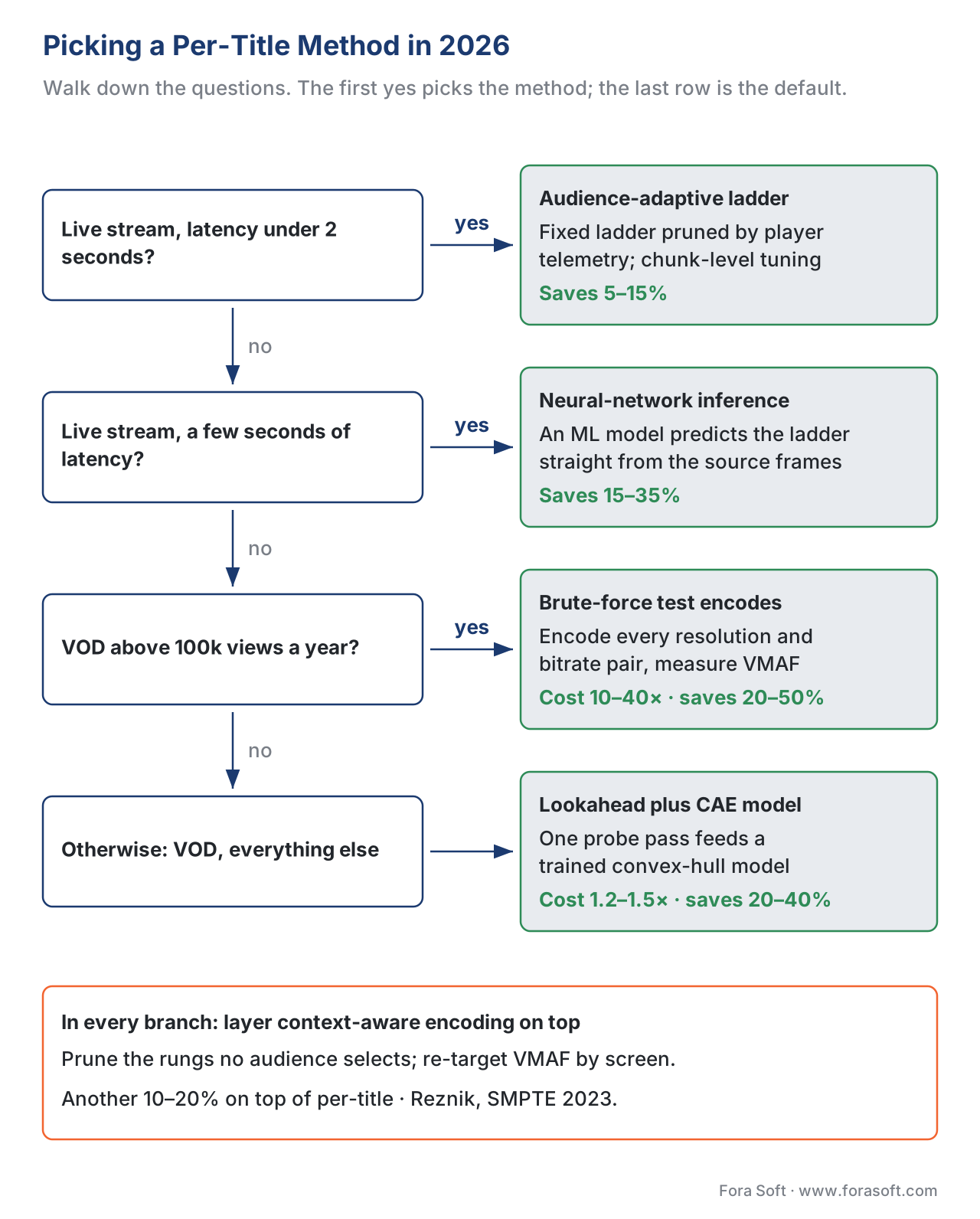 Figure 4. Which per-title method to run. Walk the questions from the top: the first one you answer yes to is your method, and context-aware pruning goes on top of whichever you pick.
Where Fora Soft Fits In
We build streaming video products: OTT and internet TV catalogues that need to keep CDN costs predictable, conferencing platforms that fight for every millisecond of bandwidth, e-learning systems where lecture content varies from slide capture to camera-and-whiteboard, and surveillance and telemedicine products where bandwidth is paid for by the client. In every one of those verticals, the right per-title or per-scene strategy is a different shape. A lecture platform can run brute-force per-title overnight on each upload because lectures rarely watch live. A live sports OTT product needs neural-inference per-title plus context-aware pruning. A telemedicine app needs context-aware only — the content is uniform but the network varies. Picking the right combination is one of the design decisions we walk every new project through.

The book
Video Encoding: A Complete Guide to Video Compression — From Pixels and Color to H.264, HEVC, AV1, Quality Metrics, and AI
Every point on the convex hull above is one encode, scored by one metric, hit by one rate-control mode — and a ladder is only as trustworthy as those three. The book spends 1,522 pages on them: the encoder stages that shape the rate–quality curve in the first place, then rate control, GOP structure and the quality metrics you need to prove a cheaper ladder does not look cheaper. Written by Nikolay Sapunov, CEO at Fora Soft.
Still shipping the ladder from the Apple spec?
Send us a sample of your catalogue, your player telemetry and your CDN bill, and we will tell you what a per-title or per-scene ladder saves on it, what the analysis costs to run, and which of the three methods fits your latency budget — 250+ video products shipped since 2005.
See our case studies
Case study
Worldcast Live
Concert streaming at 1.5 Gb/s with 0.4 to 0.5 s of latency for 10,000 simultaneous viewers — the case where there is no file to analyse and the ladder has to be right before the first note.
Case study
Sprii
A Danish live shopping platform with 72,000+ live events hosted and 12.3 million products sold in 2024, watched mostly on phones — the audience profile that decides which rungs are worth encoding at all.
Case study
Speed.Space
Remote production recording at 1080p and 8 Mbps for Netflix, Electronic Arts and HBO shoots, with per-stream control over resolution, fps, codec and bitrate.
What to read next
Context-aware
Content-Aware and Context-Aware Encoding
Prune the rungs your audience never selects and re-target VMAF by screen: 10–20% on top of per-title.
Quality metrics
Objective Quality Metrics: PSNR, SSIM, MS-SSIM, VMAF
VMAF is the number the convex hull is built from. What it measures, and where it misleads.
Rate control
Rate Control: CBR, VBR, CRF, ABR, Capped CRF
The ladder sets the target; rate control decides how the encoder actually hits each rung.
Benchmarking
Benchmarking and Comparing Encoders
How to prove a new ladder is cheaper: same VMAF, different bitrate and speed.
References
- Netflix Technology Blog. Per-Title Encode Optimization (2015). netflixtechblog.com/per-title-encode-optimization-7e99442b62a2. Accessed 2026-05-17.
- Netflix Technology Blog. Dynamic Optimizer — a perceptual video encoding optimization framework (2018). netflixtechblog.com/dynamic-optimizer-a-perceptual-video-encoding-optimization-framework-e19f1e3a277f. Accessed 2026-05-17.
- Netflix Technology Blog. Optimized shot-based encodes: Now Streaming! (2018). netflixtechblog.com/optimized-shot-based-encodes-now-streaming-4b9464204830. Accessed 2026-05-17.
- Apple Developer. HTTP Live Streaming (HLS) Authoring Specification for Apple Devices. developer.apple.com/documentation/http-live-streaming/hls-authoring-specification-for-apple-devices. Accessed 2026-05-17.
- Reznik, Y. Context-Aware Encoding and 5G — DASH-IF Workshop 2019. dashif.org/docs/workshop-2019/03-Reznik-DASH-IF-workshop-2019-CAE.pdf.
- Reznik, Y. Improving Context-Aware Encoding by Adaptation to "True" Audience — SMPTE MTS 2023. reznik.org/papers/SMPTE_MTS2023_Improving_Context_Aware_Encoding.pdf.
- Mux Engineering. Instant Per-Title Encoding. mux.com/blog/instant-per-title-encoding. Accessed 2026-05-17.
- Bitmovin. Per-Title Encoding service page. bitmovin.com/encoding-service/per-title-encoding. Accessed 2026-05-17.
- Bitmovin. Cut your storage and CDN bills in half with Per-Title Encoding. bitmovin.com/blog/per-title-encoding-savings. Accessed 2026-05-17.
- ATHENA Christian Doppler Laboratory. OPSE: Online Per-Scene Encoding for Adaptive HTTP Live Streaming (2022). athena.itec.aau.at/2022/05/opse-online-per-scene-encoding-for-adaptive-http-live-streaming/.
- Convex Hull Prediction Methods for Bitrate Ladder Construction: Design, Evaluation, and Comparison — ACM TOMM (2025). dl.acm.org/doi/10.1145/3723006.
- Zabrovskiy, A. et al. FAUST: Fast Per-Scene Encoding Using Entropy-Based Scene Detection and Machine Learning. fruct.org/publications/volume-30/fruct30/files/Zab.pdf.
