

Key takeaways
• Bad releases churn paying users, not just free ones. Around half of users abandon an app after a single frustrating update cycle, so smooth app updates are a retention lever, not a QA nicety.
• Staged rollouts plus feature flags are the default pattern. Start at 1–5 percent, let crash-free users and key business KPIs hold for 24–48 hours, then ramp to 100 percent. Keep a kill switch on every risky change.
• Backward compatibility is the cheapest insurance you can buy. Keep at least two API versions in production and support N−2 mobile clients; it is usually cheaper than handling a forced-update storm in support.
• OTA updates are powerful but regulated. Apple’s Guideline 3.3.2 and Google Play’s In-App Updates API define what you can ship without a full store review — design your release flow around those limits.
• Measure releases with crash-free sessions, not just uptime. The 2024 DORA elite tier recovers from a failed deploy in under an hour and keeps change-failure rate near 5 percent. Those are the bars worth benchmarking against.
Shipping an update to a live product is the single riskiest routine operation most software teams perform. Get it right and nobody notices: the new feature appears, the bug disappears, retention stays flat. Get it wrong and a single bad release can wipe out months of growth, invite one-star reviews, and punch a hole in your app revenue. This playbook collects the app update best practices we use to ship across mobile and web without the churn, backed by the patterns Fora Soft runs on products with hundreds of thousands of monthly users.
We focus on what actually moves the needle — staged rollouts, feature flags, backward compatibility, over-the-air (OTA) updates, force-update patterns, and the CI/CD plumbing underneath. If you are a product manager or founder choosing a development partner, the last section also tells you how Fora Soft structures its release engineering so your updates do not become an incident.
Why Fora Soft wrote this playbook
Fora Soft has been building video-heavy and mission-critical software since 2005. Our platforms power real-time classrooms, telemedicine sessions, live streams, and AI video agents where a broken release is not a minor inconvenience — it is a failed exam, a missed doctor appointment, or a dropped live sports feed. That pressure forced us to treat release engineering, and the maintenance and support around it, as a product in itself.
On BrainCert, a WebRTC virtual classroom LMS with 100,000+ customers and four Brandon Hall Awards, we ship updates on a rolling basis without ever interrupting a live class. On Bellicon Home, a trampoline fitness app with 530+ workout videos, we push new content and features to iOS, Android, and Smart TV clients in lockstep. On ProVideoMeeting, a video-conferencing platform with digital signatures and phone dial-in, we carry regulated enterprise tenants through every upgrade without a forced cutover. Those products share the same release playbook — and it is the one in this article.
We now lean heavily on Agent Engineering inside our own CI/CD, which is why our release cycles are meaningfully faster and cheaper than a traditional outsourced team. If you are budgeting a rollout and benchmarking quotes, factor that in before you compare line-for-line.
Stuck with release cycles that scare your team?
Book a 30-minute scoping call and we will map your update flow, identify the biggest failure modes, and tell you what a safe rollout looks like for your product.
What a disruption-free update actually looks like
A disruption-free update is not “no bugs shipped.” That bar is unreachable at any real scale. A smooth update is one where the blast radius of any regression stays small, bounded, and reversible. Three properties define it.
1. Observable. You know within minutes, not days, whether the new build is healthier or sicker than the old one. Crash-free sessions, error rates, latency, and conversion rates are measured against a stable baseline.
2. Reversible. You can roll back a bad release faster than the rollout itself finished. That means a feature flag kill switch, a one-click Google Play halt, a one-click Expo EAS Update rollback, or a blue-green environment swap — not a “we’ll cut a hotfix overnight.”
3. Bounded. The percentage of users exposed to an unverified change is a deliberate choice, not an accident. 1 percent canary, 5 percent early ring, 25 percent, then 100 percent — paced by how many crash-free sessions you require before ramping.
Reach for a disciplined update flow when: your product has paying users, a public app-store presence, or SLAs that measure availability in 9s rather than percentages.
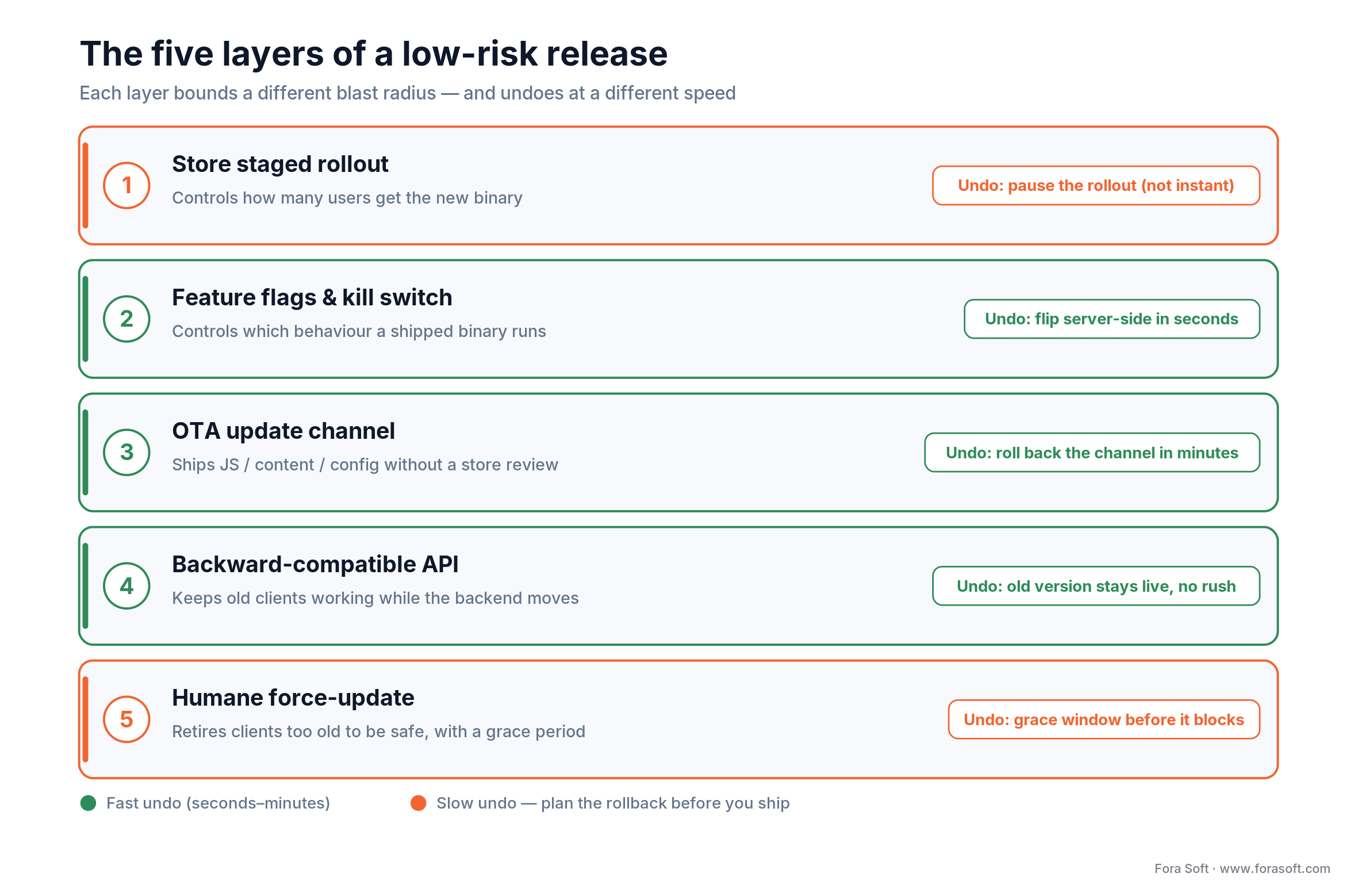
Figure 1. Each release layer bounds a different blast radius, and undoes at a different speed.
The economics of a bad release
Disruption is expensive, and the cost compounds in ways most founders underestimate. Industry research on mobile app behaviour shows that roughly half of users will uninstall or stop using an app after a single crash or a frustrating update, which maps directly to lifetime-value lost, not just engagement.
A one-star rating storm compounds the damage. App-store ranking algorithms weight recent reviews heavily, so a botched update can knock you off the first search page for your category for weeks. For consumer apps, where a large share of installs come from organic store discovery, that is a real revenue line item.
For B2B and SaaS products the cost shifts from stars to support tickets, SLA credits, and renewals. An outage inside a procurement cycle can push a renewal off by a quarter; a series of flaky releases can shift a multi-year deal to a competitor at the first chance.
The punchline: the cost of investing in release engineering — feature flags, staged rollouts, crash monitoring, automated rollback — is almost always lower than the cost of one bad month that follows a sloppy deploy.
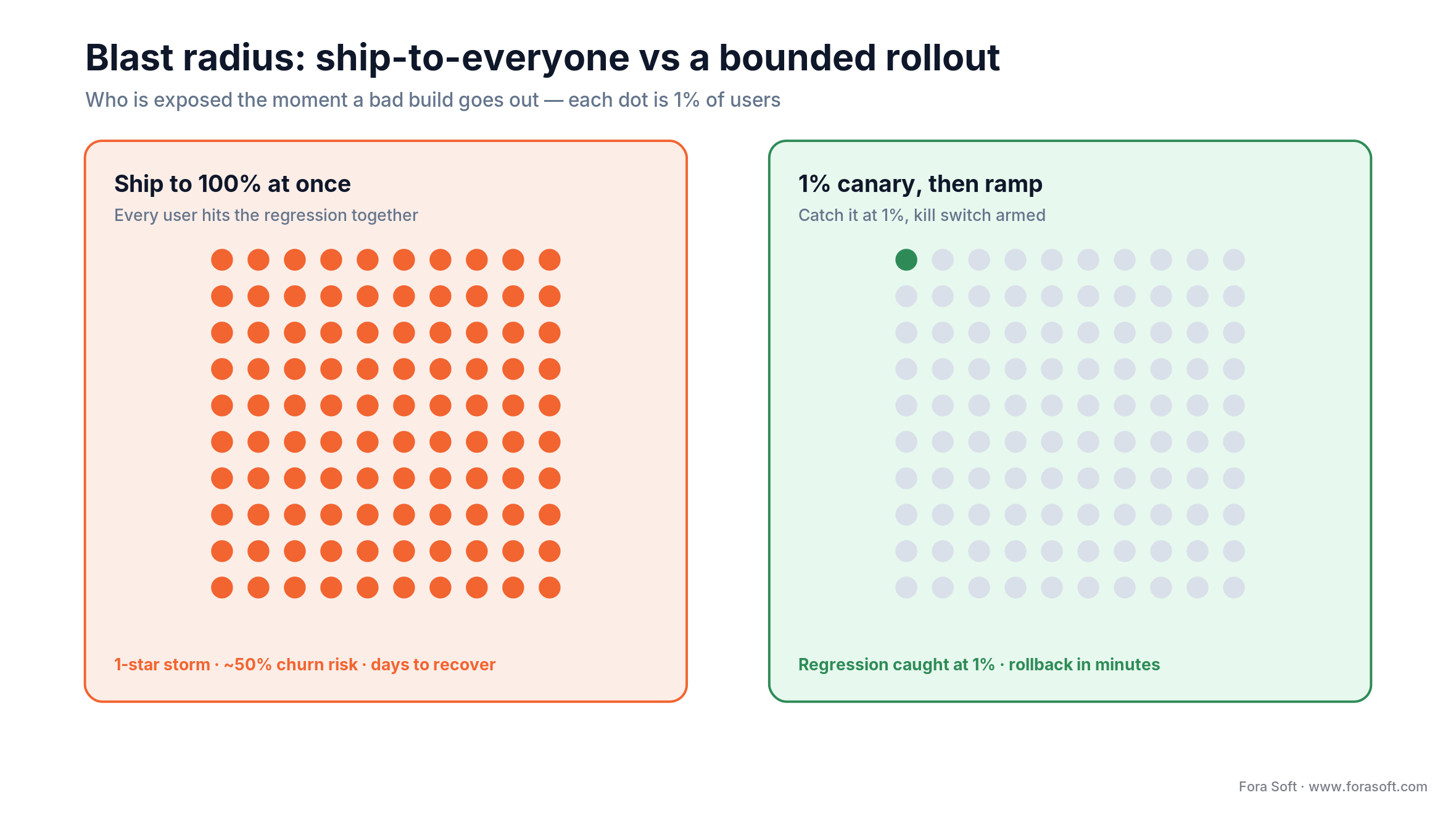
Figure 2. Ship to everyone and a bad build hits all of them at once; a 1% canary keeps the damage bounded.
The five update strategies that actually move the needle
Across hundreds of production apps, five strategies do the heavy lifting. They are the app update best practices that actually move retention, and each one exists because a specific failure mode keeps biting teams that skip it. The rest of this article goes deep on each.
- Staged rollouts — expose a percentage of users first, monitor, ramp only if healthy.
- Feature flags and kill switches — decouple deploy from release, so turning a feature off does not need a new build.
- Backward compatibility and API versioning — keep old clients working while you roll forward the backend.
- OTA (over-the-air) updates — ship JS, config, or content changes in minutes instead of days, within what Apple and Google allow.
- Force updates done humanely — reserve them for real breakage, wrap them in grace periods, and always offer a reason.
Strategy 1 — staged rollouts on the stores
Staged rollouts are the cheapest defensive layer because both stores already build the machinery for you. They work for mobile and, with internal tooling, for web and desktop too.
Google Play staged rollouts
Google Play Console lets you release a new APK or App Bundle to a fractional percentage of the install base. Common cadence: 1–5 percent for the first day, 10 percent for the next day or two, 50 percent mid-week, 100 percent once crash-free sessions and ANR (application-not-responding) rates look stable. You can halt a rollout if metrics degrade, but note that the build stays on devices that already pulled it, so halting is not the same as instant rollback — you still need a server-side kill switch for features that caused the regression.
Apple App Store phased release
Apple’s Phased Release spreads a new build over seven days to users with automatic updates enabled: roughly 1 percent day 1, 2 percent day 2, 5 percent day 3, 10 percent day 4, 20 percent day 5, 50 percent day 6, 100 percent day 7. You can pause but not rewind. Users who install the app manually from the store get the latest version immediately, so your observability setup must not assume the phased cadence is the only traffic you see.
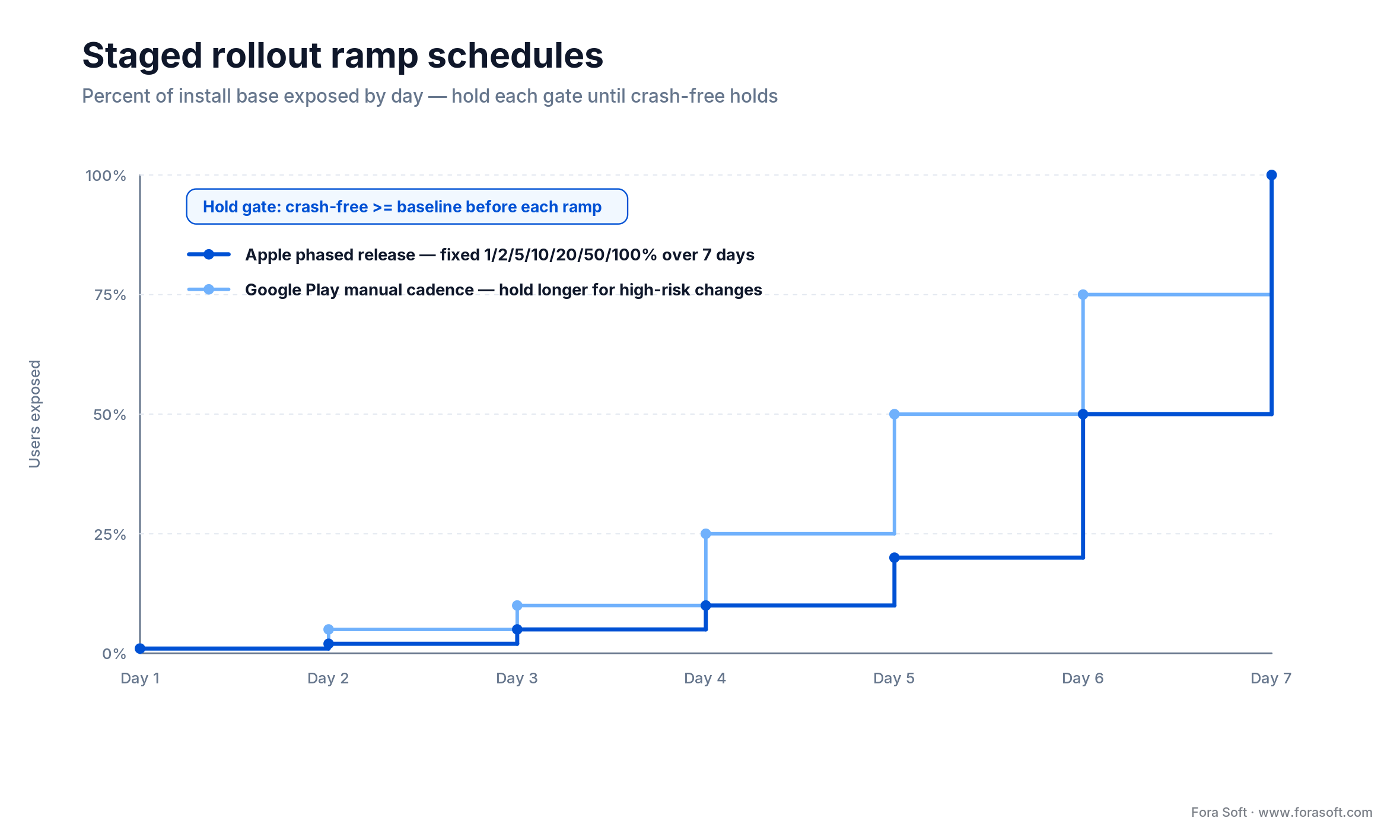
Figure 3. Apple’s phased release is a fixed 7-day ramp; on Google Play you set the percentages yourself.
Web canary and blue-green
On the web, the equivalent tool is a canary or blue-green deployment. Canary routes a small percentage of traffic to the new version via a load balancer or service mesh; blue-green stands up a full parallel environment and swaps DNS or LB targets after the smoke tests pass. Canary is usually cheaper and gives you a finer-grained ramp; blue-green gives you the fastest rollback at the cost of running two environments at full size.
Reach for staged rollouts when: your install base is above 10,000 active users, or your change touches critical paths (login, payments, real-time media).
Strategy 2 — feature flags and kill switches
Feature flags (sometimes called feature toggles) decouple the act of deploying code from the act of releasing a feature. You merge the feature behind a flag, ship it to production turned off, then turn it on for internal users, then a 1 percent slice, then a target cohort, then everyone — all without a new build. Feature flags are table stakes for any team that wants disruption-free app updates in 2026; by now they are standard practice on most product teams.
Three kinds of flag and when to use each
Release flags. Short-lived wrappers around a new feature. Their job is to let you ramp or kill the feature, then be removed within weeks.
Permission / entitlement flags. Longer-lived flags that gate features by plan (free vs. pro), tenant, or region. These are effectively product configuration and usually do not expire.
Operational kill switches. Always-on flags that let SRE disable a risky subsystem (a third-party integration, a heavy endpoint, a flaky background job) in seconds when something breaks. Every critical path should have one.
The debt problem
Flags are the only engineering pattern where the tool itself becomes technical debt if left running. Teams that do not institute a cleanup policy end up with hundreds of zombie flags that nobody owns and nobody dares to delete. Two practical rules: every release flag gets a sunset date at creation, and every flag that has returned the same value for more than 90 days is a candidate for removal. A good platform (LaunchDarkly, Statsig, ConfigCat) will flag zombies for you.
Reach for feature flags when: you deploy more than once a week, ship to multiple cohorts, or need to turn a feature off without publishing a new binary.
Strategy 3 — backward compatibility and API versioning
Mobile users do not update on your schedule. At any given moment you have clients on the current version, N−1, N−2, and some stragglers on N−5. If the backend ships a breaking change, those older clients start producing errors — and you cannot force them to update fast enough to avoid the reputational hit. The answer is to support multiple client versions concurrently.
Pattern A — additive-only API evolution
The cheapest option: never remove or change a field. New behaviour always arrives as new optional fields or new endpoints. Old clients ignore what they do not know about; new clients light up the new capability. Works for 80 percent of product changes.
Pattern B — explicit API versions
When a contract genuinely needs to change (auth model, resource shape, pagination), version the API and run the old and new versions side by side. Common shapes: /v1/… and /v2/… in the URL, or a header such as Accept-Version. Deprecation windows of 3–6 months are normal for consumer apps; 12–24 months for B2B.
Pattern C — dual-write migrations
For database shape changes, write to both old and new structures for a window, backfill, then cut reads over, then stop writing to the old structure. Four discrete releases, each small, each reversible. This is how you change a schema under a live product without a maintenance window.
Reach for explicit API versions when: a contract change would break more than 5 percent of your current clients or any enterprise tenant with a signed SLA.
Need a second pair of eyes on your API migration?
We have carried WebRTC, SaaS, and video-streaming backends through breaking changes without forced cutovers. Tell us what you are migrating and we will sketch the safest ramp.
Strategy 4 — OTA updates, what Apple and Google actually allow
Over-the-air updates let a running app fetch new JavaScript, content, or configuration without going through a store review. Used well, they collapse the hotfix loop from days to minutes. Used badly, they land you in store policy trouble.
Apple’s interpreted-code rule (Guideline 2.5.2)
Apple’s App Store Review Guideline 2.5.2 (and §3.3.2 of the Developer Program License Agreement) allows interpreted-code updates (React Native JS bundles, web content, server-driven UI) as long as the update does not change the app’s primary purpose, introduce new major features that were not reviewed, or otherwise subvert the review process. In practice: bug fixes, content updates, JS tweaks, and A/B test variants are fine; shipping a new native-feeling feature behind OTA is not. Treat OTA as a way to make reviewed behaviour safer, not to bypass review.
Google Play In-App Updates API
Google Play’s In-App Updates API lets you detect a new store version from inside the running app and prompt the user to download it. Two flavours: flexible (download in background, restart when user is ready) and immediate (full-screen blocking UX, used for must-have updates). It is the closest thing Android has to force-update, and it integrates cleanly with staged rollouts.
CodePush to Expo EAS Update
Microsoft retired App Center (including its hosted CodePush service) on 31 March 2025, and archived the React Native CodePush repositories that May. Most React Native and Expo teams have moved to Expo EAS Update or a self-hosted equivalent. EAS Update supports channel-based rollouts, rollbacks, and crash-based automatic halt. If you inherited a CodePush-based pipeline, migrating to EAS Update or a similar managed service is now a must-do maintenance task.
Server-driven UI and Firebase Remote Config
For many features, a simple server-driven config (copy, flags, pricing, feature availability) is enough — no JS bundle needed. Firebase Remote Config, LaunchDarkly, and in-house config services all do this. Start here before you reach for a full OTA framework; it covers more use cases than teams expect.
Reach for OTA updates when: you ship React Native or Expo, need sub-hour hotfix latency, or want to A/B test copy and UI without a store review round.
Strategy 5 — force updates without losing users
Force updates are the nuclear option: a blocking prompt that the user cannot dismiss until they update. They are sometimes necessary — a critical security fix, a protocol change on the backend, a mobile-device-management policy. But every forced upgrade costs goodwill, so design them humanely.
1. Tiered messaging. Start with a soft nudge (“new version available”), escalate to a stronger banner after 2–3 sessions, and only then move to a blocking screen. Most users update before you ever need to block.
2. Explain why. “We fixed a security issue that could expose your payment details” converts better than “Please update.” Users are not hostile to updates, they are hostile to updates that feel arbitrary.
3. Version-gate the backend, not the UI. If the server will reject API calls from the old client anyway, return a structured error that the client recognizes and turns into a graceful upgrade prompt. Do not let the old client hit mysterious 400s.
4. Use Google Play In-App Updates for Android and a well-designed in-app modal with a deep link to the App Store for iOS. There is no native iOS force-update API, so the implementation has to be yours.
5. Respect offline and low-bandwidth users. If your update is 150 MB and the user is on cellular in a train tunnel, a blocking modal is user abuse. Detect the context and defer.
The release tooling compared
Most teams end up with a stack of four or five tools covering flags, rollouts, crash reporting, and CI/CD. The matrix below is the one we recommend to clients as a starting point; the sweet spot usually sits in the mid-tier.
| Category | Lightweight pick | Mid-tier pick | Enterprise pick | What to watch |
|---|---|---|---|---|
| Feature flags | ConfigCat, Flagsmith (self-host) | PostHog, Statsig, Unleash Cloud | LaunchDarkly, Split.io | SDK bundle size, mobile offline behaviour |
| Crash & error monitoring | Firebase Crashlytics | Sentry, Bugsnag | Sentry Business, Instabug | Source-map / dSYM upload automation |
| Mobile OTA / staged | Play Staged Rollout, App Store Phased Release | Expo EAS Update | Custom hosted bundles + CDN | Guideline 3.3.2 compliance |
| Web deploy / canary | Vercel, Netlify previews | AWS CodeDeploy, GitHub Actions + blue-green | Argo Rollouts, Spinnaker | Automatic rollback triggers |
| Remote config / A/B | Firebase Remote Config | Statsig, PostHog experiments | LaunchDarkly Experimentation, Optimizely | Stats engine quality, sample ratio mismatch alerts |
A few non-obvious notes. First, Firebase Crashlytics and Firebase Remote Config are essentially free at small scale and remain defensible choices even at 1M MAU; do not over-buy. Second, SDK bundle size matters more than teams expect on low-end Android devices — the LaunchDarkly SDK is bigger than ConfigCat by a meaningful margin. Third, automatic rollback triggers on crash-free session deltas are the single most under-used feature in the commercial flag tools.
Reference release pipeline
Below is the pipeline shape we use on most Fora Soft mobile and web products. It is opinionated but not exotic — any competent team can implement it on top of GitHub Actions, GitLab CI, or CircleCI.
1. commit / PR
   |- lint, type-check, unit tests, size-diff budget
   |- preview deploy (web) or internal-track upload (mobile)
   v
2. merge to main
   |- integration tests on staging
   |- contract tests against N-1 client
   |- visual regression snapshots
   v
3. promote to prod (manual gate)
   |- canary 1% / internal ring
   |- auto-watch: crash-free sessions, error rate, p95 latency
   v
4. ramp 5% -> 25% -> 50% -> 100% over 24-72h
   |- feature flag on, kill switch armed
   |- stop-ramp rule triggered by SLO deltas
   v
5. cleanup
   |- remove expired flags
   |- archive old API version after deprecation window
   |- post-release KPI review
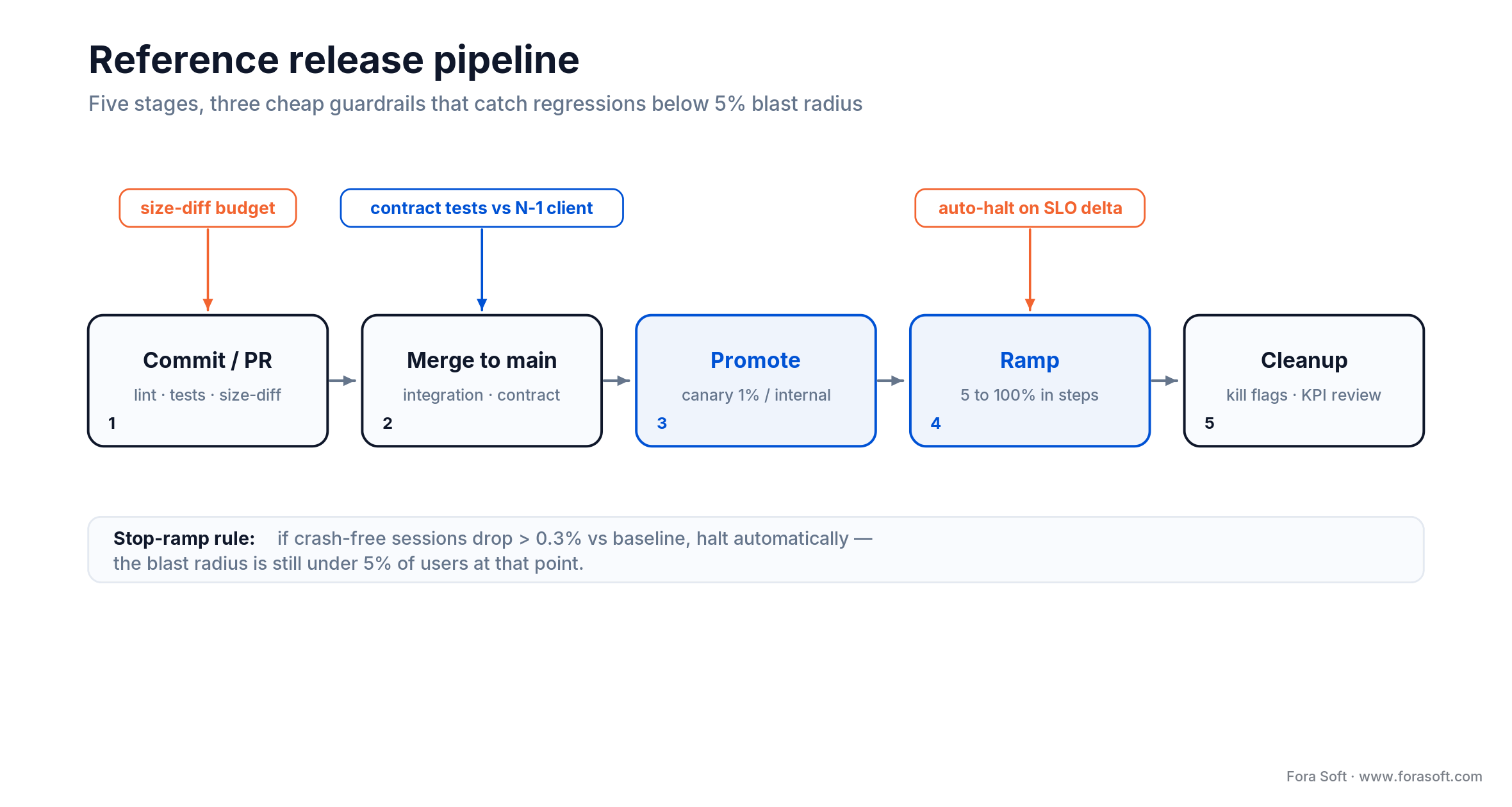
Figure 4. The pipeline we run on most products, and the three guardrails that catch regressions early.
Three cheap guardrails punch above their weight in this pipeline. A size-diff budget on the bundle (fail the PR if JS bundle grows more than 5 percent) stops slow performance regressions. Contract tests against an N−1 client stop accidental API breakage. Automatic halt rules tied to SLO deltas (“stop the ramp if crash-free sessions drop more than 0.3 percent versus baseline”) catch regressions while the blast radius is still below 5 percent.
Mini case — rolling updates under live classroom load
A concrete example. On BrainCert, the virtual classroom runs WebRTC sessions for 100,000+ customers and has delivered 500M+ real-time classroom minutes, including regulated education and corporate-training tenants. Any release that dropped sessions mid-class would surface instantly as support tickets and refund requests.
Our release pattern there pairs staged web rollouts behind a service-mesh canary, with feature flags gating every new WebRTC behaviour, and a strict rule that no session in flight is ever cut over. New sessions land on the new build; existing sessions continue on the old pods until they end. For the mobile and Smart TV companions we lean on phased store releases plus Remote Config for surgical enable/disable of features by tenant. In three years of this pattern, we have never had to schedule a maintenance window for a code release — and that uptime story is one of the reasons BrainCert won four Brandon Hall awards.
The same release shape carries across our other real-time products: ProVideoMeeting for compliance-heavy enterprise video conferencing, Bellicon Home for fitness content on iOS, Android, and Smart TV in lockstep, and Netcam Studio for 24×7 video surveillance.
Cost model — what a safe release pipeline actually costs
The common objection to this level of rigour is cost. In practice the marginal cost of adding this release machinery to an existing product is modest; the cost of not having it is the one that is easy to miss. A rough bill of materials for a mid-sized consumer or SaaS product might look like this.
| Component | Typical monthly software cost | Engineering effort to set up | Payoff |
|---|---|---|---|
| Feature flag service | $0–$500 | 1–2 weeks first integration | Deploy ≠ release; instant kill switch |
| Crash & error monitoring | $0–$200 | 2–4 days per platform | Minutes-level regression signal |
| CI/CD pipeline | $50–$300 in runners | 2–3 weeks initial | Repeatable, auditable releases |
| Staged rollout tooling | $0 (store native) to $200 | 1 week to wire monitors | Bounded blast radius |
| OTA / EAS Update | $0–$100 | 1 week if already on Expo | Sub-hour hotfix latency |
For most mid-sized products, the software bill is under $1,000 per month, and the engineering set-up lands in the 6–8 week range for a team doing it for the first time. With an Agent-Engineering-accelerated team like ours, that set-up window often collapses meaningfully — we re-use hardened pipeline templates across clients rather than rebuilding from zero.
A decision framework — pick your update strategy in five questions
Q1. What is my current deploy frequency? If you ship less than weekly, start with CI/CD and crash monitoring; feature flags can wait. If you ship daily or more, flags and staged rollouts are non-negotiable.
Q2. What is the worst case if this change is wrong? Cosmetic UI regression? Ship with a simple flag. Payment flow, authentication, or real-time media? Use canary plus kill switch plus explicit rollback drill.
Q3. How many client versions are in production right now? If you have a long tail of old mobile installs, backward compatibility is not optional — invest before you hit the first breaking change.
Q4. What is my rollback path? Write it down. If it takes more than 15 minutes, your release is effectively one-way and you should not be shipping risky changes at 4 pm.
Q5. Who owns the release? Releases without a named on-call owner become releases that no one watches. Even a two-person startup can rotate an on-call.
Five pitfalls that quietly kill release velocity
1. Shipping Friday at 5 pm. The cliche is a cliche because it is correct. Any risky release should happen when the team is fresh, the monitoring dashboards are watched, and there is time to roll back before anyone goes home.
2. Flag sprawl. Every flag you add is code complexity you owe the future. Teams without a cleanup policy end up with branches inside branches inside branches, and nobody remembers what the default should be. Sunset every flag at creation.
3. Treating halt as rollback. Pausing a staged rollout on Google Play does not remove the bad build from devices that already have it. If the regression lives in shipped code, you still need a server-side kill switch or a new build to actually reverse it.
4. Silent OTA changes that feel like new features. Shipping a behavioural change via OTA that a reasonable user would call “new” is a quick way into a store-policy dispute with Apple — and into the trust crater that comes with users seeing their app redesign itself overnight. Use OTA to make behaviour safer, not to invent new behaviour.
5. No rollback drill. If your team has never practised a rollback, you do not have one. Run a game-day where you intentionally break something in staging and time how long it takes to get back to green. Track it as a KPI.
KPIs — what to measure after every release
Quality KPIs. Crash-free sessions must hold above 99.5 percent for consumer apps and above 99.9 percent for regulated or real-time-media apps. ANR rate on Android under 0.47 percent (Google Play’s Vitals threshold). JavaScript error rate on web under 1 percent of sessions. Any release that degrades these numbers by more than half a point in the first 24 hours is a rollback candidate.
Business KPIs. Activation rate of the released feature (are users actually using it?), guardrail conversion (is checkout holding steady?), and NPS or store-rating delta in the first week. If activation is under 10 percent for a visible feature, something is wrong — either the rollout, the UX, or the targeting.
Reliability KPIs. The DORA four: deployment frequency, lead time for changes, change-failure rate, and mean-time-to-recovery. In the 2024 DORA report, the elite tier deploys on demand, keeps change lead time under a day, holds change-failure rate near 5 percent, and recovers from a failed deploy in under an hour. Those numbers are worth tracking regardless of stage — they tell you whether your release engineering is getting better or worse over time.
When NOT to invest in this
Not every product needs the full machinery on day one. A pre-launch MVP with fewer than a few thousand users and no paying customers gets more value from shipping features than from a LaunchDarkly subscription. Internal tools used by a handful of employees rarely justify canary rollouts. One-off marketing microsites do not need staged deploys — a 1−click rollback on Vercel or Netlify is already good enough.
The heuristic we use with clients: if a single bad release would cost you less than two weeks of development time in lost revenue, reviews, or support, stay lean. Once the stakes exceed that, adopt the stack in the order above — CI/CD, crash monitoring, feature flags, staged rollouts, OTA — and stop before the last item you do not yet need.
Planning a migration or a major release?
Fora Soft can pair your team with a dedicated team of senior release engineers who have shipped tens of millions of sessions without a cutover. Start with a 30-minute call and leave with a written rollout plan.
FAQ
What is the difference between staged rollout and canary deployment?
Staged rollout is the mobile-store flavour: a platform-managed ramp (Google Play or Apple) pushes a new build to an increasing fraction of the install base over days. Canary deployment is the equivalent pattern on the server or web side, usually routed by a load balancer or service mesh. Both share the same goal — bound the blast radius of a bad change — but canary gives you finer-grained control and faster rollback, while staged rollout relies on the stores’ update scheduling.
How long should a staged rollout on Google Play take?
For a routine release, 24–72 hours across 1 percent, 10 percent, 50 percent, 100 percent is a safe cadence. For high-risk changes — payments, real-time media, core authentication — stretch to 5–7 days and hold each stage until crash-free sessions and ANR rates match baseline. For trivial content-only changes you can compress to 24 hours if monitoring is solid.
Can I ship new features via OTA without App Store review?
Only within Apple’s interpreted-code rule (App Store Review Guideline 2.5.2, which mirrors §3.3.2 of the Developer Program License Agreement). You can update bug fixes, content, and JavaScript behaviour that does not alter the app’s primary purpose or introduce new major features. Shipping a behaviourally new feature via OTA puts your app at risk of rejection in the next review cycle and of user trust issues if the app changes under their feet. The safer pattern: ship the feature through a normal review, hide it behind a flag, then enable remotely.
Do I still need feature flags if I already use staged rollouts?
Yes. Staged rollouts control how a new binary reaches users; feature flags control which behaviour that binary actually performs once installed. A staged rollout cannot turn a feature off after it has shipped; a feature flag can. In practice the two are complementary and almost always used together.
What replaced Microsoft CodePush for React Native?
Expo EAS Update is the de-facto replacement for most React Native and Expo teams. It supports channel-based rollouts, rollbacks, and integrates with the Expo build pipeline. If you cannot or do not want to adopt Expo, self-hosted update servers and commercial alternatives like Appcircle CodePush or a self-hosted expo-updates server are valid options. If you inherited a CodePush-based app, plan a migration, since the hosted service shut down on 31 March 2025.
How do I handle users stuck on very old mobile versions?
Support N−2 as a minimum for consumer apps. When the cost of keeping an old client alive outgrows its user base, use a graceful force-update: version-gate the backend so the old client gets a structured “please update” response, surface that as a human-readable explanation in-app, and deep-link to the store. On Android, Google Play In-App Updates makes the flow one screen; on iOS you implement the modal yourself.
How much does a smooth-update setup actually cost?
For a mid-sized product, the tooling bill is usually under $1,000 a month — feature flags, crash monitoring, CI runners, and an OTA channel combined. The one-off engineering investment to wire it up properly lands in the 6–8 week range for a team doing it for the first time, and meaningfully less for a team that already has hardened pipeline templates. Compared to the revenue impact of a single bad release cycle, it is almost always a positive trade.
What KPIs tell me my release engineering is healthy?
Watch the DORA four — deployment frequency, lead time for changes, change-failure rate, and mean-time-to-recovery — alongside crash-free sessions, ANR rate, and activation rate of the last shipped feature. In the 2024 DORA report, the elite tier deploys on demand, keeps lead time under a day, change-failure rate near 5 percent, and recovers in under an hour. You do not need to be there on day one; you need to see the numbers trending in the right direction.
What to read next
Retention
Avoid App Abandonment: Strategies That Work
The retention side of the same coin — why users leave and how to keep them.
Growth
Why Active App Users Are Important
How to think about DAU, MAU, and the engagement metrics that matter.
UX
Mobile App UX Design Best Practices
The UX patterns that keep users on your app through each release.
Revenue
How Much Money Can You Make From an App?
Put a dollar value on the users a bad release would cost you.
Ready to ship updates without the downtime?
The app update best practices that hold up in production come down to five complementary moves: staged rollouts on the stores, feature flags and kill switches, backward compatibility, disciplined OTA, and humane force-update patterns. None of the five is exotic. What makes them hard is that they are useful only together, under a CI/CD pipeline with real monitoring and named owners.
If you apply this playbook to your next release, three things happen. Change-failure rate drops because bad builds are caught at 1 percent, not 100 percent. Mean-time-to-recovery drops because kill switches and rollbacks are drilled, not theoretical. And the business value compounds: retention holds, ratings hold, enterprise renewals hold. That is the point of all this engineering.



The handbook · 7 volumes
Fora Soft Video Engineering Handbook
Staged rollouts and feature flags keep a release calm, but in a video app the riskiest changes usually sit in the media stack under the UI. We wrote the seven-volume Fora Soft Video Engineering Handbook across encoding, delivery, audio and AI; start with Volume 3 on players, ABR and WebRTC, then Volume 1 on codecs and Volume 7 on shipping AI features to production. Written by Nikolay Sapunov, CEO at Fora Soft.
Browse the handbook on Amazon →7 volumes · 9,000+ pages · Kindle & paperback
Want a release pipeline that feels boring in the best way?
We can pair senior release engineers with your team, audit your current flow, or build the pipeline end-to-end — typically in weeks, not quarters, thanks to Agent Engineering.

