

Key takeaways
• AI compresses iteration, not judgment. Expect 40–60% faster first-draft cycles and 70–80% less time on microcopy, but the decisions that matter still come from humans who know the product.
• The wins live in complex UX, not pretty mockups. On dashboards with multi-role permissions, layered filters, and 10+ states per screen, AI’s biggest value is surfacing logic conflicts early — not generating another hero banner.
• Design-system maturity is the ROI multiplier. Teams with semantic tokens and MCP-ready Figma components see 50–70% time savings. Teams without one see 10–15% — and a pile of rework.
• AI is weak exactly where stakes are highest. Accessibility (automated tools catch only ~30–40% of WCAG issues), qualitative research, and brand nuance still require humans — skip that step and you ship on-brand-looking technical debt.
• Three Fora Soft projects prove the math. FoxRunner UX analysis: 8 hours → 3 hours. Perspire concept direction: 2 weeks → 3–4 days. EyeBuild design-system iteration: 6 hours → 2 hours. Full case details below.
Why Fora Soft wrote this playbook
Most articles about AI in UX design are written by people who have never had to ship a multi-role analytics dashboard with free and premium tiers, custom alerts, and state machines that touch 14 screens. We have. We designed and built FoxRunner, a stock-market news platform where a single screen needs to behave differently for four user states. We built Perspire, a fitness product whose competitive edge is emotional tone. We have shipped analytics, streaming, telehealth, and B2B SaaS products since 2005 — 250+ projects over 20 years, with 50+ in-house specialists. For video-heavy products, our engineers document the deeper AI build stack in our AI for video engineering track.
That environment is where AI in design earns or loses its keep. On a marketing page, AI writes passable copy in thirty seconds. On a dashboard where one misplaced filter breaks a premium-tier entitlement, AI’s value is measured differently — in how many hours it saves surfacing the conflict before QA does. This playbook is the inside view: where we use AI today, where we refuse to use it, and the concrete numbers we measured across three recent projects.
If you are evaluating a design vendor, a tooling budget, or an internal AI rollout for a complex digital product, this is a working reference, not a vision deck.
Stuck at week four of the same UX iteration?
Tell us the product, the roles, and the screen that keeps breaking. In 30 minutes we’ll map where AI can compress the next iteration — and where it can’t.
Where AI actually moves the needle in complex UX
The strongest gains cluster in five areas. In each, the pattern is the same: AI removes repetition, a senior designer compresses decisions, and the team reaches a stable version faster. Nothing in this list is “AI generates the final product.”
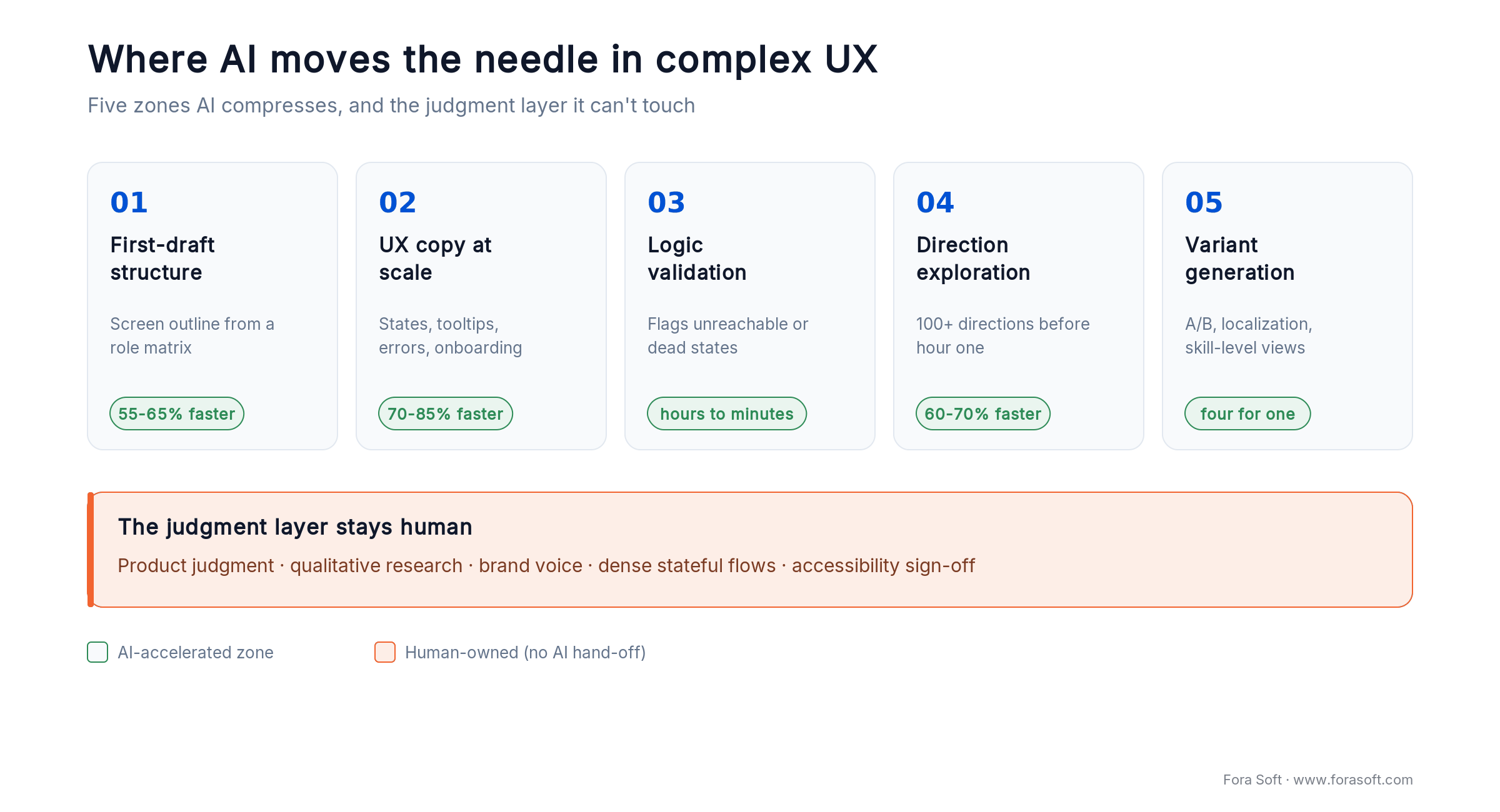
Figure 1. The five zones where AI compresses complex-UX work, and the judgment layer that stays human.
1. First-draft structuring. Given a role matrix, an entity list, and three key user goals, AI produces a structured screen outline — columns, filters, empty-state copy, primary CTAs — in 15–30 minutes. That outline is wrong in the interesting ways you want to see first: which filters conflict, which states are unreachable, where microcopy collides.
2. UX copy at scale. Empty states, tooltips, validation errors, notifications, feature descriptions, onboarding nudges. A designer who used to spend 90 minutes finding the right five words for a premium upsell banner now generates a dozen variants in three minutes and picks in ten. Time drops from hours to minutes per screen.
3. Logic validation on role + permission matrices. Paste the role matrix and a screen spec into Claude or GPT-5.5, ask “what combinations produce an unreachable or contradictory state?” You’ll get a ranked list of edge cases in a minute — the same list your senior designer would produce in an afternoon, but earlier.
4. Visual-direction exploration. Midjourney, Recraft, and Ideogram compress the “what could this look like” phase. Two weeks of moodboarding becomes two days of AI-assisted exploration plus a human polish day. You do not ship AI visuals — you ship directions they revealed.
5. Variant generation for A/B and localization. Screens for beginner vs. advanced users, four-language copy variants, mobile restatement of a web layout. What used to be “write it four more times” is now “generate four, curate one.”
The 2026 productivity numbers — what’s real, what’s marketing
Vendors publish impressive percentages. Our own measurements and independent studies — like Nielsen Norman Group’s productivity research — converge on narrower, more honest ranges. Here is what has held up across multiple studies and across our own projects.
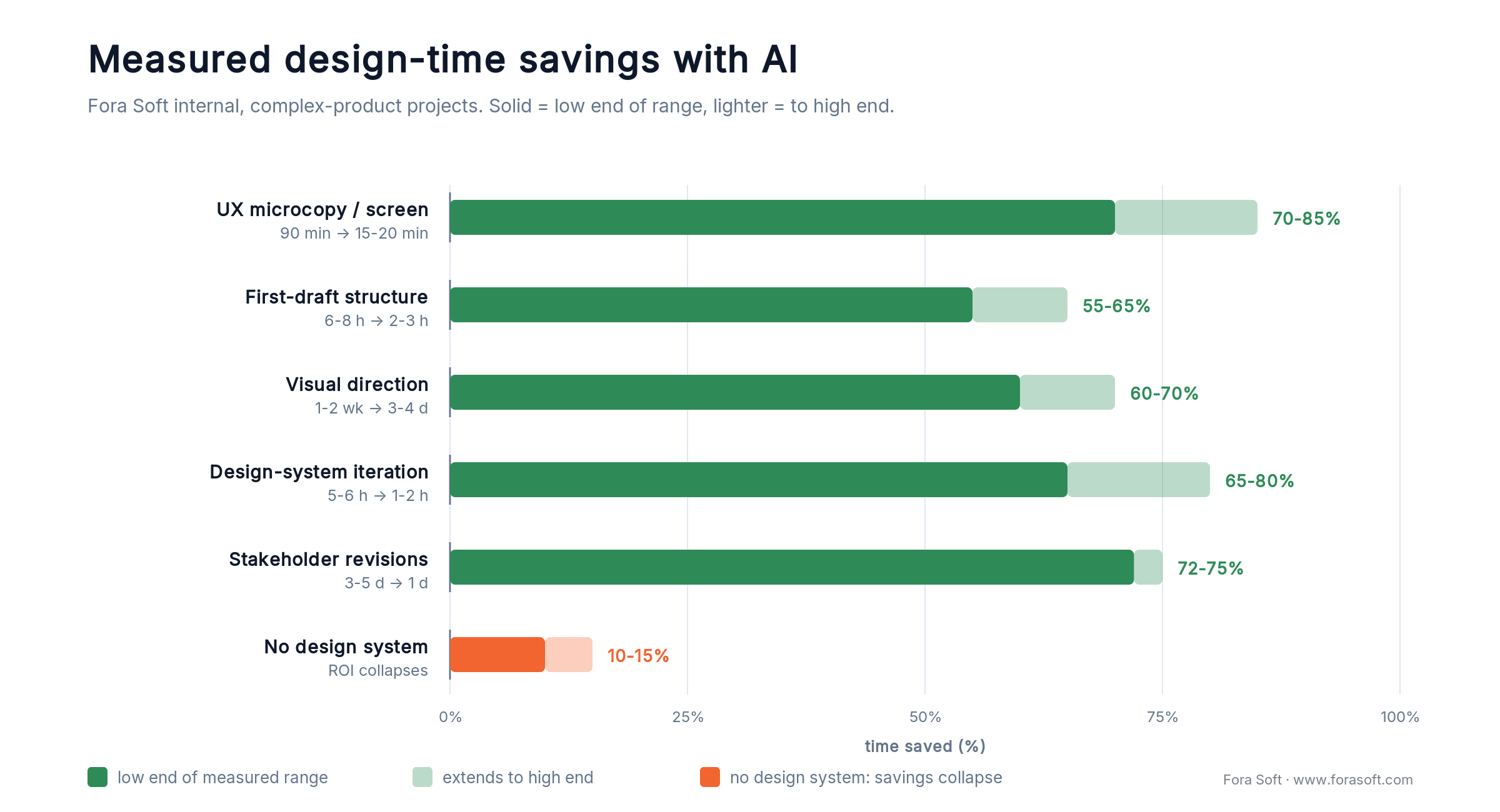
Figure 2. Measured time saved per activity. With a mature design system the range is 55–85%; without one it collapses to 10–15%.
| Activity | Before AI | With AI (measured) | Time saved | Source |
|---|---|---|---|---|
| UX microcopy per screen | 90–120 min | 15–20 min | 70–85% | Fora Soft internal |
| First-draft structure (complex screen) | 6–8 h | 2–3 h | 55–65% | FoxRunner case |
| Visual concept exploration | 1–2 weeks | 3–4 days | 60–70% | Perspire case |
| Design-system iteration cycle | 5–6 h | 1–2 h | 65–80% | EyeBuild case |
| Frontend scaffolding from design | 3 weeks | 9 days | ~55% | Fora Soft internal |
| Stakeholder revision cycle | 3–5 days | 1 day | ~75% | Perspire case |
| General knowledge-work output | baseline | +66% throughput | — | Nielsen Norman Group, 2023 |
Two caveats stay with every number. First, savings collapse toward zero for teams without a documented design system, because the output has nothing to snap to, and a senior designer then spends the saved time cleaning up tokens. Second, savings do not compound across the whole project: a 70% cut in microcopy time translates to roughly 8–12% of the total design budget, not 70%.
Reach for AI-assisted design when: you have at least five screens with non-trivial logic, a design system with semantic tokens, and a deadline that would otherwise force a cut-scope decision. Under those conditions, the ROI appears inside the first sprint.
Case 1 — FoxRunner: cutting UX analysis from a full day to three hours

Figure 3. FoxRunner All News / News Alerts: the multi-role dashboard whose UX we compressed with AI.
FoxRunner is a real-time news analytics product aimed at active traders. The “All News / News Alerts” dashboard is the heart of the product: free users see a filtered feed; premium users see layered keyword alerts, custom ticker filters, and sentiment overlays. The dashboard must render at least eight distinct states (free/logged-in, free/anonymous, premium/light-user, premium/power-user with saved filters, etc.) without feeling like four different products bolted together.
The UX problem
Organizing columns, permissions, and filter logic without overwhelming the interface. Before AI, the senior designer would spend 6–8 hours replaying state combinations in their head, writing conditional copy for each, then another 3–4 hours on interface text and validation. Nearly a full working day for one stable version of one screen.
The AI-assisted workflow
We fed Claude Opus 5 a structured brief: the entity model (news item, alert, ticker, user), the four role definitions, the twelve filter dimensions, and the existing component library. We asked for (a) a ranked list of state combinations most likely to conflict, (b) a first-draft column structure per role, and (c) tooltip copy for the five filter dimensions most prone to confusion. Output arrived in 20 minutes. The designer then spent two hours curating, rejecting, and integrating.
The measured outcome
UX analysis dropped from 6–8 hours to 2–3 hours. Microcopy refinement dropped from 3–4 hours to around one hour. Total: 3–4 hours versus a prior full working day. More important, AI surfaced two role-filter conflicts on the first pass that our designer would likely have caught only in QA — saving an estimated three-to-five day rework cycle downstream.
What made this work: a fully-written role matrix and entity list. With a vague “here’s our product” prompt, the same exercise produces generic output in 20 minutes that takes four hours to clean up. Structured input is what makes it work.
Case 2 — Perspire: two-week concept exploration compressed into four days

Figure 4. Perspire visual direction exploration: the mood was the product.
Perspire is a live fitness-streaming product built on emotional engagement. A 3D-illustrated visual language had to carry the motivation story across its responsive web and mobile surfaces. The client rejected stock libraries. The brief called for a cohesive, proprietary 3D style that felt warm without being juvenile.
The design problem
Finding a visual direction is not a one-shot problem. It is dozens of moodboards, a briefing cycle with illustrators, two or three exploration rounds, and a stakeholder alignment meeting. Historically the direction phase — before any illustrator started rendering final assets — consumed 10–14 calendar days.
The AI-assisted workflow
Our senior art director prompted Midjourney and Recraft across four deliberately different axes: warmth, abstraction level, color temperature, and character style. Within one day, we had 140 direction samples. Day two: we grouped them into six clusters and presented three to the client. Day three: refinement of the chosen cluster. Day four: our illustrator locked the final composition and our designer finalized typography.
The measured outcome
Direction phase compressed from 10–14 calendar days to 3–4. Later, when the client asked for a tonal shift (“less aspirational, more grounded”), we delivered three updated directions in one day — the same revision loop used to take a week. For a fitness product whose launch window competes with seasonal cycles, that speed was not a vanity metric; it was a go/no-go on the quarter.
What we did not ship: any AI-generated final asset. Every hero illustration was hand-rendered by our illustrator. AI gave us direction — craft gave us product.
Need a distinct visual direction before your next board review?
We compress the first four days of moodboarding into one and give you three defensible directions in a shareable format. No stock, no cliches.
Case 3 — EyeBuild: design-system iteration from six hours to two

Figure 5. EyeBuild component iteration: where design-system maturity multiplied AI’s value.
EyeBuild, a solar-powered construction-site surveillance product, demanded both a polished visual concept and a disciplined design system — consistent tone of voice, component descriptions, state documentation, across roughly 60 components. Before AI, a single iteration cycle (revise two components, align microcopy, update design-system docs) took 5–6 hours.
Why design-system maturity was the multiplier
EyeBuild already had semantic tokens, documented component states, and a brand voice spec. That gave AI something to snap to. We prompted GPT-5.5 with the tone spec, the component’s current copy, and the three nearest neighbors in the system; it returned six variants aligned with the existing voice. Our designer picked, adjusted, and moved on in roughly one hour per cycle — including the design-system doc update.
Lesson for teams without a design system
We ran the same prompt on a client project without semantic tokens. Output looked acceptable but used hard-coded colors, inconsistent spacing, and a tone two notches off brand. The designer spent the “saved” time cleaning up. Net savings: near zero. If you are buying AI-assisted design into a team that does not yet have a working design system, the honest conversation is “we need to build one first, or this investment will not return.”
The AI design-tool stack in 2026, compared
The 2026 tool market is crowded. Most tools fit into one of three buckets: designer-first (generates Figma-native output), developer-first (generates production code), or explorer-first (generates moodboards, variants, and pitches). Pick for the bucket you live in, not the marketing homepage.
| Tool | Bucket | Best for | Pricing (2026) | Main limitation |
|---|---|---|---|---|
| Figma AI / Make | Designer-first | Mockups native to Figma, token-aware | $16/full seat/mo (annual); AI credits included | Needs mature component library |
| v0 by Vercel | Developer-first | React + Tailwind scaffolding from prompts | Free tier; Premium $20/mo; Team $30/seat | Frontend only, no backend/DB |
| Galileo AI | Designer-first | High-fidelity UI from text prompts | Free + paid tiers | Standalone; manual Figma paste |
| Uizard | Explorer-first | Sketch-to-prototype, full journeys | Free tier; Pro ~$19/mo | Outputs less developer-ready |
| Lovable | Developer-first | Full-stack MVPs with DB and auth | From ~$20–25/mo | Low control for branded products |
| Framer AI | Designer-first | Landing pages, portfolio sites | Included in Framer plans | Not for complex app UIs |
| Gamma | Explorer-first | Concept decks, client pitches | Free + Pro ~$10/mo | Presentation format only |
| Midjourney / Recraft | Explorer-first | Moodboards, illustration direction | From $10/mo each | Final assets still need illustrators |
| Visily | Explorer-first | Layout drafts and concept structures | Free + paid tiers | Limited depth for complex logic |
Reach for Figma AI when: your design system lives in Figma components and you want native, token-aware output that hands off cleanly to engineering.
Reach for v0 by Vercel when: your engineers drive the loop and you want React + Tailwind code from the start, not Figma frames that then need to be rebuilt in code.
Reach for Midjourney/Recraft when: you are in the fuzzy “what could this product feel like?” phase and want 100+ direction samples before a single illustrator hour is spent.
For coverage on each of these individually, see our deep dive on AI tools for UI/UX design and the AI wireframe tools comparison.
Prompt patterns that actually work in design work
Weak prompts waste the time you thought you were saving. Four patterns have held up across our projects, each structured to make AI output easy to curate rather than easy to admire.
1. The role-matrix prompt. Paste the role matrix, the entity model, and the target screen spec. Ask: “List the twelve state combinations most likely to create ambiguous or unreachable UI, ranked by blast radius.” Outputs a prioritized edge-case list your designer can walk in under an hour.
2. The brand-voice prompt. Start with 5–10 examples of on-voice and off-voice copy you have already written. Add tone rules and forbidden words. Then ask for variants. Without those examples, the model falls back to a generic SaaS voice.
3. The design-system guardrail prompt. Attach the token file or the component inventory. Ask for output that uses only tokens from that file and components already in the inventory. This alone cuts “hardcoded color” cleanup by an order of magnitude.
4. The “show me the worst five” prompt. After generating variants, ask the model to critique its own output: “Identify the five worst options in this set and explain why each fails.” You surface issues a designer would otherwise miss during cherry-picking.
A reference AI-assisted design pipeline
The pipeline we run at Fora Soft on complex digital products. Each stage shows the human owner, the AI assist, and the human gate before the next step.

Figure 6. The nine-stage pipeline we run: every AI assist (purple) clears a human gate (green) before the next stage.
| Stage | Human owner | AI assist | Human gate |
|---|---|---|---|
| 1. Discovery | Product lead + UX | Competitor audit summaries; heuristic checks | Approved problem statement |
| 2. Role & entity modeling | UX architect | Edge-case enumeration; state-machine audit | Signed-off matrix |
| 3. Direction exploration | Art director | Midjourney/Recraft batches; mood clustering | Three directions chosen |
| 4. Wireframes & screen drafts | Senior designer | Figma AI / Galileo first drafts | Flow walkthrough |
| 5. Microcopy pass | UX writer / designer | Claude/GPT variants on brand-voice prompt | Copy QA sheet |
| 6. Design-system alignment | Design-system lead | Token / component usage audit | Tokens compile clean |
| 7. Handoff / code scaffold | Frontend lead | v0 or Figma MCP code scaffold | Lighthouse & a11y baseline |
| 8. Accessibility audit | QA + a11y specialist | Automated scan (catches ~30–40%) | Manual WCAG 2.2 review |
| 9. User testing | UX research | Transcript summarization only | Recommendations drafted by human |
Stage 9 is the non-negotiable one. We do not use AI to generate synthetic user-test “insights.” We use it to condense recorded sessions so a human researcher spends their time on interpretation, not transcription.
Where AI does not help — and will quietly hurt you
1. Real user research. AI is strong at scaling structured data and weak at spotting the unexpected. It flattens subtle customer pain points into templated buckets, which is the opposite of what qualitative research is for. Use it for summaries, not interpretation. A well-run five-person interview still beats a thousand LLM-generated personas.
2. Accessibility. Automated scans catch roughly 30–40% of WCAG issues, per Deque’s coverage data (its own axe-core reaches ~57% on real sites); success-criteria coverage sits near 30%. Under the DOJ’s 2024 ADA Title II rule, US state and local government sites must meet WCAG 2.1 AA; in April 2026 the DOJ pushed the deadline for populations of 50,000+ to 26 April 2027 (smaller entities, 2028), and healthcare has a separate HHS Section 1557 deadline around May 2026. Treating an automated “accessibility score” as shippable is a legal-risk position. Plan for a manual audit cycle.
3. Brand nuance. A product’s voice is built from micro-choices AI has not seen in training. A default LLM “tone” is agreeable, professional, and forgettable — the opposite of a strong brand. Without a written voice spec in your prompt, expect generic output.
4. Dense stateful flows. AI handles isolated screens well. It handles an end-to-end onboarding across eight screens, with conditional branches and data persistence, much less well. Keep stateful logic human-owned.
5. Production accuracy. AI code-generation hallucination rates run 20% and up on open benchmarks, and roughly one in five AI package suggestions points to a library that does not exist (2025). The danger is not the obvious error; it is the plausible-but-wrong output that renders fine and slides past a quick review. In design terms: the layout looks clean, but the label says something your legal team would hate. Assume a chunk of the output is quietly wrong and budget a human pass.
Five pitfalls we watch for on every AI-assisted engagement
1. No design system, high AI spend. Buying Figma AI Enterprise for a team that has never documented a color token is the fastest way to waste $20k and end up with less consistent output than last year. Fix the system first.
2. Trusting the first AI draft. Every AI output we use goes through a structured review: tone match, design-system compliance, edge-case coverage, accessibility pass. Skipping the review is how generic, on-brand-looking technical debt enters a product.
3. Confusing “looks good” with “works good.” AI mockups render beautifully and fail subtly. A checkout flow that looks clean but has a trap state for users with saved addresses is worse than an ugly flow that ships correctly. Human walkthroughs stay mandatory.
4. Replacing research with generated personas. A beautifully formatted “AI persona” gives the illusion of evidence. It is not evidence. Five recorded user sessions beat five hundred AI-generated fictions, every time.
5. Letting AI own the design-system docs. AI can generate component descriptions. It cannot maintain system-wide coherence as you add the twelfth variant of the fourth button. Docs must have a human owner, or entropy wins inside two quarters.
A decision framework — should AI touch your next design sprint?
Answer these five questions before you buy another seat license.
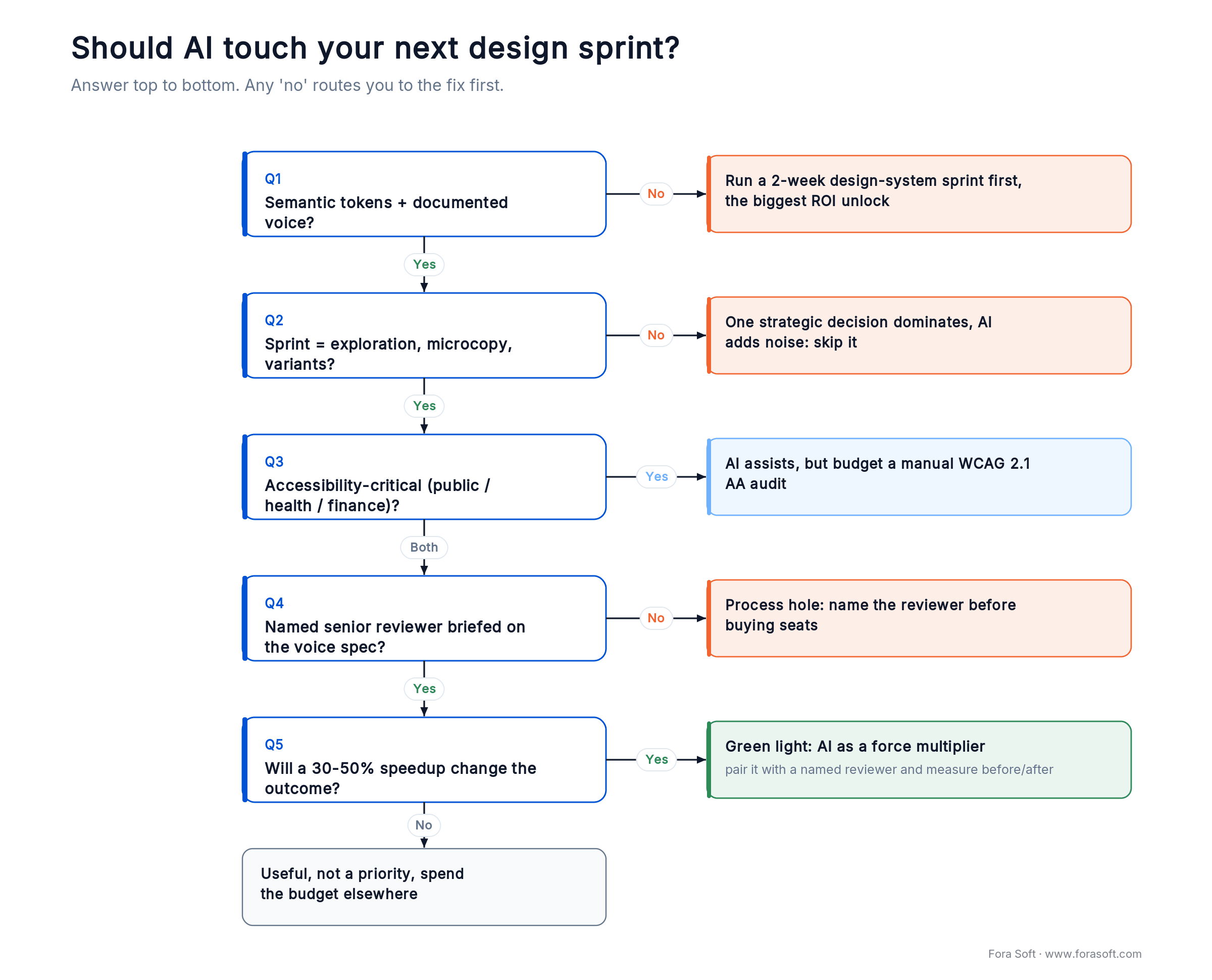
Figure 7. The five-question decision tree: any “no” routes you to the fix before you spend on tooling.
Q1. Do you have semantic design tokens and a documented voice? If not, AI output has nothing to snap to. Fix this first. A two-week design-system sprint pays back inside the next design cycle.
Q2. Is your target sprint dominated by exploration, microcopy, or variants? If yes, AI saves 40–70% of that time. If your sprint is dominated by a single hard strategic decision, AI will not help — and may speed you toward the wrong answer.
Q3. Is accessibility critical (public-sector, healthcare, finance, EU-facing)? Then AI output cannot be the last step. Budget manual audit time explicitly; do not trust an automated “accessibility score.”
Q4. Who reviews the AI output? Needs to be named, senior, and briefed on the voice spec. “The designer” is not a named reviewer; that is a process hole.
Q5. Are you on a timeline where a 30–50% speedup changes the business outcome? If yes, AI is a force multiplier. If the bottleneck is a two-month client approval cycle, tooling will not fix that.
Cost model — what a modest AI-assisted UX budget looks like
A realistic annual tooling stack for a 5–8 person design team working on a complex digital product, based on list prices as of early 2026:
Figma Professional full seats (~$16/seat/mo billed annually) for eight people: ~$1,536/yr. A Figma AI upgrade where available: typically a modest add-on per seat. v0 Team ($30/seat/mo) for three engineers: ~$1,080/yr. Midjourney + Recraft for the art director: ~$240/yr. Claude Pro or GPT Plus across the team: ~$2,400/yr for 10 seats. Total: roughly $5–7k/year for the tooling stack.
Against a conservative 30% reduction in design hours on a team with a loaded cost around $800k/yr, the payback period is measured in weeks. The bigger budget item is not tool licenses — it is the design-system work that makes the tool ROI real.
Planning an AI-assisted design refit?
We can audit your design system, suggest the minimal tool stack that matches your team, and scope a two-week pilot with measurable before/after numbers. No slide decks — a working plan.
KPIs — what to measure so you know if it worked
Quality KPIs. Design-system token compliance rate of generated screens (target: ≥95%). Accessibility pass rate against WCAG 2.2 AA (manual audit, target: 100% for regulated products). Stakeholder revision cycles per screen (target: down 30%).
Business KPIs. Design hours per feature shipped (track quarterly, target: down 25–40% within two quarters). Time from concept to approved direction (target: down 50% for new products). Design rework after engineering hand-off (target: down 30%, because fewer state conflicts leak into development).
Reliability KPIs. Share of AI output shipped without human edits (target: <10%; if it is higher, your reviewers are rubber-stamping). Production UX defects traced to AI-generated components (target: zero attributable regressions per quarter). Time lost to clean-up of off-brand AI output (track explicitly; if it exceeds 15% of time saved, the tool is not paying off).
When NOT to use AI in your design sprint
Skip AI assistance when the sprint revolves around one strategic design decision that determines the product’s positioning. AI generates plausible variations, which is exactly the wrong input when a single clear choice matters more than coverage.
Skip it when you are doing formative user research. AI summarization tools are fine; AI-generated “synthetic users” or personas are not a substitute for five people talking to a human.
Skip it for safety-critical or legally-bound UI (medical dosing, voting, financial compliance) where ambiguity in microcopy has real-world downside. Humans should own every word.
Skip it on first-of-its-kind products where no prior pattern exists in training data. AI will helpfully generate the nearest cousin of something familiar, which is the opposite of breakthrough design.
Finally, skip it if your team is not senior enough to catch subtle errors. AI amplifies whoever is reviewing it. Give it to a junior team and you get polished-looking mistakes at 2x speed.
The five-minute design-system readiness check
Before you spend a dollar on AI tooling, answer these. If fewer than four are “yes,” a two-week design-system sprint will return more than any tool purchase.
1. Named semantic tokens. Do your colors, spacing, and typography have semantic names (`surface-muted`, `spacing-lg`) rather than raw values?
2. A canonical component inventory. Can someone list every component and its variants from a single source of truth?
3. A written voice spec. At least one page explaining tone, forbidden phrases, and sample on-voice / off-voice pairs.
4. A named design-system owner. One human with the authority to say no to a new variant. Not a Slack channel.
5. A handoff convention. How designs move to engineering (Figma MCP, Storybook, annotated frames). Inconsistent handoff is where AI-generated designs go to die.
Mini case — what changed at Fora Soft, end to end, over twelve months
Between Q1 2025 and Q1 2026 we migrated our design workflow from “AI occasionally helpful” to “AI integrated at seven of nine pipeline stages.” Across six comparable projects, average first-to-stable-version cycle time on complex screens dropped from roughly 18 hours to 7 hours — a 61% reduction. Stakeholder-revision rounds per project fell from 4.3 to 2.1.
What did not change: our overall defect rate in QA, our accessibility pass rate, or our client satisfaction NPS. The human review discipline held. That is the point. AI compressed the work; it did not degrade the outcome. For teams that pair AI with our AI integration services or our end-to-end custom software development, those are the numbers to expect — with the same caveats about design-system maturity we have hammered on throughout.
FAQ
Can AI actually replace UX/UI designers in 2026?
No. AI replaces repetitive steps within a designer’s day: first drafts, microcopy variants, moodboard expansion, edge-case enumeration. The judgment calls that determine whether a product feels good or broken still belong to a senior human. Teams that tried to “go headless” in 2025 report higher defect rates and brand drift within two quarters.
How much time does AI really save on UX/UI work?
Measured across our projects: 40–70% on first-draft structuring, 70–85% on microcopy, 55–80% on design-system iterations, 60–70% on visual-direction exploration. Savings collapse for teams without a documented design system, typically to 10–15%.
Which AI design tool should we start with?
If your team lives in Figma, start with Figma AI / Make because output stays native. If engineers drive the loop, v0 by Vercel gets you production-shaped code from day one. If you mostly need faster exploration, Midjourney or Recraft for visuals plus Claude or GPT-5.5 for copy cover 80% of the wins at low cost.
What is the cheapest responsible AI design stack?
For a small studio: Figma Starter, one Claude Pro seat for the lead, one Midjourney seat for the art director, and a shared v0 free-tier account. Expect $50–80/month and meaningful savings on microcopy and exploration from week one. Bump up only when the team crosses five active projects.
Is AI UX output accessible out of the box?
Assume not. Automated accessibility checkers catch roughly 30–40% of WCAG issues; the rest need manual review. For regulated or public-sector products, plan for a manual accessibility pass at stage 8 of the pipeline — it is not optional. The DOJ’s ADA Title II rule mandates WCAG 2.1 AA, with 50,000+ populations required to comply by April 2027.
Can AI write UX copy that matches our brand voice?
Only if you feed it a written brand-voice spec (five to ten examples of on-voice and off-voice copy, tone rules, forbidden words). Without that spec, expect agreeable, professional, generic output — which will read as “not us” to anyone on your team. The spec is a one-day investment that keeps paying off.
Do we need a design system before we adopt AI tools?
Yes — at least a minimal one. Semantic tokens (named colors, spacing, typography), documented component variants, and a written voice spec. Teams without these see 10–15% time savings from AI; teams with them see 50–70%. A two-week design-system sprint before tool adoption is the highest-return move available.
How do you prevent AI from introducing brand drift?
Three-part discipline. One: every prompt includes the current brand-voice spec and the token file reference. Two: every AI output passes a human review against a short checklist (tone, tokens, edge cases, accessibility). Three: the design-system documentation is owned by a human whose job description includes it. Skip any of the three and drift appears within a quarter.
What to Read Next
Tools
AI Tools for UI/UX Design Software
Deep dive on Figma AI, Galileo, Uizard, and the emerging stack.
Wireframing
AI Wireframe Tools Compared
Which wireframer outputs structure you can actually ship from.
Accessibility
AI and Accessibility in UI/UX
Where automated WCAG tooling helps — and where it misleads.
Predictive UX
Predictive UX for AI-Powered SaaS
How leading SaaS products use prediction in the interface itself.
Streaming UX
Streaming App UX Best Practices
Lessons from shipping high-concurrency real-time UIs.
Ready to compress your next design cycle — without shipping AI slop?
In complex digital products, AI in UX design is not a trend and not a replacement; it is an operational multiplier that works best in the hands of a disciplined team with a documented design system. In our own projects, it has cut UX analysis time by more than half, compressed visual-direction work from weeks to days, and made stakeholder revision loops painless. None of that changed our defect rates, accessibility pass rates, or client-facing quality bar.
The teams that will benefit most in the next twelve months are not the ones spending the most on tools. They are the ones that fix their design-system foundations, name their reviewers, and treat AI exactly like any other junior team member: fast, eager, and in need of supervision.



The handbook · 7 volumes
Fora Soft Video Engineering Handbook
AI shortens design work, but the products in these cases still run on video, real-time media and models underneath. We wrote a seven-volume handbook on that stack, from encoding and delivery to sound and AI. Designers and product leads working on video features can start with Volume 6 on AI capabilities, then Volume 3 on players, WebRTC and quality of experience. Written by Nikolay Sapunov, CEO at Fora Soft.
Browse the handbook on Amazon →7 volumes · 9,000+ pages · Kindle & paperback
Let’s scope a two-week AI-assisted design pilot on your product.
Bring the hardest screen in your backlog. We’ll return a before/after plan with measurable targets — and show you which tools will actually move the needle for your team.

