

An AI wireframe generator turns a prompt, sketch, or screenshot into an editable wireframe in under a minute. The hard part in 2026 is not making boxes appear. It is picking the tool whose output lands where your work goes next: Figma, production code, or a stakeholder review. This guide compares the 11 AI wireframe generators that actually ship product this year — Visily, Uizard, Banani, Mockflow, Google Stitch, Relume, v0, Lovable, Bolt.new, Framer AI, and Figma Make — with real 2026 pricing, a reproducible benchmark, and a decision tree built from 250+ Fora Soft design sprints.
Key takeaways
• Visily is the default pick for PMs and founders. Screenshot to wireframe to Figma, $11/editor/mo, and a 45-second first flow. It wins when the person wireframing is not a designer.
• v0, Lovable, and Bolt.new are not wireframe tools. They skip the wireframe and emit working code. Reach for them to validate an idea fast, but budget for cleanup, not for boxes.
• Relume is the one tool a marketing site can ship with. Its sitemap to wireframe to Webflow chain matches how marketing teams actually work; nothing else in this list does that end to end.
• Google Stitch and Figma Make are the 2026 entrants to test first. Stitch is free and now runs on Gemini 3; Figma Make is bundled into plans your team may already pay for.
• Fora Soft uses these agentically. AI does the first 80%, a senior designer does the last 20%. That is why our wireframe-to-Figma handoff runs about 2× faster than teams still drawing every screen by hand.
Why Fora Soft wrote this guide
We have shipped 250+ software products since 2005, and we design wireframes for nearly every one. Over the last 18 months we moved our discovery work from pure-Figma wireframing to AI-assisted wireframing inside an Agent Engineering loop. It is the same approach behind products like BrainCert, a Brandon Hall-winning e-learning platform, Meetric, a funded AI sales-video platform, and AppyBee, a booking SaaS used by 800+ fitness studios.
This is the playbook we hand to product owners and CTOs weighing AI wireframe tools for a real product, not a top-10 listicle. We have run every tool here on at least one client engagement. Every benchmark below is reproducible. Every recommendation ties to a use case we charge real money to deliver. And because we sell software development, not a wireframe tool, we have no dog in the fight over which generator you pick.
Reading shortcut: jump to the comparison matrix for specs, the pricing breakdown if your CFO needs numbers tomorrow, or the decision tree if you already know your role.
What is an AI wireframe generator
An AI wireframe generator is a tool that produces an editable screen layout from a text prompt, a hand sketch, a screenshot, or a short product brief. Instead of dragging rectangles onto a canvas, you describe the screen (“a mobile onboarding flow with SSO and email signup”) and the model returns structured, editable UI you can refine and hand off. The output is a wireframe or low-fidelity mockup, not a finished visual design and not, in most cases, production code.
Under the hood, these tools pair a large multimodal model with a component library and a layout engine. The model reads your intent and maps it to known UI patterns; the layout engine snaps the result onto a canvas you can edit. That is why output quality tracks two things: how good the model is at understanding product intent, and how clean the tool’s components and export path are. A generator with a weak component set produces generic screens no matter how strong the model behind it.
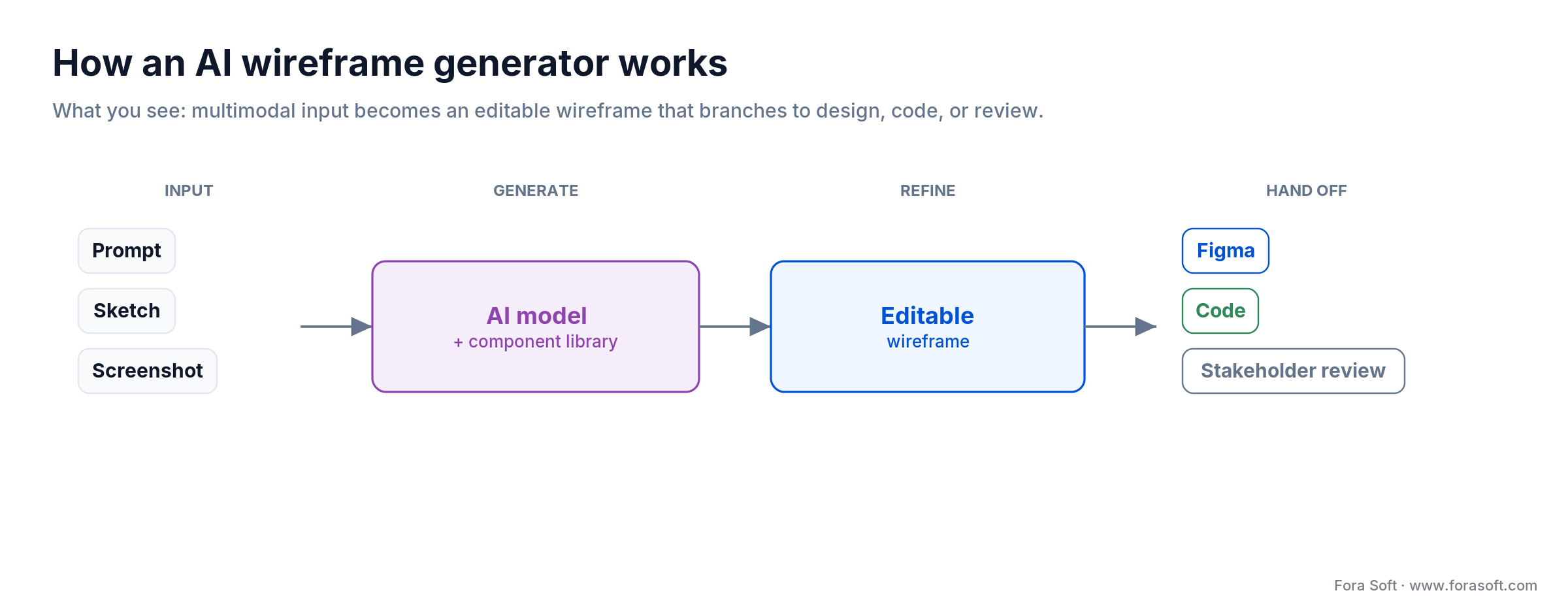
Figure 1. The AI wireframe generator pipeline: multimodal input feeds a model plus component library, and the editable wireframe branches to Figma, code, or stakeholder review.
Not sure which tool fits your product?
Book a 30-minute call and we will map your wireframing workflow to the right tool, then scope what it takes to ship the product behind it.
What changed between 2024 and 2026
Three shifts reshaped this category in 18 months. None of them is “AI got better at boxes.” All three change the economics of who wireframes, when, and why.
1. Vibe coding ate the bottom of the market. When v0, Lovable, and Bolt.new can turn a paragraph into a deployable app in a few minutes, the “low-fidelity wireframe to validate an idea” step compresses into “working prototype to validate an idea.” Founders skip wireframes; designers move up-stack into design-system work and edge cases.
2. Multimodal input became table stakes. Every serious tool now takes text, a phone photo of a sketch, a competitor screenshot, and uploaded design tokens. Uizard pioneered sketch-to-digital back in 2021. In 2026 that is a baseline feature, and the real difference is how cleanly the output lands in Figma, Webflow, or React.
3. Native Figma AI arrived. Figma shipped Make in 2025, and Google rebuilt Stitch on Gemini 3 in late 2025. If your team lives in Figma every day, you now have a built-in option that needs no extra subscription, though it is still less mature than Visily for screenshot-to-wireframe.
Who actually needs an AI wireframe generator
Not every team needs one. Honestly, AI wireframing is a force multiplier for four roles and a distraction for the rest. You will get measurable return if you are one of these:
- A product manager or PO who needs to show engineers an idea without waiting on design. Start with Visily, Uizard, or Banani.
- A solo or technical founder validating a product. Skip wireframes and build the thing with Lovable, Bolt.new, or v0.
- A marketing team shipping landing pages and microsites. Use Relume with Webflow, or Framer AI.
- A design team handling 5–10 client briefs a quarter. Visily for client-facing concepts, Figma Make for internal handoff.
You probably do not need one if you ship a single product with a mature design system, run a large centralized design org where governance overhead outweighs the per-designer gain, or build hardware and embedded UIs where AI training data is thin. We come back to those cases in the When NOT to use one section.
The four categories of AI wireframe tools
Most “best AI wireframe tools” lists pile eleven products into one ranking, which helps no one. These tools split into four categories that do different jobs. Picking the wrong category costs more than picking the wrong tool inside the right one.
Category 1 — AI wireframers (Visily, Uizard, Banani, Mockflow, Google Stitch). These produce editable wireframes you hand to a designer or developer. They live in their own canvas, export to Figma, and are a stop on the way, not the destination.
Category 2 — AI sitemap and component generators (Relume). Relume sits between a sitemap and Webflow or Figma. It does not give you free-form wireframes; it generates a full information architecture plus component sets for marketing sites. One product owns this category.
Category 3 — Vibe-coding tools (v0, Lovable, Bolt.new, Framer AI). These skip wireframes and emit code or a live site. They are the right answer when speed to a working prototype matters more than design fidelity.
Category 4 — Native-Figma AI (Figma Make). AI that lives inside Figma so designers never switch tools. Best when your design system already lives there. Anima’s Buddy agent plays in the same lane if you want an agent rather than a prompt box.
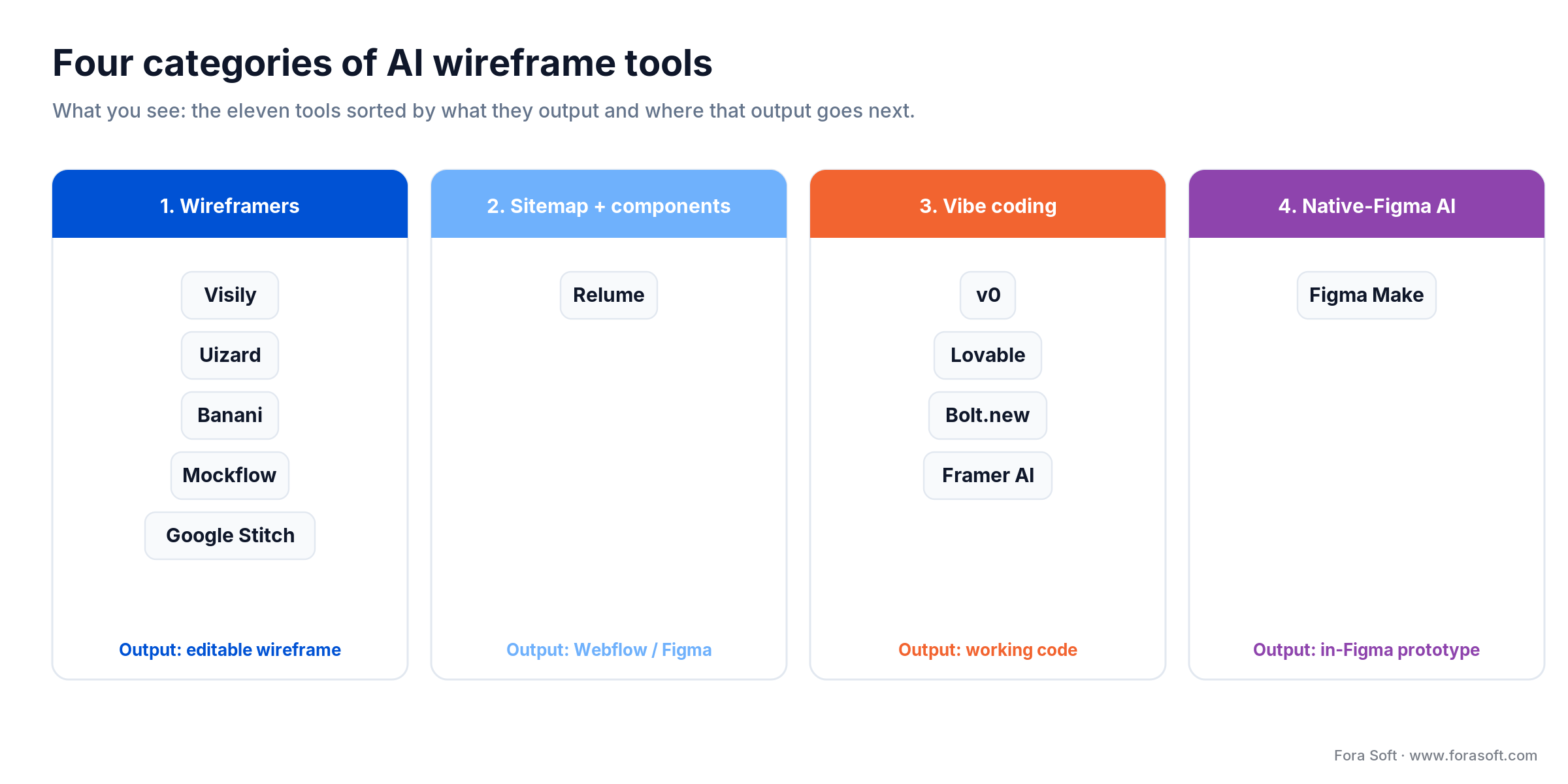
Figure 2. The 11 tools mapped to four categories, each labelled with what it outputs and where that output goes next.
A product manager comparing “Visily vs Lovable” is comparing a wireframer with a code generator. Both are useful; neither is interchangeable. Sort the category first, then the tool.
The comparison matrix — 11 tools side by side
Numbers below come from Q3 2026 vendor pricing pages and our own benchmark, run with one identical brief across every tool. We re-check this quarterly. Paid prices are the entry paid tier billed annually unless noted.
| Tool | Category | Best for | Free tier | Paid from (USD/mo) | Code export | Figma export |
|---|---|---|---|---|---|---|
| Visily | Wireframer | PMs, founders | Yes (watermark) | $11 | No | Yes |
| Uizard (Miro) | Wireframer | Sketch to digital | Yes (2 projects) | $12 | No | Yes |
| Banani | Wireframer | Mobile-first apps | Yes (~170/mo) | $12 | Beta | Yes |
| Mockflow | Wireframer | Enterprise teams | Yes (1 project) | $14 | No | Yes |
| Google Stitch | Wireframer | Free exploration | Yes (free beta) | Free | HTML/CSS | Yes |
| Relume | Sitemap + components | Marketing sites | Yes (1 project) | $18 | Webflow/React | Yes |
| v0 (Vercel) | Vibe coding | React prototypes | Yes ($5 credits) | $20 | React/Next | No |
| Lovable | Vibe coding | Full-stack MVPs | Limited | $20 | Full-stack | No |
| Bolt.new | Vibe coding | In-browser builds | Yes (limited) | $20 | Full-stack | No |
| Framer AI | Vibe coding | Published sites | Yes (Framer sub) | $10 | Hosted site | No |
| Figma Make | Native-Figma AI | Figma-native teams | Plan-based | $16* | Prototype/code | Native |
*Figma Make is bundled with a Figma Professional Full seat ($16/editor/mo annual), not sold standalone. Free tiers change often; check the vendor page before you commit budget.
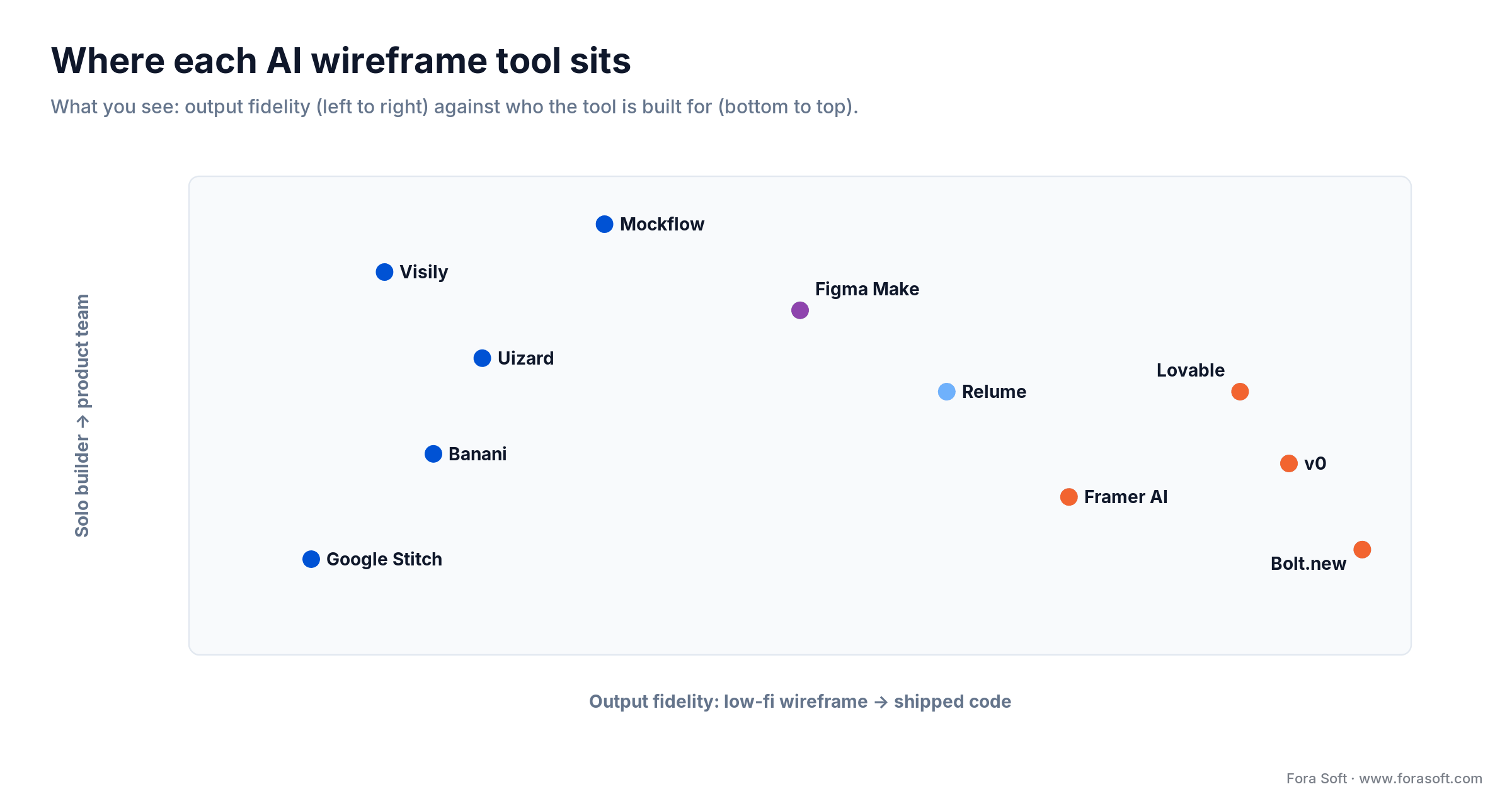
Figure 3. Where each tool sits: the horizontal axis runs from low-fidelity wireframe to shipped code; the vertical axis from solo builder to product team.
Pricing in plain English — what your CFO will approve
The headline prices hide two traps: credit systems and per-seat math. Here is what each tool actually costs a small team in 2026.
The cheap, predictable wireframers. Visily runs $11/editor/mo on annual billing ($14 monthly), Uizard $12 ($19 monthly), Banani $12, and Mockflow $14. All four have real free tiers, so a solo PM can start at zero. Google Stitch is free in Google Labs beta, with roughly 350 standard generations a month, which is plenty for exploration.
The credit-metered code tools. v0, Lovable, and Bolt.new all start near $20/mo, but each meters usage. v0 gives you $20 of raw-token credits that a heavy day can burn through fast. Lovable’s $20 Starter includes 100 generation runs. Bolt.new’s Pro includes 10 million of its own tokens. Predict your spend before you standardize on one; token pricing makes monthly cost hard to forecast.
The two with a jump. Relume’s Starter is a friendly $18/mo annual, but its Pro tier costs several times more for unlimited projects and AI generations, which only earns its keep for agencies shipping many sites. Figma Make has no separate price; a Figma Professional Full seat is $16/editor/mo annually and includes 3,000 AI credits, with pay-as-you-go at $0.03/credit on higher plans.
Framer AI sits apart: $10/mo Basic gets you a published, hosted site, not just a design file, which is the whole point of the tool. Relume’s own numbers are on the Relume pricing page, and Uizard’s move under Miro is documented in the Uizard joins Miro announcement.
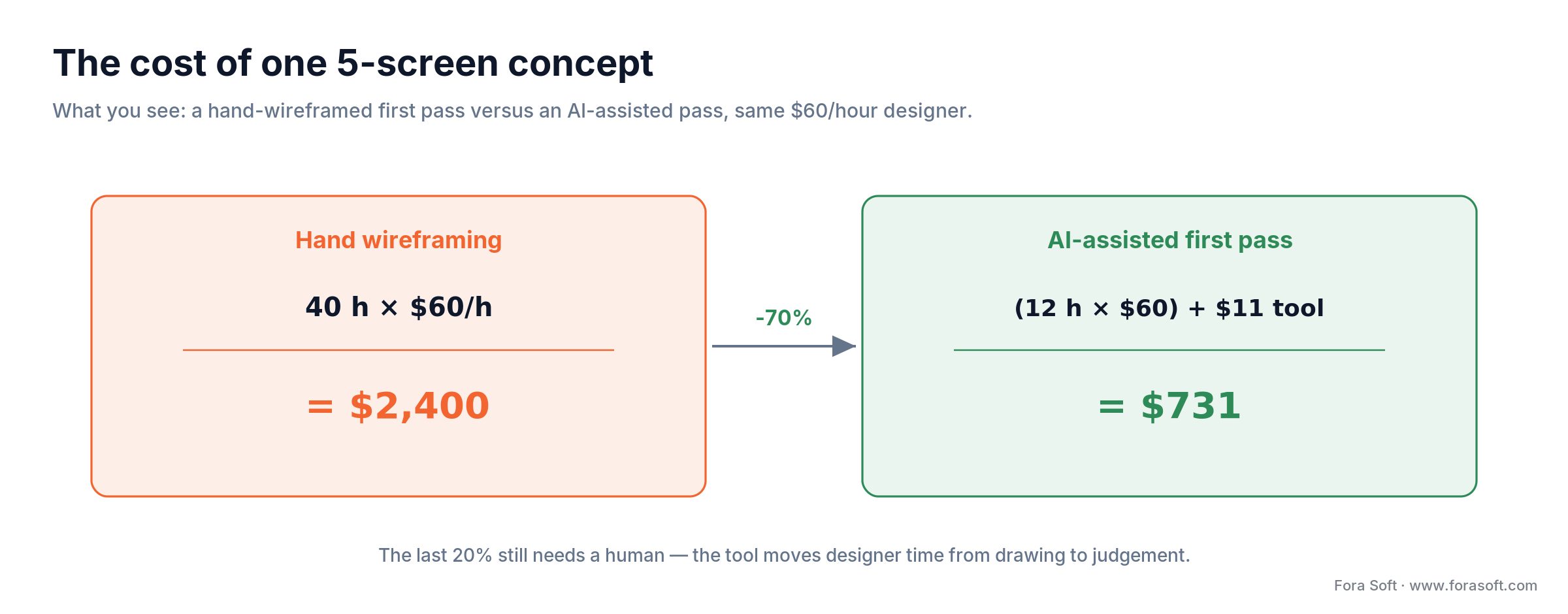
Figure 4. A worked cost comparison for one 5-screen concept: hand wireframing versus an AI-assisted pass, same designer rate.
Here is the arithmetic behind Figure 4. A designer at $60/hour spends about 40 hours wireframing a 5-screen concept by hand: 40 × $60 = $2,400. With an AI wireframe generator, that first pass drops to roughly 12 hours of prompt-and-refine plus an $11 monthly seat: (12 × $60) + $11 = $731. That is a 70% cut on the first draft. The catch: the last 20% still needs a human, and the tool never removes that. It moves the designer’s time from drawing to judgement.
Wireframes are cheap. Shipping the product is the hard part.
We take AI-assisted wireframes to a shipped, tested product. Tell us what you are building and we will scope it honestly.
Visily — the best pick for PMs and founders
Visily wins the non-designer bracket. Paste a screenshot of a competitor app, or type a screen description, and it returns a clean, editable wireframe you can theme and push to Figma. In our benchmark it produced a usable 5-screen onboarding flow in about 45 seconds, and the screenshot-to-wireframe path was the most reliable of any tool here.
Where it wins: PMs who need to communicate, not craft; teams that live in Figma downstream; anyone who wants zero-to-first-flow in a minute. Where it breaks: it does not export code, and its visual polish tops out at wireframe fidelity, so do not expect a finished UI. Pricing is honest at $11/editor/mo annual, though AI credits can push heavy users toward the $29 Business tier sooner than expected.
Reach for Visily when: a product manager or founder needs to turn an idea into a shareable, Figma-bound wireframe today, and nobody on the team is a full-time designer.
Uizard — sketch to digital, now inside Miro
Uizard still owns the sketch-to-digital move it invented in 2021. Photograph a whiteboard drawing and its Autodesigner turns it into an editable multi-screen project. Since Miro Labs acquired Uizard in May 2024, it fits naturally into workshop-heavy teams that already run discovery on a Miro board.
Where it wins: hand-sketch input, screenshot-to-editable, and teams standardized on Miro. Where it breaks: pricing changes over the last two years nudged some serious teams toward Visily, and the free tier is tight at two projects. At $12/editor/mo annual it is priced to compete, and the 500 AI generations on Pro suit most product squads.
Reach for Uizard when: your team sketches on paper or whiteboards and wants those drawings turned into editable screens, especially if you already run discovery in Miro.
Relume — the one tool a marketing site can ship with
Relume is the only tool here that matches how a marketing team actually works. Describe your company in a few sentences and it generates a full sitemap, then converts that sitemap into wireframes built from real components, then hands off to Webflow, React, or Figma. Its library holds 1,000+ human-designed components, so the output looks intentional rather than generic. Teams report saving 2–4 hours per project on sitemap and component selection alone.
Where it wins: marketing sites and microsites headed for Webflow, and anyone who wants IA plus components in one chain. Where it breaks: it is not a free-form product-UI wireframer, and the pricier Pro tier only makes sense for agencies shipping many sites. The $18/mo Starter covers a single active project.
Reach for Relume when: you are shipping a marketing site or landing pages to Webflow and want the sitemap, wireframes, and components generated as one connected flow.
Vibe coding — v0, Lovable, and Bolt.new
These three do not wireframe. They skip straight to working software, which is exactly right when a clickable prototype beats a static mockup. v0 by Vercel emits clean React and Next.js with Tailwind, and it is the strongest of the three for teams that will keep the code. Lovable builds full-stack apps with a Supabase backend, aimed at founders shipping an MVP. Bolt.new runs an entire dev environment in the browser and deploys in a click.
Where they win: idea validation, investor demos, and MVPs where speed is everything. Where they break: the generated code needs a senior review before it touches production, state management and security are where the hand-holding starts, and token-metered pricing makes cost spiky. Treat their output as a fast first draft of the product, not the product.
Reach for vibe coding when: you need a working, clickable prototype to validate an idea or raise money this week, and you have engineering on hand to harden whatever survives.
Figma Make and Google Stitch — native and free
Figma Make is the sleeper pick for Figma-native teams. It turns a prompt or an existing Figma design into an interactive prototype without leaving the canvas, and it draws on your team libraries so output respects your design system. If you already pay for Figma, evaluate Make before adding another subscription. It is less mature than Visily for screenshot-to-wireframe, but the zero switching cost is real.
Google Stitch is the best free option in 2026. It launched at Google I/O in May 2025, moved to Gemini 3 in a December 2025 update, and rebuilt itself into an AI-native canvas with a voice mode in March 2026. It generates web and mobile UI from a prompt and exports to Figma or code. For zero-budget exploration, nothing else comes close, though outputs can feel generic without firm design direction.
Reach for Figma Make or Stitch when: your team already lives in Figma (Make) or you want a genuinely free, capable generator for early exploration (Stitch).
How we tested every tool — a reproducible benchmark
Reviews that just assert “great AI” are useless. Here is our method, so you can run it yourself before you commit. We gave every tool the same three briefs and scored the output on the same rubric.
The three briefs. One: a mobile onboarding flow with SSO and email signup. Two: a SaaS dashboard with empty states, filters, and charts. Three: an e-commerce checkout with shipping, payment, and confirmation. These cover the layout patterns most products actually need.
The rubric. We scored six things: time to first usable flow, how well the tool understood product intent, design-system fidelity, edit and iteration control, export cleanliness (Figma or code), and collaboration. Run the same three prompts across your shortlist and the right tool for your team becomes obvious in an afternoon. Do not trust anyone’s ranking, including ours, over your own three-prompt test.
The decision tree — pick the right tool in four questions
You do not need to test eleven tools. Answer four questions and the field narrows to one or two.
Question 1: does the output go to code or to a designer? To code, and you want a working prototype, go vibe coding (v0, Lovable, Bolt.new). To a designer or dev as a wireframe, keep reading.
Question 2: is it a marketing site? Yes, and it is headed to Webflow, then Relume. No, keep reading.
Question 3: does your team live in Figma? Yes, and you want zero switching cost, then Figma Make. No, keep reading.
Question 4: who is holding the tool? A non-designer PM or founder, then Visily. Someone who sketches on paper, then Uizard. On zero budget, then Google Stitch.
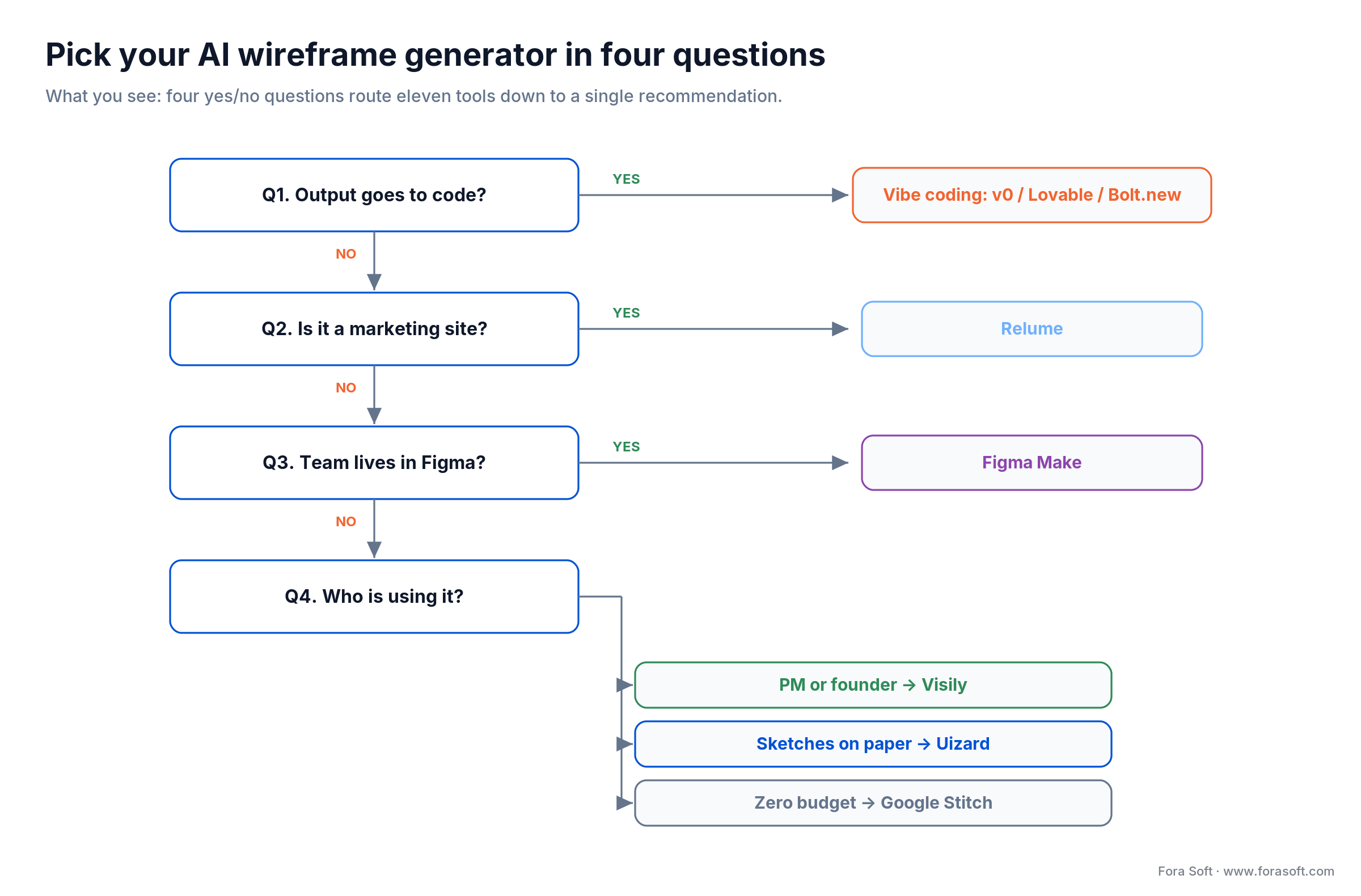
Figure 5. Four questions route you from eleven tools to a clear pick, from vibe-coding down to a role-based wireframer choice.
From wireframe to shipping product
A wireframe is a means, not an end. The pipeline that works in 2026 looks like this: an AI generator produces the first-draft screens, a senior designer applies the design system and fixes the flows AI gets wrong, and engineering builds against a clean Figma handoff. Skipping the middle step is the mistake we see most: teams treat the AI output as final and ship generic UI that erodes trust.
That is the shape of our own Agent Engineering loop, and we walk through how we structure AI-assisted delivery in our AI engineering knowledge base. If you want the requirements-to-wireframe half done right, our discovery and visualization process covers how we turn a brief into screens, and our wireframing in software development guide goes deeper on fidelity levels.
Case study — three Fora Soft projects that used AI wireframing
On a recent e-learning engagement, the client arrived with a two-line idea and a launch date eight weeks out. Old process: two weeks of back-and-forth wireframing before anyone saw a screen. Instead, we ran the brief through an AI wireframe generator, got a full set of low-fidelity screens on day two, and spent the saved time on the flows that mattered. The stakeholder review moved from week three to week one.
The plan from there was ordinary and deliberate. A senior designer rebuilt the AI drafts against the client’s design system, we pressure-tested the checkout and enrollment flows by hand, and engineering built against a clean Figma handoff. The AI did the first 80%; the humans did the 20% that decides whether a product feels trustworthy. We have repeated that pattern on booking software like AppyBee and on AI-heavy products like Meetric.
The outcome that matters: discovery that used to eat two to three weeks now takes days, and the money saved goes into building, not drawing boxes. Want a similar assessment of your own design-to-build pipeline? Book a 30-minute call and we will look at where AI helps and where it will bite you.
Five pitfalls that quietly kill AI wireframing efforts
1. Shipping the first draft. AI output is a starting point. Teams that publish it unedited get generic screens that look like every other AI-made app. The last 20% is the work.
2. Confusing categories. Evaluating Visily against Lovable wastes a week. One makes wireframes; the other makes apps. Sort by category before you compare tools.
3. Ignoring the export path. A beautiful wireframe that will not land cleanly in your Figma or codebase creates rework. Test the handoff, not just the generation.
4. Underestimating credit burn. Token-metered tools look cheap at $20 until a heavy week doubles the bill. Model your real usage before you standardize.
5. Setting the wrong fidelity expectation. Show a stakeholder an AI wireframe and call it a design, and you will spend the next month explaining why the “finished” product looks different. Label fidelity clearly.
KPIs — how to know AI wireframing is working
Speed KPIs. Track time from brief to first shareable flow, and time from wireframe to Figma handoff. If AI is helping, the first should drop to under a day and the second should roughly halve.
Quality KPIs. Count design-system violations per screen at handoff and rework requests from engineering. If these climb, you are shipping AI drafts too raw; the human pass is being skipped.
Cost KPIs. Watch cost per validated concept and monthly credit spend against your forecast. A tool that saves designer hours but triples in credits has not saved you anything.
When NOT to use an AI wireframe generator
The honest answer is that these tools are wrong for some teams, and pretending otherwise would cost you money. Skip them if you ship a single product with a mature design system, where a designer in Figma is already faster than re-learning a new canvas. Skip them if your design org is large and centralized, where the per-designer gain is small and governance overhead is real.
Skip them, too, for hardware UIs, embedded software, or anything outside the dominant web-and-mobile-app pattern, because the training data behind these models is thin there and the output shows it. And if your stakeholders expect pixel-perfect visuals in week one, an AI wireframe will set the wrong expectation faster than no wireframe at all. When the tool does not fit, a custom design and build process beats forcing a generic generator onto a specialized problem.
When to build instead of buy
A few teams outgrow off-the-shelf generators. If your product has a large proprietary design system, strict compliance rules on where data goes, or a design volume that makes per-seat AI pricing painful, a custom AI-assisted design pipeline can pay off. That usually means wiring a model to your own component library and tokens, so the output is your system rather than a generic one.
This is a build-versus-buy call, and most teams should buy. But when the volume and the constraints line up, a tailored pipeline built with AI integration services removes the credit ceiling and the generic-output problem at once. We help teams make that call without overselling the custom path; often the answer is a $12 tool and a good designer.
Frequently asked questions
What is the best AI wireframe generator in 2026?
For product managers and founders, Visily is the best AI wireframe generator in 2026: screenshot-to-wireframe, Figma export, and $11/editor/mo. Marketing teams should pick Relume, Figma-native teams should try Figma Make, and anyone on zero budget should start with the free Google Stitch. The best tool depends on where your output goes next, not on a single overall winner.
How does an AI wireframe generator work?
It pairs a multimodal AI model with a component library and a layout engine. You give it a prompt, sketch, or screenshot; the model maps your intent to known UI patterns; and the layout engine renders an editable wireframe on a canvas. Output quality depends on both the model’s understanding and the quality of the tool’s component set.
Is there a free AI wireframe generator?
Yes. Google Stitch is free in Google Labs beta, with about 350 generations a month, and it runs on Gemini 3. Visily, Uizard, Banani, and Mockflow also have free tiers with limits like watermarks or a small project cap. For genuinely no-budget work, Stitch is the strongest free option in 2026.
Can AI wireframe generators create wireframes in Figma?
Yes. Visily, Uizard, Banani, Mockflow, and Google Stitch all export to Figma, and Figma Make generates directly on the Figma canvas. If a Figma-native workflow matters most, Figma Make or an agent like Anima’s Buddy keeps the whole loop inside Figma.
What is the difference between AI wireframing and vibe coding?
AI wireframing creates editable screens and flows you refine and hand off. Vibe coding skips the wireframe and generates working software from a prompt. Visily and Uizard are wireframers; v0, Lovable, and Bolt.new are vibe-coding tools. Use wireframers when a designer or dev works downstream, and vibe coding when a clickable prototype beats a static mockup.
Can AI wireframe tools generate production code?
Some can. Vibe-coding tools like v0, Lovable, and Bolt.new emit React or full-stack code, and Relume exports Webflow and React. That code is a fast first draft, not production-ready output: it needs a senior review for state management, security, and performance before it ships.
How much does an AI wireframe generator cost in 2026?
Entry paid tiers run about $11–$20/mo per seat: Visily $11, Uizard $12, Banani $12, Mockflow $14, Relume $18, and the vibe-coding tools around $20. Figma Make is bundled with a $16/editor Figma Professional seat. Google Stitch is free. Watch credit-metered tools, where heavy use can multiply the monthly bill.
Do AI wireframe generators replace designers?
No. They compress the first 80% of the work, the drafting, and move designers up-stack into design-system curation, flow quality, and edge cases. In our projects the AI produces the first pass and a senior designer does the 20% that decides whether a product feels trustworthy. The tool changes the job; it does not remove it.
More design and process resources
If you are choosing tools across the wider design stack, our guide to AI tools for UI/UX design covers the layer above wireframing, and mobile app UX design best practices covers what to do with the screens once you have them. For the bigger picture, see how we apply AI across the software development process.
What to read next
Design process
Wireframing in software development
Fidelity levels, when to wireframe, and how it fits a real build.
AI & design
AI tools for UI/UX design
The layer above wireframing: visual design, tokens, and handoff.
Discovery
From requirements to visualization
How we turn a two-line brief into screens a team can build.
Product
Predictive UX in AI SaaS
Where AI moves next in the interface, past static wireframes.
Engineering
AI in the software development process
How Agent Engineering changes discovery, build, and QA.
Ready to pick your AI wireframe generator?
Sort by category first, then by role. If the output goes to code, use v0, Lovable, or Bolt.new. If it is a marketing site, use Relume. If your team lives in Figma, try Figma Make. Otherwise, a non-designer reaches for Visily, a sketcher for Uizard, and a zero-budget team for Google Stitch. Run all three of our benchmark prompts before you standardize.
The tool is the easy part. The wireframe is worth nothing until it becomes a product people trust, and that last 20% is where a good team earns its keep. We have shipped 250+ products since 2005 doing exactly that.
Have a wireframe and need the product behind it?
Book a 30-minute call. We will review your design-to-build pipeline and scope what it takes to ship, with an honest estimate.

