

AI in video streaming stopped being a keynote slide and turned into a line item on the engineering roadmap. Encoding, personalisation, moderation, search, captions, ad insertion, delivery — every big cost and experience lever in a streaming product now runs partly on machine learning. Teams that treat AI as table stakes are cutting delivery bills by double-digit percentages, shipping richer discovery, and catching policy violations in seconds instead of hours. The ones that treat it as pixie dust burn a quarter and ship nothing.
This is the short, practical version of how AI reshapes video streaming in 2026: what to build in-house, what to buy, the reference architecture that survives contact with real traffic, and the pitfalls that keep sinking ambitious streaming teams. We’ve shipped every piece of it, so the numbers here are the ones we actually see, not the ones a vendor deck promises.
Key takeaways
• Encoding pays first. Per-title and per-shot optimisation with open codecs and ML-driven ABR cuts egress and storage 20–40% at the same perceived quality. Netflix measured ~20% from per-title, ~30% per-scene.
• Personalisation wins retention, not minutes. The lift shows up in long-term retention and session starts, not average watch time. Optimise the right metric or you’ll juice engagement while churn quietly rises.
• Moderation has to be real-time and auditable. For live UGC, human-only review is now a legal liability. Pair an ML classifier with a human appeal queue and a full audit log — synchronous blocking adds ~100–300 ms, and that’s the price of passing an audit.
• Build vs buy splits cleanly. Buy commodity ML (ASR captions, content ID, ad insertion); build what differentiates you (recommendations, moderation for your policies, scene-aware effects).
• Latency stays a transport problem. WebRTC and LL-HLS remain the default for sub-2-second interactive; HLS/DASH with CMAF for 3–8 second large-scale live. AI doesn’t change the transport decision.
More on this topic: pair this with our Streaming App UX Best Practices: 7 Pillars (2026) and the engineering ground floor in Video Streaming App Development.
Why Fora Soft wrote this playbook
Fora Soft has built video streaming products since 2005 — 21 years, 250+ projects, one focus. Our portfolio spans interactive live (ProVideoMeeting), large-scale OTT and IPTV (Smart IPTV, Smart STB), financial and professional broadcast (Tradecaster, Worldcast Live), AI-enhanced creation (SuperPower FX) and mission-critical surveillance (V.A.L.T., running at 770+ organizations with 50,000+ active users).
Across those products we’ve shipped WebRTC SFUs, HLS/DASH packagers, AV1/HEVC pipelines, ML captioning, scene detection, auto-highlights and real-time moderation. So this isn’t a survey of press releases. It’s the distilled version of what actually ships and pays off — the same thing we do inside our video and audio streaming software development work.
If you run product or engineering at a streaming company, this should save you the six months of experimentation we spent figuring out which AI bets are real and which just look good in a roadmap.
Planning an AI-native video platform?
Tell us your content type, concurrency target and latency budget — we’ll map a build-or-buy plan for every AI capability on the roadmap.
The one-page answer: AI in streaming, demystified
AI in video streaming isn’t one product. It’s six distinct problem areas, each with its own tooling, build-vs-buy trade-off and ROI profile. Treat them as one thing and the roadmap collapses into vendor soup.
- Encoding & delivery. Per-title / per-shot / per-chunk ABR and codec decisions. The biggest direct cost saving.
- Personalisation & discovery. Recommendations, semantic search, auto-playlists.
- Content understanding. Scene detection, object recognition, auto-highlights, captions, translation.
- Moderation & compliance. UGC classification, brand-safety, age signals, regulatory evidence.
- Creation tools. Generative effects, virtual presenters, dubbing, noise reduction, real-time FX.
- Monetisation. Dynamic ad insertion, programmatic yield, churn prediction.
Here’s how those six map onto the pipeline you already run.
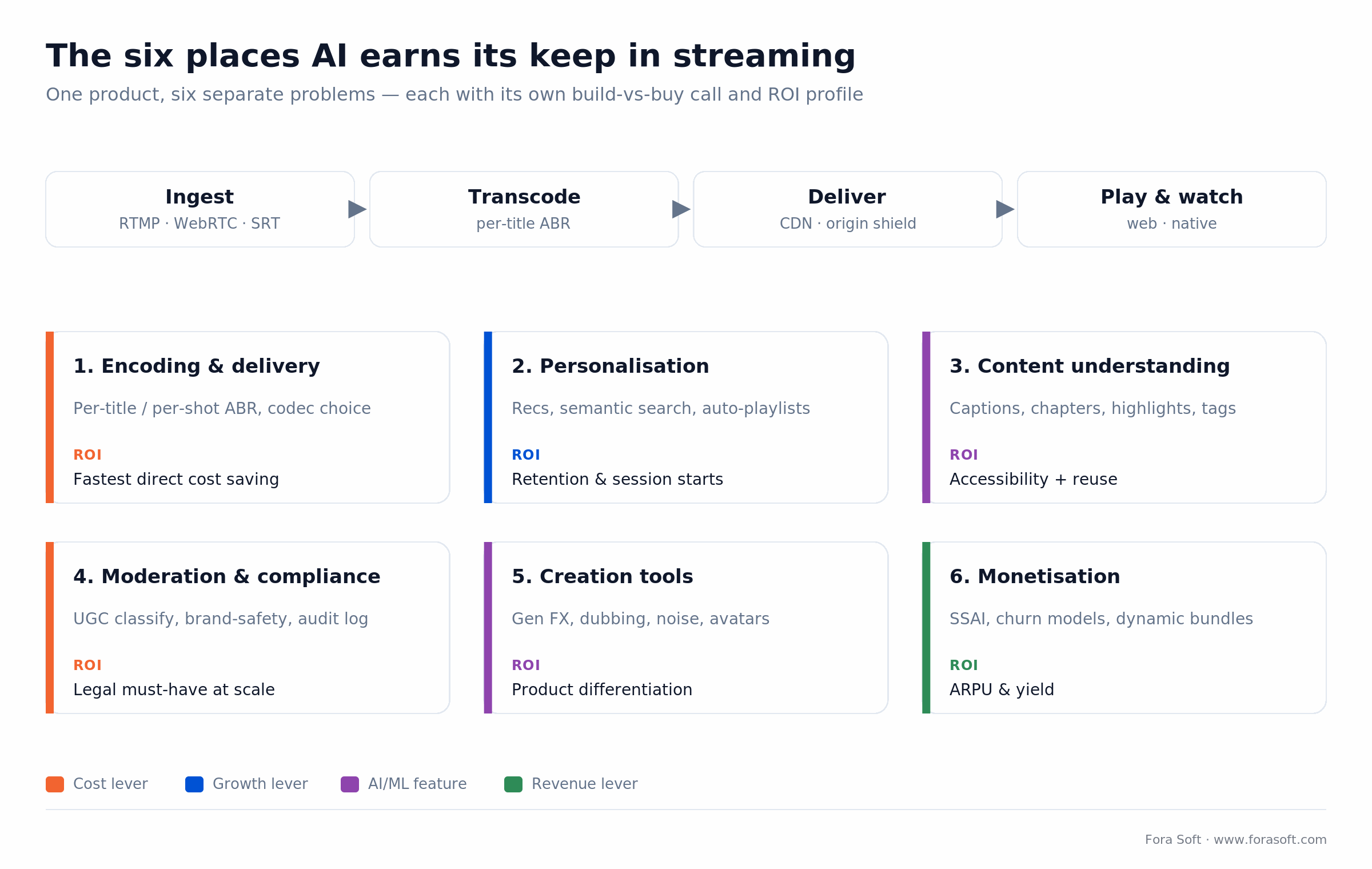
Figure 1. Six separate AI problems in a streaming stack — each with its own build-vs-buy call and ROI shape.
Reach for AI in streaming when: encoding bills are a meaningful share of P&L, moderation load exceeds what a human team can service, or content volume is too large for human curation. If none of those apply, spend the budget on origin reliability first.
AI encoding and ABR: the fastest ROI
If you want one AI win you can defend in a budget meeting, start here. For years, adaptive bitrate ladders were static: 240p / 360p / 480p / 720p / 1080p at fixed bitrates, regardless of whether the content was a talking head or a firework display. Two shifts changed that.
1. Per-title and per-shot encoding. Pioneered by Netflix and now in every serious encoder (AWS Elemental, Bitmovin, Mux, Harmonic). ML estimates perceptual complexity per scene, picks the lowest bitrate that still clears a VMAF target, and emits a custom ladder. Netflix reported roughly 20% bitrate savings from per-title and ~30% per-scene; Mux trains neural nets on tens of thousands of encodes so a new upload gets its ladder in seconds. AWS Automated ABR showed ~30% off the bitrate sum on the same corpus.
2. ML-assisted ABR on the client. Modern players (Shaka, THEOplayer, Bitmovin, custom WebRTC clients) use learned models to pick the next chunk from buffer, throughput history and device capability. Fewer rebuffering events, higher average bitrate on the same network.
3. Next-gen codecs with ML-guided encoders. AV1 (via libsvtav1) is royalty-free and now has broad hardware decode; VVC/H.266 is shipping but decode is still thin. ML-guided presets close the gap between slow-preset quality and fast-preset throughput, which is what finally makes AV1 viable at scale. We go deeper in AV1 in production.
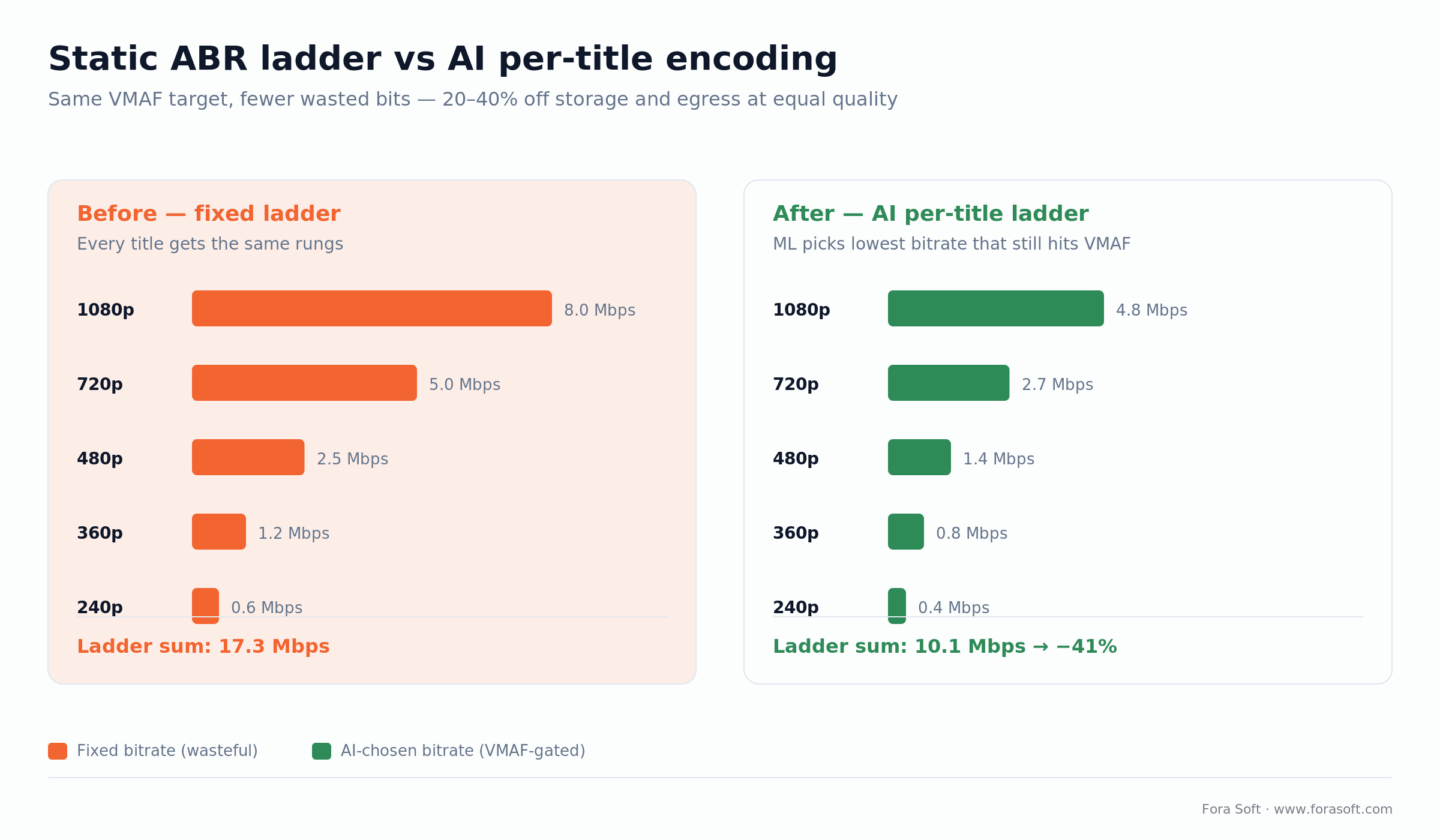
Figure 2. Same five renditions, same VMAF: a VMAF-gated per-title ladder trims the bitrate sum from 17.3 to 10.1 Mbps here — 41% off the bits you pay to store and deliver.
Reach for per-title encoding when: your catalogue has mixed complexity (talking heads next to sports or animation) and delivery is a real cost line. On a uniform, low-volume catalogue the savings won’t clear the integration effort.
Personalisation, discovery and semantic search
The real question in personalisation isn’t “how smart is the recommender” — it’s “what metric are we optimising?” Lazy teams chase average watch time. Disciplined teams chase retention, session starts and conversion. Netflix has said ~80% of what people watch comes from recommendations, and that the system is worth over $1B/year in avoided churn — but that value comes from optimising retention, not raw minutes.
Three capabilities worth building:
- Cold-start recommendations. Embedding-based content similarity plus popularity-by-cohort handles new users with no watch history.
- Semantic video search. Index transcripts, visual tags and chapter titles in a vector database. CLIP maps images and text into one space (ViT-L/14 gives 768-dim vectors); native video encoders like V-JEPA 2 and VideoPrism add the temporal structure frame-by-frame CLIP misses. Users ask for “the goal in the last five minutes” instead of guessing file names.
- Auto-playlists and topical rows. Clustering over embeddings builds themed rows without an editorial team touching them.
Watch out for cannibalisation. Blind A/B testing of recommenders misses it — a model can lift one row’s click-through while quietly tanking another. Measure at the surface level (session start-rate) as well as the row level, or you’ll ship a “win” that loses money.
Reach for a built recommender when: you own a real catalogue and behavioural telemetry. Without both, a good human-curated row beats a weak model for months — buy nothing, hire an editor.
Content understanding: captions, chapters, highlights
Automatic captions and subtitles. Whisper-class ASR handles 90+ languages. Large-v3 lands around 2.7% WER on clean audio but 8–12% on real-world meetings and phone calls, so budget a punctuation and diarisation pass for readable subtitles. One catch worth knowing: Whisper is batch-designed and invents text during long pauses, so live captions need chunking and cleanup. Captions are mandatory for accessibility compliance (EAA in the EU, ADA in the US) on any user-facing platform.
Scene detection and chapter markers. Shot-boundary detection plus visual-language models produce chapters, timestamped summaries and thumbnails. For long-form content — podcasts, courses, talks — this replaces an entire editorial role. For a deeper engineering treatment, our AI for Video Engineering course covers the model integration end to end.
Auto-highlights. For sports and esports, crowd-noise spikes, on-screen text and object tracking turn a three-hour broadcast into a 90-second reel within minutes of the final whistle. We built the forensic version of this into V.A.L.T. and the creative version into SuperPower FX.
Object and face recognition. Use it carefully. Face recognition in consumer products is regulated in multiple jurisdictions (EU AI Act, Illinois BIPA). Build the feature flag and the consent flow before the model, not after.
Moderation and compliance at scale
Any platform with user-generated video faces a regulatory pincer: the EU Digital Services Act, the UK Online Safety Act, US state laws and app-store policy. Manual moderation doesn’t scale; AI alone doesn’t pass an audit. The pattern that works is two layers.
Layer 1 — real-time ML classification. Frame-level (visual), audio-level (ASR + keyword) and text-level (chat, captions) classifiers run as the stream publishes. Thresholds are tuned per category: zero tolerance for CSAM, strict for adult content, context-dependent for violence. Synchronous blocking at write time adds roughly 100–300 ms — plan for it in the latency budget.
Layer 2 — human review queue. Every AI decision that blocks, demotes or limits content writes an audit record: model version, confidence score, action, reviewer. Appeals route to a human within a defined SLA. Regulators now ask for transparency reports, so build the log the same week you build the classifier — and know that the EU AI Act Article 5 puts hard limits on some biometric uses.
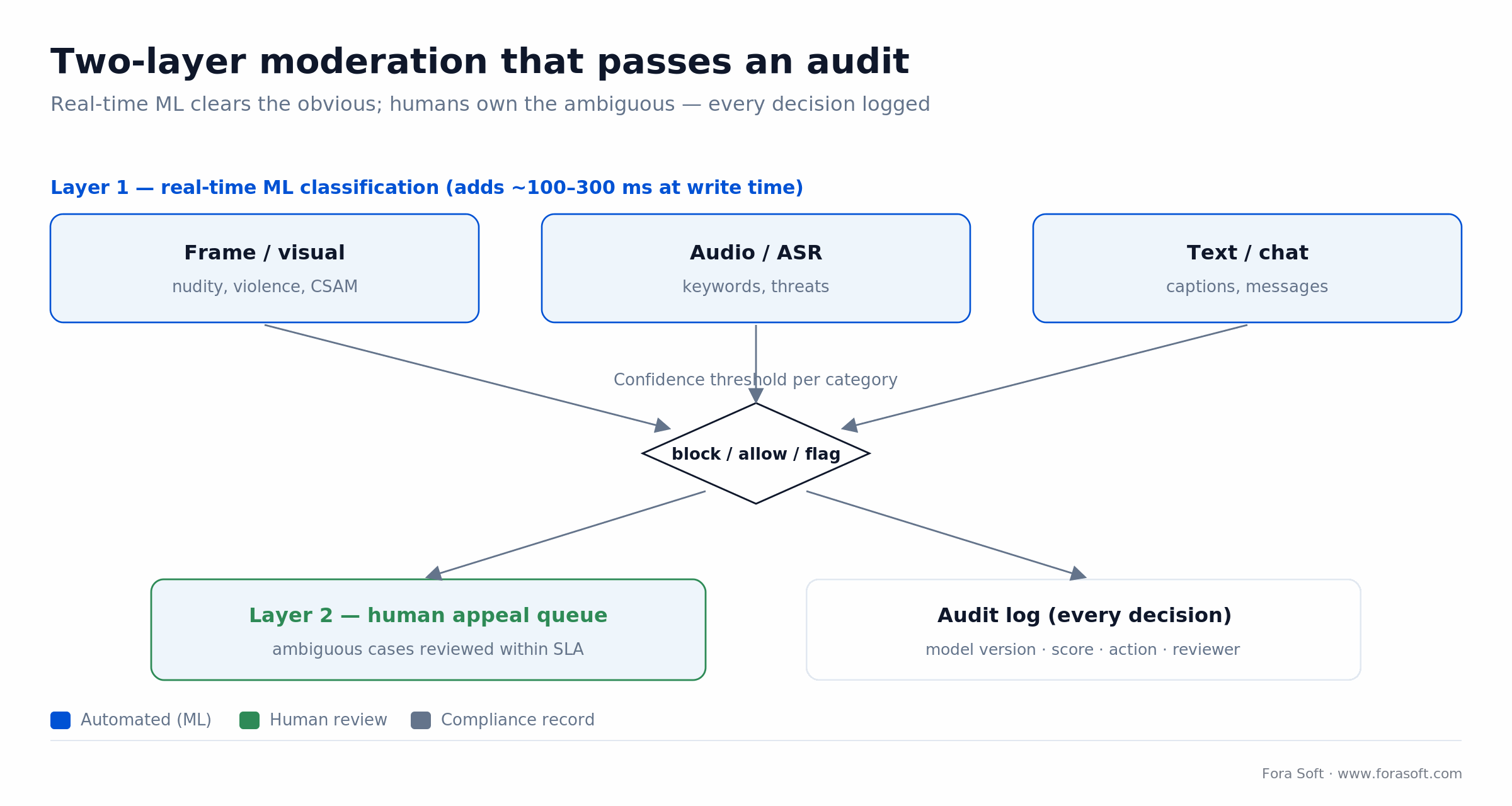
Figure 3. The two-layer pattern: ML clears the obvious cases in real time, humans own the ambiguous ones, and every decision lands in an audit log a regulator can read.
Reach for hybrid moderation when: you host live or user-generated video at any real volume. Below a few hundred daily uploads a small human team plus keyword filters is cheaper — the ML tier earns its cost once the queue outgrows the people.
Creation tools: generative FX, dubbing, virtual presenters
Real-time voice and noise filtering. RNNoise, NVIDIA Broadcast and Krisp-class models run on-device or at the SFU edge and rescue audio in noisy rooms — unavoidable for conferencing, telehealth and classroom products.
Voice translation and dubbing. Lip-synced dubbing with preserved voice identity is production-ready for pre-recorded content. Live dubbing still runs 2–4 seconds behind, and it’s improving every quarter, but don’t promise a client real-time yet.
Generative effects. Segmentation plus diffusion effects power creator tools like SuperPower FX, where anyone drops themselves into a superhero overlay with no green screen. The build pattern repeats across beauty, fitness and education products.
Virtual presenters and avatars. Text-to-video avatars are credible for training, internal comms and low-stakes marketing. They’re not a substitute for on-camera talent in brand-critical work, and you should disclose their use to end users.
Reach for generative creation tools when: the effect itself is the product hook (a filter, an avatar studio, a dubbing service). If it’s a nice-to-have bolted onto a delivery platform, ship the delivery first and add FX once retention holds.
Monetisation: ads, churn and lifetime value
Server-side ad insertion (SSAI). Ad decisioning trained on ML signals (context, engagement, viewability) beats rule-based VAST selection. Contextual targeting also survives the third-party cookie sunset, which pure behavioural models don’t.
Churn prediction. Sequence models on watch behaviour flag churn 14–30 days ahead with enough precision to trigger a retention play — a free episode, a price nudge, a concierge message.
Dynamic pricing and bundles. ML-composed bundles (“sports + premium” vs “kids + dubbing”) beat fixed tiers on conversion and revenue. This one needs a clean experimentation framework, or you’ll ship a revenue regression and not notice for a month.
Reference architecture for an AI-native streaming platform
The most common mistake is retrofitting AI into a monolith. The clean shape adds an AI services layer beside ingest, transcoding and delivery, with clearly typed inputs and outputs so you can swap a model without touching the media path.
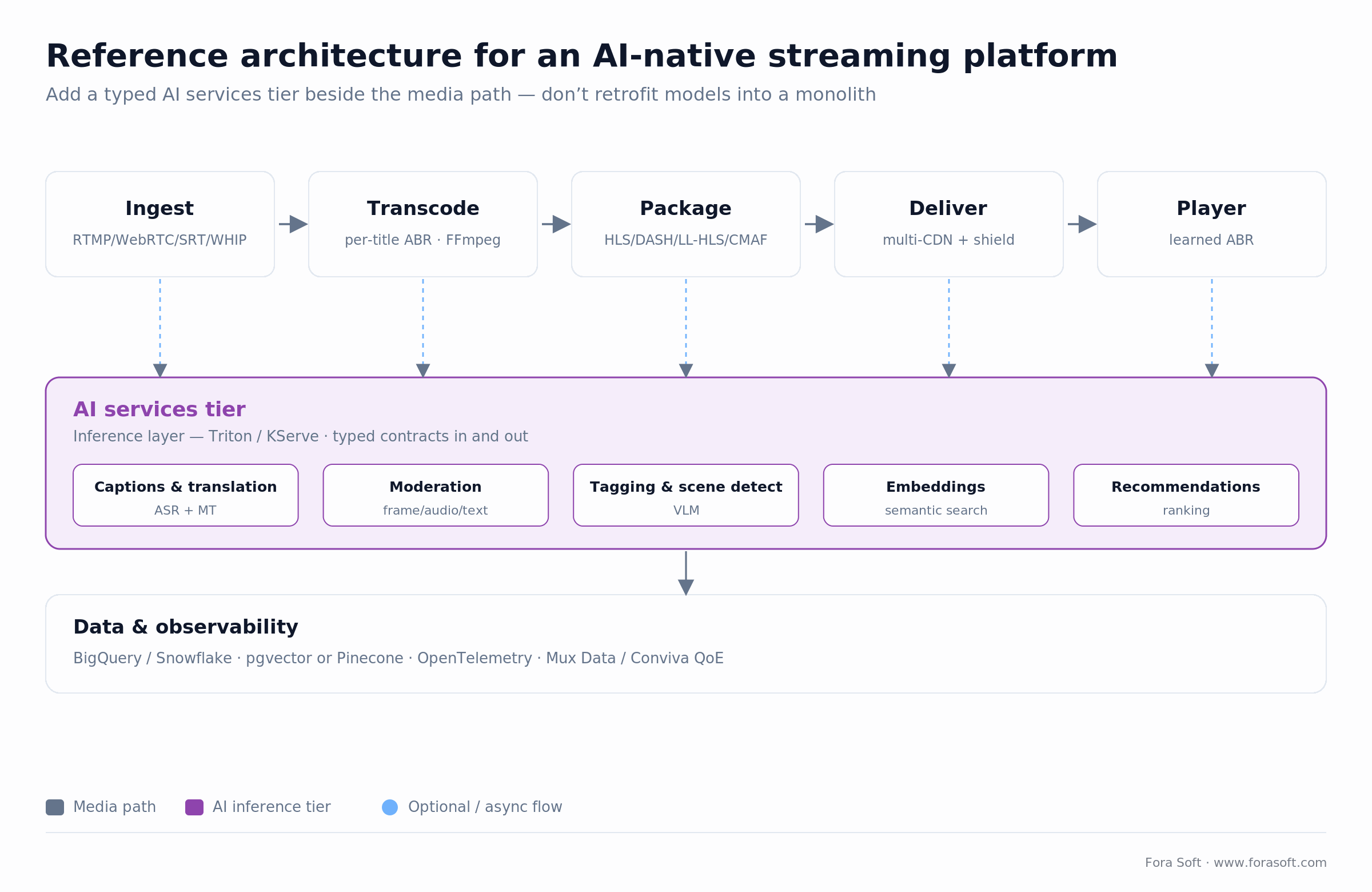
Figure 4. The AI services tier hangs off the media path through typed contracts — captions, moderation, tagging, embeddings and recs all reuse one inference layer instead of a dozen one-off integrations.
| Layer | Role | Typical tech | AI added here |
|---|---|---|---|
| Ingest | RTMP / WebRTC / SRT / WHIP | nginx-rtmp, Pion, OvenMediaEngine, AWS IVS | Noise reduction, auto-cropping, consent gates |
| Transcode | Per-title / per-shot ABR | FFmpeg, Bitmovin, Mux, Harmonic | ML bitrate, VMAF gating, codec choice |
| AI services | Inference layer | Triton, KServe, custom Go/Python | Captions, moderation, tagging, embeddings |
| Packaging | HLS / DASH / LL-HLS / CMAF | Shaka Packager, Bento4 | Dynamic ad markers, steering manifests |
| Delivery | CDN + origin shield | Cloudflare, Fastly, CloudFront, Akamai | ML multi-CDN switching |
| Player | Native / web | Shaka, THEOplayer, AVPlayer, ExoPlayer | Learned ABR, in-player moderation overlays |
| Data | Analytics & embeddings | BigQuery / Snowflake + pgvector / Pinecone | Recommendations, semantic search, churn |
The core stack we reach for
Transport. WebRTC for sub-second interactive (classrooms, telehealth, auctions); LL-HLS or CMAF-CTE for 3–8 second live; HLS/DASH for VOD. WHIP/WHEP are the modern, simple ingest standards.
Encoding. FFmpeg everywhere, with Bitmovin or AWS MediaConvert as managed alternatives. AV1 via libsvtav1; VVC via VVenC once clients support it.
AI serving. NVIDIA Triton or KServe for GPU inference; ONNX Runtime or Core ML on-device. A thin model gateway for third-party LLM calls, with retries and cost caps.
Data. PostgreSQL + pgvector is the sweet spot for embeddings under ~100M items; managed Pinecone, Qdrant or Weaviate above that.
Observability. OpenTelemetry everywhere, plus Mux Data or Conviva for QoE — time-to-first-frame, rebuffering ratio, join failures, exit-before-video-start.
Need help putting AI into a live streaming pipeline?
We’ve shipped WebRTC, HLS and CMAF stacks with ML captions, moderation and personalisation on top. A 30-minute review usually gets you to a clean architecture.
Build vs buy: where AI streaming bets pay off
The honest rule: buy commodity ML, build anything that depends on your catalogue or brand policies. Here’s how that shakes out across the capabilities in this guide.
| Capability | Verdict | Reasoning |
|---|---|---|
| Captions & translation | Buy | Whisper-class APIs are a commodity; undifferentiating |
| Per-title ABR | Buy | Bitmovin, Mux, AWS already ship it |
| Recommendations | Build | Depends on your catalogue, metric and ranking policy |
| UGC moderation | Hybrid | Base models from Hive/AWS; your policies on top |
| Content-ID / fingerprinting | Buy | Non-differentiating, licensed datasets required |
| Generative effects / UX | Build | Product differentiation lives here |
| Churn prediction | Build | Needs your own behavioural telemetry |
Latency: what AI still can’t fix
Every year someone claims AI will collapse the gap between broadcast and interactive latency. It doesn’t. Latency is a transport and infrastructure problem. Choose the transport first; layer AI on top.
| Use case | Target glass-to-glass | Transport | AI layer |
|---|---|---|---|
| Classroom / telehealth | < 500 ms | WebRTC (SFU) | Noise suppression, captions, sentiment |
| Auction / live betting | < 1 s | WebRTC or SLDP | Event detection, anti-fraud |
| Sports live | 3–8 s | LL-HLS / CMAF-CTE | Highlights, ad insertion |
| VOD / OTT | N/A | HLS / DASH | Recommendation, search, chapters |
Mini case: AI inside V.A.L.T. and SuperPower FX
Situation. In V.A.L.T., investigators record and review multi-hour forensic interviews. Finding one exchange used to mean scrubbing a timeline by hand.
Plan. We added an AI services tier: ASR with diarisation, on-the-fly chapter generation, and embedding-indexed transcript search. Every clip becomes queryable by phrase, speaker and visual event the moment it’s recorded, and chain-of-custody logs capture every AI action for court admissibility.
Outcome. Review time dropped sharply, the platform earned premium pricing on the AI search feature, and it now runs at 770+ organizations with 50,000+ active users. Want a similar assessment of your video stack?
The inverse. In SuperPower FX the same pattern runs the other way: generative effects at the creation step, segmentation overlays rendered on mobile GPUs, and server-side inference reserved for the heavier filters. Same engineering discipline — clean typed contracts between the media pipeline and the AI tier.
Cost model: what AI actually costs in streaming
Budget AI along three axes: build effort, runtime cost shape, and the saving or lift it returns. Numbers below are directional — our Agent Engineering approach usually lets us come in under the industry average on build effort. Where we’re unsure of a figure, we leave it out rather than pad it.
| Feature | Build effort | Runtime cost shape | Typical saving / lift |
|---|---|---|---|
| Per-title / per-shot encoding | 4–8 wks | +10–20% encoding CPU | 20–40% delivery savings |
| ASR captions (bought) | 1–2 wks integration | $0.004–0.008 / min | Compliance + reuse |
| Recommendations (built) | 8–16 wks | Train + inference ~$1–3k/mo | 5–15% retention lift |
| UGC moderation (hybrid) | 6–12 wks | API + GPU hours | Compliance + team scaling |
| Generative effects | 12–20 wks | Device GPU, optional server tier | Product differentiation |
The one number people always ask about is captions, so here it is with the arithmetic shown — not a range you have to trust.
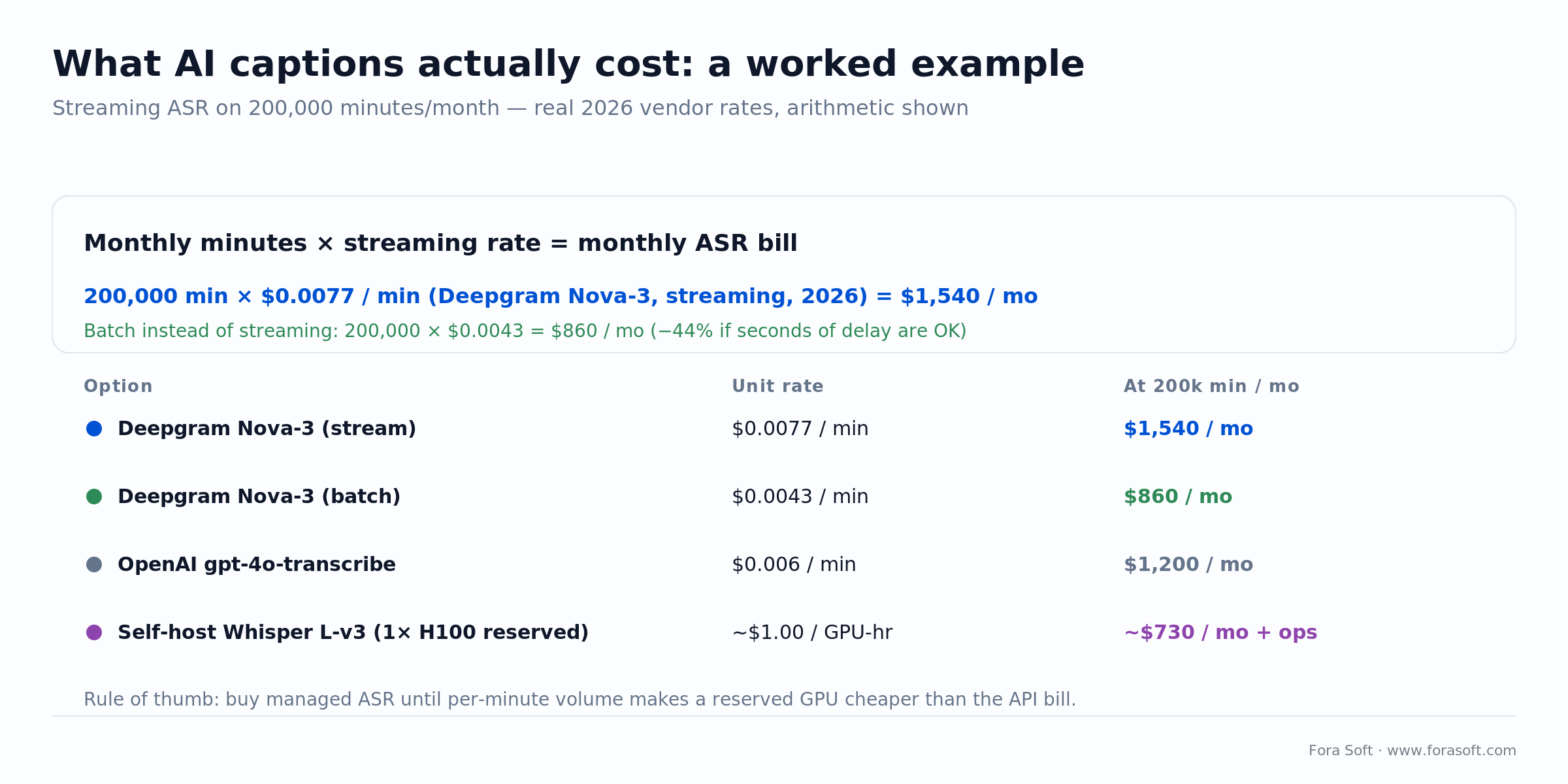
Figure 5. Captions at 200,000 minutes/month, 2026 vendor rates: streaming ASR runs ~$1,540, batch ~$860. Self-hosting Whisper on one reserved H100 lands near $730 plus the ops burden — only worth it once volume is high and steady.
For the whole-platform picture — not just the AI line — see our breakdown of streaming platform development cost.
Five pitfalls that derail AI streaming projects
1. Treating AI as a feature instead of a system. One-off model integrations with no shared serving, evaluation or versioning become a maintenance swamp. Build the AI services layer once, reuse it everywhere.
2. Optimising the wrong metric. Average watch time is the classic trap. Engagement climbs while retention quietly drops because users feel manipulated. Track retention and session starts as primary.
3. Moderation as an afterthought. Regulators and app stores treat moderation as a first-class requirement now. Retrofitting it onto a live UGC product after launch is painful and expensive.
4. Ignoring data rights. Training or fine-tuning on user content without explicit rights is a legal landmine. Bake consent into ingest and content metadata from day one.
5. Betting on one model vendor. Put every third-party model behind a thin internal API. Switching from OpenAI to Claude, Gemini or self-hosted Whisper should be a config change, not a rewrite.
A decision framework in five questions
Q1. What latency do your users actually need? < 1 s → WebRTC / SFU. 3–8 s → LL-HLS / CMAF. VOD → HLS / DASH. AI doesn’t change this.
Q2. Which AI capability is on the critical path? Captions, moderation and discovery usually are; generative effects only if they’re the hook.
Q3. Do you own a catalogue and behavioural data? Without both, recommendations and churn models lose to a good human editor.
Q4. Is the content regulated? Health, education, children, finance — build the compliance log before the model. Non-negotiable.
Q5. Do you own model evaluation? Continuous eval on production-representative data is the difference between AI that improves and AI that quietly rots.
KPIs worth tracking
1. Quality KPIs. VMAF / SSIM on delivered renditions, rebuffering ratio, time-to-first-frame p95, exit-before-video-start rate.
2. Business KPIs. Retention (D1, D7, D30), session starts per active user, recommendation click-through at surface and row level, ARPU, churn rate.
3. Reliability KPIs. AI service uptime, moderation decision latency p95, model-drift alerts per week, percent of AI decisions with a full audit trail (target 100%).
When NOT to add AI to your streaming product
AI isn’t always the right next step. Three signals you should fix something else first.
- Your origin reliability is shaky. No AI feature compensates for a stream that stalls.
- Your catalogue is small and editorial works fine. Human-curated rows beat weak recommenders for months.
- You don’t have analytics in place. Without behavioural data, every AI feature is flying blind.
Fix those first. AI amplifies a healthy streaming platform; it can’t save a broken one.
Need help sequencing AI features on a streaming roadmap?
We’ll help you prioritise encoding savings, moderation, discovery and creator tools in the order that actually moves P&L.
FAQ
How much can AI encoding actually save on delivery bills?
Well-tuned per-title and per-shot encoding typically cuts storage and egress 20–40% at the same VMAF. Netflix reported ~20% from per-title and ~30% per-scene; the exact number depends on your content mix and how rigid the old ladder was.
Does AI moderation remove the need for human reviewers?
No. Regulators, payment processors and app stores expect a human appeal path and an audit trail. AI clears the obvious cases — roughly 80–95% — and lets humans focus on the ambiguous ones.
Open-source or managed ASR for captions?
Managed ASR (Deepgram, AssemblyAI, OpenAI, AWS) is faster to integrate at roughly $0.004–0.008 per minute in 2026. Self-hosted Whisper on a reserved GPU wins once per-minute volume makes the GPU cheaper than the API bill, or when data residency and privacy demand it.
Can AI reduce WebRTC latency below 500 ms?
Not directly. WebRTC already runs under 500 ms on a healthy path. AI helps perceived quality (noise suppression, bandwidth estimation, loss concealment) but doesn’t change the network physics.
Is AV1 ready for production streaming in 2026?
Yes for VOD and large-scale live where encoding compute is acceptable; hardware decode on iOS, Android, modern TVs and browsers is now broad. Ship AV1 alongside H.264/HEVC, not as a day-one replacement.
What’s the biggest hidden cost of AI in streaming?
Evaluation. You need continuous, content-representative eval for every model in production. Skip it and you never see drift — only the business-metric drop months later.
How do I protect my content from being used for AI training?
Robots.txt and licence metadata first; watermarking and hashing for forensic traceability; contractual controls with any vendor you feed content to. None alone is enough; together they’re a practical defence.
What does semantic video search need under the hood?
A multimodal embedding model (CLIP-family for images/text, or a native video encoder like V-JEPA 2 for temporal structure), a vector database (pgvector under ~100M items, Pinecone/Qdrant above), and a shot-segmentation step so you index scenes, not whole files.
What to read next
Features
Essential features of AI-powered streaming platforms
The feature checklist behind the architecture in this playbook.
Cost
Streaming platform development cost
Budgeting a build — SaaS vs custom, with honest numbers.
Live streaming
Future of live streaming trends
What’s shipping beyond AI — latency, codecs, monetisation.
Case study
V.A.L.T. — AI-enhanced video review
AI search, transcripts and chapters at 770+ organizations.
Case study
SuperPower FX — generative video effects
Mobile-first generative effects with real-time inference.
Ready to put AI where it earns money in your streaming stack?
Pick one metric per AI capability. Encoding: delivery cost per hour. Personalisation: retention, not watch time. Moderation: decision latency and audit coverage. Creation: user-facing NPS. When every AI feature maps to a metric, AI stops being a narrative and becomes a lever.
Fora Soft builds AI-native video products end to end — ingest and transcoding through recommendations, moderation and creator tools. If you’re sizing that roadmap, we’ll help you sequence it for business impact, not buzzword density.
Ready to scope your AI streaming roadmap?
Tell us your content type, concurrency target and biggest cost line. We’ll come back with a sequenced plan and an honest build-vs-buy call for every capability.

