

Picking a streaming speech-to-text API for live video is five decisions, not one, and teams that treat it as “just call Deepgram” ship captions their viewers switch off inside a minute. You choose the API for your latency and language mix, engineer the audio path before it ever reaches the model, diarize speakers without a wall-of-text transcript, shape the text for the surface people actually read, and wire it into the video pipeline so captions stay glued to the picture. Get those five right and captions land under 500 ms with usable accuracy. Miss one and the model’s marketing WER won’t save you.
We’ve built this exact stack in production. Since 2005 Fora Soft has shipped 250+ real-time video and audio products, and live captioning sits inside a lot of them: conference platforms, telehealth, remote hearings, e-learning. This is the playbook we actually use, with 2026 numbers: what moves caption latency and accuracy on a live stream, and what’s vendor noise.
If you’re weighing Deepgram, AssemblyAI, Google, AWS or OpenAI for a product where the audio isn’t studio-clean and the captions have to keep up with the video, this is the document. We’ll show the pricing math, the sync trap that breaks most first builds, and the honest cases where you shouldn’t build this at all.
Key takeaways
• Five decisions, one pipeline. API choice, audio engineering, diarization, transcript shaping, and pipeline integration. Skip one and viewers silence your captions.
• 2026 prices are flat enough to pick on fit, not cents. AssemblyAI $0.0025/min, Deepgram Nova-3 $0.0058/min, Google V2 $0.016/min, AWS $0.024/min. The spread is latency, languages, and billing rounding.
• Audio quality decides most of your WER. A cheap model on clean 16 kHz mono beats a premium model on a laptop mic across a noisy room.
• Sub-500 ms end-to-end is the 2026 bar for conversational live captions; past 600 ms it reads as broken on screen.
• Sync is the real bug factory. Timestamp every transcript against the media clock (RTP/HLS PTS), never the wall clock, or captions drift off the picture.
Why Fora Soft Wrote This Guide
We build real-time video and audio platforms, and captioning is a layer we’ve shipped on top of WebRTC, HLS, and SRT pipelines many times. The clearest example is Translinguist, a real-time interpretation platform we built that delivers live captions in the source language plus translated captions and voice in 30+ languages, used for conferences, shareholder meetings, and remote hearings. Getting captions to feel instant on that product forced us to solve every one of the five decisions below.
That work lives inside our AI integration and custom software development practices, with an AI and ML specialist on every real-time team. So the trade-offs here aren’t from a benchmark page. They’re from shipping captions to real viewers who complain the moment the text lags the speaker. Everything below is what we’d tell a client on a scoping call, written down.
Tip 1: Pick the Right Streaming Speech-to-Text API
The streaming speech-to-text API market in 2026 is a five-horse race, and the right pick depends on what your stream looks like, not on who tops a leaderboard. Latency, per-minute price, language coverage, and diarization quality move independently across vendors, so the winner for a two-language webinar is rarely the winner for a 40-language global event. The chart below plots where each option sits on the two axes that decide most live builds: price and latency.
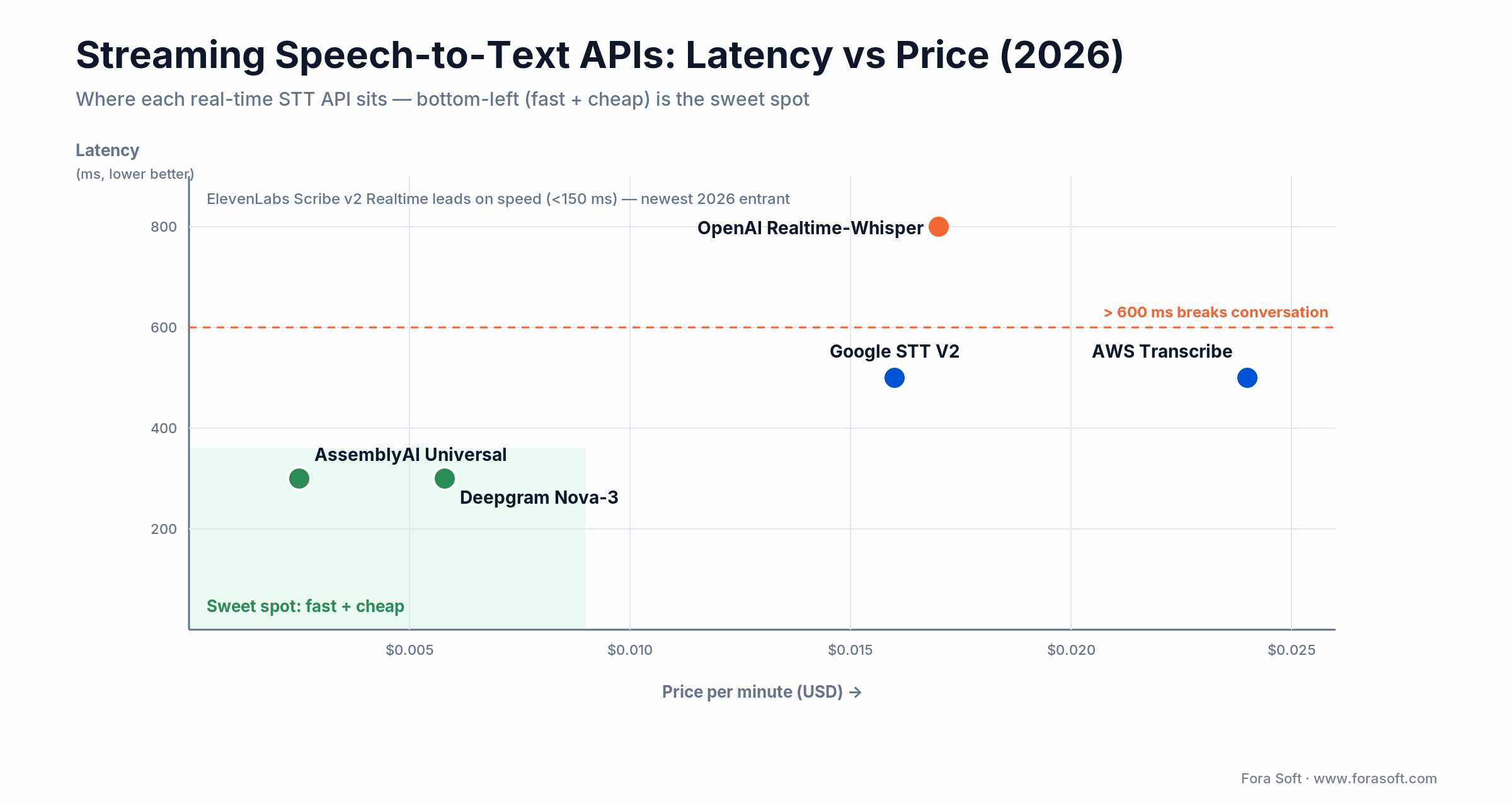
Figure 1. Latency vs price for the main streaming STT APIs (2026). Bottom-left is fast and cheap.
| Provider | Price / min | Latency (partial → final) | Languages | On-prem | Where it wins |
|---|---|---|---|---|---|
| Deepgram Nova-3 / Flux | $0.0058 multi (promo; $0.0092 list) | ≈120 → <300 ms | 36+ | Yes | Lowest latency; Flux end-of-turn for agents |
| AssemblyAI Universal-Streaming | $0.15/hr (≈$0.0025) | ≈300 ms final | 20+ | No | Cheapest; free concurrency; strong diarization |
| Google Cloud STT V2 | $0.016 (batch $0.003) | ≈500 ms | 125+ | No | Broadest languages; bills per 15 s |
| AWS Transcribe | $0.024 (→$0.0078 at volume) | ≈500 ms | 100+ | No | AWS integration; 15 s minimum per request |
| OpenAI Realtime-Whisper | $0.017 | 150 ms target (500–1500 real) | 90+ | No | Hard audio; native GPT-agent path |
| ElevenLabs Scribe v2 Realtime | Usage-based | <150 ms | 90+ | No | Fastest WebSocket transcription we’ve tested |
| Speechmatics | Enterprise / usage | ≈1 s final | 50+ | Yes | On-prem / air-gapped; accents + code-switching |
| Gladia | Usage-based | ≈300 ms | 100+ | Partial | Multilingual + code-switching focus |
| Open-source (WhisperX / whisper-streaming) | Infra only | 0.5–1 s | 99+ | Yes | Zero per-minute cost; full control |
Decision rule. Pick Deepgram or AssemblyAI when sub-400 ms is a hard requirement (voice agents, live broadcast captions). Pick Google V2 when you need 40+ languages at even quality. Pick AWS Transcribe when you’re already deep in AWS and want Call Analytics. Use OpenAI Realtime-Whisper or a batch pass to correct the archive when accuracy matters more than sub-second delivery. One caveat on the accuracy leaders: Deepgram reports 5.26% batch WER on its own set, and NVIDIA Canary-Qwen tops the public Open ASR Leaderboard near 5.6%. But on independent mixed sets the same models score far higher. Marketing WER is not your WER.
Two 2026 dimensions the datasheet comparisons miss: code-switching and data residency. If speakers mix languages mid-sentence, Speechmatics and Gladia handle it better than the US-first models. If audio can’t leave your network, Speechmatics or self-hosted WhisperX run fully on-prem. And clean-English WER clusters tightly at 5–8% across the whole 2026 frontier, so on a real stream the tiebreaker is your audio and your languages, not the leaderboard.
Reach for a per-minute vendor test when: you have three hours of your real stream audio. Run the top two on it: your noise, accents, and vocabulary shift the ranking 20–40%, and the winner on your audio is rarely the winner on LibriSpeech.
What Caption Latency Should You Target?
Target under 500 ms from spoken word to rendered caption for conversational live streams, and under 1 second for one-way broadcast. Past 600 ms, viewers read the delay as a bug and turn captions off. That budget isn’t one number you buy from a vendor. It’s a sum across six stages, and the ASR call is only one of them. The diagram below shows where the milliseconds go.
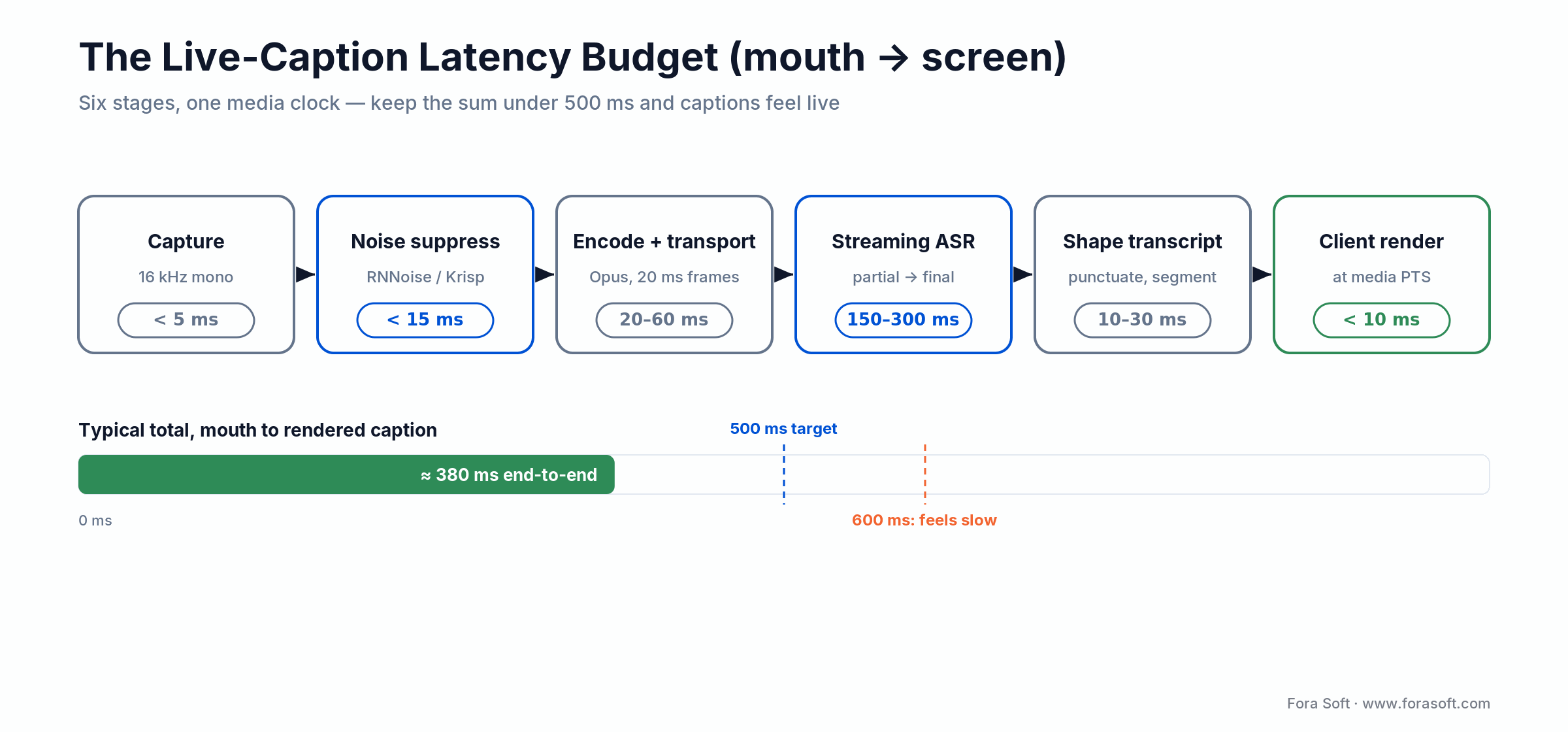
Figure 2. The six-stage caption latency budget; keep the sum under 500 ms.
Two lines on that budget cause most of the pain. The transport stage balloons if you send captions over a slow polling channel instead of a WebRTC data channel or a low-latency segment. The ASR stage varies 3× between vendors, which is why Tip 1 matters. Everything else (capture, suppression, shaping, render) is small and under your control. Spend your latency budget where the big numbers are.
Tip 2: Engineer the Audio Path, Not Just the Model
The single biggest driver of caption quality is what arrives at the model, not the model itself. A top-tier $0.017/min model on bad audio loses to a $0.0025/min model on clean audio every time. Four rules keep the audio path reliable on a live stream:
1. Sample at 16 kHz mono, 16-bit PCM. Every production streaming ASR in 2026 trains on 16 kHz mono. Sending 48 kHz stereo just makes the provider downsample on ingest, often with worse filters than your capture side. Resample and downmix locally before the wire.
2. Run noise suppression, not noise gating. A neural suppressor (RNNoise, NVIDIA Broadcast, or Krisp) on the capture side cuts WER 15–25% on noisy streams without chewing up voiced segments. A noise gate does the opposite: it clips word-initial phonemes and raises WER. They are not interchangeable, and teams confuse them constantly.
3. Give presenters a headset mic. This is a briefing you send before the stream, not a codec setting. A $40 cardioid headset 3 cm from the mouth routinely beats a $500 room array for live ASR. Publish a one-page presenter brief with two or three models you support, and hold people to it.
4. Apply AGC at capture, not at broadcast. Automatic gain control belongs upstream of the ASR tap. Applied post-mix at broadcast time, it smears the transient energy the model uses to segment speech. WebRTC’s built-in AGC is usually enough. Don’t stack a second one on top. For the fundamentals underneath all of this, our Audio for Video learning track walks through capture, codecs, and processing.
Reach for on-device STT when: your latency budget is under 200 ms and you can ship Whisper.cpp or Vosk on the client. You trade some accuracy and language coverage for privacy and near-zero network latency, a fair deal for short commands and single-speaker capture.
Captions lagging the speaker on your live stream?
Tell us your stream type, languages, and latency budget. We’ll come back with a vendor pick and an integration plan — no upsell.
Tip 3: Do Real-Time Speaker Diarization Right
Streaming diarization is a $0.002–$0.004/min add-on from every major provider in 2026, cheap enough to always enable for panels, interviews, webinars, and courtroom feeds — and it’s the backbone of any meeting bot API that has to label who said what. But turning it on isn’t enough. Three engineering moves make diarization actually readable:
Do not expect voiceprint enrollment from streaming APIs. Deepgram, AssemblyAI, and Google diarize by clustering voices on the fly, not by matching pre-uploaded samples; AssemblyAI labels speakers from conversational context instead. If a named speaker has to stay correct across a long stream, run a dedicated speaker-recognition step next to the ASR (Azure Speaker Recognition, or self-hosted pyannote or NeMo with enrollment) and reconcile the labels downstream.
Map speaker IDs to names server-side. The ASR returns “Speaker 0, 1, 2.” Your session layer maps those to “Dr. Chen, Ms. Patel” from the event’s presenter list. Keep that mapping on the server. Never ship raw speaker indices to clients.
Debounce speaker switches. Add a 400–600 ms hysteresis window. Without it, one cough or stutter re-attributes two words to the wrong person, which reads badly in live captions and worse in a transcript of record.
Reach for per-track routing when: you run a WebRTC multi-track stream. Send each presenter’s track to its own ASR session instead of mixing first. Diarization collapses into trivial track-to-speaker mapping and 90% of confusion errors disappear. Fall back to acoustic diarization only for shared-mic rooms.
Tip 4: Shape Transcripts for the Viewer Surface
Raw ASR output is the wrong format for any viewer surface. Three post-processing passes should happen before a caption reaches the client:
Punctuation and casing
Every mainstream streaming API emits punctuation and casing in real time now, but they differ in aggressiveness. Tune the confidence threshold per language. Spanish and Mandarin usually need a lower bar than English to avoid dropped commas that make captions unreadable.
Segmentation for display
Cap caption lines at 32 characters on mobile and 42 on desktop. Split on punctuation where you can, on a pause boundary where you can’t. Hold each line on screen at least 1.2 seconds even if new words arrive. People can’t read faster than that. Most SDKs emit partials then finals; render finals, not partials, or the text flickers.
Profanity and PII handling
Providers ship per-call profanity masking and PII redaction (names, phone numbers, card numbers) as add-ons. Turn them on by default for consumer-facing streams. For regulated workloads (courts, healthcare, education), put your own redaction layer downstream too, as belt and suspenders.
Tip 5: Wire ASR Cleanly Into the Streaming Pipeline
How you tap audio and deliver captions decides whether they stay in sync with the picture. There are four common live pipelines, each with its own tap point, delivery format, and sync discipline. The map below shows all four at a glance.
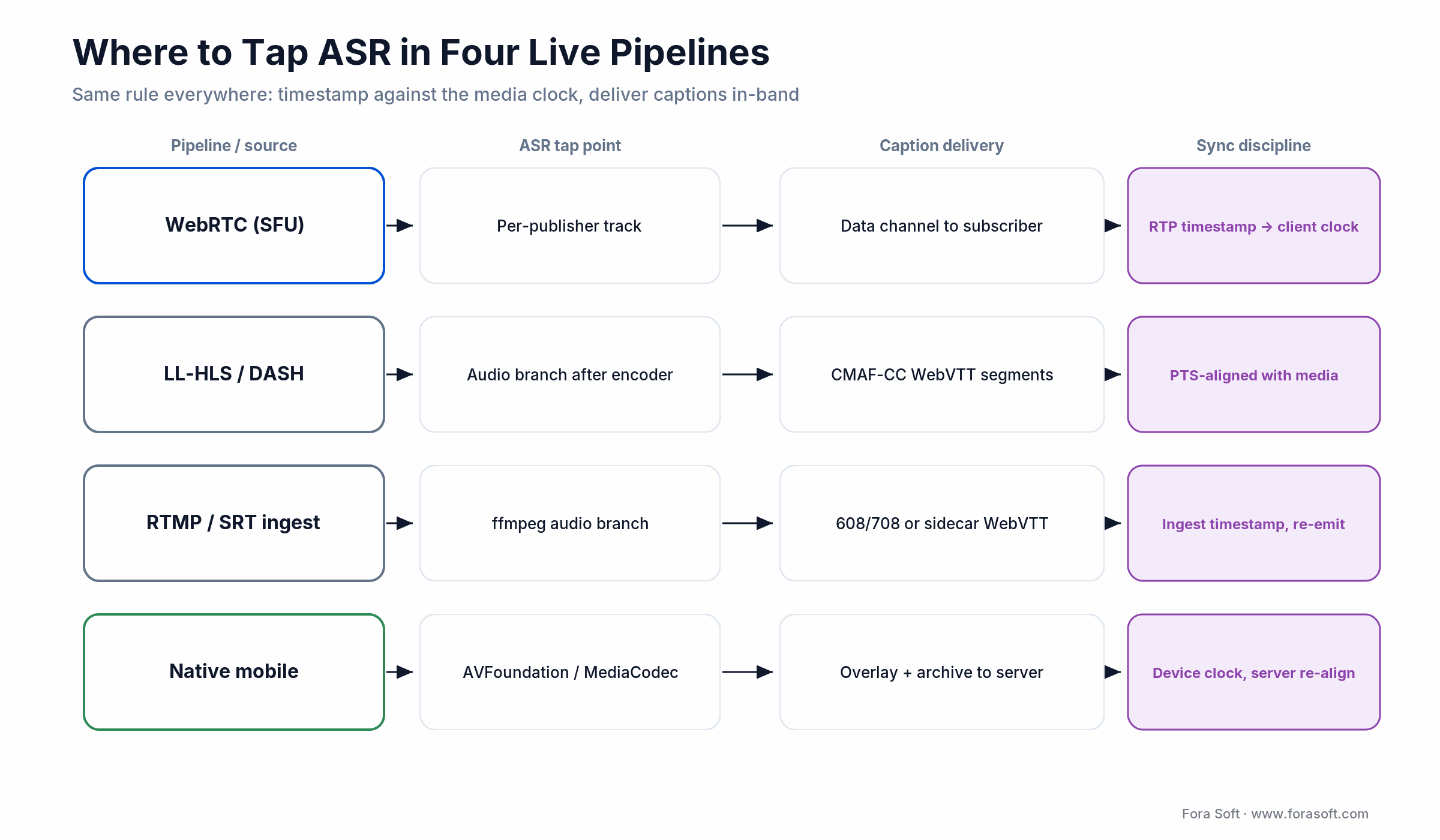
Figure 3. Where ASR taps in, and how captions ride, across four live pipelines.
| Pipeline | ASR tap point | Caption delivery | Sync discipline |
|---|---|---|---|
| WebRTC (SFU) | Per-publisher track on the SFU | Data channel to each subscriber | RTP timestamp, delta to client clock |
| LL-HLS / DASH | Audio branch after the encoder | CMAF-CC (WebVTT) segments | PTS-aligned with media segments |
| RTMP / SRT ingest | ffmpeg audio branch from ingest | 608/708 or sidecar WebVTT | Ingest timestamp, re-emit with HLS |
| Native mobile broadcast | AVFoundation / MediaCodec callback | Overlay on publisher, archive to server | Device clock; server re-aligns for VOD |
The sync-discipline column is where most production bugs live. For voice-agent builds, the same transport and ASR layer slots straight into a full agent stack, which we cover in our LiveKit multimodal agents guide.
Reach for a WebRTC data channel when: you already run captions over a WebRTC stream. It carries caption cues with sub-frame timing and no extra segmenting, the cleanest delivery path when the video is already peer-to-peer or SFU-routed.
How Do You Keep Captions From Drifting?
Timestamp every ASR emission against the media clock (RTP or HLS PTS), never the wall clock, and carry that timestamp all the way to the client renderer. That one rule fixes most caption drift. On HLS, anchor the WebVTT to the media timeline with an X-TIMESTAMP-MAP header so captions stay aligned even after a seek; on WebRTC, stamp the data-channel payload with the RTP time.
The advanced trick, when you need bleeding-edge sync, is to render captions at their PTS time and delay the video by a matching few hundred milliseconds. That gives you sub-100 ms effective drift at the cost of a hair more glass-to-glass latency. If captions drift more than ~300 ms from the picture, viewers perceive the whole stream as broken, so the standards matter here. CMAF carries the same WebVTT or 608/708 payload for both HLS and DASH, which the low-latency streaming protocol guides lay out in detail.
What We Learned Building Translinguist
When we started on live captions for Translinguist, the first cut ran ASR on a mixed conference feed and delivered captions on a polling channel. End-to-end latency sat near 900 ms and speaker labels smeared across whoever spoke last, the classic wall-of-text that clients hate.
Over a focused iteration we applied all five decisions: Deepgram Nova-3 for sub-300 ms source-language partials, per-publisher 16 kHz mono with RNNoise and AGC off at broadcast, per-track routing through the WebRTC SFU with presenter names mapped from the event schedule, punctuated finals only with a 42-character line cap and 1.4-second dwell, and captions delivered over the data channel with RTP-referenced timestamps (CMAF-CC as the HLS fallback). We added an OpenAI corrective pass on the archive for the transcript of record.
The result: captions at roughly 380 ms median end-to-end latency and measured English WER under 6% in moderately noisy rooms, with clean per-speaker attribution. The “captions are wrong again” tickets stopped. Want a similar assessment of your stream? Bring a recording of your worst audio.
The Real 2026 Cost Math: A 1,000-Hour Month
For a live platform doing 1,000 hours of streamed audio a month, or 60,000 minutes, here is what the provider layer costs. The spread is wider than the per-minute rates suggest, because Google bills per 15 seconds rounding up and AWS enforces a 15-second minimum per request, both of which inflate short-utterance workloads.
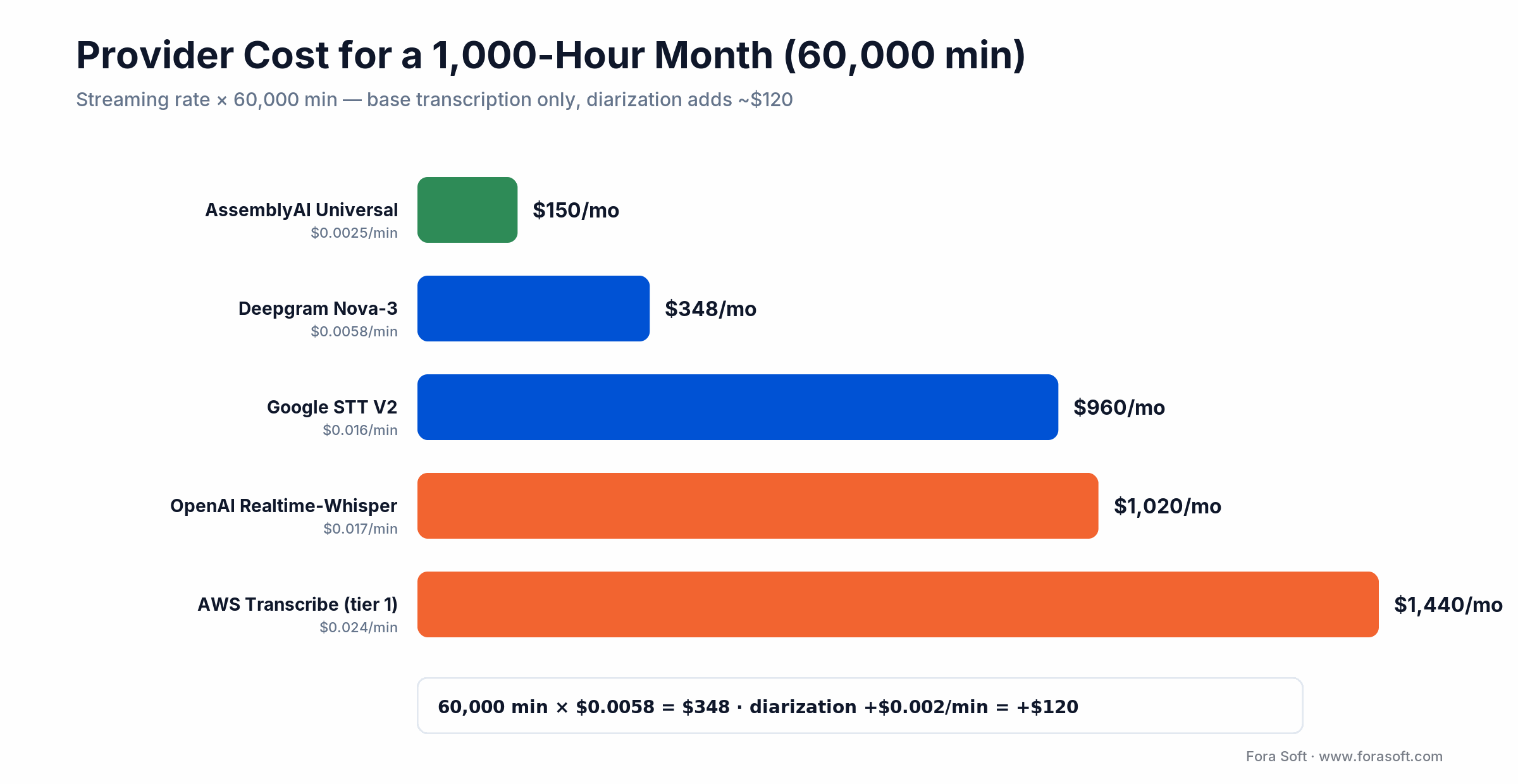
Figure 4. Base transcription cost for a 1,000-hour month by provider (2026).
| Provider | Rate | 60,000 min / month |
|---|---|---|
| AssemblyAI Universal-Streaming | $0.15/hr | ≈$150 |
| Deepgram Nova-3 (multilingual) | $0.0058/min | ≈$348 |
| Google Cloud STT V2 | $0.016/min | ≈$960 |
| OpenAI Realtime-Whisper | $0.017/min | ≈$1,020 |
| AWS Transcribe (tier 1) | $0.024/min | ≈$1,440 |
Worked example on Deepgram, at the 2026 rate: 60,000 min × $0.0058 = $348/month for base transcription (that $0.0058 is Deepgram’s current promotional multilingual rate; the list rate is $0.0092, or $552/month). Add streaming diarization at $0.002/min — 60,000 × $0.002 = $120 — and you’re at $468 for fully-labeled multi-speaker captions. The engineering to wire any of these into a live pipeline is typically a 4–8 week v1 plus about 4 weeks of A/B tuning on your real audio to stabilize WER. Budget around that, not the per-minute rate. The integration labor dwarfs the API bill at anything under enterprise scale.
Want the real number for your volume and stack?
Share your minutes, languages, and pipeline. We’ll model the provider cost and the integration effort, and flag where the sync pitfalls hide.
Build, Buy, Hybrid, or Open-Source
A quick grid for the four typical 2026 paths. Pick the row that matches your team size, regulatory surface, and time-to-value target, not the one that sounds most ambitious. If the answer is a custom or hybrid build, our custom speech-to-text development team ships Whisper, Deepgram and AssemblyAI pipelines with real-time captions, on-prem or in the cloud.
| Approach | Best for | Build effort | Time-to-value | Main risk |
|---|---|---|---|---|
| Buy off-the-shelf SaaS | Teams < 10 engineers, generic captions | Low (1–2 weeks) | 1–2 weeks | Vendor lock-in, limited caption UX control |
| Hybrid (API + custom layer) | Most streaming platforms | Medium (1–2 months) | 1–3 months | Integration debt, two systems to maintain |
| Build in-house | Media businesses where ASR is the product | High (3–6 months) | 6–12 months | Engineering velocity, talent retention |
| Open-source self-hosted | Cost-sensitive or compliance-bound | High (2–4 months) | 3–6 months | GPU ops, security patching |
For most streaming platforms the hybrid path wins: a hosted streaming API for the ASR, plus your own thin layer for diarization mapping, transcript shaping, and caption delivery. That’s the shape of nearly every live-caption build we ship.
How to Evaluate: The Three Metrics That Matter
Don’t judge streaming captioning on a single WER number. You need three, measured on your own audio, not the vendor’s:
Final WER. The standard measure on finalized captions. A good production target is under 8% on typical audio, under 15% on hard audio. Segment it by scenario (clean, noisy, accented) instead of reporting one blended figure.
Latency p95. The 95th-percentile time from spoken word to rendered final caption. Sub-500 ms for conversational streams, sub-1 second for broadcast. Watch the tail, not the median. One late caption in twenty is what viewers remember.
Partial flicker rate. How often a partial caption changes before it’s finalized. Above 30% and viewers find it distracting. Control it by rendering finals only, or by debouncing partials with a short hysteresis window. For deeper WER work on hard audio, our noisy speech recognition guide goes layer by layer.
Privacy, Residency, and the EU AI Act
Streaming ASR sends every spoken word to a third-party service, so for regulated workloads this is a first-class architecture concern, not a checkbox.
Data residency and BAAs. Google V2, AWS Transcribe, and Deepgram offer regional endpoints. Use EU endpoints for GDPR workloads. HIPAA-covered audio needs a signed BAA, available on higher tiers from every major provider. Confirm in writing that customer audio isn’t used for model training; most vendors default to opt-out, not opt-in.
The EU AI Act moved its dates. The 2026 Digital Omnibus pushed high-risk obligations back: standalone Annex III systems (workplace, education, law-enforcement uses) now apply from 2 December 2027, and AI embedded in regulated products under Annex I (medical devices, machinery, vehicles) from 2 August 2028. The Article 50 transparency duties (telling people they’re being recorded or captioned by AI) stay on the original schedule. See the official EU AI Act timeline. Transcription-only captioning usually sits outside high-risk; the moment you infer speaker identity, demographics, or emotion, you’re in Annex III territory and owe conformity paperwork.
Recording consent. Two-party-consent jurisdictions — California, Illinois, Germany — require explicit consent before you record and transcribe a live stream. Build the consent flow in from day one. None of this is legal advice; run your deployment past counsel.
Reach for self-hosted Whisper or Riva when: court, defense, or certain healthcare rules block third-party audio entirely. Budget 2–3× the integration effort and accept 50–100 ms more latency versus a hosted API — the price of keeping audio on your own infrastructure.
A Decision Framework in Five Questions
Answer these five and your stack picks itself.
1. Conversational or one-way? Voice agents and interactive events need sub-400 ms — Deepgram or AssemblyAI. One-way broadcast can tolerate 700 ms–1 s and open more vendor options.
2. How many languages? Two or three: any top vendor. 40+ at even quality: Google V2 as the backbone, with a fallback for the long tail.
3. How noisy is the audio, really? Measure signal-to-noise on real recordings. Clean rooms need a model plus VAD; noisy venues need the full audio-path treatment from Tip 2 before you touch the model.
4. What’s your compliance surface? PHI, EU voice data, or on-prem-only pushes you toward self-hosted Whisper or Riva with a signed BAA. Everything else can run on a hosted API.
5. What’s your monthly volume? Under a few million minutes, stay on a cloud API for velocity. Past that, with steady load, self-hosting starts to pay. When two answers pull in opposite directions, that’s exactly the conversation we have on a scoping call.
Five Pitfalls That Wreck Live Captioning
1. Benchmarking on marketing WER. Choosing a vendor on its own leaderboard number and finding production WER double. Always A/B on three hours of your real stream first.
2. Ignoring the audio path. Paying for the priciest model while feeding it 48 kHz stereo off a room mic. Clean 16 kHz mono plus a suppressor buys more accuracy than any model upgrade.
3. Rendering partials. Showing every partial hypothesis so captions flicker and rewrite themselves on screen. Render finals, hold each line 1.2 seconds.
4. Syncing to the wall clock. Timestamping captions with server time instead of the media PTS, so they drift as network jitter accumulates. Stamp against the media clock, always.
5. Skipping the consent and retention design. Treating GDPR, HIPAA, and two-party-consent as a post-launch sprint. They’re design constraints — retrofitting them is where budgets go to die.
The KPIs to Track Before and After Launch
Outcome metrics drive every live-caption decision; vanity counters don’t. Track three buckets.
Quality KPIs. Segmented WER (clean / noisy / accented), speaker-attribution accuracy, and caption-line readability (characters per line, dwell time). Set a hard WER ceiling per scenario and alert when a release crosses it.
Business KPIs. Caption-complaint tickets per 1,000 sessions, accessibility-driven watch time, and cost per streamed minute. Attribute any lift with a clean A/B against a hold-out — most teams skip the hold-out and then can’t say whether the gain is real.
Reliability KPIs. Latency p95 and p99, streaming disconnect rate, and fallback-path hit rate when the primary provider times out. A caption track that’s accurate but occasionally three seconds late still feels broken.
When NOT to Build Live Speech-to-Text
Honesty sells better than a pitch, so here’s where this whole effort is the wrong call. If your captions can lag a few seconds — a recorded webinar you publish afterward, a VOD library — skip streaming ASR entirely and run a batch pass. It’s cheaper and more accurate, and nobody is watching live.
If your volume is a few thousand minutes a month, don’t agonize over vendors — pick AssemblyAI or Deepgram, ship, and move on; the bill is smaller than the meeting you’d hold to compare them. And if you only need short command recognition (“start,” “mute,” “next slide”), on-device keyword spotting beats a full streaming pipeline on latency, cost, and privacy. Save the five-decision stack for real conversational captions where the audio is messy and the delay is visible.
FAQ
What end-to-end caption latency should we target in 2026?
Under 500 ms for conversational streams (voice agents, webinars, interactive events) and under 1 second for one-way broadcast. Deepgram Nova-3 and AssemblyAI Universal-Streaming routinely deliver 300–400 ms; Google and AWS sit around 500 ms. Past 600 ms, viewers read the lag as broken.
Which streaming speech-to-text API is cheapest for a live platform?
AssemblyAI Universal-Streaming at $0.15/hour (≈$0.0025/min) is the lowest headline rate, roughly $150 for a 1,000-hour month. Deepgram Nova-3 lands near $348. Google ($960) and AWS ($1,440) cost more per minute and add billing rounding — Google bills per 15 seconds, AWS enforces a 15-second minimum — which inflates short-utterance workloads.
Can we use one provider for both live captions and archival transcripts?
You can, but the best streaming model is rarely the best batch model. A common 2026 pattern is Deepgram Nova-3 or AssemblyAI live, then a corrective OpenAI or Whisper batch pass on the archive. That gives sub-400 ms live captions plus a cleaner transcript of record.
How do we stop captions drifting out of sync with the video?
Timestamp every ASR emission against the media clock (RTP or HLS PTS), not the wall clock; carry that timestamp through your delivery layer (data-channel payload or CMAF-CC cue time); and render captions at their PTS on the client. On HLS, use an X-TIMESTAMP-MAP header so captions survive seeks. The client-render-at-PTS trick gets you sub-100 ms effective drift.
How much does speaker diarization add to the bill?
Roughly $0.002–$0.004 per minute across major providers — about $120–$240 on top of a 1,000-hour month. For any multi-speaker stream it’s worth it, because without diarization your captions become an unreadable wall of text with no idea who said what.
Should we self-host Whisper instead of using a hosted API?
Only if compliance forces it or you run unusual volume. Hosted streaming ASR beats self-hosting on total cost below roughly two million minutes a month. Self-hosted Whisper Large v3 Turbo on L4 or A10 GPUs works, but you take on GPU fleet management and 50–100 ms more latency.
How do we caption 30+ languages without 30 vendor contracts?
Use one vendor as the backbone — Google V2 has the broadest coverage, Deepgram Nova-3 Multilingual covers 45+ with ultra-low latency — and fall back to OpenAI Realtime-Whisper for long-tail languages neither covers well, accepting a slightly higher latency budget on those.
How long does it take to ship a live captioning feature?
For a team that has done it before, 4–8 weeks to integrate a streaming API end-to-end with audio cleanup, diarization, and caption delivery, plus about 4 weeks of A/B tuning on your real audio. Self-hosted pipelines run 3–6 months. For a scoped estimate, book a call.
What to Read Next
ASR in noise
Speech Recognition Accuracy in Noise
The audio and model tricks that move WER on hard, real-world audio.
Live translation
Real-Time Meeting Translation Platforms
Extend captions into multilingual voice and text in the same pipeline.
Voice agents
Multimodal AI Agents with LiveKit
The full agent stack — ASR, LLM, TTS — over WebRTC.
iOS
On-Device Speech Recognition on iOS
When to move captioning onto the client for latency and privacy.
Vendors
Top AI Speech Recognition Software
The wider vendor landscape and a matrix for picking a provider.
Ready to Ship Live Captions That Work?
Effective streaming speech-to-text for live video is a pipeline decision, not a vendor decision. Pick the API for your latency and languages, clean the audio before the model sees it, diarize with pre-enrolled speakers and per-track routing, shape transcripts for the surface people actually read, and stamp everything against the media clock so captions stay glued to the picture.
The teams that ship great live captions in 2026 treat all five as engineering problems and budget the integration labor to match. The ones that pick a vendor and call it done ship captions their viewers silence in the first minute.
If you’d rather bring in a team that has shipped this stack — WebRTC, HLS, SRT, multi-speaker, multilingual — end to end, that’s us.

The book · Volume 7 of 7
AI for Video: A Complete Guide to Intelligence in Video Products: From Real-Time Pipelines and Agents to Serving, Cost, Compliance, and Verticals
Hitting a caption latency target means placing ASR inside the live pipeline rather than bolting it on afterwards, which is where these five tips stop. Volume 7 of our handbook covers live captions and translation, where AI fits into a WebRTC pipeline, the call latency budget, serving on vLLM, Triton and TensorRT, and EU AI Act obligations. Written by Nikolay Sapunov, CEO at Fora Soft.
Read it on Amazon →Kindle & paperback · Fora Soft Video Engineering Handbook
Adding live captions to your platform?
We scope the vendor, the integration pattern, and the WER/latency targets — then build it. Book a call and bring a sample of your worst audio.

