

The best AI tools for lesson planning in 2026 aren’t the ones with the slickest demo. They’re the ones a district will let teachers log into without a six-month privacy review. The serious question stopped being “which one writes the best outline?” a while ago. It’s now “which one signs a data-privacy agreement, tags the right standard, and fits the tab a teacher already has open.” The eight that clear that bar are MagicSchool, Diffit, Curipod, Eduaide.ai, Brisk Teaching, Education Copilot, Khanmigo, and Flip Education. We built ALDA, an AI course generator co-designed with 70+ US college educators, and we’ve integrated tools like these into LMS platforms, so this reads like an architect’s memo, not a listicle.
Key takeaways
• The shortlist. For most teams: MagicSchool for breadth, Diffit for differentiation, Curipod for live engagement, with Eduaide, Brisk, Education Copilot, Khanmigo and Flip Education as specialists.
• Compliance decides adoption, not model quality. A signed DPA and FERPA/COPPA posture gate district rollout. The amended COPPA rule hit its April 22, 2026 compliance deadline and is now in full effect.
• Prices moved in 2026. Diffit is now $14.99/mo or $149.99/yr (not the $89 you’ll see repeated everywhere); Khanmigo is free for all US teachers; Eduaide Pro is $49.99/yr.
• Free built-ins reset the baseline. ChatGPT for Teachers is free for verified US K-12 staff through June 2027 (OpenAI, November 2025), and Gemini in Classroom is free in every Google Workspace for Education edition (Google, June 2025). A paid tool now has to beat free.
• Teachers who use AI weekly save 5.9 hours a week, about six weeks a year (RAND/Gallup, 2025). Lesson prep is one of the three tasks where it saves the most.
• Building? Don’t rebuild these. Wrap a model with your own curriculum RAG and a compliance posture a district CTO will sign. We show the buy-vs-build cost math below.
Updated October 2026: added ChatGPT for Teachers, Gemini in Classroom and Oak’s Aila, a planning-plus-grading guide, Curipod’s shift to writing practice, re-verified prices, and cost math on GPT-5.6 Terra.
Why Fora Soft wrote this comparison
Fora Soft has built software since 2005: 21 years, 250+ shipped products, 50+ people who specialize in multimedia and AI. We’ve written the production RAG layer that keeps generated lessons grounded in a client’s real curriculum instead of plausible-sounding invention, and we’ve integrated MagicSchool-style toolkits into LMS platforms for EdTech clients. On ALDA, an AI course generator co-designed with 70+ US college educators and now owned by 1EdTech, the platform raised educator efficiency by 20%. That’s the vantage point here: we’ve built the thing these eight products are, and we’ve shipped the compliance work that decides whether a district ever turns them on.
We link our EdTech work throughout — the virtual-classroom build for BrainCert, the education platform for Tabsera, and the way we think about AI-crafted personalized learning materials. None of that is theory: it’s the day job of our e-learning software development team.
Reach for auto-generation when: you have standards alignment and a teacher-in-the-loop edit step. Miss either one and the output won’t survive a department chair’s review.
Building an EdTech product with AI lesson planning inside?
We’ll map your curriculum model, pick the right vendor or decide to build, and scope the RAG and compliance layer. 30 minutes, no commitment.
The 2026 lesson-planning reality, in numbers
Adoption is no longer the question. In the RAND/Gallup study “Teaching for Tomorrow” (surveyed March–April 2025, n=2,232 US K-12 teachers), 6 in 10 teachers had used AI that year and about 32% used it weekly. The weekly users saved an average of 5.9 hours a week — roughly six weeks over a school year. The tasks where AI saved the most time were creating worksheets and assessments, admin work, and preparing lessons. So the tool you pick isn’t buying novelty. It’s buying back the single scarcest thing a teacher has.
The best controlled evidence comes from England. In the Education Endowment Foundation’s randomised trial (EEF evaluation report, December 2024; 259 Key Stage 3 science teachers in 68 schools), teachers using ChatGPT spent 56.2 minutes a week on lesson and resource preparation versus 81.5 minutes without it, a 31% saving, and a blinded expert panel found no drop in quality. A second EEF trial, of Oak National Academy’s Aila with about 450 primary teachers, is due to report in autumn 2026.
Here’s the catch that the demos skip: those hours only show up if the workflow survives contact with a real classroom and a real procurement office. A generated plan that ignores the state standard, or a vendor that won’t sign a data-privacy agreement, produces zero of those six weeks. The workflow below is where the time is actually won or lost.
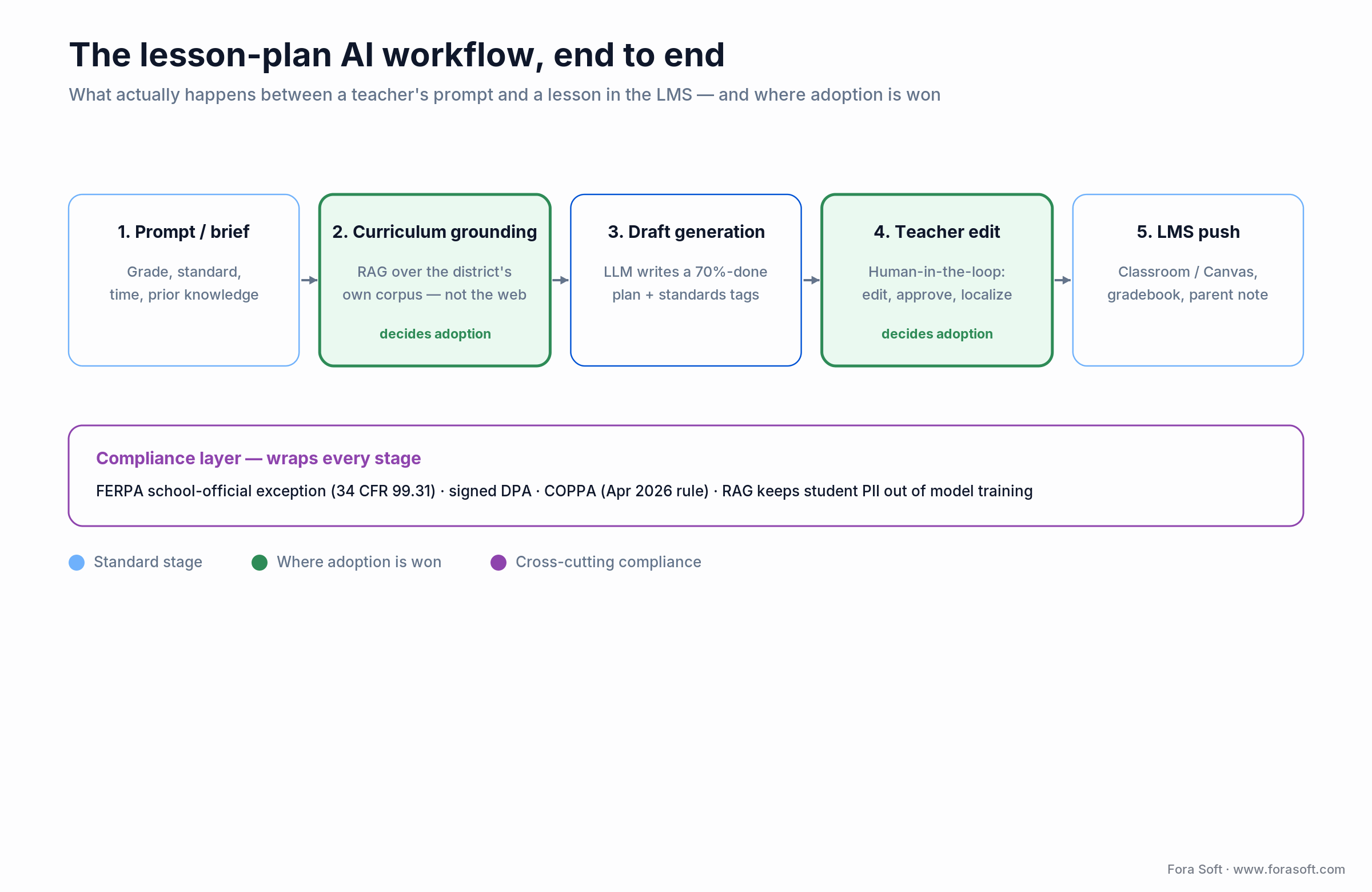
Figure 1. The two stages that decide adoption are curriculum grounding and the teacher edit — not the model that writes the draft.
How we ranked these tools
Every serious shortlist of AI tools for lesson planning is shaped by six constraints. Fail one and the tool stalls at pilot:
1. Compliance posture. FERPA, COPPA, and state student-data-privacy statutes (SOPIPA in California, Ed Law 2-d in New York). No signed DPA, no district deal.
2. Workflow fit. Does it live in Google Docs, Classroom, Canvas, or Schoology — or does it demand a new tab and a new habit?
3. Pedagogy, not just prose. Does the output carry differentiation, scaffolding, assessment, and a named standard, or just a pretty outline?
4. Curriculum grounding. Can it anchor to this district’s curriculum, or does it invent content that sounds right?
5. Unit economics. Free-for-teacher is table stakes; district pricing runs roughly $3–$22 per teacher per month at the paid tier, custom at enterprise.
6. Integration. SSO (Google, Microsoft), rostering (Clever, ClassLink), and Classroom/Canvas push are non-negotiable at scale.
MagicSchool AI — the district default
MagicSchool is the most-deployed AI teacher platform in US K-12. By the company’s own count it has passed 6 million educator sign-ups, 10,000+ partner schools and 160 countries (MagicSchool, after its $45M Series B led by Valor Equity Partners), bundling 80+ teacher tools (lesson plans, rubrics, IEP drafting, unit planners) plus student tools behind one interface with admin guardrails.
Pricing (2026)
Free forever for individual teachers. Plus is $8.33/mo billed annually ($12.99 monthly) and lifts generation limits, adds output history, AI editing, and 1-click Google/Microsoft export. Enterprise is a custom quote and adds SSO, rostering, a signed DPA, and district dashboards. Confirm current numbers on the MagicSchool pricing page.
Where it wins, where it breaks
Wins: one vendor covers the whole teacher surface, and hundreds of districts have already signed its DPA, so procurement time, the real cost, drops. Breaks: there’s no public developer API in 2026. For a white-label product, MagicSchool is a use-it-directly tool, not a build-on-top platform. Depth per tool is good, not specialist; differentiation, for one, is thinner than Diffit’s.
Reach for MagicSchool when: you’re a district (or sell into districts) and need one signed vendor to cover lesson plans, assessments, and IEP work at once.
Diffit — differentiation as a first-class output
Diffit does one job better than anything else: take any source (an article, a paragraph, a YouTube URL, a PDF) and produce reading-level-adjusted versions, vocabulary lists, comprehension questions, and summaries in under a minute. Leveling spans roughly grade 2 through high school, strongest in ELA, social studies, and science.
Pricing (2026)
Here’s a correction worth making loudly: Diffit’s Individual Teacher plan is now $14.99/mo or $149.99/yr, per the Diffit pricing page, not the “~$89/year” figure still copied across 2024-era listicles. Schools is a custom annual rate by enrollment. Premium-only features include Google/Microsoft export, standards alignment, graphic organizers, and longer inputs (novels, chapters).
Where it wins, where it breaks
Wins: IEP and multilingual-learner support is the hardest thing for a general model to do well, and Diffit’s reading-level output passes an ELA specialist’s review more often than raw ChatGPT. Breaks: it’s a differentiation layer, not a full planner — pair it with MagicSchool rather than expecting it to replace one.
Reach for Diffit when: IEPs, 504s, and multilingual learners make differentiation the #1 workload. We’d pick it for the adapted-text layer, and it’s not close.
Curipod — lessons students act on live
Curipod runs whole-class, teacher-led lessons in which students read, write and discuss on their own devices, and every submission gets specific AI feedback in real time before the student revises. It began as a prompt-to-interactive-slides generator; in 2026 the product leads with writing practice aligned to 55+ published curricula and says it is used in more than 14,000 districts (Curipod, October 2026). It’s Norwegian-built.
Pricing (2026)
The Free plan covers weekly writing practice with instant feedback and unlimited student writers, with capped weekly sessions, a 1,000-character limit on student responses (5,000 on paid plans) and restricted test-prep access. School & District is a custom quote that adds unlimited sessions, full test-prep libraries, bilingual ESL/ELL practice, SSO, reports and a data privacy agreement; schools under 200 students can ask for a small-school price.
Where it wins, where it breaks
Wins: the real product is the feedback loop and the data. Students revise against AI feedback inside the lesson, and the teacher gets response-level reports on learning gaps that a static plan never produces. Breaks: it runs the lesson, it doesn’t write your planning doc. If your problem is documentation and standards mapping, this is the wrong tool.
Reach for Curipod when: your problem isn’t “teachers need planning help” but “students aren’t participating” or “students don’t write enough.”
Eduaide.ai — the pedagogy power tool
Eduaide.ai gives 75+ resource generators covering lesson plans, assessments, questioning frameworks (Socratic, Bloom’s, Webb’s Depth of Knowledge), IEP goals, and project scaffolds. Its edge is choice: it grounds output in an internal knowledge graph of educational research and can align lessons to named frameworks: 5E Inquiry, Universal Design for Learning, Backward Design, Gagné’s Nine Events.
Pricing (2026)
The Free plan is always free with a monthly generation limit. Pro is $49.99/yr (about $4.17/mo billed yearly; monthly billing is also offered) and removes the limit, adding document revision, differentiation and custom images — the cheapest paid teacher tier of the eight. School bundles are available, and regional pricing applies at checkout.
Where it wins, where it breaks
Wins: its Teaching Assistant mode asks clarifying questions (grade, standard, time, prior knowledge) before generating, like a coach’s workflow rather than a button. Breaks: that depth is wasted on a teacher who just wants a fast draft; the option surface can feel heavy for casual use.
Reach for Eduaide when: your users are experienced educators who want to dial in pedagogy (DOK levels, specific frameworks), not press one generate button.
Brisk Teaching — AI where teachers already work
Brisk is a Chrome and Edge extension that injects AI into Google Docs, Slides, Classroom, YouTube, and any page. It writes leveled passages, rubrics, quizzes, and feedback without the teacher leaving the tab. Its Boost feature turns existing content into interactive student activities. The company raised a $15M Series A led by Bessemer Venture Partners in March 2025, which matters for a tool you’re betting a rollout on.
Pricing (2026)
Free tier for individual teachers with daily caps. The paid individual tier adds unlimited generations, advanced feedback, and AI-writing detection signals. School and district pricing is by quote.
Where it wins, where it breaks
Wins: Brisk won early adopters because it demanded zero workflow change — any product building a planning feature should study its interaction design. Breaks: it’s tied to the browser and the Google/Microsoft ecosystem; outside that, the value drops fast.
Reach for Brisk when: your schools are Google Workspace shops and the #1 barrier to adoption is “another tool to learn.”
Education Copilot — structured, print-ready plans
Education Copilot is more opinionated than MagicSchool. It produces structured, consistently formatted lesson plans, unit plans, syllabi, and writing prompts — output that looks like something you could hand a substitute without edits.
Pricing (2026)
The Free plan needs no card and covers three core templates, lesson plans, handouts and export. Pro is $9/mo billed annually ($108/yr) and adds 10+ templates, unlimited long-form handouts and output history; team, school and district pricing is by quote.
Where it wins, where it breaks
Wins: the structure is the feature — ideal for tutoring centers, homeschool co-ops, and charter networks that need uniform documentation across instructors. Breaks: it’s built for the PDF deliverable, not live interaction, and the breadth doesn’t match MagicSchool’s.
Reach for Education Copilot when: uniform, review-ready lesson documents matter more than interactive engagement.
Khanmigo — student tutor with a teacher mode
Khan Academy’s Khanmigo, originally built on OpenAI’s GPT-4 for tutoring (Khan now runs a multi-model stack), is the only tool here that’s a real student-facing tutor: it asks Socratic questions and won’t just hand over answers. Teacher mode generates lesson plans, leveled passages, rubrics, and feedback aligned to the Khan library.
Pricing (2026)
Free for all US teachers, funded through Khan Academy’s Microsoft-supported rollout; learners and parents pay $4/mo (or $44/yr), per the Khanmigo pricing page. Full classroom/district integration is a separate custom tier.
Where it wins, where it breaks
Wins: if you serve students directly, Khanmigo’s Socratic behavior is the reference implementation, and teacher mode covers both sides of the room. Breaks: it’s anchored to Khan’s content and US teachers; planning is the supporting act, not the headline. Be honest about impact, too: Khan Academy’s Sal Khan called the student-tutor results “a non-event” for most learners in 2026, even as usage grew past 2 million.
Reach for Khanmigo when: the classroom already runs on Khan content, or student-facing tutoring is the goal and planning rides along.
Flip Education — the printed lesson, not the screen
Built around the printed artifact rather than the screen: pick a methodology and Flip generates a complete paper kit — teacher briefing, student cards, facilitation guide, debrief slips — sized to the lesson length and class size you enter. Its own framing is the accurate one: the app is where you generate, the classroom is where the lesson lives. Generating and printing needs a connection; the lesson itself needs nothing, with no student accounts, no student devices, no scanning, and no student data collected.
The catalogue runs to 64 active-learning methodologies, and Flip’s own platform data (719 lesson configurations from 361 verified teachers across 18 countries, March to August 2026) shows teachers reached for 57 of them, the most popular accounting for only 10.6% of lessons. That data also explains the shape of the product: 50.8% of lessons in the dataset were planned outside school hours, before 08:00 or after 16:00 local time, and 23.8% were planned at night, between 20:00 and 05:59. Source: Flip Education, “What Teachers Teach: 2026 Active-Learning Trends” (data March 5 to August 5, 2026; published August 2026).
Pricing (2026)
$7.99/mo for one subject to $21.99/mo for all, 25% off annually; schools of 20–99 teachers pay $149 per teacher per year, districts of 100+ pay $119, per Flip Education’s pricing page (October 2026). These are US list prices; Flip bills in local currency, so buyers outside the US see their own.
Where it wins, where it breaks
Wins: zero student screen time by design, and genuine methodology breadth — 57 of the 64 methodologies see real use, so the catalogue is not shelfware. Breaks: it does one job, the printed active-learning lesson, so it sits beside a planner rather than replacing one, and its all-subject and school tiers cost more per seat than MagicSchool Plus while doing one job rather than eighty.
Reach for Flip Education when: the lesson has to run on paper, with no student devices or accounts anywhere in the flow.
Free built-ins: ChatGPT for Teachers, Gemini in Classroom and Aila
Three free options now sit underneath every paid tool on this list. ChatGPT for Teachers is free for verified US K-12 staff through June 2027, Gemini in Classroom is free in every Google Workspace for Education edition, and Oak National Academy’s Aila is the free, National-Curriculum-based lesson assistant for teachers in England. None of them replaces a specialist, but each one raises the bar a paid tool has to clear.
ChatGPT for Teachers. OpenAI launched it on November 19, 2025 as a secure workspace for verified US K-12 teachers and staff (verification through SheerID), launching with unlimited GPT-5.1 Auto messages, file uploads, Canva, Google Drive and Microsoft 365 connectors, shared custom GPTs for planning templates, and admin controls with SAML SSO. OpenAI says content shared there isn’t used to train its models by default and that the workspace is built to help schools meet FERPA requirements; check the terms against your district DPA. Source: OpenAI, “Introducing ChatGPT for Teachers” (November 19, 2025).
Gemini in Classroom. Google made Gemini in Classroom free for all Workspace for Education editions at ISTE in June 2025, with more than 30 teacher capabilities, and says it won’t use education chats to improve its models. The January 2026 Bett update added file-to-rubric conversion, audio lessons, learning-standards tagging in pilot (US, UK, Australia, Canada and more), and announced suggested feedback on writing assignments. Sources: Google, June 2025 and Google, January 2026.
Aila (UK). Oak National Academy’s Aila builds a full lesson through a chat: it suggests similar lessons from Oak’s library of about 10,000, then exports a lesson plan, starter quiz, slide deck, worksheet and exit quiz, with a separate moderation agent checking for unsafe content. It runs on OpenAI’s GPT-4o, per the UK government’s algorithmic transparency record (updated September 2026). For KS3 and KS4 planning against the English National Curriculum, it’s the first tool to try.
| Free built-in | Who gets it free | Best at | Watch out for |
|---|---|---|---|
| ChatGPT for Teachers | Verified US K-12 staff, through June 2027 | Flexible drafting, unit plans, shared planning GPTs | No built-in standards validator; pricing may change after the free period |
| Gemini in Classroom | All Google Workspace for Education editions | Rubrics, standards tagging, work inside Classroom | Several features still in pilot or rolling out |
| Aila (Oak National Academy) | Teachers in England | KS1–KS4 lessons with slides and quizzes from Oak’s library | Built around the English National Curriculum |
Reach for a free built-in when: your school already runs on Google Workspace, you’re a verified US K-12 teacher, or you plan to the English National Curriculum. Add a paid specialist only for the job it does clearly better: Diffit for leveled texts, Curipod for in-lesson writing feedback.
Which tools cover both lesson planning and grading?
MagicSchool is the strongest single platform for planning plus grading: its free tier already pairs 80+ planning tools with rubric generation and class writing feedback. Brisk is the pick when grading happens in Google Docs, because its feedback runs inside the student’s document. Curipod gives students AI feedback during the lesson itself, and Gemini in Classroom turns a file into a rubric at no cost. In every case the AI drafts feedback and the teacher owns the grade.
| Need | Best pick | Why |
|---|---|---|
| Planning and grading in one tool | MagicSchool | Lesson plans, rubrics and class writing feedback on the free tier |
| Feedback inside Google Docs | Brisk Teaching | Rubric-based feedback in the document, no new tab |
| Interactive lessons with live responses | Curipod | Students write and respond on devices, AI feedback in real time |
| Interactive lessons without devices | Flip Education | Printed active-learning kits, no student accounts |
| Free rubrics in Google Classroom | Gemini in Classroom | File-to-rubric conversion at no cost |
The 8 tools side by side
Pricing and posture at a glance. The coverage map below the table scores all eight tools on the six buyer criteria — it complements the numbers rather than repeating them.
| Tool | Best for | Pricing (2026) | DPA / SSO | Where it wins |
|---|---|---|---|---|
| MagicSchool | Districts, broad toolkit | Free / $8.33 Plus / Enterprise custom | Yes (Enterprise) | 80+ tools, IEP drafting, guardrails |
| Diffit | Differentiation, MLLs, IEPs | Free / $14.99 mo or $149.99 yr / Schools | Yes (Schools) | Reading-level output in under a minute |
| Curipod | Live engagement, writing practice | Free / School & District custom | Yes (District) | Live writing practice with real-time AI feedback |
| Eduaide.ai | Pedagogy-forward power users | Free / $49.99 yr / School | Yes (School) | 75+ resource types, DOK, frameworks |
| Brisk Teaching | Google Workspace shops | Free / paid individual / District | Yes (District) | Chrome extension, zero workflow change |
| Education Copilot | Tutoring centers, charters | Free / $9 mo / School & district | Yes (School) | Consistent, print-ready documents |
| Khanmigo | Student tutoring + teacher mode | Free for US teachers / District custom | Yes (District) | Socratic tutor, Khan library alignment |
| Flip Education | Paper-first lessons, no student devices | $7.99–$21.99 mo / $149 per teacher yr (schools) | No student data collected | Complete printed kit per methodology |
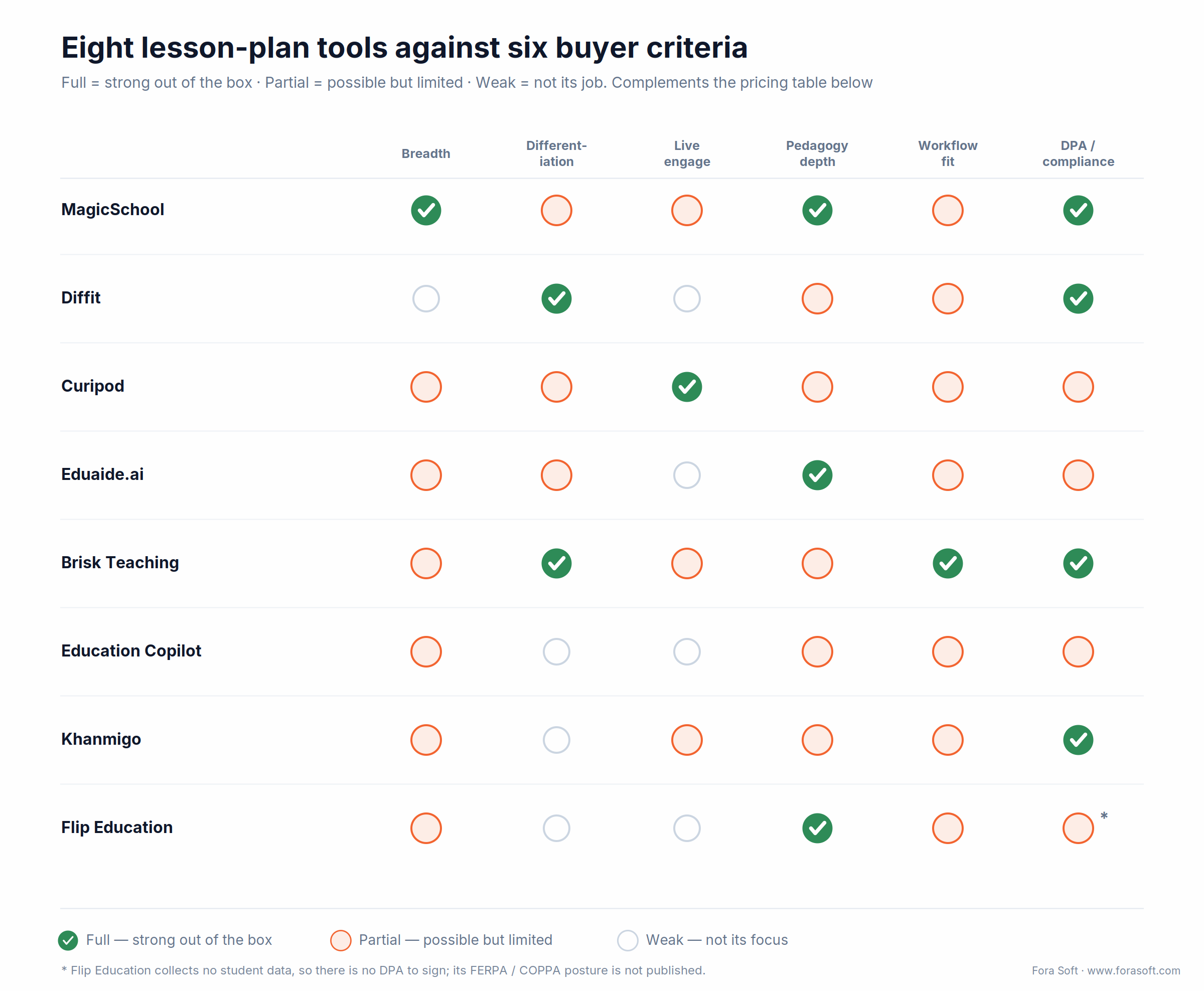
Figure 2. No single tool is full across all six criteria — which is why the winning setup is usually two or three of them, not one.
The compliance layer — FERPA, COPPA, and DPAs
This is the section most listicles skip, and it’s the one that decides whether any of the eight ever go live in a district. Get it wrong and the best AI tools for lesson planning stay stuck at “pilot with three teachers.”
1. FERPA and the school-official exception. Under FERPA (20 U.S.C. § 1232g), a school can share student records with a vendor only under the school-official exception (34 CFR 99.31): the vendor performs a function the school would otherwise do, stays under the school’s direct control, follows FERPA, and doesn’t re-disclose the data. In practice that means a signed Data Privacy Agreement. The US Department of Education’s Student Privacy office is the primary reference here.
2. COPPA is now in full effect. The FTC’s amended COPPA rule was published April 22, 2025, took effect June 23, 2025, and reached its compliance deadline on April 22, 2026 — see the Federal Register notice. It expands “personal information” to include biometric and government identifiers, and requires separate verifiable parental consent before disclosing a child’s data to third parties. Any tool touching under-13 students has to meet it today.
3. The AI sub-processor trap. Here’s the 2026-specific catch a lot of buyers miss: when a lesson tool sends a student’s writing to an LLM API for feedback, that model provider becomes a sub-processor with its own privacy exposure. The vendor’s DPA has to flow retention, use, and re-disclosure terms through to the model provider — and “direct control” is weak when the API contract, not the school, sets the terms.
4. Architecture that satisfies the lawyers. The pattern we ship: zero-retention, no-training API terms plus PII redaction before any model call, RAG that grounds output in approved curriculum, SOC 2 Type II with AES-256 at rest and TLS 1.3 in transit, and a clear answer to “do we process student PII at all?” If yes, budget two to three months of legal time before launch. If your build touches this, our AI integration team handles it as part of scope.
Stuck on the DPA and data-flow questions?
We’ll audit your student-data flow, name the FERPA/COPPA gaps, and hand you the architecture that closes them. 30 minutes, no obligation.
Build vs. buy — integrate, wrap, or build
Every product team asks the same thing: license one of the eight, rebuild something like it, or wrap a foundation model? In 2026 the answer is usually “buy the toolkit and build the thin layer that makes it yours.” The logic we use with clients:
You run an LMS or SIS. Don’t rebuild MagicSchool’s breadth. Integrate via SSO and deep links, and spend your engineering on curriculum grounding and analytics instead. That’s the split we use in custom LMS development: the gradebook, LTI 1.3 and rostering stay in the platform, and the lesson generator plugs in.
You sell to higher-ed or corporate training. None of the eight fit; they’re K-12-shaped. Wrap a current GPT-5.x or Claude model with your own curriculum RAG and a compliance posture tuned to your vertical (HIPAA for med-ed, SOC 2 for corporate).
You’re a K-12 vendor under $5M ARR. Don’t out-MagicSchool MagicSchool. Find the niche they haven’t saturated: subject-specific, modality-specific (special ed, MLL), or workflow-specific (sub plans, field trips).
You’re a publisher with proprietary curriculum. This is where the build case is strongest. Your moat is the corpus — a custom RAG-plus-LLM layer generates standards-aligned lessons from your content, which MagicSchool can’t do without licensing it. That corpus-grounded layer is the core of our generative AI development work. See how we frame this in our guide to e-learning platform development.
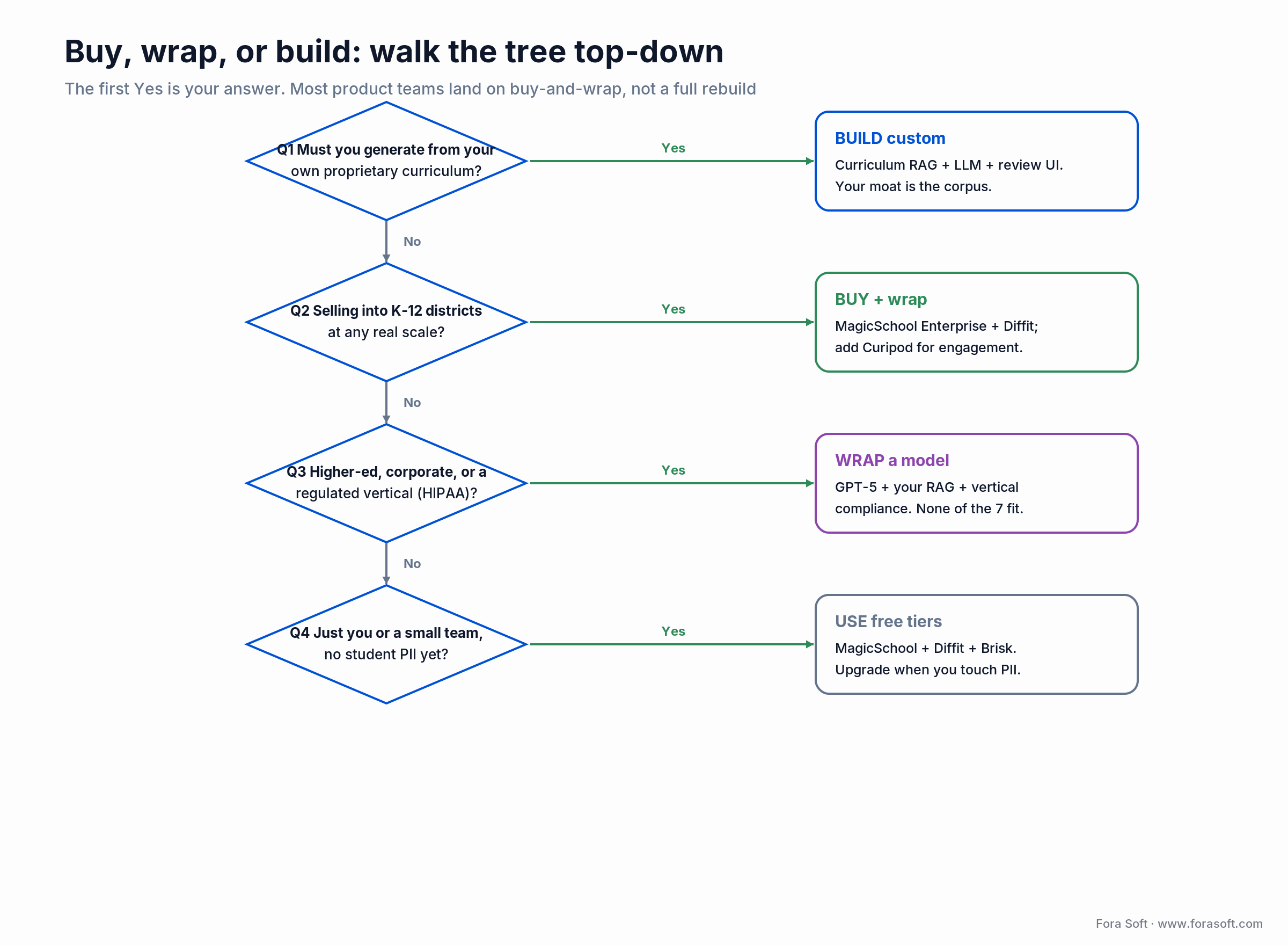
Figure 3. Walk it top-down; the first yes is your path. Most product teams land on buy-and-wrap.
Cost math: a 500-teacher district for a year
Concrete numbers make the decision honest. Take a 500-teacher US district over a full year. Buying a stack of MagicSchool Enterprise plus Diffit, and optionally Curipod, lands around $58k–$95k in year one including setup. Building your own comes in higher up front and only pays back later.
The build side is where people guess wrong, so here’s the arithmetic out loud. Assume 500 teachers × 80 generations per month × ~4K tokens each (3K in, 1K out). On GPT-5.6 Terra at $2 / $12 per million tokens (October 2026 OpenAI pricing): input is 120M tokens = $240/mo, output is 40M tokens = $480/mo, so ~$720/mo ≈ $8,640/yr in model spend. Add ops and monitoring and the run cost is roughly $15k–$23k/yr. The one-time MVP (curriculum RAG, prompt scaffold, standards tagging, teacher review UI, SSO) runs about $90k–$160k with our Agent Engineering approach, where AI agents handle the repetitive build work under senior review.

Figure 4. Buy wins in year one. Build pays off past roughly 2,000 teachers, or when a proprietary curriculum is the whole point.
Mini case — the ALDA curriculum engine
Situation. e-Literate ran a Design/Build Workshop series in which 70+ US college educators co-designed an AI Learning Design Assistant. Participating institutions included Dallas College, Southern New Hampshire University, the University of Central Florida, University of Maryland Global Campus and five HBCUs through UNCF, together serving more than 500,000 students a year. The brief: turn a course idea into a syllabus, lectures and assessments that faculty would actually keep.
Plan. We built ALDA on OpenAI’s Assistants API with GPT-4. Its core is a “Chain of Inquiry” prompt flow modeled on how junior learning designers work: broad questions about the students and the learning goals first, then narrowing to lesson-level detail. ALDA generates syllabi, full-text lectures and personalized assessments, and it refines lecture material faculty upload instead of starting from a blank page.
Result. Educator efficiency rose by 20%, and course-design work that used to take days now fits in a single session. After the seven-month program, ALDA is now owned by 1EdTech. The lesson for anyone picking from the eight: your users don’t need “an AI planner,” they need one that starts from their students and goals and fits their review workflow. Want a similar assessment for your product?
A decision framework — pick in five questions
1. Do you generate from proprietary curriculum? If yes, build custom — a RAG-plus-LLM layer over your corpus is your moat, and no off-the-shelf tool can match it.
2. Are you selling into K-12 districts at scale? If yes, buy: MagicSchool Enterprise plus Diffit, adding Curipod where engagement drives the budget. Our district buyer’s guide to AI lesson plan generators covers the procurement side.
3. Higher-ed, corporate, or a regulated vertical? If yes, wrap a model with your own RAG and vertical compliance — none of the eight are shaped for you.
4. Is the real problem engagement, not planning? If yes, Curipod (or Khanmigo for tutoring) beats another planning generator.
5. Just you or a small team with no student PII yet? Stack the free tiers — MagicSchool, Diffit, and Brisk cover most needs at zero cost. Upgrade the moment you touch PII. If two answers point in different directions, we can settle it in one call.
Five pitfalls that stall lesson-plan AI
1. Shipping without standards alignment. A plan that doesn’t name the standard (NGSS, CCSS, or state code) won’t clear a department chair. Every output has to tag it — and a validator should confirm the tag actually appears.
2. Designing for autonomy instead of editing. No teacher wants a button that emits a final lesson. They want a 70%-done draft they can shape. Build for the edit, not the magic trick.
3. An undersized safety posture. A generic model will write an example sentence on “symbolism” using adult themes. K-12 needs classroom-tuned prompts, blocklists, and a human-review path — not default settings.
4. Treating the DPA as an afterthought. You will not sell into a single US district without a signed Data Privacy Agreement covering student data. Decide up front whether you process PII at all, and if so, plan the legal runway.
5. Trusting the citation the model gives you. Models will confidently cite the wrong standard, which is worse than none. Cross-check every generated standard code against a source list before it reaches a teacher.
KPIs to track before and after rollout
Quality KPIs. Teacher edit distance (how much of the draft survives), standards-tag accuracy against a validated list, and the rate of flagged unsafe outputs. Aim for edit distance trending down week over week as your prompts improve.
Adoption KPIs. Weekly active teachers, generations per teacher, and D7/D30 retention. Tie them to the RAND/Gallup benchmark: if your tool isn’t returning something close to those hours, adoption will stall regardless of features.
Reliability KPIs. p95 generation latency, model/API error rate, and cost per generation against your budget. Watch cost per generation especially — it’s the number that decides whether the build stays economical as you scale.
When NOT to add another AI tool
Honesty sells better than another logo. Skip the new tool when your teachers already have two they haven’t learned — tool sprawl kills adoption faster than any missing feature. Skip a custom build when a $9/mo product already does the job; the ROI math almost never favors rebuilding a commodity. And skip student-facing AI entirely if you can’t staff the safety review and sign the DPA. A tool you can’t govern is a liability, not a feature. The strongest move is sometimes to consolidate on MagicSchool plus Diffit and put your energy into training, not procurement.
FAQ
What are the best AI tools for lesson planning in 2026?
For most teams: MagicSchool for breadth, Diffit for differentiation, and Curipod for live engagement, with Eduaide.ai, Brisk Teaching, Education Copilot, Khanmigo and Flip Education (paper-first lessons) as specialists. Your role sets the pick: solo teachers, districts, and EdTech product teams weight compliance and workflow fit differently, and those matter more than raw model quality.
Which software for educators provides the best lesson planning and grading features?
MagicSchool, because its free tier pairs 80+ planning tools with rubric generation and class writing feedback. Pick Brisk Teaching if grading happens inside Google Docs, and Gemini in Classroom if you want free rubrics inside Google Classroom.
Is ChatGPT for Teachers free?
Yes, for verified US K-12 teachers and staff: OpenAI made it free through June 2027 when it launched on November 19, 2025. It launched with GPT-5.1 Auto, Canva, Google Drive and Microsoft 365 connectors, and admin controls, and OpenAI says shared content isn’t used for training by default.
What is the best AI tool for KS3 and KS4 lesson planning in the UK?
Oak National Academy’s Aila is the first one to try: it builds lessons from Oak’s library of about 10,000 National Curriculum lessons and exports the plan, slides, worksheet and quizzes. Add Diffit when you need the same text at several reading levels.
What is the best software for interactive lesson planning?
Curipod, if students have devices: they write and respond live during the lesson and get AI feedback in real time. Flip Education, if the lesson must run on paper with no student devices or accounts.
Which AI lesson-planning tool is best on a free plan?
MagicSchool Free is the most generous, covering 80+ teacher tools with no time limit. Add Diffit Free for differentiation and Brisk Free if you live in Google Docs. A teacher using all three covers most 2026 planning needs at zero dollars. Khanmigo is free for US teachers, ChatGPT for Teachers is free for verified US K-12 staff through June 2027, and Gemini in Classroom is free in every Google Workspace for Education edition.
Are these tools FERPA and COPPA compliant?
The seven tools that handle student data (all but Flip Education, which collects none) publish FERPA and COPPA statements. MagicSchool, Diffit, Curipod, Brisk, and Khanmigo will sign district Data Privacy Agreements at the paid/enterprise tier; Eduaide.ai and Education Copilot handle them through school plans. Free tiers usually don’t carry a signed DPA, which is why procurement offices require paid tiers for district-wide use. The amended COPPA rule reached full compliance on April 22, 2026, so confirm current posture — including state laws like SOPIPA and Ed Law 2-d.
Can teachers just use ChatGPT or Claude for lesson planning?
For a single teacher’s own planning, yes: good prompts go a long way. Verified US K-12 teachers should use ChatGPT for Teachers rather than a personal account: it’s free through June 2027 and doesn’t train on shared content by default. For anything student-facing, the specialized tools still win: they ship content filters, age-appropriate defaults, standards tagging, and signed DPAs that consumer ChatGPT and Claude don’t carry at a teacher’s price point. Generic models also won’t reliably tag standards or produce IEP-aligned output.
How much does a custom lesson-plan AI cost to build?
A focused MVP — curriculum RAG, prompt scaffold, standards tagging, teacher review UI, SSO — typically runs $90k–$160k with our Agent Engineering approach. Model run costs at a 500-teacher pilot are about $8,640/yr on October 2026 GPT-5.6 Terra pricing, or roughly $15k–$23k/yr including ops. The build case strengthens past ~2,000 active teachers or when the curriculum itself is proprietary.
Do these tools have an API for EdTech integration?
Most don’t expose a public REST API in 2026. Integration is via SSO (Clever, ClassLink, Google, Microsoft), deep-linking from your LMS, and rostering sync. For embedded or white-label integration, contact the vendor’s partnerships team; for full API flexibility, you’ll wrap a foundation model directly.
How do AI tools keep lessons aligned to state standards?
The reliable pattern is RAG over a standards corpus (NGSS, CCSS, your state frameworks) plus an explicit tagging step: the model lists every standard the lesson addresses with its exact code, and a post-generation validator confirms the requested standard appears. Tools that skip the validator produce lessons that sound right but cite the wrong standard.
Is Khanmigo really free for teachers in 2026?
Yes — Khanmigo is free for all US teachers, funded through Khan Academy’s Microsoft-supported program. Learners and parents pay $4/mo (or $44/yr), and full classroom/district integration is a separate custom tier. Access outside the US is more limited.
What to read next
AI · EdTech
10 Best AI Tools for Educational Content Creation
The wider content stack that sits around lesson planning.
Architecture
AI-Crafted Personalized Learning Materials
The RAG + prompt + review stack that powers custom lesson AI.
Teachers · AI
AI-Generated Educational Resources for Teachers
How teachers use generative AI to produce lesson materials.
Case study
AI Learning Platform: Scholarly for 15,000 Users
What we learned shipping an AI learning platform at scale.
Ready to ship lesson-plan AI teachers keep using?
The 2026 answer to “what are the best AI tools for lesson planning?” is MagicSchool for breadth, Diffit for differentiation, and Curipod for engagement, with Eduaide.ai, Brisk Teaching, Education Copilot, Khanmigo and Flip Education as specialists. Pick by workflow fit and compliance posture, not the demo. For product teams the job is rarely to rebuild one of these — it’s to integrate the right toolkit, layer curriculum grounding and a signed-DPA compliance posture on top, then ship a workflow teachers actually keep opening.
If you’re staring at a roadmap and deciding which tools to bundle, or whether to build, talk to us. We’ve shipped both paths, including our own AI lesson-planning builds, and we can tell you in one call which one fits your economics.



The handbook · 7 volumes
Fora Soft Video Engineering Handbook
Lesson-plan generators are where many edtech teams start with AI; the next step is usually live classes, recorded lessons and captions. We wrote a seven-volume handbook that covers the whole video stack, from encoding and delivery to sound and AI. Start with Volume 6 on speech recognition, search and RAG over a video archive, then Volume 7 for real-time captions and AI cost, and Volume 3 for WebRTC classrooms. Written by Nikolay Sapunov, CEO at Fora Soft.
Browse the handbook on Amazon →7 volumes · 9,000+ pages · Kindle & paperback
Ship an AI lesson-planning feature teachers actually use
21 years of software, 250+ products, including the ALDA course generator and the BrainCert virtual classroom. We architect the integration, handle the FERPA/COPPA posture, and ship it with your brand on the outside. 30 minutes, no obligation.
References: MagicSchool, Diffit, Curipod, Eduaide.ai, Brisk Teaching, Education Copilot, Khanmigo, and Flip Education pricing/product pages (October 2026); OpenAI, ChatGPT for Teachers (November 2025); Google, Gemini in Classroom (June 2025, January 2026); UK algorithmic transparency record for Oak’s Aila (September 2026); EEF ChatGPT lesson-preparation trial (December 2024); RAND/Gallup “Teaching for Tomorrow” (2025); FTC amended COPPA rule, Federal Register (April 22, 2025); FERPA, 20 U.S.C. § 1232g and US Dept. of Education Student Privacy; OpenAI API pricing (October 2026). Fora Soft ALDA project page. Vendor pricing and features verified as of October 2026 and subject to change.

