

Key takeaways
• Teachers already adopted AI — 60% used it in 2024/25 and saved up to 5.9 hours a week. Your product is no longer convincing teachers AI works; it’s making the workflow safe, auditable and standards-aligned.
• Generation is easy; grounding is the moat. Retrieval-augmented generation (RAG) over standards (Common Core, NGSS, state frameworks) and district curriculum is what separates a production tool from a ChatGPT wrapper.
• Build the full resource library, not one generator. Worksheets, lesson plans, rubrics, quizzes, IEP accommodations, parent letters and multilingual translations — teachers want a copilot, not a chatbot.
• FERPA, COPPA, SOPPA, NY Ed Law 2-d are non-negotiable. 42% of districts launched AI without a data processing agreement; don’t ship a product that forces them to fail audit.
• A realistic teacher-copilot MVP ships in 10–14 weeks for roughly $70k–$140k. With our Agent Engineering stack, you get to a usable pilot in a single quarter instead of a year.
Why Fora Soft wrote this playbook
Fora Soft has built multimedia and education products since 2005: 20+ years, 250+ shipped projects, and dedicated e-learning and AI integration practice. In 2017 we shipped the world’s first WebRTC+HTML5 virtual classroom with BrainCert, which bootstrapped to $3M in annual revenue in 2024 (58% YoY growth), 100K+ customers and 500M+ real-time classroom minutes, and won four Brandon Hall awards. When founders ask us to build AI resources for teachers, we’ve usually shipped the hard part before.
We keep getting the same brief: “our teachers already use ChatGPT for worksheets, build us a proper product around it: standards-aligned, privacy-compliant, branded.” We’ve also built that generator ourselves — ALDA, an AI course generator co-designed with 70+ US college educators (more on it below). This playbook is what we’d tell an EdTech founder, a district CTO or a publisher scoping that product in 2026.
Scoping a teacher AI copilot?
Book a 30-minute call. We’ll sketch the architecture, a 10–14 week plan and a transparent budget for your scope — no slides, no lock-in.
What “AI-generated educational resources” actually means in 2026
The phrase “AI resources for teachers” used to mean “a chatbot that writes a worksheet”. It doesn’t anymore. In 2026 an AI-generated educational resources product is a teacher copilot: a focused UI that turns a few teacher inputs — topic, grade, standard, learner profile — into a bundle of classroom-ready artefacts, grounded in verified sources, saved into the teacher’s library, and exported into their existing tools.
The typical artefact catalogue buyers ask for:
- Lesson plans aligned to Common Core, NGSS or a state standard
- Worksheets and problem sets, levelled for 3–5 reading/difficulty tiers
- Quizzes, exit tickets and item banks with answer keys and DOK tags
- Rubrics tied to standards and grading policies
- IEP / 504 accommodations, ELL scaffolds, enrichment for gifted learners
- Discussion prompts, exit slips, bell-ringers, do-nows
- Parent letters and progress updates in the family’s language
- Study guides, flashcards and review packs for students
The product question is not “can the LLM generate this?”. It’s “can the LLM generate this safely, aligned to the right standards, in the teacher’s voice and the district’s policy?”
Market snapshot — why now is the right moment to build
Teacher AI adoption is no longer early. A 2025 Gallup survey for the Walton Family Foundation (2,232 US teachers on the RAND American Teacher Panel) found 60% of K–12 teachers used AI in 2024/25; weekly users saved 5.9 hours a week, about six weeks over a school year. The two most common uses were preparing to teach (20%) and administrative work (18%). Incumbents are already large: MagicSchool ships 80+ tools and passed 5M educator sign-ups after a $45M Series B (2025); Brisk Teaching runs ~40 tools with Chrome-extension distribution on a $15M Series A; Eduaide is bootstrapped with 100+ resource types. The ground is tilled.
What’s open: vertical or regional copilots — aligned to one country’s curriculum, one subject (STEM, language, SEL), one age group, or a specific LMS ecosystem — and white-labelled teacher AI baked into existing LMSes, publishers and tutoring platforms. That’s where custom builds outperform off-the-shelf SaaS. The AI-in-education market sits near $10–11B in 2026 (Research and Markets; Grand View Research), and the teacher-facing assistant slice alone is roughly $1.1B and compounding at double digits — a market big enough for focused challengers, not just the incumbents.
Reach for a custom teacher-copilot build when: you need district-specific curricula, a regulated market (K–12 with FERPA/SOPPA, healthcare training, defence), white-label delivery, or your unit economics on an existing SaaS are eroding at scale.
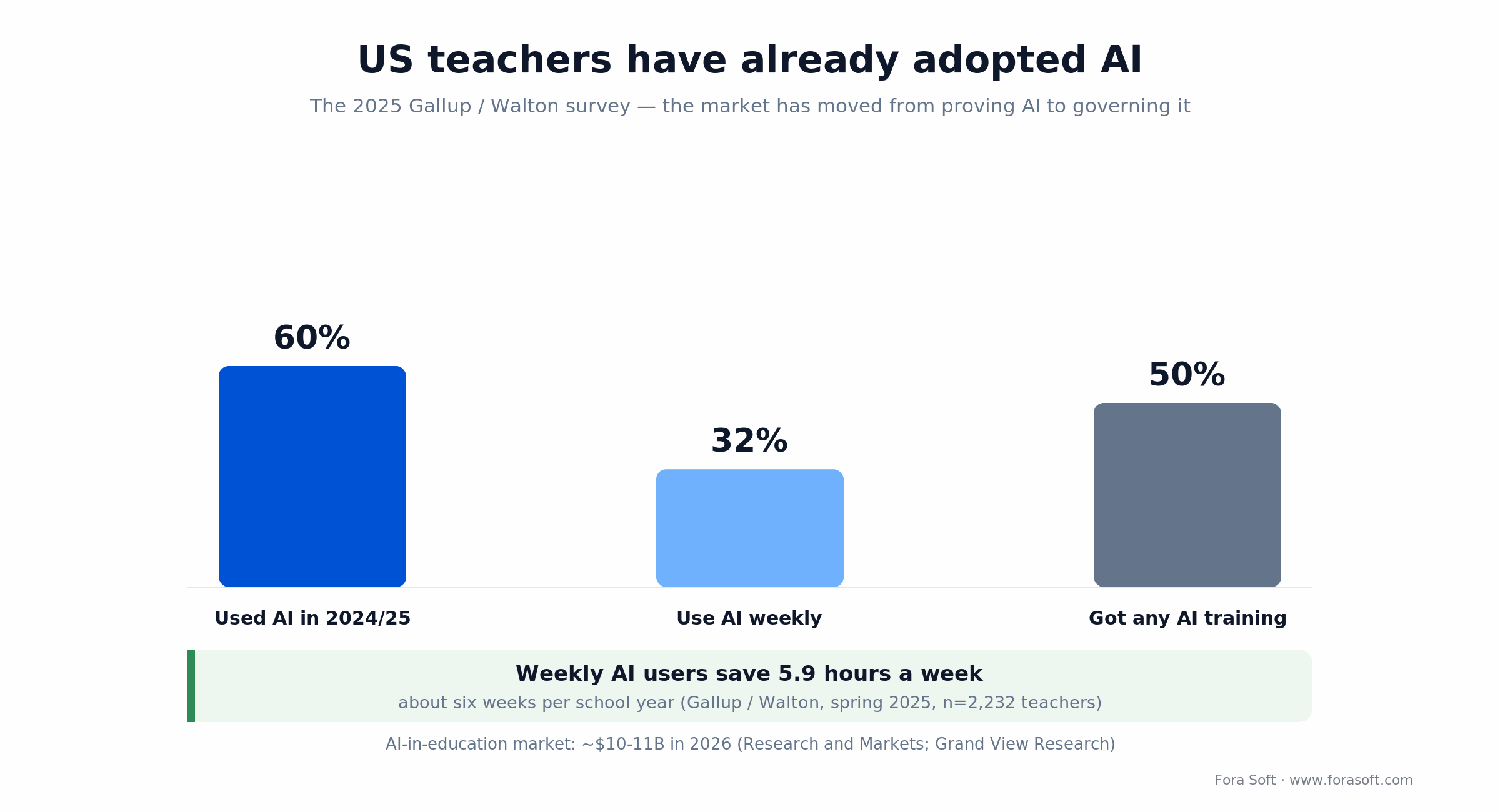
Figure 1. US teacher AI adoption in 2024/25. The market has moved from proving AI works to governing it.
The resource catalogue: what to generate first
Not every AI-generated asset is equally valuable. In teacher interviews and the public data we keep seeing the same priority order — launch these five first; everything else is an expansion pack.
1. Lesson plans. The single biggest time sink. Expect teachers to enter topic, grade, standard and duration; your system returns objectives, materials, warm-up, direct instruction, guided practice, independent practice, assessment and homework — with citations to the standard(s) used.
2. Differentiated worksheets. One topic, three to five reading/difficulty levels generated in one pass. Teachers of mixed-ability or inclusion classrooms will adopt this feature fastest.
3. Rubrics. Standards-aligned, 3–5 performance levels, tied to the lesson’s objectives. Exportable as Google Doc, PDF and Google Classroom assignment.
4. Quizzes and item banks. Generate items with answer keys, distractor analysis, DOK tags and alignment metadata; let teachers build reusable banks per unit.
5. IEP / 504 / ELL scaffolds. Teachers of students with accommodations lose the most time and get the least help. Well-designed AI accommodation generators — leveled instructions, visuals, sentence stems, translated versions — are the feature that drives word-of-mouth.
Reach for accommodations first when: your target districts have high proportions of ELL or IEP students — this single feature often determines whether a rollout survives the teachers’ union feedback loop.
Reference architecture for a teacher AI copilot
The baseline we use on this kind of product separates four responsibilities: prompt/workflow, retrieval, generation, and integration. Each has its own scaling profile and compliance footprint.
| Layer | Role | Typical stack | What to watch |
|---|---|---|---|
| Teacher UX | Resource picker, wizard forms, preview, library | React/Next.js, Chrome extension, Google/Microsoft add-ons | 3-click time-to-resource |
| Workflow / prompt registry | Template per resource type, versioned, A/B tested | Postgres, custom prompt DSL, Langfuse/Langsmith | Prompt drift & regression |
| Standards & content RAG | Retrieve Common Core / NGSS / state / curriculum chunks | pgvector / Qdrant, hybrid BM25+vector, GraphRAG | Standards versioning |
| LLM layer | Generate artefacts, QA-check, translate | GPT-5.6, Claude Sonnet 4.5, Gemini 2.5 Pro, self-hosted Llama/Mistral | Token cost, PII leakage |
| Moderation & safety | Block unsafe / off-curriculum / biased output | Provider moderation API, custom classifiers, policy rules | False positives on edge cases |
| Integrations | LMS, SIS, docs, storage, rostering | Google Classroom, Canvas, Schoology, Clever, OneRoster, Microsoft Graph | FERPA-grade token handling |
| Compliance & audit | DPAs, audit trail, consent, SOC 2, retention | OpenTelemetry, immutable audit log, region pinning | State law deltas (IL, NY, CA) |
What buyers most underestimate is the prompt registry — the library of tested, versioned prompts per resource type. It’s the single biggest driver of output quality. Treat it as a first-class engineering artefact: version-controlled, eval-gated, A/B-tested.

Figure 2. Six responsibilities of a teacher AI copilot, with compliance and audit spanning all of them.
How to ground generation in standards (RAG, not wishing)
The fastest way to lose a district is to ship a worksheet that “feels 4th-grade” but doesn’t actually align to the standard the teacher selected. The remedy is retrieval-augmented generation with standards as the corpus.
1. Ingest the frameworks. Common Core (ELA, Math), NGSS, C3, ISTE, state-specific frameworks (Texas TEKS, Virginia SOL, UK National Curriculum, Australian Curriculum, etc.), plus any district- or publisher-specific curriculum.
2. Chunk by standard code. Each standard, sub-standard and descriptor becomes a chunk with explicit metadata: framework, grade, domain, code (CCSS.MATH.CONTENT.4.NF.A.1), depth of knowledge, and cross-reference links. Embed with text-embedding-3-large or an open equivalent.
3. Retrieve with hybrid search. When a teacher picks a standard, pull the exact descriptor plus adjacent standards (prerequisites, vertical alignment). Hybrid BM25 + vector catches both the exact code and semantically related content.
4. Constrain generation. The system prompt instructs the LLM to tie every objective and every item to a specific chunk ID. If nothing maps, the system refuses (“I can’t generate this for the selected standard”) rather than inventing a fake alignment.
System prompt (abridged)
--------------------------------
You are a K-12 curriculum author.
Every objective, item and rubric row
MUST cite a STANDARD from CONTEXT.
If CONTEXT is insufficient, say so.

CONTEXT:
{retrieved_standards_chunks}

TASK:
Generate a {resource_type} for:
  grade={grade}
  topic={topic}
  standard={code}
  difficulty={level}
5. Evaluate nightly. Run 200–500 golden standards through the pipeline; measure alignment rate (chunk-match), refusal correctness and readability on a Flesch-Kincaid target. Block releases on regressions > 2 points. This is the same pattern we describe in our AI-powered multimedia e-learning playbook and the mindset is identical: grounded generation is an engineering discipline, not a prompt. We keep our working notes on eval-gated AI in our AI engineering playbook.
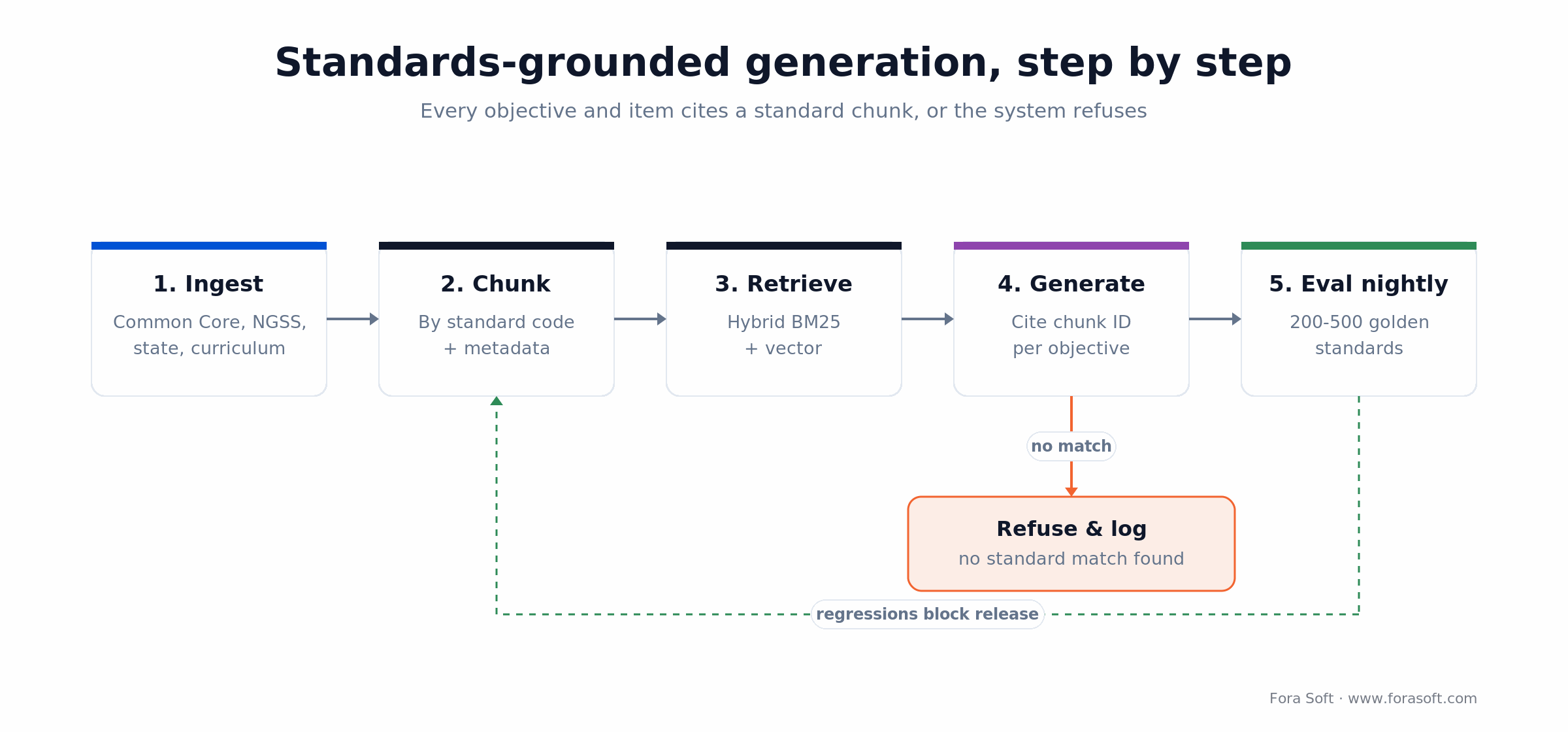
Figure 3. Grounded generation: every objective cites a standard chunk, or the system refuses and logs it.
Differentiation, IEP / 504 accommodations and ELL support
Every teacher complaint about off-the-shelf AI tools eventually lands in the same place: “it doesn’t adapt for my students with IEPs / ELLs / gifted learners”. Nail this and your product compounds.
Reading level controls. Target Lexile / Flesch-Kincaid / age-band per output. Generate 3–5 levels in one request and label them clearly.
IEP / 504 scaffolds. Chunked instructions, visual supports, sentence stems, reduced item counts, extended time guidance, read-aloud versions. Generate “accommodation cards” per student profile, not per lesson.
ELL support. Cognate glossaries, translated student instructions (teacher instructions stay in English), bilingual vocabulary cards, WIDA-aligned language-proficiency scaffolds.
Enrichment / gifted. Extension prompts, higher-DOK items, cross-curricular connections, independent-study scaffolds.
Critical rule: never pass raw student PII into a third-party LLM. Generate the scaffolds from the profile type (e.g. “ELL L2 Spanish”, “504 reading fluency”), not the student’s name, medical diagnosis or IEP number.
Assessment and rubric generation that administrators will sign off on
Generating assessment content is where risk goes up sharply: item validity, bias, accessibility, security of the item bank. A defensible architecture treats every generated item like a human-authored one — it just removes the 10-minute drafting step.
Items with metadata. Every generated item ships with: standard code, DOK level, expected difficulty, answer key, distractor rationales, and accessibility metadata (screen-reader alt text, math MathML).
Bias and fairness checks. Second-pass LLM or classifier screens items for cultural, socio-economic and linguistic bias; human review on any flagged item.
Item banking. Teacher-level and school-level banks with de-duplication (embedding similarity), difficulty-calibration over time (IRT on actual student responses), and secure-mode items that never leave the bank.
Rubrics. 3–5 performance levels, criteria-aligned to standards, exported to PDF, Google Doc, Google Classroom and Canvas. Allow teachers to save rubric templates per course.
Human-in-the-loop. Anything used for a grade must pass a teacher review step. Treat AI as the drafting partner; teacher approval is the contract.
Need an architecture review before your MVP sprint?
Send us your current design and target districts. We’ll pressure-test it on a call — RAG, compliance, cost — and highlight the two or three decisions worth an extra week of thinking.
LMS, SIS and rostering integrations teachers actually want
An AI resource tool without integration is a toy. Teachers work inside Google Classroom, Canvas, Schoology, Microsoft Teams for Education and PowerSchool. Every generated resource must land in those surfaces in one click.
Rostering. Clever, ClassLink and OneRoster for FERPA-grade provisioning. Support SSO through Google Workspace and Microsoft 365 at minimum.
LMS export. Google Classroom assignment create, Canvas LTI 1.3 deep-linking, Schoology API, Microsoft Teams Education assignment endpoint. PDF and Google Doc are table stakes.
Chrome extension. The fastest way to reach teachers is meeting them inside Google Docs/Slides — right-click → level this, right-click → add rubric. Brisk Teaching proved this distribution.
Mobile companion. A lightweight mobile view for parent letters and rubric export is enough. Full mobile authoring is usually over-scope for the MVP.
Compliance — FERPA, COPPA, SOPPA, NY Ed Law 2-d, GDPR, AI policy
If you sell to US K–12 you pass or fail on compliance before you demo a single feature. The gap is governance, not appetite: a 2025 Gallup survey found most teachers get no formal AI guidance from their school, and the Center for Democracy & Technology reported 85% of teachers used AI in 2024/25 while only about half received any training. Districts are adopting faster than they govern, so don’t be the vendor that makes them fail an audit.
FERPA. Sign a Data Processing Agreement with every district. Minimise PII — most teacher-copilot workflows need none at all. Store any educational record in logged, role-based storage with parent/student access and deletion workflows.
COPPA. Under-13 learners require verifiable parental consent. The FTC’s amended COPPA Rule (effective 23 June 2025, full compliance 22 April 2026) now demands separate, unbundled consent before sharing a child’s data with third parties, and explicit consent before using it to train AI; the FTC kept the existing school-authorization path for ed tech. Easiest posture: no behavioural tracking, no third-party ad SDKs, ever.
State laws. Illinois SOPPA (DPA, Data Privacy Officer, 30-day breach notice), New York Ed Law 2-d (strong encryption, data minimisation, no commercial use), California SOPIPA (no targeted ads, no profile sale), Texas HB-18. Build one compliance baseline that satisfies the strictest.
GDPR / UK DPA. Lawful basis, DPIA for AI features, EU data residency, DPA with every AI vendor (Azure OpenAI, AWS Bedrock, OpenAI Enterprise, Anthropic, Gemini via Google Cloud). Consumer endpoints don’t qualify.
SOC 2 Type II & ISO 27001. Enterprise buyers expect it. Plan a 6–12 month observation window early.
Ethical AI policy. Model cards, usage disclosure, bias testing, a student-facing AI policy template you give away to customers, and a public incident runbook. The EU AI Act classifies education AI as high-risk (Annex III); the Digital Omnibus agreed in 2026 moved that compliance deadline to 2 December 2027, with Article 50 transparency duties still landing 2 August 2026. Build the logging and technical documentation in from day one — retrofitting them is expensive.
Mini case: the ALDA AI course generator
Situation. ALDA is an AI course generator we helped build, co-designed with 70+ US college educators through e-Literate’s Design/Build Workshop series. The brief was this article’s topic in miniature: turn an instructor’s intent into standards-shaped resources (syllabi, full-text lectures, personalized assessments) without dumping them in front of a blank prompt box.
Plan. We built a “Chain of Inquiry” prompt pattern on top of the OpenAI Assistant API: start broad (who are the students, what’s the goal), then narrow to specific lesson details, the same way a junior learning designer works. An adaptive content engine and institution-specific customization sat on top, so every artefact fit the school, not a generic template.
Outcome. ALDA now serves institutions (Dallas College, SNHU, UCF, UMGC and five HBCUs via UNCF) that collectively teach 500,000+ students a year, and faculty reported roughly a 20% efficiency gain. It’s now owned by 1EdTech after a seven-month program, backed by D2L and VitalSource. The pattern (structured inquiry, grounded generation, human-in-the-loop) is exactly what a new teacher-resource product needs. Want a similar build assessment? Book a 30-minute call.
Cost model — build and run costs for a teacher AI copilot
Two cost curves: the one-time build and the per-teacher run-rate. These ranges reflect what we see on EdTech projects delivered with our Agent Engineering stack, which shortens scoping-to-MVP against classic staffing. Figure 4 shows the arithmetic behind both the run-rate and the build bands.
| Scope | Timeline | Indicative cost (USD) | Included |
|---|---|---|---|
| Pilot MVP | 10–14 weeks | ~$70k–$140k | Auth, 3 resource types, standards RAG, Google Classroom export, admin panel |
| Production v1 | 5–7 months | ~$160k–$280k | MVP + rubrics, item banks, LTI deep-link, Chrome extension, multilingual, SOC 2 prep |
| Enterprise-ready | 8–12 months | ~$280k–$520k | v1 + SSO/SAML, SOC 2 Type II, multi-region, SIS rostering, white-label, SLAs |
| Per-teacher run-rate | Ongoing | ~$0.50–$3.00 / active teacher / month | Infra, LLM tokens, storage, export APIs |
LLM tokens dominate the run-rate once you hit a few thousand teachers. Cache aggressively per standard + grade + topic + level combination, reuse embeddings, use cheaper models for standards retrieval and reserve top-tier models for final drafting. For a quote on your scope, book a scoping call.
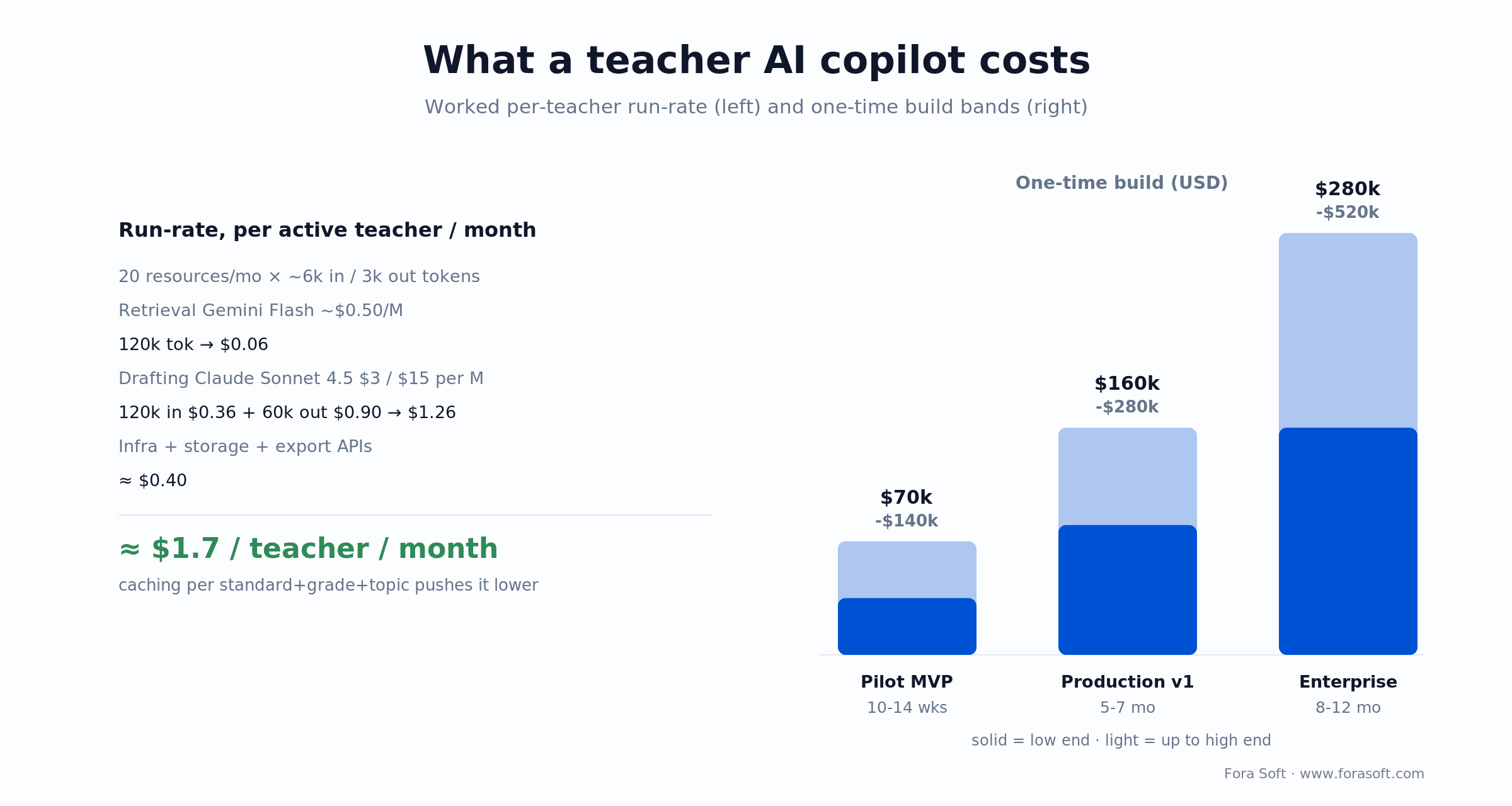
Figure 4. Run-rate is dominated by LLM tokens; the one-time build scales with scope and compliance.
Tooling shortlist — the stack we reach for first
LLMs. GPT-5.6 (Sol/Terra/Luna tiers) through Azure OpenAI for regulated deployments; Claude Sonnet 4.5 via Anthropic or AWS Bedrock; Gemini 2.5 Pro and Gemini 3 via Google Cloud; self-hosted Llama or Mistral for data-sovereign or offline districts. Route cheap retrieval to a small/flash model and reserve a top-tier model for final drafting.
Embeddings & retrieval. text-embedding-3-large or open-source equivalents; Postgres + pgvector for cost-efficiency, Qdrant or Weaviate at scale; LlamaIndex / LangChain for the retrieval pipeline.
Observability & evals. Langfuse or Langsmith for prompt traces and evals, OpenTelemetry for service metrics, Sentry for client errors, Datadog for synthetic monitoring.
Document export. Google Docs / Slides APIs, Microsoft Graph, LibreOffice-based headless PDF, mathjax-node for equations, react-pdf or Puppeteer for branded printouts.
Rostering & LMS. Clever, ClassLink, OneRoster, Google Classroom API, Canvas LTI 1.3, Schoology, PowerSchool.
Benchmarks to study. MagicSchool, Eduaide, Brisk Teaching, Diffit, Khan Academy Khanmigo teacher tools. Don’t copy them; use them to stress-test your UX ideas.
A decision framework — build your teacher AI tool in five questions
Q1. Which teachers, in which system? U.S. K–12 districts vs. UK academy trusts vs. publishers’ teacher portals vs. corporate L&D vs. tutoring businesses. Each has different compliance, integrations and buying cycles.
Q2. What’s the top outcome you’re selling? Teacher hours saved, student outcome lift, parent engagement, or content-throughput (for publishers). Pick one primary metric and instrument it from day one.
Q3. Which 3 resource types first? Lesson plan + differentiated worksheet + rubric is the canonical 80/20. Pick based on your buyer.
Q4. Which standards frameworks? Start with 1–2 frameworks, plan for 5–10 within 12 months. Versioning matters — CCSS and NGSS update.
Q5. What’s the compliance ceiling? K–12 U.S. with the strictest state law you care about = your baseline. Exceeding it is cheap; matching it later is expensive.
Five pitfalls we see on teacher-AI builds
1. Free-form chatbot instead of workflows. Teachers don’t want a blank prompt box. They want a structured wizard with grade, standard, duration. Blank boxes kill retention.
2. Ungrounded generation. An LLM without RAG over standards produces plausible-sounding but off-standard outputs. You’ll get returned by curriculum directors in week one.
3. Ignoring state privacy laws. SOPPA, NY Ed Law 2-d and SB-1177 each bite. One non-compliant ship-region is enough to kill a district deal.
4. No export path. If teachers can’t get the output into Google Classroom or a PDF in one click, the tool loses to Google Docs + ChatGPT tab.
5. Uncapped AI spend. Without caching and model tiering, per-teacher LLM cost spirals. We’ve seen founders burn a round because a single “regenerate” button ran GPT-4 at full context size on every click.
Reach for a rescue-and-refactor engagement when: two or more of these pitfalls are already live — the cheapest fix is usually a focused rework of prompts, RAG and caching, not a greenfield rebuild.
KPIs: what to measure once you’re live
Quality KPIs. Standards alignment rate (≥95% of generated artefacts cite a real chunk), teacher edit distance on first draft (≤20%), accessibility PASS rate on generated PDFs (≥95%), refusal correctness (≥98% on traps).
Adoption KPIs. Weekly active teachers, resources generated per teacher per week (target ≥5), D30 retention (≥45% B2C teachers, ≥70% within a paid district contract), NPS per district.
Reliability KPIs. Generation latency p95 (≤8 s for standard resources, ≤25 s for long lesson plans), API availability (≥99.9%), deployment frequency (≥weekly), MTTR (≤30 min).
Reach for weekly KPI reviews when: you pass 500 active teachers — before that, trust qualitative feedback; after that, tune every release against these numbers.
When not to build a teacher AI tool
We’ll tell you not to build if:
• You plan to resell MagicSchool / Eduaide / Brisk with a coat of paint. Their distribution and feature surface are too far ahead. A white-label partnership is cheaper.
• Your team has no educator in the room. Teacher UX is subtle; ship with a pedagogical lead or don’t ship.
• You can’t articulate the buyer. If you don’t know whether you’re selling to a district CTO, a publisher or an LMS vendor, do two weeks of buyer interviews before any code.
Ready to ship a teacher AI copilot in a quarter?
Bring us your shortlist of resource types, standards and districts. We’ll return a 10–14 week plan, a realistic budget and the team you’d work with — inside one call.
FAQ
How long does it take to build a teacher AI copilot MVP?
Plan on 10–14 weeks for a focused MVP covering auth, three resource types (typically lesson plan, differentiated worksheet, rubric), standards RAG over one or two frameworks, and a Google Classroom or Canvas export. Item banks, mobile and SOC 2 Type II push you into the 5–7 month range.
Do we need to compete on features with MagicSchool or Eduaide?
No — compete on depth, not breadth. A copilot aligned to one country’s curriculum, one subject or an LMS ecosystem beats a 100-tool jack-of-all-trades in procurement. The goal is to be the obvious choice inside a niche, not the fifth option inside a crowded category.
How do you keep AI hallucinations out of lessons?
Three layers: retrieval-augmented generation strictly grounded in the selected standards and curriculum, a refusal policy when retrieval fails, and a teacher review step before any resource is used for a grade. An eval set of 200–500 golden standards blocks regressions before release.
How do we handle FERPA, COPPA and state privacy laws with AI APIs?
Pick vendors with enterprise regions and DPAs (Azure OpenAI, AWS Bedrock, OpenAI Enterprise, Anthropic, Gemini on Google Cloud). Keep student PII out of prompts by generating from profile types, not named students. Log every AI call for audit. Build to the strictest state law you care about (typically NY Ed Law 2-d or Illinois SOPPA).
Which LMS integrations are essential for K–12 buyers?
At minimum Google Classroom (assignment create) and Google Docs/Slides export; Canvas LTI 1.3 deep-linking for larger districts and higher-ed; Clever or ClassLink for rostering and SSO. Microsoft Teams Education, Schoology and PowerSchool add measurable deal velocity in specific regions.
What does AI cost per teacher per month?
Rough order: $0.50–$3.00 per active teacher per month, depending on usage volume and whether you cache. Standards retrieval is cheap, long-form lesson-plan generation on a top-tier model is where budgets blow up. Cache per standard + grade + topic + level tuple and route to a cheaper model for simple drafts.
Should the product be a web app or a Chrome extension?
Both, eventually. The fastest distribution path to U.S. K–12 is a Chrome extension that lives inside Google Docs/Slides; the long-term home is a full web app with a library, collaboration and admin panel. Brisk Teaching is the canonical example of extension-first; MagicSchool is web-first.
Can Fora Soft own the whole build end-to-end?
Yes. E-learning and AI integration are our core practices, we’ve shipped video-first learning products since 2005 and we run a dedicated AI integration team on top of the e-learning one. We can deliver discovery, product design, build, launch and post-launch iteration under one contract.
What to Read Next
Playbook
How to Build AI-Powered Multimedia Solutions for E-Learning
The wider platform reference architecture your teacher copilot plugs into.
AI & video
AI for E-Learning Video Tools: Transform Your Platform and Cut Costs
Which AI video tools cut production cost, and which are demo-ware.
Lesson planning
The Best AI Lesson Plan Generator — Features to Look For
Deep-dive on the single most-used feature in any teacher AI tool.
Analytics
AI Video Analytics for Online Learning
Measure what’s actually working — beyond engagement vanity metrics.
AI apps
How to Build Apps with AI in 2026
The delivery model — Agent Engineering — behind our 10–14 week MVPs.
Ready to build a teacher AI copilot?
The best AI resources for teachers are a product, not a prompt. Get the five canonical resource types right, ground every artefact in real standards with RAG, integrate where teachers already work, and build compliance into the data model from day one.
The market window is open for vertical, regional and white-labelled teacher copilots. A focused MVP ships in one quarter, not one year — if the team knows both video/e-learning and AI engineering, and if compliance is designed in rather than patched over. That’s the intersection Fora Soft sits in.
Let’s build your teacher AI copilot
Tell us about your teachers and the outcome you’re selling. In one 30-minute call we’ll sketch architecture, phased plan and a transparent budget — no slides, no lock-in.

