

Key takeaways
• An AI lesson planner is a module, not a chatbot. Inside an LMS or EdTech product it combines a structured input form, RAG over your curriculum and standards, an LLM, a validator and a teacher review screen. We ship an MVP in 6–8 weeks for $30K–$80K.
• Inference is the cheap part in 2026. At 5,000 active teachers and 10 lessons each per month, a mid-tier model costs about $2,000 a month at October 2026 list prices — roughly $0.40 per teacher, against a typical $10–$50 per-teacher upsell.
• Your module competes with free tools. ChatGPT for Teachers has been free for verified US K-12 educators since November 2025, and MagicSchool reported 6 million+ educator sign-ups in February 2025. Build only when your curriculum data, LMS context or student-data perimeter gives you an edge they cannot copy.
• Compliance is part of the build. The amended FTC COPPA Rule has applied since April 22, 2026 (separate parental consent for third-party sharing, written retention and security programmes). EU AI Act Article 50 transparency applies from August 2, 2026, and high-risk duties for AI that evaluates learning outcomes from December 2, 2027.
• Keep a human on IEPs, graded tests and behaviour plans. A draft-and-approve screen, a fact-check validator and an audit log are what make the feature safe to sell to schools.
Updated October 2026: inference budget recalculated at October 2026 model prices, amended COPPA Rule (in force April 22, 2026) and EU AI Act dates after the July 2026 Digital Omnibus.
Short answer: to build an AI lesson planner into an EdTech product, you add six layers to your platform — a structured request form, retrieval over your own curriculum and standards, an LLM call, a validator, a teacher edit-and-approve screen, and a compliance and audit layer. An MVP with lesson and rubric generation and one LMS integration takes 6–8 weeks and $30K–$80K with our team; a full module with differentiation, multilingual output and curriculum RAG takes 16–22 weeks and $150K–$300K.
This guide is for product owners and CTOs of LMSs, tutoring platforms and training products. If you are a school or district choosing a ready-made tool, our AI lesson plan generator buyer’s guide for districts covers vendor tiers, pricing and rollout, and the eight best AI lesson-planning tools are compared one by one in a separate review.
Why Fora Soft wrote this playbook
Fora Soft has built e-learning and virtual-classroom platforms since 2005 (20+ years). We shipped the world’s first WebRTC HTML5 virtual classroom for BrainCert (now $3M ARR, 100K+ customers, 500M+ classroom minutes delivered), an AWS Most Innovative EdTech Award-winning platform for Scholarly (15,000+ users, 2,000 concurrent students on live classes), and the InstaClass virtual-tutoring platform with a firewall-bypassing WebRTC core. We also embed generative AI features — GPT and Claude-powered hints, content summarisation, adaptive assessment — across client products.
We work in Agent Engineering mode: senior engineers pair with AI coding agents for boilerplate, test generation, and refactors. That is why our AI lesson-planner MVPs typically ship in 6–8 weeks at $30K–$80K — about 30% faster and cheaper than agency averages. When we quote a build cost in this article, it is a number we have actually billed on a Fora Soft EdTech project.
Planning an AI lesson-planner feature for your LMS?
Book a 30-minute scoping call and we will return with an architecture diagram, stack recommendation, and a dollar-accurate estimate — no sales pitch.
The 2026 numbers behind an AI lesson-planner business case
The numbers that matter for a build decision are adoption (teachers already expect AI drafts), time saved (the value you sell), and how cheap generic generation has become (the bar you must clear).
| Signal | Latest number | Source and what it means for your product |
|---|---|---|
| K-12 teacher AI use | 60% of US teachers used an AI tool in 2024–25 | Gallup & Walton Family Foundation, June 2025 — teachers are already used to AI drafts |
| Time saved by weekly users | 5.9 hours a week, about six weeks a school year | Gallup & Walton, 2025 — the ROI your sales deck will quote |
| Lesson planning as the top use | 54% of English teachers who use AI use it for lesson planning; 61% in primary | Teacher Tapp, Nov–Dec 2025 (published 2026) — planning is the job users hire AI for |
| Schools with an AI policy | 19% of US teachers; their users save 26% more time a week | Gallup & Walton, 2025 — ship admin controls and policy templates, not only generation |
| Free competition | ChatGPT for Teachers free for verified US K-12 educators | OpenAI, November 19, 2025 — generic generation is no longer a paid feature |
| Inference cost per teacher | ≈ $0.40 a month on a mid-tier model | Fora Soft estimate at October 2026 list prices (worked example below) |
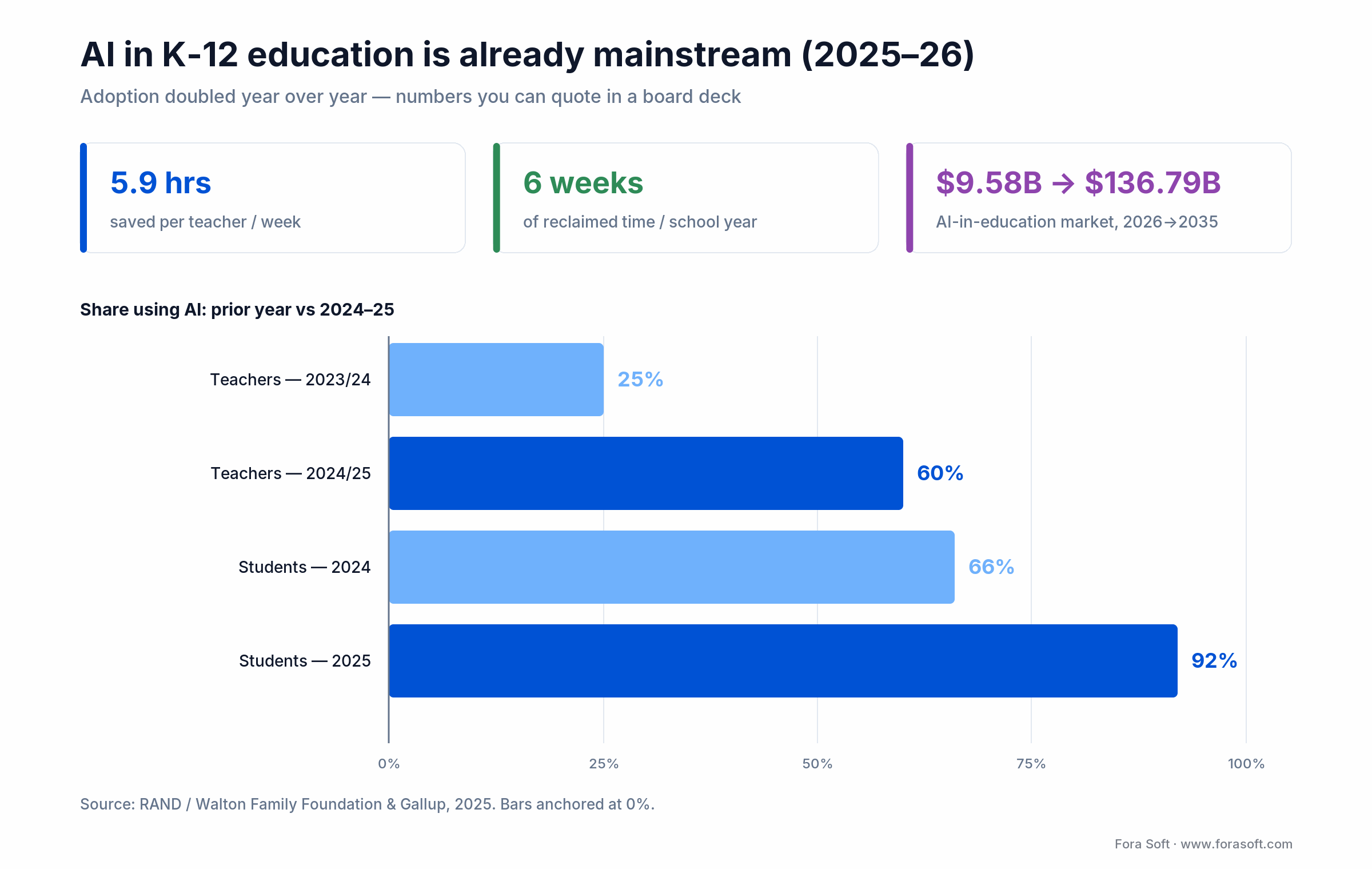
Figure 1. Teacher AI use: 25% in 2023–24 (RAND) and 60% in 2024–25 (Gallup & Walton); student use: 66% to 92% among UK undergraduates, 2024–2025 (HEPI). Weekly AI users save 5.9 hours a week.
What teachers already use — and what your module must beat
Your built-in planner will be compared with free general tools and with teacher AI suites. It wins only where it uses context those tools do not have: your curriculum, your standards mapping, the class roster and progress data already in your LMS, and your compliance perimeter. For tool-by-tool pricing and verdicts, see the best AI tools for lesson planning.
| Category | Examples (October 2026) | Where your module can do better |
|---|---|---|
| General AI workspaces | ChatGPT for Teachers, Gemini in Google Workspace for Education | Free or bundled; strong writing, no knowledge of your course model, pacing or learner data |
| Teacher AI suites | MagicSchool, SchoolAI, Eduaide, Education Copilot | Dozens of generators, Google Classroom and Canvas hooks; generic unless the teacher pastes context |
| Specialist tools | Diffit (differentiation), Twee (language teaching), Curipod (interactive lessons) | Do one job well; teachers juggle several tabs |
| Curriculum-bound tutors | Khanmigo | Aligned to one publisher’s content; not portable to your curriculum |
How AI concretely improves lesson planning
Time saved — the six-week dividend
Teachers who use AI weekly recover 5.9 hours per week (Walton / Gallup 2025). That is six weeks of reclaimed time per school year. Schools with explicit AI policies capture 26% more of that benefit than those without. That reclaimed time usually goes back into differentiated feedback and targeted 1:1 work, not more lessons on paper.
Reach for AI planning when: your teachers spend more than 5 hours a week on lesson documentation, differentiation drafts, or parent communications — exactly the tasks LLMs compress.
Differentiation at scale
A single prompt can produce reading-level-adapted versions, ELL scaffolds, SpEd accommodations, and enrichment for stronger learners. For special education the output is a starting point only: IEP accommodations still need a human special-education reviewer (see when not to let AI write the lesson below).
Assessment and rubric generation
Exit tickets, short-answer quizzes, rubrics aligned to Bloom’s taxonomy and state standards. The LLM renders them in under a minute. Humans still own high-stakes summative assessments.
Reach for AI rubric generation when: you need rubrics aligned to state standards or Bloom’s taxonomy at scale — for low-stakes formative checks only, and always with a human final review before grading.
Multilingual and accessibility
Instant translation into 20+ languages, plus text-to-speech, auto-captioning, and WCAG-aligned graphic organisers. For a district with a growing multilingual population this turns a months-long effort into a days-long one.
Reach for AI multilingual tooling when: your student population speaks more than two primary languages, or you serve EU schools where translation is a daily requirement, not a nice-to-have.
Non-negotiable features of a 2026 AI lesson planner
- Standards alignment — Common Core, NGSS, IB, state standards — with explicit reporting.
- Differentiation engine covering SpEd, ELL, and advanced learners.
- Multi-modal output — text, slides, quizzes, graphic organisers, interactive exit tickets.
- Auto-rubric generation with Bloom’s taxonomy tagging.
- Parent-communication templates — newsletter, progress report, intervention letter.
- Content validator (fact-checking, bias detection) before classroom deployment.
- LMS integration — Google Classroom, Canvas, Schoology, Moodle, Blackboard.
- Teacher customisation surface — every AI output is editable before it ships.
- FERPA / COPPA / GDPR-compliant data pipeline with DPAs on every vendor.
Build versus buy — the decision for EdTech founders
If you run a school or district, buy MagicSchool, SchoolAI, or Education Copilot. The tools are good enough, the pricing is reasonable, and the governance burden is manageable. Our AI lesson plan generator buyer’s guide for districts covers vendor tiers, cost and compliance for that path.
If you run an LMS, training platform, or a vertical-specific e-learning product, building a lesson-planner module into your own stack is usually the better play. You differentiate your product, own the curriculum context, keep student data inside your compliance perimeter, and add a SaaS upsell (often $10–$50 per teacher per month). The planner then ships as one more module in your custom LMS development roadmap, next to the gradebook and course model.
Reach for a custom build when: you already have > 10,000 teacher users on your platform, your curriculum content is proprietary, and the biggest LMS integrations (Google Classroom, Canvas) are already wired into your product.
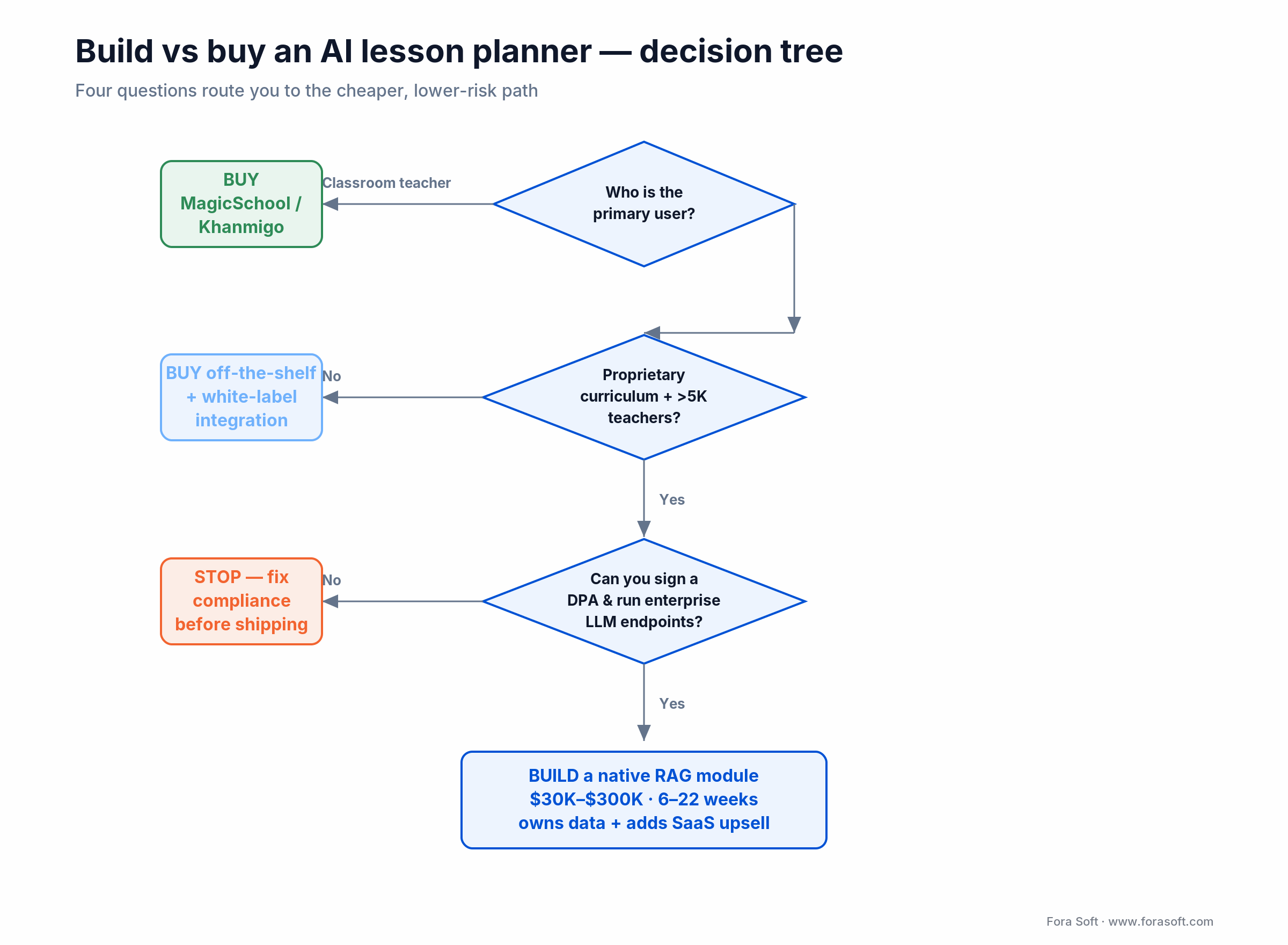
Figure 2. Build-vs-buy decision tree: four questions route you to the cheaper, lower-risk path for AI lesson planning.
Reference architecture for a custom AI lesson-planner module
Every lesson-planner module we ship follows the same six-layer pattern. The layers are technology-agnostic — you can swap the LLM, vector DB, or front-end without changing the shape.
1. Input layer. A structured form: grade, subject, standard code, duration, differentiation needs, optional seed content. Keep it under 10 fields; more and teachers bounce.
2. RAG layer. Vector DB (Pinecone, Chroma, FAISS, pgvector) seeded with the district’s curriculum, state standards, rubric library, and approved-source passages. This is where LLM hallucinations are controlled.
3. LLM inference layer. A mid-tier model (for example Claude Sonnet 5.5 or GPT-6.1 Sol, both $2 input / $10 output per million tokens in October 2026) for the main draft; a small model (Claude Haiku 5.5 or GPT-6 Luna, $0.10 / $0.50) for routing, translation and validation passes. Cache the system prompt and standards context: cached input is billed at 5–10% of the normal input price on both vendors’ price lists. Keep the model behind your own interface so you can switch vendors when prices move.
4. Validator layer. Standards-alignment checker, fact-checker against retrieved passages, bias detector, reading-level checker (Flesch-Kincaid). Flag low-confidence outputs for human review.
5. Teacher customisation surface. Side-by-side editor with accept / edit / reject controls. Every AI output is a draft, never a shipped lesson.
6. Compliance & audit layer. PII tokenisation, audit log of every prompt, DPA-bound LLM vendor (enterprise endpoints only, no training use of student data), FERPA / COPPA / GDPR reporting.
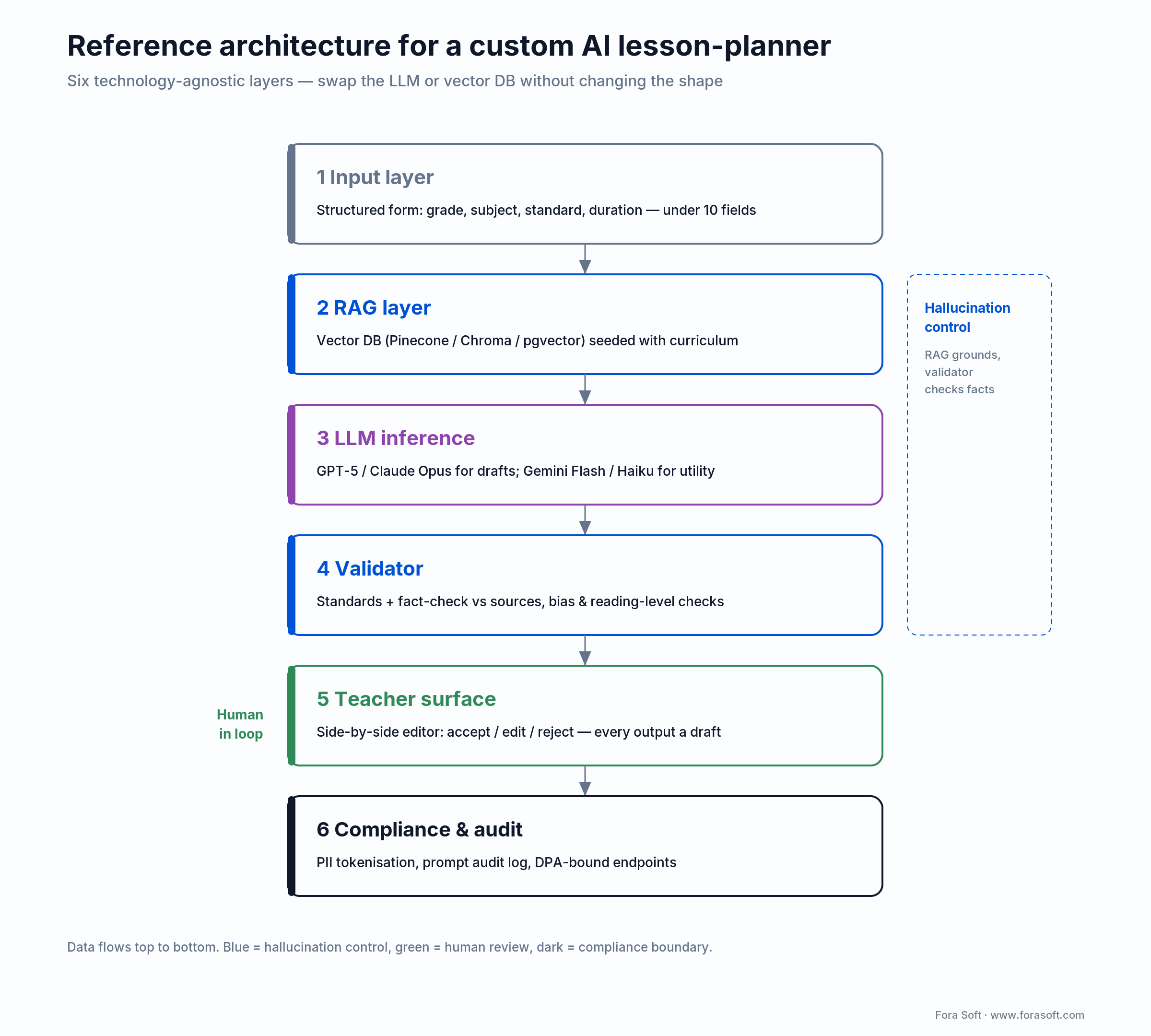
Figure 3. Reference architecture: RAG plus a validator layer control hallucinations; the teacher keeps final say before any lesson ships.
Want us to prototype it in four weeks?
We ship AI lesson-planner MVPs on a fixed-fee basis. Tell us your curriculum, LMS, and compliance scope — we return with an architecture diagram and a firm quote.
Build cost, timeline, and monthly inference budget
| Scope | Features | Timeline | Build cost |
|---|---|---|---|
| MVP | Lesson + rubric generation, one LMS integration | 6–8 weeks | $30K–$80K |
| Mid-size | +Differentiation, validator, two LMS, FERPA | 10–14 weeks | $80K–$150K |
| Full platform | +RAG on district curriculum, multilingual, teacher analytics | 16–22 weeks | $150K–$300K |
Monthly inference budget. Worked example at October 2026 list prices (Anthropic and OpenAI pricing pages): 5,000 monthly active teachers × 10 lessons = 50,000 generations. Each lesson uses about 6,000 input tokens (4,000 of them a cached system prompt and standards context) and 2,500 output tokens, plus one validator pass on a small model; we add 30% for regenerations.
| Model tier | Price per 1M tokens (input / output) | Cost per lesson | Monthly cost, 50,000 lessons |
|---|---|---|---|
| Small model only (Claude Haiku 5.5 / GPT-6 Luna) | $0.10 / $0.50 | ≈ $0.002 | ≈ $130 |
| Mid-tier draft + small validator (Claude Sonnet 5.5 / GPT-6.1 Sol) | $2 / $10 | ≈ $0.03 | ≈ $1,900–$2,000 |
| Top-tier draft + small validator (Claude Opus 5.5) | $4 / $20 | ≈ $0.06 | ≈ $3,800–$3,900 |
The mid tier is our default for lesson drafts: about $0.40 per active teacher per month. Add hosting ($300–$1,500), a vector database ($100–$500) and monitoring. Prices change every few months, so re-run the numbers before you sign a pricing page — our free MVP planning and monetization modelling does this for your own teacher volumes.
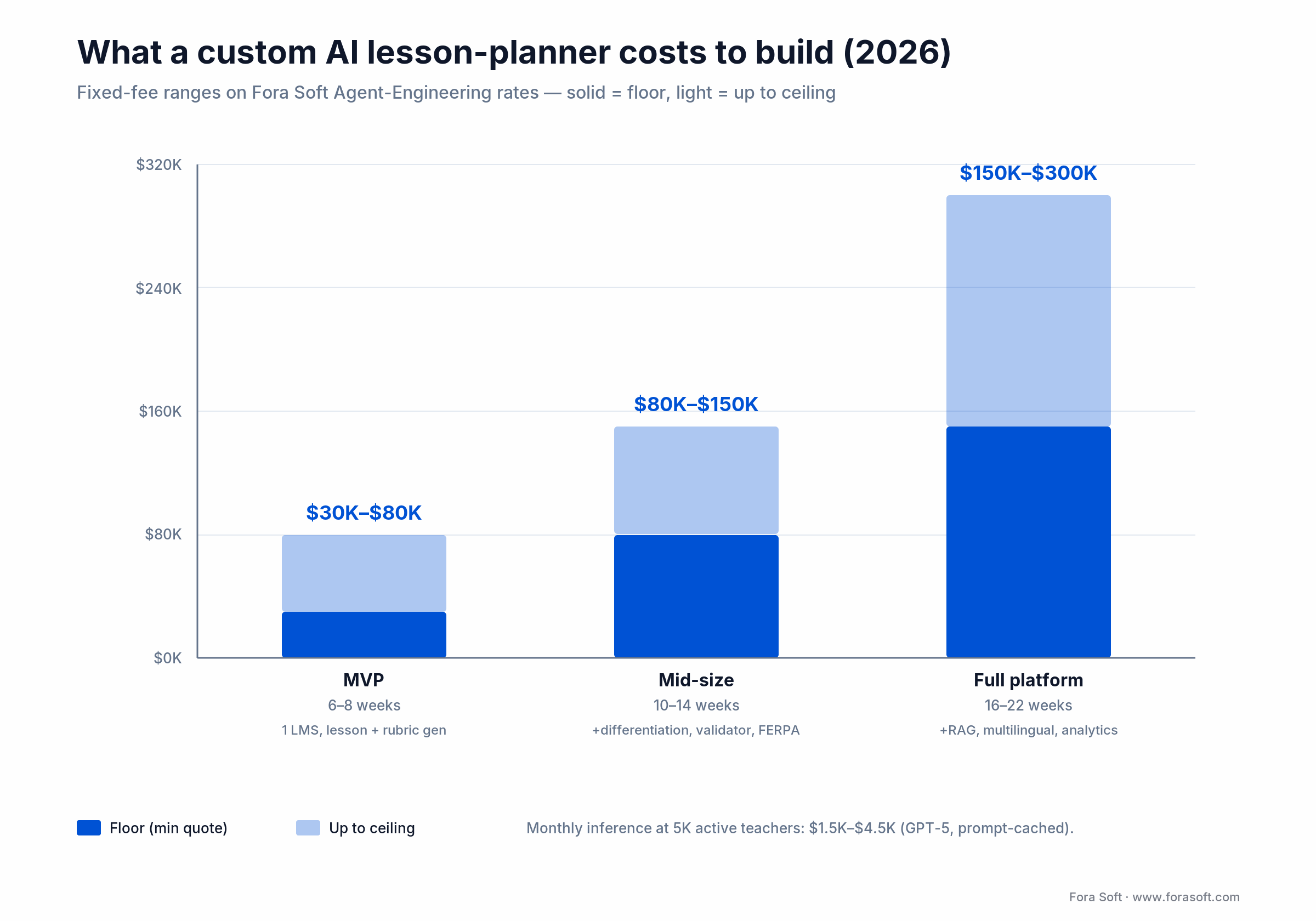
Figure 4. Build cost by scope on Agent-Engineering rates: MVP $30K-$80K through full platform $150K-$300K, 6-22 weeks.
Mini case — scaling Scholarly with AI course creation
A global higher-education platform came to us needing to help instructors create full courses — lessons, quizzes, rubrics — without hiring an instructional-design team for every cohort. Live-class scale had to hit 2,000 concurrent students without degrading video quality.
Our plan combined a WebRTC live-class core with AI-assisted course generation: GPT-based drafts from an instructor’s syllabus outline, Claude-based rubric generation, on-device Whisper transcription, and an interactive-whiteboard module. The AI layer was RAG-grounded on the platform’s existing course catalogue and pedagogy guidelines to keep outputs consistent.
Outcome: 15,000+ users, 2,000 concurrent students on live classes, and an AWS Most Innovative EdTech Award (Asia Pacific) for the result. Full details on the Scholarly case study page. Want a similar assessment?
FERPA, COPPA, GDPR and the EU AI Act — five rules your module ships with
1. Do not send student PII to a cloud LLM without a contract. FERPA (US Department of Education, Student Privacy Policy Office) lets schools share education records with a vendor only under direct school control, which in practice means a data processing agreement with every vendor touching student records. Default to enterprise or API endpoints where customer data is not used for training (OpenAI API and ChatGPT Edu, Anthropic API, Azure OpenAI, AWS Bedrock).
2. Meet the amended COPPA Rule for under-13 users. The FTC’s amendments were published on April 22, 2025, and compliance has been required since April 22, 2026. They add separate verifiable parental consent before disclosing children’s data to third parties (the FTC has said disclosure for AI training is not “integral” to the service), a written data-retention policy with deletion timeframes, and a written information security programme.
3. GDPR for any EU student. Right to access, right to erasure, data-residency controls. Keep a per-student data map. Penalties reach €20M or 4% of global revenue.
4. Plan for the EU AI Act. Under Regulation (EU) 2026/1744 (the Digital Omnibus, in force since July 27, 2026), high-risk duties for Annex III education systems — including AI that evaluates learning outcomes or steers the learning process — apply from December 2, 2027. A planner that drafts lessons for a teacher is usually outside that list, but adaptive assessment or automated grading features can fall inside it. Article 50 transparency (telling users they deal with AI, marking generated content) applies from August 2, 2026.
5. Tokenise PII before it hits the LLM. Replace student names and IDs with tokens upstream; re-hydrate in the UI. Simple and effective.
Five pitfalls that sink AI lesson-planning rollouts
1. Hallucinations in generated content. LLMs confidently invent facts, especially in long-tail subjects. Mitigation: RAG against vetted sources, a fact-checker validator, and a visible “AI-generated — please verify” banner on every draft.
2. Student data leakage. A single unsigned DPA or a teacher pasting names into the free tier of ChatGPT triggers FERPA, COPPA, and GDPR headaches at once. Mitigation: enforced enterprise endpoints, pre-flight PII redaction, mandatory staff training.
3. Equity gaps widening. Rich schools adopt AI and compound their advantage; under-resourced schools fall further behind. Mitigation: equitable licensing, open-source alternatives, bias audits, explicit offline / low-bandwidth fallbacks.
4. Teacher agency erosion. Blindly following AI drafts turns teachers into script-followers. Mitigation: co-creative workflow (teachers edit every output), professional development on critical evaluation, analytics on how often teachers change the draft.
5. Context loss in generic outputs. An LLM without district curriculum, pacing guides, and student demographics produces bland, disconnected lessons. Mitigation: RAG on local context, teacher customisation surface, feedback loop that retrains from edits.
KPIs to track from day one
Teacher-side KPIs. Hours saved per week (target > 4), teacher NPS (target > 40), adoption rate (target > 70% in 12 months), edit rate on AI drafts (target 40–60% — too low signals blind acceptance, too high signals bad output).
Student-side KPIs. Engagement lift (target ≥ 20% over baseline), completion rate on AI-generated lessons, time-to-mastery reduction, differentiated-material usage rate.
Content-quality KPIs. Standards-alignment score (target 95%), fact accuracy (target 98%+), rubric alignment to objectives (target 90%+), differentiation coverage (percentage of lessons with 2+ learner-level variants).
When not to let AI write the lesson
IEPs and 504 plans. Common Sense Education specifically warns against AI-generated IEPs that look professional but miss the individualisation IDEA legally requires. Use AI to assist drafting; require a human special-education expert to approve.
High-stakes summative assessments. AI can draft options; humans must validate rigour, equity, and alignment. Never ship a graded test from an AI draft.
Deep creative and arts analysis. AI handles foundational skill drills fine. Interpretation, critique, and artistic voice require a human teacher.
Behaviour-intervention plans. These require understanding the whole child, family, context. AI assists with documentation; teachers decide.
How to ship an AI lesson-planner module in four phases
This is the product-team plan. A school or district rolling out a ready-made tool follows a different sequence (policy, DPAs, pilot, professional development), covered in the district buyer’s guide.
Phase 1 — Spec and data audit (weeks 1–2)
Pick one grade band and subject, list the standards frameworks you must cover (Common Core, NGSS, state, IB), and audit the curriculum content you can legally use for retrieval. Write the evaluation set: 50–100 real lesson requests with teacher-approved answers.
Phase 2 — MVP (weeks 3–8)
Ship the request form, retrieval, generation, validator and the edit-and-approve screen behind a feature flag, with one LMS integration. Run the evaluation set on every prompt or model change.
Phase 3 — Design-partner pilot (weeks 9–14)
Ten to twenty teachers at two or three partner schools. Track hours saved, edit rate and accuracy; exit when teachers save more than 4 hours a week and edit 40–60% of drafts.
Phase 4 — Scale and price (ongoing)
Open to all customers, attach the per-teacher upsell, add admin controls and policy templates for school leaders, and review cost per lesson monthly.
A decision framework — pick your approach in five questions
1. Who is the primary user? Classroom teacher → buy MagicSchool / Khanmigo / Education Copilot. LMS / platform customer → build a native module.
2. What is the compliance surface? Under-13 students → COPPA mandatory. EU students → GDPR mandatory. US K-12 → FERPA DPAs mandatory. If you cannot sign a DPA, do not send data.
3. Do you have proprietary curriculum? Yes → RAG it into your platform and build a custom planner. No → buy an off-the-shelf tool.
4. What is the scale? < 500 teachers → commercial SaaS. 500–5,000 → commercial SaaS or a lightweight white-label integration. > 5,000 → custom build breaks even quickly.
5. What is the differentiation requirement? Heavy SpEd / ELL → Diffit, SchoolAI, or a custom differentiation engine. Standard mixed-ability → any major tool works.
Common mistakes we keep seeing
Shipping generation without admin controls. Only 19% of US teachers work in schools with an AI policy, and their AI users save 26% more time (Gallup & Walton, 2025). Give school leaders policy templates, usage reports and an off switch, and the module sells itself to them.
Letting student names reach the model. One prompt with real names on a consumer endpoint is a FERPA and COPPA problem. Tokenise upstream and call enterprise or API endpoints only.
Skipping professional development. A teacher who does not know the tool uses it for one feature and abandons it. Budget 4–8 hours of PD per teacher in year one.
Generating an IEP and shipping it. Always a human SpEd reviewer. The quality gain holds only with review.
Measuring success by “lessons generated”. That is a vanity metric. Measure hours saved, engagement lift, standards alignment, and content accuracy.
Pre-launch checklist — the twelve items we never skip
Before an AI lesson-planning tool goes school-wide or platform-wide, we walk the client through these twelve checks. Any red and the rollout is paused.
- AI-use policy is written, approved by leadership, and shared with staff.
- DPAs are signed with every tool and LLM vendor touching student data.
- Enterprise LLM endpoints are enforced; free-tier use is blocked by policy and network controls.
- Amended COPPA Rule flows are live for under-13 students: verifiable parental consent, separate consent for third-party sharing, posted retention policy.
- GDPR data-residency, access, and erasure workflows are tested end-to-end.
- PII tokenisation happens upstream of the LLM call.
- Fact-checking validator is live and blocks low-confidence drafts from auto-shipping.
- Human review step exists on IEPs, assessments, and creative analysis.
- Teacher-customisation surface is visible and every draft is editable.
- Professional development plan exists (4–8 hours per teacher in year one).
- Metrics dashboard tracks hours saved, edit rate, and accuracy score.
- Kill-switch feature flag can disable the AI module remotely without a new release.
FAQ
How long does it take to build an AI lesson planner?
An MVP with lesson and rubric generation and one LMS integration takes 6–8 weeks; adding differentiation, a validator and a second LMS takes 10–14 weeks; a full module with curriculum RAG, multilingual output and teacher analytics takes 16–22 weeks.
Which LLM should an AI lesson planner use in 2026?
Use a mid-tier model such as Claude Sonnet 5.5 or GPT-6.1 Sol for drafts and a small model such as Claude Haiku 5.5 or GPT-6 Luna for routing and validation, behind your own model interface. Choose by your evaluation set, not by benchmark headlines, and re-test when prices or versions change.
Can AI lesson planners align to Common Core, NGSS, IB, or state standards?
Yes. MagicSchool, Khanmigo, SchoolAI, and Education Copilot all ship built-in standards matching for Common Core and NGSS; most cover state standards in the US and major international frameworks (IB, Cambridge). Verify your specific standards are supported; custom local standards usually require a RAG implementation.
How do we prevent AI from generating misinformation in lessons?
Three layers: (1) RAG against a vetted source library so the LLM quotes curriculum, not its training memory; (2) a fact-checker validator that cross-references generated content with sources before it reaches the teacher; (3) a human review step for every lesson, with a visible “AI-generated — verify before use” banner.
Is AI lesson planning FERPA, COPPA, and GDPR compliant?
It can be — it is not by default. Requirements: signed DPA with every LLM and tool vendor, tokenised / redacted PII before it leaves your infrastructure, verifiable parental consent flows for under-13 students (amended COPPA Rule, in force since April 22, 2026), data-residency controls for EU students (GDPR), and a documented deletion-on-request process. Fora Soft designs these flows for every EdTech client.
What does it cost to build a custom AI lesson planner into our LMS?
An MVP with lesson + rubric generation and one LMS integration: $30K–$80K in 6–8 weeks on our Agent-Engineering rates. A full platform with differentiation, multilingual, RAG, and compliance: $150K–$300K in 16–22 weeks. Monthly inference runs $1,500–$4,500 at mid-scale if you route intelligently between model tiers.
Will AI replace teacher lesson planning entirely?
No. AI works as augmentation: compresses routine drafts, differentiation and documentation so teachers spend the saved time on feedback, on relationships, and on higher-order design. Districts that used AI as a staffing-cut justification usually reverse the decision within two quarters once the teacher-agency erosion shows up in student outcomes.
Does the EU AI Act make an AI lesson planner high-risk?
Usually not on its own: a tool that drafts lessons for a teacher is not in the Annex III education list. Features that evaluate learning outcomes, steer a student’s learning path or detect cheating are, and those duties apply from December 2, 2027 under Regulation (EU) 2026/1744; transparency duties under Article 50 apply from August 2, 2026.
How much does AI lesson-plan generation cost per teacher?
At October 2026 list prices a mid-tier model costs about 3 cents per lesson, or roughly $0.40 per active teacher per month at 10 lessons; a small model alone costs well under a cent per lesson.
What is the single biggest risk?
Student data leakage via untrained staff using free LLM tiers with PII. It is simultaneously a FERPA, COPPA, and GDPR violation and it shows up in local news fast. Mitigate with enforced enterprise endpoints, pre-flight PII redaction, and a clear “never paste student names into the free tool” policy with staff training.
What to read next
AI streaming
AI in Video Streaming & Learning Apps
ML-driven recommendations and adaptive bitrate for EdTech streaming.
AI patterns
Fora Soft & AI: 6 Production Patterns
The AI components we drop into LMS and EdTech products in production.
AI agents
How Video AI Agents Work
Patterns for AI agents inside a live virtual classroom.
Engagement
ML-Based Emotional Analysis
Using emotion detection to adapt lesson pacing and feedback.
Agent engineering
Spec-Driven Agentic Engineering
The methodology behind our faster-than-agency EdTech rollouts.
Ready to ship AI lesson planning to teachers or build it into your platform?
The playbook is clear. If you are a school or district, start with MagicSchool or Khanmigo on a governance-first rollout — AI-use policy, DPAs, small pilot, measurable exit criteria, and professional development before scaling. If you are an EdTech platform, build a native RAG-grounded lesson-planner module to differentiate your product, protect student data inside your compliance perimeter, and add a new SaaS upsell.
Either way, keep the human in the loop on IEPs, high-stakes assessments, creative analysis, and behavioural plans. Measure hours saved, engagement lift, standards alignment, and content accuracy — not lessons generated. Ship enterprise LLM endpoints, sign DPAs, tokenise PII. Train your staff. Review drafts.
Fora Soft has shipped e-learning and AI-assisted EdTech products since 2005 across virtual classrooms, LMSs, tutoring platforms, and AR gamification. Newer to EdTech engineering? Our e-learning video course covers the streaming and classroom foundations these AI features sit on top of. If you want a second pair of eyes on your roadmap or a team to build it with you, a 30-minute scoping call is the shortest path.



The handbook · 7 volumes
Fora Soft Video Engineering Handbook
An AI lesson planner is usually the first AI module in a platform that also streams live classes. We wrote a seven-volume handbook on that whole stack; start with Volume 6 for the AI feature lifecycle and search and RAG over a video archive, then Volume 3 for live class delivery and Volume 7 for AI serving cost and compliance. Written by Nikolay Sapunov, CEO at Fora Soft.
Browse the handbook on Amazon →7 volumes · 9,000+ pages · Kindle & paperback
Let’s build your AI lesson planner
Tell us your curriculum scope, LMS, and compliance context — we will come back with an architecture diagram, tool recommendation, and a dollar-accurate estimate.

