

Key takeaways
• An AI-powered learning platform is a stack, not a feature. You need adaptive learning, automated captioning, AI tutoring, video analytics and content generation — orchestrated behind one LMS, not bolted on.
• Buy the commodity, build the moat. Use Whisper, AssemblyAI, Azure Speech, Mux, HeyGen for commodity tasks; build proprietary RAG tutoring, adaptive-path engines and analytics on your own curriculum data.
• Compliance is a Day-1 decision, not a Day-90 patch. FERPA, COPPA, GDPR, WCAG 2.2 AA and SOC 2 Type II shape your schema, tenancy model and cloud region — retrofitting costs 3–5× more than designing them in.
• Expect a 10–16 week MVP, not a 12-month megaproject. With Agent Engineering and modular WebRTC + AI building blocks, a realistic AI-powered multimedia MVP for e-learning ships in roughly 10–16 weeks for around $60k–$140k, depending on scope.
• Fora Soft shipped the world’s first WebRTC+HTML5 classroom (BrainCert, 2017). We’ve been building video-first learning products for 20+ years — that’s the lens this playbook is written through.
Why Fora Soft wrote this playbook
Fora Soft has been building multimedia software since 2005: 20+ years of video, WebRTC and AI work across 250+ projects, delivered by 50 in-house engineers, with 100% job success on Upwork and Clutch Global Leader status for custom video development. We don’t dabble in e-learning; virtual classrooms, LMS and training video are our core practice.
In 2017 we shipped the world’s first WebRTC+HTML5 virtual classroom for BrainCert, a browser-based whiteboard and live video learning platform that grew to $3M ARR (2024, 58% YoY), 100K+ customers and 500M+ classroom minutes, and won Bronze at Brandon Hall’s “Best Advance in Unique Learning Technology” against 30+ competitors. Since then we’ve built adaptive learning tools, AI video analytics and AI tutoring on the same infrastructure: ALDA, an AI course generator whose institutions serve 500,000+ students a year, and Scholarly, a Sydney platform running live classes for up to 2,000 concurrent learners, are recent examples. This article is the playbook we give to founders and L&D leaders who ask us how to actually ship an AI-powered multimedia e-learning product in 2026 — and keep it out of technical and regulatory trouble.
Scoping an AI-powered e-learning platform?
Book a 30-minute scoping call. We’ll sketch an architecture, a 10–16 week plan and a realistic budget for your use case. No slide deck, no sales fluff.
What an AI-powered multimedia e-learning platform actually is
Strip away the marketing and an AI-powered learning platform is three layers stacked on top of each other: a media layer that ingests, transcodes and streams video and audio; an AI layer that extracts meaning, generates content and personalises the experience; and a learning layer that wraps it all in courses, cohorts, assessments and credentials. If one of the three is weak, the whole product feels gimmicky.
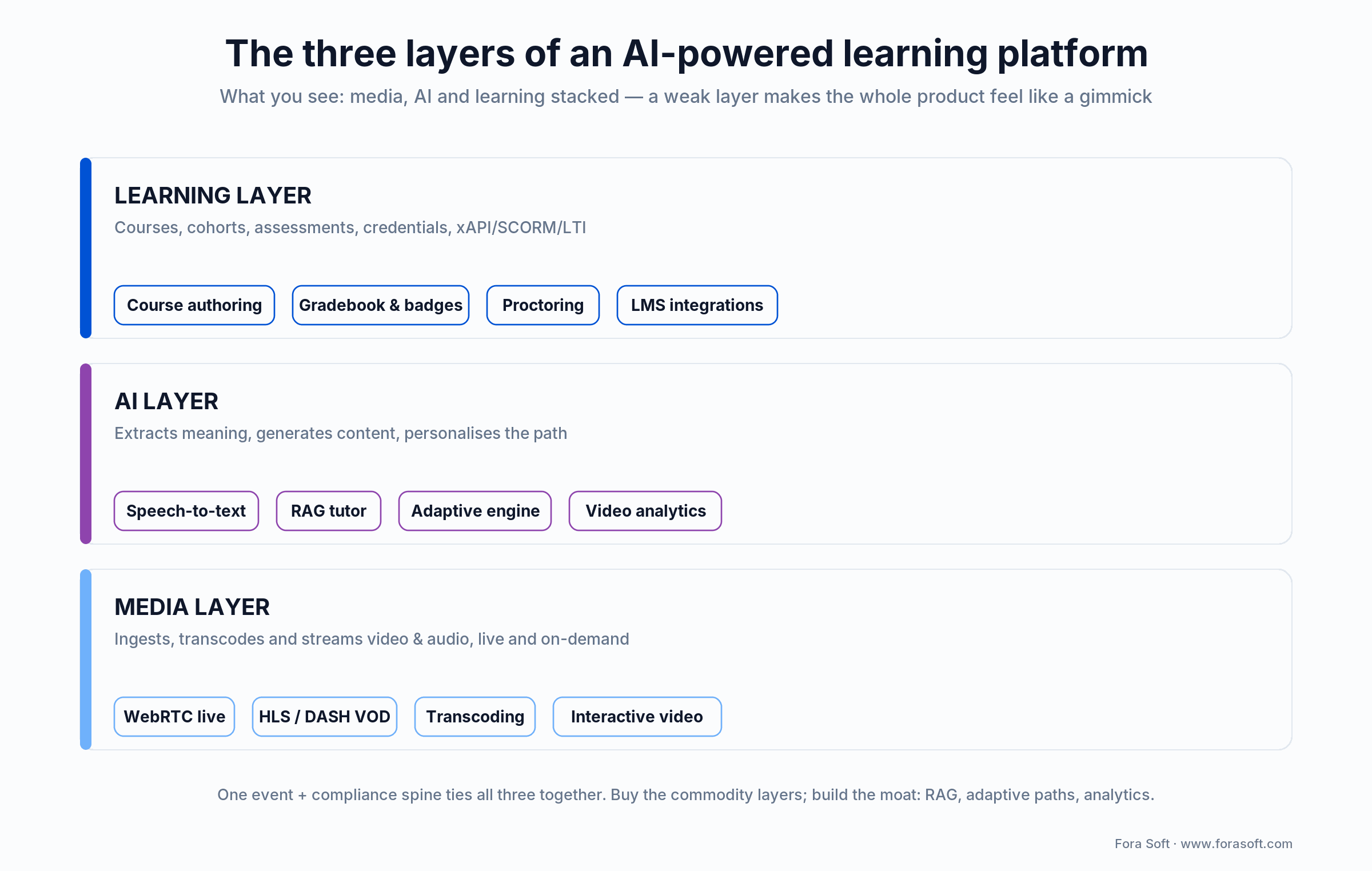
Figure 1. An AI-powered learning platform is three layers (media, AI and learning) behind one LMS.
The core capabilities buyers expect in 2026 are: adaptive learning paths driven by learner performance, automatic captioning and translation for accessibility and reach, AI-generated quizzes, summaries and flashcards from source video, conversational AI tutors grounded in your curriculum (not ChatGPT hallucinating Shakespeare), video analytics for engagement and integrity, and measurable outcomes through xAPI or SCORM so enterprise buyers can actually report ROI. We see this shopping list on almost every RFP.
The three layers, in one sentence each
Media layer. HLS/DASH adaptive streaming, real-time WebRTC for live classrooms, interactive video (bookmarks, hotspots, in-video quizzes), recording and transcoding — the plumbing that delivers 480p on 3G and 4K on fibre without dropping frames.
AI layer. Speech-to-text, translation, speaker diarisation, scene/topic detection, face and emotion analytics, embedding-based semantic search, retrieval-augmented generation (RAG) for tutors, and recommender models for adaptive paths.
Learning layer. Course authoring, cohorts, assignments, proctoring, gradebook, badges, xAPI/SCORM/LTI integrations with existing LMS (Moodle, Canvas, Blackboard, Google Classroom), certificates and, increasingly, skills-taxonomy mapping.
Market snapshot — why now is the right moment to ship
The e-learning market is now counted in hundreds of billions of dollars and AI is the lever pulling growth. Global e-learning is on track for roughly $400B in 2026 (Statista and Grand View Research, 2026), with the U.S. segment alone near $100B. Adaptive learning works: a 2024 meta-analysis of AI-enabled adaptive systems (Wang et al., Journal of Educational Computing Research) found a medium-to-large effect size of g = 0.70 on cognitive outcomes. Flagship cases prove the scale. Duolingo runs AI-driven features over 137.8M monthly active users (Duolingo Q1 2026 results), and Khan Academy’s Khanmigo tutor jumped from 40,000 to 700,000 K–12 students in 2024–25, on track to pass 1M in 2025–26 across hundreds of U.S. districts (Khan Academy, 2026).
Reach for a custom AI e-learning build when: you need proprietary curriculum, vertical compliance (FERPA, HIPAA, defence), branded UX or cost control over per-minute AI spend at scale — off-the-shelf SaaS (Teachable, Thinkific, 360Learning) stops scaling with your margin.
The five AI multimedia use cases that actually move learning outcomes
Every AI feature we’ve deployed on an e-learning product in the past four years maps to one of five use cases. If a feature doesn’t fit one of these, it’s usually a demo — not a reason learners come back on day 14.
1. Adaptive learning paths. The system changes the next lesson, hint or question based on the learner’s performance, pace and preference. Implementation: Bayesian knowledge tracing, item-response theory, or a lightweight deep-learning recommender over xAPI events. This is the feature with the strongest evidence base: the 2024 meta-analysis above puts the average effect at g = 0.70.
2. Automatic captions, transcripts and translation. Every video gets machine-generated captions (WCAG 2.2 AA), a searchable transcript, and on-demand translation into the learner’s language. This one feature widens your addressable audience several-fold (non-native speakers, hard-of-hearing learners, and search) and is legally required for most public-sector and enterprise buyers in the U.S. and EU.
3. AI tutoring (RAG-grounded). A chat/voice tutor that answers questions strictly from your course material. The defining architectural choice is grounding via retrieval: a RAG pipeline over your lectures, PDFs and transcripts, so the tutor can’t invent a fake citation or contradict the instructor. Without grounding, you’re shipping a liability.
4. AI content generation. Converting a 60-minute lecture into micro-lessons, summaries, flashcards and quiz banks in minutes. Authoring time drops from hours to double-digit seconds per asset. Quality control (human-in-the-loop review) is non-negotiable for anything the learner is graded on.
5. Video engagement analytics & integrity. Detect disengagement, lookaways, multiple faces (proctoring), second screens, copied answers, abnormal response time patterns. Both sides of the value prop: product teams get retention dashboards, administrators get exam integrity. We’ve seen this bucket alone cut drop-off on video modules by 15–25 percentage points when used correctly.
Reach for AI tutoring first when: your course catalogue is wide enough that staffing live TAs is expensive, and the subject matter has clear reference material (code, docs, textbooks, lectures) a RAG pipeline can ground against.
Reference architecture for an AI-powered multimedia e-learning platform
This is the baseline we use on most builds. It separates concerns cleanly, scales to tens of thousands of concurrent learners on modest infra, and doesn’t lock you into a single AI vendor.

Figure 2. The delivery path and the intelligence path, over one compliance and observability spine.
| Layer | Role | Typical stack | What to watch |
|---|---|---|---|
| Edge & CDN | Deliver video/audio globally, cache assets | Cloudflare, CloudFront, Fastly | Egress cost per GB |
| Media services | Transcode, package HLS/DASH, live WebRTC | Mux, AWS MediaConvert, Mediasoup, LiveKit | Per-minute transcoding fees |
| AI services | STT, translation, embeddings, LLM, video analysis | Whisper, AssemblyAI, Deepgram, GPT-5.4, Claude 4.6, Gemini 3.1, Bedrock | Token/minute cost, PII leakage |
| Application | API, auth, gradebook, courses, users | Node.js / NestJS, Python FastAPI, Postgres, Redis | Multi-tenant isolation |
| Data & analytics | xAPI LRS, event bus, vector DB, warehouse | Kafka, pgvector/Qdrant, ClickHouse, dbt | Event schema churn |
| Client | Web, iOS, Android, smart-TV | React/Next.js, Swift, Kotlin, Video.js, Shaka | Accessibility parity |
| Compliance & observability | Audit trail, consent, KPIs, error budget | OpenTelemetry, Grafana, Datadog, Sentry | FERPA/COPPA/GDPR audit logs |
The two pieces buyers most often under-invest in are the LRS/event bus and the compliance/observability layer. Skip them and you end up rebuilding the product 18 months later because you can’t answer “which adaptive path actually worked?” or “who accessed this minor’s data?”. For the standards-level treatment of each block, see our e-learning video engineering guide.
Build vs buy — a capability-by-capability decision matrix
Our rule of thumb: buy anything commoditised, build anything that touches your curriculum data or your brand experience. This is how it breaks down in practice.
| Capability | Default choice | Typical vendor | Indicative price | When to build |
|---|---|---|---|---|
| Speech-to-text | Buy | Whisper / AssemblyAI / Azure Speech | $0.26–$0.37 / audio-hour | Highly specialised domain jargon only |
| Translation / captions | Buy | DeepL, Google Translate, Gemini 3.5 | $10–$25 / 1M characters | Rare low-resource languages |
| LLM tutoring | Hybrid | GPT-5.4 / Claude 4.6 / Gemini 3.1 / Llama-hosted | $0.10–$25 / 1M tokens | Data sovereignty, huge volume |
| RAG layer | Build | pgvector, Qdrant, LlamaIndex | Infra + dev time | Always — this is your moat |
| Video analytics | Hybrid | Google Video Intelligence, AWS Rekognition | $0.10–$0.15 / analysed-minute | Custom engagement signals |
| AI avatars | Buy | HeyGen, Synthesia, D-ID | $24–$150 / month per seat | Rarely |
| Adaptive path engine | Build | Custom model on your xAPI data | Infra + dev time | Always |
| LMS & authoring | Build (UX) / reuse (standards) | Custom + xAPI/LTI/SCORM adapters | Dev time | Always if brand matters |
Reach for “buy” when: the capability is commoditised, priced per unit of usage, and doesn’t expose your curriculum or learner data to a shared model. Reach for “build” when: the data is proprietary, the UX is the product, or the cost curve crosses over the vendor’s at your projected scale.
How to build a RAG-grounded AI tutor that doesn’t hallucinate
The single highest-risk feature in AI e-learning is the tutor. Ungrounded, it will confidently invent facts. Grounded, it becomes the most-loved feature in the product. The architecture is straightforward once you’ve shipped it twice.

Figure 3. The five-stage RAG pipeline; the grounding constraint at stage 4 removes most hallucinations.
1. Ingest. Pull lectures, PDFs, slides, transcripts into a content store. Keep the original media reference — you’ll want to cite back to it (“Lecture 4, 08:22”).
2. Chunk and embed. Split by semantic boundary (paragraph, slide, video chapter), embed with text-embedding-3-large or an open model, store in pgvector or Qdrant with metadata (course, module, timestamp, locale).
3. Retrieve. At query time, hybrid search (BM25 + vector) returns top-k chunks. Re-rank with a cross-encoder if precision matters.
4. Generate with citations. Prompt the LLM to answer only from provided context and to cite chunk IDs. If no chunk is relevant, the tutor says so. This single constraint kills 80+% of hallucinations.
5. Evaluate. Run a nightly eval set (golden Q&A pairs) and a “trap” set (questions the system shouldn’t answer) to track groundedness and refusal correctness. Regression > 2 points on either metric blocks the release.
System prompt (abridged)
--------------------------------
You are an AI tutor for {course_name}.
Answer ONLY from CONTEXT below.
If CONTEXT does not contain the answer,
reply: "The course material doesn’t cover that."
Cite every claim as [chunk_id].

CONTEXT:
{retrieved_chunks}

QUESTION:
{user_question}
The same pattern is how we add AI tutoring to client products like the ones we describe in our AI video analytics for online learning and AI-generated educational resources playbooks — grounded retrieval first, model choice second.
Designing the adaptive learning engine
Adaptive learning sounds like AI magic; in practice it’s a tight loop of event → skill estimate → next best item. You pick a model family based on how much data and how much opinion you have about your domain.
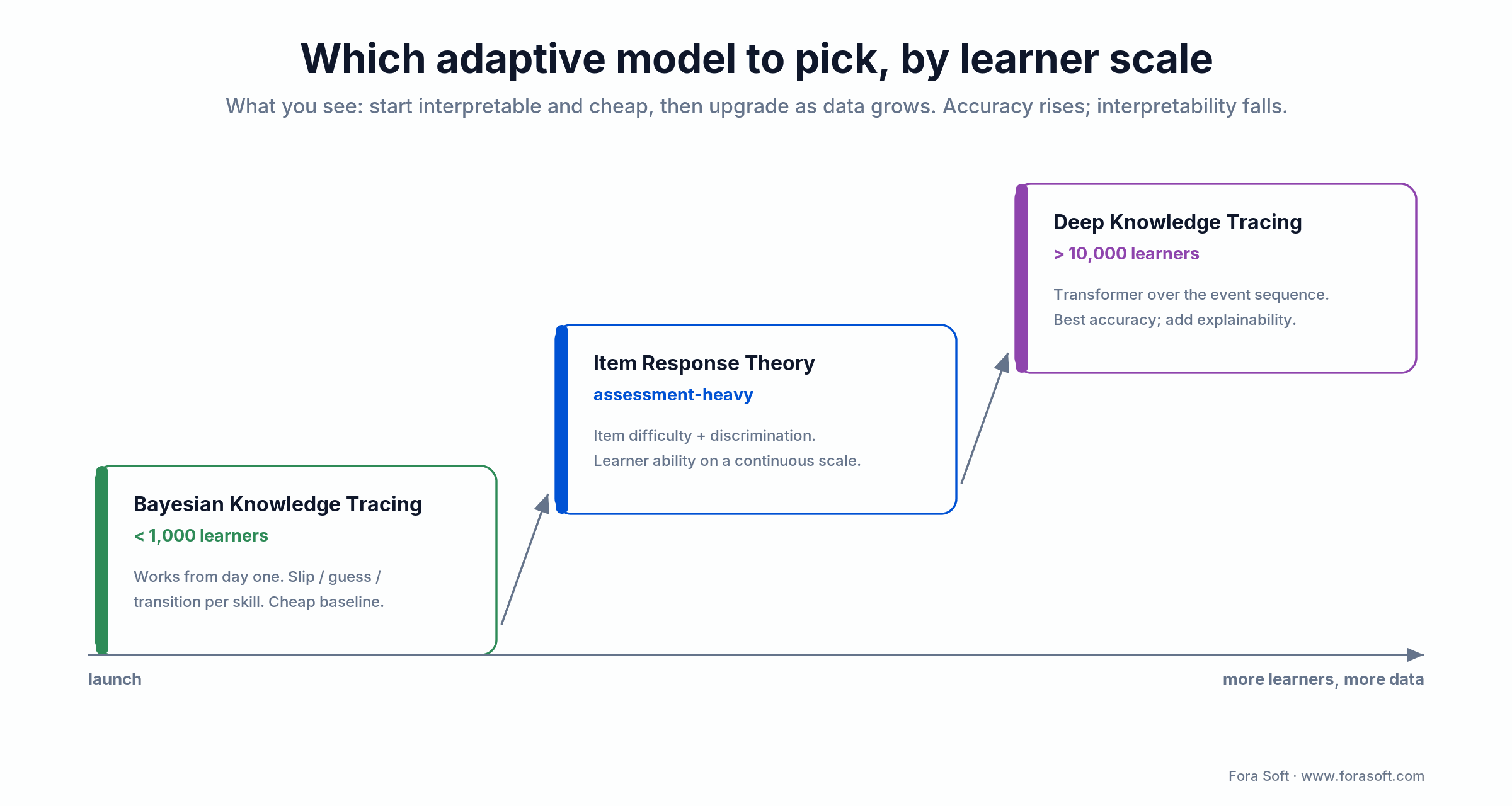
Figure 4. Pick the adaptive model by learner scale: start interpretable, then upgrade as data grows.
Bayesian Knowledge Tracing (BKT). Works from day one with as few as a few hundred learners. Each skill has slip/guess/transition probabilities. Interpretable, cheap, good baseline.
Item Response Theory (IRT). Treats items as having difficulty and discrimination; estimates learner ability on a continuous scale. Strong for assessment-heavy products (certifications, standardised tests).
Deep Knowledge Tracing (DKT) / transformers. An RNN or transformer over the learner’s event sequence predicts the next correctness probability. Best accuracy above ~10k learners, worst interpretability — bring explainability tooling.
Contextual bandits / RL. For ordering content or picking between equally valid next steps. Pair with guard-rails so the policy never recommends material above the learner’s estimated level.
On client projects we default to BKT or IRT at launch, instrument everything through xAPI to a Learning Record Store, and upgrade to DKT once we have ~8–10k engaged learners.
Unsure which AI features will actually move retention?
We’ll run a 30-minute discovery call, map your goals to a small set of proven use cases, and flag the ones that are likely to burn cash without lifting outcomes.
The video pipeline: ingest, transcode, stream, analyse
Roughly two thirds of learner time in a modern e-learning platform is spent inside a video player. If the pipeline is shaky, everything AI you bolt on top looks bad, so we treat it as foundational, not plumbing.
Ingest. Resumable uploads (TUS, Mux Direct Upload) for recorded lectures; WebRTC for live classrooms. For scale and sub-500ms latency on live, we default to a SFU on Mediasoup or LiveKit — see our deep-dive on custom video streaming app architecture.
Transcode and package. Async workers produce an encoding ladder (e.g. 240p/480p/720p/1080p/4K) packaged as HLS and/or DASH. For AI, fork the pipeline to extract audio for STT and keyframes for vision models — you do not want to re-decode the full video twice.
Stream. Adaptive bitrate on the player (Video.js, Shaka, HLS.js) with CDN at the edge. Track player events (stall ratio, rebuffers, bitrate switches) into the same event bus as learner xAPI events so QoE problems and learning drop-off can be correlated.
Analyse. Run STT + diarisation for searchable transcripts, slide-change detection for chapters, face/engagement analytics for proctoring, and, if you want a lighter footprint, use a small vision model on sampled frames rather than full-video inference on every upload. This alone can cut AI costs by 70+% without losing signal.
Compliance — FERPA, COPPA, GDPR, accessibility, AI policy
Every serious e-learning buyer (universities, school districts, regulated corporates, defence) will disqualify you on compliance before they look at features. Retrofitting is 3–5× more expensive than designing it in.
FERPA (U.S. education records). Student records are protected; you need role-based access, consent logs, and data-export flows for parents/students. Model: treat every AI tutor and analytics pipeline as a data subprocessor with an audit trail.
COPPA (children under 13). Verifiable parental consent, no behavioural advertising, minimisation of collected data. Most pre-K–12 platforms fail here by feeding unmasked events to third-party LLM APIs — do not.
GDPR / UK DPA. Lawful basis, DPIA for AI features, data residency (EU region), right to erasure propagated into your vector store, a DPA with every AI vendor. HeyGen, Synthesia, Azure, AWS Bedrock and OpenAI Enterprise all offer compliant regions and DPAs — consumer endpoints do not.
Accessibility (WCAG 2.1/2.2 AA). Captions, transcripts, audio description, keyboard navigation, colour contrast, screen-reader labels. In the US the ADA Title II rule ties public schools and universities to WCAG 2.1 AA, with large entities due by 24 April 2026; many public-sector RFPs also require an accessibility conformance report (ACR/VPAT) in the bid.
SOC 2 Type II & ISO 27001. Increasingly table stakes for enterprise. Plan an SOC 2 Type II observation window (6–12 months) before you target enterprise deals.
Ethical AI policy and the EU AI Act. Model cards, usage disclosure to learners, human-in-the-loop for graded content, bias testing on representative data, and an incident runbook for AI misbehaviour. The EU AI Act classes most educational AI as Annex III high-risk. The Digital Omnibus (provisionally agreed May 2026) pushed those high-risk obligations to 2 December 2027, but the Article 50 transparency duties still start 2 August 2026: you must tell learners when they’re talking to an AI and label AI-generated content. Design for both dates now.
Mini case — BrainCert and the world’s first WebRTC+HTML5 classroom
Situation. In 2017 BrainCert came to Fora Soft with a thesis: modern learners want browser-based live classes with video, a whiteboard and collaboration, no downloads. The market at the time was a mix of Flash-based plug-ins and desktop apps. Nobody had shipped a production-grade WebRTC+HTML5 classroom.
12-week plan. We built the WebRTC media layer (SFU, recording, bandwidth adaptation), an HTML5 interactive whiteboard, live chat and moderation, and plumbed it into BrainCert’s existing LMS. Progressive rollout by region, QoE instrumentation from week one.
Outcome. BrainCert became the first production WebRTC+HTML5 virtual classroom in the market, went on to serve tens of thousands of instructors, grew to $3M ARR (2024) and 500M+ classroom minutes, and won Bronze at Brandon Hall Group 2017 for “Best Advance in Unique Learning Technology” — out of 30+ entries. The same media and event infrastructure is what today’s AI tutoring and analytics features plug into for our newer clients. Read the case in full on the BrainCert project page. Want a similar assessment for your platform? Book a 30-minute call.
Cost model — what an AI e-learning platform actually costs to build and run
Two cost curves matter: one-time build cost and ongoing per-learner cost. We see these numbers consistently across EdTech and L&D projects in 2025–2026. Our Agent Engineering approach (AI-assisted coding, test generation and review loops) shortens scoping-to-MVP by roughly 30–40% vs. classical delivery, which is reflected below.

Figure 5. Build-cost bands for 2026 plus the per-learner monthly run-rate.
| Scope | Typical timeline | Indicative build cost (USD) | Core scope included |
|---|---|---|---|
| MVP | 10–16 weeks | ~$60k–$140k | Auth, courses, recorded video, captions, 1 AI feature, basic analytics |
| Production v1 | 5–8 months | ~$160k–$320k | MVP + live classrooms, RAG tutor, adaptive engine, xAPI LRS, mobile apps |
| Enterprise-ready | 9–14 months | ~$320k–$600k | v1 + SSO/SAML, SOC 2, multi-region, advanced analytics, LTI/SCORM, SLAs |
| Per-learner run-rate | Ongoing | ~$0.30–$1.20 / active learner / month | Infra + AI minutes + STT + storage/egress |
Treat these as rough planning figures — final numbers depend on scope, content volume, compliance and device coverage. For a precise estimate on your scope, we build a written plan in a single scoping call; you can book one here.
Tooling shortlist — the vendors we reach for first
These are the tools and APIs we lean on to move quickly on AI-powered multimedia e-learning in 2026. None are absolute (test two in a bake-off for your data), but they are strong defaults.
Transcription & captions. OpenAI Whisper ($0.36/hr, batch only), Deepgram Nova-3 (cheapest at scale, ~$0.26/hr batch), AssemblyAI (best speaker diarisation, ~$0.37/hr, batch + streaming), Azure Speech (enterprise DPAs, custom domain models), Verbit (regulated use cases needing human QA).
LLMs & embeddings. GPT-5.4 / GPT-5.4 Mini via OpenAI or Azure OpenAI for regulated deployments; Claude Opus 4.6 / Sonnet 4.6 / Haiku 4.5 via Anthropic or AWS Bedrock; Gemini 3.1 Pro / 3.5 Flash via Google Cloud; Llama / Mistral self-hosted for data-sovereign setups. Prompt caching cuts cached-token cost ~10× and the Batch API ~50% on non-real-time jobs.
Vector stores & retrieval. Postgres + pgvector (cheap, good enough for <10M chunks), Qdrant or Weaviate (purpose-built at scale), LlamaIndex / LangChain for the retrieval pipeline itself.
Media. Mux for managed HLS/DASH; AWS MediaConvert + CloudFront for AWS-native shops; Mediasoup or LiveKit for self-hosted WebRTC SFU when latency and cost matter (we’ve covered this in our custom video streaming app guide).
AI avatars & TTS. HeyGen or Synthesia for avatar videos (100+–240+ avatars, 160+ languages); ElevenLabs or Azure Neural TTS for voice; D-ID for talking-head portraits.
Video analytics. Google Cloud Video Intelligence and AWS Rekognition cover the commodity detection work (~$0.10/min); custom CV pipelines on YOLO or CLIP + a small LLM give you bespoke engagement/integrity signals without per-minute vendor fees.
A decision framework — pick your AI e-learning stack in five questions
Q1. Who is the learner, and where are they? Regulated (K–12, healthcare, public sector) vs. adult/consumer changes your compliance baseline and your data residency constraints.
Q2. What is the single primary outcome? Certification pass rate, time-to-competency, renewal revenue, seat retention. Without one, you can’t choose between adaptive learning and AI tutoring.
Q3. Live, recorded, or hybrid? Drives the media stack (WebRTC SFU vs. HLS), the peak-concurrency cost and the edge strategy.
Q4. How sensitive is your content and learner data? Corporate IP, PII, children’s data, defence material — each pushes you further up the self-hosting / single-tenant curve.
Q5. What’s the scaling bet? 5k learners or 5M? A model that’s efficient at 5k (single-tenant Postgres, cached AI) breaks at 5M (multi-tenant, sharded, streaming inference).
Five pitfalls we see on AI e-learning builds
1. Shipping an ungrounded tutor. If the LLM can answer from its own weights, it will — and it will be wrong. Always constrain to retrieved context, always test refusals.
2. Treating captions as optional. Missing captions lose enterprise buyers and large slices of the global audience. Automate them on ingest, let humans edit, track accuracy.
3. Letting AI spend grow uncapped. Per-learner AI cost is the most common cause of unit-economics death. Cache aggressively (prompt caching cuts cached-token cost ~10×), batch non-real-time jobs (~50% off), use cheaper models for retrieval, and reserve top-tier reasoning for the final answer.
4. Skipping xAPI. Without a clean event layer, adaptive learning and analytics are guesswork. Design the event schema before the first sprint, not after six.
5. Bolt-on compliance. Tacking FERPA/COPPA/GDPR after launch is how you end up rewriting tenancy and auth. Bake it into data models and contracts on day one.
Reach for a rescue-and-rewrite engagement when: two of these pitfalls are already live in production — the cheapest fix is usually a targeted refactor of the data and AI layers, not a greenfield rebuild.
KPIs: what to measure once you’re live
Quality KPIs. Course completion rate (≥60% on paid cohorts), assessment pass rate, AI tutor groundedness score (≥95% on eval set), caption WER (≤8% English, ≤12% non-English), video QoE stall ratio (≤1.5%).
Business KPIs. Weekly active learners, revenue per active learner, CAC payback (≤9 months for B2C, ≤14 months for B2B), renewal rate (≥85% for B2B contracts), NPS per cohort.
Reliability KPIs. Media availability (99.9% SLO minimum), AI latency p95 (≤2.5 s for tutor), deployment frequency (≥weekly), MTTR (≤30 min), error budget burn-rate alerts.
Reach for a weekly KPI review when: you pass 1,000 active learners — before that, trust the qualitative feedback loop; after that, instrument and tune every release against these targets.
When not to build an AI-powered multimedia e-learning platform
Because we care more about long-term referrals than any single project, here’s when we’ll politely push back on building.
If you only need to sell a handful of recorded courses to under a thousand learners, use Teachable, Thinkific, Kajabi or Podia. AI-authored content? Add a Descript or Heygen subscription. Custom code buys you nothing there.
If your organisation already uses Moodle, Canvas or Blackboard and just wants AI tutoring on top, an LTI-integrated tutor is usually the right first move — we can build it in weeks, not months, and you avoid the rebuild of the LMS itself.
If you can’t articulate the primary outcome (see Q2), the build is premature — do a 2-week discovery first, not a 12-month MVP.
Need a second opinion on your AI e-learning roadmap?
Send us your current plan, architecture diagram or RFP. We’ll review it on a call and flag what’s solid, what will break and what’s missing.
FAQ
How long does it take to build an AI-powered multimedia e-learning MVP?
Plan on 10–16 weeks for a focused MVP covering auth, courses, recorded video with auto-captions, one core AI feature (usually RAG tutoring or adaptive quizzes) and basic analytics. Live classrooms, mobile apps, compliance certification and advanced adaptive engines push you into the 5–8 month range for Production v1.
Which AI models are best for an e-learning tutor?
A hybrid stack: text-embedding-3-large (or an open equivalent) for retrieval, a mid-tier model (GPT-5.4 Mini, Claude Haiku 4.5, Gemini 3.5 Flash) for re-ranking and simple answers, and a top-tier model (GPT-5.4, Claude Opus 4.6, Gemini 3.1 Pro) for reasoning-heavy answers. Pin models, keep an eval set, and switch providers only when the eval score improves.
Do I need xAPI, SCORM and LTI — or can I skip them?
If you plan to sell to enterprises, universities or school districts, you need at least xAPI (for fine-grained analytics) and either SCORM or LTI (for LMS integration). For pure D2C consumer learning you can defer them, but design your event schema so xAPI is a thin adapter, not a rewrite.
How do I prevent AI hallucinations in lessons and assessments?
Three layers: retrieval-augmented generation strictly grounded in your curriculum, a refusal policy (“the course material doesn’t cover that”) and human-in-the-loop review for anything the learner is graded on. Add an eval set with golden answers and a “trap” set of off-scope questions, and gate releases on groundedness and refusal metrics.
How much does the AI itself cost per active learner?
Rough order of magnitude, for a moderately engaged learner: a few cents to a couple of dollars per month, depending on how often the tutor is used, whether you cache, and which models you pick. Captions, translation and embeddings are cheap; per-chat reasoning with a top-tier model is where budgets blow up. Always cap and monitor.
Is it better to build on top of Moodle/Canvas or start from scratch?
If your buyers already run Moodle, Canvas, Blackboard or Google Classroom, ship an LTI tool against those LMSes first — it’s the cheapest path to adoption. Start from scratch when your brand, UX or AI features are the product and LMS-as-shell is a limitation.
How do we handle FERPA, COPPA and GDPR with third-party AI APIs?
Pick vendors with compliant regions and real DPAs (Azure OpenAI, AWS Bedrock, OpenAI Enterprise, Anthropic, Gemini via Google Cloud). Mask learner PII before sending to the model, log every AI call with purpose and data categories, and support erasure propagation. For K–12, prefer self-hosted or private-deployment options and avoid consumer endpoints.
Can Fora Soft build both the media and the AI layers?
Yes — it’s our core practice. We’ve shipped video-first learning products since 2005 (BrainCert, adaptive LMSes, corporate training, AI video analytics) and run a dedicated AI-integration practice on top of that stack. See our e-learning and AI integration services pages.
What to Read Next
AI & video
AI for E-Learning Video Tools: Transform Your Platform and Cut Costs
Which AI video tools actually cut production costs, and which just look good in demos.
Analytics
AI Video Analytics for Online Learning
Track engagement, attention and integrity across live and recorded sessions.
Content gen
AI-Generated Educational Resources for Teachers
How to turn source material into quizzes, flashcards and micro-lessons at scale.
Corporate training
How to Develop a Corporate Training Video Platform
Reference architecture for L&D teams rolling out video at enterprise scale.
Video platform
How to Build a Custom Video Streaming App
The media-layer foundation every AI-driven e-learning product is built on.
Ready to ship an AI-powered multimedia e-learning platform?
An AI-powered learning platform is three layers working together: media, AI and learning, orchestrated through a clean event and compliance spine. Buy the commodities, build the moat: adaptive paths, grounded RAG tutoring and curriculum-aware analytics are where you earn defensibility.
Design for compliance on day one, cap AI spend from week one, and measure outcomes through xAPI from day zero. With the right scope and Agent-Engineering-assisted delivery, a real AI e-learning MVP ships in 10–16 weeks — not the 12+ months legacy vendors will quote you. If you want Fora Soft to help, we’re a message away.
Let’s build your AI e-learning platform
Tell us about your learners and your outcome. In one 30-minute call we’ll sketch a realistic architecture, a phased plan and a transparent budget — no slide deck, no lock-in.

