

Key takeaways
• Building a video streaming app is a protocol decision, not a framework decision. WebRTC for sub-second interaction, LL-HLS for large-audience live, HLS/DASH for VOD. Pick by latency budget, then everything else follows.
• CDN egress is the bill. Above ~100K concurrent viewers roughly 70% of monthly infrastructure spend is bytes shipped, not compute. A 36 TB event costs ~$2,800 on CloudFront and ~$180 on Bunny — same bytes, 15× spread.
• Multi-DRM is one asset now, not three. A single cbcs-encrypted CMAF ladder plays on Widevine, FairPlay and PlayReady since 2018, and only license delivery differs.
• 2026 moved the floor. AV1 hardware decode now covers ~88% of large-screen devices, Netflix serves ~30% of streams in AV1, and Media over QUIC reached IETF draft -22 in October 2026 (still not an RFC). Build for these, not for 2022.
• A production V1 is realistic in 12–20 weeks. Fora Soft has shipped 250+ projects since 2005, video-first the whole time, so we know where the landmines sit.
Updated October 2026: an 8-step build path up front, new Mux and AWS MediaConvert prices, CloudFront flat-rate plans, MoQ draft -22, and the 2026 App Store link-out rules for subscriptions.
Most video streaming app development projects don’t fail on the video. They fail on a protocol chosen for the wrong latency budget, a CDN bill nobody modeled, or an iOS launch where every iPhone plays a black screen because FairPlay was an afterthought. The market is big enough to make those mistakes expensive: OTT revenue is on track for roughly $265 billion in 2026, and the teams winning share ship faster and run leaner than the ones before them.
This is the playbook we use internally when a founder or product lead walks in with a streaming idea. It covers the architecture, the protocol math, the DRM reality, the honest cost model, and the one question that decides whether you should build custom at all. No filler, no “it depends” where a number belongs.
Reach for this guide when: you’re scoping a custom video product and need to decide protocol, stack, DRM and budget before you commit a line of code. For the pure price question, see our 2026 CTO pricing guide.
How to build a video streaming app: 8 steps
Short answer: to build a video streaming app, fix the latency budget first, pick the delivery protocol from it (WebRTC under 500 ms, LL-HLS at 2–5 s, HLS or DASH for VOD), put managed transcoding and a CDN underneath, package one CMAF ladder with multi-DRM, and spend your own engineering on the player, catalog, payments and analytics. A production V1 takes 12–20 weeks with a 6–8 person team.
- Set the latency budget and audience size. Interactive (under 500 ms), live one-to-many (2–5 s) or on-demand (10 s+ is fine). This one number picks most of the stack.
- Choose the protocol. WebRTC with an SFU for two-way video, LL-HLS or LL-DASH for large live events, HLS or DASH for VOD, RTMP or SRT for ingest only.
- Pick ingest and transcoding. Managed (Mux, Cloudflare Stream, AWS MediaConvert) below roughly 30–50K encoded minutes a month, self-hosted FFmpeg above it.
- Model CDN egress before anything else. Viewers × hours × bitrate gives terabytes; terabytes × $/GB gives the bill that dominates at scale.
- Package once, protect once. One cbcs-encrypted CMAF ladder serves HLS and DASH and plays under Widevine, FairPlay and PlayReady.
- Build or license the player per platform. hls.js or Shaka on web, AVPlayer on iOS, Media3 on Android, then TV apps.
- Wire the backend. Auth, catalog, entitlements, payments (including App Store and Google Play rules), chat and analytics.
- Ship observability on day one, then launch. Startup time, rebuffer ratio and errors per CDN and region, plus a load test at 2× expected peak.
Each step has its own section below. If you are choosing who should build it rather than how, our guide to video streaming app development and hiring a development company covers engagement models, rates and vetting. If the open question is build versus buy for the whole platform, read the custom video streaming software development playbook.
Why Fora Soft wrote this playbook
Since 2005 we’ve built one thing: video-first software. WebRTC, HLS, DASH, RTMP, SFUs, custom players, DRM integrations, CDN edge logic, across 250+ projects with 50 in-house engineers, and a Top Rated Plus record on Upwork to show the work held up. That focus is the whole point of this article: we’re not summarizing other people’s blog posts, we’re writing down what we ship, break and measure in production, from first prototype to scalable video streaming platforms with SFU, ABR and multi-CDN delivery.
A few we can point at. We streamed HD concerts to 10,000+ concurrent viewers at sub-second latency for Worldcast Live. We built a 100K-user iOS movie-rental app for Janson Media’s Vodeo. We launched a trader-focused streaming community, TradeCaster, now past 46K users, and shipped Smart IPTV on Android set-top boxes and Smart TVs against the Stalker middleware API.
One more thing worth saying up front: we run engineering with Agent Engineering — human engineers paired with AI copilots across design, backend and QA — so our build estimates come in faster and leaner than the traditional-team norm. Where we can’t stand behind a number, we say so instead of padding it.
Planning a custom video streaming app?
Book a 30-minute scoping call and walk away with a latency target, a protocol pick and a realistic budget for your use case.
What “custom” means for a streaming app in 2026
Custom does not mean writing an SFU from scratch. It means owning the product surface (UX, business rules, data, monetization) while plugging battle-tested infrastructure underneath. The competent 2026 team architecture splits into three layers:
- Custom layer: player UI, session and billing logic, catalog, recommendations, chat, analytics, admin: the parts users see and you differentiate on.
- Managed or open-source layer: transcoding, CDN, storage, DRM license delivery, auth, media database: undifferentiated plumbing that someone else runs better than you will.
- Owned code: whatever the business actually competes on: usually engagement, moderation, AI content operations and the monetization model.
This “custom front, managed back” split is why a modern streaming team is 5–9 engineers, not 30. It’s also why the build-vs-buy question is no longer binary. Almost every product we ship is a deliberate mix of the two. The same split holds for custom broadcast software: SRT or RTMP contribution from the venue, cloud production and playout, then the same delivery plane as any streaming app.
Live, VOD, or interactive: decide before you code
Every architectural choice flows from one question: is the primary content live, on-demand, or two-way interactive? The three have different latency budgets, different cost shapes and different teams. Get this wrong and you rebuild the pipeline in month four.
Reach for VOD first when: content is produced once and viewed many times, latency over 10 seconds is fine, and margins live or die on CDN cost per GB. Think Netflix, Masterclass, Vimeo OTT. To build a VOD app, you need upload and transcoding into an ABR ladder, object storage, a CDN, DRM, a catalog with search, and players per platform; live is not required.
Reach for one-to-many live (LL-HLS/LL-DASH) when: live events at 2–5 seconds of latency, an audience anywhere from 1K to 1M, with chat or reactions as the only interaction. Sports, concerts, conferences.
Reach for WebRTC when: true two-way or multi-party interaction under 500ms: virtual classrooms, auctions, trading rooms, telehealth, co-watching. If people talk back, you’re here. To build a real-time video application, run WebRTC through an SFU (LiveKit, mediasoup, Janus or Pion), add TURN for restrictive networks, and record server-side if you need replays.
Most mature products end up hybrid: a WebRTC stage for hosts, an LL-HLS fan-out for the audience, and a VOD archive for replays. Worldcast Live is a clean example: an HD concert streamed sub-second to 10K+ viewers, then reused as a VOD catalog the next morning.
Reference architecture: seven planes that scale to 1M
A custom streaming app looks the same whether you ship to 100 viewers or 1M; only the numbers in the boxes change. There are seven planes, and they should be decoupled from day one, because each scales on a different curve and fails in a different way.
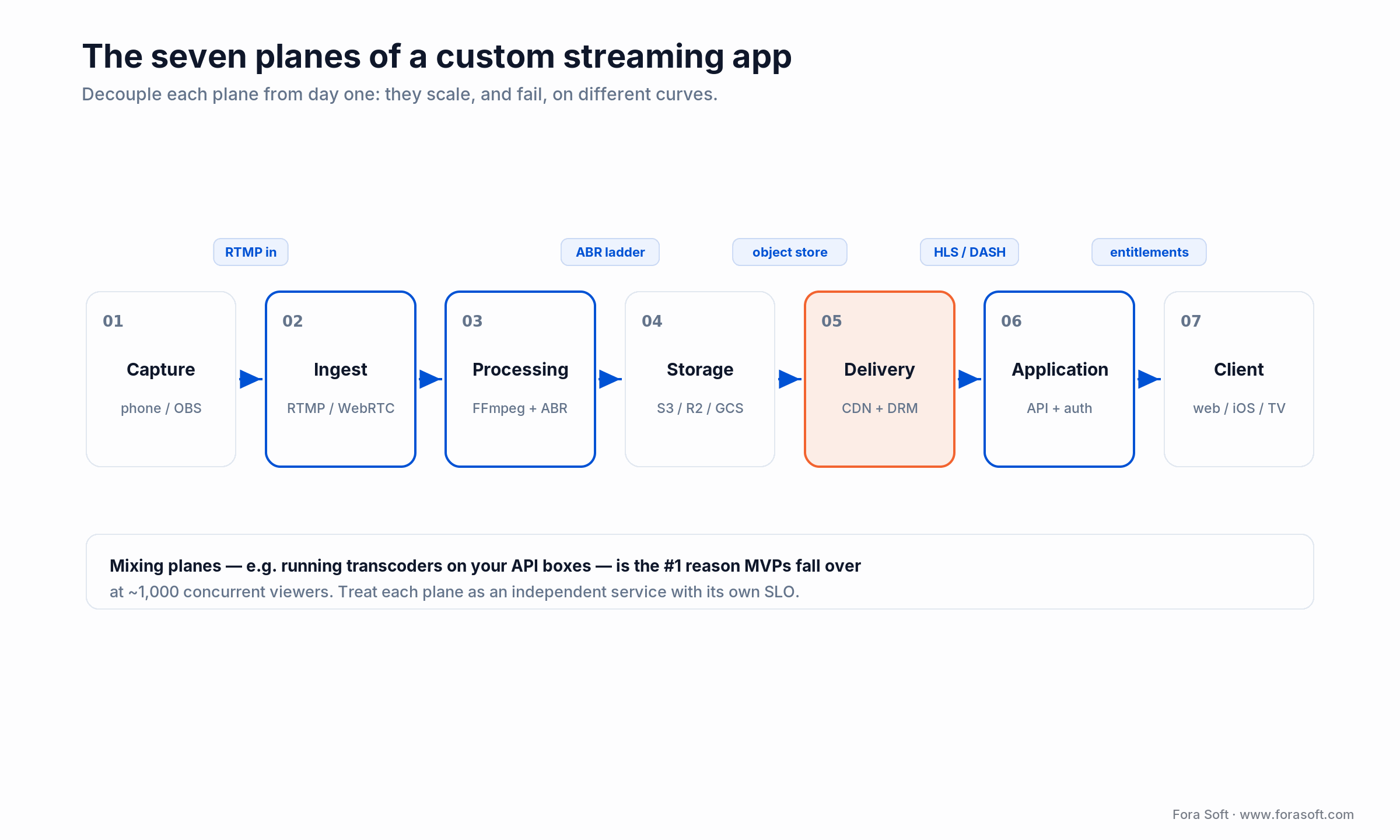
Figure 1. The seven decoupled planes of a custom video streaming app, with the protocol crossing each boundary.
- Capture plane: the creator’s phone, browser, camera or OBS → an RTMP or WebRTC ingest endpoint.
- Ingest plane: SRS, Ant Media, nginx-rtmp or a managed ingest (AWS IVS, Mux, Cloudflare Stream) that accepts the signal and authenticates the publisher.
- Processing plane: the transcoder that builds an adaptive ABR ladder (240p to 4K), packages HLS/DASH/LL-HLS, and writes thumbnails and captions.
- Storage plane: object storage (S3, R2, GCS) for segments and manifests, with a hot tier for the active show, a cold tier for archive.
- Delivery plane: the CDN edge (Cloudflare, CloudFront, Fastly, Akamai, Bunny) plus a DRM license endpoint.
- Application plane: your API, meaning auth, catalog, entitlements, payments, recommendations, chat, analytics.
- Client plane: web, iOS, Android, Smart TV, set-top box, VR headset, each with a player tuned to that device’s ABR, DRM and lifecycle.
Treat the seven planes as independent services with their own SLOs. Mixing them, say by running transcoders on your API boxes, is the number-one reason MVPs fall over at 1,000 concurrent viewers.
Protocol choice: WebRTC vs LL-HLS vs DASH vs MoQ
Pick the protocol from the latency budget backwards, not from what your framework happens to support. Each option is engineered for a different point on the latency-versus-scale curve, and the honest answer to “which one” is “how many seconds can you tolerate, and for how many people.”
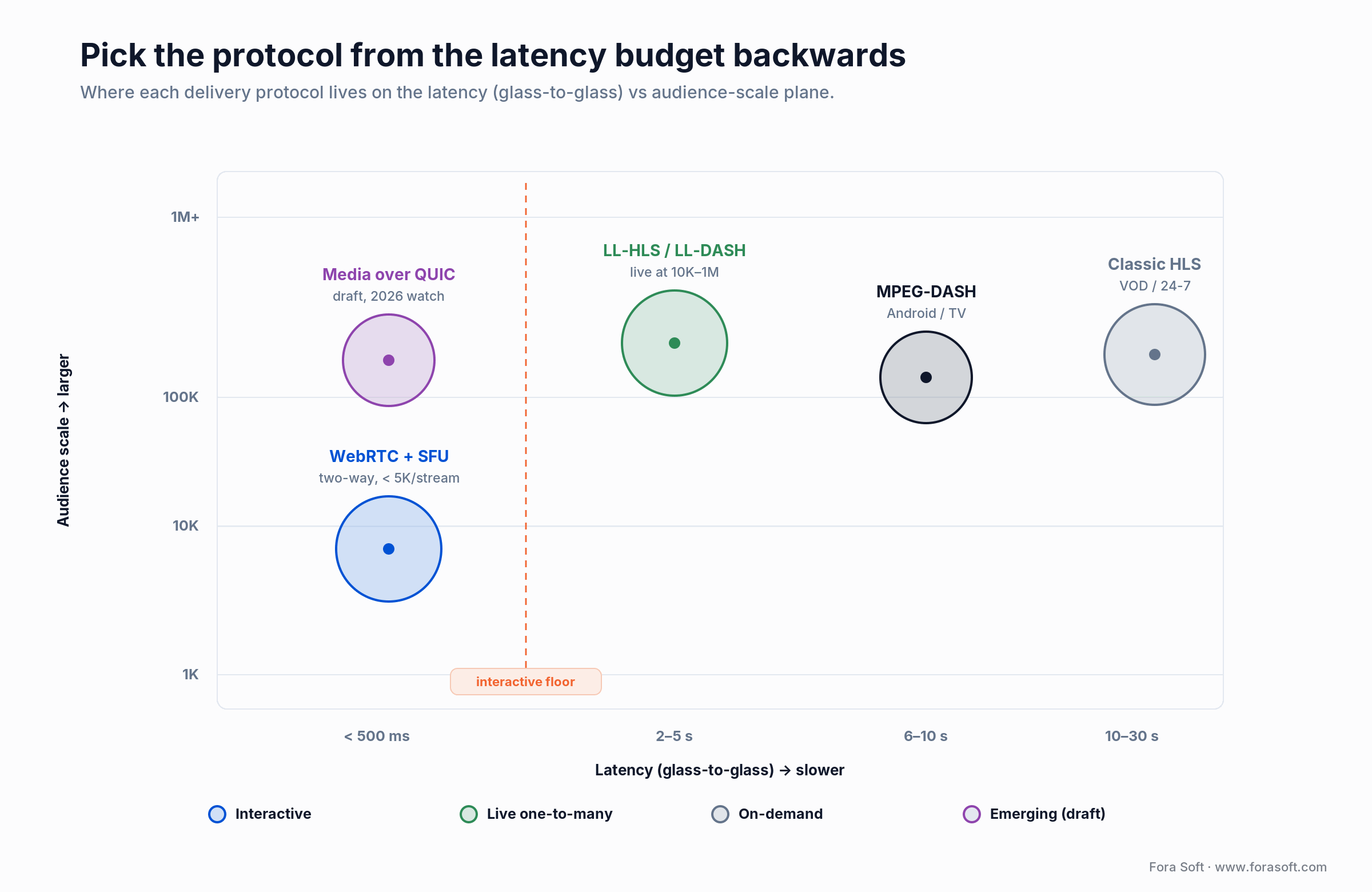
Figure 2. Where each delivery protocol lives on the latency (glass-to-glass) versus audience-scale plane.
1. WebRTC. Sub-500ms glass-to-glass, peer-to-peer or through an SFU (mediasoup, Janus, Pion, LiveKit). Scales by adding and cascading SFU instances. Ideal for interaction; gets expensive above ~1,000 simultaneous publishers per region.
2. LL-HLS (Apple Low-Latency HLS). 2–5 second latency, native iOS/Safari support, CDN-cacheable over plain HTTPS. The 2026 sweet spot for “live-ish” events that still need CDN economics. It’s an Apple extension to HLS (RFC 8216).
3. Classic HLS. 10–30 second latency, universal device support. Still the right call for VOD and for live where the product tolerates lag: sports highlights, 24/7 linear channels.
4. MPEG-DASH (incl. LL-DASH). Open standard, strong Android/Chromecast/Smart TV support, Widevine-friendly. A good second manifest alongside HLS for Android and Windows audiences, and with CMAF you package both from one set of segments.
5. RTMP (ingest only). Legacy, but still the standard way creators push from OBS, broadcast gear or drones. You accept RTMP in, transcode, and fan out as HLS/DASH/WebRTC.
6. Media over QUIC (MoQ) — the 2026 watch item. MoQ aims for sub-second, CDN-scale delivery over QUIC, collapsing the WebRTC-vs-HLS trade-off. It’s real but not finished: draft-ietf-moq-transport reached revision -22 on 1 October 2026 and is still a working-group draft, not an RFC. WebTransport went Baseline across all four major browsers when Safari 26.4 shipped it in March 2026, and Cloudflare now runs a MoQ CDN across 330+ cities. Prototype on it; don’t bet a launch on it yet. If you want that prototype built properly, our Media over QUIC development team works on quic-go, quiche and WebTransport. We unpack the trade-offs in our Media over QUIC deep dive.
Streaming protocol comparison matrix
| Protocol | Latency | Scale pattern | Device coverage | Best for | Where it breaks |
|---|---|---|---|---|---|
| WebRTC + SFU | < 500ms | Compute-bound (SFU CPU) | All modern browsers, iOS, Android, RN, Flutter | Classrooms, telehealth, auctions, co-watch | Pay per SFU port; costly past ~1K publishers/region |
| LL-HLS / LL-DASH | 2–5s | CDN-bound (egress) | iOS 14+, Safari, modern Android, hls.js | Sports, concerts, auctions at 10K–1M viewers | Not truly interactive; part-second floor |
| HLS (classic) | 10–30s | CDN-bound | Everything, incl. legacy Smart TVs and STBs | VOD catalogs, 24/7 linear channels | Lag makes live feel broken |
| MPEG-DASH | 6–30s (LL: 2–6s) | CDN-bound | Android, Chromecast, Smart TVs, Windows | Android-first apps, Widevine catalogs | No native Safari support |
| Media over QUIC | < 1s (target) | QUIC edge, CDN-scale | WebTransport in all 4 major browsers (2026) | Future low-latency at scale; prototypes | Draft spec, thin tooling — not launch-ready |
| RTMP (ingest) | 2–5s ingest | Per-publisher server | OBS, hardware encoders, drones, dSLRs | Creator ingest, pro broadcast gear | Not a delivery protocol; Flash-era edges |
CMAF lets you package one set of segments and serve them as HLS and DASH at once, the modern default that halves storage and encode. For the hard numbers, see our protocol implementation guide and the sub-1-second latency playbook.
Transcoding, codecs and packaging
Transcoding turns one uploaded master into the 5–8 renditions a player hops between. The real decision is managed versus self-hosted, and the break-even math matters more than most teams expect.
Managed transcoding. Mux (October 2026 list prices: basic-quality encoding free, plus quality from $0.025/min at 720p; delivery about $0.001/min at 1080p with the first 100,000 minutes free each month), AWS Elemental MediaConvert (2026 US East: basic tier $0.0075 per normalized minute, so about $0.015/min for HD AVC; professional HEVC HD about $0.048/min), GCP Transcoder API (priced per output minute by resolution), Cloudflare Stream ($5 per 1,000 minutes stored + $1 per 1,000 delivered, encoding and ingest free; WebRTC delivery is billed from 15 October 2026). Zero ops, predictable unit cost, less room to tune custom ladders.
Self-hosted transcoding. FFmpeg orchestrated by Kubernetes or AWS Batch, or an open-source media server (Ant Media, SRS) on Hetzner AX-series or GCP GPU nodes. Runs 40–60% cheaper above ~50K minutes/month if you have the SRE bandwidth. Break-even usually sits at 30–50K encoded minutes per month. Below that, managed wins on total cost of ownership once you price your own on-call.
Hybrid. Managed for live (reliability plus burst), self-hosted for the VOD backlog (economy). It’s the setup we ship most often.
Codecs and the ABR ladder
A sensible 2026 ladder for a consumer app: 240p/400kbps, 360p/800kbps, 480p/1.4Mbps, 720p/2.8Mbps, 1080p/5Mbps, and 4K/15Mbps only when the catalog justifies the 3× storage. On codecs, the picture finally changed. AV1 hardware decode now covers roughly 88% of large-screen devices certified 2021–2025 and every Smart TV shipped after 2023; Netflix serves about 30% of its streams in AV1 and YouTube has encoded over 75% of its catalog in it, both chasing the ~30% egress saving versus H.264 at equal quality. Practical stack: AV1 for top tiers where the device decodes it, H.265/HEVC for Apple, H.264 as the universal floor. Our state-of-AV1 breakdown has the device tables.
Reach for AV1 when: your audience skews to 2023+ devices and egress is a top-three cost. The ~30% bitrate saving pays for the extra encode within weeks at scale, but keep an H.264 rung on the ladder or you lose every older phone.
CDN and edge delivery: where the money goes
CDN egress is the single biggest line item in any streaming P&L at scale: roughly 70% of total monthly infrastructure spend above 100K concurrent viewers. Pick the CDN before the rest of the stack, because it constrains both protocol and pricing. For current vendor prices at 1.3 PB a month, see the cost model in our media streaming software development guide. Here’s the arithmetic nobody shows you.
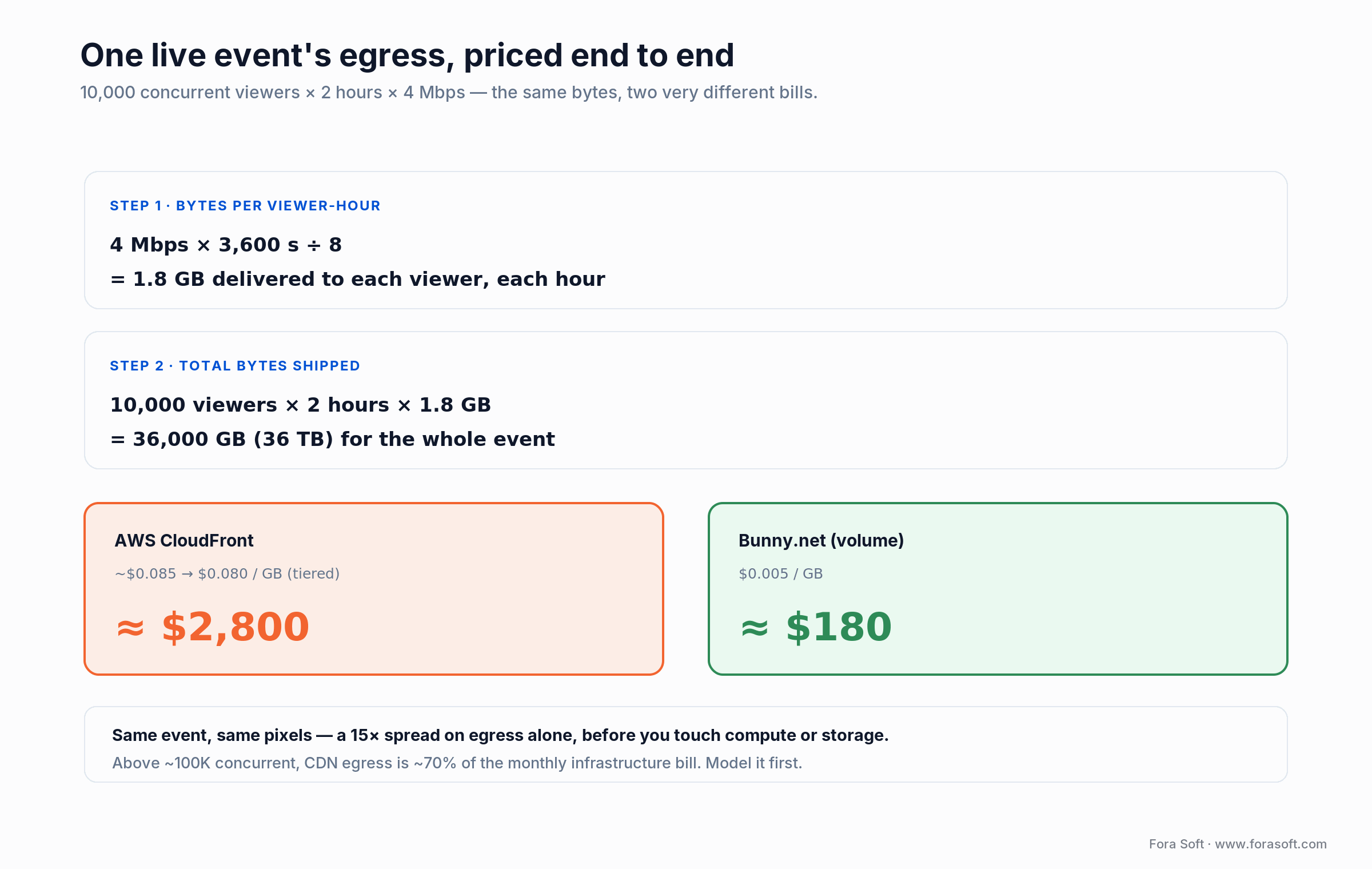
Figure 3. One live event’s egress, priced end to end — the same bytes cost 15× more on a premium CDN than a value one.
Worked example. Take one 2-hour live event, 10,000 concurrent viewers, average bitrate 4 Mbps. Bytes per viewer-hour = 4 Mbps × 3,600s ÷ 8 = 1.8 GB. So 10,000 viewers × 2 hours × 1.8 GB = 36,000 GB (36 TB) shipped. On AWS CloudFront (~$0.085/GB for the first 10 TB, tiering down to ~$0.080) that’s roughly $2,800. On Bunny’s volume network at $0.005/GB it’s $180. Same event, same pixels, a 15× spread, all before you’ve touched compute.
- Cloudflare (Stream + R2): zero egress on R2, delivery bundled in Stream, best starter economics for 100–100K concurrent.
- AWS CloudFront: most integrations, first 1 TB/month free, then ~$0.085/GB tiering to $0.030 above 500 TB; committed-use contracts go lower.
- Fastly / Akamai: premium reliability and edge compute, higher sticker price, the tier-1 broadcaster choice.
- CloudFront flat-rate plans: since November 2025 AWS also sells per-distribution bundles from $15 (Pro) to $1,000 (Premium) a month with a 50 TB transfer allowance, configurable up to 600 TB on Premium. Above the allowance AWS may reduce performance instead of billing, so size a live event against it carefully.
- Bunny.net: $0.01/GB standard, $0.005/GB volume, tiny commitments — strong for mid-market VOD.
- Multi-CDN: 2–3 CDNs behind a steering layer (10–25% lower per-GB plus resilience) are worth the complexity above ~$30K/month egress.
For a full server model see our piece on estimating video platform server cost, and for edge use cases, edge computing for live streaming.
Is your CDN bill the mystery line item?
We’ll model your egress against your real concurrency and bitrate, then tell you where the money is hiding and which CDN mix fixes it.
DRM, piracy and payment fraud
Three DRM systems cover every consumer device: Google Widevine (Chrome, Android, most Smart TVs, Chromecast), Apple FairPlay (Safari, iOS, tvOS, macOS) and Microsoft PlayReady (Windows, Xbox, many set-top boxes). Studios, leagues and labels require all three before they sign a content deal, so plan for multi-DRM from day one, not as a premium tier.
The 2026 simplification. You no longer package a title three times. Since 2018 all three systems support the cbcs encryption mode, so a single cbcs-encrypted CMAF ladder plays on Widevine, FairPlay and PlayReady alike: you encrypt and store once, and only the license-delivery endpoint differs per system. That’s the difference between a one-week DRM integration and a one-month one. The mechanics are in our Widevine vs FairPlay vs PlayReady explainer.
Cost. Self-integrating multi-DRM typically runs $10–50K one-off plus $500–5,000/month in license-server fees. Managed services (ExpressPlay, EZDRM, PallyCon, BuyDRM) start around $200–1,000/month for small catalogs, and Mux, Cloudflare Stream and AWS bundle multi-DRM into their plans.
Beyond DRM. Forensic watermarking (Verimatrix, NexGuard) on premium catalogs, token-signed segment URLs with 30–120s TTL, geo-fencing, concurrent-session limits, and 3-D Secure v2 payments with BIN checks to stop subscription fraud. DRM stops the casual ripper; the rest stops the organized one.
Players, mobile, TV and embedded clients
The player is where the product lives or dies. The must-haves: startup under 2 seconds, rebuffer ratio under 0.5%, smooth ABR switching, live DVR, captions, audio-track switching, picture-in-picture, AirPlay/Cast, and offline download where the business justifies it. On top of that sits the differentiation: branded controls, chapters, time-synced chat, polls, shoppable overlays, multiview.
Buy or build the player? JW Player, THEOplayer and Bitmovin are production-ready at $300–3,000/month and save 6–9 weeks, so we recommend them for VOD-heavy products. For differentiated live or interactive apps we build on hls.js, Shaka Player (the 5.2 release line in 2026, the one client that speaks both DASH and HLS through a single API) or video.js with a thin custom controller. The trade-offs are in our custom video player guide.
Mobile. React Native or Flutter for catalog and onboarding, native iOS/Android for the player surface, which needs hardware-decoded video, FairPlay/Widevine L1, PiP and Cast all want native. A 100%-React-Native app with 4K DRM fights its stack every week. Our Vodeo movie-rental app for Janson Media (100K+ iOS users) took exactly this split; more in our iOS streaming guide and cross-platform notes.
TV and set-top box. Apple TV (SwiftUI), Android TV (Kotlin, Leanback), Fire TV, Roku (BrightScript/SceneGraph), Samsung Tizen, LG webOS, and for IPTV operators the middleware path (Stalker/Ministra). We’ve shipped both ends. See Smart IPTV on Android STB and Smart TV. If TV and set-top apps are the core of your product, our OTT and IPTV platform development team ships the web, mobile, Smart TV and STB clients as one build.
Backend, auth and metadata APIs
Under the “video” label hides a fairly standard SaaS stack; the video parts are just a few of the services.
- Runtime: Node.js (NestJS/Express), Python (FastAPI/Django), Go or .NET, roughly in that order of frequency on our projects.
- Databases: PostgreSQL for core data, MongoDB for catalog blobs, Redis for session and entitlement cache, ClickHouse or BigQuery for analytics.
- Auth: Auth0, Clerk, Keycloak or a custom JWT stack; SSO and SAML for enterprise; device-level tokens for STBs and TVs.
- Payments and subscriptions: Stripe Billing, Adyen, Recurly, Chargebee; Apple IAP and Google Play billing for mobile subs; local wallets (M-Pesa, PIX) where the market needs them.
- Chat and reactions: Ably, PubNub, Pusher, or a self-hosted WebSocket layer, rate-limited, ML-moderated, persisted in a log-structured store.
Monetization: SVOD, AVOD, TVOD, live events
Pick a model the product actually earns on, then design the player and backend around it, not the other way round. The common patterns:
- SVOD (subscription): Netflix, Disney+. Highest lifetime value, needs a deep library and strong recommendations.
- AVOD (ad-supported): YouTube, Pluto, Tubi. Use server-side ad insertion (SSAI) with Google Ad Manager or FreeWheel — client-side ads get blocked.
- TVOD (rent/buy): Apple TV, Amazon Video. High margin, high friction, needs multi-currency payments and territorial rights.
- Hybrid / FAST: free ad-supported linear channels alongside subscription. Increasingly the OTT default.
- Live events and PPV: concerts, sports, masterclasses on a one-time paywall, the Worldcast Live pattern.
Which model fits which audience is in our monetization strategies breakdown. Pure-SVOD teams tend to leave 15–25% of revenue on the table: the people who won’t pay $9.99 will still watch ads.
App store fees decide the subscription margin. Apple takes 30% on in-app subscriptions (15% after the first year, for Small Business Program members, and for apps in the Video Partner Program). In the US, apps may link out to web checkout since the April 2025 Epic v. Apple injunction; as of August 2026 no Apple commission on those link-outs is approved, and Apple has proposed 15% (10% for Video Partner apps and renewals), modelled on Google Play’s 20%/10% linked-out rates. Build web checkout and entitlement sync so the app can switch as the rules settle.
AI features that move the needle
AI stopped being a nice-to-have and became a measurable retention lever. The features we ship most often, ordered by return:
1. Content recommendations. An embeddings-plus-collaborative-filtering pipeline with reranking lifts watch-time 15–30% on mid-sized catalogs.
2. Captions, transcripts and translation. Whisper-class ASR plus NLLB/Translate gives dubbing-ready transcripts in 30+ languages for about a GPU-hour per asset, opening new markets at near-zero marginal cost.
3. Highlight and reel generation. Shot-boundary detection plus event detection plus a multimodal model picks the good parts, halving a creator’s editing time.
4. Moderation. Nudity, violence and hate classifiers on video and audio, with a reviewer triage queue, non-negotiable once user-generated content goes live.
5. Per-title encoding. An ML-tuned bitrate ladder per title (the Netflix approach) cuts egress 15–35% at the same visual quality — it pays for the whole AI roadmap on its own at scale. Deep dives: AI streaming features, AI-based streaming development, AI video quality enhancement.
Mini case: Worldcast Live, 10K+ concurrent at sub-second
Situation. An artist-management group wanted to stream HD live concerts to a global audience with latency close to in-room feel — so remote viewers could clap and sing on-beat with the artist. Off-the-shelf OTT platforms added 8–20 seconds of lag and no branded experience. The interaction was the product, and the lag killed it.
12-week plan. WebRTC ingest from the venue, an SFU ring cascaded across three regions, LL-HLS fan-out via Cloudflare Stream for long-tail viewers, a custom web/iOS/Android player with live chat and reactions, a Stripe PPV paywall, and S3-archived VOD replays published the next morning.
Outcome. Worldcast Live streams to 10,000+ concurrent viewers with glass-to-glass latency under a second on WebRTC and under three on LL-HLS. CDN egress is the dominant cost, exactly as the model predicted, and replays drive a second revenue wave within 48 hours. Want a similar assessment? Grab a 30-minute call and we’ll sketch it.
A realistic cost model: build plus run-rate
Budget a custom video streaming app in two columns: the one-off build and the monthly run-rate at your target scale. Below is a grounded envelope — Hetzner AX hardware where self-hosting wins, AWS/Cloudflare where managed wins, and Agent Engineering rates for the team.
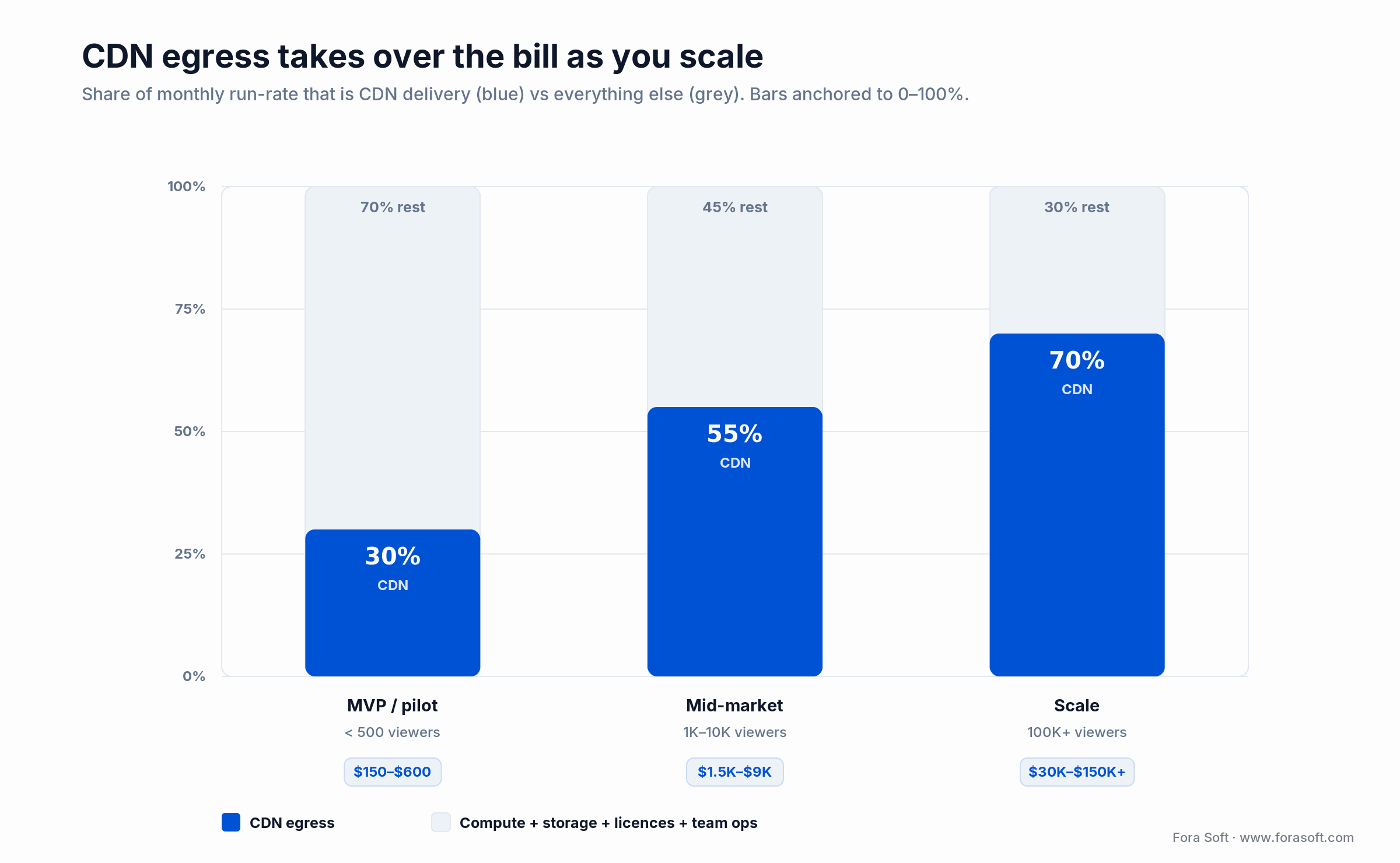
Figure 4. Monthly run-rate by scale — CDN egress (blue) overtakes everything else as concurrency climbs.
| Scale | Concurrent viewers | Typical setup | Monthly run-rate | CDN share |
|---|---|---|---|---|
| MVP / pilot | < 500 | Cloudflare Stream + R2 + small API on Hetzner | $150 – $600 | ~30% |
| Mid-market | 1K – 10K | Mux or self-hosted transcode + Cloudflare/Bunny | $1,500 – $9,000 | ~55% |
| Scale | 100K+ | Multi-CDN + self-hosted GPU encode + dedicated SFUs | $30K – $150K+ | ~70% |
A production V1 — web + iOS + Android, one primary monetization model, a standard player, Widevine + FairPlay, a CMS and analytics — typically lands in 12–20 weeks with a 6–8 person squad. Because our team runs Agent Engineering, we hit noticeably faster throughput than a comparable traditional team. For a precise number we need your feature list, and we stay deliberately conservative on public ranges — if we can’t stand behind a figure, we won’t print it. The full pricing guide breaks it down by app type.
A decision framework in five questions
Q1. What is the latency budget, and is it negotiable? If the product breaks at 3 seconds, you’re in WebRTC or LL-HLS territory. If 10–30 seconds is fine, you save half the cost immediately.
Q2. What is the peak concurrent audience, and where are they? 500 viewers in one country is a single Hetzner box. 500K globally is a multi-CDN, multi-region problem.
Q3. Who owns the content, and what DRM do they require? Licensors dictate multi-DRM, territory limits and output controls. Get the rights document before the architecture document.
Q4. What is the monetization model? SVOD and AVOD shape the payment, ad and entitlement stacks completely differently. Decide before you pick Stripe versus Adyen.
Q5. What team are you building around? A 4-person team has no business running its own SFU or multi-CDN. Be honest about SRE bandwidth — it’s the top cause of late releases, and the cheapest thing to get wrong on paper.
Five pitfalls we see every quarter
1. Running transcoders on your API servers. Dies at the first 30-viewer peak. Put encoding on its own auto-scaling pool or a managed service.
2. Forgetting FairPlay. Teams ship Widevine for web and Android, launch on iOS, and discover every iPhone plays nothing. FairPlay has its own license server, key format and packaging path.
3. One giant 4K rendition. Without a 240p/360p rung you lose every mobile viewer on a weak network. The ABR ladder is not optional.
4. Client-side ads. Ad-blockers kill 30–60% of inventory. Use SSAI and stitch ads at the origin.
5. No QoS dashboard. If you can’t see startup time, rebuffer ratio and error rate by region and CDN, you can’t diagnose an outage. Ship Mux Data, Conviva or a home-grown RUM from week one.
KPIs that matter, in three buckets
Quality KPIs. Video start time under 2s (P75), exits-before-start under 2%, rebuffer ratio under 0.5%, average bitrate above 2.5 Mbps on web, playback failure rate under 0.3%.
Business KPIs. Day-1 retention above 45%, day-30 above 18%, free-to-paid conversion above 3.5%, ARPU trending up quarter over quarter, and CDN cost per viewer-hour trending down.
Reliability KPIs. Ingest uptime above 99.95% per event, delivery uptime above 99.99% monthly, MTTR under 20 minutes on P1 incidents, and zero unplanned license-server outages.
When NOT to build custom
Custom is not always the right answer, and we’ll say so before you spend the money. If the product is truly “upload and play” with no monetization or UX differentiation, a hosted OTT platform (Vimeo OTT, Uscreen, Dacast, Kaltura) ships faster and cheaper than anything we can build for you.
If it’s a one-off webinar or a small internal learning portal, Zoom or Thinkific will do. Custom pays off when (a) your UX, data or monetization is the product, (b) you expect tens of thousands of concurrent viewers, or (c) you’re in a regulated space (HIPAA, SOC 2, financial) where shared-tenant platforms are a liability. If none of those is true, keep your money.
FAQ
How much does video streaming app development cost in 2026?
Public 2026 ranges land between $25K and $200K+ for a real V1, and north of $500K for a Netflix-grade OTT product with native TV apps, DRM, live and analytics. A focused MVP is often $25–60K. The swing is entirely feature list and scale — our pricing guide breaks it down by app type.
How long does it take to build a custom video streaming app?
A focused MVP — web plus one mobile platform, one monetization model, a standard player and single DRM — is realistic in 8–12 weeks. A production V1 across web, iOS, Android, multi-DRM and analytics typically lands in 12–20 weeks. Large OTT launches with 5+ clients and a full CMS run 6–12 months.
Should you use WebRTC or HLS for live streaming?
WebRTC when any two-way interaction is required (classrooms, auctions, trading, telehealth) and the per-stream audience is below ~5K concurrent. LL-HLS for large-audience one-to-many live where 2–5 seconds of lag is acceptable. Many products run both — WebRTC on the stage, LL-HLS for the crowd, one archive for VOD.
Do you really need multi-DRM, or is Widevine enough?
If your catalog is user-generated or fully owned and you only target Android and Chrome, Widevine alone is fine. For any premium catalog — studios, labels, live sports — Widevine + FairPlay is the minimum, and PlayReady is required for Xbox, many Smart TVs and Windows apps. Since 2018 a single cbcs-encrypted CMAF asset serves all three, so “multi” no longer means “three times the work.”
What is the single biggest infrastructure cost to plan for?
CDN egress. Above ~100K concurrent viewers roughly 70% of the monthly bill is bytes shipped to users, not compute or storage. Negotiate committed-use, consider multi-CDN steering, and use ML-tuned per-title encoding — together they compound to 20–40% savings.
Can you use React Native or Flutter for a streaming app?
For catalog, auth and onboarding, yes — both are production-grade. For the player surface we recommend native iOS (AVPlayer + FairPlay) and native Android (ExoPlayer/Media3 + Widevine) to get hardware decoding, picture-in-picture and Cast working reliably. The hybrid split saves about 40% of total code while keeping the hot path native.
Is Media over QUIC ready for production in 2026?
Not for a launch you’re staking revenue on. The IETF draft (draft-ietf-moq-transport) reached revision -22 on 1 October 2026 and is still not an RFC. WebTransport is now Baseline in all four major browsers and Cloudflare runs a MoQ CDN across 330+ cities, so it’s worth a prototype — but ship your product on WebRTC or LL-HLS today.
How do you build a video streaming app step by step?
Set the latency budget, pick the protocol from it, choose managed or self-hosted transcoding, model CDN egress, package one CMAF ladder with multi-DRM, build players per platform, wire auth, catalog and payments, and ship QoS monitoring before launch. A production V1 takes 12–20 weeks.
How do you build a VOD app?
A VOD app needs upload and transcoding into an adaptive bitrate ladder, object storage, a CDN, DRM, a searchable catalog, players for each platform and a payment model (SVOD, AVOD or TVOD). Managed services like Mux or Cloudflare Stream cover the video plumbing for an MVP in 8–12 weeks.
How do you build a real-time video application?
Use WebRTC with an SFU such as LiveKit, mediasoup, Janus or Pion, add TURN servers for restrictive networks, and keep glass-to-glass latency under 500 ms. Fan out to LL-HLS when the audience grows past what the SFU can serve economically.
What to Read Next
Pricing
Video Streaming App Development Cost
A 2026 CTO pricing guide — budgets by app type and scale.
Protocols
How to Implement Video Streaming
A deeper dive on picking the right protocol for your product.
Latency
Sub-Second Latency for Mass Streams
The engineering playbook behind < 1-second live for 10K+ viewers.
Player
Custom Video Player Development
Build-vs-buy on the player surface, and when to commit to hls.js.
Cost
Estimating Server Cost for a Video Platform
A line-by-line run-rate model for live and VOD at 1K, 10K and 100K.
Ready to scope your video streaming app?
Building a video streaming app in 2026 is a protocol decision, an egress decision and a monetization decision — not a framework decision. Pick the latency budget first, design the seven planes around it, and budget CDN before compute. Multi-DRM is one cbcs-encrypted asset now; an ABR ladder that starts at 240p is non-negotiable; observability ships in week one, not at launch.
Build custom when UX, data or monetization is the product. Buy managed where the infrastructure is undifferentiated. Hire specialists where video is the hot path — that’s where Fora Soft lives, and where a custom video streaming app turns into a compounding business rather than a maintenance bill. Start with the video streaming development service or read the Learn hub for the engineering detail.


The handbook · 7 volumes
Fora Soft Video Engineering Handbook
Scoping a streaming app starts with the latency budget, and every later decision in this guide depends on it. We wrote seven volumes on the whole video stack, from encoding and delivery to sound and AI. Start with the transport volume on RTMP and SRT ingest, HLS, DASH and CMAF, then open the encoding and delivery volumes for codec ladders, CDNs, players and DRM. Written by Nikolay Sapunov, CEO at Fora Soft.
Browse the handbook on Amazon →7 volumes · 9,000+ pages · Kindle & paperback
Let’s build your video streaming app
30-minute scoping call with a video-first engineer. Walk away with a latency target, a protocol pick and a realistic build envelope.

