


A streaming platform that skips AI in 2026 does not look modern — it looks expensive. Fixed-bitrate encoding overpays the CDN on every hour watched. A search box that only matches titles buries the catalog it took years to license. And one piece of illegal content sitting in an unmoderated upload queue is a legal problem, not a bug. AI video streaming is now the layer that decides three of the numbers that make or break a platform: delivery cost, discovery, and safety. Fora Soft has built video products since 2005, 250+ of them, and we have shipped AI features like word-search-inside-recorded-video for surveillance clients who are legally required to get it right. This is the feature-by-feature guide we give founders before the first architecture call: which AI features earn their keep, what each one costs, and where to buy instead of build.
Key takeaways
• Treat AI as a cost-and-risk decision, not a demo. The AI features that pay for themselves are encoding optimization (the delivery bill), moderation (legal exposure), and recommendations (retention). Everything else is a nice-to-have until those three are handled.
• Encoding is where AI saves the most money. Per-title encoding cut Netflix bitrate ~20% back in 2015; content-aware encoding and AV1 stack on top, and AV1 alone now carries about 30% of Netflix streaming (2025). On a large catalog that is a direct cut to your biggest line item.
• Recommendations are the retention engine. Around 80% of what Netflix members watch starts from a recommendation, and its recommender saves the company more than $1 billion a year. Any working recsys beats a chronological grid.
• Moderation is not optional once you accept uploads. Manual review stops scaling past a few hundred hours a day; layered AI detection plus a human queue is the only affordable path, and EU AI Act labeling of AI-generated media has applied since 2 August 2026.
• Buy the AI pipeline until it becomes the product. Managed AI (Mux, Cloudflare, AWS Bedrock) ships in weeks; a from-scratch agent stack runs 12–22 weeks and only pays off when your AI layer is the differentiator.
Updated October 2026: new section on AI monetization (Netflix and YouTube 2026 ad and dubbing data), 2026 ASR and moderation pricing, EU AI Act Article 50 dates after the Digital Omnibus, AV2 release.
What AI-powered video streaming means in 2026
AI-powered video streaming means AI runs inside the delivery pipeline itself, not as a recommendation widget bolted onto the homepage. In 2026 that means a model tags and chapters content on ingest, decides the bitrate ladder per title, screens uploads for illegal and infringing material, powers search and recommendations from embeddings instead of keywords, and generates captions, translations and clips live. The video moves through the same stages it always has; AI now sits at most of them.
What does “AI streaming” mean? In video, AI streaming is short for AI-powered video streaming, and an AI streaming platform (or AI streaming service) is a video platform whose pipeline uses machine learning to encode, moderate, search, recommend and caption its content. The phrase has two other uses: streaming a language model’s answer token by token (the “AI stream” helpers in developer SDKs) and live channels hosted by AI-generated avatars. When a buyer asks for an AI streaming platform, they mean the first.
The practical difference is where the work happens. A 2024 platform bolted a recommendation API onto a finished product. A 2026 platform routes content through AI at ingest, encode, safety, discovery and playback, and treats the models as shared infrastructure. That shift is what cuts encoding cost, catches abuse before it goes live, and makes a catalog searchable by meaning, and it is the core of our scalable AI video streaming builds. Our AI-native streaming playbook maps where each model sits and what it costs to run; this guide is the feature checklist that sits above it. For the non-AI half of the build — codecs, DRM, protocols — our streaming app feature guide covers the table stakes.
The 2026 AI streaming market in one number
The global video streaming market is worth about $196 billion in 2026, up from about $160 billion in 2025, and is forecast to grow about 18.5% a year through 2035 (Precedence Research, 2026). Read that as a cost warning, not a gold rush: growth means more hours watched, and more hours watched means more egress, more moderation load, and more content to make discoverable. Every one of those scales with usage, which is exactly why the AI features that cut per-hour cost compound instead of adding up.
Read the market as a brief: a bigger market is a bigger bill. The platforms that keep their margin are the ones whose encoding, moderation and discovery costs grow slower than their watch hours — and that gap is where AI earns its place in the stack.
The AI feature stack: where models actually sit
Before ranking features, it helps to see the whole pipeline at once. Content flows left to right, from upload to playback, and AI shows up at five of the six stages. The models are shared: the same speech model that captions a live stream also indexes a VOD transcript for search, and the same detection stack that moderates uploads also tags them for discovery. Figure 1 shows the shape.
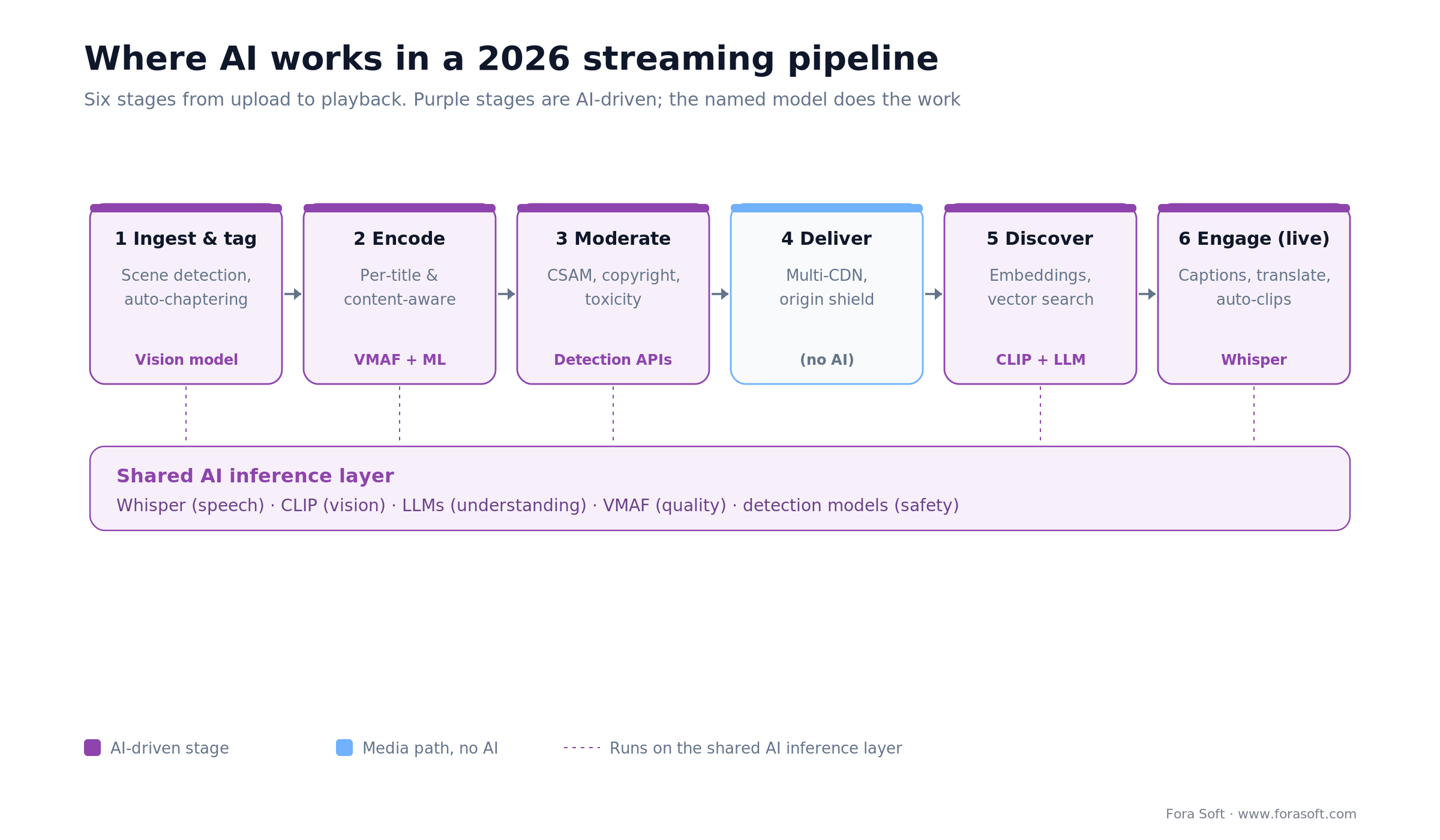
Figure 1. Where AI works across a 2026 streaming pipeline. Five of six stages are AI-driven, all sharing one inference layer.
Notice that delivery — the CDN itself — has no AI in it. That is deliberate. AI belongs where it changes a cost or a risk: trimming the bytes before they hit the CDN, screening what gets published, and deciding what a viewer sees next. The rest of this guide walks each AI stage with the number that decides it.
AI encoding optimization: the biggest money saver
Where does AI save the most money in streaming? Encoding, by a wide margin. You encode a title once and deliver it millions of times, so every percent shaved off the bitrate is a percent off your largest recurring bill. That is why the encode stage is the first place AI pays for itself.
Per-title and content-aware encoding
Netflix introduced per-title encoding in 2015 and cut bitrate roughly 20% by fitting the bitrate ladder to each title instead of using one fixed ladder for everything (Netflix Technology Blog, 2015). An animated short and a snowy night scene need very different bit budgets, and a fixed ladder overpays for the easy content. Content-aware and per-scene encoding push this further: a model scores each scene with VMAF, Netflix’s open-source perceptual quality metric, and spends bits only where the eye will notice. A dialog scene drops to a low rung; an action sequence climbs. The result is the same perceived quality at a smaller average bitrate.
AV1, on top of everything else
AV1 is a royalty-free codec that delivers roughly 30% lower bitrate than H.264 or HEVC at equal quality, and it now powers about 30% of Netflix streaming as of late 2025 (Netflix Technology Blog, December 2025, via StreamingMediaBlog). The catch is decode: AV1 needs hardware support to play efficiently on phones, and older devices without it fall back to a battery-hungry software path or a lower codec. So AV1 is a rung you add, not a codec you switch to wholesale. The next codec is already specified: the Alliance for Open Media released AV2 in June 2026 (AOMedia, 2026), but with no hardware decoders shipping yet it is a 2027-and-later rung. Our AV1 in production guide and the state of AV1 in 2026 cover the decode-coverage detail.
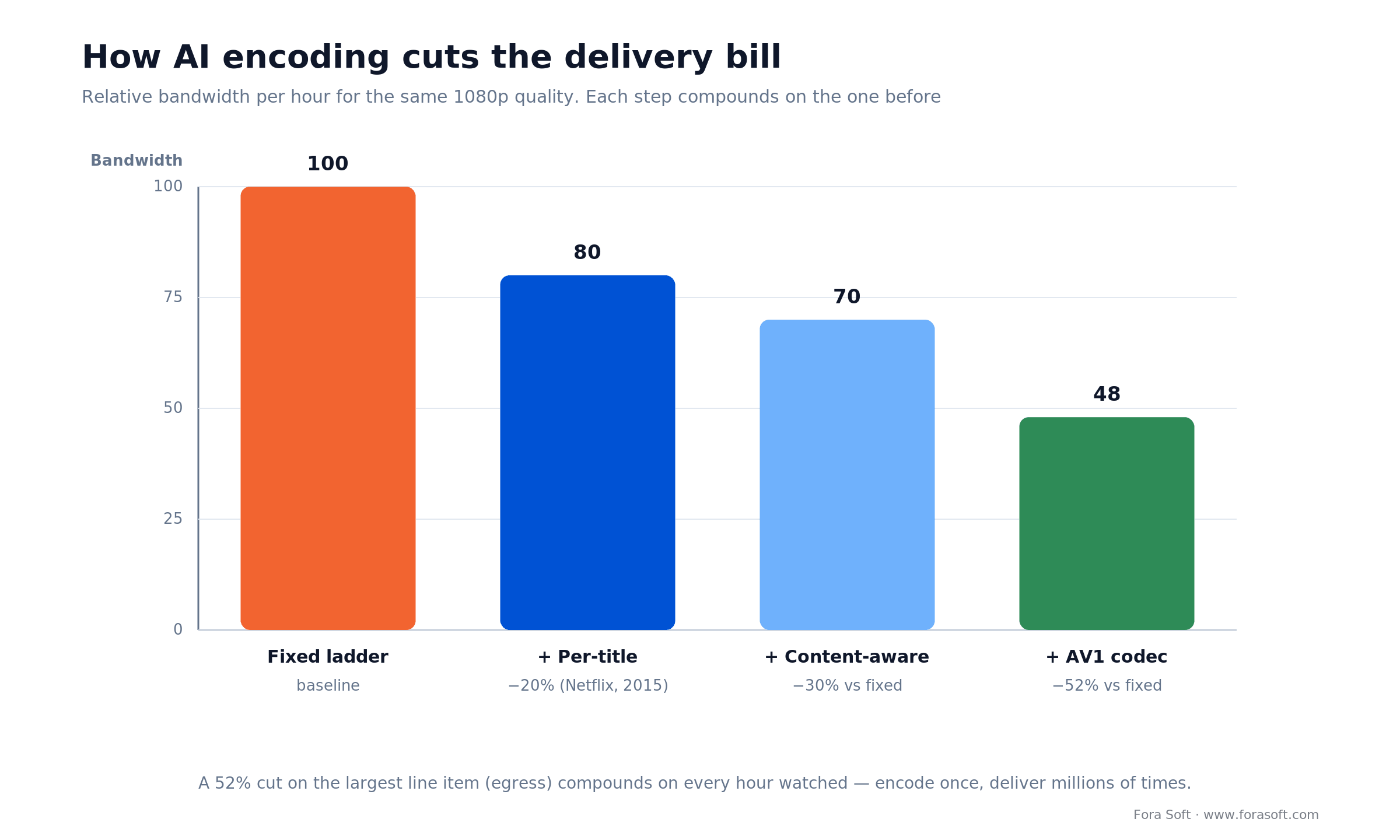
Figure 2. How AI encoding steps compound: per-title, content-aware and AV1 together cut relative delivery bandwidth by about half.
Reach for per-title and content-aware encoding when: delivery is your dominant cost — a large VOD catalog, a mobile-heavy audience, or a 4K library. The savings appear in year one on the CDN bill. If you serve a few dozen short clips, the encode complexity is not worth it yet.
Not sure which AI features your platform actually needs?
Tell us the catalog, the audience and the budget. We will hand back a ranked AI feature list, a delivery-cost model, and a build-vs-buy call you can act on.
AI content moderation and safety
Do you need AI moderation, or can a small team handle it? Once you accept uploads or host live streams, a team cannot keep up, and the failure mode is legal, not cosmetic. Here is the math: a 100-creator platform posting 10 hours of content each per day generates 1,000 hours a day. A human reviewer watches maybe 6 hours in a shift, so reviewing everything once at normal speed needs about 167 reviewer-shifts a day (1,000 ÷ 6). That is a call center, and it still misses things. AI flips the model: models screen everything, and humans review only what gets flagged.
The three detection layers
Three layers cover most of the risk. Illegal-content and abuse detection (CSAM, extreme violence) runs on specialized models from vendors like Hive, AWS Rekognition and Microsoft Content Safety, and pairs with hash-matching against known-bad databases. Copyright and piracy detection fingerprints licensed content and matches uploads against it, blocking a ripped film in seconds instead of after a takedown notice. Toxicity and hate detection transcribes speech, then classifies the text across languages. The point is layering: visual plus audio plus text catches what any single signal misses.
On cost, moderation is priced per minute of video analyzed — AWS Rekognition bills its video API by the minute, for example. Scan 1 million hours a year (60 million minutes) at roughly ten cents a minute and you are looking at about $6 million if you brute-force every minute. Nobody does that: real systems hash-match known content first, sample cheaply, and escalate only novel uploads to full analysis. Designing that funnel is most of the engineering.
One 2026 change matters for live: AWS stopped offering Rekognition’s streaming video features to new customers on 30 April 2026 (AWS, 2026). Stored-video moderation is still sold, at $0.10 per minute in US East (2026), and AWS now points new live projects to sampling frames through its Image API. If your live moderation plan was built around that streaming feature, plan for frame sampling or another vendor.
How do you cut flagged sections before a live stream becomes VOD? Run moderation on the live stream in parallel with delivery and write every flag as a time range (start, end, label, confidence) into an edit list. The VOD packaging job reads that list before it publishes: confirmed ranges are cut or blurred, borderline ones go to the human queue, and the replay enters the catalog only when the queue is clear. Sampling one or two frames a second plus the speech transcript is usually enough, because the cut happens on the recording, not on the live edge.
Reach for layered moderation when: you accept any user uploads, live streams, or comments. Combining visual, audio and text detection drops false negatives sharply and gives a compliance auditor something concrete to look at. The honest limit: AI moderation is triage, not a judge — keep a human review path for anything high-stakes, and under the EU AI Act, label AI-generated media.
Personalization and recommendation engines
How much does a recommender actually move the numbers? A lot. Around 80% of what Netflix members watch starts from a recommendation, and Netflix has said its recommender saves the company more than $1 billion a year through higher retention and fewer cancellations (Netflix, 2015–2017). For a new platform, shipping any working recommender beats the chronological grid it replaces.
The modern build is embeddings plus a vector database. You turn each title into a vector from its metadata, transcript and thumbnails (models like CLIP for the visual side), turn each user into a preference vector from watch history, and store both in a vector database — Pinecone, Weaviate, Qdrant or Milvus. A homepage request becomes a nearest-neighbor query that returns the top matches in tens of milliseconds. Embeddings also solve the cold-start problem a pure collaborative filter has: a brand-new title has no watch history, but it does have content you can match on day one.
Reach for an embeddings recommender when: your catalog is past ~1,000 titles and growing, and you have 30+ days of watch data. Below that, a simple content-based “more like this” is enough, and GDPR plus the EU Digital Markets Act push you toward first-party, on-device signals rather than cross-site tracking anyway.
AI search and discovery
What does AI search add over a keyword box? It lets people find content by meaning and by what is said or shown on screen, not just by title metadata. Three techniques stack up. Semantic search embeds the query and the catalog into the same vector space, so “heist movies where the crew falls apart” returns the right films even with no matching keyword. Speech-to-text search transcribes every video with a model like Whisper (open-source, around 99 languages) and indexes the transcript, so a viewer can jump to the exact moment a topic is discussed. On-screen text and object search runs OCR and vision models over frames so a brand, a face or a caption becomes findable.
This is not theoretical for us. On VALT, a video-observation platform for medical training and law enforcement, we built word-search inside recorded video on top of Amazon Transcribe: an investigator types a phrase and lands on the second it was spoken across thousands of hours of footage, then exports it as a report. Semantic and speech search turn a video archive from a shelf into a database. For the analytics side of the same models, see our AI video analytics guide.
Want semantic search or a recommender scoped for your catalog?
Bring the catalog size and the stack you are on; we will size the embeddings, the vector database and the retrieval latency, and tell you what it costs to run.
AI features for live streaming
Live is where AI engagement features are most visible, because they change the stream while it is happening. Three earn their keep. Real-time captions and translation transcribe the audio and render captions with a few seconds of delay, then translate to a handful of languages at once — the single biggest accessibility and reach lever a live product has. Auto-highlights and clips score the recording for peaks as the stream ends and cut short vertical clips for social, turning one broadcast into a week of distribution. AI commentary and stat overlays read a live data feed and surface context for sports and esports.
On the ingest side, the protocol matters more than the AI: WHIP, the WebRTC-over-HTTP ingest standard, became RFC 9725 in March 2025 and is replacing RTMP for sub-second live. The honest caveat on live AI: real-time captioning and translation cost per minute and add latency, so price them against your actual concurrency before promising ten languages on every stream. When live translation is the feature you sell, our AI language interpretation development team builds the caption and dubbed-voice pipeline end to end.
AI analytics and quality of experience
Once content is streaming, AI turns telemetry into decisions. Churn prediction trains a classifier on subscription age, recency and watch-time trend to flag who is likely to cancel in the next month, so you can intervene while it still matters. Anomaly detection watches quality-of-experience signals — startup time, rebuffer ratio, error rate — and pages an engineer when a bitrate cliff or regional outage starts, cutting time-to-recovery from hours to minutes. Content performance forecasting predicts a title’s reach from first-week metrics so programming and licensing decisions rest on data, not gut.
Reach for predictive analytics when: your monthly churn is above a few percent, incidents happen more than once or twice a week, or you license content and need to predict whether a title will earn back its cost. Below that, standard dashboards are enough — do not build a model to watch a number that never moves.
AI monetization features for streaming platforms and creators
Which AI features make a streaming platform money? In 2026, three: ad decisioning that understands the content, clipping and dubbing that multiply a creator’s reach, and brand-suitability scoring that lets advertisers buy live inventory without fear. All three reuse the tags, transcripts and embeddings the platform already produces for search and moderation.
The largest platforms show where this is going. YouTube’s Peak Points format, announced in May 2025, uses Gemini to find the moments viewers are most engaged and places ads right after them (Google, 2025). Netflix told advertisers in May 2026 that its ad tier reaches more than 250 million monthly active viewers, that AI matching of ad creative to the show it runs in will reach every ad-supported country by the end of 2026, and that it is testing AI agents that buy ads (Netflix, 2026). On the creator side, YouTube auto dubbing covers 27 languages, and more than 6 million viewers a day watched at least 10 minutes of auto-dubbed video as of December 2025 (YouTube, May 2026).
On a platform you build, the same ideas become concrete components: server-side ad insertion with breaks placed by a scene and engagement model instead of fixed cue points, contextual targeting from the transcripts and tags that already power search, auto-clips that turn a live session into shorts with the creator’s revenue share attached, and a brand-suitability score per segment so live inventory can be sold to cautious advertisers. If you run an ad-supported OTT service or FAST channels, our OTT and Internet TV development team builds the ad insertion, ad decisioning and audience analytics as part of the platform.
Reach for AI ad decisioning when: you run an ad-supported tier or FAST channels with enough inventory to test model-placed breaks against fixed cue points. With a small audience, start with contextual targeting from tags you already have; a placement model has nothing to learn from yet.
AI production and creator tooling
Creators are the supply side of most platforms, and AI tooling that saves them time is a retention feature aimed at them. Four tools do real work today. Auto-editing finds silences, filler and off-topic stretches in raw footage and proposes cuts, turning a two-hour recording into a tight episode in minutes. Automatic chaptering segments a video by topic and writes timestamps. Thumbnail generation pulls candidate frames and lets creators A/B test them. Dubbing and localization clone a voice and generate dubbed audio in many languages.
The caveat is quality and disclosure. AI dubbing is good for scripted content and still stumbles on tone and idiom, so it is a draft accelerator, not a replacement for a human pass on high-value titles. And where the EU AI Act applies, AI-generated or manipulated audio and video carry a labeling obligation under Article 50, which has applied since 2 August 2026. Ship the time savings, keep the human in the loop, and disclose what the model made.
AI streaming stacks compared: build vs. buy
Should you buy the AI pipeline or build it? Buy until the AI layer is your actual product. Four patterns cover the market, and they trade cost, control and speed differently. Figure 3 lays them out; the table gives the detail. For a vendor-by-vendor shortlist with October 2026 list prices, see our guide to AI streaming platforms compared.
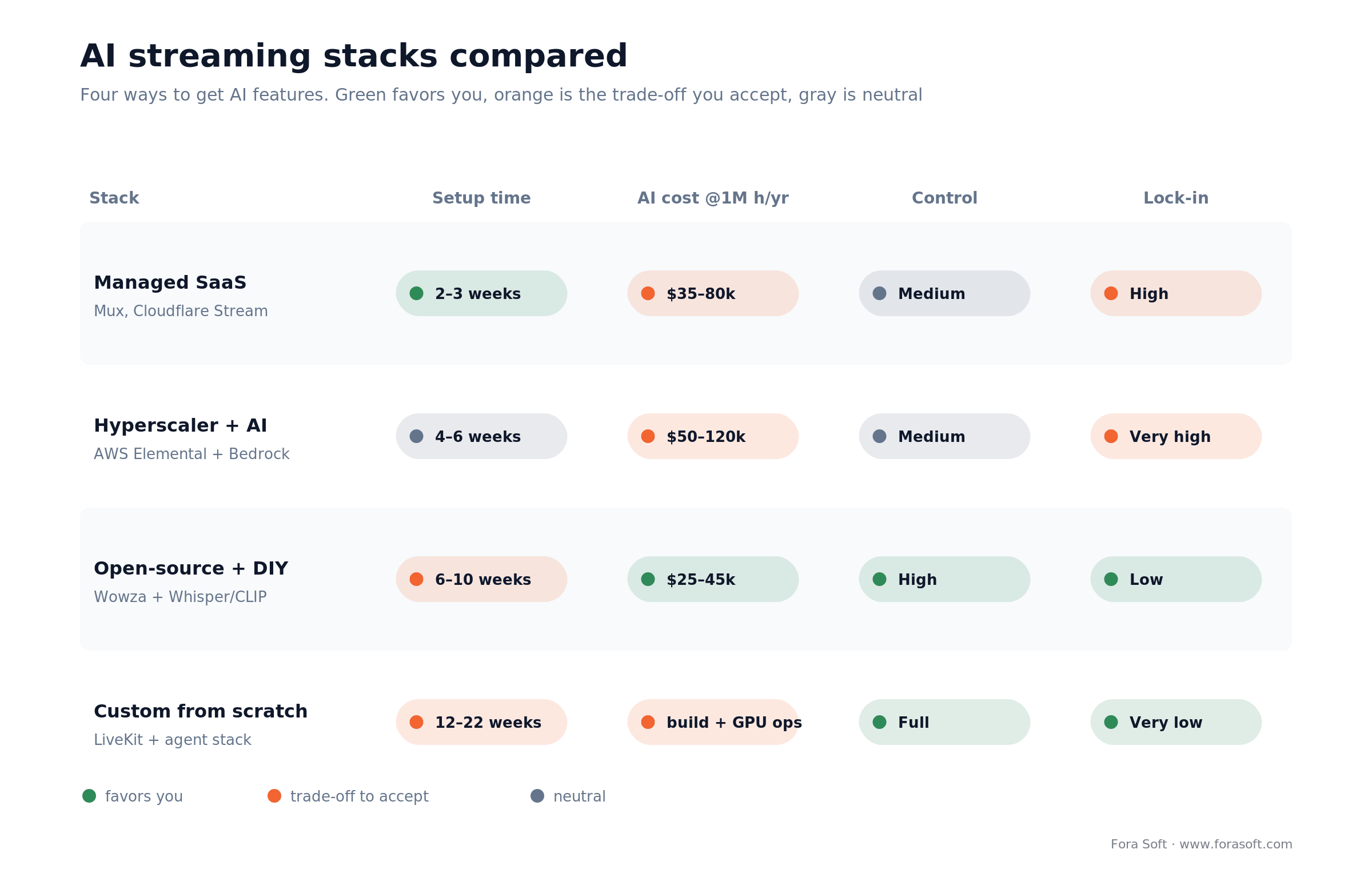
Figure 3. Four AI streaming stacks compared. Managed ships fastest; open-source and custom trade setup time for control and lower lock-in.
| Stack | AI features included | Setup time | Annual cost @1M h | Lock-in / control |
|---|---|---|---|---|
| Managed SaaS (Mux, Cloudflare Stream) | Auto/per-title encoding and captions native; Mux Robots (beta, 2026) adds summaries, chapters, moderation and caption translation; deep search bolted on | 2–3 weeks | ~$35–80k | High lock-in, medium control |
| Hyperscaler + AI (AWS Elemental + Bedrock) | Auto-tagging, encoding, recommendations, moderation | 4–6 weeks | ~$50–120k | Very high lock-in, medium control |
| Open-source + DIY (Wowza + Whisper/CLIP) | Modular: add ASR, embeddings, LLMs as needed | 6–10 weeks | ~$25–45k platform + AI ops | Low lock-in, high control |
| Custom from scratch (LiveKit + agents) | Full pipeline, 8–12 AI services stitched by API | 12–22 weeks | build + GPU inference ops | Very low lock-in, full control |
The pattern: managed stacks trade money and lock-in for weeks-to-launch, and they are the right first build for almost everyone. You move toward open-source or custom when data residency, per-minute economics at scale, or an AI feature that is genuinely your differentiator forces the issue. Our streaming cost and timeline estimate breaks down the hours by layer, and our enterprise video platform guide covers the residency and scale end.
Managed AI is moving fast, so check what your video platform ships before building it yourself. Mux opened its Robots AI workflows to all customers in beta on 1 September 2026: summaries, chapters, key moments, nudity and violence moderation, and caption translation into more than 50 languages (Mux, 2026). If you have already decided to build, our build playbook for AI video streaming apps lays out a 14-week enablement roadmap.
Reference architecture for AI streaming
A dependable 2026 stack looks like this. Client apps send content to an ingest layer that accepts WHIP or RTMP for live and direct upload for VOD. From ingest, work fans out in parallel: an AI analysis service (scene detection, tagging, transcription), a transcoding pipeline that produces a multi-codec content-aware ladder, and a safety service that screens for illegal and infringing content before anything publishes. Processed media lands on a multi-CDN delivery layer. Metadata and embeddings flow into a vector database and cache, so personalization and semantic search resolve in tens of milliseconds without touching the delivery path. The rule that keeps it scalable: AI runs alongside delivery as independent services, never inline in the playback path, so a slow model never stalls a stream.
The AI streaming cost model
AI cost splits into two shapes, and confusing them is how budgets blow up. Managed inference (captioning, moderation, recommendations through a vendor API) is priced per minute or per request: predictable, no idle cost, and it climbs linearly with usage. Self-hosted inference (your own GPUs running Whisper, CLIP and detection models) is cheaper per unit at high volume but carries fixed GPU and ops cost, plus the risk of paying for idle accelerators between peaks.
A worked example makes the trade concrete. Say you caption 1 million hours of content a year. That is 60 million minutes of ASR. At Deepgram’s 2026 list prices of $0.0043 per minute for batch and $0.0077 per minute for streaming (Deepgram, 2026), a managed API costs roughly $260,000–$460,000 a year, and you pay only for what you process. Self-hosting the same workload on your own GPUs can undercut that per-minute rate, but only if the GPUs stay busy; at 40% usage the idle time eats the saving. The decision rule: start managed, meter your real usage, and move a workload in-house only when sustained volume clears the ops and idle overhead. Do not self-host on a forecast.
Reach for self-hosted AI inference when: a single workload (usually transcription or moderation) runs at high, steady volume and its managed bill has become a top-three line item. Until one model dominates your spend, managed APIs are cheaper all-in once you count engineering and idle GPUs.
Want your AI inference cost modeled before you commit?
Give us your projected watch hours and upload volume; we will model managed versus self-hosted for encoding, moderation and captions, and flag the crossover point.
Mini case study: AI word-search on VALT
VALT, by Intelligent Video Solutions, is a video recording and observation platform used across medical simulation labs, law-enforcement interview rooms and child-advocacy centers. The problem was scale of footage: organizations record thousands of hours, and the value is locked inside them unless someone can find the right moment. Manual scrubbing does not scale, and in these settings accuracy is not optional.
The plan we shipped: a transcription pipeline on Amazon Transcribe that turns every recording into a searchable transcript, a word-search index over it, and timestamp-accurate playback so a user types a phrase and jumps to the exact second it was spoken — then exports it as a PDF report. All of it built HIPAA-compliant, because the content is medical and legal.
The result: VALT serves 770+ US organizations and more than 50,000 users, and Fora Soft has been their sole development team for over ten years — the year we launched v1 they hit $1M in revenue, and within five years, $8M. Speech-to-text search is exactly the AI feature this guide argues for, shipped in a domain where getting it wrong has consequences. Want this kind of search on your archive? Book a 30-minute call and we will scope it.
Pick your AI streaming strategy in five questions
Answer these five before writing a line of code. Each answer removes a whole branch of the feature tree, and the order reflects what tends to hurt first. Figure 4 shows the same logic as a flow.
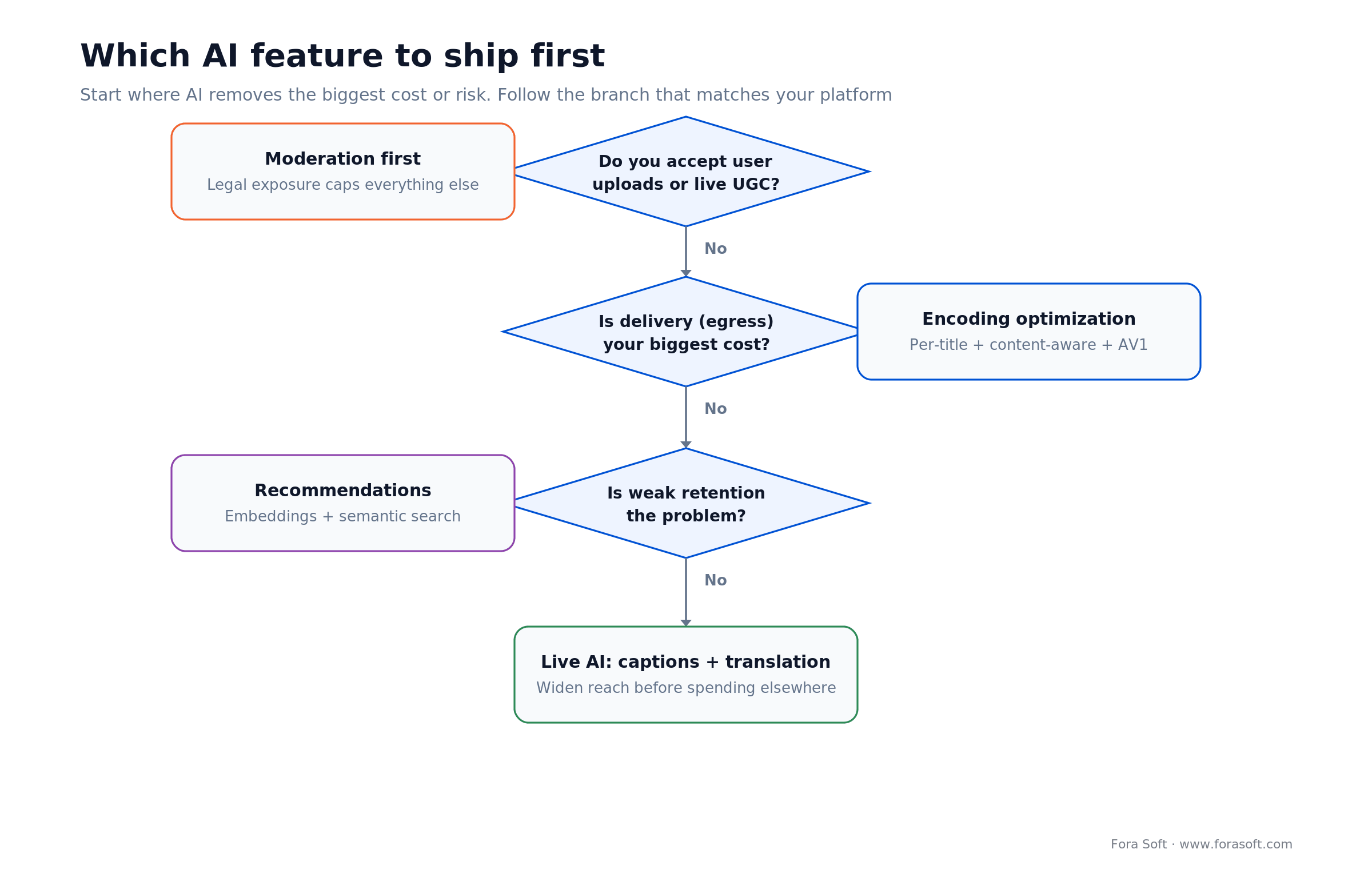
Figure 4. Which AI feature to ship first, by the cost or risk it removes: moderation, encoding, recommendations, then live AI.
| Question | If yes | What to build first |
|---|---|---|
| Do you accept user uploads or live UGC? | Yes | AI moderation — legal exposure caps everything else |
| Is delivery (egress) your biggest cost? | Yes | Per-title + content-aware encoding, add AV1 |
| Is weak retention the problem? | Yes | Embeddings recommender + semantic search |
| Are non-English viewers a real share? | Yes | Real-time captions and translation |
| Is an AI feature your actual differentiator? | Yes | Custom pipeline; own that model end to end |
If most answers are no, a managed platform plus a thin custom layer is the right first build. If several are yes — especially the last one — you are in custom-pipeline territory, and designing for it early is cheaper than retrofitting it later.
Five pitfalls we see in AI streaming projects
- Adding AI features before the money features. Auto-highlights are fun; unmoderated uploads are a lawsuit. Fix cost and risk first, then chase engagement.
- Self-hosting inference too early. GPUs sitting idle between peaks erase the per-unit saving. Start on managed APIs and move in-house only when one workload dominates the bill.
- Trusting AI moderation as the final word. Detection is triage. No human review path for high-stakes flags is how a false negative becomes a headline.
- Bolting a recommender onto no data. A cold recommender with no watch history and no content embeddings recommends noise. Ship content-based matching first.
- Ignoring the EU AI Act. AI-generated audio and video carry a labeling duty under Article 50, which has applied since 2 August 2026; generative systems already on the market before that date have until 2 December 2026 to add machine-readable marking. Retrofitting disclosure and provenance after launch is painful; design it in.
KPIs to track after shipping AI features
Instrument these from day one, because AI features are easy to ship and hard to justify without numbers. On cost: delivery cost per hour watched (should fall as encoding AI lands) and AI inference cost per hour. On safety: share of content auto-cleared versus human-reviewed, and moderation false-negative rate. On engagement: recommendation click-through and week-two retention. On quality: time-to-first-frame under ~2 seconds and rebuffer ratio under ~1% of watch time. If an AI feature is not moving one of these, it is a demo, not a feature.
When NOT to add AI to streaming
Honesty sells better than a pitch. Do not add AI moderation if you never accept user content — a curated, first-party catalog does not need it. Do not build a custom recommender for a catalog of fifty titles; a hand-tuned “more like this” is better and cheaper. Do not self-host inference to save money at low volume; managed APIs win until one workload dominates your spend. And do not ship AI dubbing or generated content into a compliance-sensitive market without a human pass and a label. Add AI where it removes a real cost or a real risk — not because the deck has a slide for it.
FAQ
What is AI-powered video streaming?
It is video streaming where AI runs inside the pipeline — tagging and chaptering on ingest, deciding the bitrate ladder per title, screening uploads for illegal content, powering search and recommendations from embeddings, and generating live captions, translations and clips. The AI is infrastructure, not a widget on the homepage.
What is an AI streaming platform?
An AI streaming platform is a video streaming service whose pipeline uses AI at ingest, encoding, moderation, discovery and live production. Managed options such as Mux and Cloudflare Stream now bundle captions and some AI workflows; custom platforms add their own models where the AI is the product.
How do I clip flagged sections out before a live stream becomes VOD?
Moderate the live stream in parallel with delivery, store each flag as a time range in an edit list, and have the VOD packaging job cut or blur confirmed ranges before publishing. Borderline ranges go to a human queue, and the replay enters the catalog only when that queue is clear.
Which AI features help streaming platforms and creators earn more?
Content-aware ad placement, auto-clips and AI dubbing. YouTube places Peak Points ads after the most engaging moments using Gemini, Netflix matches ad creative to shows with AI on a 250M-viewer ad tier (2026), and YouTube auto dubbing covers 27 languages.
Which AI features actually increase revenue?
Three carry most of the return: encoding optimization (cuts the delivery bill), recommendations (lift retention — ~80% of Netflix viewing starts from one), and moderation (removes legal risk that would otherwise cap growth). Live captions and translation add reach. Everything else is secondary until those are in place.
How much can AI encoding cut streaming costs?
Per-title encoding cut Netflix bitrate about 20% (since 2015); content-aware encoding and AV1 stack on top, and AV1 alone saves roughly 30% versus H.264/HEVC. Combined, they can roughly halve delivery bandwidth for the same quality. Since you deliver each title far more than you encode it, that lands straight on your biggest bill.
Do I need AI content moderation?
If you accept user uploads, live streams or comments, yes. Manual review stops scaling past a few hundred hours of content a day, and the failure mode is legal, not cosmetic. Layer visual, audio and text detection to triage everything, and keep a human queue for flagged edge cases.
Should I build or buy the AI streaming stack?
Buy until the AI layer is your product. Managed stacks (Mux, Cloudflare, AWS Bedrock) ship in weeks and cost less all-in at small and mid scale. Go open-source or fully custom when data residency, per-minute economics at scale, or a differentiating model forces it — typically a 12-to-22-week build.
How does AI search work for video?
Three techniques stack: semantic search matches meaning by embedding the query and catalog into one vector space; speech-to-text (Whisper) transcribes audio so viewers can find the exact moment a topic is discussed; and OCR plus vision models make on-screen text and objects findable. Together they turn an archive into a searchable database.
Can AI add real-time captions and translation to live streams?
Yes. A speech model transcribes the live audio with a few seconds of delay and translates to several languages at once. It is the biggest accessibility and reach lever a live product has, but it costs per minute and adds latency, so size it against your real concurrency before promising every language on every stream.
Is AI-generated content allowed under the EU AI Act?
It is allowed, but AI-generated or manipulated audio and video must be labeled under Article 50, which has applied since 2 August 2026. Generative AI systems already on the market before that date have until 2 December 2026 to add machine-readable marking, under the Digital Omnibus adopted in 2026. Design disclosure and provenance in from the start.
Ship an AI-powered streaming platform in 2026
The bar has moved, and it is no mystery where. Viewers and partners now expect AI-optimized delivery, moderated uploads, recommendations that work, and live captions in more than one language — and the platforms that win pick the two or three AI features that remove their biggest cost or risk first, buy the pipeline until it becomes the product, and instrument every AI feature against a real number. That is the work we do. Explore our video streaming development service, or read the deeper video streaming fundamentals in Learn, and talk to the engineers who have shipped AI video since 2005.



The handbook · 7 volumes
Fora Soft Video Engineering Handbook
Once you have picked the two or three AI features that cut your biggest cost or risk, each one needs its own engineering. Our seven-volume handbook covers the full video stack, from encoding and delivery to sound and AI. Volume 6 is the place to start for moderation, search and RAG over a catalog and generative video; Volume 1 explains per-title encoding and VMAF, and Volume 7 sizes live captions and inference cost. Written by Nikolay Sapunov, CEO at Fora Soft.
Browse the handbook on Amazon →7 volumes · 9,000+ pages · Kindle & paperback
Building an AI-powered streaming platform in 2026?
We will rank the AI features worth building, size the delivery and inference cost, and give you a build-vs-buy call — in one 30-minute call.
What to read next
Service
Video streaming development
Custom AI streaming platforms from MVP to multi-million MAU.
Deep dive
AI-native video streaming
Where each AI model sits in the pipeline, and what it costs to run.
Features
Video streaming app features
The non-AI table stakes: codecs, DRM, latency and monetization.
Analytics
AI video analytics
Detection, tracking and QoE models applied to live and VOD.
Estimate
Streaming cost and timeline
The hours behind each layer, from ingest to AI inference.

