

Key takeaways
• ProVideoMeeting collapses Zoom, Calendly and DocuSign into one product. One branded link books the meeting, hosts the call, and captures a legally valid signature. No tab-switching, no expired signing links.
• The commercial case is simple. Sales, legal, HR and professional-services teams pay three vendors roughly $30–60 per user per month for meeting, scheduling and e-signature. One platform folds that stack, and the per-seat bill, into a single line.
• The hard parts are the signature and the phone line, not the video. WebRTC is a commodity. Legally valid in-call signing (ProVideoMeeting ships it as Instasign) and PSTN dial-in are what make the product enterprise-ready.
• A minimum unified product ships in 14–22 weeks. That’s our number on ProVideoMeeting-class builds with agent-assisted engineering, phased so pilots start before the full product is done.
• The stack is boring on purpose. React, Node.js, Kurento and FreeSWITCH for media and telephony (or LiveKit for a greenfield build), Twilio for phone numbers, MongoDB plus MySQL, Stripe for billing. Production-proven beats trendy.
Why Fora Soft wrote this playbook
Most video conferencing app development projects fail at the boring parts, not the video. The calls work in the demo. Then a signature link expires mid-deal, a dial-in caller can’t hear the room, or an auditor asks who actually signed, and the “we’ll add that later” features turn out to be the whole product. We’ve been shipping real-time video since 2005, across 250+ projects, and we keep meeting teams who hit exactly that wall trying to glue three SaaS tools together with Zapier.
We built ProVideoMeeting from the ground up for a B2B founder who wanted “Zoom plus Calendly plus DocuSign” fused into one white-label product. It was not our first hard video system. We are the sole dev team behind VALT (770+ US organizations, 50,000+ users, HIPAA), Scholarly (live classes to 2,000 concurrent students), and TransLinguist (real-time interpretation across 75+ languages).
Fora Soft is a software development company that has built video and real-time communication products since 2005, across 250+ projects. This is the short version of the build-or-buy decision: what a unified meeting, scheduling and signing platform actually contains, which parts are genuinely hard, what the stack should be, and what it costs. If you want the broader “how to build custom video conferencing” overview first, read our complete development guide; this article goes deep on the unified, sign-in-the-call variant. Either way, our video conferencing software development team can scope it with you.
Thinking about a unified meeting and e-signature product?
Tell us the stack you’re replacing and the compliance bar you need to clear. You get a 30-minute architecture review and a fixed-fee estimate.
What ProVideoMeeting actually does
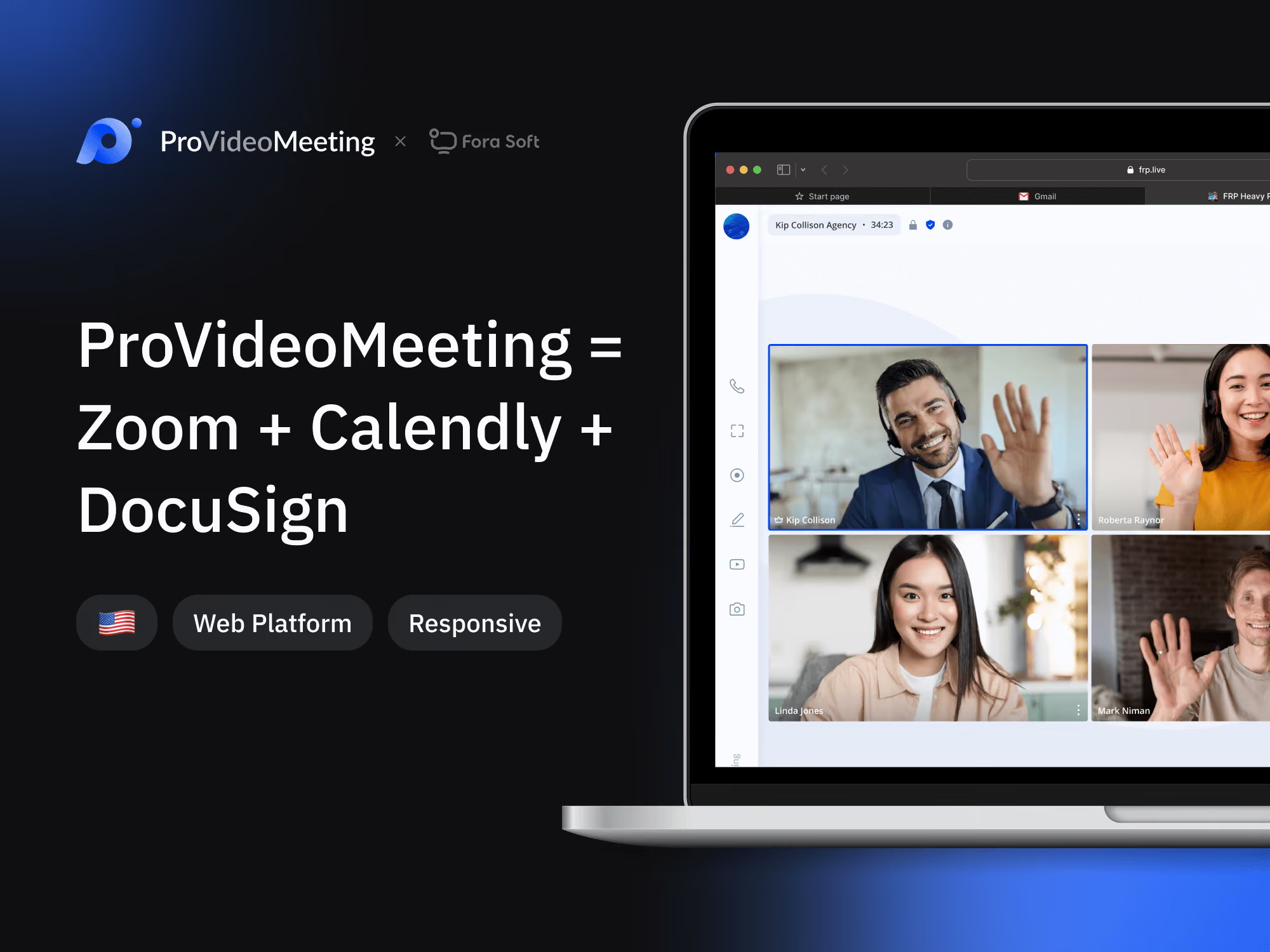
ProVideoMeeting is a business video-conferencing platform that folds three separate workflows into a single meeting URL. Founded by Vito Lomanaco in Philadelphia, it markets itself as one link for the whole sales-to-signed-contract motion:
1. Scheduling. Syncs with Google Calendar, Outlook, Calendly and Chili Piper. Participants get invites by email or SMS before the meeting, plus recurring scheduling and permanent personalized links.
2. Video conference. A WebRTC room tuned for desktop, mobile and tablet, with branded rooms, custom waiting rooms, a real-time whiteboard, notes and call transcription.
3. PSTN dial-in. Participants without a solid internet connection join by phone (cell, landline, even satellite) over a SIP bridge, mixed into the same room.
4. In-call signing (Instasign). The platform ships Instasign, the first natively integrated document-signing tool for video conferencing. A participant signs a legally valid document during the call, with identity verified by SMS or photo, without leaving the room, and every step lands in a signing log.
The punchline for a sales-ops or legal-ops buyer: the entire motion fits in one window. That’s the part that makes it commercially interesting, and the part generic “build an app like Zoom” guides skip.
Under the unified pitch sits the same feature set any serious video conferencing app needs. This is the checklist buyers score you on, split into table-stakes and the differentiators that win deals:
| Layer | Table-stakes | Differentiators |
|---|---|---|
| Meeting | HD audio/video, screen share, recording | AI transcription, live captions, noise suppression |
| Collaboration | In-call chat, participant list | Whiteboard, shared notes, breakout rooms |
| Scheduling | Calendar sync, email/SMS invites | Recurring links, Calendly/Chili Piper routing |
| Access | Browser and mobile join | PSTN/SIP dial-in, waiting rooms, SSO |
| Signing | Document share in-call | In-call e-signature (Instasign), signing log |
| Admin & ops | Roles, basic analytics | Multi-tenant branding, RBAC/SCIM, usage metering |
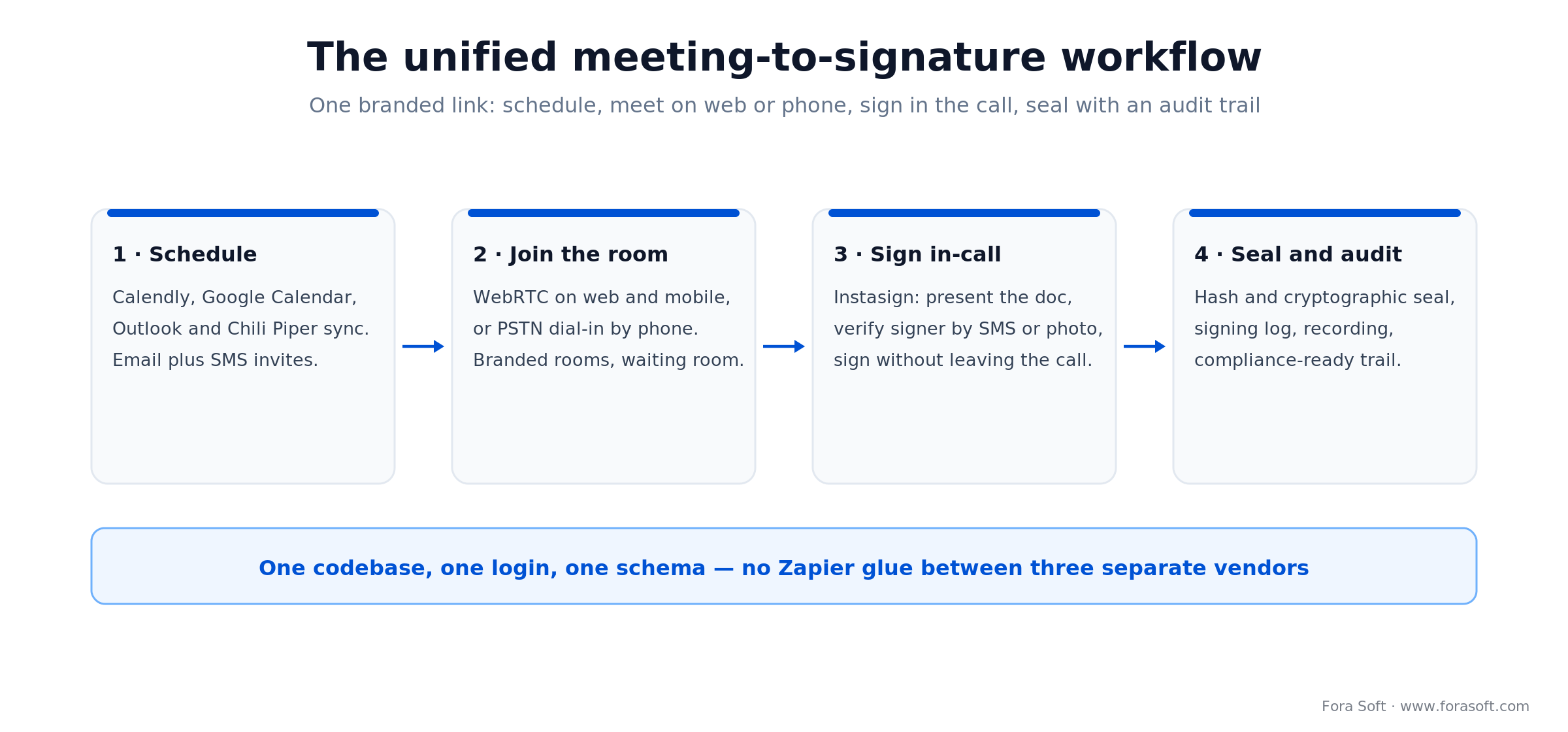
Figure 1. The unified flow: one branded link carries a deal from scheduling to a sealed, audited signature.
Why a unified platform beats three SaaS subscriptions
The video conferencing market is worth around $41.6 billion in 2026 (Fortune Business Insights), and most of that money still flows to per-seat SaaS. A typical B2B team pays per seat for Zoom or Teams, per seat for Calendly or Chili Piper, and per seat or per envelope for DocuSign or Adobe Sign. Combined, that’s usually $30–60 per user per month, and the operational tax is real: calendar glitches, expired signing links, mis-copied meeting URLs, and dropped handoffs between sales, legal and ops.
| Aspect | Three separate SaaS | Unified platform |
|---|---|---|
| Per-user cost | $30–60/user/month, forever | Flat infra + a one-time build amortised over seats |
| Integration risk | Zapier glue, webhooks, OAuth chains that break silently | One codebase, one auth, one schema |
| Data residency | Three vendors, three jurisdictions | Your infrastructure, your region |
| Branding | Mostly locked to vendor chrome | White-labelled end to end |
| Typical UX friction | 4–6 tab switches per deal | One meeting URL, one signature |
| Ownership | Three vendor relationships | Your product, your IP, a resellable asset |
Reach for a unified build when: the three-SaaS stack is a real line item — roughly 100+ licensed seats — or when the meeting-to-signature flow is your commercial product rather than an internal convenience.
Who actually needs a ProVideoMeeting-style platform
Not every business. The pattern repeats in a specific set of industries where a meeting and a legal signature happen in the same conversation.
1. Real estate and mortgage. Agents walk clients through contracts live and sign on the call. Losing the deal to a follow-up “please sign the DocuSign” email is a multi-thousand-dollar mistake.
2. Legal services and notaries. Remote notarisation, contract review with immediate signing, witness-present execution. Several US states require all three in one session.
3. Financial advisory and wealth management. KYC documents get signed during onboarding calls; splitting the flow introduces friction that kills conversion.
4. Insurance sales and claims. Quote acceptance, policy signing and claims settlement all read better as a live-call signing flow.
5. HR and recruitment. Offer letters and NDAs signed during the offer call; onboarding paperwork done in a single session.
6. Healthcare with consent forms. Patient consent, prescription acknowledgments and intake forms signed inside a telehealth visit — the pattern we know from HIPAA builds like CirrusMED.
Build vs. buy — stitch APIs or ship one product
Before any video conferencing app development starts, settle one question: do you assemble the workflow from vendor APIs, or own the product end to end? There are three honest routes, and the right one is a function of volume and how white-label you need to be.
| Route | Best for | The catch |
|---|---|---|
| Buy & bundle (Zoom SDK + DocuSign API) | Fastest to a working demo; small teams; internal use | Inherits their pricing, rate limits and branding; can’t fully white-label |
| Hybrid (custom UI over SaaS media) | Mid-volume; you want the UX but not the ops | Per-minute media cost still scales with usage |
| Build unified (self-hosted media + own signing) | Resellable products; 100+ seats; regulated verticals | Highest up-front build; you own the media ops |
Reach for a full build when: you plan to resell the product, you cross a few hundred seats, or per-envelope and per-minute fees have become a tax on growth. Below that, bundle the APIs and revisit later.
Reference architecture — how the pieces fit
A ProVideoMeeting-class platform is six logical subsystems. Each swaps independently, but they all share authentication, storage and compliance logging. Get that shared layer wrong and every subsystem inherits the problem.
| Subsystem | Job | Production-proven choice |
|---|---|---|
| Media / SFU | Real-time audio/video routing | Kurento (shipped) or LiveKit for greenfield |
| Signalling | Room join/leave, chat, presence, sign events | Node.js over WebSocket |
| Telephony bridge | PSTN dial-in, SMS invites | FreeSWITCH + Twilio numbers |
| Scheduling | Calendar sync, invite generation | Google Calendar API, Microsoft Graph, iCal |
| E-signature | Legally binding in-call signing | Custom flow (Instasign) or DocuSign API |
| Billing | Plans, usage, metering | Stripe Billing |
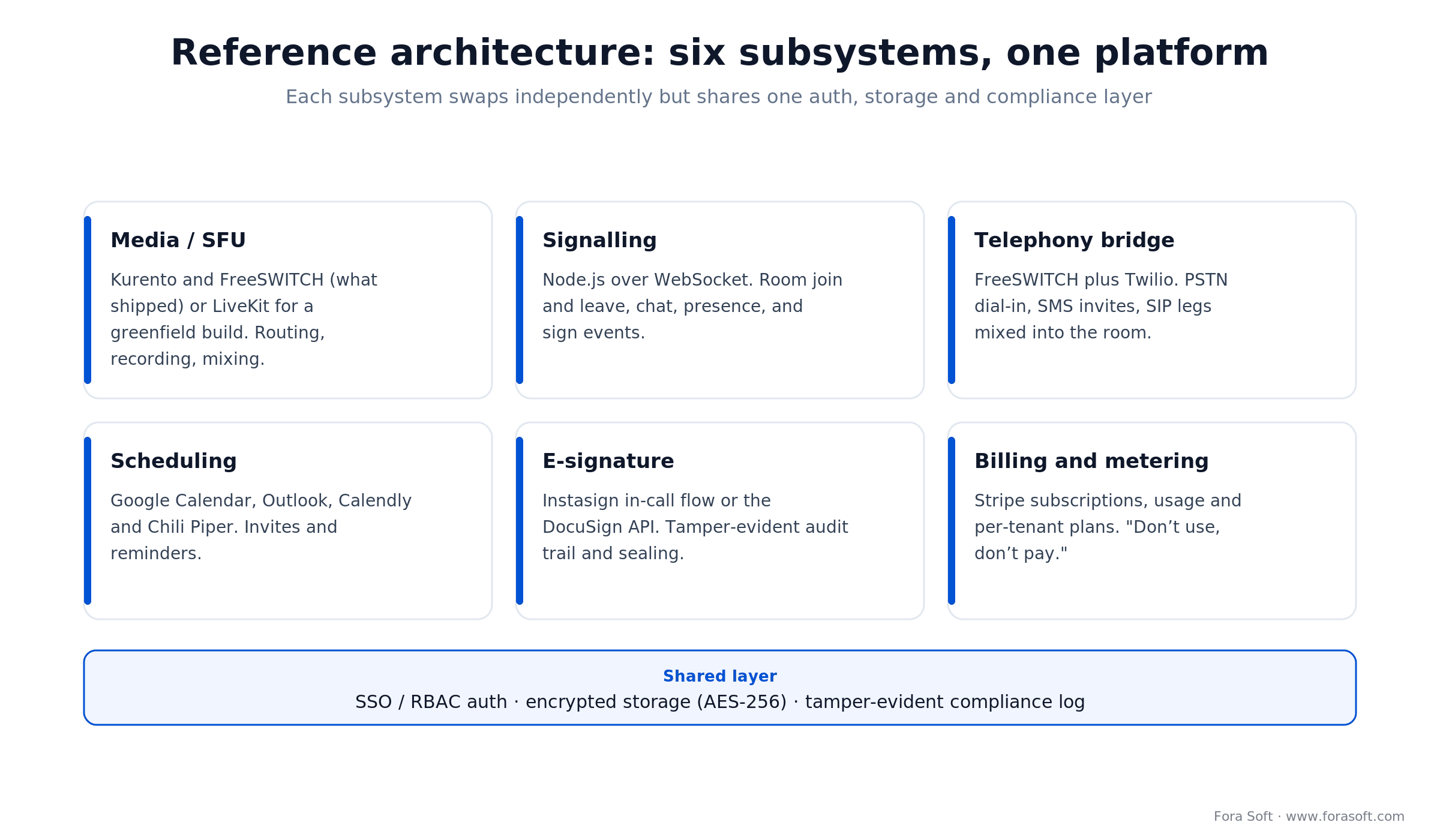
Figure 2. Six subsystems, one shared layer. Two choices dominate the rest: the media server and the signing flow.
Kurento, LiveKit, or a commercial SDK? Pick the media backbone
Short answer: self-host on Kurento or mediasoup once you expect to cross ~35,000 meeting minutes a month or need custom processing; below that, a cloud SFU like LiveKit Cloud ships faster, and for any greenfield build in 2026 we default to LiveKit. The media server is where about 60% of the infrastructure cost and 100% of the “can this scale?” question live. Four realistic options in 2026:
| Option | Best for | Watch out for |
|---|---|---|
| Kurento (self-hosted) | Custom processing, recording, dial-in mixing | In maintenance mode in 2026 — ops are on you |
| LiveKit (self-host or cloud) | Modern SFU, AI-agent primitives, cloud-to-self-host | Newer ecosystem; ops team should know Go |
| Agora / 100ms / Daily | Time-to-market, global points of presence | Per-minute pricing that balloons at scale |
| mediasoup (self-hosted) | High volume, margin-sensitive, lean C++ core | Smallest ecosystem; you build more yourself |
On ProVideoMeeting we shipped on Kurento (plus FreeSWITCH for the phone side) because the client needed custom processing — branding overlays, dial-in mixing, synchronised signing events, and per-minute pricing didn’t fit the business model. Be honest about 2026, though: Kurento still ships point releases on its GitHub, but momentum is thin. If the same project started today we’d default to LiveKit (it raised $100M in January 2026 and powers ChatGPT’s Advanced Voice) and keep mediasoup on the shortlist. For the deeper topology question, see our WebRTC architecture guide, our Kurento deep-dive, and the SFU comparison in Learn.
Whatever runs the media, the “app” side is a client question. On the web that’s a WebRTC front end; on phones you either wrap the same stack in React Native or Flutter, or ship native iOS and Android SDKs. A managed client SDK (LiveKit, Agora, 100ms) buys you battle-tested mobile clients and global edge servers, which matters more than raw media price until you hit real volume. Self-hosted media with your own thin clients wins on margin and control once usage is predictable.
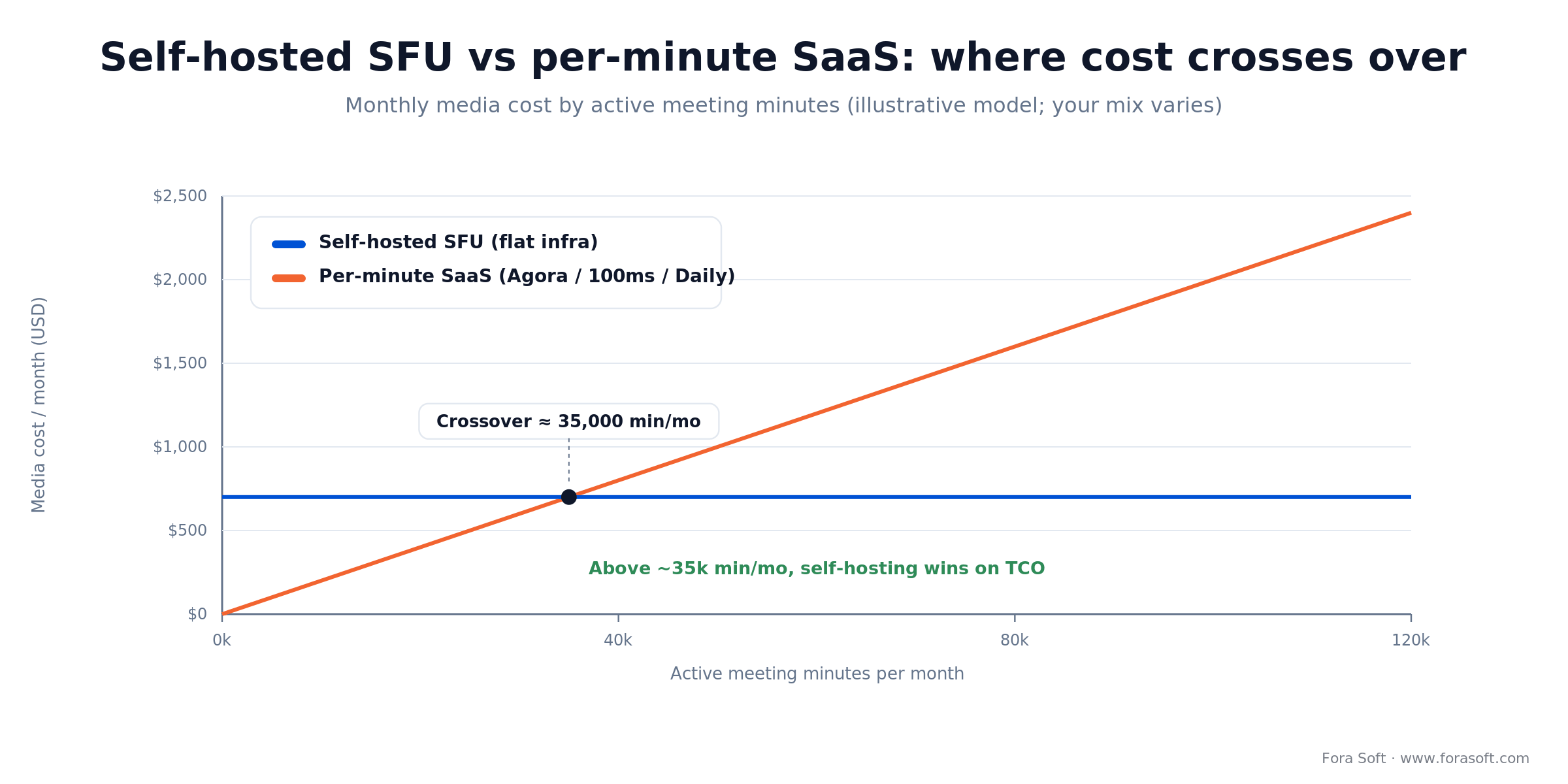
Figure 3. Illustrative media cost. Per-minute SaaS is cheaper until roughly 35,000 active minutes a month; past that, self-hosting wins on total cost.
Reach for self-hosted media when: you expect to cross ~35,000 active meeting minutes a month within a year, or you need recording, overlays and dial-in mixing the SaaS SFUs won’t give you. Below that, a cloud SFU ships faster.
Kurento, LiveKit or a cloud SDK — which fits your numbers?
We’ve shipped all of them. A short call maps your expected minutes, margin and compliance to the right media backbone — with the cost math.
Legally valid e-signatures inside the meeting — the hard bit
An image of a drawn signature on a PDF is not a legally binding e-signature. The bars you actually need to clear:
US — the ESIGN Act (2000) and UETA. They require intent to sign, consent to do business electronically, association of the signature with the record, and record retention. Relatively easy to satisfy in a well-built flow.
EU — eIDAS, now eIDAS 2.0. Three tiers: Simple (SES), Advanced (AdES) and Qualified (QES). Only QES carries automatic, handwritten-equivalent legal force across every member state, and it needs a Qualified Trust Service Provider and a qualified certificate. The 2024 update, Regulation (EU) 2024/1183, adds the EU Digital Identity (EUDI) Wallet — every member state must offer one by the end of December 2026, and it can issue a QES straight from a phone. Most B2B deals still need at most AdES.
Three practical implementation choices:
1. Embed DocuSign or Adobe Sign. Fastest to ship, legally solid, but it pulls vendor lock-in and per-envelope fees back in. Good when you want the unified UX but aren’t ready to own the signature stack.
2. Build a custom AdES-compliant flow. What ProVideoMeeting did with Instasign. It captures a tamper-evident audit trail — signer identity (verified by SMS or photo, plus IP and timestamp), the document hash before and after, an explicit intent step, and a cryptographic seal — and needs legal review in each target jurisdiction.
3. Partner with a Qualified Trust Service Provider. For QES-level signatures. It adds an identity-verification step to the UX but clears the highest-stakes contracts, such as certain real-estate deeds and government filings.
Concretely, an AdES-grade signing event is just a record you can prove later. This is the shape of one audit entry a flow like Instasign writes per signature:
{
  "document_id": "doc_8f21",
  "sha256_before": "a1b2c3...",      // hash of the doc shown to the signer
  "sha256_after":  "d4e5f6...",      // hash of the sealed PDF
  "signer": { "verified_by": "sms", "phone_last4": "4417" },
  "intent": "I agree to sign",       // explicit consent captured
  "ip": "203.0.113.24",
  "signed_at": "2026-08-08T10:14:22Z",
  "seal": { "alg": "RSA-SHA256", "cert": "cn=qtsp-partner" }
}
Store that immutably and “who signed what, when, and from where” stops being an argument in court.
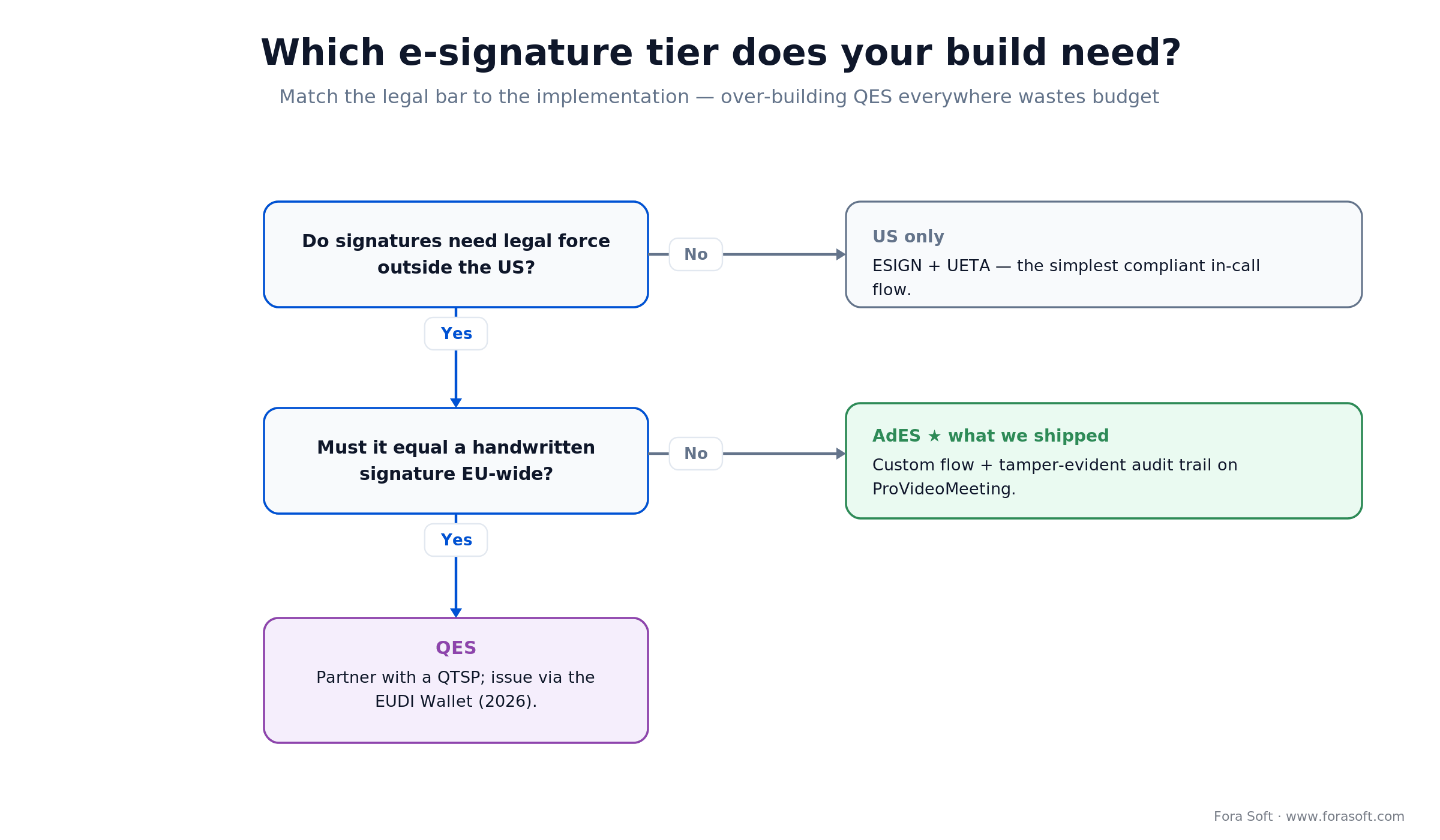
Figure 4. Match the legal bar to the build. Over-engineering QES everywhere burns budget you could spend on the product.
Reach for a custom AdES flow when: you sign in-call across the US and EU, want no per-envelope fees, and can fund one round of legal review. Reserve QES for deals that legally demand handwritten equivalence.
PSTN dial-in without a six-figure telecom budget
A chunk of the ProVideoMeeting user base works with clients who aren’t always on a fast connection. A phone dial-in option is what keeps the platform usable for them. The backbone is FreeSWITCH as the SIP softswitch, with Twilio for numbers and SMS. The specifics:
Local access numbers. Twilio provisions numbers in roughly 100 countries, so callers dial in from their own country and skip international-toll friction.
Meeting-ID IVR. The caller enters the meeting code by keypad; your backend maps it to a room and joins their audio leg.
Audio mixing. The phone audio has to mix into the room alongside the WebRTC streams. FreeSWITCH and Kurento handle this natively; LiveKit needs a SIP agent.
Recording alignment. If you record calls, make sure dial-in audio is included, time-aligned and labelled for compliance.
Twilio’s per-minute charge is the main variable cost. On its published US rates (2026), inbound to a local number is $0.0085/min, toll-free inbound is $0.022/min, and inbound over SIP is $0.004/min. Routing over SIP more than halves the local-number rate. At seat-based pricing this is absorbable; at transactional pricing, meter it carefully.
Production stack we shipped on ProVideoMeeting
React and Redux/Effector on the frontend — standard, well-understood, a large hiring pool.
Node.js for the API and signalling layer. JavaScript end to end cuts context-switching for a small team.
Kurento as the media server — a self-hosted media server that handles recording, mixing, overlays and custom processing. Here’s the background on WebRTC itself.
FreeSWITCH + Twilio for the SIP softswitch, PSTN dial-in and SMS invites.
MongoDB + MySQL + Redis. MongoDB for flexible room and meeting metadata, MySQL for billing and transactional records, Redis for presence and hot session state. Forcing everything into one store is usually waste.
Stripe for billing — including the platform’s “don’t use, don’t pay” model that only charges for members who host at least one meeting per cycle.
AWS, Grafana, SonarQube and Mixpanel for hosting, dashboards, code-quality gates and product analytics. The observability stack is what turns “it broke” into “here’s the room, the leg and the second it broke.”
Mini case — what shipping ProVideoMeeting looked like
The situation. The founder came to us with a clear thesis: US-based B2B teams were paying three vendors for one workflow and wanted a single white-label product they could resell. The brief was specific — parity with Zoom on meetings, Calendly on scheduling, and DocuSign on signatures, all under one brand.
The plan. We split the build into three phases — meetings, scheduling, signing — and shipped each independently so the client tested with pilot customers before the full product existed. Kurento gave us custom processing and self-hosting control; FreeSWITCH plus Twilio handled dial-in; Instasign implemented a custom, AdES-compatible signing flow with a cryptographic audit trail and SMS/photo identity checks.
The outcome. A turnkey conferencing product that fuses Zoom, Calendly and DocuSign, later featured on King Newswire and Digital Journal, sold on a “don’t use, don’t pay” model. See it on our portfolio. Want a similar roadmap for your own product? Book a 30-minute call.
Cost and timeline to ship a ProVideoMeeting-class platform
We use agent-assisted engineering, which compresses delivery versus typical agency quotes. The ranges below reflect recent projects, not industry averages, and we’d rather under-promise than inflate a number.
| Scope | Typical timeline | What ships |
|---|---|---|
| MVP: meetings + scheduling | 8–12 weeks | WebRTC rooms, calendar sync, invite emails/SMS, basic branding |
| + Embedded e-signing | +4–6 weeks | DocuSign embed or a custom AdES flow + audit trail |
| + PSTN dial-in | +2–3 weeks | FreeSWITCH/Twilio integration, IVR, audio mixing |
| Full unified platform | 14–22 weeks | Everything above + billing, admin, compliance logs |
Add 10–15% for multi-region deployments and another 10–20% for strict compliance regimes (HIPAA, FINRA, eIDAS QES). Ongoing run costs are the Twilio per-minute line, SFU compute (a few hundred dollars a month for a small production deployment), any DocuSign envelope fees if embedded, and standard cloud infrastructure. For a structured way to size the number, see our software cost estimation guide.
A quick word on the business model, because it changes what you build. Unified platforms usually earn money one of five ways: flat per-seat subscriptions, freemium with paid meeting length or signing, usage-based billing on minutes or envelopes, white-label resale to other brands, and the “don’t use, don’t pay” model ProVideoMeeting runs, which only charges for members who host a meeting in the cycle. Pick the model before the schema: per-seat and resale want clean multi-tenancy, while usage-based billing wants metering wired in from day one.
Want a fixed-fee estimate for your unified platform?
Send your seat count, target verticals and compliance regimes. You get a scoped build plan, a fixed-fee number, and a ship date — not a vague range.
A decision framework — should you build this?
Q1. How many licensed seats span the combined Zoom + Calendly + DocuSign stack? Under 50, stay on SaaS. 50–500, build if the meeting-to-signature flow is your core product. Over 500, build.
Q2. Is this a white-label product you’ll resell? If yes, building is the only path. If no, check whether a SaaS bundle already covers the need.
Q3. What e-signature bar do you need to clear? ESIGN or basic eIDAS SES → a custom flow is practical. AdES → custom, with legal review. QES → partner with a QTSP.
Q4. Do participants need PSTN dial-in? If yes, scope the FreeSWITCH/Twilio work from day one. If no, skip it — most modern use cases don’t need it.
Q5. Are you building to own a margin stream or to enable a primary business? For a margin stream, self-host the SFU and go full custom. To enable a primary business, a cloud SFU like LiveKit Cloud ships faster.
Five pitfalls that kill unified-meeting builds
1. Drawing on a PDF and calling it an e-signature. It isn’t. Build or integrate a flow with a tamper-evident audit trail, identity verification and cryptographic sealing, or you’re shipping a lawsuit vector.
2. Testing calendar invites on one provider. Google, Outlook and iCal each have quirks. Test invite flows across all three before you ship; a “works for Google users” MVP annoys 40% of your pilot.
3. Ignoring network-restricted participants. Many corporate IT departments block arbitrary UDP. Budget time for TURN servers and TCP fallback — boring work that separates “works in the demo” from “works in the field.”
4. Skipping compliance logging. Every meeting, participant and signature event must be auditable. Bolting this on after launch is expensive and sometimes impossible, because the data you needed was never captured.
5. Per-minute SaaS media at MVP when you know you’ll scale. Fast to ship, painful to renegotiate. If you’ll cross the break-even volume within 12 months, self-host from the start or plan the migration now.
KPIs — what to measure once it’s live
Quality KPIs. Call connection success rate (target above 99%), first-minute media quality (MOS above 4.0), signature-completion rate on meetings that include signing (above 90%), dial-in success rate (above 98%).
Business KPIs. Meeting-to-signature conversion — the proxy for the whole thesis; if the unified UX doesn’t lift it versus baseline, reconsider — plus per-seat run cost against the three-SaaS baseline, monthly active seats and renewal rate.
Reliability KPIs. Uptime (target above 99.95% for B2B), audit-log completeness (100% of signature events captured), and disaster recovery (under 1 hour RTO, under 15 minutes RPO for signed documents).
When not to build a unified platform
Skip this build when:
You have fewer than ~50 combined seats. Three subscriptions are cheaper than amortising a build.
Your meeting workflow doesn’t end in a signature. If signing is a nice-to-have rather than the bottleneck, build the meeting and scheduling side and keep DocuSign.
Your bar is QES across six jurisdictions. Partner with a specialist signing vendor rather than owning all of it in-house.
You can’t commit to media-infra ops. A self-hosted SFU needs monitoring, upgrades and CVE patching. If that’s outside your capacity, use a cloud SFU.
Honest rule of thumb: if you can’t name the deal that a signature link losing you today, you’re not ready to build. The unified platform pays off when the handoff between meeting and signature is where money leaks.
Security and compliance posture for B2B buyers
B2B procurement asks for a security package before they pilot. Ship the answers out of the box:
Transport security. DTLS-SRTP for media, TLS 1.3 everywhere else, certificate pinning where clients support it.
Data at rest. AES-256 for recordings and signed documents; per-tenant keys if you sell into regulated verticals.
Access control. RBAC, SSO via SAML 2.0 or OIDC, SCIM provisioning. These are procurement gates, not nice-to-haves.
Audit trail. A tamper-evident log of every meeting, participant, signature and admin action, exportable in a standard format, with configurable retention.
Compliance frameworks. SOC 2 Type II is the US B2B baseline; HIPAA for healthcare; GDPR for EU users (residency + DPA + a DPO contact); eIDAS for EU signatures. Don’t promise what you can’t support: each framework is real engineering and ongoing ops.
FAQ
How much does video conferencing app development cost for a unified platform?
With our agent-assisted engineering, an MVP with meetings and scheduling typically lands in 8–12 weeks. Embedded e-signing adds 4–6 weeks and PSTN dial-in adds 2–3, so a full unified platform is 14–22 weeks end to end. Budget depends on your compliance bar, region and integrations; ask for a fixed-fee quote after a scoping call.
Kurento or a cloud SFU like LiveKit or Agora — which should you pick?
Both paths work. Self-hosted (Kurento, LiveKit, mediasoup) gives you control over cost and custom processing; cloud SFUs (LiveKit Cloud, Agora, 100ms, Daily) trade that for faster time-to-market and per-minute pricing. Above roughly 35,000 active minutes a month, self-hosting usually wins on total cost. Below that, cloud is fine. For a greenfield build in 2026 we’d default to LiveKit rather than Kurento.
Is an in-call signature legally binding?
Yes, when it’s implemented correctly. In the US, ESIGN and UETA compliance is straightforward: intent, consent, record association and retention. In the EU you need at least AdES — identity verification, cryptographic signing and a tamper-evident audit trail. QES, the strongest tier, requires a Qualified Trust Service Provider and, increasingly, the EUDI Wallet. Have the exact flow reviewed by counsel in each target jurisdiction.
Is PSTN dial-in still worth building in 2026?
Only if your audience includes users on spotty networks (field sales, construction, rural healthcare, international clients) or your industry regulates call-in options. For SaaS-native B2B, WebRTC is usually enough. Check your support tickets first — “can’t join” complaints are the tell.
How does this compare to building on Zoom’s API plus DocuSign’s API?
Building on Zoom + DocuSign APIs ships faster but inherits their pricing, rate limits, branding limits and support SLAs, and you can’t fully white-label — users see “Zoom” somewhere. A unified custom build takes longer but removes per-envelope fees and vendor lock-in, which pays off above a few hundred seats or for any resellable product.
Can Fora Soft handle HIPAA, SOC 2 or eIDAS compliance?
Yes. We’ve shipped HIPAA-ready telehealth, SOC 2-aligned B2B products and eIDAS-compatible signing. Compliance is always a specific engagement with legal counsel in the loop; budget 10–20% on top of the base build for a single regulated regime, more for multi-regime.
What languages and payment methods can the platform support?
ProVideoMeeting supports multiple languages and Stripe-backed payments (cards and bank debit in most regions). For more exotic paths — wire, invoice billing — we add the relevant processor. Localisation is a per-locale effort, not a single switch.
Can the platform be white-labelled and resold?
Yes, and it’s often the whole point. We ship branded rooms, custom invite links, tenant-level theme colours and logos, and per-tenant billing. If reselling is the plan, budget an extra 2–3 weeks for multi-tenancy and admin tooling.
What to read next
Development guide
How to build custom video conferencing
The broader guide this article specialises — features, team, process.
Architecture
P2P, SFU, MCU, hybrid — 2026 WebRTC guide
The topology choice that decides your media server.
Vendor math
Agora alternatives with real numbers
When per-minute SaaS pricing stops paying off.
AI overlay
AI features worth adding to a video platform
Transcription, summaries, action items — what actually sells.
Enterprise
Multilingual video conferencing guide
The feature that turns a meeting tool into a global one.
Should your team build its own unified meeting platform?
A ProVideoMeeting-style platform makes sense when you run enough seats that the SaaS bill is a real line item, when your workflow ends in a legally binding signature, or when you want a resellable white-label product. Below those thresholds, keep paying the three vendors and put the engineering budget elsewhere.
When it does make sense, the build is well understood: 14–22 weeks, Kurento or LiveKit in the middle, FreeSWITCH and Twilio on the telephony edge, a custom AdES signing flow like Instasign, and Stripe for billing. We’ve shipped exactly this stack in production. Start with a 30-minute architecture call and we’ll tell you whether your use case fits.
Ready to collapse your Zoom + Calendly + DocuSign stack?
Tell us your seat count, industry and compliance regimes. A 30-minute call gets you a build plan, a fixed-fee estimate and a ship date.

