Key takeaways
• Four channels, not one. Android app distribution outside Google Play means direct APK, alternative stores, Managed Google Play with an MDM, or Firebase App Distribution. Each solves a different problem and most products need two.
• 30 September 2026 is the date that matters. From then, apps must be registered by a verified developer to install on certified Android devices in Brazil, Indonesia, Singapore and Thailand, with a global rollout in 2027.
• Release #2 is the real test. Getting the first install is easy anywhere. Play, Managed Play and a running store client update your app with no user action; off-Play you get that only by building the installer yourself and meeting every PackageInstaller condition.
• Leaving Play costs you the Play Integrity label. A non-Play install returns UNRECOGNIZED_VERSION, and appLicensingVerdict comes back UNLICENSED or UNEVALUATED rather than LICENSED — decide what your backend does with that before you ship.
• Money follows device ownership. Self-hosted APK for 500 users runs about $94 in platform fees over three years. The same 500 devices on Managed Play plus a mainstream MDM run $36,000 to $144,000 — less if you can live with an entry-tier vendor, and you are buying device management, not just distribution.
Why Fora Soft wrote this playbook
Most Android app distribution advice is written by people who have shipped to one channel. We have shipped to four, and we have broken all four at least once. Fora Soft is a software development company that has built products since 2005 — 250+ projects delivered, 50 in-house engineers — and a meaningful share of those Android builds never went near a public store.
We wrote and still maintain the Android agent for Instacom’s enterprise MDM, which manages up to 10,000 Android devices from a single web console for security, logistics, healthcare, construction and mining fleets in South Africa. That app is installed by a device-owner DPC, not by a user tapping a store button. We have also built white-label IPTV clients that ship pre-installed on Android set-top boxes by the operator, and consumer apps like AppyBee that live on Play and use Firebase App Distribution for every pre-release build.
So this is not a survey of documentation. It is the set of decisions we make on a real project, the numbers we quote when a client asks what it costs, and the mistakes that cost us weeks the first time around. Where Google’s own docs are out of date — and on this topic several of them are — we say so.
The four channels at a glance
There are exactly four supported ways to get an Android app onto a device without publishing it on the public Google Play store: hand the user a signed APK, list it on an alternative app store, push it through Managed Google Play to devices your organisation controls, or send it to named testers through Firebase App Distribution. Everything else is a variation on one of those four.
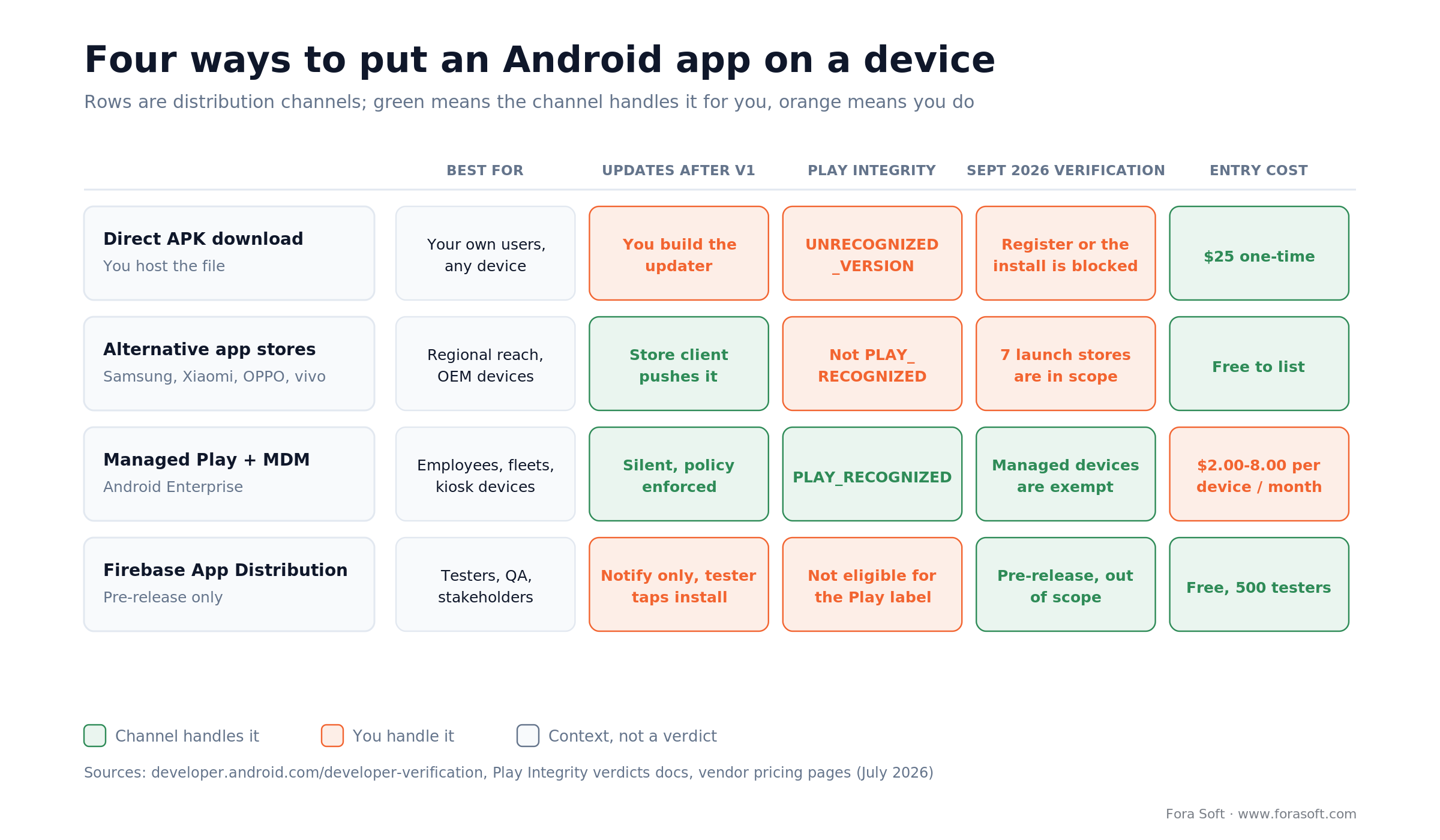
Figure 1. The same four channels scored on the five things that actually decide the choice. Green cells are handled by the channel; orange cells land on your engineering backlog.
The order in that matrix is deliberate. Teams usually start at the top because a direct APK feels simplest, then discover on release #2 that they own an update problem nobody scoped. The right way to read it is right to left: start from who owns the devices and how updates have to reach them, and the channel picks itself.
| Channel | Who it reaches | Update path | What it costs you | Where it breaks |
|---|---|---|---|---|
| Direct APK | Anyone with a link | You build the updater | $25 one-time + hosting | Install prompts, Play Protect warnings, no auto-update |
| Alternative stores | OEM device owners in specific regions | Store client, if installed | Free listing, per-store assets | Fragmented submissions, uneven review times |
| Managed Google Play | Employees and managed fleets | Silent, enforced by policy | MDM seat, $2–8 per device / month | Useless for consumers, needs enrolled devices |
| Firebase App Distribution | Named testers you invite | Notify only | Free | 500 testers per project, no production path |
| Public Google Play | Everyone, everywhere | Silent auto-update | $25 + service fees on digital sales | Policy review, targetSdk deadlines, the listing is public by definition |
Reach for more than one channel when: your product has both an internal fleet and a consumer audience — for example a driver app on managed handhelds plus a customer app on Play. Two channels, one codebase, one signing key.
Not sure which channel your product needs?
Send us your app and your audience. We’ll map the channels, the update path and the 2026 verification work in one call.
What changed in 2026
Android developer verification is the change that reshapes this topic. From 30 September 2026, apps downloaded from participating stores must be registered by a verified developer to be installed on certified Android devices in Brazil, Indonesia, Singapore and Thailand. Google says the requirement rolls out globally from 2027. That is the official position on developer.android.com, not a rumour.
Google’s stated reason is malware volume. In March 2026 Google’s Android App Safety team wrote that recent analysis found “over 90 times more malware from sideloaded sources than on Google Play.” Worth noting that Google’s own figure was 50× in August 2025, so the measurement moved a long way in seven months. We would not build a business case on either number, but the direction of policy is unambiguous.
The timeline you have to plan against
| When | What happens | What you do about it |
|---|---|---|
| 30 Mar 2026 | Verification opened to all developers in Play Console and the new Android Developer Console | Create the account; nothing is gated yet |
| Jun 2026 | Google starts rolling out the verification system service to most Android devices | Nothing |
| Jul 2026 | Android Developer ID Status API goes global; early access for the ADC API and limited accounts | Wire the status API into CI if you publish to several stores |
| Aug 2026 | Limited-distribution accounts, the ADC API and the advanced sideload flow launch globally | Decide whether 20 devices is enough for your internal builds |
| 30 Sep 2026 | Registration required for participating stores in Brazil, Indonesia, Singapore and Thailand — and Play developers must have every Play app registered | Register every package, everywhere |
| 2027 onward | Global rollout | Treat registration as done, not pending |
One line in Google’s June 2026 update deserves more attention than it got. Play developers should register any remaining Play apps by 30 September 2026 “to avoid global removal from Google Play.” That consequence is not limited to the four launch countries. Google says 99% of Play apps were registered automatically; the work is checking that yours is one of them.
The two account types, and the one that surprises people
A full distribution account in the Android Developer Console costs $25 once and covers unlimited apps and installs. Registering as an organisation also needs a D-U-N-S number, which Dun & Bradstreet can take up to 28 days to issue — start that paperwork before you need it.
A limited distribution account is free, needs no government ID, and lets you register unlimited apps but install them on only 20 devices that end users explicitly authorise through a QR or link handshake. Google positions it for hobbyists, students and classroom projects. It is not a way to run a 60-person beta.
The exemption most enterprise teams miss is in the Android Developer Console help centre: “Apps distributed through your organization’s store, on managed devices, won’t need to complete the verification requirements since your IT admin has vetted them for safety and security.” Google still recommends registering those apps in case they leak onto unmanaged devices. We register them. The cost is $25 and an afternoon.
Regulation is pulling the other way
The EU Digital Markets Act obliges gatekeepers to effectively allow app distribution through third-party stores or the web under Article 6(4), and separately bans anti-steering under Article 5(4). On 23 July 2026 the European Commission fined Google €890 million across two non-compliance decisions, €430 million of which concerned Google Play anti-steering. In the US, the Ninth Circuit upheld the Epic injunction in 2025, and since 29 October 2025 Google’s US policies let developers tell users about off-Play availability, link out to it, and use alternative in-app payments.
Two forces, opposite directions: identity checks tightening, distribution rules loosening. The practical read for a product team is that off-Play distribution is getting more legitimate and more paperwork at the same time. Plan for both.
Two limits worth holding on to. Enforcement on 30 September 2026 applies to apps installed from the seven participating stores in the four launch countries, not to every install everywhere; and even after it lands, adb and the advanced flow still install unregistered apps for people who accept the risk. What the deadline actually removes is the ordinary tap-a-link install for an unregistered developer.
Reach for early registration when: you ship anything to Brazil, Indonesia, Singapore or Thailand, or you have more than one package name in the wild. Registration is per-package, and claiming a package needs the APK signed with your private key.
Channel 1: Direct APK download
Direct APK distribution — Android sideloading, in Google’s vocabulary — means you host a signed universal APK, the user downloads it in a browser and Android’s package installer takes over. It is the fastest channel to stand up and the most expensive to run well, because every service a store normally provides — discovery, integrity, updates, rollback — becomes yours.
What the user actually has to do
Since Android 8.0 (API 26) there is no global “unknown sources” switch. Install permission is granted per source: the browser or file manager that opened your APK must hold REQUEST_INSTALL_PACKAGES and the user must approve it for that specific app. If you build your own updater, your app needs that permission too and should gate the flow behind canRequestPackageInstalls() rather than firing an intent and hoping.
There is a second trap on the far side of installation. Android puts apps installed from a local or downloaded file behind restricted settings: Accessibility, notification listener, device admin, usage access and several permission roles stay greyed out until the user opens the app info screen and taps More → Allow restricted settings. If your app needs any of them — screen readers, call screening, notification mirroring, kiosk control — write that step into onboarding, because users will not find it.
Ship a universal APK, not a bundle
An .aab is a publishing format, not an installable one. Play (or bundletool) turns it into a split APK set at install time. For direct distribution you need the universal APK: either bundletool build-apks --mode=universal in your own pipeline, or the signed universal APK that Play Console offers under Test and release → Latest releases and app bundles → All app versions → Downloads → Assets. Expect it to be noticeably larger than the split a Play user receives, because it carries every ABI and density.
The two commands that matter, so nobody has to guess:
# 1. turn the bundle into one installable APK
bundletool build-apks --bundle=app-release.aab --output=app.apks \
  --mode=universal --ks=release.jks --ks-key-alias=release \
  --ks-pass=pass:$KS_PASS --key-pass=pass:$KEY_PASS   # else it prompts and CI hangs
unzip -p app.apks universal.apk > app-universal.apk

# 2. publish the hash your users (and their IT team) can check
shasum -a 256 app-universal.apk
The hosting checklist we actually use
- HTTPS with HSTS, and a stable download URL that never redirects to a URL shortener.
- A published SHA-256 fingerprint of the APK on the same page, so a security-minded admin can verify it.
- A JSON manifest next to the file (
versionCode,versionName, size, hash, changelog, minimum supported version) that your in-app updater polls. - Signed, expiring URLs if the build is not meant to be public.
- Download logs you can actually query — without them you have no install funnel at all.
- A rollback plan: keep the previous two versionCodes live and reachable.
One more platform floor to respect: Android 14 refuses to install anything with targetSdkVersion below 23, and Android 15 raised that to 24. The error is INSTALL_FAILED_DEPRECATED_SDK_VERSION, and the only bypass is adb install --bypass-low-target-sdk-block, which your users do not have.
Reach for direct APK when: you control the relationship with every installer — an enterprise pilot, a hardware bundle, a partner integration — and you can spend 30 to 50 engineering hours on an updater that does staged rollout and rollback properly.
Channel 2: Alternative app stores
Alternative app stores make sense when a specific OEM’s devices are your market, not when you want “more reach” in general. The store client handles updates and the listing gives you a trust signal a raw APK never will, but every store is a separate submission pipeline with its own review queue, asset sizes and policy quirks.
Samsung Galaxy Store is the one worth the effort for most products: Samsung’s developer site says (2026) that the store is preloaded on 1.2 billion devices across 188 countries. Since 15 May 2025 the Galaxy Store revenue split is 80/20 on paid apps and in-app purchases and 85/15 on subscriptions, and since 24 September 2025 Galaxy Store requires Data Safety information on every new and updated app. Xiaomi GetApps, OPPO App Market, vivo V-Appstore, HONOR App Market and Transsion’s Palm Store matter if your users are in the regions those OEMs dominate; all five are named participants in Google’s verification rollout, so listing there does not exempt you from registering. Huawei AppGallery sits outside that list and outside Google Mobile Services entirely: shipping there means porting Google Play services calls to HMS Core, which is a real engineering project rather than another upload target. We will not quote AppGallery user numbers — Huawei has not published a figure we can verify for 2026, and the ones circulating date from 2020–2021.
Amazon Appstore is no longer an Android channel
This trips people up because half the internet still lists it. Amazon discontinued the Amazon Appstore for non-Fire Android devices on 20 August 2025, stopped accepting new Android-targeted submissions on 20 February 2025, stopped Coins purchases the same day and closed the Coins programme itself on 20 August 2025. The Appstore lives on for Fire TV and Fire tablets. If a 2026 article recommends Amazon as a general Android channel, it was not updated.
F-Droid is the other name that comes up, and its position is now political rather than technical. In an open letter published on 24 February 2026 with the EFF, FSFE and Software Freedom Conservancy, F-Droid argued that Android “is to become a locked-down platform, requiring that developers everywhere register centrally with Google,” and put certified devices at “over 95% of all Android-compatible devices outside of China.” The project had already written in September 2025 that the registration decree would end F-Droid as it exists today. If your distribution plan leans on F-Droid, read that letter before you commit.
We keep this section short on purpose. If you want the store-by-store detail — submission steps, asset specs, review times per marketplace — we wrote that up separately in our guide to distributing Android apps beyond Google Play.
Reach for an OEM store when: one manufacturer accounts for a large share of your installs in a market you care about, and you can budget 8 to 16 engineering hours per store for submission and per-release upload automation.
Channel 3: Managed Play and MDM
Enterprise app distribution on Android has one default answer: if the devices belong to an organisation, Managed Google Play plus an MDM beats every alternative, and it is the only off-Play channel that keeps silent updates and a clean Play Integrity verdict. Your app is published privately, never appears in the public store, and lands on enrolled devices by policy.
Two ways to publish a private app
1. Play Console private app. Upload an AAB, give it a title, and target it at up to 1,000 organisation IDs. Google’s Managed Play documentation says it shows up in the EMM console within a few minutes. One-way door worth knowing: a private app cannot later be made public under the same package name.
2. Google Play Custom App Publishing API. Built for EMM and reseller workflows. Google’s docs say published apps appear in the managed Play store in as little as five minutes, against over two hours through the Play Console, using a streamlined verification path. This is what you wire into CI when a customer’s IT team expects a build the same afternoon.
In the EMM console, private apps are found by package name with the pname:com.example.app search syntax rather than by title, and a device enrolled on multiple tracks receives the highest version available to it.
Pick the enrolment mode before you pick the MDM
| Mode | Device owner | What you can install | Typical use |
|---|---|---|---|
| Work profile | The employee | Only inside the work profile | BYOD phones |
| Company-owned, work profile | The company | Work profile apps, personal side untouched | Company phones with personal use allowed |
| Fully managed | The company | Anything, silently | Corporate handsets, field devices |
| Dedicated (kiosk) | The company | A locked set of apps, no user account | Scanners, POS, signage, in-vehicle terminals |
Those are the four modes exposed by the Android Management API. All of them install work apps silently — silent distribution inside the work profile is a core Android Enterprise requirement, not an MDM feature. What changes is scope: on a work profile the personal side is untouchable, so anything that has to reach the user’s own apps or settings is out of reach. That is why BYOD rollouts stall, and why field-operations apps end up on fully managed or dedicated devices.
What the MDM layer costs
List prices per device per month on annual commitment, taken from vendor pricing pages in July 2026: Scalefusion Essential $2.00, Hexnode Pro $2.20, Applivery Starter €2, Miradore Premium $2.75, ManageEngine MDM Plus Cloud around $1.08 at the 50-device Standard tier, and Microsoft Intune Plan 1 at $8.00 per user per month. Month-to-month rates run 10–20% higher where a vendor offers them at all. Intune is the outlier on price, and it is usually already paid for inside an M365 E3 or E5 agreement — check the contract before you buy a second MDM.
Reach for Managed Play plus an MDM when: you can enrol the devices. If IT owns the hardware, this channel removes the update problem, the integrity problem and the September 2026 verification problem in one move.
Shipping an Android app to a managed fleet?
We build the app, the device-owner install path and the MDM integration. Tell us the fleet size and we’ll give you a channel plan.
Channel 4: Firebase App Distribution
Firebase App Distribution is a pre-release channel, not a distribution strategy. It sends signed builds to named testers who get an email, install a small tester app and tap to update. It is free, it takes an afternoon to wire into CI, and it has hard ceilings that decide whether it fits.
- Firebase App Distribution allows 500 testers per Firebase project and 200 per distribution group. Google will raise the limit on request, but plan around the default.
- The maximum binary size is 2,048 MiB. Generous, and still worth knowing if you ship a game with bundled assets.
- Firebase App Distribution has no production auto-update path. The SDK’s
updateIfNewReleaseAvailable()can show an in-app prompt and download the build in the background, but a tester still taps to install, and it only works for people in your tester groups. - Builds shipped this way never get the Play Integrity label. Firebase’s own App Check docs state that apps not published on Google Play are not eligible for the PLAY_RECOGNIZED response.
The CI integration is one line in most pipelines: the appdistribution:distribute Gradle task or the Firebase CLI, with a tester group and release notes from your commit message. Pair it with Crashlytics and your QA loop gets tester-attributed crash reports for free, which is the real reason we keep using it rather than emailing APKs.
Reach for Firebase App Distribution when: the audience is named and finite — QA, client stakeholders, a pilot site — and you want crash reports attributed to the person who found the bug.
Signing and keys
Android identifies an app by package name plus signing certificate, so the signing key is the single decision you cannot walk back cheaply. Change the key and the same package becomes a different app: the user has to uninstall before installing again, and every bit of local data goes with it.
Which signature schemes you need in 2026
| Scheme | Introduced in | What it gives you | Do you need it |
|---|---|---|---|
| v1 (JAR) | From the start | Legacy compatibility | Only if you still support pre-7.0 devices |
| v2 | Android 7.0 | Whole-file signature, faster verification | Yes — baseline |
| v3 | Android 9 | Proof-of-rotation, so a key can be replaced | Yes |
| v3.1 | Android 13 | SDK-targeted rotation, recognised only on Android 13+ | If you plan to rotate |
| v4 | Android 11 | Separate .apk.idsig for incremental install |
Only for adb install --incremental |
Rotation deserves a warning. AOSP’s own documentation says key rotation “is not recommended for Android 12 (API 31) and earlier,” and checkSignatures only honours the proof-of-rotation from Android 13 (API 33). If you do rotate, check callers with hasSigningCertificate() rather than comparing signature arrays, because that is the API that understands a rotated lineage. If your install base spans older devices, treat the original key as permanent and protect it accordingly.
Play App Signing and the off-Play problem
Play App Signing splits your key in two. The upload key is yours and Google can reset it if you lose it. The app signing key is held by Google. That is a good deal until you want to ship the same build outside Play, at which point there are exactly two documented options: let Google hold the key and download the signed universal APK from Play Console (Test and release → Latest releases and app bundles → All app versions → the version → Downloads → Assets) or through the Play Developer API, or generate the key yourself and hand Google a copy. Google documents an app-signing-key upgrade for newer installs, but no exit from Play App Signing once you are in.
If you already know a second channel is coming, generate your own key, keep it in a hardware token or a properly audited secrets manager, and enrol in Play App Signing with a copy. Two people should be able to sign a release. One should not be able to lose the key.
Reach for your own signing key when: you plan to distribute the same package on Play and anywhere else. Retrofitting this after launch means asking every direct-install user to uninstall and reinstall.
How each channel ships updates
Google Play and Managed Google Play update an Android app silently; an alternative-store client updates it only if that client is installed and allowed to run; a direct APK updates only if you built the installer and it meets every PackageInstaller condition; Firebase App Distribution notifies a tester but never installs anything itself. Install is a one-time problem. Updates are forever, and this is where the four channels stop looking similar.
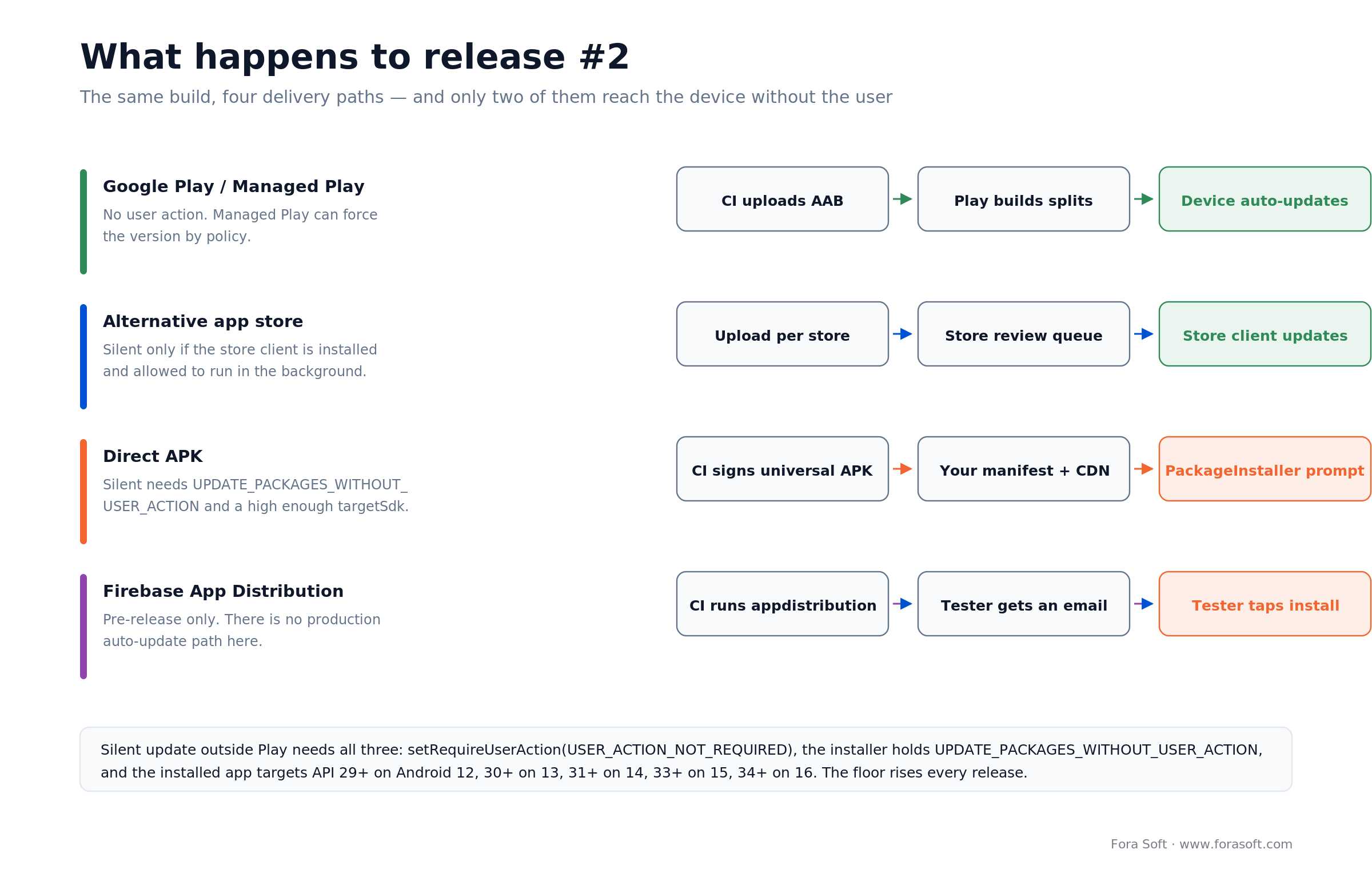
Figure 2. Same build, four delivery paths. Play and a running store client reach the device on their own; the other two need either a user tap or an installer you built and privileged yourself.
Silent updates outside Play are possible, and conditional
Android does let a non-Play installer update an app with no prompt, but PackageInstaller.SessionParams requires every one of these at once:
- the installer already holds
REQUEST_INSTALL_PACKAGES; - the session sets
setRequireUserAction(USER_ACTION_NOT_REQUIRED); - the installer app declares
UPDATE_PACKAGES_WITHOUT_USER_ACTION; - the installer is the update owner where update-ownership enforcement is on, the installer of record where it is not, or the app is updating itself;
- the installed app targets a high enough API level — 29+ on Android 12, 30+ on 13, 31+ on 14, 33+ on 15, 34+ on 16, and 35+ on API 37.
That last floor rises with every release, which is the part teams forget. An in-app updater written against Android 12’s rules quietly starts prompting users two OS versions later. Put the target matrix in a test, not a comment.
What we build when a client needs an in-app updater
// the update session, once the manifest says a newer build exists
val params = PackageInstaller.SessionParams(MODE_FULL_INSTALL).apply {
    setAppPackageName(context.packageName)
    // silent only if every condition in the list above is met;
    // otherwise Android shows the confirmation dialog anyway
    setRequireUserAction(SessionParams.USER_ACTION_NOT_REQUIRED)
}
val sessionId = context.packageManager.packageInstaller.createSession(params)
A version manifest on the CDN, a background check on app start with a jittered interval so 5,000 devices do not hit the endpoint in the same second, a SHA-256 comparison before the install intent, staged rollout by percentage bucket derived from the install ID, a forced-update floor for security releases, and a visible “you are on version X” line in settings so support can stop guessing. That is the 30-to-50-hour estimate from the cost section, and it is the part clients consistently under-scope.
Play Integrity outside Play
Leaving Google Play costs you the Play-recognised label, and if your backend treats that label as a security gate you will lock out your own users. Decide the policy before you ship, not after support tickets arrive.
The Play Integrity API is the mechanism, and its verdict reference defines three values for appRecognitionVerdict: PLAY_RECOGNIZED when the app and certificate match what Play distributes, UNRECOGNIZED_VERSION when they do not, and UNEVALUATED when integrity could not be assessed at all. A sideloaded or alternative-store build gets the second or third, never the first. Firebase’s App Check documentation says the same thing more bluntly: apps not published on Google Play are not eligible for the Play-recognised response.
Licensing is a separate field and a sharper edge. Google’s docs name sideloading explicitly as a case that returns appLicensingVerdict = UNLICENSED; if Play does not know the installed version at all, the same field can come back UNEVALUATED. Either way it is not LICENSED, and Google’s remediation guidance offers a GET_LICENSED dialog that pushes the user back to the Play listing. If you ship off-Play deliberately, that dialog is the last thing you want — do not wire it in by copying a sample.
| Signal | Play install | Alt store | Direct APK | Managed Play |
|---|---|---|---|---|
| appRecognitionVerdict | PLAY_RECOGNIZED | UNRECOGNIZED_VERSION | UNRECOGNIZED_VERSION | PLAY_RECOGNIZED |
| appLicensingVerdict | LICENSED | UNLICENSED or UNEVALUATED | UNLICENSED or UNEVALUATED | LICENSED |
| deviceRecognitionVerdict | Unaffected | Unaffected | Unaffected | Unaffected |
| Quota increase available | Yes | No — requires a Play listing | No | Yes |
| Practical policy | Gate on it | Gate on device, not app | Gate on device, not app | Gate on it |
Two housekeeping facts
SafetyNet Attestation is gone — deprecated in 2022 and fully turned down in January 2025. Any tutorial that still recommends it predates the shutdown. And the default Play Integrity quota is two separate limits of 10,000 per day per Cloud project — token requests and server-side decryptions — shared between the standard and classic APIs. Raising either requires the app to be available on Google Play and the Cloud project linked in Play Console, which is a genuine constraint for a high-volume app that lives only off-Play.
Reach for device-level integrity when: your app ships off-Play at all. Gate on deviceRecognitionVerdict plus your own server-side signals, and treat appRecognitionVerdict as telemetry rather than a lock.
One pipeline, four publish targets
Multi-channel Android app distribution only stays sane if one CI job produces one signed artifact and fans it out. The moment two channels get builds from two places, versionCodes drift and users on the unlucky channel stop receiving updates.
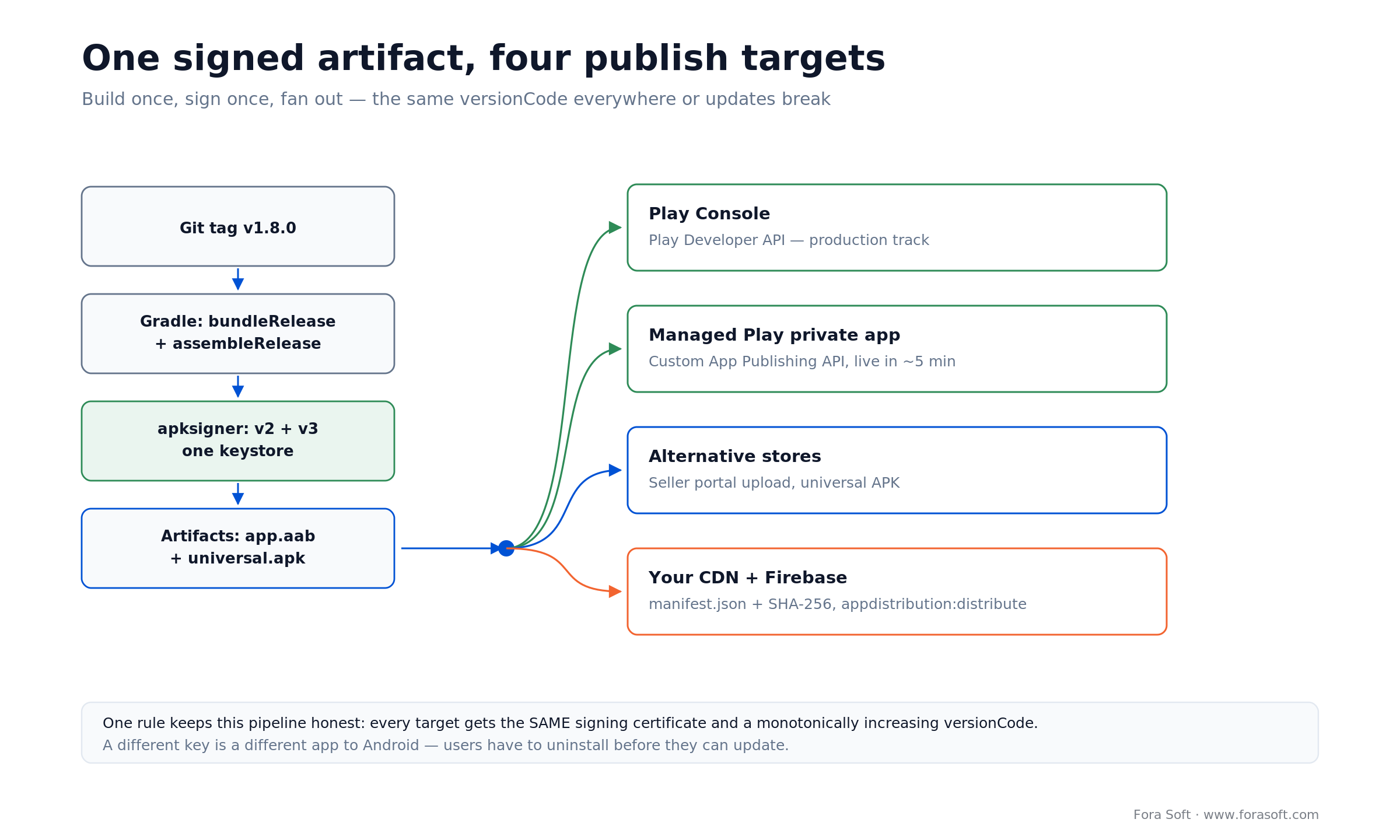
Figure 3. One tag, one signing step, four publish jobs. The signing certificate and versionCode are the invariants that make the fan-out safe.
The shape we use
- A git tag triggers the release job; the tag is the only source of the version string.
- Gradle produces both artifacts in one run:
bundleReleasefor Play and Managed Play,assembleRelease(orbundletool --mode=universal) for everything else. - One signing step, one keystore, pulled from the secrets manager and never written to the workspace.
- Parallel publish jobs: Google Play Developer API for public tracks, Google Play Custom App Publishing API for private apps, per-store seller portal uploads, CDN sync plus manifest rewrite, and
appdistribution:distribute. - A post-publish verification job that downloads each artifact back and compares the SHA-256 against what CI built. It has caught a botched store upload for us more than once.
versionCode discipline matters more than it sounds. Use a monotonic integer derived from the build number, not per-channel counters. A store that received versionCode 812 while your CDN serves 809 will quietly refuse to let a user move between channels.
If you want the same rigour applied to your own release process, that is the kind of work our dedicated development teams take on alongside feature delivery.
Case study: 10,000 devices, zero Play installs
Instacom’s field-operations Android app reaches up to 10,000 devices without ever appearing on Google Play: the agent runs as the device-owner app, so installs and updates happen with no store, no user prompt and no install-unknown-apps toggle. Instacom is a South African IoT workforce-management provider serving security, logistics, healthcare, construction and mining. Their customers hand rugged Android handsets to guards, drivers and site crews. Those devices need push-to-talk, GPS tracking, guard patrol and incident reporting, and the IT admin needs to see and control them remotely. A public Play listing was never part of the plan — the app is only useful inside a managed fleet, and its telemetry is commercially sensitive.
We built the Android agent and the web console for Instacom’s MDM: Kotlin and Android Jetpack on the device, DevicePolicyManager and AIDL for the privileged operations, and a Node.js, TypeScript, Socket.io, MongoDB and RabbitMQ backend behind a Next.js console. The agent runs as the device-owner app, which is what makes remote screen control, live screencast and remote toggling of Wi-Fi, NFC and GPS possible at all. Data handling is POPI-compliant, because South African privacy law is not optional for a system that can see a guard’s screen.
Instacom’s MDM console manages up to 10,000 Android devices, down to Android 4.2, from one place. The distribution consequence is worth spelling out: device-owner privileges are what turn a fleet rollout into an API call instead of 10,000 people tapping through an installer. Instacom publishes 99.99% uptime for the platform since 2015, and that device-owner path is what makes their apps exempt from the September 2026 verification requirement — managed store, managed devices.
If you are staring at a similar fleet and wondering whether to build the device-owner path or buy an MDM seat, that is a 30-minute conversation, not a proposal. Book a call and we will tell you which one your device count justifies.
What multi-channel really costs
For 500 devices over three years, self-hosted APK distribution costs about $94 in platform fees and Managed Play plus an MDM costs between $36,000 and $144,000. That gap is the whole argument, and it is why the channel decision is a finance decision as much as an engineering one.
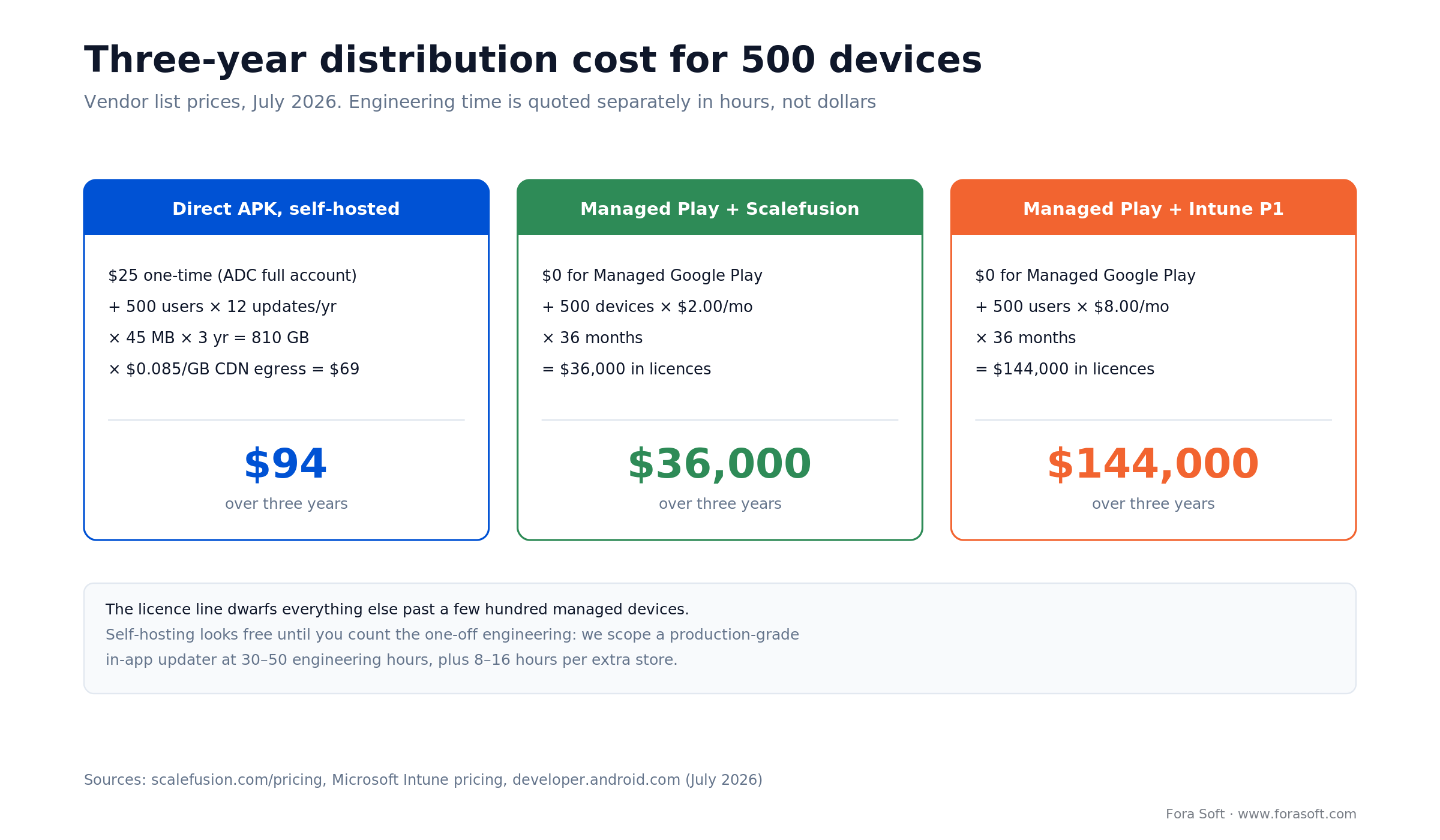
Figure 4. Vendor list prices, July 2026. The engineering hours are quoted separately because they do not scale with device count.
The arithmetic, shown
Self-hosted. $25 once for a full-distribution Android Developer Console account. Bandwidth: 500 users × 12 updates a year × 45 MB × 3 years = 810 GB. At $0.085/GB for CDN egress that is $69. Total platform cost: $94. Cloudflare R2 with zero egress fees takes the $69 to roughly nothing, at which point the line item is a rounding error.
Managed Play + Scalefusion Essential. Managed Google Play itself is free. 500 devices × $2.00/month × 36 months = $36,000. Same maths with Hexnode Pro at $2.20 gives $39,600.
Managed Play + Intune Plan 1. 500 users × $8.00/month × 36 months = $144,000 — four times the Scalefusion line for a product most Android-only fleets will not fully use. If Intune already ships inside your Microsoft agreement the marginal cost is zero, so check the contract before you price a second tool.
What the platform fees do not cover
| Work item | One-off engineering | Recurring | Skip it when |
|---|---|---|---|
| In-app updater (manifest, hash check, staged rollout, rollback) | 30–50 h | — | Every install is managed or from a store |
| Multi-channel CI fan-out | 20–35 h | Low | You publish to one channel only |
| Per alternative store (assets, submission, upload automation) | 8–16 h | Re-submission per release | That OEM is not your market |
| Developer verification and package claiming | 2–4 h | — | Never — do this |
| Integrity policy and server-side fallbacks | 12–20 h | — | You never call Play Integrity |
One caveat on the headline comparison, because it would be dishonest to skip it: $94 buys you distribution, while $36,000 buys you a device-management product. The MDM licence also covers enrolment, compliance policy, remote wipe and inventory. If you need those anyway, the distribution part is effectively free; if you do not, you are paying a lot for silent updates.
We quote engineering in hours rather than dollars because the rate depends on who does the work. What does not change is the shape: platform fees dominate once you cross a few hundred managed devices, and engineering dominates below that.
Want these numbers run against your actual fleet?
Send device count, update cadence and target markets. We’ll come back with a channel plan and an honest cost range.
Decision framework in five questions
Five questions decide your Android app distribution channel. Answer them in order and stop at the first yes.
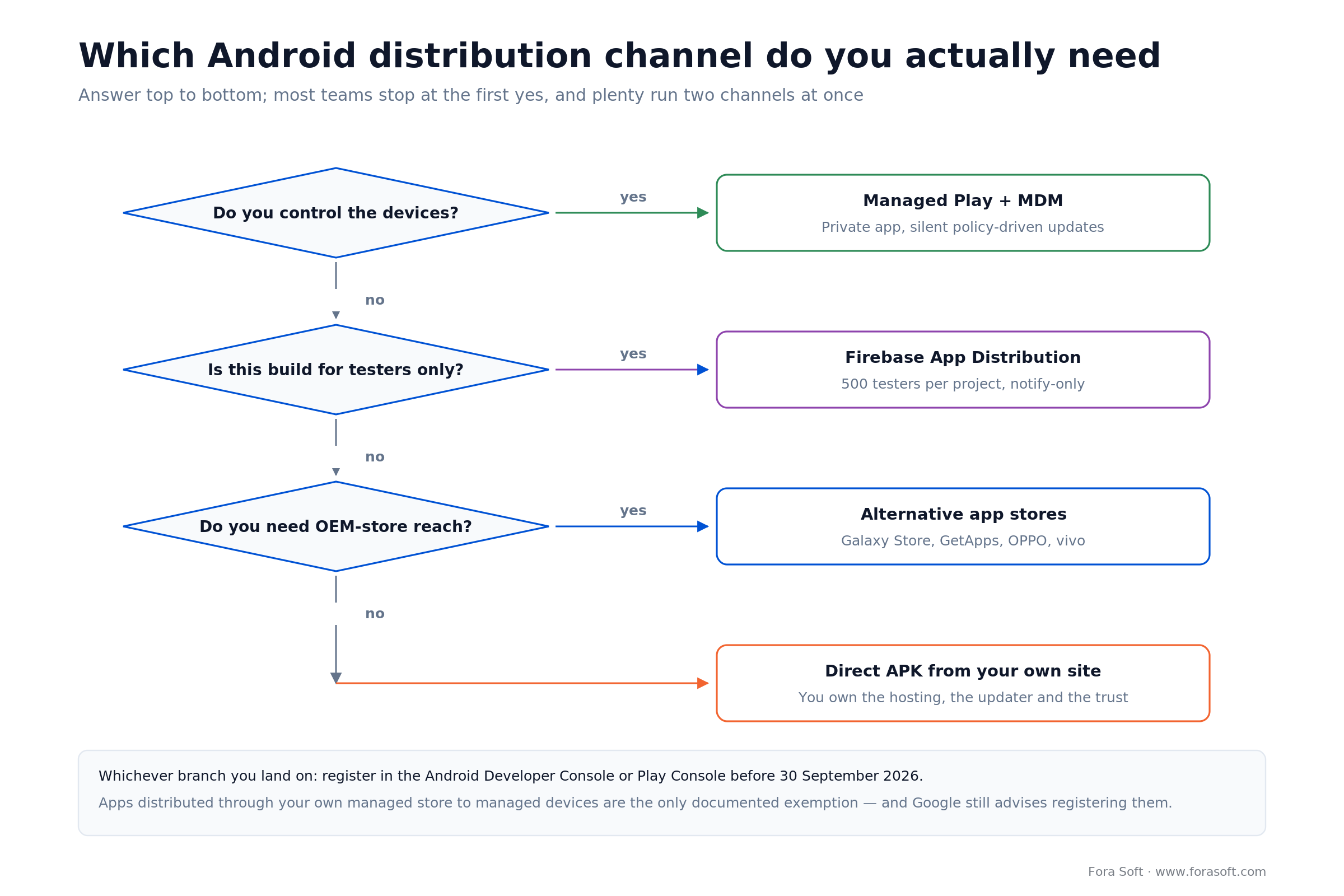
Figure 5. The same logic as the five questions below, in one screen. Most teams land on two branches, not one.
1. Does your organisation own or enrol the devices? If yes, Managed Google Play with an MDM. It gives silent updates, a Play-recognised integrity verdict and an exemption from the September 2026 verification requirement. Nothing else does all three.
2. Is this build for a named, finite group of testers? If yes, Firebase App Distribution. Free, five minutes of CI work, 500 testers per project. Do not stretch it into production — it has no auto-update path.
3. Does one OEM dominate a market you actually sell in? If yes, that OEM’s store. Samsung Galaxy Store first, then the Chinese OEM stores if your users are there. The store client handles updates, which is worth more than the listing.
4. Do you control the relationship with every person who will install it? If yes, a direct APK works — provided you budget the updater. If you are hoping strangers will find and trust an APK link, the answer is no and you should be on a store.
5. Do you need discovery from people who have never heard of you? If yes, you need public Google Play, whatever else you also run. No off-Play channel replaces search inside the store that ships on the device. Fora Soft builds for both sides of that line, and the custom software work usually starts by picking the two channels a product genuinely needs rather than all five.
Five pitfalls to avoid
1. Signing the alternative-store build with a different key. It happens when a second team member sets up a second pipeline. Android treats it as a different app, the user gets INSTALL_FAILED_UPDATE_INCOMPATIBLE, and the only fix is uninstall-and-reinstall with data loss.
2. Uploading an AAB where an APK is needed. The bundle is not installable. Teams discover this after a customer’s IT department tries to push the file through their own tooling and it silently fails.
3. Shipping an in-app updater that assumes today’s target-API floor. The silent-update conditions tighten with each Android release. What updates quietly on Android 13 starts prompting on Android 16 unless you keep the target level moving.
4. Wiring the GET_LICENSED remediation dialog into an off-Play app. It is in every Play Integrity sample. In an app you deliberately distribute outside Play, it tells your paying users their copy is unlicensed and sends them to a listing that does not exist.
5. Treating developer verification as a 2027 problem. Organisation registration needs a D-U-N-S number, and Dun & Bradstreet can take up to 28 days. Package claiming needs an APK signed with your private key, which means finding out now whether the key is where you think it is.
KPIs to track from day one
Three numbers tell you whether an Android distribution channel is working: install completion rate per channel, update adoption at seven days, and distribution engineering hours as a share of each release. The thresholds below are ours, not an industry standard — they are the lines at which we start asking questions on a project. Calibrate them against your own first two releases.
Delivery KPIs. Install completion rate per channel (downloads that become installs — below 70% on a direct APK usually means the install-unknown-apps step is losing people), update adoption at 7 and 30 days, and version fragmentation, measured as the share of active devices more than two releases behind. On a managed fleet, anything under 95% adoption at 7 days points at a policy misconfiguration, not user behaviour.
Integrity and trust KPIs. Share of sessions returning each appRecognitionVerdict value, Play Protect warning rate if you can observe it through support tickets, and time from a security release being tagged to 95% of devices running it. That last one is the number a CISO will ask for.
Cost KPIs. CDN egress per active install per month, MDM seats billed versus devices actually enrolled (the gap is usually 5–10% and it is pure waste), and engineering hours per release spent on distribution rather than product. If that last figure climbs above about 10%, the channel mix is wrong.
When not to leave Google Play
If your growth depends on strangers discovering you, stay on Play and stop reading. Store search, the install button in a Google search result, review counts, and the trust a user extends to a Play listing are not reproducible on your own domain. We have watched teams move a consumer app off Play to save the service fee and lose more revenue in organic installs than the fee ever cost them.
Three more cases where off-Play is the wrong call. If you sell digital goods to consumers, Play’s billing and refund machinery is a product in itself; rebuilding it is a project, not a line item. If your team is small, the ongoing tax of per-store submissions and a hand-rolled updater competes directly with feature work. And if you need Play-recognised integrity for fraud control — fintech, ticketing, gambling — there is no off-Play equivalent, and the quota increase you will eventually need requires a Play listing anyway.
The honest version: off-Play distribution wins when you already know exactly who installs your app. It loses when you need to be found.
Reach for public Google Play when: discovery, consumer billing or Play-recognised integrity is load-bearing for the business. Run the off-Play channels alongside it, not instead of it.
FAQ
Can you distribute an Android app without Google Play in 2026?
Yes. Android app distribution supports direct APK installs, alternative app stores, Managed Google Play for enrolled devices and Firebase App Distribution for testers. From 30 September 2026 apps must be registered by a verified developer to install on certified devices in Brazil, Indonesia, Singapore and Thailand, with a global rollout in 2027, so the channel stays open but the paperwork does not.
Does developer verification kill sideloading?
No. Google’s help centre states that unregistered apps can still be installed through ADB or a new advanced flow after a one-time setup and a risk acknowledgement. What changes is that a normal user tapping a download link will be blocked unless the developer is verified.
How much does an Android Developer Console account cost?
A full distribution account is $25 once and covers unlimited apps and installs. A limited distribution account is free, needs no government ID, and caps installs at 20 devices that end users explicitly authorise. Organisations registering for full distribution also need a D-U-N-S number.
Do enterprise apps need to be verified?
Apps distributed through your organisation’s own managed store to managed devices do not need to complete verification, because the IT admin has vetted them. Google still recommends registering them in case they ever reach unmanaged devices, and we do.
Can I install an .aab file directly on a phone?
No. An Android App Bundle is a publishing format. Google Play or bundletool converts it into a split APK set at install time. For any channel other than Play you need a universal APK, either built with bundletool or downloaded from Play Console.
What Play Integrity verdict does a sideloaded app get?
A sideloaded app’s appRecognitionVerdict returns UNRECOGNIZED_VERSION when the package name or certificate does not match what Play distributes, or UNEVALUATED when integrity could not be assessed. appLicensingVerdict returns UNLICENSED — Google’s docs name sideloading explicitly — or UNEVALUATED when Play does not know the installed version. Device-level verdicts are unaffected.
Is the Amazon Appstore still an option for Android apps?
Not for phones and tablets. Amazon discontinued the Appstore for non-Fire Android devices on 20 August 2025 and stopped accepting new Android-targeted submissions on 20 February 2025. It continues on Fire TV and Fire tablets.
How do I push silent updates to an app installed outside Play?
Use PackageInstaller with setRequireUserAction(USER_ACTION_NOT_REQUIRED). The installer must already hold REQUEST_INSTALL_PACKAGES, declare UPDATE_PACKAGES_WITHOUT_USER_ACTION, be the update owner or installer of record, and the installed app must target API 29+ on Android 12, rising to 34+ on Android 16 and 35+ on API 37. On managed devices a device-owner app installs silently without any of that.
What to read next
Distribution
Android Apps Beyond Google Play
Store-by-store detail: Samsung, Huawei, direct APK and the submission process for each.
Android engineering
Custom Android Call Notification
CallStyle, ConnectionService and the OEM behaviours that decide whether your app rings.
Android engineering
Foreground Services and Deep Links
The background-execution rules that break field apps, and how to work inside them.
Choosing a partner
AI Mobile App Development
What to look for in a team when the app has to ship, scale and stay maintainable.
Ready to ship Android outside Play?
Pick the channel from device ownership, not from what looks easiest this sprint. If IT enrols the devices, Managed Google Play with an MDM removes updates, integrity and the 2026 verification question in one move. If the audience is a named tester group, Firebase App Distribution is free and takes an afternoon. If one OEM owns your market, list on their store. A direct APK is the right answer only when you know every installer by name and you have budgeted the updater.
Whatever mix you land on: one signing key, one monotonic versionCode, one CI job that fans out, and a registered developer account before 30 September 2026. Those four habits prevent most of the failures in this guide. Everything else is a preference.
We have shipped Android to managed fleets, set-top boxes, OEM stores and Play, and we are happy to tell you which of those you do not need. Related work lives in our OTT platform learning section for teams shipping Android TV clients, and across our project portfolio.
Distributing an Android app outside Google Play?
One call, one channel plan: which channels you need, what updates will cost, and what has to be done before September 2026.