


The best video surveillance apps for Android in 2026 no longer live in the cloud. A modern phone or Android box carries a 15 to 45 TOPS neural accelerator, so object detection, face search, and license-plate reads run on the device in under 150 ms with no cloud round-trip for core events. This guide is for teams choosing or building video surveillance apps for Android: the five AI features that are table-stakes in 2026, how each one ships, what it costs, and where it breaks.
The short version: the five features that actually move the needle are on-device inference on the NPU, multimodal object and behavior detection, natural-language video search powered by vision-language models, self-supervised anomaly detection, and privacy-preserving AI with on-device redaction. Everything else, from cloud backup to multi-camera dashboards, is plumbing around those five.
Key takeaways
• On-device beats cloud now. Inference on an Android 14+ NPU runs core detection in under 150 ms and cuts roughly 90% of the cloud egress a 24/7 camera fleet used to burn.
• Five features are the bar. On-device inference, multimodal detection, VLM search, self-supervised anomaly detection, and on-device redaction are what a 2026 buyer expects.
• Compliance is architecture, not paperwork. The EU AI Act's high-risk deadline slipped to December 2027, but real-time public biometric ID has been banned since February 2025, so redaction at source is already mandatory.
• Buy the app or build the platform. Off-the-shelf apps (Alfred, Ivideon, Spot AI) cover home and SMB; custom wins when compliance, data ownership, or deep integration is the point.
• A first release is 6 to 9 months. A focused team ships an MVP with capture, streaming, and one AI feature in about three months, then adds the rest.
Why Fora Soft wrote this Android surveillance guide
Fora Soft has built video-streaming and surveillance software since 2005, and 250+ shipped projects later it is still the narrow problem space we specialize in. Our flagship surveillance platform, V.A.L.T, runs at 770+ organizations with 50,000+ active users, from law-enforcement agencies to medical schools and child-advocacy centers. It streams nine HD cameras per screen, does PTZ control and two-way audio, and enforces role-based access down to the individual video segment.
That footprint is why this guide quotes latency budgets and false-positive rates instead of adjectives. We also ship Netcam Studio for the consumer and SMB end of the same stack, and we hold an official AXIS Communications partnership for early access to network-video hardware. Every recommendation below comes from code we have run in production, not a spec sheet.
Scoping video surveillance apps for Android?
Bring your camera count, device tier, and compliance surface. We will map them to a latency budget and a realistic timeline on one call.
What changed for Android video surveillance in 2026
Three shifts separate a 2026 Android surveillance stack from a 2023 one, and they compound. Together they are the reason video surveillance apps for Android now run AI on the phone instead of renting a GPU in a data center.
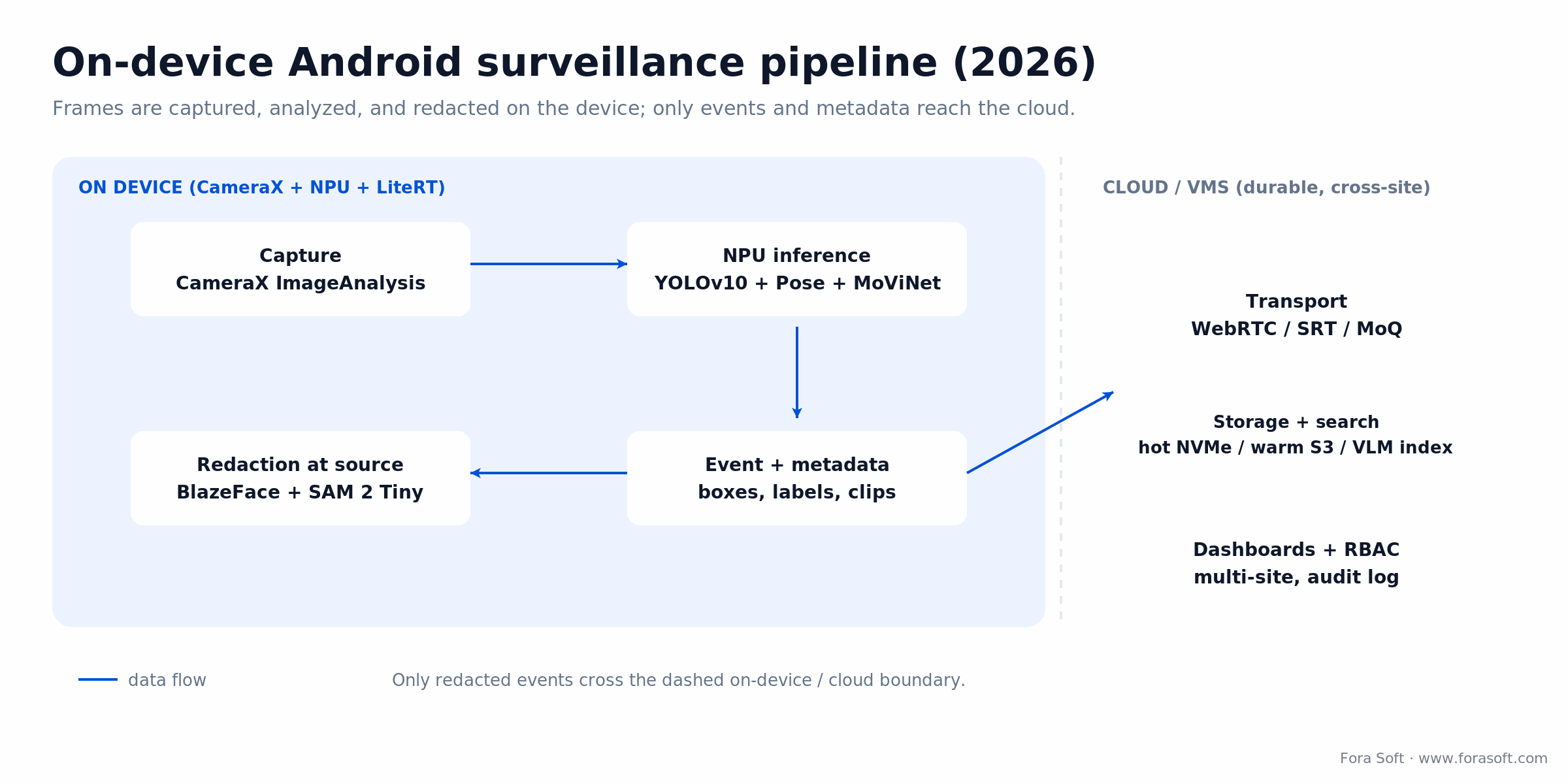
Figure 1. The 2026 pipeline. Capture, inference, and redaction run on the device; only redacted events and metadata cross into the cloud or VMS.
1. NPUs are default, not premium. Every flagship Android phone shipped since late 2024 carries a dedicated neural accelerator in the 15 to 45 TOPS range: Pixel 9's Tensor G4, the Samsung S24/S25 NPU, and Qualcomm's Hexagon in Snapdragon 8 Gen 3 and 8 Elite. Purpose-built Android cameras use the same silicon. Models that were cloud-only two years ago, like YOLOv10, SAM 2, and small VLMs, now run at 30 to 60 FPS on the device.
2. The Android AI APIs finally match the hardware. Android 14 introduced the AICore system service; Gemini Nano runs through it (the v3 generation reached 2026 flagships), and LiteRT (the successor to TensorFlow Lite) is the runtime. In 2026 LiteRT's NPU acceleration graduated to production, so one model now runs across Pixel Tensor, Qualcomm Hexagon, Samsung, and MediaTek NPUs without per-vendor shims. That portability was brutally hard in 2023.
3. Regulation is a design constraint. The EU AI Act bans real-time remote biometric identification in public spaces (in force since February 2025), and US state laws like Illinois BIPA carry statutory damages per violation. Sending raw faces to a cloud matcher is now a legal liability, so on-device inference and blur-at-source redaction are the default, not a nice-to-have.
The 5 AI features that define Android surveillance apps
Here is the whole map on one screen. Each feature replaces a 2023-era workaround, and each runs on the device. The sections that follow take them one at a time.
| # | Feature | What it replaces | Typical 2026 model | On-device throughput |
|---|---|---|---|---|
| 1 | On-device inference on the NPU | Cloud vision APIs | LiteRT + vendor NPU delegate | 30 to 60 FPS at 1080p |
| 2 | Multimodal object + behavior detection | Motion detection | YOLOv10 + MoViNet | 20 to 45 FPS |
| 3 | Natural-language video search | Timeline scrubbing | PaliGemma 2 / Gemini Nano | Indexed at 1 FPS |
| 4 | Self-supervised anomaly detection | Rule-based zones | PatchCore / MemAE | 15 to 25 FPS |
| 5 | On-device redaction | Cloud-side blur | BlazeFace + SAM 2 Tiny | Real-time |
Feature 1: On-device inference on Android NPUs
The single biggest change is that the inference you used to ship to a GPU now runs on the camera itself, at lower latency, lower cost, and with a far better privacy posture. A Pixel 9 Pro running a quantized YOLOv10-n on the Tensor G4 NPU clears 65+ FPS at 640x640. A Snapdragon 8 Gen 3 with the Hexagon delegate runs MoViNet-A2 at 30 FPS on a live 1080p stream.
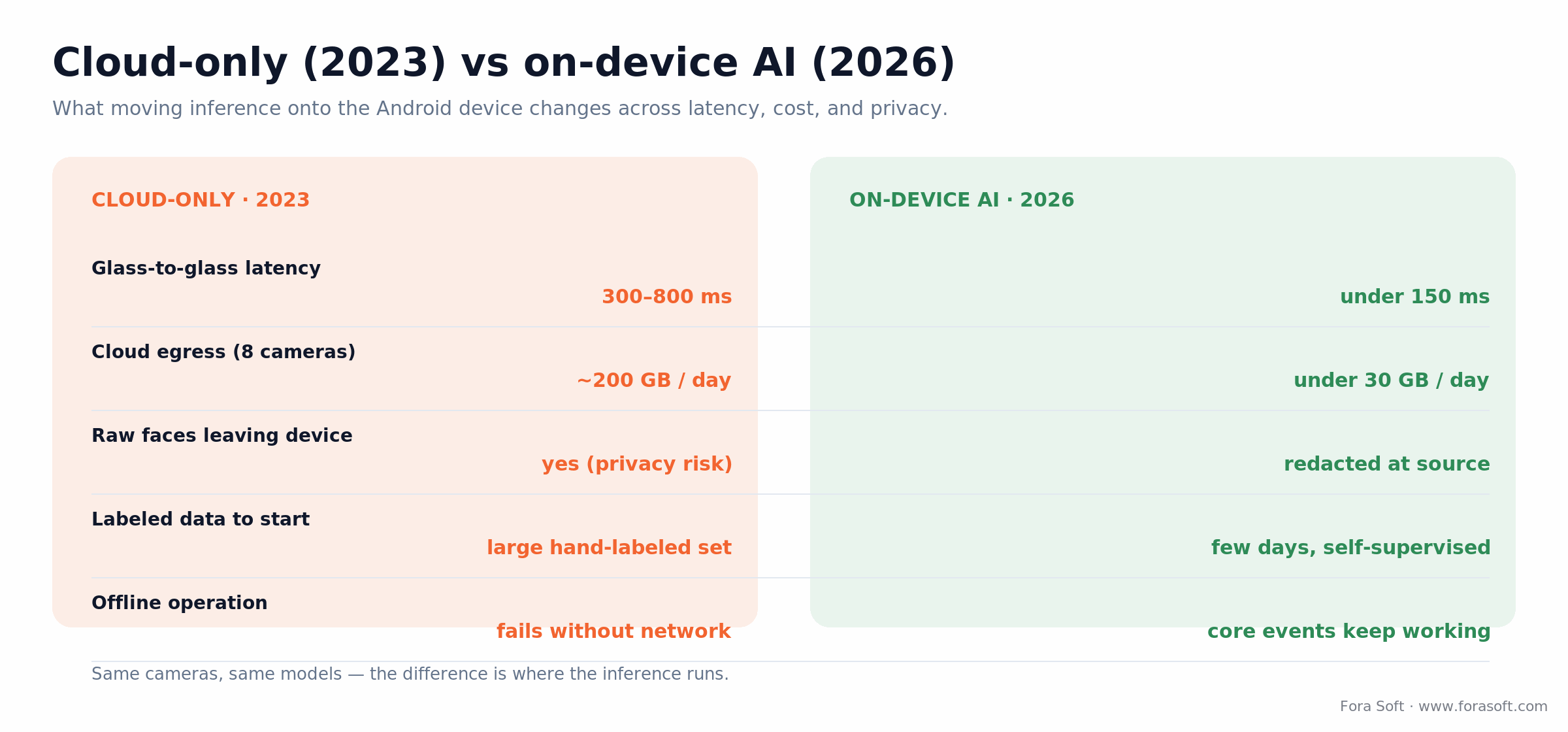
Figure 2. Same cameras, same models. Moving inference onto the device is what changes latency, cost, and privacy at once.
What to pick in 2026
Use LiteRT as the runtime. NNAPI was the old portability layer, but Google deprecated it in Android 15, so in 2026 you reach the NPU through LiteRT's vendor delegates instead: Qualcomm's QNN (AI Engine Direct) and MediaTek's NeuroPilot, both exposed through LiteRT's CompiledModel API, with a GPU delegate as the portable fallback. On Pixel devices, AICore exposes Gemini Nano for text and lightweight vision-language tasks.
Benchmarks worth memorizing
YOLOv10-n at INT8, 640x640, runs in 12 to 18 ms on 2024-and-later flagships and 45 to 80 ms on mid-tier chips like the Snapdragon 7 Gen 3. Thermal throttling starts after roughly 20 minutes of sustained inference, so a duty cycle (run every other frame, gate on motion) is the default, not an optimization. We cover the specific tricks in our guide to optimizing Android apps for video streaming.
Reach for on-device inference when: you run cameras 24/7 and cloud vision-API bills or privacy exposure are the pain. If you have a handful of cameras and only need clips on motion, a cloud API is still simpler.
Feature 2: Multimodal object and behavior detection
Motion detection catches a plastic bag in the wind. Object detection catches a person. Neither tells you whether that person is loitering, falling, fighting, or crossing into a restricted zone. Multimodal detection stacks object detection, pose estimation, and short-term action classification, and that is what turns a raw stream into events an operator can act on.
The 2026 reference pipeline: YOLOv10 (or a newer YOLO release) emits bounding boxes at 25+ FPS, MediaPipe Pose Landmarker runs on the person crops, and MoViNet or a 3D-CNN head classifies 16-frame clips into labels (loitering, fall, fight, package drop, tailgating). All three run in parallel on a modern NPU inside a 60 to 80 ms per-frame budget.
Behavior classifiers have ugly failure modes: they confuse bending over with a fall, and a group photo with a fight. The fix is a Kalman-filter tracker plus dwell-time gating, where an event has to persist past N frames before it fires. Done right, false positives drop from 30 to 50 per camera per day to under 5, which is the threshold where an ops team starts trusting the alerts. For the model internals, see our breakdown of the best machine-learning algorithms for surveillance anomalies and our work on computer vision for video surveillance.
Reach for multimodal detection when: alerts have to mean something (a fall, an intrusion, a fight), not just "pixels moved." For pure motion-triggered recording, a single detector is enough and cheaper.
Feature 3: Natural-language video search with VLMs
In 2023, finding "a red truck at gate 3 between 2 and 4 am" in a week of footage meant scrubbing. In 2026 a vision-language model turns every frame into an embedding at index time, and the operator types plain English to get matching clips in under a second. This is the feature that most impresses buyers in a demo.
The models that made this practical on Android are Google's PaliGemma 2 (smallest is a 3B checkpoint at 224px), Gemini Nano via AICore, and a true 2B-class mobile VLM like Qwen2-VL 2B. All quantize to 4-bit and run on a flagship NPU. The typical design indexes one frame per second, stores 512-dimension embeddings in a local vector index, and answers queries in under 200 ms for a week of footage per camera.
There is a correctness ceiling: small VLMs are not reliable for fine-grained attributes like exact plate numbers or specific logos. Pair the VLM's coarse search with a specialist classifier on the candidate set. In practice that two-stage design (VLM narrows, specialist re-ranks) gives 85 to 93% top-5 accuracy on standard surveillance-search benchmarks at roughly one-twentieth the cost of sending full-resolution frames to a frontier cloud model.
Reach for VLM search when: forensic review time is the bottleneck and operators know what they are looking for in words. For exact plate or badge matching, keep a dedicated OCR/classifier in the loop.
Feature 4: Self-supervised anomaly detection
The events you most want to catch are the ones you have the fewest labels for. Self-supervised anomaly detection gets around that by learning what "normal" looks like from a few days of un-annotated footage per camera, then flagging deviations. It is the only practical way to catch "never seen before" events in production.
Two families dominate on Android: memory-bank methods like PatchCore and SimpleNet, and reconstruction methods like MemAE and the newer diffusion-reconstruction variants. Both are compact enough (30 to 80 MB after quantization) to run per-camera on the device. Expect a calibration tax: each new camera needs 24 to 72 hours of baseline footage before its anomaly scores are trustworthy, and skipping calibration is the top reason these systems get switched off in the first month. Build the calibration flow in from day one. Our AI anomaly-detection playbook and the free anomaly-detection reference go deeper on the trade-offs.
Reach for self-supervised anomaly detection when: you cannot enumerate every bad event in advance and labeling is expensive. If your risks are a short, known list, tuned rule-based zones are cheaper and more predictable.
Feature 5: Privacy-preserving AI and on-device redaction
Two regulatory moves turned privacy-preserving AI from a slogan into a shipping requirement: the EU AI Act's ban on real-time public biometric identification (in force since February 2025) and the expanded Illinois BIPA settlements that set the damages ceiling. The practical translation for Android surveillance: any frame that leaves the device with an identifiable face must be redacted at source, with an audit trail, unless you hold explicit consent and a legal basis.
The 2026 redaction pipeline runs three steps on the device in under 20 ms combined: a lightweight face detector (BlazeFace) at full frame rate, SAM 2 Tiny to promote each detection to a precise mask, then a blur or pixelation pass before the frame is encoded. Storage only ever sees redacted pixels unless a signed access token authorizes the original. The same pattern covers plates, children in shot, and screens showing personal data. For rolling model updates, federated learning trains on the device and uploads gradient deltas, never raw video. The BIPA compliance starter is a useful checklist here.
Reach for on-device redaction when: faces, plates, or personal data appear on camera and footage leaves the device at all, which is nearly every real deployment. Pure private-premises recording with no export is the rare exception.
The Android surveillance AI reference architecture
Here is the stack that ships in a production Android surveillance app in 2026. Everything above the on-device line runs on the phone or camera; everything below runs on the operator's VMS or in the cloud.
| Layer | Component | Default choice in 2026 |
|---|---|---|
| Capture | Camera + frame pipeline | CameraX ImageAnalysis use case |
| IP cameras | External camera ingest | ONVIF Profile S/T/G + RTSP |
| Codec | Encode / decode | MediaCodec (H.265, AV1) |
| Inference | Runtime | LiteRT + Qualcomm QNN / MediaTek NeuroPilot |
| Models | Detection / action / VLM | YOLOv10, MoViNet, PaliGemma 2 |
| Redaction | Privacy layer | BlazeFace + SAM 2 Tiny |
| Transport | Live streaming | WebRTC, with SRT fallback |
| Identity | Auth / SSO | OAuth 2.1 + SAML / OIDC |
| Storage | VMS / cloud | Hot NVMe + warm object storage + cold archive |
The dividing line matters commercially as much as technically: everything you keep on the device is a line item you are not paying a cloud GPU or egress bill for, and a class of data you never have to defend in a compliance audit.
CameraX, ONVIF, and IP camera integration
The camera surface on Android in 2026 is CameraX. It replaced Camera2 for product work years ago, and it is the only API that cleanly exposes the ImageAnalysis use case you need to feed frames to your inference runtime without extra copies. It also absorbs the edge cases that used to eat weeks: sensor orientation, flash sync, HDR, and 10-bit HEVC.
For IP cameras, the common language is ONVIF. Implement at least Profile S (streaming), Profile T (H.265 and analytics metadata), and Profile G (edge recording and playback). Profile M (metadata/analytics) and Profile D (access control) matter as soon as your app talks to business systems. When a camera already produces ONVIF analytics metadata (boxes, zones, object classes), the Android client can consume it directly and skip a full inference pass on that feed.
Wire-level details decide reliability: use RTSP-over-TLS or SRTP for camera-to-device transport, pin certificates, and budget for 5 to 10% packet loss on LTE uplinks. For how these pieces fit in a real product, our roundup of the best Android SDKs for video surveillance apps is a good start, and the 12 essential features of modern VMS software covers what the server side has to expose.
Low-latency streaming: WebRTC, SRT, and MoQ
Sub-500 ms glass-to-glass latency is the baseline for live viewing now. Three transports compete for it on Android.
WebRTC is the default. Native on Android through webrtc.org and well supported by Janus, mediasoup, LiveKit, and Jitsi. It delivers 100 to 400 ms over LTE or 5G, handles NAT traversal, and builds in SRTP encryption. Its weak spot is fan-out economics; past 100 concurrent viewers you want an SFU. Our custom WebRTC architecture work covers when to reach for one.
SRT is the ingest workhorse. UDP with reliable retransmission, it shrugs off 10% packet loss and carries AES-256 natively. Use SRT for the camera-to-server upstream leg and WebRTC or LL-HLS for the downstream leg to viewers.
MoQ is the one to watch. Media over QUIC is still early, but the IETF draft matured through 2024 and 2025 and now runs on Chrome, the major media servers, and the first Android reference implementations. It is the only transport designed from the start for one-to-many live at WebRTC latency, and it will likely replace LL-HLS for new builds by 2027.
Privacy, biometric, and EU AI Act compliance in 2026
Compliance in 2026 is an architectural constraint that touches every layer, not a separate workstream. Here are the non-negotiables for an Android surveillance product shipped into the EU, US, or UK.
EU AI Act (Regulation 2024/1689). The prohibited-use tier has applied since February 2025: no real-time remote biometric identification in public spaces (narrow law-enforcement carve-outs aside), and no emotion recognition in workplaces or schools. The high-risk obligations (risk management, data governance, human oversight, logging, EU registration) were due 2 August 2026, but the 2026 Digital Omnibus simplification package postponed the use-based high-risk deadline to 2 December 2027. Do not read the delay as a reprieve: the bans are already live, and fines reach 7% of global turnover or 35 million euros.
GDPR and CCPA/CPRA. Biometric data is special-category. You need explicit consent, a documented legal basis, data-subject-rights endpoints (access, deletion, portability), and a DPIA on file. CCPA adds right-to-know and right-to-delete with 45-day response windows.
Illinois BIPA, Texas CUBI, Washington MHMDA. State biometric laws with statutory damages. BIPA's private right of action makes it the sharpest: 1,000 to 5,000 dollars per violation, and the plaintiff bar argues every frame of unauthorized facial data is a separate count. The mitigation is the same everywhere: on-device redaction, explicit consent, one-to-three-year retention caps, and auditable deletion.
HIPAA (healthcare deployments). End-to-end encryption at rest and in transit, BAAs with every sub-processor, tamper-evident audit logging, and role-based access down to the video segment. It applies to any surveillance shipped into hospitals, clinics, or pharmacies.
Leading Android surveillance apps compared
If you are shopping rather than building, most demand for video surveillance apps for Android splits into two buckets: turn-an-old-phone-into-a-camera apps, and mobile clients for a camera fleet. Here is an honest read on the ones people actually download, and where each fits.
| App | AI features | Pricing model | Best for | Where it breaks |
|---|---|---|---|---|
| Alfred Camera | Motion + person alerts | Free, optional paid tier | Reusing an old phone as a camera | Not for multi-camera or compliance |
| Ivideon | Motion zones, face detection | Free tier + per-camera cloud | SMB fleets that want cloud clips | Per-camera cloud pricing adds up |
| Spot AI | Event AI, push clips | Enterprise quote | Enterprise incident response at scale | Vendor lock-in, closed models |
| Reolink | Person / vehicle detection | App free with its cameras, paid cloud | Home and prosumer own-brand cameras | Best only inside its own ecosystem |
| YI Home | Facial recognition, alerts | Free + paid cloud tier | Cheap, easy home monitoring | Consumer-grade privacy posture |
| Wyze | Person / pet / package detection | App free + low-cost cloud tier | Budget home setups | Cloud-dependent, past outages |
| WardenCam | Motion detection, remote view | Freemium | Old-phone reuse on older Android | Basic analytics, no compliance |
| Our own: V.A.L.T / Netcam | On-device detection, redaction, RBAC | Custom build | Regulated and custom deployments | Overkill for a single home camera |
Quick verdicts: to turn a spare phone into a camera, Alfred Camera or WardenCam; for an SMB fleet with cloud clips, Ivideon; for enterprise incident response, Spot AI; for value with your own hardware, Reolink or Wyze; and for a regulated or deeply integrated product, a custom app is the only route that gives you on-device AI, redaction, and an audit trail.
The pattern across the off-the-shelf apps is the same gap: they ship their vendor's models and data-sharing terms, and none give you the on-device AI, redaction, or audit trail a regulated deployment needs. That is the line where building starts to pay off.
Need more than an off-the-shelf app can give?
If compliance, data ownership, or deep integration is the point, we build custom Android surveillance on your terms, from on-device AI to the VMS.
Build vs buy: when a custom Android app wins
Most Android surveillance products in 2026 should not be built from scratch. An off-the-shelf platform (Verkada, Rhombus, or Eagle Eye on the cloud side; Milestone, Genetec, or Qognify on the VMS side) gets you 80% of the function in 10% of the time. Custom makes sense under three conditions.
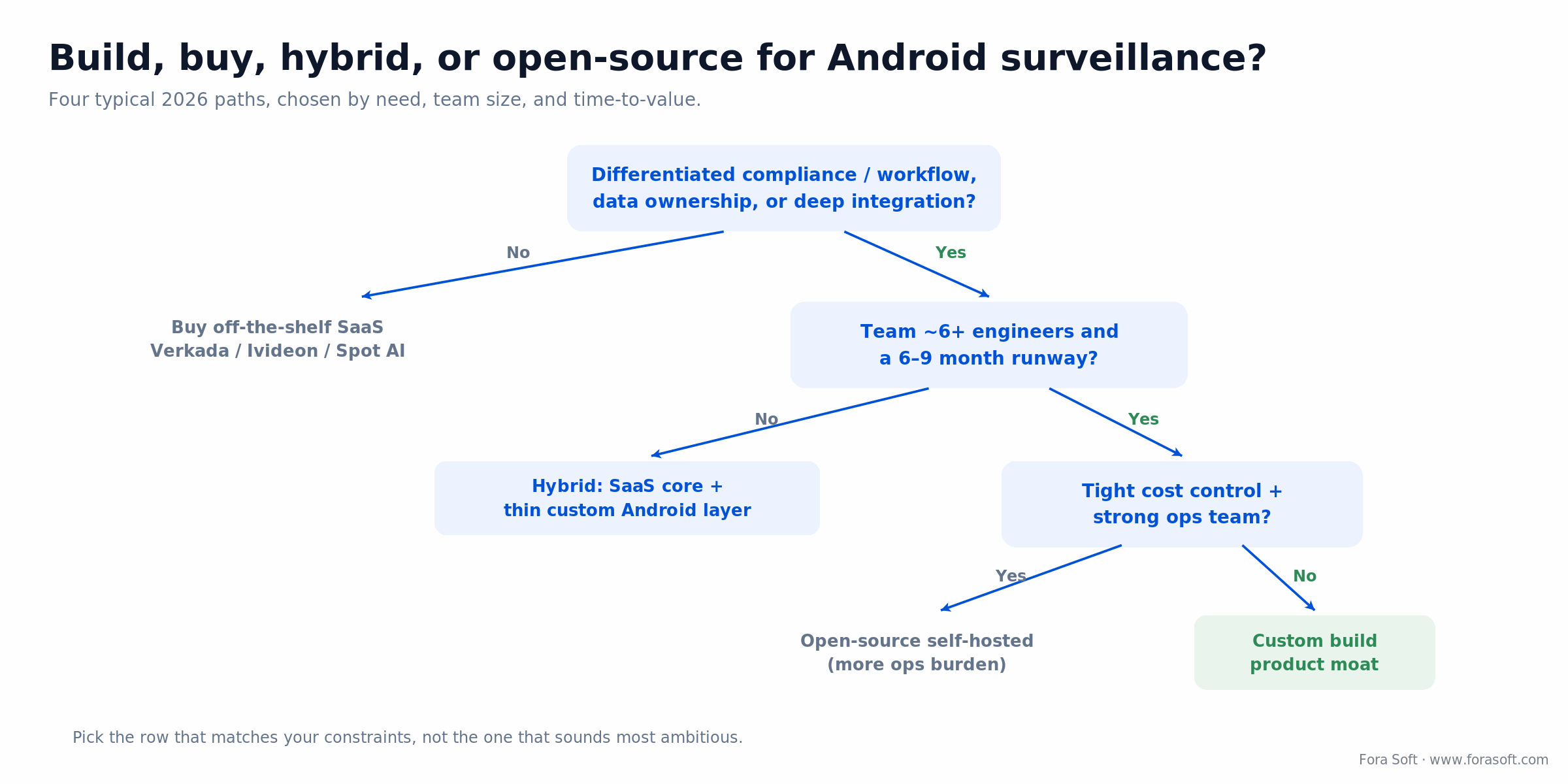
Figure 3. The four paths. Follow the branch that matches your constraints, not the one that sounds most ambitious.
1. A differentiated compliance or workflow story. Medical education, child advocacy, law enforcement, insurance claims, drone operations, cross-border logistics. Each has workflow needs a general-purpose VMS serves poorly.
2. You need to own the data and the model. Off-the-shelf products bake in their vendors' models and data-sharing clauses. Owning both is sometimes the whole point.
3. Integration depth. When the surveillance product must live two clicks deep inside a domain app (an LMS, a CAD/RMS, a facility-management suite), custom wins.
When NOT to build custom: if none of those three apply, buy off-the-shelf and ship this quarter. A custom build only returns its total cost of ownership over 18 to 36 months, and it needs a team to keep it alive. If you are unsure, the free AI-native VMS evaluation field guide walks the decision, and our video surveillance development team is happy to give a second opinion before you commit.
What a custom Android surveillance app costs
Here is the arithmetic, not a range pulled from the air. Scope an MVP as capture plus low-latency streaming plus one on-device AI feature. A focused team is one Android lead, two mobile developers, one ML engineer, one QA, and a half-time DevOps or backend, about 5.5 full-time engineers. Three months of that is 5.5 x 3 = 16.5 person-months of effort for a market-ready first release.
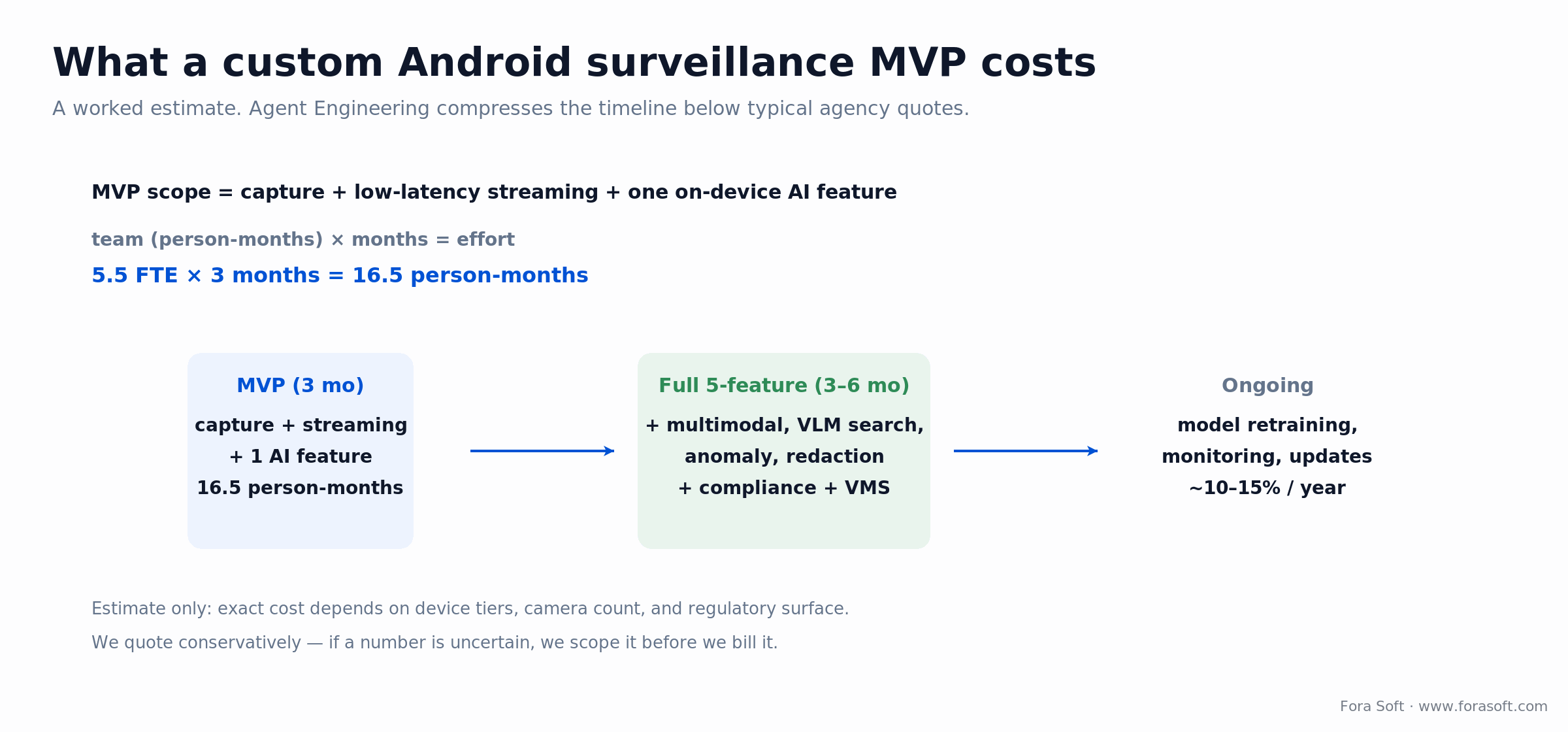
Figure 4. A worked estimate. The full five-feature build, compliance work, and VMS integration add three to six months on top of the MVP.
Adding the remaining four features, the compliance workflows, and a production VMS integration takes another three to six months. Ongoing model retraining, monitoring, and updates run roughly 10 to 15% of the build cost per year. We keep dollar estimates conservative on purpose: our Agent Engineering workflow compresses this timeline below typical agency quotes, and if a number is uncertain we scope it before we bill it rather than pad it. For the codec and storage math that drives the retention bill, the video-encoding fundamentals on Fora Soft Learn are a solid primer.
Reach for a custom build budget when: the 18-to-36-month TCO buys you a defensible product or a compliance posture you cannot rent. If time-to-value is the only metric, an off-the-shelf app wins on cost every time.
Mini-case: on-device analytics for a regulated deployment
A public-sector operator (under NDA) came to us running cloud-only recording across a multi-site camera fleet. Every frame, faces included, was leaving the premises to a cloud analytics vendor. Two problems: a rising monthly egress bill, and a compliance team that could not sign off on raw biometric data crossing the network.
Over a focused engagement we moved detection and redaction onto Android edge devices: YOLOv10 for object detection, a dwell-time tracker to gate behavior events, and a BlazeFace plus SAM 2 Tiny redaction pass so faces were blurred at source. Only redacted event clips and metadata went to storage, with signed access tokens for the rare authorized original. The calibration flow shipped on day one so each new camera self-baselined within 72 hours.
The shape of the result is the one this whole guide points at: cloud egress for a comparable eight-camera site drops from roughly 200 GB per day to under 30, false positives fall from dozens per camera per day into single digits once dwell-time gating is tuned, and the compliance sign-off gets easier because raw faces never leave the device. Want a similar assessment of your stack? Book a 30-minute call and we will map it out.
A decision framework: pick your path in five questions
Answer these in order. The first "no" that stops you usually names your path.
1. Do you have a compliance, data-ownership, or integration need an off-the-shelf app cannot meet? If no, buy one of the apps above and stop here. If yes, keep going.
2. Do your cameras run 24/7 at a scale where cloud vision-API bills or egress hurt? If yes, on-device inference is the core of your build. If no, a cloud API keeps the MVP simpler.
3. Do alerts need to mean events, not motion? If yes, budget for multimodal detection plus dwell-time gating from the start. If no, a single detector is enough.
4. Will footage with faces, plates, or personal data ever leave the device? If yes, on-device redaction and an audit trail are mandatory, not phase two. If no, you have a rare and simpler case.
5. Do you have a team (about six engineers) and a 6-to-9-month runway? If yes, a custom build returns its TCO and gives you a moat. If no, go hybrid: an off-the-shelf core with a thin custom Android layer.
Five pitfalls that derail Android surveillance projects
1. Shipping the model without the operational loop. No monitoring, no retraining, no escalation path, and accuracy quietly rots until operators stop trusting alerts.
2. Treating compliance as a post-launch sprint. GDPR, BIPA, HIPAA, and app-store policy are design constraints. Bolting them on after launch means re-architecting the data flow.
3. Optimizing for benchmark accuracy instead of operator-perceived quality. A model that scores well offline can still fire 40 false alerts a night. Tune for the alert an operator actually acts on.
4. Building in-house when an off-the-shelf app would have shipped in a tenth of the time. Custom is a moat only when you need one. Otherwise it is a maintenance bill.
5. Skipping the clean baseline. Without an A/B against a hold-out group, you cannot tell whether a feature helped or whether traffic just grew. Most teams skip this and then cannot defend the lift.
The KPIs to track before and after shipping
Outcome metrics drive every decision here; vanity counters do not. Track three buckets.
Quality KPIs. Detection precision and recall per event class, false positives per camera per day (target under 5), and p95 end-to-end alert latency (target under 150 ms on-device). Watch accuracy drift week over week, not just at launch.
Business KPIs. Operator review time per incident (the number VLM search should cut from hours to minutes), cloud egress and GPU spend per camera per month, and adoption measured week over week against a hold-out group.
Reliability KPIs. Uptime per camera, mean time to recovery after a device or network drop, and offline-mode coverage (what fraction of core events keep firing with no network). The free surveillance analytics reference lists the thresholds we hold ourselves to.
Frequently asked questions
Can an Android phone replace a dedicated surveillance gateway in 2026?
For small deployments (under eight cameras), yes. A flagship Android device on LiteRT with its vendor NPU delegates has enough headroom to ingest, analyze, and redact eight 1080p streams at about 15 FPS each. For larger sites you still want a dedicated appliance or server-class hardware. The phone-as-gateway pattern is strongest for drone and mobile scenarios.
What is the minimum Android version for production AI surveillance?
Android 13 is the practical floor. Android 14+ adds AICore and much better on-device model support through LiteRT vendor delegates. For consistent performance across OEMs, target Android 14 (API level 34) as the minimum SDK.
Which NPU chipset has the best sustained performance for 24/7 surveillance?
For continuous workloads, Qualcomm Snapdragon 8 Gen 3 or 8 Elite with the Hexagon NPU has the best thermal behavior and sustained throughput of the 2024 to 2025 flagships. Pixel Tensor G4 is faster at peak but throttles harder. For true 24/7 fixed installs, use purpose-built Android hardware with active cooling rather than a phone.
How do we handle the EU AI Act for real-time biometric features?
Default to not doing real-time biometric identification in public spaces at all, since that use has been prohibited since February 2025. For employee identification inside a private facility, document explicit consent and run recognition on-device. For post-event identification, queue it behind a judicial-authorization workflow and log every invocation. The broader high-risk obligations now apply from December 2027, but keep the DPIA and conformity assessment on file now.
What bandwidth do we need for on-device AI surveillance?
Far less than a cloud-only setup, because on-device AI collapses the requirement. Instead of uploading 4 to 8 Mbps of raw 1080p continuously, you upload event snippets and metadata, typically 5 to 15% of the raw volume. A typical eight-camera install drops from about 200 GB per day of cloud egress to under 30.
Do we still need a cloud VMS if inference runs on the device?
Yes, but for different reasons: durable storage, cross-device search, user management, and multi-site dashboards. What you no longer need is a cloud GPU fleet running inference on raw frames, which is usually the most expensive line item.
How do we update models without interrupting 24/7 operation?
Use Google Play in-app updates (flexible flow) for the app, and ship models through Firebase ML or your own CDN with a blue-green swap. Keep the old model live until the new one passes an on-device smoke test on a canary set of 20 to 30 frames with known outputs.
What is a realistic timeline to ship a production AI Android surveillance app?
A focused team of four to six engineers ships a first market-ready release in six to nine months: about three months to an MVP with capture, streaming, and one AI feature, then three to six more for the remaining features, compliance workflows, and a production VMS integration.
What to read next
Android
4 Best Android SDKs for Video Surveillance
The SDK layer beneath everything in this guide.
Computer Vision
7 Best ML Algorithms for Surveillance Anomalies
The detection and anomaly models, benchmarked.
VMS
12 Essential Features of Modern VMS Software
What the server side has to expose.
Playbook
AI Anomaly Detection in Surveillance
The 2026 playbook for catching the unusual.
Performance
Optimize Android Video Streaming
Keep the NPU fed without cooking the battery.
Ready to build Android surveillance that ships in 2026?
The five features in this guide, on-device inference, multimodal detection, natural-language search, self-supervised anomaly detection, and on-device redaction, are the table-stakes for any Android surveillance product that ships into the EU or US in 2026 and expects to win against Verkada, Rhombus, or Milestone.
Building the stack is not the hard part. Getting the NPU budgets, the compliance posture, and the streaming transport right on the first try is, and that is where a team shipping Android surveillance software since 2005 saves you six to nine months of rework.



The handbook · 7 volumes
Fora Soft Video Engineering Handbook
On-device detection, VLM search and redaction move the AI layer of a surveillance app onto the phone, which changes the latency and compliance math. Our seven-volume handbook covers the full video stack. Start with volume 7 for real-time pipelines, serving and EU AI Act rules, then volume 6 for detection and video search, and volume 1 for encoding. Written by Nikolay Sapunov, CEO at Fora Soft.
Browse the handbook on Amazon →7 volumes · 9,000+ pages · Kindle & paperback
Let's scope your Android surveillance build
Bring your camera count, target device tier, and compliance surface. In 30 minutes we will map them to a latency budget, an architecture, and a realistic timeline.

