


Video surveillance app development on Android in 2026 comes down to one early decision: which of four SDK tracks you build on. Get it right and the rest of the project falls into place. Get it wrong and you rebuild inside 18 months, usually after a compliance review or a scaling wall. We have shipped surveillance and video-streaming software since 2005, so this is the shortlist we actually hand clients, not a gallery walk of every library on GitHub. The four tracks: Flussonic Watcher for enterprise multi-site, Tuya Smart Camera for consumer IoT, VideoSDK for live two-way review, and the Insta360 SDK for 360-degree and specialty hardware. Expect the AI analytics layer, not the camera protocol, to hold most of the real project risk.
Key takeaways
- Pick the SDK track by business model, not feature list: Flussonic (enterprise), Tuya (consumer), VideoSDK (live review), Insta360 (360 hardware).
- Your Android app rarely talks to cameras directly — a media server proxies ONVIF/RTSP and hands the phone a clean WebRTC or HLS stream.
- WebRTC gives 200–500 ms glass-to-glass; standard HLS is 6–20 s. Match the protocol to whether the feed is interactive.
- Run AI edge-first: a quantized YOLO26 model on-device handles ~80% of frames; escalate the ambiguous 20% to a cloud model.
- Budget $80K–$320K depending on track and AI scope. Design compliance on day one; retrofitting runs 3–5× more.
More on this topic: if your build leans on IP cameras, pair this with our guide to integrating Android apps with IP cameras and our deep dive on anomaly-detection models for surveillance.
Why trust this guide
Fora Soft has built video-streaming and surveillance software since 2005: 250+ delivered projects, a 50-engineer in-house team, and a 100% job-success score on Upwork across two decades. Our flagship surveillance product, V.A.L.T. (Video Audio Learning Tool), runs across 770+ US organizations and serves 50,000+ users: police departments, medical schools, and child-advocacy centers that record sensitive sessions and cannot afford a dropped frame or a compliance gap.
Everything below comes from shipped work, not a product page. Where a recommendation has a sharp edge, we say so. If you want the fundamentals underneath the app layer, our video surveillance learning track and video encoding fundamentals cover the streaming stack in depth.
The four SDK tracks at a glance
Start here. Match your product to one track; every downstream choice — stream protocol, storage, AI, mobile UX — follows from it. This is the same one-screen matrix we draw on a whiteboard in the first scoping call for any android video surveillance app.
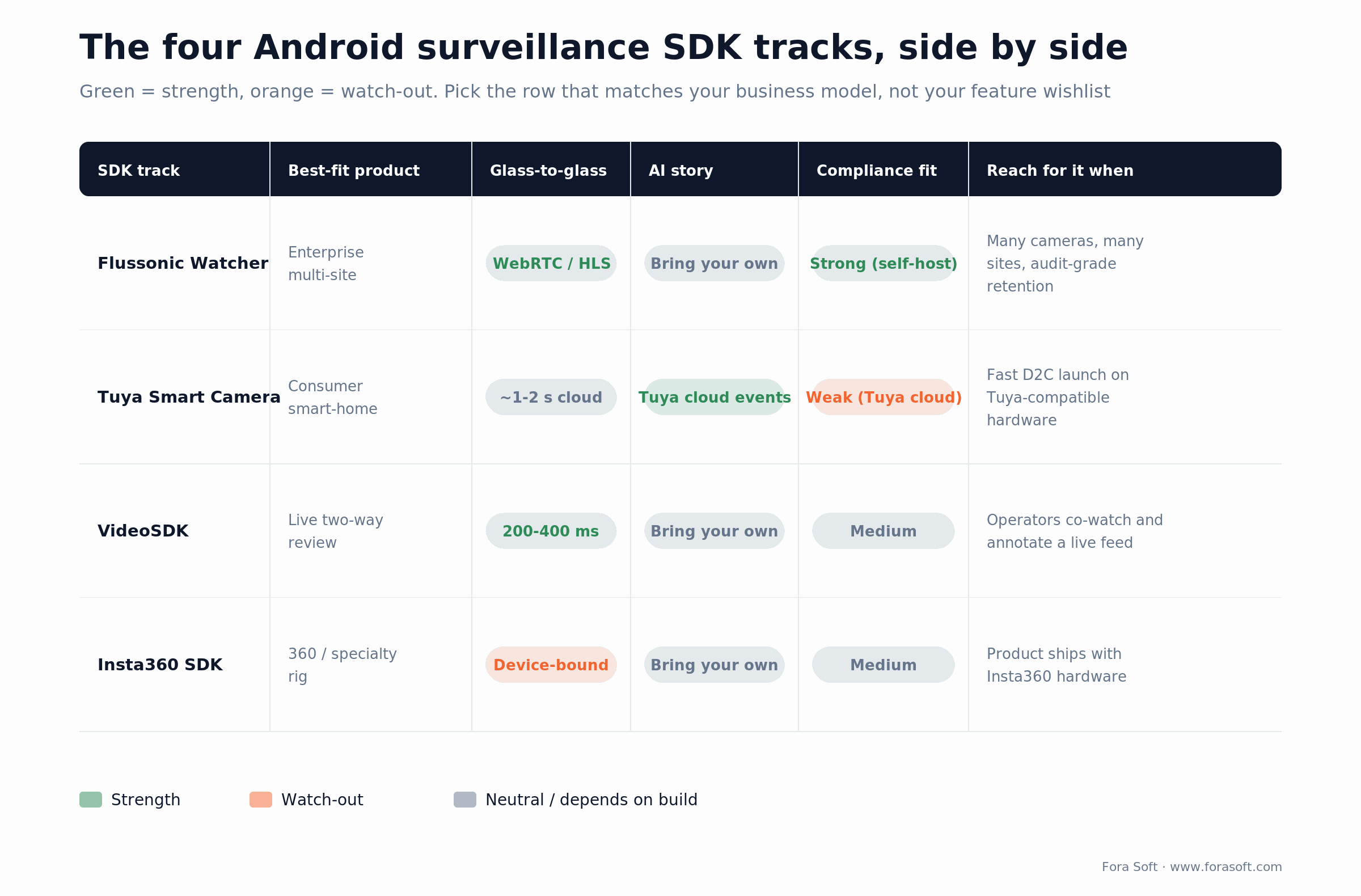
Figure 1. The four tracks side by side. Read across the row that matches your business model.
A quick word on open source: go2rtc and MediaMTX still show up in our builds as the ingest-and-restream layer underneath a vendor SDK. You do not replace Flussonic with go2rtc; you use go2rtc to pull RTSP off a stubborn camera and expose clean WebRTC to the app.
How video gets from the camera to your app
Before the SDK debate, understand the data path. A surveillance stream almost never goes straight from camera to phone. It flows through a media server that speaks the camera protocols, repackages the stream, and hands your Android client something it can render cheaply.
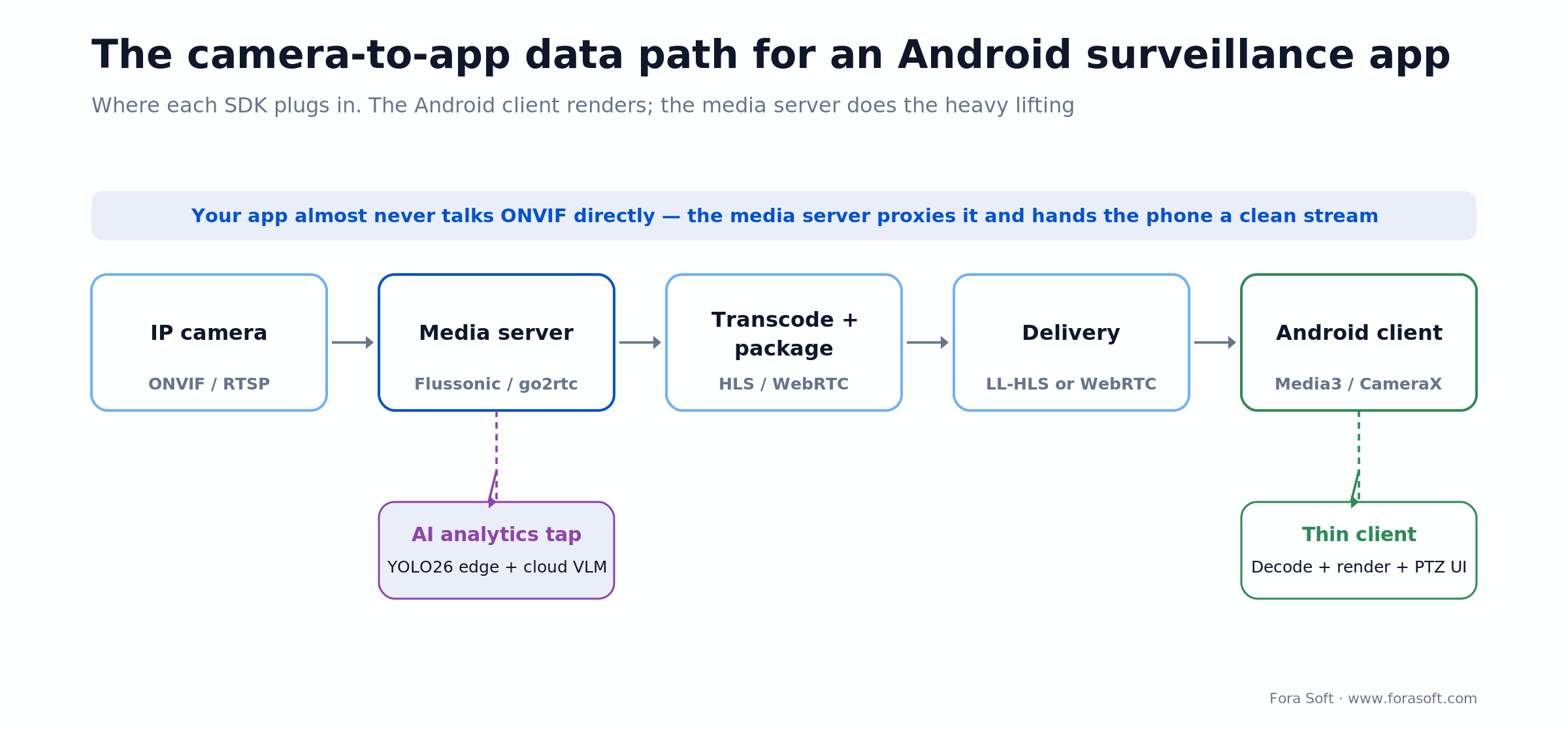
Figure 2. The path a stream travels. The media server does the heavy lifting; the phone stays a thin client.
Why this matters for cost and reliability: the phone should decode and draw pixels, run the PTZ (pan-tilt-zoom) UI, and manage the session — nothing more. Push transcoding, ONVIF negotiation, and fan-out to the server. Teams that try to make the Android app talk ONVIF directly to 30 camera models spend their whole budget on edge cases instead of product.
Track 1: Flussonic Watcher for enterprise surveillance
This is our default for anything that looks like V.A.L.T.: many fixed cameras per site, many sites, bandwidth-sensitive networks, long-term archival, and operators who need a multi-camera grid, PTZ, event timelines, and audit-grade retention. Flussonic’s value is the server-side stream engine; the Android SDK is a thin client on top.
What ships cleanly on this stack:
- Multi-camera grids (9–16 simultaneous streams on mid-range Android) with adaptive bitrate, delivered as low-latency WebRTC or HLS depending on the network.
- PTZ control proxied through Flussonic against ONVIF cameras — the app never speaks ONVIF itself.
- Event timelines driven by motion, AI detections, or external triggers, with deep-link playback into the archive.
- Hardware-triggered recording (physical “start” switches) that we ship for interrogation rooms and medical-training suites.
Where it gets hard: Flussonic is a server product first. Plan a dedicated backend engineer to own the media server alongside the Android team, and budget SSO (SAML, OIDC) plus audit-log plumbing. Enterprise buyers require both and neither ships free.
Reach for Flussonic Watcher when: you have many cameras across many sites, you need audit-grade retention, and self-hosting for data control is on the table.
Not sure which track fits your product?
Send us your camera list and target market. In 30 minutes we will map you to one of the four tracks, flag the compliance blockers for your market, and give you an honest cost band.
Track 2: Tuya Smart Camera for consumer and IoT products
Tuya is the pragmatic pick for a consumer product that pairs with Tuya-compatible hardware (roughly half the off-the-shelf Wi-Fi camera market in 2026). You inherit the Tuya cloud, device pairing, two-way audio, event notifications, and a usable out-of-the-box camera UI. Speed is the win: a branded direct-to-consumer app ships in 12–16 weeks.
The honest trade-offs:
- You are tied to Tuya’s cloud and pricing — fine for speed, awkward if you need to move data residency later.
- AI events are Tuya’s AI events. Need a custom model (license plate, a specific object class, a healthcare-specific detection)? You bolt on edge inference separately.
- Institutional buyers (schools, hospitals, government) tend to push back on Tuya’s data flows. Know your audience before you commit.
Reach for Tuya when: you are shipping a consumer or prosumer product fast, the cameras are Tuya-compatible, and no enterprise compliance desk will review the data path.
Track 3: VideoSDK for live review and real-time interaction
Reach for VideoSDK when the product is less “monitor a parking lot” and more “a doctor reviews a live feed while a nurse annotates.” The core is WebRTC at 200–400 ms end-to-end on good networks, with clean Android APIs for recording, screen share, and multi-participant rooms.
Typical shape of these apps:
- One to three live feeds, not a 16-camera grid.
- Collaborative annotation, chat, or voice on top of the feed.
- Per-session recording for later review — the pattern that fit best on Moby Tap, our short-form video review platform.
Reach for VideoSDK when: humans interact with the feed in real time — co-watching, annotating, or talking back — and sub-second latency changes the workflow.
Track 4: Insta360 SDK for 360 and specialty hardware
Relevant only if your product is built around specific Insta360 hardware — action cameras, 360-degree cameras, or the newer surveillance variants. Three things to watch:
- On-device stitching is battery-hungry. Budget thermal-throttling testing on mid-range Android, not just flagships.
- Fisheye and equirectangular projection math becomes your UI problem — especially touch-to-pan on phone and tablet.
- Firmware coupling is tight. A camera firmware update can break the SDK. Pin the SDK version and test every firmware release before rollout.
Reach for Insta360 when: your product literally ships with Insta360 hardware and 360-degree capture is the core feature, not a nice-to-have.
The Android rendering layer: CameraX, Camera2, Media3
Underneath every track sits Android’s own media stack, and in 2026 it has moved. The old android.hardware.Camera API is long deprecated. Use CameraX (Jetpack) for velocity and Camera2 when you need low-level control of exposure, focus, or multi-stream configuration. As of the 1.7 line, CameraX routes video through the Media3 muxer by default, which adds crash-resilient recording — if the app dies mid-capture, the file is still valid.
For playback of an incoming surveillance stream, Media3 (currently 1.10.x) is the maintained player. Its RTSP support lands around 1–2 seconds of latency on a LAN, which is fine for monitoring but too slow for two-way interaction — that is what WebRTC is for. Target a Kotlin-first stack with Jetpack Compose; that is the combination Google actively maintains in 2026 and the one that keeps your hiring pool large.
Reach for CameraX when: you want velocity and crash-safe recording out of the box. Drop to Camera2 only for the specific low-level knobs CameraX does not expose.
Talking to real cameras: ONVIF and RTSP
Most IP cameras and NVRs speak two things: ONVIF for discovery and control, and RTSP/RTP for the actual media. ONVIF profiles standardize live streaming (Profile S), recording and playback (Profile G), H.265 with analytics events (Profile T), and metadata (Profile M). The ONVIF ecosystem lists 25,000+ certified products, which is why building to the standard beats building to one vendor.
The catch every team hits: consumer brands (some Reolink and Amcrest models) implement ONVIF partially or not at all, so you keep a per-vendor shim on the server for the stragglers. Budget about a week of work for each vendor-specific protocol you must support. Our full walk-through lives in integrating Android apps with IP cameras and building mobile apps for IP cameras.
Which streaming protocol: WebRTC vs HLS vs RTSP
The short answer: WebRTC when a human interacts with the feed, HLS when you are broadcasting to many viewers and can tolerate delay, RTSP as the LAN transport you re-package rather than ship to the phone directly. Latency is the deciding axis, and the gap is large.
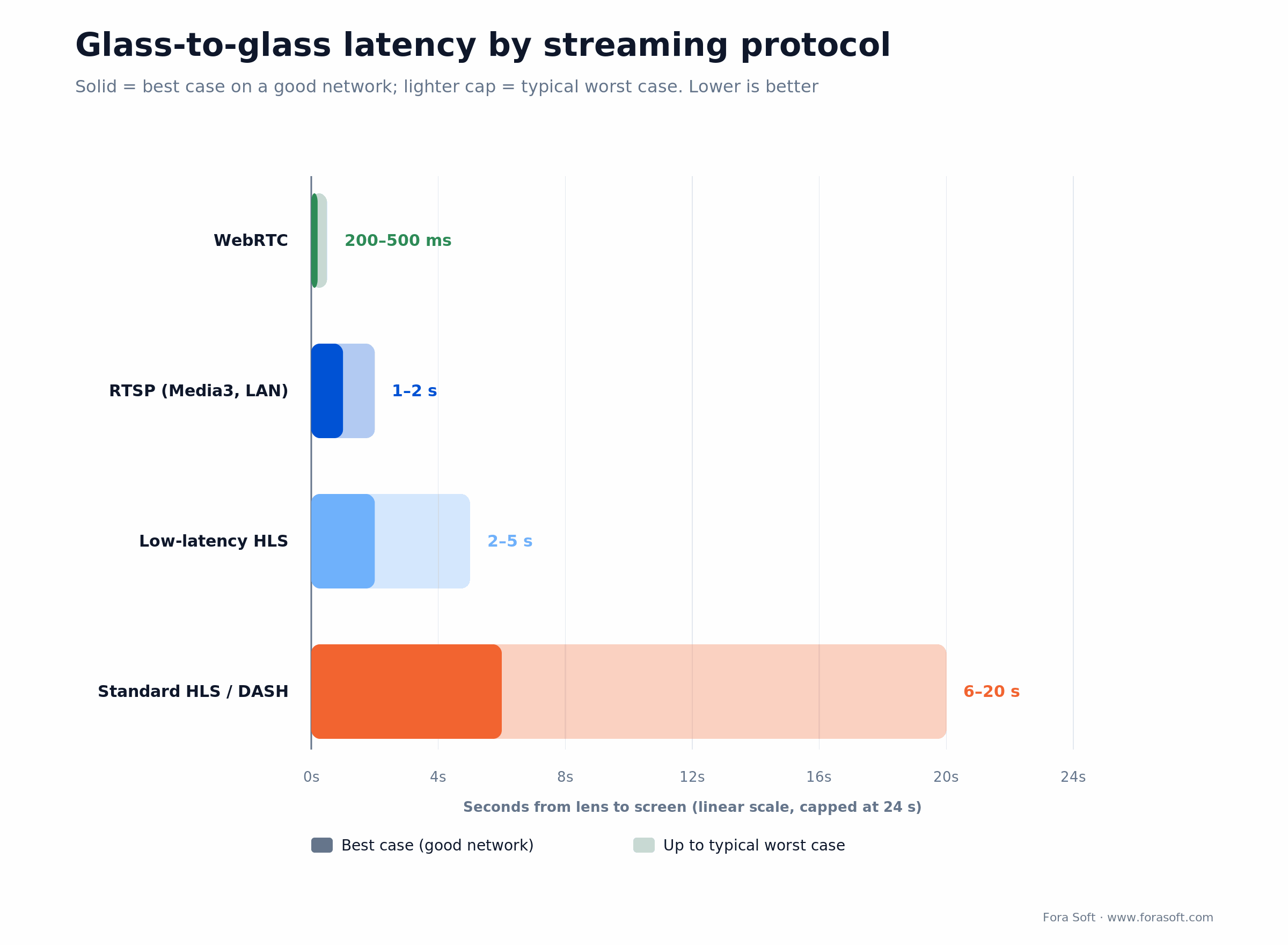
Figure 3. Glass-to-glass latency by protocol. Interactive feeds need WebRTC; passive monitoring can live on HLS.
Two rules we hold to in production. First, always ship an HLS fallback: WebRTC gets blocked on corporate and cellular networks, and a feed that fails closed is a support ticket. Second, negotiate the codec at session start, not per frame — H.264 Baseline is still the safe common denominator, H.265 needs device-class gating, and AV1 is decode-only on 2026 flagships, so it is not worth it for surveillance yet.
The 2026 AI analytics layer
In 2026, AI analytics is a separate architectural decision from SDK choice, and it is where the project risk concentrates. The dominant pattern is edge-first inference with cloud escalation: run a small model on-device for the common cases (motion vs person vs vehicle) and escalate only ambiguous frames to a heavier cloud model.
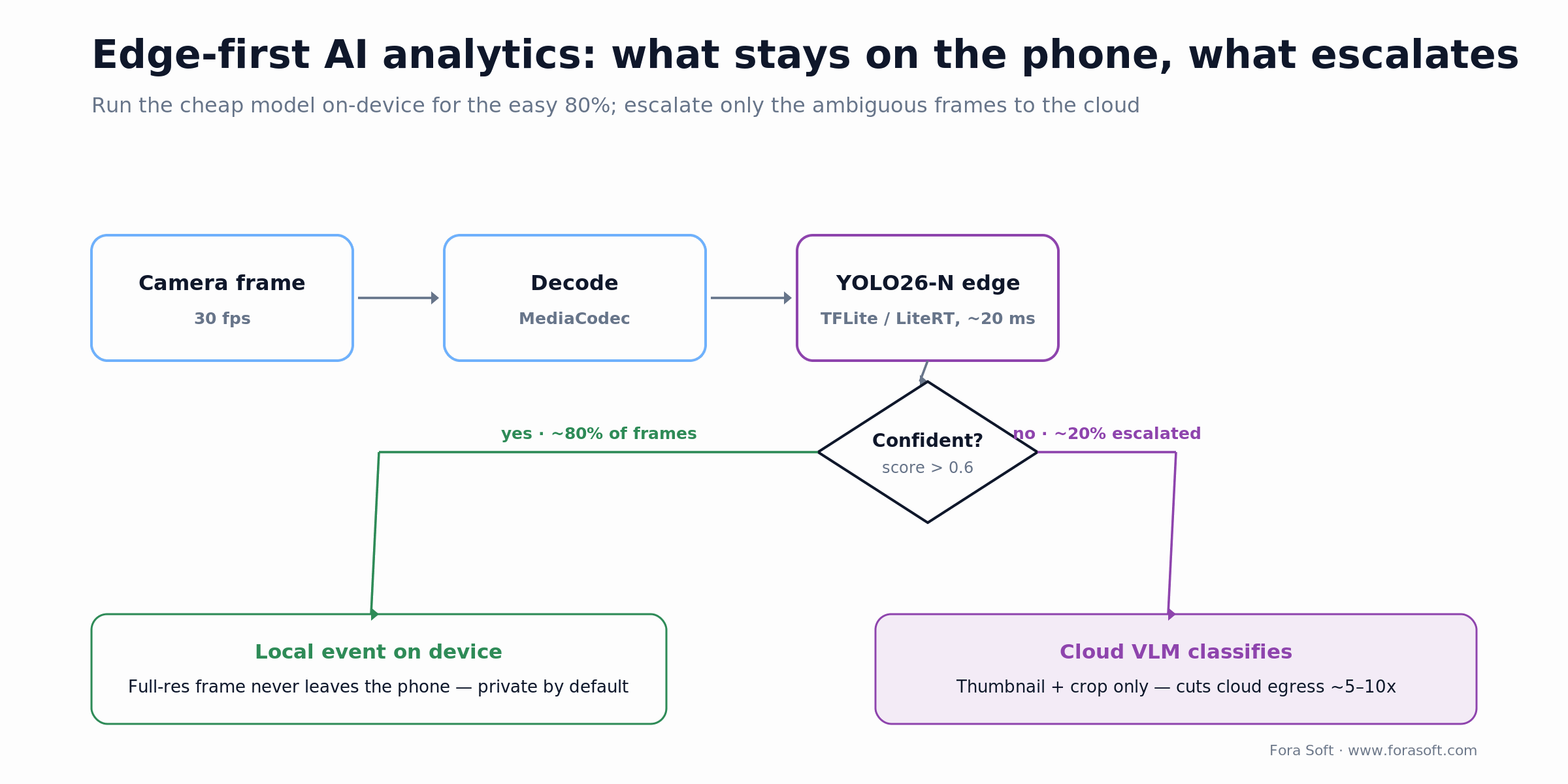
Figure 4. Edge-first routing. The cheap on-device model clears the easy 80%; the cloud sees only the hard 20%.
The reference stack we ship most often:
- On-device: TensorFlow Lite / LiteRT or ONNX Runtime Mobile running YOLO26 (Ultralytics, released January 2026). YOLO26 is NMS-free and end-to-end, and the Nano variant runs about 43% faster on CPU than YOLO11n at comparable accuracy, which suits Snapdragon-class NPUs.
- Cloud escalation: a hosted vision-language model classifies the ambiguous frames and answers scene-description queries in plain language.
- Event emission: one normalized event schema flows back into the timeline. Keep this format stable — you will regret letting each SDK emit its own shape.
Why keep inference on-device: full-resolution frames never leave the phone, which is both a privacy and a bandwidth win, and you pay for cloud compute only on the roughly 20% of frames the edge model flags as ambiguous. For a deeper model-selection walk-through, see our guide to anomaly-detection models for surveillance.
Need an AI analytics architecture reviewed?
We have shipped edge-plus-cloud vision pipelines across surveillance, medical imaging, and sports tech. Bring your constraints and we will walk the trade-offs with you.
Security and compliance from day one
Surveillance footage is the highest-risk class of personal data you can hold. Retrofitting security after launch costs 3–5× more than designing for it at kickoff. Non-negotiables on day one:
- Encryption everywhere. TLS 1.3 in transit, AES-256-GCM at rest, per-tenant keys in a KMS. No exceptions.
- Role-based access with time-bounded grants. Operators, supervisors, auditors as distinct roles; external reviewers get access that expires.
- Retention and auto-deletion as a feature, not a cron job. GDPR Article 17 (right to erasure) has to cascade into the video store.
- Region-pinned storage, set in code: EU storage for EU deployments, HIPAA-eligible cloud for US healthcare.
- Immutable audit logs. Every playback, export, and deletion written to append-only storage — a SOC 2, HIPAA, and court-evidence requirement.
Performance: what actually matters on Android in 2026
The problems that hurt in production, ranked by how often we see them:
- Thermal throttling on sustained multi-stream playback. A 9-camera grid heat-throttles a mid-range phone inside 15 minutes. Test on thermal-constrained devices; lean on hardware decoders and drop background streams to keyframe-only.
- Battery drain from always-on streaming. Use the SDK’s hardware-accelerated MediaCodec path, and hold no wake locks beyond what it requires. Android 14+ enforces foreground-service and Doze rules strictly.
- Network flakiness. Industrial and rural sites run LTE-only with 40% packet loss. Pick an SDK whose WebRTC handles congestion gracefully, and always keep the HLS fallback.
- Playback memory leaks. Rapid camera switching leaks surfaces on Android 10–11. Regression-test 50+ rapid switches per device class.
What it costs to build in 2026
Indicative ranges from projects we have scoped or shipped this year. We estimate conservatively: Fora Soft builds with an Agent Engineering workflow, so our numbers tend to come in below traditional agency quotes for the same scope.
Consumer app on Tuya
$80K – $140K, 3–4 months
Branded D2C app, Tuya-compatible cameras, basic AI events, auth, subscriptions.
Enterprise multi-site on Flussonic
$180K – $320K, 5–8 months
Multi-camera grid, PTZ, SSO, audit logs, retention policy, role-based access, cloud plus on-prem.
AI analytics add-on
+ $60K – $140K, 2–3 months
Edge YOLO pipeline, cloud escalation, normalized event schema, alert routing, a weekly evaluation loop.
Worked example. A four-person team (tech lead, two Android engineers, one backend) over six months at a blended $55/hour: 4 people × 6 months × ~160 hours = 3,840 hours × $55 ≈ $211K. Add an ML engineer for the AI tier and roughly 12 weeks and you land near the top of Tier 02 plus the add-on. Add 15–20% if SOC 2 Type II or HIPAA audit prep sits inside the initial scope. If a number feels shaky for your exact scope, we would rather scope it with you than publish a figure you cannot hold us to. For a wider budgeting view, see our mobile app development cost guide.
Build, buy, hybrid, or open source
A quick decision grid for the four paths. Pick the row that matches your team size, regulatory surface, and time-to-value target — not the row that sounds most ambitious.
| Approach | Best for | Build effort | Time-to-value | Main risk |
|---|---|---|---|---|
| Buy off-the-shelf SaaS | Small team, generic use case | Low (1–2 weeks) | 1–2 weeks | Vendor lock-in, limited customization |
| Hybrid (SaaS + custom layer) | Mid-market, mixed use cases | Medium (1–2 months) | 1–3 months | Integration debt, two systems to maintain |
| Build custom (modern stack) | Enterprise, unique data or compliance | High (3–6 months) | 5–8 months | Engineering velocity, talent retention |
| Open-source self-hosted | Cost-sensitive, strong technical team | High (2–4 months) | 3–6 months | Operational burden, security patching |
When not to build a custom surveillance app
Honesty sells better than a pitch. Do not build custom when:
- Your use case is generic monitoring and an off-the-shelf VMS already covers it — you would be paying to rebuild a solved product.
- You have fewer than a handful of cameras and no compliance surface. Licensing a SaaS is cheaper than a team until you cross roughly 80–100 cameras.
- You cannot staff a backend owner for the media server. A half-owned Flussonic or go2rtc deployment fails in month three.
- Your differentiator is not the video. If the video is a feature of a larger product, embed an SDK and spend your budget on the part users pay for.
Decision framework: your priority, your pick
If you read nothing else, read this table. Map your top priority to a starting track, then validate it against cost and compliance above.
| Your top priority | Start with | Why |
|---|---|---|
| Fastest consumer launch | Tuya Smart Camera | Inherit cloud, pairing, and UI; ship in a quarter |
| Many sites, audit-grade retention | Flussonic Watcher | Server-side engine, PTZ proxy, immutable logs |
| Live two-way review | VideoSDK | 200–400 ms WebRTC, multi-participant rooms |
| 360 or specialty capture | Insta360 SDK | On-device stitching tied to the hardware |
| Custom AI is the product | Flussonic + edge YOLO26 | Own the event schema and the model |
Still unsure which row is yours? That is the 30-minute conversation we have every week — bring your camera list and your compliance surface and we will point you at the right track. You can book a scoping call here.
Reference build: what we learned shipping V.A.L.T.
V.A.L.T. — Video Audio Learning Tool — is our flagship surveillance platform, now deployed across 770+ US organizations with 50,000+ users. The usage footprint that informs everything above:
- Police, medical-school training suites, child-advocacy centers, and legal-deposition rooms — environments where a dropped recording is a legal problem, not a bug.
- Up to 9 simultaneous camera feeds per operator, with hardware-switch recording and in-session “In Use” indicators for sensitive rooms.
- A point-and-click interface where new users reach proficiency in about 10 minutes — onboarding time we track as a shipped metric, because multi-camera tooling has a reputation for being hard.
The Flussonic default, the edge-first AI pattern, and the day-one compliance architecture in this guide all come straight from what worked — and what did not — while scaling V.A.L.T. You can read the full V.A.L.T. write-up, or explore our video surveillance development services.
Common mistakes teams make
The recurring own-goals we get called in to fix:
- Making the Android app talk ONVIF to every camera model instead of proxying through a server.
- Shipping WebRTC with no HLS fallback, then losing every corporate-network user.
- Treating retention and access control as a post-launch task, then failing the first compliance review.
- Letting each camera SDK emit its own event shape, so the timeline never unifies.
- Testing only on flagship phones and shipping a build that thermal-throttles on the devices operators actually carry.
Frequently asked questions
What is the best SDK for video surveillance app development on Android?
There is no single best SDK — it depends on your business model. Flussonic Watcher fits enterprise multi-site deployments, Tuya Smart Camera fits fast consumer launches on Tuya hardware, VideoSDK fits live two-way review, and the Insta360 SDK fits 360-degree hardware. Pick by use case, then validate against cost and compliance.
Can these SDKs integrate with legacy CCTV and NVR systems?
Yes, through ONVIF Profile S/T and RTSP. Flussonic Watcher is strongest here because it proxies ONVIF server-side, so your Android app never speaks it directly. For cameras that expose only vendor protocols (older Hikvision, Dahua, Uniview), budget about a week per vendor for a server-side shim.
What minimum Android device specs should we target in 2026?
Android 10+ (API 29+), 4 GB RAM minimum and 6 GB for multi-camera grids or on-device AI, and hardware H.264/H.265 decode. For AI analytics, target a device with a dedicated NPU (recent Snapdragon, Tensor, or Dimensity). Test on mid-range devices — flagships hide the thermal and memory issues that hit real users in week two.
How long does it take to build an Android video surveillance app?
A single-camera consumer app on Tuya or VideoSDK ships in 10–14 weeks. A multi-camera enterprise app on Flussonic with SSO, audit logs, and basic AI events ships in 5–7 months. Add 8–12 weeks for a custom AI tier. The slow part is almost never the camera feed — it is access control, compliance, and operator UX.
Edge AI on-device, cloud AI, or both?
Both, with edge-first routing. Run a small quantized detector such as YOLO26-N on-device for the ~80% of frames with clear answers, and escalate ambiguous or high-value frames to a cloud model. This cuts cloud spend roughly 5–10× and keeps private footage on the device by default.
How do we stay GDPR, CCPA, and HIPAA compliant for a surveillance app?
Encrypt at rest (AES-256) and in transit (TLS 1.3), region-pin storage, enforce role-based access with time-bounded grants, keep an append-only audit log, and build retention plus right-to-erasure as first-class features. For HIPAA, sign BAAs with every processor in the pipeline. These are day-one design constraints; retrofitting runs 3–5× the original cost.
What does glass-to-glass latency look like by protocol?
WebRTC delivers 200–500 ms on a good network, RTSP over Media3 on a LAN lands around 1–2 s, low-latency HLS is 2–5 s, and standard HLS or DASH is 6–20 s. Use WebRTC for anything interactive; HLS is fine for passive monitoring at scale.
How do we store and retrieve video efficiently?
Use tiered storage: a hot tier on SSD-backed object storage for the last 7–30 days, a warm tier for 30–90 days, and a cold archival tier beyond that. Index every segment by time, camera, and event metadata in a fast analytical store, and generate HLS segments at ingest so archived playback is sub-second.
Scoping an Android surveillance app?
Book a 30-minute architecture review with our surveillance lead. You will leave with an SDK shortlist matched to your business model, a cost band, and the compliance blockers specific to your market.
To sum up
Pick one of the four SDK tracks by business model, not feature list. Keep the phone a thin client and let a media server handle ONVIF and RTSP. Choose the streaming protocol by whether the feed is interactive. Layer AI edge-first. Architect compliance on day one. Budget honestly — $80K to $320K depending on tier, plus the AI add-on. The differentiator in 2026 is rarely which SDK you picked; it is how well the operator UX, the compliance posture, and the AI layer hold up after the twentieth customer goes live.
Read next
References
Ultralytics (2026). YOLO26 model documentation. docs.ultralytics.com/models/yolo26
ONVIF (2026). Profiles S, G, T, M. onvif.org/profiles
Android Developers (2026). CameraX and Media3 release notes. developer.android.com/jetpack/androidx/releases/media3

