


Key takeaways
• The best IP camera system for a business in 2026 is the one that matches your compliance posture, analytics needs, and 5-year total cost — not the one with the highest megapixel count.
• The China-brand rules got stricter this year. Beyond the long-standing NDAA Section 889 ban on federal use, the FCC banned importing and marketing even older, previously authorized Hikvision, Dahua, and Hytera models for public-safety, government-facility, and other national-security surveillance from July 16, 2026 (Public Notice DA 26-635). Cameras already installed may keep running. Safe picks: Axis, Hanwha, Bosch, Avigilon, Pelco, Panasonic i-PRO, or Verkada/Rhombus on the cloud side.
• For a typical 16-camera business system, budget $9k–$48k over five years depending on tier: an entry PoE NVR lands near $9.3k, a mid-tier hybrid around $23.8k, and cloud VSaaS with 4K plus AI around $48k.
• H.265 is the default codec in 2026 — roughly half the storage of H.264 at the same visual quality. 4MP is the sweet spot for most sites; reserve 4K/8MP for license plates, facial detail, and entry portals.
• Edge AI is production-ready: a Hailo-8 NPU delivers about 26 TOPS at 2.5 W, running YOLO26-class detectors at 90–95% person/vehicle accuracy with sub-500 ms latency. License plates and face recognition still lean on server or cloud inference.
Updated October 2026: the FCC import ban on older Hikvision and Dahua models (in force since July 16) and its new critical-infrastructure definition, ONVIF Profile S retirement, EU Cyber Resilience Act reporting and AI Act dates, plus best picks by use case.
Buying an IP camera system for a business in 2026, the hard part is not choosing a camera. It is choosing a stack that will still be compliant, secure, and useful in five years — after the threat model shifts, retention laws tighten, and your ops team doubles. Pick wrong and you are not out a few hundred dollars per camera; you are ripping out a six-figure deployment because it can no longer be legally imported or patched.
We are Fora Soft. We have built video and video-analytics software since 2005 — 250+ delivered products, 50+ in-house specialists, a 99% job-success score on Upwork — for customers in security, healthcare, legal, and education. That includes VALT, a video interview-recording platform now used by 770+ US organizations and 50,000+ users across courthouses, police departments, and hospitals. This guide is written from that trench view: what works in production, what the brochures skip, and where businesses overspend.
Use it as a buying checklist. If something here maps to a project you are scoping, book a 30-minute call and we will tell you, candidly, whether we are the right team — or which vendor is.
Why Fora Soft wrote this IP camera buying guide
We have shipped video software since 2005, with 250+ delivered products and a video surveillance software development team that specializes in real-time streaming, video analytics, and custom VMS integrations. Our engineers work daily with Axis, Hanwha, Bosch, and Hikvision hardware, ONVIF Profile T/S streams, RTSP and WebRTC pipelines, and cloud platforms like Verkada and Eagle Eye.
So we have seen every mistake on both sides of the deal: the $85k commercial quote that should have been $28k, and the $9k DIY system that fell over at 16 cameras because nobody sized the PoE switch. This article turns those lessons into decisions you can actually make.
The short version: pick the architecture first, the vendor second, and the model third. That is the opposite of how most buyers start — and it is why most buyers overpay.
The 60-second decision map
Before you price a camera, answer five questions. Your answers collapse the market from 200+ vendors to two or three, in the order shown below.
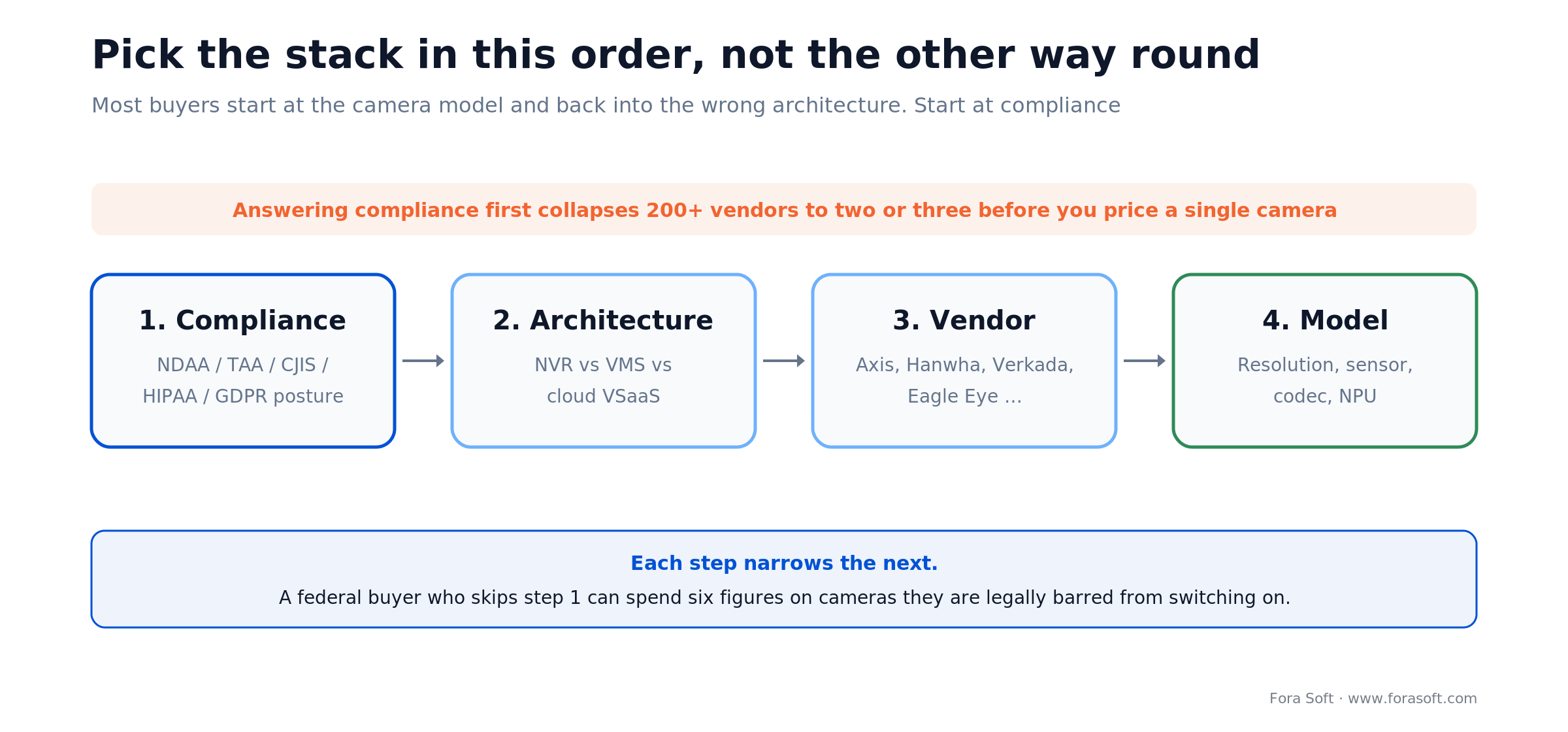
Figure 1. Pick the stack in the right order — compliance is the cheapest filter and it runs first.
| If you answer … | Go with … | Skip … |
|---|---|---|
| Federal, law-enforcement, or CJIS-regulated buyer | NDAA/TAA-compliant vendors: Axis, Hanwha, Bosch, Avigilon, Pelco, Panasonic i-PRO, Digital Watchdog | Hikvision, Dahua, Huawei, Uniview (for US federal), any Chinese OEM rebrand |
| No in-house IT, MSP or remote monitoring preferred | Cloud VSaaS: Verkada, Rhombus, Eagle Eye Networks, Brivo Video | Self-hosted Milestone / Genetec unless you have a dedicated admin |
| Strict data residency / offline site | On-prem PoE NVR + open-source VMS (Shinobi, ZoneMinder) or Milestone XProtect Essentials | Pure cloud; use hybrid if your WAN is unreliable |
| LPR, face, or custom AI required | Axis or Hanwha high-tier + Genetec / Milestone / custom analytics pipeline | Entry-tier cameras with "smart" marketing; underpowered NPUs drop below 85% accuracy outdoors |
| Access control + video as one system | Brivo + Eagle Eye, Avigilon Alta, or Verkada unified platform | Gluing two ecosystems without an API contract; budget 40–80 hrs of custom integration work |
Figure 2. Fast-path decision matrix for shortlisting an IP camera system.
Reach for cloud VSaaS when: you have multiple sites, little or no on-prem IT, and you value opex over capex. Verkada, Rhombus, and Eagle Eye let you add a camera the way you add a Slack seat. You pay for that convenience every month — see the cost model below.
Best IP camera systems for business by use case
Short answer: for most businesses in October 2026, the best IP camera system is NDAA-compliant Axis or Hanwha cameras recorded by a PoE NVR or Milestone XProtect at a single site, or Verkada, Rhombus, or Eagle Eye cloud VSaaS across several sites. The table maps the buyer profiles we meet most often to a two- or three-name shortlist.
| Buyer profile | Shortlist | Why it wins | Watch out for |
|---|---|---|---|
| Small business, one site, 8–16 cameras | Hanwha or Axis cameras on a PoE NVR or Milestone XProtect (Essential+ is free up to 8 cameras; Express+ above that) | Lowest five-year cost: about $11k–$24k for 16 Hanwha or Axis cameras, no per-camera subscription | Someone must patch firmware every quarter |
| Restaurants and retail chains | Rhombus or Eagle Eye on 4MP cameras, with POS overlay | All sites in one browser view; search video by register transaction | Per-camera licences add up; check upload bandwidth at every site |
| Multi-site enterprise, cloud-first | Verkada, Eagle Eye, or Avigilon Alta | Central admin, SSO, video and access control in one console | Highest opex; Verkada and Rhombus prefer their own hardware |
| Video plus access control as one system | Avigilon Unity/Alta, Verkada, Genetec Security Center, or Brivo + Eagle Eye | Badge event and video clip on one timeline | Gluing two separate ecosystems costs 40–80 engineering hours |
| Manufacturing and production floors | Axis or Bosch with on-camera analytics, Milestone or Genetec VMS on its own VLAN | Intrusion and safety-zone rules run at the edge; camera traffic stays off the OT network | IP66/IK10 housings and heat ratings matter more than megapixels |
| Long-term PTZ coverage | Axis Q-series or Hanwha P/X-series PTZ with a 5-year firmware commitment | Parts and patches outlive a cheap PTZ | Motors fail first; budget a yearly service visit |
| Federal, SLED, or CJIS buyers | NDAA/TAA lines: Axis, Hanwha, Bosch, Avigilon, i-PRO, plus Genetec or Milestone | Passes NDAA Section 889 and the 2026 FCC rules | Ask for a dated compliance letter per model |
| Camera events into ops or project tools | Any VMS with an open API or webhooks: Verkada, Rhombus, Eagle Eye, Milestone MIP SDK, Genetec SDK | Events become Jira, ServiceNow, or Slack tickets | No camera talks to a project-management tool natively; plan a small middleware build |
Figure 3. Best IP camera systems for business by buyer profile, October 2026. Vendor-neutral: we do not resell hardware.
What changed between 2022 and 2026
Most "ultimate guides" online were written in 2022–2023 and have not aged well. Six shifts reshaped the market, and three of them landed in 2026.
1. The China-brand ban widened in 2026
Here is the update most guides miss. The FCC stopped authorizing new Hikvision and Dahua equipment back in November 2022, but pre-2022 models kept flowing in under a grandfather clause. On June 26, 2026 the FCC closed that loophole: Public Notice DA 26-635 bans the import and marketing of previously authorized Hikvision, Dahua, and Hytera equipment for public safety, government-facility security, and other national-security uses, effective July 16, 2026 (FCC Public Notice DA 26-635, June 2026). The critical-infrastructure part of that ban was paused until the FCC redefined the term; the revised definition took effect on October 13, 2026 (Federal Register, Sept 2026). Nothing forces you to rip installed cameras off the wall — the FCC states that continued use of already-purchased equipment is not affected, and there is no kill switch — but replacement units, spares, and expansions through compliant channels just got much harder. Hikvision’s court challenge to the FCC rules was still undecided at the end of September 2026. On top of that, NDAA Section 889 still bars federal agencies, contractors, and grant recipients from using Hikvision, Dahua, Huawei, ZTE, Hytera, and their OEM rebrands at all. Check the NDAA-compliant vendor list against your model numbers before you sign a PO.
2. H.265 is now the baseline
Reolink, Lorex, Amcrest, Hanwha, Axis, Bosch — almost every camera shipped in 2025–2026 defaults to H.265. That cuts storage roughly in half versus H.264 at the same visual quality. H.266/VVC is ratified but no camera silicon ships it in production yet, so do not wait for it. The new codec that does ship is AV1: Axis’s ARTPEC-9 chip, announced in November 2024, encodes AV1 alongside H.264 and H.265 (Security Systems News, Nov 2024). Confirm your VMS records and plays AV1 before you switch it on.
3. Edge AI got good, and cheap
Hailo-8 accelerators (about 26 TOPS at 2.5 W) in edge boxes and AI-capable SoCs such as Ambarella’s CV series inside mid-tier cameras are now common. On-device person and vehicle detection lands in the 90–95% range with sub-500 ms latency, and you ship only event metadata to the cloud — roughly a 10× bandwidth saving. We run this pattern in production; the full cost math is in our edge AI for video surveillance architecture guide, and the engineering detail sits in the Learn course on on-camera edge AI.
4. Cloud VSaaS won the SMB market
Verkada, Rhombus, and Eagle Eye are the default answer for small-to-mid buyers who want set-it-and-forget-it. Milestone and Genetec answered with their own cloud tiers (Stratocast and friends), but the cost profile is still meaningfully higher than on-prem. If you want the AI-camera angle specifically, we cover it in our AI-powered IP cameras buyer's guide.
5. ONVIF Profile S is being retired
On October 9, 2025, ONVIF announced it is ending support for Profile S, and the June 2026 test tools were the last that let a manufacturer claim new Profile S conformance (ONVIF, Oct 2025). Deployed Profile S cameras keep working. For new purchases, ask for Profile T (H.265 streaming over HTTPS) and Profile M (analytics metadata); our ONVIF profiles S, G, T, and M decision guide maps each profile to the features it guarantees.
6. EU cyber rules now reach the camera maker
Since September 11, 2026, manufacturers selling cameras, recorders, and other connected products in the EU must report actively exploited vulnerabilities and severe incidents under the Cyber Resilience Act: an early warning within 24 hours and a full notification within 72 hours (European Commission, 2026). For a buyer, a vendor without a working vulnerability-reporting process is now a compliance risk as well as a security one.
The ten features that actually matter
Vendor spec sheets list 40+ features. Ten move the needle in practice. Everything else is noise or cross-sell.
| Feature | Why it matters | 2026 baseline |
|---|---|---|
| Resolution + sensor pairing | 4K on a cheap 1/3″ sensor looks worse than 4MP on a 1/1.8″ sensor. | 4MP @ 1/1.8″ general, 4K @ 1/1.2″ for LPR/entry. |
| Codec | Halves storage and WAN cost versus H.264. | H.265 with smart-codec variants (H.265+). |
| Low-light (starlight / f≤1.4) | Outdoor 24/7 without IR supplement. | Sony STARVIS or equivalent starlight sensor. |
| WDR / HDR | Saves backlit scenes (entryways, loading docks). | 120 dB WDR minimum. |
| ONVIF Profile T (+ M) | Avoids VMS lock-in; lets you mix brands. | Profile T on every new tender; Profile S stopped taking new conformance in 2026. |
| PoE++ (802.3bt) | Up to ~90 W per port powers PTZ, multi-sensor, heaters. | PoE+ at minimum; PoE++ for enterprise. |
| On-device AI (NPU) | Local person/vehicle classification at <500 ms. | Hailo-8, Ambarella CV5, or equivalent. |
| Signed firmware | Blocks malicious firmware; Axis, Bosch, Avigilon enforce. | Signed + 5-year patch commitment. |
| TLS 1.3 + mutual auth | Prevents man-in-the-middle; certificate pinning ideal. | TLS 1.3 mandatory. |
| Forced default-password change | Kills the single most common breach path. | First-boot password reset. |
Figure 4. The ten features that separate production-grade IP cameras from consumer tier in 2026.
Resolution, codec, and bitrate cheat sheet
Every storage plan starts here. Overshooting resolution is the single biggest reason business systems run out of disk before the warranty expires.
| Resolution | H.264 (Mbps) | H.265 (Mbps) | Good for |
|---|---|---|---|
| 1080p / 2MP | 5 | 2.5 | Overflow, rear perimeter, non-critical |
| 2K / 4MP | 6–8 | 3–5 | Business sweet spot — retail, office, hallway |
| 4K / 8MP | 8–12 | 4–10 | LPR, entry portals, forensic-grade facial |
| 8K / 32MP multi-sensor | 25–40 | 15–25 | Parking lot, campus perimeter panoramas |
Figure 5. Recommended bitrates by resolution and codec; H.265 assumes smart-codec variants.
Worked example — the storage math most quotes skip. Take 16 cameras at 4MP H.265, 4 Mbps each, 24/7, 30-day retention:
GB/day/cam = (4 Mbps / 8) * 86400 s / 1000   = ~43 GB
30-day total = 43 GB * 16 cams * 30 days / 1000 = ~20.7 TB

# Same 16 cameras at 4K H.265 @ 8 Mbps:
# ~86 GB/day/cam * 16 * 30 / 1000        = ~41 TB / month
That is the difference between a single 24 TB NVR and a RAID array with headroom. Deciding 4MP-versus-4K per zone — not blanket 4K everywhere — is usually a five-figure swing over the system's life.
NVR, VMS, or cloud VSaaS: picking the architecture
The "best IP camera" question is meaningless until you decide where recordings live and what pane of glass views them. Everything downstream — storage, licensing, who patches it — hangs off this one choice.
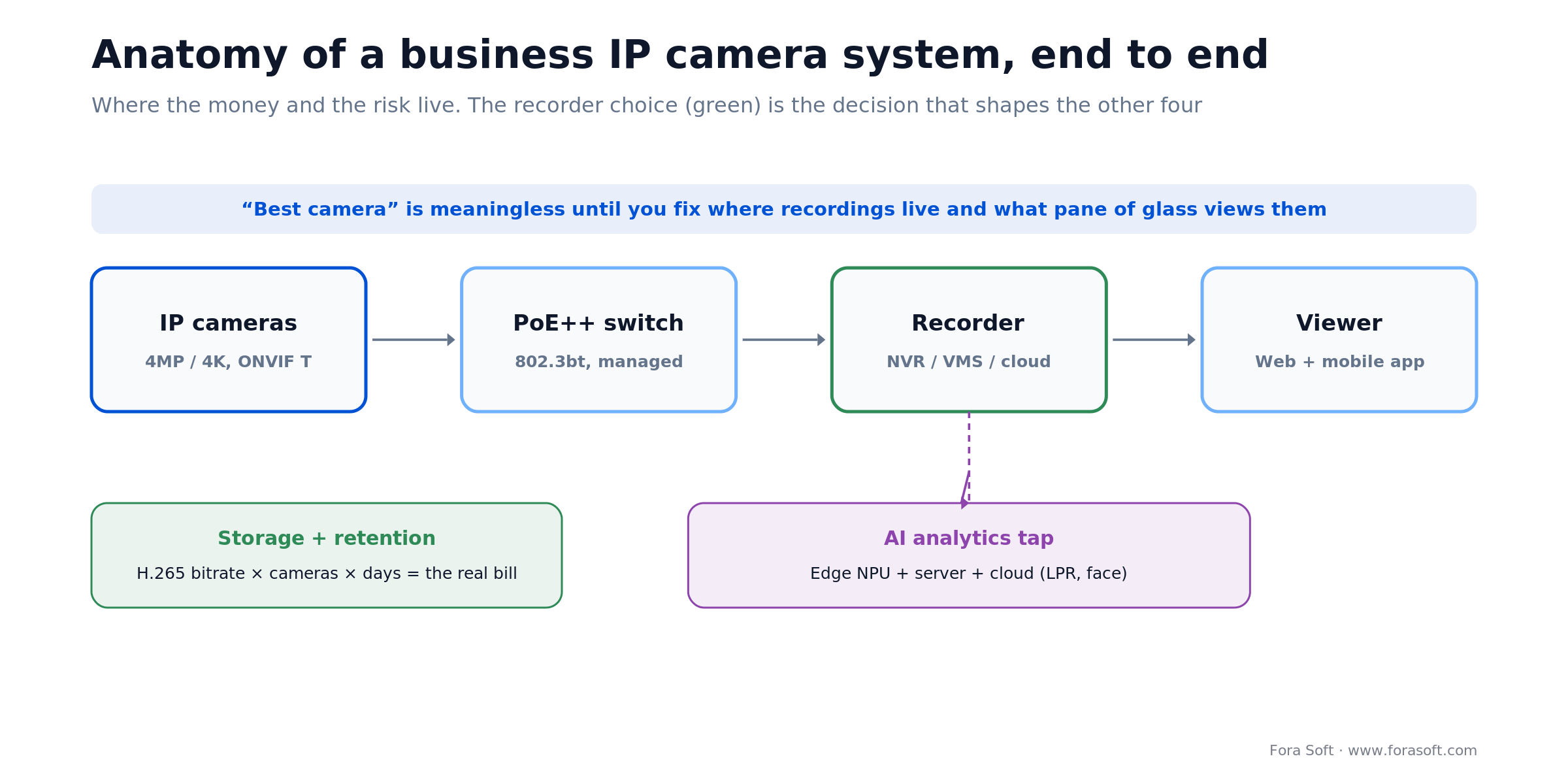
Figure 6. The recorder choice (green) is the decision that shapes the other four boxes.
| Architecture | Capex (16 cams) | Opex / year | Best for |
|---|---|---|---|
| NVR appliance | $10–20k | $500–1.5k (maintenance) | Single site, minimal IT, offline-tolerant |
| Self-hosted VMS (Milestone XProtect, Genetec Omnicast) | $15–30k | $1–4k (licensing + IT) | Multi-site, deep integrations, custom analytics |
| Cloud VSaaS (Verkada, Rhombus, Eagle Eye) | $8–15k | $6–12k subscriptions | No IT, multi-site, fast rollout, managed service |
Figure 7. NVR vs VMS vs VSaaS for a 16-camera business system.
Reach for an on-prem NVR when: it is one site, you can tolerate an offline hour, and data residency or a tight five-year budget matters more than remote convenience. A hybrid NVR with cloud backup (local recording, cloud sync for off-site redundancy and remote viewing) usually beats both pure extremes for 16–32 camera deployments.
The 2026 vendor field, honestly
Enterprise tier (NDAA-compliant, 5-year roadmap)
Axis Communications. The gold standard. Swedish-made, ARTPEC chipsets (ARTPEC-9 on the newest models adds AV1 encoding and stronger deep-learning analytics), signed firmware, TAA-eligible. The premium (30–40% over the market) buys the longest support life, the best documentation, and the tightest ONVIF compliance. Expect $450–1,500 per camera. Where it breaks: sticker shock on large counts.
Hanwha Vision. Korean-made, NDAA/TAA-compliant, Wisenet 9 platform on its newest P and X series, with two NPUs (one for AI image enhancement, one for analytics), FIPS 140-3 Level 3 certification per Hanwha, and F1.2 optics. Best low-light per dollar we have tested, and 15–20% under Axis. $250–1,500 per camera. Where it breaks: third-party analytics ecosystem is thinner than Axis's ACAP.
Bosch Security. German engineering, on-camera Intelligent Video Analytics (IVA), strong for transportation and critical infrastructure. $500–1,500 per camera. Where it breaks: UI feels dated next to the cloud-native players.
Avigilon (Motorola Solutions). Avigilon Unity on-prem and Avigilon Alta in the cloud. Best if you are already in the Motorola / Openpath ecosystem. Where it breaks: licensing lock-in on Unusual Motion Detection and Appearance Search. $500–1,300 per camera.
Cloud VSaaS tier
Verkada. The Apple of cloud cameras — polished, opinionated, expensive. Onboard SSD (up to 256 GB) gives 30–365 days of retention, the Command platform centralizes everything, and FIPS 140-validated crypto helps in regulated shops. Licenses run $199–$1,799 per camera per year on top of $500–$3k hardware. Where it wins: zero-IT operations. Where it breaks: your budget.
Rhombus Systems. Similar pitch, more flexible pricing, strong retail analytics. 30–90 day cloud retention standard.
Eagle Eye Networks. The vendor-agnostic pick — it ingests ONVIF streams from your existing Axis or Hanwha cameras, so you are not forced onto its hardware. $5–15 per camera per month, and it partners with Brivo for unified video plus access control.
Value tier (mind the compliance clock)
Reolink. Dominant in the sub-$500 PoE kit segment. 8-camera 4K kits from $400–$600. No NDAA compliance, but strong hardware for cost-sensitive private buyers with no government exposure.
Uniview. Chinese-made; NDAA-listed status varies by model year, so verify before buying. A solid mid-tier choice for private-sector retail that will never touch a federal contract.
Hikvision / Dahua. Still the global volume leaders and cheapest per spec. In 2026, though, the July import-ban expansion means spares and replacements get harder even for private buyers, and any drift into government-adjacent work makes them a costly rip-and-replace later. Hard pass if compliance is on your horizon; eyes-open only if it truly never will be.
AI analytics: edge, server, or cloud?
Usually all three, layered. The rule of thumb: push the cheap, high-volume detection to the edge, and escalate only the hard, accuracy-critical models to a server or the cloud.
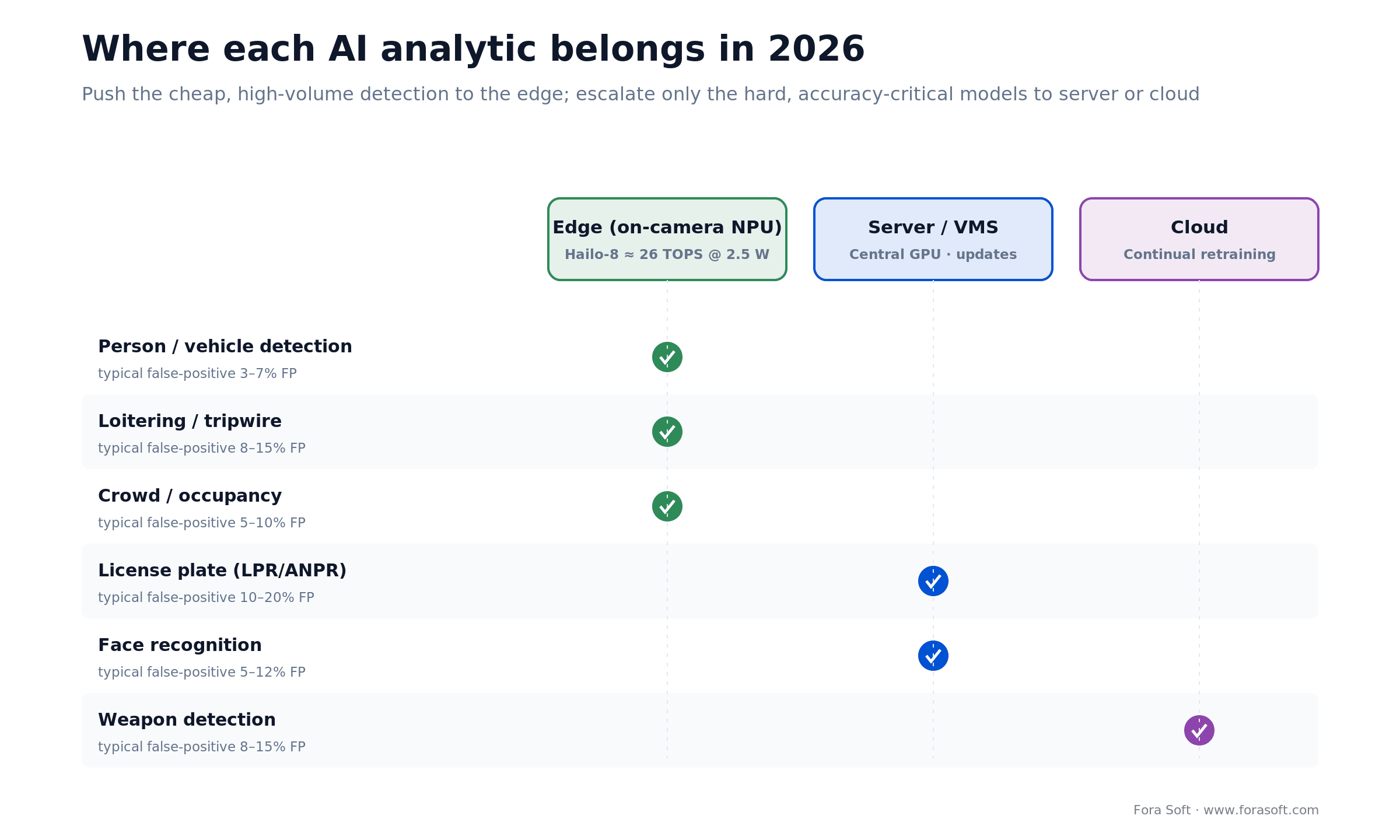
Figure 8. Default placement by analytic. Move a layer only when the business case demands it.
| Analytic | Edge | Cloud / server | Typical false-positive |
|---|---|---|---|
| Person / vehicle detection | ✓ Prefer edge | ✓ | 3–7% |
| Loitering / tripwire | ✓ Prefer edge | ✓ | 8–15% |
| License plate recognition (LPR) | Limited | Prefer cloud / VMS | 10–20% (angle / speed sensitive) |
| Face recognition | Limited | Prefer cloud / VMS | 5–12% |
| Weapon detection | Rare | Cloud-only | 8–15% |
| Abandoned object | ✓ | ✓ | 12–25% |
| Crowd / occupancy | ✓ | ✓ | 5–10% |
Figure 9. Where each analytic belongs in 2026. "Prefer" is the default; move layers only if the business case demands it.
Reach for edge AI when: you want low-latency alerts, private-by-default footage, and a small cloud bill. A Hailo-8 running a YOLO26-class model handles the easy 80% of person/vehicle frames on the camera; only ambiguous frames escalate. We ship exactly this in our AI video analytics for security work.
The pattern we ship in our computer vision for video surveillance builds: edge AI for primary event detection (low latency, low bandwidth), server-side AI for LPR and face identification (higher accuracy, centralized model updates), and cloud inference for specialty models like weapon detection that benefit from continual retraining.
Stuck between cloud VSaaS and self-hosted VMS?
Bring your camera count, compliance needs, and budget range. We will send back a stack recommendation and a ballpark 5-year TCO — and tell you honestly if off-the-shelf is the right call.
Cybersecurity you cannot skip
Cameras are the easiest lateral-movement path into a corporate network. Treat them like servers, not toasters. Search engines like Shodan surface internet-exposed cameras by the thousand — most still running factory-default credentials.
Non-negotiables for 2026:
- Forced password change on first boot — this alone eliminates the most common default-credential attack surface.
- Signed firmware + 5-year patch commitment (Axis, Bosch, Avigilon enforce; check others by model).
- TLS 1.3 with certificate pinning on the NVR / VMS side.
- Dedicated camera VLAN; access-control-list rules block camera-to-server east-west traffic.
- Mutual TLS (client cert) for NVR / VMS access where supported.
- Subscribe to your vendor's CVE feed (Axis Security Advisory, vendor PSIRT, and so on).
If you are federal or CJIS, add FIPS 140-3 validated modules on the NVR / VMS server side. FIPS cameras themselves are rare; the validated boundary is almost always the recorder.
Network, power, and site-survey math
The network is where DIY systems collapse. Rules we enforce on every deployment:
- Budget 3–5 Mbps per 4MP H.265 camera. A 16-camera system needs roughly 50–80 Mbps of aggregate local switch capacity, with headroom.
- Managed PoE++ switch, every time. Cisco Catalyst 9200, Aruba CX 6300, Dell N-series. Unmanaged switches kill latency under load.
- WAN sizing: sum of camera bitrates plus 25–50% headroom for continuous cloud recording (16 × 4 Mbps ≈ 64 Mbps, so plan 80–100 Mbps of upload); event-only cloud upload needs far less. ISP over-subscription is the usual reason VSaaS ingest falls 24–48 hours behind.
- Cat 6a, not Cat 5e. Cat 5e works, but 10GbE upgrades force a rewire.
- UPS on switches and NVR. A two-hour power blip can drop retention on an already-full NVR.
Always run a site survey before signing. Relocating cameras after install runs $150–300 per camera in labor — and that is if conduit is already in place.
Cost model: what a 16-camera business system really costs
Five-year TCO by deployment profile, based on recent Fora Soft deployments and market benchmarks. The numbers are realistic, not sticker-shock.
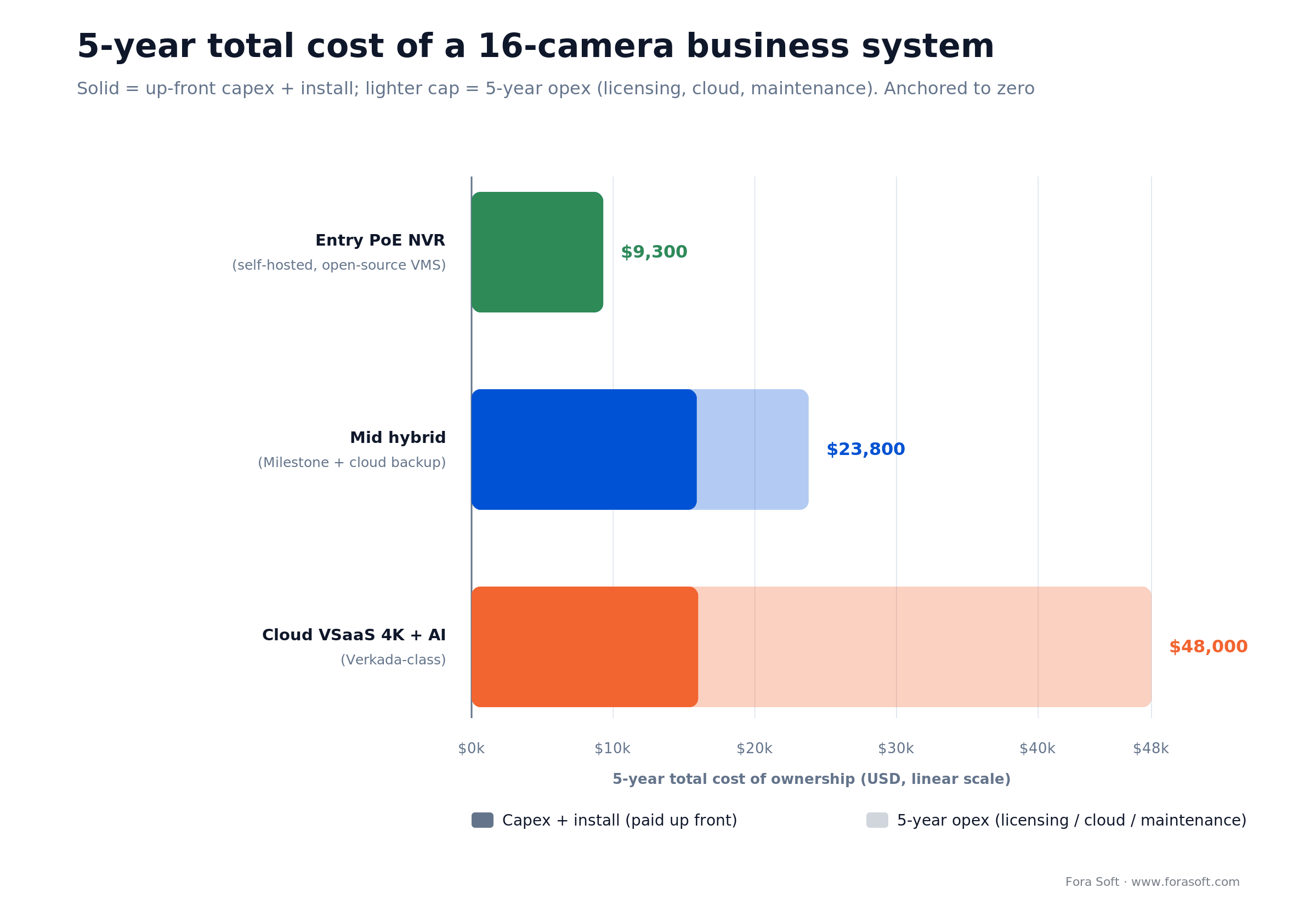
Figure 10. The gap between tiers is opex, not hardware — cloud VSaaS front-loads convenience and back-loads the bill.
| Line item | Entry PoE NVR | Mid hybrid | Cloud VSaaS 4K + AI |
|---|---|---|---|
| 16 cameras | $2,500 | $5,600 | $11,200 |
| NVR / switch / infra | $2,000 | $5,500 | $0 (managed) |
| Install labor | $4,800 | $4,800 | $4,800 |
| VMS / cloud licensing (5 yr) | $0 (open source) | $4,000 (Milestone) | $32,000 ($400 / cam / yr) |
| Cloud backup / remote (5 yr) | $0 | $1,900 | bundled |
| Maintenance (5% / yr) | $0 | $2,000 | bundled |
| 5-year TCO | $9,300 | $23,800 | $48,000 |
Figure 11. Realistic 5-year TCO for a 16-camera business system by architecture, 2026.
Integration work — tying cameras into access control, alarm, or ERP — typically adds 40–80 hours of engineering. For a team using agent-assisted development the way we do, that is usually a 1–2 week sprint rather than a month.
US tax note. Cameras, recorders, and installed security hardware usually qualify as Section 179 property: for tax years beginning in 2026 you can expense up to $2,560,000, phasing out once purchases pass $4,090,000 (IRS Rev. Proc. 2025-32). Cloud VSaaS subscriptions are operating expense instead. Confirm the treatment with your accountant.
Running 2–5 sites? Treat each site as its own line for cameras, recorder or gateway, and install, then add one central VMS or cloud console. Cloud licences scale per camera, while on-prem needs a recorder and someone to patch it at every site — the main reason cloud starts to win from about three sites.
When custom software beats off-the-shelf
Off-the-shelf VMS (Milestone, Genetec, Verkada) covers about 80% of use cases. The remaining 20% is where most of the business value sits for vertical-specific products. Typical triggers to build custom:
- Vertical workflow — legal interview recording, telemedicine consultation capture, forensic evidence chain-of-custody.
- Domain AI models — crowd behavior, industrial safety, retail shrinkage patterns that generic VMS analytics miss.
- Regulatory requirements — CJIS, HIPAA, SOC 2 Type II that demand specific evidence trails, retention policies, and access audit logs.
- Multi-vendor ingestion at scale — 50+ cameras from three vendors behind a single operator console.
- Product companies — if IP camera software is the product you sell, you cannot white-label Milestone.
Reach for custom software when: the video-management layer is core to a product you sell, tightly coupled to a regulated workflow (courtroom, hospital, lab), or stitching together more than three enterprise systems that off-the-shelf connectors do not cover. That is roughly 15–20% of buyers — and where our custom video processing team does most of its work.
VALT is the textbook example. It ingests up to 16 simultaneous camera streams per room, applies forensic-grade watermarking, and serves 770+ US organizations and 50,000+ users across law-enforcement interview suites. Generic VMS could not satisfy the evidence-retention and access-audit requirements for that buyer — so we built the layer that could. See the VALT case study.
Mini case: a 32-camera courthouse rollout
A county court system asked us to replace aging analog CCTV across three courthouses with an IP camera platform that met CJIS and state retention requirements. The buyer had been quoted $410k by a traditional integrator for a pure Genetec + Axis build.
What we actually shipped:
- 32 Axis and Hanwha cameras (mixed 4MP + 4K, NDAA/TAA-compliant).
- Custom operator console on top of Milestone XProtect — unified evidence export, CJIS-grade audit trail, role-based access, FIPS 140-3 server cryptographic module.
- Edge AI triggers (person / vehicle at the perimeter) that fired webhook events into the county's access-control system.
- 7-year retention for evidence exports and flagged incidents (continuous footage on a shorter rolling window), across replicated on-prem storage with weekly integrity checks.
Outcome: shipped end-to-end in ten weeks at roughly 60% of the original integrator quote, with a custom operator UI that cut incident-review time by more than 40%. If that shape of project sounds familiar, grab a 30-minute call and we will sketch an approach.
Integrations that move revenue
If you are the buyer, ask integrators which of these they have shipped three or more times. If you are a product company, these are the integrations that most often close deals.
- Access control (Brivo, Avigilon Alta, HID, Genea, Openpath) — a badge event triggers a 30-second video-clip export. Pairs naturally with video intercom software.
- Alarm / intrusion (Bosch, Honeywell, DMP) — a zone alarm links to a camera tour for verification.
- Retail POS — cash-register transactions overlay onto synchronized video for loss prevention.
- Mobile apps — branded iOS / Android apps for multi-site operators. See our work on AI-powered mobile apps.
- Building management (BMS) — HVAC occupancy triggers camera PTZ to a zone via MQTT or BACnet bridges.
- Custom dashboards — multi-site KPI, foot-traffic, and incident-volume analytics exported to Looker, Power BI, or Grafana.
Building a product on top of IP cameras?
Vertical SaaS, specialized analytics, or regulated-industry evidence management — we have shipped that pattern dozens of times. Bring the workflow you want to automate and we will scope the build.
Five pitfalls that cost buyers real money
Every pitfall below we have seen inside the last 18 months, more than once.
- Default credentials left live after install. The single most common breach path. Forensic cleanup runs $15k–$80k per incident. Fix: enforce first-boot password change and schedule quarterly rotations.
- No site survey. Cameras installed without measuring lighting, focal length, or blind spots; repositioning runs $150–$300 per camera. Prototype critical zones first.
- Consumer PoE switch on 16 cameras. Jitter and dropouts start at 8 cameras and become chronic at 16. Budget a managed PoE++ switch from day one.
- Oversubscribed WAN for cloud VSaaS. Ingest falls 24–48 hours behind and AI analytics stop firing. Size the upload link for the sum of camera bitrates plus headroom and confirm it is not shared.
- Assuming plug-and-play integration. "ONVIF compatible" is not an integration contract. Access-control or ERP linkage takes 40–80 hours of scoping, API keys, schema mapping, and QA.
The 12-item RFP / buying checklist
Copy this into your RFP. Any vendor that cannot answer “yes, documented” to all 12 is not ready for your deployment.
- NDAA / TAA compliance status, per model, dated 2026.
- ONVIF Profile T (plus Profile M for analytics) conformance statement; Profile S alone is no longer enough.
- H.265 (HEVC) smart-codec support.
- Signed firmware + vulnerability disclosure policy (for EU sales, the CRA 24/72-hour reporting process).
- Forced default-password reset on first boot.
- TLS 1.3 + certificate pinning support on camera and NVR.
- 5-year security patch commitment.
- Documented API / webhook for access-control or alarm integration.
- Edge AI NPU (model, TOPS, supported analytics).
- PoE class (af / at / bt) and power budget.
- Local + cloud storage tiering with documented retention SLAs.
- Reference customers with a similar vertical + deployment size.
Compliance: NDAA, FCC, CJIS, HIPAA, GDPR, and the EU AI Act
NDAA Section 889 — US federal and federal-funded buyers cannot use Hikvision, Dahua, Huawei, ZTE, Hytera, or their OEM rebrands. Check the vendor's current compliance letter, not a forum post. Note the 2026 FCC import-ban expansion above: even non-federal buyers now face a shrinking supply of spares for banned brands.
TAA (Trade Agreements Act) — the country of final manufacture must be on the designated list. Axis (Sweden), Hanwha (South Korea), Bosch (Germany), and Panasonic i-PRO (Japan) qualify. Uniview (China) does not, even for NDAA-listed models.
CJIS — law-enforcement video storage requires audit trails, FIPS-validated encryption at rest (AES-256 under the current CJIS Security Policy), and per-user access logs. Genetec and Milestone support it out of the box with configuration; cloud VSaaS requires the vendor's CJIS attestation document.
HIPAA — hospital corridor cameras that incidentally record patients fall under HIPAA. Retention policies must match the Business Associate Agreement (BAA); many VSaaS vendors now publish HIPAA-ready tiers.
GDPR — EU deployments require a Legitimate Interest Assessment and signage. A blanket "keep everything 90 days" default violates GDPR in most member states. Configure retention by zone and purpose. We translate these rules into product decisions — we are not lawyers, and we say so.
France — for shops and offices the practical retention ceiling is one month; cameras that film areas open to the public need prior authorization from the prefect; employees must be informed individually and staff representatives consulted before installation (CCI Paris Île-de-France).
EU AI Act — real-time remote biometric identification in publicly accessible spaces for law enforcement has been prohibited since February 2, 2025, with narrow exceptions. Obligations for high-risk biometric systems (Annex III) moved from August 2, 2026 to December 2, 2027 under the Digital Omnibus, Regulation (EU) 2026/1744, in force since July 27, 2026 (Cooley, 2026). If face recognition is on your EU roadmap, design for those obligations now.
EU Cyber Resilience Act — manufacturer reporting of exploited vulnerabilities and severe incidents applies from September 11, 2026 (see above). Ask every vendor on your shortlist how they meet it.
What to expect in 2027–2028
Three shifts we are preparing clients for:
- H.266 / VVC silicon will start shipping in enterprise cameras, giving another ~50% bitrate reduction over H.265. Plan for a camera refresh cycle, not a firmware update.
- Multimodal VLM analytics (vision-language models) will replace single-purpose NPU models for custom behaviors — "alert me when someone enters the lobby carrying a box larger than 30 cm" without retraining a model. We are prototyping this on production pipelines now.
- Cloud-native VMS built on WebRTC + WebCodecs will push Milestone and Genetec toward full browser-based operator consoles. Today's Windows-only clients will look dated.
None of this obsoletes today's purchase — good Axis, Hanwha, or Bosch hardware has a 7–10 year life — but it should shape your VMS and analytics contracts.
FAQ
What are the best IP camera systems for business in 2026?
For most businesses in 2026, the strongest NDAA-compliant picks are Axis and Hanwha on the hardware side, Milestone XProtect or Genetec Security Center for self-hosted VMS, and Verkada, Rhombus, or Eagle Eye for cloud VSaaS. The right one depends on your compliance posture, whether you have in-house IT, and your five-year budget — not on megapixel count.
How many IP cameras does a typical small business need?
Most 5,000–20,000 sq ft sites land at 8–24 cameras: cover entries, POS, stockroom, back dock, and perimeter, plus one PTZ for parking. More cameras than you can meaningfully monitor is cost with no return.
Is 4K always better than 4MP for business cameras?
No. 4MP on a 1/1.8-inch sensor usually beats 4K on a 1/3-inch sensor, especially in low light. Reserve 4K for zones that need forensic detail — LPR, entry-portal face capture, cash handling — and use 4MP everywhere else. That roughly halves your storage bill.
Can I mix camera brands behind one VMS?
Yes, as long as every camera is ONVIF Profile T compliant. Milestone and Genetec happily ingest Axis, Hanwha, and Uniview on the same server. Cloud VSaaS varies — Eagle Eye is flexible, while Verkada and Rhombus prefer their own hardware.
Are Hikvision cameras still legal to buy for a private business in 2026?
Using existing units is generally still legal in most jurisdictions, but since July 16, 2026 the FCC bans importing and marketing new and previously authorized Hikvision and Dahua models for public-safety, government-facility, and national-security surveillance; private buyers mostly feel it as a shrinking supply of spares. Federal contracts and federal-funded projects reject them outright under NDAA Section 889. The practical risk for a private buyer is a shrinking supply of spares and an expensive rip-and-replace if your buyer profile ever expands into government or regulated work.
Do I need AI analytics on day one?
Probably not all of them. Start with edge person / vehicle detection on perimeter cameras and tripwire alerts at critical zones. Add LPR and crowd-counting once you know which zones generate the most noise. Buying the maximum analytics bundle upfront is the fastest way to drown in false-positive alarms for six months.
Cloud VSaaS or on-prem NVR — which is cheaper at scale?
On-prem usually wins on pure five-year TCO for single-site deployments above 16 cameras. Cloud wins once you have 3+ sites, no on-prem IT staff, or a strong preference for opex over capex. Hybrid (local recording plus cloud backup) is often the best balance of cost and resilience for 16–50 cameras across one or two sites.
When should I build custom software instead of buying Milestone or Verkada?
When the video-management layer is either core to a product you sell, tightly coupled to a regulated workflow (courtroom, hospital, laboratory) that generic VMS does not encode, or integrating more than three enterprise systems that off-the-shelf connectors do not cover. That is roughly 15–20% of buyers, and it is where Fora Soft does most of its work.
What are the top IP camera systems for small business?
For one site with 8–16 cameras, NDAA-compliant Hanwha or Axis cameras on a PoE NVR or Milestone XProtect give the lowest five-year cost, about $11k–$24k for 16 cameras (the $9.3k entry tier in our cost model assumes value-brand cameras). With several sites and no IT staff, Rhombus, Eagle Eye, or Verkada cloud VSaaS cost more per year but need no on-site server.
Which IP CCTV platforms integrate best with access control?
Avigilon Unity and Alta, Verkada, and Genetec Security Center ship video and access control as one platform, and Eagle Eye pairs with Brivo. Joining two separate ecosystems works too, but budget 40–80 hours of integration through their APIs.
What is the best cloud surveillance for enterprises?
Verkada for a polished all-in-one platform, Eagle Eye if you want to keep your existing ONVIF cameras, and Avigilon Alta if you already run Motorola access control. All three bill per camera per year, so compare five-year cost, not the hardware quote.
How often does a business IP camera system need maintenance?
Check recording, retention, and time sync monthly; apply firmware and VMS patches and rotate passwords quarterly; clean lenses and housings, test the UPS, and review disk health once or twice a year. In the EU, put your vendor’s CRA vulnerability notices on the same patch calendar.
Do any IP cameras integrate with project-management tools?
Not natively. Verkada, Rhombus, Eagle Eye, Milestone, and Genetec expose APIs or webhooks, so a small middleware service can turn camera events into Jira, ServiceNow, or Slack tickets; expect a one- to two-week build.
What to read next
Ready to buy, or build?
If you are buying off-the-shelf, you now have the checklist. Start with compliance posture, pick the architecture (NVR, VMS, or VSaaS), then vendors, then models — in that order. Budget $9k at the low end and $48k at the high end for a 16-camera deployment over five years.
If you are building a product on top of IP cameras — vertical SaaS, specialized analytics, regulated-industry evidence management — we have shipped that pattern dozens of times. We do not resell hardware and we do not take referral fees. We build the software that turns your cameras into something defensible.



The handbook · 7 volumes
Fora Soft Video Engineering Handbook
Every camera in this guide ends up feeding the same pipeline: an encoder, a recorder and an analytics layer that has to keep up with the stream. We wrote the seven-volume Fora Soft Video Engineering Handbook around that pipeline, and Volume 6 is the one to start with for detection, tracking and on-camera versus server inference. Volume 1 explains what H.265 and bitrate settings really cost in storage, and Volume 7 covers real-time pipelines, cost per stream-hour and biometric rules. Written by Nikolay Sapunov, CEO at Fora Soft.
Browse the handbook on Amazon →7 volumes · 9,000+ pages · Kindle & paperback
Scope your video-surveillance product in 30 minutes
Bring your camera count, compliance requirements, and the workflow you want to automate. You will leave with a stack recommendation, a rough timeline, and a short architecture memo.
References
FCC / Federal Register (Dec 2025). Protecting Against National Security Threats to the Communications Supply Chain Through the Equipment Authorization Program. federalregister.gov/documents/2025/12/04/2025-21928
Hailo (2026). Hailo-8 AI accelerator (26 TOPS). hailo.ai/products/ai-accelerators/hailo-8-ai-accelerator
FCC (June 2026). Public Notice DA 26-635: Prohibiting Importation and Marketing of Previously Authorized Covered Equipment. docs.fcc.gov/public/attachments/DA-26-635A1.pdf
FCC / Federal Register (Sept 2026). Equipment Authorization Program final rule, revised critical-infrastructure definition, effective Oct 13, 2026. federalregister.gov/documents/2026/09/11/2026-18535
ONVIF (Oct 2025). ONVIF to End Support for Profile S; Recommends Profile T as Replacement. onvif.org
European Commission (2026). Cyber Resilience Act: reporting obligations. digital-strategy.ec.europa.eu/en/policies/cra-reporting
Cooley (2026). Digital AI Omnibus delays key deadlines, Regulation (EU) 2026/1744. cdp.cooley.com
IRS (2025). Rev. Proc. 2025-32, 2026 inflation adjustments, §179 limits. irs.gov/pub/irs-drop/rp-25-32.pdf
Axis Communications via Security Systems News (Nov 2024). ARTPEC-9 chip with AV1 encoding.
Hanwha Vision (2025). Wisenet 9 SoC. hanwhavision.com/product/wisenet-9
CCI Paris Île-de-France (2026). Vidéosurveillance et vidéoprotection au travail.
Pelco (2026). NDAA-compliant cameras: Section 889 vendor list. pelco.com/blog/ndaa-compliant-cameras

