


A camera that only records is a filing cabinet you visit after something has already gone wrong. A camera that flags the fight before the first punch, the forklift drifting into the pedestrian lane, or the plate that has circled the lot for an hour is a security system. Closing that gap is what AI video analytics does, and in 2026 it stopped being a moonshot. It’s a procurement line item boards expect to see — and getting it wrong is expensive: a missed weapon, a false SWAT call, or a six-figure platform nobody in the SOC actually watches.
We’ve shipped AI video products since 2017 and production video systems since 2005, across 250+ projects. This is the playbook we wish someone had handed us: what AI video analytics for security actually is in 2026, the eight use cases that pay for themselves, the seven-layer architecture we deploy, seven platforms compared side by side, the compliance map after this summer’s EU rule change, a real cost model for 200 cameras, and the pitfalls that quietly kill these projects. It’s long. It’s practical. We wrote it for security directors, IT and OT leaders, and product owners who have to make a call this quarter.
Key takeaways
• The market is real money now. Video analytics runs roughly $14.65B in 2026 and is headed to $41.39B by 2031 at a 23.1% CAGR (MarketsandMarkets); analyst estimates for 2026 span $14.6–18.5B.
• Edge hardware got cheap. YOLO26 (Jan 2026) runs end-to-end and NMS-free, about 43% faster on CPU than YOLO11, so real-time detection on a $249 Jetson Orin Nano Super is table stakes.
• Loss prevention pays for itself. US retail shrink hit a record $112.1B in 2022 (NRF’s last full survey, ~1.6% of sales); AI loss-prevention deployments report 30–83% fewer theft incidents within a year.
• The compliance clock just moved. EU AI Act prohibitions have applied since Feb 2025, but the Digital Omnibus (Council green light 29 Jun 2026) pushed high-risk duties to Dec 2027 / Aug 2028. NDAA 889 already bars Hikvision and Dahua from federal work.
• Edge is the default. Local inference cuts uplink to kilobits and keeps detecting if the WAN drops; over ~50 cameras it wins, with the cloud kept for forensic re-search and model training.
Why Fora Soft wrote this guide
We’ve built AI video software since 2017 and shipped production video surveillance systems since 2005. That gives us an unusual vantage point on smart security: we watched it move from forensic search (replay yesterday’s footage to find the suspect) to live decisioning (alert the on-shift guard before the suspect reaches the door). Most of what we know we learned shipping things that broke in production, then fixing them on a Saturday at 2 a.m.
A few of the products behind this guide:
- MindBox — an intelligent video management system with 99.5%+ facial recognition and an ANPR module reading 500,000+ vehicles a day, running across 50+ enterprise deployments since 2020.
- V.A.L.T. — a multi-room recording and observation platform used by 770+ organizations and 50,000+ active users for security, training, and compliance recording.
- Industrial PPE detection — hard-hat, vest, and exclusion-zone detectors on construction and energy sites.
- Retail loss-prevention pilots — sweethearting, ORC pattern recognition, and self-checkout monitoring.
Two things make this different from the marketing PDFs elsewhere. First, we have skin in the game: everything here we either operate ourselves or built for paying customers. Second, our Agent Engineering practice delivers these projects roughly 30–50% faster than a traditional shop — we use AI to write boilerplate, generate test fixtures, and draft ONVIF integrations, so our estimates often look low. They aren’t. They’re just current.
Skip the reading and get a straight answer?
A 30-minute call with our CTO: walk through your camera fleet, your VMS, and your compliance constraints, and hear what’s actually feasible — no slides.
What AI video analytics for security actually is
AI video analytics is the layer that turns raw video frames into structured events — “person crossed line at 14:32:08, confidence 0.94” — so downstream systems (a VMS, an access-control panel, a SOC, a phone app) can act on them. For security work it spans seven primitives: object detection, multi-object tracking, person re-identification, action and behaviour classification, facial recognition, licence-plate recognition, and anomaly detection. Each is a model. Each model carries a latency, an accuracy, a hardware budget, and a compliance footprint.
It is not motion detection (a 1990s trick that fires on swaying trees), it is not ChatGPT pointed at a video feed (the latency and cost don’t add up for live monitoring), and it is not a “smart camera” with proprietary firmware that locks you into one vendor (you’ll regret that in year three).
A useful mental model: AI security analytics stacks three layers above the camera. Perception (what’s in the frame), understanding (what’s happening across frames), and action (what to do about it). Most off-the-shelf platforms ship perception well, ship understanding partially, and leave action almost entirely to you. That last layer is where projects either succeed or quietly die.
Market snapshot: where smart-security spend is heading in 2026
The numbers are converging. Analyst houses still publish different absolute totals — MarketsandMarkets pegs video analytics at $14.65B in 2026 heading to $41.39B by 2031 (23.1% CAGR), Mordor lands at $15.04B, Fortune at $14.81B, and Precedence higher at $18.53B — but the shape is consistent: low-20s percent annual growth, with most new spend going to AI-driven analytics rather than plain VMS or storage.
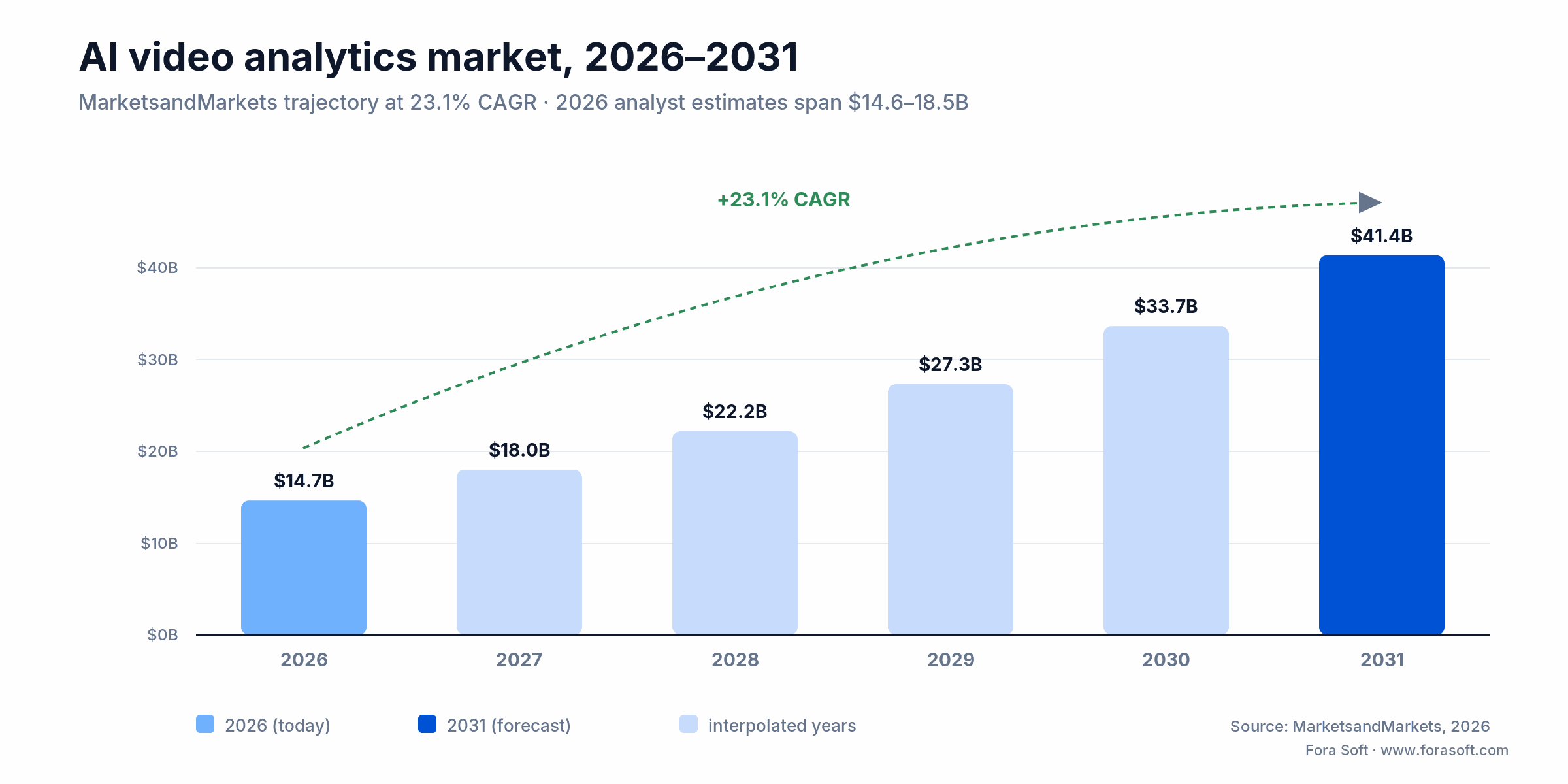
Figure 1. The 2026–2031 growth curve on the MarketsandMarkets trajectory, with the analyst spread for 2026 noted.
A few data points worth holding onto:
- Edge AI camera and accelerator shipments keep climbing as Jetson Orin and Hailo modules drop under the $250 mark, moving inference off the server and onto the wall.
- US retail shrink hit a record $112.1B in 2022 — the last comprehensive figure from the NRF National Retail Security Survey, about 1.6% of sales. NRF has since stopped publishing the full annual shrink report.
- AI-pilot conversion to production in physical security is still the choke point — most stalls happen at integration with the legacy VMS and at alert fatigue, not at model accuracy.
- NDAA Section 889 keeps propagating: federal contracts can’t use Hikvision, Dahua, Hytera, Huawei, or ZTE gear, and state and enterprise buyers are mirroring the rule.
If you’re planning a 2026 budget, the takeaway is blunt: hardware is cheaper than ever, models are commoditising, and the differentiator is integration. The cost shifted from “buy the analytics” to “wire the analytics into the workflows people run all day.”
Eight use cases where AI security analytics earns its keep
We’ll spare you the “possibilities are endless” framing. In our intake, eight use cases account for roughly 90% of what ships. They’re ordered by maturity — the higher up the list, the more likely you’ll find off-the-shelf models that work out of the box.
1. Retail loss prevention and ORC detection
Self-checkout sweethearting, organised retail crime (ORC) patterns, after-hours intrusion. The models watch for skip-scans (item past the scanner with no beep), bagging anomalies, and known-offender re-entry. Reported shrink reductions from production deployments run 30–83% within twelve months. See our deep dive on retail video analytics.
2. Public safety and smart cities
ALPR for stolen-vehicle alerts, crowd-density estimation, weapon detection in public squares, fight detection in transit hubs. The legal envelope is tight here — the EU AI Act treats real-time remote biometric identification in public spaces as a prohibited practice with narrow exceptions — so most production systems run investigative replay rather than live public identification.
3. Transportation and parking
Wrong-way detection on highways, tailgating at tolls, parked-vehicle classification, abandoned-luggage detection in airports. Ingest is usually PTZ feeds and ANPR cameras at lane level. Our own MindBox reads 500,000+ vehicles a day in this segment.
4. Industrial PPE and safety compliance
Hard hat, high-vis, safety glasses, and fall-arrest-gear detection on sites, refineries, and warehouses, plus exclusion-zone monitoring (no person in an excavator’s swing radius) and forklift-pedestrian proximity alerts. We unpack this in our guide to hard-hat detection.
5. Healthcare campuses
Patient-fall detection, elopement monitoring (a wandering patient leaves a unit), aggression escalation in EDs. HIPAA forces on-prem inference and tight access logs, so cloud-only solutions are usually a non-starter.
6. Schools and universities
Weapon detection at entrances, lockdown automation, after-hours intrusion. This market is unforgiving on false positives — one false weapon alert that triggers a SWAT response can end an administrator’s career — so vendors gate alerts behind a human reviewer in a 24/7 SOC.
7. Government and critical infrastructure
Substation perimeters, water treatment, ports. NDAA-compliant cameras only (Axis, Hanwha, Bosch, i-PRO, Verkada). Most deployments are air-gapped and use one-way data diodes to report up to a SIEM.
8. Construction and site progress
Material-delivery counting, equipment idle-time analysis, after-hours theft, perimeter intrusion. Often a temporary mast-mounted camera with cellular backhaul and a small Jetson box at the base running the analytics.
Reference architecture: the seven-layer security pipeline
Every smart-security system we’ve shipped looks about the same under the hood. Seven layers, each of which we build or integrate in nearly every project. Skip one at your peril — the layer you skip is usually the one that bites you in production.
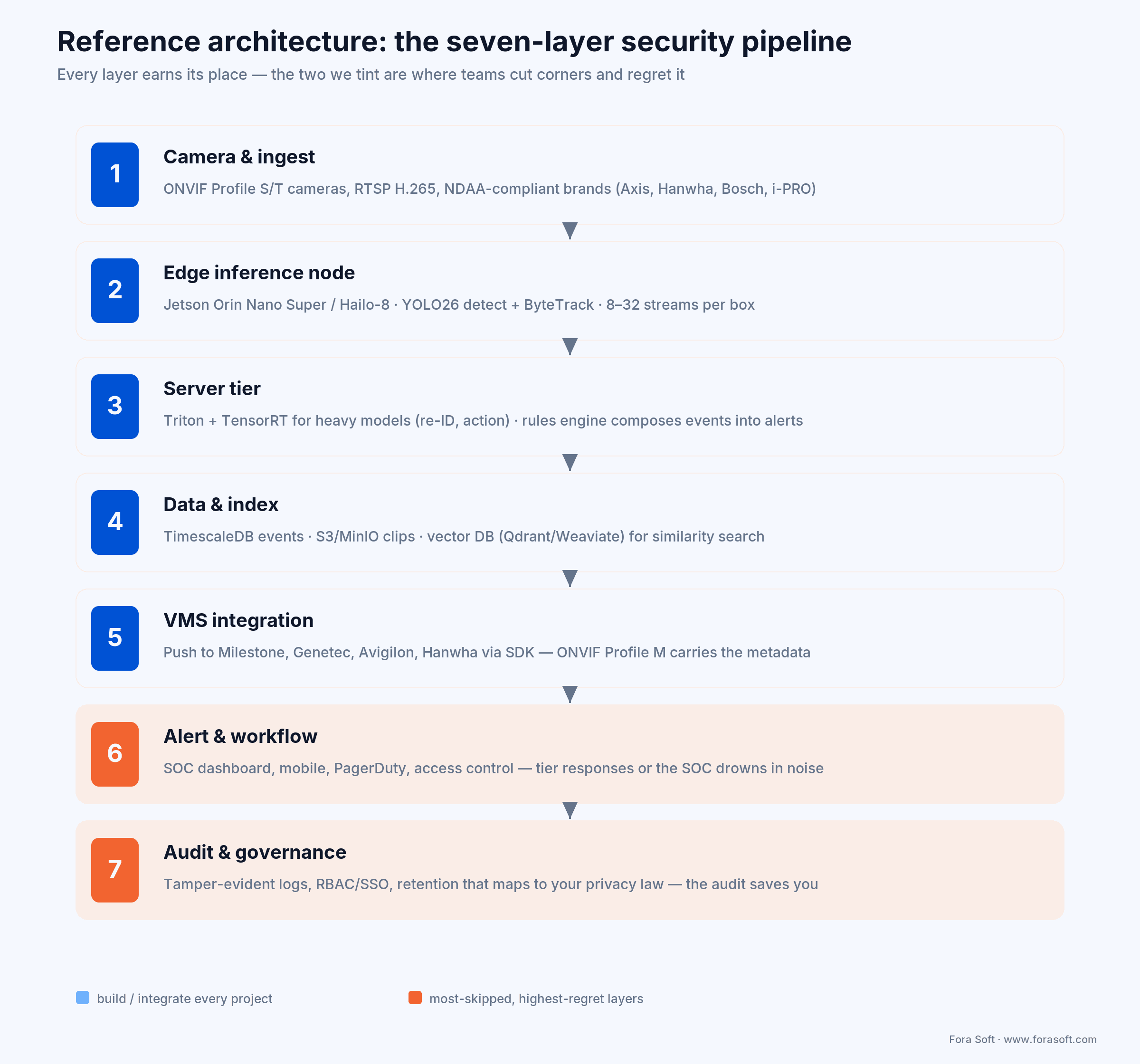
Figure 2. The seven layers, with alert-and-workflow and audit-and-governance tinted — the two teams cut and regret.
Layer 1 — Camera and ingest. ONVIF Profile S/T cameras feeding RTSP (H.264/H.265) into a media server. For greenfield we recommend NDAA-compliant brands (Axis, Hanwha, Bosch, i-PRO) at 4MP+, 30fps, with WDR. Avoid analytics baked into the camera unless the job is binary (motion / no motion): keep the model on a box you control.
Layer 2 — Edge inference node. A Jetson Orin (Nano Super / NX / AGX) or an Intel + Hailo-8 box at the closet level handling 8–32 streams. It runs YOLO26 or YOLO11 for detection, ByteTrack or BoT-SORT for tracking, and a quantised face/ALPR model where needed, emitting structured events over MQTT or gRPC.
Layer 3 — Server tier. NVIDIA Triton + TensorRT for anything too heavy for the edge (cross-camera re-identification, complex activity recognition). This tier also runs the rules engine that combines events into alerts: “person + loitering > 60s + after hours = alert.”
Layer 4 — Data and index. PostgreSQL/TimescaleDB for events, S3-compatible storage (MinIO or AWS S3) for clips, and a vector DB (Qdrant or Weaviate) for similarity search — “find every clip with a person in a red jacket between 6 and 8 p.m.”
Layer 5 — VMS integration. Pushing detections back into Milestone XProtect, Genetec Security Center, Avigilon Control Center, or Hanwha Wisenet via their SDKs, with ONVIF Profile M carrying the analytics metadata. Most projects underestimate this: vendor SDKs are often thinly documented and need real glue code.
Layer 6 — Alert and workflow. A SOC dashboard, mobile app, and hooks into PagerDuty/Opsgenie, two-way radio dispatch, and access panels (HID, LenelS2, Genetec Synergis). This is what your customer sees every day. Budget for it accordingly.
Layer 7 — Audit and governance. Tamper-evident logs for every detection, override, and clip access. RBAC and SSO at the operator level. Retention that maps to your local privacy law — usually 14–90 days for raw video, longer for tagged events.
Reach for a custom pipeline when: you run 200+ cameras or 10+ sites, need a VMS the SaaS vendors don’t integrate with, or you’re building the analytics into a product you sell — the cases where a fixed SKU quietly caps what you can ship.
Comparison: seven AI video analytics platforms
If you’re evaluating off-the-shelf, the practical shortlist in 2026 looks like this. Pricing is indicative — everyone discounts on multi-year deals — so treat these as anchor points, not quotes.
| Platform | Best for | Edge or cloud | Indicative price | Watch-out |
|---|---|---|---|---|
| Verkada | Mid-market unified physical security | Edge-first, cloud command | $500–3,000/cam + $199–1,799/cam/yr | Locked-in hardware; export is hard |
| Avigilon (Motorola) | Large enterprise; appearance search | Hybrid (server + edge) | ~$700–1,500/cam + ACC licence | Per-camera licence adds up fast |
| Genetec Security Center | Government, transport, large campuses | On-prem + cloud add-ons | Quote-based; channel-only | Steep curve; integration-heavy |
| Rhombus | Multi-site SMB; cloud-native | Edge + cloud | ~$700–1,400/cam + $200–500/cam/yr | Fewer integrations than Verkada |
| Eagle Eye Networks | Cloud VMS over existing cameras | Cloud-first via on-site bridge | $15–50/cam/mo + bridge | Bandwidth-hungry; latency varies |
| Spot AI | Adds AI to an existing fleet | On-prem appliance + cloud | ~$50–100/cam/mo all-in | Newer ecosystem; fewer integrations |
| Custom (Fora Soft & similar) | Anything that doesn’t fit a SKU; product platforms | You decide | $80k–400k build, then per-camera marginal | Needs a real engineering partner |
Pricing reflects publicly observed ranges as of Q1 2026 and shifts with discounts and multi-year terms. Directional anchor, not a quote.
Reach for a turn-key SaaS platform when: you’re under ~50 cameras across one or two sites, you don’t staff an ops team, and your use cases are covered by stock models — below that line, SaaS is almost always cheaper than building.
Edge vs cloud: where to put the inference
For any deployment over about 50 cameras, edge inference is the default. The reasons are unglamorous and decisive: bandwidth, latency, and cost. We covered the trade-offs in integrating analytics with an existing VMS; here’s the short version.
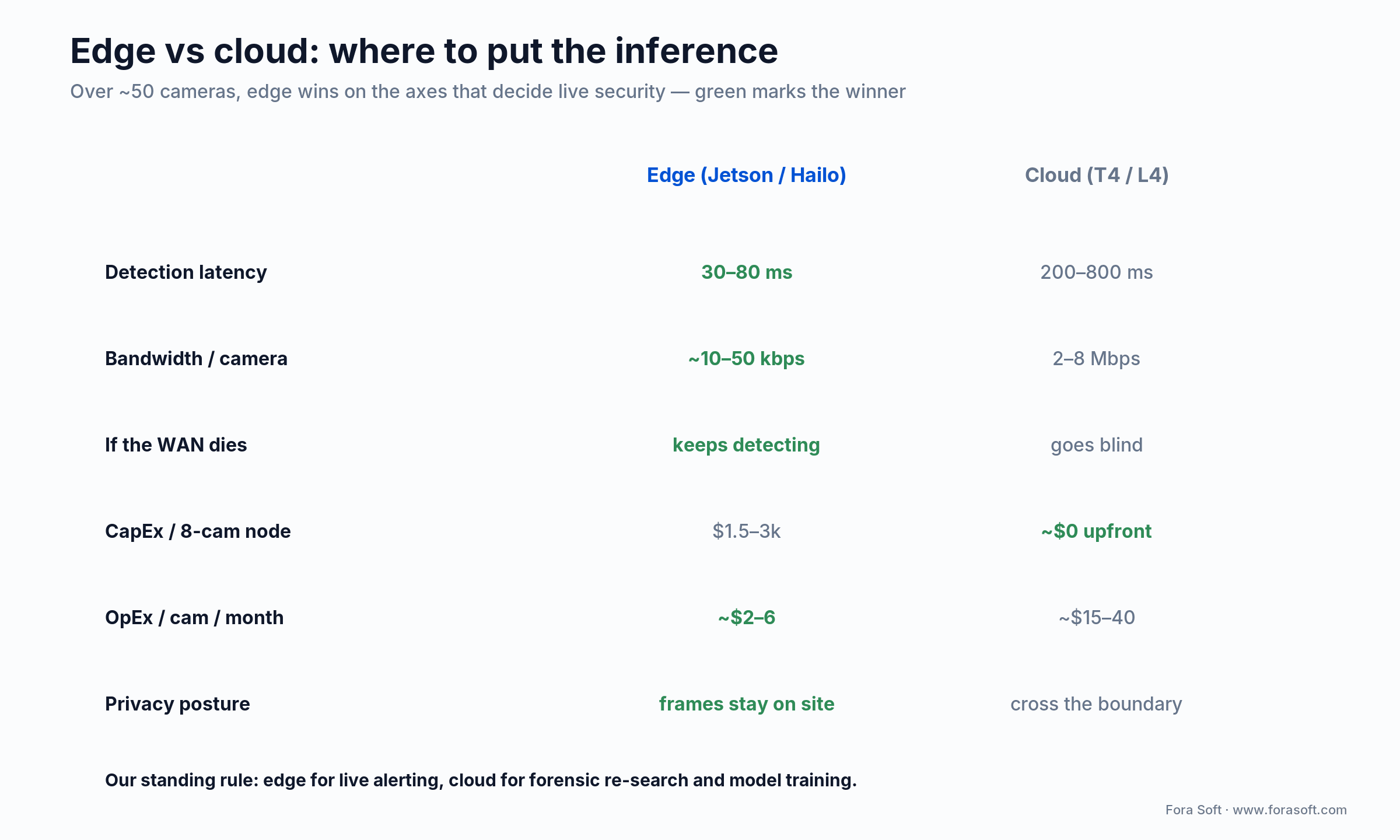
Figure 3. Edge wins the axes that decide live security; the cloud earns its place on forensic re-search and training.
Our standing rule is edge for live, cloud for forensic and training. Local inference gives 30–80 ms detection and ~10–50 kbps of uplink per camera versus a 200–800 ms round trip and 2–8 Mbps when you push full streams to the cloud — and if the WAN dies, the edge keeps detecting while a cloud-only system goes blind. Compare with our broader piece on AI-powered video surveillance.
Reach for cloud inference when: you run under ~20 cameras, need heavy forensic re-search across months of footage, or you’re retraining models on aggregated data — the workloads where a round trip and full-stream bandwidth are acceptable.
Not sure whether to push inference to the edge or the cloud?
Send us your camera count, sites, and VMS. We’ll sketch the edge/cloud split that keeps latency, bandwidth, and your privacy law all happy.
The model layer: what to run on your cameras in 2026
Models drift, but in 2026 the production shortlist for security workloads is small. What we deploy, and when:
- Detection: YOLO26 is the 2026 pick for edge — end-to-end and NMS-free, DFL removed, about 43% faster on CPU than YOLO11, which matters on a fanless box. YOLO11 stays the safe production baseline; YOLOv9-E (~55.6% mAP on COCO) when accuracy beats latency. RT-DETR for transformer use cases.
- Tracking: ByteTrack and BoT-SORT for general use; DeepSORT only when you need re-ID baked in.
- Re-identification: OSNet or CLIP-ReID for cross-camera tracking, with a vector DB (Qdrant/Weaviate) as the gallery.
- Action recognition: SlowFast or VideoMAE for fight/fall/loitering — heavier, so they usually run on the server tier, not the edge.
- Anomaly detection: memory-augmented autoencoders for unsupervised scenes. See our write-up on anomaly detection models.
- Face recognition: ArcFace or AdaFace embeddings, FAISS or Qdrant index. The ceiling is almost always photographic quality (pose, light, resolution), not the model — NIST’s FRVT shows top algorithms above 99% on clean images and falling off sharply on messy ones.
- ALPR: a specialised detector plus plate-reader. Open-source: PaddleOCR + a custom detector. Commercial: Plate Recognizer, Genetec AutoVu.
Reach for YOLO26 on the edge when: you’re fanless or CPU-bound and want the simplest deploy — its NMS-free path removes a post-processing step and gives consistent latency, exactly what a wall-mounted node needs.
VMS integration: playing nice with the existing stack
In greenfield you pick your VMS. In nearly every brownfield project — which is most of them — you’re bolting AI onto whatever’s already there. The big four still cover most of the installed base: Milestone XProtect, Genetec Security Center, Avigilon Control Center, and Hanwha Wisenet WAVE. Each exposes an SDK or REST API for events back, each has quirks, and some require a paid integration partnership.
Common patterns we use: write detected events as bookmarks (Milestone), as alarms (Genetec), as appearance-search vectors (Avigilon), or as overlay metadata (Hanwha). The choice changes how the operator meets the alert — bookmarks suit forensic review, alarms force an acknowledgement, overlays drop into the live wall.
Rule of thumb: VMS integration is usually 20–35% of the project by hours. Underestimating it is the single most common reason these projects slip.
The alert pipeline: turning detections into action
A detection is not an alert. A detection is a signal that, combined with context, a rules engine, and an operator’s finite attention, may become an alert. Get this layer wrong and the customer turns the system off inside a month because the SOC is drowning in noise.
Four patterns that hold up in production:
- Compose, don’t chain. A “person” detection alone is meaningless after hours; “person + restricted zone + after hours + dwell > 30s” is an alert. Use a small rules engine (Drools, Open Policy Agent, or homegrown).
- Tier the responses. Critical goes to a phone call to the on-shift guard. Major goes to a SOC dashboard alert with an acknowledgement timer. Minor is logged for shift handover.
- Make false-positive feedback one click. Operators must flag a false positive in two seconds — that corrected data is the gold for retraining.
- Always show the clip. No alert ships without a 10-second preview. Operators don’t trust headless alerts, and they shouldn’t.
Compliance: NDAA, EU AI Act, GDPR, HIPAA, BIPA
Compliance moved from afterthought to procurement gate. Here’s the 2026 lay of the land — bookmark it, consult an actual lawyer before launch, but this keeps you out of the obvious traps. The headline change this year: the EU’s Digital Omnibus pushed high-risk obligations back, so a lot of competing guides now cite the wrong date.
| Regime | Where it applies | Practical impact in 2026 |
|---|---|---|
| NDAA Section 889 | US federal, propagating to state & enterprise | No Hikvision, Dahua, Hytera, Huawei, ZTE — matters at component level |
| EU AI Act | Anything sold or used in the EU | Real-time public biometric ID prohibited (Feb 2025); high-risk duties now Dec 2027 / Aug 2028 |
| GDPR | EU residents’ data, anywhere | DPIA required; lawful basis usually legitimate interest + signage |
| HIPAA | US healthcare | PHI in video is covered: on-prem inference, BAA, audit logs |
| BIPA | Illinois (plus TX, WA analogues) | Written consent for biometrics — private right of action, class actions are real |
| CJIS | US law-enforcement data | Personnel screening, encryption, on-prem-friendly |
| SOC 2 Type II | Enterprise customers | Increasingly table-stakes; budget 6–9 months to first report |
The EU detail is worth getting right because it flips how you plan. Prohibited practices under Article 5 (including real-time remote biometric identification in public spaces, with narrow exceptions) have applied since 2 February 2025, and GPAI duties since August 2025. High-risk obligations were due 2 August 2026 — but the Digital Omnibus, which the Council green-lit on 29 June 2026, deferred them to 2 December 2027 for standalone Annex III systems and 2 August 2028 for AI embedded in regulated products. For European deployments our companion piece on AI video surveillance ethics goes deeper.
Mini case: how MindBox hits 99.5% face ID at city scale
MindBox is one of our flagship security deployments and a useful picture of what production scale looks like. It runs 99.5%+ facial recognition and a separate ANPR module reading 500,000+ vehicles a day at roughly 95% accuracy, across 50+ enterprise sites since 2020. Five things make it work:
1. Edge-first ingest. Each gate or zone runs detection, tracking, and ALPR locally on a Jetson AGX Orin. The server tier only sees structured events, not raw streams.
2. Quality-gated face capture. A face is only embedded when a quality classifier clears a threshold — that’s how the system holds 99.5% on the faces that matter instead of chasing every blurry frame.
3. Watchlist tiers. Three tiers (BOLO, person-of-interest, banned) with different alerting policies and audit requirements.
4. Real-time alerts, automatic recording. An event in a camera’s view rings the on-duty operator and triggers recording without anyone touching a mouse.
5. Operator feedback loop. Every false positive is a one-click correction, and the model is retrained on that data. Want a similar assessment of your fleet? Grab a 30-minute call.
The pattern is portable. In retail the “face” becomes a sweethearting event; in industrial it becomes a PPE violation; in healthcare, an elopement. The business logic changes; the architecture doesn’t.
Cost model: pricing a 200-camera deployment
A 200-camera, multi-site deployment is a useful sizing point because it’s where SaaS and custom converge on price. Under it, SaaS usually wins; over it, custom catches up fast. Here’s a representative all-in for year one, off-the-shelf versus a custom build with our team.

Figure 4. Year-one totals land within a rounding error; the story is what happens in years two through five.
The two columns look alike in year one and diverge from year two, as the custom build stops paying per-camera SaaS fees: off-the-shelf keeps billing $120–240k a year, custom drops to $30–60k for hosting and support. The catch is real: with custom, you (or your partner) own operations, security patching, and model maintenance. If you’re not staffed for that, off-the-shelf is the honest call. Our estimates run lean because of Agent Engineering, not because we cut scope.
Want this cost model run against your real numbers?
Give us camera count, sites, VMS, and compliance regime. We’ll size it in 30 minutes and send a one-page estimate within two business days.
Decision framework: pick your approach in five questions
When customers arrive undecided, we run five questions. Honest answers usually point at exactly one of three options: SaaS platform, hybrid (existing cameras + AI overlay), or custom build.
1. How many cameras, across how many sites? Under 50 or one to two sites, SaaS is almost always cheaper. Over 200 or 10+ sites, custom catches up fast.
2. What’s your existing fleet? Mostly Hikvision/Dahua and you sell to government? You have an NDAA problem to solve first. Mostly Axis/Hanwha? You can layer AI on top with Spot AI or a custom tier.
3. What’s the highest-risk use case? Weapon detection at a school needs a vendor with a 24/7 human-in-the-loop SOC. PPE on a site is fine off-the-shelf or custom.
4. What’s your compliance regime? EU plus biometrics means AI Act exposure; US healthcare means HIPAA on-prem; multi-state retail with biometrics means BIPA. These constrain vendor and architecture hard.
5. Do you sell this, or run it internally? Building a product (say, a VSaaS platform for parking) almost always means custom — off-the-shelf locks you out of differentiation. See our take on custom video surveillance solutions.
Reach for a four-week live pilot when: a vendor shows you a demo reel instead of your own cameras — insist on a pilot on live data, because any vendor unwilling to run one is hiding how the models behave outside scripted conditions.
Six pitfalls that quietly kill these projects
1. Treating the camera as the product. The camera is the worst place to spend on AI. Spend on the SOC dashboard, the alert logic, and operator UX. Replace cameras every 5–7 years; replace the analytics layer every 18 months.
2. Skipping alert-tier design. The fastest way to kill a deployment is to push every detection to the SOC dashboard. Tier the alerts before you ship, not after the complaints.
3. Using consumer-grade cameras. The Wyze cam in the storage closet is not a security camera. ONVIF compliance, WDR, and a maintained firmware roadmap are non-negotiable.
4. No retraining loop. Models drift with new lighting, uniforms, and vehicle types. Without a feedback loop from the SOC back into the training set, accuracy quietly decays over 6–12 months.
5. Forgetting the audit log. When the regulator or the lawsuit arrives, the question isn’t “did the system detect it” but “can you prove who watched the clip, and when.” Build the audit trail on day one.
6. Underestimating VMS hours. Budget 20–35% of total hours for VMS work alone. Vendor SDKs are rarely as documented as their datasheets suggest.
KPIs: what to measure and the targets that matter
A short metric set we track on every deployment, with the targets customers tend to settle on:
- True positive rate (recall) per use case: >85% for safety-critical (weapons, falls); >75% for loss prevention.
- False positives per camera per day: <3 for SOC-monitored alerts, or operators stop trusting the system.
- End-to-end alert latency (p95): <1.5s for live alerts; <5s acceptable for forensic.
- Uptime: 99.9% for the alert pipeline; 99.5% for the analytics workers.
- Time-to-clip: from alert ring to operator watching the clip, <3s.
- Model drift: <5 percentage-point drop in mAP over six months, or the retraining loop isn’t doing its job.
Privacy and hardening: building a system people trust
A smart-security platform watches people and is itself a target — an attacker who owns the cameras owns the surveillance picture. Privacy-by-design and infosec hardening are the same discipline seen from two sides, and both are now procurement questions.
Privacy by design
- Default to embeddings, not images. Ship a hash or embedding to the vector DB or the alert rather than a raw face crop wherever you can.
- Pixelate on review. Operators see pixelated bystanders by default; un-pixelating is a logged, permissioned action.
- Tight retention defaults. 14 days for raw video, 90 for tagged events, 7 years for audit logs is a defensible baseline, with site-level override.
- Subject-access as a feature. If you’re GDPR-bound, build a tool to answer SARs in <72 hours — doing it ad hoc burns your DPO out fast.
Hardening the platform
- Mutual TLS and per-device certs between cameras, edge nodes, and server tier — no plaintext RTSP on the LAN, and revoking one stolen camera shouldn’t mean re-keying the fleet.
- SSO + RBAC for operators, with hardware MFA for admin actions.
- Network segmentation: separate camera, analytics, and ops VLANs, firewalled.
- Tamper-evident logs (append-only, hash-chained) so an attacker can’t quietly cover their tracks.
- Quarterly red-team against the SOC dashboard and the alert pipeline — especially the “mute alert” button — and camera firmware patching tracked as real work, not “we’ll get to it.”
When NOT to deploy AI security analytics yet
A short list of when our honest answer is “wait six months and do these first.”
- You have no SOC or escalation path. Detections without action are just noise with a subscription fee.
- Your existing footage is unusable — poor angles, low resolution, blocked lenses. Fix the optics before the AI.
- You haven’t mapped the legal regime. In the EU especially, getting a DPIA wrong costs more than the whole project.
- Your operators are already at their alert ceiling. AI without alert design multiplies noise, it doesn’t reduce it.
- The job can be solved by a $50 sensor — a door contact, a microwave motion sensor. AI is overkill there.
What’s next: three 2026–2027 shifts to plan for
1. VLM-augmented review. Vision-language models summarising hours of footage in plain language. Not for live alerting yet (latency, hallucinations), but a real step-change for forensic review and shift handover.
2. On-device fine-tuning. Federated learning across edge nodes, so each site improves its own models without shipping pixels to the cloud. That keeps GDPR and HIPAA happy by construction.
3. Camera commoditisation squeezing SaaS. When a $200 NDAA-compliant Hanwha plus a $300 edge node delivers what a $2k smart camera did in 2024, per-camera SaaS pricing gets squeezed. Expect consolidation. For the Android and edge-AI trend lines, see our 2026 Android surveillance trends, and the fuller architecture view in our AI video analytics architecture and ROI guide.
FAQ
How accurate is AI video analytics in 2026?
For object detection on COCO-class targets, top open models (YOLOv9-E, RT-DETR-X) reach roughly 55–56% mAP. In real deployments, scene-tuned recall on safety-critical events lands around 90–95% with false positives under 3 per camera per day — with the right alert design. Accuracy is set by camera quality and alert logic far more than by the model name.
Can I add AI analytics to my existing camera fleet?
Yes, if your cameras are ONVIF-compliant and at least 2MP at 15fps. You layer analytics via an on-prem appliance (Spot AI, Camio, or a custom Jetson tier). NDAA-restricted brands are a separate gating question for federal customers.
Is facial recognition legal in my jurisdiction?
It depends. The EU AI Act prohibits real-time remote biometric identification in public spaces with narrow exceptions; the US has no federal ban, but state laws (Illinois BIPA, Texas, Washington) require informed consent and carry real penalties. Get a written legal opinion before deployment.
Edge or cloud — which should I pick?
Edge for live alerting, cloud for forensic search and model training. Above 50 cameras the bandwidth and latency math makes edge-first the default. Below 20 cameras, pure cloud is often simpler and cheaper.
How long does a typical deployment take?
For 200 cameras across multiple sites: 12–20 weeks for an off-the-shelf rollout, 16–24 weeks for a custom build with our Agent-Engineering practice (versus 24–36 for a traditional shop). Pilot to first signal is usually 3–5 weeks.
What does NDAA Section 889 actually ban?
The use, sale, or integration of equipment from Hikvision, Dahua, Hytera, Huawei, and ZTE in US federal contracts — including at the component level, so a rebadged camera with a banned chipset still counts. State and enterprise procurement increasingly mirrors it.
Can AI video analytics prevent shoplifting in real time?
It can detect sweethearting, skip-scans, and ORC patterns in real time and alert a loss-prevention officer’s phone in under a second. Whether it “prevents” theft depends on your store’s response posture and local law on intervention. Deployments report 30–83% fewer incidents within a year.
What’s the difference between video surveillance and video analytics?
Surveillance is the recording layer — cameras, VMS, storage. Analytics is the intelligence layer that interprets footage, detecting objects, classifying behaviour, and generating events. Modern security systems combine both; our video surveillance and VMS course walks the full stack.
What to read next
Integration
Integrate AI analytics with your surveillance stack
VMS hooks, SDK quirks, and the integration patterns that survive production.
Models
Anomaly detection models for video surveillance
Memory autoencoders, normality models, and what works on real CCTV.
Compliance
AI video surveillance and ethics in 2026
EU AI Act high-risk duties, BIPA, and keeping your DPO happy.
Build with us
Computer vision for video surveillance
How we design and ship custom surveillance analytics, end to end.
Ready to scope your AI video analytics project?
AI video analytics for security in 2026 is a procurement category, not a research project. The hardware is cheap, open models like YOLO26 are excellent, and the regulatory map is clear enough to plan against — provided you cite the post-Omnibus dates, not last year’s. What’s left is the hard part: integration, alert design, and operational discipline, which is where projects actually succeed or quietly fail.
If you’re weighing a project — greenfield or layered onto an existing fleet — we’d be glad to help you scope it. We’ve been building this since 2017, and we have the 2 a.m. bug fixes to prove it.
Talk to the engineers who ship this?
Thirty minutes with our CTO: your fleet, your VMS, your compliance regime, and a straight read on what’s feasible — no slides, real answers.

