

.avif)
To simulate a slow network for app testing, you throttle three things at once: bandwidth (how many kbps), latency (round-trip delay in ms), and packet loss (the percent of packets dropped). Do it on a device, in a proxy, in the Linux kernel, or on a cloud farm, whichever layer reproduces the bug. The mistake almost every team makes is testing only bandwidth. Real mobile networks drop and reorder packets, and that is what actually breaks calls, uploads, and reconnection logic.
Your users open your app on a crowded train, in a basement Wi-Fi dead zone, on a roaming SIM abroad, or on flaky in-flight Wi-Fi, and they expect it to work. Ship without testing those conditions and you ship a product that stalls for a large slice of real sessions. Fora Soft has built real-time video, telehealth, and streaming apps since 2005, so our QA team has throttled, dropped, and degraded every mobile network they could get their hands on. This is the 2026 version of our internal playbook.
Key takeaways
- Pick the lowest layer that reproduces the bug. On-device toggle, browser DevTools, proxy, kernel qdisc, cloud farm, or hardware. Six layers, and most bugs surface at the cheapest one.
- iOS developers get Network Link Conditioner free. It ships in Apple's Additional Tools for Xcode, runs on-device, and is the fastest way to degrade an iPhone in 2026.
- Packet loss and jitter break apps before bandwidth does. A 4G link with 8% loss fails more video calls than a 2G link at 0% loss. Test both axes, and test upload separately from download.
- Cloud device farms add throttling on paid tiers. BrowserStack gates it behind Team plans; AWS Device Farm bills $0.17 per device-minute. Right tool when you need hundreds of device-OS combos in CI.
- Don't ship without a bad-network test matrix. Our default is five profiles (2G Edge, 3G HSPA, lossy 4G, high-latency, airplane-recover) run on every release. Five scenarios catch most real-world pathologies.
Where you can throttle a network
There are six places you can degrade a network, from a one-tap OS toggle to full line-rate hardware. Higher layers are faster to set up; lower layers are more reproducible and hit every protocol equally. The rule we teach new engineers: use the lowest layer that still reproduces the bug you are chasing.
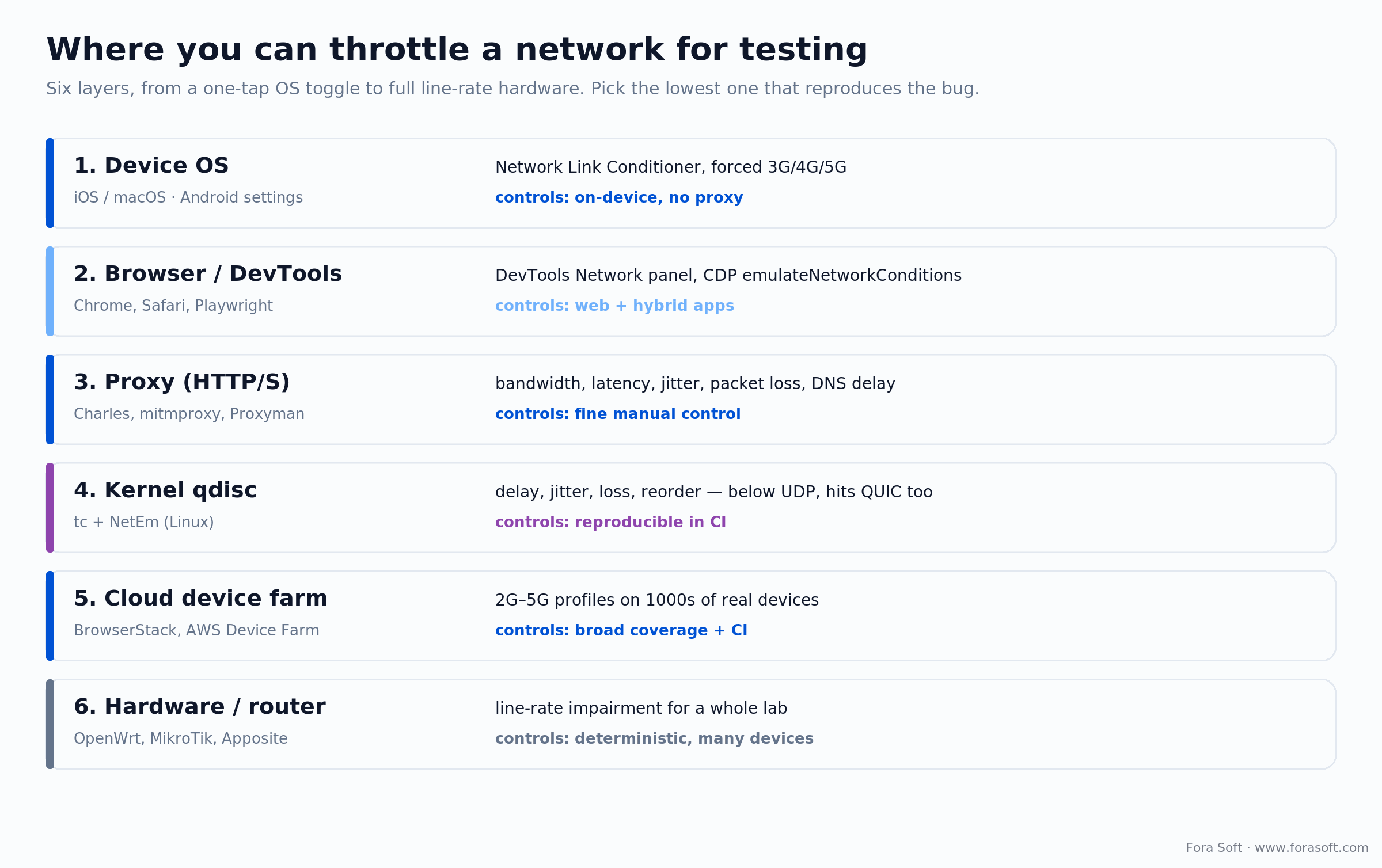
Figure 1. The six layers where you can inject bandwidth caps, latency, and packet loss, with the tool and trade-off for each.
Two of those layers cover pure web and hybrid apps that never touch a native mobile network stack. Chrome DevTools has a Network panel with Slow 4G / Fast 4G presets and a custom profile (kbps down/up plus latency); Safari exposes the same under its Develop menu; and Playwright drives it programmatically through the Chrome DevTools Protocol. If your product is a web app or a WebView, that browser layer is often all you need. The rest of this guide covers the seven tools that matter for native and cross-platform apps.
Why trust this playbook
We build real-time video, audio, and live-streaming apps where 100 ms of extra latency or 3% extra loss turns a call into a garbled mess. Across 250+ shipped projects since 2005, we have run bad-network QA on iOS, Android, React Native, Flutter, and Kotlin Multiplatform, from BrainCert's virtual-classroom platform to HIPAA telehealth to sports streaming for tens of thousands of concurrent viewers. Each section below tells you what a tool simulates, where its accuracy stops, and when to reach for something else. Want us to pressure-test your stack instead? Book a 30-min network-QA audit and we'll tell you where it breaks.
Reach for a proxy plus Network Link Conditioner when you want fast iteration and roughly 80% coverage without buying anything. Between them they reproduce most realistic mobile-network conditions on the two platforms that matter.
1. Network Link Conditioner (iOS & macOS)
Apple's Network Link Conditioner (NLC) is the fastest way to degrade an iPhone, iPad, or Mac in 2026. It applies on-device, so you don't need a proxy or extra hardware. Presets include Edge, 3G, LTE, Very Bad Network, and 100% Loss; custom profiles control bandwidth, packet loss, and DNS delay independently.
On iPhone/iPad (iOS 17+): Settings → Developer → Network Link Conditioner → choose a profile → toggle on. No Developer menu? Connect the device once to a Mac running Xcode. On Mac (Sequoia 15+): Xcode → Open Developer Tool → More Developer Tools, then download "Additional Tools for Xcode" and install Network Link Conditioner.prefPane. It runs natively on Apple Silicon, no Rosetta needed.
2. Android Studio emulator throttling
Android Studio's emulator supports cellular-class throttling at the virtual-modem layer. In the AVD Manager, open Advanced Settings and pick a Network Speed (GSM, HSCSD, GPRS, EDGE, UMTS, HSDPA, LTE) plus a Network Latency profile. The command-line flags are more precise than the UI: -netspeed edge, -netdelay umts, and adb shell cmd connectivity airplane-mode enable to script recovery.
Here's the catch: the emulator sets a speed class, not jitter or loss. For those, layer a proxy on top (see Charles below). And a simulated modem is not a real radio, so for anything touching WebRTC or handovers, validate on real devices. For a deeper Android-only walkthrough, we wrote a companion piece on simulating a slow connection on Android.
Skip the emulator when you ship in emerging markets. A simulated modem misses tower congestion and handover drops. Real devices on real carriers in the target country catch what the emulator cannot.
3. Cloud device farms
The big four cloud farms all offer network-profile throttling on real hardware: BrowserStack App Live, LambdaTest Real Device Cloud, Sauce Labs, and AWS Device Farm. You get thousands of real iOS and Android devices, each configurable with a 2G/3G/4G/5G or custom profile, exposed through both UI and API.
One trap worth flagging, because the marketing pages hide it: on BrowserStack the Throttle Network feature is only on Team, Team Pro, and Enterprise plans (Team Pro runs about $249/month in 2026), not the $39 entry tier. AWS Device Farm bills $0.17 per device-minute after 1,000 free trial minutes, or $250 per unmetered slot per month. All four ship CI plugins for GitHub Actions, CircleCI, Bitrise, and GitLab CI.
4. Charles Proxy
Charles Proxy is still the QA Swiss-army knife for HTTP(S) inspection and network degradation. Charles 5 shipped in March 2025. Point your device's Wi-Fi proxy at your machine, trust the root cert, then open Proxy → Throttle Settings and dial in bandwidth up/down, latency, MTU, reliability (packet loss), and DNS delay, each independently. That independence is the point: real networks are asymmetric and lossy, and Charles lets you model both.
Pricing (2026): $50 for a single-user license; site licenses scale up from there. Runs on macOS, Windows, and Linux.
5. mitmproxy, Proxyman and tc + NetEm
Don't want a Charles license? mitmproxy is free, open-source, Python-based, and scriptable per request, so you can degrade a single endpoint while leaving the rest fast. Proxyman is a friendlier macOS front-end (Pro is a $49 one-time license, Team $69 a seat). For layer-3 degradation on Linux, tc + NetEm is the kernel-native way to apply bandwidth caps, delay, jitter, loss, and reordering:
tc qdisc add dev eth0 root netem delay 200ms 50ms loss 5%If your test devices route through a Linux box or a Docker rig, NetEm is almost always the right layer. It sits below the application and below UDP, so it affects every protocol equally, degrades QUIC exactly like TCP, and scales from one process to a full CI grid. Best of all, the config is text you can version-control.
Reach for tc + NetEm when you want reproducible network profiles in CI that live in git, or a test rig spanning many devices behind one Linux box. It's the right choice at scale, and it's free.
6. Force a cellular generation
Sometimes you want an actual carrier network at an actual speed, not a simulation. Force the device onto a specific cellular generation in OS settings. This is the final-mile check before release, and the fastest way to match a report like "slow on 3G in rural areas".
iOS (18+): Settings → Cellular → Cellular Data Options → Voice & Data, then pick 3G/4G/5G (2G-only is not exposed on many regions' iPhones, so use NLC for Edge). Android (14+): Settings → Network & Internet → SIMs → Preferred network type. The exact path shifts with each manufacturer's skin.
7. Router QoS and hardware shapers
For whole-office or whole-farm throttling, apply limits at the router or a dedicated shaper. Routers running OpenWrt or DD-WRT expose tc + NetEm through a UI; enterprise gear from MikroTik or Ubiquiti has built-in QoS with per-SSID limits. Hardware WAN emulators such as Apposite Netropy run full line-rate impairment and are what larger QA labs standardize on.
Budget (2026): an OpenWrt router from about $60, or a MikroTik hAP ax2 from roughly $99. Pro: dedicated WAN emulators start in the low four figures. Worth it only if you're doing many hours a week of network-degraded QA on a shared lab.
The 7 tools compared (2026)
| Tool | Platform | Controls | Price (2026) | Best for |
|---|---|---|---|---|
| Network Link Conditioner | iOS, macOS | Bandwidth, loss, DNS delay | Free (with Xcode) | Fast iOS on-device |
| Android emulator | Emulator (Android) | Cellular class, latency | Free | Smoke test in CI |
| Cloud device farm | Real iOS & Android | 2G–5G profiles | $0.17/dev-min or tiered | Broad coverage, CI |
| Charles Proxy | macOS/Win/Linux | Bandwidth, loss, jitter, DNS | $50 single license | Detailed manual testing |
| mitmproxy / tc + NetEm | Any (Linux for NetEm) | Full layer-3 + HTTP | Free | CI-scale, scriptable |
| Forced cellular generation | Real device | Real carrier behaviour | Free | Final-mile validation |
| Router QoS / WAN emulator | All devices on network | Full line-rate impairment | $60–low four figures | Lab-scale, deterministic |
Which tool should you pick?
Match the tool to how you work, not to a feature checklist. If you're on a physical iPhone, start with Network Link Conditioner. If you need CI plus many device-OS combinations, go to a cloud farm. If you need loss and jitter dialed in by hand, use Charles or tc + NetEm. If you want it reproducible in git, NetEm in a Docker rig wins.
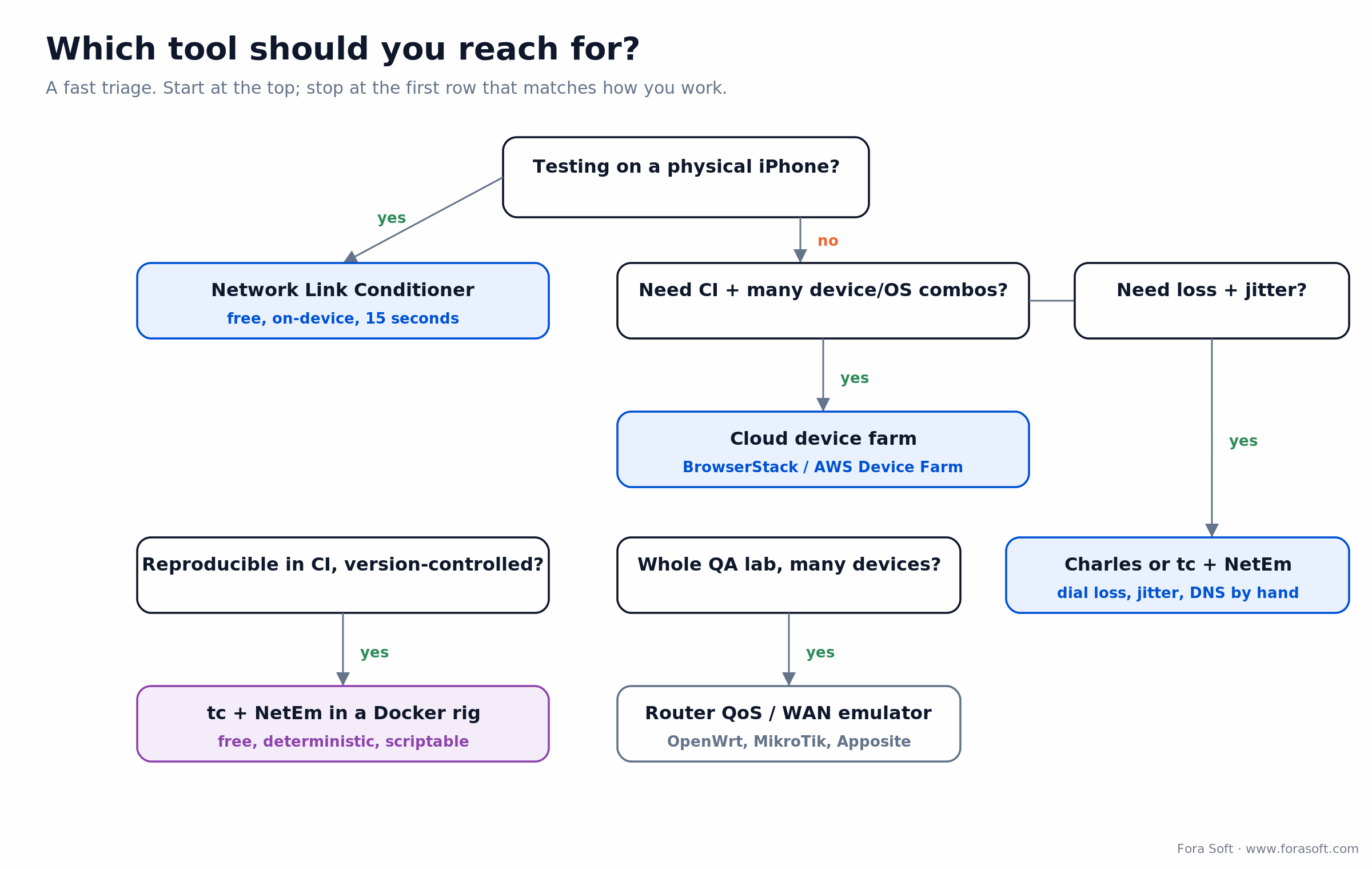
Figure 2. A fast triage for choosing a tool to simulate a slow network. Stop at the first row that matches your workflow.
What network-degraded QA costs
Free tools (NLC, emulator, tc + NetEm) cover most teams. The real spend shows up on cloud farms, and the metered-vs-fixed decision is where budgets get burned. Here's the arithmetic on AWS Device Farm at 2026 pricing.
Say each build runs 8 devices for 25 minutes, so 200 device-minutes, and you run 30 builds a month. That's 6,000 device-minutes. Metered at $0.17 each, that's 6,000 × $0.17 = $1,020/month. Eight unmetered slots at $250 each is $2,000/month flat, no matter how much you run. So at this volume metered still wins; unmetered pulls ahead once each device passes roughly 1,470 device-minutes a month. Light or spiky testing stays cheaper metered; steady daily CI crosses into fixed slots fast.
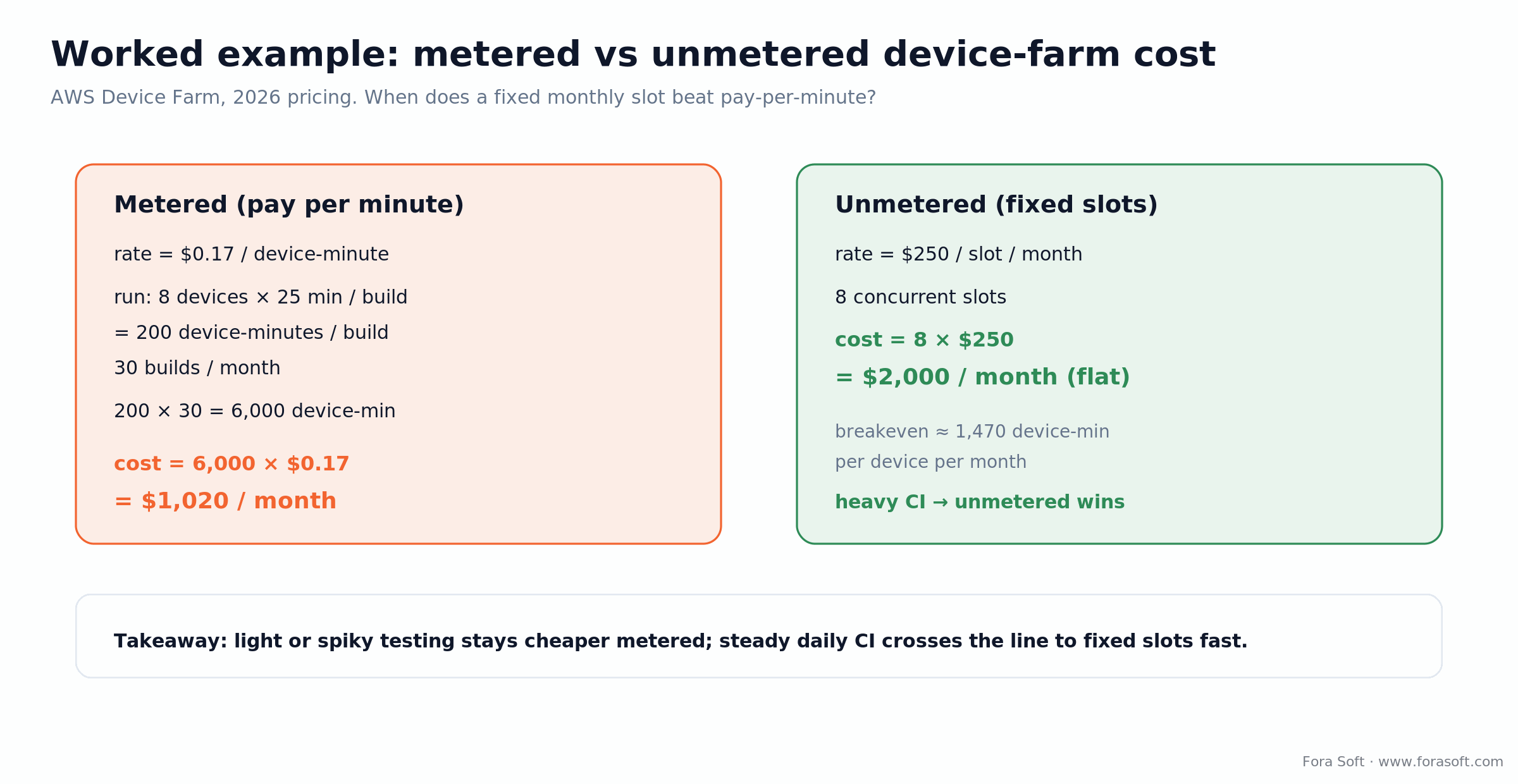
Figure 3. Metered vs unmetered device-farm cost worked end to end, so you can see where the line sits.
What actually breaks: loss vs bandwidth
Bandwidth is the easy axis to test and the least likely to break a modern app. What actually kills sessions is packet loss and jitter, and they hit different app types differently. A video call falls apart on 5% loss long before it runs short of megabits; a large file upload cares about raw throughput and barely notices latency. Knowing which defect breaks your app tells you which profile to test first.
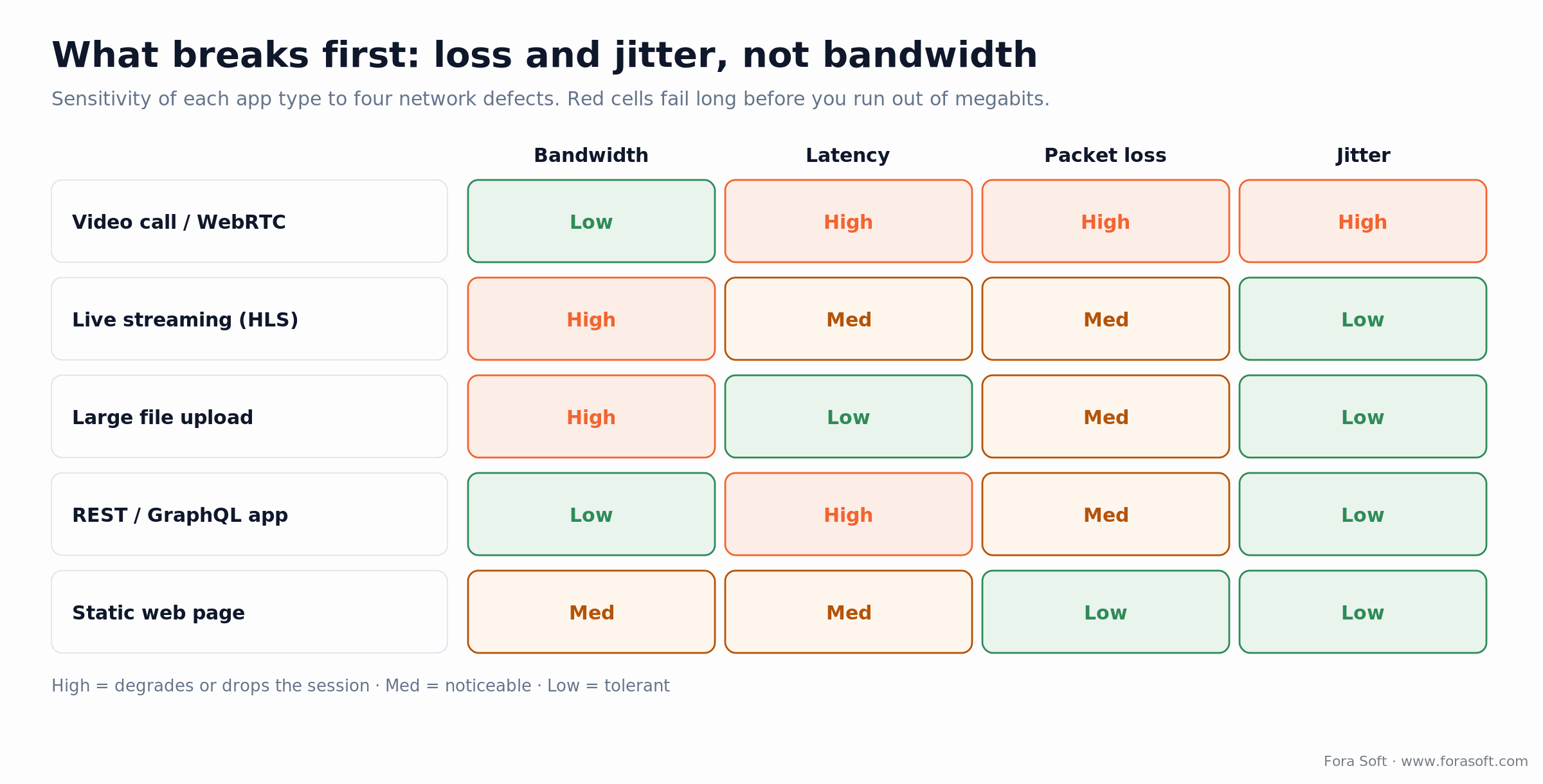
Figure 4. How five app types react to bandwidth, latency, loss, and jitter. Red is where each one fails first.
The practical takeaway: if you build anything real-time, weight your test matrix toward loss and jitter, and always profile upload independently from download, because mobile uplink is often several times slower than downlink. An app that uploads photos fine on Wi-Fi can stall badly on a cellular uplink.
Common failure mode: testing only bandwidth. Packet loss, jitter, and DNS delay change app behaviour far more than a lower bitrate does, and they're the defects a bandwidth-only test never catches.
Our five-scenario bad-network test
We run these five profiles on every pre-release of an app with any network component. Together they catch most real-world pathology in about 15 minutes of QA time:
- 2G Edge (50 kbps down/up, 400 ms latency, 0% loss). Does the app survive or time out before first paint? Catches over-aggressive HTTP timeouts and missing skeleton states.
- 3G HSPA (1.6 Mbps down, 768 kbps up, 150 ms latency, 2% loss). The most common "slow" network real users hit. Tests lazy-loading, video preroll, and API retry.
- Lossy 4G (10 Mbps down, 3 Mbps up, 80 ms latency, 5% loss). Moving vehicles, crowded stadiums, poor roaming. Catches WebRTC and WebSocket reconnection bugs.
- High latency (10 Mbps, 400 ms, 0% loss). Satellite and far-country roaming. Catches chatty APIs that multiply latency by the number of round-trips.
- Airplane-mode-then-recover. Toggle airplane mode on for 20 seconds, then off. Does the app reconnect, re-auth, and resume uploads? This is where "my app got stuck" reports come from.
Simulating bad networks for WebRTC
Real-time video is the hardest case, so it deserves its own note. WebRTC degrades on packet loss and jitter well before bandwidth becomes the limit, so test it with tc + NetEm or Charles at the Wi-Fi/proxy layer using 2–8% loss and 50–150 ms of jitter, not just a low bitrate. Test asymmetric loss too: 1% down with 8% up is a genuinely nasty real-world profile that breaks the media uplink while the UI still feels fine.
On our own video and audio streaming projects the lesson repeats: a call that's flawless in the office falls apart on a congested uplink, and only loss/jitter testing catches it pre-release. If you want the deeper theory on why, our Learn track on video streaming covers adaptive bitrate and congestion control.
Wiring bad-network tests into CI
Manual network tests get run once per release, then skipped when the deadline slips. The fix is to wire two or three degraded profiles into CI so they run on every pull request. The scenarios don't have to be exhaustive; they have to run automatically. A tc + NetEm profile inside a Docker container is the cleanest path: versioned config, deterministic result, zero license cost. For teams already on a cloud farm, network profile is just a run parameter you pass in the pipeline.
Five pitfalls we've paid for
- Testing bandwidth but no packet loss. Bandwidth is the easy axis. Real mobile networks lose packets, especially on handover. Always test at least 2% loss on slow profiles and 5% on lossy ones.
- Forgetting asymmetric links. Mobile uplink is often several times slower than downlink. Profile upload and download separately, or you'll miss upload stalls entirely.
- Trusting emulator throttling. A simulated modem doesn't reproduce radio effects like tower handover. Use it for smoke tests, then validate on real devices before release.
- Not testing recovery. Steady-state "slow network" isn't enough. Test the transitions: slow to fast, offline to online, mid-upload drop. In our experience recovery bugs outnumber steady-state ones.
- No CI integration. A test that runs only when someone remembers doesn't protect anything. Wire two or three profiles into CI and let them run on every PR.
When not to simulate a slow network
Simulation is a proxy for reality, and a few cases call for the real thing instead. When you're chasing a bug that only shows up on a specific carrier, a simulated profile will send you down the wrong path; force the real cellular generation and reproduce it live. When you ship to an emerging market with congested towers, a lab profile understates the pain, so budget for real-device testing in the target region. And if your app has no network dependency beyond a login call, five throttled profiles are overkill; one 3G-with-loss smoke test is enough. Simulate to regress cheaply and often; use real networks to confirm the fix.
FAQ
What's the single most important bad-network profile to test?
3G HSPA with 2–3% packet loss and 150 ms latency. It matches the most common "slow" experience real users hit in 2026 on transit, in crowded venues, and on rural cellular. If your app works well there, it works well in most bad-network scenarios.
How do I simulate a slow network in Chrome DevTools or Playwright?
In Chrome DevTools, open the Network panel and pick a Slow 4G / Fast 4G preset or define a custom kbps + latency profile. Playwright drives the same throttling through the Chrome DevTools Protocol, so you can script it in tests. Safari exposes equivalent controls under its Develop menu.
Does Network Link Conditioner work on Apple Silicon Macs?
Yes. On macOS Sonoma and Sequoia (M1 through M4), install Additional Tools for Xcode from developer.apple.com and drag Network Link Conditioner.prefPane into System Settings. It runs natively on Apple Silicon with no Rosetta.
Can I test network pathologies in React Native or Flutter?
Yes. Network degradation is applied at the OS or proxy layer, below the framework, so every tool here works identically for React Native, Flutter, Kotlin Multiplatform, or native apps. React Native's Flipper DevTools also has built-in throttling as a convenience.
How do I simulate bad networks for WebRTC video calls?
Use tc + NetEm or Charles at the Wi-Fi/proxy layer with 2–8% packet loss and 50–150 ms jitter. WebRTC is far more sensitive to loss and jitter than to raw bandwidth, so both degrade audio and video quality before bitrate does. Test asymmetric loss (for example 1% down, 8% up) as well.
Which tool integrates best with CI?
Cloud device farms (BrowserStack, LambdaTest, Sauce Labs, AWS Device Farm) all expose network profile as a run parameter with official CI plugins. For local or self-hosted CI, tc + NetEm in a Docker container is the cleanest path: versioned config, deterministic, and free.
Do I need to test 5G?
Only for apps that lean on ultra-low latency, such as AR, cloud gaming, or real-time multiplayer. For most apps 5G behaves like fast 4G, so if you pass on 4G you'll pass on 5G. Millimeter-wave 5G does have propagation quirks worth testing for AR and live-streaming products.
Is HTTP/3 / QUIC testing different?
QUIC handles packet loss better than HTTP/2 over TCP because it avoids head-of-line blocking across streams, so apps on QUIC behave better on lossy links. Test both stacks if your CDN auto-negotiates. tc + NetEm applies below UDP, so it degrades QUIC exactly like TCP.
Sum up
To simulate a slow network in 2026, pick the layer that fits your workflow and reproduces the bug. Network Link Conditioner is the fastest start on iOS; the Android emulator covers smoke tests; cloud farms give you device coverage and CI. When you need precision, Charles or tc + NetEm dial bandwidth, loss, jitter, and latency independently. Forced cellular and router QoS close the loop on real-world validation.
The tools are free or cheap. The discipline is the hard part. Wire at least three bad-network scenarios into CI, test recovery as hard as you test steady state, and profile upload and download separately. Your users on crowded trains, roaming SIMs, and in-flight Wi-Fi will notice, and they're the ones most likely to churn. If you want a hand hardening your app, our troubleshooting and optimization team does exactly this, and our QA reporting template shows how we write it up.
Read next
Android
Simulate a Slow Internet Connection on Android
The Android-only deep dive: emulator, ADB, and proxy methods.
Mobile
Optimize Android Apps for Video Streaming in 2026
ABR, HEVC, AV1, and ExoPlayer settings that save bandwidth.
QA & Testing
How to Report on Software Testing
Status, risk, and coverage summaries your PM will actually read.
Services
Software Troubleshooting & Optimization
Performance, flakiness, and regression hunts on mobile and web.

