

Swift 6 is Apple’s biggest language release since async/await landed in Swift 5.5. The headline is data-race safety enforced by the compiler: concurrency bugs that used to surface at 2 a.m. on a user’s device now surface as build errors during swift build. Everything else — Swift 6.2’s approachable concurrency, region-based isolation, typed throws, the Swift Testing framework, cross-platform Foundation — supports that one shift in how Swift treats shared state.
This is the version of “what’s new in Swift 6” we wish we’d had when we started migrating our own iOS apps. It’s decision-focused: what each feature buys you in production, what it costs during migration, and when to turn it on in a real codebase instead of a toy sample. The toolchain has moved fast — Swift 6.2 (September 2025) softened the migration, Swift 6.3 (March 2026) shipped an official Android SDK, and Swift 6.3.3 is the current stable release — so every version number below is checked against swift.org, not memory.
Key takeaways
• Swift 6 turns data races into compile errors. Full strict concurrency checking catches shared-mutable-state bugs at build time, not at crash time. The migration is real work; the production payoff is bigger than any Swift change since ARC.
• Swift 6.2 made the migration far easier. Approachable concurrency and default main-actor isolation mean most app code is single-threaded unless you opt into parallelism — new Xcode 26 projects get this out of the box.
• Region-based isolation keeps the ceremony low. You don’t paint every type with Sendable. The compiler tracks which values flow across actor boundaries and only complains when a real race is possible.
• Typed throws and noncopyable types close the edge cases. Typed throws pin down a closed error set in local, stable code; ~Copyable gives value-type RAII for file handles, locks, and tokens.
• Cross-platform Swift is now real. Swift-based Foundation plus the official Swift 6.3 Android SDK (March 2026) make one language a credible choice for shared logic across iOS, Android, macOS, Linux, and Windows.
Why Fora Soft wrote this Swift 6 playbook
Fora Soft ships iOS products in Swift for EdTech, e-health, media, and enterprise video clients — 250+ projects since 2005, built by 50 in-house engineers. We migrated our own production codebases to Swift 6 across 2024–2026: the iOS client for BrainCert’s learning platform, the app behind SuperPower FX real-time video effects, and mobile review tooling for the VALT enterprise video system. Each migration hit a different flavour of concurrency trap, so the trade-offs below are tested, not guessed.
We use Agent Engineering (senior engineers supervising Cursor, Claude, and Copilot) to keep Swift 6 migrations under budget. The compiler’s stricter diagnostics pair unusually well with AI-assisted rewrites: every proposed fix has to survive a stricter type and concurrency check before it lands, so bad suggestions get filtered instantly. Our Swift 6 migration estimates typically come in 20–40% below standard agency rates as a result.
Planning a Swift 6 migration for a production iOS app?
Send us your current Swift version, concurrency style, and app scale. We’ll return a concrete migration plan, a risk list, and a tight estimate — usually well below a rewrite-everything quote.
A compressed timeline — from Swift 5.1 to Swift 6.4
Swift 6 is the pay-off of a multi-year arc. Each 5.x release added a piece of the concurrency model; Swift 6.0 flipped the defaults, and the 6.x line has been sanding down the rough edges ever since.
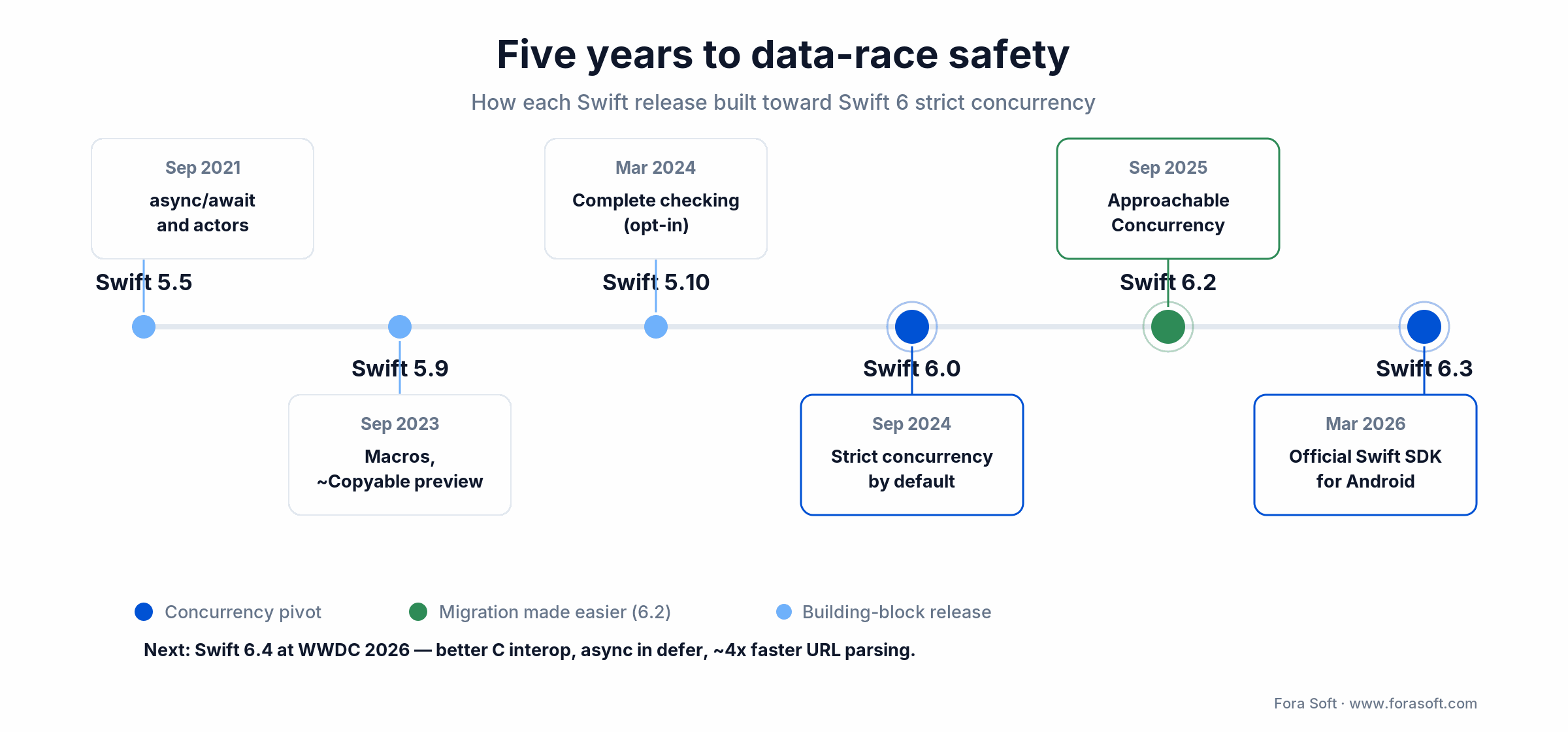
Figure 1. Every Swift 5.x release added a piece of the concurrency model; Swift 6 enforced it, and 6.2–6.3 made it approachable.
| Version | Released | Headline feature | Why it mattered |
|---|---|---|---|
| Swift 5.1 | Sep 2019 | Opaque return types, module stability | Unblocked SwiftUI and binary distribution |
| Swift 5.5 | Sep 2021 | async/await, actors, Sendable | Native concurrency replaces GCD callbacks |
| Swift 5.9 | Sep 2023 | Macros, noncopyable types (preview) | Compile-time code generation, RAII patterns |
| Swift 5.10 | Mar 2024 | Complete data isolation (opt-in) | Final rehearsal for Swift 6 defaults |
| Swift 6.0 | Sep 2024 | Strict concurrency by default, Swift Testing | Data-race safety enforced at compile time |
| Swift 6.1 | Mar 2025 | Incremental language and tooling refinements | Steadied the 6.0 concurrency model |
| Swift 6.2 | Sep 2025 | Approachable concurrency, Span, WebAssembly | Default main-actor isolation makes migration easier |
| Swift 6.3 | Mar 2026 | Official Swift SDK for Android | Swift compiles to native Android ARM code |
| Swift 6.4 | WWDC 2026 | Better C interop, async in defer, faster URL parsing | Current toolchain: 6.3.3 stable; 6.4 in beta |
Strict concurrency checking by default
The flagship Swift 6 change is that complete concurrency checking is on by default under language mode -swift-version 6. The compiler rejects any code path that could share mutable state across isolation domains. Where Swift 5.x emitted a warning, Swift 6 emits a build error.
In practice: classes that aren’t Sendable can’t be captured by @Sendable closures; values crossing an actor boundary must be transferable; and global mutable state without isolation is a compile error. The real migration cost is proving which pieces of your code are actually safe, then fixing the pieces that weren’t.
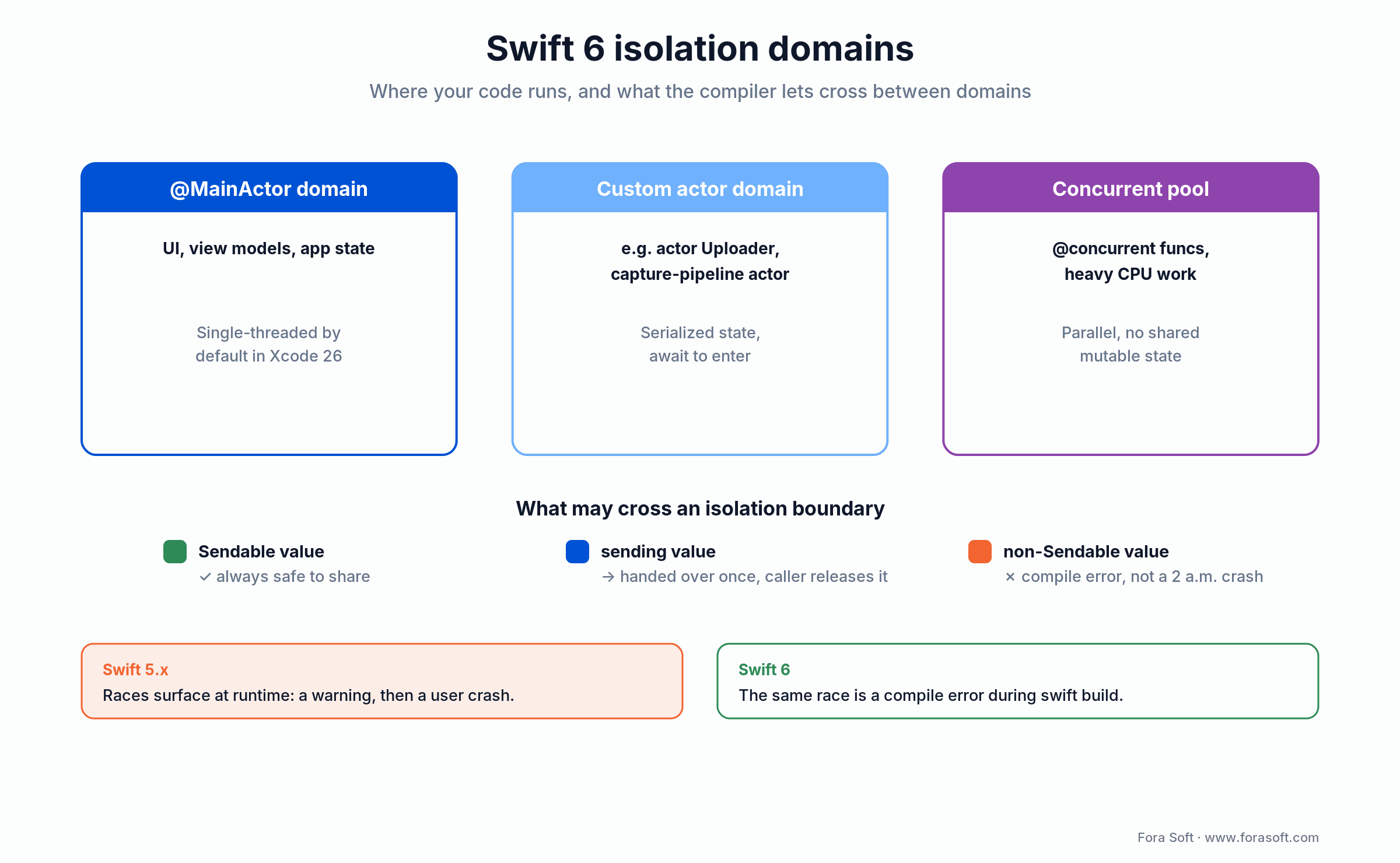
Figure 2. In Swift 6 the compiler tracks which domain code runs in and what may legally cross between them.
// Swift 5: compiles with a warning
class CounterUnsafe { var value = 0 }
let c = CounterUnsafe()
Task.detached { c.value += 1 }   // data race, warning only

// Swift 6: compile error unless Counter is an actor or Sendable-safe
actor Counter {
    private(set) var value = 0
    func bump() { value += 1 }
}
let counter = Counter()
Task { await counter.bump() }    // the compiler is happy
The 2026 update: approachable concurrency (Swift 6.2)
The scary version of this story is the Swift 6.0 one, where every project felt like it sprouted a thousand Sendable warnings overnight. Swift 6.2 (September 2025) rewrote that experience. With approachable concurrency and default main-actor isolation turned on — the default for new Xcode 26 projects — your app code runs on the main actor unless you explicitly opt a function into the background with @concurrent. Sequential UI code stays sequential and quiet; you only reach for actors and Sendable when you deliberately add parallelism. It is the single biggest reason a Swift 6 migration is more tractable in 2026 than it was in late 2024.
Reach for strict concurrency mode when: your CI is green on Swift 5.10 complete checking, the team is comfortable with actors and async/await, and you can turn on default main-actor isolation to absorb most of the noise. If those aren’t true, get there first, then flip the language mode.
The Swift 6 concurrency and safety toolkit at a glance
Before the deep dives, here is the toolkit you’ll meet below: what each feature is, what it buys you in production, and when to actually reach for it. The sections that follow work through each one with code.
| Feature | What it buys you | When to reach for it |
|---|---|---|
| Strict concurrency | Data races become build errors | Always, once CI is green on complete checking |
| Default main-actor isolation | App code is single-threaded by default | New apps; migrating apps that fight Sendable noise |
| Region-based isolation | Fewer Sendable annotations to write | Automatic; it just cuts your diff size |
| sending parameters | Move a value across a boundary safely | Buffers and one-shot payloads the caller drops |
| Typed throws | Exhaustive handling of a closed error set | Local, perf, or Embedded scopes; wary on public APIs |
| Noncopyable types | Unique-resource safety (RAII) | File handles, locks, tokens, GPU buffers |
| Swift Testing | Clearer tests, parameterized cases | New tests now; migrate old XCTest opportunistically |
Region-based isolation (SE-0414) — fewer Sendable annotations
The feature that makes strict concurrency tolerable is region-based isolation. Instead of demanding every type be Sendable, the compiler tracks which values flow across isolation boundaries and only objects when a real race is possible.
In a typical app migration, region-based isolation cuts the number of Sendable annotations you have to add by roughly half to two-thirds. A non-Sendable value created on the main actor and passed to a Task on that same actor is fine; the compiler only complains when it sees the value escape into a different isolation domain. Fewer diffs to review, fewer mechanical @unchecked Sendable escape hatches that rot in your codebase, and less ceremony blocking the path to data-race safety.
Sending parameters and values (SE-0430)
The sending keyword marks a value the compiler is allowed to transfer across an isolation boundary, typically because the caller no longer uses it after the call. It replaces whole classes of “make it Sendable or clone it” dilemmas with a precise, local annotation.
actor Uploader {
    func send(_ payload: sending Payload) async throws {
        // The compiler verifies the caller released the Payload,
        // so we can safely take ownership across the actor boundary.
    }
}
For video-processing and streaming code, where we routinely pass buffers across pipelines, sending is the feature that made strict concurrency practical on SuperPower FX. Buffers are transient; marking them sending is closer to the truth than pretending they’re Sendable.
Reach for sending when: the caller hands a non-Sendable value to an async boundary and doesn’t use it afterwards. Typical fits: buffers, intermediate results, single-use request payloads.
Typed throws (SE-0413) — explicit error contracts
Swift 6 lets a function declare the specific error type it can throw, not just throws as an open set.
enum UploadError: Error { case network, serialization, size }

func upload(_ file: URL) throws(UploadError) -> UploadID {
    // Only UploadError cases can compile here.
}
The tempting move is to slap typed throws on your public API. Resist it. On a library or SDK surface the concrete error type becomes part of your source and ABI contract, so adding a case later is a breaking change for every caller — the opposite of what you want from a stable API. SE-0413’s own guidance points the other way: reach for typed throws in narrow, local scopes where the error set is genuinely closed (a small parser, a self-contained state machine), in generic code that just forwards a caller’s error, and in performance- or Embedded-Swift code where boxing errors as any Error is too costly. For an evolving public surface, keep an open throws (or a deliberately versioned error enum).
Reach for typed throws when: the error set is small, closed, and unlikely to grow — local helpers, parsers, generic forwarding, or performance and Embedded code. Think twice before putting it on a public API, where the error type becomes part of your contract.
Stuck on Sendable warnings or actor deadlocks?
We’ve untangled Swift 6 concurrency on real production apps: video pipelines, networking SDKs, SwiftUI clients. Send us the file path or the error message and we’ll scope a focused fix sprint.
Noncopyable types (SE-0390 / SE-0437) — value-type RAII
Swift 6 promotes noncopyable types (~Copyable) from preview to stable, with broader standard-library adoption. Use them for a value that represents a unique resource: a file descriptor, a mutex token, a GPU buffer handle, an in-flight network transaction. The compiler prevents accidental duplication, so you can’t close the same file twice or leak a lock.
struct FileHandle: ~Copyable {
    private let fd: CInt
    init(_ path: String) throws { /* open fd */ }
    deinit { close(fd) }         // runs exactly once; no double-close
}
This is RAII without reference counting. Where you used to reach for a class just to get a deterministic deinit, a noncopyable struct now gives you the same guarantee with value semantics and no heap allocation.
Reach for noncopyable types when: a value owns a resource that must be released exactly once and must never be silently copied. Skip them for ordinary data models — the copy restrictions add friction you don’t need there.
Swift Testing — the XCTest replacement that ships with Xcode
Swift Testing is the macro-based framework that ships alongside Swift 6. It replaces XCTest’s XCTAssert chain with a single #expect and adds first-class parameterized tests, tags, traits, and suites. Swift 6.2 went further with exit testing (verify code terminates on a failed precondition) and attachments (screenshots, JSON, logs surfaced in the test report).
import Testing

@Suite("Uploader")
struct UploaderTests {
    @Test(arguments: [1024, 5 * 1024 * 1024, 100 * 1024 * 1024])
    func respectsSizeLimit(size: Int) async throws {
        let result = try await upload(size: size)
        #expect(result.status != .rejected)
    }
}
Swift Testing co-exists with XCTest, so migration is feature-by-feature: write new tests in Swift Testing, leave existing XCTest suites alone until you’re editing the file anyway. We pair it with the AI QA tools in our QA process — Swift Testing for unit and fast-integration, end-to-end UI runners for full flows. That combination is what keeps our release cadence predictable on complex video apps.
Swift-based Foundation and official Android support
Swift 6 completes the Swift-based Foundation re-implementation. The behaviour of Date, URL, JSONEncoder, and String is consistent across Apple and non-Apple platforms, with performance close to or better than the old Objective-C Foundation on Apple devices.
The bigger 2026 news is Android. Swift 6.3 (March 2026, per swift.org) shipped the first official Swift SDK for Android, backed by a dedicated Android Workgroup. Swift now compiles to native Android ARM code, and Swift-Java / JNI bridges let you drop Swift into an existing Kotlin app. Combined with Swift-based Foundation, one language can carry your domain model through iOS, Android, macOS, Linux, and Windows for the first time since Objective-C. SwiftUI stays Apple-only, so the pattern is shared business logic with native UI per platform — see the Summer 2025 tech digest for the wider context.
Macros grown up — practical patterns
Macros shipped in Swift 5.9 and matured through 6.x with better diagnostics, stable tooling, and a growing set of first-party macros (@Observable, @Test, @Suite). Swift 6.2 even fixed the biggest pain point — clean builds no longer rebuild swift-syntax from source, thanks to pre-built macro dependencies. Four places macros earn their keep in our apps:
1. Observation. @Observable replaces ObservableObject / @Published boilerplate with one attribute, and it plays cleanly with strict concurrency.
2. Serialization. Custom macros remove the tedious Codable key-path dance on domain types.
3. Testing ergonomics. @Test, #expect, and #require collapse three lines of XCTest into one.
4. Build-time constants. Bring config schemas into the type system at compile time instead of stringly-typed lookups at runtime.
A staged migration plan that survives real releases
Trying to flip a production app to Swift 6 in a single sprint is how weekends get ruined. We stage the migration across four phases, each of which ships behind the same release train you already run.
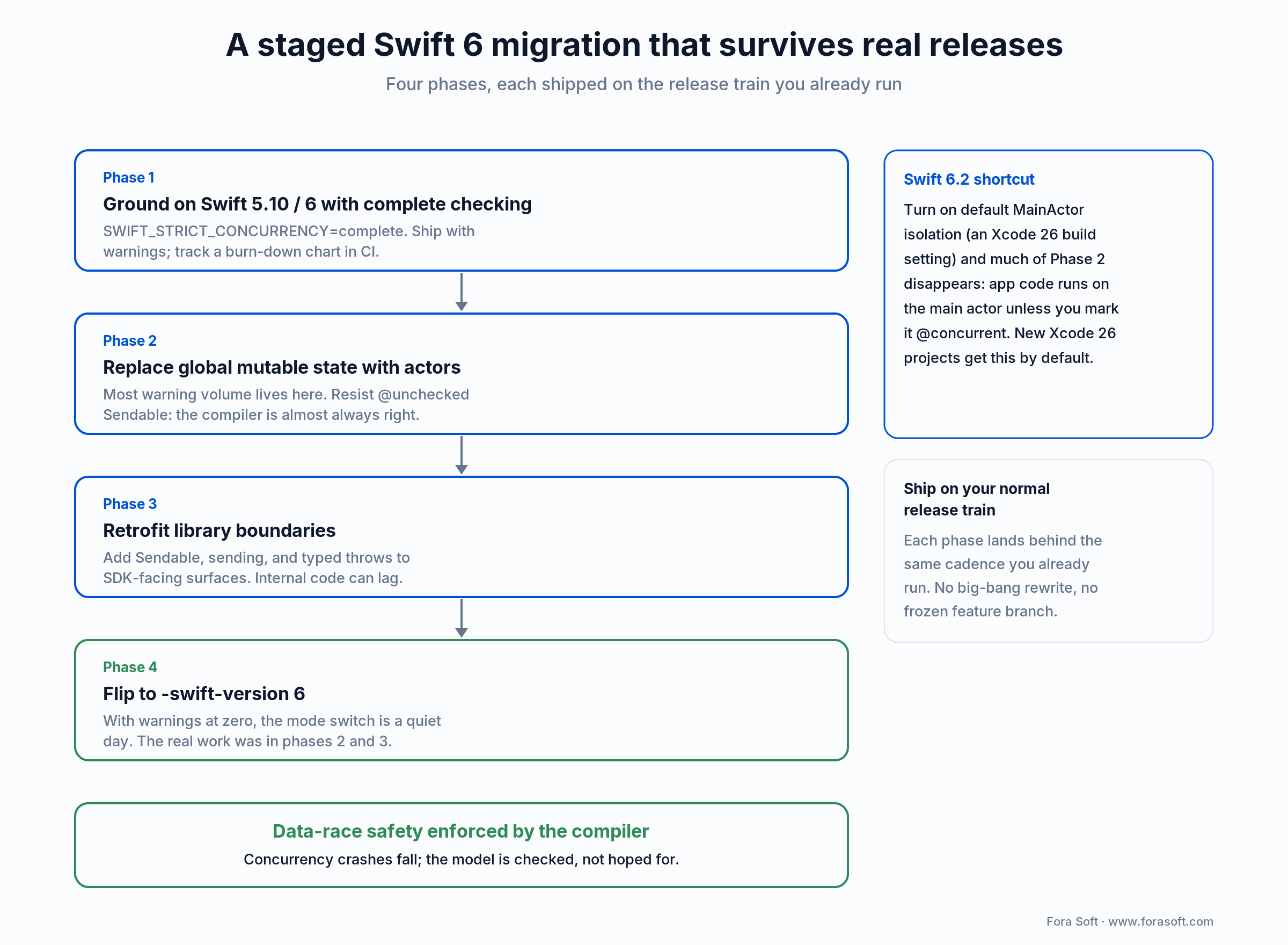
Figure 3. Stage the migration across four phases so it rides your normal release train instead of blocking it.
Phase 1 — Ground on Swift 5.10 or 6 with complete checking. Enable SWIFT_STRICT_CONCURRENCY=complete. Ship with warnings. Track a warnings burn-down chart in CI so regressions are visible.
Phase 2 — Replace global mutable state with actors or main-actor singletons. Most warning volume comes from this bucket. Resist the urge to @unchecked Sendable your way out; the compiler is almost always right. On Swift 6.2, turning on default main-actor isolation erases much of this bucket for free.
Phase 3 — Retrofit library boundaries. Add Sendable, sending, and typed throws to SDK-facing surfaces. Internal code can lag.
Phase 4 — Flip to -swift-version 6. With warnings at zero, the mode switch is a quiet day. Celebrate quietly; the real work was in phases 2 and 3.
Cost math — what a Swift 6 migration costs in engineer-weeks
Ballpark from our own production migrations. Numbers vary heavily with codebase hygiene; apps already on async/await land at the low end.
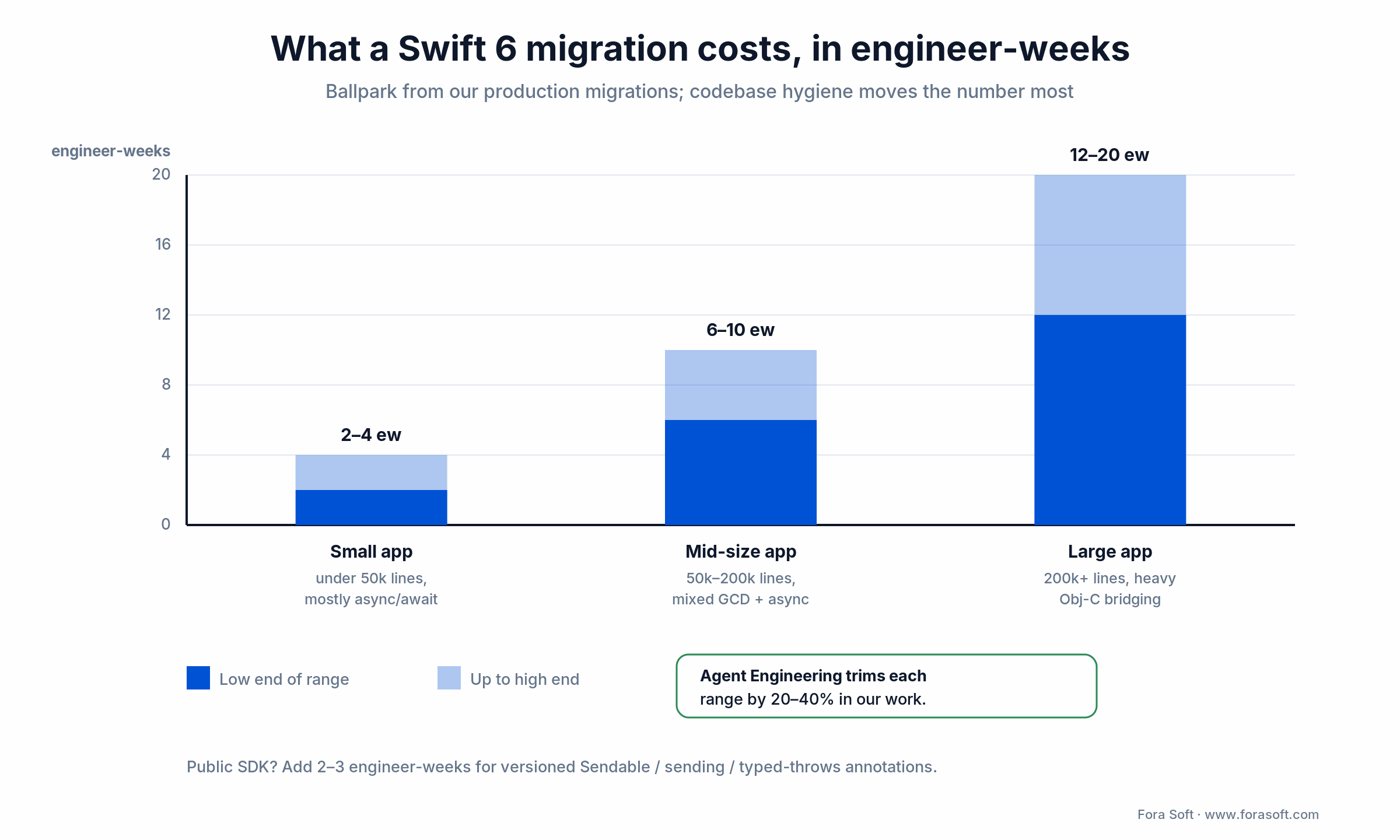
Figure 4. Migration effort scales with codebase size and Objective-C surface, not with how old the app is.
Small iOS app (under 50k lines, mostly async/await). 2–4 engineer-weeks, mostly annotating Sendable and fixing a handful of global-state pain points.
Mid-size app (50k–200k lines, mixed GCD and async). 6–10 engineer-weeks. The big bucket is rewiring GCD queues to actors and untangling shared-state singletons.
Large app (200k+ lines, heavy Objective-C bridging). 12–20 engineer-weeks, phased over two or three releases.
SDK with a public API. Add 2–3 weeks on top for carefully versioned Sendable / sending / typed-throws annotations so downstream apps migrate at their own pace.
Agent Engineering shortens each bucket by 20–40% in our experience, because the strict compiler pairs unusually well with AI-proposed fixes: every suggestion has to compile under the new mode, so false positives get filtered instantly. For a defendable estimate on your codebase, book a scoping call.
Mini case — Swift 6 on a real-time video app
Situation. A production iOS app with real-time video capture, on-device ML inference, and a GCD-era networking stack. Swift 5.10 complete checking emitted 400+ warnings. The goal: flip to Swift 6 without regressing the two-week release cadence or the frame-drop KPI. Real-time video is unforgiving of main-thread stalls, which is exactly what live video engineering teaches you to respect.
12-week plan. Weeks 1–3: burn down global-singleton warnings by introducing a main-actor-isolated AppState and moving three GCD queues into a capture-pipeline actor. Weeks 4–7: annotate the video and networking SDK surfaces with sending and Sendable, land Swift Testing suites on the two highest-churn modules. Weeks 8–10: close the last 50 warnings with small refactors, plus one @unchecked Sendable on an intentionally shared cache with a documented justification. Weeks 11–12: flip -swift-version 6, ship behind a flag, roll out.
Outcome. Concurrency-related crashes fell sharply in the weeks after the flip, because several latent data races surfaced during the migration and were fixed before release. The frame-drop KPI and the release cadence stayed unchanged. The work was invisible to users, which is the point.
A decision framework — should you adopt Swift 6 this quarter?
1. Is your codebase already on async/await? If not, migrate to async/await first; Swift 6’s benefits are multiplicative on an async-native codebase.
2. Do you have complete checking enabled on 5.10? If yes, the hard part is behind you — flip the mode in the next release. If no, that’s phase 1.
3. Can you turn on default main-actor isolation? On Xcode 26 this absorbs most of the migration noise. New projects get it by default; existing projects opt in.
4. Are you shipping a public SDK? Add buffer for versioned annotation work and a clear migration guide for downstream consumers.
5. What’s your crash-bucket concurrency rate? If concurrency crashes are a notable share of your top-five, the migration pays for itself in the first post-migration release. If not, ship it opportunistically around feature work.
Want a defendable Swift 6 estimate for your app?
Tell us your Swift version, app size, and Objective-C surface. We’ll come back with a staged plan, the two concurrency bets to make first, and a number you can take to your board.
Pitfalls to avoid
1. Reaching for @unchecked Sendable too quickly. Every escape hatch is technical debt. If you truly need it, document why; if you don’t, fix the design instead.
2. Putting typed throws on a public API too eagerly. The concrete error type becomes part of your contract, so a new failure mode turns into a breaking change. Keep public surfaces on open throws and reserve typed throws for local, closed scopes.
3. Migrating and shipping feature work in the same file. Warnings burn-down stays clean only when it’s the only thing happening in that file.
4. Ignoring Swift Testing until the end. Adding the first @Test early teaches the team the new macros before they’re under deadline.
5. Underestimating Objective-C bridging. Obj-C-bridged APIs are the noisiest source of Sendable gaps. Budget extra time for any app with a significant Obj-C core.
KPIs — what to measure after adopting Swift 6
Quality KPIs. Concurrency-class crashes per 10k sessions (target: approaching zero), compile-time warnings in CI (target: zero), and unit-test flake rate (expect it to drop as Swift Testing replaces flaky XCTest async patterns).
Business KPIs. Time-to-fix for concurrency hotfixes (before vs after), developer ramp-up time on the codebase (new hires onboard faster once the compiler teaches them the model), and release-cadence stability.
Reliability KPIs. Main-thread stalls (the @MainActor scopes you now own explicitly), hang rate, and cold-start time (usually improves, sometimes mildly regresses, always worth tracking).
When not to migrate yet
Not every app should flip to Swift 6 this quarter. Hold off if your team is mid-migration to SwiftUI or async/await (do one migration at a time), if your app still leans on substantial Objective-C you’re not ready to bridge, or if your release window is already compressed by a platform event such as an App Store submission freeze or a major OS launch.
Swift 6 will still be there next quarter. A broken release because the migration collided with a feature push will not forgive you as easily.
Reach for a “not yet” when: a hard deadline, a heavy Obj-C core, or a parallel framework migration means the Swift 6 flip would compete for the same engineers. Ship the deadline first, then migrate on a clear runway.
FAQ
What is the latest version of Swift in 2026?
The current stable toolchain is Swift 6.3.3 (per swift.org). Swift 6.2 (September 2025) introduced approachable concurrency; Swift 6.3 (March 2026) added the official Android SDK; Swift 6.4 was announced at WWDC 2026 with faster C interop and URL parsing.
Can I adopt Swift 6 features without flipping the language mode?
Yes. Most Swift 6 features — region-based isolation, sending, typed throws, noncopyable types, Swift Testing — land in Swift 5.10 or later behind opt-in flags. Many teams enable them for a release or two before flipping -swift-version 6.
Does Swift 6 break my existing codebase?
Only if you enable language mode 6. Swift 6 compilers still build Swift 5 code — the stricter behaviour is opt-in per module, so you can migrate module-by-module.
Should I turn on default main-actor isolation?
For most app targets, yes — it removes a large share of Sendable noise and matches how UI code actually runs. New Xcode 26 projects enable it by default; existing projects opt in via a build setting. Libraries with heavy background work are the main exception.
Should we switch from XCTest to Swift Testing immediately?
No rush. Swift Testing co-exists with XCTest. Write new tests in Swift Testing and migrate existing suites when you’re already in the file. A big-bang rewrite buys nothing an incremental approach doesn’t.
How does Swift 6 interact with SwiftUI apps?
SwiftUI is @MainActor-annotated, so it plays cleanly with strict concurrency. Plan extra work if you use non-isolated view-model singletons or pass non-Sendable closures into SwiftUI actions — the compiler now flags patterns that used to slide.
Can Swift 6 run on Android or the back end?
Yes. Swift 6.3 ships an official Android SDK, and Swift-based Foundation makes Swift a credible Linux and Windows back-end language (pair it with Vapor or Hummingbird). Teams already on Swift for the client get one language across the stack.
How much does a Swift 6 migration typically cost?
A small app is typically 2–4 engineer-weeks, a mid-size app 6–10, a large app 12–20 phased over releases. With Agent Engineering we regularly come in 20–40% below those ranges. Every quote is shaped by the specific codebase, so treat these as starting points, not contracts.
What to read next
Deep dive
Swift 6 iOS Development
Build next-gen video chat apps with Swift 6 — the production companion to this feature overview.
SwiftUI
SwiftUI vs UIKit for Video Conferencing
Where SwiftUI wins, where UIKit still earns its keep, and how Swift 6 shifts the trade-off.
SPM
Swift Package Manager for Video Apps
Module boundaries and Sendable annotations across packages — the practical companion to migration.
Context
Summer 2025 Tech Digest
iOS 26, Swift on Android, GPT-5 — the broader release picture around Swift 6.
QA
AI in Quality Assurance
How Swift Testing fits into the broader Fora Soft QA playbook.
Ready to make Swift 6 safe for your production app?
Swift 6 is the real deal: data-race safety at compile time, a much friendlier migration since 6.2, noncopyable resources, typed errors at library boundaries, and an official Android SDK that finally makes one language credible across iOS, Android, macOS, Linux, and Windows. Every production app we’ve moved has come out measurably safer and easier to reason about.
Stage the migration across releases, turn on default main-actor isolation to keep the Sendable ceremony low, and introduce Swift Testing where you’re already writing tests. When you want engineers who’ve done this on shipping apps, we’re a 30-minute call away.
Ship Swift 6 with confidence
Tell us your Swift version, app size, and timeline. We’ll return a staged migration plan, a defendable estimate, and the two concurrency bets you should make first.
Primary sources: Swift 6.2 release notes (swift.org), Apple’s Adopting Swift 6 guide, and the Swift Android Workgroup.

