

Key takeaways
• Hard hat detection is a solved-tech, unsolved-deployment problem in 2026. YOLO26 and RT-DETR clear 50+ mAP at real-time frame rates on a ~$399 Jetson; the hard part is temporal filtering, privacy and alert routing, not the model.
• Tune for recall, not headline accuracy. A missed violation costs an injury or an OSHA citation; a false alert costs an eye-roll. We run recall ≥ 0.90 at a 0.35 confidence threshold, gated by zone and by K-of-N frames.
• Edge beats cloud past ~20 cameras. Streaming 4K to the cloud runs about $118 per camera per month in upload bandwidth and cloud-GPU time; a hybrid edge design steps once for hardware, then stays nearly flat.
• Buy under 20 cameras, build past 50. SaaS (Voxel, Protex AI, Intenseye) wins on speed and small sites; custom wins on deep integration, on-prem, odd PPE classes and per-camera economics at scale.
• One prevented serious injury pays for the whole system. The average fatal injury carries $1.39–1.54M in total cost (NSC); a 20-camera custom build lands at $110k–162k.
Why Fora Soft wrote this hard hat detection playbook
Hard hat detection is a computer-vision problem wearing a safety-compliance costume: a camera watches a work area, a model decides whether each worker’s head has a helmet on it, and the system raises an alert fast enough for a foreman to act. We’ve built that shape of system before. Fora Soft has shipped video and computer-vision surveillance software since 2005: 250+ projects, 50+ in-house specialists, and a 99% success rate on the work we scope.
The closest match in our portfolio is EyeBuild, a solar-powered, fully offline construction-site surveillance product we built end to end. Its cameras run AI motion detection that separates people from vehicles and fires automated alerts over 4G/5G, with 14-day battery backup and 30-day cloud retention at $249 per camera per month. EyeBuild classifies humans versus vehicles rather than PPE specifically — but it’s the same RTSP-to-AI-to-alert pipeline this article is about, and it’s running on real job sites today. We also run VALT, a video surveillance platform used by 770+ US organizations and 50,000+ users, as the sole engineering team for over a decade. So the numbers and trade-offs below are the ones we actually hit in production, not a vendor brochure.
Weighing a PPE detection build?
Tell us your camera count, your existing VMS and your PM stack. We’ll come back with a fixed-price plan and an honest build-vs-buy read.
Why hard hat detection AI is a 2026 decision, not a 2020 one
Five years ago the question was whether the technology worked. It didn’t, really — early detectors misfired on shadows and baseball caps, privacy backlash was fierce, and edge hardware cost too much per camera to scale. All three are now handled. Modern detectors reach 50–56% mAP on COCO-style benchmarks and, once fine-tuned, cite 85–95% on hard-hat-specific footage. A Jetson Orin Nano Super runs several 1080p streams for around $399 (after NVIDIA’s July 2026 price hike, up from $249). Blur-on-the-edge anonymization has made most union conversations tractable.
Two things changed the math in 2025 and 2026 specifically. First, regulation got teeth: OSHA’s revised construction PPE rule took effect January 13, 2025, requiring head protection that properly fits each worker — which pushes safety leaders to prove compliance continuously, not at a quarterly walk-through. Second, transformer detectors (RT-DETR, DINO) matched YOLO on speed, and NMS-free models like YOLO26 (January 2026) simplified serving. That flipped the economics for sites under 50 cameras, where turnkey SaaS used to be the only sane path. Our broader AI architecture guide covers how we choose between SaaS, custom-build and hybrid.
How AI hard hat detection actually works
A hard hat detection pipeline has four stages. First, ingest: frames arrive from an IP camera over RTSP, H.264 or H.265 encoded. Second, detect: an object detection model looks at each frame (or one of every N) and draws boxes around people, heads and hard hats. Third, associate: each head is paired with the nearest person, then checked for overlap with a helmet. Fourth, decide: if a person has a visible head but no helmet overlap for more than a few seconds, fire a violation event.
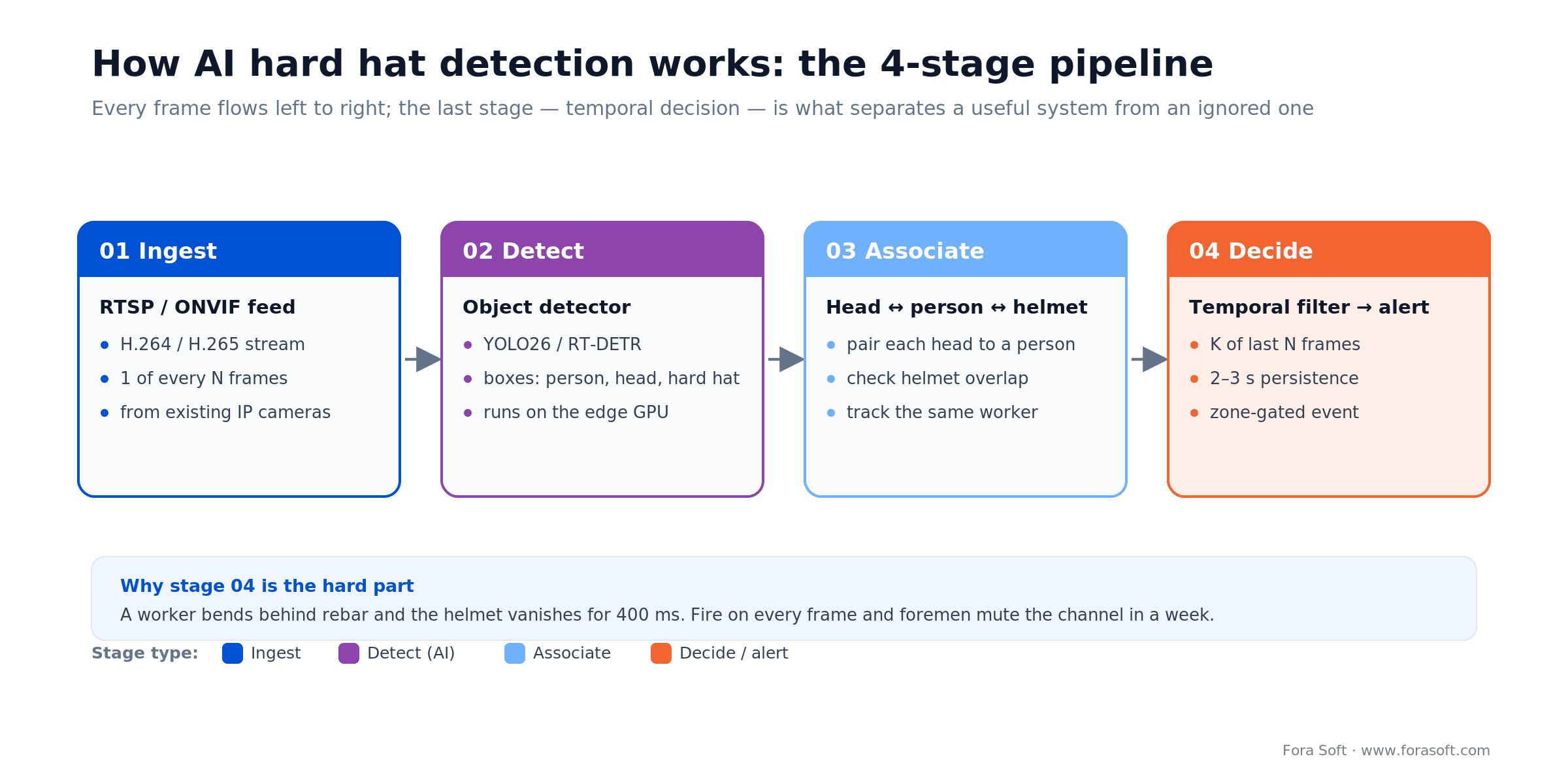
Figure 1. The four-stage hard hat detection pipeline. Stage 04, the temporal filter, is what keeps foremen from muting the alerts.
The per-frame decision is easy. What makes a production system hard is the temporal filtering. A worker bending behind a rebar stack briefly hides their helmet. A contractor carrying drywall across camera 3 looks helmet-less for half a second. Fire on every frame and foremen mute the channel within a week. The fix is a sliding-window accumulator: require K of the last N frames to show a violation, and require the same tracked worker to stay in frame for the whole window. That one detail separates a system people trust from one they switch off.
Detection models that work in 2026 — YOLO26, RT-DETR and YOLOv9
Which model? For a typical 20-camera site we start with YOLOv9-C fine-tuned on SH17 or SHEL5K: it clears roughly 53% COCO mAP, runs comfortably on a Jetson Orin Nano, and has deep community tooling. When a site wants end-to-end serving without non-maximum-suppression (NMS) tuning, we reach for RT-DETR or YOLO26, the NMS-free model Ultralytics shipped in January 2026.
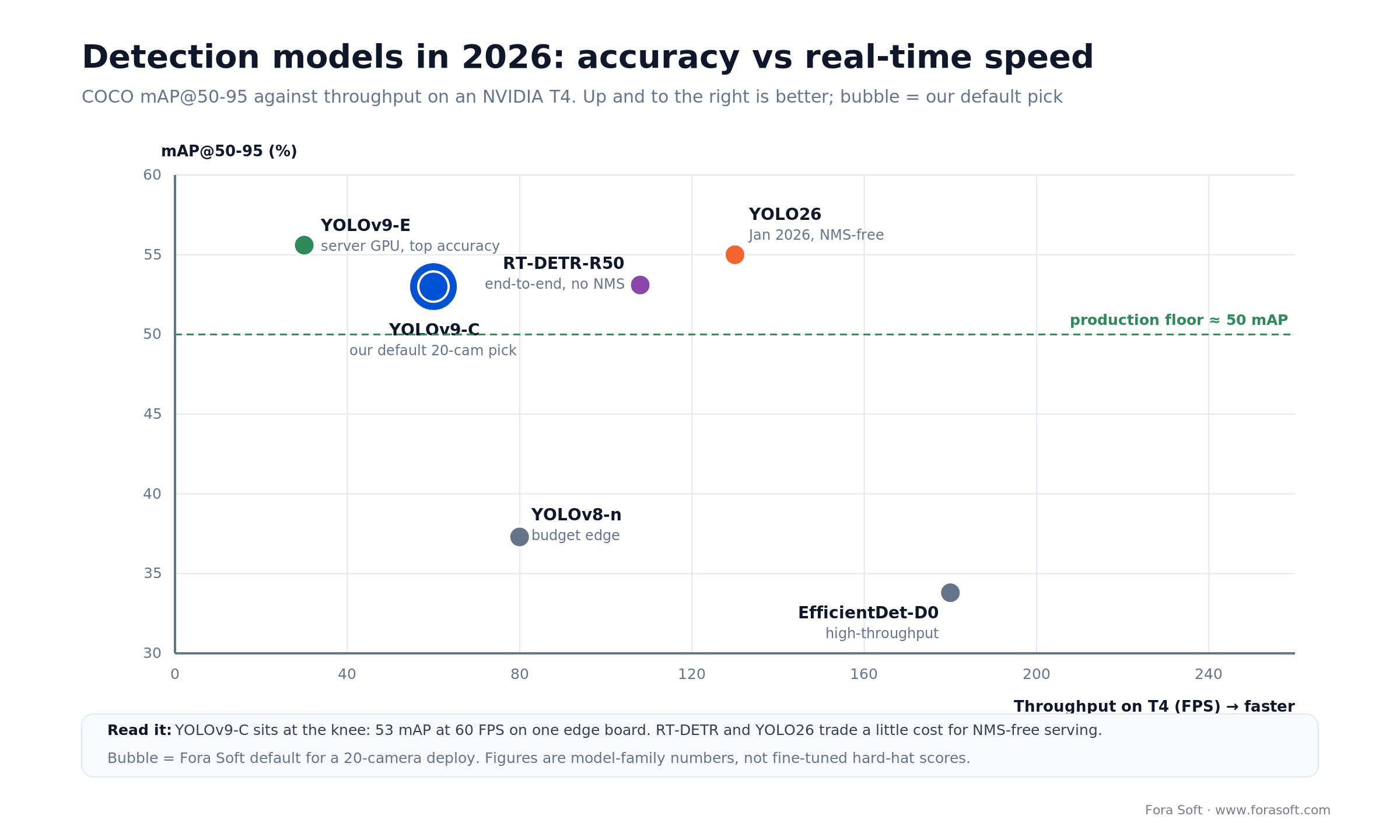
Figure 2. Where the 2026 detectors land on accuracy vs speed. YOLOv9-C sits at the knee for a typical construction deploy.
| Model | COCO mAP@50-95 | Speed (T4) | Best for |
|---|---|---|---|
| YOLOv8-n | 37.3% | 80+ FPS | Budget edge (Coral, Hailo-8L) |
| YOLOv9-C | 53.0% | ~60 FPS | Standard construction deploy |
| YOLOv9-E | 55.6% | ~16 ms/frame | Highest accuracy, server GPU |
| RT-DETR-R50 | 53.1% | 108 FPS | End-to-end, no NMS tuning |
| YOLO26-m | ~55% | fast, NMS-free | Simplest 2026 serving |
| EfficientDet-D0 | 33.8% | ~60 FPS | Legacy low-res baseline |
A caution on numbers: these are model-family figures on COCO, not fine-tuned hard-hat scores. A 2025 PPE-detection study (Performance Analysis of YOLO, Faster R-CNN and DETR for PPE detection) found DETR and YOLOv11n tied at 0.770 mAP@50-95 on PPE data, with YOLOv8 at 0.763. On this task the transformer and YOLO families sit close enough that tooling, latency and your own fine-tuning matter more than the leaderboard. RT-DETR-R50 hits 53.1% AP at 108 FPS on a T4, and RT-DETRv2 reaches roughly 54% AP (past 55% with Objects365 pre-training) without losing speed. The model-evaluation fundamentals behind these numbers (mAP, precision/recall, latency budgets) are in our AI-for-video-engineering hub.
Public datasets: SHEL5K, SH17, Pictor-PPE, CHV
SHEL5K (Safety Helmet, 5,000 images, 75,570 annotated instances) covers head, helmet, face and person-with/without-helmet — our default starting point. SH17 is a 17-class industrial PPE set (8,099 images) for when you also need gloves, glasses and boots. Pictor-PPE covers worker, hat and vest with less annotation depth but more job-site diversity. CHV (Color Helmet + Vest) merges GDUT-HWD and SHW and is strong for color-coded helmet policies. If you just want a fast baseline, the Roboflow Hard Hat Workers set is the most-used public option and downloads in a few clicks.
In practice you fine-tune a COCO-pretrained model on SHEL5K or SH17, then fine-tune again on 1,000–3,000 site-specific frames captured from the actual cameras in the actual light. That last step is where teams under-invest. A model trained on clean research footage and thrown at a dusty site with mixed lighting runs 10–15 points below its headline number, every time.
Rule of thumb: reserve 1–2 weeks per site for site-specific labeling and fine-tuning. Skip it and headline benchmark numbers are optimistic by 10–15 mAP on your real footage.
Edge vs cloud — where to run the model
Where should inference run? Cloud makes sense below about 10 cameras, where one batched cloud GPU beats buying ten edge boards. Past 15–20 cameras the calculus flips: streaming full video to the cloud costs more in upload bandwidth and cloud-GPU time than buying and running on-site GPUs. A single 4K camera at 10 Mbps pushes roughly 3.2 TB per month; at 1,000 cameras that is 3.2 PB per month, plus a cloud GPU bill to decode and run inference on every frame — the combination is what ruins the business case.
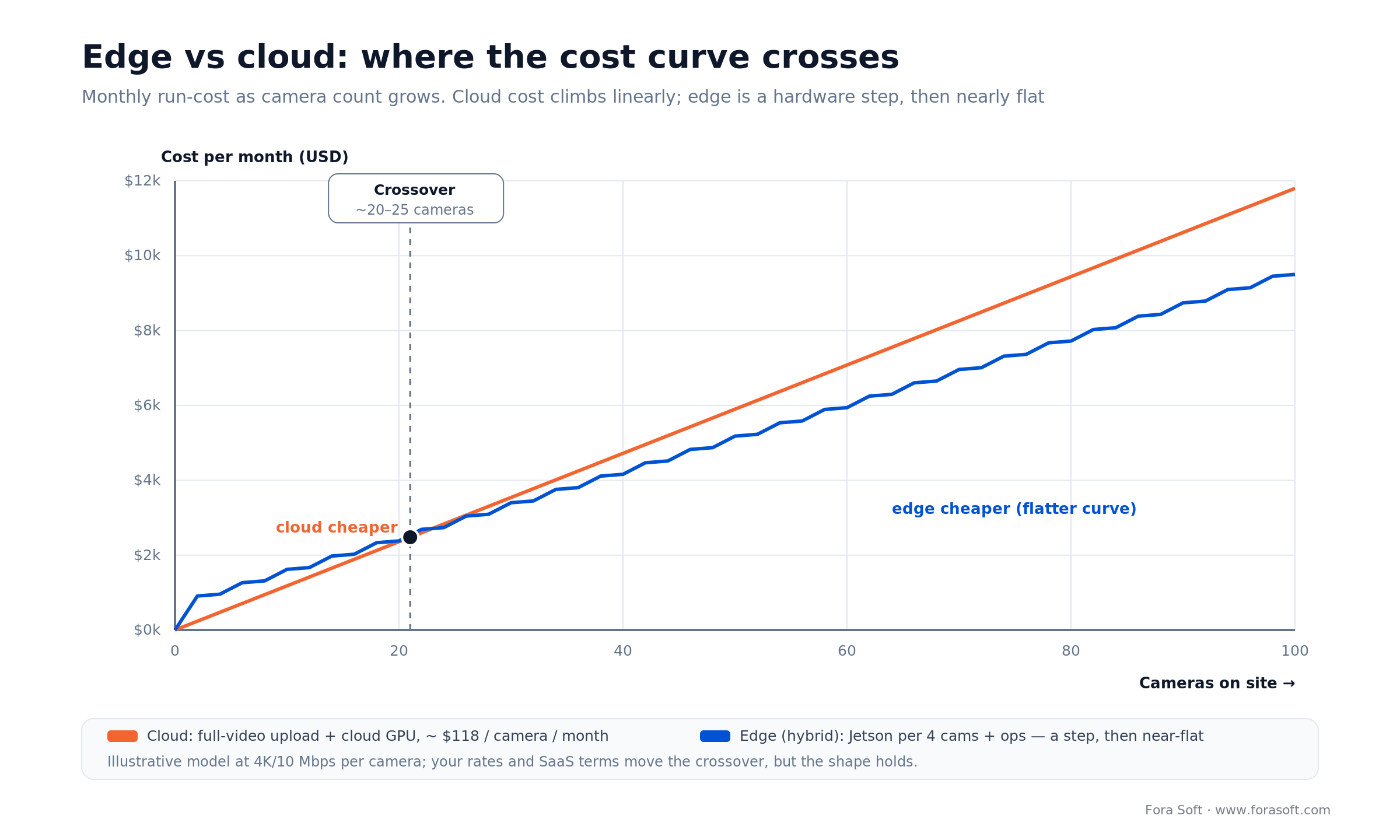
Figure 3. Edge vs cloud run-cost. The curves cross around 20–25 cameras; past that, edge inference wins on a flatter slope.
Edge inference keeps raw frames on site. Only alerts, short clips around each violation and aggregate metadata leave the camera, so bandwidth drops 80–95%. The trade-off is operational: you now own GPU devices to provision, monitor and replace. Our default for 15–100 cameras is hybrid — one Jetson Orin Nano per four cameras doing real-time inference, plus a cloud layer for storage, dashboards, cross-site analytics and alert routing.
Edge hardware: Jetson, Hailo-8 and Coral compared
| Board | Price (mid-2026) | YOLOv8 FPS | Streams at 30 FPS |
|---|---|---|---|
| Jetson Orin Nano 8GB (Super) | ~$399 / 67 TOPS | ~40 FPS | 1–2 cameras |
| Jetson Orin NX 16GB | ~$999 / 100 TOPS | ~120 FPS | 4 cameras |
| Hailo-8 M.2 | ~$150 / 26 TOPS | ~160 FPS (small models) | 4–6 cameras |
| Coral USB | ~$60 | ~30 FPS (MobileNet) | 1 camera |
| Server: NVIDIA A10 / L4 | cloud | 300+ FPS | 8–12 cameras/GPU |
A pricing note that changed mid-2026: NVIDIA raised Jetson prices by up to 101% on July 22, 2026, so the Orin Nano Super jumped from $249 to $399 and the Orin NX 16GB module to about $999. That nudges the edge-vs-cloud crossover slightly to the right but doesn’t break the case — it just means you budget hardware more carefully. Worked example from our own construction rollout: 14 cameras across two job sites, three Jetson Orin NX 16GB boards (one per four to five cameras, plus a spare). At today’s prices that edge hardware runs about $3,500 with carriers; a cloud-only design would have pushed roughly 45 TB per month of uploaded video plus continuous GPU decode, and the edge hardware still pays back inside the first quarter. The Orin Nano Super at $399 for 67 TOPS is the value pick for new builds; Hailo-8 is the low-power option where a fanless enclosure matters.
Reference pipeline: RTSP to DeepStream to alert
Our reference edge-first architecture: cameras expose RTSP; NVIDIA DeepStream (or Intel OpenVINO’s equivalent) reads them on the Jetson, runs the detector and tracker in one fused pipeline, extracts violation events, and hands them to a small edge agent. The agent posts events — not video — to a cloud API. The cloud side handles dashboards, long-term analytics, alert routing and per-site tuning.
For evidence on a violation we record a 10-second clip (5 seconds before, 5 after) and upload only that clip. Faces are blurred on the edge before upload, using a second face-detection model in the same DeepStream pipeline. Raw, unblurred footage never leaves the site. That single design choice removes most of the legal and union friction we’ve hit on real deployments — it is the difference between a one-hour sign-off and a three-month grievance.
Tuning precision, recall and confidence thresholds
The cost of a false negative — missing a real violation — dwarfs the cost of a false positive. A false positive is an annoyed foreman. A false negative is a head injury or a citation. So tune for recall first. Our default operating point is recall ≥ 0.90, precision ≥ 0.85, which usually means a confidence threshold near 0.35 for the hard-hat class, not the 0.5 YOLO ships with.
Two upstream tricks cut false positives without sacrificing recall: require the head-no-helmet state to persist for 2–3 seconds (temporal filtering), and gate the detector by zone so it only alerts inside the active work area, not the parking lot. One more thing worth stealing: every verified false negative should auto-generate a training sample for the next fine-tune, or model drift is inevitable. With those in place we typically see under one false positive per camera per day on mature sites.
The short version: set recall ≥ 0.90 first, threshold around 0.35, then use K-of-N temporal filtering plus zone gating to claw precision back. Chasing precision first is how you ship a system that misses the injury it was bought to prevent.
Alert routing: Slack, Teams, PagerDuty and the crew’s own language
Where should an alert land? Every event carries a timestamp, camera ID, violation type, confidence and a signed URL to the blurred 10-second clip, sent as JSON over a webhook to whatever channel the site already uses. Slack and Teams are one-line integrations. PagerDuty is the right home for critical events (multiple simultaneous, or high-confidence in a high-risk zone): it has on-call escalation, acknowledgment tracking, and an incident record that insurance auditors actually want to see.
Two-way radio matters more than you’d expect — the foreman who has to act often can’t see a phone on the floor. We push alerts into the site’s existing radio or CAD gateway over REST, which triggers a voice broadcast to the right channel, dropping mean-time-to-action from minutes to under 30 seconds. Crews in the US, UAE and Europe are multilingual, so English-only alerts reach a fraction of the floor; modern systems template alerts in four to six languages (English, Spanish, Portuguese, Mandarin, Arabic, Hindi) and route by camera or by worker-ID lookup. If you already run an AI integration stack, adding a translation call is a one-day job.
Beyond hard hats — vests, fall-arrest gear, gloves, glasses
Hard hat is the starter class, but most clients extend the detector within six months. Common additions, roughly in order of demand: high-visibility vests, fall-arrest gear (the strap rig workers clip to an anchor above 6 feet), safety glasses, gloves and steel-toe boots. Each new class needs its own labeled data and has its own failure modes. Fall-arrest gear is the tough one (straps blend into clothing), so we pair it with a pose-estimation model (OpenPose or YOLO-pose) to confirm the worker is in a fall-risk position before alerting.
Some classes don’t belong in vision-based detection at all. Ear protection is invisible from most angles. Respirator types can look identical on camera while offering very different protection. For those, RFID or NFC tags on the equipment with gate-mounted readers at the site entrance is the right tool — a different system that pairs cleanly with vision PPE detection rather than replacing it.
Vision works for what’s visible: hard hat, vest, fall-arrest straps, gloves, boots. For invisible PPE (hearing protection, respirator class) pair with RFID or NFC at site entry — don’t force the model to solve a problem it can’t see.
The SaaS vendors: Intenseye, Protex AI, Voxel, Newmetrix, Forsight
Intenseye is the most mature SaaS option — 50+ safety leading indicators, works on existing CCTV, strong in heavy manufacturing. Protex AI pairs PPE detection with behavioral analysis, focused on why violations happen, not just logging them. Voxel deploys in about 48 hours on existing cameras and publishes hard outcomes: a 62% drop in safety-vest incidents at NSG Group and roughly $1.1M in annual EBITDA savings at Americold. Newmetrix (formerly Smartvid.io) goes beyond real-time detection into image-based project-risk prediction trained on around 17 million construction photos. Forsight leans into job-site behavior analytics, and Everguard is the wearables-heavy IoT option.
SaaS pricing typically runs $100–250 per camera per month. Under 20 cameras that’s usually cheaper than a custom build once you count the model-operations team a custom system needs. Above 50 cameras, custom starts to win on both cost and integration flexibility — which is where clients come to us.
Mini-case: shipping AI construction surveillance with EyeBuild
The situation. A construction-security company came to us to build EyeBuild, a turnkey, solar-powered surveillance product for job sites with no reliable power or internet. The cameras had to run fully offline on 4G/5G, survive storms, and flag intrusions on active sites overnight — where a single equipment theft can run into six figures. Off-the-shelf VMS software assumed a wired, always-on network the sites didn’t have.
The plan. We built an edge-first pipeline: each 4K camera runs AI motion detection that separates humans from vehicles, so a fox or a swaying crane doesn’t page anyone, and only human-motion events fire alerts. Raw footage stays on the device with 30-day cloud retention for evidence; 14-day solar battery backup plus a 3-day reserve keeps it live through bad weather. The same RTSP-to-detection-to-alert shape this article describes, just tuned for intrusion instead of PPE.
The outcome. EyeBuild ships as a month-to-month service at $249 per camera with same-day installation, and protects projects holding billions of dollars in assets. Swapping the detection classes from human-versus-vehicle to helmet-versus-no-helmet is a fine-tune and a threshold change, not a re-architecture — which is exactly why we tell clients the pipeline, not the model, is the real deliverable. Want a similar assessment for your sites? Book a 30-minute scoping call.
Build vs buy: the honest decision
| Scenario | Recommended path |
|---|---|
| Under 20 cameras, no custom integrations | Buy SaaS (Voxel, Protex AI, Intenseye) |
| 20–100 cameras, deep Procore / PM integration | Custom build on YOLO + DeepStream |
| 100+ cameras across multiple sites | Custom build, edge-first, multi-tenant dashboard |
| Unusual PPE classes (region-specific helmets, color codes) | Custom build — SaaS models don’t fine-tune per customer |
| Strict on-prem or air-gapped requirement | Custom build, edge-only |
The line most teams get wrong is treating SaaS per-camera fees as fixed. At 15 cameras, $150 per camera per month is $27,000 a year — comfortable. At 120 cameras it’s $216,000 a year, every year, and a custom build’s one-time cost starts looking cheap by month 18.
Not sure whether to build or buy?
Send us your camera count and the integrations you need. We’ll tell you honestly whether SaaS covers it — and only pitch a custom build if the math actually favors it.
Privacy, GDPR, the EU AI Act and union sign-off
Can you deploy this without a revolt? Yes, if four design choices are baked in. First, no biometrics — detect objects, not identities; no face embeddings, no gait recognition. That also keeps you clear of the EU AI Act’s restrictions on biometric categorization, which object-only PPE detection simply doesn’t trigger. Second, blur before upload — any face or plate in a violation clip is blurred on the edge before it leaves the site. Third, data minimization — store alert metadata and 10-second clips, not continuous footage. Fourth, worker communication — signage, onboarding briefings and a published retention policy.
On two recent deployments the union rep walked us through every privacy concern before go-live. Both signed off in under an hour, because we could show that no identifying footage leaves the job site and no worker-level tracking is possible. It’s the build choices, not the sales pitch, that get you through — and one honest caveat: OSHA has not accepted AI-only monitoring as a compliance record, so the system is a force-multiplier for your safety officer, not a replacement for one.
Privacy-by-design checklist: no face embeddings, no biometric IDs, blur-before-upload, 10-second clip retention, no per-worker tracking, a documented retention policy, and union sign-off before go-live.
ROI: what one prevented incident actually saves
The numbers that move a CFO: the National Safety Council puts the average total cost of a workplace injury near $48,000 (2024) and a fatal injury around $1.5 million, with indirect costs (lost productivity, investigation, replacement hire, premium impact) running 4× to 17× the direct cost. One prevented serious-injury event typically covers two to five years of a 50-camera deployment. Human monitoring services alone run $50–150 per camera per month; amortized AI detection runs lower.
The quieter ROI driver is insurance. US builders-risk and general-liability carriers increasingly offer 5–20% premium reductions for verifiable continuous safety monitoring. On a $10M construction portfolio that is a $100k–200k annual line item that lands immediately, not amortized across incidents you hope never happen. Add the OSHA-fit rule from January 2025, and continuous proof of compliance stops being a nice-to-have.
Cost to build a 20-camera custom system
For a 20-camera single-site deployment integrated with an existing Procore, PagerDuty and Slack stack, at 2026 Fora Soft rates:
| Line item | Duration | Cost (USD) |
|---|---|---|
| Discovery + architecture | 2 weeks | $12k – $18k |
| Model training + site-specific fine-tune | 4 weeks | $28k – $40k |
| Edge pipeline (DeepStream + alerting) | 4 weeks | $32k – $48k |
| Dashboard + integrations | 3 weeks | $22k – $32k |
| Edge hardware (5× Jetson Orin NX, mid-2026 prices) | capex | $6k – $9k |
| Pilot + go-live + 30-day tuning | 2 weeks | $12k – $18k |
Total: $112k–165k for a production-ready 20-camera system in 14–16 weeks (edge hardware reflects NVIDIA’s July 2026 Jetson price hike). Scaling to 100 cameras adds roughly $50k of hardware and $25k for a multi-tenant dashboard. That’s competitive with SaaS at 20 cameras and meaningfully cheaper from month 18 onward. We use agent-assisted engineering to keep these estimates faster and leaner than typical agency numbers; if you want the arithmetic behind a fixed quote, our estimation-methods guide shows the working.
Want a fixed-price number for your site count?
Send the camera count, the existing VMS and the integrations you need. We’ll return a phased, fixed-price plan that keeps the pilot small and expansion cheap.
A decision framework in five questions
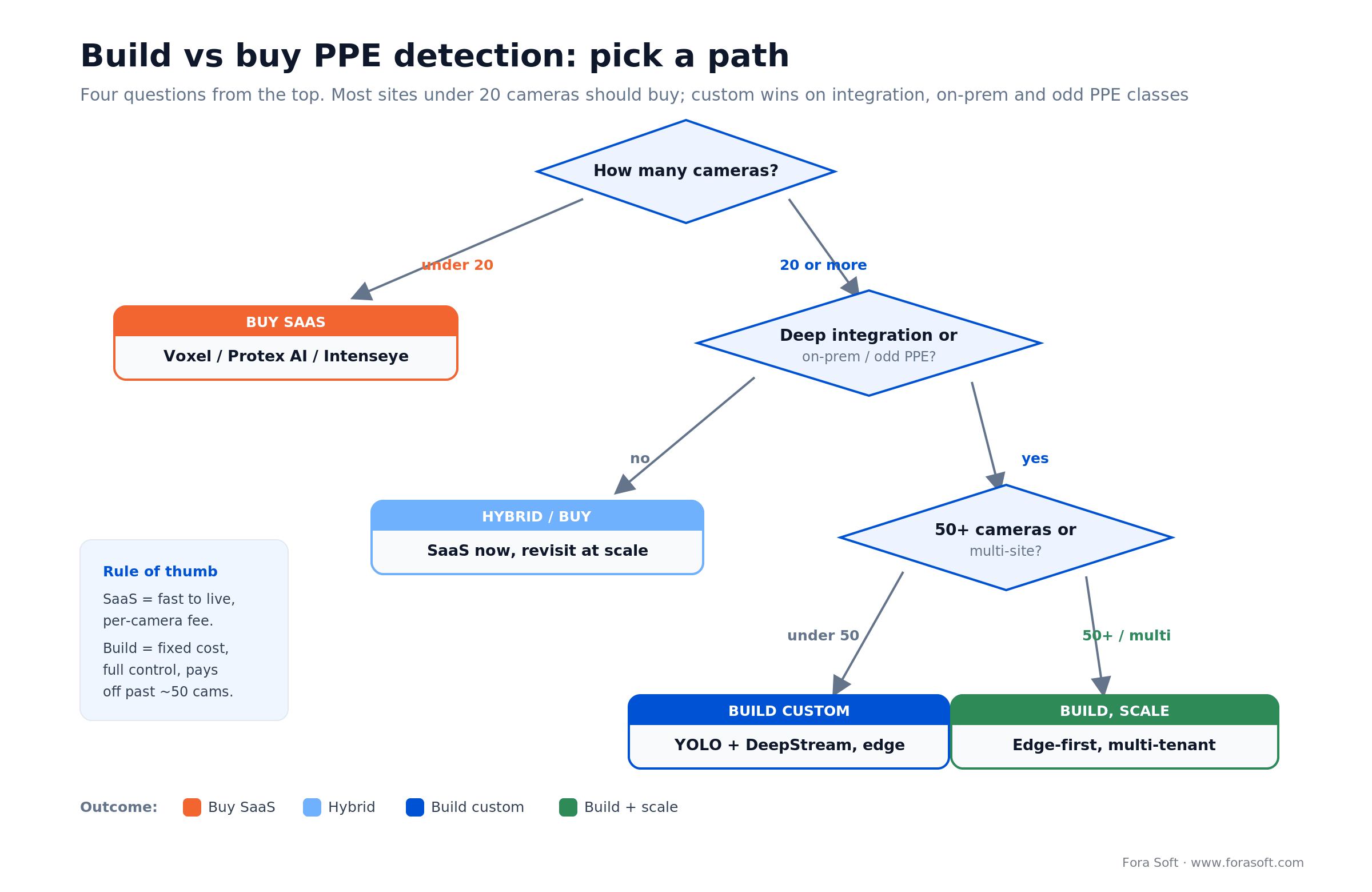
Figure 4. Build vs buy in four questions. Under 20 cameras, buy; custom wins on integration, on-prem and odd PPE classes.
1. How many cameras, really? Under 20 and SaaS almost always wins; 20–100 is the custom sweet spot; 100+ across sites is custom, edge-first, full stop.
2. How deep is the integration? If alerts must flow into Procore, a custom PagerDuty routing tree or a two-way radio gateway, SaaS webhooks run out of road fast. Custom pays for itself in integration alone.
3. On-prem or cloud-allowed? Air-gapped or strict on-prem requirements rule out most SaaS immediately. Build edge-only.
4. Standard or odd PPE? Hard hat and vest are covered by every vendor. Region-specific helmets, color-coded crews or unusual gear need per-customer fine-tuning that SaaS platforms don’t offer.
5. Who operates the model after launch? A custom build needs someone to own drift, re-training and false-negative feedback. If you don’t have (or want) that team, buy SaaS — or have us run it for you.
Five pitfalls we’ve seen on real deployments
1. Training only on daylight footage. The 5 a.m. winter shift looks nothing like the dataset. Fine-tune on site-specific dawn, dusk and low-light frames or accept a wave of false negatives at exactly the wrong hours.
2. Alert fatigue from missing temporal filtering. If every transient occlusion fires, foremen mute the channel within days. K-of-N frame filtering is not optional.
3. Missing zone gating. Cameras see parking lots, deliveries and visitors. Restrict detection to the active work area or alert volume doubles for no safety gain.
4. Assuming cloud GPU scales forever. Cloud is fine at 10 cameras and unaffordable at 200. Plan the edge migration before the cloud bill forces it.
5. Skipping the union conversation. A post-deployment grievance is 10× harder to resolve than a pre-deployment sign-off. Bring the rep in before the first camera goes live, with the blur-on-edge design in hand.
KPIs: what to measure once it’s live
Detection-quality KPIs. Track recall and precision per camera per week against a small human-audited sample; hold recall ≥ 0.90 and false positives under one per camera per day. Watch for drift after weather or site-layout changes.
Business KPIs. Measure mean-time-to-corrective-action (target under 30 seconds via radio), violations per 1,000 worker-hours trending down, and the insurance premium delta at renewal — the line item that pays for the system.
Reliability KPIs. Track edge-device uptime, alert-delivery success rate, and clip-upload latency. A detector that’s right but offline every third morning is worth less than a slightly less accurate one that never misses a shift.
When not to deploy hard hat detection
Honesty sells better than a demo. Don’t deploy vision-based PPE detection if your cameras can’t see the work — poor angles, heavy dust or constant back-lighting will bury you in false negatives no fine-tune fixes. Don’t deploy it as a gotcha tool to discipline workers; that is how you turn a safety win into a labor dispute, and it poisons the data because crews start gaming the cameras.
And don’t build custom for a handful of cameras with no integration needs. If you run five cameras and want hard-hat alerts in Slack tomorrow, a SaaS trial is the right answer and we’ll tell you so. Custom earns its cost at scale, on integration depth, or on requirements — on-prem, odd PPE, air-gapped — that no SaaS vendor will meet.
FAQ
What is the OSHA rule for hard hats?
OSHA requires head protection wherever there is a risk of head injury from impact, falling objects or electrical shock, under 29 CFR 1926.100 for construction. Hard hats must meet ANSI/ISEA Z89.1 (Type I for top impact or Type II for top and side impact). As of January 13, 2025, a revised rule also requires that head protection properly fit each worker.
Can YOLO detect a helmet?
Yes. YOLO models (v8, v9, and the 2026 YOLO26) detect hard hats reliably once fine-tuned on a PPE dataset such as SHEL5K or SH17. On PPE-specific data, YOLO and transformer detectors like RT-DETR score within a point or two of each other; the bigger accuracy driver is fine-tuning on your own camera footage.
Are bump caps legal as hard hats?
No. Bump caps protect against minor bumps and scrapes but do not meet the ANSI Z89.1 impact and penetration standard that OSHA requires for hard hats, so they are not a substitute where falling-object or impact hazards exist. A detection model can be trained to tell a bump cap from a rated hard hat if your site polices the difference.
What does a red hard hat indicate?
Color coding is a site convention, not a federal rule, so it varies by employer. A common US scheme uses white for managers and engineers, blue for electricians or technical operators, green for safety officers or new workers, yellow for general laborers, and red for fire marshals or emergency responders. A color-aware model (trained on the CHV dataset) can enforce per-crew helmet rules.
Will this work with my existing IP cameras?
Almost always. If your cameras expose RTSP or ONVIF (nearly all IP cameras do), a Jetson can read them directly. The exceptions are proprietary cloud-only doorbell cameras and some legacy analog systems that need a video encoder first.
How accurate is hard hat detection in poor lighting?
With site-specific fine-tuning on dawn, dusk and overcast frames you can hold accuracy within 3–5 points of daylight. Without that site data, expect a 10–15 point drop. Fine-tune on your own footage or accept more false negatives.
How do you avoid identifying individual workers?
We store no face embeddings or gait signatures. Faces in any uploaded clip are blurred on the edge before upload, and raw video never leaves the site. Alerts reference a camera and zone, not a worker identity.
Is AI hard hat detection OSHA-compliant on its own?
No. AI detection complements but does not replace a human safety officer, and OSHA has not accepted AI-only records as compliance evidence. Use it as a force-multiplier for your safety team and keep their sign-off in the audit trail.
How long from kickoff to first live alerts?
For a 20-camera site, 10–12 weeks to first live production alerts, plus about 4 weeks of tuning and false-positive reduction. We can pilot a single camera in 3 weeks if you want early confidence before committing to the full rollout.
What to read next
Surveillance
Anomaly detection in surveillance footage
The 2026 playbook for spotting the unexpected on camera, the sibling technique to PPE detection.
Models
Anomaly detection models for video surveillance
Which detection models hold up on real surveillance feeds, and where they break.
Computer vision
ML algorithms for surveillance anomalies
Seven algorithms behind modern video analytics, with the trade-offs named honestly.
Architecture
AI in software architecture design
Where we put AI models in system diagrams for surveillance and adjacent products.
Estimating
Software development estimation methods
How we price a 20-camera PPE pilot into a fixed-scope, fixed-price delivery.
Ready to ship hard hat detection on your sites?
The technology is settled: YOLO26 and RT-DETR clear production accuracy on a ~$399 board, public datasets get you a fast baseline, and blur-on-edge design gets you past privacy and union review. What’s left is judgment — buy SaaS under 20 cameras, build custom past 50, tune for recall, gate by zone and language, and treat the pipeline as the real deliverable. That’s the same call we made building AI surveillance software for construction and public-safety clients.
If you’re weighing a build, we’ll give you an honest read on whether to buy instead — and a fixed-price plan if custom is the right call. Fora Soft has shipped this shape of system before, on sites with worse constraints than yours.

The book · Volume 6 of 7
AI for Video: A Complete Guide to Intelligence in Video Products: From Models and Inference to Computer Vision, Speech, Search, and Generative Video
Hard hat detection is one application of a wider computer vision toolkit, and the same choices repeat on every safety camera project. Our AI for Video volume on models and capabilities covers detection, tracking and segmentation, deployment topologies from edge to cloud, and the ML basics you need to pick a model and judge its accuracy. Written by Nikolay Sapunov, CEO at Fora Soft.
Read it on Amazon →Kindle & paperback · Fora Soft Video Engineering Handbook
Start the conversation
Tell us your camera count, your PM stack and your timeline. We’ll reply with a fixed-price delivery plan and an honest build-vs-buy recommendation.

