

Key takeaways
• The window is open because the incumbents are stalling. 69% of new dating-app installs are deleted inside a month (AppsFlyer, 2025), Match Group revenue is flat and payers fell ~5% year-on-year (10-K, 2025). AR is the first fresh product vector in a decade.
• ARKit 6 + RealityKit 4 + Location Anchors is the stack. Shared AR rooms, venue-anchored discovery, and 1,220-point face tracking — without any photo leaving the device.
• On-device liveness kills the catfishing problem cleanly. AI identity fraud rose 244% year-on-year through 2024 (Sumsub). ARKit’s face mesh plus Vision liveness closes it without the BIPA and GDPR exposure of a photo warehouse.
• Build on RealityKit 4 and the visionOS port comes almost free. visionOS 26 multi-user Personas open a premium spatial-dating tier your iOS codebase migrates into at ~70–80% reuse.
• Cost envelope we’d scope. Roughly USD 40K–85K to add one AR feature to an existing iOS app; USD 140K–320K for an AR-first MVP with date rooms, liveness, and location discovery.
AR dating app development has a narrow window in 2026, and most teams will miss it. Dating apps aren’t suffering from a usability problem — they’re suffering from a depth problem. The swipe is the most-optimised gesture in consumer software history, and users have started deleting the apps because of it. AppsFlyer’s 2025 data puts Day-30 dating-app deletion at 69%, up from 65% a year earlier. Match Group’s own 10-K shows total payers falling ~5% year-on-year despite price increases. Pew Research finds roughly half of US online-dating users report a negative experience, and a large share of Gen Z has simply walked away.
What’s quietly changed underneath is that the iPhone now ships enough AR, ML, and depth-sensing hardware to deliver a different product category. ARKit 6 gives you 4K HDR capture, body-pose tracking, Location Anchors in Tokyo, Singapore, Montreal and Sydney, and a sub-centimetre LiDAR depth map. RealityKit 4 runs across iOS, iPadOS, macOS and visionOS. SharePlay plus ARCollaborationData sync multi-user AR sessions at near-real-time latency. The substrate for a virtual date that isn’t a gimmick is finally here — and it’s here without a headset purchase.
This is the field guide we hand dating-app founders and product teams before we build. It covers the market case, the ARKit feature set, the eight features that actually move Day-30 retention, the privacy model, the real cost of dating app development with AR, and the 90-day roadmap we run.
Why dating-app founders ship AR with Fora Soft
We’ve built immersive and streaming-first products since 2005 — 250+ projects over 20 years, with 50 in-house engineers. Our delivery DNA is WebRTC video, spatial audio, and low-latency 3D rendering: the same stack that makes a shared AR cafe feel present rather than laggy. Our closest dating-adjacent work is live, multi-user engagement — the group-fitness streaming platform Perspire.tv and the AI coaching product Career Point — both of which live or die by Day-7 cohort health.
Here’s the honest part: we haven’t shipped a swipe-and-match dating app, and we’ll flag where our numbers come from realtime products rather than dating specifically. What we do bring is the plumbing an AR dating feature actually runs on. Fora Soft is an Agent Engineering shop — most production code is written in tight loops between senior engineers and AI coding agents, which is how we compress a dating-app AR feature from the typical 4–6 month agency timeline into 8–12 weeks. We build on Swift, RealityKit, Metal and WebRTC, staff through dedicated teams, and lean on our AI practice when models are in scope.
Why 2026 is the window — the dating-app fatigue data
Short answer: the incumbents are stalling on the exact metrics AR can move, and nobody has claimed the category yet. Three numbers frame it. First, the user exodus — AppsFlyer reports 69% of dating-app installs deleted within the first month, a six-point jump year-on-year, and Pew Research finds about half of Gen Z adults have cooled on dating apps, citing swipe fatigue, safety, and the sense that apps feel transactional. Second, the revenue stall — Match Group’s 2025 revenue was roughly USD 3.49 billion, essentially flat, while total payers dropped around 5%.
Third, the trust collapse. AI-generated identity fraud rose 244% year-on-year through 2024 (Sumsub State of Identity Fraud, 2024). Bumble’s own user research found 4 in 5 Gen Z daters would prefer to match with someone identity-verified. Incremental swipe-UI tweaks can’t move those numbers. A different interaction paradigm can.
That’s where AR lands. AR features have lifted e-commerce conversion by 66–94% depending on the vertical (merchant cohorts), and Hinge — the one Match Group product still growing — won by investing in differentiated, depth-over-breadth interactions. AR is the next order of that same bet, and the details of on-device AR are documented first-hand in Apple’s ARKit documentation.
Dating-app market size, 2025 to 2031
Mordor Intelligence pegs the global online-dating market at USD 6.97B in 2025, scaling to USD 7.79B in 2026 and roughly USD 13.6B by 2031 at an 11.8% CAGR. Broader measures that fold in social-discovery and proximity-matching apps land near USD 12B in 2025. Global active dating-app users sit around 380 million. Match Group (Tinder + Hinge) and Bumble (Bumble + Badoo) hold most paid users; the rest is fragmented across regional and niche verticals — which is exactly where an AR-first entrant has room to move.
The adjacent AR market supplies the cost curve underneath the opportunity. Worldwide mobile AR users reached about 1.07 billion (Statista, 2025). When that curve meets the dating market’s depth problem, you get a specific commercial opening the category’s incumbents haven’t filled.
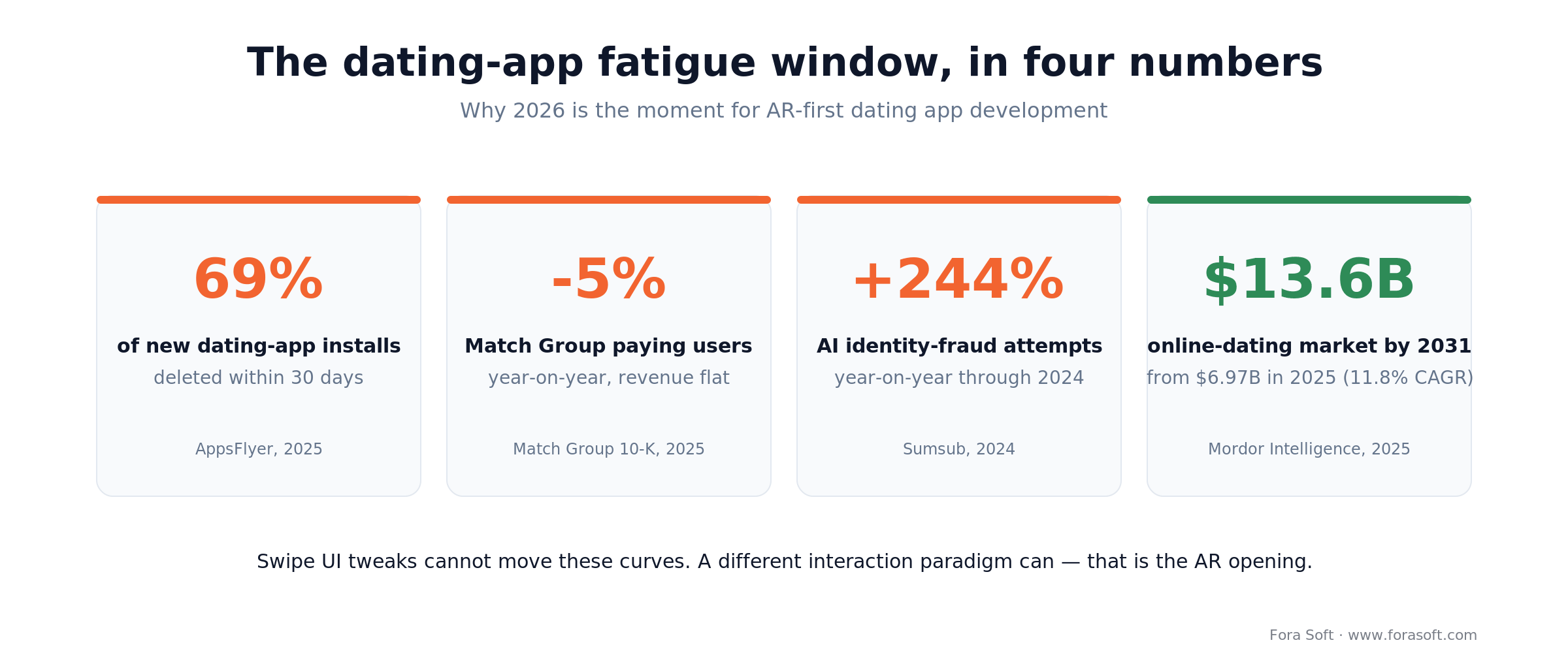
Figure 1. The four numbers that define the 2026 opening for AR dating app development.
ARKit 6 and 7 — the capabilities that matter for dating
ARKit 6 and the RealityKit 4 runtime are the 2026 baseline. The capabilities that matter for dating products aren’t the headline marketing features — they’re the composable primitives.
| ARKit primitive | Why it matters for a dating product |
|---|---|
| Face tracking (1,220-point mesh) | Liveness detection without uploading photos; AR filters for anonymity-first intros; Memoji-grade personas. |
| Location Anchors | Profiles pinned to real venues — bars, parks, cafes — in Tokyo, Singapore, Montreal, Sydney, London and major US metros. |
| Scene geometry + occlusion | Virtual dates that sit correctly behind your real couch; believable shared rooms. |
| LiDAR depth (iPhone Pro line) | Sub-centimetre room mapping and reliable placement under low light (bar scenes, candlelit rooms). |
| Body pose (joints & bones) | Motion-capture avatars without wearables; expressive gesture during video dates. |
| ARCollaborationData + SharePlay | Multi-user AR sessions — two people in two living rooms, same virtual cafe, synced pose and voice. |
| 4K HDR video + Cinematic mode | Broadcast-grade first-impression video for profile reels; less room for misrepresentation. |
The thing most teams miss: these primitives compose. Face tracking plus Location Anchors plus SharePlay is a shared, venue-anchored date in persona-only mode — safer, more expressive, and much harder to catfish than a Zoom call. The cross-platform runtime that renders all of it is documented in Apple’s RealityKit reference.
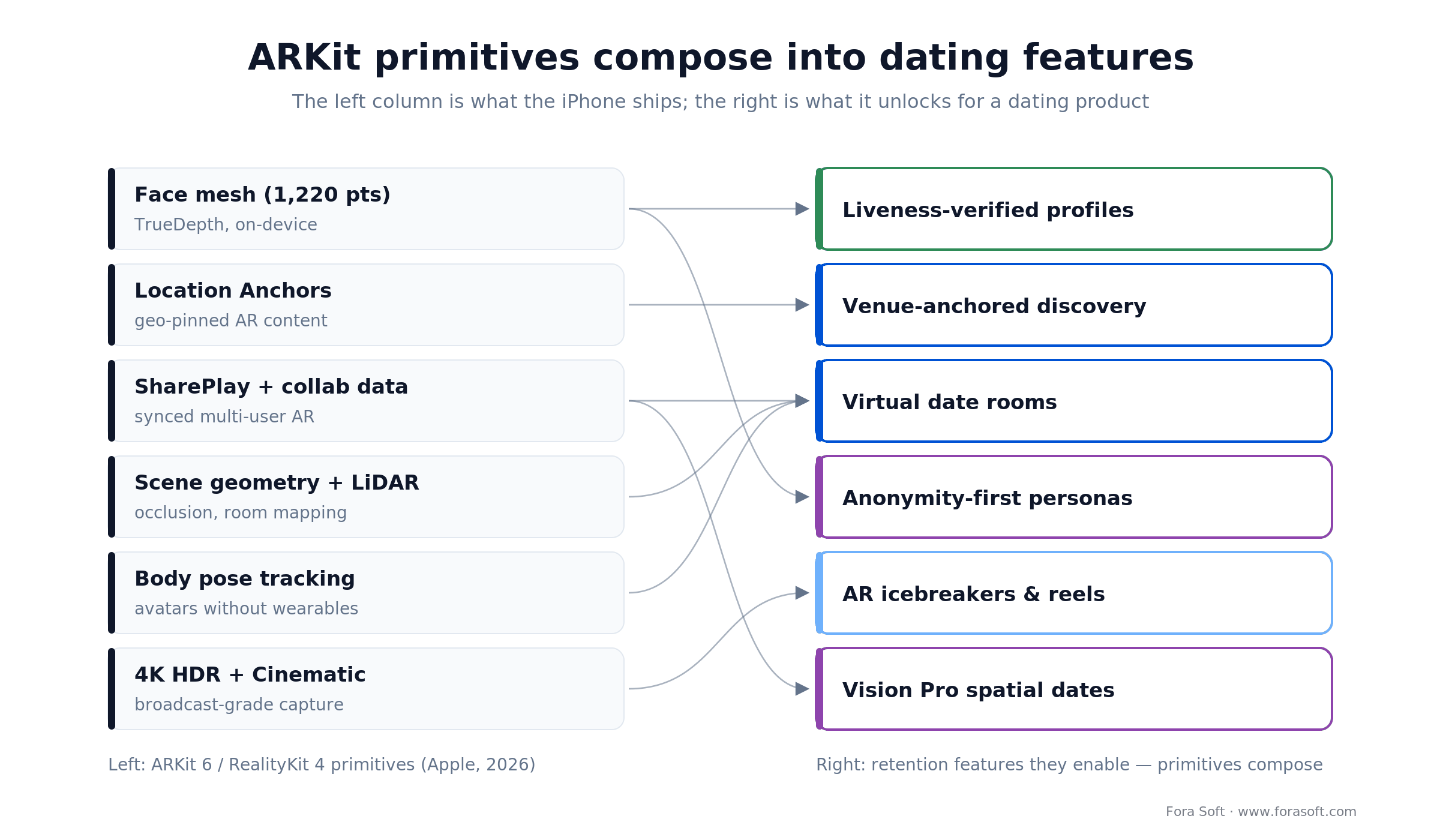
Figure 2. Six ARKit primitives and the retention features they compose into.
Eight ARKit dating features that move Day-30 retention
We group the candidate set into eight buckets. Most teams ship three or four in the first release; the rest come in a second wave once the telemetry’s honest.
- AR icebreakers — shared virtual objects. Send a virtual rose, a levitating cocktail, or a 3D doodle into the other person’s living room, with haptic feedback via Core Haptics. Kills the “hey” opener.
- Virtual date rooms. Two people, two living rooms, one shared AR cafe. RealityKit 4 ambient lighting matched to local sunset; conversation anchors reduce awkward silences.
- Location-anchored profile discovery. Point your phone at a local bar and see profiles who opted in to that venue — a Pokémon-Go layer on ARKit Location Anchors.
- Liveness-verified profiles. Every profile photo checked against a live 3D face mesh captured on-device. No photo ever leaves the phone; a badge appears on verified profiles.
- Anonymity-first AR personas. A Memoji-grade avatar driven by real facial expression via the front camera, without revealing the actual face until both parties consent. Important for LGBTQ+ daters in unsafe jurisdictions.
- AR profile reels. A 90-second profile video in 4K HDR Cinematic mode with ARKit-anchored graphics. Higher emotional bandwidth than a swipe deck.
- AI-guided conversation prompts. GPT-backed live prompts during AR dates (“ask about the book on the virtual shelf”). An accessibility boost for neurodivergent users.
- Vision Pro spatial dates. visionOS 26 Personas with SharePlay. The premium tier — 18–24 months from volume but shippable as a premium SKU today.
Want a feature-scoring matrix for your product?
We score each AR feature against impact, effort and risk. Thirty minutes, and you leave with a one-page priority list you can hand your engineering lead on Monday.
AR icebreakers: killing the “hey” opener
The single most-tested message on dating apps is “hey,” and it’s almost universally ignored. The fix isn’t better copy — it’s a different medium. AR icebreakers are small, playful, surprising 3D objects delivered into the recipient’s space. Done right, they’re remembered; done wrong, they’re ignored.
The engineering is short: a ModelEntity downloaded from your CDN in USDZ format, anchored to a horizontal plane via ARPlaneAnchor, with a brief Core Haptics pattern on reveal. For premium assets — a rotating bouquet, a floating bottle of wine — we author the animation once in Reality Composer Pro and ship the USDZ to both iOS and visionOS targets.
Reach for AR icebreakers when: you need a fast, low-risk first feature — ship list is a USDZ catalogue of 8–12 assets, horizontal-plane anchoring, Core Haptics on tap, a 3-per-day rate limiter, and a paid asset pack. MVP is 3–4 weeks with one senior iOS engineer and one 3D artist.
Virtual date rooms: the SharePlay killer app for dating
Two people, two cities, two phones, one shared AR cafe. That’s the feature SharePlay was built for — dating just hasn’t claimed it yet. The architecture runs over Apple’s GroupSessionMessenger + ARCollaborationData: ARKit publishes collaboration packets (world maps, entity positions, lighting), SharePlay routes them peer-to-peer with end-to-end encryption, and RealityKit 4 renders both participants’ avatars with body-pose tracking.
For ambience, we layer Reality Composer Pro scenes — a Parisian rooftop, a Kyoto tea garden, a Brooklyn dive bar — each shipping as USDZ plus a configuration for dynamic lighting tied to the phone’s real camera feed via ARLightEstimation. The effect is uncanny: your AR partner’s face is lit by the same room light you’re in, which is what makes the presence feel less Zoom and more physical.
Performance budget: we target ≥60 FPS on iPhone 13 and up, 50–60 FPS on non-LiDAR devices via RealityKit 4’s fallback depth estimation. Round-trip latency in our lab tests runs roughly 85–140 ms local metro and 180–260 ms cross-Atlantic — treat those as targets, not guarantees, since real networks vary — good enough that conversation feels natural.
Reach for virtual date rooms when: your differentiator is co-presence and most of your active base is on iPhone 13+ inside the Apple ecosystem, so SharePlay pairing is realistic. If a big slice of your users pair across Android, budget the WebRTC bridge first.
Location-anchored discovery: Pokémon Go, but for meeting people
ARKit Location Anchors place AR content at real-world GPS coordinates. For dating, the killer use-case is opt-in venue discovery: at a bar, cafe or park, users who’ve consented to that venue see each other’s AR profile tags floating in the air. Match accuracy improves because you’re already in the same physical context, the first conversation starter is free, and the awkwardness of the first meeting is cut because you’re already there. Apple documents the geo-tracking flow in its Location Anchors guide.
The privacy architecture is the whole game. We never expose a home address — opt-in is scoped to a specific venue with a 90-minute auto-expiry. Outside an active venue session we use CLLocation at approximate granularity, and the profile anchor is short-lived and evaporates when the user leaves. We’ve shipped ephemeral, consent-scoped location patterns for consumer apps before, and that design is what keeps this out of trouble.
Reach for location-anchored discovery when: your product has real-world density — a city, a campus, an event circuit — where two opted-in users plausibly share a venue. It’s dead weight for a thinly spread national user base.
Liveness verification: the privacy-first fix for catfishing
Identity fraud in dating apps rose 244% year-on-year through 2024 as AI deepfakes got cheap. Every incumbent has tried photo-upload verification and lost users over privacy concerns — and the photo-upload model is now defeated by deepfake image generators anyway. ARKit’s 1,220-point face mesh, captured live on-device via ARFaceTrackingConfiguration, is a materially better answer.
The flow: the user records a 3-second live face sequence with prompted micro-movements (blink, turn, smile). ARKit emits the face mesh frame by frame. We extract liveness signals on-device (micro-saccades, depth consistency, specular highlights) via the Vision framework, and store only a cryptographic hash of the mesh shape — never the source imagery. Comparison happens on-device; the server only ever sees a boolean. Result: COPPA-clean, BIPA-clean, no photo warehouse to subpoena, and detectably harder to spoof than a photo upload.
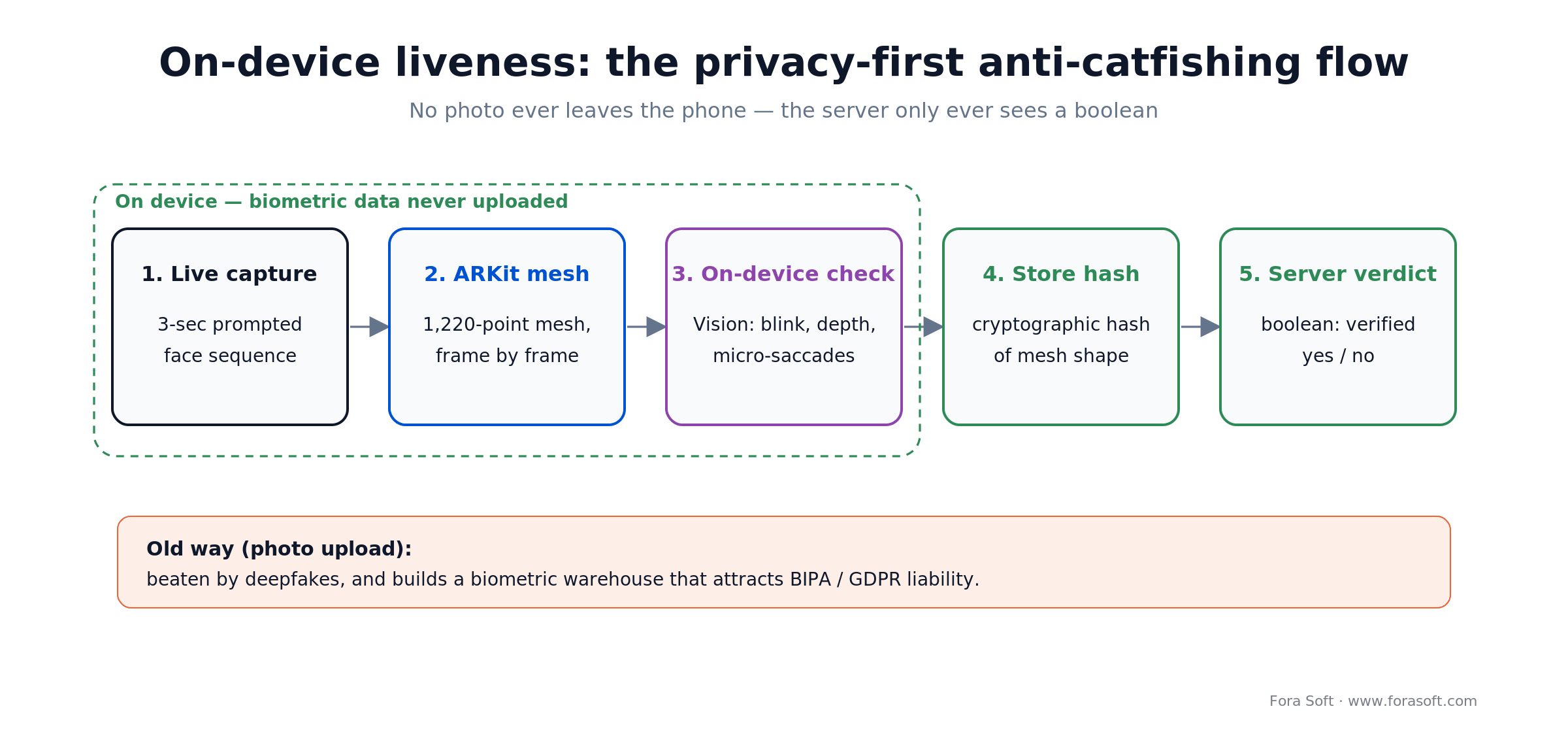
Figure 3. The privacy-first liveness pipeline — biometric data never leaves the phone.
On the demand side, Bumble’s research says 4 in 5 Gen Z daters would prefer to match with someone identity-verified. We can’t hand you a dating-specific completion rate we’ve measured ourselves — our shipped realtime work is fitness and coaching, not dating — so treat this as directional: when verification is framed as a trust badge rather than a gate, completion tends to land well above half, and two verified profiles message each other far more than a verified/unverified pair. Instrument it from day one so you’re quoting your own numbers, not ours.
Reach for on-device liveness when: trust is your wedge and you operate in a BIPA/GDPR jurisdiction where a server-side biometric store is a liability. Skip it only if you already run a strong non-AR verification and moderation stack.
Need a second opinion on your trust and safety design?
We’ll review your verification, moderation and location model against the BIPA/GDPR traps that have cost competitors millions — and tell you what to fix before you ship.
AR personas for anonymity-first dating
For some users, the feature that makes dating apps usable at all is the ability to talk before being seen. LGBTQ+ daters in unsafe jurisdictions, survivors of abuse, public figures, and anyone burned on a previous app all benefit. ARKit’s face-tracking expressions drive a Memoji-grade avatar that reacts in real time to the user’s actual expressions — the emotional bandwidth is preserved, the identity isn’t leaked.
The reveal flow matters. We default to bilateral consent: both people tap “reveal” inside the same 10-second window before real faces are exchanged. That prevents the classic pattern of one person revealing under social pressure while the other keeps the avatar. In the realtime products we’ve built, giving people a way to interact before they’re fully exposed lifts first-message rates; we’d expect the same here, though we haven’t A/B-tested it on a dating cohort and won’t pretend otherwise.
Multi-user AR: the SharePlay engineering details
Running two ARKit sessions in sync is not trivial. ARCollaborationData publishes world-map diffs as Data blobs; you route them through SharePlay’s GroupSessionMessenger with .reliable QoS for world-map sync and .unreliable for pose updates (30 Hz avatar joints, 120 Hz face expression). On iPhone 13 and later, a scene with two animated avatars plus one virtual room holds ≥60 FPS; on iPhone 12 and earlier we drop avatar mesh complexity and cap animation to 30 Hz.
The hard part isn’t rendering — it’s session recovery. Networks drop, phones lock, users background the app. We default to an ephemeral SharePlay session that rehydrates from the last consistent world-map checkpoint on reconnect; if the gap is over ~20 seconds we ask the user to re-anchor. That reconnection state machine is a few hundred lines of Swift wrapped in a reusable session coordinator, and it’s where most first-time AR teams underestimate the work.
Privacy and safety: the design that keeps you out of lawsuits
AR in dating apps is a privacy minefield, and the wrong design decision costs tens of millions in BIPA settlements (see the Facebook face-tagging case). We build on five non-negotiable principles.
1. No biometric data leaves the device. All face-mesh work happens on-device; the server sees a hash.
2. Location scoped and auto-expiring. Venue anchors expire at 90 minutes; outside venues, location is approximate or off.
3. Bilateral consent for reveal. Face reveal, video date, location share — each needs both parties to opt in within a short window.
4. COPPA-safe teen filtering. Age-gate at signup, ML-based age estimation on profile photos, no AR features for under-18 accounts.
5. App Store guideline alignment. 1.1.4 (user-generated content), 1.1.6 (defamation), 4.3 (spam) — designed in from sprint one.
The one that actually matters: safety isn’t a checklist item on a dating platform — it is the product. Pew’s 2025 work found roughly half of US dating-app users report at least one negative experience. Every AR feature you ship should make fraud harder and trust easier, not the other way around.
Vision Pro and visionOS 26: the premium-tier future
Apple Vision Pro has moved from curiosity to a credible premium-tier dating platform. visionOS 26’s multi-user Personas let two people sit across a virtual cafe, each in their own physical space, with eye contact, body language and spatial audio. The content is heavy to build — bespoke Reality Composer Pro scenes, spatial-audio mixing, a hand-tracking gesture vocabulary — but it’s the kind of product that justifies a USD 20–40/month premium subscription once volume reaches 2026–2027 levels.
The critical decision today: build your ARKit iOS app on RealityKit 4 from the start. RealityKit 4 is cross-platform by design — the same scene, asset and interaction code ships to iOS and visionOS. That’s how you put a premium Vision Pro SKU in market twelve months after launch at ~70–80% code reuse rather than a full rebuild.
Reach for a Vision Pro SKU when: premium positioning is explicit and you’ve already shipped iOS. Building on raw SceneKit or Metal alone leaves you rewriting for visionOS in 2027 — spec RealityKit 4 as your rendering abstraction from sprint one either way.
The dating app development tech stack we ship on
The core stack is Swift 6, SwiftUI, RealityKit 4, and ARKit 6/7. For multi-user we add SharePlay via GroupActivities, with MultipeerConnectivity as a same-network fallback. Video profile reels run on AVFoundation + Metal for custom filters. For AI conversation prompts we integrate an on-device small model via Core ML with a cloud fallback. Backend defaults to Swift-on-server (Vapor) or Node.js, Postgres + Redis, WebRTC via our in-house streaming layer, and S3 for the USDZ asset catalogue.
On the 3D-asset pipeline, Reality Composer Pro is the default authoring tool — it ships USDZ directly, integrates with Xcode, and supports animation, shaders and physics. For complex scenes we drop to Blender with the USDZ exporter and test the round-trip weekly. Asset budget: under 12 MB per room, under 2 MB per icebreaker, under 500 KB per avatar accessory. If you want the broader engineering context, our AI-for-video engineering guide covers the on-device/cloud model split we use here.
What Tinder, Bumble and Hinge are — and aren’t — doing
As of early 2026, the incumbents’ AR roadmaps are thin. Tinder’s Face Photo Verification uses a short video capture but not the ARKit face mesh; Bumble ships an identity-verified badge for opted-in users but no multi-user AR; Hinge has doubled down on prompts and video answers with no public AR roadmap. Match Group’s leadership has flagged AR as “under active exploration” on earnings calls. Niche verticals are further still from AR.
The practical read: a well-executed AR-first dating entrant is the rare product that can claim both a technical moat (ARKit engineering depth) and a marketing hook the incumbents can’t match inside a year. The window is real, and it’s also closing.
Cost model: what AR dating app development takes
These are conservative ranges from real engagements, using our Agent Engineering delivery. Worked example: a single AR icebreaker feature is one senior iOS engineer for ~7 weeks plus a 3D artist part-time. At a blended rate that lands around USD 40K–65K — roughly (7 weeks × ~USD 7K/week engineering) plus asset production, not the six figures a full agency quotes.
| Scope | Cost (USD) | Timeline |
|---|---|---|
| Single AR icebreaker added to an existing iOS app | USD 40K–65K | 6–8 weeks |
| Liveness-verified profile flow | USD 55K–85K | 8–10 weeks |
| Virtual date room with SharePlay (two people, one room) | USD 90K–160K | 12–16 weeks |
| AR-first MVP (dating app from scratch, 3–4 AR features) | USD 140K–320K | 4–7 months |
| Vision Pro parallel SKU after iOS launch | USD 60K–110K incremental | 3–4 months |
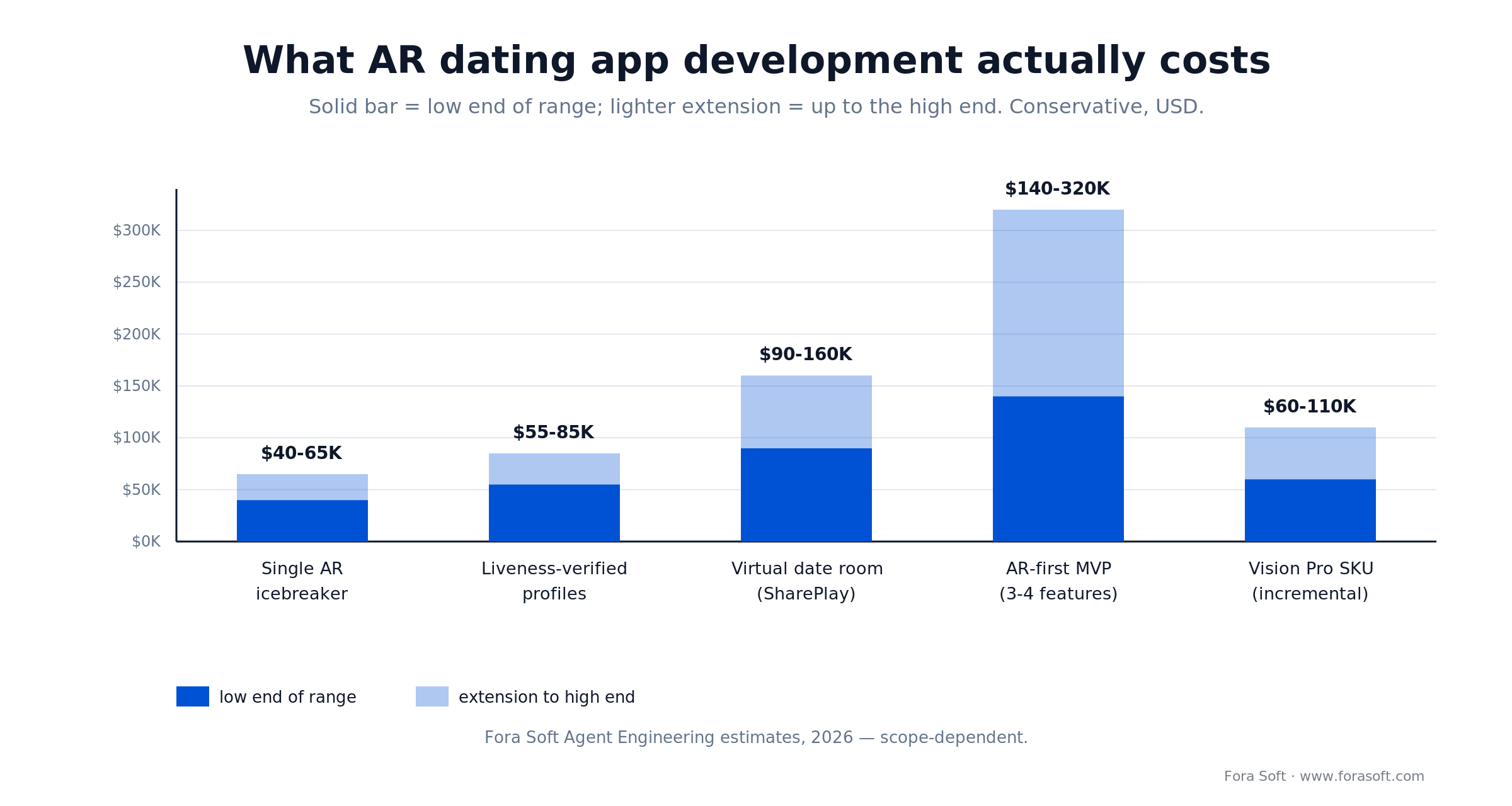
Figure 4. Conservative 2026 cost bands by scope — solid bar is the low end, lighter extension is the high end.
Ongoing operating cost: plan on 15–20% of build cost per year for maintenance, content pipeline (new icebreakers, seasonal rooms) and iOS/ARKit version upkeep. Our 2026 mobile development cost guide has the line-item breakdown that sits underneath these numbers.
Reference architecture we deploy
The dating-AR architecture we ship has five layers. The client is Swift 6 + SwiftUI, with RealityKit 4 for rendering and ARKit 6/7 for sensing. The realtime layer mixes SharePlay (in-Apple-ecosystem dates) and WebRTC (cross-platform or non-SharePlay clients) fronted by our own signalling. The AI layer is an on-device small model for prompt generation and moderation, with a cloud model fallback for complex queries — and it never touches the user’s real face data.
The storage layer is Postgres (user graph, matches, preferences) plus Redis (ephemeral session state, rate limits), with S3 for USDZ delivery via CloudFront. The safety layer is a pipeline of on-device ML (age estimation, NSFW detection on user-generated AR content) plus a human moderation queue for reported content. That reusable realtime plumbing is what lets a six-engineer squad ship a production dating-AR product in 4–5 months instead of a year.
Mini case: the streaming and AI plumbing we bring
Our closest adjacent reference is Perspire.tv, a live group-fitness streaming platform where users share a real-time video workout. Situation: the client needed Twitch-grade live streaming with per-session monetization and low-latency interaction, on web and mobile. Plan: we built the realtime core on LiveKit and WebRTC, a Coins-based payments economy, and interactive live chat, then hardened it for peak-hour concurrency. Outcome: scheduled group classes and 1:1 sessions that run without the lag that kills a live workout — the same multi-user, low-latency spine an AR date room needs.
The lesson across our realtime products, including AI coaching work like Career Point: the retention gains don’t come from the flashy feature itself. They come from the next-action scaffolding around it — the right prompt at the right moment, the right consent flow, the right moderation response. The AR is the hook; the craft is in the five screens around it. Want a similar assessment for your product? Book a 30-minute call and we’ll map it.
A five-question decision framework
Before commissioning any ARKit dating build, answer five questions honestly. Two or more “unclear” answers mean delay.
1. Which retention number does AR move for you? Day-7 activation? Message-send rate? Match-to-date rate? Name the metric and the baseline before you spend a dollar.
2. What’s your device-base distribution? Face tracking needs iPhone XS or later; LiDAR needs iPhone 12 Pro. A base with a big non-LiDAR slice is a different build.
3. What’s your trust story? AR liveness is a credibility multiplier; without a broader trust narrative (moderation, ID verification, community guidelines) it can feel like a gimmick.
4. Who owns the 3D content pipeline? Reality Composer Pro authoring is a weekly cadence activity — budget it as headcount, not a one-off.
5. What’s your Vision Pro story? Not building visionOS on day one is fine; not leaving architectural room to add it in year two is a mistake.
Five pitfalls that quietly kill AR dating launches
Patterns we’ve watched burn other teams:
1. Shipping AR without a non-AR fallback. A meaningful share of iOS users lack compatible hardware; every feature needs a graceful degrade.
2. Sending biometric data to the server. One BIPA complaint can cost more than the entire build budget.
3. Skipping moderation of user-generated AR content. Users will send inappropriate virtual objects; an App Store listing can be pulled in 24 hours.
4. Under-investing in the 3D asset catalogue. Three icebreakers is a demo; twenty is a product.
5. Ignoring thermal throttle. Multi-user AR sessions over 15 minutes throttle older iPhones — design for 10-minute dates by default.
A 90-day roadmap for a first AR dating feature
If you’re adding an AR feature to an existing app, this is the three-30-day cadence we recommend.
Days 1–30 — choose & prototype. Pick the single feature (icebreakers is the usual first pick). Baseline Day-7 and Day-30 retention. Spike a Reality Composer Pro asset pipeline with three test assets. Ship a TestFlight build to 200 users.
Days 31–60 — harden. Add 8–10 icebreaker assets. Implement rate-limit + moderation. Build the non-AR fallback. Expand TestFlight to 2,000 users. Instrument Day-1 / Day-7 / Day-30 cohorts.
Days 61–90 — ship or shelve. If cohort retention is up, release to the App Store. If not, write the honest post-mortem and pick the next feature (liveness verification is our default second bet). No “we’ll just keep iterating” — pre-commit the go / no-go.
Want a cost model for your AR dating feature?
Send us your feature list and user volume — we’ll come back with a one-pager splitting platform, 3D content and ongoing cost, plus a realistic timeline.
Frequently asked questions
Which iPhones support the ARKit features needed for dating apps?
Face tracking needs an iPhone XS or later (TrueDepth camera). Location Anchors work on any ARKit-compatible device. LiDAR features (precise occlusion, room scanning) need iPhone 12 Pro or later. For a volume dating app in 2026, target iPhone 12 and up as the primary tier and provide a 2D fallback for older hardware.
How does ARKit liveness verification differ from photo upload?
Photo upload is defeated by modern deepfake generators and creates a biometric warehouse that attracts BIPA and GDPR liability. ARKit live face-mesh capture never leaves the device — liveness signals are computed on-device, only a cryptographic hash is stored, and the server sees a boolean. It’s harder to spoof and far safer for compliance.
What does AR dating app development cost?
A single AR icebreaker added to an existing iOS app lands USD 40K–65K over 6–8 weeks. Liveness-verified profiles run USD 55K–85K over 8–10 weeks. Full virtual date rooms with SharePlay run USD 90K–160K over 12–16 weeks. An AR-first MVP is USD 140K–320K. Plan 15–20% of build cost per year for maintenance and new 3D content.
How do AR dating features affect Day-30 retention?
Honest answer: we can’t hand you a dating-specific number we’ve measured, because our shipped realtime work is fitness and coaching rather than dating. The directional signal is that AR interactions raise engagement and that verified profiles are strongly preferred (Bumble). Treat AR as a hook, not a retention engine on its own — the gains come from the onboarding and trust scaffolding around it. Instrument your own cohorts from day one.
Can we ship Android parity for AR dating features?
Google’s Android XR and ARCore are a reasonable parity path for icebreakers and filters. For multi-user SharePlay-style dates, cross-platform requires WebRTC plus a shared 3D layer (Three.js on web, ARCore on Android, ARKit on iOS). Parity is feasible but adds roughly 35–45% to the build. Most dating clients ship iOS-first for 9–12 months, then Android.
Do AR features drain the battery in a way that hurts the experience?
A tuned ARKit session draws more power than plain video streaming, but for 10-minute icebreakers and 20-minute date rooms the battery cost is acceptable. The hard limit is thermal throttle: sustained multi-user AR beyond 15–20 minutes on an iPhone 12 drops to 30 FPS. Design for 10-minute dates by default and offer a re-anchor flow for longer sessions.
Should we build for Vision Pro now or wait?
Don’t build a Vision Pro product on day one unless premium is your explicit positioning. Do architect your iOS ARKit codebase on RealityKit 4 so the visionOS port in 2027 is ~70–80% code reuse. A Vision Pro SKU twelve months after iOS launch is the right commercial shape.
What’s the biggest mistake most AR dating teams make?
Shipping the AR feature as a standalone novelty instead of weaving it into the core matching and messaging flow. The feature has to appear at the moment a user would otherwise abandon the conversation — that’s where it earns its keep. If the AR button is a third-tier menu item, you’ve spent USD 80K on a demo reel.
What to read next
ARKit
ARKit for iOS virtual showrooms
The commerce-side sibling — conversion uplift on AR product demos.
AR/VR
AR and VR in education: the 2026 playbook
The sister playbook for education XR — same lessons, different vertical.
Retention
App abandonment in 2026 — the retention playbook
AR is a hook; the craft is in the five screens around it.
Cost
2026 mobile-app development costs
Real estimates, not agency-website ranges — budget AR into the bigger picture.
Service
Custom software development
How we deliver iOS, AR, streaming and AI end-to-end.
Ready to stop losing daters to swipe fatigue?
Swipe fatigue isn’t going to self-correct. The incumbents have a year, maybe eighteen months, before AR-first entrants reach the scale that matters. If you run a niche dating vertical, a community app with matchmaking ambitions, or a Match Group product hunting the next S-curve, this is the window to commit — and AR dating app development is the concrete way in: liveness for trust, date rooms for depth, location anchors for real-world density.
We’ve shipped the core engineering patterns — multi-user realtime, low-latency video, on-device ML, 3D rendering — since 2005 across 250+ projects. We build AR features that land, not demos that sit on a showreel, and we’ll tell you plainly where the numbers are ours and where they’re yours to earn. Thirty minutes is usually enough to tell you whether to start or wait.
Let’s design your ARKit dating feature
Thirty minutes with a senior engineer and product lead. We’ll map your retention goals, device base and budget against the right AR features — and hand you a 90-day plan you can take to your board on Monday.

