

Key takeaways
• Treat Apple Vision Pro app development as an enterprise play, not a consumer one. IDC puts ~75% of buyers at businesses, and the consumer story is over — 2024 shipped ~390K units, Q4 2025 shipped ~45K. Build for the buyer with a budget.
• The advantage is measurable. PwC clocks VR training at ~75% retention versus ~10% for classroom, 4x faster completion, and 275% more confidence — numbers a flat-screen app cannot touch.
• visionOS is a SwiftUI + RealityKit stack. If your team already ships iOS, the jump to Windows, Volumes, and Immersive Spaces is weeks, not quarters. An iPadOS app runs unmodified on Vision Pro on day one.
• Five verticals are printing ROI today. Medical training, surgical planning, pilot and cockpit simulation, retail configuration, and remote collaboration. Everything else is still experimental.
• Fora Soft has shipped spatial software since 2005. We already build video conferencing, AR/VR, telemedicine, and e-learning platforms — Vision Pro is an output channel for us, not a new business line.
Why Fora Soft wrote this playbook
We have been shipping multimedia, video streaming, and immersive software since 2005: 250+ projects, a 100% Upwork job-success score, two decades of production real-time and spatial work. The capabilities Vision Pro exposes (stereoscopic video, spatial audio, hand and eye tracking, shared spaces) are not new to us. What is new is the packaging: Apple turned a research-grade headset into a shippable product with a real SDK, a dedicated Business app, MDM support, and a queue of Fortune 100 buyers.
Three of our service lines map onto the five verticals where Vision Pro has found product-market fit: AR/VR, video conferencing, and telemedicine. Products like our VALT video platform (used in police interrogation rooms and medical simulation centers across 770+ US organizations) already run the kind of immersive playback workflow that maps cleanly to visionOS.
This playbook is what we tell founders in the first scoping call when they ask whether Vision Pro is a viable channel, and what the 90-day path looks like from a flat-screen product to a spatial one.
Thinking about a Vision Pro version of your product?
In 30 minutes we’ll tell you whether your use case fits the five verticals Vision Pro actually wins in, and what a visionOS port would cost.
Market reality in 2026: who is actually buying Vision Pro
Vision Pro shipped ~390K units in its 2024 launch year, fell below 100K in 2025, and IDC pegs the final quarter of 2025 at roughly 45,000 units. Apple has since cut production and marketing, and by early 2026 press was calling the M5 refresh a flop. Read that as a verdict — on the consumer bet. Look at who actually bought and a different picture appears: around three-quarters of units went to businesses. Apple trails Meta badly on raw volume, but its buyer is stickier and spends more per seat. The consumer headset failed; the enterprise headset is the only Vision Pro left standing.
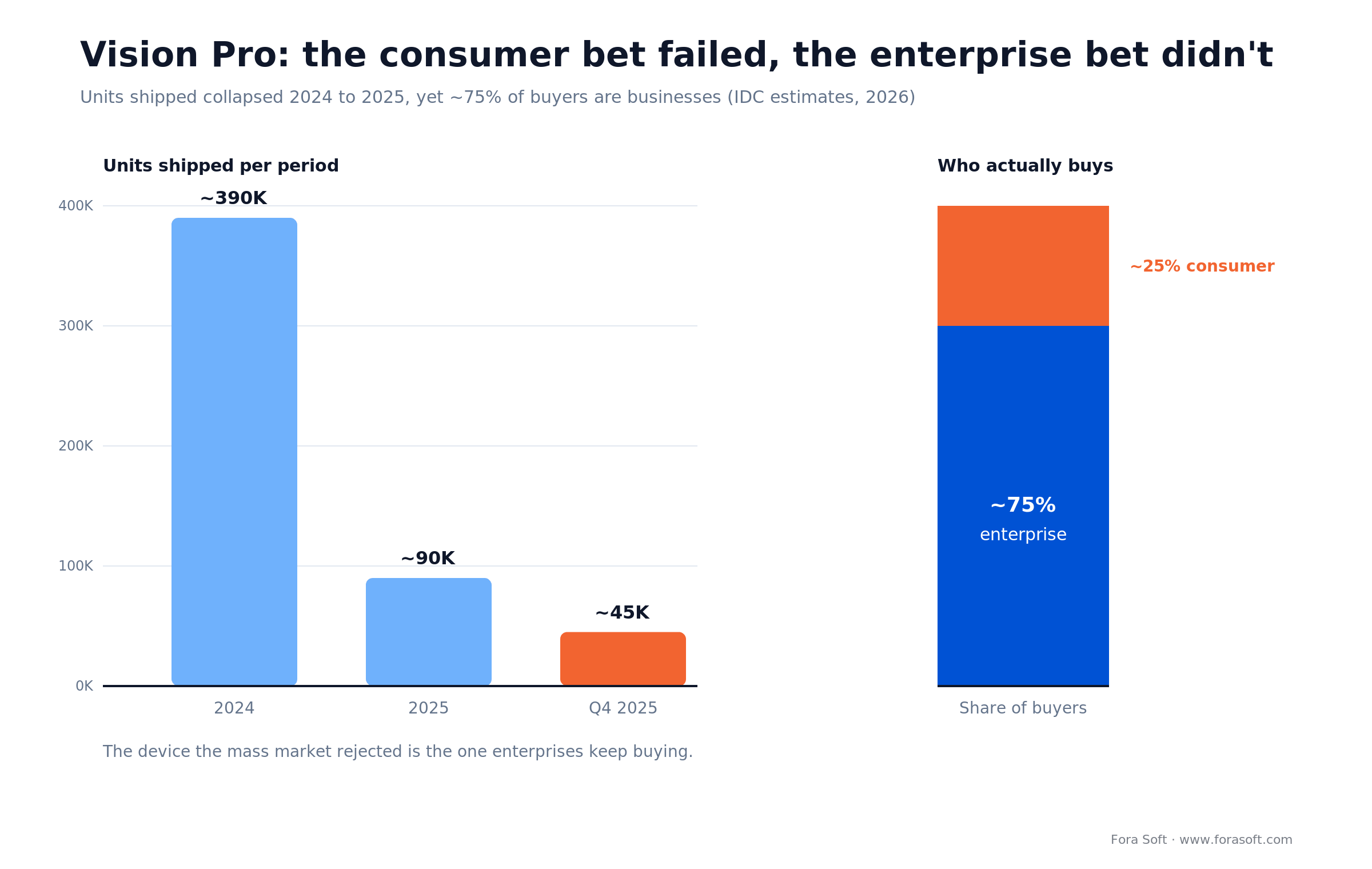
Figure 1. Vision Pro shipments cratered from ~390K (2024) to ~45K (Q4 2025), yet roughly 75% of remaining buyers are enterprises.
| Metric | Number | Why it matters |
|---|---|---|
| Units shipped, 2024 | ~390K (IDC est.) | Launch tail, premium early adopters |
| Units shipped, Q4 2025 | ~45K (IDC est.) | Consumer demand has evaporated |
| Enterprise share of buyers | ~75% (IDC) | The buyer has budget, not impulse |
| Fortune 100 with ≥ 1 unit | 50%+ (Apple, 2024) | Procurement gate is already open |
| Starting price | $3,499 (M5, 2025) | Self-selects for B2B use cases |
Reach for Vision Pro when: your buyer is a Fortune 1000 enterprise or a regulated vertical (health, defense, aerospace, legal) and the problem rewards precision, immersion, or eliminating physical travel. Skip it if your addressable market is consumers paying out of pocket.
The five unfair advantages Vision Pro gives your product
An unfair advantage here means a capability your flat-screen competitors cannot copy without the hardware. Five of them actually matter in 2026:
1. Infinite screen real estate. A knowledge worker gets a wall of monitors on any desk, plane, or hotel room. Companies deploying Vision Pro for executive productivity (spreadsheets, BI, multi-monitor coding) report session lengths of 90+ minutes — unheard of in consumer XR.
2. Stereoscopic visualization at millimeter precision. The display packs ~23 million pixels across both micro-OLED panels (higher than a 4K TV per eye), and passthrough is accurate enough for surgical planning, CAD inspection, and engineering review — use cases where Quest and Pico fall short on fidelity.
3. Hands-free, gaze-driven interaction. Eye tracking plus a hand pinch is a genuinely new input modality. Surgeons review imaging mid-procedure without breaking the sterile field; field technicians follow an overlay while both hands hold a tool. No controllers required.
4. Personas and spatial presence in video calls. Vision Pro renders a photoreal avatar of the wearer for FaceTime and third-party video apps, so remote collaboration feels qualitatively closer to in-person. We have shipped this pattern into several video conferencing products.
5. An iOS-adjacent SDK. visionOS shares SwiftUI and the broader iOS ecosystem. If your engineering team already ships iPhone and iPad apps, you can produce a Vision Pro build in weeks. Against Quest, where you fight Unity build times, the velocity gap is real.
Five verticals where Vision Pro is already winning
Not every industry benefits equally. These five have already produced documented revenue and training outcomes.
| Vertical | Use case | Reference shippers | Measured outcome |
|---|---|---|---|
| Medical training | Immersive anatomy, device onboarding | Boston Children’s CyranoHealth; Elsevier Complete HeartX | Up to 75% retention lift (PwC) |
| Surgical workflow | Pre-op planning, intra-op imaging overlay | UC San Diego Health; KARL STORZ CollaboratOR 3D | Fewer sterile-field breaks |
| Pilot & cockpit training | Procedural simulation, checklist training | CAE flight simulation | Higher information retention |
| Retail & configuration | Walk-in redesign, spatial product preview | Lowe’s home remodel (100-store rollout) | Fewer visits to close a deal |
| Remote collaboration | Design review, field support, CAD | SAP, Salesforce, NVIDIA Omniverse | Faster decisions at distance |
Reach for medical training first when: you have SMEs, regulatory cover (HIPAA, FDA Class I SaMD), and a procurement path into hospital systems. Retention lift plus liability reduction is the easiest ROI story to close.
Operating in one of those five verticals?
We’ve shipped video, AR/VR, and telehealth software into each of them. Let’s see whether the Vision Pro story lands for your product.
The visionOS tech stack: SwiftUI + RealityKit, not Unity
Vision Pro runs visionOS, a near-sibling of iPadOS. Apple’s preferred stack is SwiftUI for scene structure and UI, RealityKit for 3D content, and ARKit for world-sensing. Unity ships to visionOS too, but for teams that already know iOS the native path iterates faster. Most Apple Vision Pro app development starts here, with one of three scene types.
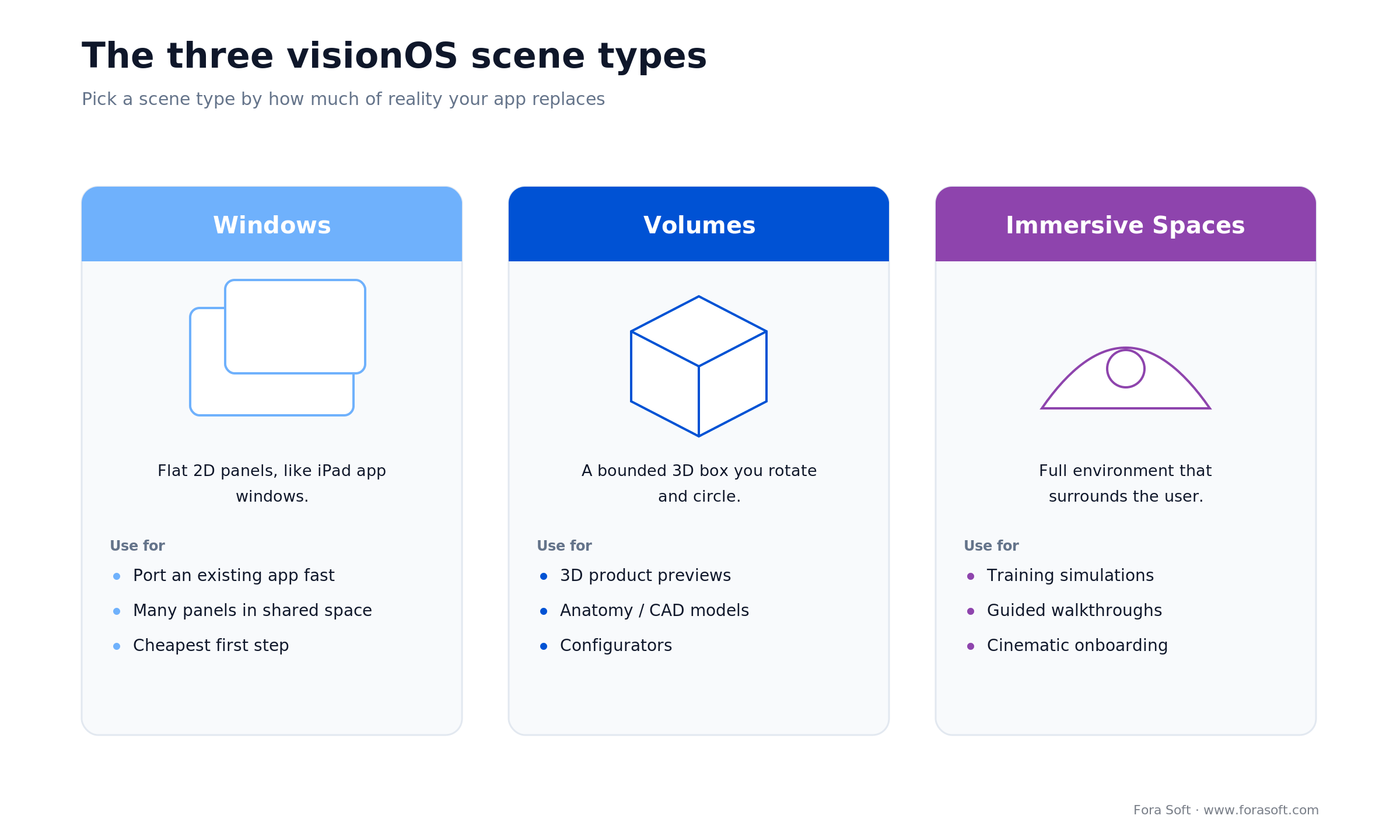
Figure 2. The three visionOS scene types — Windows, Volumes, and Immersive Spaces — and what each is best used for.
Three scene types — the architecture every app chooses from
1. Windows. Flat 2D panels, exactly like iPad app windows. Best starting point for porting an existing app. Users can place many in the shared space.
2. Volumes. A bounded 3D box you can rotate and walk around. Use it for 3D product previews, anatomical models, and configurators.
3. Immersive Spaces. The full-environment scene — your content replaces or surrounds the user’s real-world view. Use it for training simulations, walkthroughs, and cinematic onboarding.
RealityKit ECS in one paragraph
RealityKit uses an Entity Component System: every scene object (mesh, light, collider, animator) is an entity, and behaviour is added by attaching components. That composability means you can add physics, spatial audio, or a gesture handler to any entity in one line of Swift. Entities are observable, so you drop them into SwiftUI views directly.
import SwiftUI
import RealityKit

struct HeartView: View {
    var body: some View {
        RealityView { content in
            let heart = try? await Entity(named: "heart")
            heart?.scale = .init(repeating: 0.3)
            heart?.components.set(InputTargetComponent())
            heart?.components.set(CollisionComponent(shapes: [.generateBox(size: .one)]))
            if let h = heart { content.add(h) }
        }
        .gesture(TapGesture().targetedToAnyEntity().onEnded { e in
            // play a “pump” animation or log telemetry
        })
    }
}
Enterprise APIs: the part App Store apps can’t touch
This is the detail most Vision Pro dev shops skip, and it decides whether a real enterprise use case is even buildable. Since WWDC 2024 Apple ships a set of visionOS Enterprise APIs that expose what the sandbox normally hides: raw main-camera access (the entitlement is literally com.apple.developer.arkit.main-camera-access.allow), enhanced passthrough for assisted-reality overlays, Apple Neural Engine access for on-device inference, object tracking, and spatial barcode and QR scanning.
The catch is distribution. These entitlements need a managed license file tied to your Apple Developer account, and any app that uses them can ship only as an in-house or custom app through Apple Business Manager — never on the public App Store. If your barcode-scanning warehouse app or camera-driven inspection tool depends on these APIs, plan for private distribution from day one. Get that wrong and your build is stuck in review limbo.
Reach for SwiftUI + RealityKit when: your team already ships iOS, the experience is mostly windowed with one or two Volumes, and you want the fastest path to a demo. Reach for Unity only when you share a large Immersive Space across Quest and Vision Pro, or need heavy physics.
Reference architecture for a shippable Vision Pro business app
Every Vision Pro app we plan for a client reduces to the same seven layers. Each one is a proven, production-grade technology. Nothing here is research-ware.
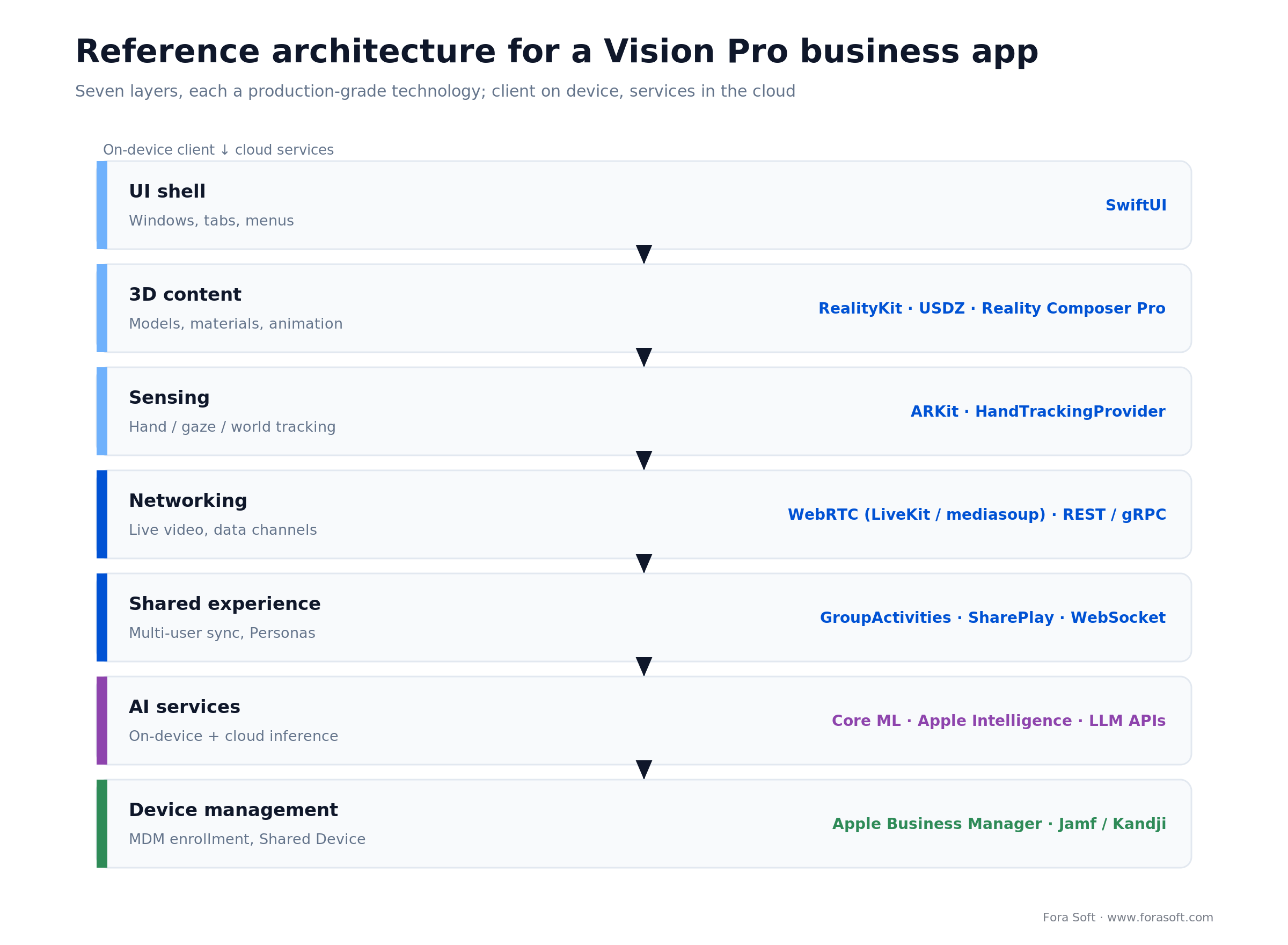
Figure 3. A seven-layer reference architecture for a shippable Vision Pro business app, from UI shell to MDM.
| Layer | Component | Typical tech |
|---|---|---|
| UI shell | Windows, tabs, menus | SwiftUI |
| 3D content | Models, materials, animation | RealityKit, USDZ assets, Reality Composer Pro |
| Sensing | Hand/gaze/world tracking | ARKit, HandTrackingProvider |
| Networking | Live video, data channels | WebRTC via LiveKit/mediasoup, REST/gRPC backend |
| Shared experience | Multi-user sync, FaceTime Personas | GroupActivities, SharePlay, custom WebSocket |
| AI services | On-device inference, cloud LLM | Core ML, Apple Intelligence, OpenAI/Anthropic |
| Device management | MDM enrollment, Shared Device mode | Apple Business Manager, Jamf/Kandji |
Mini case: how we would port a medical training product to Vision Pro
Situation. A client with an iPad-based medical simulation product, similar in spirit to the VALT workflow at Boston Children’s, wanted to know whether Vision Pro was worth adding as a third client, alongside iPad and web.
12-week plan. Weeks 1–2: run the existing iPad build unmodified on Vision Pro (day-one capability) and measure session length and learner NPS. Weeks 3–6: promote 2D anatomy views to a Volume scene with RealityKit, load USDZ heart and respiratory models, wire pinch-to-dissect gestures. Weeks 7–10: add an Immersive Space for a full OR walkthrough, spatial audio, and a SharePlay instructor-learner mode. Weeks 11–12: MDM enrollment via Apple Business Manager, Jamf integration, QA on a rotating fleet of five devices.
Outcome projection. Against the published PwC benchmarks (about 75% retention uplift, 4x faster completion), the business case clears in the first three customer deployments. The key insight: this is not a new codebase, it is a new channel for an existing one. Want a similar assessment of your product? Book 30 minutes.
What a Vision Pro build actually costs
The scope ranges below are realistic for teams using our Agent Engineering workflow (Claude plus senior reviewers). Treat them as a starting point; the discovery call is where we compress them further against your existing codebase.
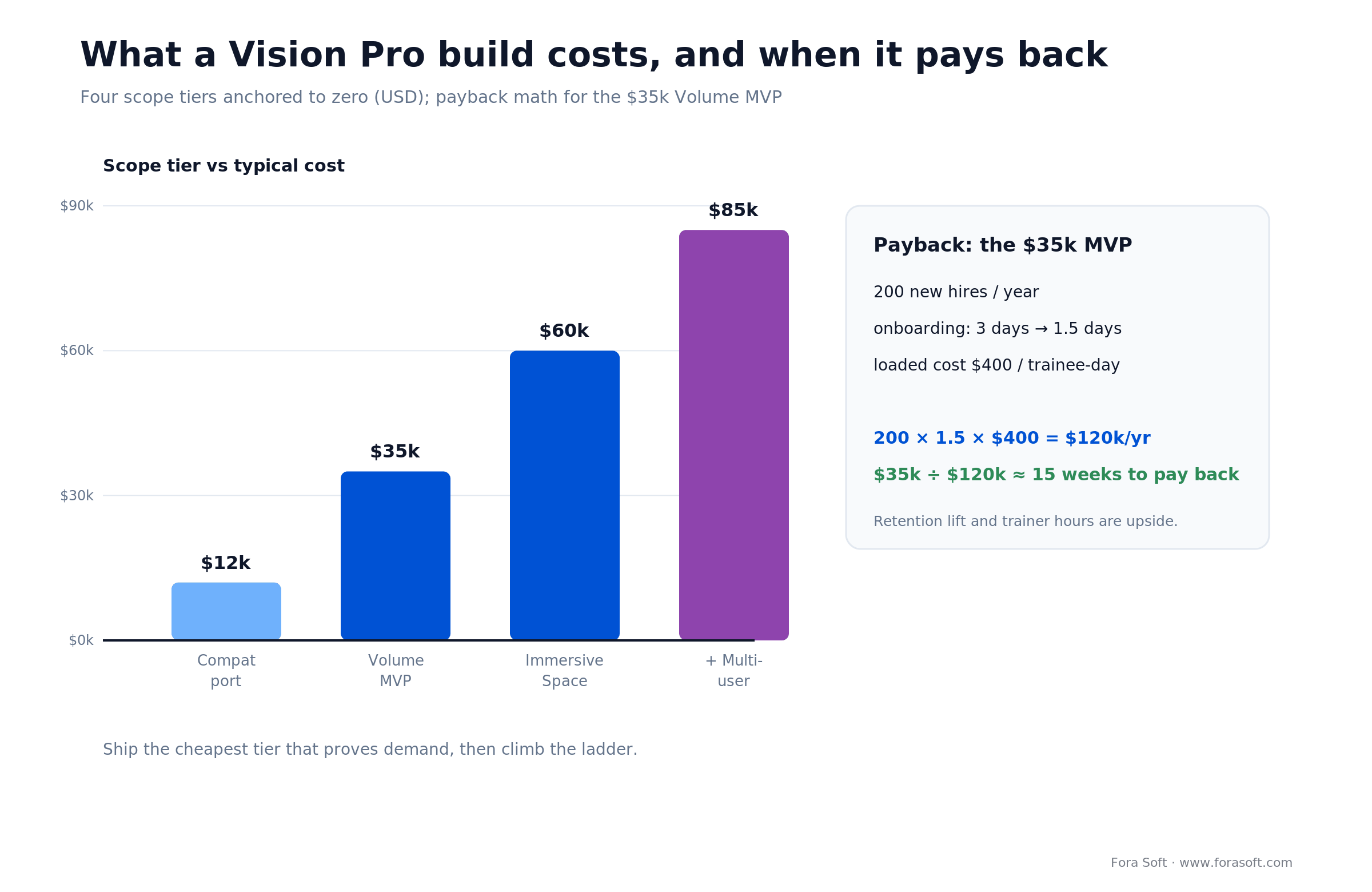
Figure 4. Four build-scope tiers and the payback math for the $35k Volume MVP.
| Scope | What’s in | Timeline | Ballpark |
|---|---|---|---|
| Compat port (iPad → visionOS windowed) | Existing app in Shared Space, branding tweaks | 2–4 weeks | From $12k |
| Volume scene MVP | 3D product / anatomy viewer, gestures, 2–3 scenes | 6–10 weeks | From $35k |
| Full Immersive Space | Environment, spatial audio, narrative flow, analytics | 10–14 weeks | From $60k |
| Multi-user + SharePlay | Shared training sessions, instructor view, telemetry | +4–6 weeks | +$20–30k |
Here is the payback math for the most common starting point, a $35k Volume MVP for onboarding. Say VR compresses a 3-day induction to 1.5 days for 200 new hires a year, at a loaded cost of $400 per trainee-day:
200 hires × 1.5 days saved × $400/day = $120,000 saved per year
A $35k build against $120k of annual saved time pays for itself in roughly 15 weeks, before you count the retention lift or the reduction in trainer hours. Swap in your own headcount and day-rate; the shape holds. That is the number that gets a Vision Pro line item through procurement.
Reach for a compat port first when: you already sell an iPad app and want signal fast. Spend $12k to see whether users want a spatial version before you commit $35k+ to a Volume MVP. Immersive Spaces come in phase two, once the data says go.
A decision framework — pick Vision Pro in five questions
If you want the one-glance version, the tree below routes you to build or skip. The five questions underneath it are the same logic in words.
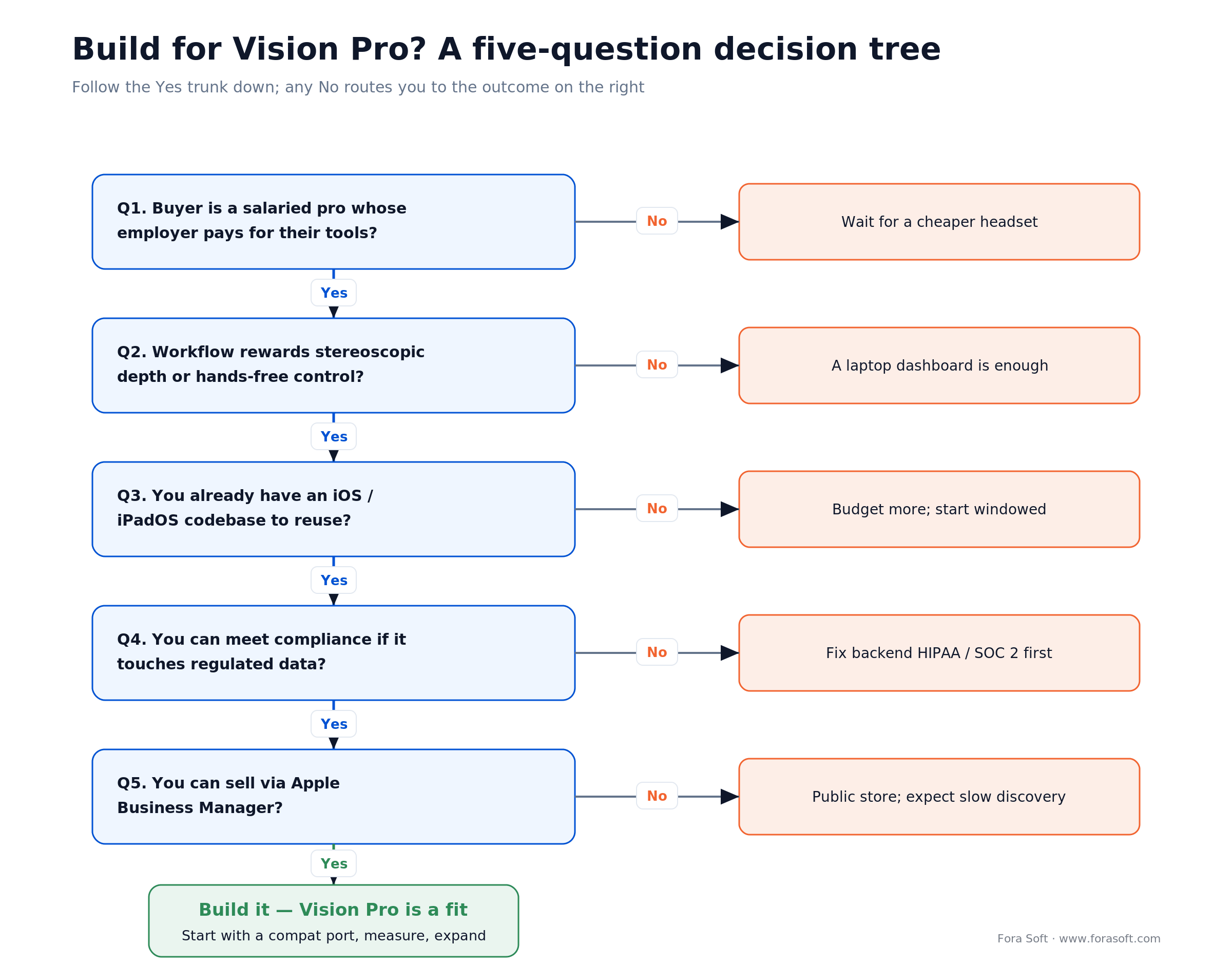
Figure 5. A five-question decision tree: follow the Yes trunk to build; any No routes to the alternative.
Q1. Is your end-user a salaried professional whose employer pays for their tools? Yes → the $3,499 price tag is a non-issue. No → wait for a cheaper Apple headset.
Q2. Does the workflow reward stereoscopic depth or hands-free control? Yes (surgery, CAD, field service, immersive training) → build. No (a dashboard that could run on a laptop) → skip.
Q3. Do you already have an iOS/iPadOS codebase? Yes → the port is weeks, not months. No → budget more, or start with a Windows-only scene until you have reusable SwiftUI.
Q4. Do you have a compliance story if this touches patient data, student records, defense data, or financials? Apple Business Manager plus MDM handles device-level compliance; your backend still needs the HIPAA/GDPR/SOC 2 plumbing.
Q5. Can you sell through Apple’s enterprise channel? The Apple Business app supports Vision Pro with deep-linked purchasing. If your buyer is already in Apple Business Manager, you have a distribution edge over Quest or Pico.
Five pitfalls we see kill Vision Pro projects
1. Designing for 60-minute sessions. The device is heavy. Real-world sessions cluster around 20–45 minutes; anything longer needs break pacing. Design training into chapters with natural exit points.
2. Porting a mouse-and-keyboard UI unmodified. Tap targets that were fine on iPad get frustrating at arm’s length. Rebuild touch zones with visionOS sizing guidelines (44pt minimum scales to ~60pt here).
3. Ignoring MDM from day one. Enterprise buyers will ask about Shared Device mode, Apple Business Manager, and Jamf/Kandji. If your app cannot enroll, procurement stalls and the pilot dies.
4. Over-investing in Immersive Spaces before you have signal. Windowed plus Volume delivers 80% of the ROI for 30% of the cost. Reserve fully-immersive experiences for phase two.
5. Building without a Persona and SharePlay strategy. The moment Vision Pro is used for remote expertise (tele-mentoring, remote design review), Personas and SharePlay become the feature that sells the product. Plan them early, not as post-launch patches.
Porting an iOS product to Vision Pro?
We pair SwiftUI + RealityKit engineers with product designers who have shipped AR/VR and spatial video across dozens of products. Bring the spec and we’ll scope the port.
KPIs: what to measure before and after launch
Quality KPIs. Frame rate held at 90fps, head-lock jitter under 3ms, hand-tracking recognition above 95% for the gestures your product uses, and time-to-first-content under 4 seconds from app launch.
Business KPIs. Session length above the 20-minute threshold, completion rate on your flagship training module above 80%, and — the bar that actually matters for enterprise sales — learner-reported retention uplift versus the flat-screen baseline.
Reliability KPIs. Crash-free sessions above 99.5%, MDM enrollment success above 98%, and SharePlay session drop rate under 2% on corporate Wi-Fi.
When not to build for Vision Pro
Skip Vision Pro if all three are true: your user is a consumer paying out of pocket, the workflow gains nothing from depth or hands-free input, and you do not already have an iOS-shaped engineering team. In those cases you are better served by the web, a Quest 3S at the $299 price point, or waiting for the rumored cheaper Apple headset.
A PWA or an iPad-first app covers 80% of the value for these audiences at a fraction of the cost. Revisit Vision Pro when an enterprise buyer surfaces a concrete use case with measurable ROI — not before.
Security, privacy, and compliance essentials
Eye-tracking data stays on device. Apple exposes gaze only as resolved hit-test events, never raw gaze vectors. That is a privacy win, but it also means you cannot build gaze-heatmap analytics without explicit user consent and a separate analytics hop — plan for it.
Persona data handling. FaceTime Personas are rendered from user scans; treat the scan and derived avatar data with the same care as biometric data.
Device enrollment. Apple Business Manager plus Jamf/Kandji gives you per-device policy, app distribution, and remote wipe. It is required for any regulated deployment.
Backend compliance. Your Vision Pro app still hits the same APIs as your iOS app. HIPAA, SOC 2, GDPR, and CJIS work stays a backend concern. Nothing about visionOS grants compliance automatically.
What’s next: M5, visionOS 27, and the cheaper headset
Apple refreshed Vision Pro to the M5 chip in October 2025 (120Hz, more rendered pixels, a comfier Dual Knit Band, same $3,499 entry) and is signaling a lighter, lower-priced headset in the 2027 window. That shifts the addressable market: today’s enterprise playbook becomes tomorrow’s prosumer play. Teams that ship a visionOS codebase in 2026 get a two-year head start when the hardware finally gets cheap.
On software, note the naming: Apple moved to year-based versions, so the shipping OS is visionOS 26, and visionOS 27 landed at WWDC 2026 (general release in fall 2026). visionOS 27 adds a floating look-to-talk Siri, Visual Intelligence, spatial panoramas, and RealityKit upgrades — physical-space lighting, 3D Gaussian splatting, cloth simulation, and a Spatial Accessories framework for tracked hardware. None of it changes the architecture in this playbook: SwiftUI scenes, RealityKit entities, and MDM-first design stay the foundation.
Onboarding UX: the first ten minutes decide adoption
Enterprise pilots fail at onboarding, not at the software. Three patterns make the difference:
Guided first wear. Walk the user through eye calibration, hand recognition, and the crown-to-adjust-immersion gesture before they ever see your app. Apple’s own setup handles this, but enterprises running IT-managed rollouts that skip it need to rebuild the steps.
Windowed-first, immersive-later. Start the first session in a familiar 2D window. Move to Volumes once the user is comfortable. Drop into an Immersive Space only when the narrative calls for it — never in the first minute.
Break pacing. Long training sessions need explicit breaks at 20 and 40 minutes. Build them in; do not leave them to the user.
Distribution & monetization: how to actually sell a Vision Pro app
Vision Pro’s App Store is small enough that store discovery alone is not a strategy. Three channels compound:
Apple Business Manager custom-app distribution. Ship a signed build straight to a customer’s Vision Pro fleet and bypass the public store for enterprise agreements. This is also the only channel for apps that use the enterprise APIs above.
Bundled with an existing iOS license. If you already sell an iPad version, fold the visionOS build into the same seat. Procurement loves single-SKU rollouts.
Professional-services attach. Vision Pro content production (USDZ assets, environments, scripted training flows) is a paid service line. Price it as one; do not give it away with the license.
Reach for Apple Business Manager distribution when: you sell to a handful of named enterprise accounts, your app touches enterprise APIs, or your content is confidential. Public App Store only makes sense for a horizontal tool with a self-serve buyer.
How Vision Pro slots into an existing product portfolio
A visionOS build is rarely a standalone product. It is usually the fourth client in a family of iOS, Android, and web apps. Design the backend once, with Vision Pro as one more client, and feature parity stays cheap.
Shared auth and account state. Use the same OIDC / passkey backend across every client. Vision Pro supports Sign in with Apple and hardware-backed passkeys natively.
Unified media pipeline. The same WebRTC SFU that feeds your browser and iOS apps feeds Vision Pro; the same stereoscopic and digital-video fundamentals apply. Do not fork the streaming stack.
USDZ as the 3D content format. Model content once in USDZ; it renders on Vision Pro and on iPad/iPhone via Quick Look. Content you commission for Vision Pro enriches every Apple platform you already ship.
FAQ
Can my existing iPad app run on Vision Pro without any changes?
In almost every case, yes. Apple auto-builds a compatibility target from your iPadOS build; it runs as a flat window in the Shared Space. This is the cheapest first step and a useful way to measure whether users even want a spatial version.
SwiftUI + RealityKit or Unity — which should we pick?
Pick SwiftUI + RealityKit if your team already ships iOS, the experience is mostly windowed or has one or two Volumes, and you want the fastest iteration. Pick Unity if you have an existing Unity codebase, the experience is a large Immersive Space shared across Quest and Vision Pro, or you need heavy physics simulation.
How much does Apple Vision Pro app development cost?
A compatibility port from an existing iPad build starts around $12k (2–4 weeks). A Volume-based 3D viewer MVP runs from $35k (6–10 weeks). A full Immersive Space starts near $60k (10–14 weeks), and multi-user SharePlay adds $20–30k. Costs drop when you already have a reusable SwiftUI codebase.
How do enterprises actually deploy Vision Pro at scale?
Apple Business Manager plus an MDM like Jamf or Kandji handles enrollment, app distribution, and policy. Shared Device mode lets several employees share one headset with per-user data separation — essential for any training-room deployment.
Is Vision Pro HIPAA-compliant for healthcare deployments?
The device itself does not confer compliance; compliance is a function of your backend and BAAs. But a Vision Pro enrolled via Apple Business Manager with MDM policies, paired with an appropriate backend, meets the technical safeguards HIPAA requires. Hospital systems like UC San Diego and Boston Children’s have deployed with these controls in place.
Can Vision Pro apps talk to each other in real time across users?
Yes. GroupActivities / SharePlay is the native multi-user primitive and synchronizes app state across participants. For richer shared experiences — persistent rooms, non-Apple participants, external auth — wire up your own WebRTC + WebSocket layer as we do for our video conferencing clients.
Do I need Apple’s enterprise APIs, and can those apps go on the App Store?
You need them only if you require raw camera access, enhanced passthrough, object tracking, or barcode scanning. Those entitlements demand a managed license tied to your developer account, and any app using them ships only as an in-house or custom app through Apple Business Manager — not the public App Store. Plan private distribution up front.
Is Vision Pro dead now that consumer sales have collapsed?
The consumer product stalled, but the enterprise product did not. IDC still puts ~75% of buyers in business, and deployments at Lowe’s, CAE, and major hospital systems keep expanding. If your buyer is an enterprise with a depth-or-hands-free use case, Vision Pro is very much alive as a channel.
What to Read Next
Healthcare
How AR and VR are transforming modern healthcare
The clinical workflows where Vision Pro delivers measurable ROI.
Education
How AR and VR are used in education
The learning science behind the 75% retention uplift we cite above.
Services
AR / VR development services
Our spatial-computing practice — visionOS, Unity, Quest, WebXR.
Services
Custom video conferencing development
Where Personas and SharePlay plug into your existing platform.
Case study
VALT: video platform used by US police and med-sim
The medical-simulation workflow that ports cleanly to Vision Pro.
Ready to turn Vision Pro into your unfair advantage?
Vision Pro is not the mass-market product Apple wanted. It is something more useful to a B2B builder: a premium enterprise platform with an iOS-shaped SDK, MDM-friendly deployment, enterprise APIs no consumer app can touch, and documented ROI in five verticals. If your product sits in one of those verticals — or your buyer is a Fortune 1000 that already procures Apple devices — a visionOS channel is a moat, not a novelty.
We ship this stack every quarter. Bring us the spec or the existing iOS codebase and we’ll tell you what’s possible in 90 days, what Apple Vision Pro app development will cost, and what the first pilot deployment should look like.
Let’s scope your Vision Pro product
30 minutes, a realistic estimate, concrete next steps — no obligation.

