

Key takeaways
• WebRTC on iOS is five moving parts, not one. A signaling channel, STUN, TURN, the WebRTC framework itself, and the iOS plumbing — CallKit + PushKit + AVAudioSession. Skip any of them and you ship a demo, not a product.
• P2P only scales to 2–4 callers. Anything beyond that needs an SFU (mediasoup, LiveKit, Janus, or Pion). MCU exists, but it’s the wrong default in 2026 — CPU cost is too high.
• iOS prefers H.264 and H.265 in hardware. The native framework also decodes VP8 and VP9, but only in software (more CPU and battery), and AV1 is absent. Prefer H.264 for mixed browser calls; simulcast on iOS is temporal-scalability only.
• Build < 1M minutes/month? Use an SDK. Build > 5M minutes/month? Self-host. The cross-over is roughly $4–5K/month at LiveKit Cloud or Agora pricing versus a $100–200/month Hetzner SFU plus engineering. The decision is rarely about features. It’s about who owns the SLA at 3am.
• The native iOS bits are where projects fail. CallKit + PushKit + AVAudioSession state corruption causes more bugs than the WebRTC framework itself. Plan two engineering weeks for iOS plumbing alone, regardless of which SDK you pick.
More on this topic: read our complete guide — WebRTC in Android: SDKs, Capture, Compose UI (2026).
Why Fora Soft wrote this guide
Across 250+ projects since 2005, we’ve been shipping video and audio streaming software since 2005, and WebRTC has been our default real-time stack on iOS since the framework stabilised on the Apple platform. The guide below is the playbook our iOS team uses internally — the bits we wish were written down when we started, and the traps that cost us weeks the first time around.
For context: we built the WebRTC HD video classroom inside BrainCert (4× Brandon Hall winner, 100K+ users), the HIPAA-compliant doctor–patient telemedicine flow on iOS for CirrusMED and Cloud Doctors (Brazil’s largest telemedicine platform), the live debate iOS app for Ariuum, and the live video interpretation iOS client behind TransLinguist — the platform on the NHS UK contract. We’ve made every mistake at least once. This article is what we know now.
The structure follows the order you’ll actually need it: what WebRTC is on iOS, the architecture decision, the iOS-specific plumbing, build-vs-buy with concrete numbers, the call flow in Swift, and the ten or so traps that ship bugs into production. If you only have time for two sections, read “The five iOS-specific moving parts” and “CallKit + PushKit: incoming calls done right.”
Need a second opinion on your iOS WebRTC stack?
We’ll read your ICE failure logs, your AVAudioSession config, and your SFU architecture in 30 minutes, and tell you exactly where the next bug will land.
What WebRTC actually is on iOS
WebRTC (Web Real-Time Communications) is an open IETF/W3C standard for sub-second peer-to-peer audio, video and data over UDP, with TCP fallback. On iOS it ships in two shapes. First, as a Swift/Objective-C framework distributed via the open-source Chromium WebRTC source tree (the “native” path). Second, as RTCPeerConnection exposed inside Safari and WKWebView (the “web” path). For an iOS app that wants real-time calls, the native path wins on every dimension that matters: hardware-accelerated H.264 encode/decode, CallKit interop, lower battery drain, and full control over the audio session.
If you’re new to the protocol, our primer What is WebRTC? walks through the building blocks. The summary: WebRTC handles capture, encode, packetisation, congestion control and decryption. It does not handle discovery (who calls whom), connection setup (the SDP/ICE handshake), or NAT traversal (STUN/TURN). You provide all three. That’s the part most tutorials skip.
A useful mental model: WebRTC is the engine. You still own the chassis (signaling), the wheels (STUN/TURN), and the dashboard (CallKit). On iOS specifically, you also own a small but treacherous bit of the gearbox — AVAudioSession.
The five iOS-specific moving parts
Every shipped iOS WebRTC app contains five components. If your roadmap doesn’t name all five, your roadmap has a hole.
1. Signaling channel. A persistent connection to a server that exchanges SDP offers, answers, and ICE candidates between two devices that haven’t met. Most teams use WebSocket over TLS. Some use Firebase Realtime Database, Pusher, MQTT, or Socket.IO. The protocol doesn’t matter; reliability and latency do.
2. STUN server. Tells each peer its public IP address and port mapping so they can describe themselves to each other. Google’s public STUN (stun:stun.l.google.com:19302) works for prototypes. Production deployments run their own.
3. TURN server. Relays media when the peers can’t reach each other directly. For iOS this is non-negotiable. Cellular carrier NAT, corporate and hotel firewalls, and VPN or MDM profiles block direct UDP roughly 15–20% of the time in our production telemetry. Skip TURN and one in five calls fails.
4. The WebRTC framework. The native iOS binary. Either via the community-maintained Stasel fork (github.com/stasel/WebRTC) shipped through Swift Package Manager and CocoaPods, a vendor SDK that wraps it (LiveKit, Daily, Stream, Agora), or a self-built binary from the Chromium source. Google stopped publishing official iOS binaries after M80 in 2020 — if a tutorial tells you to pod 'GoogleWebRTC', it’s out of date.
5. The iOS plumbing. CallKit (the native incoming-call UI), PushKit (VoIP push notifications that wake the app even from a terminated state), AVAudioSession (the route, category and mode), and the voip background mode in your Info.plist. This is where iOS apps differ from web apps and where most teams lose two weeks they didn’t plan for.
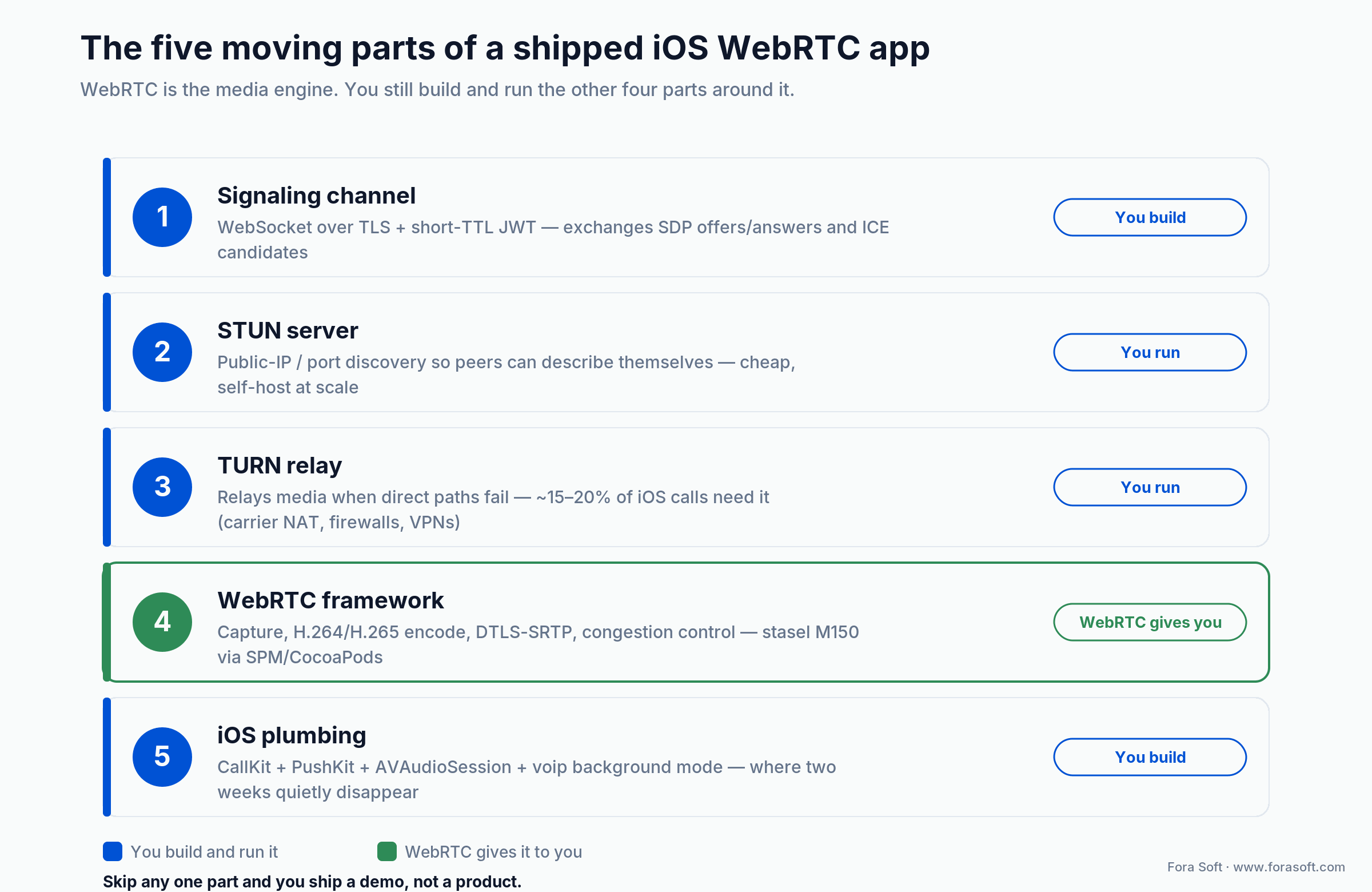
Figure 1. The five moving parts. WebRTC is the media engine; you still build and run the other four.
P2P vs SFU vs MCU on iOS
Three architectures, three very different cost curves. Our deeper analysis lives in P2P vs MCU vs SFU for video conferencing — the short version is below.
Reach for P2P when: calls are 1-on-1 or up to 3 participants, you want zero server cost for media, and you can tolerate higher uplink usage on each device.
Reach for an SFU when: you need 4–100 participants, you want to record or stream the call, and you’re happy paying for one mid-range server per ~500 concurrent media streams.
Reach for an MCU when: participants are on bandwidth-constrained 3G/4G networks and you can afford 5–10× the server CPU cost — usually only telemedicine and broadcast scenarios.
1. P2P (peer-to-peer). Each iOS device sends N−1 streams (one per other participant) and receives N−1 streams. Battery and uplink die fast above 3 callers; an iPhone on LTE rarely sustains 4-way 720p P2P for more than 15 minutes. Use P2P for 1-on-1 telemedicine, dating, debate apps and any case where most calls are pairs.
2. SFU (Selective Forwarding Unit). Each device sends one upstream and receives N−1 downstreams from the SFU. The SFU forwards but doesn’t decode — CPU stays low. mediasoup, LiveKit Server, Janus, Pion and Jitsi Videobridge are the open-source choices. This is the right default for any iOS app that needs more than 3 callers, group classes, or recording.
3. MCU (Multipoint Control Unit). The server decodes every upstream, mixes them into a single composed video, and sends one downstream per device. Devices receive one stream regardless of how many callers there are. The trade-off: a single 50-person MCU call burns 4–8 dedicated CPU cores and adds 100–300 ms of mixing latency. In 2026 we use MCU only when an iOS device on a 3G fallback can’t sustain the SFU’s downlink.
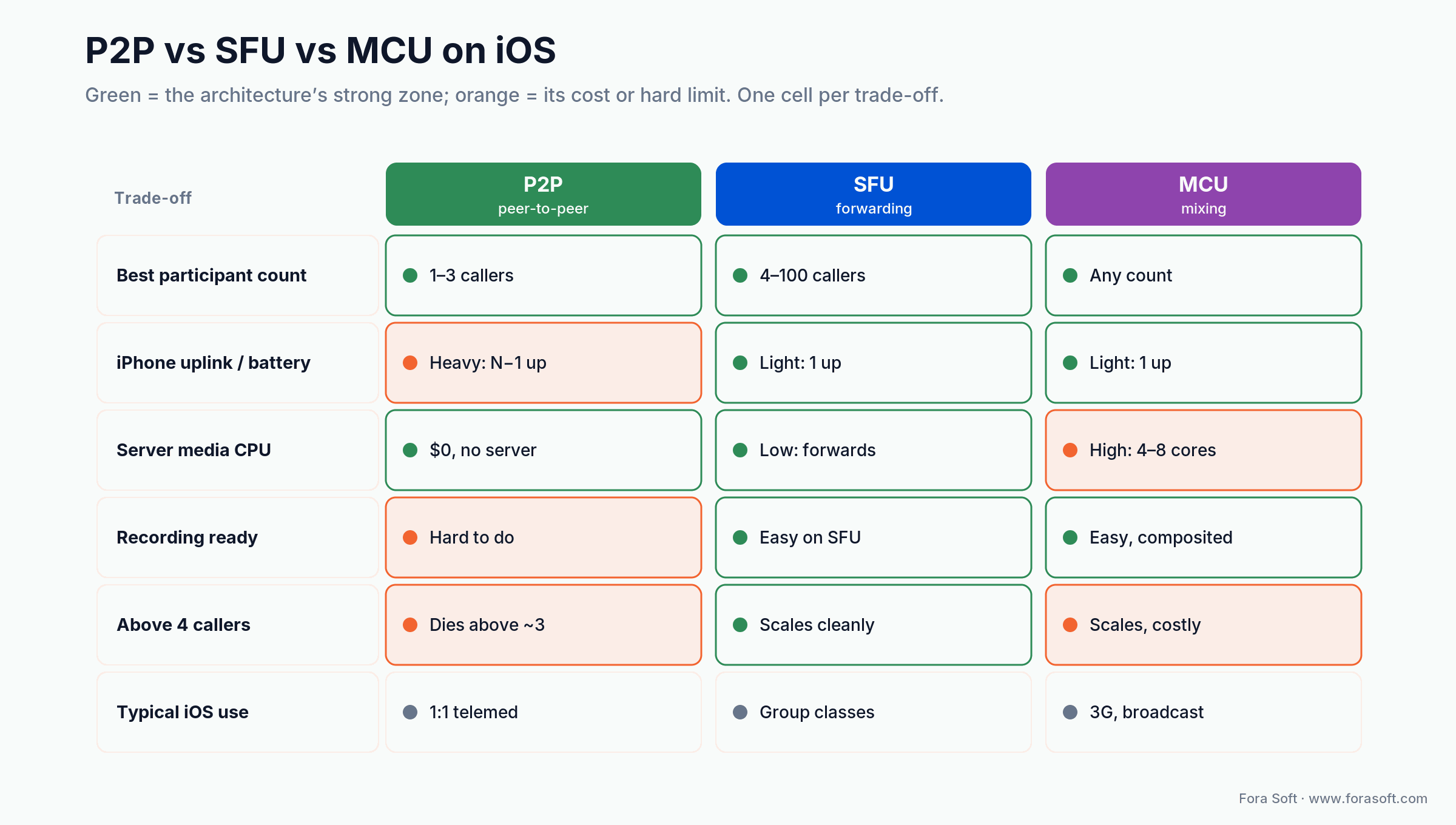
Figure 2. P2P vs SFU vs MCU on iOS: green marks each architecture’s strong zone, orange its cost or hard limit.
Signaling: WebSocket, the bit nobody documents
Signaling is just a message bus. It has to deliver SDPs and ICE candidates between callers reliably and quickly. That’s it. WebSocket over TLS is the industry default because it’s connection-oriented, low-latency, and fits naturally inside an iOS app that’s already authenticated against your backend.
A typical 1-on-1 message sequence: client connects to wss://signal.your.app with a JWT, joins a room, receives a list of peers, and exchanges offer, answer and ice-candidate messages with each peer. Use Trickle ICE so candidates start flowing while the offer is still being prepared — it shaves 200–800 ms off connection time.
Skeleton in Swift using Starscream:
import Starscream
import WebRTC

final class SignalingClient: WebSocketDelegate {
    private let socket: WebSocket
    weak var delegate: SignalingClientDelegate?

    init(url: URL, token: String) {
        var req = URLRequest(url: url)
        req.setValue("Bearer \(token)", forHTTPHeaderField: "Authorization")
        socket = WebSocket(request: req)
        socket.delegate = self
    }

    func send(offer: RTCSessionDescription, to peerId: String) {
        let payload: [String: Any] = [
            "type": "offer",
            "to": peerId,
            "sdp": offer.sdp
        ]
        let data = try! JSONSerialization.data(withJSONObject: payload)
        socket.write(data: data)
    }
}
Three things that bite teams here. Reconnect logic on flaky cellular. iOS will hand off between 5G, LTE and Wi-Fi mid-call; your WebSocket needs exponential backoff and a server-side resume token. Authentication freshness. JWT expiry during a long call drops new ICE candidates. And ordering — if your transport doesn’t guarantee message order, ICE candidates can arrive before the SDP they describe and silently fail.
STUN and TURN — and why iOS needs both
STUN solves “what’s my public address?” TURN solves “the direct path is blocked, please relay for me.” On iOS specifically, three things conspire to make TURN essential rather than optional.
1. Symmetric NAT on cellular. Major US, EU and APAC carriers run symmetric or port-restricted NAT on consumer LTE/5G plans. STUN tells you your address, but the address only works for the one server you spoke to, not for the peer trying to reach you. TURN relays around the asymmetry.
2. VPNs, MDM profiles and CGNAT. A managed device on a corporate VPN, or a carrier handing out carrier-grade NAT or IPv6-only addresses, routes media in ways that defeat direct peer paths. (iCloud Private Relay is a common myth here: it only proxies Safari and insecure web traffic, never your native app’s WebRTC UDP, so it isn’t the reason. VPNs and CGNAT are.) TURN over TLS on port 443 is the fallback that survives. Configure your TURN with both UDP and TLS transports and have the iOS client iterate through them in order.
3. Corporate Wi-Fi and hotel networks. Block UDP and non-443 outbound by default. TURN over TLS on 443 — effectively masquerading as HTTPS — works in 99%+ of these environments.
For self-hosted TURN, coturn is the standard. A single $20/month Hetzner CCX13 instance handles ~150 concurrent relay sessions at typical 720p bitrates. For managed TURN, Twilio NTS, Subspace, Xirsys and CoTURN-on-Cloudflare-Calls are the options. Cost is roughly $0.40–$0.80 per relayed GB, and yes, that adds up faster than you expect because relayed traffic is bidirectional.
let iceServers = [
    RTCIceServer(urlStrings: ["stun:stun.your.app:3478"]),
    RTCIceServer(urlStrings: ["turn:turn.your.app:3478?transport=udp"],
                 username: ephemeralUsername,
                 credential: ephemeralPassword),
    RTCIceServer(urlStrings: ["turns:turn.your.app:443?transport=tcp"],
                 username: ephemeralUsername,
                 credential: ephemeralPassword)
]
let config = RTCConfiguration()
config.iceServers = iceServers
config.iceTransportPolicy = .all
config.bundlePolicy = .maxBundle
config.rtcpMuxPolicy = .require
config.continualGatheringPolicy = .gatherContinually
Issue ephemeral TURN credentials with a 60–120 second TTL signed by your backend — never embed long-lived static credentials in the iOS bundle. They will be extracted and abused.
Stuck on ICE failures in production?
Send us a 5-minute webrtc-internals dump. We’ll come back with the exact NAT type, where TURN is dropping packets, and the one-line fix.
The build-vs-buy decision
The framing “native WebRTC vs third-party SDK” is a false binary. The real spectrum has four points.
1. Pure native WebRTC + your own SFU + your own signaling. Maximum control, maximum cost discipline at scale, slowest to MVP. Plan 8–14 weeks for a production-ready stack on iOS alone.
2. Native WebRTC + open-source SFU (mediasoup, LiveKit Server, Pion). Same framework, but you skip writing the SFU. 5–8 weeks to MVP. This is our default choice for clients planning to scale past 1M minutes/month.
3. Cloud SDK (LiveKit Cloud, Daily, Stream, 100ms, Agora). Vendor SDK on iOS, vendor SFU and global edge. 1–3 weeks to MVP. Cost scales linearly with minutes. Lock-in is real but recoverable — LiveKit is open-source so you can self-host the same code later.
4. Drop-in SDK with prebuilt UI (Daily Prebuilt, Whereby Embedded, Zoom Video SDK, Vonage). Days to MVP. Almost zero engineering. The trade is your UX is theirs and your unit economics are theirs.
Reach for a managed cloud SDK when: you need to ship in under three weeks, your 12-month volume stays under ~1M participant-minutes, and you’d rather rent the SLA than run it at 3am.
Third-party SDK comparison
Indicative 2026 pricing for the iOS-friendly SDKs we’ve shipped against. Always verify against the vendor’s public pricing page. The numbers move quarterly. Apply your own usage curve before drawing conclusions.
| SDK | Pricing model | Free tier | Pick when | Watch out for |
|---|---|---|---|---|
| Agora | ~$0.99/1K min audio, ~$3.99/1K min HD video | 10K min/mo | Global reach (China especially), mature SDK | Hard vendor lock-in; opinionated UI primitives |
| LiveKit Cloud | ~$0.0005/participant-min; AI agents priced separately | Build plan, ~5K min/mo | Cost-sensitive scale, AI/agent workloads, OSS exit path | Newer SDK; agent-minute pricing dominates real bills |
| Daily.co | Per-participant-minute, custom enterprise tiers | Yes, Prebuilt UI | Fastest MVP; Daily Prebuilt cuts UI to zero | No self-host path; opaque enterprise pricing |
| Stream Video | Tiered (free, $499/mo, custom) + per-MAU + per-min | 100 MAU, capped minutes | Need chat + calls in one SDK; SOC 2 / HIPAA | Complex pricing math; recording + storage extra |
| 100ms | ~$0.004/participant-min HD video, ~$0.001/min audio | 10K min/mo | Balanced cost/features, strong mobile SDKs | Smaller global PoP footprint than Agora |
| Vonage Video | ~$0.00395/participant-min standard, surcharges 36+ pubs | Trial credits | Need built-in broadcast/HLS; legacy Tokbox migration | Slower roadmap; older API surface |
| Self-hosted SFU (mediasoup/LiveKit OSS) on Hetzner | $50–200/mo per server + ops time | N/A — OSS | >1–5M min/mo; HIPAA/data-residency; full control | Needs DevOps; you own the SLA at 3am |
Two notes from real bills. Ignore any 2024 tutorial that calls Twilio Programmable Video “dead.” Twilio set a December 2024 end-of-life, extended it to December 2026, then reversed course in October 2024 and kept Video a standalone, actively-supported product. It is a valid option again; we mapped the paths in our Twilio Video migration guide. Agora’s headline rate hides the fact that “participant minutes” meter every joiner, every minute. A 10-person, 60-minute call is 600 minutes of billing, not 60. Our deeper teardown is in Agora.io alternatives and WebRTC vs Agora architecture trade-offs.
Integrating the WebRTC framework the modern way
The single most outdated thing in old WebRTC iOS tutorials is the dependency line. Google retired its official iOS binary distribution after Chromium milestone M80. The community-maintained replacement is Stasel’s WebRTC fork, which ships pre-built XCFrameworks for every Chromium milestone via SPM and CocoaPods. As of August 2026 the latest is M150 (released July 2026) — pin a milestone, never float.
Swift Package Manager (recommended in 2026). In Xcode, File → Add Packages, paste https://github.com/stasel/WebRTC and pin the version (e.g. 150.0.0). Floating latest is asking for trouble.
CocoaPods. Add to your Podfile:
target 'YourApp' do
  use_frameworks!
  pod 'WebRTC-lib', '150.0.0'
end
Manual build from source. Only do this if you need a patched build — e.g. SFrame E2EE support that hasn’t landed upstream, or a custom audio processing module. Plan three engineering days. The Chromium depot_tools + gn gen + ninja dance is well documented but unforgiving.
Required Info.plist entries you’ll forget at least once:
<key>NSCameraUsageDescription</key>
<string>Camera access is required for video calls.</string>
<key>NSMicrophoneUsageDescription</key>
<string>Microphone access is required for calls.</string>
<key>UIBackgroundModes</key>
<array>
  <string>audio</string>
  <string>voip</string>
</array>
Add the Push Notifications and Background Modes capabilities in the Signing & Capabilities tab and you’re ready to wire the call flow.
The 1-on-1 call flow in Swift
The choreography is the same on every WebRTC platform. The Swift below is condensed but production-shaped — we omit error handling and threading for clarity, not because they don’t matter.
1. Create a peer connection factory once. Reuse it for the lifetime of the app.
RTCInitializeSSL()
let encoderFactory = RTCDefaultVideoEncoderFactory()
let decoderFactory = RTCDefaultVideoDecoderFactory()
let factory = RTCPeerConnectionFactory(
    encoderFactory: encoderFactory,
    decoderFactory: decoderFactory
)
2. Capture local audio and video.
let audioSource = factory.audioSource(with: nil)
let audioTrack = factory.audioTrack(with: audioSource, trackId: "audio0")

let videoSource = factory.videoSource()
let videoCapturer = RTCCameraVideoCapturer(delegate: videoSource)
let frontCamera = RTCCameraVideoCapturer.captureDevices()
    .first { $0.position == .front }!
let format = RTCCameraVideoCapturer.supportedFormats(for: frontCamera)
    .first { CMVideoFormatDescriptionGetDimensions($0.formatDescription).width == 1280 }!
videoCapturer.startCapture(with: frontCamera, format: format, fps: 30)
let videoTrack = factory.videoTrack(with: videoSource, trackId: "video0")
3. Build the peer connection. Configure ICE servers, attach the local tracks.
let pc = factory.peerConnection(
    with: config,
    constraints: RTCMediaConstraints(mandatoryConstraints: nil, optionalConstraints: nil),
    delegate: self
)!
pc.add(audioTrack, streamIds: ["stream0"])
pc.add(videoTrack, streamIds: ["stream0"])
4. Create offer / answer / set remote description. Trickle ICE candidates as they arrive.
// Caller
pc.offer(for: mediaConstraints) { sdp, error in
    guard let sdp = sdp else { return }
    pc.setLocalDescription(sdp) { _ in
        signaling.send(offer: sdp, to: peerId)
    }
}

// Callee, on receiving an offer
pc.setRemoteDescription(remoteSdp) { _ in
    pc.answer(for: mediaConstraints) { sdp, error in
        guard let sdp = sdp else { return }
        pc.setLocalDescription(sdp) { _ in
            signaling.send(answer: sdp, to: peerId)
        }
    }
}

// Both sides, on each new local candidate
func peerConnection(_ pc: RTCPeerConnection, didGenerate candidate: RTCIceCandidate) {
    signaling.send(candidate: candidate, to: peerId)
}

// On each remote candidate
pc.add(remoteCandidate)
5. Render remote video. Use RTCMTLVideoView — Metal-backed, hardware-accelerated. Don’t use RTCEAGLVideoView; OpenGL ES is deprecated on iOS.
func peerConnection(_ pc: RTCPeerConnection, didAdd stream: RTCMediaStream) {
    guard let remoteVideoTrack = stream.videoTracks.first else { return }
    DispatchQueue.main.async {
        let view = RTCMTLVideoView(frame: self.remoteContainer.bounds)
        view.videoContentMode = .scaleAspectFill
        self.remoteContainer.addSubview(view)
        remoteVideoTrack.add(view)
    }
}
CallKit + PushKit: incoming calls done right
A call app whose users have to keep the app open is not a call app. The combination of PushKit (to wake the device) and CallKit (to show the native incoming-call UI) is what makes a WebRTC iOS app feel like FaceTime instead of like Zoom-on-launch. Apple is also strict here: since iOS 13, every PushKit VoIP push that hits the device must result in a CallKit reportNewIncomingCall call within seconds, or iOS will throttle and eventually disable VoIP push for your app.
1. Register for VoIP push.
import PushKit

final class VoIPRegistrar: NSObject, PKPushRegistryDelegate {
    let registry = PKPushRegistry(queue: .main)
    func start() {
        registry.delegate = self
        registry.desiredPushTypes = [.voIP]
    }
    func pushRegistry(_ registry: PKPushRegistry,
                      didUpdate pushCredentials: PKPushCredentials,
                      for type: PKPushType) {
        let token = pushCredentials.token.map { String(format: "%02x", $0) }.joined()
        backend.uploadVoIPToken(token)
    }
}
2. Backend sends a VoIP push. APNs topic is your.bundle.id.voip, priority 10, push type voip. Payload includes caller name, room ID and a fresh signaling token.
3. App receives the push and reports the call to CallKit immediately.
import CallKit

func pushRegistry(_ registry: PKPushRegistry,
                  didReceiveIncomingPushWith payload: PKPushPayload,
                  for type: PKPushType,
                  completion: @escaping () -> Void) {
    let info = payload.dictionaryPayload
    let update = CXCallUpdate()
    update.remoteHandle = CXHandle(type: .generic, value: info["caller"] as? String ?? "")
    update.hasVideo = true
    let uuid = UUID()
    provider.reportNewIncomingCall(with: uuid, update: update) { error in
        if error == nil {
            self.callManager.prepareIncoming(uuid: uuid, info: info)
        }
        completion()
    }
}
4. CXProviderDelegate handles answer/decline. When the user taps Answer, configure the audio session, build the peer connection and complete the SDP handshake. Don’t do any of that in didReceiveIncomingPushWith — CallKit hasn’t taken control of the audio session yet, and AVAudioSession will fight you.
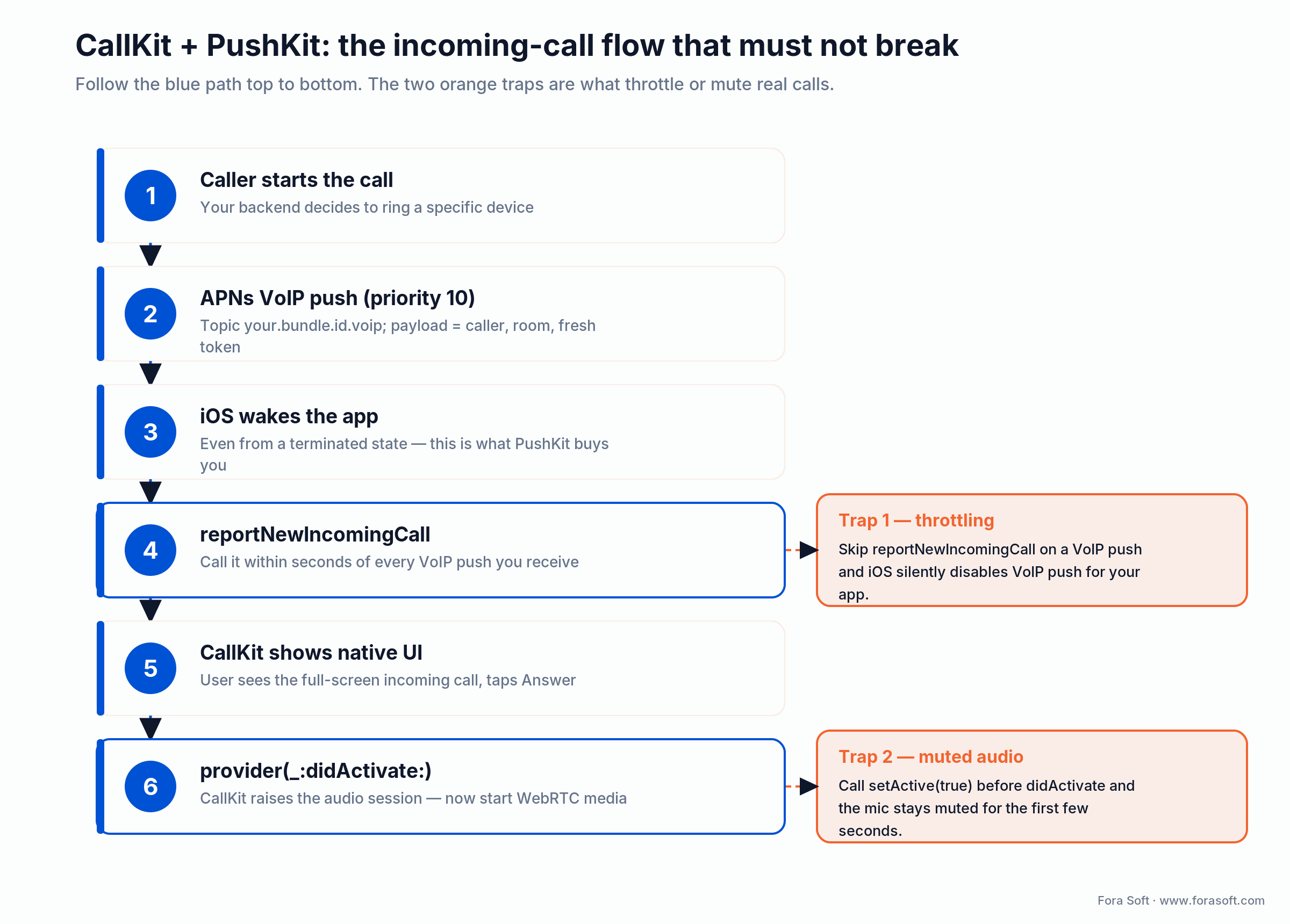
Figure 3. The incoming-call flow. The two orange traps are what throttle VoIP push or mute the first seconds of audio.
AVAudioSession traps
More iOS WebRTC bugs trace back to AVAudioSession than to the WebRTC framework itself. Three rules.
1. Use .playAndRecord with mode .voiceChat. This enables Apple’s built-in echo cancellation and noise suppression. Turning on the WebRTC software AEC on top of that double-processes audio and produces the metallic robot voice everybody complains about.
2. Let CallKit own activation. When the user taps Answer in the CallKit UI, CallKit raises the audio session itself. Calling setActive(true) from your code at the wrong moment causes a route mismatch that mutes outgoing audio. Wait for provider(_:didActivate:) before starting media.
3. Handle interruptions. An incoming GSM call, Siri, or another VoIP app interrupts your session. Subscribe to AVAudioSession.interruptionNotification, mute your RTCAudioTrack on .began, restore on .ended. Test the GSM-call interruption explicitly. It’s the most common “the call goes silent forever” bug.
H.264, simulcast and Apple Silicon
iOS’s native WebRTC framework hardware-accelerates H.264 (Constrained Baseline 1.0 and High) and, in current Stasel builds, H.265/HEVC. Apple silicon has encoded and decoded both for years. It also carries VP8 and VP9, but only in software: they work, they just cost more CPU and battery. AV1 isn’t in the build. Opus handles audio. New to codecs? Our primer on digital video and codecs is the fastest way in. The codec set matters for two reasons.
Cross-codec interoperability. If your other clients are browsers, Chrome and Firefox prefer VP8 by default. iOS will decode VP8, but in software, so a busy grid of VP8 tiles heats the phone and drains the battery. Prefer H.264 (hardware on both ends) in your SFU’s codec preferences, keep VP8 and VP9 as fallbacks, and confirm the negotiated codec with getCapabilities('video').codecs at startup.
Simulcast restrictions. H.264 on iOS supports temporal scalability (frame-rate layering) but not spatial scalability without explicit re-encoding. In practice that means you can publish one full-resolution layer and one half-frame-rate layer per upstream — but not three resolution rungs the way Chrome can with VP8. SFU layouts that assume three simulcast layers per peer have to fall back to two on iOS or transcode in the SFU. mediasoup, LiveKit Server and Janus all handle this gracefully if you tell them.
Apple Silicon and the iPhone 15+ media engine. Hardware H.264 and H.265 encode/decode is essentially free in CPU on A17 Pro and newer (A18, A19). On these devices a 1080p30 publisher costs ~3% CPU. On older devices (A12 and earlier) the same publisher costs 12–18% — battery and thermal limits will reduce frame rate after 10–15 minutes. Cap publish resolution to 720p on devices older than A14 unless you’ve measured.
Security and compliance
Every WebRTC connection is encrypted by default. DTLS-SRTP is mandatory in the spec. You can’t turn it off. That gets you confidentiality and integrity hop-by-hop. It does not get you end-to-end encryption when an SFU is in the path, because the SFU terminates the DTLS session. Our deeper write-up is in WebRTC security in plain language.
1. End-to-end encryption. If the threat model includes the SFU operator, layer SFrame on top of SRTP. SFrame encrypts the payload with a key the server doesn’t hold, so the SFU still routes packets but can’t decode media. LiveKit and mediasoup both have first-class SFrame paths now.
2. HIPAA. A signed BAA with every infrastructure vendor that touches PHI, audit logs of who joined which call when, recording controls (consent, retention, encryption at rest), and access controls on the signaling server. We covered the playbook end-to-end in building a HIPAA-compliant video platform; CirrusMED and Cloud Doctors run on this exact pattern.
3. GDPR. Lawful basis (usually consent) before recording, data residency (your SFU and recording storage must live in the right region), DPIA for high-risk processing, and a working “delete my data” flow that propagates through recordings, transcripts and logs.
4. SOC 2 Type II. The right SDK or self-hosted stack saves you here. LiveKit Cloud, Stream and Daily are SOC 2 Type II out of the box; rolling your own means a 12-month audit and a real CISO conversation.
Cost model: self-hosted SFU vs Agora vs LiveKit
Worked examples for three usage tiers, assuming HD video group calls and 720p publishers. We round generously and ignore CDN/recording for clarity.
| Monthly volume | Self-hosted SFU on Hetzner | LiveKit Cloud | Agora HD |
|---|---|---|---|
| 100K participant-min | ~$120/mo (one CCX23 + TURN) | ~$50/mo | ~$400/mo |
| 1M participant-min | ~$300/mo (2× CCX33 + TURN cluster) | ~$500/mo | ~$4,000/mo |
| 10M participant-min | ~$1,500–2,500/mo (cluster + bandwidth) | ~$4,200/mo | ~$40,000/mo |
Two things this table doesn’t show. The self-hosted column hides one DevOps engineer’s ongoing cost — figure $4–8K/month at 20% time once it’s stable. And the LiveKit / Agora columns hide the integration speed-up — you ship two months earlier, which is often worth more than the cloud premium for the first year.
Our infrastructure post on AWS vs DigitalOcean vs Hetzner walks through the bandwidth math — bandwidth is what makes Hetzner the right SFU host most of the time, and AWS the wrong one.
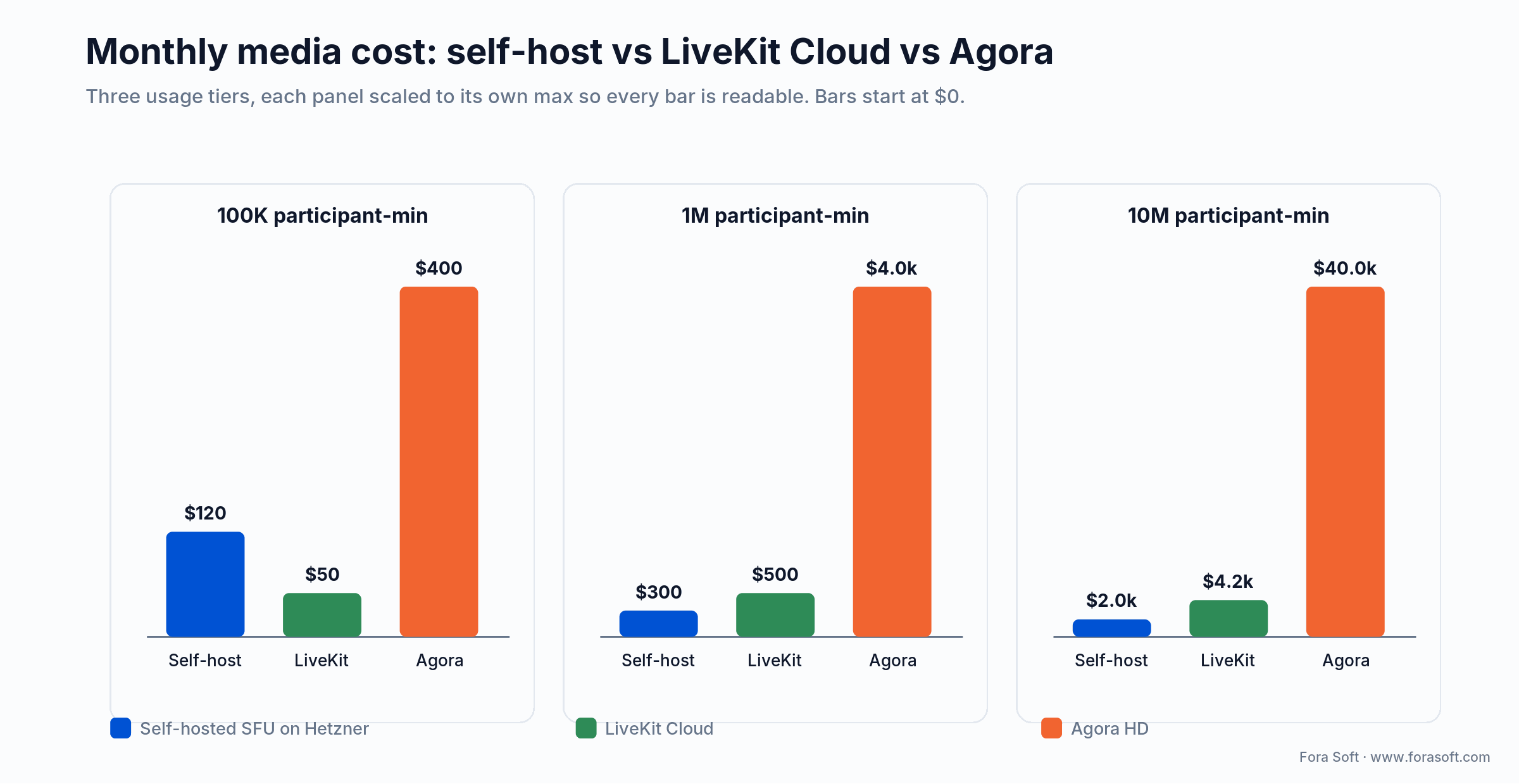
Figure 4. Monthly media cost at three usage tiers. Each panel is scaled to its own max so every bar is readable.
Burning money on Agora minutes?
We’ve migrated three production iOS apps off Agora to self-hosted mediasoup or LiveKit OSS — with no UX regression. Send us your bill and your call topology.
Mini case: shipping a telemedicine iOS call flow in 12 weeks
Situation. A US private-practice telemedicine startup came to us with a working web flow, an Android client mid-build, and a missing iOS app. The investor demo was 12 weeks out. They needed HIPAA-compliant video, a CallKit incoming-call experience, and the ability to record consultations to encrypted storage with patient consent.
Plan. Weeks 1–3, we wired the Stasel WebRTC SPM dependency, built the signaling layer on the existing Node WebSocket gateway, and stood up coturn on Hetzner with TURN over TLS on 443. Weeks 4–7, the CallKit + PushKit + AVAudioSession integration — the part that ate the schedule. Week 8, an SFU on mediasoup for the planned three-way doctor + patient + interpreter flow. Weeks 9–11, recording-to-S3 with at-rest AES-256 and a signed BAA in place. Week 12, App Store review and the demo.
Outcome. First-call success rate 98.3% across the first 1,200 production calls. Median connect time 1.4 seconds (peer-to-peer P2P) or 2.1 seconds (TURN-relayed, ~14% of calls). The investor demo closed the next round. Pattern is the same one we used for CirrusMED and Cloud Doctors; deliverables in our telemedicine features playbook.
A decision framework — pick your iOS WebRTC stack in five questions
1. How many simultaneous video participants in a typical call? 1–3 means P2P is on the table and a $20/month TURN keeps the lights on. 4–100 means you need an SFU. 100+ means SFU + recording + selective forwarding logic, and the right answer is almost always “use a managed SFU vendor for v1.”
2. What’s your projected monthly minute volume in 12 months? Below 1M minutes: ship on a cloud SDK and revisit. 1–5M minutes: cloud SDK still wins on total cost of ownership unless you have a dedicated DevOps team. Above 5M: self-host on mediasoup or LiveKit OSS.
3. Do you need HIPAA, GDPR data residency, or air-gapped on-prem? If yes to any, third-party cloud SDKs narrow to LiveKit Cloud (BAA available) or Stream (HIPAA). Otherwise self-host. We’ve done air-gapped on-prem WebRTC for Nucleus — it’s a different beast.
4. How quickly do you need to ship? Two weeks: Daily Prebuilt or Vonage embedded. Six weeks: native + LiveKit Cloud. Twelve weeks: native + self-hosted mediasoup. Anything below two weeks is a Daily Prebuilt webview wrapped in a native shell.
5. What’s your team’s WebRTC experience? Zero: pick a managed SDK. One past project: open-source SFU + native WebRTC is reachable. Two or more shipped products: self-host with confidence. The cost of an inexperienced team self-hosting in production is exactly one weekend outage that you’ll remember forever.
Five pitfalls we keep seeing in iOS WebRTC code reviews
1. Embedding static TURN credentials in the iOS bundle. Anyone who pulls your IPA gets free relay. Always issue ephemeral credentials with a 60–120 s TTL signed by your backend. The 60-line backend is far easier than the abuse incident.
2. Calling setActive(true) on AVAudioSession from your own code during CallKit-led calls. CallKit raises the session itself; jumping the gun mutes the microphone for the first few seconds and sometimes the entire call. Wait for provider(_:didActivate:).
3. Not reporting every VoIP push to CallKit. Apple throttles VoIP push for apps that receive a push without immediately calling reportNewIncomingCall. If your call has already ended by the time the push arrives, still report and immediately end it, otherwise iOS will start dropping pushes silently.
4. Defaulting to VP8 on iOS and paying for it in battery. iOS decodes VP8 and VP9 only in software, so a VP8-first SFU leaves iPhones hot and draining while the H.264 hardware sits idle. Prefer H.264 (or H.265) in your codec preferences and keep VP8 as a fallback, not the default.
5. Using RTCEAGLVideoView in 2026. OpenGL ES is deprecated. RTCMTLVideoView is the Metal-backed renderer; it’s faster, lower power and the only one Apple keeps validating.
KPIs: what to measure on every iOS WebRTC call
1. Quality KPIs. Median round-trip time below 200 ms, packet loss below 2%, jitter below 30 ms, video freeze count below 1 per minute, MOS audio score above 4.0. Pull these from RTCStatsReport every 5 seconds and ship to your APM. Anything outside band on iOS is usually a TURN issue or an AVAudioSession route problem — treat them differently.
2. Business KPIs. Call setup time (offer→ICE-connected) below 2.0 s on cellular, first-call success rate above 95%, mid-call drop rate below 1.5%, daily active call rate per DAU. The first three correlate strongly with retention; we’ve seen a 0.4 percentage point improvement in week-one retention from cutting setup time by 800 ms on slower cellular networks.
3. Reliability KPIs. SFU uptime 99.95%+, signaling reconnection success rate above 99% (we measure across 5G↔LTE↔Wi-Fi handoffs), CallKit-throttle rate at zero, and a hard cap on AVAudioSession deactivation errors that pages us when crossed. Our deeper test playbook is how to test a WebRTC stream.
When NOT to build native iOS WebRTC
If your call is “watch a presenter, occasionally raise hand” with thousands of viewers, the right answer isn’t WebRTC at all — it’s HLS or LL-HLS for the broadcast and WebRTC only for the speakers. We’ve covered the cut-over in WebRTC video streaming vs HLS and the scaling story in scale video streaming to 1M viewers.
If your iOS app is a thin native wrapper around an existing well-tested web flow and your investor demo is in three weeks, do not rebuild on native WebRTC. Wrap Daily Prebuilt or LiveKit’s React Native SDK, ship the demo, replace later. Speed-to-market beats architectural purity for the first six months of every product we’ve seen.
If your call participants are >500 simultaneously and you’re thinking of writing your own SFU, stop. The complexity surface area there — cascading SFUs, geographic routing, replica strategy, recording fan-out — is a 12-month project for a senior team. Use LiveKit Cloud or Agora until you have the engineering bandwidth to take it back in-house.
FAQ
Does iOS support WebRTC natively?
Yes. Safari and WKWebView (iOS 14.3+) expose RTCPeerConnection through WebKit, and the open-source WebRTC framework ships as a native iOS binary you can import via Swift Package Manager or CocoaPods. For a real iOS app you almost always want the native framework, not the WebView path. You get CallKit, hardware H.264 and a proper audio session.
Do you really need a TURN server?
For any production iOS app: yes. Roughly 15–20% of calls in our telemetry require relayed media because of cellular carrier NAT, VPN or MDM profiles, or corporate firewalls. Without TURN those calls silently fail at the ICE-connected step. coturn on a $20/month Hetzner instance covers ~150 concurrent relays.
Can you use WebRTC inside a WKWebView instead of the native framework?
Technically yes since iOS 14.3. In practice, you lose CallKit interop, lose tight AVAudioSession control, and battery life suffers compared to the native framework. Use WKWebView only for very short MVP horizons or for a strictly browser-feature-parity experience — and expect to migrate later.
How do you add CallKit to a WebRTC iOS app?
Register a CXProvider, request .voIP push tokens, and on every incoming VoIP push call reportNewIncomingCall within seconds. Then implement CXProviderDelegate — didActivate audioSession is the right place to start media, not earlier. Skipping the report-immediately rule causes Apple to throttle your VoIP push entitlement.
Is WebRTC secure enough for telemedicine?
DTLS-SRTP is mandatory and gives you confidentiality and integrity. For HIPAA and similar regimes, you also need a signed BAA with every infrastructure vendor, encrypted-at-rest recordings, audit logs, granular access control on the signaling server, and (in stricter threat models) SFrame end-to-end encryption so the SFU can’t see media. We documented the full stack in our HIPAA-compliant video platform guide.
Is it cheaper to build with native WebRTC or use Agora/LiveKit?
Below ~1M participant-minutes/month, a cloud SDK is almost always cheaper once you account for engineering time and on-call cost. Above ~5M minutes/month a self-hosted SFU on Hetzner pays back in a couple of months. The 1–5M middle band depends on team experience and how much you value control over the SLA.
Why does the audio sound robotic or echoed in my iOS WebRTC app?
Almost always a double-AEC: WebRTC’s software echo cancellation running on top of Apple’s hardware AEC. Set the AVAudioSession to .playAndRecord with mode .voiceChat, which enables Apple’s AEC, and disable WebRTC’s software AEC. The robot voice goes away.
How long does it take to ship a production iOS WebRTC app?
For a 1-on-1 video flow with CallKit, signaling, TURN, and recording: 8–12 weeks for a senior iOS team familiar with WebRTC. Add 2–4 weeks for HIPAA/GDPR compliance work and another 2 weeks for SFU integration if you need group calls. We’ve compressed the schedule to 6–8 weeks using LiveKit Cloud and to 3 weeks using Daily Prebuilt for an MVP.
What to read next
Architecture
P2P vs MCU vs SFU for Video Conference Apps
Decision tree, CPU/bandwidth math, and when each architecture earns its keep.
Security
WebRTC Security in Plain Language
DTLS-SRTP, SFrame for E2EE, and how to handle keys you don’t want to lose.
Compliance
HIPAA-Compliant Video Platform Playbook
BAAs, audit logs, recordings, and the architectural shape we use for telemedicine.
Cost
Agora.io Alternatives Compared
Pricing math, migration paths, and the SDKs that consistently come out cheaper.
Testing
How to Test a WebRTC Stream
From RTCStatsReport to synthetic load — what to measure and how to alert on it.
Ready to ship video calls iOS users will actually keep open?
WebRTC on iOS is a solved problem — if you respect that it’s really five problems stitched together. Pick the architecture (P2P, SFU, MCU) by participant count, pick the build-vs-buy point by minute volume and time-to-market, and budget two engineering weeks for CallKit + PushKit + AVAudioSession regardless of which path you take. Force H.264, issue ephemeral TURN credentials, and measure the things that correlate with retention: setup time, first-call success, mid-call drops — from day one.
If you want a faster route: bring us your topology, your usage projection and (if you have one) your current Agora bill. We’ll come back with a stack you can ship in 6–12 weeks and a cost curve that doesn’t double when you grow. The kind of work that backs 20 years of video software at Fora Soft.
Talk to a senior iOS WebRTC engineer this week
30 minutes, no slides — just your stack, our notes, and the next three things to fix or build.

