

Key takeaways
• Low-code/no-code app development is real, but bounded. Bubble, Glide, FlutterFlow, Webflow, Power Apps and Retool ship internal tools, marketing apps and lightweight MVPs in days. They stall on multi-platform consumer products, real-time media and compliance-heavy data.
• Costs invert as you scale. A no-code MVP is $0–$5K; a custom MVP is $35K–$60K. But metered platform fees, lock-in and the eventual rebuild push no-code’s 36-month total past custom, usually between month 18 and 24.
• The lock-in tax is not theoretical. Google App Maker shut down in January 2021; AWS Honeycode in February 2024. Bubble now meters Workload Units and Webflow re-priced everything in May 2026. Owning your code is owning your option to leave.
• The 2026 default is hybrid. No-code for the commodity layers (marketing site, admin, dashboards), custom for the differentiator (the product, the UX, the integrations that make you hard to copy).
• Run the six-question framework before you sign anything. It’s in section 10. It prevents the most expensive mistake in software procurement: paying for the same product twice.
Why Fora Soft wrote this playbook
We’re the team founders call after the no-code build hits the wall. Several times a year a startup arrives with a Bubble or FlutterFlow MVP that won’t scale past a few thousand users, won’t survive an enterprise security review, or won’t integrate with a partner’s payment rails. We rebuild the parts that broke: sometimes the whole app, sometimes just the bottleneck.
We’ve shipped 250+ products since 2005 with a 50-engineer in-house team. Some clients came to us with a no-code prototype that had run out of room; others needed custom from the first line because compliance, scale or real-time media put no-code out of the running: ALDA (an AI course generator whose institutions serve 500K+ students a year), VALT (video surveillance for 770+ US organizations and 50,000+ users), and BrainCert (100K+ customers, 500M+ classroom minutes). This playbook is the conversation we’d have with you on a 30-minute call: opinionated, with real numbers, aimed at the one question that matters: where does low-code/no-code app development save you money long-term, and where does it quietly cost you double? It sits alongside our mobile app development services explainer, which frames the same decision across native, cross-platform and PWA builds.
Already on a no-code platform and worried it won’t scale?
Send us the platform and your scale assumptions. We’ll come back in 24 hours with a written verdict, a partial-rebuild plan, and a budget you can defend internally.
The verdict, in one paragraph
Low-code/no-code wins when your differentiator does not live in software — when it’s content, brand, distribution or relationships. It’s the right tool for internal tooling, admin panels, marketing micro-sites and demo-grade MVPs. Custom development wins when the software is the differentiator: multi-platform consumer apps, real-time multimedia, deep integrations, regulated compliance, or any product whose unit economics depend on a cost-per-user the platforms can’t hit. The hybrid (custom product, no-code admin and dashboards and marketing site) is what most successful 2026 software companies actually run, and it’s what we recommend on nearly every engagement.
What changed in low-code and no-code by 2026
Adoption is no longer the question. Gartner’s widely-cited forecast put roughly 70% of new enterprise applications on low-code or no-code technology by the mid-2020s, up from under 25% in 2020, with the market heading toward roughly $44.5B in 2026. Three shifts matter before you decide.
1. AI code-generation broke the “you don’t need a developer” pitch. When a senior engineer with Cursor or Claude Code turns a Figma file into a working React app in an afternoon, “use a builder so you don’t need a developer” stops being the strongest argument. The honest new pitch is narrower: “use no-code so a non-developer can keep editing it.”
2. The platforms got more capable and more expensive. Bubble, Webflow, Power Apps and Retool all added real workflows, plugins and code escape hatches — and all raised prices. Bubble moved to consumption-based Workload-Unit pricing; Webflow re-priced everything in May 2026, splitting Site plans from per-seat Workspace plans. The sticker price and the real bill have drifted apart.
3. Hybrid went mainstream. Serious companies don’t pick “no-code” or “custom” — they apply each to a different layer. Custom product, Retool internal tools, Webflow marketing site, Notion docs. Right tool per job, not per company.
No-code vs low-code vs custom: what each actually means
1. No-code. Visual drag-and-drop with no real code escape hatch. Bubble, Glide, Adalo, Softr, Airtable, Webflow CMS, Notion. Best for static sites, simple workflows and single-platform internal tools.
2. Low-code. A visual builder plus a real code escape hatch. Power Apps, Retool, Mendix, OutSystems, Appian, Zoho Creator. Best for enterprise internal apps with serious integration needs and IT governance.
3. Custom development. Native or cross-platform code (Swift, Kotlin, Flutter, React Native, Next.js, Django) under your full control. You own the source, the deployment, the data and the option to change anything. Best for products that need scale, performance or deep integration, or that are the differentiator.
4. Hybrid. Custom for the differentiator, no-code/low-code for the supporting cast. The 2026 default for serious software companies.
Reach for low-code (not no-code) when: the app is internal and integration-heavy, IT governance is real, and you need a code escape hatch for the 20% the visual builder can’t express — Power Apps, Retool or OutSystems, not Bubble.
Comparison matrix: no-code vs low-code vs custom
| Dimension | No-code | Low-code | Custom |
|---|---|---|---|
| Time to first working app | Days | 1–4 weeks | 3–5 months MVP |
| Initial cost | $0–$5K | $10K–$30K | $35K–$80K |
| Recurring cost (monthly) | $29–$2,000+ | $1K–$10K+ | Infra only ($100–$3K) |
| Scale ceiling | ~5K active users | Tens of thousands | Millions |
| Performance | OK–poor | OK–good | Excellent |
| Custom branding / UX | Limited | Moderate | Unlimited |
| Vendor lock-in | High | Medium | None |
| You own source code | No | Partial | Yes |
| Compliance fit (HIPAA / SOC 2) | Limited | Possible (with effort) | Yes |
| Best for | Static sites, internal tools, demos | Enterprise internal apps | Consumer products at scale |
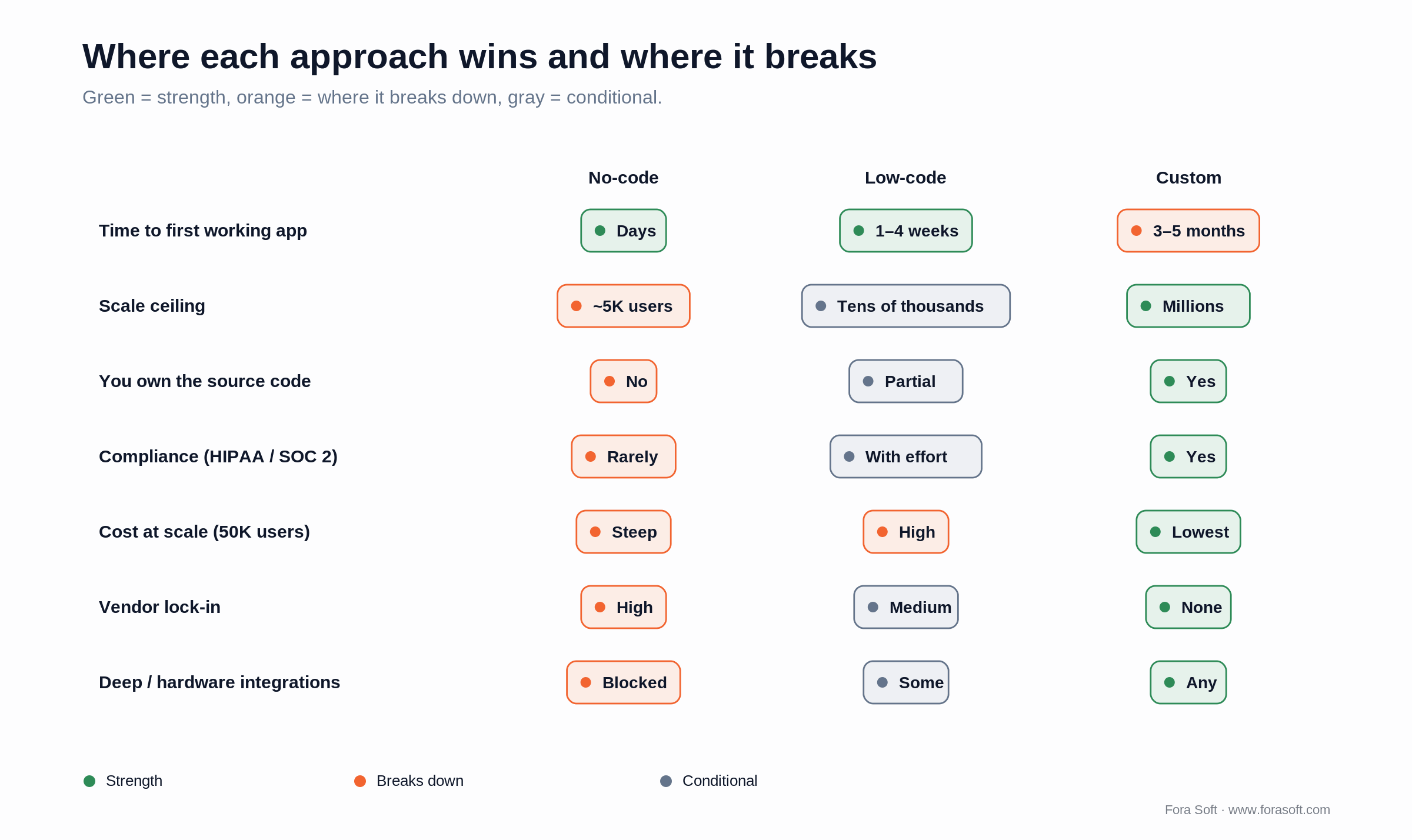
Figure 1. Green marks a strength, orange marks where the approach breaks down at scale, gray is conditional.
When low-code/no-code is the right call
Five product shapes where the no-code path almost always beats hiring developers.
1. Marketing site, blog or content hub. Webflow, Framer or Notion will do this faster, cheaper and prettier than any custom build. Rebuilding your homepage in Next.js because “we’re a software company” is engineering ego, not engineering judgement.
2. Internal admin, CRM or dashboard. Retool and Power Apps wire up a useful internal tool in a day. The audience is your own team, bug-tolerance is high, and every hour your engineer isn’t spending here is an hour on customer features.
3. Forms, surveys, simple workflows. Typeform, Tally, Airtable. Don’t hand-build form processing.
4. Lightweight MVPs that validate a non-software hypothesis. If your “app” is really “will people pay for this service we’ll deliver by hand,” Bubble or Softr is fine. Validate the business model with the cheapest artifact that answers the question.
5. Glue between SaaS tools. Zapier, n8n, Make. Don’t hand-write integration code a $20/month tool already handles.
Reach for no-code when: the audience is internal, tolerances are high, the data isn’t regulated, and the product is supporting cast for a different differentiator — content, services or sales.
When hiring custom developers is the right call
Six product shapes where no-code costs more in the long run, however good the early demo looks.
1. Multi-platform consumer apps. If you need iOS + Android with native performance and deep platform integration, no-code chokes. Use native, Flutter or React Native; the trade-offs are in our native vs cross-platform guide.
2. Real-time multimedia. Video conferencing, live streaming, voice rooms, low-latency interactive tools — no-code platforms don’t have the primitives. Our video streaming engineering guides walk the real stack.
3. Compliance-heavy data flows. HIPAA, PCI-DSS, SOC 2, FERPA, FedRAMP. Possible on some low-code platforms with careful architecture; impossible on most no-code. Get the auditor’s opinion in writing before you commit.
4. Heavy custom integrations. Third-party SDKs, hardware (BLE, NFC, cameras, sensors), trading APIs, custom auth (SAML, non-standard OAuth flows), bespoke billing logic. No-code stops at the integration boundary.
5. Performance-critical apps. Anything where every millisecond is revenue (trading, gaming, AR/VR), or where cost-per-user math demands optimized infra. No-code platforms add latency and cost layers you can’t remove.
6. Products that ARE the company. If the software is your product — not a marketing surface, not an internal tool — you’ll eventually need to control every layer. Pay that cost on day one instead of rebuilding under pressure on day 700.
Reach for custom development when: the software is the product, you need native mobile or real-time media, compliance is on the line, or you’re building to be acquired, since acquirers expect to own the source and vendor-locked products discount badly.
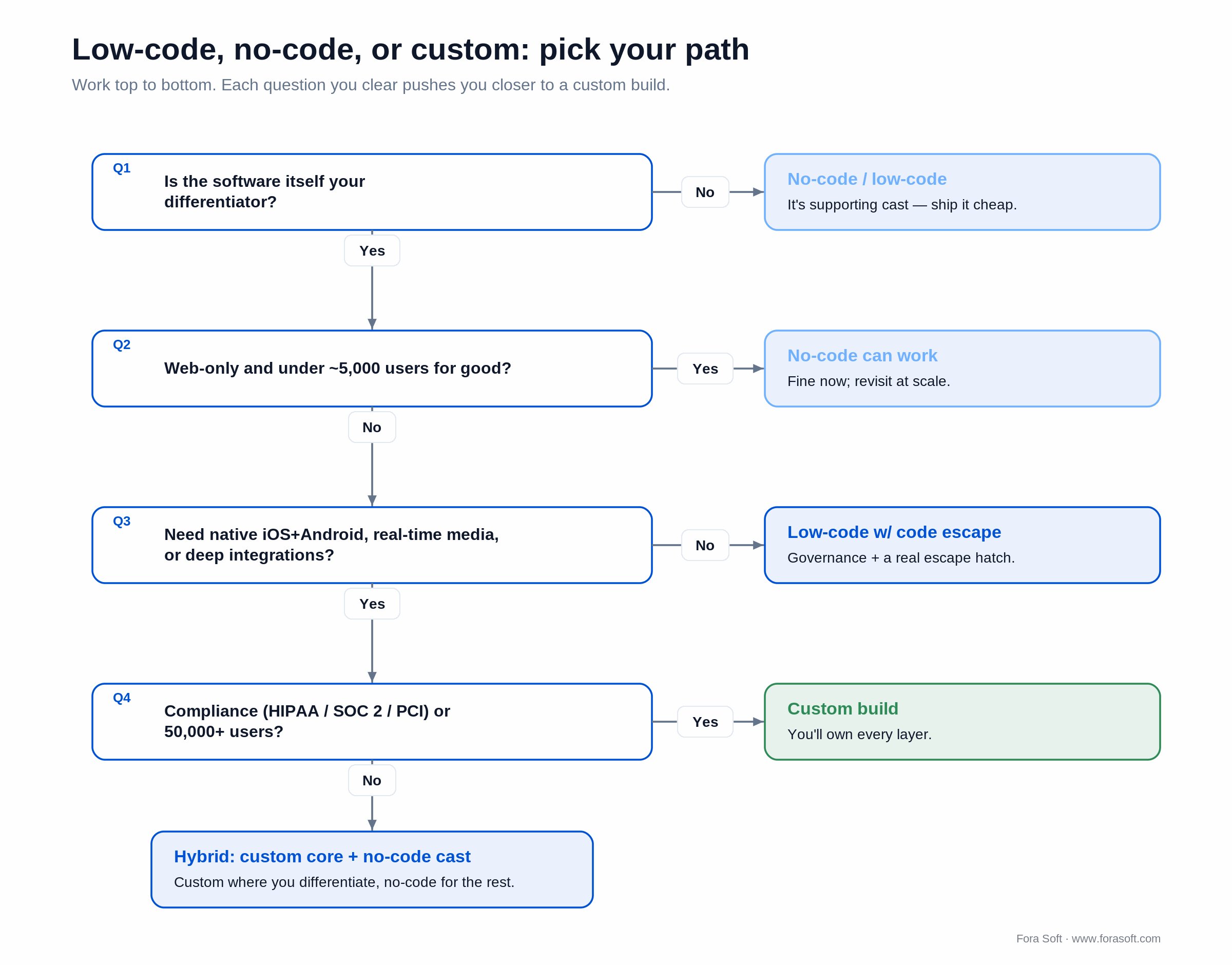
Figure 2. Work down the questions — each one you clear pushes the build toward custom, or toward a hybrid split.
The hidden costs of no-code nobody quotes
1. Pricing that bites at scale. Bubble meters Workload Units now: Starter is $29/mo (175K WU), Growth $119/mo (250K WU), Team $349/mo (500K WU). Every database search, API call and workflow burns units, so an active app routinely blows past its allotment and pays $0.30–$0.50 per extra 1,000 WU, adding $50–$200 a month before you ship a single feature. Webflow’s May 2026 re-pricing splits Site plans from per-seat Workspace plans, so the “$25” you budgeted becomes $158–$260 for a five-person team once seats and add-ons stack up.
2. Lock-in and shutdown risk. Google App Maker shut down in January 2021. AWS Honeycode, Amazon’s own no-code builder, was shut down in February 2024, taking its users’ apps with it. Your product living inside a vendor’s editor is a strategic risk you don’t feel until the day you have to leave.
3. The migration tax. Moving from a no-code platform to custom is rarely a port — it’s a rebuild. Plan 4–6 months and $40K–$120K depending on complexity. Plenty of founders pay this twice (no-code MVP, then custom rebuild) when starting custom on day one would have been cheaper.
4. Talent scarcity inside the platform. A senior Bubble developer charges $80–$150/hour. The pool is small and the skills don’t transfer outside that platform, so you’re paying premium-developer rates for platform-specific glue.
5. Performance penalties. A hand-tuned Next.js page still loads meaningfully faster than the equivalent Bubble page in 2026. For an internal tool that’s irrelevant; for a public product, it’s a conversion hit you can measure.
Reach for a rebuild-friendly platform when: you might outgrow no-code but want an exit ramp — FlutterFlow exports real Flutter code and Retool leans on a Postgres you control, so the migration later is a lift, not a from-scratch rewrite.
36-month total cost of ownership
Here’s the math we run with founders. Take a typical consumer app: web + iOS + Android, 30 screens, basic monetization, 50K users by month 36.
| Phase | No-code path | Custom path |
|---|---|---|
| MVP build (months 0–3) | $3K–$8K (founder + 1 contractor) | $35K–$60K (senior team) |
| Platform fees Y1 | $2K–$15K | $1K–$5K (infra only) |
| Iteration / new features Y1 | $15K–$30K | $30K–$60K |
| Platform fees Y2 (10K users) | $15K–$45K | $5K–$15K |
| Wall-hit rebuild (months 18–24, if you scale) | $50K–$120K | $0 |
| Platform fees Y3 (50K users) | $50K–$150K | $15K–$45K |
| 36-month TCO (typical) | $135K–$370K | $86K–$185K |
Show the arithmetic on one line — platform fees. Webflow advertises a Premium Site plan at $25/mo. A real team stacks a Site plan ($25) + two Full Workspace seats ($39 each = $78) + a Limited seat ($15). That’s 25 + 78 + 15 = $118/mo before a single add-on; turn on the Optimize A/B-testing add-on ($299) and you’re at $417/mo for the thing the pricing page calls “$25.” Over 36 months the $118 line alone is ~$4,250; the $417 line is ~$15,000. None of it buys code you can take elsewhere.
For products that scale, custom is cheaper over 36 months — counter-intuitive but real, and the break-even usually lands at month 18–24. For products that don’t scale (most don’t), no-code stays cheaper forever — but only because the product never grew up. The number to care about is your cost conditional on success, not the unconditional average. For how we turn scope into hours and dollars, see our 2026 software estimation guide.
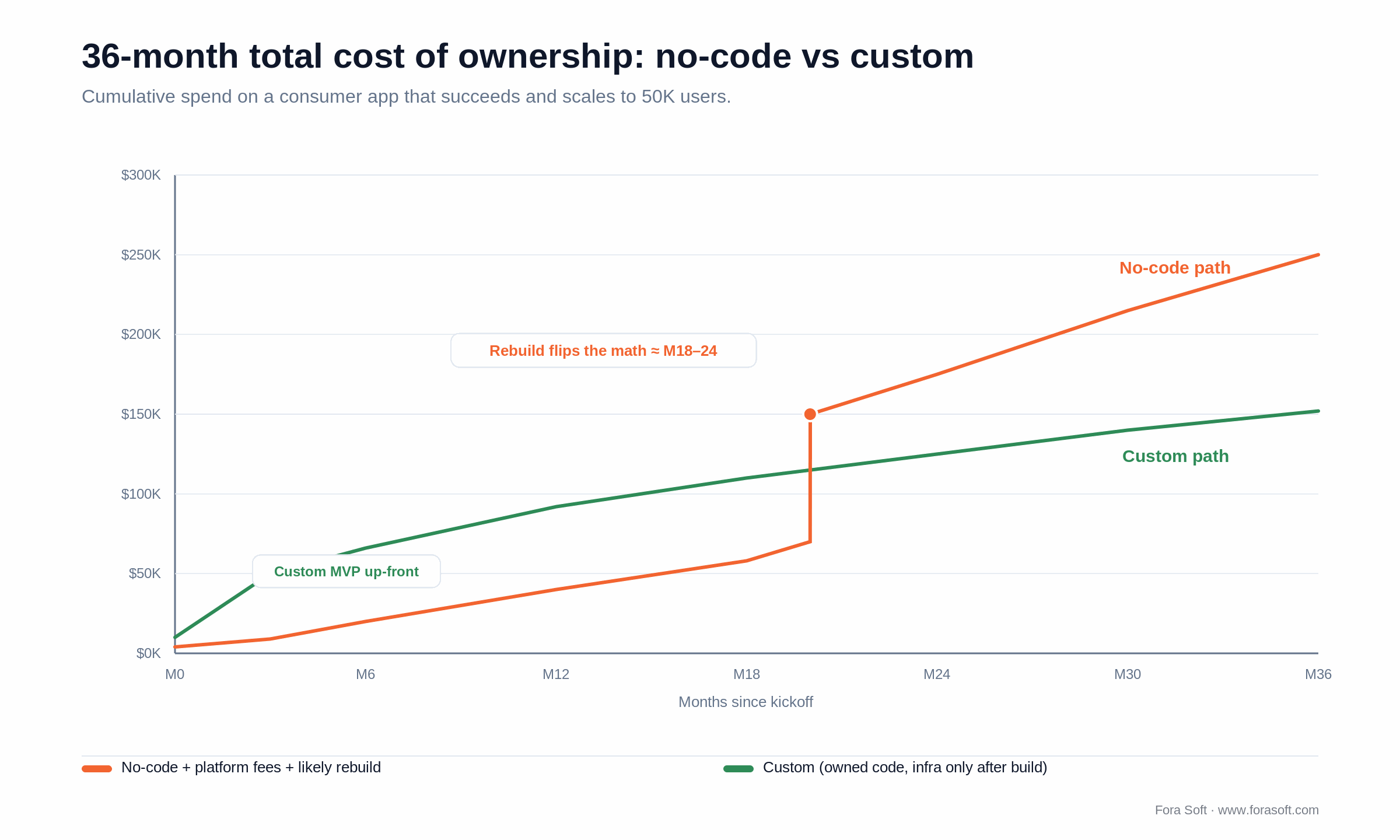
Figure 3. On a product that scales, the no-code line crosses custom around month 18–24 — mostly on the rebuild.
Want a 36-month TCO model for your specific product?
Tell us your audience, growth assumptions and platforms. We’ll come back with a no-code-vs-custom spreadsheet you can use to defend the call internally.
Mini case: when no-code worked, and when it didn’t
The win. A creator-economy startup we advised built its first 200 paying customers on a Bubble + Stripe + Airtable stack in six weeks for under $4,000. The differentiator was curated content and the founder’s relationships, not the software. They didn’t need custom, so we told them not to hire us. They reached $40K MRR before custom entered the conversation.
The pivot. A telehealth startup arrived with a Bubble MVP, 1,200 active patients and an enterprise pilot they couldn’t close because procurement needed HIPAA and SOC 2 evidence Bubble couldn’t produce. We rebuilt the patient web and iOS apps as custom, kept the marketing site on Webflow, and shipped HIPAA-compliant infrastructure in 11 weeks for $58K. They closed the pilot the next quarter. The original Bubble spend wasn’t wasted — it validated the product, but it had to be replaced to grow up. Want a similar read on your stack? Grab a 30-minute call.
The lesson. No-code is a great learning environment. Treat the artifact as disposable until you know your business model. Once you know it, decide deliberately what to keep and what to rebuild.
A decision framework in six questions
Run this with your CTO and CFO before you sign any platform contract or hire any developer.
Q1. Is software the product, or supporting cast? Product → lean custom. Supporting cast → lean no-code.
Q2. What’s our audience scale at month 24? Under 5K active users → no-code is fine indefinitely. 5K–50K → real risk of the wall; plan a custom rebuild. 50K+ → start custom.
Q3. Do we need iOS + Android with native performance? Yes → custom (Flutter, React Native or native). Web only → no-code can work.
Q4. Any compliance constraints (HIPAA, SOC 2, PCI, FERPA)? Yes → custom, or vetted enterprise low-code (Power Apps under E5, OutSystems with its compliance pack). No → no-code is fine.
Q5. Integrations beyond the standard SaaS catalog? Yes → custom, or low-code with a code escape. No (Stripe + Sendgrid + Slack cover it) → no-code is fine.
Q6. What’s our 24-month exit story? Build to acquire or IPO → custom (acquirers expect to own source; vendor-locked products discount badly). Stay independent → no-code is fine.
Reach for the hybrid pattern when: the product is custom but the supporting cast — marketing site, internal CRM, dashboards — doesn’t need to be. That’s most successful 2026 software companies.
The hybrid pattern: where to draw the line
A typical 2026 software company we work with splits its stack like this. Custom, owned by your engineers: the product itself (web and mobile apps), the customer-facing API, anything compliance-regulated, and the data warehouse and analytics pipeline. No-code or low-code, editable by anyone: the marketing site, blog and careers page (Webflow, Framer or Notion); the internal admin tool and CRM (Retool or Power Apps); forms and surveys (Typeform or Tally); internal docs (Notion); and SaaS-to-SaaS glue (Zapier or n8n).
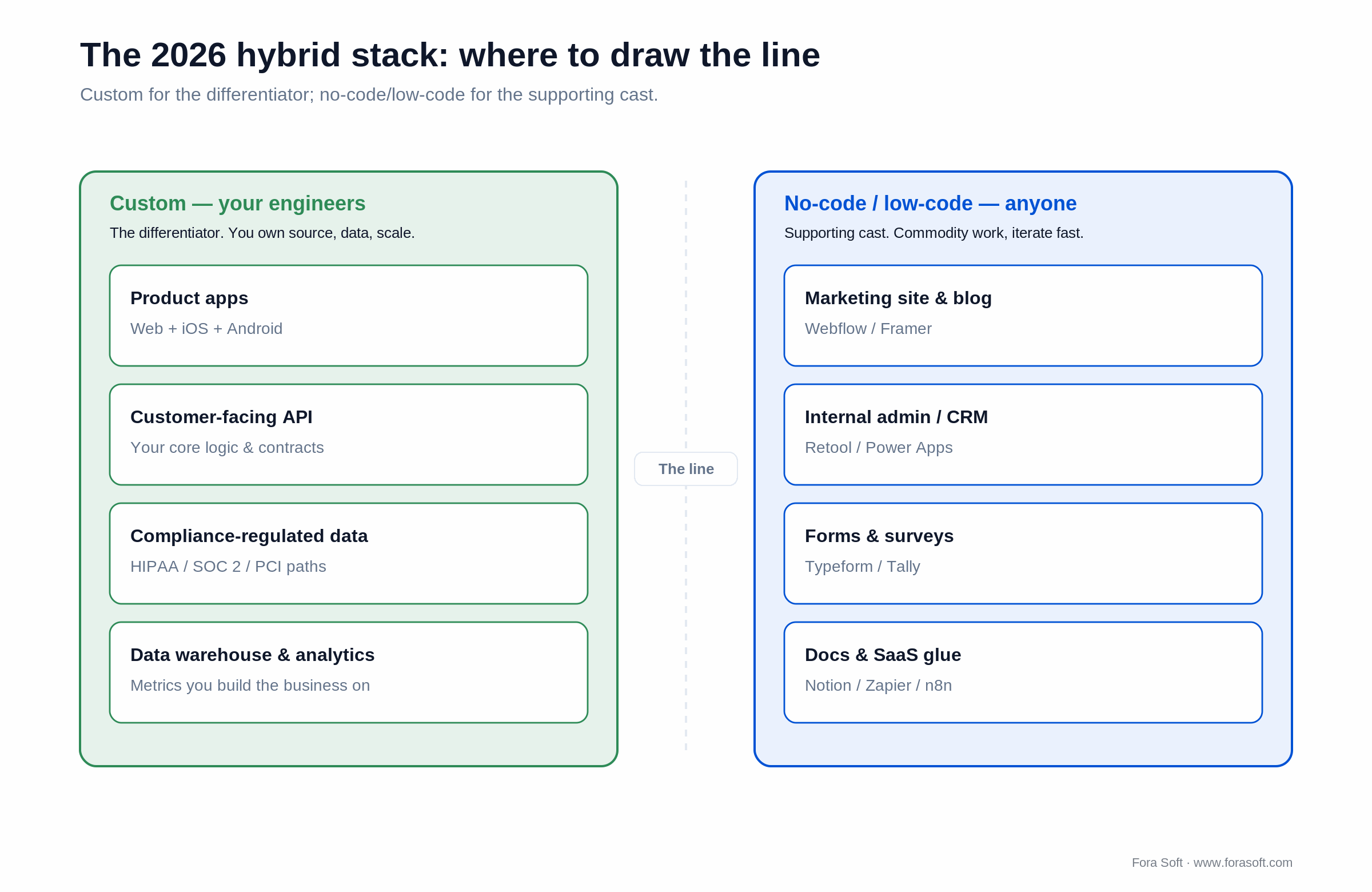
Figure 4. Draw the line at the differentiator: custom on the left, commodity supporting cast on the right.
This split saves 30–40% of engineering time on supporting cast and lets your seniors focus only on the product. We recommend it on virtually every engagement.
The platforms worth knowing in 2026
1. Webflow. Best-in-class for marketing and content-led sites; the CMS is solid and designer collaboration is strong. Where it breaks: it’s not a product platform, and the May 2026 seat-plus-add-on pricing adds up fast. Don’t run a real product on it.
2. Framer. Faster than Webflow for design-led marketing sites, with a newer CMS. Good for visual brands; thinner for content-heavy sites.
3. Bubble. The most powerful no-code app builder, with real workflows, database and auth. Where it breaks: the Workload-Unit meter gets expensive under load and it still hits a scale wall around a few thousand active users for serious apps. Best for MVPs you plan to rebuild.
4. FlutterFlow. No-code Flutter that compiles to real Flutter code you can export — much less lock-in than Bubble. Worth a serious look for early consumer mobile MVPs. Treat the export as starter code, not the final codebase.
5. Glide / Softr. Lightweight mobile and web apps from spreadsheet data. Internal-tool sweet spot.
6. Retool. Best-in-class internal admin tools and dashboards, with code escape hatches everywhere and a database you control. Used by serious software companies.
7. Power Apps. Microsoft’s low-code with deep Microsoft 365 integration. The right answer for many enterprise internal apps where E5 licensing is already in place.
8. OutSystems / Mendix / Appian. Heavyweight enterprise low-code. Good when IT governance and compliance are first-class concerns. Expensive.
9. Zapier / n8n / Make. SaaS glue. Don’t hand-roll integrations these do in five minutes.
10. Notion / Coda. Internal docs, lightweight workflows and ad-hoc mini-apps. Not customer-facing products.
Five pitfalls that waste no-code budgets
1. Treating no-code like custom. Don’t budget six months and $80K to build the “perfect” Bubble app. Go cheap-and-fast, or go custom — the middle is the worst of both.
2. Hiring an agency to do your no-code build. The point of no-code is that you or a junior in-house person can iterate. If you’re paying $150/hour for a Bubble agency, go custom — you’re paying senior-developer rates already.
3. Ignoring the export story. Before you commit, know exactly what you can export and what’s locked in. FlutterFlow exports real Flutter code; Bubble does not. The export option is your insurance policy.
4. Buying a tier you’ll outgrow in a quarter. Read the pricing-at-scale page before you commit, not after. The jump from “startup” to “business” tier is often 5–10× — and on metered platforms your bill climbs with usage, not just with plan.
5. Skipping security and backup hygiene. No-code platforms can fail, get breached or change ownership. Export your database weekly, document your workflows, and treat the platform as a vendor, not a foundation.
KPIs to track if you ship no-code
Quality KPIs. Page-load p95 under 3 s. Form-submission success over 99%. Workflow uptime over 99.5%. Critical bug-fix turnaround under 48h.
Business KPIs. Cost per active user under target. Monthly platform fees under 5% of revenue. Time to ship a new screen under one day at steady state.
Reliability KPIs. Database backup runs daily. Vendor SLA reviewed quarterly. Migration plan documented and tested annually. Features blocked by platform limits tracked monthly.
Migrating from no-code to custom: when and how
If three of these are true, plan a custom rebuild within six months: monthly platform fees are over 5% of revenue; performance complaints are showing up in support tickets; your compliance team is asking questions you can’t answer; two or more features are blocked by platform limits; or an enterprise customer wants SSO, audit logs or data residency. Any three together mean you’re past no-code’s ceiling.
Then do the migration without losing momentum. Don’t big-bang — migrate feature by feature behind a flag, keeping the no-code app live for the slice you haven’t moved. Keep the database where you can: if the platform exposes a Postgres or MySQL store, point the custom build at the same data during transition. Cap new feature work in the legacy app, or you build everything twice and never finish. Budget 4–6 months and $50K–$120K — less for a simple app, more for a HIPAA or SOC 2 retrofit. Cut over by audience segment: new signups hit the new app first; existing users move in cohorts, so the switch is never one high-stakes event.
Stuck on Bubble, Webflow or Power Apps and need to scale?
We run staged rebuilds that keep you live throughout the migration. Three outcomes per audit — stay, hybrid, or full rebuild — with a written plan either way.
AI code-generation: the third path in 2026
In 2024 this was a binary choice. In 2026 there’s a third path: AI-assisted custom code. With Cursor, Claude Code or Cline driving a senior engineer, build velocity for custom apps has moved much closer to no-code timelines, and the artifact is real code you own.
Concretely, an AI-augmented senior team can ship a custom MVP in 6–10 weeks where the same scope was a 12–16-week project two years ago. That collapses no-code’s strongest argument, speed, without inheriting the platform-fee meter or the lock-in. See how we use spec-driven agentic engineering on every project.
The 2026 reality: no-code is still right for the marketing site, internal admin and disposable MVPs. AI-augmented custom is right for nearly everything else, and the pure-no-code sweet spot is shrinking fast.
How Fora Soft delivers (and when we say no-code)
1. Discovery is paid. We run a 1–2 week paid discovery before quoting a build. If no-code is genuinely the right answer, we’ll tell you and you’ll go save the money. We’ve done exactly that more than once. See our discovery process.
2. Senior-only delivery. Every engineer is senior or above. With Agent Engineering on top, two seniors output the work of three or four mid-levels — which is why our custom software development quotes tend to land under typical agency rates without cutting senior review.
3. Hybrid by default. When we ship a custom product, we recommend the marketing site stay on Webflow and the internal admin stay on Retool, and we integrate the three into one operations stack.
4. Clients on the record: AppyBee, Vodeo, MobyTap, Community Hill, ALDA.
When NOT to commission custom development
We talk founders out of custom builds a couple of times a quarter. Here’s when.
1. The product is a marketing surface, not a product. Lead-capture forms, landing pages, content hubs. Webflow plus a CRM is the right answer.
2. The audience is under 1,000 people, for good. A consultancy with 200 clients doesn’t need a custom portal. Notion + Airtable + Stripe does the job.
3. The hypothesis is unproven and the cheapest test is no-code. Validate first, build once you know.
4. The buyer is non-technical and will iterate themselves. If your CEO edits copy weekly, Webflow beats a custom CMS for that buyer.
FAQ
What is low-code/no-code app development?
It’s building apps through a visual builder instead of hand-written code. No-code (Bubble, Glide, Webflow) has no real code escape hatch; low-code (Power Apps, Retool, OutSystems) adds one for the parts the visual layer can’t express. Both trade control and scale for speed, so they fit internal tools, marketing sites and MVPs better than scaled consumer products.
Is no-code/low-code cheaper than hiring developers?
Cheaper for the first 6–12 months, often more expensive over 36. Total cost of ownership inverts as you scale — metered platform fees, lock-in and rebuild costs usually push no-code past custom around month 18–24 for any product that grows past ~5,000 users.
Can no-code platforms handle 100,000 users?
Some can, with serious engineering effort. Most struggle past 5,000–20,000 active users without performance degradation, metered pricing spikes, or code escape hatches that undo the no-code advantage. For consumer products targeting 100K+ users, custom is the safer call.
Should I build my MVP on no-code or hire developers?
If you’re testing a hypothesis where the differentiator isn’t the software, a no-code MVP is fine and cheap. If the differentiator is the software (multi-platform consumer app, real-time media, deep integrations), custom from day one usually saves the rebuild later — and AI-assisted development has narrowed the speed gap to 6–10 weeks for a custom MVP.
Which no-code app development tool is best?
There isn’t one “best” — it’s per job. Webflow or Framer for marketing sites; Retool or Power Apps for internal tools; Bubble for a full-featured MVP you plan to rebuild; FlutterFlow for early mobile because it exports real Flutter code. Match the tool to the layer, and check the export story before you commit.
Can I migrate from Bubble to custom code?
Yes, and we do it regularly. Plan 4–6 months and $50K–$120K depending on complexity. Migrate feature by feature behind a flag, keep the database where possible, and cap new work in Bubble during the transition or you’ll build everything twice. The Bubble spend isn’t wasted — it validated the product — but it gets replaced.
Are no-code platforms HIPAA or SOC 2 compliant?
Most consumer no-code platforms aren’t. Some enterprise low-code platforms (Power Apps under E5, OutSystems with its compliance pack) can be made compliant with serious effort. Always get the auditor’s opinion in writing before committing. For HIPAA, SOC 2 or PCI products, custom is usually the safer and ultimately cheaper path.
What team size do I need for a custom MVP?
A senior team of 4–5: one PM, one designer, two engineers (frontend + backend, or a full-stack + a mobile dev), one QA. With Agent Engineering on top, that crew ships a custom MVP for iOS + Android + web in 3–5 months at $35K–$80K all-in. We use this crew shape on most engagements.
What to read next
Decision
Is Cross-Platform Development with Flutter Worth It in 2026?
If you’ve concluded custom is the call, here’s the next fork — native or cross-platform.
Decision matrix
Native vs Cross-Platform Application: Buyer’s Guide
A wider 8-question matrix once you’ve ruled out no-code.
Buyer’s guide
Mobile App Development Services Explained
Native, cross-platform and PWA compared as services, with cost ranges and engagement models.
Estimation
Software Estimation in 2026: Buyer’s Playbook
Defensible quotes, the math behind hours and dollars, and how Agent Engineering changes them.
Methodology
Spec-Driven Agentic Engineering at Fora Soft
How AI-augmented custom development collapses the speed gap with no-code.
Ready to draw the right line between no-code and custom?
Low-code/no-code app development is real and useful within bounds. It wins for marketing sites, internal admin tools, simple workflows and MVPs whose differentiator isn’t the software. It loses for multi-platform consumer products, real-time media, compliance-heavy data and anything that scales past ~5,000 active users without a rebuild. The 2026 default is hybrid: custom where the differentiator lives, no-code everywhere else.
Run the six-question framework before you sign anything. If you want a written verdict on your specific product, we do that on a 30-minute call, and we’ll tell you to use no-code if that’s the right answer.
Need a vendor-neutral verdict on your stack?
Show us your one-pager and current platform. We’ll come back in 24 hours with a written verdict, a TCO comparison and a phased plan you can defend internally.

