Key takeaways
• A production live translation video call runs at 800ms–1.5s end-to-end on a cascaded ASR→MT→TTS pipeline for tier-1 languages. Anything faster is marketing; anything slower is a broken pipeline.
• Cascaded pipelines still beat end-to-end speech-to-speech for most production use cases. End-to-end speech-to-speech models are closing the gap, but cascaded gives you per-stage observability, glossary control, and per-vendor cost tuning.
• Real-world word error rate is 2–3× higher than vendor demos. Deepgram reports 6.84% WER for Nova-3 streaming; independent July 2026 tests land near 8–9%, and a real Zoom call with accents and cross-talk pushes 18–25%. Design for that gap, don’t wish it away.
• A 100K-minute-per-month product runs about $3,460/month for captions (Deepgram ASR + Google MT + infrastructure) and climbs to roughly $11,700/month once every minute gets a synthetic voice. Under ~1M minutes, managed APIs win; past that, self-hosting Whisper-large-v3 + NLLB + XTTS drops you below $0.002 per minute.
• Fora Soft has built WebRTC video and multilingual products since 2005 — 250+ shipped projects, including BrainCert’s 500M-classroom-minute platform and TransLinguist, an interpreter marketplace of 30,000+ certified interpreters across 75+ languages that runs Deepgram, Google, and Speechmatics under the hood. This guide is the playbook we run when clients ask us to add live translation to a video product.
More on this topic: read our complete guide — 7 Best Video Call Translation Tools Compared (2026).
Why Fora Soft wrote this playbook
Fora Soft has shipped WebRTC video products since 2005 — 20+ years, 250+ projects, and dozens of production video platforms running on custom pipelines. A live translation video call is one of the three “AI inside the call” features clients ask us to add most often in 2026, alongside transcription and live summarization.
The anchor references we lean on throughout this guide are BrainCert — the world’s first WebRTC + HTML5 virtual classroom LMS, now past 500M classroom minutes with 99.995% uptime — and TransLinguist, a video interpretation platform we build with a marketplace of 30,000+ certified interpreters, 75+ languages, AI speech-to-speech in 16+ languages and closed captions in 22. TransLinguist runs the exact cascaded stack this guide describes: Google Cloud Speech-to-Text, Deepgram and Speechmatics for recognition, Google TTS for output, over a MediaSoup WebRTC core. If you want the consulting-led version of this work, that is our custom language-interpretation team.
We also use Agent Engineering on every new engagement — AI-assisted spec, architecture, and glue code — which shaves 25–40% off what a traditional shop will quote. When the cost numbers in this article look lower than what you see on competitor blogs, that is because they are our actual 2026 rates, not last year’s industry average.
Adding live translation to a video calling product?
We will benchmark the pipeline options against your specific languages and latency SLA, then send back a two-page estimate with a fixed engineering ceiling.
The 2026 live translation market in four numbers
Before budgeting or vendor selection, calibrate against where the market is moving. Four data points shape every decision below.
1. Model quality took a real step up. Meta SeamlessM4T-v2 averages 26.1 ASR-BLEU for speech-to-speech translation — a +5.2 point jump over the prior SeamlessM4T-Large (20.9), per Meta’s 2024 Nature paper. On the CVSS benchmark it even beats a two-stage cascade by 9.6 ASR-BLEU — a reminder the cascaded default is a product choice, not a quality ceiling.
2. Per-minute prices dropped 30–50%. Streaming ASR is a commoditized market; competing Deepgram, AssemblyAI, and Whisper-compatible self-hosted options have compressed vendor margins. Expect this trend to continue.
3. Voice cloning crossed the production bar. ElevenLabs, Meta Voicebox, and Google Expressive TTS now preserve tone and pronunciation well enough that users tolerate the 2-voice UI (original speaker + translated voice) in dubbing and live interpretation.
4. Translation moved into the platforms themselves. Google’s Gemini 3.5 Live Translate began rolling into Meet in June 2026, expanding from 5 to 70+ languages; Microsoft shipped a Teams Interpreter agent (Calls, January 2026) that speaks each participant’s language; Zoom’s AI Companion does translated captions in 46 languages; Apple added FaceTime Live Translation captions in iOS 26. That changes the build question for a live translation video call — it doesn’t remove it. We come back to exactly where native stops and a custom build starts.
What is actually possible in August 2026
Calibrate expectations first. Vendors publish latency and accuracy numbers in controlled conditions; your users will run the feature on a noisy home network with regional accents. The four realities below are what a production build actually delivers today.
1. Latency. A clean cascaded pipeline (streaming ASR → MT → neural TTS) achieves 800ms–1.5s end-to-end glass-to-ear on tier-1 language pairs. Captions-only (no TTS) clears 400–700ms. End-to-end speech-to-speech models (SeamlessM4T-v2, Voicebox) add 300–500ms because of streaming buffer requirements, but they are catching up fast.
2. Accuracy. Deepgram reports 6.84% WER for Nova-3 streaming; independent July 2026 benchmarks put real-world English nearer 8–9%, and OpenAI Whisper-large-v3 sits around 7–8%. On a real Zoom call with medium accents, cross-talk, and 90 WPM speech, expect 18–25% WER. Translation adds another 5–15% quality drop depending on language pair.
3. Language support. 6–8 tier-1 languages (EN, ES, FR, DE, JA, ZH, PT, IT) get near-production quality. 30–40 tier-2 languages work for captions but sound wooden through TTS. Meta SeamlessM4T-v2 covers 100+ input and 36 output languages; Maestra claims 125+. Tail languages still degrade past 30–40% WER.
4. Cost. Per-minute cost lands around $0.03–$0.04 for captions-only (ASR + MT + infrastructure) and roughly $0.10–$0.15 for full voice-to-voice with neural TTS; premium voice-cloning tiers push it higher. Which side of that spread you pick drives your whole unit economics.
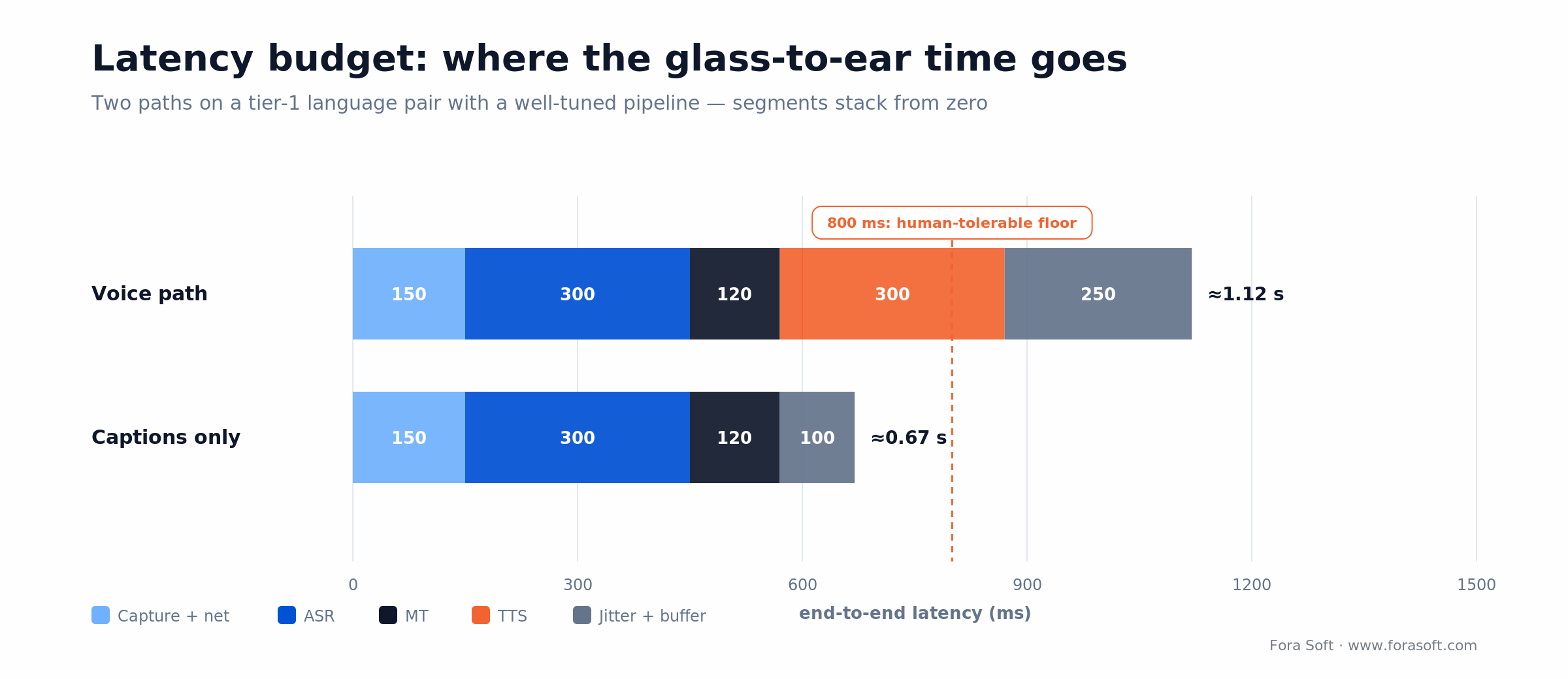
Figure 1. Where the glass-to-ear time goes. The voice path spends most of its budget on ASR and TTS; dropping TTS is what gets captions under the 800ms human-tolerable floor.
Nine expert tips for shipping live translation that actually works
These are the nine things we consistently teach new clients on a live translation build. Ignore any of them and you will rewrite that part of the pipeline within six months.
1. Start cascaded, not end-to-end. Split ASR, MT, and TTS into three swappable services. You get per-stage observability, you can swap the MT vendor without a full rebuild, and you keep glossary control. End-to-end speech-to-speech is still the right choice for ~5% of use cases (ultra-low-latency interpretation where TTS voice match matters more than glossary control).
2. Measure real-time factor (RTF) before feature scope. Any pipeline with RTF > 1.0 on your target hardware cannot stream. Run a 30-minute load test with 10 concurrent streams on day 5 of the build, not on day 60.
3. Account for browser overhead. A web-based build adds 200–400ms of Audio Worklet + WebRTC jitter on top of your pipeline latency. Desktop SDK or native mobile builds are consistently 30–50% faster. Pick the platform that matches your SLA.
4. Ship a glossary from week one. 10–25 BLEU points of translation quality come from domain-specific vocabulary: drug names, legal terms, brand names, product SKUs. Every serious enterprise deal will require this. Build it in from week one, not after the first customer escalation.
5. Hybrid AI + human is still the gold standard. For boardroom, courtroom, healthcare, and high-stakes diplomacy, the production pattern is an AI transcript feeding a human interpreter (KUDO AI Assist, Interprefy Hybrid). Price it 10–20% under human-only, ship AI-only for casual. Do not pretend AI-only solves the high-stakes segment in 2026.
6. Language pairs are not symmetric. EN→ES is ~500ms; EN→ZH is ~800ms; EN→Hindi is ~1.2s; EN→Yoruba can exceed 2s. Set SLAs per language pair, not globally. Show the latency per channel in your UI so users know what to expect.
7. Diarize or die on overlapping speech. Real meetings have >30% overlapping speech. Without speaker diarization (pyannote, WhisperX, or Azure Speaker Recognition), your transcript becomes an unreadable soup. Budget 11–13% DER as your baseline.
8. Never skip the push-to-talk + noise suppression pair. Krisp, NVIDIA RTX Voice, or a custom RNNoise stage knocks 30–40% off WER on noisy inputs. Noise gating plus optional push-to-talk UX shaves another 5–10%. This pair is the single highest-ROI accuracy investment we have measured.
9. Test on real data, not lab benchmarks. Vendor demos are recorded in soundproof booths with native speakers. Build your own eval set: 30 recordings from the actual use case with the actual accents, background noise, and jargon. Run every vendor against it weekly. This is how you avoid being surprised in production.
Want a benchmarked vendor recommendation?
We will run your target language pairs and audio profile against 3–5 ASR/MT/TTS vendors and send back a concrete recommendation with pricing.
Cascaded pipeline vs end-to-end: which one to pick
There are two serious architectural patterns. Most teams picking the wrong one rebuild within a year.
Cascaded: streaming ASR → MT → TTS or captions
Three separate services running in series. Each stage is independently swappable, each emits metrics, each has its own cost line. The classical choice in 2026 and still the right default for 95% of products.
Reach for cascaded when: you need glossary control, multi-vendor flexibility, stage-level observability, or support for more than 10 languages.
End-to-end speech-to-speech (SeamlessM4T-v2, Google S2ST, Voicebox)
A single model ingests source audio and emits target audio. Preserves prosody, accent, and emotion better than cascaded TTS. Meta SeamlessM4T-v2 averages 26.1 ASR-BLEU (vs 20.9 for the prior Large model); open-source variants now exist for self-hosting.
Reach for end-to-end when: emotion and voice preservation matter more than glossary control — dubbing, accessibility, immersive interpretation, AI voice agents.
Reach for hybrid pipelines when: your product needs both the glossary control of cascaded and the voice preservation of end-to-end. Example pattern — cascaded for captions, end-to-end only for the optional voice channel.
ASR / MT / TTS vendor matrix (August 2026)
Picking vendors is a stage-by-stage decision. These are the short-lists we recommend clients evaluate; actual pick depends on language list, cost model, and region.
| Stage | Vendor | Price | Latency | Best for |
|---|---|---|---|---|
| ASR | Deepgram Nova-3 | $0.0077/min | ~300ms | Default choice; streaming + high accuracy |
| ASR | AWS Transcribe Streaming | $0.0078–$0.024/min | ~500ms | AWS-native shops; medical/legal vocab |
| ASR | OpenAI Whisper API | $0.006/min | Batch | Batch post-processing; self-host option |
| ASR | Google Cloud Speech | $0.016/min (to 500K min) | ~400ms | Maximum language coverage |
| MT | DeepL API | ~$25/M chars + monthly | ~100ms | EU languages; polished output |
| MT | Google Translate | $20/M chars | ~150ms | 100+ languages; glossary support |
| MT | NLLB-200 (self-host) | GPU cost only | ~200ms | 200-language coverage; self-hosted |
| TTS | ElevenLabs | $0.10/1K chars (≈$0.08/min) | ~300ms | Voice cloning; emotional prosody |
| TTS | Google Cloud TTS | $0.016/min | ~200ms | Budget; wide language support |
| S2S | Meta SeamlessM4T-v2 | Self-host (GPU) | 500ms–2s | Voice preservation; 100+ langs |
Reference architecture for a WebRTC app with live translation
The architecture below is what we ship most often inside video products. It runs inside a WebRTC SFU (LiveKit, mediasoup, or the native SDK of Zoom/Teams/Meet) with translation services consuming a server-side audio fork.
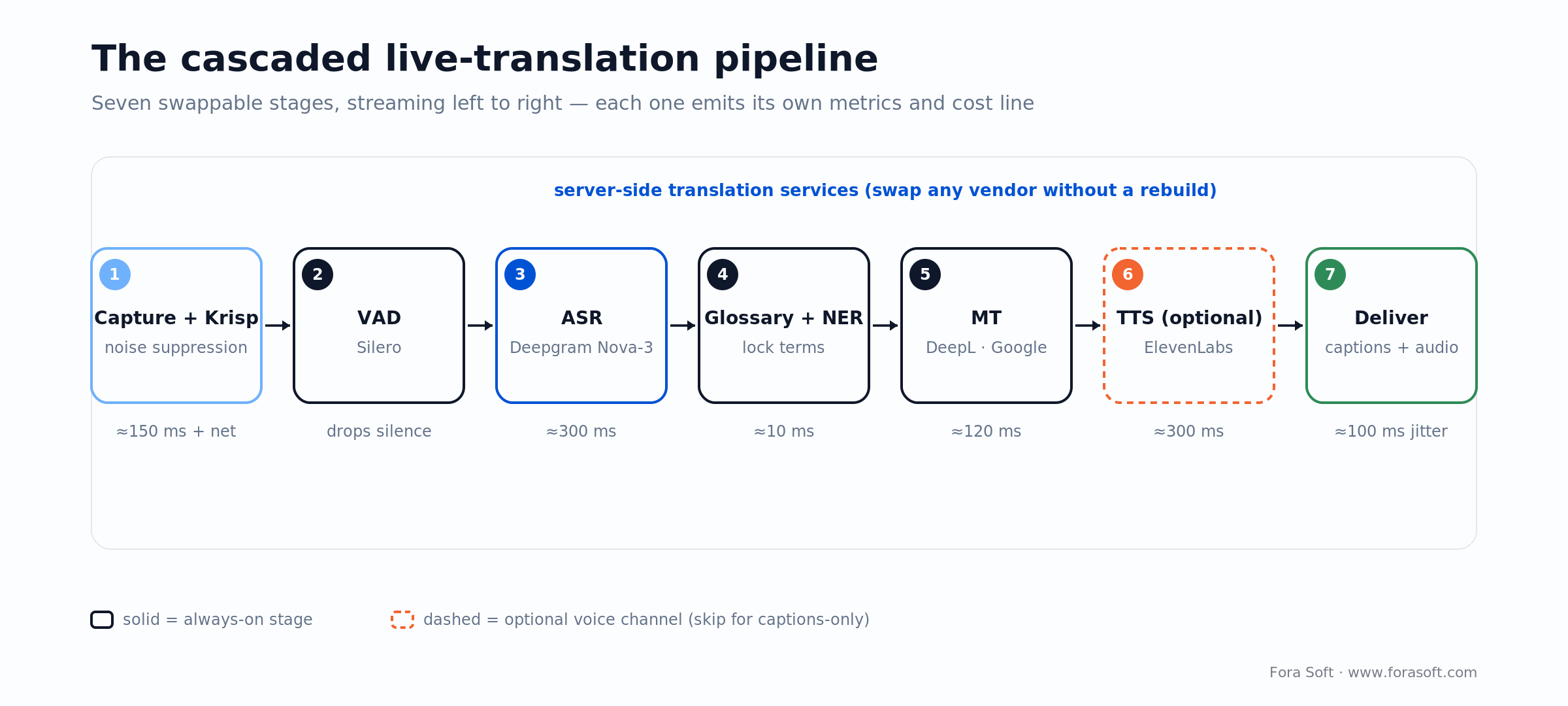
Figure 2. The cascaded pipeline we ship most often. Keeping ASR, MT and TTS as separate services is what lets you swap a vendor, add a glossary, or drop the voice channel without a rewrite.
| Layer | Choice | Why |
|---|---|---|
| Capture + noise suppression | Client-side Krisp SDK or RNNoise | 30–40% WER reduction before the audio hits your ASR |
| Voice activity detection | Silero VAD | Drops silence; reduces ASR cost by 30% |
| Diarization | pyannote.audio or WhisperX | Per-speaker labelling in overlapping speech |
| ASR | Deepgram Nova-3 (default) / Whisper (self-host) | Sub-300ms streaming; 6.8% WER on curated audio |
| Glossary + NER preservation | Custom pre/post processor | Locks brand names, SKUs, legal terms through MT |
| MT | DeepL (EU) / Google Translate (global) / NLLB-200 (self-host) | Pick per language list and data residency |
| TTS (optional) | ElevenLabs (premium) / Google TTS (budget) | Voice cloning vs cheap/wide support |
| Delivery back into the call | Audio injection + captions track | Interprefy-style UX: translated audio as an additional track |
| Observability | Per-stage latency + WER dashboard | Detect regressions within one release cycle |
Integration paths by video platform
If you are building on top of an existing video platform rather than your own WebRTC stack, the integration rules are specific. Here is the short version.
Zoom. The Meeting SDK exposes raw audio via the Meeting Bot Framework; inject translated audio as a second participant or inject captions via the Closed Caption API. Fastest path to shipping is a Zoom App + Captioning Bot. Zoom’s own AI Companion now does translated captions in 46 languages, so pitch your build on the gaps it leaves: your glossary, your languages, your data residency.
Microsoft Teams. Teams Graph Communications API or Media Bot. The Media Bot is the path for real-time translated audio; captions use the Live Transcription API. Enterprise-friendly, but the SDK learning curve is steep. Microsoft’s built-in Interpreter agent (Calls, January 2026; consecutive two-language mode added May 2026) already speaks each participant’s language, so a custom bot has to earn its place with domain accuracy or channels Interpreter doesn’t cover.
Google Meet. The Google Meet Media API (GA in 2025) exposes raw participant audio and lets you emit translated audio back — the best-documented SDK of the three big enterprise platforms. Google’s Gemini 3.5 Live Translate started expanding Meet from 5 to 70+ languages in June 2026, so a build here competes with a very good default; win on glossary control, on-prem residency, or a bespoke UX.
Jitsi / Jigasi. Full source control. You can fork the audio pipeline anywhere. Most cost-efficient for a custom product where the video stack is already yours.
LiveKit / Agora / 100ms / Dolby.io. Native server-side audio tracks plus SDK publishing. LiveKit’s Agents framework (see our LiveKit AI Agent Development guide) is the cleanest path for embedding a translation agent into a room.
Reach for a native SDK integration when: your go-to-market is “a feature on top of the customer’s existing Zoom/Teams/Meet deployment.” Otherwise build on your own WebRTC stack — cheaper long-term, no vendor SDK politics.
Cost model for a 100K-minute-per-month product
Real numbers for a mid-scale translation product: 100,000 minutes per month of translated calls, captions-first with optional TTS on 30% of them, 4 language pairs (EN↔ES, EN↔FR, EN↔DE, EN↔ZH).
| Line item | Assumption | Monthly $ |
|---|---|---|
| ASR (Deepgram Nova-3) | 100K min × $0.0077 | $770 |
| MT (Google Translate) | ~72M chars × $20/M | $1,440 |
| TTS (ElevenLabs, 30% of minutes) | 30K min × ~825 chars × $0.10/1K | $2,500 |
| Compute (EC2 c7i.2xlarge × 4) | VAD, glossary, diarization | $900 |
| Observability + storage | Transcripts, audit logs, Grafana | $350 |
| Total (captions + TTS on 30%) | — | ~$5,960 |
Drop the TTS line and captions-only lands at about $3,460/month — roughly $0.035 per minute. Go the other way and put a synthetic voice on every minute: the TTS line grows to ~$8,250 and the total lands near $11,700/month, about $0.12 per minute. Most B2B products price translated minutes at $0.20–$0.50, so the gross margin holds even at the voice end of the range.
Two levers move this bill more than vendor choice. Machine translation is cheap per character — Google at $20 per million characters, DeepL higher at roughly $25 plus a monthly fee (its old Free and Pro API tiers were retired in July 2026) — and ElevenLabs bills per character, not per minute, so the “$0.30/min” TTS figure you see on older blogs is stale. Past ~1M minutes/month, self-hosting Whisper-large-v3 + NLLB-200 + XTTS on a pair of A100s drops per-minute cost below $0.002 and pays back the infra work in 3–5 months. For the middle band, hybrid is the sane choice — self-host ASR, keep MT and TTS on managed APIs.
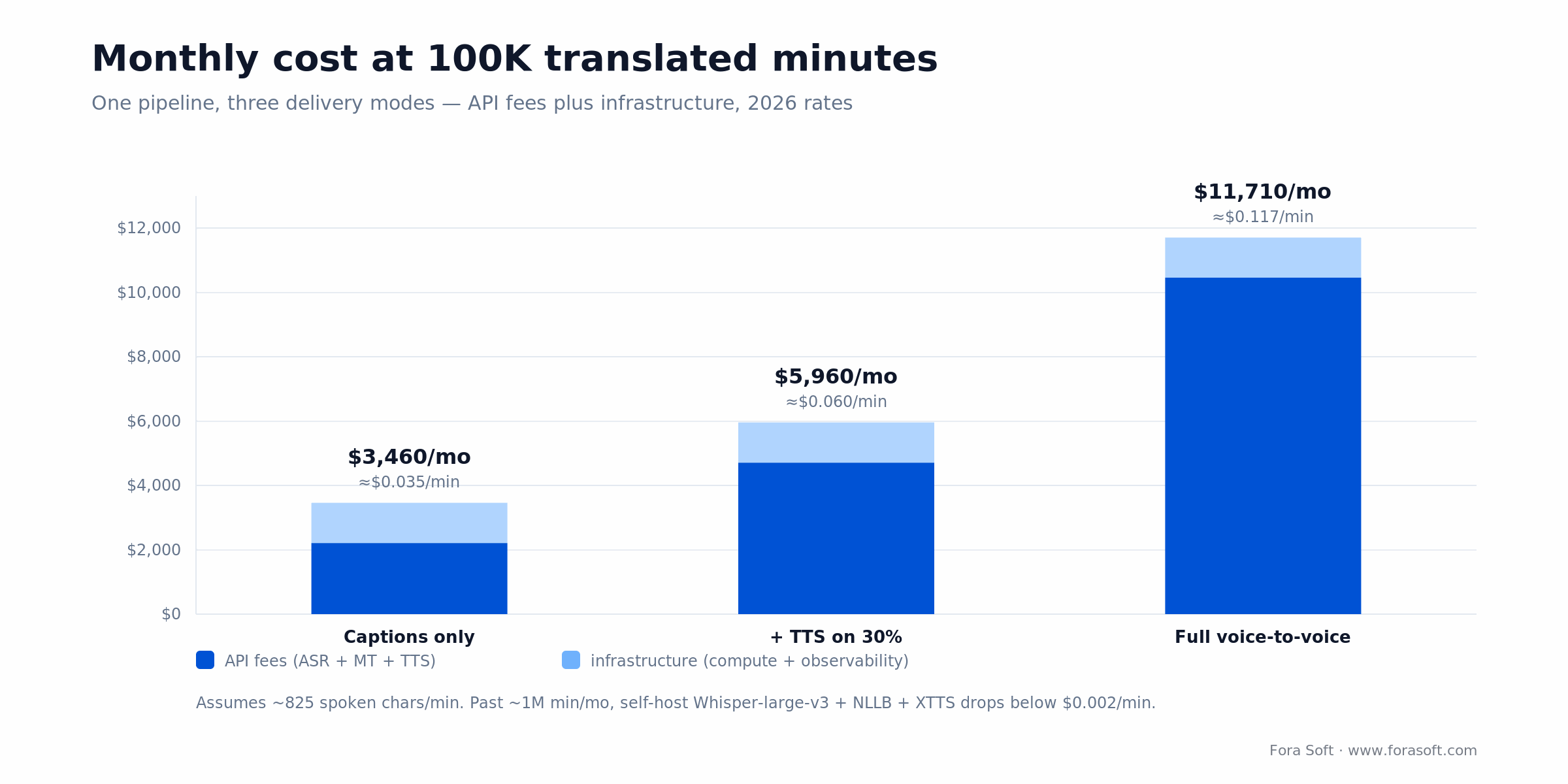
Figure 3. The same pipeline in three delivery modes. Captions are cheap; the synthetic voice is what moves the bill, which is why we gate TTS behind a feature flag by default.
Need the cost model for your specific call mix?
Tell us your expected minutes, language pairs, and latency SLA. We will plug your numbers into the model above and return a 12-month TCO.
Accuracy-boosting techniques that actually move WER
Once your baseline pipeline is live, these are the interventions that improve accuracy on real-world calls. Ordered by ROI per engineering hour.
Noise suppression + VAD. 30–40% WER improvement on noisy inputs. Krisp, NVIDIA RTX Voice, or RNNoise upfront. Silero VAD to drop silence before it hits ASR.
Custom vocabulary. +10–25 BLEU for domain-specific terminology. Drug names, legal jargon, sports rosters, ticker symbols. Most ASR vendors accept pronunciation lexicons; every MT vendor accepts glossaries.
Named entity preservation. Pre-extract names, dates, numbers, and codes with NER and re-insert them verbatim in the translated output. Solves the “Tom Brady” becomes “Tom’s brother” problem.
Context windows. Pass the last 2–3 utterances plus meeting context (“a medical consultation”) into the MT prompt. Modern LLM-based MT improves 5–10 BLEU with relevant context.
Confidence scoring + fallback. If ASR confidence drops below 0.7, surface the original word with a caveat rather than translating confidently-wrong output. Saves reputational damage.
Speaker diarization. pyannote.audio or WhisperX. Baseline 11–13% DER on real meetings. Without it, overlapping speech becomes unreadable.
Common failure modes and how to design around them
The five failure modes below account for most bad reviews of live translation products. Design around them from day one.
1. Poor microphone quality. Adds 30–40% WER. Surface a client-side audio quality score and prompt users to switch to a headset when it drops below a threshold.
2. Code-switching. WER spikes 30–50% at language switch points. CS-FLEURS-trained models help; a language-ID classifier in front of the ASR helps more. Accept that this is a 2026 frontier, not a solved problem.
3. Fast or mumbled speakers. Above 180 WPM, ASR accuracy drops sharply. Prompt the speaker (“speak 20% slower for live translation”) as a soft toast in the UI.
4. Overlapping speech. Present in >30% of real meetings. Diarize, prioritize the dominant speaker, and queue overlapping utterances as a separate caption stream.
5. Network jitter. Cascaded pipelines compound latency when any stage stalls. Instrument every stage. Alert when any p95 latency crosses its SLA.
Five pitfalls that blow up live translation projects
These are the five mistakes we see most often in discovery. They are all preventable.
1. Launching with 50+ languages on day one. Quality in the tail destroys trust. Start with 4–8 tier-1 languages; expand based on revenue signal.
2. Ignoring domain vocabulary. No glossary means 20–40% more mistranslations on brand names, drug names, and SKUs. Ship glossary infrastructure in week one, not week ten.
3. Skipping VAD and noise suppression. Single largest WER lever. Leaving it for later is a false economy.
4. Monolithic pipeline. If ASR, MT, and TTS are one binary, you cannot swap vendors or debug stages. Always split them.
5. No real-world eval set. Vendor demos are theatre. Build a 30-sample eval from your actual use case; run every vendor against it weekly.
Rule of thumb: if a vendor demo uses native speakers in a sound booth with a studio mic, cut their claimed accuracy number in half when projecting real-world performance.
Mini case — live translation at national scale
Situation. An interpretation platform serving UK public-sector buyers — NHS trusts, local councils, police and fire services — needed live captions and AI translation inside video calls across dozens of languages, and still had to hand high-stakes sessions to a human interpreter on demand. That platform is TransLinguist.
The build. A cascaded pipeline on a MediaSoup WebRTC core: Google Cloud Speech-to-Text, Deepgram and Speechmatics for recognition (routed per language), Google TTS for output, RabbitMQ moving jobs between stages. On top sits a marketplace layer that pulls a human from 30,000+ certified interpreters whenever a session needs one — the hybrid pattern, productised. It integrates with Zoom, Google Meet and Microsoft Teams so buyers keep the meeting tools they already use.
Outcome. TransLinguist won an appointment to the NHS (NOE CPC) national framework for language services. Buyers report 50% cost savings, up to 80% lower interpreting costs, 53% higher attendance and 2× ROI inside two years; the platform now runs AI speech-to-speech in 16+ languages and closed captions in 22, and Slator has covered it as a disruptive player in remote interpreting. Want a similar breakdown for your product? Book a 30-minute scoping call.
Build vs. buy — embed a SaaS or roll your own?
Before either, ask whether you need to build at all. If your users already live in Google Meet, Microsoft Teams or Zoom, those platforms now translate natively — Gemini 3.5 Live Translate, the Teams Interpreter agent, Zoom’s 46-language captions. Native wins on zero build cost and instant reach. A custom build — the work our AI integration team does — wins on what native can’t give you: your own glossary, languages outside their set, a bespoke UX, and audio that stays in your VPC. For the architecture underneath a live translation video call, see our real-time speech translation guide.
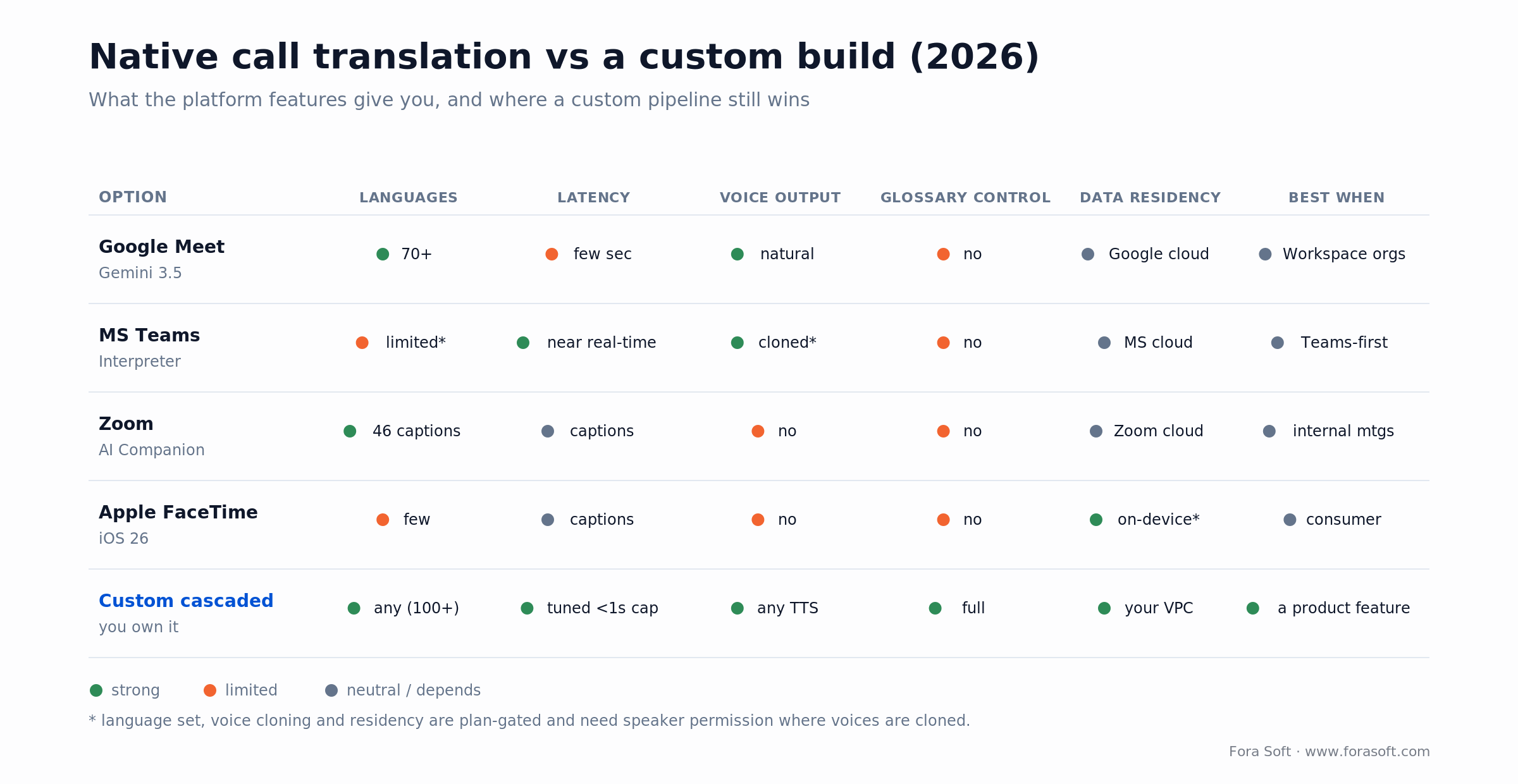
Figure 4. Where native call translation is enough, and where a custom build still wins. The green column is the reason clients still call us: glossary control, any language, tuned latency and data that stays in their VPC.
If native isn’t enough, there is a short list of “drop-in” SaaS providers you can embed instead of building a pipeline: Interprefy, KUDO, Wordly, Maestra, Palabra.ai, Akkadu. Each trades a higher per-minute price for zero build time.
Buy (embed SaaS) when: you want translation as a bolt-on to an existing product, you expect <50K minutes/month, or you need human interpreter hybrid (Interprefy, KUDO).
Build cascaded pipeline when: translation is core to the product experience, you need glossary control, you are >100K minutes/month, or you need to run in a specific data-residency region.
Self-host models when: you are past 1M minutes/month, your data cannot leave your cloud (healthcare, finance, gov), or you want voice cloning with on-prem GPUs.
A decision framework — design your translation in five questions
Run the five questions below before touching an SDK. The answers collapse the stack choices to one or two viable paths.
Q1. Voice or captions? Captions-only → skip TTS and save the entire voice line — about $2,500–$8,250/month at 100K minutes. Voice → budget for ElevenLabs or Google TTS.
Q2. How many languages? 4–8 → DeepL + Google Translate hybrid. 20+ → Google Translate + NLLB for the tail. 100+ → SeamlessM4T-v2 self-hosted.
Q3. What is the latency SLA? >2s → any pipeline works. 1–2s → cascaded with streaming ASR. <1s captions → Deepgram + DeepL + in-region deployment.
Q4. Data residency? Any region → managed APIs. EU-only or industry-regulated → self-hosted Whisper + NLLB in your own VPC.
Q5. What is the human-in-the-loop expectation? None → pure AI (Wordly, Maestra). High-stakes → hybrid AI + human (Interprefy, KUDO).
KPIs to measure post-launch
Live translation features need their own telemetry discipline. Instrument these three buckets.
Quality KPIs. WER per language pair (target <15% on clean audio, <25% on real calls); BLEU for glossary terms (target >60); DER for diarization (target <13%); confidence-filtered output ratio.
Business KPIs. Translation-opt-in rate, minutes translated per paying user, multilingual session retention vs monolingual baseline. Stickiness measurement is the hardest but most important of the three.
Reliability KPIs. p95 latency per stage, pipeline restart rate, language-model failover frequency, glossary sync lag. Aim for p95 pipeline latency within 1.5× of p50.
Compliance and data residency considerations
Translating audio means transcribing it first. Transcription creates PII that now sits somewhere. Get the compliance design right before the first enterprise sale.
1. GDPR and data residency. EU customers increasingly require all audio and transcripts to stay in EU regions. Pick vendors with EU endpoints (Deepgram EU, AWS Frankfurt, DeepL Pro EU) or self-host.
2. HIPAA. The BAA picture changed in 2026, so check current status rather than old blog posts. AWS, Google and Azure have long signed Business Associate Agreements; Deepgram now signs a BAA for covered entities on request; and OpenAI added healthcare BAAs early in 2026 — ChatGPT for Healthcare plus the API on zero-data-retention endpoints. Confirm the specific endpoint and tier are in scope before you route PHI through any of them.
3. Retention. Default “delete after session” for non-premium users; 7–30 day retention for premium plus explicit consent. Hard requirement in most privacy-conscious verticals.
4. Audit log. Signed audit records for every translated utterance (who, when, what language pair, confidence score). Makes eDiscovery tractable.
5. AI transparency (EU AI Act Article 50). Since 2 August 2026, if your product speaks in a synthetic or cloned voice, that audio is machine-generated content. Article 50 requires you to disclose it clearly, at the first moment a user hears it, and to tell users they are talking to an AI. Build the disclosure into the UI now — penalties reach €15M or 3% of global turnover, and content shipped before the deadline isn’t exempt going forward.
When not to ship live translation yet
Honest counter-position. Live translation is not always the right feature to ship in 2026.
1. Your monolingual product has weak retention. Translation will not save it. Fix the core loop first.
2. Your users are all in one language region. The engineering cost of live translation is never justified by “cool demo.” Ship captions only, and only if >20% of your users speak a second language.
3. Your content has heavy jargon and you have no glossary budget. Without a domain glossary, translation quality in specialized verticals (medical, legal, engineering) is too low to sell against the monolingual alternative.
4. Your latency SLA is <400ms end-to-end. Not possible in 2026, full stop. Redesign the user experience to absorb 800ms+ or wait for the 2027 generation of streaming speech-to-speech models.
FAQ
What is the lowest latency I can realistically hit for a live translated video call?
Captions-only end-to-end latency is 400–700ms with a well-tuned cascaded pipeline on tier-1 languages. Voice-to-voice is 800ms–1.5s. Below those numbers is marketing, not production.
Should I self-host Whisper or use the OpenAI API?
OpenAI’s Whisper API is batch-only and ~$0.006/min, which is cheap but does not stream. For real-time, either self-host Whisper-large-v3 with streaming wrappers (WhisperX, Faster-Whisper) or use Deepgram Nova-3 at $0.0077/min. Self-hosting wins past ~1M minutes/month or when data residency forces it.
How many languages can I realistically support at launch?
Ship with 4–8 tier-1 languages (EN, ES, FR, DE, JA, ZH, PT, IT). Add tier-2 based on user demand. Do not launch with 50+ languages; you cannot maintain quality on all of them and one bad language poisons the whole product’s reputation.
Is AI translation good enough to replace human interpreters?
For informal or mid-stakes meetings, yes. For boardroom, courtroom, medical, diplomatic, or any situation where a mistranslation has serious consequences, the production pattern is still AI + human hybrid (KUDO AI Assist, Interprefy). Price accordingly — hybrid is ~10–20% cheaper than human-only, not 90% cheaper.
Do I need speaker diarization for captions?
For one-on-one calls, no. For 3+ participants or any meeting with overlapping speech (essentially all real meetings), yes — without diarization the caption stream becomes unreadable. pyannote.audio or WhisperX baseline 11–13% DER, which is good enough for UI labelling.
Can I embed translation inside Zoom, Teams, or Google Meet?
Yes. Zoom via the Meeting SDK + Captioning API, Teams via the Graph Communications API + Media Bot, Google Meet via the Meet Media API. Each has different auth, different latency, and different approval processes. Budget 8–12 weeks for a production-quality bot on any of the three.
How much does it cost to build live translation into a video app?
With Fora Soft and Agent Engineering, $40K–$80K for a captions-only pipeline across 4–6 languages (10–14 weeks); $90K–$160K for a production voice-to-voice pipeline with glossary, diarization, and observability (16–24 weeks). Traditional studios quote 1.4–2× these numbers.
How does live translation cost compare to a full live streaming build?
Translation is usually a module on top of an existing video product rather than a standalone build. If you are budgeting the broader streaming context, see our live streaming platform dev cost guide for the full stack breakdown.
Do Google Meet, Teams, and Zoom already do this — should I still build?
For meetings held inside those platforms, often no. Gemini 3.5 Live Translate (70+ languages in Meet), the Microsoft Teams Interpreter agent, and Zoom’s 46-language translated captions cover a lot at no build cost. Build when you need a glossary they won’t accept, languages outside their set, translation inside your own product rather than theirs, or audio that must stay in your VPC.
Does the EU AI Act require disclosing an AI-generated voice?
Yes. Since 2 August 2026, EU AI Act Article 50 treats a synthetic or cloned voice as machine-generated content: you must tell users they are interacting with AI and mark the audio as AI-generated, clearly and at first exposure. Add the disclosure to the UI. Penalties reach €15M or 3% of global turnover.
What to Read Next
AI agents
LiveKit AI Agent Development: Complete Guide
How to drop a voice-capable AI agent — including a translator — into a WebRTC room.
AI multimedia
AI-Powered Multimedia Solutions: Intro & Applications
The full map of AI inside streaming, conferencing, and content workflows.
Cost analysis
Live Streaming Platform Development Cost in 2026
Three cost tiers, protocol choice, and hidden egress costs for a full streaming build.
WebRTC vendors
LiveKit vs Agora Pricing: Complete Cost Analysis
Which WebRTC backbone to pick under your translation pipeline.
Video development
Video Streaming App Development Partner Guide
How to pick the right partner for a multimedia product with AI features.
Ready to ship live translation into your video product?
Live translation is in 2026 a shippable feature, not a research project. The pipeline is cascaded ASR → MT → TTS. The latency budget is 800ms–1.5s on tier-1 languages. The cost is $0.035–$0.12 per minute depending on whether you ship captions or voice. The accuracy gate is real-world WER below 25% on noisy calls with glossary-aware domain adaptation.
If you want a concrete cost, a vendor recommendation, and a 12-week plan for your specific languages and use case, we will benchmark the options against your audio profile and send back a defensible estimate.

The book · Volume 7 of 7
AI for Video: A Complete Guide to Intelligence in Video Products: From Real-Time Pipelines and Agents to Serving, Cost, Compliance, and Verticals
Cascaded ASR, MT and TTS only works in a call when every stage fits the latency budget. Volume 7 covers where AI plugs into a WebRTC pipeline, live captions and translation, real-time moderation, serving infrastructure and cost per stream-hour, the engineering behind translation that keeps pace with the speaker. Written by Nikolay Sapunov, CEO at Fora Soft.
Read it on Amazon →Kindle & paperback · Fora Soft Video Engineering Handbook
Want the pipeline benchmarked against your audio?
Send us a 30-minute audio sample in each language you care about. We will run three vendors against it and send back a benchmark report.