


Key takeaways
• Video surveillance anomaly detection is behavioral, not object-centric. Loitering, falls, fights, abandoned objects, crowd surges — the value is in spotting what shouldn’t be happening, not counting what’s there. A face recognizer is not an anomaly detector.
• Real-world accuracy is 10–20 points below the benchmarks. UCF-Crime SOTA sits at 85–92 % AUC in the paper. Your cameras at 4 PM in June will see 70–82 %. Budget the gap and calibrate on-site.
• False positives kill operator trust in week one. Above ~3 alerts per camera per day, operators mute the channel and the product is dead. Ship zone-specific thresholds, shadow suppression, and explainability from day one.
• Edge beats cloud past ~50 cameras; SaaS wins below. A Jetson Orin AGX covers 8–12 streams and, fully loaded, amortizes to ~$700–$900 per camera all-in over 5 years; cloud AI SaaS runs ~$10–$30 per camera per month — $600–$1,800 across the same five years — indefinitely.
• Compliance is a product decision, not a lawyer problem. GDPR, BIPA, CCPA, and local surveillance ordinances all sit squarely on anomaly pipelines. Store metadata, not raw video; skeletons, not faces; 90 days, not forever.
Why Fora Soft wrote this playbook
Fora Soft has been shipping video surveillance software since 2005, and video surveillance anomaly detection is one of the hardest features to get right in production. Valt is our long-running reference in the space — a video surveillance and review platform used in law-enforcement, research, and enterprise security environments. We also build ONVIF-integrated camera tooling, VMS plugins, and AI analytics pipelines for security integrators and product companies. The video surveillance practice is where the patterns in this playbook live; our AI integration team ships the inference layer on top.
Every VMS vendor and security integrator we’ve worked with in the last two years has asked some version of the same question: “How do we actually ship anomaly detection that operators don’t turn off in a week?” This playbook answers that — what models to use, what hardware to put where, how to route events through ONVIF Profile M and into Milestone / Genetec / Nx Witness, how to pass the compliance review, and what to measure so you know the thing is working. For the broader engineering view, see our AI security-camera analytics playbook.
Scoping AI anomaly detection on top of a VMS you already run?
30 minutes with a video engineering lead. Bring your VMS, camera count, and compliance envelope — leave with a realistic edge-vs-cloud plan.
What real-world anomaly detection means
Video surveillance anomaly detection is the craft of flagging behavior that should not be happening, not cataloguing what is in frame. The term collapses two very different things in marketing copy; keep them separate in your spec.
Object detection asks: is there a person, a car, a license plate in this frame? Well-understood, off-the-shelf, solved by YOLO-class detectors that clear 95 % precision on person and vehicle classes in good conditions in 2026. It’s a prerequisite, not the goal.
Anomaly detection asks: is the behavior here unusual for this zone, at this time? It’s contextual and temporal. A person standing still in a waiting room is normal; the same pose in a restricted warehouse zone at 02:00 is an incident. That requires frame-level features, a model of “normal” per zone, and a temporal reasoning layer that fires on deviations.
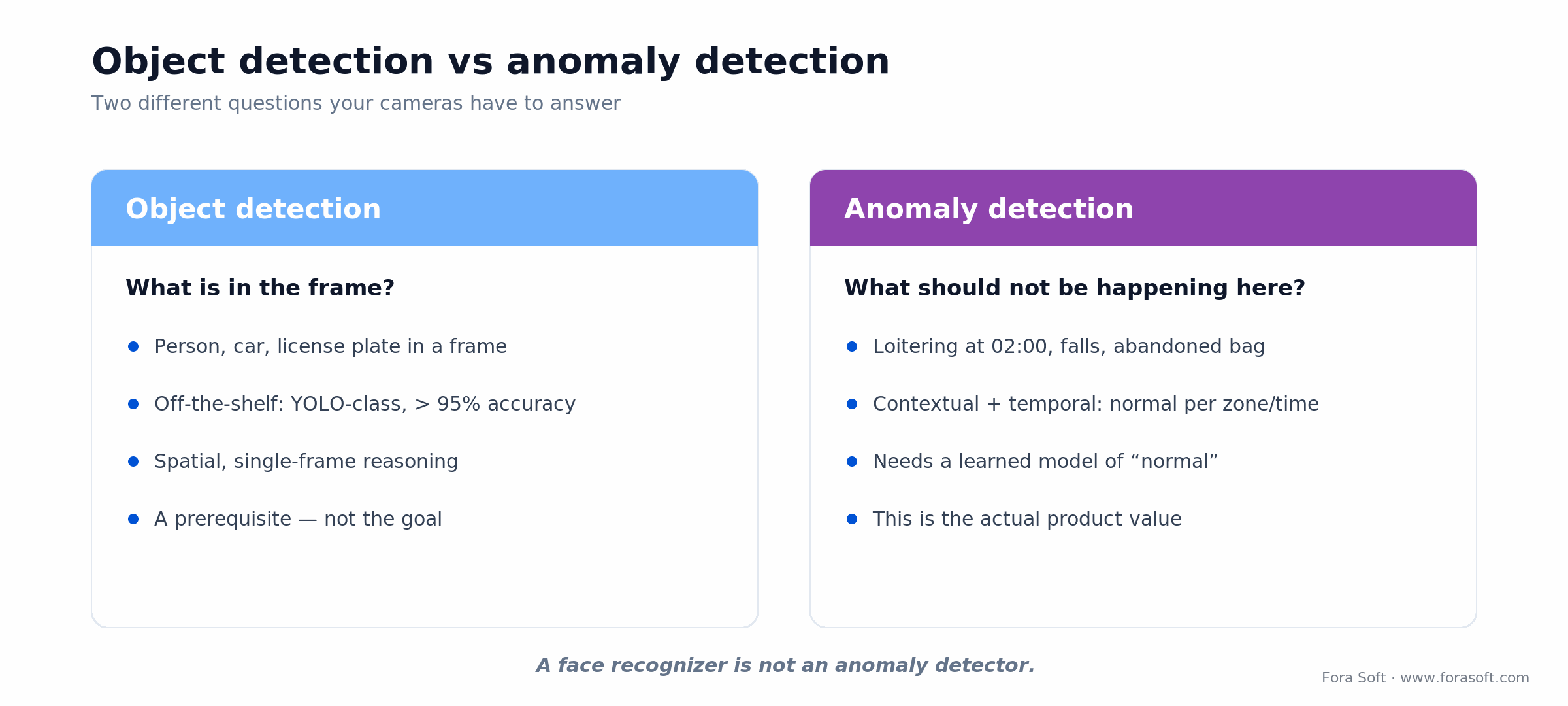
Figure 1. Object detection catalogues what is in the frame; anomaly detection judges what is out of place for the zone and time.
The common anomaly classes that actually ship as products:
- Perimeter: intrusion, tripwire crossing, fence climbing, unauthorized vehicle approach.
- Behavioral: loitering, dwelling in restricted zones, abandoned objects, unusual paths.
- Safety: falls, slips, collapses, prolonged immobility.
- Conflict: fights, aggression, rapid motion clusters, weapons.
- Crowd: density anomalies, surge direction, counter-flow, panic dispersal.
- Traffic: red-light running, wrong-way entry, speed violations, stopped vehicles in live lanes.
The 2026 model families
Supervised learning remains the right choice when you have a curated dataset of labelled anomaly / normal clips and a narrow use case — retail shrinkage at a specific store layout, for example. Trained on a dataset like UCF-Crime (1,900 videos, 13 anomaly categories) it reaches 85–92 % AUC on benchmark splits. It does not generalize cleanly to new cameras or new scenes.
Self-supervised learning is the dominant pattern for new deployments. Pretrain on a large unlabelled video corpus (Kinetics, YouTube-8M), then fine-tune on 7–30 days of “normal” footage from each site. Far better domain adaptation; the approach behind VideoMAE and recent transformer-based VAD models.
Unsupervised / weakly-supervised methods — Multiple Instance Learning (MIL), autoencoder-based density estimation, one-class SVM on deep features — work when labelled anomalies are scarce. MIL in particular treats each video as a bag of clips and learns to flag anomalous bags without frame-level labels; it’s the right tool for security integrators who have hours of incident footage but no time-stamped annotations.
Named frameworks worth knowing in 2026: RTFM (temporal feature-magnitude learning), MGFN (magnitude-contrastive glance-and-focus), PEL4VAD (prompt-enhanced learning), plus CLIP-based detectors like VadCLIP and transformer models built on video backbones such as TimeSformer and ViViT. On UCF-Crime the current top sits near 91.6 % AUC (GS-MoE, 2025), with VadCLIP around 88 %; on production cameras you’ll see 10–15 points lower, so calibration against your own data isn’t optional.
Reach for self-supervised models when: you’re deploying to new cameras with no labelled anomalies — pretrain on public video, then fine-tune on 7–30 days of each site’s “normal” footage.
Benchmark vs production numbers
The gap between paper numbers and production numbers is the biggest source of disappointed VMS customers we see. A realistic picture:
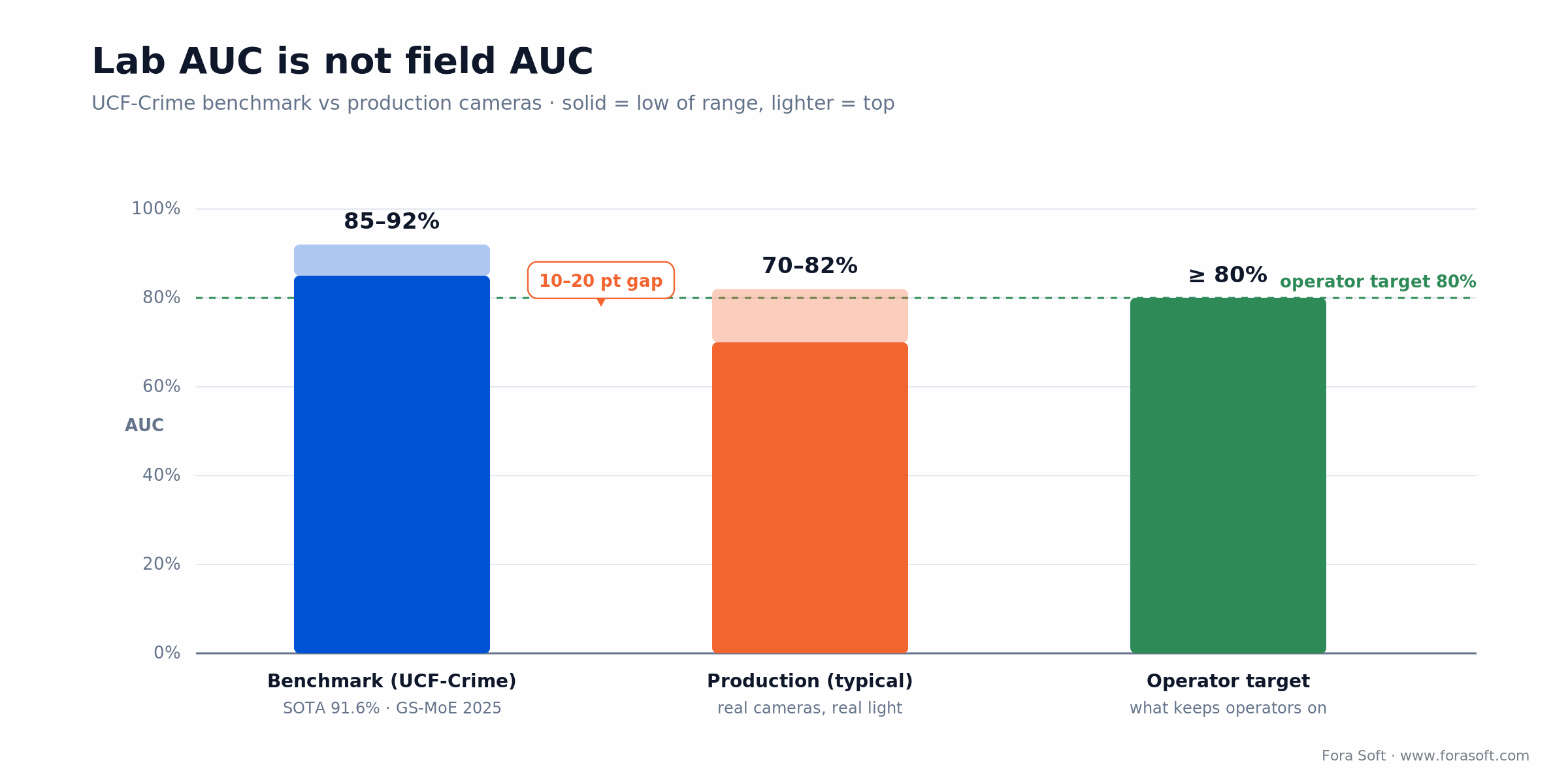
Figure 2. Lab AUC (85–92 %, SOTA 91.6 %) versus what production cameras deliver (70–82 %), against the operator’s 80 % floor.
| Metric | Benchmark (UCF-Crime) | Production (typical) | Operator target |
|---|---|---|---|
| AUC (ROC) | 85–92 % | 70–82 % | ≥ 80 % |
| False alarms / camera / day | n/a | 2–5 | < 1 |
| Recall (loitering) | ~85 % | 70–80 % | ≥ 75 % |
| Recall (falls) | ~80 % | 60–75 % | ≥ 85 %* |
| Intrusion latency | n/a | < 500 ms | < 500 ms |
| Fall alert latency | n/a | 2–5 s | < 5 s |
*Fall detection recall must be high because misses carry life-safety consequences. Trade false positives up to hit it.
Edge vs cloud: the economics
Edge inference runs the model on a device at the site — Jetson Orin, Hailo-8, Coral, or inside a camera with an Ambarella CVflow chip. Video never leaves the premises; alerts plus 5–10 s of supporting clip are exported. Latency is 50–200 ms, privacy is first-class, operating cost is low after the upfront hardware spend.
Cloud inference pushes RTSP streams to a managed GPU pool (AWS, Azure, GCP, or a specialist such as NVIDIA Metropolis / Eagle Eye Networks). Latency is 500–2 000 ms, capex is near zero, operating cost is steady and recurring.
Hybrid is how everyone lands in the end: edge for real-time detection and false-positive filtering, cloud for weekly retraining, trend analytics, and audit. This matches how VMS vendors already structure their products — on-prem recorders for video, cloud for admin and reporting.
Reach for edge when: latency matters (< 500 ms), privacy rules out video egress, or you’re operating 50+ cameras where the amortized hardware cost beats the SaaS bill.
Reach for cloud when: you’re under 20 cameras, you need multi-tenant scale without on-site install, or your team has no appetite for edge fleet management.
Reach for hybrid when: you’re serious about this long-term — keep inference at the edge, keep retraining and model ops in the cloud, keep the compliance story clean.
Edge hardware in 2026
| Device | Compute | Power | Streams (1080p) | Approx. device price | Best for |
|---|---|---|---|---|---|
| Jetson Orin Nano (Super) | 67 TOPS | up to 25 W | 1–2 | ~$399 (Super dev kit) | Small retail, kiosk edge |
| Jetson Orin NX (Super) | 117–157 TOPS | up to 40 W | 2–4 | ~$649–$999 (module) | Mid-market multi-camera sites |
| Jetson Orin AGX | 275 TOPS | up to 60 W | 8–12 | ~$2,999 (64GB module); $3,499 dev kit | Enterprise on-prem analytics hub |
| Hailo-8 | 26 TOPS (INT8) | 2.5 W | 4–8 (detection only) | ~$150–$250 (M.2 module) | Compact, high-efficiency installs |
| Coral Edge TPU | 4 TOPS (INT8) | 2–3 W | 1 (light workloads) | $80–$150 | Ultra-low-power accessory |
| Ambarella CVflow (in-camera) | ~5–12 TOPS-equiv* | 2–5 W | 1–2 (in-camera) | licensed per device | Smart cameras, OEM integrations |
The practical choice for a security integrator shipping a multi-camera site in 2026 is the Jetson Orin family: Nano for tiny sites, NX for mid-market, AGX as the on-prem analytics box for enterprise deployments. Hailo wins when power envelope matters (solar-powered perimeters, vehicle-mounted, compact NVR boxes). The Hailo-8 (26 TOPS at ~2.5 W) is the efficiency reference; for the in-camera route, our guide to on-camera edge AI weighs the trade-offs.
*Ambarella doesn’t publish raw TOPS; in-camera figures are DNN-equivalent estimates. Jetson TOPS are the Dec 2024 “Super” numbers and need the top power mode to hit them (67 TOPS on Nano at 25 W, 157 TOPS on NX at 40 W). NVIDIA raised Jetson prices by up to ~101 % in July 2026 — Orin Nano Super dev kit $249→$399, AGX Orin 64GB module $1,599→$2,999, AGX Orin dev kit $1,999→$3,499 — so the figures above are post-increase August 2026 prices, not 2024 MSRPs.
ONVIF Profile M and your VMS
Anomaly detection without VMS integration is a science project. ONVIF Profile M — published by ONVIF in 2021 (the Profile M spec) — is the standard way to stream analytics metadata alongside video, and it’s the path most Milestone, Genetec, and Nx Witness plugins already speak. Our deeper dive on ONVIF profiles in security systems covers the full family.

Figure 3. How an anomaly event travels from camera to operator: edge inference, ONVIF Profile M metadata, VMS, then rules and SIEM.
The flow in a production deployment:
1. Edge inference. Jetson-class device subscribes to camera RTSP, runs the anomaly model, emits Profile M metadata frames alongside RTP.
2. VMS ingestion. Milestone XProtect, Genetec Security Center, Nx Witness, or Avigilon Control Center consumes the metadata via plugin or native driver. Alerts appear on the operator timeline; bounding boxes render on playback.
3. Rules engine. Zone-specific thresholds, escalation paths, operator assignment. Nx Witness’s rule engine and Milestone’s Smart Client alerts are the common entry points; Genetec has a proprietary rules layer.
4. SIEM / incident management. High-severity alerts webhook into Splunk, Sentinel, or a SOAR platform; security teams correlate with access control and network IDS events.
The trap: Profile M compliance is uneven across VMS vendors. Expect 20–30 % schema-compatibility gaps in the field. Validate on a real VMS instance before you quote a project.
False positives: the project killer
Operators tolerate fewer than one unexplained alert per camera per day before they mute channels or disable zones. Everything above that is a product failure, even if the recall numbers look good on paper. The five recurring causes:
1. Shadows and lighting shifts. Sun angle changes throughout the day. PCA-based background subtraction misreads shadow motion as object motion. Solve with adaptive Gaussian mixture background models, updated every 24–48 hours, plus shadow-aware detectors on the boundary layer.
2. Camera vibration. Wind on a pole-mounted camera, HVAC-induced sway, traffic-induced tremor — all trigger motion alerts. Stabilization pre-filter (homography-based) plus minimum motion-magnitude thresholds kill the easy cases.
3. Baseline drift. Retail store rearranges displays; “normal” changes. Warehouse adds a loading dock; traffic patterns shift. Plan quarterly re-baselining as operational hygiene, not crisis response.
4. Weather. Rain on the lens, snow on the ground, fog reducing contrast. Seasonal retraining windows and weather-aware thresholds (lower sensitivity during heavy precipitation, flagged to the operator).
5. Scene transitions. PTZ camera movements, focus shifts, IR cutover at dusk. Suppress alerts for N seconds after any detected scene transition; it’s a 20-line patch that saves operator sanity.
Budget a 4–8 week calibration phase per site post-installation. Plug-and-play is a sales line, not a deployment reality.
Battling false alarm rates on a live deployment?
We’ve tuned VAD pipelines in retail, logistics, and law-enforcement-adjacent products. 30 minutes, concrete remediation plan.
Use cases with real numbers
Retail loss prevention. Shrinkage target typically lives at 1–2 % of inventory; real numbers run 2–4 %. Anomalies tracked are loitering in high-value aisles, tag-switching, blind-spot behavior. A 50-location chain can reasonably target meaningful six-figure annual savings on loss prevention with anomaly detection deployed correctly. Site cost: $800–$1 200 for an edge node plus integration. Practical retail video analytics walk deeper into this use case.
Warehouse safety. Slips, trips and falls are roughly 1 in 5 of all nonfatal workplace injuries (BLS, 2024); in construction the rate runs about 31.5 per 10,000 full-time workers. Fall detection with 2–5 s alert latency speeds emergency response. One prevented serious injury pays for the whole system at a single facility. 8–12 cameras per 10 000 sq ft, $5–$8 K install per warehouse.
Perimeter security (airports, prisons, borders). Intrusion detection at sub-500 ms latency. False positive rate tolerance is extreme — under 0.2 per camera per day. Models: 3D CNNs with strong temporal coherence. 24–72 cameras per facility; total deployments are typically $200–$500 K including hardware, integration, and six to eight weeks of calibration.
Smart cities and traffic. Red-light running, wrong-way detection, stopped vehicles in live lanes. 1–3 s detection latency so enforcement happens downstream. Typically 50–500 intersections per city, $50 K–$500 K+ depending on scale; integrates with existing SCATS / SCOOT traffic control.
Elderly care and independent living. Fall detection + prolonged immobility. Skeleton-based analytics (no face, no identity) for HIPAA / GDPR hygiene. 85–95 % recall target; < 0.5 false positives per day per room to avoid family alert fatigue. 1–2 cameras per room; $2–$5 K per resident including integration.
Cost model: SaaS vs edge, 5-year TCO
Two ballpark models to anchor a build-vs-buy conversation. SaaS AI anomaly detection runs about $10–$30 per camera per month for a bundled cloud VMS (analytics-only add-ons can be lower, ~$3–$15). Edge deployment amortizes hardware + install + maintenance over 5 years.
| Model | Capex | Opex / yr | 5-yr TCO / camera |
|---|---|---|---|
| SaaS AI (mid-market) | ~$0 | $240–$360 / camera | $1 200–$1 800 |
| Edge (Jetson Orin AGX, 8 cameras) | ~$400 / camera | ~$60 / camera | $700–$900 |
| Hybrid edge + cloud retraining | ~$400 / camera | $120–$180 / camera | $1 000–$1 300 |
The per-camera figures above assume a fully-loaded node and exclude the fixed fleet-level cost of edge MLOps, on-call, and a retraining pipeline. Fold that overhead in and spread it across the fleet, and the edge-vs-SaaS crossover lands around 40–60 cameras across a portfolio (Figure 4). Below it, SaaS economics win once you count on-call engineering and hardware refresh; above it, edge amortization dominates and the privacy and latency story is better besides.

Figure 4. Five-year cost per camera: edge amortization crosses below SaaS somewhere around 40–60 cameras across the portfolio.
Compliance: GDPR, BIPA, CCPA
GDPR (EU). Surveillance footage is personal data; biometric processing (face, gait) used to identify a person is an Article 9 special category. Lawful basis required — legitimate interest for perimeter security, contract for workplace monitoring, consent rarely works at scale. DPA with every processor; subprocessor list public. Anomaly-only metadata (event + zone + timestamp, no identity) is the easiest path to a defensible posture.
BIPA (Illinois). Biometric Information Privacy Act: written informed consent for any face-print, gait-print, or scan of hand geometry. Class-action exposure is real: $1,000 (negligent) to $5,000 (intentional) per violation — though Illinois’ SB 2979 (August 2024) now accrues damages once per person per violation type rather than per scan. For retail or workplace anomaly products, avoid identity-based features unless you have the consent workflow in hand. Skeleton / keypoint analytics side-step most BIPA risk.
CCPA (California). Consumer right to know, delete, and opt out. Notice of camera presence and AI analytics required. Surveillance in semi-public spaces (retail) is higher-scrutiny than in private workplaces.
Local ordinances. San Francisco and Oakland have restrictions on municipal facial recognition; New York City has data-governance requirements on biometric surveillance. Portland, OR bans private-sector facial recognition in public spaces. Expect more cities to follow.
Data minimization practice. Store anomaly metadata and a 10-second clip centered on the event — not raw 24/7 video. Delete raw recordings after 30–90 days unless a specific incident keeps them. Use skeletons / heatmaps for analytics that don’t require identity. This one design decision resolves most regulator concerns at once.
Integration patterns
Four integration paths, picked per VMS and security stack:
1. ONVIF Profile M. Default for mainstream VMSes. Analytics metadata flows over the same RTSP session as video. Milestone, Nx Witness, Avigilon speak it natively; Genetec has partial coverage.
2. REST webhooks. Emit event.anomaly.loitering JSON payloads to a webhook endpoint in the customer’s SIEM. Simplest integration for non-VMS destinations.
3. MQTT. Publish-subscribe over a broker, useful in IoT-heavy environments and bandwidth-constrained sites. Smaller payloads than REST; operators subscribe to per-zone topics.
4. VMS SDKs. Milestone MIP SDK, Nx Witness REST + rule engine, Genetec SDK (tighter vendor control), Avigilon plugin framework. Use these when the VMS is the customer-facing surface and you need tight timeline / playback integration.
Operator UX beats raw accuracy
A 92 % accurate alert without evidence loses every time to an 80 % accurate alert with a clear bounding box, temporal heatmap, and one-click access to the 10 seconds before and after. Explainability drives trust, and trust drives adoption. Five UX decisions that move the needle:
1. Bounding boxes and heatmaps on playback. Operators need to see what the model flagged, not just an event label.
2. Confidence binned, not raw. “High / medium / low” rather than 0.87. Operators aren’t calibrating a model; they’re triaging.
3. One-click “not an anomaly” feedback. Flows into weekly retraining. Makes operators feel heard and closes the quality loop.
4. Zone-level severity. Same event class has different consequences in the vault vs. the break room. Let admins tier severity per zone.
5. Alert timeline with causal context. Show the last three events in the same zone plus access-control data. Operators reason in scenes, not isolated incidents.
Mini-case: anomaly detection on a live VMS
Situation. A security integrator running multi-site video deployments wanted to add AI anomaly detection (loitering, intrusion, perimeter breach) to existing VMS installations without ripping out cameras or asking customers to re-learn their product. Operators were already overloaded; the new feature couldn’t add noise.
12-week plan. Weeks 1–2: site survey on two pilot facilities, labelled audit of 30 days of recorded video per site, baseline “normal” model per camera. Weeks 3–5: Jetson Orin NX edge node per 4 cameras, TensorRT-optimized VAD pipeline, ONVIF Profile M metadata publisher. Weeks 6–7: Milestone XProtect plugin integration, bounding-box overlay on timeline, zone-severity controls. Weeks 8–10: calibration pass — shadow suppression, camera-vibration filter, zone-specific thresholds, weekly retraining loop. Weeks 11–12: staged rollout behind a feature flag, operator training, quarterly re-baselining runbook.
Outcome. False alarm rate dropped from an initial 6–8 per camera per day in week one to under 1 per camera per day after the calibration pass. Operator adoption stayed above 80 % after four weeks (we track this specifically because the failure mode is silent muting). Two additional customer sites rolled out the following quarter citing the pilot references. Want a similar assessment?
A decision framework in five questions
1. How many cameras, across how many sites? < 20 → SaaS. 20–50 → hybrid. > 50 → edge, with cloud retraining.
2. What’s the latency tolerance? Life-safety falls, perimeter intrusion → edge mandatory. Loss-prevention loitering → cloud works.
3. Which VMS is the customer already running? Milestone or Nx Witness → ONVIF Profile M path is clean. Genetec → budget proprietary SDK time. Avigilon → plugin framework.
4. What’s the regulatory envelope? EU / BIPA state / municipal ban zones → keep identity features off; ship skeleton / keypoint analytics; data minimization from day one.
5. Who owns operator training and calibration? If your customer doesn’t have a security operations team ready to run 4–8 weeks of calibration, bundle managed service in the deal. Shipping anomaly detection to an untrained operator team is how you lose the account.
Five pitfalls that sink projects
1. Using pre-trained models as-is. UCF-Crime-trained networks lose 10–20 points of AUC on production cameras. Fine-tune on-site footage; plan 4–8 weeks of calibration per deployment.
2. No zone-aware thresholds. A single global confidence threshold produces either too many false alarms in open areas or misses in high-value zones. Per-zone thresholds plus per-class severity is the minimum viable config surface.
3. No seasonal retraining. Spring rain, fall leaves, winter snow all break models trained on summer footage. Quarterly retraining cycles are operational hygiene, not a roadmap item.
4. Identity-based features without a consent workflow. Face recognition anomalies look great in a demo and fail compliance review in production. Build without identity first; layer it in behind explicit consent only where the law allows.
5. Treating the VMS integration as “plumbing”. A great model surfaced through a bad plugin is a dead feature. Invest in the VMS UI layer as seriously as the inference layer.
KPIs to measure from day one
Quality KPIs. AUC on a monthly human-labelled sample (target ≥ 80 % production). False alarms per camera per day (target < 1 for critical zones). Recall on life-safety anomalies (target ≥ 85 % for falls).
Operational KPIs. Operator engagement — share of alerts acted on within 5 minutes (target ≥ 80 % for high severity). Channel mute rate (target 0 % after week 4). Retraining cycle time (target ≤ 2 weeks from feedback to production).
Business KPIs. Per-site incident closure rate post-deployment (target meaningful lift inside two quarters). Insurance / shrinkage-driven ROI measured quarterly. Enterprise renewal conversations referencing AI analytics as a required capability.
When NOT to ship anomaly detection
If your camera quality is mixed consumer-grade and you can’t normalize resolution or frame rate across the fleet, spend the money on a camera refresh first. Anomaly models don’t compensate for garbage inputs. If your operator team is overloaded with existing alerts, anomaly detection will make it worse before it makes it better — plan the workflow redesign alongside the AI project, not after. If your customer base is in a jurisdiction with an active surveillance ban (Portland OR private-sector, parts of SF municipal), clear the legal review before you ship, not after.
Ready to turn an existing VMS into an AI-powered security platform?
We ship VMS plugins, edge inference stacks, and ONVIF Profile M pipelines. 30 minutes, concrete plan for your fleet, no slideware.
FAQ
Can I just use a pre-trained UCF-Crime model from Hugging Face?
You can start there. You can’t finish there. Benchmark-trained models lose 10–20 points of AUC on real cameras due to lighting, angle, resolution, and scene diversity. Plan a 4–8 week fine-tuning pass on site-specific footage; use pre-trained weights as initialization only.
What’s a realistic false-alarm rate for production anomaly detection?
Under 1 alert per camera per day for strict-definition anomalies in critical zones. 2–3 per camera per day is tolerable for broader behavioral alerts in open areas. Anything above that and operators will mute the channel; treat it as a product failure, not a tuning gap.
Edge or cloud — which should I pick?
Hybrid. Edge for real-time detection and false-positive filtering; cloud for weekly retraining, long-term trend analytics, and audit. Economic break-even between pure SaaS and edge-heavy hybrid lands around 40–60 cameras across a customer’s portfolio.
How do I avoid GDPR and BIPA violations?
Store anomaly metadata, not raw video. Use skeleton / keypoint analytics instead of face recognition where possible. Limit retention to 30–90 days, longer only for specific flagged incidents. Sign DPAs with every cloud vendor. Skip biometric identity features unless you have a documented consent workflow. Do all of this before launch, not after.
Does my VMS support ONVIF Profile M?
Milestone XProtect: yes via plugins. Nx Witness: yes natively plus REST. Avigilon: mostly, via plugin framework. Genetec: partial, plan proprietary SDK work. Schema compliance is uneven; budget 2–3 weeks of integration testing with the specific VMS version your customer runs.
How many cameras can a Jetson Orin AGX handle?
8–12 concurrent 1080p streams at 10–15 FPS for moderate-complexity anomaly models; 4–6 streams for heavier transformer-based models at 30 FPS. Jetson Orin NX covers 2–4 streams; Orin Nano covers 1–2. Size for 25 % headroom so you absorb codec variance and rain-day spikes.
How long does it take to ship this to a live deployment?
10–14 weeks for a production rollout on top of an existing VMS with a Fora Soft team running Agent Engineering tooling: site survey, edge hardware, ONVIF Profile M integration, calibration pass, operator training, staged rollout. Multi-site pilots add 3–4 weeks for per-site calibration.
Does anomaly detection work on legacy analog cameras?
Only through an IP encoder at an acceptable resolution (1080p minimum). Sub-1080p analog feeds lose too much detail for reliable anomaly detection. If the customer’s fleet is mostly legacy analog, plan for a camera refresh before or alongside the AI rollout — it’s a better investment than wringing quality out of the wrong input.
What to read next
Surveillance
Real-Time Anomaly Detection in Video Surveillance
The real-time engineering companion — streaming inference, event routing, operator UX for live monitoring.
Surveillance
AI Anomaly Detection In Surveillance: The 2026 Playbook
How anomaly detection works on real surveillance footage: methods and pitfalls.
Protocols
ONVIF Profile M and Object Detection
The metadata protocol your anomaly events ride on its way from edge to VMS.
Retail
Retail Video Analytics: AI-Powered Store Intelligence
The industry-specific take on loss prevention, shrinkage, and in-store behavioral analytics.
Analytics
Real-Time Video Analytics: 4 Business Applications
Business-side view of real-time video analytics across retail, security, and operations.
Ready to ship anomaly detection that operators actually leave turned on?
Video surveillance anomaly detection wins or loses on the same handful of decisions, and they are sharper than the marketing makes them look. Use self-supervised or weakly-supervised models over raw benchmark-trained networks. Deploy edge inference on Jetson-class hardware for anything latency-sensitive; layer cloud retraining on top. Route events through ONVIF Profile M into whichever VMS your customer already trusts. Spend as much on false-positive suppression, zone-severity controls, and explainability UX as you spend on the model itself.
The projects that win treat compliance, calibration, and operator trust as first-class design work, not retrofits. The projects that stall ship a 92 %-accurate model, blow past the 4-week false-positive honeymoon, and watch operators silently mute the channels. We’ve shipped VMS-integrated anomaly detection into law-enforcement-adjacent, logistics, and retail environments; a production-grade rollout lands in 10–14 weeks on top of an existing fleet.
Let’s scope your anomaly-detection rollout
Bring your VMS, your camera count, and your compliance envelope. 30 minutes, concrete plan, no sales deck.

