

Key takeaways
• An AI quiz maker falls into one of three categories. Classroom engagement (Wayground — formerly Quizizz, Kahoot!, Edpuzzle, ClassPoint), formative and assessment-grade testing (Newsela Formative, ClassMarker, Eklavvya, ProProfs), and embeddable AI generators you drop into your own product (Conker, Diffit, MagicSchool, MindStudio). Pick the category before the tool.
• The market is real, the hype less so. The AI-in-education market is projected at roughly $32.3B by 2030 at a 31.2% CAGR (Grand View Research, 2024), and about six in ten US teachers reported using an AI tool in 2025 (Gallup/Walton Family Foundation). But most of the eye-catching accuracy stats online are vendor marketing, not evidence.
• Auto-grading is good, not magic. Peer-reviewed automated essay scoring agrees with human graders at about r 0.70–0.90 — roughly the same as two humans agree with each other, not better. Multiple-choice is auto-scored deterministically. Pair AI grading with human review whenever the stakes matter.
• Buy first, build only the differentiator. Most teams should start with one off-the-shelf tool and build only when they need something the market does not sell — a custom adaptive engine, deep LMS integration, or a vertical-specific assessment type with its own item bank.
• Compliance decides the shortlist. FERPA, COPPA, GDPR, and the EU AI Act shape what you can ship, especially around minors and proctoring. Emotion-inference proctoring in schools is a prohibited practice in the EU since 2 February 2025; the 2026 Digital Omnibus moved the Act’s high-risk duties for education and assessment to 2 December 2027, but the ban stays. Data residency and audit posture matter as much as features.
Updated October 2026: EU AI Act high-risk duties for education moved to December 2027, the amended COPPA Rule is now enforced, a new section on how reliable AI quiz generation is, built-in quiz AI in Google Classroom and Canvas, and current Kahoot! pricing.
Why Fora Soft wrote this playbook
We are a software company that has built video and real-time products since 2005 — 250+ projects, 50+ in-house specialists — and EdTech is one of the verticals we have shipped in most. Our AI integration team has put quiz generation, adaptive testing, auto-grading, and AI-content features into virtual classrooms, LMSes, and corporate learning platforms.
A concrete reference: BrainCert, an all-in-one e-learning platform we help engineer, runs assessments, virtual classrooms, courses, and proctoring at global scale — roughly $3M ARR in 2024 (up 58% year over year), 100K+ customers, and more than 500M classroom minutes delivered. So when we say a claim about AI quizzes is marketing rather than fact, it is because we have run these features under real load and real regulator scrutiny.
This playbook serves two readers: an educator picking the best AI quiz maker for a classroom this term, and a product owner deciding whether to embed a quiz feature into their own platform. The shortlist is different for each, so we cover both, and we link out to the deeper engineering in our AI-for-media engineering guides where the model internals matter.
The top 3 AI-powered quiz and assessment tools in 2026
Out of dozens of options, three platforms cover most classroom and formative needs: Wayground and Kahoot! for engagement, Newsela Formative for real-time formative checks. For secure graded exams, see ClassMarker or Eklavvya below; for generators you embed in your own product, see Conker, MindStudio and the build-vs-buy section. Before you compare tools, decide which category you are actually in, because a classroom game and a certification exam are different products that happen to share the word “quiz.”
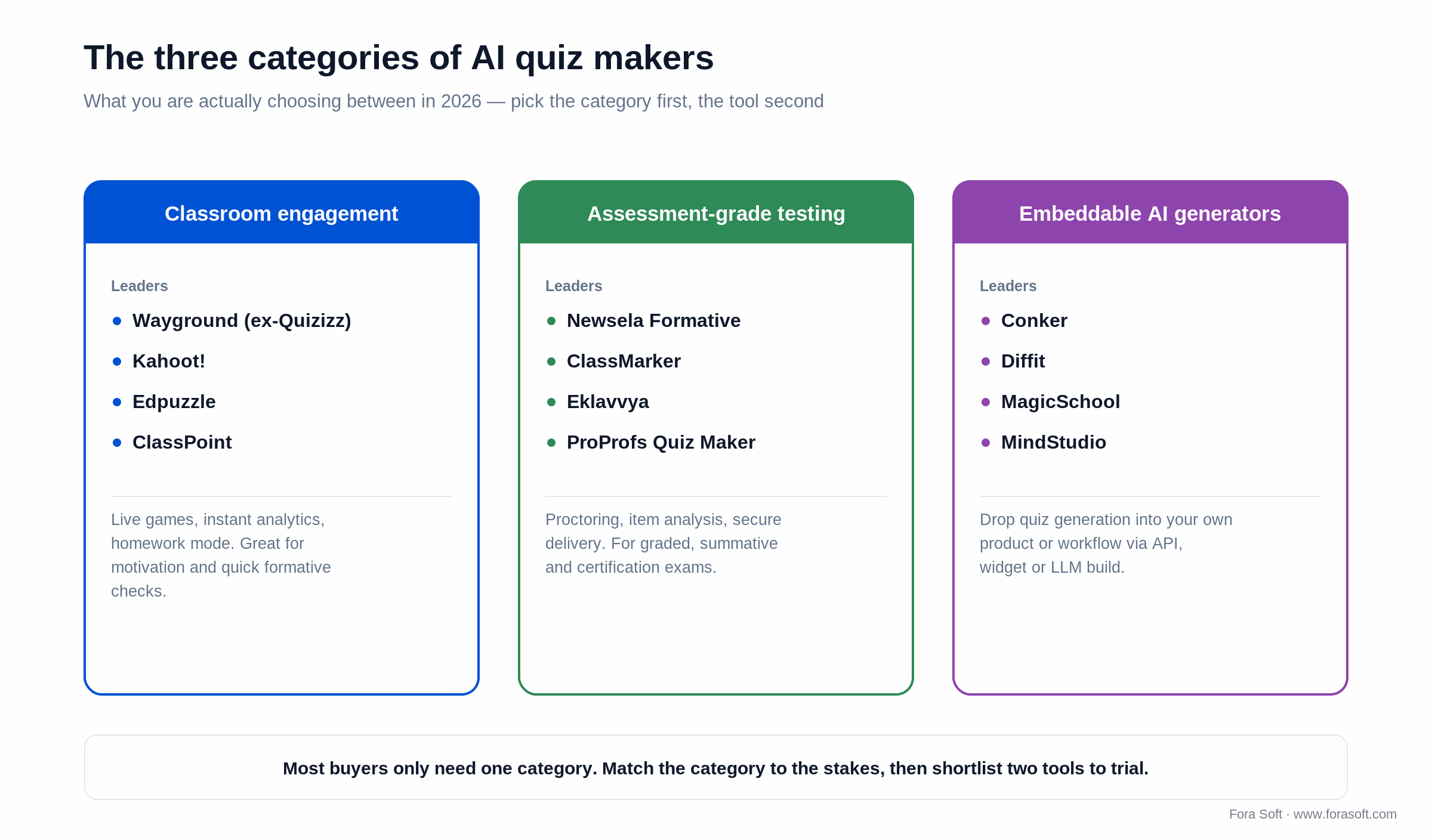
Figure 1. The three categories of AI quiz makers — match the category to the stakes, then shortlist two tools to trial.
1. Wayground (formerly Quizizz) — classroom engagement plus AI generation
Quizizz rebranded to Wayground in June 2025 — same company, same product lineage, new name and an expanded AI hub. It pairs gamified delivery with a generator that builds multiple-choice, open-ended, slide-based, and homework quizzes from a topic, document, or YouTube link. Strengths: works on any device in live or async homework mode, instant analytics, a large ready-made library, and AI generation from PDFs, slides, and links. Weakness: assessment-grade controls (proctoring, secure browser, item analysis) are thinner than dedicated testing platforms.
Reach for Wayground when: engagement and speed are the goal, you teach K–12 or run training sessions, and you want to spin up a quiz from existing material in minutes. Skip it when you need secure, graded, high-stakes exams.
2. Kahoot! — live game-based learning with AI question generation
Kahoot! is the canonical live game-based platform — timed questions, leaderboard, music, big-screen energy. Its AI question generator (on paid tiers) creates quizzes from a topic, link, or uploaded document. For business use, Kahoot! 360 Pro ran from $19 per user per month (Pro Start, which already includes the AI kahoot generator and PDF-to-kahoot for one-page files) to $69 (Pro Max) in October 2026, per Kahoot!’s pricing page; Pro Standard at $25 raises PDF import to 150 pages. Teacher and school plans are priced separately and vary by region — check the live page before you budget. Best for motivation and short formative checks; weaker for graded summative assessment.
Reach for Kahoot! when: you want a room energized in real time, live participation beats depth, and the assessment is formative. Don’t reach for it when you need per-student accommodations or an audit trail.
3. Newsela Formative — real-time formative assessment with AI hints and grading
Formative is now part of Newsela. It leans into “assessment for learning”: live student responses, AI-generated hints that scaffold without giving away answers, and AI-assisted grading. Newsela’s Luna assistant adds rubric-aligned writing feedback across its products, and “Balanced Assessment by Formative” won a 2026 CODiE Award. Strong for teachers who want to watch a class learn in real time and adjust on the fly, and for standards-aligned work in US K–12.
Reach for Newsela Formative when: you want real-time visibility into student thinking, standards alignment, and AI hints that teach rather than reveal. Look elsewhere for gamified competition or embeddable product widgets.
Building an AI quiz maker into your own product?
30 minutes with our EdTech lead and you leave with the right architecture, an item-bank strategy, and an Agent-Engineering-accelerated timeline.
Honourable mentions: 12 more worth knowing
Beyond the top three, twelve more tools are worth shortlisting depending on use case — several rank among the best AI quiz generators for 2026 — especially if you want a free AI quiz maker, a generator that works from a PDF or your notes, or something built for one subject.
| Tool | Sweet spot | Notable |
|---|---|---|
| Edpuzzle | Video-based assessment | Embed questions inside video |
| ClassPoint | PowerPoint-native quiz overlay | AI quiz generator built in |
| ClassMarker | Corporate testing & certification | Strong on test security |
| Eklavvya | Online proctoring + assessment | Proctored exams at scale |
| ProProfs Quiz Maker | Marketing/training quizzes | Large template library |
| Conker | Pure AI quiz generation | 10+ formats, standards alignment |
| Gibbly | Gamified curriculum-aligned quizzes | Live classroom play |
| MagicSchool | All-in-one teacher AI suite | 80+ tools incl. quiz gen |
| Diffit | Differentiation & leveled items | 70+ languages |
| Quizgecko | Quizzes from any source content | Free tier, paid educator plans |
| MindStudio | Embeddable quiz widgets | Custom AI agents |
| iSpring QuizMaker | Corporate L&D, SCORM-ready | Good LMS integration |
Already on Google Classroom or Canvas? Try the built-in generator first
Two of the most-used platforms now ship quiz generation inside the tools schools already pay for. Gemini in Google Classroom has a “Generate a quiz” tool in its Gemini tab, and since April 2026 it works in every Classroom-supported language on Education Fundamentals, Standard and Plus (Google Workspace Updates, April 2026). Canvas IgniteAI from Instructure adds Question Authoring Assistance for Quizzes, which drafts questions from course content; institutions switch it on course by course (University of St. Thomas Canvas guide, 2026).
If your school already runs one of these, trial the built-in generator for a unit before you buy a standalone AI quiz maker. Standalone tools still win on game mechanics (Wayground, Kahoot!), live formative views (Newsela Formative), and question formats the LMS does not offer.
What “AI-powered” really means in a quiz tool
“AI quiz” is a marketing umbrella over five distinct capabilities. The right tool depends on which one you actually need — and how much you trust the machine to do it unsupervised.
1. Auto-generation. Turning a topic, document, slide deck, or video into multiple-choice, open-ended, fill-in, or short-answer items. This is where most “AI quiz maker” tools live. Quality varies a lot; the better tools produce usable drafts, but every batch has a long tail of ambiguous stems and weak distractors you should edit before students see them.
2. Adaptive difficulty. Adjusting item difficulty in real time from student responses, using item response theory (IRT) or simpler heuristics. A 2024 peer-reviewed scoping review found personalized adaptive learning improved academic performance in about 59% of the studies it reviewed, with gains commonly in the 15–35% range — real, but dependent on good implementation, not a switch you flip.
3. Auto-grading. Multiple-choice grading is trivial and deterministic — no AI needed. Short-answer and essay grading is where AI earns its keep. Peer-reviewed automated essay scoring (systematic reviews, 2021–2023) lands around r 0.70–0.90 agreement with human raters, roughly on par with two humans grading the same essay. Vendors quote higher — AutoMark self-reports about 97% agreement, EssayGrader under 4% deviation — but those are internal figures, not independent evidence.
4. Personalised feedback. AI-generated hints, scaffolding, and “what to study next” nudges. Strong on engagement; works best as a teacher-in-the-loop feature, not a replacement for one.
5. Integrity and proctoring. AI proctoring (face, voice, screen monitoring) plus answer-pattern anomaly detection. This is the most heavily regulated capability: under the EU AI Act, inferring emotions from biometric data in schools has been a prohibited practice since February 2025, and proctoring vendors are restructuring around it.
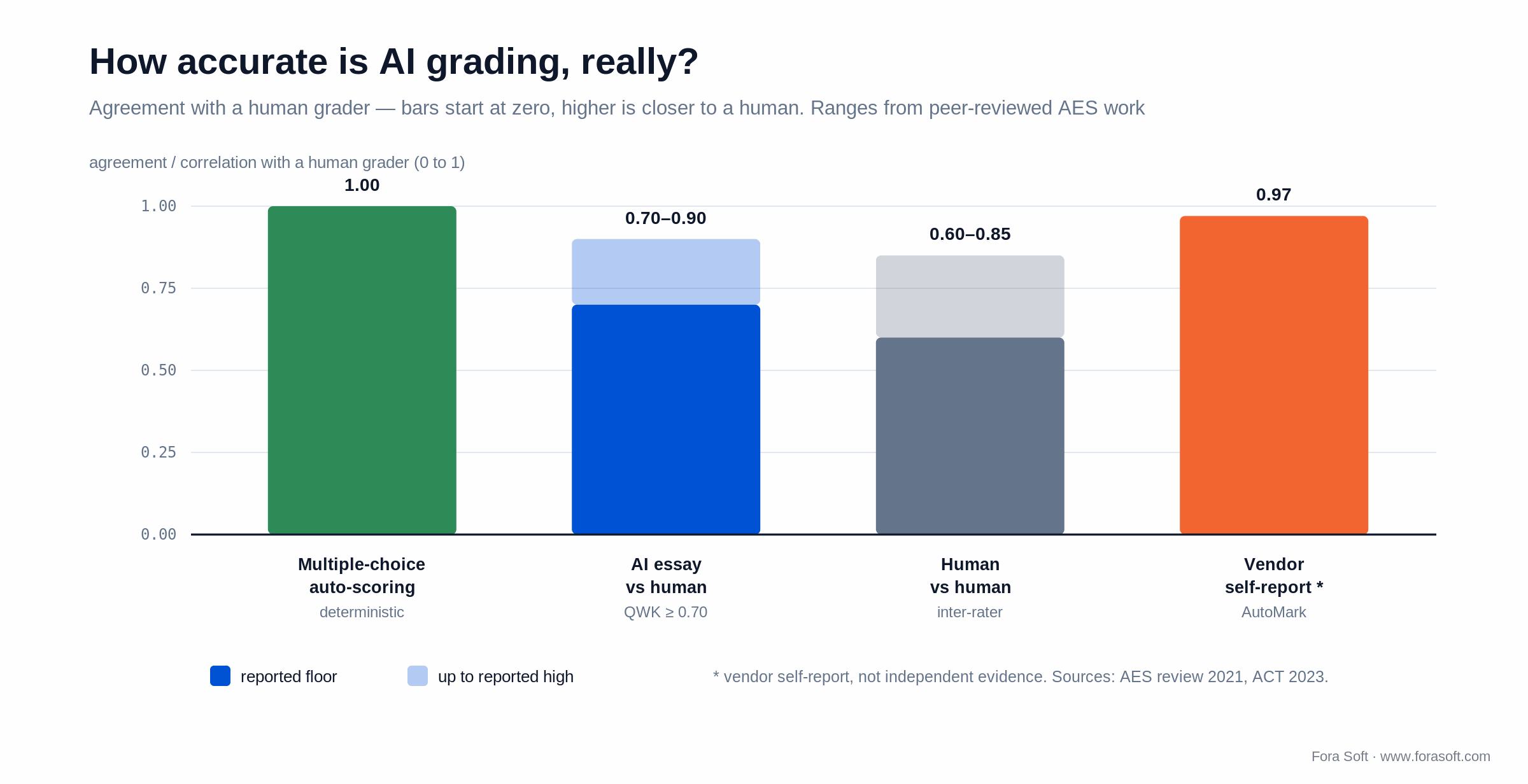
Figure 2. How accurate is AI grading, really? AI essay scoring sits about where two human graders do — the 97% vendor figure is self-reported, not independent.
Is AI quiz generation reliable?
Short answer: reliable for first drafts, not for unsupervised grading. Current models write factually sound questions most of the time, but wording and distractor quality still need a human pass. In a 2025 single-specialty study in JMIR Medical Education, experts rated 192 licensure-exam questions written by OpenAI o3 at 4.18 out of 5 for factual accuracy, but only 3.92 for wording and 3.60 for instructional usefulness — below the study’s “adoptable” bar of 4.
That matches what we see in production. The generator saves the writing time; the review step catches ambiguous stems, implausible distractors, and answers leaked in the question. How much review you need depends on the stakes:
| Stakes | Example | Review before students see it |
|---|---|---|
| Low (formative) | Warm-up game, exit ticket | Teacher skims the batch, deletes weak items |
| Medium (graded) | Unit test, homework for marks | Every item read and edited; answer key checked |
| High (certification) | Licensure, compliance exam | Subject-matter expert review plus item statistics from a pilot |
For the mechanics behind those checks — prompting, distractor generation and automatic validation — see our lesson on how automatic quiz and assessment generation works, and use the AI quiz generation review checklist for the review pass itself.
Use cases that drive tool choice
K–12 classroom. Engagement and formative assessment dominate. Wayground, Kahoot!, Newsela Formative, Edpuzzle. For most teachers, the best AI quiz maker for teachers is simply whichever of those three fits the lesson — Wayground for a quick game, Newsela Formative for standards-aligned checks, Kahoot! for live energy. Watch FERPA and minor-data rules; in the EU, watch the AI Act emotion-inference restriction if any product touches facial signals. Expect to write the classroom rules yourself: in a May 2026 Gallup and Walton Family Foundation survey, only 18% of US K–12 teachers said they had formal guidance on AI from administrators, and 34% had none.
Higher education. A mix of formative (Wayground, Kahoot!) and summative testing (Canvas, Blackboard, and Moodle assessments, often paired with ClassMarker, Eklavvya, or ProProfs). AI use is now mainstream: about 88% of students and 77% of faculty reported using AI in the 2026 Digital Education Council global surveys.
Corporate L&D. SCORM-ready tools (iSpring, ProProfs) with strong LMS integration; certification platforms (ClassMarker) for compliance training. AI question generation cuts course-update cycles sharply.
Marketing and lead-gen. ProProfs, Riddle, and Outgrow are built for branded quizzes with lead capture and CRM sync — a different job from assessment, but the same underlying tech.
EdTech product builders. If you sell to teachers, you embed quiz creation. Now the decision is build vs. integrate — which we cover next.
Build vs. buy: when to embed an AI quiz feature in your product
Three paths, and the honest answer is that most products should start on the first row and only move down when a real constraint forces it.
| Path | Wins when | Cost shape | Limit |
|---|---|---|---|
| Embed an off-the-shelf SDK | Quiz is a supporting feature, not core | Per-seat or per-quiz licence | Vendor branding, limited custom UX |
| Build on LLMs (GPT, Claude, Gemini) | Custom UX, item bank, your domain | Per-token + infra | You own quality, prompts, evals |
| Hybrid (LLM + curated item bank) | Regulated content, K–12, certification | Item-bank curation + LLM on demand | Highest quality, highest setup cost |
Reach for a custom build when: quiz is core to your product, you have a domain or regulatory reason an off-the-shelf vendor cannot meet, or you want a proprietary item bank that becomes a moat competitors cannot copy. Otherwise, embed and move on.
Reference architecture for an AI quiz feature
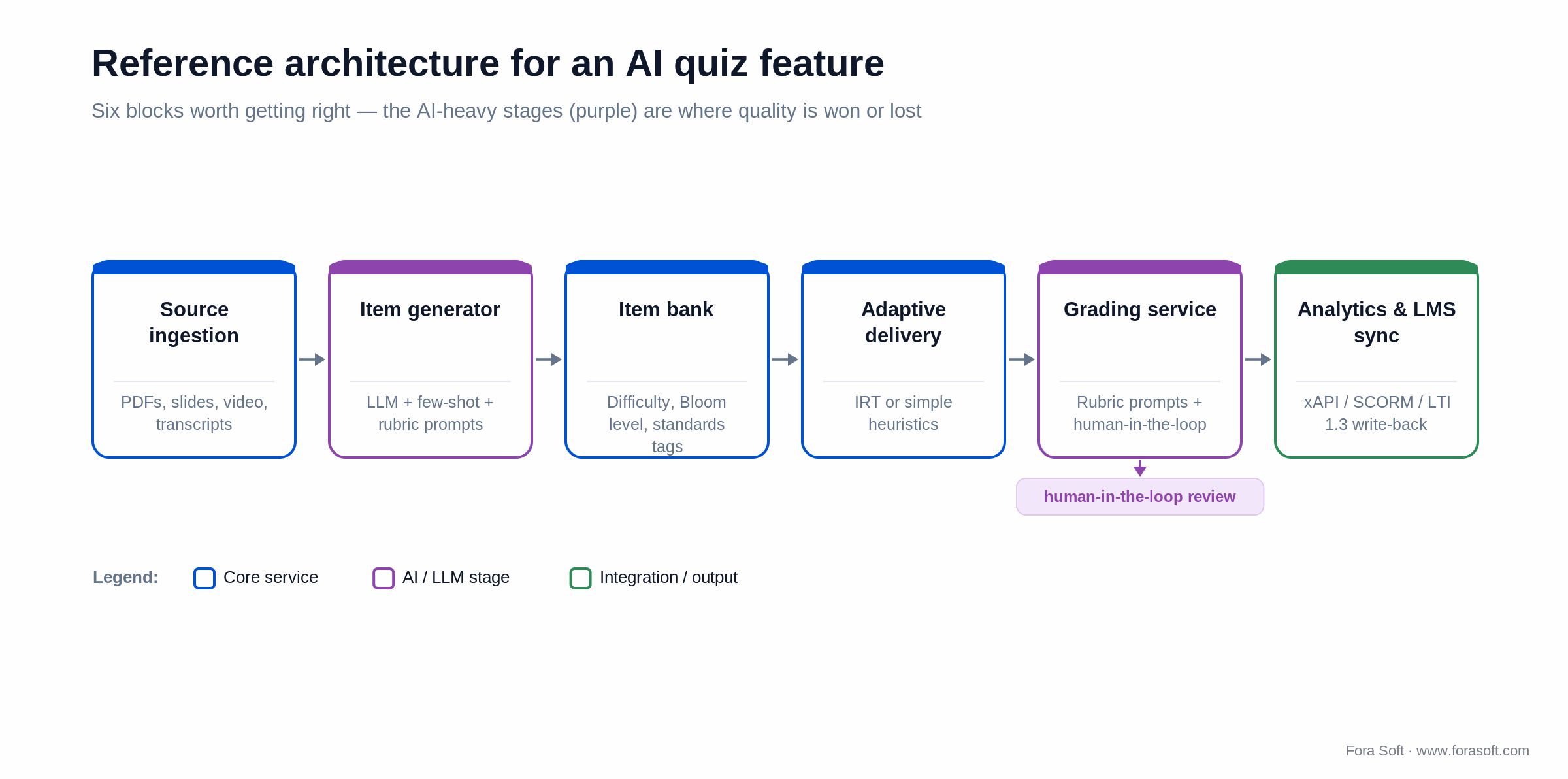
Figure 3. Reference architecture for an AI quiz feature — the AI-heavy stages (item generation, grading) are where quality is won or lost.
Six blocks are worth getting right: source ingestion (PDFs, slides, video, transcripts); the item generator (an LLM with few-shot examples plus a curated item bank); an item bank store with metadata — difficulty, Bloom level, standards alignment; an adaptive delivery engine (basic IRT or simpler heuristics); a grading service (rubric prompts, calibration, and a human-in-the-loop path when stakes are real); and analytics and LMS sync (xAPI, SCORM, LTI 1.3, and gradebook write-back).
Generation pipeline: from source to graded item
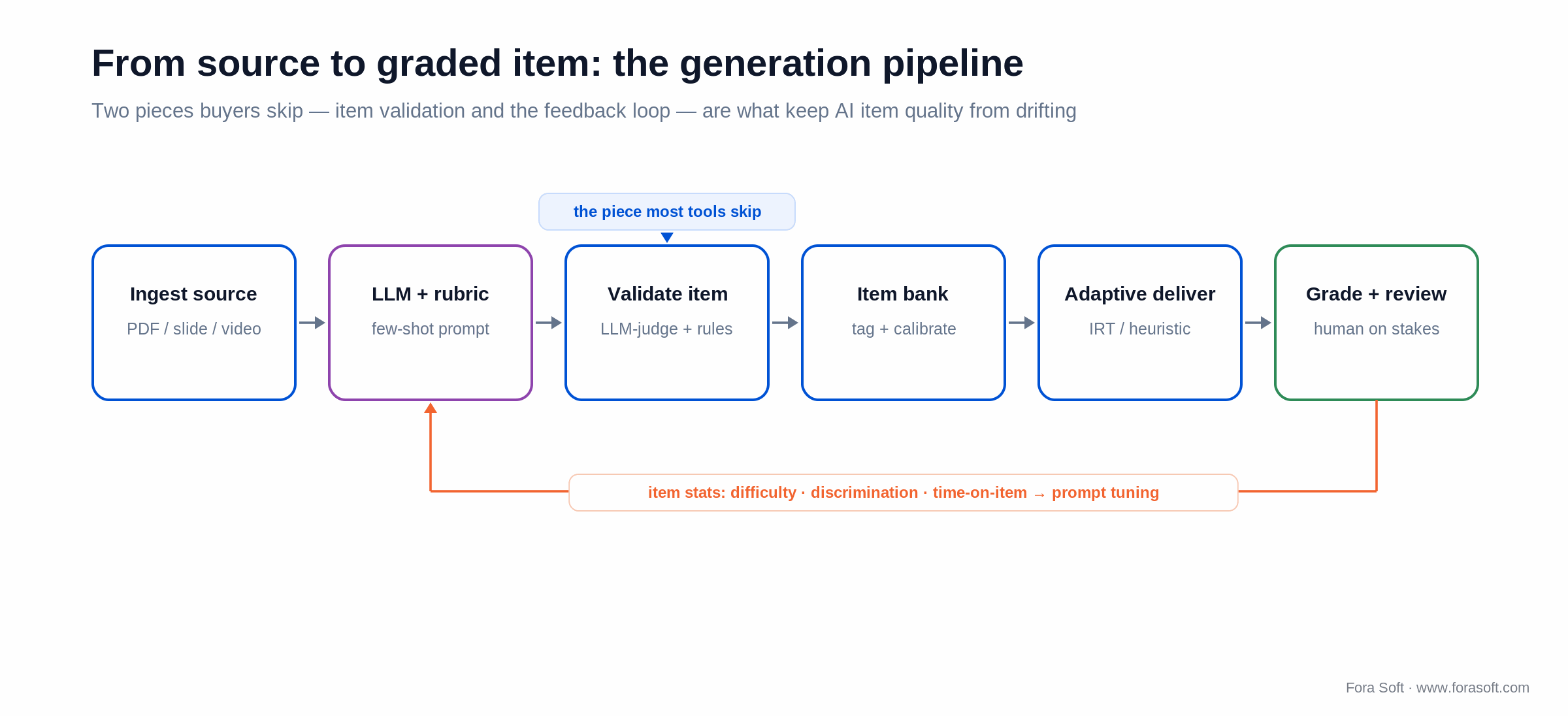
Figure 4. The generation pipeline — item validation and the feedback loop are the two pieces buyers skip and then regret.
Two non-obvious pieces separate a durable AI quiz feature from a demo. Item validation — an LLM-judge plus rule-based checks for ambiguous stems, implausible distractors, and answer leakage — culls weak items before they reach students. And the feedback loop: item performance metrics (difficulty index, discrimination index, time-on-item) flow back into prompt tuning and item-bank pruning. Skip that loop and AI item quality quietly degrades over a school year, one weak question at a time.
Compliance: FERPA, GDPR, COPPA, EU AI Act
AI quiz tools touch four overlapping regulatory zones. FERPA protects US student education records — vendors handling K–12 or higher-ed data must support FERPA-compliant handling, usually as a “school official” under the institution’s direct control; outside that exception, disclosures need consent from parents, or from the student once they turn 18 or enter higher education. COPPA covers under-13s, where verifiable parental consent and tight data minimisation are mandatory; the FTC’s amended COPPA Rule has been enforceable since 22 April 2026, adds biometric identifiers to personal information, and tightens security and retention duties. GDPR requires an explicit lawful basis for processing student data in the EU, and gives children’s data heightened protection with stricter consent (the digital-consent age is set between 13 and 16 by each member state). The EU AI Act classifies education and high-stakes assessment as high-risk, with bias-monitoring and human-oversight duties. The 2026 Digital Omnibus amendment moved those Annex III obligations from 2 August 2026 to 2 December 2027, while the Article 50 transparency duties — telling users they are dealing with an AI and marking AI-generated content — have applied since 2 August 2026. Under Article 5, inferring emotions from biometric data in schools and workplaces has been a prohibited practice since 2 February 2025, with penalties of up to €35M or 7% of global turnover live from 2 August 2025.
A practical procurement checklist: data residency (EU, US, or regional), encryption at rest and in transit, sub-processor disclosures, a retention policy, a parental-consent flow for under-13s, audit-log access, model-bias documentation, and a documented appeal path for any AI-graded outcome that affects a student’s record. If proctoring is on the list, our guide to online proctoring and anti-cheating options in 2026 covers which methods survive these rules.
Accessibility: WCAG, dyslexia, time extensions, screen readers
An AI quiz tool that does not work for students with disabilities is a non-starter for most public-sector buyers. The bar is WCAG 2.2 AA at minimum: full keyboard navigation, screen-reader-friendly markup (no quiz UI that hides answers from assistive tech), sufficient colour contrast, captions for embedded video, and text that resizes without breaking layout. In the US, public schools and universities also fall under the DOJ’s ADA Title II rule, which requires WCAG 2.1 AA for web content and apps; an April 2026 interim final rule moved the deadlines to 26 April 2027 for entities serving 50,000+ people and 26 April 2028 for smaller ones (Campus Technology, 2026).
For students with documented needs, the platform must support per-student time extensions, dyslexia-friendly fonts (OpenDyslexic, Lexie Readable, Atkinson Hyperlegible), a high-contrast mode, and AI-generated alt text for image-based items. Build accessibility as a first-class feature, not a Q4 audit ticket — it is also a sales advantage in higher-ed and EU public-sector procurement.
Cost model: realistic ranges
Worked example for the middle row: a custom AI quiz generator on top of an LLM. Assume 8 weeks and a two-person team. Engineering at a blended $6k/week for the whole team is about $48k; add item validation, an evaluation suite, and QA, and you land in the $50k–$130k range shown in the table below. Token cost to generate and validate, say, 10,000 items at roughly $0.02 each is about $200 — a rounding error next to the build, which is why the table sizes the build, not the tokens. Ranges assume our Agent Engineering delivery model — AI-assisted implementation that compresses the build calendar — which is why they sit below typical agency quotes; when we are unsure of a number, we leave it out rather than pad it.
| Scope | Duration | Build cost | Run-rate |
|---|---|---|---|
| Wayground/Kahoot embed via LTI | 2–3 weeks | $10k–$25k | Vendor licence per seat |
| Custom AI quiz generator on an LLM | 6–10 weeks | $50k–$130k | Per-token + infra |
| Adaptive testing engine + item bank | 10–16 weeks | $90k–$220k | Curation team + LLM |
| High-stakes / certification (proctoring + audit) | 5–9 months | $200k–$500k | Compliance + revalidation |
Hit a wall on AI quiz quality or LMS integration?
We have shipped quiz, assessment, and proctoring features into LMSes and learning products at global scale. Bring us your numbers and we will size the build honestly.
LMS, SCORM, LTI 1.3, xAPI: where the integrations live
Quiz tools rarely live alone — they plug into a Learning Management System and an analytics store. LTI 1.3 with the LTI Advantage services (Deep Linking, Assignment and Grade Services, Names and Role Provisioning) is the modern interoperability standard: single sign-on, content selection, and gradebook write-back, supported by Canvas, Moodle, Schoology, Brightspace, and Blackboard. If you ship a quiz product to schools, LTI 1.3 is the price of entry.
SCORM 1.2 / 2004 remains the lingua franca in corporate L&D — older but everywhere in compliance and certification stacks. xAPI (Tin Can) sends richer activity statements to a Learning Record Store and is the better choice for analytics-heavy surfaces. Caliper Analytics (1EdTech) is gaining traction in higher-ed for richer event modelling.
Practical rule: ship LTI 1.3 first if you sell into K–12 and higher-ed; ship SCORM and xAPI in parallel if you sell into corporate L&D. Caliper and OneRoster (rostering) are nice-to-haves once real customers ask for them. When the quiz engine lives inside your own platform, our custom LMS development team builds the LTI 1.3, SCORM 2004 and xAPI layer together with the course model and gradebook.
A decision framework: pick a tool in five questions
1. Who is the user? A teacher running a class → Wayground, Kahoot!, Newsela Formative. A trainer running corporate L&D → ProProfs, iSpring, ClassMarker. A product team embedding quizzes → an SDK or a custom build.
2. What are the stakes? Formative (engagement, learning) → Wayground, Kahoot!, Newsela Formative. Summative or certification → ClassMarker, Eklavvya, or a custom hybrid with proctoring.
3. Where does the data live? US, EU, or on-prem? FERPA, GDPR, COPPA, and the EU AI Act mean you verify vendor data residency and audit posture before you pay.
4. How often does content change? Static curriculum → pre-generate an item bank, audit it, ship. Frequently updated content (news, regulation, code) → on-demand LLM generation with a validator in front of it.
5. Are minors involved? If yes, COPPA, FERPA, and the EU AI Act apply at full force; emotion-inference proctoring is off the table (in the EU it is banned in education for learners of any age); and explicit parental consent flows are not optional. When these questions get hard, that is usually the moment to talk to an engineering partner who has shipped this before.
Pitfalls we keep seeing
1. Trusting AI-generated items without review. Even good generators produce a meaningful share of ambiguous or leakage-prone items. Always run human review for graded assessments — the review cost is part of the AI cost, not a nice-to-have.
2. Ignoring item statistics. Track difficulty index, discrimination index, and time-on-item; prune low-discrimination items quarterly. Without that loop, item quality slides across a school year.
3. Over-relying on auto-grading for essays. Around 0.70–0.90 agreement with a human is strong, but that gap on a high-stakes essay is a complaint waiting to happen. Pair AI grading with sample human review and a clear escalation path for appeals.
4. Privacy and compliance shortcuts. Storing minor responses on a US-only LLM endpoint when your customers are EU schools breaks GDPR. Solve it at procurement, not after launch.
5. Forgetting accessibility. WCAG conformance, screen-reader compatibility, dyslexia-friendly fonts, and time extensions. Ship accessibility as a core feature, not a Q4 ticket.
KPIs: what to measure
Quality KPIs. Item difficulty index in a healthy range (0.3–0.85), discrimination index ≥ 0.3 on operational items, AI-item review acceptance rate (target ≥ 80% accepted with light edits), and AI–human agreement on essay items (quadratic weighted kappa of at least 0.70 and within 0.10 of human–human agreement before you reduce human review sampling).
Business KPIs. Quizzes created per teacher per week, attach rate to lessons, completion rate, time saved per quiz, teacher NPS, and gross retention. Vendor benchmarks help calibrate targets — Edcafe AI, for instance, self-reports a 29% engagement lift — but hold them as claims, not guarantees.
Reliability KPIs. P95 quiz-load time, real-time delivery success rate, LMS sync success rate, and time-to-rollback for an item-bank version.
Mini case: AI quizzes inside a global virtual classroom
Situation. An all-in-one e-learning platform — BrainCert — needed inline quiz creation, adaptive delivery, and AI auto-grading inside its virtual-classroom and course modules, across multiple regions and language pairs, without breaking its assessment and proctoring guarantees.
Approach. An LLM-based item generator with rubric prompts; a curated item bank for high-stakes content; an adaptive engine with IRT-style heuristics; auto-grading on short answers and essays with a human escalation path; LTI and SCORM export to host LMSes; and data residency configured per tenant.
Outcome. The platform grew to roughly $3M ARR in 2024 (up 58% year over year), serving 100K+ customers and delivering 500M+ classroom minutes, and it scaled into corporate certification and K–12 verticals on the same engine. The same shape works for any LMS, course platform, or product team adding quiz capability; when quizzes have to run inside live lessons, our virtual classroom development team builds that layer on WebRTC with LTI 1.3 and SCORM 2004 hooks. Want a similar build?
When NOT to use AI-generated quizzes
Skip AI generation when (a) the assessment is high-stakes — board exams, professional certification — without a curated, psychometrically validated item bank behind it; (b) you cannot afford the human review cycle that AI-generated items still require; (c) compliance constraints (regulated proctoring, the EU AI Act) eliminate the vendor list; or (d) the audience is too narrow or specialised for an LLM to produce defensible items.
In those cases, the better answer is hand-curated items with AI-assisted authoring and analytics — the AI helps the writer, but the items stay human-authored. That is not a failure of the technology; it is knowing where its edge is.
Ready to scope an AI quiz feature for your product?
We will audit your content, recommend the right architecture, size the build with Agent Engineering, and come back with a one-pager for your board.
FAQ
What is the best AI quiz maker in 2026?
There is no single best. For classroom engagement, Wayground (formerly Quizizz) and Kahoot! lead. For real-time formative assessment with AI hints, Newsela Formative is strongest; for secure graded exams, use ClassMarker or Eklavvya. For an embeddable AI quiz maker inside your own product, Conker, MindStudio, or a custom LLM build are the practical options. Pick the category first, then trial two tools.
Is there a free AI quiz maker?
Yes — Wayground, Quizgecko, Fillout and Jotform offer free tiers that generate quizzes from a prompt or document; Kahoot!’s free plan hosts games, but its AI generator sits on paid plans. Free tiers usually cap input length, question types, or export, and rarely include the security and analytics you need for graded assessment, so treat them as a trial rather than a testing platform.
Can an AI quiz maker create a quiz from a PDF or my notes?
Most modern generators can. Wayground, Conker, Quizgecko, and MagicSchool build quizzes from an uploaded PDF, slide deck, document, pasted notes, or a YouTube link. The output is a solid first draft — review the questions for ambiguity and answer leakage before you use them for a grade.
How accurate are AI-generated quiz questions?
Mostly accurate on facts, weaker on wording. In a 2025 JMIR Medical Education study, experts scored OpenAI o3 exam questions 4.18 of 5 for factual accuracy but 3.92 for wording and 3.60 for usefulness, below the “adoptable” bar of 4. Treat AI generation as a first draft and review every item before a graded use.
Is AI essay grading reliable enough to deploy?
Peer-reviewed automated essay scoring agrees with human graders at roughly r 0.70–0.90 — about the same as two humans agree with each other. Vendors quote higher figures (AutoMark reports around 97%), but those are self-reported. For low-to-medium stakes, AI grading is enough; for binding decisions, pair it with sample human review and a clear appeal path.
Should I build a custom AI quiz feature or embed an existing tool?
Embed if quiz is a supporting feature and your customers accept vendor branding. Build if quiz is core to your product, you have a domain or regulatory reason vendors cannot meet, or you want a custom item bank that becomes a moat. Most teams should embed first and build only the differentiator.
What does an AI quiz feature cost to build?
An LTI embed integration is about $10k–$25k over 2–3 weeks. A custom AI quiz generator is $50k–$130k over 6–10 weeks. An adaptive engine plus item bank runs $90k–$220k over 10–16 weeks. High-stakes certification with proctoring runs $200k–$500k over 5–9 months. Ranges assume our Agent-Engineering-accelerated delivery.
Are AI quiz tools safe for K–12 and compliant with the EU AI Act?
Yes, when you choose vendors with FERPA, COPPA, and (for the EU) GDPR compliance, and when you avoid emotion-inference proctoring in any education setting — Article 5 bans it for learners of all ages, and that specific practice has been prohibited in the EU since 2 February 2025, and the Act’s high-risk duties for education apply from 2 December 2027. Verify data residency, retention, and parental-consent flows at procurement, not after launch.
Which AI platforms auto-generate quizzes and formative assessments for higher ed?
Start with what your LMS already has: Canvas IgniteAI drafts quiz questions from course content, and Gemini in Google Classroom has a Generate a quiz tool. For formative checks on top, Wayground and Newsela Formative build quizzes from slides, PDFs and links; for proctored summative exams, pair the LMS with ClassMarker or Eklavvya.
What are the best tools for automated quiz feedback?
For written answers, Newsela Formative’s Luna assistant gives rubric-aligned feedback and AI hints that scaffold without revealing the answer. For objective items, every tool in this guide scores instantly and shows the correct answer. Inside your own product, the pattern is an LLM grading service with rubric prompts and a human escalation path.
What are the best platforms for analyzing quiz results?
For class-level checks, the built-in reports in Wayground, Kahoot!, Newsela Formative and your LMS are enough. To judge the questions themselves, track difficulty index, discrimination index and time-on-item. To combine results across tools, send xAPI statements to a Learning Record Store.
What to Read Next
EdTech
AI-Assisted Educational Content Creation
Beyond quizzes: how AI helps generate, adapt, and personalise content.
Tutoring
Intelligent Tutoring Systems for Educators
Adaptive learning systems and where AI tutors actually move the needle.
Personalisation
Personalised Learning Materials with AI
Adaptive learning patterns that pair naturally with AI quizzing.
Lesson plans
Automated Lesson Plan Generation Software
How AI builds and updates lesson plans — the upstream of the quiz.
Services
Fora Soft AI Integration Services
Our stack and a one-click path to scoping an EdTech AI build.
Ready to ship AI quizzes that students — and regulators — trust?
If you are a teacher, the answer is one of three: Wayground for engagement, Kahoot! for live games, Newsela Formative for real-time formative assessment. If you are a product team, embed via LTI for a fast win, or build on LLMs when quiz is a core differentiator and you have an item bank to protect quality.
Either way, the failure modes are predictable — weak items, drift, compliance, accessibility. Fora Soft has built quiz, assessment, and proctoring into LMSes and learning products, and Agent Engineering is what now lets us deliver in months. If that is the conversation you need, we are one call away.


The handbook · 7 volumes
Fora Soft Video Engineering Handbook
AI quizzes usually sit inside a larger learning product with lectures, recordings and live classes. Our seven-volume handbook covers that product's video stack, from encoding and delivery to audio and AI. Start with Volume 6 on the lifecycle of an AI feature and speech recognition for lecture content; Volume 4 covers accessibility and captions, and Volume 3 the players and delivery students see. Written by Nikolay Sapunov, CEO at Fora Soft.
Browse the handbook on Amazon →7 volumes · 9,000+ pages · Kindle & paperback
Get a second opinion on your AI quiz strategy
30 minutes with our EdTech lead, a clear scope, and honest advice on build vs. buy.

