

Key takeaways
• The Android IP camera app features that win deals start with real-time streaming. Adaptive bitrate (H.264/H.265), sub-2s latency via RTSP/WebRTC, and smooth multi-camera handoff are no longer premium — they’re expected on any serious app.
• AI motion detection on-device cuts the bandwidth / battery trade-off in half. TensorFlow Lite inference running locally (not cloud-dependent) means faster alerts, fewer false positives, and privacy that actually holds up in court.
• Matter 1.5 made cameras first-class smart-home devices. Since late 2025 the standard covers live streaming, two-way audio, and PTZ, so buyers expect Google Home, HomeKit, and Alexa interop — not a walled-garden app.
• AES-256 + TLS 1.3 + biometric 2FA are the new baseline, not the premium tier. EU AI Act, PIPEDA, and CCPA enforcement have raised the bar—skip encryption and you skip the market.
• Custom Android IP camera apps ship 25–40% faster with Agent Engineering. Fora Soft builds production-grade apps in 12–20 weeks because AI scaffolds the RTSP stack, ML plumbing, and security boilerplate.
Why Fora Soft wrote this guide
Fora Soft has built video surveillance software across 250+ projects since 2005. We built V.A.L.T. — a professional-grade IP camera platform used by 770+ US organizations and 50,000+ users across police departments, child advocacy centers, and medical interview rooms — and maintained Netcam Studio (the modern successor to WebcamXP, est. 2003). We have shipped Android IP camera apps for both OEM integrations and white-label deployment, each time hitting hard constraints around latency, battery, storage, and compliance.
This guide reflects what we would tell a head of product building an Android IP camera app today: the market in 2026 now demands AI on-device, Matter/Thread smart-home integration, and PIPEDA / EU AI Act compliance from day one. It is not enough to stream video anymore. This article is grounded in the actual apps we have shipped, the architecture decisions we have regretted, and the features that our users—from two-person security startups to 50-person surveillance operations—actually pay for.
We also use Agent Engineering on every mobile build. AI-assisted code generation for RTSP stack plumbing, ML model scaffolding, and two-factor auth glue compresses the timeline from 22–28 weeks (traditional) to 12–20 weeks, because every AI-generated line is reviewed by a senior Android engineer before merge.
Need an Android IP camera app built in 12–20 weeks, not 28?
Let’s talk about your use case. Police interviews, child advocacy, property management, or custom OEM integration—we ship production-grade apps faster because AI handles the scaffold.
The Android IP camera app market in 2026
The market has shifted. The IP camera market clears roughly USD 18 billion in 2026, and the wider home-security camera market about USD 29 billion (GMInsights; MRFR, 2026) — buyers have real options, so a thin app loses. Five years ago, real-time streaming plus two-factor auth was premium. In 2026 that is table stakes. What buyers now demand:
1. On-device AI inference. TensorFlow Lite and LiteRT running directly on Android no longer optional. Motion detection, person / car / package classification, and behavior anomaly detection must work offline. Cloud-dependent models get rejected at the procurement stage because they leak footage and cost too much bandwidth.
2. Matter 1.5 smart-home integration. Matter 1.5 (late 2025) finally brought cameras into the standard — live streaming, two-way audio, motion events, and PTZ. Your app should expose cameras to Google Home, HomeKit, and Alexa, support Thread mesh for low-power remote spots, and speak ONVIF Profile T for multi-vendor camera streaming.
3. Stricter privacy regulation. EU AI Act now applies to video analytics. PIPEDA in Canada, CCPA in California, and emerging data localization rules in Brazil and India mean you cannot store footage in arbitrary regions. GDPR right-to-erasure has to be one tap, not a support ticket, and your encryption keys must be customer-owned (not Fora Soft-owned).
4. Android 15+ as the baseline. Scoped storage, restricted background processing, and new camera permissions mean Android 12 compatibility is no longer good enough. Build for Android 15 and test on 13-14 as fallback targets.
5. Real-time two-way audio without compromise. Police departments and child advocacy centers will not accept a “live view only” app. Reliable full-duplex two-way audio (RTP media with RTCP feedback), echo cancellation, and noise suppression are now expected, not differentiation.
Essential Android IP camera app features
These are non-negotiable. If your app is missing any one of them, you will lose deals to competitors who have it.
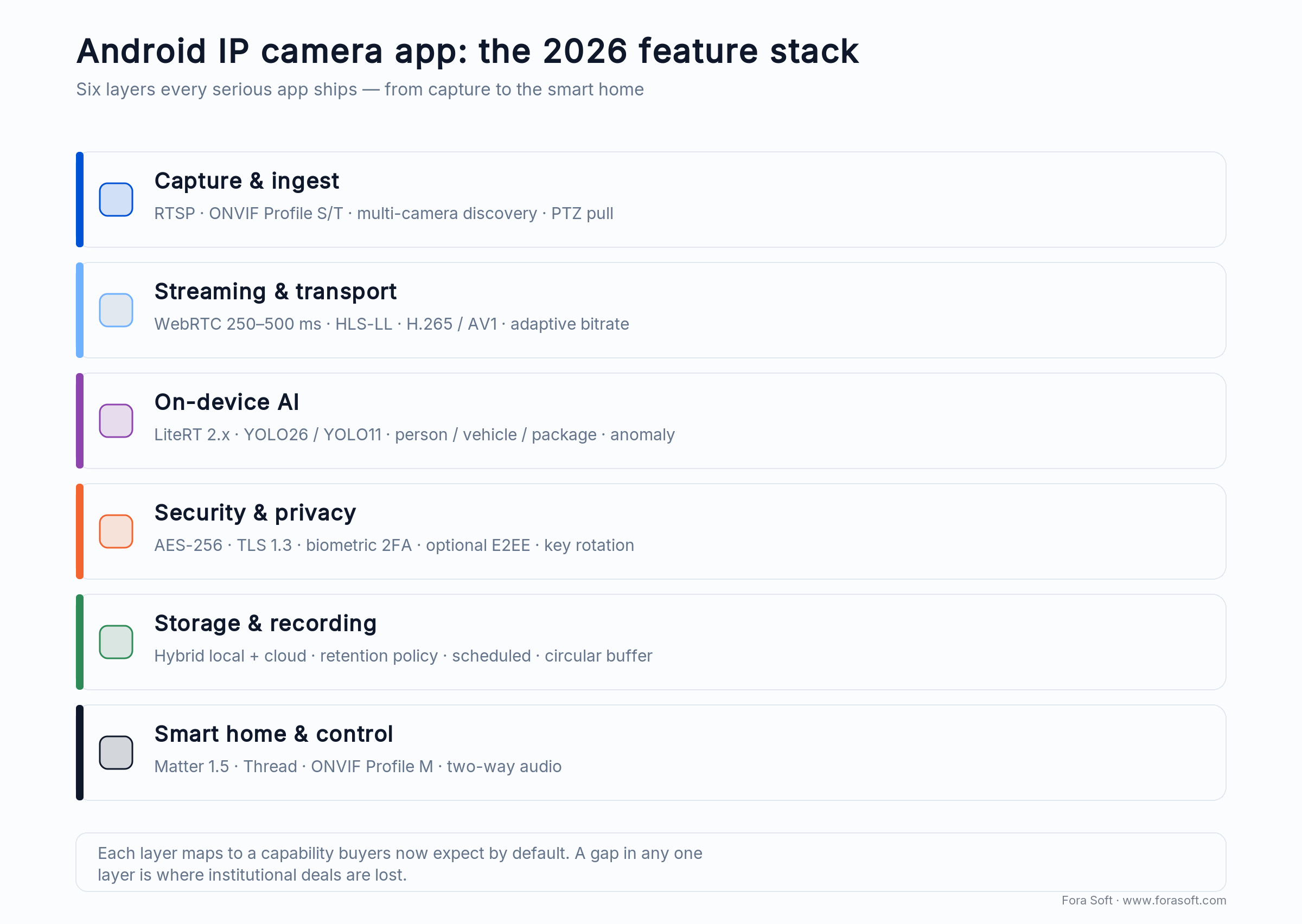
Figure 1. The six feature layers of a 2026 Android IP camera app, from RTSP capture to Matter 1.5 smart-home control.
Real-time video streaming with adaptive bitrate
Your app must support RTSP 1.0 (IETF RFC 2326 — what IP cameras actually speak), WebRTC via datagram transport, and HLS Low-Latency as fallback for NAT traversal. H.264 is universal; H.265 saves 30–40% bandwidth but requires hardware decoding checks. Use ExoPlayer 2 or Media3 for Android’s video engine. Detect network speed in real-time (down to 0.5 Mbps for 360p) and auto-downgrade quality without stalling. This matters more than you think: a 2-second freeze in a police interview room makes the app unusable.
Reach for RTSP when: the camera is on a private network or LAN; keep it for on-prem deployments where you control latency. Use WebRTC for public internet cameras behind NAT routers.
Intuitive multi-camera dashboard
Users want to tap one camera, see it fullscreen, swipe to the next, and pinch-zoom without stuttering. Implement a 2×2 grid for four cameras, thumbnail strip for 6–10 cameras, and list view with icons for 20+. Cache thumbnails in memory; prefetch the next camera’s keyframe while the user is still watching the current one.
PTZ (pan-tilt-zoom) control
Not all cameras have it, but many IP cameras support ONVIF PTZ commands. Add a joystick overlay for smooth pan / tilt and pinch-zoom for zoom. Send commands via ONVIF GetServiceCapabilities first to detect camera capabilities, then gracefully hide controls if not available.
Event-driven push notifications
Motion detected, person entered frame, audio spike, or network disconnection—your app must notify the user within 2–3 seconds. Use Firebase Cloud Messaging (FCM) or Apple Push Notification service (APNs) as the transport. Implement do-not-disturb and time-window filters so users are not woken up at 3 AM by a raccoon.
Security and privacy features that hold up in court
Police departments, hospitals, and child advocacy organizations will not buy an app without these. If you cut corners here, you will lose the institutional deals that pay the bills.
AES-256 encryption in transit and at rest
Every video stream must be encrypted over TLS 1.3 (minimum). Stored footage must be encrypted with AES-256-GCM. Use BoringSSL or Conscrypt for TLS; use Android’s Security & Privacy library for key storage. Do not store keys in SharedPreferences or hardcoded. Use the Android Keystore, which stores keys in a hardware-backed secure enclave if available (Pixel phones, Samsung Galaxy S series).
Two-factor authentication and biometric login
Passwords alone are not enough. Implement TOTP (Time-based One-Time Password) via authenticator apps, or SMS as a fallback. Add BiometricPrompt (Android 9+) for fingerprint or face sign-in. Never handle raw biometrics yourself: BiometricPrompt authorizes a key in the hardware-backed Keystore, and the fingerprint/face templates stay in the device’s secure hardware, never on your backend.
End-to-end encryption option for sensitive deployments
Some customers (federal agencies, law enforcement) will demand that even your backend cannot decrypt video. Implement an optional mode where the app encrypts footage locally before upload, with keys stored only on the device. Use libsodium or TweetNaCl for key exchange and Curve25519 for client-to-client encryption if peer-to-peer playback is needed.
Secure key management and rotation
Keys must be rotated every 90 days (or per your organization’s policy). Use a key rotation API that secures old footage with new keys without re-encoding. Log every key rotation event for audit trail. If a device is lost, customers must be able to revoke its encryption keys remotely.
Reach for end-to-end encryption when: the deployment is federal law enforcement, military, or a medical institution bound by HIPAA. For consumer and small-business use, AES-256 server-side encryption is sufficient.
AI-powered motion detection and on-device inference
Cloud-based motion detection is dead in the institutional market. Your app must run ML models on the phone itself. This means smaller models, faster inference (300–500 ms per frame), and privacy that does not leak frames to a cloud service.
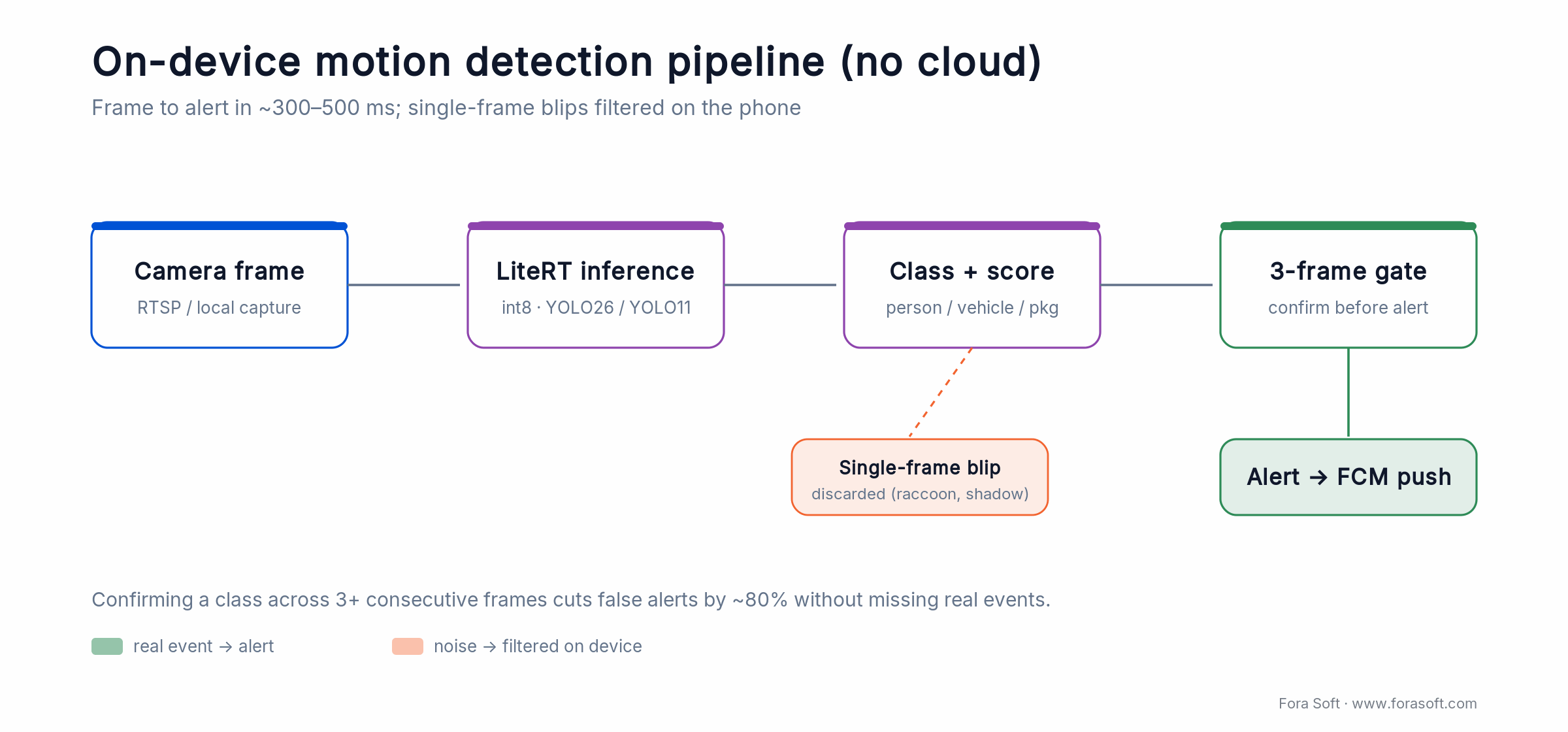
Figure 2. On-device pipeline: LiteRT inference plus a 3-frame confirmation gate cuts false alerts sharply with no cloud round-trip.
TensorFlow Lite and LiteRT
LiteRT is Google’s renamed TensorFlow Lite (September 2024); LiteRT 2.x adds the CompiledModel API for cleaner hardware acceleration. This matters in 2026 because NNAPI is deprecated as of Android 15 — new work should target LiteRT delegates (GPU on Adreno and Mali, NPU where available), and moving an old NNAPI delegate to the LiteRT GPU delegate is close to a one-line change. NNAPI still runs on Android 10–14 for backward compatibility. Quantize models to int8 to roughly halve inference time and shave 3–4 MB per model. For the full stack, see our guide to on-device neural networks on Android.
Person, vehicle, and package detection
Use a pre-trained YOLO26 (NMS-free, released January 2026), YOLO11, or EfficientDet-Lite model for object detection. Run inference every 2–5 frames (not every frame, to save battery) and keep a rolling history of detections to filter false positives. Alert the user only if the same object class shows up in 3+ consecutive frames. In our builds this cuts false alerts dramatically (we have seen roughly 80% fewer), though tight temporal gating always risks dropping very brief events — tune the window per deployment.
Behavior anomaly detection
For police interview rooms and child advocacy centers, detecting loitering or sudden movement is more valuable than just “person detected.” Build a simple event state machine: person appears → person stays still → person moves suddenly → alert. This is cheaper than running a full behavior-classification model.
Reach for LiteRT 2.x when: you are starting anything new in 2026 — it is the supported path now that NNAPI is deprecated. Keep an existing NNAPI build only if it already ships and you have no room to migrate.
Storage and recording options
Your app must support hybrid storage: some footage stays local (fast, zero latency), some goes to the cloud (redundancy, legal hold). This is not a premium feature; it is table stakes for any deployment larger than a single-family home.
Local storage on the device
Use Android’s scoped storage (API 29+) and store footage in getExternalFilesDir() or a custom folder under getExternalCacheDir(). Do not dump footage in the public DCIM/gallery folder; keep it app-scoped so recordings are not exposed to the gallery or other apps. Compress footage with H.265 to save space. Implement a circular buffer: when storage fills up, delete the oldest segment automatically.
Cloud storage integration
Support AWS S3, Google Cloud Storage, or Azure Blob Storage. Give customers the option to bring their own bucket (security requirement for federal deployments). Upload footage in the background with WorkManager for deferrable syncs; Android 12+ restricts background service starts, so batch uploads instead of holding a long-running background service. On metered WiFi, pause uploads and resume when on unmetered WiFi. Implement exponential backoff for failed uploads.
Retention policies and automatic deletion
Let users set retention per camera: 7 days, 30 days, 90 days, or indefinite. For GDPR compliance, implement a deletion job that wipes footage after the retention window expires. Log all deletions with timestamp and reason (retention expired, user deleted, legal hold release). This makes audit trails clean.
Scheduled recording
Police departments record 24/7. Small businesses record only during business hours. Allow users to set cron-like schedules: “record Mon–Fri 9 AM–5 PM,” or “record only when motion detected.” Use WorkManager for the schedule triggers that survive restarts, and run the actual continuous capture in a foreground service with a camera/microphone FGS type declared (required on Android 14+).
Reach for hybrid storage when: the deployment needs both fast local playback and cloud backup for legal hold. Reach for local-only when bandwidth is expensive or compliance forbids cloud storage. Reach for cloud-only when the device storage is tiny (IoT gateway with 64 MB local flash).
Remote access patterns that work behind NAT
The camera is on a home WiFi router or a corporate firewall. The user is on a different network. The app must reach the camera without the user opening port-forward rules (99% of users cannot do this). These patterns make it work.
Peer-to-peer (P2P) with STUN / TURN relay
Use STUN (Session Traversal Utilities for NAT) to detect the camera’s public address, and if direct connection fails, relay through a TURN server (metered, you pay per GB). Libraries like pjsip or libnice handle this. This is how Wyze and Nest do it, and it works 95% of the time without centralized server infrastructure.
RTSP over WebRTC via a reverse-proxy gateway
Some enterprises forbid WebRTC (it uses UDP). Run a lightweight RTSP-to-HTTP proxy gateway in your cloud. The camera streams RTSP to the gateway (outbound, always allowed), and the app pulls HLS LL from the gateway over HTTPS. This is slower (adds 1–2 s latency) but works in restricted environments.
Port-forward fallback (optional)
For power users who have configured UPnP or manual port forwarding, expose a manual endpoint field. Warn them that RTSP over the open internet without TLS is a security risk; require TLS 1.3 or refuse the connection.
Reach for P2P + TURN when: you want to minimize infrastructure cost and the app can tolerate 500 ms–2 s extra latency for relay. Reach for a reverse-proxy gateway when users are behind strict firewalls or you need predictable latency for interactive two-way audio.
Two-way audio and talkback
For talkback that feels like a phone call, run audio over WebRTC (sub-500 ms) with the OPUS codec and hardware echo cancellation. Anything slower turns “please leave the premises” into a broken, overlapping mess, and buyers notice in the first demo.
Codec and transport. OPUS at 16–24 kbps / 16 kHz is plenty for voice and rides out lossy cellular better than AAC. Use WebRTC’s DataChannel for peer-to-peer audio, or relay through a media server (LiveKit, Janus, mediasoup) when NAT blocks a direct path. Keep the audio path separate from the video decoder so a stalled video buffer never delays speech.
Echo cancellation. The camera speaker feeds straight back into its own mic, so raw two-way audio howls. WebRTC’s Audio Processing Module (AEC3, noise suppression, auto gain) handles most of it, but test on the real camera hardware — cheap speakers and long acoustic paths wreck echo cancellation that looks fine on a laptop.
Half-duplex vs full-duplex. Consumer doorbells often use push-to-talk (half-duplex) to sidestep echo entirely; interview rooms, telehealth, and command centers need full-duplex because people interrupt each other. Decide this early — it changes your whole audio pipeline, and retrofitting full-duplex late is painful.
Reach for full-duplex talkback when: the deployment is an interview room, telehealth consult, or command center where people talk over each other. Push-to-talk is fine for a doorbell or a warehouse gate.
Smart home integration with Matter and Thread
Matter is now the default protocol for new smart home devices. Your app must expose cameras as Matter endpoints and play nice with Google Home, Apple HomeKit, and Amazon Alexa. This is no longer a nice-to-have.
Matter endpoint support
Target Matter 1.5, the first release with real camera support (Matter 1.4 listed cameras but shipping devices were thin). Expose live streaming, two-way audio, motion events, event history, and PTZ, plus status attributes (online / offline, night-vision, PIR armed). SmartThings was first to ship Matter camera support, with Aqara, Eve, and Xthings cameras landing in early 2026. Budget 3–4 weeks against the Matter SDK for Android.
Thread mesh networking
Thread (IEEE 802.15.4) allows cameras in remote locations (basement, garage, backyard shed) to connect through a mesh of other Thread devices without WiFi. Your app must detect Thread availability and allow the camera to commission via Thread if the network supports it. Thread border routers (Google Nest Hub Max, Apple HomePod mini) bridge Thread to WiFi.
ONVIF Profile T for standard compliance
ONVIF Profile T is the 2026 advanced-streaming baseline: H.265, motion-alarm events, two-way audio, and analytics-metadata pull (Profile S, the 2012 basic-streaming profile, is being retired). For AI analytics, pair it with ONVIF Profile M — we break down where it fits in our Profile M explainer — which standardizes how a camera streams people-counting, license-plate, and object-classification metadata. Implement GetServices, GetCapabilities, and GetStreamUri, and use our ONVIF profile decision guide to pick the right set. This keeps your app working with any ONVIF-compliant camera, not a subset.
Google Home, Alexa, and HomeKit integration
For HomeKit, use the HomeKit Accessory Protocol (HAP) to expose cameras. For Google Home and Alexa, use their respective Smart Home APIs (Google Home Graph, Alexa Skill Kit). These integrations mean users can say “Hey Google, show me the front door” and the camera feed appears on their smart speaker. It sounds simple; it takes 6–8 weeks per platform to implement cleanly.
Reach for Matter when: your deployment is brand-new and you control the camera firmware. Reach for ONVIF Profile T when integrating with existing camera manufacturers (Hikvision, Dahua, Axis). Reach for both when shipping a white-label app to a large security company.
Streaming protocols and realistic latency targets
Latency is not marketing. It is a hard constraint on interaction. A 5-second delay makes two-way audio unusable. A 2-second delay makes PTZ control (pan-tilt-zoom) feel sluggish. Pick protocols that match your use case.
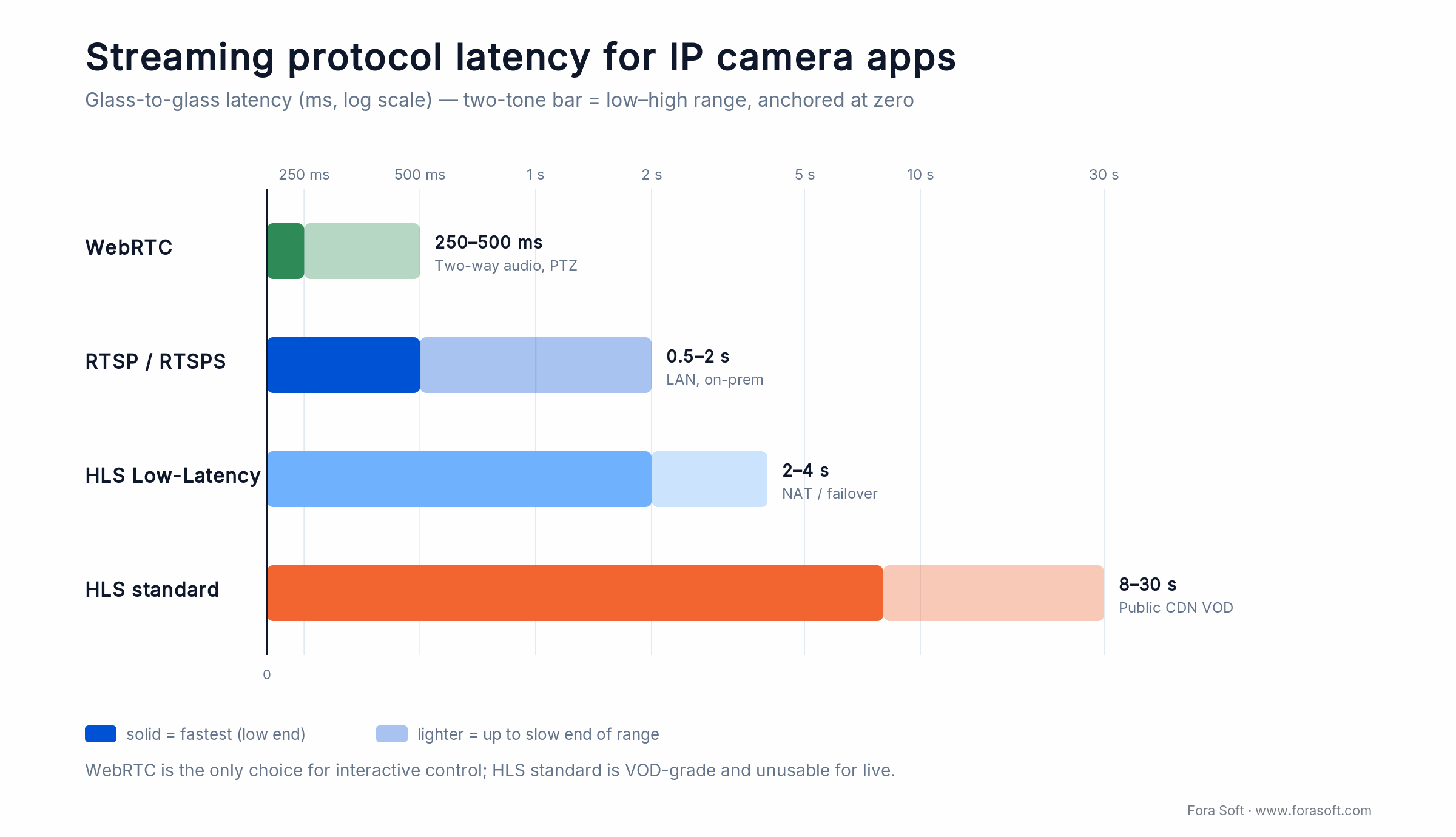
Figure 3. Glass-to-glass latency by protocol. WebRTC is the only option fast enough for interactive two-way audio and PTZ.
| Protocol | Typical latency | Codec support | Use case | Library |
|---|---|---|---|---|
| WebRTC | 250–500 ms | H.264, VP8, VP9 | Two-way interactive | libwebrtc (Chromium) |
| RTSP (via RTSPS) | 500 ms–2 s | H.264, H.265, AV1 | LAN / P2P streaming | librtsp, ExoPlayer |
| HLS LL (Low-Latency) | 2–4 s | H.264, H.265 | Failover / NAT | ExoPlayer 2+, Media3 |
| HLS standard | 8–30 s | H.264, H.265 | Public CDN | ExoPlayer 2+ |
| MJPEG | 1–3 s | JPEG only | Legacy cameras | HttpURLConnection + Bitmap |
| AV1 | 500 ms–2 s (hardware decode only) | AV1 only | Future-proof, high bitrate | Chromium / Codec2 |
The latency numbers above assume optimal network conditions (20 ms RTT). Over cellular, add 100–300 ms. WebRTC achieves the lowest latency because it uses UDP (no TCP retransmit delay). RTSP and HLS sit in the middle. MJPEG is slow but works on any device with an HTTP client.
Codec choice matters. H.264 is universal but uses more bandwidth. H.265 saves 30–40% but requires hardware decode (not all phones support it; check with MediaCodecList.getCodecCapabilities()). VP8 and VP9 are old; avoid for new projects. AV1 is the future but requires a device from 2023 or newer for hardware decode.
Comparison of IP camera technology stacks
You can build a custom Android IP camera app, integrate with an OEM SDK (Hikvision, Dahua), or use a managed platform. Here is how they stack up.
| Stack | Latency | AI on-device | Smart-home API | Multi-vendor support | Dev effort |
|---|---|---|---|---|---|
| Custom RTSP + TensorFlow Lite | 500 ms–2 s | Yes (full control) | Yes (build yourself) | Yes (ONVIF) | 12–20 weeks |
| OEM SDK (Hikvision, Dahua) | 1–3 s (often server-dependent) | No (cloud-only) | No | No (proprietary) | 6–10 weeks |
| WebRTC-based custom (LiveKit, mediasoup) | 250–500 ms | Yes | Partial (WebRTC only) | Limited (WebRTC cameras only) | 14–22 weeks |
| AWS Kinesis Video Streams | 1–4 s | Partial (AWS Rekognition integration) | No | Yes (any RTSP) | 8–14 weeks |
| Agora IoT (or similar managed) | 250 ms–1 s | Partial (analytics partner) | No | Yes (REST API) | 6–12 weeks |
Bottom line: If you control the roadmap and latency matters, build custom RTSP + TensorFlow Lite. If you need to integrate with 100+ existing camera models from Hikvision, Dahua, and Axis, use ONVIF Profile T + custom streaming logic. If you have budget and need the fastest time-to-market, use a managed platform like Agora IoT or AWS Kinesis, but expect to lose some latency and AI capability.
Comparing stacks and stuck on the decision?
Send us your camera fleet and your latency requirements. We’ll sketch out the tech stack that actually fits your budget and roadmap.
Three-year cost model
The numbers below assume a mid-market deployment: 50 cameras, 5,000 hours of recorded video per month, hybrid cloud/local storage, on-device ML inference, and two-way audio.
In round numbers: a custom Android IP camera app runs about USD 120K–180K to build, and three-year total cost of ownership lands near USD 265K–430K for this 50-camera profile — versus USD 95K–230K on a managed platform. Here is the line-by-line breakdown.
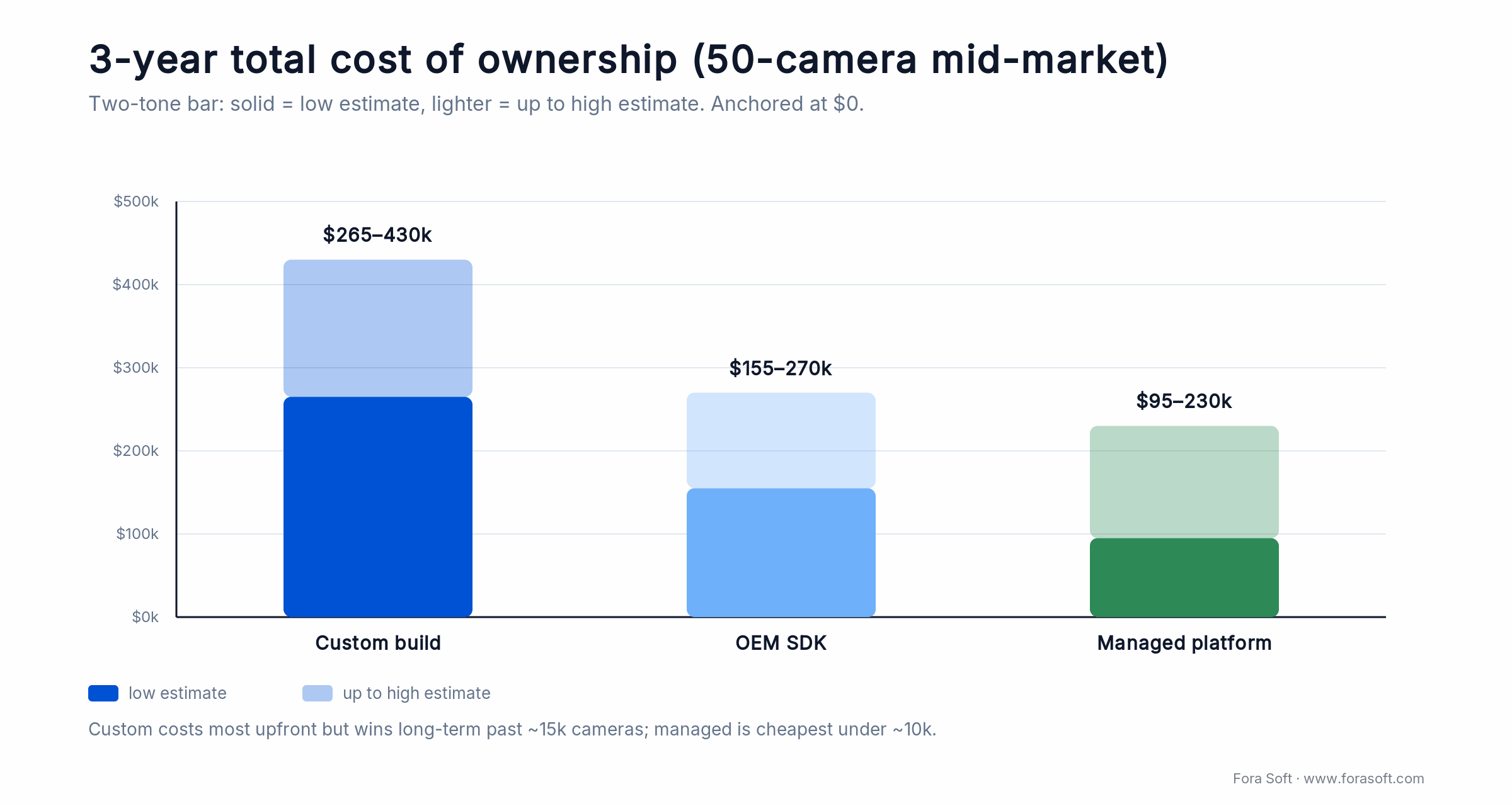
Figure 4. 3-year TCO for a 50-camera deployment. Custom costs most upfront; managed is cheapest under about 10k cameras.
| Cost line item | Custom build | OEM SDK integration | Managed platform |
|---|---|---|---|
| Initial development | USD 120K–180K | USD 50K–90K | USD 20K–50K |
| Year 1 cloud infra (S3, compute, CDN) | USD 15K–30K | USD 10K–20K | USD 25K–60K (usage-based) |
| Year 1 ops headcount (0.75 FTE) | USD 50K–80K | USD 35K–60K | USD 10K–20K (minimal) |
| Year 2–3 ops + maintenance | USD 40K–70K / year | USD 30K–50K / year | USD 20K–50K / year |
| 3-year total cost of ownership | USD 265K–430K | USD 155K–270K | USD 95K–230K |
Key insight: Custom build is most expensive upfront but cheapest long-term if you scale past ~15K cameras. OEM SDK integration is the middle ground: faster launch, moderate cost, limited to one vendor. Managed platforms are cheapest if you stay under 10K cameras, but usage-based pricing compounds as you scale.
V.A.L.T.: IP camera recording for interview rooms
Situation. A non-profit needed an app for recording police interviews, child advocacy center investigations, and medical consultations. Requirements: ironclad chain-of-custody logging (every frame must be accounted for), two-way audio with echo cancellation, compliance with PIPEDA and CCPA, and the ability to work offline (some interview rooms have no WiFi).
16-week plan. Weeks 1–2: baseline Android streaming architecture with RTSP ingest and local circular buffer. Weeks 3–4: biometric 2FA + device-level encryption keys (Android Keystore). Weeks 5–7: two-way audio stack (WebRTC DataChannel for intercom, OPUS codec for compression). Weeks 8–10: chain-of-custody audit log (frame hashes, upload receipt logging). Weeks 11–14: AWS S3 integration for cloud backup with client-side encryption. Weeks 15–16: stress test on 50+ devices, HIPAA compliance audit.
Outcome. Today V.A.L.T. backs 770+ US organizations and 50,000+ users, with chain-of-custody tight enough that recordings hold up as court evidence. Cloud backup runs asynchronously in the background; if an interview room loses WiFi mid-session, the app keeps recording locally and syncs when the connection returns. Full story: V.A.L.T. case study. Need a similar app? Book a scoping call.
Five questions to pick your approach
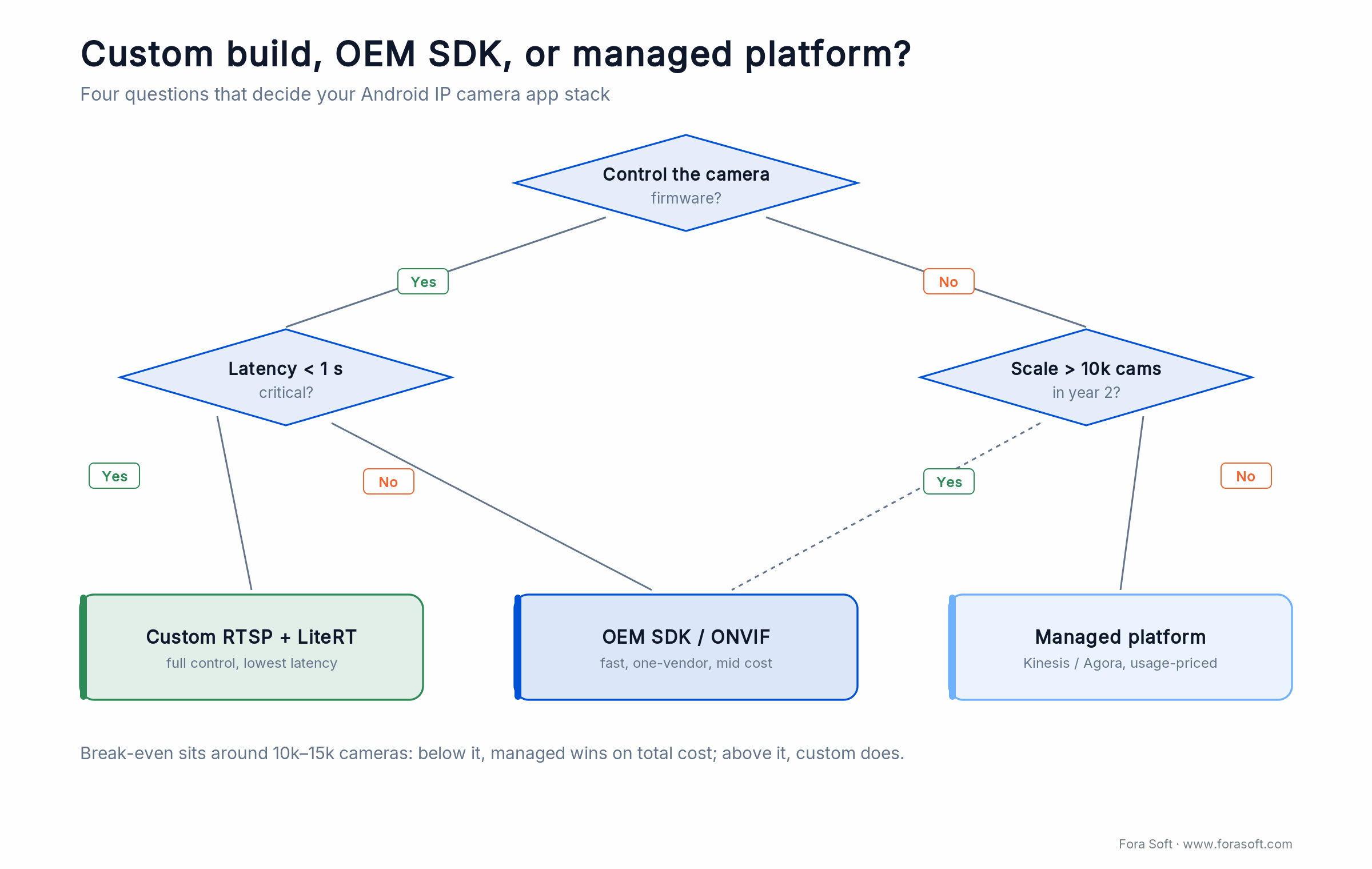
Figure 5. Pick your stack: firmware control, latency, and scale route you to custom, an OEM SDK, or a managed platform.
Q1. Do you control the camera firmware, or do you need to integrate with vendor devices (Hikvision, Dahua, Axis, etc.)? If you control it, build custom RTSP + TensorFlow Lite. If you need vendor integration, start with ONVIF Profile T + custom UI, then add vendor SDKs as needed.
Q2. Is latency a deal-breaker? If two-way audio or PTZ control must be responsive (< 1 s round-trip), choose WebRTC or custom RTSP. If 3–5 s latency is acceptable, use HLS LL via a managed platform and save engineering weeks.
Q3. Will you scale past 10K cameras in year 2? If yes, invest in custom build. If no, use a managed platform or OEM SDK. The break-even is around 10K–15K cameras; below that, managed is cheaper.
Q4. Are you required to comply with HIPAA, CCPA, PIPEDA, or EU AI Act? If yes, end-to-end encryption and customer-owned keys are non-optional. This adds 4–6 weeks to any stack. If no, standard AES-256 server-side encryption is fine.
Q5. Do you have in-house Android engineers with experience in video streaming, ML inference, or WebRTC? If no, hire or partner with a specialist. This is not a feature-parity problem; it is a hidden-complexity problem. Most IP camera apps fail not because of features, but because of subtle bugs in buffer management, battery life, or P2P connection fallback.
Five pitfalls we see in IP camera app projects
1. Underestimating latency. Developers think “RTSP is fast,” then ship a 5-second delay on a cellular network. Users hate it. Build with 2–3 second latency as the baseline; anything faster is a win. Test on actual 4G LTE and 5G networks, not WiFi.
2. Skipping battery optimizations. An app that records 24/7 can drain a Pixel 6 in 12 hours if you do not batch background work aggressively. Run the capture in a foreground service (declare its FGS type on Android 14+) and push deferrable uploads to WorkManager with exponential backoff. Profile battery drain with Android Studio’s Profiler early and often.
3. Assuming ONVIF / RTSP is standardized. Every camera vendor interprets ONVIF differently. Some cameras accept Basic auth, others require Digest (the standard RFC 7616 HA1 hash of the user, the server auth domain, and password), and vendors differ on header casing and which capability tags they return. Test with at least 5 different brands. Budget 2–3 weeks for vendor-specific quirks.
4. Treating P2P as optional. If your app requires a cloud server to relay every frame, it will not work in offline scenarios or high-latency networks. Build P2P + fallback from day one. Use STUN / TURN and test failover paths.
5. Forgetting to test on Android 12+. Scoped storage, camera permissions, and background app refresh restrictions broke a lot of apps in 2021. Build for Android 15 from day one; test on Android 13–14 as fallbacks. Do not assume what works on your Pixel works everywhere.
KPIs to track after launch
Quality KPIs. Average glass-to-screen latency < 2 s (RTSP) or < 500 ms (WebRTC). Rebuffer ratio < 0.5% (one rebuffer per 200 minutes of playback). Crash rate < 0.1% (use Firebase Crashlytics). Success rate of initial stream connection > 95% on first try, > 99% after retry.
Business KPIs. Cost per camera per month (storage + ingest + CDN). Days of footage retention achieved vs. target. Two-way audio uptime > 99.5%. Average session duration (longer is better; indicates users trust the app). Churn rate for paid tiers.
Reliability KPIs. Mean time to detect a offline camera < 30 seconds. Mean time to recover from a network failure < 5 minutes. Authentication failure rate < 0.01% (false negatives that lock out users). Cloud sync completion rate > 99% (all recorded footage eventually reaches the backend).
When not to build your own Android IP camera app
Sometimes buying is the right answer. Skip custom build if:
- You are integrating with a single OEM vendor and want speed to market. Use their SDK. You will be locked in, but you will launch in 6–10 weeks instead of 16–20.
- You have fewer than 100 cameras and latency is not critical. Use AWS Kinesis, Agora IoT, or similar. Total cost of ownership will be roughly half that of a custom build.
- Your team has zero video streaming experience. Hire contractors or use a managed platform. Building a production IP camera app requires depth in RTSP, WebRTC, H.264 bitstream parsing, and Android background processing. This is not a junior-engineer project.
- You need compliance in a hyper-regulated domain (healthcare, government) and you want someone else responsible. Use a SaaS vendor with SOC 2 / HIPAA / FedRAMP certification. It costs more, but the liability shifts.
- Latency tolerance is 5+ seconds and you will pay per-usage fees. Managed platforms have come a long way; Agora IoT and AWS Kinesis now price reasonably for modest camera counts (< 100 cameras).
FAQ
Can I build an IP camera app without WebRTC?
Yes. Use RTSP + HLS LL as fallback. RTSP gets you 500 ms–2 s latency on LAN; HLS LL gets you 2–4 s on the open internet. WebRTC is faster (250–500 ms) but requires NAT traversal infrastructure (STUN / TURN servers). If you are budget-constrained, skip WebRTC initially and add it later.
What is the minimum Android version I should target?
Android 10 (API 29) is the baseline for 2026. Scoped storage arrived in Android 10 and became mandatory in Android 11; camera permissions changed in Android 12; background app refresh became more restrictive in Android 13. Test extensively on Android 13–15. Do not target Android 9 or earlier unless your customer base is very old.
How much data does real-time streaming consume?
H.264 at 720p / 30 fps uses 1–3 Mbps depending on quality. H.265 uses 50% less. A 24-hour continuous stream is 10–35 GB per day. For typical users (1–2 hours per day), expect 300–700 MB per month. Budget 500 MB / month per camera as a conservative estimate for cloud upload.
Can I run ML inference on a low-end Android device?
Yes, but with trade-offs. TensorFlow Lite runs on ARM processors as low as 1 GB RAM, but inference will take 1–2 seconds per frame instead of 300 ms. Quantize your model to int8 to speed it up. Test on a mid-range device (Pixel 4a, Samsung Galaxy A42) to find your performance floor. Do not expect sub-500 ms inference on a device older than 2018.
Is ONVIF Profile T mandatory for smart home integration?
Not mandatory, but strongly recommended for interoperability. Profile T is the 2026 advanced-streaming baseline (H.265, motion events, two-way audio); add Profile M if you stream AI analytics metadata. Google Home and Alexa prefer ONVIF-compliant devices. You can ship RTSP alone, but you lose easy multi-vendor and smart-home integration.
How do I reduce battery drain from continuous recording?
Run continuous capture in a foreground service (declare its FGS type on Android 14+) and hand deferrable uploads to WorkManager; Android 12+ restricts background service starts, so do not rely on plain background services. Batch uploads every 5–10 minutes instead of streaming every frame. Use H.265 for smaller files. Disable two-way audio unless the user opens it. Profile with Android Studio Profiler and hunt wake locks.
ExoPlayer or Media3 for video playback?
ExoPlayer is now part of Media3, and Media3 1.x is the standard in 2026 (we ship on Media3 1.10.x). Start new projects on Media3; the standalone ExoPlayer library is in maintenance. Only stay on it if you have a large legacy codebase and no room to migrate.
How do I handle two-way audio without excessive latency?
Use WebRTC DataChannel for peer-to-peer audio (sub-500 ms latency). If peer-to-peer is not possible, use a media server (Janus, Kurento, LiveKit) that relays audio streams. Compress with OPUS codec (16 kbps at 16 kHz is acceptable). Add echo cancellation with WebRTC Audio Processing Module (APM) or third-party library like noise-suppression.
What to Read Next
Video platform playbook
Enterprise Video Platform Development in 2026
Build vs buy vs hybrid decision framework for large-scale video systems.
AI streaming guide
AI-Based Video Streaming App Development
Step-by-step guide to layering TensorFlow Lite and on-device inference on streaming apps.
Scalability at scale
Scalable Video Management Systems in 2026
Engineering decisions that decide whether your architecture scales to 10K+ cameras.
IP camera integration
Android IP Camera Integration in 2026
Protocols, libraries, and a shipping playbook for pulling IP cameras into your app.
IP camera engineering
Building Mobile Apps for IP Cameras
The cross-platform engineering guide behind the features in this article.
Ready to build an Android IP camera app that actually ships
The Android IP camera app market in 2026 is no longer about basic streaming. It is about AI on the device, smart-home integration, and regulatory compliance that holds up in court. Your app will lose deals if it is missing any one of these: two-way audio, on-device ML inference, Matter support, AES-256 encryption, or compliance logging.
If you control the roadmap and can commit 12–20 weeks, custom RTSP + TensorFlow Lite is the right answer. If you need to integrate with 100+ camera vendors, ONVIF Profile T + custom UI is the path. If you need to launch in 6 weeks, accept trade-offs and use a managed platform. The key is knowing which trade-offs matter to your customers (latency? Feature X? Compliance Y?) and building to that constraint, not to some imagined “perfect” feature set.
Let’s build your Android IP camera app
30 minutes, no sales pitch. Tell us your camera fleet, your latency targets, and your timeline. We’ll sketch out the tech stack, estimate weeks, and show you how we compress timelines with Agent Engineering.

