


Key takeaways
• The streaming software market splits four ways. Encoders (OBS, vMix, Streamlabs), cloud studios (StreamYard, Restream, Riverside), platforms (YouTube Live, Twitch, LinkedIn Live, Vimeo OTT), and SDK/PaaS (LiveKit, Agora, Daily, Mux, Cloudflare Stream, Wowza). You almost always pick one from each row, not one from the whole list.
• The protocol decides everything else. WebRTC for <500 ms interactive, LL-HLS for 2–5 s scalable, RTMP for legacy ingest, SRT for pro contribution, MoQ on the horizon (IETF draft-22 as of October 2026, no RFC yet).
• Free is not free at scale. OBS is free; vMix is a one-time licence from $60 to $1,200 (2026); cloud studios charge per stream/seat; PaaS charge per minute and per GB egress — the right answer depends on volume, not feature checklists.
• If you are building a product, look at SDK/PaaS first. Mux, Cloudflare Stream, LiveKit, Agora, Daily, AWS IVS — these are how you embed streaming inside an app rather than gluing a creator’s OBS workflow into your UX.
• Most failures are operational, not feature. Bitrate ladder, ABR rules, jitter buffers, geographic origin selection, and a real failover plan matter more than which encoder you pick.
Updated October 2026: re-verified 2026 pricing for vMix, Streamlabs, XSplit, StreamYard, Restream, Mux, Cloudflare Stream and AWS IVS; new webcasting section after Microsoft retired Teams Live Events on June 30, 2026; MoQ status at draft-22.
Why Fora Soft wrote this playbook
We have been building real-time video products since 2005 — live streaming, low-latency video calls, recording, encoding, and the back-of-house plumbing that holds it together. Our practice spans the full stack: WebRTC and SFU development, HLS/LL-HLS pipelines, RTMP/SRT contribution feeds, video CDN integrations, recording and replay, and AI-augmented streaming features.
A reference point we ship at scale: V.A.L.T, our HD video evidence platform, runs across 2,500+ cameras and 50,000+ daily users in 770+ US organisations — encoding, recording, encrypted storage, and replay all happen on one stack we built and operate. On the live side we built TradeCaster, a trader-livestreaming platform with 46,000+ users and sub-second latency, and Worldcast Live, HD concert streaming to roughly 10,000 concurrent viewers. That experience informs every recommendation in this guide.
If you are picking streaming software because you produce content, read the encoder and cloud-studio sections. If you are building a product that contains video streaming, jump to the SDK/PaaS section. The same vendor list is rarely right for both audiences.
Streaming software, sorted into the four real categories
Most lists that promise the best streaming software mash everything together. In practice the market sorts cleanly into four layers, and the right stack uses one from each layer.
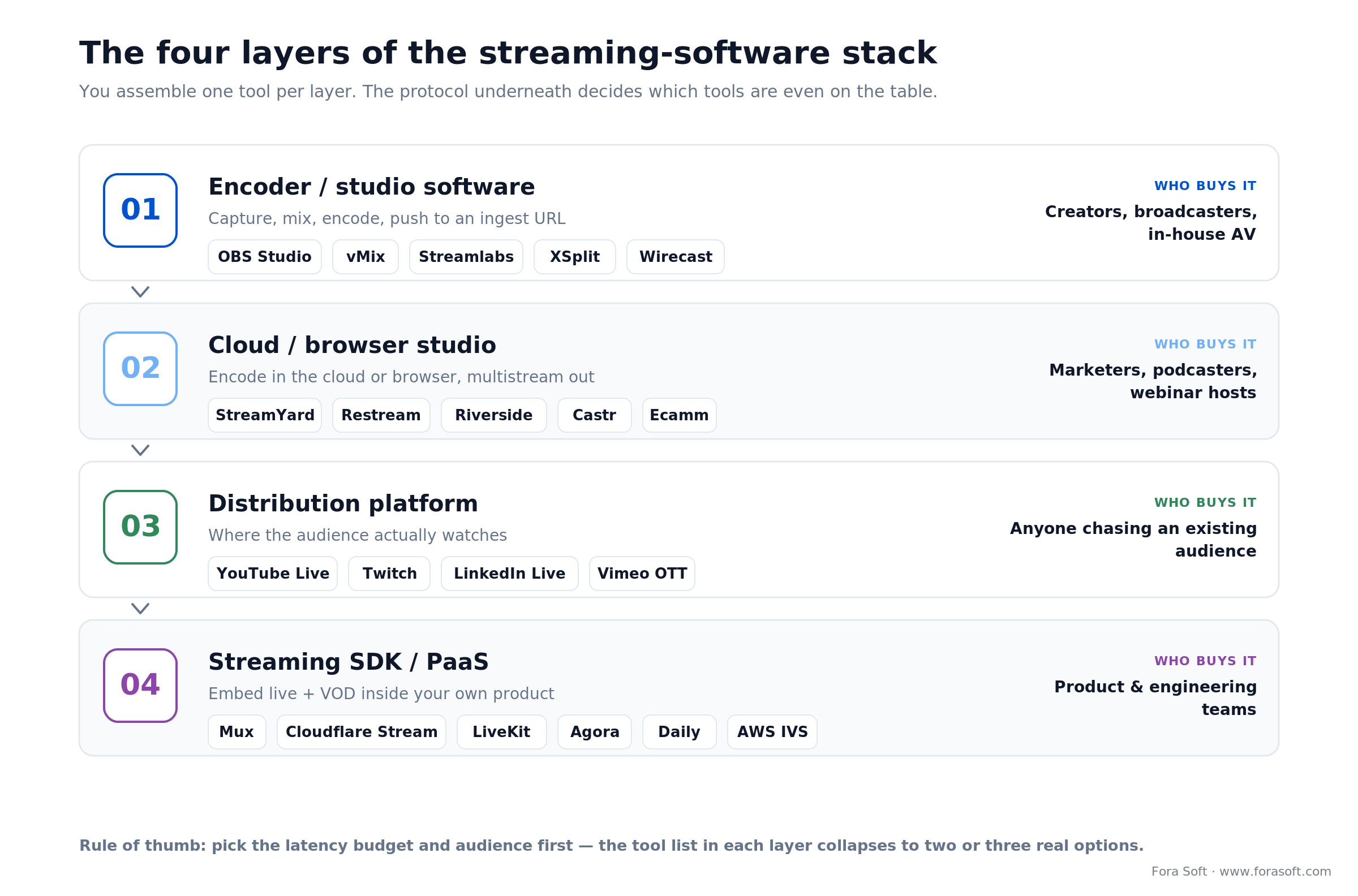
Figure 1. The four layers of the streaming-software stack — you pick one tool per layer.
| Layer | What it does | Examples | Buyer |
|---|---|---|---|
| Encoder / studio software | Capture, mix, encode, push to ingest | OBS Studio, vMix, Streamlabs Desktop, XSplit, Wirecast | Creators, broadcasters, internal AV |
| Cloud studio / browser studio | Encode in the cloud or browser, multistream | StreamYard, Restream, Riverside, Castr, Ecamm | Marketers, podcasters, small teams |
| Distribution platform | Where the stream lives for viewers | YouTube Live, Twitch, Facebook Live, LinkedIn Live, Vimeo OTT, Dacast, Brightcove | Content owners, publishers |
| SDK / PaaS for products | Embed live video into your own app | Mux, Cloudflare Stream, AWS IVS, Wowza, LiveKit, Agora, Daily, 100ms, Vonage Video, Zoom Video SDK | Product teams, software companies |
Building streaming into your product, not just hosting a stream?
30 minutes with our streaming-platform lead and you walk away with the right protocol, the right SDK, a cost ceiling per concurrent viewer, and an Agent-Engineering-accelerated timeline.
Desktop encoders compared (OBS, vMix, Streamlabs, XSplit, Wirecast)
| Tool | License | Strengths | Watch-outs |
|---|---|---|---|
| OBS Studio | Free / open source (v32.2, August 2026) | Plugin ecosystem, scripting, RTMP/SRT/WHIP output, multitrack video | Steeper learning curve; you own configuration |
| Streamlabs Desktop | Free; Ultra $189/yr (about $15.75/mo), 2026 | Templates, alerts, easier onboarding for creators | OBS fork; some performance/UX baggage |
| vMix | One-time: Basic HD $60, HD $350, 4K $700, Pro $1,200; Max $50/mo (2026) | Pro broadcast features, NDI, multi-camera, instant replay | Windows-only; complex UI |
| XSplit Broadcaster | Premium $14.99/mo, $59.99/yr or $119.99 lifetime (2026) | Polished UX, scene presets, virtual camera | Windows-only; thinner plugin ecosystem |
| Wirecast | Studio and Pro tiers (Telestream); software still sold, Gear hardware retired | Broadcast-grade, ISO recording, multi-stream presets | Heavier, niche, classic broadcast workflow |
Reach for OBS Studio when: you control the technical setup, want full plugin freedom, and care about cost. It is the workhorse the rest of the industry forks.
Reach for vMix when: you run live productions with multiple SDI/NDI cameras, need instant replay, and your team already lives in a Windows broadcast workflow.
What is the best free streaming software? OBS Studio. It is free and open source, runs on Windows, macOS and Linux, and pushes RTMP, SRT and, since version 30, WebRTC over WHIP. The 32.2 release (August 2026) added dynamic bitrate for multitrack video and an SDR-to-HDR filter, and dropped support for macOS 12. Streamlabs Desktop is also free, but its themes and alerts steer you toward the $189-a-year Ultra plan.
Cloud and browser studios (StreamYard, Restream, Riverside, Castr, Ecamm)
Cloud studios run the encoder for you. You log in to a browser, drop in guests, push to one or many platforms. They are the right answer for podcasts, webinars, marketing live streams, and anyone who wants to stop fighting OBS.
| Tool | Sweet spot | Pricing shape | Notable |
|---|---|---|---|
| StreamYard | Webinars, marketing live, multi-guest interviews | Free tier; Core $35.99/mo, Advanced $68.99/mo billed yearly (2026) | 3 destinations on Core, 8 on Advanced; custom branding |
| Restream | Multistream one feed to many platforms | Free (2 channels); Standard $19, Professional $49, Business $239 per month (2026) | Standalone studio + OBS push target |
| Riverside | High-quality podcast/interview recording, AI clips | Tiered subscription | Local recording, separate tracks |
| Castr | Multistream + low-latency CDN | Tiered subscription | Embed player + analytics |
| Ecamm Live | macOS broadcast for creators | Subscription | Tight Mac integration |
Riverside’s local recording is the same trick broadcast and podcast crews use, and once you need it next to crew roles, multi-stream switching and post-production storage, a seat-based studio stops being enough: our custom remote video production platform case study shows what that build cost and the four to six tools it replaced.
Reach for a cloud studio when: you want to go live from a browser with remote guests and push one feed to several platforms at once, and you would rather pay a monthly seat than babysit OBS on a production machine.
Distribution platforms: where the audience watches
YouTube Live, Twitch and Kick dominate consumer live; LinkedIn Live and Microsoft Teams town halls cover B2B; Vimeo (which agreed to a $1.38B acquisition by Bending Spoons in September 2025), Dacast, Brightcove, Kaltura, JW Live and IBM Cloud Video sit at the enterprise/OTT tier with white-label control. Pick by where the audience already is — not by feature checklist. The encoder is portable; the audience is not.
Webcasting software: what corporate webcasts run on in 2026
Webcast software runs a one-to-many broadcast for a company or institution, such as an all-hands, an investor call, a product launch or an accredited lecture, and wraps the video in registration, Q&A, polls and attendance analytics. Webcast production uses the same encoders as above (vMix, Wirecast, OBS Studio). What changes is the platform on top: Microsoft Teams town halls, Zoom Webinars and Zoom Sessions, ON24, Kaltura, Vimeo, or a branded player inside your own portal.
The 2026 change you cannot ignore: Microsoft retired Teams Live Events on June 30, 2026 and moved customers to Teams town halls; Live Events that were already set up stay supported until February 28, 2027 (Microsoft 365 Message Center, MC1226495). Any internal webcast that still pushes an external encoder into Live Events needs a migration plan now.
Pick webcast software by the job:
Internal all-hands on Microsoft 365 — Teams town halls, with vMix or OBS feeding RTMP when you need a produced show with graphics and several cameras.
Marketing webinars with lead capture — ON24, Zoom Webinars or Zoom Sessions, or StreamYard when a lighter studio is enough.
Multi-camera produced webcast — vMix or Wirecast on site, SRT or RTMP to the cloud, then LL-HLS to the audience.
Webcast inside your own product, LMS or member portal — an SDK or PaaS from the next section, or a custom build when you need your own branding, your own audience data and no per-seat licence.
Streaming SDK and PaaS for product teams
If you are building streaming into your own product, this is the layer that matters. Three sub-categories: HLS-first scalable streaming (Mux, Cloudflare Stream, AWS IVS, Wowza, JW Player, api.video), WebRTC SFU/MCU for low-latency interactive (LiveKit, Agora, Daily, 100ms, Vonage Video, Zoom Video SDK), and self-hosted broadcast servers (Wowza Streaming Engine, Ant Media Server, Red5 Pro, NGINX-RTMP, MediaMTX, Janus, mediasoup, Pion). Twilio Live is no longer an option: Twilio ended the Twilio Live API on November 30, 2023, so lists that still recommend it are out of date. When sub-second delivery is the deciding factor, our ultra-low latency streaming APIs comparison ranks these vendors by glass-to-glass latency and price per viewer-hour.
| Vendor | Best for | Latency | Pricing shape | Watch-outs |
|---|---|---|---|---|
| Mux | Polished HLS in product | 2–10 s | Basic encoding free; delivery from $0.0008/min at 720p after 100K free min/mo (2026) | Cost climbs at consumer-scale |
| Cloudflare Stream | Cheap egress, global edge | 2–10 s standard, <1 s with WebRTC ingest | $1 per 1,000 min delivered, $5 per 1,000 min stored; ingest and encoding free (2026) | Limited transcoding controls |
| AWS IVS | Low-latency interactive in AWS estates | ~3 s standard / sub-sec real-time | Input from $0.20/h; HD output $0.072 per viewer-hour; real-time $0.072 per participant-hour (US, 2026) | AWS lock-in |
| LiveKit | Self-hostable WebRTC, low-latency | <500 ms | Open-source + Cloud per-minute | You own ops if self-hosted |
| Agora | Global WebRTC SDK, voice-first | <500 ms | Per-minute, tiered | Pricing rises with concurrency |
| Daily | Embedded calls, recording, transcription | <500 ms | Per-minute | Per-participant-minute adds up in large rooms |
| Wowza Streaming Engine | Self-hosted, multi-protocol | 2–10 s HLS / sub-sec WebRTC add-on | Licence + your infra | Heavier ops |
| Ant Media Server | Self-host, low-latency CMAF/WebRTC | <500 ms WebRTC | Open-source + Enterprise licence | DevOps required |
The protocol decides everything else
Figure 2 maps the major streaming protocols by latency and scale. The protocol you choose constrains the software stack you can pick from.
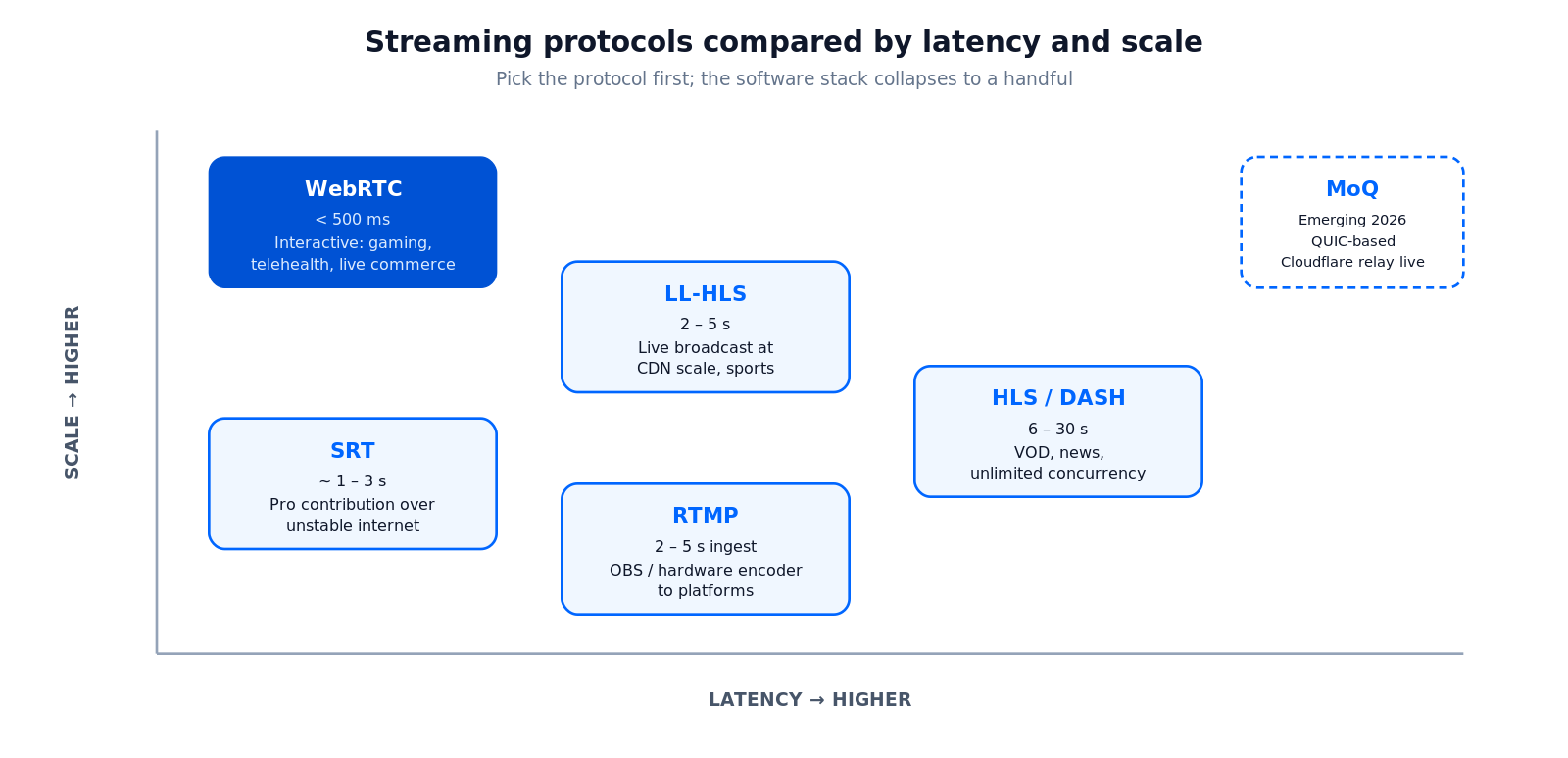
Figure 2. Streaming protocols compared by latency and scale.
WebRTC — sub-500 ms peer-to-peer or via SFU. Mandatory for interactive video, gambling, auctions, telehealth, gaming. Native browser support; SFU scaling; harder ops.
LL-HLS — 2–5 s with HTTP scale. The 2026 default for live broadcasts where you want CDN economics with conversational latency. Apple-native, broad CDN support.
HLS / DASH — 6–30 s. Reliable, infinitely scalable, every device. VOD, broadcast where latency does not matter.
RTMP — under 5 s end-to-end with origin support. Still the de facto ingest from OBS, vMix, hardware encoders to YouTube/Twitch and most cloud services. Distribution side increasingly replaced by HLS/LL-HLS or WebRTC.
SRT — secure, low-latency contribution over the public internet. Pro contribution feed (camera-to-cloud, venue-to-broadcaster) where RTMP is too fragile.
WHIP / WHEP — WebRTC ingest and playback over plain HTTP. WHIP became a Standards Track RFC (RFC 9725) in March 2025, and OBS Studio can publish over it, so a sub-second contribution leg no longer needs a custom signalling server. Our guide to WHIP and WHEP replacing RTMP covers the migration.
Media-over-QUIC (MoQ) — the emerging standard. The core spec reached draft-ietf-moq-transport-22 on October 1, 2026, and the IETF working group plans to send it to the IESG in December 2026; it is not an RFC yet. Cloudflare offers MoQ relays in a free public beta that supports drafts 14 and 16. MoQ promises low latency at HTTP scale on a single fabric. Worth piloting, not yet a production default. If you want a pilot next to an existing HLS or WebRTC path, our Media over QUIC development team builds MoQ and WebTransport prototypes.
Reference architecture for a streaming product
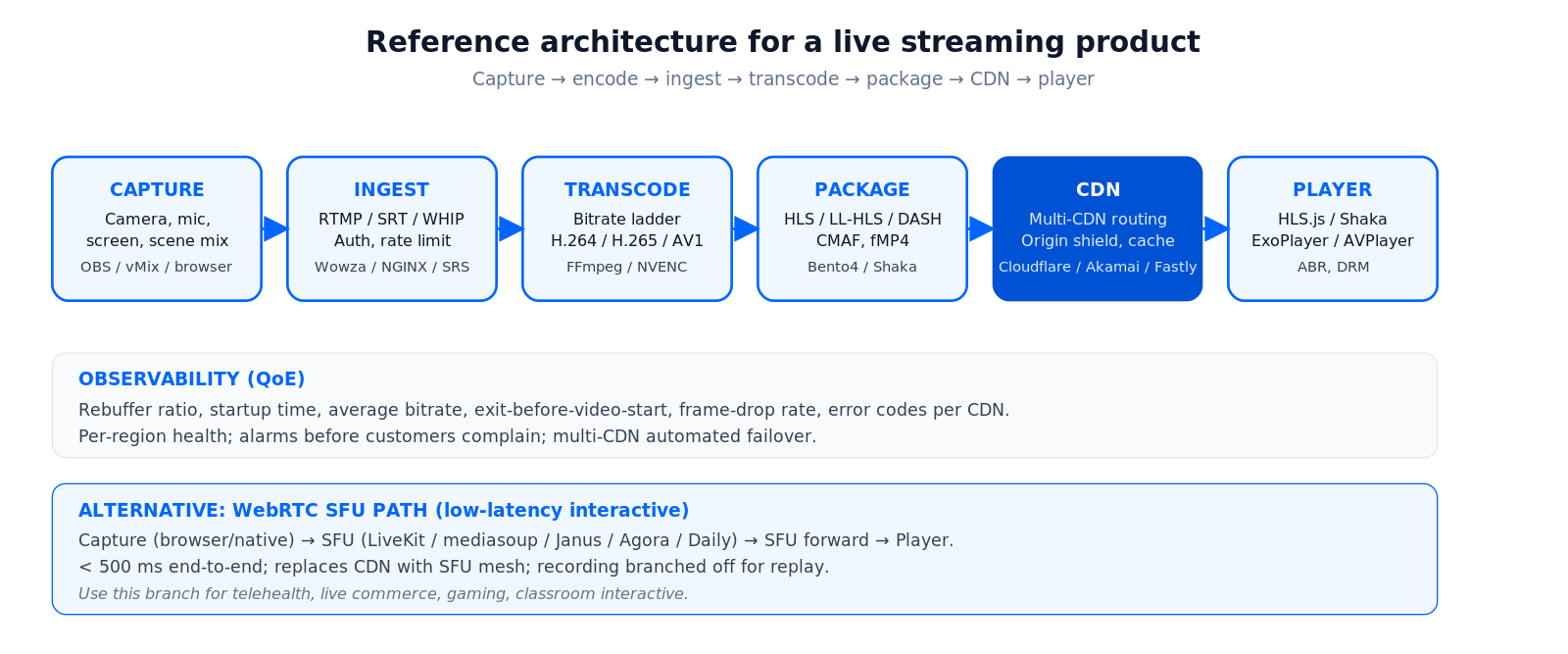
Figure 3. Reference architecture for a production streaming product.
Five blocks worth getting right: contribution/ingest (RTMP/SRT/WHIP), transcoding (per-resolution rungs in the bitrate ladder), packaging (HLS, LL-HLS, DASH, fMP4), distribution (multi-CDN with origin shield), playback (web HLS.js / Shaka, native AVPlayer / ExoPlayer), and observability (QoE: rebuffer ratio, startup time, average bitrate, exit-before-start). The classic mistake is to optimise the encoder while leaving the bitrate ladder, ABR and CDN choice on default — the QoE win lives downstream.
Open-source streaming software you can actually run in production
Self-hosting is a real option in 2026, especially with low-cost dedicated hardware (Hetzner AX-series, OVH, DigitalOcean droplets) and mature open-source projects. The stack we see most often:
Ingest and SFU: mediasoup (Node + C++ SFU), Janus (C SFU/MCU with broad plugin set), Pion (Go WebRTC), LiveKit Server (open-source under Apache 2.0). For RTMP-only ingest, NGINX-RTMP and MediaMTX are the lightweight options.
Transcoding: FFmpeg is still the workhorse; SRS (Simple Realtime Server) bundles RTMP/SRT/HLS in one binary. NVIDIA NVENC and AMD VCE on commodity GPUs cut transcoding cost dramatically when you control hardware.
Packaging and playback: Bento4 and Shaka Packager for HLS/DASH/CMAF; HLS.js, Shaka Player and dash.js for browsers; ExoPlayer (Android) and AVPlayer (iOS) on native.
The trade-off is the same one self-hosting always brings: lower per-minute cost, much higher operational burden. We typically recommend a hybrid — PaaS for the consumer-scale long tail, self-host for the predictable always-on capacity, with a routing layer that picks per session based on cost and latency.
Build vs. buy: when to use a SaaS, a PaaS, or self-host
| Path | Wins when | Cost shape | Limit |
|---|---|---|---|
| SaaS (StreamYard, Restream) | Marketing, webinars, podcasts | Per-seat / per-event | Vendor branding, no in-app embed |
| PaaS (Mux, Cloudflare, Agora, LiveKit Cloud) | Native streaming inside your product | Per-minute + per-GB | Margin pressure at scale |
| Self-host (Wowza, Ant Media, mediasoup, Janus) | Tens of thousands of concurrent viewers, full control, regulated | Infra + ops + engineering | You operate it 24/7 |
Reach for PaaS first. Most product teams should start on Mux, Cloudflare Stream, AWS IVS, LiveKit Cloud or Agora and only consider self-hosting when egress + per-minute fees become a meaningful percentage of revenue. When the decision is to build, our media streaming software development playbook covers the protocols, CDN egress math and custom architecture in depth.
Cost model: what a streaming product really runs on
Numbers below are scoping ranges using Agent-Engineering-accelerated delivery; real engagements depend on protocols, scale, and integrations.
Here is the arithmetic that settles most stacks. Delivery PaaS bills per minute delivered, not per feature. On Cloudflare Stream at $0.001 per delivered minute (2026), one 60-minute event with 5,000 concurrent viewers is 5,000 × 60 = 300,000 delivered minutes, so 300,000 × $0.001 = $300; storing the replay adds about $0.30. Scale that to a product streaming 2,000,000 delivered minutes a month and you are at 2,000,000 × $0.001 = $2,000/month of delivery. Mux gives the first 100,000 delivered minutes each month free, then charges from $0.0008 per minute at 720p and $0.001 at 1080p (2026), so the same 2,000,000 minutes at 1080p cost (2,000,000 − 100,000) × $0.001 ≈ $1,900/month. Model your real resolution mix before you commit. The encoder (OBS) is free. The bill is delivery, and it scales with watch-time, not with your feature list.

Figure 4. Delivery-PaaS unit math, and the point where self-hosting starts to pay for itself.
| Scope | Duration | Build cost | Run-rate |
|---|---|---|---|
| SaaS integration (StreamYard / Restream embed) | 2–4 weeks | $15k–$40k | Vendor subscription |
| PaaS-native streaming feature in app | 8–14 weeks | $70k–$180k | Per-minute + egress |
| Custom WebRTC SFU + recording + replay | 12–20 weeks | $120k–$300k | Compute + bandwidth + ops |
| Full broadcast platform (multi-CDN, multi-protocol, OTT) | 5–9 months | $250k–$700k | CDN + storage + ops + revalidation |
Stuck on which streaming protocol or PaaS to pick?
We have shipped streaming products on every major PaaS and self-hosted stack. We will tell you which one fits your scale, latency, and budget.
Use cases that drive software choice
1. Creator and game streaming. OBS or Streamlabs Desktop → YouTube/Twitch/Kick. Add Restream for multistream. AI captions and clips via cloud studios.
2. Webinars and B2B marketing. StreamYard, Restream, or LinkedIn Live native. Per-seat subscription, branded landing page, downloadable replay.
3. EdTech live classes. Daily, LiveKit, Agora or 100ms for <500 ms classroom interactivity; Zoom Video SDK if you need Zoom-grade reliability and recording.
4. Sports and pro broadcast. SRT contribution → cloud transcoder → LL-HLS distribution via multi-CDN. Tools: Wowza, AWS Elemental MediaLive, Mux Live, Brightcove.
5. Live commerce and shoppable streams. WebRTC for <500 ms host-audience interaction, with HLS fallback for the long-tail audience. Bambuser, Firework, Shopify Live SDKs — or roll your own on Mux + LiveKit.
6. Surveillance and behavioural video. WebRTC ingest + cloud SFU + encrypted recording. V.A.L.T handles 2,500+ cameras with 50,000+ daily users on this pattern.
7. OTT/VOD platforms. Mux, AWS Media Services, JW Player, Brightcove. DRM via Widevine/PlayReady/FairPlay. AI features layered over the stack: chapters, search, dubbing, ad insertion. See our future of AI in video streaming. When the OTT service is the product itself, our OTT and Internet TV development team builds the web, mobile and Smart TV apps, multi-DRM and the subscriber back end on top of that stack.
A decision framework: pick a stack in five questions
1. Are you producing content or building a product? Producing → encoder + cloud studio + platform. Product → SDK/PaaS.
2. What is your latency target? <500 ms → WebRTC. 2–5 s → LL-HLS. 6–30 s → HLS/DASH.
3. What is your peak concurrency? <1k → PaaS pricing is fine. 1k–100k → PaaS or hybrid origin. 100k+ → multi-CDN, packager tier, possibly self-host pieces.
4. Where do viewers live? Geographic distribution drives CDN choice (Cloudflare, Akamai, Fastly, AWS CloudFront, regional CDNs). One CDN is a single point of failure at scale; multi-CDN is the production default.
5. What regulation applies? Healthcare (HIPAA), classroom (FERPA, EU AI Act for some classroom AI), surveillance (jurisdictional), broadcast (BBC technical requirements, FCC). That decides which vendors are even on the table.
Pitfalls that derail streaming software choices
1. Choosing protocol after vendor. Pick the latency budget first; the vendor list collapses to a handful immediately.
2. Treating the encoder as the product. If you are a creator, the encoder is the product. If you are building software, the encoder is just plumbing — do not let it dictate the rest of the stack.
3. Ignoring egress at scale. A successful product can hit five figures of CDN bills per month before anyone notices. Multi-CDN routing and bitrate-ladder tuning are the cheapest wins.
4. No QoE telemetry. Without rebuffer ratio, startup time, average bitrate, EBVS and play-failure metrics you cannot diagnose customer churn. Bake telemetry in from day one.
5. Single-CDN dependency. A regional CDN brownout will silently halve your viewership. Multi-CDN routing should be in scope for any product over a few thousand concurrent viewers.
KPIs: what to measure
Quality KPIs. Rebuffer ratio (target < 0.5%), startup time (P95 < 2 s for HLS, < 1 s for WebRTC), average video bitrate vs. capability, exit-before-video-start (EBVS) ratio, frame-drop rate.
Business KPIs. Concurrent viewers, watch time, viewer-to-engaged conversion, retention curve, NPS, ad fill rate (if relevant).
Reliability KPIs. Stream uptime, ingest success rate, packager failure rate, CDN error rate per region, time to detect an incident, time to rollback.
Mini case: streaming software at law-enforcement and medical-education scale
Situation. 770+ US organisations — police departments, hospitals, universities — needed HD multi-camera capture, encrypted recording, evidence chain-of-custody, and replay.
Software stack. Custom WebRTC ingest, in-house transcoder cluster on Hetzner-class hardware, HLS playback for replay, encrypted-at-rest evidence vault, browser and native clients. We chose a self-hosted SFU rather than buying PaaS at this scale because per-minute fees would have been a meaningful percentage of customer revenue.
Outcome. 2,500+ cameras and 50,000+ daily users on the platform — V.A.L.T. Same shape applies to surveillance, medical proctoring, and any vertical where streaming volume + compliance push past PaaS economics.
When NOT to build your own streaming stack
Skip the build when (a) your concurrency stays below a few thousand — PaaS is cheaper end-to-end; (b) you do not have someone who will own ops 24/7; (c) the vertical has no special compliance, geographic, or latency need that PaaS can not meet; (d) you are testing market fit and any engineering time spent on streaming infra is engineering time not spent on product. Buy a PaaS, ship fast, swap later when the numbers force it. When they do, that is where our video streaming development team comes in.
Need a partner who has actually shipped streaming at scale?
We will audit your protocol, vendors and architecture, and come back with a roadmap and budget you can defend to your board.
FAQ
What is the best streaming software in 2026?
There is no single best. For creators, OBS Studio is free, flexible and the de facto standard; for produced broadcast, vMix is the workhorse; for marketing webinars, StreamYard or Restream win on UX; for products, look at Mux, Cloudflare Stream, AWS IVS, LiveKit, Agora and Daily.
What is the best live streaming SDK?
It depends on latency. For sub-500 ms interactive streams, LiveKit (open source, self-host or cloud), Agora and Daily are the usual picks; for 2–10 s broadcast inside an app, Mux, Cloudflare Stream and AWS IVS. Start on a managed SDK and consider self-hosting only when per-minute fees become a real share of revenue.
What is the best free streaming software?
OBS Studio. It is free and open source, runs on Windows, macOS and Linux, and streams over RTMP, SRT and WHIP; version 32.2 shipped in August 2026. Streamlabs Desktop is also free but nudges you toward its $189-a-year Ultra plan.
What is webcasting software, and what replaced Teams Live Events?
Webcasting software runs one-to-many corporate broadcasts with registration, Q&A, polls and analytics around the video. Microsoft retired Teams Live Events on June 30, 2026 and points customers to Teams town halls; existing Live Events stay supported until February 28, 2027.
OBS Studio vs vMix vs Streamlabs Desktop — which should you run?
OBS Studio if you want full control, plugin freedom and zero cost. Streamlabs Desktop if you are a solo creator who wants ready-made overlays and an easier UX. vMix if you run multi-camera live productions on Windows with NDI, instant replay and broadcast-grade workflows.
RTMP, HLS, LL-HLS, WebRTC, SRT — which protocol should I pick?
WebRTC for <500 ms interactive (gaming, gambling, telehealth, live commerce). LL-HLS for 2–5 s scalable broadcasts. HLS/DASH for VOD or where latency does not matter. RTMP for ingest from OBS or hardware encoders. SRT for resilient pro contribution over the public internet.
Should I build on Mux, Cloudflare Stream, AWS IVS, LiveKit or Agora?
Mux for polished HLS in product with strong DX. Cloudflare Stream for cheap egress and global edge. AWS IVS if you live in AWS and need low-latency interactive. LiveKit for self-hostable WebRTC with cloud option. Agora for global voice-first WebRTC. Pick by latency, scale, geography and pricing — not by feature checklist.
When should we self-host streaming infrastructure?
When PaaS per-minute and egress fees are a meaningful percentage of revenue (typically 10k+ concurrent viewers or many parallel rooms), when data-residency or compliance requires it, or when you need protocol/codec freedom no PaaS provides. Otherwise, PaaS wins.
What is Media-over-QUIC and should I care yet?
MoQ is the emerging IETF standard that aims to deliver HLS-scale economics with WebRTC-class latency on a single fabric over QUIC. It is still a draft: draft-ietf-moq-transport-22 as of October 1, 2026, edited by engineers from Cisco, Google and Meta, not a ratified RFC. But it is past theory: Cloudflare offers MoQ relays in public beta, and eleven vendors demoed interoperable MoQ at NAB Show 2026. Our Learn hub on video streaming tracks it. Watch it closely, pilot it, but do not bet your whole production stack on it yet.
What does it cost to add streaming to a product?
A SaaS integration is $15k–$40k over 2–4 weeks. A PaaS-native streaming feature is $70k–$180k over 8–14 weeks. A custom WebRTC SFU with recording and replay is $120k–$300k over 12–20 weeks. A full broadcast platform with multi-CDN and OTT is $250k–$700k over 5–9 months. Ranges assume our Agent-Engineering-accelerated delivery.
How do I keep CDN bills under control as the audience grows?
Tune the bitrate ladder (do not ship 4K to a 360p audience), enable per-title encoding, route between multiple CDNs by cost and quality, cache aggressively, and consider self-hosted origin shielding when egress crosses your acceptable threshold.
What to Read Next
Vertical
Church Streaming Software: Multi-Campus Platforms
A vertical worked example: streaming a Sunday service across campuses with giving and owned audience data.
Building streaming
Building a Streaming App: VOD, Live and Video Conferencing
Architecture and product patterns for full-stack streaming products.
Encoding
Video Encoding and Streaming Quality
Bitrate ladders, per-title encoding, codec choices and what they cost you.
WebRTC
What is WebRTC?
The protocol behind low-latency interactive streaming, demystified.
Trends
The Future of Live Streaming: Trends to Watch
Where the industry is moving and how to plan investment now.
Ready to pick a streaming software stack you will not regret?
There is no single best streaming software: it is a stack of an encoder, a cloud studio, a distribution platform and an SDK/PaaS, with the protocol choice underneath. Pick the latency budget and the audience first; the vendor list collapses to a handful, and the build/buy decision becomes obvious.
Fora Soft has been shipping live, recorded and AI-augmented video products since 2005 — and Agent Engineering is what now lets us build them in months rather than quarters. If you want a sober second opinion on protocol, vendor, architecture or budget, we are one call away.

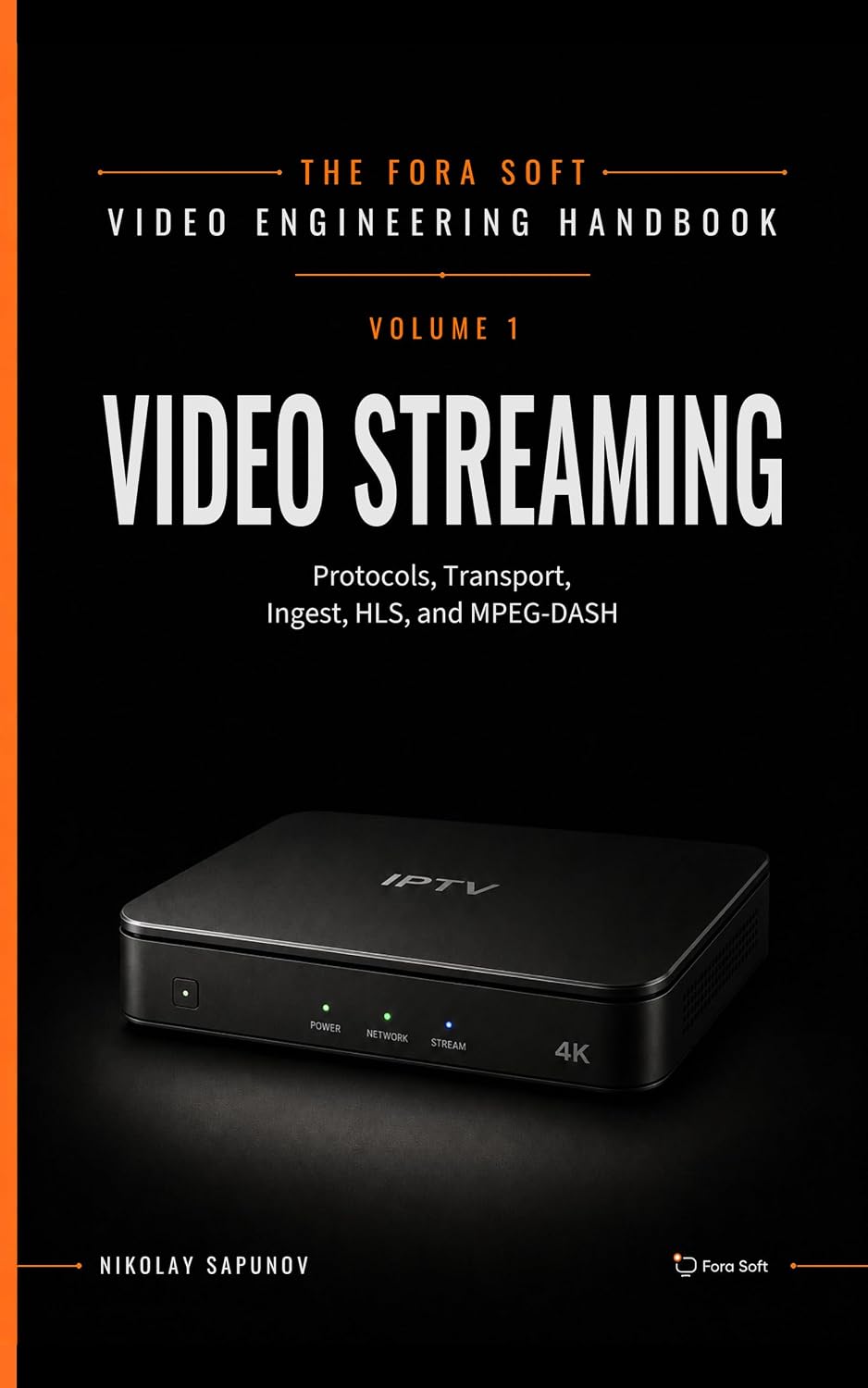

The handbook · 7 volumes
Fora Soft Video Engineering Handbook
Every row of this list sits on the same stack: an encoder, a contribution protocol, a delivery layer and a player. We wrote the seven-volume Fora Soft Video Engineering Handbook to cover that stack end to end, and for the choices in this guide the place to start is Volume 2 on RTMP, SRT, ingest and HLS/DASH packaging, then Volume 3 on ABR ladders, CDNs, players and what delivery really costs. Volume 1 explains what your encoder settings actually do to bitrate and picture quality. Written by Nikolay Sapunov, CEO at Fora Soft.
Browse the handbook on Amazon →7 volumes · 9,000+ pages · Kindle & paperback
Get a streaming software roadmap you can defend
30 minutes with our streaming-platform lead, a clear scope, and honest advice on build vs. buy.

