

Key takeaways
• Remote video production works when you split the signal. Speed Space streams a compressed live proxy for directing and records a pristine local master on every device — the “double-ender” move that makes the deliverable independent of anyone’s Wi-Fi.
• The streamlining is operational, not visual. Setup per shoot dropped from 20–30 minutes to a few, post-production stopped hunting time-code drift, frame loss in masters went to zero, and crews run 25-participant sessions in one browser tab.
• One platform replaced six tools. Zoom, OBS, Slack, Frame.io, radios and a shot-list spreadsheet collapsed into a single console — on shoots that ship for Netflix, HBO, Apex Legends, EA, Paris Fashion Week and Live Nation Urban.
• The stack is boring on purpose. Next.js, Node, socket.io, WebRTC + LiveKit, MongoDB, AWS S3, and the browser’s MediaRecorder API with an IndexedDB chunk store. Battle-tested parts, assembled well.
• This is the workflow walk-through. For cost ranges, a SaaS comparison and a build-vs-buy framework, read the companion piece: Speed Space: Custom Remote Video Production Platform. Here we walk the actual shoot, end to end.
Why Fora Soft built Speed Space
We’ve spent 20+ years shipping real-time video, streaming and AI products — 250+ of them since 2005, across telemedicine, e-learning, video surveillance, OTT and live entertainment. Speed Space is the remote video production platform we built with Revo Studio, a Southern California agency that ships for Netflix, Apex Legends, Electronic Arts, HBO, Paris Fashion Week and Live Nation Urban. When their shoots outgrew a pile of consumer tools, they didn’t need another app. They needed the apps to become one.
This article is the workflow half of that story: what the platform does, how the pieces fit, and the mechanics that turn a chaotic remote shoot into something that behaves like a real studio. If you’re a producer still duct-taping Zoom, Frame.io and Slack, or a CTO weighing a custom build, this is the walk-through we give clients on day one. For the buyer’s version (cost ranges, SaaS comparison, decision framework), see the companion piece: Speed Space: Custom Remote Video Production Platform. For screens and capabilities, the project page.
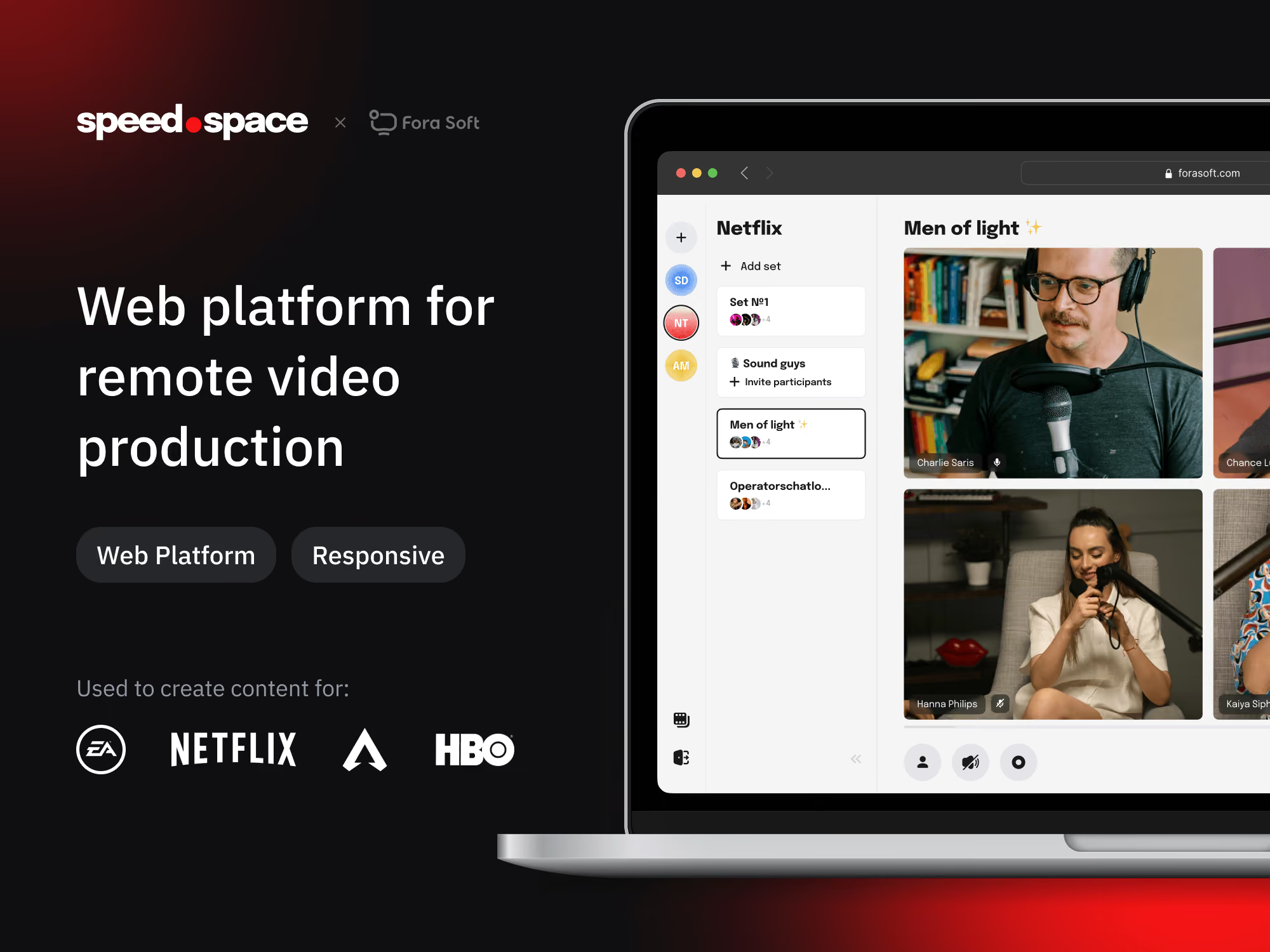
Here’s the demo Revo uses to walk new crew through the console:
The producer console, multi-stream switching and role-based crew controls in one tab.
Want this kind of workflow for your studio?
Thirty minutes with a senior video engineer: we walk your current tooling, surface the streamlining wins, and scope what a custom build would look like.
What is remote video production?
Remote video production is capturing, directing and editing video with a geographically distributed team — sending camera feeds, audio and production control over the internet instead of gathering everyone in one studio. The modern version pairs two things that used to fight each other: a low-latency live stream for directing in real time, and locally recorded high-resolution masters for the final cut.
In one sentence, Speed Space is a web platform that lets a distributed crew run a multi-camera, broadcast-quality shoot as if everyone were in the same room: no installs, no separate recorder, no radio chatter, no spreadsheet cross-referencing cameras to takes. If you’ve ever opened five tabs to run a single remote shoot, that is the experience it replaces.
The word doing the heavy lifting above is “locally recorded.” It is the difference between a shoot that survives a bad hotel connection and one that doesn’t. So start there.
What is double-ender recording, and why it matters
Double-ender recording means each participant records their own high-quality audio and video locally on their own device, instead of relying on the compressed conference stream. The separate local files are synced together afterward, so the final quality never depends on anyone’s internet connection. It started in podcasting; Speed Space brings the same idea to multi-camera video at production scale.
Here’s the catch a live-only tool can’t escape: to keep latency low enough to direct in real time, the stream is heavily compressed and its bitrate is capped. A live 1080p stream commonly runs around 4.5–9 Mbps (YouTube’s live encoder settings, 2026), while a proper 1080p upload master wants about 8 Mbps at 24–30 fps (YouTube’s upload settings, 2026). Trust the live feed for the deliverable and you bake that compression into the master.
So Speed Space runs two paths from every device at once. The live proxy goes up to a WebRTC SFU for the control room. The full-quality master is written locally through the browser’s MediaRecorder API into an IndexedDB chunk store, then uploaded after the take. Same camera, two encodings, two jobs.
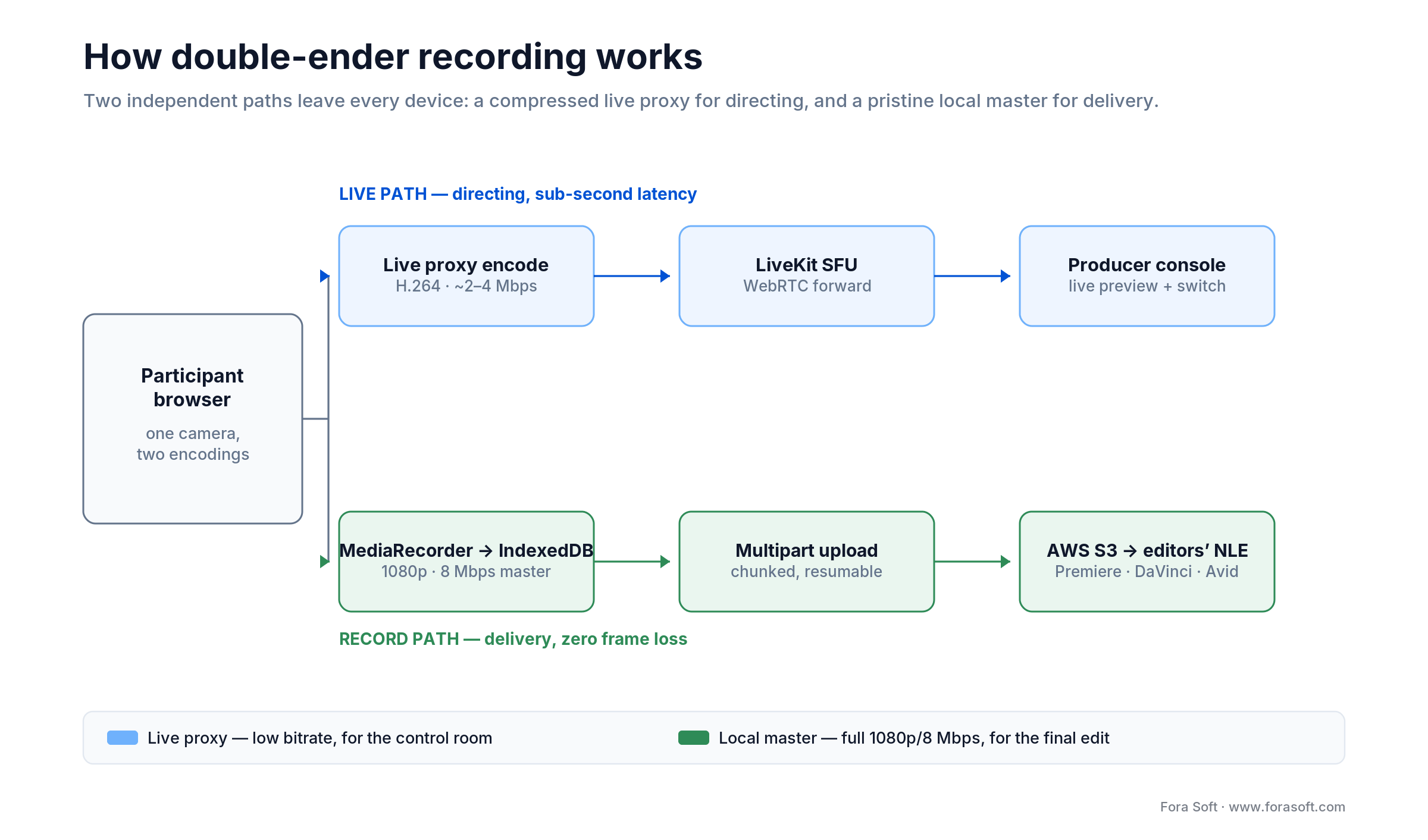
Figure 1. The double-ender split: a compressed live proxy for directing, and a pristine local master for delivery.
Reach for double-ender when: your deliverable must look clean regardless of the talent’s connection. If a dropped frame in the master is unacceptable — a brand spot, a broadcast insert, a paid interview — a live-only recording is a bet you will eventually lose.
Before vs after: how the shoot day changes
The “here are the features” tour misses the point. What matters is what changes for the crew on shoot day. Side by side:
| Phase | Before Speed Space | After Speed Space |
|---|---|---|
| Pre-call setup | Three tools to launch, two device dials per participant, radios paired, shared docs opened. | Producer creates a set; talent click an invite link; crew join a single tab. |
| Live take | Producer alt-tabs between Zoom, OBS, Slack and notes; talent self-record on a phone; crew direct over radio. | Producer cuts cameras live in the console, pushes overlays, draws on a shared screen; talent look one place. |
| Recording quality | Network-degraded conference capture; frame loss visible in the master; a self-record sometimes forgotten. | Local recording on each device at 1080p / 8 Mbps; zero frame loss in the master, whatever the network does. |
| Post-production handoff | Files merged from 5+ devices, naming guessed, time-code drift hunted by hand. | All masters auto-uploaded to AWS with one naming scheme; editors pull a single bundle. |
| Crew coordination | Radio cross-talk, Slack DMs, Zoom chat for everyone, context lost. | Built-in chat scoped per role; producers message reps privately, talent never see crew chatter. |
| Talent UX | Install a desktop client, sign in, configure a mic, hope the Wi-Fi holds, panic if it breaks. | Click an invite link, allow camera and mic, look at one button. Crew handle every other control. |
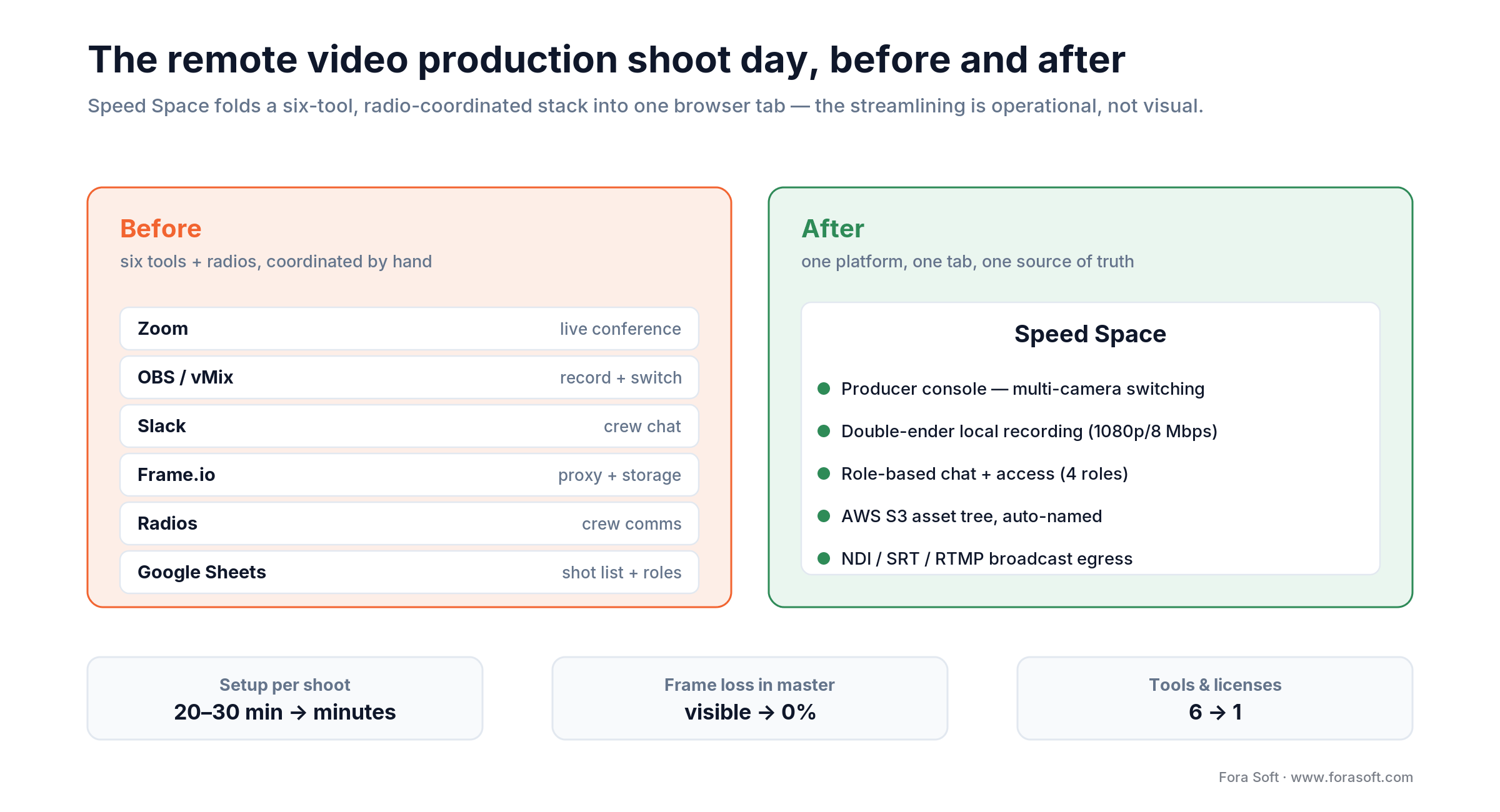
Figure 2. Six tools plus radios fold into one platform; the operational KPIs move with them.
None of this is hypothetical. It is the day-to-day shape of a Revo shoot before and after the platform went live. The rest of this article walks each piece.
The producer console: where the streamlining happens
The producer console is the heart of the platform. Everything a director needs during a take is one click away, with no tab-switching.
Multi-stream switching
Producers cut between any participant’s camera the way a control room does. Layouts change in one click — full-screen on talent, side-by-side talent and interviewer, picture-in-picture for B-roll. The active layout is what records to the composite, so the cut you direct is the cut the editor receives.
Recording controls: resolution, FPS, codec, bitrate
Per session, the producer picks resolution (up to 1080p in default deployments), frame rate (24 / 25 / 30 / 60), codec (H.264 by default, AV1 for high-spec devices) and container. The default 1080p / 8 Mbps local capture is roughly five times the bitrate of generic conferencing capture, and it’s the colour-grading headroom editors expect. If codec and bitrate are unfamiliar, our primer on digital video foundations covers the basics. The chart below shows why that gap exists.
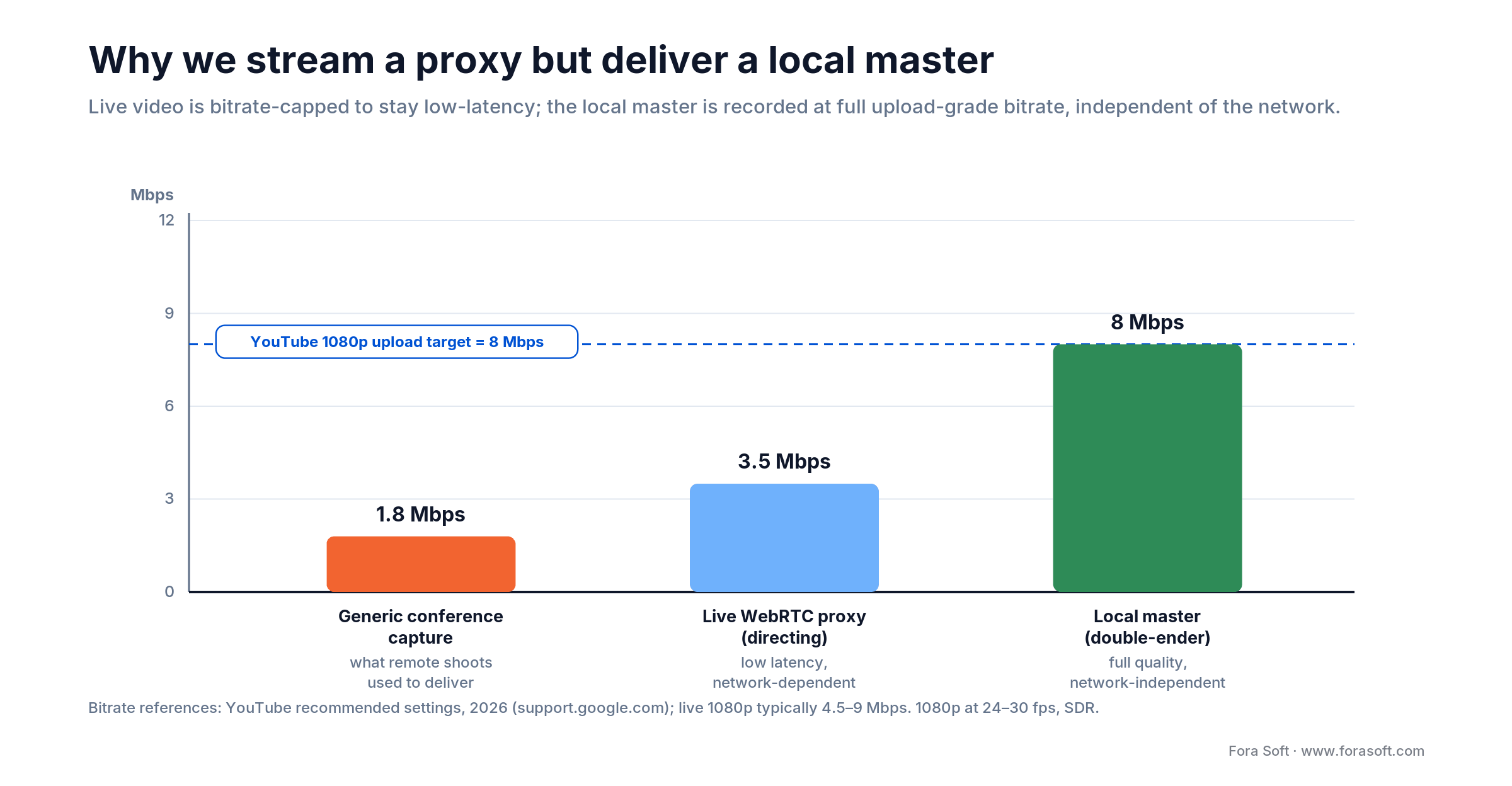
Figure 3. Live streams are bitrate-capped to stay low-latency; the local master is recorded at the full upload-grade bitrate.
Overlays, drawing and screen share
Producers push background fills, looped animations, lower-thirds, image overlays and on-screen drawing into the live feed. Drawing is the quiet workhorse for direction: the producer circles the exact spot they want talent to look, and talent see the circle on their preview. Screen share walks talent through scripts, storyboards and lighting references without a second app.
Post-take analytics
Most conferencing tools stop at “call ended.” Speed Space surfaces a debrief. Per-participant connection telemetry comes straight from WebRTC’s getStats() API — bitrate over time, packet loss, jitter, round-trip time, codec, hardware acceleration. A recording-integrity report checks every uploaded master for file size vs expected, duration match, NTP-synced timestamp range and chunk gaps, and prompts a re-upload before the talent leaves. Studio-level metrics (hours recorded, session duration, cycle time vs baseline) let principals prove the streamlining to clients at renewal.
Reach for a producer console when: the director currently keeps three or more browser tabs open during a live take. The streamlining win compounds with every tool you can fold in.
Four roles, four control surfaces
Generic conferencing has one user type: “participant.” Speed Space splits that into four, each with a deliberately different surface area. Role-based access is the unsung feature that keeps a Netflix shoot from turning into a “wait, who muted the mic?” scramble.
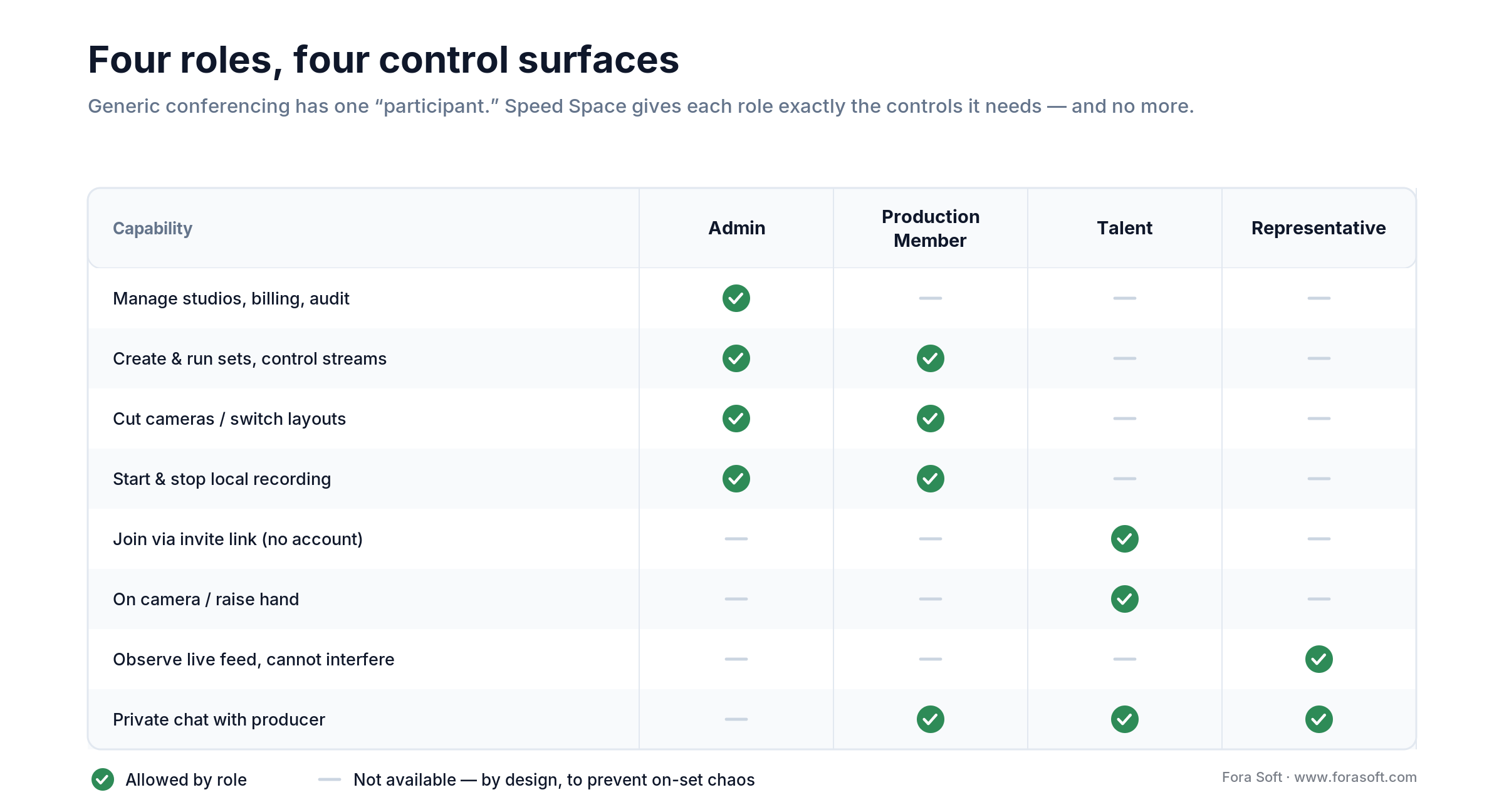
Figure 4. Each role sees exactly the controls it needs — and nothing that lets it break the shoot.
Admin owns the studio: creates studios and sets, assigns roles, sets recording defaults, manages billing, audits downloads. Usually one agency principal.
Production Member is the working crew: creates and runs sets, controls streams, starts and stops recording, invites talent. They live inside the sandbox the admin set up.
Talent joins via a unique invite link, no account. Their console is bare on purpose: a preview, a “raise hand” button, a “leave” button. They can’t change configs, switch layouts or accidentally screen-share. Friction-free for them, impossible to break the production.
Representative is the talent agent, brand rep or client watching the shoot. They see the live feed but cannot mute talent, change cameras or interfere, and they can chat privately with the producer. It’s the role no generic conferencing tool offers, and one of the most-requested features from Revo’s clients.
Reach for a four-role model when: non-crew people — talent reps, brand-side observers, reviewers — regularly join and need to watch without touching anything. Generic conferencing puts them in the same bucket as crew, and that’s where on-set chaos starts.
Studios and sets: a project model that doesn’t leak
A common pain in remote production is project state living in five places: shot list in Sheets, footage in Frame.io, briefs in Slack, takes on someone’s desktop. The answer here is a two-level model.
Studios are virtual workspaces, like client folders. Each holds its own assets, crew memberships, recording defaults and post-production files. An agency runs one studio per ongoing client and flips between them.
Sets are one shoot configuration inside a studio: specific codec, FPS and resolution, a participant list, a scheduled time, an intended deliverable. The same studio can have several sets in flight — today’s four-camera interview, tomorrow’s product B-roll, next week’s rehearsal.
Up to 25 participants per set, with zero downtime in production sessions. The set boundary keeps recordings, chat history and crew assignments tidy, and nothing leaks across clients.
Building a multi-tenant production tool of your own?
Studios, sets and role-based access is the model that holds at scale. We’ll walk the trade-offs we made for Speed Space and adapt them to your shape.
The remote video production tech stack, and why
A production-grade remote stack rewards boring, battle-tested tech over fashionable choices. What we shipped:
| Layer | Technology | Why |
|---|---|---|
| Frontend | JavaScript, Next.js | SSR for the marketing surface; client-side rendering for the console, where state lives in WebRTC tracks and canvases. |
| API / backend | Node.js, Express | One language across the stack; Express keeps the surface tight and the code path debuggable. |
| Real-time messaging | socket.io | Crew chat, signalling fallbacks and the producer command channel over one persistent connection. |
| Live video / SFU | WebRTC + LiveKit | Sub-second preview, native multi-party support, recordings via local capture rather than server-side mixing. See our Agora alternatives playbook. |
| Persistence | MongoDB | A documents-first model fits the studios → sets → recordings → participants tree without rigid migrations. |
| Storage | AWS S3 | Multipart uploads from each device; lifecycle to Glacier for cold archives. Cheap and reliable at Revo’s volumes. |
| Browser capture | MediaRecorder API + IndexedDB | Full-quality local recording with crash-resilient chunk replay if a talent’s tab refreshes mid-take. |
For the deeper architectural “why” behind the SFU choice and how this scales past 25 participants, the companion piece Scalability in Video Streaming and Conferencing walks the cascade pattern, and our video and audio streaming development service is where these builds live.
A real remote shoot, step by step
Walk through a typical 60-minute Revo shoot inside the platform:
T-24h — the producer creates the set. Inside the client’s studio, they pick recording params (1080p, 30 fps, H.264, MP4), schedule the time, generate unique invite links for talent and reps, and add crew by role.
T-30 min — crew join and run checks. The console runs an automatic camera, mic and bandwidth probe. Anything red gets a fix-it hint: close other tabs, switch Wi-Fi to Ethernet, raise the camera.
T-5 min — talent click their link. One browser permission prompt, an automatic device probe, a friendly hold screen. The producer pings the rep privately to confirm both arrived. No accounts created.
T-0 — recording starts. The producer hits record. Each browser silently begins a local 1080p / 8 Mbps capture to IndexedDB; the stream pushed to the SFU is a separate, lower-bitrate signal for live preview.
During the take. The producer cuts cameras, pushes overlays, draws on shared screens, sends private guidance to the rep, drops a lower-third for branding. Talent look at one button and one preview. Crew chat scrolls quietly in the corner.
End of take. The producer stops. Each device starts a multipart upload of its local capture to AWS; talent can close the tab once it completes, or pause and resume later. Files arrive named by participant, set and timestamp.
Post-shoot. Editors open the studio in their handoff workflow. Masters live in AWS under the studio → set → recording tree. Frame loss in the deliverable is zero, whatever the network did during the take.
The streamlining wins, quantified
Speed Space went live and quickly became core to Revo’s daily operations. The wins, ordered by how often clients ask about them:
Frame-loss elimination in masters. Local recording means the file editors receive is the same crisp 1080p / 8 Mbps capture regardless of internet wobble. The single biggest editorial pain in remote production goes to zero, and that’s the headline nobody argues with.
Setup time per shoot. Opening five tools, dialling devices, pairing radios and confirming everyone was online used to eat 20–30 minutes. Now the producer creates a set, sends links, and the crew is live in a few.
Post-production cycle time. Editors used to rebuild masters from five-plus device recordings and chase time-code drift by hand. One AWS-hosted asset tree makes the handoff a no-op, and cycle time drops accordingly.
Tool-cost consolidation. The pre-platform stack (Zoom, OBS, Slack, Frame.io, radios, spreadsheets) was roughly six tools and licenses. Now it’s one. The hard-cost saving is real; the soft-cost saving (training, license sprawl, support) is bigger.
Remote video production software: build vs buy
Most teams should buy off-the-shelf remote video production software. A custom platform earns its cost only at the top end — broadcast-grade masters, role-based access, custom egress, SSO. Here is the honest map of where each option wins and breaks (pricing shown as of 2026; confirm on each vendor’s page before you budget).
| Option | Where it wins | Where it breaks | Ballpark (2026) |
|---|---|---|---|
| Riverside / Zencastr | Local-record interviews and podcasts, per-speaker tracks, quick clips. | No live multi-camera direction, no role model, no custom egress. | from ~$24/mo |
| StreamYard / Restream | Single-platform live streaming, simple branding, multistreaming. | Streamed recording only, so masters inherit compression; thin post-production. | ~$19–99/mo |
| Frame.io + Zoom | Camera-to-Cloud proxies, editorial review, familiar call UX. | Two tools stitched by hand; no unified roles or one-tab capture. | ~$15–25/user/mo + call |
| Custom (Speed-Space-class) | Double-ender masters, 4-role access, NDI/SRT egress, SSO, your brand. | Real build; needs deep WebRTC/SFU/AWS Media experience to get right. | project-based |
A quick worked example on the consolidation math, kept conservative. A six-person agency running the stitched stack might carry a live-conference seat set, a switcher/record tool, a team chat plan, a proxy-review plan, plus storage — call it a few hundred dollars a month in licenses before anyone opens a spreadsheet. The custom platform replaces the licenses with one system you own; the payback is rarely the license line alone, though. It’s the editorial hours you stop spending on drift, and the takes you stop losing. Put a number on both before you decide.
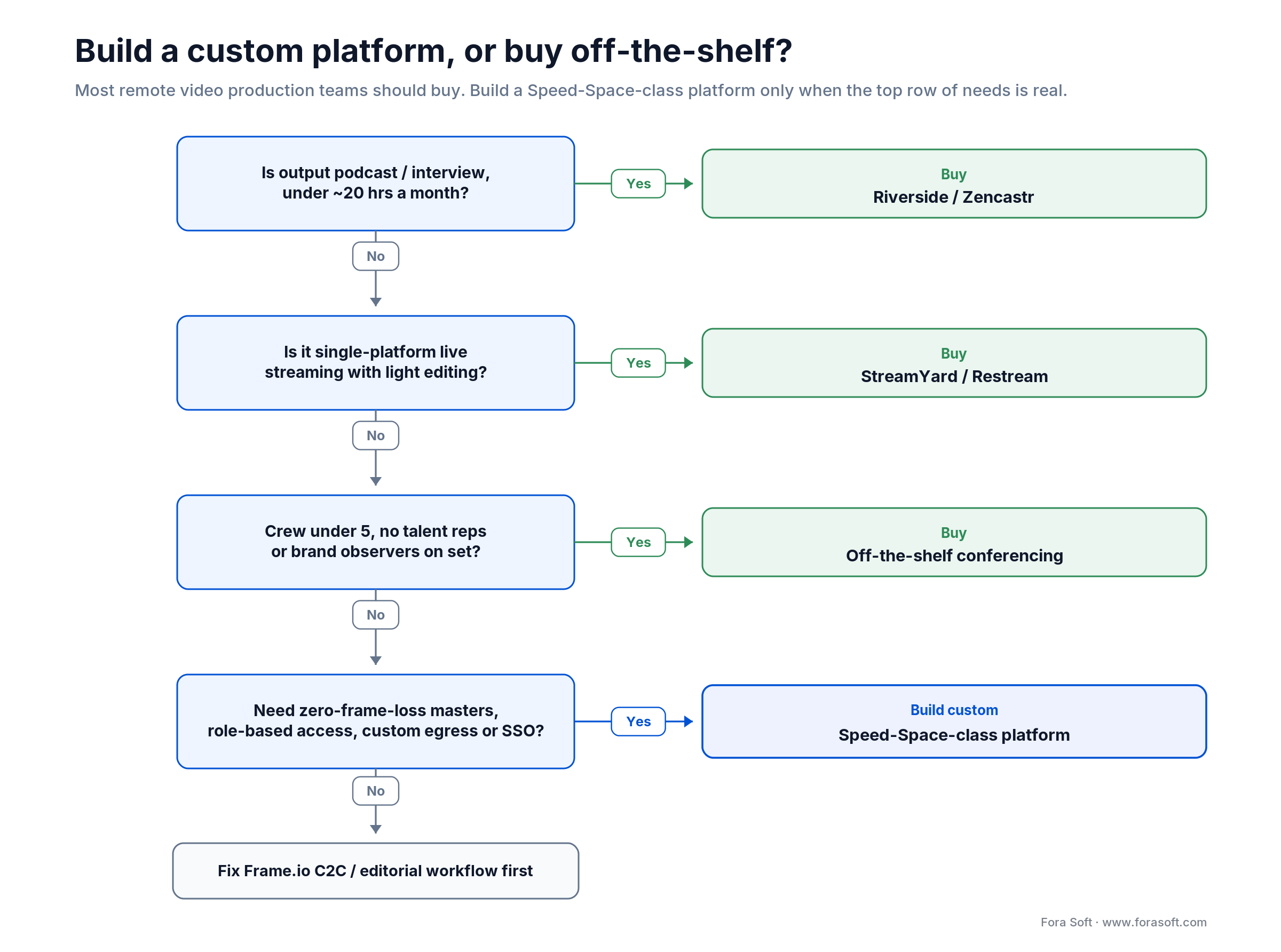
Figure 5. A four-question path from “buy off-the-shelf” to “build a Speed-Space-class platform.”
How Speed Space talks to the rest of the stack
No tool wins by being an island. The integration surfaces that matter for a production-grade platform:
NLE handoff. Premiere Pro, DaVinci Resolve and Avid Media Composer pull masters via S3 URLs, with AAF / EDL / XML exports keeping time-code and stem isolation intact. Editors don’t babysit naming or sync.
Frame.io / cloud review. When editorial already lives in Frame.io, proxy generation auto-uploads watermarked H.264 / H.265 files to a Frame.io project, keeping review tooling as the team knows it.
Live broadcast egress. To push a feed to traditional broadcast (vMix, OBS, AWS MediaLive, social platforms), the platform exposes NDI on LAN and SRT on WAN, with RTMP as a fallback for anything older.
Identity / SSO. SAML and OIDC for crew; magic-link invites for talent with no account. Enterprise studios plug into a client’s identity provider without onboarding friction.
Reach for a custom integration layer when: your editorial path needs a specific NLE export (AAF for Avid, XML for Final Cut), your broadcast pipeline depends on NDI / SRT / SMPTE 2110, or your enterprise client mandates SSO. Off-the-shelf tools rarely cover all three at once.
Five operational pitfalls Speed Space removes
1. Talent forgetting to start their recorder. The most common cause of an unusable take in self-record setups. Local recording starts and stops from the producer’s console — talent has nothing to forget.
2. Crew chatter leaking into the talent’s view. Generic group conferencing puts everyone in one chat. Role-scoped chat keeps producer-rep coordination invisible to talent.
3. Time-code drift across takes. Local recordings are stamped with NTP-synced timestamps and chunk metadata, so reconciliation is automatic in post rather than a manual hunt.
4. Lost takes from a refreshed tab. The IndexedDB chunk store replays captured chunks after a mid-take refresh instead of dropping them. Generic browser recording fails silently.
5. File-naming spaghetti. Every recording lands in AWS named by participant, set, timestamp and take. No more “final_v3_FINAL_real.mp4” in twenty places.
Losing takes or fighting frame drops on remote shoots?
We’ll run the four-test runbook below on your current setup on a 30-minute call, and hand you a prioritised gap list. No slideware.
KPIs we track on a Speed-Space-class build
Quality KPIs. Master frame-drop rate (target 0%), local capture bitrate vs configured (95th percentile within 5%), audio sync drift across tracks (under 30 ms), proxy generation time (under 2× recording duration). The first one is the headline; if it isn’t zero, nothing else matters.
Reliability KPIs. Session uptime (target 99.9%), post-shoot upload success (over 99.5%), p95 preview latency (under 500 ms intra-region), SFU CPU per participant (under 20%).
Operational KPIs. Setup time per shoot, post-production cycle time vs the pre-platform baseline, tool-license count per active studio, support tickets per 100 sessions. This is where streamlining shows up on the bottom line.
Security and compliance in 30 seconds
Production teams handle pre-release content under NDA, talent contracts, child-talent age checks and brand-sensitive material. The shortlist:
End-to-end encryption on the conferencing channel for sensitive shoots. Encryption at rest with KMS-managed keys for AWS storage. Watermarking on proxies sent to external editors. Audit trails on who downloaded which master, when and from where.
SOC 2 Type II for enterprise customers. SSO via SAML / OIDC for crew. Data residency — if a Netflix EU shoot needs masters in eu-west-1, design the bucket layout for it on day one.
When NOT to build a custom remote production platform
Honesty sells better than a pitch. A custom Speed-Space-class build is a poor fit when:
- You produce under ~20 hours a month and the deliverable is a podcast or interview — Riverside or Zencastr will save you a fortune.
- Your output is single-platform live streaming with light editing — StreamYard out-competes any custom MVP for years.
- Your crew is under five stable people — the marginal value of role-based access doesn’t justify the build.
- Editorial review, not capture, is the bottleneck — fix your Frame.io Camera-to-Cloud and Adobe workflow first. Our AI video quality enhancement playbook covers the post side.
- You don’t have a partner with deep WebRTC, SFU, MediaRecorder and AWS Media experience. This stack is unforgiving for generalist teams.
Evaluating any remote-production tool: a four-test runbook
1. The 30-minute frame-drop test. Run a multi-participant session at 1080p with deliberate network impairment. Compare the local master to the streamed recording. If the tool doesn’t do double-ender, the loss is visible.
2. The role-permission walkthrough. Have a producer, a talent and a rep join. Try to make talent do producer-only things. The tool should refuse cleanly.
3. The post-production handoff. Export to Premiere / DaVinci / Avid. Check time-code accuracy, AAF / EDL / XML fidelity and audio-stem isolation. If editors can’t pull clean tracks, it isn’t shippable.
4. The crash-recovery test. Mid-take, tell talent to refresh their browser. The recording should resume from the last good chunk, not lose the take. If it does, you can’t ship serious productions on it.
FAQ
What is remote video production?
It’s capturing, directing and editing video with a distributed team, sending camera feeds, audio and control over the internet instead of gathering in one studio. Modern setups pair a low-latency live proxy for directing with locally recorded high-resolution masters for the final deliverable.
What is double-ender recording?
Each participant records their own high-quality audio and video locally on their device instead of relying on the compressed conference stream. The local files are synced in post, so the final quality never depends on anyone’s internet connection.
Why does live streaming degrade quality for production?
To keep latency low enough to direct in real time, a live stream is heavily compressed and bitrate-capped — a live 1080p feed often runs 4.5–9 Mbps versus about 8 Mbps for an upload master. That’s why Speed Space streams a low-res proxy for monitoring and records a full-quality local master on each device.
Which tools does Speed Space replace?
Typically Zoom (live conference), OBS or vMix (record and switch), Slack (crew chat), Frame.io (proxy and storage), radios (crew comms) and Google Sheets (shot list and roles). One platform, one tab, one source of truth.
What stack is Speed Space built on?
JavaScript and Next.js for the UI, Node and Express for the API, socket.io for real-time messaging, WebRTC + LiveKit for the live conference and SFU, MongoDB for project state, AWS S3 for storage, and the browser’s MediaRecorder API with an IndexedDB chunk store for double-ender local recording.
How many participants can a session hold?
Up to 25 simultaneous participants per session with zero downtime in production. The same SFU-plus-double-ender architecture scales to 50–100+ by cascading SFUs, which is the standard custom-build path for broadcasters.
Does it work on mobile?
Talent join from mobile browsers without issue — iOS Safari and Android Chrome both support the MediaRecorder API and getUserMedia we rely on. The producer console is desktop-first; running a multi-camera switch from a phone isn’t practical, but every other role works on tablet or phone.
Can we build a Speed-Space-class platform for our studio?
Yes. A custom build gives you a branded domain, custom UI, embedded experiences and SSO with your client’s identity provider. For cost ranges (pilot, production-grade, broadcast-SLA), see the companion piece: Speed Space: Custom Remote Video Production Platform.
What to read next
Companion piece
Speed Space: Custom Remote Video Production Platform
The buyer’s playbook — cost ranges, SaaS comparison and a build-vs-buy decision framework.
WebRTC architecture
Agora.io Alternatives in 2026
LiveKit, mediasoup, Jitsi, Janus — the SFU choices behind Speed-Space-class builds.
Scaling
Scalability in Video Streaming and Conferencing
SFU cascading, CDN egress and storage strategies for real-time video at production scale.
Low-latency video
Real-Time Video Streaming: Low-Latency Solutions
Latency budgets, codecs and protocols behind sub-second remote-production preview.
Project page
Speed Space — Project Page
The Fora Soft project page with screens, capabilities and the full client list.
Ready to streamline your remote video production?
Speed Space took Revo Studio from a six-tool, radio-coordinated, frame-loss-prone stack to a single browser tab: the producer cuts cameras, talent click one link, and editors pull clean masters from AWS — on shoots that ship for Netflix, HBO, Apex Legends, Electronic Arts, Paris Fashion Week and Live Nation Urban. The streamlining is the product, and the architecture (Next.js, Node, WebRTC + LiveKit, MongoDB and AWS, with double-ender local recording on every device) is the boring, battle-tested choice that lets it work.
If your team is duct-taping Zoom, OBS, Frame.io and Slack today, the day-one win is tool consolidation. The month-three win is editorial cycle time. The year-one win is the license budget that quietly disappears. We’ve shipped this pattern for one of the most demanding production agencies in the field. We’d like to ship it for yours.
Let’s scope your remote-production streamlining
Thirty minutes, a senior video engineer, and a one-page plan: workflow audit, tool-consolidation map, custom-build cost range, frame-loss strategy.

