

Key takeaways
• Latency, not vocabulary, is what breaks live meeting translation. Under 3 seconds for captions and 1.5 seconds for spoken voice is where people stop talking over each other. Past 5 seconds the conversation falls apart.
• Built-in captions in Teams, Zoom and Meet now cover most internal calls. Microsoft’s Interpreter in Teams went GA in February 2025 with voice in 9 languages; Google Meet translation went GA for businesses on 27 January 2026. Regulated industries still need on-prem or VPC isolation.
• 2026 changed the build math. OpenAI’s gpt-realtime-translate ($0.034/min) collapses speech-to-speech into one pace-matched call across 70+ input languages, so a custom lane no longer means stitching five services by hand.
• Vendors run $0.30–$2.00 per minute; a stitched API stack runs $0.04–$0.08. You buy latency tuning, custom vocabulary and compliance posture when you build, not just a lower unit price.
• Buy off-the-shelf until roughly 50,000 monthly meeting minutes. Above that, a custom build usually pays back inside 9–14 months on the usage curves we’ve modeled at Fora Soft.
Why Fora Soft wrote this guide
Live meeting translation is one of the few things we’ve shipped on every layer of the stack: WebRTC media servers, streaming speech recognition, neural machine translation, and synthetic-voice output, including voice cloning. We built courtroom-grade interpretation for a Kazakhstan judiciary deployment where every byte of audio had to stay in a sovereign data center, live classroom captions for BrainCert, and translation tooling for TransLinguist. Fora Soft has been building real-time media products since 2005, across 250+ projects.
This guide answers the questions remote-work product owners actually ask before signing anything: which built-in captions are good enough, when a vendor bot earns its per-minute fee, what a custom build costs, which compliance regimes accept AI-only translation, and how to hit latency below the point where people give up on it. It is written for the buyer’s real choice, which in 2026 is between Microsoft Teams, Zoom, Google Meet, Wordly, KUDO, Interprefy, DeepL Voice, and building your own on OpenAI’s realtime models or a Deepgram-plus-DeepL pipeline.
Throughout, we link to deeper playbooks: our real-time speech translation reference, the simultaneous interpretation deep-dive, our comparison of multilingual video-call tools, and the voice-cloning guide that covers keeping the speaker’s voice across languages.
Need live meeting translation in your remote-work product?
A 30-minute call: we map your meeting volume, language pairs and compliance needs onto buy-versus-build, with a 3-year cost curve you keep.
What is live meeting translation, exactly
Live meeting translation is a streaming pipeline that turns one speaker’s voice into another language while the meeting is still happening. It runs three steps: automatic speech recognition (ASR) turns voice into source-language text, neural machine translation (MT) turns that text into the target language, and optionally text-to-speech (TTS) speaks the result, sometimes in the original speaker’s cloned voice. Each step adds delay. The system counts as “real-time” only if the total stays under a perceptual threshold: about 3 seconds for captions, 1.5 seconds for spoken voice.
For remote-work tools (Teams, Zoom, Meet, Webex, Slack huddles, or a custom platform), translation shows up in one of three places. It runs inside the meeting client as built-in translated captions; it’s added as a third-party bot such as Wordly, KUDO or Interprefy; or it’s built into a custom pipeline on top of Deepgram, OpenAI’s realtime models, Whisper, or open models like NLLB-200. Those three placements are the spine of this whole guide.
Four output modes matter in practice: captions (subtitles in the viewer’s language), spoken translation (a synthesized neutral voice), voice-cloned interpretation (the speaker’s own voice, rendered in the target language), and hybrid AI-plus-human (AI handles the bulk, a human interpreter certifies regulated content). Each mode carries a different latency budget, compliance posture and cost. The diagram below shows how the three placements line up against the meeting you’re actually running.
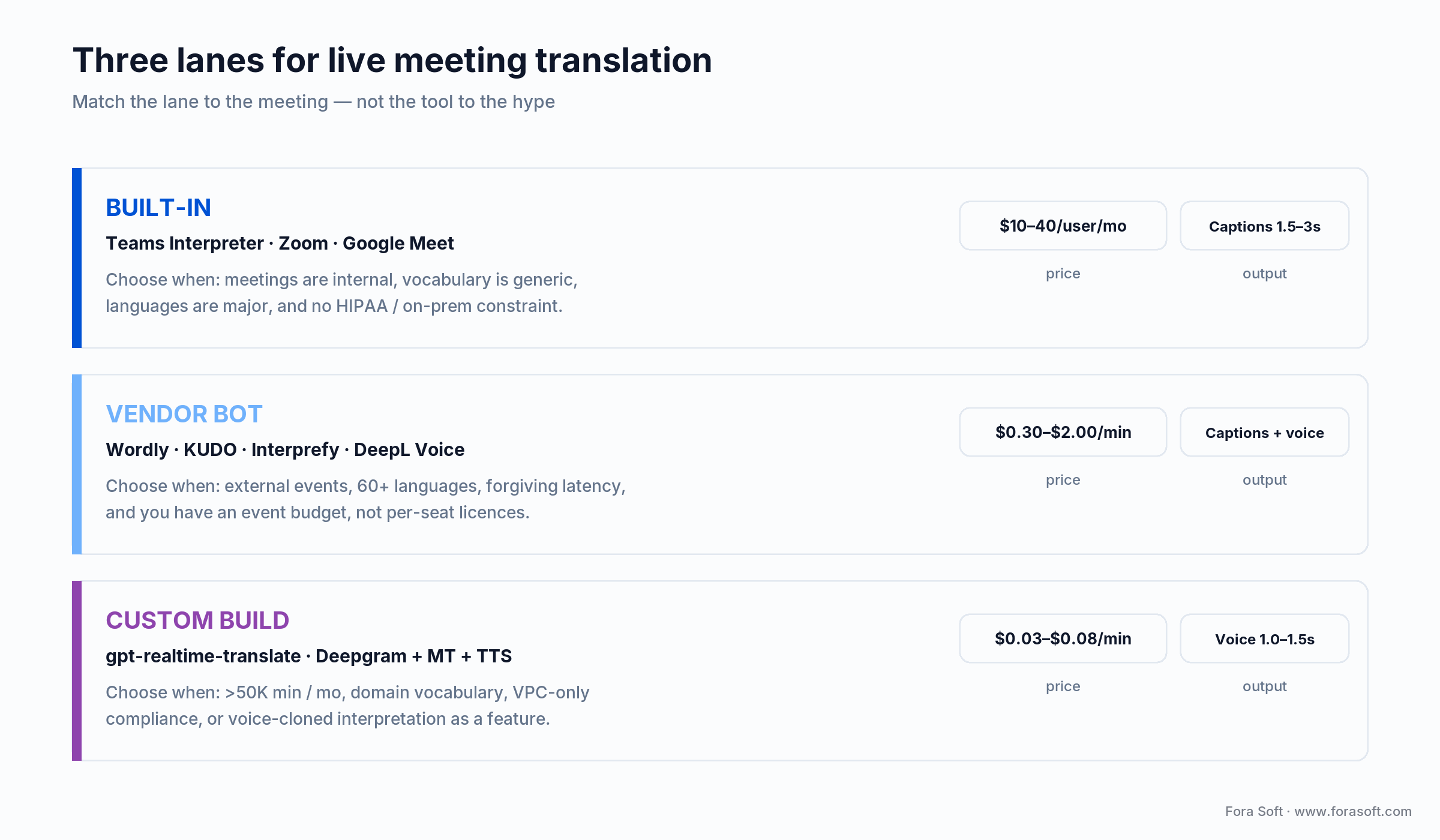
Figure 1. The three placements for live meeting translation and when each one is the right call.
Why is live meeting translation still hard in 2026
The hard part isn’t model accuracy. Modern ASR sits at 5–10% word error rate on clean audio across the top 30 languages, and modern MT is fluent on the major pairs. The hard part is streaming everything together under a sub-3-second budget on a noisy home connection while handling silence, turn-taking, jitter, dropout recovery and partial-sentence retractions. Five problems compound:
1. The latency budget is tiny. Cross 3 seconds and viewers stop reading captions and start interrupting. ASR alone takes 200–800 ms, MT 100–400 ms, TTS 200–700 ms, and WebRTC ingestion 80–300 ms. The remaining second has to absorb networking, queueing and partial-result revisions.
2. Noisy audio is the default, not the exception. Home offices, laptop mics, mobile networks, fans and dogs push word error rate from 6% to 25%. The fix is upstream noise suppression (Krisp, RNNoise, or Microsoft’s built-in voice isolation), not a better model downstream.
3. Domain vocabulary fails on first contact. Off-the-shelf models don’t know your product names, internal acronyms or industry jargon. “CRO” means three different things in pharma, finance and SaaS. The fix is custom-vocabulary injection, available on Deepgram, AssemblyAI and Speechmatics, but not on default Teams captions.
4. Code-switching still trips most engines. Multilingual teams switch languages mid-sentence. Many ASR engines lock to one language at session start and freeze when a speaker switches. Multilingual models such as Whisper-Large and OpenAI’s realtime family transcribe code-switched audio without stalling.
5. Compliance varies by jurisdiction. HIPAA needs a signed agreement with every cloud and AI vendor in the path. EU GDPR treats meeting audio as personal data, and a recorded voice can be biometric. A single-vendor stack rarely satisfies healthcare, EU residency and court-grade rules at once.
Latency rule of thumb: if a listener can finish the sentence in their head before the translation appears, they read it as real-time. That budget is roughly 2.5–3 seconds for captions and 1.0–1.5 seconds for synthesized voice. Optimize the p50 and p95, not the average. A few long spikes destroy trust faster than a steady, slightly slow feed.
Who actually uses live meeting translation
Five buyers drive nearly every project we scope, and each one lands in a different lane:
1. Distributed product orgs. Companies with engineers in Eastern Europe and customer success in Latin America want captions on standups and design reviews. Built-in Teams or Zoom translation usually does the job, and the buyer is IT, not product.
2. Telehealth platforms. Doctors and patients on different language pairs need accurate, HIPAA-compliant translation. Default consumer meeting clients fail HIPAA out of the box, so this segment buys a compliant bot or builds on AWS or Azure under a signed agreement. Our work on CirrusMED lives here.
3. EdTech platforms. Synchronous classes with international students. BrainCert ships live captions on every classroom; the requirement is forgiving latency but tight cost per minute, because the margins are thin.
4. Cross-border B2B sales. Account executives in San Francisco selling to Tokyo, São Paulo and Riyadh. The buyer wants the speaker’s tone preserved in the target language, which means voice-cloned interpretation. Latency has to be tight here, because a mistranslation on a live call can cost the deal.
5. Government, legal and judicial. Court hearings, immigration interviews, asylum proceedings. AI-only is rarely accepted, so the model is hybrid: AI as a live preview, a human interpreter as the authoritative record. We shipped exactly this stack for the Kazakhstan judiciary; certified-quality builds run $200K–$600K over 6–9 months.
Built-in vs vendor bot vs custom build
Answer first: use built-in captions for internal calls, a vendor bot for external events in many languages, and a custom build when you exceed roughly 50,000 monthly minutes or need vocabulary, VPC isolation or voice cloning. Every major meeting client now ships some translation, and the gaps are specific. Here is what each option actually does in 2026.
| Option | Languages | Output | Pricing (USD) | Where it wins / breaks |
|---|---|---|---|---|
| Teams (Interpreter) | 40+ captions, 9 voice | Translated captions; voice interpreter (GA Feb 2025) | Premium / Copilot licence | Wins for Microsoft shops; breaks on custom vocabulary |
| Zoom AI Companion | ~30+ captions | Translated captions | Included in paid plans | Wins on price; breaks with no spoken output |
| Google Meet | Growing set (GA 27 Jan 2026) | Translated speech + captions | Select Workspace plans | Wins for Google shops; breaks outside Meet |
| DeepL Voice | 33 | Captions via Teams/Zoom/Meet plugin | Per-seat subscription | Wins on EU-pair quality; breaks on spoken voice |
| Wordly | 60+ | Captions + AI voice | ~$0.30–$1.00/min | Wins for webinars; breaks on tight per-user budgets |
| KUDO / Interprefy | 60+ AI, human network | Captions, AI voice, human interpreters | ~$0.50–$2.00/min event tier | Wins on hybrid/regulated; breaks on unit cost |
| Custom build | 100+ (ASR-limited) | Captions, voice, voice-cloned | ~$0.03–$0.08/min compute | Wins at high volume; breaks below 50K min/mo |
Reach for built-in captions when: meetings are internal, vocabulary is generic, languages are major, and you don’t need HIPAA or on-prem. Teams Interpreter and Google Meet cover this without a second contract.
Reach for a vendor bot (Wordly, KUDO, Interprefy) when: events are external, you need 60+ languages or a human in the loop, latency can be 3–5 seconds, and you have an event budget rather than a per-user licence.
Reach for a custom build when: you pass 50,000 monthly meeting minutes, need domain vocabulary, must run inside a VPC for compliance, or want voice-cloned interpretation as a product feature.
Buy a vendor or build your own translation pipeline?
Send your meeting volume, language pairs and compliance constraints. We model both paths and return a 3-year cost curve.
What latency should I target, and how do I budget it
Target under 1.5 seconds for spoken voice and under 3 seconds for captions. There are three tiers, each tied to a perceptual experience:
1. Conversational, under 1.5 s. The bar for spoken interpretation. It needs streaming ASR, streaming MT and streaming TTS, plus a tight WebRTC path. OpenAI’s gpt-realtime-translate hits this by pace-matching the speaker in a single call; a hand-built stack gets there with a 60 ms-chunk streaming ASR, a small MT model and a turbo TTS.
2. Caption-friendly, 1.5–3 s. The bar for translated captions. Teams, Zoom, Meet, Wordly and Interprefy all sit here. Users notice the lag but adapt, because reading speed catches up.
3. Asynchronous, 5–15 s. The bar for on-demand transcripts and post-meeting summaries. Cheaper compute, higher accuracy, and anything goes on timing. Otter, Fireflies and Fathom live here.
A custom Tier-1 build spends its budget hop by hop. The figure below breaks down a realistic ~1.2-second p50 across the six hops, against the 1.5-second voice ceiling.
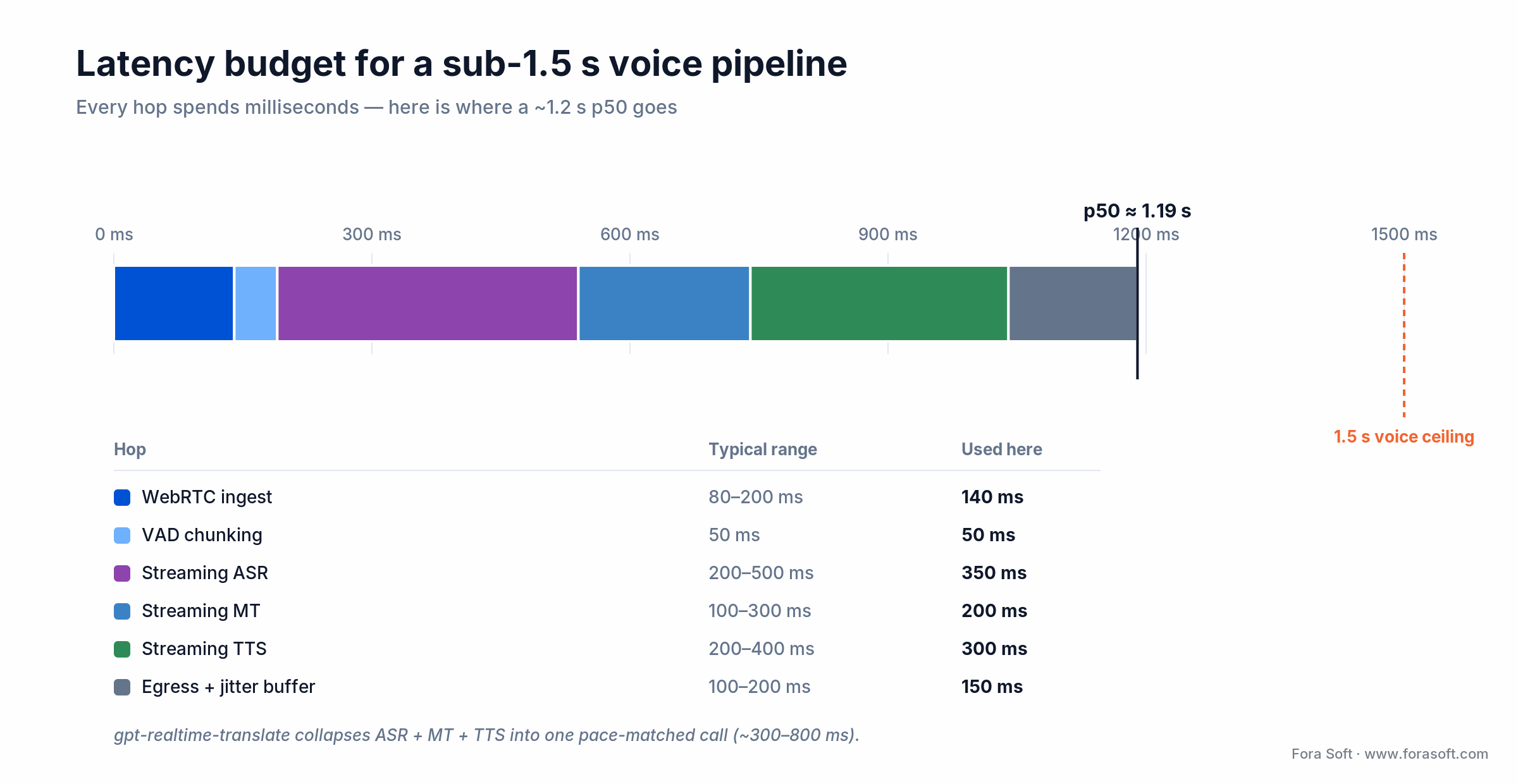
Figure 2. Where a sub-1.5-second voice pipeline spends its milliseconds, hop by hop.
Which speech-recognition engine for streaming translation
For most B2B pipelines, start with Deepgram Nova-3; switch to a self-hosted or OpenAI realtime model when code-switching or residency forces it. Five live contenders for streaming ASR in 2026:
1. Deepgram Nova-3. About 200 ms streaming latency, 99 languages, custom-vocabulary API. Real-time streaming runs $0.0077 per minute pay-as-you-go ($0.0065 on the Growth plan), with the newer Flux model for agent use. The default for SaaS pipelines, with a native WebSocket interface.
2. OpenAI gpt-realtime-whisper. New in 2026. Live transcription at $0.017 per minute that keeps pace with the speaker. It pairs naturally with gpt-realtime-translate if you want a single-vendor realtime stack.
3. AssemblyAI Universal-Streaming. Around 300 ms latency, roughly $0.0125 per minute. The best word error rate on noisy audio in our tests, which earns its higher price for healthcare and legal.
4. Whisper-Streaming, self-hosted. 400–800 ms latency, 99 languages, about $0.03–$0.04 per minute on a rented A100 or H100. Best multilingual code-switching. On steady volume it runs on Hetzner GPU bare-metal for $200–$400 a month.
5. Azure Speech and Speechmatics. Azure runs around $1 per audio-hour with a signed agreement, which makes it the HIPAA default. Speechmatics is EU-headquartered with custom vocabulary, which GDPR-conscious buyers prefer.
Which translation engine after speech recognition
Pick DeepL for European pairs, Microsoft for HIPAA, an open model for high volume, and OpenAI’s realtime translator when you want one call instead of three. Four engines we’ve shipped to production:
1. OpenAI gpt-realtime-translate. The 2026 shift for this article. One pace-matched call takes 70+ input languages to 13 output languages at $0.034 per minute, folding recognition, translation and voice into a single stream at 300–800 ms end to end. It collapses the classic five-box pipeline into one, which is why the build lane got cheaper this year.
2. DeepL. 33 languages, widely rated best on European pairs, about $25 per million characters. Its new DeepL Voice for Meetings delivers real-time captions straight into Teams, Zoom and Meet.
3. Microsoft Translator. 130+ languages, signed-agreement path, custom vocabulary, about $10 per million characters. The HIPAA-friendly default when you also run Azure Speech.
4. NLLB-200, self-hosted. Meta’s open-source model covers 200+ languages, running on the same GPU as your ASR at about $0.005–$0.015 per minute. Best for high-volume, low-resource pairs across African, Indic and Southeast-Asian languages.
Can I keep the original speaker’s voice in the translation
Yes, and it’s production-grade in 2026. The technique is voice cloning plus zero-shot TTS, productized by ElevenLabs, OpenAI voices, Cartesia Sonic, Microsoft Personal Voice and the open-source XTTS. Microsoft’s Interpreter in Teams uses this exact idea to speak your translation back in a voice that resembles yours.
The pipeline: capture 30–60 seconds of the speaker’s voice with consent, build a clone, then route translated text through TTS in that voice. The overhead is small: cloned TTS adds roughly 50–150 ms over a generic voice. Our voice-cloning guide covers the production details and the tradeoff between a cloned voice and a neutral one.
Consent and disclosure are now law, not etiquette. Under Article 50 of the EU AI Act, transparency obligations for AI-generated audio apply from 2 August 2026, and a deepfake voice must be disclosed even without intent to deceive. A proposed Digital Omnibus may shift the machine-readable marking duty to 2 December 2026, but the direction is fixed. California’s AI Transparency Act (SB 942), amended by AB 853, was deliberately re-dated to the same 2 August 2026 to line up with the EU. Build consent capture and an AI-voice label into onboarding now, not as a 2027 retrofit.
What about HIPAA, GDPR, SOC 2 and data residency
HIPAA (US healthcare). Audio of a doctor-patient call is protected health information, so you need a signed business associate agreement with every cloud and AI vendor in the path. AWS Transcribe and Translate are HIPAA-eligible, and Azure Speech is eligible under a signed agreement. Most teams ship on AWS or Azure rather than a consumer API with no such agreement.
GDPR (EU). Meeting audio is personal data, and a voice can be biometric under Article 9. The lawful basis is usually contract performance for internal B2B use and explicit consent for healthcare. Microsoft, Google and AWS all offer EU-only processing; DeepL is German-headquartered, which helps a data-minimization argument.
SOC 2 Type II. Most enterprise buyers ask for it. Wordly, KUDO, Interprefy, Microsoft and Google all carry it. A self-hosted deployment means you inherit the underlying cloud’s report and add a control layer of your own.
Data residency. The real question is where the audio buffer sits at every hop. Default Teams and Zoom send to US data centers. Several jurisdictions effectively force on-prem or in-country deployment, which is the path our judiciary client took in Kazakhstan, where every byte of court audio stayed in a sovereign data center.
What does a custom architecture look like, end to end
A reference pipeline denoises one source, fans the audio out to a per-language translation worker, and republishes each translation as its own audio track that listeners pick by language. The figure shows the full path.
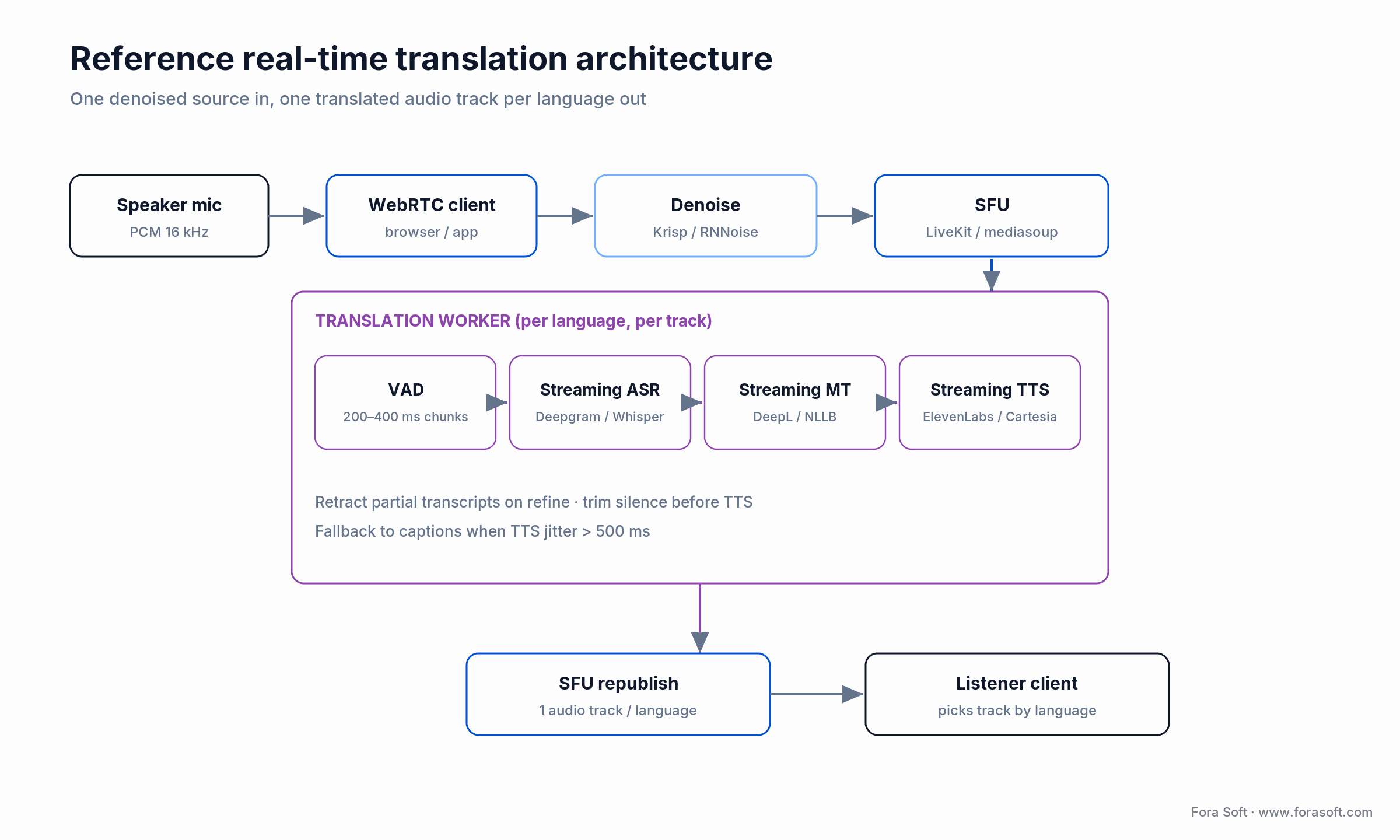
Figure 3. A production reference: one denoised source in, one translated audio track per language out.
Four engineering details decide whether this feels smooth or broken. Retract partial transcripts when the ASR refines them, tracking interim-versus-final flags, or captions flicker. Trim silence before TTS so you never synthesize two seconds of nothing. Use a track-per-language model on the SFU, which LiveKit supports natively while mediasoup needs orchestration. And fall back to captions the moment TTS jitter passes 500 ms, so a listener never gets stuck in dead air. For the WebRTC transport underneath, our speech-to-text for live streaming guide goes a level deeper.
Architecting a sub-1.5-second translation pipeline?
We review your latency budget against the SFU, ASR, MT and TTS stack and name the bottleneck in 30 minutes.
How much does live meeting translation cost
Off-the-shelf runs $0.30–$2.00 per minute; a stitched API stack runs $0.04–$0.08; a self-hosted stack drops lower at high volume. Three cost lenses:
Off-the-shelf. Wordly $0.30–$1.00 per minute, KUDO $0.50–$2.00 event tier, Teams and Meet bundled into their premium licences, Zoom captions included in paid plans.
API-stitched, with the arithmetic shown. Captions only: $0.005 (Deepgram ASR) + $0.002 (Microsoft MT) = $0.007 per minute. Add streaming TTS at $0.04 and you’re at ~$0.05 per minute. Add voice cloning and it’s $0.06–$0.08. Or skip the stitching: OpenAI’s gpt-realtime-translate does speech-to-speech in one call at $0.034 per minute. These are model costs; add 30–50% for SFU egress, orchestration and monitoring.
Self-hosted. Whisper-Streaming plus NLLB on a Hetzner H100 at $1.80 an hour is about $0.03 per minute of compute; add an API TTS and you’re near $0.07 all in. Below 100,000 minutes a month this is dearer than API-stitched once you price the DevOps. Above 500,000 it’s two to three times cheaper.
Build cost. A production translation feature with ASR, MT, TTS, SFU integration and an admin dashboard lands at $80K–$180K over 8–14 weeks with our Agent Engineering practice. A voice-cloning interpretation feature runs $150K–$280K over 12–20 weeks. Those numbers sit below the typical agency baseline because we generate a large share of the code with AI assistance. When a figure isn’t defensible for your case, we say so on the call rather than print it here.
The buy-versus-build curves cross near 50,000 monthly minutes. Below that, a vendor bot wins on total cost; above it, an amortized build pulls ahead. The figure plots both.
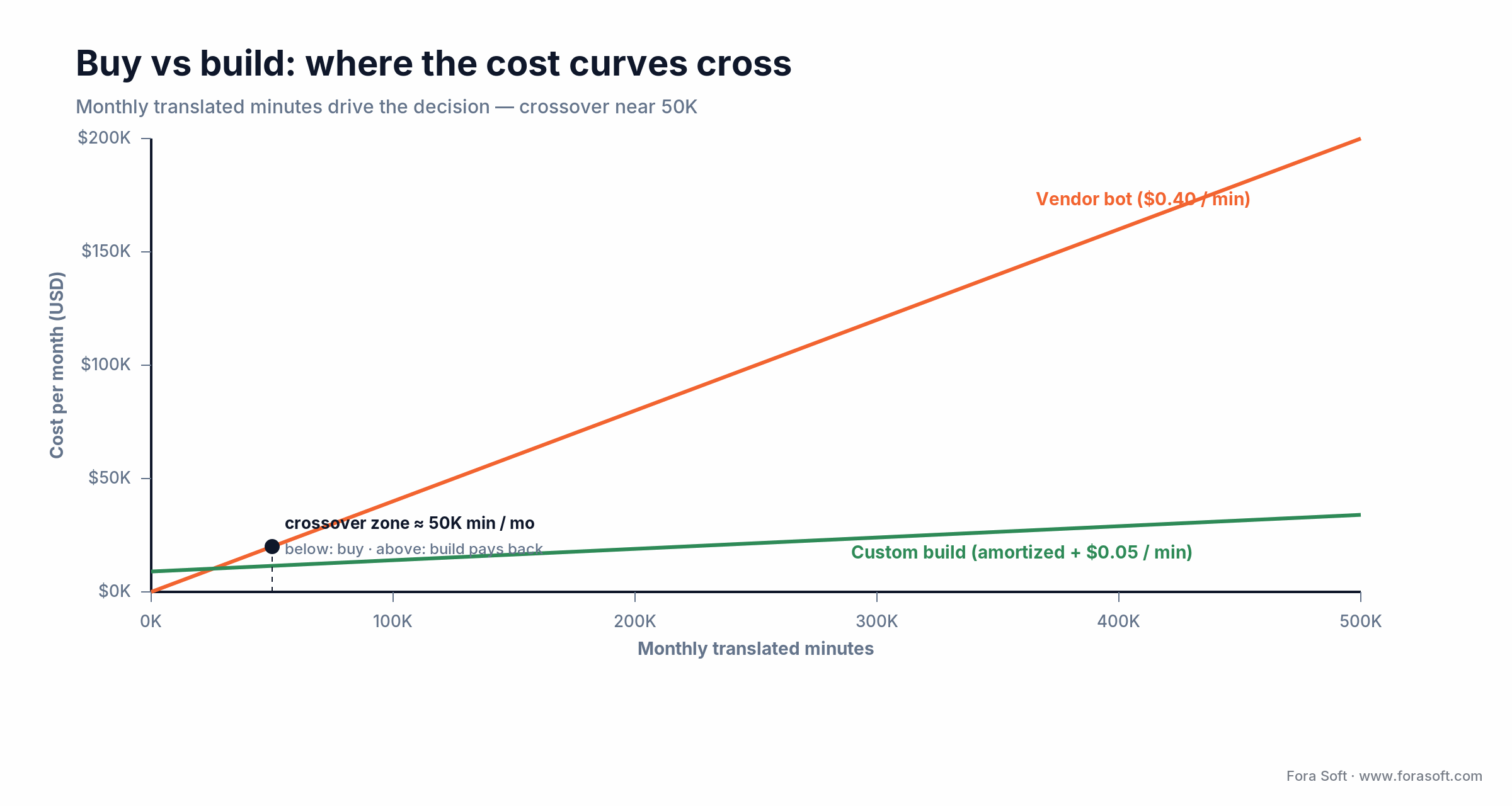
Figure 4. Buy versus build: monthly minutes drive the decision, with the crossover near 50K.
Mini case: multilingual classroom captions on BrainCert
Situation. BrainCert runs synchronous classes for enterprise learners across dozens of countries. The product needed translated captions in 25+ languages on every classroom, with sub-3-second latency, custom education vocabulary and per-student language choice. An off-the-shelf bot at $0.40 a minute would have added roughly $480K a year to the cost of goods for a margin-thin EdTech product.
12-week plan. We built a custom pipeline: Deepgram Nova-3 streaming ASR, Microsoft Translator with a custom education vocabulary, LiveKit SFU integration for per-student caption tracks, and a turbo-TTS fallback for a “hear it in your language” preview. Compute landed at $0.06 a minute, about one-seventh of the vendor contract.
Outcome. 25 languages live; p50 caption latency 1.8 s and p95 2.6 s; international-student attendance up 31% in the first quarter; educator satisfaction for non-native English speakers moved from 22 to 49 on the same survey. Want a similar assessment? Book a 30-minute call and we’ll size it against your numbers.
A decision framework: pick a path in five questions
Q1. How many monthly meeting minutes will you translate? Below 50,000, a vendor bot wins on total cost. Above it, a custom build usually pays back inside 9–14 months.
Q2. Do you ship inside Teams, Zoom or Meet, or in your own product? Inside the big three, use their built-in translation unless compliance forbids it. In your own product, it’s a custom build or a bot integration.
Q3. What is your strictest compliance regime? HIPAA forces Azure or AWS under a signed agreement. Strict EU residency forces in-region processing. Court-grade work forces hybrid AI-plus-human. No hard constraint? Decide on cost.
Q4. Captions, spoken voice, or voice-cloned interpretation? Captions are about 80% of demand, and the cheapest and fastest to ship. Spoken voice roughly doubles cost and complexity. Voice cloning roughly triples it, but opens sales and executive use cases captions can’t.
Q5. Are domain vocabulary and code-switching critical? If yes, default vendors will miss; you need custom-vocabulary APIs or self-hosted multilingual models. If your meetings are generic, built-in captions will do. Still unsure after these five? That’s exactly the call we take: our interpretation experts will map it with you.
Pitfalls to avoid when shipping live meeting translation
1. Skipping noise suppression. Home-office word error rate quadruples without it. Wire Krisp or RNNoise in front of every ASR call, or use Microsoft’s built-in voice isolation in Teams ecosystems.
2. Pushing every interim transcript. Streaming ASR returns partial results that get refined. If you display each one, the caption flickers. Dampen with a 200–400 ms debounce and only promote stable text.
3. Forgetting to trim silence before TTS. Streaming MT emits partial sentences that end mid-clause. Synthesize them blindly and the voice speaks broken half-sentences. Buffer until punctuation or two seconds of silence before you invoke TTS.
4. A single centralized translation worker. One worker is one point of failure for the whole room. Run translation per track on per-language workers and orchestrate failover.
5. No consent or disclosure guardrails. Cloning a voice without disclosure runs against the EU AI Act and California’s transparency law from 2 August 2026. Build consent capture and an AI-voice label into onboarding from day one.
KPIs: what to measure once translation is live
Quality KPIs. Word error rate (target under 10% on clean audio, under 20% on noisy), translation quality on your top three pairs, and a mean-opinion score above 3.8 out of 5 for synthesized voice. Sample real meetings, not a clean benchmark set.
Business KPIs. Translation attach rate (share of meetings with it enabled, target 25%+ for global teams), retention lift on multilingual cohorts against a control, and session length among non-native speakers.
Reliability KPIs. p50, p95 and p99 caption latency (target under 2, 3 and 5 seconds), translation-worker uptime at 99.95%, and the share of failed-TTS sessions that fell back to captions cleanly instead of dropping into silence.
When live AI translation is the wrong answer
Court hearings, depositions, asylum interviews. AI alone isn’t legally accepted in most jurisdictions. Use hybrid: AI as a preview for the human interpreter, who delivers the authoritative translation on the record.
Diplomatic and high-stakes negotiation. Idiom, nuance and political weight matter, and human professional interpreters remain the standard. AI belongs in post-meeting review here, not the live channel.
Low-resource pairs without good ASR. When recognition word error rate runs above 30%, translation compounds the error, and captions can mislead more than they help. Prefer a post-meeting summary reviewed by a native speaker.
Short, two-person calls where both muddle through. If both speakers are bilingual enough, the cost of monitoring a translation feed is higher than the comprehension it adds. Captions earn their place only when one side would otherwise be lost.
FAQ
How accurate is live meeting translation in 2026?
On top-tier pairs such as English with Spanish, German, French, Chinese or Japanese, modern stacks reach 85–95% accuracy on clean audio in business settings. Accuracy drops 10–20 points on noisy audio, technical jargon and code-switched speech. Custom-vocabulary injection pulls technical-domain accuracy back into the 90s.
What is realistic latency for translated meetings?
Captions land at 1.5–3 seconds end to end on Teams, Zoom, Meet and Wordly. Synthesized speech reaches 1.0–1.5 seconds on a tight streaming stack, though it’s fragile under network jitter. Voice-cloned interpretation targets 1.5 seconds and typically sees about 2.0 seconds in production.
Does Microsoft Teams translate meetings in real time?
Yes. Teams shows translated live captions in 40+ languages, and Interpreter in Teams, generally available since February 2025, speaks a real-time voice translation in 9 languages that can resemble the speaker’s own voice. Both sit behind a Premium or Copilot licence, and healthcare use needs a business associate agreement review first.
What is gpt-realtime-translate and why does it matter?
It’s an OpenAI realtime model, released in 2026, that translates speech from 70+ input languages into 13 output languages in a single pace-matched call at $0.034 per minute, with 300–800 ms end-to-end latency. It matters because it folds recognition, translation and voice into one API, so a custom build no longer means orchestrating five services by hand.
Wordly vs KUDO vs Interprefy: which and when?
Wordly is AI-first, with captions and AI voice at predictable per-minute pricing, which suits internal company meetings. KUDO leads on hybrid AI-plus-human with a large interpreter network, the default when regulated content needs a human in the loop. Interprefy is strong on EU and GDPR posture for live conferences. For ticketed external events, KUDO and Interprefy are the safer call.
Can I run live meeting translation entirely on-prem?
Yes. Whisper-Streaming for ASR, NLLB-200 for translation, and XTTS or Coqui for voice cover the full path with no cloud call. The operations cost is real, one or two H100 or A100 GPUs plus a DevOps owner, but the compliance posture is the strongest available. We deployed this stack for a sovereign judiciary build.
How do I handle mixed languages in one sentence?
Use a multilingual ASR with explicit code-switching support. Whisper-Large, NLLB and OpenAI’s realtime models transcribe code-switched audio without freezing on the start language. Avoid older single-language engines, which stop transcribing the moment a speaker switches.
Do I have to disclose AI-generated voice in meetings?
Increasingly, yes. The EU AI Act’s transparency obligations for AI-generated audio apply from 2 August 2026, and California’s AI Transparency Act was re-dated to the same day. A cloned or synthetic voice should be labeled, and consent should be captured at enrollment. Treat disclosure as a product requirement, not a legal afterthought.
How long does a custom translation feature take to ship?
Captions only on a product with a WebRTC backbone: 6–10 weeks. Add synthesized voice: 8–14 weeks. Add voice cloning: 12–20 weeks. We hit the lower end of these ranges with our Agent Engineering practice, where a typical agency runs 30–60% slower.
What to read next
Interpretation
AI Simultaneous Interpretation: Complete Guide
The full pipeline for video-conference interpretation, latency budgets and tool selection.
Tools
7 Tools for Multilingual Video Calls in 2026
DeepL, KUDO, Interprefy, Teams, Zoom, Meet and open models, compared honestly.
Voice cloning
Real-Time Voice Cloning for Translation
Pipelines, ethics and the consent flow for keeping a speaker’s voice across languages.
Benchmarks
Real-Time Speech Translation Vendor Benchmarks
Latency and accuracy numbers, vendor by vendor, for the streaming stack.
Ready to ship live meeting translation in your product?
Live meeting translation cleared the production bar in 2025, and 2026 made the build lane cheaper: Teams and Meet ship translation for internal calls, Wordly and KUDO cover external events, and OpenAI’s realtime models let a custom build do speech-to-speech in a single call. The decision is no longer whether the technology works. It’s which of the three lanes matches your minutes, your compliance regime and your product roadmap.
We’ve shipped translation on every layer, from custom Deepgram-plus-Microsoft pipelines for EdTech to sovereign on-prem builds for a judiciary. For a working session against your meeting volume, language pairs and compliance rules, with a 3-year cost curve across buy, hybrid and build, book a call below. If you’d rather read first, our AI integration and audio-for-video resources go deeper.
Pick the right live meeting translation stack
A 30-minute call: latency budget, vendor short-list, compliance posture and a cost comparison across the four paths, in writing afterward.

