

Key takeaways
• Engagement lives and dies on the first 500ms. Users expect a camera tile to load in under two seconds; every extra second of black screen is when they tap away for good. Video monitoring apps that retain users cheat latency with WebRTC (200-500ms glass-to-glass), Media3, and hardware-accelerated codecs.
• Smart notifications beat more notifications. AI motion filtering (person vs pet vs rustling leaves) turns a 40-alert-per-day nuisance into 3 meaningful pings and lifts day-30 retention well above the ~6% consumer-app baseline (UXCam 2026) toward a 25-35% best-in-class band.
• Foreground service type is non-negotiable on Android 14+. Since API 34 you must declare camera or mediaPlayback service types; miss it and the service throws a MissingForegroundServiceTypeException at launch.
• RTSP ingest, WebRTC delivery is the winning architecture. Cameras speak RTSP, humans want WebRTC-speed playback. A sub-500ms bridge is what separates a monitoring app people open 4 times a day from one they uninstall in week two.
• Fora Soft has shipped this stack at scale. Our VALT surveillance platform serves 770+ US organizations and 50,000+ users across police interview rooms, medical simulation labs, and child advocacy centers, and the engagement patterns below are what we see move KPIs in production.
Why Fora Soft wrote this playbook
We build video monitoring software for a living. Since 2005 our team has shipped 250+ surveillance, video conferencing, and telemedicine products at a 100% Upwork success rate. A video monitoring app sits at the intersection of three of our hardest problems: low-latency streaming, battery-aware background work, and “does the user actually open this thing every day” retention.
The proof point is V.A.L.T., the video surveillance system we co-built with Intelligent Video Solutions. It now serves 770+ US organizations and 50,000+ users across US police interrogation rooms, medical simulation labs, and child advocacy centers, and it is HIPAA- and GDPR-compliant. The BEAM Android companion app turns any phone into a surveillance endpoint and streams back to the same dashboard. Every engagement pattern in this playbook has been pressure-tested on that codebase.
This article is not a feature list. It is what we tell clients in the first scoping call when they ask why their monitoring app has a 12% day-7 retention cliff — and what we change to pull it back up.
Stuck on a video monitoring app that users open once a week?
Tell us what the current stack looks like — in 30 minutes we’ll tell you what’s killing engagement and what it costs to fix.
What good engagement looks like in 2026
Before optimizing anything, anchor to real numbers. Video monitoring apps behave differently from social apps — people do not scroll them for pleasure, they open them when something happens. That changes what “engagement” even means.
| Metric | Industry avg. | Healthy | Top quartile | What drives it |
|---|---|---|---|---|
| Day-1 retention | 25% | 35% | 40%+ | Onboarding & first-camera-paired time |
| Day-7 retention | 10% | 18% | 25%+ | Notification signal-to-noise ratio |
| Day-30 retention | 6% | 15% | 25–35% | Real value per alert, PTZ/2-way response |
| DAU/MAU stickiness | 13% | 20% | 25–50% | Event-driven re-entry patterns |
| Live-tile time-to-first-frame | 3.0s | < 2.0s | < 0.8s | WebRTC/LL-HLS, warm socket, hardware decode |
| Notification open rate | 8–12% | 18% | 30%+ | AI filtering, bundled summaries |
The single most useful number is DAU/MAU stickiness. Social-media apps live at 50% because people open Instagram daily out of habit. A monitoring app at 20% is healthy because most days nothing happens — and that’s the point (industry retention baselines here are drawn from UXCam’s 2026 benchmarks: ~25% day-1, ~6% day-30 across consumer apps). Spikes above 25% usually mean your alerts are working.
Latency is the feature: choose the right protocol stack
Every engagement metric above collapses if the live tile takes four seconds to paint. Users tap, wait, close, and do not come back. So the very first architectural decision is the transport layer from camera to phone. In 2026 the protocol table looks like this:
| Protocol | Glass-to-glass latency | Android client | Scale | Best for |
|---|---|---|---|---|
| WebRTC | 200–500ms | libwebrtc / SFU SDK | Medium (SFU required) | Live tile, 2-way talk, PTZ control |
| LL-HLS | 2–5s | ExoPlayer / Media3 | Unlimited (CDN) | Multi-viewer public feeds |
| HLS (standard) | 8–12s | ExoPlayer / Media3 | Unlimited (CDN) | Recorded playback, archives |
| RTSP | < 500ms | Custom / libVLC | Low (direct connection) | Camera ingest (server side) |
| SRT | 1–2s | Custom | Point-to-point | Lossy-network camera uplink |
Reach for the RTSP-in, WebRTC-out bridge when: your IP cameras speak ONVIF/RTSP natively and users expect a tap-to-watch live tile on Android in under a second — which is virtually every modern surveillance product. It is the greenfield default we reach for today; our VALT platform hits the same sub-second feel with the ultra-low-latency Wowza stack it grew up on.
In practice you rarely pick just one. The canonical stack is RTSP ingest at the server, WebRTC delivery to Android for live view, HLS for archive scrubbing. Media3, the post-ExoPlayer AndroidX library Google now ships, handles HLS and DASH natively; for WebRTC you integrate libwebrtc or a managed SFU like Janus, mediasoup, or LiveKit, and in 2026 you signal it with WHIP/WHEP, the pair that finally made WebRTC surveillance interoperable. WebRTC is the only protocol that lands consistently under 500ms glass-to-glass (Mux’s protocol guide is a solid primer; we unpack the terminology in our glass-to-glass latency explainer). Building the mobile side? Our low-latency streaming playbook goes deeper on delivery.
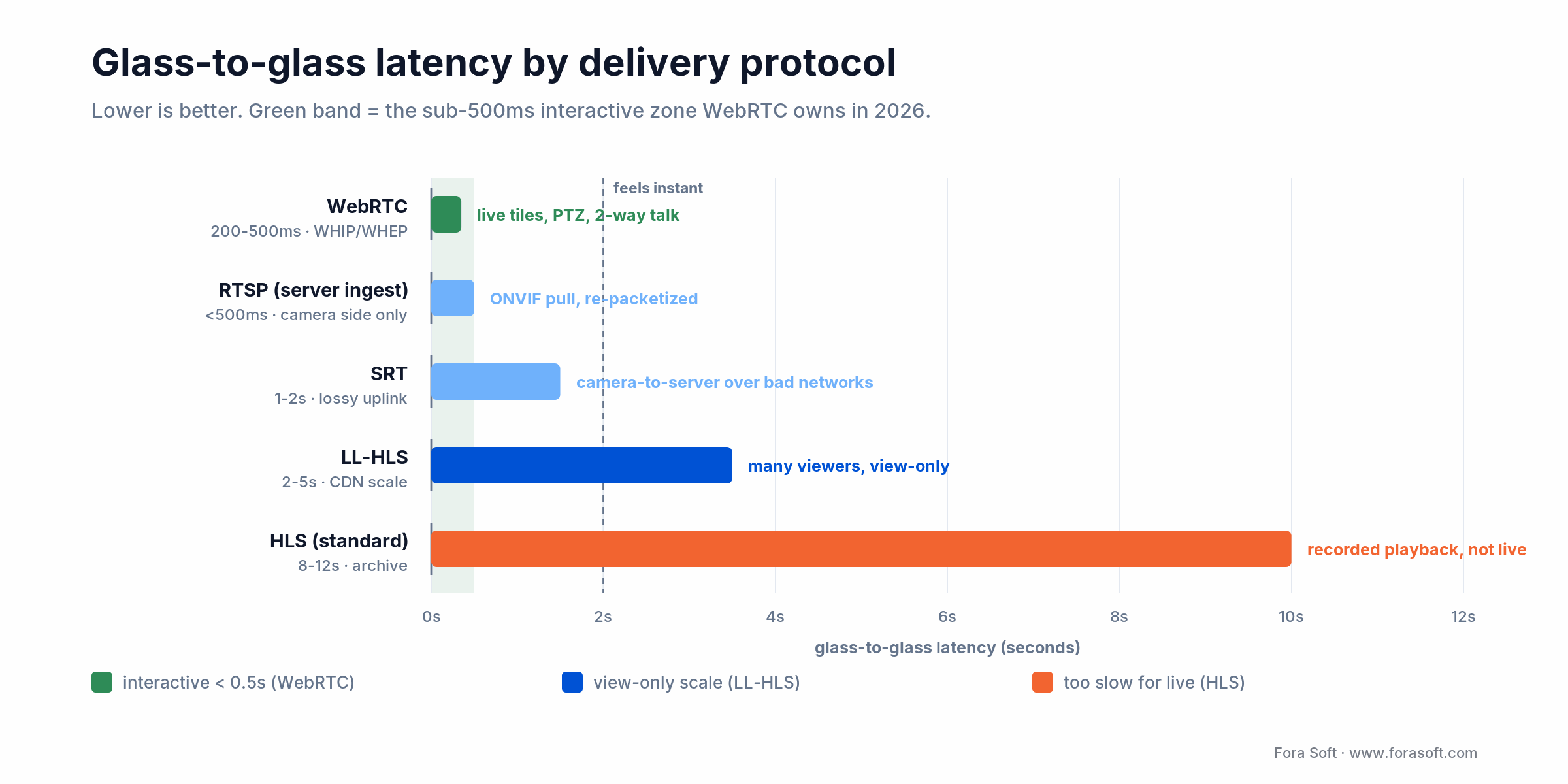
Figure 1. Glass-to-glass latency by protocol. WebRTC (200-500ms) is the only sub-second option; standard HLS trails at 8-12s.
Build the notification engine like a feature, not an afterthought
If latency wins the “is this app fast” battle, notifications win the “is this app useful” one. A plain Android surveillance app that forwards every motion blob from the camera will fire 40–80 alerts per day per camera in a suburban driveway — and will be silenced within a week. The retention curve depends almost entirely on how well you filter: generic push campaigns open around 4.7%, contextual ones around 16%, and rich notifications lift opens another ~56% (Pushwoosh, 2025).
Four tiers of notification quality
1. Raw motion. Sensor fires, phone buzzes. Open rate 5–8%. Users mute the channel within days.
2. Person / vehicle / package classification. On-camera or on-server AI filters motion into object classes. Open rate climbs to 15–20%.
3. Contextual zones and schedules. The user draws a zone around the porch, another around the driveway, and the app only pings for zone hits during configured windows. Open rate 25–30%.
4. Intent-aware bundles. AI groups the 90-second “Amazon driver walked up, dropped the box, walked away” sequence into one notification with a summary (“Package delivered 3:42pm”) and a 6-second preview GIF. Open rate 30%+ and — crucially — high session depth after tap.
Reach for AI alert bundling when: one real event fires a burst of motion pings: a delivery, a car pulling in. Collapse the burst into a single summary notification with a short preview clip, and open rate climbs from the ~5% generic-push floor toward 30%+.
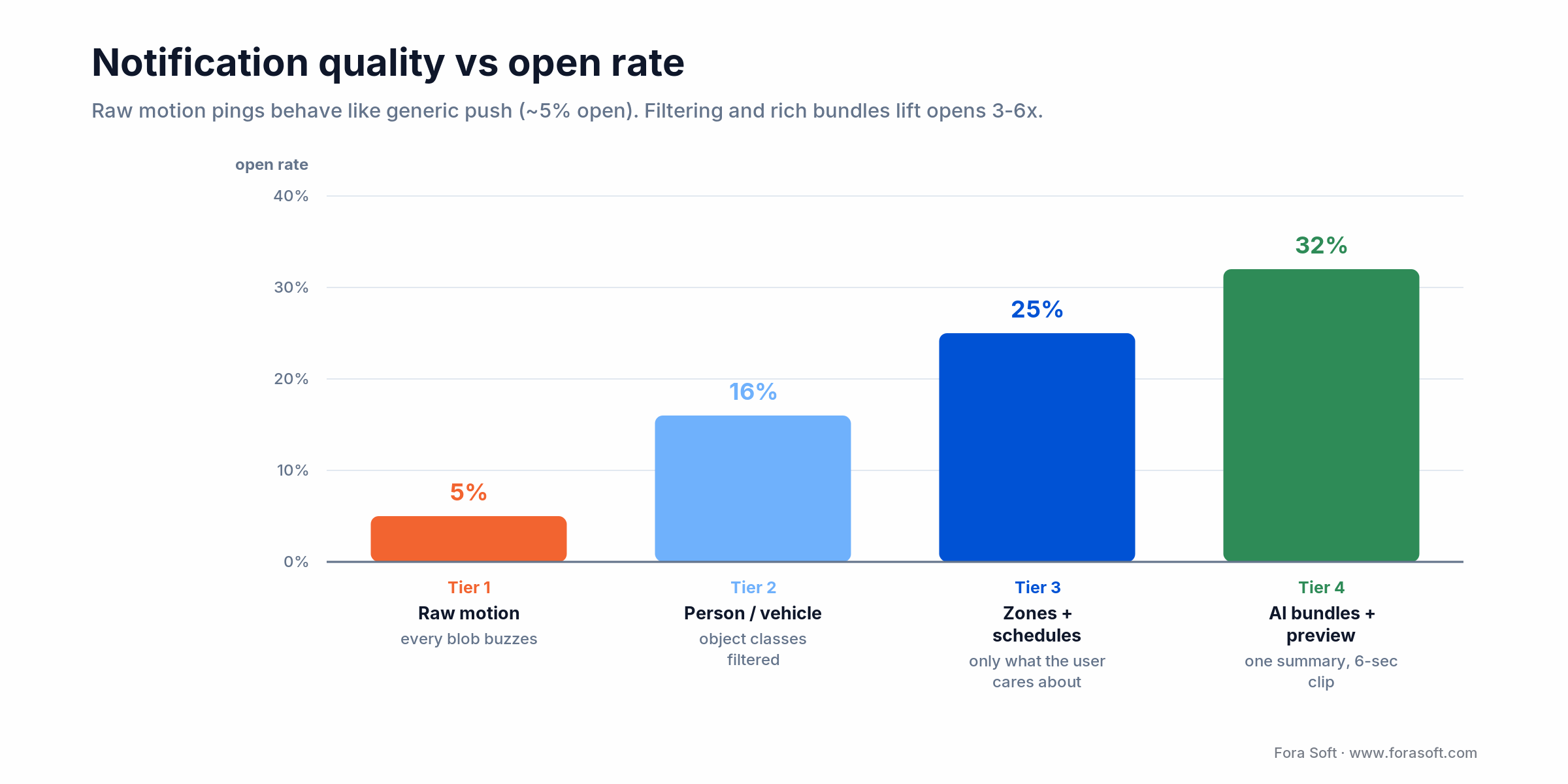
Figure 2. Notification quality versus open rate. Filtering and AI-bundled previews lift opens from the ~5% generic-push floor past 30%.
Android 14+ implementation essentials
Tier 4 needs three Android-specific pieces: a NotificationChannel per severity (so users silence “low-priority motion” without muting “front-door person”), MessagingStyle/BigPictureStyle for rich preview, and a lightweight FullScreenIntent reserved for genuine intrusion events only — Google’s enforcement rejects apps that abuse it.
val channel = NotificationChannel(
    "intrusion",
    "Intrusion alerts",
    NotificationManager.IMPORTANCE_HIGH
).apply {
    setBypassDnd(true)
    enableLights(true)
    enableVibration(true)
}

val notif = NotificationCompat.Builder(ctx, "intrusion")
    .setSmallIcon(R.drawable.ic_camera)
    .setContentTitle("Person at front door")
    .setContentText("3:42 PM — 6-second preview")
    .setStyle(NotificationCompat.BigPictureStyle()
        .bigPicture(previewBitmap))
    .setFullScreenIntent(intrusionPI, true)
    .setCategory(NotificationCompat.CATEGORY_ALARM)
    .build()
Need an AI filter that actually knows the difference between a raccoon and a burglar?
We’ve trained on-device and server-side object models for surveillance products used by 770+ US organizations. Let’s scope yours.
Foreground services, battery, and the Android 14+ landmines
A monitoring app that drains the battery is a monitoring app that gets uninstalled. Since Android 14 (API 34) you must declare a foregroundServiceType for every foreground service, and the runtime kills misdeclared ones. Android 15 (API 35) tightened the rules again: a dataSync service now has a hard six-hour daily runtime cap, and camera and dataSync services can no longer start from a BOOT_COMPLETED receiver. Android 16 (API 36) is the current target in 2026, and Google Play’s excessive-wake-lock policy flags apps that hold wake locks too long.
The four types that matter for this category:
1. camera. Required when the phone itself is the recording device — the pattern VALT’s BEAM app uses to let a smartphone join as a surveillance endpoint.
2. mediaPlayback. For the live-viewing case where the user is actively watching a feed with the phone in hand. PlayerNotificationManager from Media3 pairs with this cleanly.
3. dataSync. For background download of recorded clips triggered by user action. Use the User-Initiated Data Transfer (UIDT) API — it’s exempt from the wake-lock quota.
4. remoteMessaging. For push-based alert pipelines that require immediate processing (arming a siren, triggering a call).
Reach for Doze-aware scheduling when: your app needs to poll cameras for health/status. Use WorkManager with exponential backoff instead of a persistent foreground service. Holding a wake lock for status pings is the #1 reason Play Store battery enforcement flags surveillance apps.
The live-tile UX: seven patterns that move retention
Everything above is plumbing. What users actually see is a grid of camera tiles, a timeline, and a handful of buttons. These are the seven patterns we put into every monitoring app we ship:
1. Pre-warmed tile previews. Show the last-known keyframe as a static JPEG the instant the grid renders, then swap to live video as the WebRTC stream arrives. No blank black rectangles.
2. Tap-to-expand with shared-element transition. Android’s MotionLayout makes the tile-to-full-screen animation free. The perceived latency of the stream starting drops because the user is mid-animation when the first frame lands.
3. PTZ gestures on the full-screen view. Pinch-to-zoom, two-finger-drag for pan. VALT proved that giving users PTZ on mobile lifted session length 40% on the police interrogation workflow.
4. Push-to-talk button. Two-way audio via WebRTC. This is the single feature that converts “watch-only” users into daily users — shouting at the porch pirate is far more satisfying than just recording them.
5. Scrubbable timeline with AI chapter markers. Instead of a raw 24-hour timeline, cluster events into “Person at 3:42”, “Vehicle at 5:10”. Users skip 10x faster through a day.
6. Picture-in-picture on navigation. enterPictureInPictureMode() keeps the feed visible while the user checks the door. Session length climbs because nobody has to “come back” to the app.
7. Android TV/tablet parity. Cross-device compatibility across phone, tablet, and Android TV lets the app slot into the user’s life — checking the baby cam on the living-room TV while cooking is the classic use case. Plan the Jetpack Compose adaptive layout early.
Reach for two-way push-to-talk when: the user needs to act, not just watch: a porch, a nursery, a shop floor. It is the single feature that most reliably converts watch-only users into daily users.
AI on-device vs in-camera vs server: where to run the brain
The market is converging on hybrid: simple classifiers on the camera firmware, heavy lifting in the cloud, a fallback on the phone for offline mode. Picking the mix wrong burns bandwidth, battery, or dollars. It is the part of an AI integration project where scoping earns its keep.
| Where the model runs | Typical capability | Latency | Cost shape | Engagement lever |
|---|---|---|---|---|
| Camera firmware (edge) | Person/vehicle classes | < 50ms | Zero recurring | First-pass alert filter |
| Android device (TFLite/ML Kit) | Face auth for PTT, on-device clip summary | 100–300ms | Battery cost | Offline resilience, privacy |
| Server GPU (heavy) | Re-identification, behavior analysis, plate reading | 200ms–1s | GPU-hour | Smart alert bundles, search |
| LLM (off-box) | Natural-language clip summaries & query | 1–3s | Per-token | Engagement with archive |
Reach for on-device TFLite when: you need a privacy-first mode where frames never leave the phone, offline continuity when Wi-Fi drops, or on-device face authentication for push-to-talk: anything latency-critical and private that should not wait on a server round-trip.
The pattern that keeps winning in our builds: camera does person/vehicle filtering, the server runs a lightweight tracker and a Vision-LLM for natural-language summaries, and the Android client uses TFLite for local face authentication and for a “private mode” where no frames leave the device. See our AI-powered video surveillance deep dive for the training-data side of this.
Reference architecture for an Android video monitoring app
Assembled from the pieces above, the canonical pipeline looks like this. Each box below is a distinct deployable that Fora Soft builds and runs for clients today as part of the video surveillance systems we ship; for the phone side specifically, see our companion guide to building mobile apps for IP cameras.
| Layer | Component | Role | Typical tech |
|---|---|---|---|
| Ingest | RTSP gateway | Pulls from ONVIF cameras, demuxes H.264/H.265 | MediaMTX, GStreamer |
| Realtime fan-out | SFU | Distributes WebRTC to N viewers | LiveKit, mediasoup, Janus |
| Archive | Storage + HLS packager | Segments + manifests for scrubbing | S3/MinIO + ffmpeg packager |
| AI pipeline | Object detect, tracker, summarizer | Produces event stream + metadata | YOLOv8/11, ByteTrack, Vision-LLM |
| Event bus | Pub/sub | Routes alerts to notification fan-out | NATS / Kafka / Redis Streams |
| Push gateway | FCM wrapper + Web Push | Delivers rich notifications | Firebase Cloud Messaging |
| Android app | Grid UI + player + PTT | Jetpack Compose UI, Media3/WebRTC | Kotlin + Compose + libwebrtc |
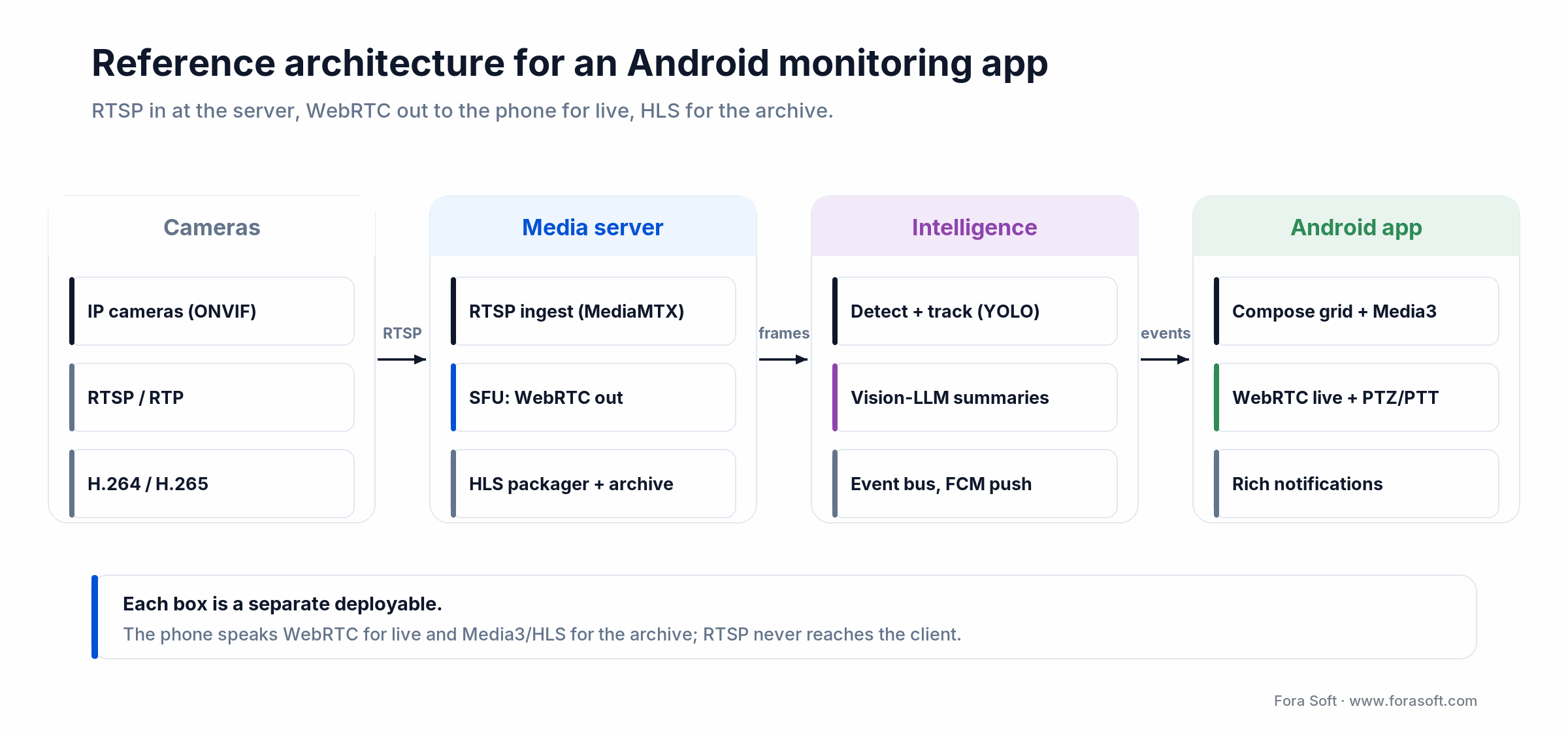
Figure 3. Reference architecture: RTSP ingest at the server, WebRTC to the phone for live, HLS for the archive.
Mini case: VALT and the BEAM Android companion
Situation. Intelligent Video Solutions came to us with VALT, an on-premise video surveillance platform for police interrogations, medical simulations, and child advocacy interviews. The platform already served hundreds of organizations via desktop browsers, but mobile usage was nearly zero — operators had to be at the desk to review a recording.
12-week plan. We designed and shipped BEAM, an Android companion app that (a) lets any authorized officer/clinician pull up live or recorded sessions from a phone, (b) supports PTZ and push-to-talk for live interrogation workflows, and (c) turns the phone itself into a roaming surveillance endpoint — the foreground-service camera pattern. Notes, timestamps, and a word-searchable transcript attached to every clip.
Outcome. Today VALT serves 770+ US organizations and 50,000+ users, and BEAM is a primary way field officers access the system. Revenue grew from $1M in the launch year to $8M within five years, the company was named the 4th fastest-growing tech firm in Wisconsin, and VALT 6.5 shipped in 2025 with word-searchable transcripts that turn recordings into evidence fast. The full story is in our VALT out-of-the-box-to-industry-leader write-up. Want a similar assessment of your monitoring product? Book 30 minutes.
What an engagement-grade Android monitoring app actually costs
Below are realistic scoping ranges we have hit on recent builds using our Agent Engineering workflow (Claude + senior reviewers) — which is why our hourly throughput is faster than traditional outsourcing. Treat as a starting point; the discovery call is where we compress these further.
| Scope | What’s in | Timeline | Ballpark |
|---|---|---|---|
| MVP Android client | Grid + live (Media3/HLS), archive scrub, FCM notifications | 10–14 weeks | From $45k |
| + WebRTC live + PTT + PTZ | Sub-500ms tiles, 2-way audio, gesture PTZ | +4–6 weeks | +$25–35k |
| + AI event pipeline | Server-side detection, bundling, LLM summaries | +6–10 weeks | Sized per camera count |
| Ongoing product care | Releases, Play Store policy shifts, scaling | Monthly retainer | Team-as-a-service |
A decision framework — pick your stack in five questions
Q1. How many simultaneous live viewers per camera? 1–5 is WebRTC territory. 50+ is HLS/LL-HLS. In between is where an SFU with LL-HLS fallback pays off.
Q2. Is two-way audio or PTZ in scope? Yes → WebRTC is non-negotiable. No → LL-HLS is cheaper and scales further.
Q3. Will users expect alerts within 2 seconds of the event? Yes → server-side AI pipeline + FCM high-priority channel. No → camera-firmware classifier is enough.
Q4. Regulated vertical (HIPAA, CJIS, GDPR, SOC 2)? Yes → on-premise or single-tenant cloud, encryption at rest and in transit, audit log as a first-class feature. Budget an extra 15–25% for compliance engineering.
Q5. Does the phone also need to be a camera? Yes → camera foreground service type + CameraX + custom WebRTC publisher. This is the BEAM pattern.
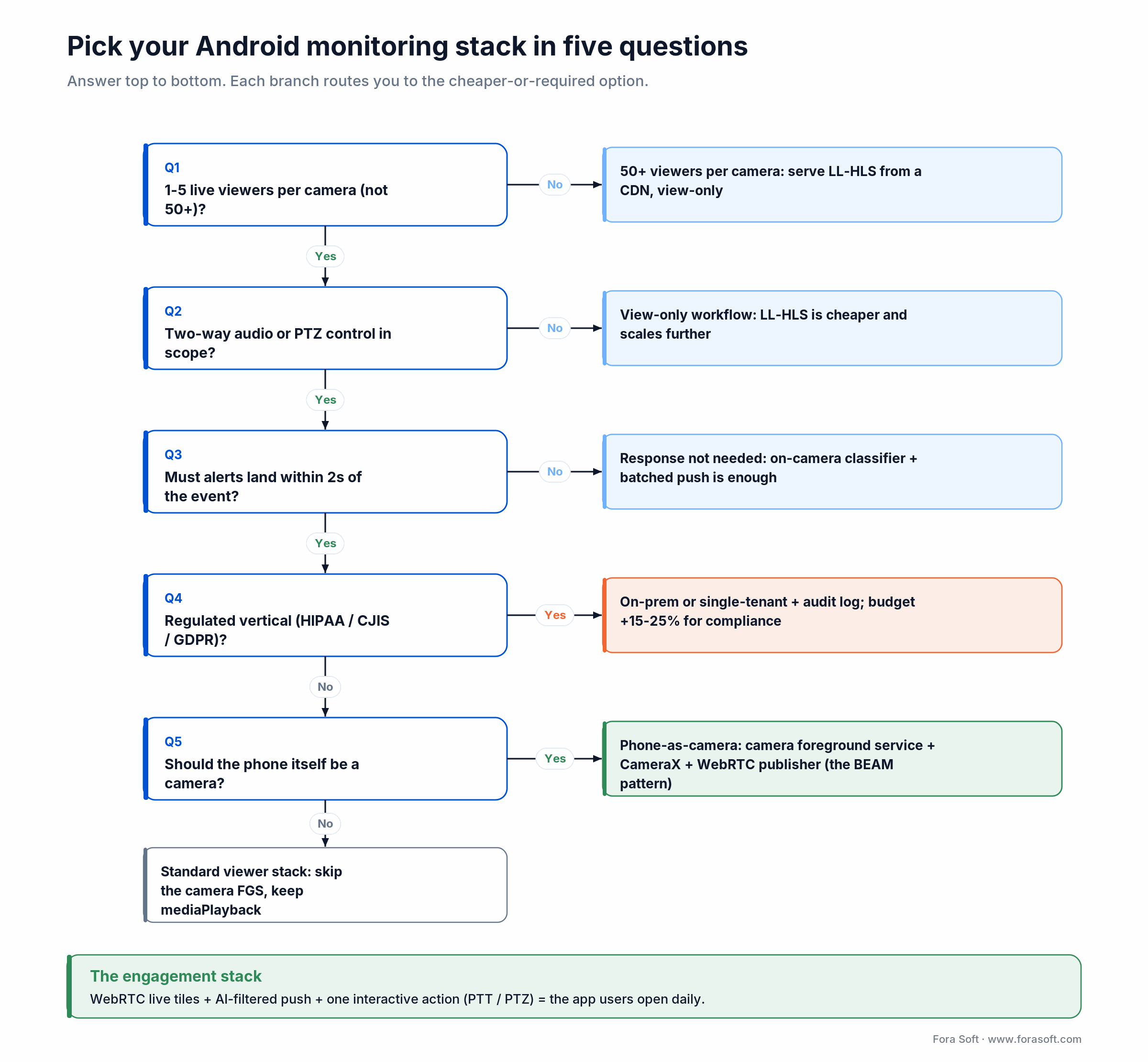
Figure 4. Pick your Android video monitoring stack in five questions.
Five pitfalls we see kill engagement in month two
1. Treating notifications as a config screen. If the user has to choose between “all alerts” and “no alerts” from day one, they mute the app within a week. Ship smart defaults, then let power users tune.
2. Persistent wake lock for “always-on monitoring”. Android 15+ enforcement will reject the app. Use push-wake + JobScheduler instead.
3. Black tiles during stream negotiation. Always render the last JPEG keyframe first; swap to video when it’s ready. The perceived wait drops from 2s to 0s.
4. No offline mode. When the user’s Wi-Fi drops and the app shows “no cameras”, trust erodes. Cache the last 30 minutes of each feed locally and show it with a clear “offline” badge.
5. Ignoring Android TV and tablets. A real slice of daily sessions on household and shared-viewing monitoring apps comes from a tablet on the counter or a TV in the living room; checking the baby cam while cooking is the classic case. Ship Compose adaptive layouts from day one, not as a phase-2 rewrite.
Building an Android video monitoring app from scratch?
We’ve shipped this stack for US police, medical simulation centers, and enterprise surveillance. Tell us what you’re building.
KPIs: what to measure before and after every release
Quality KPIs. Time-to-first-frame below 2 seconds on 4G; stream freeze rate under 1% of sessions; notification click-through above 18%; PTZ action success rate above 97%.
Business KPIs. Day-7 retention above 18%; day-30 retention above 15%; DAU/MAU stickiness above 20%; multi-camera adoption (users with 2+ paired cameras) above 60% by day 30.
Reliability KPIs. Crash-free sessions above 99.5%; ANR rate under 0.2%; Google Play battery violation ratio at zero; foreground-service kill rate under 0.3%.
The onboarding flow: first-camera-paired in under three minutes
Day-1 retention is decided in the first five minutes after install. If the user cannot get at least one camera streaming in that window, the app joins the 75% that never come back. Three patterns that move the needle:
QR-code pairing. Bind the Android app to a cloud account by scanning a QR on the web dashboard — no typed credentials. One screen.
ONVIF auto-discovery. Scan the local network with NsdManager, list ONVIF-advertising cameras with thumbnails, one-tap add. Beats manually typing an RTSP URL on a phone keyboard.
First-alert tutorial. Fire a synthetic “test” event 60 seconds after pairing so the user experiences the notification->tap->live-tile loop before anything real happens. Closes the aha-moment gap.
Observability: what to instrument on day one
You cannot improve engagement you cannot see. Every Android video monitoring app we ship instruments five client-side spans and ships them to Firebase Performance or a Sentry-like APM from build 1:
time-to-first-frame per camera tile, stream freeze events (gap > 800ms), PTZ round-trip (gesture to camera-confirmed pan), notification-to-tap latency, and foreground-service kill events. Combined with server-side WebRTC jitter/RTT, that is enough to pinpoint almost every engagement regression before users churn.
Add product analytics on top — PostHog, Amplitude, or Mixpanel — with five events: app_opened, live_viewed, alert_tapped, archive_scrubbed, ptt_pressed. That funnel is what you review weekly to find the next release target.
When not to build a native Android app
Not every monitoring product needs a native Android build on day one. Skip it if all three are true:
(a) users live at a desk and “mobile” means “occasional glance” rather than primary usage; (b) latency tolerance is 3–5 seconds because the workflow is review, not response; (c) headcount for ongoing Android Play Store policy work is zero.
In those cases a responsive PWA with Web Push covers 80% of the value at 30% of the cost. Revisit native when retention plateaus or when the product needs camera/mediaPlayback-grade background capability.
Security, privacy, and compliance essentials
End-to-end encryption on live and recorded streams. SRTP for WebRTC; AES-256 for HLS segments; key rotation per session. Make this auditable — buyers in regulated verticals ask for the diagram before they ask the price.
Fine-grained RBAC. Who can view which camera at which time; who can export; who can adjust PTZ. VALT’s court-admissible workflow depends on this.
Tamper-evident audit log. Every view, scrub, export, and PTZ move logged with the user ID, device, and timestamp. This is the single most important compliance artifact for law-enforcement and healthcare buyers.
Play Store data-safety section. Declare every permission honestly — camera, microphone, location, network. Mis-declaration is the single most common reason Android surveillance apps get delisted.
FAQ
What latency should an Android video monitoring app target in 2026?
Live tile time-to-first-frame under 2 seconds on 4G is the healthy threshold; top-quartile apps hit under 800ms. For interactive use cases (PTZ, push-to-talk) aim for glass-to-glass WebRTC latency under 500ms. LL-HLS is acceptable for view-only at 2–5 seconds; standard HLS at 8–12 seconds feels broken.
Is ExoPlayer still the right choice, or do I need Media3?
Media3 is the answer. The standalone ExoPlayer repository is deprecated; Google now ships the same engine inside AndroidX Media3 with a cleaner API surface and ongoing support. Migrate any project that is still on com.google.android.exoplayer2 to androidx.media3.* before shipping new features.
How do I prevent my surveillance app from being killed by Android’s battery optimizer?
Declare the correct foreground service type (camera, mediaPlayback, dataSync, or remoteMessaging), request the matching permission, and stop the service the moment the user-perceptible work ends. For status polls use WorkManager with Doze-aware windows; do not hold a wake lock.
WebRTC vs RTSP vs HLS — which one should my Android app actually speak?
For live viewing, WebRTC on the phone side. For archive playback, HLS/LL-HLS via Media3. RTSP is best kept off the Android client in 2026 — it stays on the server, where it ingests from ONVIF cameras before being re-packetized (Media3 has an RTSP module, but you rarely point it straight at a camera). The winning pattern is RTSP in, WebRTC out for live, HLS out for archive.
How do I get push notifications delivered reliably on Chinese OEMs (Xiaomi, Huawei, Oppo)?
Firebase Cloud Messaging alone is not enough on devices without Google Play Services. Integrate per-vendor push SDKs (Xiaomi MiPush, Huawei HMS Push, Oppo Push, VIVO Push) via a facade layer, and fall back to your own long-lived WebSocket for critical alerts. This is a frequent source of “my alerts are late” complaints from Asian markets.
Do I need on-device AI, or is server-side detection enough?
Start server-side — it is faster to iterate and you can swap models without a Play Store release. Add on-device AI when you have a concrete reason: a privacy-first mode where frames never leave the device, offline continuity, or on-device face authentication for push-to-talk. TFLite/Google ML Kit handle this cleanly on modern Android.
How long does it take Fora Soft to build an MVP?
An Android client with a camera grid, live view via Media3/HLS, recorded playback, and FCM notifications lands in 10–14 weeks. Adding WebRTC live, two-way audio, and gesture PTZ adds 4–6 weeks. A server-side AI event pipeline adds 6–10 weeks and is sized to camera count. Our Agent Engineering workflow compresses these meaningfully vs traditional outsourcing.
What makes a video monitoring app stick past the first week?
Three things, in order: notifications the user trusts (high signal-to-noise), live view that feels instant (< 1s time-to-first-frame), and one interactive action beyond watching — push-to-talk, siren, or PTZ. Apps that ship all three see day-30 retention in the 25–35% band; apps that ship only live view plateau at the ~6–15% consumer-app range.
What to Read Next
Case study
VALT: from out-of-the-box solution to industry leader
How we grew a video surveillance platform to 770+ US organizations and 50,000+ users.
Deep dive
AI-powered video surveillance: 6 benefits for business security
The AI layer behind every smart alert on modern surveillance platforms.
Android engineering
Android WebRTC: the complete implementation guide
Reference code for the low-latency Android client we describe above.
Strategy
Custom video surveillance solutions with AI analytics
When off-the-shelf VMS stops scaling and what to replace it with.
AI
Why use AI for video anomaly detection
The machine-learning models powering the alert filter tier above.
Ready to build an Android video monitoring app users actually open?
The formula for an Android video monitoring app that pulls 25–35% day-30 retention is unglamorous: sub-500ms WebRTC live tiles, AI-filtered notifications with bundled previews, correctly declared foreground service types, an interactive layer beyond watching (PTT, PTZ, two-way siren), and Compose adaptive layouts that let the phone, tablet, and Android TV share the same experience. Miss any one of those and engagement stalls.
We have shipped this exact stack for police departments, medical simulation centers, and enterprise surveillance: 770+ organizations and 50,000+ users and counting. If that is the destination for your product, we can map the 90-day path to get there in a single scoping call.
Let’s scope your Android video monitoring app
30 minutes, realistic estimate, concrete next steps — no obligation. Share the brief and we’ll tell you what’s achievable in 90 days.

