

Key takeaways
• Polymath AI is one of a dozen mature AI lesson planners. Before you commit, benchmark it against MagicSchool, Diffit, Brisk, Eduaide, Khanmigo and Curipod — each wins a different classroom.
• The buy-vs-build line sits near 1,000 teacher seats. Under it, a third-party tool at $10–25/seat/month almost always wins. Over it, or when your curriculum is proprietary, a custom AI layer on your own LMS usually wins on total cost within 18–24 months.
• Teacher trust is the adoption bottleneck, not model quality. About 68% of teachers name privacy and data protection as their top AI concern (2025). A transparent human-in-the-loop flow moves adoption more than switching LLMs.
• COPPA’s amended rule reset the compliance bar. It took effect June 23, 2025, with a full compliance deadline of April 22, 2026: separate parental consent before a child’s data reaches a third party, plus a written data-retention policy. Custom builds suddenly look cheaper for K–8.
• A custom AI lesson planner MVP is a 6–10 week project. With agent-assisted engineering, Fora Soft ships a curriculum-aligned generator, teacher dashboard and LMS integration inside one quarter.
Why Fora Soft wrote this playbook
Fora Soft has built e-learning platforms since 2005, with 250+ projects over 20 years. We shipped Scholarly, a Sydney test-prep platform now running 15,000+ active users and live classes of up to 2,000 students, named the most innovative EdTech startup in Asia–Pacific by AWS; BrainCert, a virtual-classroom LMS at $3M ARR with 100K+ customers and 500M+ classroom minutes delivered; and a long line of language-learning, tutoring and corporate-training apps. We also do the AI integration work underneath them — recommendation, transcription, content generation and lesson-planning pipelines — for EdTech clients on four continents.
This is the short version of what we walk every EdTech founder, head-of-product and school-district IT lead through when they arrive asking “should we buy Polymath AI or build our own?” It covers what Polymath AI actually is, how it stacks up against the main 2026 alternatives, where the buy-vs-build line falls, and what a custom build costs when we do it.
The article is vendor-neutral. Polymath AI, MagicSchool, Diffit and Brisk all solve real problems. The only question is which one (or none of them) fits your product or your district.
Evaluating AI lesson planning for your LMS?
We’ll review your curriculum, seat count and compliance profile on a 30-minute call and tell you whether to buy, build, or combine — with a fixed-fee estimate if build wins.
What Polymath AI actually is in 2026
Polymath AI (trypolymath.ai) is a teacher-facing generator for lesson plans, worksheets, exit tickets and quick assessments. The workflow is simple: a teacher types a topic, a learning standard and a grade level; the tool returns an editable plan with scaffolds for multilingual learners, a Bloom’s-Taxonomy objective, and student-ready materials you can export to Google Docs or Word.
It has real strengths — a curated standards-aligned library, Common Core and NGSS support out of the box, and differentiation scaffolds that look usable on day one. It also has real limits. As of our last check it has no deep integrations with the major LMS platforms (Canvas, Schoology, Blackboard), lesson drafts still need human review for hallucination and curriculum-specific sequencing, and pricing sits behind account creation rather than a public page. That last part is common in the category, but it makes apples-to-apples procurement annoying.
The short version: it’s a good individual-teacher tool. Whether it’s the right choice for a district buy, a publisher integration, or a custom EdTech product is a different question — and the rest of this article answers it.
Market snapshot — why this is worth your attention
AI in education is roughly a $10.6 billion market in 2026 and is forecast to about quadruple to $42 billion by 2030 — a ~41.5% CAGR (Research and Markets, 2026). Firm-to-firm estimates for 2026 run $9.6–11.4 billion, so treat the exact figure as directional; the slope is not in dispute. Teacher-side adoption is already real: 37% of US teachers use AI at least monthly when planning lessons, and teachers who use it weekly save about 5.9 hours a week — close to six weeks over a school year (Gallup, 2025).
Procurement is lagging that adoption. Most AI spend so far has been teacher self-service through discretionary or Title IV budgets, not formal district RFPs — teachers are buying faster than IT and curriculum directors can evaluate. The vendors who show up with a defensible compliance and curriculum story win the second wave, which starts the moment districts move to consolidate that sprawl. If you’re deciding what to build, this is the window.
Polymath AI vs. the main 2026 alternatives
These are the ten tools that actually show up in teacher workflows and district pilots in 2026. Positioning and pricing shift fast, so re-check vendor sites before a formal evaluation. If you want the vendor-by-vendor deep dive, our district buyer’s guide to AI lesson plan generators and our roundup of the 7 best lesson-planning tools go tier by tier; this page stays on the buy-vs-build decision.
| Tool | Best for | Standout feature | Pricing signal (2026) |
|---|---|---|---|
| Polymath AI | K–12 teachers building standards-aligned plans fast | Bloom’s verb selector, ELL scaffolds | Free tier + paid (gated) |
| MagicSchool AI | All-in-one teacher toolbox | 80+ generators under one login | Free tier; Premium ~$9.99/mo |
| Diffit | Differentiated reading | Leveled passages + questions from any text | Free; Premium ~$14.99/mo |
| Brisk Teaching | Google Workspace classrooms | Chrome extension over Docs/Slides/Forms | Free core; ~$9.99/mo |
| Eduaide.ai | Feedback & PD content | 100+ generators, teacher-feedback loops | Freemium |
| Khanmigo | Student-side tutoring | Socratic dialogue, not answer-spewing | Free for verified teachers |
| Twee | Language instruction (ESL/EFL) | CEFR-aligned, 60+ languages | Freemium |
| Curipod | Interactive live slides | AI slides + real-time polls & word clouds | Free + paid |
| Education Copilot | Rubrics + worksheets bundle | Rubric generator tied to standards | Freemium |
| ChatGPT EDU | Teachers who already prompt well | General-purpose, very flexible | ~$20/mo (Plus); EDU per-seat |
Reach for a bundled tool (MagicSchool, Eduaide, Brisk) when: your teachers already run five or more AI point tools. Consolidating onto one login typically trims 30–40% of per-seat spend and cuts training overhead.
Reach for Polymath AI or Diffit specifically when: your core pain is standards-aligned differentiation for ELL and mixed reading-level classes. This is where the specialists beat the bundles.
Buy Polymath AI, build your own, or blend the two?
The interesting decision is almost never “Polymath vs. MagicSchool.” It’s “do we pay a per-seat fee to a generic vendor, or build AI lesson generation into our own LMS — where we already own the curriculum, the students and the data?” Three factors drive the answer: seats, compliance, and strategic fit.
| Factor | Buy (Polymath AI & peers) | Build (custom on your LMS) |
|---|---|---|
| Seat economics | $10–25/teacher/month, volume discount | Flat build cost + ~15–25% annual maintenance |
| Curriculum fit | Generic Common Core / NGSS only | Your exact scope & sequence, approved materials |
| Compliance control | Vendor DPA + their privacy posture | Your residency, your encryption, your audit trail |
| Time to first use | Same day | 6–10 weeks MVP, 4–6 months full release |
| Strategic moat | None — competitors can use the same tool | Defensible feature set + data flywheel |
| Break-even scale | <1,000 teacher seats | >1,000 teacher seats, or unique curriculum |
The heuristic we give founders: run the math at three seat counts — 500, 1,000 and 2,500. At 500, buy. At 2,500, build. At 1,000, the answer depends on how differentiated your curriculum is and how much control you need over the data that leaves the building. Figure 1 turns that into a decision you can make in about a minute.
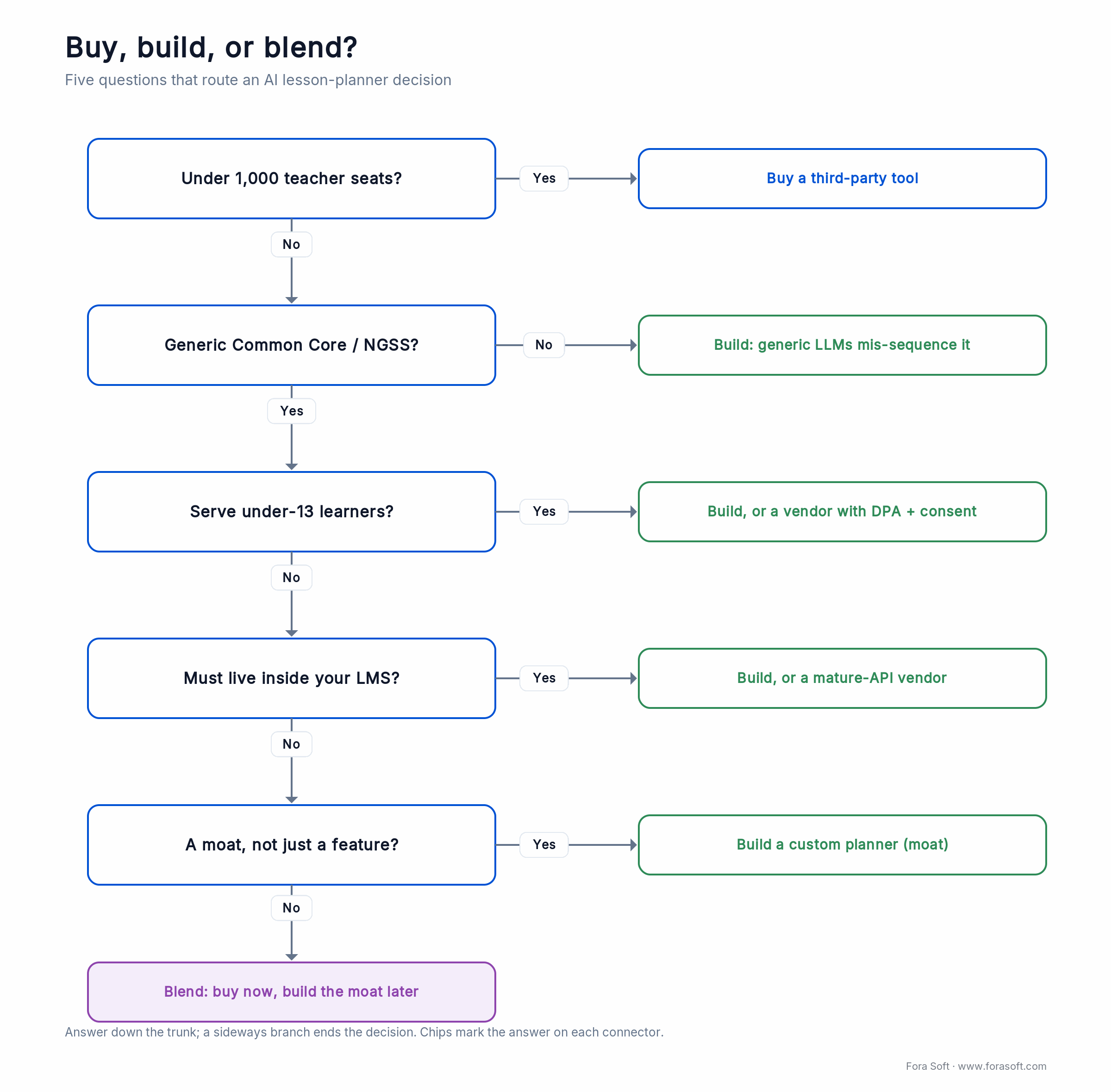
Figure 1. The buy-vs-build decision in one view. Five questions route you to buy Polymath AI (or a peer), build a custom planner, or blend both.
Reach for a custom build when: you cross ~1,000 seats, your curriculum is proprietary, or the AI planner is meant to be a product moat rather than a teacher convenience. At that point per-seat fees compound against you and generic tools can’t sequence your scope correctly.
What a custom AI lesson planner actually looks like
A working custom AI lesson planner is not “wrap an LLM in a web form.” It’s a small pipeline of six concrete components, each solving a different problem. Below is the stack we use on Fora Soft projects; swap in your LLM of choice.
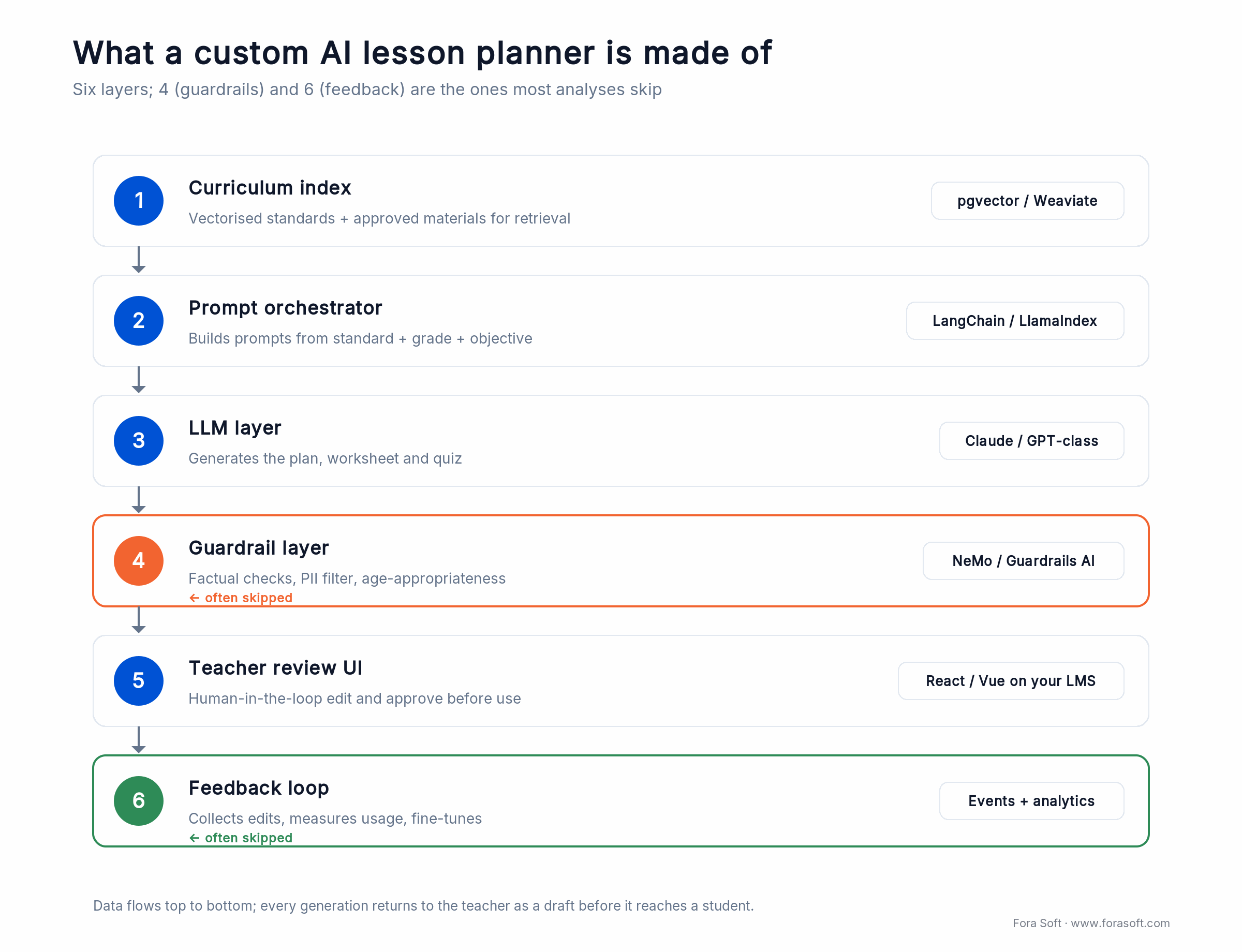
Figure 2. The six-layer custom stack. Layers 4 (guardrails) and 6 (feedback loop) are the two most buy-vs-build analyses skip.
| Layer | What it does | Typical tech |
|---|---|---|
| 1. Curriculum index | Vectorised standards + approved materials for retrieval | pgvector / Weaviate / Pinecone |
| 2. Prompt orchestrator | Builds prompts with standard + grade + objective | LangChain / LlamaIndex / custom |
| 3. LLM layer | Plan + worksheet + quiz generation | Claude, GPT-class, or a fine-tuned open model |
| 4. Guardrail layer | Factual checks, PII filter, age-appropriateness | NeMo Guardrails / Guardrails AI |
| 5. Teacher review UI | Human-in-the-loop edit + approve before use | Your LMS frontend, React / Vue |
| 6. Feedback loop | Collect edits, measure usage, fine-tune | Event pipeline + analytics + periodic re-train |
The two layers most buy-vs-build analyses miss are 4 and 6. The guardrail layer is the difference between a demo and something you can put in front of a superintendent; the feedback loop is what turns generic LLM output into plans that sound like your district five releases later. The retrieval and RAG plumbing here is the same pattern we describe in our e-learning platform development guide and our multimodal AI agents guide.
FERPA, COPPA and GDPR — the compliance bar that changed everything
Until 2025, most schools treated AI lesson planners as privacy-low-risk: teachers weren’t typing student names, so FERPA didn’t obviously trigger. For K–8, that argument got weaker. The FTC’s amended COPPA Rule took effect on June 23, 2025, with a full compliance deadline of April 22, 2026. It tightens verifiable parental consent, requires separate consent before a child’s personal information is disclosed to a third party, and forces operators to keep a written data-retention policy instead of storing student data indefinitely.
Three practical consequences:
1. Data-processing agreements are now table stakes. Any AI vendor a K–8 school touches needs a signed DPA enumerating what data flows where. Self-service SaaS signups by individual teachers are formally non-compliant in most districts.
2. Data residency matters again. GDPR-adjacent districts — European schools, international schools with EU parents — need written confirmation of where prompts are processed. Some vendors answer this cleanly; many don’t.
3. Custom builds get more attractive for K–8. When you own the pipeline, you can route every inference through an in-region endpoint with full audit logs and never ship a prompt to a third-party SaaS at all. This is often the single biggest reason a mid-size K–8 district picks build over buy.
Reach for an in-region custom pipeline when: you serve under-13 learners or EU students and can’t get a clean data-residency answer from a vendor. Owning the inference path is usually cheaper than fighting a procurement review you’ll lose.
Hallucination risk — not all subjects are equal
Every AI lesson planner hallucinates sometimes. The question is how much, where, and what your review process does about it. The useful move is to bucket content by risk before you design the review workflow, so teachers spend their attention where it pays off.
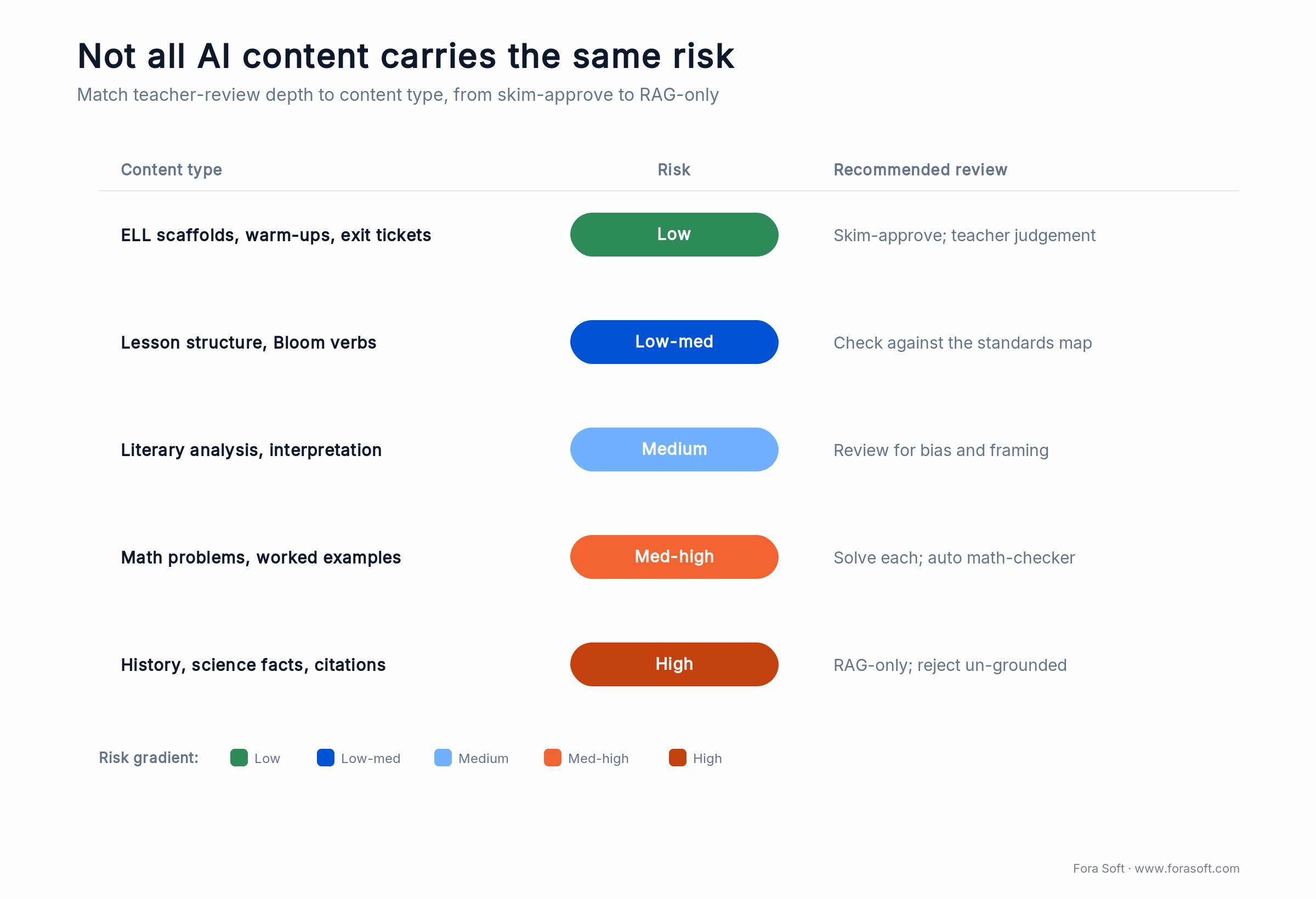
Figure 3. Match review depth to content type. Skim low-risk warm-ups; ground high-risk facts and math in retrieval before they reach a student.
| Content type | Hallucination risk | Recommended review |
|---|---|---|
| ELL scaffolds, warm-ups, exit tickets | Low | Skim-approve; teacher judgement only |
| Lesson structure, Bloom verbs | Low-medium | Check against standards map |
| Math problems, worked examples | Medium-high | Solve each before class; automated math-checker ideal |
| History, science facts, citations | High | Retrieval-augmented only; reject un-grounded output |
| Literary analysis, interpretation | Medium | Teacher review for bias and framing |
The best custom builds solve this by gating the LLM through retrieval-augmented generation (RAG) — the model can only speak from an approved curriculum index. On our RAG-based EdTech builds, factual errors on grounded content drop by roughly an order of magnitude versus an unconstrained prompt, based on internal QA numbers. Treat that as a directional in-house figure, not a published benchmark.
Want a retrieval-augmented lesson planner on your curriculum?
We index your standards and approved materials, build the RAG layer, and stand up a teacher-review UI. First MVP typically live in 6–10 weeks.
Teacher trust — the adoption bottleneck nobody writes about
Survey data across 2025 is consistent: about 68% of teachers name privacy and data protection as their top concern about classroom AI, ahead of accuracy (~61%) and lost human nuance (~67%). Output quality matters less than whether teachers feel in control. The tools that win district pilots treat every generation as a draft, not a decision.
Five design patterns we use on trust-sensitive EdTech builds:
1. Draft-only output. The AI never auto-publishes to students. Every generated plan lands in a teacher’s “Drafts” queue and must be explicitly approved. This one pattern does more for adoption than any model upgrade.
2. Visible provenance. Each paragraph cites the curriculum source it came from. If the standard is Common Core 4.NBT.B.5, the teacher sees that linked inline. It kills the “where did this come from?” anxiety.
3. No student PII in prompts. The teacher-facing UI strips names and IDs before the prompt is built. Buyers ask this in every security review — it’s easier to ship it default-on than to explain why you didn’t.
4. Edit-and-retrain feedback. When a teacher edits a generated plan, the diff feeds the fine-tuning pipeline. Over six months the generator starts matching your district’s tone.
5. Kill switch. A district admin can turn AI generation off tomorrow morning without removing any existing content. Sounds obvious; surprisingly few tools actually ship it.
Mini case — AI lesson features on Scholarly
Scholarly is the Sydney test-prep platform Fora Soft built and has extended across several release cycles. It runs 15,000+ active users and live classes of up to 2,000 students. In 2025 the product team shipped an AI-assisted lesson and assessment generator on top of the existing tutor dashboard.
The brief was tight: reuse Scholarly’s existing curriculum library for RAG, respect Australian Curriculum standards, keep every generated item as a draft, and log every edit. We shipped the MVP in eight weeks and followed with a polish release a month later. The first cohort of tutors reported cutting lesson-prep time roughly in half; tutor-side adoption passed 60% within the first term, well above most standalone SaaS benchmarks.
Want a walkthrough of the Scholarly AI architecture on your project’s terms? Book a 30-minute call and we’ll show you the pieces live.
Cost and timeline to ship a custom AI lesson planner
We use agent-assisted engineering — senior engineers plus LLM code generation and automated test suites — which compresses delivery against typical agency numbers. The ranges below reflect recent Fora Soft EdTech projects, not industry averages. Treat them as order-of-magnitude; exact figures depend on your LMS stack, curriculum scope, and compliance posture.
| Scope | Typical timeline | What ships |
|---|---|---|
| MVP (pilot-ready) | 6–10 weeks | Curriculum index, prompt orchestrator, LLM call, teacher review UI on existing LMS |
| Production release | 3–5 months | All of MVP + guardrails, feedback loop, admin kill-switch, SSO, audit logs |
| Enterprise build | 5–8 months | All of above + multi-tenant, regional data residency, deep LMS integrations (Canvas, Moodle, Blackboard) |
| Ongoing maintenance | Continuous | ~15–25% of build cost/year for model upgrades, curriculum refresh, compliance audits |
Here’s the arithmetic that decides it. Take a 1,200-teacher district on a $18/seat/month tool: 1,200 × $18 × 12 = $259,200 a year, and it climbs every renewal. A custom build with ~20% annual maintenance lands in the same first-year envelope, then the per-seat line keeps rising while your build cost holds mostly flat — so build wins on three-year total cost and you keep the data and the IP. Figure 4 shows where the two lines cross.
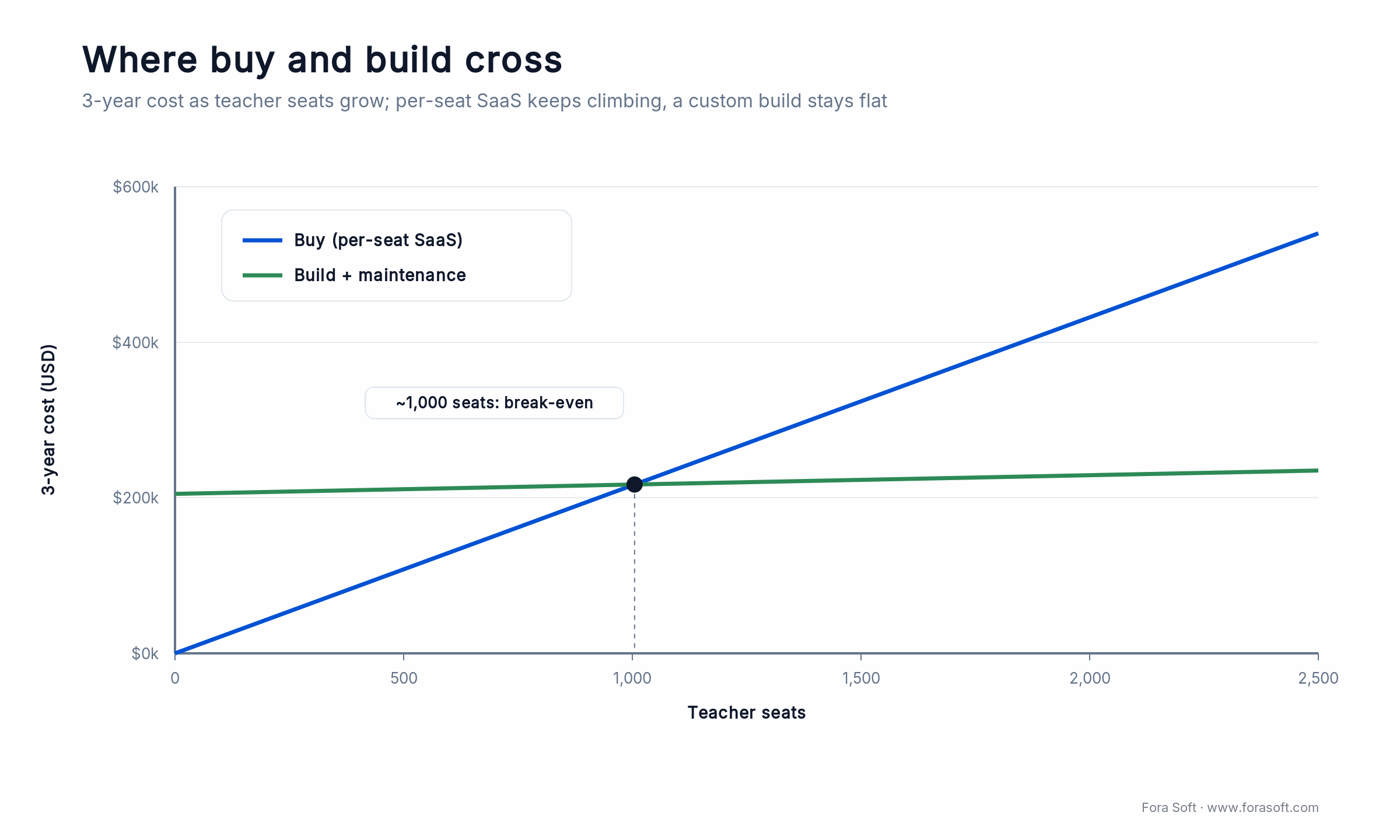
Figure 4. Where buy and build cross. Per-seat SaaS scales with headcount; a custom build is mostly fixed, so it wins on total cost past roughly 1,000 seats.
A decision framework — pick your path in five questions
Q1. How many teacher seats will use it in 18 months? <1,000 → buy a third-party tool. >2,500 → build. 1,000–2,500 → answer Q2–Q5.
Q2. Is your curriculum proprietary or heavily customised? Yes → build (generic LLMs won’t sequence it correctly). No → a third-party tool is probably fine.
Q3. Do you serve under-13 learners? Yes → COPPA pushes you toward a custom build or a vendor with a solid DPA and a verifiable parental-consent flow. No → less compliance weight.
Q4. Does the planner need to live inside your LMS, or beside it? Inside → build, or pick a tool with a mature API (few have one). Beside → any third-party tool works.
Q5. Is the AI lesson planner a feature, or a moat? Feature → buy. Moat for your EdTech product → build — you can’t differentiate on a tool your competitors also rent.
Five pitfalls that kill AI lesson planner rollouts
1. Shipping without human-in-the-loop. AI-generated content that lands directly in front of students triggers teacher backlash within days. Always gate it with a draft queue.
2. Skipping the curriculum index. An LLM without RAG on your standards will hallucinate a reasonable-looking plan that references the wrong scope and sequence. Teachers stop using it by week three.
3. Chasing AI-detection myths. Don’t build plagiarism / AI-use detection into the student assessment flow. False-positive rates are too high to be defensible. Redesign assessments instead — projects, presentations, peer review.
4. Letting teachers paste student data into prompts. Enforce PII stripping at the UI layer, not with policy. Policy-based controls fail in the first busy week of term.
5. No kill switch. Districts ask about the “turn AI off tomorrow” story in every security review. Ship it in the MVP or you’ll retrofit it under procurement pressure.
KPIs — what to measure after launch
Adoption. Weekly active teachers using AI generation (target >60% of eligible within one term), draft-to-publish conversion (target >70%; lower means teachers don’t trust the output), edit-to-publish ratio (a healthy 30–60% of text edited; below 30% means teachers aren’t reading drafts carefully).
Quality. Teacher-reported time saved per prep (target 30–60 minutes), hallucination incidents per 1,000 generations (<5 once guardrails are in), curriculum-alignment audit score (target 95%+ spot-check pass rate).
Business. Cost per generated lesson (target under $0.20 including LLM tokens), district renewal rate (target 90%+ in year two), seat expansion within pilot districts after first renewal (target 25%+).
When an AI lesson planner is the wrong tool
Not every classroom needs one. Say no when:
• You don’t have curriculum consistency yet. With no agreed scope and sequence, the AI just amplifies the chaos.
• Teachers haven’t had basic prompting training. Rolling AI out cold to a low-AI-literacy staff produces frustration and abandonment within two months.
• Your admin team will use it as a surveillance tool. Measuring teachers on AI usage kills the flywheel; they hide usage, outputs degrade.
• Privacy review is unresolved. Ship compliance first, generation second.
• Your cohort is <50 teachers and plans change weekly. The per-seat math doesn’t work and the build math doesn’t either. Use ChatGPT EDU and a shared prompt library.
Need to map AI into your LMS without blowing up procurement?
Share your stack, seat count, and curriculum model. We’ll draft a buy-vs-build recommendation and a pilot plan — free on the first call.
LMS integration — where most AI lesson planners stop short
The single biggest gap between “cute teacher tool” and “district-wide deployment” is LMS integration. When a teacher has to export a plan to Word, paste it into Canvas and re-format, AI’s time savings collapse by about half. The integrations that actually matter in 2026:
1. LTI 1.3 Advantage. The 1EdTech standard for embedding third-party tools into Canvas, Moodle, Blackboard, D2L and Schoology. If your planner ships plans through LTI’s Assignment and Grade Service, teachers never leave the LMS.
2. OneRoster 1.2. Roster and class-list sync. It matters because it lets the AI know grade level, subject and section automatically — removing two manual fields from every generation. See the OneRoster spec for the data model.
3. Google Classroom / Microsoft Teams Education APIs. Outside formal LMSs, these cover a huge share of K–12 classrooms. Brisk Teaching wins Google-heavy districts precisely because its Chrome extension works natively in Docs and Slides.
4. SCORM / xAPI. Less critical for lesson planning, but if you export to corporate L&D catalogues or older LMS deployments, SCORM export belongs on the roadmap.
5. SSO via SAML 2.0 or OIDC. Not optional. Districts won’t approve a tool teachers log into separately; single sign-on is a procurement gate, not a nice-to-have.
When we build a custom AI lesson planner, LTI 1.3 + OneRoster + SSO usually accounts for 20–30% of the engineering scope. Teams that try to ship AI first and integrations later consistently ship integrations three times.
A 90-day rollout plan
If you’ve decided to pilot any AI lesson planner — third-party or custom — this sequence has worked on our client rollouts and in the external case studies we’ve reviewed.
| Window | Focus | Deliverable |
|---|---|---|
| Weeks 1–2 | Compliance & curriculum mapping | DPA signed, curriculum indexed, privacy review clean |
| Weeks 3–4 | Lighthouse teachers | 5–10 early adopters trained, prompt library drafted |
| Weeks 5–8 | Pilot cohort (1 grade or department) | Draft-to-publish rate measured, review loop refined |
| Weeks 9–12 | Expansion | Full department or campus rollout, trainings scheduled |
| Post-90 | Feedback loop & fine-tune | Edit diffs flowing into fine-tuning; quarterly audit |
FAQ
Is Polymath AI better than MagicSchool or Diffit?
They solve different problems. Polymath AI is strongest on standards-aligned plans with ELL scaffolds. MagicSchool is strongest as an all-in-one teacher toolbox. Diffit is best-in-class for leveled reading differentiation. For most K–12 classrooms a bundle (MagicSchool or Eduaide) reduces tool sprawl; for a focused use case, pick the specialist.
How much does a custom AI lesson planner cost to build?
With Fora Soft’s agent-assisted engineering, an MVP typically ships in 6–10 weeks, a production release in 3–5 months, and an enterprise-grade build in 5–8 months. Exact budget depends on your LMS, curriculum scope, and compliance posture — we give a fixed-fee quote after a 30-minute scoping call.
Does Polymath AI integrate with Canvas, Moodle, or Blackboard?
As of our last review, no deep native LMS integrations are publicly documented. Teachers export generated plans to Google Docs or Word and paste into their LMS manually. If deep LMS integration is a hard requirement, either pick a vendor that ships it (for example, Brisk’s Google-native flow) or build custom.
How do you keep an AI lesson planner FERPA / COPPA / GDPR compliant?
Three non-negotiables: a signed data-processing agreement with the vendor; strict PII stripping at the prompt layer so student names and IDs never leave your system; and regional data residency for GDPR and EU schools. For under-13 learners after April 2026, separate verifiable parental consent is required under the amended COPPA Rule. Custom builds make all three easier because you control the pipeline end to end.
Is AI lesson planning safe for STEM, given hallucinations?
It’s safe if you gate the LLM with retrieval-augmented generation on an approved content index, require teacher review on math and science, and log every edit for fine-tuning. Unconstrained prompts on STEM content are risky; the RAG-based builds we ship cut factual errors by roughly an order of magnitude.
Can AI lesson planners differentiate for IEP / 504 / ELL students?
Yes, and this is where they genuinely shine — generating chunked text, simplified vocabulary, graphic organisers, and extended-time cues at scale. The guardrail is privacy: never put a named student’s IEP details into the prompt. Use generic descriptors (“a 3rd grader reading two grade levels below target”) so the AI can scaffold without touching PII.
How do you measure whether the AI lesson planner is working?
Track weekly active teachers, draft-to-publish conversion, edit-to-publish ratio, and teacher-reported time saved per lesson. A healthy rollout shows 60%+ adoption by end of first term, 70%+ draft-to-publish, 30–60% edit-to-publish, and 30–60 minutes saved per lesson. See the KPIs section above.
Are AI-detection tools worth using to catch ChatGPT on assignments?
No. Current AI-detection tools have false-positive rates too high to be defensible in a disciplinary process, and they bias against non-native English writers. The better answer is assessment redesign — project-based work, presentations, peer review and in-class drafting produce artifacts AI can’t easily fake. Lead with design, not detection.
What to read next
Buyer’s guide
AI lesson plan generator: a district buyer’s guide
The full vendor-by-vendor breakdown across every pricing tier.
AI agents
Building multimodal AI agents with LiveKit
The voice/video agent architecture behind modern AI tutoring.
Recommendation
AI content recommendation systems
The same retrieval-augmented pipeline standards-aligned planning needs.
Delivery
AI in our software development process
How agent-assisted engineering compresses EdTech timelines.
Founder guide
How to build apps with AI
A hands-on guide to shipping AI-first product features from scratch.
Polymath AI or a custom build — how do you actually decide?
Polymath AI is a sharp tool for standards-aligned differentiation in individual classrooms. On its own it’s not a moat or a platform. If your seat count is small, your curriculum is generic, and you don’t need deep LMS integration, buying is the right call — and so is any of the main bundled alternatives.
Once you cross into four-digit seat counts, proprietary curriculum, K–8 compliance pressure, or strategic-differentiation territory, a custom AI lesson planner on your own LMS becomes the cheaper option inside a couple of years, and the only one that scales past the feature-parity wall. Our job is to keep you honest about which side of the line you’re on.
Ready to ship an AI lesson planner teachers actually trust?
A 30-minute call gets you a buy-vs-build answer for your LMS, a compliance checklist, and a fixed-fee estimate if a custom build is the cheaper route.

