Key takeaways
• Retrieval, not the model, is where video RAG breaks. 2026 practitioner analyses put roughly 60–73% of production RAG failures in the retrieval stage, and naive RAG misses the right context about 40% of the time. Fix chunking, hybrid search and reranking before you touch the prompt.
• Generic RAG fails on recordings. Transcript chunking, speaker diarization, time anchoring and the multimodal-vs-text decision matter more than which vector store you pick.
• Time-anchored deep links are the feature. A useful answer links back to 12:34 in the August 14 call, not just “the patient mentioned chest pain.” Engineer time anchors into every chunk from day one.
• Cost is dominated by speech-to-text and LLM inference. Embedding 1,000 hours costs about $0.20; the vector store runs $15–$70/month. The bill is ASR (one-time) plus per-query LLM calls, not the database.
• You can ship ‘chat with your recordings’ in 6–12 weeks. Managed ASR plus a custom retrieval layer is the 2026 default; go fully custom only for vertical or compliance-bound cases.
What ‘chat with your recordings’ actually means
Video RAG is retrieval-augmented generation where the knowledge base is your recordings instead of documents. The system transcribes each video or audio file, splits the transcript into time-stamped chunks, stores their embeddings in a vector database, and—at question time—retrieves the most relevant chunks and hands them to a language model that writes a cited answer. “Chat with your recordings” is the product name users see; video RAG is the architecture underneath it.
The reason it deserves its own playbook is that a recording is not a document. A PDF has headings, paragraphs and sentences that map cleanly to chunks. A recording is a stream of speech with overlaps, filler, mid-sentence topic switches and, sometimes, information that lives only in the picture. Every one of those facts changes how you chunk, embed, retrieve and cite. Treat a call archive like a folder of PDFs and you get an assistant that answers confidently and wrongly.
This guide is for teams building lecture Q&A, meeting recall, deposition and e-discovery search, telehealth consult review, or semantic search over a surveillance archive. We cover the reference architecture, transcript chunking, when to add vision, the vector-store choice, a 2026 cost model, security for sensitive footage, and how to measure whether any of it works.
Why Fora Soft wrote this playbook
We have built video and audio products since 2005—250+ of them—and retrieval on top of several; our generative AI development team adds RAG and LLM features to products that are already in production. On BrainCert, an e-learning platform with 100K+ customers and 500M+ classroom minutes, the hard part of lecture search was never the model; it was chunking recorded classes so a query landed on the right two minutes. On VALT, a video system used by 770+ US organizations and 50,000+ users, search across deposition and interview recordings has to be precise and auditable, because a missed clip has legal weight.
We have also shipped multilingual transcript retrieval on TransLinguist, an interpreter platform spanning 75+ languages and 30,000+ interpreters, which forces you to confront embedding quality per language rather than assuming English behavior holds. The patterns below come from those builds plus public references we trust: the VideoRAG paper (ACL 2025) and the HKUDS “Chat with Your Videos” project (KDD 2026).
One dependency comes before any of this: you have to capture the calls in the first place. If your recordings arrive from live meetings, that is a job for a meeting bot API, and the quality of that capture sets the ceiling for everything downstream.
Sitting on an archive you can’t search?
Send us your recording count, total hours and use case. We’ll come back with an architecture and a cost forecast, no charge.
Why generic RAG fails on video and audio
Generic RAG—a vector database, an off-the-shelf framework and a strong model—works on a documentation set in about 50 lines of code. Point the same stack at a recording archive and the answers get vague or wrong. Here is what the tutorial never told you.
1. Transcript chunking is harder than document chunking. Documents carry their own boundaries. Transcripts have speaker turns, pauses, interruptions and topic switches mid-sentence. A blind 500-word window can capture three speakers arguing about four things, and retrieval surfaces the wrong moment because the chunk has no clean meaning.
2. Time anchoring is essential, not a nice-to-have. “The patient mentioned chest pain” is useless without “at 12:34 in the August 14 consult.” The deep link back to the exact moment is what turns an answer into an action. Anchors have to be carried through chunking, retrieval and generation, or you lose them.
3. Some questions live in the picture, not the words. A surveillance clip of someone entering a restricted room, a lecture built around a whiteboard, a product demo pointing at a screen—text-only retrieval never sees any of it. For that content you need visual signal, and knowing when you do (and when you don’t) saves real money.
The good news: the failure modes are predictable, and they cluster in one place. Independent 2026 analyses of production RAG agree that when it breaks, the break is upstream of the language model far more often than in it.
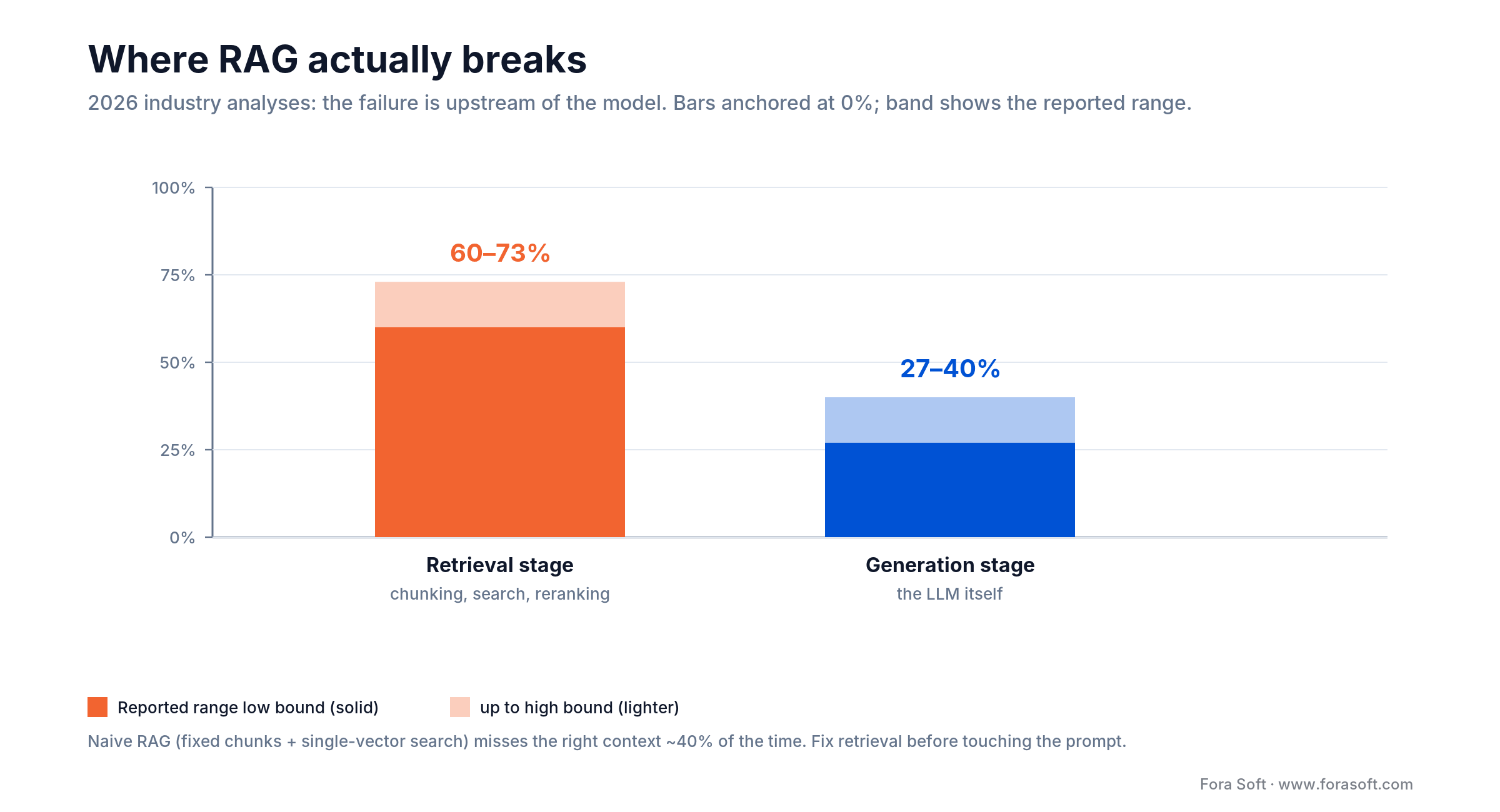
Figure 1. Most production RAG failures happen before the model runs: in chunking, search and reranking.
A reference architecture for video and audio RAG
The architecture splits cleanly into two phases: an offline ingest path that runs once per recording, and an online query path that runs once per question. Keeping them separate is what lets you re-chunk or swap embedding models later without re-transcribing everything.
Ingest (offline). Each source file goes through speech-to-text with speaker diarization, then a chunker that cuts on speaker turns and stores a time anchor with every chunk, then an embedding model. The embeddings and their metadata land in the vector store.
Query (online). A user question runs hybrid retrieval against the store, a reranker trims the top 50 candidates to the best 5, and the model writes an answer with citations that carry the chunk IDs—which is how you rebuild the deep link back to the video.
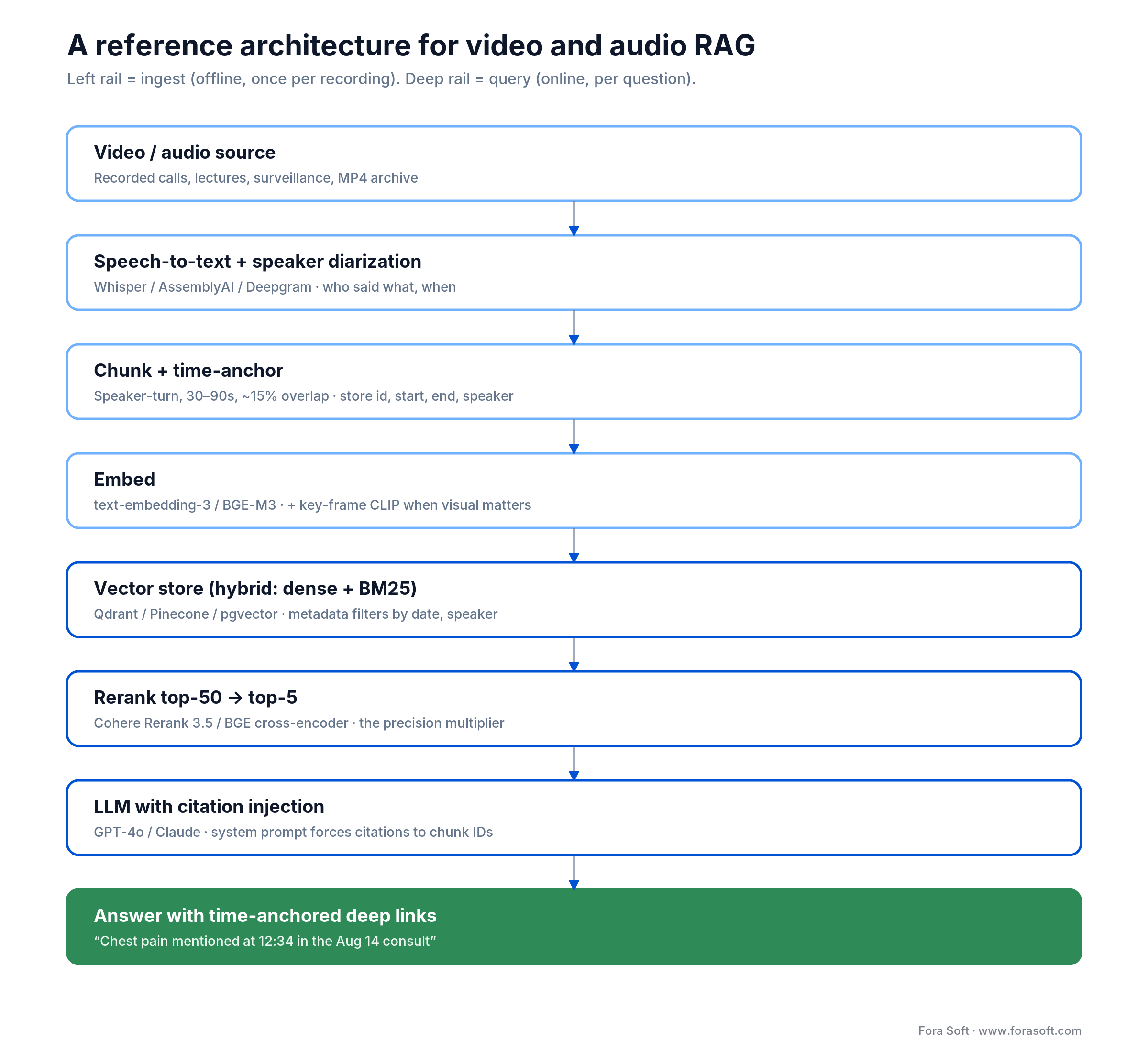
Figure 2. End-to-end pipeline. Ingest (sky) runs once per recording; query (blue) runs per question; the answer (green) carries time-anchored deep links.
Two design choices earn their keep. Store rich metadata on every chunk—source ID, start and end time, speaker, date—so you can filter before you search (“only my calls with Mark, last quarter”). And force citations in the system prompt: the model must name the chunk IDs it used, so a wrong answer is traceable instead of mysterious.
Speech-to-text: the layer that decides retrieval
Your retrieval quality is capped by your transcript quality. If the speech-to-text step drops names, mangles technical terms or gives you no speaker labels, no amount of clever chunking or reranking recovers the meaning. This is the cheapest place to lose the whole project and the easiest to under-budget. If transcription is the weak link, our custom speech-to-text development team tunes Whisper, Deepgram or AssemblyAI pipelines for domain vocabulary and speaker labels.
Pick for accuracy on your domain, then for price. For clean English, self-hosted Whisper-large-v3 is still excellent and the managed OpenAI transcription API is about $0.006 per minute (2026), which is roughly $0.36 an hour. AWS Transcribe sits near $0.024 per minute and adds a HIPAA-eligible medical model; AssemblyAI’s lower tiers land around $0.12–$0.37 per hour. At those prices, self-hosting only pays off at very large or continuous volume—a reversal from a few years ago.
Diarization is not optional for conversations. “Who said what” is what lets you chunk on speaker turns and filter retrieval by participant. For meetings, depositions and interviews, treat diarization quality as a first-class selection criterion, not a bonus feature.
Test on your own audio. Vendor benchmarks use clean studio speech. Your calls have crosstalk, accents and jargon. Run a two-hour sample of real recordings through two or three engines and read the transcripts before you commit; we go deeper on this in our speech-vendor benchmark write-up.
Chunking strategies for transcripts
Chunking is the single highest-impact decision in the pipeline. The goal is a chunk that means one thing, is small enough to be relevant and large enough to be self-contained, and carries a time anchor. Five approaches, from simplest to what we actually ship.
Sentence-level. Each sentence is a chunk. Tight boundaries, lots of small chunks, easy to expand context on retrieval. Good for FAQ-style questions against clean speech.
Speaker-turn. Each continuous turn by one speaker is a chunk. It preserves conversational structure and aligns with diarization output. Our default for meetings, depositions and interviews.
Semantic-shift. Boundaries fall where the embedding similarity drops, i.e. where the topic actually changes. Higher quality, more expensive at ingest. Worth it for lectures, podcasts and long-form.
Fixed window with overlap. 30–90-second windows with roughly 15% overlap. Predictable and simple; the fallback when speaker and topic structure are poor.
Hybrid. Speaker-turn as the primary boundary, with semantic-shift splitting inside long turns; windows of 60–90 seconds and 10–20 seconds of overlap. This is what most of our production builds run, and what we would start you on.

Figure 3. How the five chunking strategies trade boundary quality against ingest cost.
Reach for hybrid speaker-turn chunking when: your content is conversational, diarization is reliable, and users ask “what did X say about Y” questions—which describes almost every meeting, deposition and interview archive.
Whatever you choose, store the same metadata on every chunk: chunk ID, source ID, start time, end time, speaker and embedding. Retrieval returns the chunk and its anchor; the answer cites “minute X in recording Y.” Skip the anchor at ingest and you cannot add it back later without re-processing everything.
Multimodal embedding vs text-only: when each wins
Default to text-only embedding of the transcript, and add vision only when the information genuinely lives in the picture. Most spoken content—calls, podcasts, depositions—carries its meaning in the words, and text embedding is faster, cheaper and easier to debug. Reach for multimodal when the visual channel is primary or carries answers the audio does not.
| Content type | Recommended | Why |
|---|---|---|
| Meetings, podcasts, depositions | Text-only embedding | Speech-heavy; the visual track is low-signal |
| Lectures with diagrams, demos | Text + key-frame embedding | Whiteboards and screens carry information |
| Surveillance footage | Multimodal (CLIP + text) | Visual is primary; little or no speech |
| Sports and broadcast | Multimodal + commentary track | Action and commentary both matter |
| Music, ambient audio | Audio embedding (CLAP) | No language; sonic features dominate |
On tooling: CLIP handles image-text pairs, VideoCLIP and X-CLIP handle video, CLAP handles audio, and Meta’s ImageBind spans several modalities. If you want to avoid building a vision pipeline yourself, Twelve Labs’ Marengo 3.0 gives you visual, audio and text understanding through one API. The common 2026 pattern is not “multimodal everything”—it is text embedding for the transcript plus sparse key-frame embeddings only for the moments where the picture matters.
Reach for multimodal embedding when: a user could reasonably ask about something on screen that was never spoken aloud—a face, an object, a slide, an action—otherwise text-only is cheaper and just as accurate.
The retrieval-first rule: hybrid search and reranking
When production RAG disappoints, fix retrieval before you fix anything else. 2026 practitioner analyses of production systems, such as DigitalOcean’s teardown of why RAG fails, put the retrieval stage (chunking, search and reranking) behind roughly 60–73% of failures, well ahead of the model. The model rarely invents a bad answer from good context; it writes a bad answer because the retriever handed it the wrong chunks.
Common retrieval failure modes. Chunks too small to hold context; chunks too large so relevance dilutes; keyword-only or vector-only search instead of both; no reranker, so the answer sits at rank 40 and the model never sees it; and an embedding model that does not match the language of the content.
Hybrid search. Combine dense vector search (semantic similarity) with sparse BM25 (exact keyword match) and merge the results. BM25 catches proper nouns, product names, IDs and jargon that embeddings blur together; dense search catches paraphrases. Together they beat either alone by a clear margin on spoken content, where names and numbers matter.
Reranking. Take the top 50 candidates from the first pass and run them through a cross-encoder reranker (Cohere Rerank 3.5, a BGE reranker or ColBERT), then pass the best 5 to the model. A reranker is far smaller than the model and it is the highest-return component you can add. On a recent build, moving from a naive setup to speaker-turn chunks, hybrid search and reranking lifted retrieval precision from 58% to 84% on the same corpus and the same model.

Figure 4. Same corpus, same model. The 26-point precision gain came entirely from the retrieval layer.
Work in that order: chunking, hybrid search, reranking, metadata filters—measuring precision and recall on a labelled set after each change. Only once retrieval is solid does tuning the prompt pay off. We walk through the measurement loop in our LLM evaluation guide.
Vector store comparison
Pick the vector store your team can operate, not the one that wins a benchmark. The cost difference between them is small next to ASR and LLM spend, and every option below handles a video RAG workload. The real questions are hosting model, hybrid-search support and how much operations muscle you have.
| Store | Hosting | Strength | Best for |
|---|---|---|---|
| Qdrant | Self-hosted or cloud | Performance, hybrid search, payload filters | Our 2026 default for serious builds |
| Pinecone | Managed only | Operational simplicity, wide ecosystem | Speed to market with no SRE |
| Weaviate | Self-hosted or cloud | Schema, hybrid, modules | Structured metadata needs |
| pgvector | Postgres extension | No new infra if you run Postgres | Under ~10M vectors, transactional apps |
| Chroma | Embedded or self-hosted | Developer ergonomics | Prototypes, single-tenant apps |
| Milvus | Self-hosted or Zilliz cloud | Scale to billions of vectors | Very large datasets |
Reach for Qdrant when: you have basic ops capacity and want strong hybrid search and metadata filtering; reach for Pinecone when there is no one to run infrastructure and time-to-market beats everything; reach for pgvector when you already run Postgres and have under ~10 million vectors.
Build vs buy: LeMUR, Twelve Labs, or custom
Buy the managed path to validate demand fast; build custom when the use case is vertical, the volume is large, or compliance forces self-hosting. Here is where each option wins and where it breaks.
AssemblyAI LeMUR. Speech-to-text plus an LLM-over-transcript service: Q&A, summaries and custom prompts on your audio. Wins on time-to-market for transcript-only use cases; breaks on unit economics at high volume and on control over retrieval internals.
Twelve Labs. Multimodal video search and Q&A as a service via the Marengo and Pegasus models. Wins when the picture matters and you do not want to build a vision pipeline; breaks on cost at scale, and pricing is contact-sales rather than a public rate card.
Application frameworks. LlamaIndex or LangChain handle orchestration around your own vector store, embedding model and LLM. Wins as the 2026 default for custom builds; breaks if you treat the framework as the product instead of the glue.
Fully custom. Wins for vertical problems—legal e-discovery, surveillance search, medical transcript review—and when HIPAA or data residency demands a self-hosted stack. Breaks on engineering cost and calendar; you own everything, including the maintenance. Our AI engineering team usually runs a managed ASR layer under a custom retrieval and citation layer, which keeps control where it matters without rebuilding transcription.
Reach for a managed API when: you have under ~1,000 hours, a near-term launch date, and no compliance constraint that rules out sending audio to a third party—otherwise a custom retrieval layer over managed ASR gives you control without the transcription overhead.
Cost model: a 2026 worked example
For a realistic mid-size case—1,000 hours of recordings, 100 questions a day—the bill is dominated by speech-to-text at ingest and language-model calls at query time. Embeddings and the vector store are rounding errors by comparison. Here is the arithmetic, at 2026 public rates.
Speech-to-text (one-time). 1,000 hours is 60,000 minutes. At the managed Whisper rate of $0.006 per minute, that is 60,000 × $0.006 = $360, once. New content at ~50 hours a month adds about $18 a month.
Embedding (one-time). 1,000 hours of speech is roughly 11 million tokens. At $0.020 per million for text-embedding-3-small, that is 11 × $0.020 ≈ $0.20. This is why worrying about embedding cost is a distraction.
Vector store (monthly). Roughly $15–$70 a month for a workload of this size, self-hosted Qdrant at the low end, managed Pinecone at the high end.
Reranking (monthly). Cohere Rerank 3.5 is about $2 per 1,000 searches. 100 queries a day is roughly 3,000 a month, so about $6 a month.
LLM inference (monthly). A five-chunk query costs roughly $0.003 to $0.02 depending on the model. 3,000 queries a month lands at about $9–$60 a month. Total ongoing cost is roughly $30–$140 a month after a one-time ingest near $360.
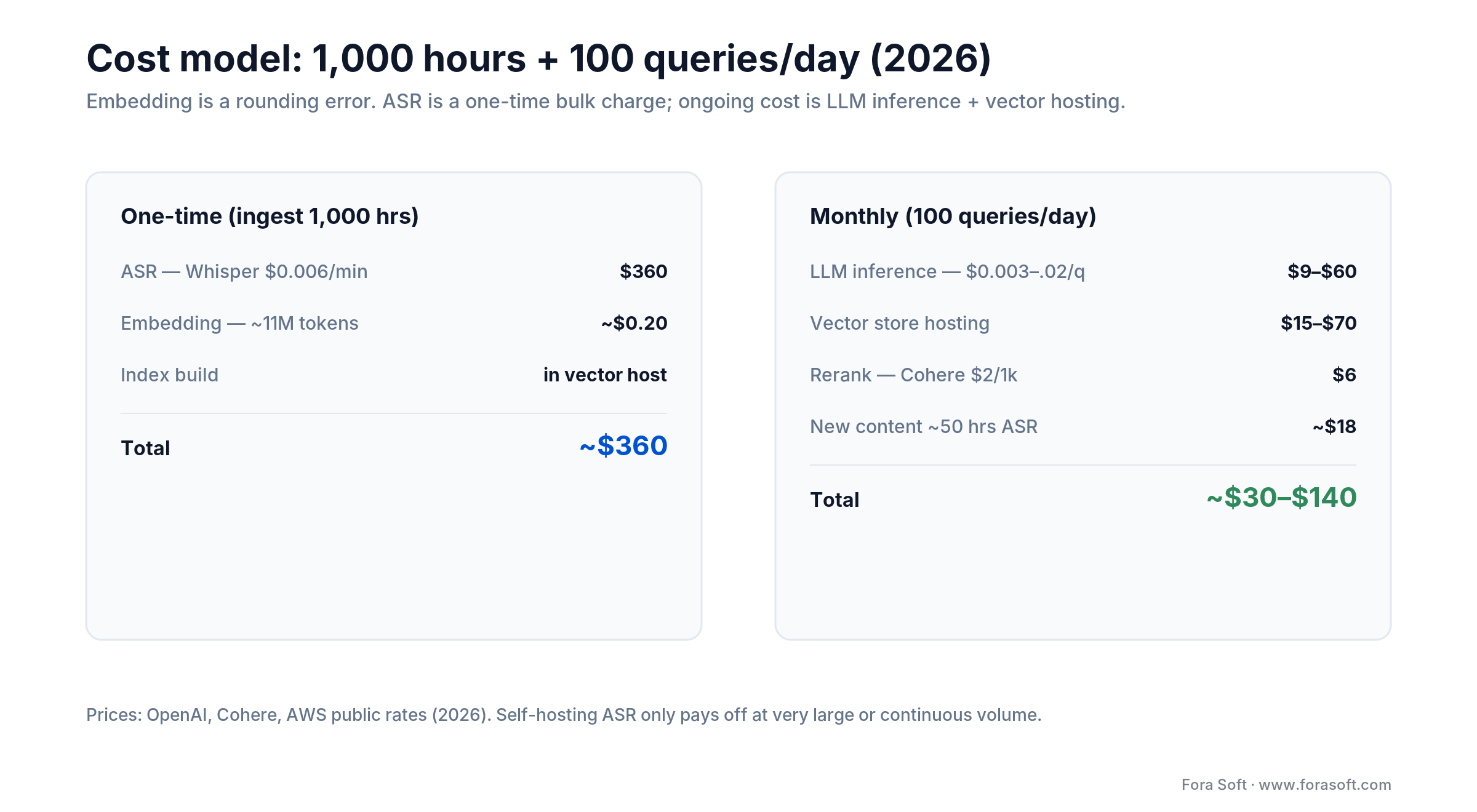
Figure 5. Where the money goes: a one-time ASR charge plus a modest monthly run rate. Costs scale roughly linearly with hours and queries.
Want a cost model for your archive?
Tell us your hours, content type and query volume. We’ll turn it into a real 2026 cost forecast and a build plan.
Security and compliance for sensitive recordings
Recordings are often the most sensitive data a company holds: patient consults, legal depositions, HR calls, security footage. The moment you transcribe and index them, transcripts, embeddings, logs and prompts all become copies of that sensitive content—and every one of them needs the same protection as the source.
Keep protected data inside your boundary. For HIPAA-grade work, use a speech-to-text engine that will sign a business associate agreement (AWS Transcribe Medical, Azure Speech), language-model endpoints that are also BAA-eligible, and a self-hosted vector store inside your own network. Do not let raw audio or transcripts touch a service that has not agreed to protect it.
Redact before you retrieve. Prompts and logs are the quiet leak. A query and its retrieved chunks are just as sensitive as the recording; strip or mask identifiers before anything is stored or sent onward, and set retention deliberately. For the full architecture, see our HIPAA and SOC 2 guide.
Enforce access at retrieval time. Metadata filters are also a permission boundary: a user must only be able to retrieve chunks from recordings they are allowed to see. Bake row-level access into the query, not just the interface.
Evaluation and the KPIs that matter
Without measurement, every change is a guess and you will regress without noticing. The hard part is not the tool; it is the labelled “golden” set of 100–200 real question-and-answer pairs, curated by domain experts, that tells you whether a change helped.
Tooling. RAGAS is the open-source standard for RAG-specific metrics—context relevance, answer relevance and groundedness (did the answer come from the retrieved context). LangSmith is strong if your stack is LangChain-heavy; Braintrust connects production traces to evaluations and CI quality gates for teams running several model features.
Quality KPIs. Retrieval precision at k=5 (aim above 80%), retrieval recall at k=20 (above 90%), groundedness (above 0.85) and answer relevance (above 0.85). These are the numbers that move first when retrieval improves.
Business KPIs. Feature adoption (aim for 30%+ of active users inside 30 days), query-to-success rate (the user finds what they wanted within three follow-ups), and retention lift among people who use the feature repeatedly.
Reliability KPIs. p95 query latency (under 3 seconds), transcription success rate (99%+), and ingest lag (new recordings searchable within a few minutes). For the deeper method, our evaluation guide covers golden sets and CI gates in full.
Mini case: ‘chat with last week’ in six weeks
A B2B meeting-recording platform (under NDA, roughly 50,000 recordings a week) came to us in late 2025 wanting “chat with my recordings” as a v2 feature. The target: a user types “what did we agree with Mark yesterday?” and gets an answer with deep links to the exact moments.
The six-week build. Weeks 1–2: chunking (speaker-turn primary, 60-second windows, 10-second overlap) on top of the Whisper transcripts already in their pipeline, embedded with text-embedding-3-small. Weeks 3–4: Qdrant with hybrid search, a Cohere reranker trimming top-50 to top-5, and a model prompt that forces citations to chunk IDs. Week 5: time-anchored deep links and multi-recording filtering by participant and date. Week 6: evaluation with RAGAS on 200 labelled queries, iterating retrieval until precision cleared 80%.
Outcome. 84% retrieval precision on the labelled set. 35% of users tried the feature within 30 days and 58% within 90; monthly retention rose 11 points among people who used it five or more times. We reused chunking and citation patterns from BrainCert and VALT, which is why it fit into six weeks rather than three months. Book a 30-min call for a similar assessment of your archive.
A decision framework in five questions
1. Is the content speech-heavy or visual-heavy? Speech: a text-only embedding pipeline. Visual: multimodal (CLIP plus text). Mixed: text with sparse key-frame embeddings.
2. How many hours in the next twelve months? Under 1,000: managed services such as LeMUR or Twelve Labs. 1,000 to 100,000: managed ASR with a custom retrieval layer. Above 100,000: self-hosted transcription and a custom stack.
3. What is your compliance posture? Standard: any path. HIPAA: BAA-eligible transcription and model endpoints plus a self-hosted vector store. High-risk regulated use: budget extra weeks for documentation and audit trails.
4. How big is the vector index? Under 10 million vectors: pgvector if you already run Postgres. 10 million to a billion: Qdrant or Weaviate. Beyond that: Milvus or a distributed Qdrant.
5. What is your latency budget? Sub-second: skip the reranker, use a smaller model, cache aggressively. Two to three seconds: run the full pipeline—that is the default, and worth it for the precision. If you are unsure how these answers combine, that is exactly the audit our AI integration team runs in a first call.
Pitfalls to avoid
1. Skipping the reranker. The top five from the first pass are noisy. A cross-encoder reranker is the highest-return component in the stack; leaving it out is the most common self-inflicted wound.
2. No time anchors. An answer without a deep link back to the moment is a demo, not a feature. Build anchors into chunks on day one, because you cannot add them later without re-processing.
3. Tuning the model before the retriever. Most failures are upstream of the model. Prompt-tweaking a broken retriever wastes weeks; fix chunking and search first.
4. Shipping without evaluation. No golden set means every “improvement” is anecdotal, and you will regress silently. Build the labelled set before you optimize.
5. Assuming English behavior holds. Default embeddings cover many languages but quality varies widely. For multilingual archives, test per language and switch to a model like BGE-M3 where the default underperforms.
When not to build RAG over your recordings
RAG is the wrong tool more often than vendors admit. Skip it, or delay it, in these cases—saying so up front is what keeps a project honest.
Your archive is tiny. Under a few dozen recordings, a good full-text search over transcripts, or simply feeding a whole transcript to a long-context model, often beats a full RAG stack and costs almost nothing to run.
Users want structured facts, not passages. If the real question is “how many deals closed last quarter,” that is analytics over a database, not semantic retrieval over speech. RAG will paraphrase; a query will be exact.
Your transcripts are poor and you cannot fix them. If the audio is bad and better ASR is out of reach, retrieval has nothing solid to stand on. Fix capture and transcription first, or the whole thing inherits the noise.
Reach for full-text search or long-context instead when: your archive is small, your transcripts are clean, and users ask a handful of questions—a RAG stack is overhead you do not need yet.
Not sure RAG is even the right call?
We’ll tell you straight—sometimes the answer is search or long-context, not a RAG stack. Bring your use case and we’ll scope it honestly.
FAQ
What is video RAG in one sentence?
Video RAG is retrieval-augmented generation where the knowledge base is your recordings: transcribe them, chunk with time anchors, embed, retrieve the relevant moments, and let a model write a cited answer that links back to the exact timestamp.
Whisper or AssemblyAI for transcription?
For clean English at scale, self-hosted Whisper-large is excellent and managed Whisper is about $0.006 per minute. AssemblyAI and Deepgram win on convenience, diarization quality and time-to-market for smaller volumes. Test both on your own audio before committing.
Pinecone or Qdrant?
Pinecone wins on operational simplicity because it is managed-only. Qdrant wins on cost, performance and hybrid search when you have some ops capacity. We default to Qdrant for new builds and Pinecone when there is no one to run infrastructure.
Do I need multimodal embedding, or is text enough?
Text-only is enough for speech-heavy content like meetings and podcasts. Add multimodal only when users could ask about something shown on screen but never said aloud, such as surveillance footage or a diagram-driven lecture.
Can I run RAG over HIPAA-protected recordings?
Yes, with BAA-eligible transcription (AWS Transcribe Medical or Azure Speech), BAA-eligible model endpoints, and a self-hosted vector store inside your network. Redact identifiers from prompts and logs before anything external touches them, since transcripts and embeddings are protected data too.
How much does video RAG cost to run?
For 1,000 hours and 100 queries a day at 2026 rates: about $360 one-time for transcription, roughly $0.20 for embedding, and about $30 to $140 a month for the vector store, reranking and model calls. Speech-to-text and LLM inference dominate; the database is minor.
How long does it take to build production video RAG?
Greenfield on managed services: 4 to 6 weeks. Custom on LangChain, Qdrant and Whisper: 8 to 12 weeks. Vertical and compliance-bound builds run 12 to 16 weeks. Reusing patterns from prior builds usually pulls us toward the lower end.
Are the VideoRAG papers ready for production?
They are strong references. The ACL 2025 VideoRAG paper and the HKUDS “Chat with Your Videos” project (KDD 2026) are worth reading for full multimodal designs, but most production systems stay transcript-first because it is cheaper and lower-latency.
What to read next
Evaluation
LLM App Evaluation in Production
Golden sets, RAGAS and CI gates for RAG you can trust.
Voice AI
OpenAI Realtime Production Guide
Let users ask their archive out loud with a voice agent.
AI Infra
MCP for Video Apps
Expose your RAG retrieval as tools any agent can call.
Compliance
HIPAA & SOC 2 for Video
The BAA architecture for RAG that touches PHI.
Ready to ship ‘chat with your recordings’?
Video RAG lives or dies on retrieval. Generic stacks fail on recordings because transcript chunking, diarization, time anchoring and the multimodal decision are all different from documents. Fix retrieval first—speaker-turn chunks, hybrid search, reranking—and the model stops being the problem.
The economics are friendly: a one-time transcription charge and a modest monthly run rate, with embeddings and the database as rounding errors. Engineer time-anchored deep links from day one, measure against a golden set, and treat sensitive recordings with the compliance they deserve. Do that and “chat with your recordings” ships in weeks, not quarters. If you want a second set of eyes, our AI-for-video engineering team is a message away.

The book · Volume 6 of 7
AI for Video: A Complete Guide to Intelligence in Video Products: From Models and Inference to Computer Vision, Speech, Search, and Generative Video
Chat with your recordings rests on transcripts, embeddings and retrieval, the same layers this playbook warns are easy to underbudget. Volume 6 of our handbook covers search and RAG over video archives, speech recognition and diarization, model artifacts and deployment topologies, and the full lifecycle of an AI feature inside a video product. Written by Nikolay Sapunov, CEO at Fora Soft.
Read it on Amazon →Kindle & paperback · Fora Soft Video Engineering Handbook
Want a six-week video RAG plan?
Send your archive size, content type and use case. We’ll return an architecture, a vendor pick and a 6–12-week plan.