

Key takeaways
• Language is the biggest hidden churn driver in e-learning. In the platforms we’ve shipped, learners fighting a language barrier finish less often and re-enroll less; closing that gap moves completion, retention, and lifetime value more than most features on your roadmap this quarter.
• Captions first, voice later. Translated captions are cheaper, faster, and lift learning outcomes more than synthesized voice. Ship captions to 100 % of users in 12 weeks; layer voice behind a premium tier once you’ve proven attach.
• Domain vocabulary is the real accuracy ceiling. Medical curricula, coding courses, K-12 science — each has terminology that generic models miss 15–30 % of the time. Per-course glossaries plus a human-in-the-loop QA pass get you to 95 %+.
• Live classrooms, recorded lectures, and VOD need different pipelines. Live uses streaming ASR+MT with a latency budget; recorded uses batch Whisper + human review; hybrid sessions need both wired to the same glossary service.
• Measure attach rate, completion lift, and support volume. Translation that nobody turns on is wasted spend. The teams that win track per-language attach and iterate the UX until it crosses 30 %.
Why Fora Soft wrote this e-learning playbook
Fora Soft has built software since 2005: 250+ projects, delivered by a 50-engineer in-house team. Our reference portfolio includes global virtual classrooms, corporate LMS builds, K-12 platforms, and adaptive learning tools. Every single one of them, at some point, asked the same question: “Can we ship this course to Spanish, Hindi, Portuguese, or Arabic speakers without rewriting the content?” Video translation for e-learning is the shortest path to that “yes”.
BrainCert grounds this guide: the world’s first WebRTC + HTML5 virtual-classroom LMS, bootstrapped to $3M ARR (2024, 58 % YoY), 100K+ customers, and 500M+ classroom minutes. We built its live-lesson stack to carry thousands of concurrent participants with AI-assisted captions, per-course glossaries, and translation hooks that open new markets without spinning up local content teams. Our e-learning engineering practice is where these patterns live.
This playbook is narrower than the strategic and integration guides in the series. It’s for product leaders at e-learning companies, heads of global expansion, and engineering leads about to scope “add translation” into a roadmap. It covers what actually moves completion rates, what trips up live vs. recorded pipelines, and what your glossary workflow has to look like to keep medical and technical content accurate.
Running an e-learning platform and scoping real-time translation?
30 minutes with an engineering lead who’s shipped this on a global virtual classroom. Bring your LMS, your priority languages, and your target launch date.
What translation actually does to e-learning metrics
The business case for video translation in e-learning is not “expand TAM”. That’s a slide, not a plan. The business case is three specific metrics that consistently improve when you ship translation properly:
1. Course completion rate. Learners taking a course in a second language wrestle with rate of speech, unfamiliar vocabulary, and the cognitive load of reading and listening at once, a barrier the language-learning literature documents well. The practical result is lower completion in under-served languages. Add accurate translated captions and the gap narrows: in the engagements where we measure it, completion lift in previously under-served languages typically lands in the 15–35 % range over two quarters.
2. Net revenue retention. For B2B LMS products, enterprise renewal conversations routinely cite multilingual support as a gating feature. Shipping translation moves deals through procurement that would otherwise stall on “we need to cover our global workforce”.
3. Accessibility compliance. WCAG 2.2 Level AA requires captions on live video. Section 508 in the US, EN 301 549 in Europe, and AODA in Ontario all lean on the same requirement. Real-time translation is a small delta on top of real-time captioning — you’re already halfway there for compliance anyway.
All three outcomes compound: compliant products sell into more procurement processes, better completion drives better NRR, better NRR justifies more languages. The teams that nail this treat translation as a retention engine, not a feature.
Live classroom, recorded lecture, hybrid session — three different pipelines
One of the first traps in e-learning translation is treating all video content the same way. It’s not. The three shapes your platform has — live, recorded, hybrid — need different pipelines:
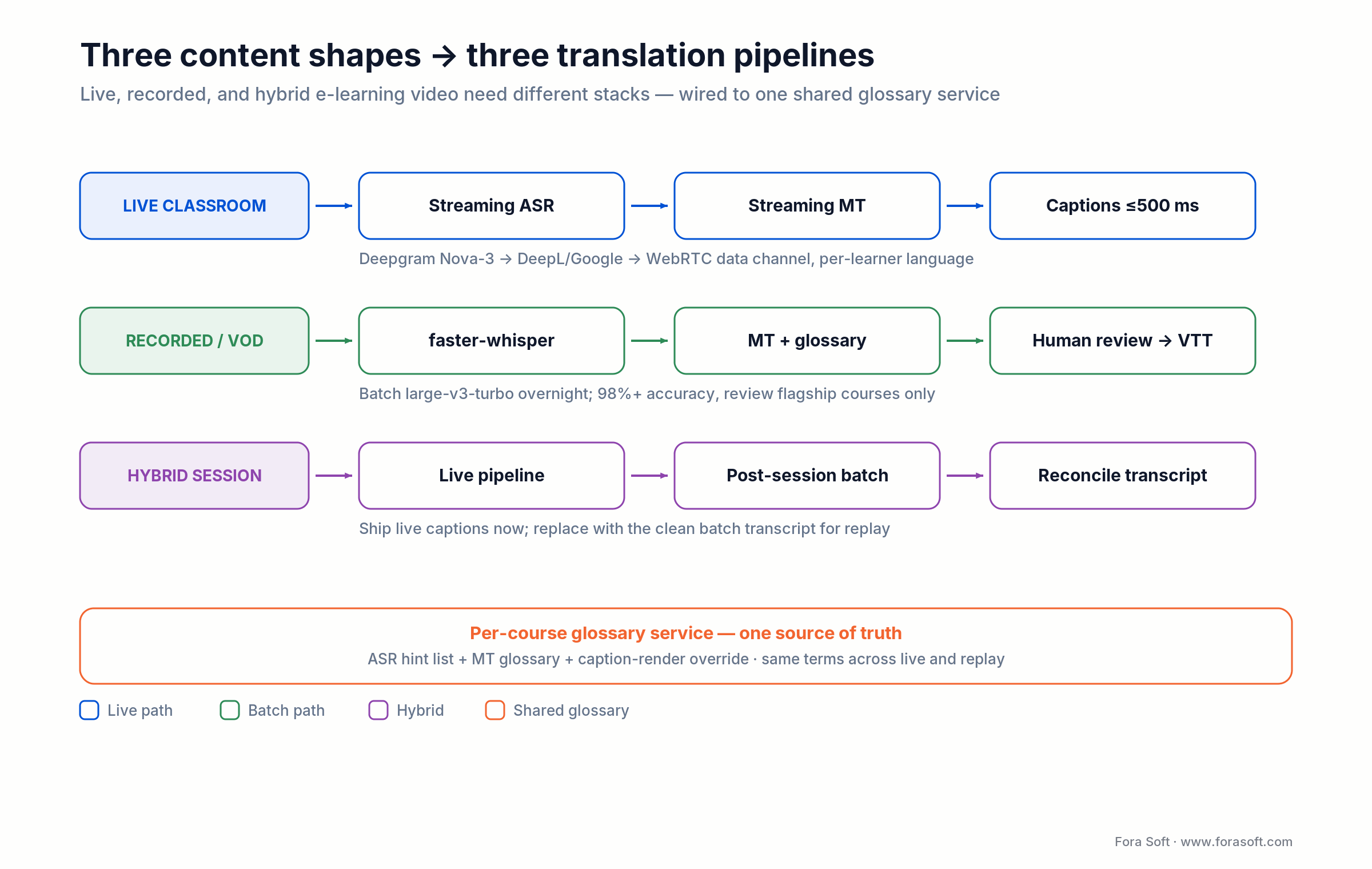
Figure 1. Live, recorded, and hybrid content each need a different pipeline, but they share one per-course glossary service so terminology stays identical across live and replay.
| Content type | Pipeline | Latency target | Quality ceiling |
|---|---|---|---|
| Live virtual classroom | Streaming ASR + streaming MT | ≤ 500 ms captions | 92–95 % coverage |
| Pre-recorded lecture / VOD | Batch Whisper + human review + MT | Hours (async) | 98 %+ with review |
| Hybrid session (live + recording) | Live pipeline + post-session human pass | Live < 500 ms; recording +24 h | 95 % live / 98 % archive |
| 1:1 tutoring | Streaming ASR + MT (captions-first) | ≤ 500 ms | 90 %+ with glossary |
Table 1. Pipeline shape follows content type: live needs speed, recorded wins on quality, and hybrid sessions use both, then reconcile.
Live: where latency kills learning
For live classrooms, the target is captions visible within 500 ms of word onset and stable within 1 s. Beyond that, learners read ahead of the teacher and the cognitive load of reconciling translated text with lip-sync mismatch kills retention. The stack is streaming ASR (Deepgram Nova-3, Azure Speech, or AssemblyAI Universal-Streaming) into streaming MT (DeepL, Google Cloud Translation, Azure) into a WebRTC data channel. Deepgram Nova-3 streams at roughly 200 ms median latency (under 300 ms at p95 in Deepgram’s 2026 benchmarks), which is what makes the sub-500 ms caption budget realistic. Whisper is more accurate but its 30-second window and autoregressive decoder make it a batch tool, not a live one.
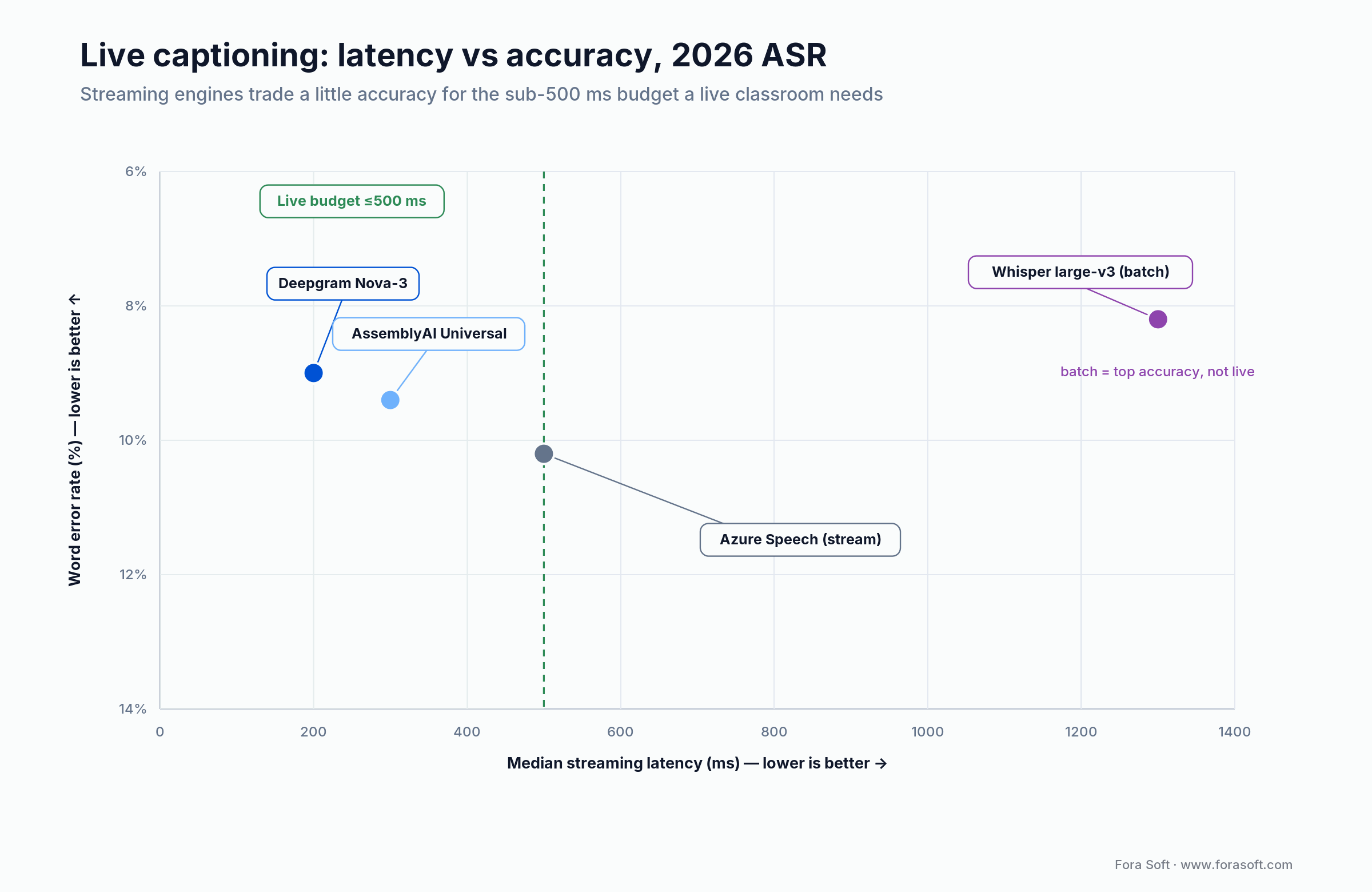
Figure 2. For live captioning, only sub-500 ms streaming engines fit the budget; batch Whisper is more accurate but runs offline, for recorded lectures.
Recorded: where quality wins over speed
For pre-recorded lectures, latency doesn’t matter and accuracy is everything. Run faster-whisper large-v3 on the full audio overnight, run MT with course-specific glossaries, then schedule a human review pass for flagship content. The incremental cost of review is small and the quality jump from 93 % to 99 % pays for itself in reduced learner churn.
Hybrid: the common case
Most real e-learning products are hybrid: live sessions that are also recorded for on-demand replay. Ship the live pipeline for the synchronous viewers; queue a post-session batch pass for the recording. When students re-watch, they get the cleaner transcript. Same glossary across both pipelines or the learner sees different terminology in live vs. replay, which erodes trust.
Reach for a live pipeline when the class is synchronous and interaction matters; reach for batch when the catalog is recorded and accuracy is the priority. Most e-learning products run both, wired to one glossary service so a term never renders two ways.
A live classroom pipeline that ships in 12 weeks
The stack we default to for e-learning platforms in 2026:
Transport. LiveKit Cloud or self-hosted LiveKit as the SFU, with Cloudflare in front for TURN and global edge. Per-track audio subscription for server-side agents — essential for diarization without paying for it twice.
Noise suppression. Client-side Krisp or open-source RNNoise. Live classrooms have teachers in offices, students in dorms, and everyone in between — background noise is the default, not the exception.
Streaming ASR. Deepgram Nova-3 for top languages, Azure Speech for long-tail. A LiveKit Agent joins each session, subscribes to the teacher’s audio track (and student tracks when they speak), streams to ASR, emits partials every 150 ms.
Glossary service. A per-course dictionary of domain terms is injected as an ASR hint list before the session starts and as an MT glossary during. Huge accuracy lift for technical content with zero infra cost.
Streaming MT. DeepL for European languages, Google Translation for everything else, Azure Translator for enterprise tenants that need a single compliance story.
Caption delivery. WebRTC data channel with RTP-timestamped payloads. Per-learner language selection so one room can serve captions in 5 languages simultaneously without 5 pipelines.
Recording pipeline. Once the session ends, the recording goes into a batch pipeline: faster-whisper running large-v3-turbo (809M params, ~6× faster than full large-v3 for within ~1–2 % of its accuracy), the same glossary, MT, and a VTT file attached to the recorded asset in the LMS. Humans review flagship content.
The glossary workflow: the one thing that separates 88 % and 96 % accuracy
Generic translation models handle everyday classroom speech well. They fail on domain vocabulary. Two examples we hit routinely:
Medical curriculum. “Chole-cyst-ec-tomy” becomes “cholesky ectomy”. “Myocardial infarction” becomes “my cardinal infection”. Medical students laugh, then unsubscribe. A course-level glossary with 50–200 terms fixes the vast majority of these.
Coding bootcamp. “Git rebase” becomes “get the base”. “Kubernetes” becomes “cue bernities”. Function names and library names — nginx, Redis, pnpm — mangle consistently. Again, per-course glossary plus an ASR hint list solves most of it.
Glossary ingestion workflow
Build this once, reuse per course. Instructors submit a CSV of terms (source language, target languages, preferred translation, forbidden translations, pronunciation hint if unusual). The service ingests into three places: an ASR hint list for the streaming provider, an MT glossary for the translation API, and a caption-render override table for cases where ASR gets the word right but MT mistranslates it. Course goes live with its glossary preloaded; 30 minutes of instructor time saves hours of learner confusion.
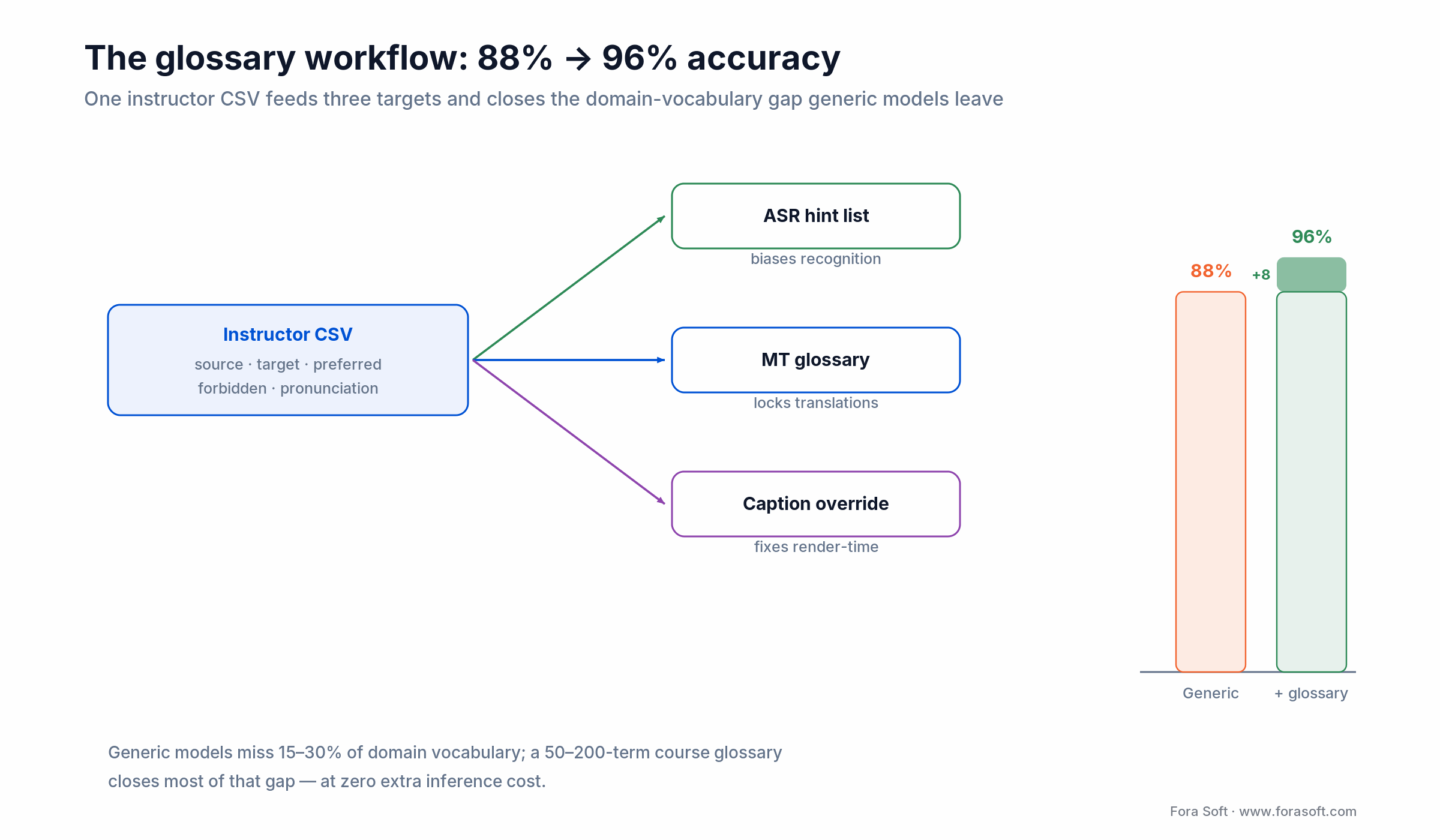
Figure 3. One instructor-supplied CSV feeds the ASR hint list, the MT glossary, and a caption-render override table, the cheapest accuracy win in the stack.
Rule of thumb: every course with more than 100 enrolled learners gets a custom glossary. Below that, a shared platform glossary by subject area is plenty.
Caption UX: the learner chooses, you deliver
The UX decisions that matter more than they look like they matter:
1. Per-learner language picker. Not per-room. A room can have students reading Spanish, Portuguese, and Arabic captions simultaneously. One translation pipeline feeds all three via the data channel.
2. Source-language captions available as a setting. Many non-native English speakers want English captions on English lectures — reading along dramatically increases comprehension. Don’t force translation; offer both.
3. Minimum 2–3 line history visible. Single-line captions disappear too fast for L2 readers. Showing the last 2–3 sentences gives learners room to reread.
4. Speaker labels. In discussion-heavy classrooms, knowing which student asked which question changes comprehension entirely. Per-track ASR makes this free; don’t hide it.
5. Transcript download. A captioned session generates a post-class transcript. Offer it in both source language and the learner’s selected language. Students keep it for study, instructors keep it for compliance.
Compliance lenses for e-learning: FERPA, COPPA, GDPR, accessibility
FERPA (US K-12 and higher ed). Student recordings and transcripts are educational records. You need written institutional consent to ship audio to third-party processors. Vendor list must be disclosed to the institution’s data governance office. In practice, work with Azure, Google, and Deepgram — all three have FERPA-compatible contracts available.
COPPA (under-13 learners). Parental consent required for any identifiable data. Turn audio processing off by default for under-13 accounts and gate on verified parental consent. Caption retention policies need to be tighter — don’t persist audio, minimize transcript retention.
GDPR (EU learners and institutions). Voice is biometric personal data; lawful basis needed. For institutional customers (universities, corporates), rely on the data-processing agreement; for consumer learners, explicit consent at sign-up. DPIA on file before launch, subprocessor list published.
Accessibility (WCAG 2.2 AA, the EAA, ADA Title II). Live captions in the source language are the legal requirement (WCAG 2.2 SC 1.2.4, Level AA); translated captions are additive, driven by your target markets rather than by law. Scope matters here. The European Accessibility Act came into force on 28 June 2025, but its closed list of covered services doesn’t name online courses; e-learning platforms are usually caught through their e-commerce checkout, not the lecture video itself. US public universities and K-12 fall under the 2024 ADA Title II web rule (WCAG 2.1 AA, phased 2026–2027). Either way, make the caption renderer itself accessible: contrast, font-scaling, and a caption layer the learner can move.
Rule of thumb on consent: default audio processing OFF for under-13 accounts and EU consumer learners until verified consent is on file; institutional customers ride their data-processing agreement. It is far cheaper to gate at sign-up than to unwind a retention policy after launch.
Scoping translation for a K-12 or higher-ed platform?
We’ve shipped translation into FERPA-covered workflows before. 30 minutes, compliance-aware architecture plan, no generic sales deck.
LMS integrations: SCORM, xAPI, LTI, and where translation data flows
If you’re selling into institutional LMSes (Canvas, Moodle, Blackboard, D2L, corporate SCORM players) the translation pipeline has to speak LMS protocols. We keep the standards deep-dives behind each of these in our e-learning video knowledge base.
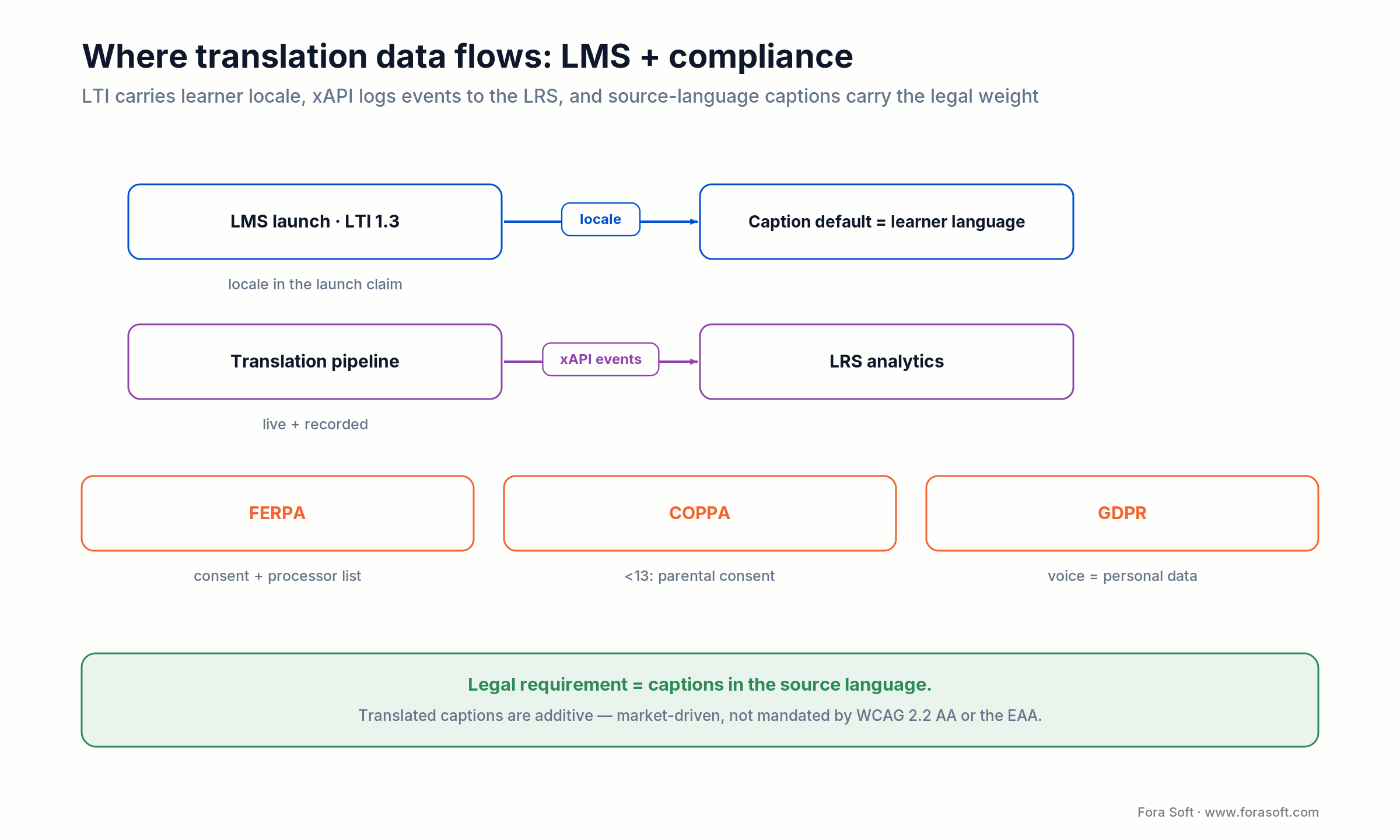
Figure 4. Where the data goes: LTI hands over the learner’s locale, xAPI events land in the LRS, and three privacy regimes gate what you may process.
LTI 1.3. Your live classroom tool launches from the LMS via LTI; the learner’s preferred language comes through in the launch claim. Honor it as the default caption language. On session end, post a transcript back as an attached resource.
xAPI / cmi5. Translation events (“learner turned on Spanish captions”, “transcript downloaded”) are xAPI statements your tool emits to the LRS. Gives institutional customers the analytics they need without a custom reporting layer.
SCORM 1.2 / 2004. Older corporate LMSes consume SCORM packages. Translated caption tracks go into the package as sidecar VTT files; the launcher picks the right track based on browser locale.
VOD library translation: faster-whisper, review, and economics
Most e-learning catalogs have dozens to thousands of hours of pre-recorded video. Translating them in batch costs less than most teams expect.
Running faster-whisper large-v3 on an A10G node transcribes roughly 6–10× real-time, so a 1-hour lecture needs 6–10 minutes of GPU time. An A10G runs about $0.40/hour spot to $1.00/hour on-demand (AWS g5.xlarge, 2026), so transcription lands near $0.10 per hour of lecture. Translation adds ~$0.25 per hour via DeepL. Human review for flagship content, at a professional rate of $0.80–$1.50/minute of video, lands at roughly $50–$90 per hour of lecture reviewed.
For a 500-hour library going into 5 languages, that’s roughly $50 of transcription (you transcribe each source hour once) plus about $625 of machine translation (500 hours × 5 languages × ~$0.25/hour), then $25 K–$45 K for human review of flagship content only. Flagship-only review is the common choice; long-tail content ships with machine-only translation and is upgraded on demand if viewership justifies.
Translated voice over captions: when it actually helps learning
Captions lift comprehension for most learners. Translated voice is a step further — the learner hears the lesson in their native language instead of reading along. It sounds obvious that voice is better, but the data we see is more nuanced.
Where voice helps. Very young learners (under 12) whose reading speed can’t keep up with captions. Visual-heavy content (anatomy, physics demonstrations) where the eyes are on the video, not the caption rail. Mobile learners on small screens where the caption layer crowds the video.
Where voice hurts. Language learning itself (students want to hear the target language). Expert instructor brand (the instructor’s voice is part of the value; synthesized voice dilutes it). Heavy-vocabulary lectures where students want to correlate sound with spelling.
Our recommendation: ship captions to everyone, voice as a premium SKU or a learner-level opt-in. Measure attach and learning outcomes per cohort before expanding.
Reach for translated voice when learners are young, the content is visual-heavy, or the screen is small. Stay with captions when the course teaches a language, the instructor’s voice is the brand, or the vocabulary is heavy and learners need to link sound to spelling.
Scaling for exam season and the September spike
E-learning workloads are spiky. September back-to-school, January new-year enrollment, exam weeks. A translation pipeline that handles Tuesday afternoon can fall over Monday morning when 50× normal load hits simultaneously.
Worker pool sizing. Headroom for 5× steady-state. Autoscale aggressively but with a floor so cold starts don’t hit the first learners. LiveKit dispatchers, Kubernetes HPA on a custom metric (active ASR streams), and a warm-pod buffer.
Provider rate limits. Deepgram, Azure, DeepL all have per-account concurrency caps. Negotiate upward before peak season; they’re usually generous with advance notice. Run a secondary provider on standby so if the primary caps, traffic fails over to it automatically.
Cost bands. At 500,000 translated minutes/month steady-state with spikes to 2M, the monthly bill lands in the $8–$15 K range for managed APIs. Moving the steady state to self-hosted faster-whisper on reserved A10G capacity can cut that roughly in half, with managed APIs absorbing the spikes.
Mini-case: captions and translation on a global virtual classroom
Situation. A longstanding Fora Soft partner runs a global virtual classroom used by schools and enterprise L&D teams worldwide. Live lessons regularly pair English-speaking instructors with learners across East Asia, South Asia, Latin America, and the MENA region. Completion rates in non-English regions trailed English regions significantly; enterprise procurement cycles stalled on “we need multilingual to cover our full workforce”.
12-week plan. Weeks 1–2: benchmark Deepgram, AssemblyAI, Azure, and faster-whisper on a labelled sample of the platform’s own accented English audio. Pick the top two. Weeks 3–5: build a LiveKit Agent that joins each session, runs per-speaker ASR on participant audio tracks, emits translated captions over a data channel. Weeks 6–8: UI work — per-learner language picker, multi-line caption rail, transcript download in both languages. Weeks 9–10: glossary ingestion workflow for the three largest enterprise tenants; load test at 3× current peak. Weeks 11–12: staged rollout behind a feature flag, weekly WER sampling by human review, instructor training materials.
Outcome. First-partial latency landed at ~700 ms P50, ~1.1 s P95. Caption coverage per lesson reached 92 % of spoken words (the 8 % gap is silence, music, and disfluencies). Completion rates in previously under-served regions moved materially over the following two quarters. Two non-English-market enterprise deals closed citing the feature in RFP responses. Detailed KPI numbers are under NDA; ask us directly for the engagement deep dive.
A decision framework for e-learning translation — five questions
1. Which languages come first? Look at three signals: geographic breakdown of engaged but not completing learners, enterprise pipeline languages, and competitive gaps. Ship the top three; grow from there.
2. Captions only, or voice too? Captions for everyone in v1. Voice as a premium SKU or opt-in for visual-heavy content. Don’t ship both at launch — complexity doubles, attach data gets noisy.
3. Instructor-supplied glossaries or platform glossaries? Both. Platform glossary by subject for long-tail; instructor-supplied for flagship courses. Build the ingestion workflow on day one — retrofitting is painful.
4. Live, recorded, or hybrid first? If your platform is majority live, start live. If majority recorded, start batch — higher accuracy ceiling, simpler engineering. Hybrid ships both pipelines; plan a joint glossary service.
5. Who reviews? Decide up front. “No human review” is a valid choice for long-tail content; for flagship courses and anything medical, legal, or technical, budget the review pass or quality will disappoint.
Five e-learning-specific pitfalls
1. Shipping without instructor training. Teachers who don’t trust the captions will repeat themselves loudly and break the flow. A 15-minute onboarding video for instructors plus a pre-class preview of their own captions fixes it.
2. Forgetting quizzes and downloadable materials. Translating live captions while leaving the in-class quiz in English means you’ve solved half the language barrier. The full experience, including slides, quizzes, and assignments, is the goal.
3. Uniform captions across ages. 8-year-olds and 28-year-olds read at different speeds. Reading-level-aware rendering (bigger type, slower promotion of partials) matters more in K-12 than we’d expect going in.
4. One-shot glossary at course creation. Glossaries drift as courses iterate. Make them versioned, editable mid-term, and visible to instructors — not buried in a one-time onboarding step.
5. No per-language analytics. Attach rate is a global number; completion delta is per-language. Build the dashboards at the language grain from day one or you can’t tell which markets are working.
KPIs specific to e-learning translation
Quality KPIs. Per-language WER sampled weekly (target ≤ 8 % live, ≤ 3 % recorded-with-review). Glossary hit rate per course (target ≥ 95 % of domain terms correctly rendered). Caption coverage (target ≥ 90 % of spoken words).
Learning KPIs. Completion lift per language cohort after translation goes live (measured quarter-over-quarter). Time-on-task in translated sessions (should stabilize or rise; if it falls off a cliff, UX issue). Quiz score delta between English-only and translated cohorts (closing the gap is the win).
Business KPIs. Per-language attach rate (target ≥ 30 % within two quarters of launch for marketed languages). Enterprise renewal conversations citing translation as a required feature. Deal velocity in non-English markets.
When NOT to ship translation yet
Three counter-situations. If your platform is a pure language-learning product (Duolingo-style), real-time translation of the target language during a lesson breaks the entire product loop — learners need the friction. If your content catalog is tiny (under a few dozen hours) and primarily flagship, human-translated professional subtitles on your VOD library beat real-time AI captions and cost less. If your user base is 95 %+ English, translation isn’t the next feature you should ship — find the actual retention lever first.
Ready to move completion rates in non-English markets?
Bring your language priority list, your live-vs-recorded mix, and your compliance envelope. In 30 minutes we’ll scope the stack, cost, and timeline.
Realistic 12-week timeline for an e-learning platform
| Week | Workstream | Deliverable |
|---|---|---|
| 1–2 | Benchmark & language priority | Provider shortlist with WER on your audio; top-3 language roadmap |
| 3 | Compliance & LMS integration design | FERPA/GDPR posture, LTI claim mapping, xAPI event plan |
| 4–5 | Server-side translation agent | LiveKit Agent with per-track ASR + MT, data-channel delivery |
| 6–7 | Learner UX | Language picker, multi-line rail, speaker labels, transcript export |
| 8 | Glossary service | Instructor glossary ingestion, versioning, ASR/MT propagation |
| 9 | Recording pipeline | Batch Whisper + MT for session recordings; same glossary |
| 10 | Load, chaos, & analytics | 3× peak simulation; per-language attach & completion dashboards |
| 11 | Staged rollout | Feature-flagged release; weekly WER sampling |
| 12 | Instructor enablement | Instructor training videos, glossary onboarding, support runbooks |
What’s next for translation in learning
Three trends worth tracking for education teams. Voice-preserving translation — synthesized output that keeps the instructor’s voice — is moving from demo to production; meaningful for brand-driven instructors. Simultaneous interpretation with wait-k policies is tightening the captions-vs-speech latency gap — useful for K-12 where captions outrun reading speed. Domain-tuned small models for medical, legal, coding, and K-12 subjects are getting cheap enough to fine-tune per course — the quality jump on specialized vocabulary is large.
None of this changes the architecture we recommend today. It does mean the pipeline you build in 2026 should keep ASR, MT, and TTS boundaries swappable so you can drop a better model into any stage without rewriting the rest.
FAQ
How much does adding real-time translation cost per student?
For a typical 60-minute captioned lesson with 20 learners, the managed-API cost is roughly $0.40–$0.60 per lesson total (not per learner — one translation pipeline feeds all listeners). Translated voice roughly triples that. Development is a one-time window of $60–$120K for the 12-week rollout; infrastructure runs $1,500–$4,000/month at moderate load.
Does real-time translation actually improve completion rates?
In our experience across global platforms, yes — but the magnitude depends on how under-served the language currently is. When we ship translation into a market where learners were fighting a language barrier, completion rates in that cohort typically lift 15–35 % over two quarters. In markets where the gap is already small, lift is modest.
Should I buy a translation SDK or integrate multiple APIs directly?
If you’re a pure events platform running once-a-year conferences, a turnkey service (KUDO, Interprefy, Wordly) is faster and cheaper. If translation is a continuous feature inside your own product — live classrooms, tutoring, compliance training — integrate ASR + MT + TTS directly. You’ll get better per-minute economics, tighter control over quality, and the glossary workflow you need.
What about courses with a lot of mathematical or coding content?
Technical content benefits most from glossaries and is the fastest place to see quality wins. Variable names, library names, and formulas should be glossary-protected so they pass through untranslated. Consider also pinning on-screen code blocks as non-translatable; the instructor’s spoken code names get handled by the glossary, the code itself stays canonical.
How do I handle FERPA when shipping student audio to third-party APIs?
Sign FERPA-aware contracts with your ASR/MT vendors (Azure, Google, Deepgram all have them). Don’t persist audio by default. Document the processor list in your institutional data-governance paperwork. For K-12, verify parental consent flows for under-13 learners — COPPA and FERPA stack.
How do instructors manage glossaries at scale?
CSV upload for bulk entry, in-session correction UI for one-offs (instructor flags a mistranslated term; system adds to the course glossary). Platform-level glossaries by subject area cover long-tail. Version the glossaries so iteration doesn’t silently break previously-working courses.
Can I translate asynchronous discussion forums too?
Yes, and it’s the easiest extension. Same MT service and glossary used by the live pipeline translates forum posts on render. Cache aggressively. Many learners discover the platform’s translation feature in the discussion forum first; ship it alongside live captions.
What’s the realistic rollout timeline?
10–14 weeks for a production-grade rollout with a Fora Soft team running Agent Engineering tooling — including benchmarking, server-side agent, learner UX, glossary service, recording pipeline, analytics, and instructor enablement. LMS-embedded tools add 2–4 weeks for LTI + xAPI wiring.
What to read next
Strategy
Real-Time Video Translation: The 2026 Integration Guide
The strategic companion to this piece: latency, providers, cost model, and compliance.
Integration
Real-Time Video Translation Integration: The Engineering Playbook for 2026
Deeper on the engineering patterns — LiveKit Agents, Agora, caption sync, scaling.
E-learning
AI Video Analytics for Online Learning
The other AI-driven video feature that pairs with translation in virtual classrooms.
Content
Polymath AI Lesson Plan Generator
A client case where AI powers the content side of e-learning, complementing translation.
Architecture
P2P, SFU, MCU, Hybrid: Which WebRTC Architecture Fits Your 2026 Roadmap?
The transport layer behind any live-classroom translation pipeline.
Ready to open e-learning markets translation has been gating?
Video translation in e-learning is the highest-impact retention lever most platforms haven’t shipped yet. Captions first, voice later. Per-course glossaries first, platform defaults second. Live pipeline and batch pipeline wired to the same glossary service. Per-learner language picker, multi-line rail, speaker labels. FERPA, GDPR, and WCAG baked in from week one.
The products that win measure attach and completion at the language grain and iterate until attach crosses 30 %. The products that stall ship translation as a checkbox and never look at the per-language numbers. A production-grade rollout lands in 10–14 weeks with a Fora Soft team running Agent Engineering tooling; we’ve shipped this on global virtual classrooms, enterprise LMS tools, and K-12 platforms.
Let’s scope your e-learning translation rollout
Bring your priority languages, your live-vs-recorded mix, and your LMS setup. 30 minutes, concrete plan, no sales pitch.

