

Key takeaways
• A cloud video management system on Android is a different product from an on-prem VMS with a phone app. A cloud-hosted VMS shifts storage, AI, and operator workflow into a SaaS, then exposes it through an Android app. The architecture, pricing model, and compliance work all change — not just the deployment target.
• The market is moving cloud-first, fast. Memoori puts video-management software growth at roughly 2× the hardware rate; the mobile-VMS slice grew to $2.78B in 2025 and AI/edge-analytics segments compound at 13.9% CAGR. Recurring SaaS revenue is replacing one-time NVR sales.
• The hard problems are bandwidth, retention cost, and identity. A single 4K/30 camera streaming to cloud burns 6–12 Mbps per camera. Multiply by your fleet, then by 90 days of retention. Edge bridges, smart pre-recording, and adaptive resolution are how you keep the bill sane.
• Conservative 2026 budgets. A focused Android cloud-VMS app over an existing back-end is $25k–$40k. A full cloud-native VMS with Android client, ingest pipeline, AI, and admin web is $120k–$220k. White-label or multi-tenant adds 20–30%. We use agent-assisted engineering so quotes run noticeably tighter than typical 2024–2025 ranges.
• Pick architecture before features. The single decision that defines the next two years is: cloud-native VMS, hybrid (edge bridge to cloud), or cloud companion to on-prem VMS. The rest of the playbook below tells you how to make that call and what to scope after it.
Why Fora Soft wrote this playbook
Fora Soft is a software development company that has shipped 625+ projects since 2005, and we have been building cloud video management system software and surveillance products for almost two decades — cloud-native ingest pipelines, multi-tenant admin, AI motion analytics, and the Android clients that operators actually use in the field. We have built the parts that make Android cloud video management work: an AI-powered cloud surveillance platform processing 2,000+ real-time customer interactions per day across 10,000+ sites, a SIP-to-WebRTC bridge for IP intercom feeds, an Android MDM platform handling fleets of 10,000 devices, and a NetCamStudio-class multi-camera ingest tool with codec control.
This guide is for product owners, security directors, and CTOs scoping a custom Android cloud VMS — whether that is a brand-new SaaS, a cloud companion to your existing on-prem VMS, or a managed service for resellers. It is the same discipline behind our video surveillance software development work. We will cover the commercial decisions first (architecture, retention, identity, where the AI lives), then the cost model, then the pitfalls. Every recommendation is grounded in projects we have shipped, not vendor marketing.
Our team uses agent-assisted engineering — in-house Claude- and Cursor-based pipelines — to compress the commodity work in any cloud-VMS build: ingest plumbing, admin CRUD, FCM push, basic settings UI. That keeps the budget on the parts that matter: video performance, identity, AI, and the integrations the customer pays for. Our 2026 quotes therefore run tighter than the typical 2024–2025 industry ranges you may have collected.
Scoping a custom Android cloud VMS and want a sanity check?
Bring the camera count, the retention target, the AI features, and the regions in scope. We will tell you in 30 minutes which architecture path is cheapest and which features to delay.
Cloud VMS vs on-prem VMS with an Android app
The two are easy to confuse, and the confusion costs months. An on-prem VMS with a mobile app keeps the recordings, the analytics, and the identity layer on a server in the customer’s building — the Android app is a window into that server. A cloud video management system hosts everything as a SaaS in regional clouds — the Android app is a window into the SaaS, and most of your engineering moves to the back-end.
Cloud VMS shifts the workload. Storage costs become an opex line. AI runs in cloud GPUs you provision. Identity and SSO live in your cloud, not the customer’s LDAP. Customer onboarding compresses from days to minutes. Multi-site investigations finally work, because you are no longer VPN-hopping between sites.
On-prem VMS shifts the risk. Recordings stay on the customer’s premises — a strong story for healthcare, defense, and EU-heavy buyers. Bandwidth costs are minimal, because video does not leave the building. Sovereignty is straightforward. The trade-off is operational: every customer needs a maintenance contract, and remote support over VPN is your daily reality.
If you are reading this, you have probably already decided cloud is the path. Good. The next sections are about getting the architecture right.
Three cloud architectures: pure cloud, hybrid bridge, cloud companion
Almost every Android cloud VMS we have scoped fits into one of three architecture patterns. Pick deliberately. Switching later means a six-month rebuild.
Pattern A — Pure cloud. Cameras stream directly to the cloud over RTSP-over-TLS or WebRTC. The Android app receives via WebRTC or LL-HLS from the cloud SFU. Examples: Verkada, Eagle Eye Networks, Rhombus, Avigilon Alta. This works when bandwidth is plentiful, every camera has internet, and the customer accepts continuous cloud uplink. Best for SMB and modern retail.
Pattern B — Hybrid bridge. A small Linux appliance (or a VM) sits in each site, ingests local cameras, records on-site for retention/evidence, and uploads only motion-triggered clips, thumbnails, and analytics events to the cloud. The Android app fetches live via the bridge through the cloud, fetches archive from local on demand. Examples: Genetec Stratocast, Rhombus hybrid, Network Optix Nx Cloud. Best for sites with limited uplink, large camera fleets, or strict retention rules.
Pattern C — Cloud companion to on-prem VMS. The customer keeps Milestone, Genetec, or Bosch on premises. You add a thin cloud layer that mirrors metadata, alert events, and short clips, and an Android app that operators use for fast triage from anywhere. Best when the customer is locked into an existing on-prem VMS and just needs mobile and remote access without uprooting the install.
Reach for hybrid bridge (Pattern B) when: you have more than 50 cameras per site, retention > 30 days, operators that need offline-tolerant local recording, or any uplink under 50 Mbps shared. Pure cloud breaks here; cloud-companion is over-scope.
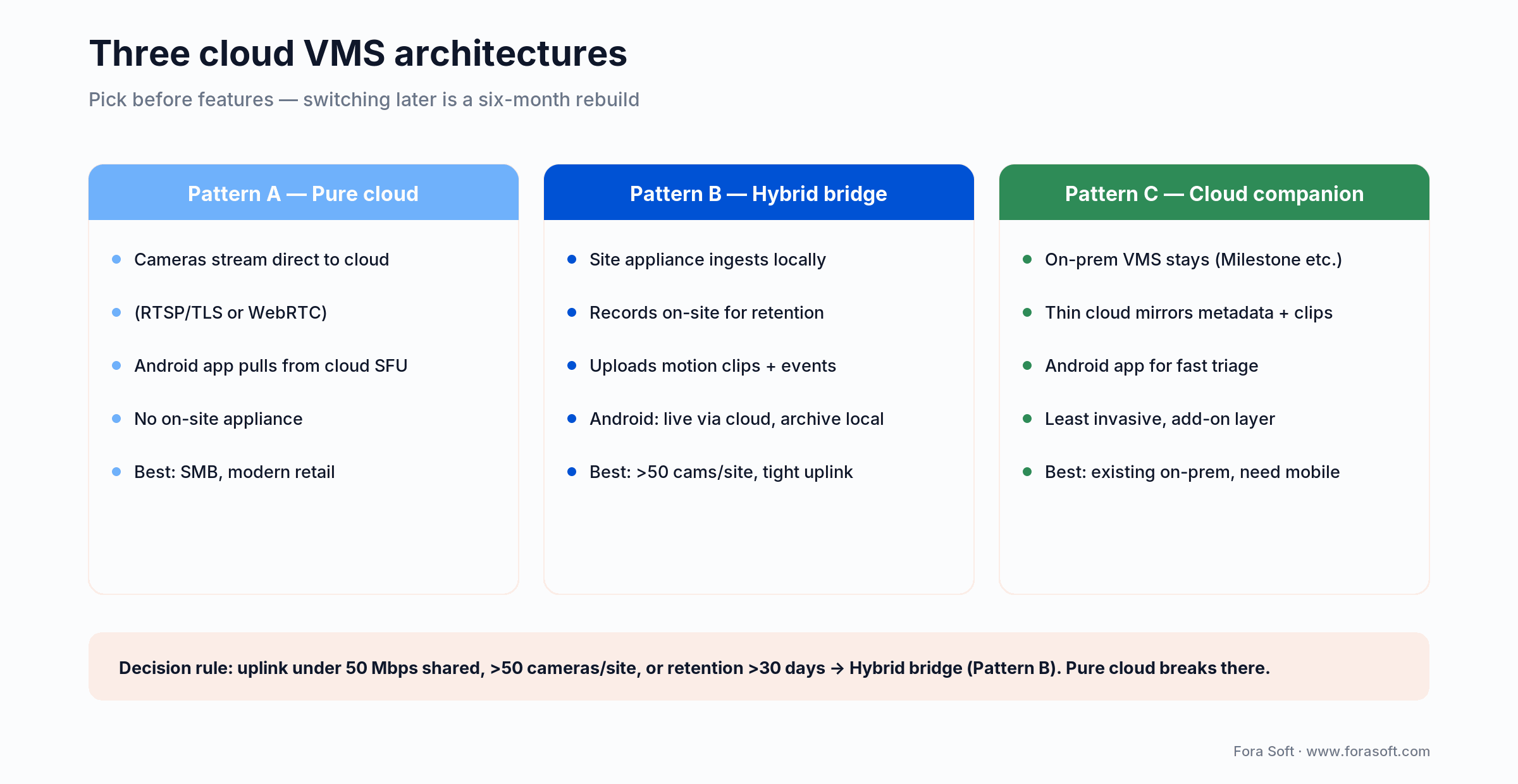
Figure 1. The three cloud VMS architectures — pick the pattern before you scope features.
The 2026 cloud VMS market in numbers
If you are pitching this build internally, the macro picture is on your side. Three numbers do most of the work.
Software is outgrowing hardware roughly 2×. Memoori’s 2025–2030 outlook puts global video-surveillance hardware revenue at $33.8B (2024) growing to $47.9B (2030) at about 6% CAGR, while video-management software, analytics, and storage software grow at roughly 12% CAGR. Recurring SaaS revenue is replacing one-time NVR sales.
Mobile cloud VMS compounds even faster. MarketsandMarkets has the mobile-VMS slice climbing from $2.78B (2025) to $4.00B (2030), with a 13.9% CAGR in the AI/edge-analytics segment. North America held a 36% share of mobile video surveillance in 2024; APAC is the fastest-growing region.
Consolidation is real. Memoori counted 24 M&A transactions in the VMS sector between September 2023 and August 2025, with about $3.8B of investment across 38 deals. Private equity is reshaping the cloud-VMS space — the integration partner you pick today may be owned by someone else next year. Plan your integration layer to be replaceable.
The cloud ingest pipeline: from camera to Android tile
A working cloud-VMS ingest path has five stages, and most projects underestimate the second and the fourth. Map each stage to a specific service so you can evolve them independently.
1. Camera or bridge uplink. RTSP-over-TLS or RTSP-over-WebRTC from the camera to a regional ingest endpoint. Bridges (Pattern B) compress and pre-filter here.
2. Media gateway. Terminates RTSP, transcodes if needed, republishes as WebRTC or LL-HLS for the Android client, persists the source segment to object storage. We use MediaMTX, Janus, and LiveKit depending on scale; an enterprise build often runs a fleet behind an autoscaler.
3. Storage tier. Hot tier for the last 24–72 hours (S3 Standard or equivalent SSD), warm tier for 7–30 days (S3 Infrequent Access, B2), cold archive for > 30 days (Glacier, Archive Storage). Choose retention per camera class, not per fleet — not every camera needs 90 days of 4K.
4. AI and event pipeline. Inference services (cloud GPU or specialized inference endpoints) consume the source stream, emit events on a queue (RabbitMQ, NATS, Kafka), and write results to a search index (OpenSearch). The Android client subscribes to the user’s relevant events via FCM or WebSocket. This is where the cost can quietly balloon. One always-on YOLO inference per camera per 30 fps is not free.
5. Android client and admin web. The Android app handles live grid, playback, push, and operator workflow. The admin web (separate) handles user/role management, camera enrolment, retention policies, and billing. One backend, two clients. Our deep dive on secure cloud video management covers the back-end design in detail.
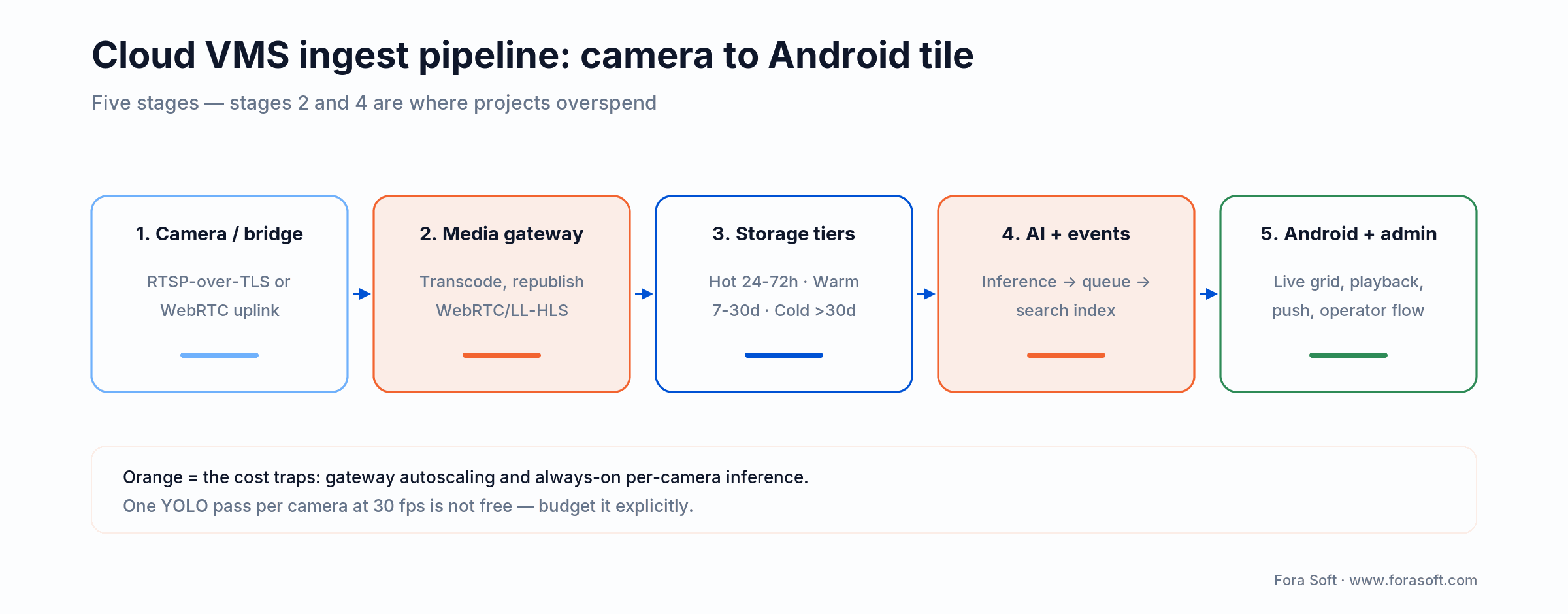
Figure 2. The five-stage cloud ingest path; stages 2 and 4 are where budgets quietly balloon.
Bandwidth and storage math: the bill nobody scopes
The single fastest way to sink an Android cloud VMS project is to under-budget bandwidth and storage. Run the math before you scope — not after.
| Stream | Bitrate | Per camera per day | Per camera 30 days | 100-camera fleet, 30 days |
|---|---|---|---|---|
| 720p H.264, 15 fps | 1.5 Mbps | ≈ 16 GB | ≈ 480 GB | ≈ 48 TB |
| 1080p H.264, 30 fps | 4 Mbps | ≈ 43 GB | ≈ 1.3 TB | ≈ 130 TB |
| 1080p H.265, 30 fps | 2 Mbps | ≈ 22 GB | ≈ 660 GB | ≈ 66 TB |
| 4K H.265, 30 fps | 8 Mbps | ≈ 86 GB | ≈ 2.6 TB | ≈ 260 TB |
| Smart-record only (10% motion) | peaks 4 Mbps | ≈ 4 GB | ≈ 130 GB | ≈ 13 TB |
Three takeaways from the table. H.265 halves the bill versus H.264 at the same quality — if your camera supports it, mandate it. Smart-record (event-driven) cuts storage roughly 90% versus continuous; the trade-off is that you cannot retroactively review periods nothing was happening. Egress to mobile clients is a separate bill. Each operator viewing a 1080p tile for an hour pulls about 1.8 GB. With a fleet of 50 daily operators, plan for hundreds of TB of egress per month.
The cheapest cloud-VMS bills we audit run a hybrid bridge with H.265, smart-record, sub-stream-by-default for the Android grid, and aggressive lifecycle policies (Standard for 7 days, IA for 23 days, Glacier for everything older). On those settings, a 100-camera fleet at 30-day retention typically lands under $800/month all-in — an order of magnitude below pure-cloud continuous H.264.
Reach for H.265 plus smart-record plus tiered storage when: your fleet exceeds 30 cameras, retention exceeds 14 days, or your cloud bill is the line item your CFO already complains about. The savings show up in the first month.
Cloud bill running away from you?
Send us a month of S3 and egress invoices, plus the camera spec sheet. We will tell you in 30 minutes which three settings will cut the bill by 50% or more.
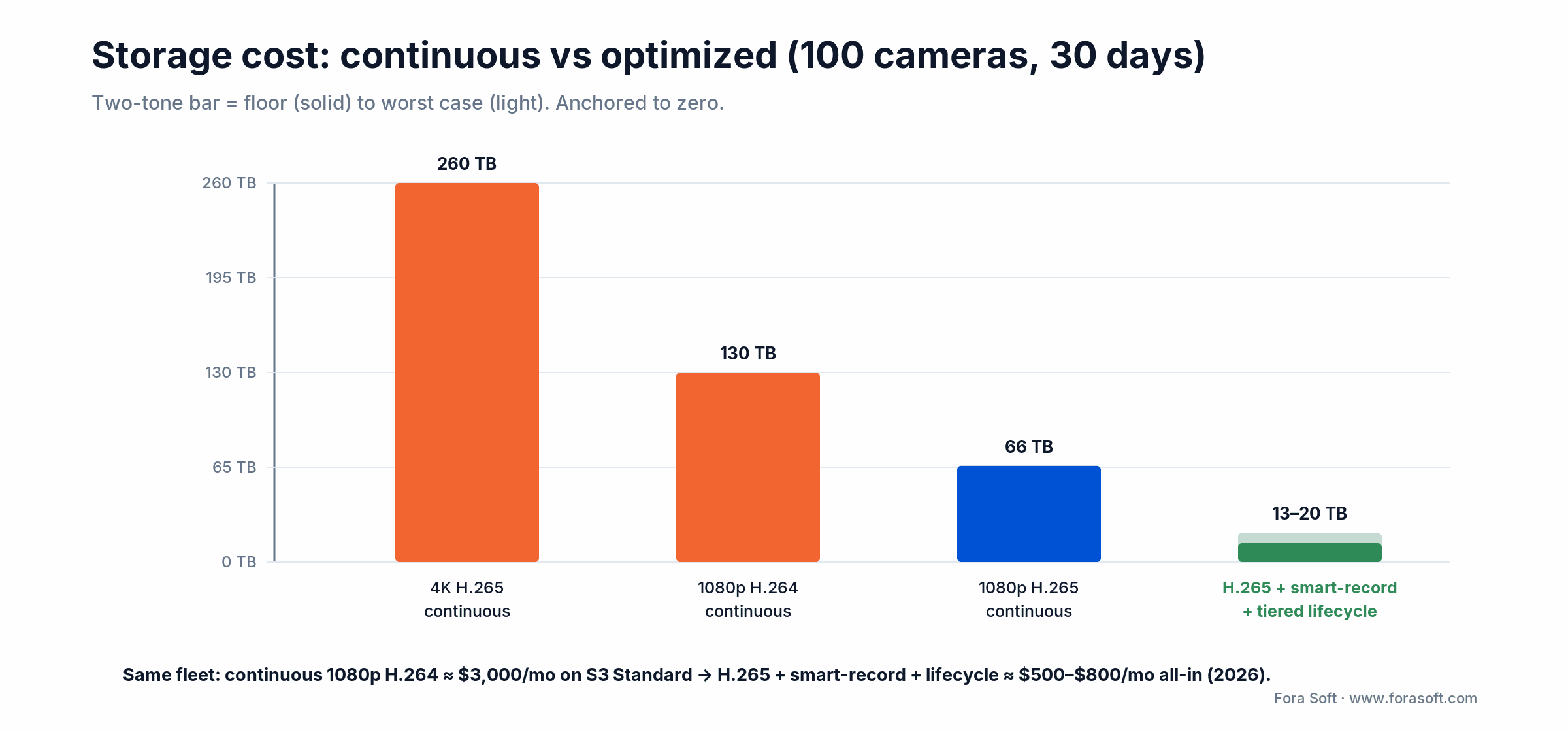
Figure 3. H.265 plus smart-record plus tiered lifecycle cuts a 100-camera bill by roughly 90%.
Comparison matrix: 8 cloud VMS platforms
If you are integrating with an existing cloud VMS rather than building one from scratch, this is the realistic shortlist for 2026. Strengths and weaknesses are the ones we encounter in real integrations.
| Platform | Architecture | AI strength | Differentiator | Best for |
|---|---|---|---|---|
| Verkada Command | Pure cloud | Edge AI on cameras | Hardware+software bundle, fast deploy | SMB to mid-market retail chains |
| Eagle Eye Networks | Cloud + bridge | Server-side | Reseller-friendly, white-label | MSPs, integrators |
| Avigilon Alta | Pure cloud | Native Avigilon AI | Appearance Search, easy UX | Mid-market, cloud-native |
| Rhombus Systems | Hybrid bridge | AI-native cloud | Hybrid storage, competitive pricing | Multi-site, cost-conscious |
| Genetec Stratocast | Hybrid bridge | Server, partner | Genetec ecosystem, mature security | Enterprise mixed-fleet |
| Milestone Kite | Cloud-managed bridge | Server, partner | Easy onboarding from XProtect | XProtect customers going hybrid |
| Network Optix Nx Cloud | Hybrid bridge | Plugin SDK | Open SDK, ONVIF-first | OEMs, custom integrators |
| Custom build (Fora Soft) | Any of A/B/C | Customer-owned models | Full control, white-label, multi-tenant | ISVs, resellers, regulated verticals |
If you are NDAA-restricted, the camera shortlist still applies regardless of cloud platform: Hanwha, Axis, Bosch, Pelco, Avigilon. Skip OEM rebadges that contain a HiSilicon SoC. We cover this in detail in the compliance section.
What the Android client must do well
A cloud VMS lives or dies by the experience on the operator’s phone. Six things have to work, and three of them are where most apps fall down.
Six concrete responsibilities
1. Live monitoring at WAN latency. WebRTC over the public internet, < 500 ms glass-to-glass at p95. Multi-tile grid (4/9/16) with sub-stream by default. Detail at fullscreen via mainstream pull-up.
2. Recorded playback with timeline scrubbing. Operators investigate yesterday more than they monitor today. Scrub at 4K, jump between motion events, export an evidence clip with a hash chain.
3. Push alerts that survive Android Doze. FCM high-priority for true alerts, normal-priority for everything else. Listen to onNewToken() and resync to the back-end. End-to-end latency < 5 s at p95.
4. Identity that integrates with the customer’s SSO. OIDC against Okta, Entra, Google Workspace; MFA via TOTP or push. Per-camera role matrix enforced server-side, not client-side.
5. Foreground service hygiene on Android 14/15. Declare the correct foregroundServiceType: mediaPlayback for live, camera for recording, specialUse for monitoring. Wrong type at runtime throws ForegroundServiceTypeException.
6. Offline tolerance. Cache thumbnails, last-known camera state, recent events. Reconnect with exponential backoff. Tell the operator when frames are stale — never silently show old video.
Reach for sub-stream-by-default rendering when: typical operators view 9 or more tiles at once on phone-class hardware. The cognitive cost of one extra tap to fullscreen is much smaller than the cost of a phone that gets hot in their pocket and drops frames.
Where the AI lives in a cloud VMS
In a cloud VMS, AI can run in three places. The choice changes both your bill and your privacy story.
On the camera (edge AI). Hanwha, Axis, Avigilon, and Verkada cameras run object detection and behavior models in silicon. The edge emits events — person, vehicle, line-cross, dwell — and the cloud receives metadata, not pixels. This is the fastest growing pattern because it cuts cloud egress and gives the buyer the privacy story (“video stays on premises until something interesting happens”).
In the cloud GPU. Heavier models — license-plate recognition with regional databases, face indexing, gait, multi-camera tracking — live as autoscaled inference services. They consume the same RTSP stream the Android app sees and write events to a search index. The cost shape is per-event, not per-camera, and that is your upsell lever.
On the Android device. Narrow scenarios only: privacy-sensitive bystander blur before the operator sees a clip, on-the-fly classification of a downloaded clip, guard-tablet workflows with offline tolerance. TensorFlow Lite with the NNAPI delegate gives 5–15 ms object-detection inference on a recent Snapdragon — fine for one or two streams, not a 16-tile grid. Our AI security-camera engineering playbook in Learn and our anomaly-detection guide both cover model choice in depth.
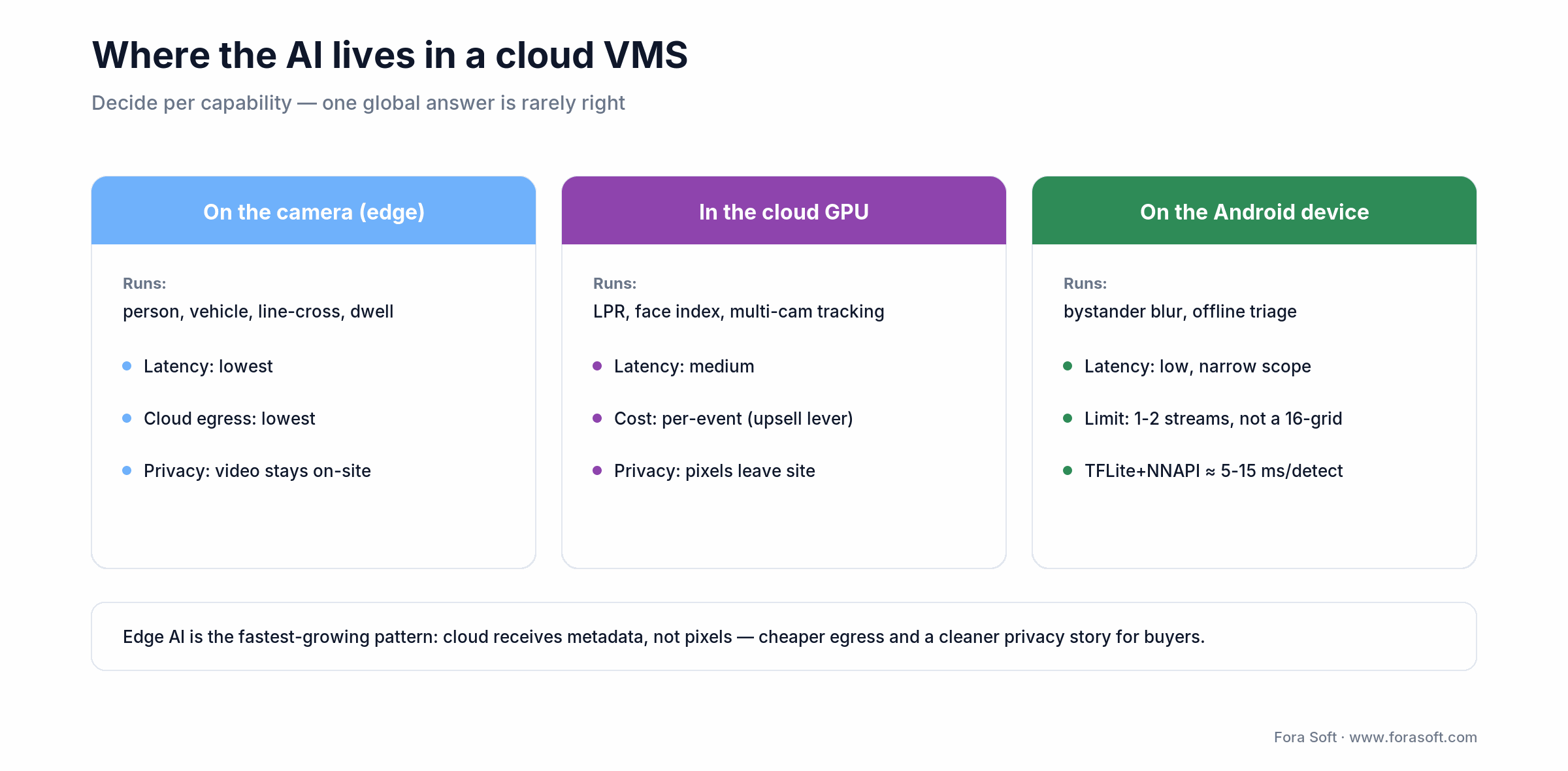
Figure 4. Decide where each AI capability runs — edge, cloud GPU, or device — per capability.
Security, identity, and access control in the cloud
Surveillance video is the most sensitive data your customer owns, and a cloud VMS concentrates more of it in one place than any on-prem system. Treat it that way from day one, not after the first audit.
Three layers that need explicit attention
1. Transport. TLS 1.3 to every back-end. Certificate pinning on FCM, the API server, and the media gateway. Per-build-variant pinning configs — debug without pinning so engineers can use Charles, release with pinning enforced and CI that fails the build if pinning is off.
2. Storage and tenancy. Per-tenant encryption keys backed by KMS (AWS KMS, GCP KMS, Azure Key Vault). Bucket policies that prevent cross-tenant reads even with leaked credentials. SQL row-level security on the metadata DB. Cached video and thumbnails on the Android device go in EncryptedFile; credentials in the Android Keystore.
3. Identity and authorization. SSO via OIDC where the customer has it, MFA mandatory for admin roles. Per-camera role matrix enforced in the cloud back-end. The Android app is a UI layer, not a security boundary. Every video request and every PTZ command is authorized server-side, even if the UI hides the button.
End-to-end encryption — meaning the cloud cannot decrypt the video — is rare in commercial cloud VMS today because it conflicts with cloud-side recording, search, and AI. If a customer demands it, scope it as architecture, not a checkbox. Real E2EE typically means the operator’s key sits in a hardware module on premises, the Android app fetches the key directly, and the cloud only sees ciphertext. Plan four to eight weeks for that sub-project.
Compliance: SOC 2, GDPR, HIPAA, BIPA, NDAA
A cloud VMS gets dragged through more compliance reviews than any on-prem product. Front-loading the work pays.
SOC 2 Type II is what enterprise procurement actually asks for. Plan a 6–12 month observation window, an auditor relationship, and roughly 100–200 controls in scope. Tooling (Vanta, Drata, Secureframe) cuts the documentation cost by an order of magnitude. Without SOC 2, you cannot sell to most US enterprise buyers.
GDPR (EU/UK) shapes the cloud architecture more than any other regulation. Video retention is data minimisation in legal terms — 30 to 90 days is typical, longer needs justification. Data subjects can request access (DSAR) and erasure. Build the operator UI for “export everything featuring person X” and “delete everything featuring person X” from day one. Cross-border transfer needs Standard Contractual Clauses if your back-end sits outside the EU.
HIPAA (US healthcare) kicks in when cameras observe patients, charts, or treatment areas. Plan for Business Associate Agreements with every cloud and SaaS vendor in your path. Allocate four weeks of audit cycle per release.
BIPA (Illinois) and other US biometric laws govern face recognition, fingerprint, and gait analytics. Written consent before biometric capture, no sale or sharing of biometric identifiers, an opt-out flow, and a hard kill-switch for face features per camera. Several US states have copied the BIPA template; treat it as the floor, not the ceiling.
NDAA Section 889 bans US federal agencies, contractors, and grant recipients from using Hikvision, Dahua, Hytera, Huawei, and ZTE equipment, including OEM rebadges that contain their SoCs. If your customer is anywhere near a federal contract, you cannot ship support for those cameras. Document every camera vendor, every SoC, and every cloud region in a compliance matrix and have the customer sign off.
Need a SOC 2 readiness review for your cloud VMS?
Bring the architecture diagram and the cloud account. We will tell you in 30 minutes which controls you already pass and which 3 will take the most engineering work.
Mini case: shipping retail-grade cloud surveillance with mobile access
Situation. A retail-security operator running over 10,000 sites added in 2025 alone needed mobile access for store managers and regional loss-prevention leads. The desktop client worked, but managers were carrying separate hardware and tablet apps; mobile dashboards on the legacy stack were too slow for active investigations. The KPI on the table was shrink reduction — the platform was already credited with up to 30% first-quarter shrink reduction at national grocery chains.
What we shipped. A cloud-VMS workflow on top of the existing video pipeline (FFmpeg, MediaMTX, MongoDB) with a SIP/WebRTC gateway pattern we had used on a parallel cloud video-management project. The mobile experience surfaced AI motion alerts within 30 seconds, matched POS transactions to video tiles, and let managers create evidence clips with a verifiable hash. We borrowed the SIP-to-WebRTC bridge we had built for an IP intercom doorbell project to keep latency under control.
Outcome. Quick-service-restaurant customers reported 40% fewer drive-off incidents. A regional banking association credited the broader platform with stopping >$5M in fraud attempts. Average installation time for a new site dropped roughly 60% versus the legacy stack. The biggest mobile-specific win was that managers stopped escalating “I can’t see the camera on my phone” tickets to support — the alert and the playback were one tap apart, not three apps and a VPN.
Cost model: realistic budgets in 2026
These are conservative ranges for a senior agency in 2026 using agent-assisted engineering. They assume Kotlin/Compose on Android, an autoscaling cloud back-end, and ONVIF+RTSP+WebRTC over a media gateway. Add roughly 20–30% for federal/NDAA work, multi-region cloud, or aggressive accessibility/localisation requirements.
| Tier | What it covers | Timeline | Conservative range |
|---|---|---|---|
| Android client over existing back-end | Live, playback, push, role-based UI, single tenant | 8–12 weeks | $25k–$40k |
| Cloud-companion to on-prem VMS | Cloud event mirror, clip mirror, Android app, admin web | 14–18 weeks | $55k–$90k |
| Hybrid bridge cloud VMS | Site bridge appliance, ingest, AI events, retention tiers, multi-tenant, Android + admin | 20–26 weeks | $90k–$160k |
| Pure-cloud, multi-tenant, white-label | Cloud-native ingest, GPU AI, SSO, audit, GDPR/HIPAA tooling, white-label | 26–36 weeks | $120k–$220k |
Where the budget actually goes is rarely “the camera grid”. It goes into compliance documentation, push reliability, ingest scale tests, multi-region failover, and the long tail of Android device fragmentation. Plan 25–35% of the budget for QA and pilot operations, not feature development. Cloud opex (AWS/GCP/Azure) is a separate line and the storage math from earlier in this guide is the right starting point.
Multi-tenant architecture without cross-tenant leaks
If you sell to more than one customer, multi-tenant is unavoidable. Done well, it is invisible. Done poorly, you are one bug away from leaking one customer’s video to another.
Pick the tenancy model first. Three options: shared schema with row-level security (cheap, simplest, hardest to lock down), schema-per-tenant (clean blast radius, more migrations), database-per-tenant (best isolation, most ops work). For most cloud VMS we recommend schema-per-tenant for metadata, single S3 bucket with strict IAM-prefix isolation per tenant for video, single Redis with key prefixes per tenant for hot state.
Encrypt per tenant. Per-tenant data keys backed by KMS. The cloud cannot decrypt one tenant’s video while serving another. Even an exfiltrated S3 dump is useless without per-tenant key access.
Test the leak. A regression suite that creates two tenants, writes a clip in tenant A, and asserts that tenant B receives 403 on every API endpoint — clip URL, search index, alert feed, evidence export. Run it on every PR. This is the single highest-ROI test on a multi-tenant cloud VMS.
Reach for schema-per-tenant isolation when: you sell to enterprise security teams, healthcare, or financial services. Shared-schema row-level security is cheaper to build but one mistake away from a cross-tenant leak that ends the contract.
A decision framework — pick your path in five questions
Five questions, on a sheet of paper, before any architecture call.
Q1. Cameras per site, sites per tenant, tenants? Below 30 cameras per site and a single tenant, pure cloud is fine. Above 100 cameras per site or any uplink under 50 Mbps, you need a hybrid bridge.
Q2. Retention target? 7 days vs 30 days vs 90 days vs “forever for evidence”. Retention drives storage tiers and compliance work more than any other variable.
Q3. Compliance regimes? SOC 2, GDPR, HIPAA, BIPA, NDAA. Each one adds weeks. Underestimating this is the #1 cause of scope creep on enterprise cloud-VMS projects.
Q4. Where does the AI live? Edge, cloud GPU, or device. Decide per capability — one global answer is rarely right. The cost shape and the privacy story both follow.
Q5. Who maintains it for the next three years? If “the agency we hire”, plan for 15–25% of build cost annually. If “our internal team”, scope explicit knowledge transfer and code-review milestones into the build.
Pitfalls to avoid
Five places we keep watching cloud-VMS projects burn weeks. None are exotic; all are easy to skip in a SOW.
1. Continuous-record everything, decide retention later. The classic cloud-VMS bill killer. Default to smart-record (motion plus event-driven), and let high-value cameras (cash registers, doors) override into continuous. Lifecycle rules from day one: 7 days hot, 23 days warm, the rest cold.
2. Egress costs you forgot about. Operators viewing 1080p tiles for an hour pull 1.8 GB. Multi-region replication doubles your storage bill. Cross-region database read replicas charge per byte. Audit the cloud bill weekly during the first three months and tag every line item with a feature owner.
3. Skipping FCM token rotation. Apps that do not implement onNewToken() end-to-end quietly stop receiving alerts on 5–10% of devices per month. The user sees nothing wrong, until the audit shows missed motion alerts on key cameras.
4. Disabling certificate pinning in debug builds and forgetting to re-enable. A Charles proxy is set up for QA, pinning is disabled to make tests pass, and the disable flag survives the release build. Pen testers love it. Solution: build-variant-specific configs, with CI that fails the release build if pinning is off.
5. Camera-fleet NDAA drift. A customer adds an OEM camera that contains a HiSilicon SoC. Compliance breaks silently. Solution: publish a hardware-allow-list, refuse to add cameras that fail the SoC check, and audit the fleet quarterly. Our roundup of leading video-surveillance vendors calls out which ones publish their NDAA status clearly.
KPIs that matter: Quality, Business, Reliability
Every Android cloud VMS needs an instrumented KPI dashboard from week one of the pilot, not after launch. Three buckets, with thresholds we use as the minimum bar to ship.
Quality KPIs. Time-to-first-frame < 2 s WAN. Frame-drop rate < 3% under normal load, < 1% for security-grade alerts. Push end-to-end latency < 5 s at p95. Cold-start < 3 s. Multi-region failover < 60 s.
Business KPIs. Daily active operator count, average tiles viewed per session, alerts-acted-on per shift, evidence-clip exports per week, time-to-first-action on a high-severity alert, monthly recurring revenue per camera, gross margin per active camera. The cloud VMS lives or dies on the per-camera economics.
Reliability KPIs. Crash-free sessions > 99.5% (Crashlytics). False-positive motion-alert rate < 10% (tunable per camera). Push delivery success rate > 98%. Successful reconnect after network change > 99%. Cloud uptime > 99.9% per region; multi-region target 99.95%.
When NOT to build a custom Android cloud VMS
Custom cloud-VMS development is expensive and the wrong answer for many buyers. We tell roughly one prospect in four that custom is not worth the spend. They usually thank us later. Walk away when:
You serve under 200 cameras and one VMS. Verkada, Eagle Eye, Avigilon Alta, or Rhombus will get you 95% of the value at 10% of the engineering cost. Your job is integrating, not building.
Your only differentiator is branding. White-label is cheaper than custom code. Most enterprise cloud VMS vendors offer it. If the only reason for the build is “our logo on a login screen”, pay the white-label fee.
You cannot fund maintenance and SOC 2. Cloud VMS is a perpetual investment. Plan $30k–$80k/year for maintenance, plus a SOC 2 budget. If you cannot commit to that, do not start.
Your timeline is under eight weeks. An MVP that ships in eight weeks is doable for an Android client over an existing back-end. A full cloud VMS in eight weeks is a vendor-app rebrand, not a real product.
FAQ
How long does it take to build a custom Android cloud VMS?
An Android client over an existing cloud back-end ships in 8–12 weeks. A cloud-companion that mirrors metadata from on-prem VMS is 14–18 weeks. A hybrid-bridge cloud VMS with multi-tenant and AI events is 20–26 weeks. A pure-cloud, multi-tenant, white-label SaaS is 26–36 weeks. Compliance audits add four weeks per regime in scope.
How much does cloud storage really cost for a 100-camera fleet?
Continuous 1080p H.264 at 30 days runs about 130 TB. On AWS S3 Standard that is roughly $3,000/month before egress. Switch to H.265 plus smart-record plus tiered lifecycle (Standard 7 days, IA 23 days), and the same fleet drops to 13–20 TB and roughly $500–$800/month all-in. Egress to mobile clients is a separate line.
Pure cloud, hybrid bridge, or cloud companion — how do I choose?
Pure cloud for SMB, modern retail, and any deployment where every camera has reliable internet and continuous cloud uplink is fine. Hybrid bridge for multi-site enterprise with > 50 cameras per site, retention > 30 days, or any uplink under 50 Mbps. Cloud companion when an existing on-prem VMS (Milestone, Genetec, Bosch) is locked in and the customer just wants mobile and remote access on top.
Do we need SOC 2 from day one?
If you sell to US enterprise, yes. SOC 2 Type II is the most-asked compliance certificate in security-software procurement. Plan a 6–12 month observation window. Use Vanta, Drata, or Secureframe to cut the documentation cost by an order of magnitude. Until you have it, expect 30–50% of enterprise deals to stall.
Will the Android app work with existing Milestone, Genetec, or Avigilon back-ends?
Yes, as a cloud companion (Pattern C). Milestone exposes XProtect Mobile SDK and the Kite cloud variant; Genetec offers Stratocast and the Security Center mobile components; Avigilon Alta is a closed cloud and integrates via documented REST. Budget two to three weeks per VMS for certification and field testing.
Where should we run the AI — on the camera, in the cloud, or on the phone?
Edge AI on the camera for the always-on detectors (person, vehicle, line-cross, dwell). Cloud GPU for heavier models (LPR, face indexing, multi-camera tracking, behavior chains). On-device only for narrow scenarios — bystander blur, on-the-fly classification of a downloaded clip, offline guard-tablet workflows. One global answer is rarely right; pick per capability.
How many cameras can a single Android tablet handle simultaneously?
Four to nine 720p/30fps live streams comfortably on a modern tablet. Sixteen tiles requires adaptive resolution — each tile at 480p or below. Recorded playback is much lighter; the same tablet can browse archives of 100+ cameras. Thermal throttling is the real ceiling, not network.
Can we deploy the Android app on guard tablets in kiosk mode?
Yes. Use Android Enterprise with a managed Google Play deployment, plus DevicePolicyManager for kiosk and lock-task mode. Disable home and recents, manage app pinning, enforce screen timeout, and ship a remote kill-switch for lost or stolen devices. Add two to three weeks for MDM hardening and pilot.
What to Read Next
Cloud VMS
Secure Cloud Video Management Architecture
The deep back-end companion: encryption, audit trails, multi-tenant patterns, and what the Android client talks to.
Android VMS
Android VMS App Development Playbook
The on-prem and hybrid sibling guide: ONVIF, RTSP/WebRTC, vendor SDKs, and conservative 2026 budgets.
IP Camera Mobile
Build Powerful Mobile Apps for IP Cameras
The technical companion: ONVIF discovery, RTSP negotiation, PTZ commands, and audio talk-back specifics.
Edge AI
Anomaly Detection Models for Video Surveillance
Picking the right model family for the events your cloud VMS surfaces — and what runs at the edge.
Retail Security
Advanced Video Surveillance for Retail
How POS+video integration, false-positive tuning, and BIPA shape what an Android cloud VMS must do for retailers.
Ready to scope your custom Android cloud VMS?
A custom Android cloud VMS earns its keep when you serve more than one customer or when AI, multi-tenancy, or compliance force you to control the data path. Below that bar, an off-the-shelf cloud VMS is a smarter trade. Either way, the path is the same on the inside: pick the architecture (pure cloud, hybrid bridge, or cloud companion) before any feature, tier the storage, mind the bandwidth, and instrument the KPIs from week one.
If you are scoping a build right now, the highest-value thing you can do this week is write down the answers to the five questions in the decision framework above. If they hold up under twenty minutes of internal pushback, you have a real project. If they do not, that is the meeting we want to be in — before the SOW gets signed, not after.
Bring your Android cloud VMS scope to a working session?
Thirty minutes. Two senior engineers with cloud-VMS scars, a real architecture sketch, and a conservative budget you can take to your CFO.

