


Key takeaways
• Android VMS app development is now a software problem, not a camera problem. The mobile video-surveillance slice is compounding near 14% a year through 2030 while the overall market grows about 6%. Software, mobile UX, and analytics drive the value, and Android is the cheapest hardware path to put a VMS in every guard’s hand.
• Three commercial paths exist. You can ship a vendor app (Milestone, Genetec, Verkada) and live with their UX, integrate a vendor SDK into a thin custom shell, or build a full custom Android VMS client over ONVIF+RTSP+WebRTC. Each path trades control against time-to-market and licensing risk.
• Conservative budgets in 2026. A focused MVP (live, playback, push) lands around $25k–$45k with an agent-engineering team. A mid-tier app with PTZ, talk-back, role-based admin and one or two VMS integrations is $55k–$90k. A multi-tenant enterprise build with edge AI and MDM kiosk mode is $110k–$180k. Pad the high end if you target NDAA-compliant federal customers.
• The hard problems are codecs, background work, and compliance. H.265 patent pools, Android 14/15 foreground-service rules, FCM token rotation, doze-mode silence, certificate pinning under MITM, and NDAA Section 889 are where projects burn weeks if you under-scope.
• Read this before you sign a statement of work. The playbook below is a senior-engineering view of how Fora Soft would scope, architect, and ship a custom Android VMS client today — with the trade-offs, KPIs, and pitfalls we have hit on real video projects.
Why Fora Soft wrote this playbook
Fora Soft is a software development company that has built video and surveillance products since 2005, with 250+ projects shipped and a 50-strong in-house engineering team. We have shipped live IP-camera apps, AI-driven retail surveillance, SIP-based smart doorbells, Android MDM for fleets of up to 10,000 devices, and IPTV set-top-box clients — the exact components a serious Android VMS app stitches together. We know where the latency budget evaporates, which Android API levels break what, and which compliance corners you cannot cut.
This guide is written for product owners, security directors, and CTOs who are scoping a custom Android VMS app right now — not for engineers picking a library. We will cover the commercial decisions first (build vs buy, where to spend, what to skip), then the architecture, then the pitfalls. Every number, every range, and every recommendation is grounded in projects we have shipped, including NetCamStudio (multi-camera capture with codec control), an Android MDM platform managing up to 10,000 devices, and a SIP-to-WebRTC doorbell that pipes IP intercom feeds to phones.
Our team uses agent-assisted engineering (in-house Claude- and Cursor-based pipelines) to compress the parts of the build that are commodity work — CRUD admin screens, ONVIF discovery boilerplate, FCM plumbing, basic settings UI — so we can spend the budget where it matters: video performance, security, and the integrations that the customer actually pays for — the same discipline we bring to every video surveillance software engagement. That is why our quotes below are noticeably tighter than typical 2024–2025 industry ranges.
Scoping a custom Android VMS app and want a sanity check?
Bring the camera list, the feature list, and the deadline. We will tell you in 30 minutes which path is fastest, where the budget will leak, and what to cut.
What an Android VMS app actually has to do
Every meaningful Android VMS client does six things, and most projects underestimate at least three of them. If your scope misses any of these, you have not scoped a VMS app — you have scoped an IP-camera viewer.
The six core jobs
1. Live monitoring at low latency. Single feed in < 2 seconds glass-to-glass on LAN, multi-tile grid (4/9/16) at < 1% frame drop on mid-tier hardware. Anything slower and operators reach for a desktop. This is the table-stakes feature.
2. Recorded playback with timeline scrubbing. Operators investigate yesterday’s incident more often than they monitor today’s. The timeline must scrub at 4K, jump between motion events, and export an evidence clip with a verifiable hash chain.
3. Real-time alerts that survive Android Doze. Motion, line-cross, person/vehicle, intrusion zone, tamper. Push delivery time end-to-end < 5 seconds, even when the phone is locked, idle, and on battery saver. This is where most apps quietly fail in production.
4. PTZ and two-way audio. Pan/tilt/zoom commands round-trip in < 500 ms or the joystick feels broken. Talk-back over Opus or AAC-LD with echo cancellation tuned for the camera microphone, not the phone microphone. Critical for active-deterrent retail and parking.
5. Role-based access and audit logs. Per-camera permission matrix, video-access logs, evidence-chain provenance. Without this you cannot pass any GDPR, HIPAA, or BIPA review, and enterprise customers will not buy.
6. Offline-tolerant operation. Cache thumbnails, last-known camera state, recent events. Reconnect with exponential backoff. Tell the user when they are looking at stale frames. Mobile networks die. Your app should not.
Optional features that drive enterprise revenue
Once the six core jobs ship, the features below are how you justify a price-per-camera bump. They are also where partners and integrators differentiate. Edge AI on device (LiteRT, on-device GPU) for person, vehicle, and anomaly classification keeps video out of the cloud and shaves egress costs. Cloud AI fallback for heavier models (LPR, gait, behavior) gives you a per-event upsell. POS or access-control integrations turn raw video into loss-prevention dashboards — retail customers care about this far more than they care about pixels. MDM kiosk mode turns guard tablets into single-purpose appliances that cannot be sideloaded. White-labeling lets resellers ship the same code as their own brand.
Reach for a custom Android VMS app when: you need workflows the vendor app refuses to support, you serve more than one VMS or camera brand, you are building a managed service for resellers, or compliance forces full control over the data path.
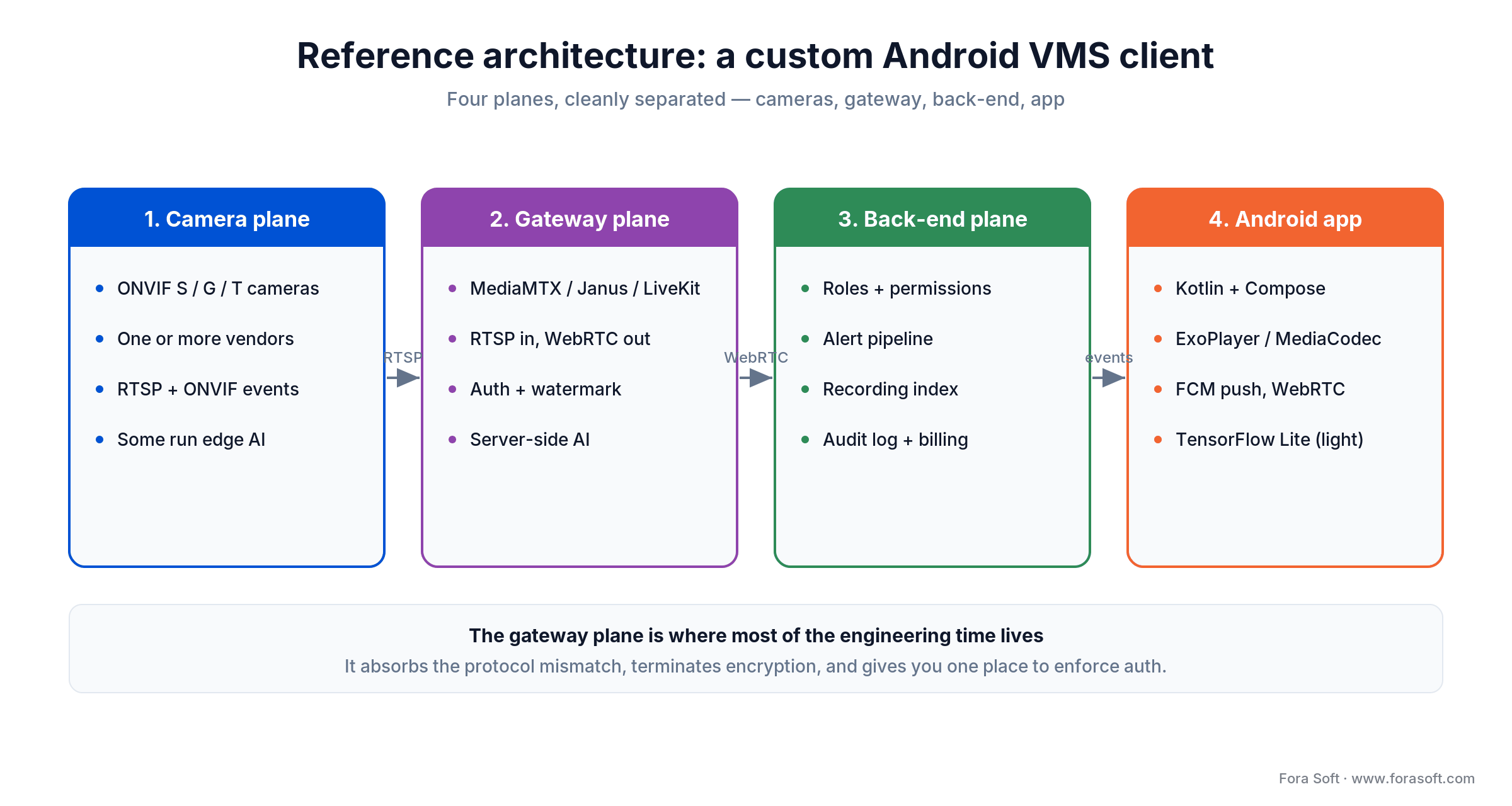
Figure 1. The four planes of a custom Android VMS client. Keeping them separated is the difference between a six-month build and an eighteen-month one.
The 2026 VMS market in numbers
If you are pitching this build internally, the macro picture is on your side. Three numbers do most of the work.
Software is outgrowing hardware. Memoori’s 2025–2030 outlook puts the total video-surveillance market (equipment plus software, at factory-gate prices) at $33.8B in 2024, reaching $47.9B by 2030 at about 6% CAGR. Software, not hardware, is the segment driving that growth. The mobile slice grows far faster: Grand View Research pegs mobile video surveillance at roughly $2.47B in 2024, compounding at 13.9% a year through 2030. Broader definitions run higher still — MarketsandMarkets sizes the whole market at $56.1B in 2025, heading to $88.1B by 2031.
The buyer base shifted to North America and APAC. North America held a 36% share of mobile video surveillance in 2024. APAC is the fastest-growing region, driven by smart-city programs in China, India, and South Korea. If you are building for European buyers, GDPR is the constraint that defines the architecture — we will come back to it.
Consolidation is real. Memoori counted 24 M&A transactions in the sector between September 2023 and August 2025, with about $3.8B invested across 38 deals. Recent examples include Triton Partners’ reported ~$735M carve-out of Bosch Building Technologies (now Keenfinity) and Axon’s $241M pickup of Fusus. Private equity is reshaping the space, and the consolidation is software-led, not hardware-led. Translation: the OEM you integrate with today may be owned by someone else next year. Plan your integration layer to be replaceable.
Build vs buy vs OEM SDK: three commercial paths
Before any architecture decision, decide which of three paths you are on. The wrong path costs six months.
Path A — Use the vendor mobile app. XProtect Mobile, Genetec Mobile, Verkada Command, Avigilon Cloud Services. Zero engineering. You inherit the vendor’s UX, the vendor’s release schedule, and a hard ceiling on customization. Fine for single-vendor deployments under 200 cameras. Painful the moment a customer asks for a feature the vendor does not prioritize.
Path B — Wrap the vendor SDK in a custom shell. Most major VMS vendors expose a mobile SDK (Milestone, Hanwha, Bosch, Network Optix Nx Witness, Eagle Eye). You ship your own login, branding, navigation, and the integrations you care about — the SDK does the heavy lifting on streaming and playback. Faster than full custom (8–14 weeks for a working app), but you are still locked to one ecosystem and one license fee structure.
Path C — Build a custom Android VMS client over ONVIF, RTSP, WebRTC, and your own backend. Maximum control. Multi-vendor camera support out of the box. You own the data path, the alert pipeline, the analytics layer, and the licensing. This is the path resellers, service providers, and security ISVs almost always end up on once they have repeat customers.
Reach for Path C (full custom) when: you sell to more than one customer, you serve mixed camera fleets, AI is part of the value proposition, or compliance forces you to control the data path. Otherwise start on Path A or B and graduate.
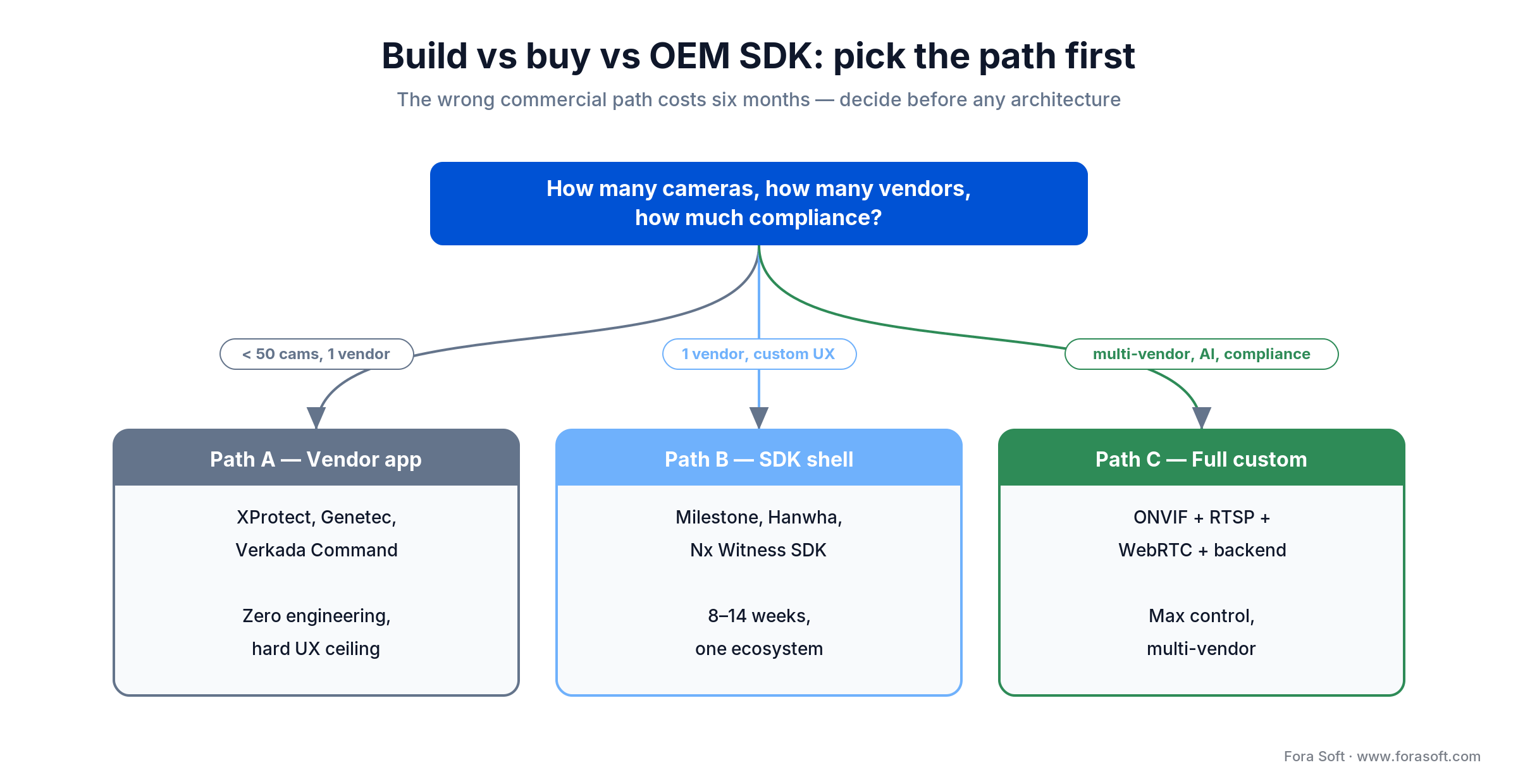
Figure 2. Decide the commercial path before the architecture. Camera count, vendor spread, and compliance push you toward Path A, B, or C.
ONVIF Profile S, G, T explained for product owners
ONVIF is the only thing that lets a custom Android VMS app talk to cameras from twenty different brands without writing twenty drivers. You do not need to know SOAP. You do need to know which profiles matter. Our deep dive on ONVIF profiles covers the camera side, and the video surveillance learning hub maps the rest of the stack.
Profile S is the live-streaming and PTZ baseline. RTSP video, audio, basic event signalling, and pan/tilt/zoom commands. Almost every IP camera built since 2012 supports it. If a camera does not, do not buy it for your fleet.
Profile G covers on-camera and on-NVR recording: search the storage, retrieve recorded video, browse the timeline. This is what your playback screen actually talks to. If your app needs to scrub yesterday’s footage from the camera SD card or the NVR, you need Profile G compliance on both ends.
Profile T is the modern profile: H.265 video, advanced motion detection, edge analytics events (line-cross, intrusion zone, person-vehicle classification), tamper events, audio bidirectional. Anything that markets itself as “AI camera” in 2026 should support Profile T. Without it, your AI features depend on per-vendor proprietary APIs.
Streaming protocols compared: RTSP, WebRTC, HLS, SRT
Pick the wrong protocol and you will eat the consequences for the life of the product. Match the protocol to the use case, not to the vendor demo you saw at the trade show.
| Protocol | Typical latency | Strength | Weakness | Best fit |
|---|---|---|---|---|
| RTSP/RTP | 200–500 ms (LAN) | Native to every IP camera, no transcoding | UDP packet loss on flaky WAN, NAT pain | On-prem, single-site, LAN viewing |
| WebRTC | 200–500 ms (WAN) | Sub-second over the public internet, NAT-traversal built in | Needs SFU/TURN infra, scales by viewer count | Cloud VMS, doorbell, talk-back, remote PTZ |
| HLS/LL-HLS | 2–6 s (HLS), 1–3 s (LL-HLS) | Scales to thousands of viewers via CDN | Latency too high for active monitoring | Public broadcasts, education feeds, archive playback |
| SRT | 300–800 ms | Resilient on lossy public internet, low-latency | Less browser-native, fewer mobile decoders | Mobile/cellular ingest, drone uplink, contribution |
| RTMP | 2–5 s | Universal ingest support | Deprecated for playback, Flash legacy | Ingest only, never for VMS playback |
For a typical Android VMS app the right answer is usually layered: RTSP from the camera to a media gateway, then WebRTC from the gateway to the phone. The gateway absorbs the protocol mismatch, terminates encryption, transcodes if needed, and gives you one place to enforce auth. We use this pattern with MediaMTX, Janus, and LiveKit depending on the scale.
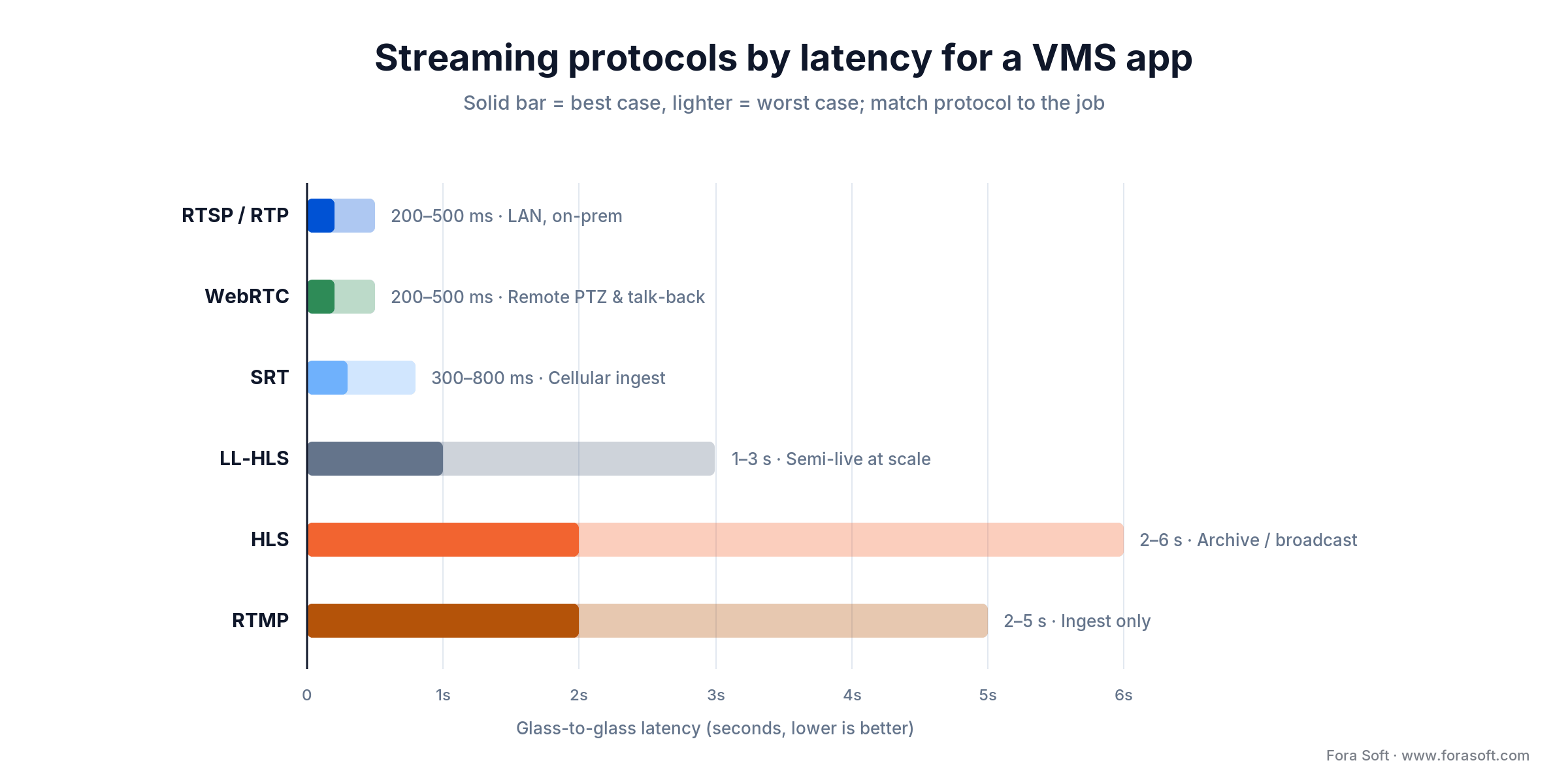
Figure 3. Match the protocol to the job. RTSP and WebRTC hold sub-second latency for live monitoring; HLS and RTMP are for archive and ingest, not active viewing.
Comparison matrix: 8 leading VMS platforms
If you are integrating with an existing VMS rather than building one, this is the shortlist. Our overview of video management systems covers the category in more depth. Strengths and weaknesses are the ones we hit in real integrations, not marketing claims.
| Platform | Deployment | AI/Edge | Differentiator | Best for |
|---|---|---|---|---|
| Milestone XProtect | On-prem & cloud | Server-side, partner-led | 1,000+ integration partners | Multi-site enterprise, retail chains |
| Genetec Security Center | Hybrid cloud | Native (Omnicast) | Unified VMS + access control | Government, critical infrastructure |
| Avigilon Alta | Cloud-first | Native (Avigilon AI) | Appearance Search, easy UX | Mid-market, cloud-native |
| Hanwha Wisenet | On-prem & cloud | Edge AI on cameras | NDAA-compliant, image quality | US federal, large campuses |
| Bosch BVMS | On-prem & cloud | Server + edge essentials | Reliability at mega-scale | Critical infrastructure, transit |
| Verkada Command | Cloud-only | Cloud + edge AI | Hardware+software bundle, fast deploy | SMB to mid-market retail |
| Eagle Eye Networks | Cloud-only | Server-side AI | Reseller-friendly, white-label | MSPs, integrators |
| Network Optix Nx Witness | On-prem & cloud | Plugin SDK | Open SDK, ONVIF-first | Custom integrators, OEMs |
If you are NDAA-restricted, your camera shortlist is essentially Hanwha, Axis, Bosch, Pelco, and Avigilon. Skip anything with a HiSilicon SoC, including OEM rebadges, until you have a written waiver. The compliance section below covers this in detail.
Multi-camera grid: how to keep 16 tiles smooth
The grid view is the demo every customer asks for and the surface where most apps fall apart. The math is unforgiving: nine 1080p H.264 streams at 30 fps are roughly 0.56 gigapixels per second of decode work (nine 4K streams would be ~2.2). Mid-tier Android phones thermal-throttle the GPU within three minutes if you do not actively manage it.
Four rules that actually work
1. Use MediaCodec hardware decoders, not software fallbacks. Detect device capability at runtime. If hardware is not available for a codec, drop the tile resolution before you drop the frame rate.
2. Adaptive resolution per tile. A 16-tile grid at 1080p is wasted pixels — the user cannot see detail in a 250×140 cell anyway. Pull the substream (480p or 360p) for tiles smaller than ≈480 px wide. Switch to mainstream when the user double-taps a tile to fullscreen.
3. Watch the thermal API. Android exposes PowerManager.getCurrentThermalStatus(). Above “moderate”, drop frame rate from 30 to 15 and warn the user that the device is throttling. Better to show a yellow indicator than to silently freeze tiles.
4. Pause off-screen tiles aggressively. When the user scrolls, pause decoders that have left the viewport. Resume on the same I-frame instead of restarting the connection. Saves CPU, GPU, battery, and bandwidth.
Reach for substream-by-default rendering when: your typical user views 9 or more tiles at once on phone-class hardware. The cognitive cost of one extra tap to fullscreen is much smaller than the cost of a phone that gets hot in their pocket.
Push alerts that actually arrive on Android 14 and 15
Most VMS apps quietly fail on push reliability. The user sees alerts in the app, the back-end sees alerts dispatched, and Firebase Cloud Messaging shows delivery — but the phone is on the kitchen counter, locked, asleep, and the alert never wakes the screen. Three Android-platform changes drive this.
Doze mode and App Standby Buckets. Idle phones drop into Doze. Network access, alarms, and job scheduling are suspended. FCM high-priority messages bypass Doze, but Google polices abuse: send too many high-priority pings that do not result in user-visible notifications and your app gets demoted. Send heartbeats during work hours only and reserve high-priority for true alerts.
Foreground service type rules (Android 14+). Background services that touch network, microphone, camera, location, or media playback must declare a foregroundServiceType. A missing or invalid type throws MissingForegroundServiceTypeException or InvalidForegroundServiceTypeException at runtime. For VMS apps the relevant types are mediaPlayback, camera, microphone, dataSync, and the newer specialUse for monitoring sessions.
FCM token rotation. Tokens rotate when the app is reinstalled, its data is cleared, or it is restored onto a new device. Apps that do not subscribe to onNewToken() and resync to the back-end immediately quietly lose 5–10% of devices per month. Most affected: tablet fleets that get reflashed or restored, and kiosk devices re-imaged in the field.
The fix on all three is unglamorous: declare service types correctly, treat onNewToken() as production code (not a one-line stub), and instrument end-to-end push latency from server timestamp to onMessageReceived(). We hold the bar at < 5 seconds at p95 across a fleet of devices.
Push alerts dropping in production?
Bring your push-pipeline diagram and a week of FCM logs. We will tell you in 30 minutes where the alerts are dying — usually in two specific places.
Edge AI on device vs cloud analytics
By 2026, “AI camera” is no longer a feature — it is a checkbox. The interesting question is where the AI runs. Two locations matter for an Android VMS app: on the camera (edge), or on a server that the app talks to (cloud or on-prem). The phone itself is rarely the right place to run heavy models on a continuous video stream — the battery cost is a deal-breaker.
On-camera edge AI is the fastest-growing segment because it gives the buyer the privacy story (“video never leaves the building”) and cuts cloud egress costs. Hanwha, Axis, Avigilon, and Verkada cameras run object detection and behavior models in silicon. Your Android app consumes the resulting events — person detected, line crossed, vehicle dwelling — and renders them on the timeline. You do not own the model.
Cloud or on-prem AI is what you need for capabilities the camera does not ship: license plate recognition with regional databases, face indexing, gait, behavior chains, multi-camera tracking. These models live on a server and ingest the same RTSP stream the app sees. From the Android app’s perspective, both edge and cloud AI look the same — events arrive on the timeline. The difference is who pays the per-event compute bill.
On-device AI on the phone earns its keep in narrow scenarios: privacy-sensitive blur of bystander faces before the operator sees them, on-the-fly classification of a downloaded clip the operator is reviewing, or guard-tablet workflows that need offline tolerance. LiteRT (the runtime formerly branded TensorFlow Lite), running on a GPU delegate now that NNAPI is deprecated in Android 15, gives you 5–15 ms object-detection inference on a recent Snapdragon, which is fine for one or two streams — not a 16-tile grid. Our anomaly-detection guide goes deeper into model choice.
Security, encryption, and access control
Surveillance video is the most sensitive data your customer owns. Your app should treat it that way from day one, not after the first audit.
Three layers that need explicit attention
1. Transport. TLS 1.3 to every back-end. Certificate pinning on the FCM server, the API server, the media gateway. Ship per-build-variant pinning configs — debug builds without pinning so engineers can use Charles, release builds with pinning enforced. Most apps fail this in their first pen test.
2. Storage. Credentials and refresh tokens go in the Android Keystore, not SharedPreferences. Cached video and thumbnails are encrypted with a Keystore-held key via Tink; the old Jetpack Security EncryptedFile API was deprecated in 2025, so do not reach for it in a new build. SQLite event metadata is encrypted with SQLCipher. Evidence exports get a hash chain so chain-of-custody is verifiable.
3. Identity and authorization. SSO via OIDC where the customer has it (Okta, Entra, Google Workspace), MFA via TOTP or push, and a per-camera role matrix that the back-end enforces — not the app. The app is a UI layer, not a security boundary. Every video request and every PTZ command is authorized server-side, even if the UI hides the button.
End-to-end encryption — meaning the cloud cannot decrypt the video — is rare in commercial VMS today because it conflicts with cloud-side recording, search, and AI. If the customer demands it, scope it as an architecture change, not a checkbox. Real E2EE in a VMS context typically means the operator’s key is held in a hardware module on premises, the app fetches the key directly, and the cloud only sees ciphertext. This is a 4–8 week sub-project on its own.
NDAA, GDPR, HIPAA, BIPA: the compliance map
Compliance is the most common reason a custom Android VMS app gets rejected during the procurement review — not because the engineering is bad, but because nobody documented the data path. Get in front of it.
NDAA Section 889 bans US federal agencies, contractors, and grant recipients from using Hikvision, Dahua, Hytera, Huawei, and ZTE equipment, including OEM rebadges that contain their SoCs. If your customer is anywhere near a federal contract, you cannot ship support for those cameras — even if the customer asks for it. Document every camera vendor, every SoC, every cloud region in a compliance matrix and have the customer sign off.
GDPR (EU/UK) is the constraint that shapes architecture. Video retention is “data minimisation” in legal language — 30 to 90 days is typical, longer needs justification. Data subjects can request access (DSAR) and erasure. Build the operator UI for “export everything featuring person X” and “delete everything featuring person X” from day one. Cross-border transfer needs Standard Contractual Clauses if the cloud back-end sits outside the EU.
HIPAA (US healthcare) kicks in when the camera looks at patients, charts, or treatment areas. PHI access is logged, encrypted at rest, and audit-trailed. Plan for a Business Associate Agreement with every cloud and SaaS vendor in the path. Allocate four weeks to the audit cycle per release. We run this playbook on VALT, a HIPAA-compliant video platform used by 770+ US organizations and 50,000+ users across medical, law-enforcement, and research sites.
BIPA (Illinois) and other US biometric laws govern face recognition, fingerprint, and gait analytics. Written consent is required before biometric capture. You cannot sell or share biometric identifiers. Plan for an opt-out flow in the app and a hard kill-switch for face features per camera. Several US states have copied the BIPA template; treat it as the floor, not the ceiling.
Reference architecture for an Android VMS client
A working architecture for a custom Android VMS app has four planes — cameras, gateway, back-end, and the app itself (Figure 1). Keeping them clearly separated is the difference between a six-month build and an eighteen-month build.
Camera plane. ONVIF Profile S/G/T cameras, one or more vendors, possibly behind an NVR. Some cameras run edge AI and emit events directly. Cameras speak RTSP and ONVIF events.
Gateway plane. A media gateway (MediaMTX, Janus, LiveKit, or a vendor SDK’s server) terminates RTSP from the cameras and republishes to clients over WebRTC or LL-HLS. It also enforces auth, applies watermarks, and can run server-side AI. This is where most of the engineering time on a serious VMS lives.
Back-end plane. User accounts, role and permission matrix, alert pipeline, recording index, audit log, billing, and admin web. We usually run Node.js or Kotlin services on Postgres, Redis for hot state, S3-compatible object storage for clips, and an event bus (RabbitMQ or NATS) for alerts.
Android app plane. Kotlin, Jetpack Compose for the UI, ExoPlayer or a custom MediaCodec pipeline for video, FCM for push, OkHttp+Retrofit for the back-end, WebRTC SDK for low-latency, and a small footprint of LiteRT (formerly TensorFlow Lite) if you do on-device classification. Architecture is MVVM + clean domain layer; CI/CD via GitHub Actions or Bitrise to Play Console.
Reach for a media-gateway architecture (vs direct camera-to-app) when: you support more than 50 cameras, multiple camera vendors, remote operators outside the LAN, server-side AI, or any compliance regime that requires a single point of authorization and audit.
Mini case: shipping retail-grade surveillance with mobile access
Situation. Live Eye, an AI cloud-surveillance operator that added 10,000+ retail, restaurant, and hotel locations in 2025 alone, needed mobile access for store managers and regional loss-prevention leads. The desktop client worked, but managers juggled separate hardware and tablet apps, and latency on legacy mobile dashboards was visibly killing investigations. The KPI on the table was shrink, and the platform was already credited with up to 30% first-quarter shrink reduction at national grocery chains.
What we shipped. A mobile-grade VMS workflow on top of the existing video pipeline (FFmpeg, MediaMTX, MongoDB) with a SIP/WebRTC media gateway pattern we had used on a parallel cloud video-management project. The mobile experience surfaced AI motion alerts in under 30 seconds, matched POS transactions to video tiles, and let managers create evidence clips with a verifiable hash. We borrowed the SIP-to-WebRTC bridge we had built for an IP intercom doorbell project to keep latency under control.
Outcome. Quick-service-restaurant customers reported 40% fewer drive-off incidents. A regional banking association credited the broader platform with stopping >$5M in fraud attempts. Average installation time for a new site dropped roughly 60% versus the legacy stack. The biggest mobile-specific win was that managers stopped escalating “I can’t see the camera on my phone” tickets to support — the alert and the playback were one tap apart, not three apps and a VPN.
Cost model: realistic budgets for MVP, Mid, and Enterprise
These are conservative ranges for a senior agency in 2026 using agent-assisted engineering. They assume a single team, modern Android stack (Kotlin, Compose, ExoPlayer), and ONVIF+RTSP+WebRTC over a media gateway. Add roughly 20–30% for federal/NDAA work, multi-region cloud, or aggressive accessibility/localisation requirements.
| Tier | What it covers | Typical timeline | Conservative range |
|---|---|---|---|
| MVP | RTSP/ONVIF live, 4–9 tile grid, basic playback, FCM push, login/logout, single VMS | 8–12 weeks | $25k–$45k |
| Mid-tier | All MVP + PTZ, talk-back, role/permission matrix, event timeline, two VMS integrations, offline cache | 14–18 weeks | $55k–$90k |
| Enterprise | All Mid + multi-tenant, white-label, edge AI events, MDM kiosk mode, SSO, audit log, GDPR/HIPAA tooling | 22–30 weeks | $110k–$180k |
Where the budget actually goes is rarely “the camera grid”. It goes into compliance documentation, push reliability, integration testing across camera fleets, and ironing out the long tail of edge cases on Android device fragmentation. Plan 25–35% of the budget for QA and pilot operations, not feature development.
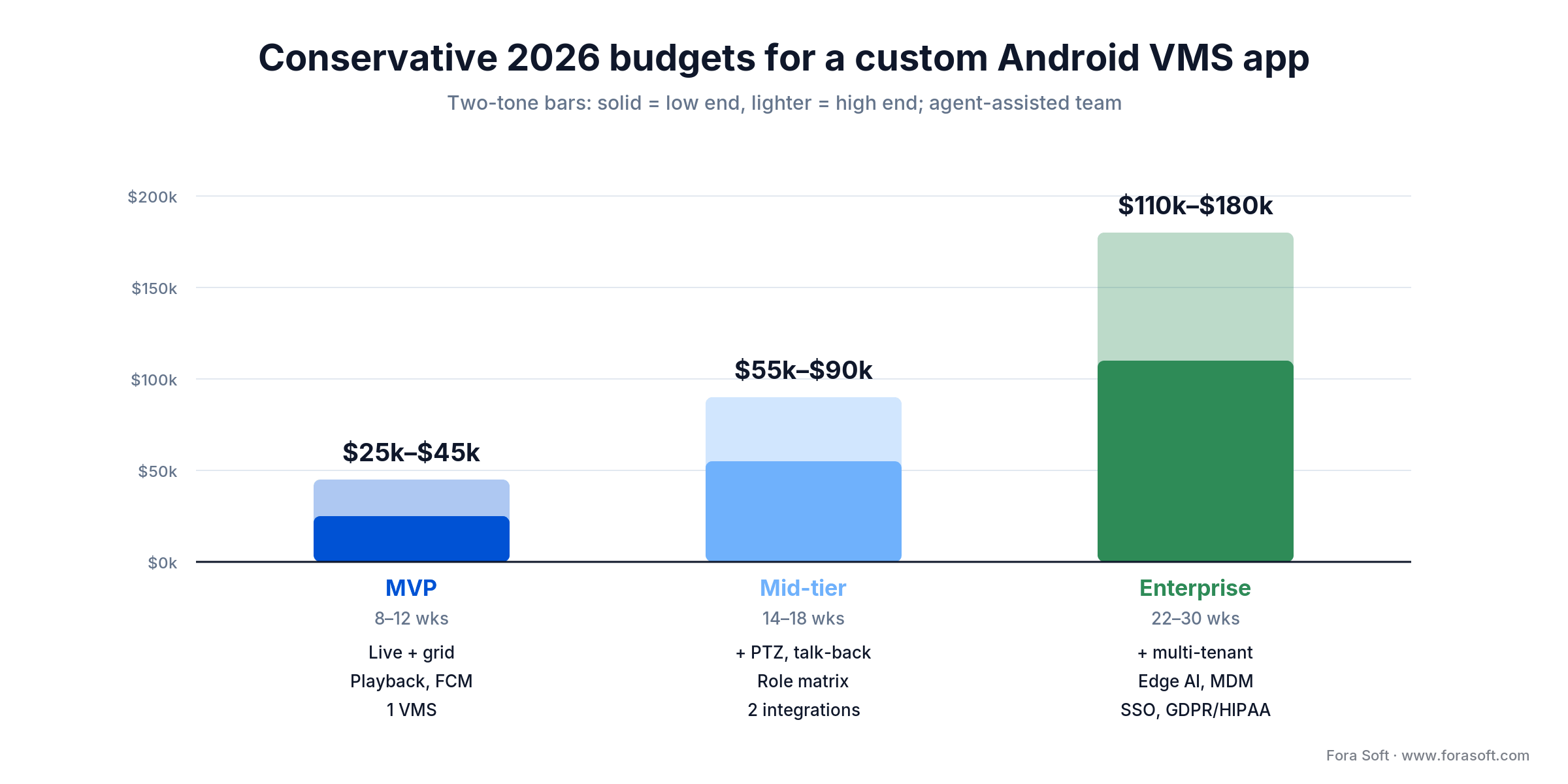
Figure 4. Conservative 2026 budget bands with an agent-assisted team. Solid = low end, lighter = high end; add 20–30% for NDAA or federal work.
A decision framework — pick your path in five questions
If you can answer these five questions on a sheet of paper, your scope is in good shape. If you cannot, that is the meeting to have before signing a statement of work.
Q1. How many cameras, how many sites, how many concurrent operators? Below 50 cameras and a single site, vendor app or vendor SDK is almost always cheaper. Above 200 cameras, multiple sites, or 10+ concurrent operators, custom architecture starts to pay off.
Q2. One VMS or many? One vendor — SDK shell. Many vendors or unknown future vendors — ONVIF-first custom client. Mixing vendors via SDKs becomes a maintenance trap by year two.
Q3. Where does the AI live? On the camera, in the cloud, or on the phone. The answer drives bandwidth, latency, privacy story, and licensing. Most projects need a clear choice for each capability rather than one global answer.
Q4. Which compliance regimes are in scope? NDAA, GDPR, HIPAA, BIPA, SOC 2, ISO 27001. Each one adds weeks. Underestimating this is the #1 cause of scope creep on enterprise VMS projects.
Q5. Who maintains it for the next three years? If the answer is “the agency we hire”, plan for 15–25% of the build cost annually. If the answer is “our internal team”, scope explicit knowledge transfer and code-review milestones into the build.
Pitfalls to avoid
These are the five places we keep watching projects burn weeks. None of them are exotic; all of them are easy to skip in a SOW.
1. RTSP-over-UDP without a TCP fallback. UDP is great on the LAN and miserable across the internet. If your media gateway does not negotiate TCP fallback, the first key frame waits for a packet that never arrives and the user sees a black tile. Roughly a third of mobile-VMS support tickets we audit trace back to this.
2. Underestimating H.264 and H.265 licensing. Via LA replaced H.264’s flat $100k annual streaming cap with a tiered structure for new licenses taken in 2026 or later, topping out at $4.5M a year for Tier-1 OTT services with 100M+ subscribers; anyone already licensed before 2026 keeps their old terms. A surveillance app rarely hits that OTT tier, but the direction of travel is clear, and H.265 is policed across several separate patent pools. If you ship a commercial app that decodes either, talk to a media-licensing lawyer before launch — do not assume the camera vendor’s license covers your client.
3. Skipping FCM token rotation. Apps that do not implement onNewToken() end-to-end quietly stop receiving alerts on 5–10% of devices per month. The user sees nothing wrong — until the audit shows missed motion alerts on key cameras.
4. Disabling certificate pinning in debug builds and forgetting to re-enable it. Classic. A Charles proxy is set up for QA, the pinning gets disabled to make tests pass, and the disable flag survives the release build. Pen testers and bug-bounty hunters love this. Solution: build-variant-specific pinning configs, with CI that fails the release build if pinning is off.
5. Camera-fleet NDAA drift. A customer adds an OEM camera that contains a HiSilicon SoC. Compliance breaks silently. Solution: publish a hardware-allow-list, refuse to add cameras that fail the SoC check, and audit the fleet quarterly. Our roundup of leading video-surveillance vendors calls out which ones publish their NDAA status clearly.
KPIs that matter: Quality, Business, Reliability
Every Android VMS app needs an instrumented KPI dashboard from week one of the pilot, not after launch. Three buckets, with thresholds we use as the minimum bar to ship.
Quality KPIs. Time-to-first-frame < 1 s LAN, < 2 s WAN. Frame-drop rate < 3% under normal load, < 1% for security-grade alerts. PTZ round-trip < 500 ms. Push end-to-end latency < 5 s at p95. Cold-start < 3 s on mid-tier device.
Business KPIs. Daily active operator count, average tiles viewed per session, alerts-acted-on per shift, evidence-clip exports per week, time-to-first-action on a high-severity alert. These are what your customer’s ops director actually shows to their CFO.
Reliability KPIs. Crash-free sessions > 99.5% (Crashlytics). False-positive motion-alert rate < 10% (tunable per camera). Push delivery success rate > 98%. Successful reconnect after network change > 99%. Battery drain < 10% per hour with one tile open on Wi-Fi.
Need a second opinion on a vendor proposal?
Send us the SOW, the architecture diagram, and the camera list. We will tell you what to keep, what to cut, and what is missing — without billing for the read.
When NOT to build a custom Android VMS app
Custom Android VMS development is expensive and the wrong answer for a meaningful share of buyers. We tell roughly one prospect in four that a custom app is not worth the spend — and they usually thank us later. Walk away from custom when:
You serve a single VMS vendor and under 50 cameras. The vendor mobile app, plus a thin layer of custom dashboards on top of their REST API, will get you 95% of the value at 10% of the cost.
Your only differentiator is branding. White-label is cheaper than custom code. Most enterprise vendors offer it. If the only reason for the build is “our logo on a login screen,” pay the white-label fee.
You cannot fund maintenance. Android moves fast. API levels deprecate. FCM rotates. New foreground-service rules ship every twelve months. If you cannot commit to roughly $25k–$50k a year for maintenance and platform-update work, do not start.
Your timeline is under eight weeks. An MVP that ships in eight weeks is doable, but anything below that is a vendor-app rebrand at best. We will tell you that on the first call.
FAQ
How long does it take to build a custom Android VMS app?
A focused MVP with live, playback, push, and one VMS integration ships in 8–12 weeks. Mid-tier with PTZ, talk-back, role matrix, and two VMS integrations is 14–18 weeks. Enterprise with multi-tenant, edge AI, MDM, and SSO is 22–30 weeks. Compliance audits add four weeks per regime in scope.
Will the app work with our existing Milestone, Genetec, or Avigilon setup?
Yes, but the integration path differs. Milestone exposes XProtect Mobile SDK; Genetec offers Security Center mobile components; Avigilon is closed cloud and integrates via documented REST. For Bosch, Hanwha, and Axis, ONVIF Profile S/G is usually the entry point. Budget two to three weeks per VMS for certification and field testing.
How many cameras can a single Android tablet handle simultaneously?
Four to nine 720p/30fps live streams comfortably on a modern tablet (Galaxy Tab S, Pixel Tablet). Sixteen tiles requires adaptive resolution — each tile at 480p or below. Recorded playback is much lighter; the same tablet can browse archives of 100+ cameras. Thermal throttling is the real ceiling, not network.
Do we need end-to-end encryption, and is it worth the latency hit?
If you handle PII, healthcare, or regulated retail, plan for it. Properly implemented hardware-accelerated AES-GCM adds < 50 ms of latency. The harder cost is operational — key management, recovery for lost devices, and the loss of cloud-side search if true E2EE is enforced. Scope it as a four-to-eight-week sub-project.
Which Android API level should we target in 2026?
Compile against and target API 35 (Android 15): since August 2025 Google Play has required new apps and app updates to target API 35, so a lower target simply cannot be published. Set your minimum SDK no lower than API 30 (Android 11); below that you lose the modern photo picker, updated MediaCodec capabilities, and predictable foreground-service behavior. Most foreground-service and broadcast-receiver headaches concentrate between API 31 and 35, so plan explicit testing on each level.
Can we run this as a kiosk or MDM-locked app on guard tablets?
Yes. Use Android Enterprise with a managed Google Play deployment, plus DevicePolicyManager for kiosk and lock-task mode. Disable home and recents, manage app pinning, enforce screen timeout, and ship a remote kill-switch for lost or stolen devices. Add two to three weeks for MDM hardening and pilot.
What ongoing compliance and audit work should we plan for?
GDPR: retention < 90 days unless justified, audit trail for video access, deletion endpoints. HIPAA: PHI access logging, role-based access, encrypted at rest, annual audit. BIPA: explicit biometric consent, no sale or sharing, opt-out flow. NDAA: documented hardware and cloud allow-lists, no Hikvision, no Dahua, no rebadged HiSilicon. Budget four weeks of QA and one week of compliance review per major release.
Should we support Android Auto, Wear OS, Android TV, and foldables?
Foldables are free if you build with Compose and adaptive layouts. Android TV pays off only if you ship to control rooms or living-room dashboards — Google reported the Android TV OS at 220 million monthly active devices and 47% YoY growth in mid-2024, so the audience is real but specific. Wear OS for VMS rarely earns its keep beyond simple alert summaries. Android Auto is a no for live video by policy. Scope these as separate phases.
What to Read Next
IP Camera Mobile
Build Powerful Mobile Apps for IP Cameras
The deep technical companion: ONVIF discovery, RTSP negotiation, PTZ commands, and audio talk-back specifics.
Cloud VMS
Secure Cloud Video Management Architecture
How to design the back-end that the Android client talks to: encryption, audit trails, multi-tenant patterns.
Edge AI
Anomaly Detection Models for Video Surveillance
Picking the right model family for the events your VMS app surfaces — and what runs at the edge.
Smart Intercom
Android Smart Intercom Systems
Two-way audio, SIP-to-WebRTC bridges, and the architecture pattern we reuse on doorbell projects.
Retail Security
Advanced Video Surveillance for Retail
How POS+video integration, false-positive tuning, and BIPA shape what an Android VMS client must do for retailers.
Ready to scope your custom Android VMS app?
A custom Android VMS app earns its keep when you serve more than one customer or more than one VMS, when AI is part of your pitch, or when compliance forces you to control the data path. Below that bar, the vendor app or a vendor-SDK shell is a smarter trade. Either way, the path is the same on the inside: ONVIF on the camera side, a media gateway in the middle, a careful Android client on top, and a relentless KPI dashboard from week one.
If you are scoping a build right now, the highest-value thing you can do this week is write down the answers to the five questions in the decision framework above. If they hold up under twenty minutes of internal pushback, you have a real project. If they do not, that is the meeting we want to be in — before the SOW gets signed, not after.
Bring your Android VMS scope to a working session?
Thirty minutes. We bring two senior engineers with custom Android VMS app development scars, a real architecture sketch, and a conservative budget you can take to your CFO.

