


Key takeaways
• Pick the protocol before the library. RTSP gets you 1–2 s latency with Media3 and buffer tuning; WebRTC gets you sub-500 ms via a go2rtc or MediaMTX bridge; LL-HLS is the fallback for devices that choke on the first two.
• ONVIF is a discovery tool, not a streaming layer. Use Profile S to find cameras and pull the RTSP URI, then hand off to Media3 or libwebrtc. Skip WS-Discovery without a WifiManager lock — that’s the #1 silent failure we see.
• H.264 is the safe default, H.265 is the trap. About 35% of Android devices still lack hardware HEVC decode; negotiate an H.264 substream on cameras that expose both, or plan for software decode and its battery cost.
• Compliance is scope, not polish. GDPR retention, CCPA 2026 audits, and BIPA’s $1 000–$5 000 per-violation penalties for facial recognition force design decisions — fold them into the spec or pay later.
• A realistic MVP lands in 8–12 weeks. Fora Soft’s agent-engineering playbook shipped a 1M+ line video platform 40% faster than the prior baseline; the same stack handles Android IP camera MVPs in the $30–70 k range when scoped well.
Why Fora Soft wrote this Android IP camera playbook
Fora Soft has shipped video and surveillance software since 2005 — 250+ projects across 21 years. Our V.A.L.T. video surveillance platform runs in police departments, courtrooms, and medical clinics with up to 9 synchronized HD camera feeds per screen, full PTZ, and two-way audio — and every one of those deployments started with the same question: how do we pull clean video from an IP camera into a mobile app without wrecking latency or security.
This guide is the playbook we hand to technical leaders before they sign a contract for an IP camera app for Android — the kind of work we do as part of our video surveillance development services. It covers the protocol decision, the library choices, the ONVIF subtleties, the codec traps, and the compliance line items that almost always get missed at scoping time. Everything in it has been battle-tested on real client deployments, not just read off a GitHub README.
If you’re a product manager scoping an Android viewer, a CTO auditing an existing app, or an engineering lead who wants a second opinion, this is built for you. For a broader picture of how we build, see our custom VMS development guide, the AI video surveillance architecture playbook, and the case study on a 1M+ line platform we rebuilt 40% faster with agent engineering.
Planning an Android IP camera integration?
We’ll walk your target cameras, network topology, and latency budget in a 30-minute scoping call — and come back with a concrete protocol + library pick and a delivery timeline.
The decision in 60 seconds
If you need an IP camera app for Android that can view, record, and control cameras in 2026, the default stack is: ExoPlayer (Media3 1.10.1) with the RTSP source module for the on-LAN path, libwebrtc for remote access, and go2rtc or MediaMTX as the bridge. Use ONVIF for discovery and PTZ, never as a streaming transport. Reach for LL-HLS only when you have to support old devices or weak networks.
Everything else in this article is how we arrive at that recommendation and where to deviate. If your constraints push you somewhere else (thermal cameras, heavy PTZ fleets, strict data-residency), the comparison tables and decision framework below will land you on the right variant.
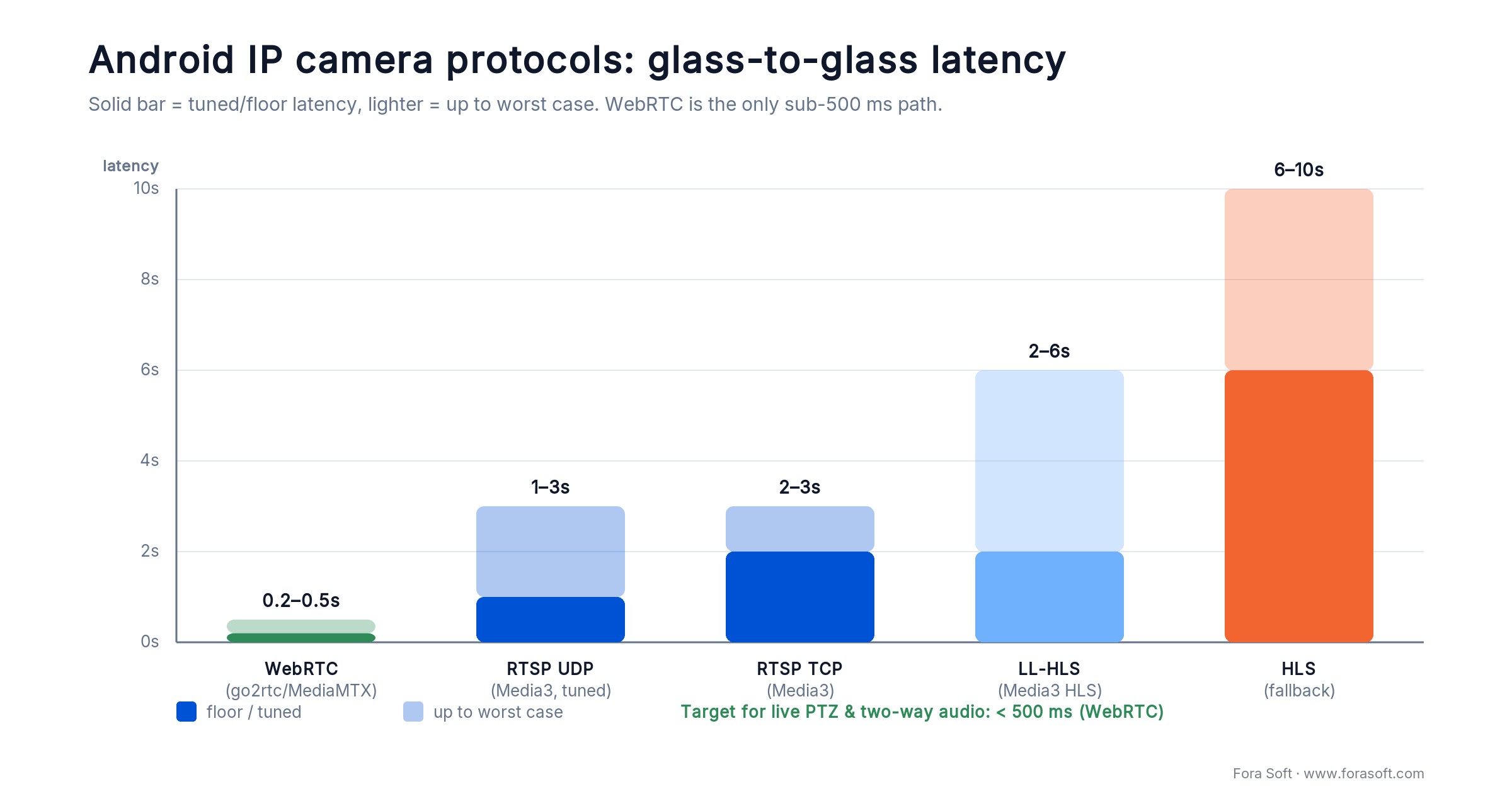
Figure 1. Glass-to-glass latency by protocol. WebRTC through a go2rtc or MediaMTX bridge is the only reliable sub-500 ms path; Media3 RTSP lands at 1–2 s when tuned.
What changed for Android IP camera apps in 2025–2026
1. Media3 took over from ExoPlayer. Google’s Media3 1.10.1 (the latest stable release, 2026) is now the supported home for RTSP, HLS, DASH, and SmoothStreaming. It handles H.264 + AAC natively and, with buffer tuning, gets to 1–2 s RTSP latency without custom code.
2. Foreground service rules tightened. Android 14 introduced mandatory foregroundServiceType declarations; Android 15 enforces them hard. Background video services must declare mediaPlayback or risk Play Store rejection.
3. RTSP-to-WebRTC bridges matured. go2rtc and MediaMTX both run on a Raspberry Pi, handle dozens of camera streams, and deliver sub-500 ms WebRTC. Two years ago this took a Kurento cluster.
4. CCPA privacy rules tightened on January 1, 2026. The CPPA’s new regulations require covered businesses to run risk assessments and, on a staggered schedule, submit independent cybersecurity-audit certifications (largest firms by April 1, 2028; smaller ones through 2030). Surveillance-adjacent apps routinely cross the thresholds, so budget the assessment work now.
5. AV1 on mobile is still early. Cloud encoders like AWS Elemental MediaConvert added AV1 support, but Android device-side AV1 decode is uneven. H.264 is still the “ships everywhere” choice; H.265/HEVC still fails on roughly a third of installed devices.
Protocol comparison: RTSP, ONVIF, WebRTC, HLS, LL-HLS
Pick the protocol that matches your latency budget, network shape, and device mix — not the one the camera vendor’s demo happens to use.
| Protocol | Typical latency | Android support | Use when | Watch out for |
|---|---|---|---|---|
| RTSP (UDP) | 2–3 s default, 1–2 s tuned | Media3 RTSP source | Same LAN, clean network | Firewall & NAT traversal |
| RTSP (TCP interleaved) | 2–3 s | Media3 (setForceUseRtpTcp) |
Corporate or hotel Wi-Fi | Slightly more overhead |
| ONVIF (S / T / G / M) | N/A — discovery + control | WS-Discovery + SOAP; RootSoft/ONVIF-Java | Finding cameras, PTZ, events | WifiManager lock; vendor quirks |
| WebRTC | < 500 ms | libwebrtc Android SDK | Remote, real-time control | STUN/TURN/bridge ops cost |
| HLS | 6–10 s | Media3, MediaPlayer | VOD, very weak networks | Latency ceiling |
| LL-HLS | 2–6 s | Media3 HLS module | Wide device mix, fallback path | Server complexity, tuning |
Reach for RTSP when: your app lives on the same LAN as the camera, you don’t need sub-second latency, and you want to ship fast with Media3.
Reach for WebRTC when: users are remote over the internet, you need <500 ms for PTZ or interrogation-style monitoring, and you can run a go2rtc or MediaMTX bridge.
Reach for LL-HLS when: your device mix is old, you can accept 2–6 s latency, and you need the CDN economics of segmented delivery.
Android RTSP libraries: Media3, LibVLC, IJKPlayer, GStreamer
If you’re landing on RTSP, the library choice is your next fork in the road. This is how we rank the options in 2026.
| Library | License | Tuned latency | Strength | When to skip |
|---|---|---|---|---|
| Media3 / ExoPlayer RTSP | Apache 2.0 | 1–2 s | Official; smallest APK delta; great DRM story | H.264+AAC only out of box |
| LibVLC Android | LGPL | 2–3 s | Codec-rich; odd formats “just work” | ~10–20 MB APK bloat |
| IJKPlayer (Bilibili) | LGPL + custom | 1–2 s | FFmpeg under the hood; low-level knobs | Maintenance has slowed |
| rtsp-android (pedroSG94) | Apache 2.0 | 1–2 s | Pairs well with push/restreaming | Not a full player UX |
| GStreamer Android | LGPL | 1–3 s | Pipeline power; custom transcode | Build complexity; steep team ramp-up |
For 80% of the IP camera apps for Android we ship, Media3 is the answer (see the official Media3 RTSP guide). It’s free, official, well-tested on recent Android versions, and lets you tune buffers aggressively. Here’s the minimal Kotlin snippet that drops RTSP latency to roughly 1 s on a modern device.
val loadControl = DefaultLoadControl.Builder()
    .setBufferDurationsMs(
        /* min = */ 100,
        /* max = */ 500,
        /* playbackBufferMs = */ 100,
        /* playbackAfterRebufferMs = */ 200
    )
    .build()

val mediaSource = RtspMediaSource.Factory()
    .setForceUseRtpTcp(true)                // firewall-friendly
    .setDebugLoggingEnabled(BuildConfig.DEBUG)
    .createMediaSource(MediaItem.fromUri(rtspUrl))

val player = ExoPlayer.Builder(context)
    .setLoadControl(loadControl)
    .build()

player.setMediaSource(mediaSource)
player.prepare()
player.playWhenReady = true
Reach for LibVLC when: your cameras throw exotic codecs or non-standard RTSP dialects that Media3 rejects, and a 10–20 MB APK size bump is an acceptable price for “it just plays.”
ONVIF on Android: discovery, PTZ, and the WifiManager trap
ONVIF is the open standard that gives you a uniform way to discover cameras, pull their RTSP URIs, and drive PTZ and events. Four ONVIF profiles matter in practice: S for mainstream surveillance, T for thermal, G for high-end PTZ (think speed domes), and M for metadata and analytics. Most consumer and SMB cameras conform to Profile S.
| Profile | Focus | PTZ | Typical cameras |
|---|---|---|---|
| S (Streaming) | Mainstream IP video surveillance | Basic | Hikvision, Dahua, Axis, Amcrest |
| T (Advanced streaming) | H.265, imaging, audio | Basic | Modern Hikvision / Dahua H.265 SKUs, some thermal |
| G (Recording) | On-device recording, export | Full | Hikvision PTZ, Axis Q-series |
| M (Metadata / analytics) | Events, object metadata | Full | Premium Hikvision / Dahua analytics cameras |
The #1 Android-specific ONVIF trap. WS-Discovery uses multicast UDP on port 3702. On Android you must hold a WifiManager.MulticastLock during discovery or the OS silently drops multicast packets. Symptom: discovery works on a laptop, returns zero cameras on the phone. Every single time.
val wifi = getSystemService(Context.WIFI_SERVICE) as WifiManager
val multicastLock = wifi.createMulticastLock("onvif-discovery").apply {
    setReferenceCounted(true)
    acquire()
}
try {
    val devices = OnvifManager().discoverAsync(timeoutMs = 4000)
    // map devices -> GetStreamUri -> Media3 RtspMediaSource
} finally {
    multicastLock.release()
}
For the actual SOAP plumbing, RootSoft/ONVIF-Java is the mature Android-friendly option. If you need PTZ beyond basic pan/tilt, validate against the specific camera model you’re targeting — vendor ONVIF conformance is uneven, especially outside Profile S.
WebRTC: the sub-500 ms path using go2rtc or MediaMTX
RTSP simply cannot hit <1 s reliably over a noisy consumer internet link. When a security operator needs to PTZ a camera, catch a fast-moving event, or start a two-way audio conversation, you need WebRTC.
The modern answer is don’t build your own SFU. Run go2rtc or MediaMTX on a small VM (a Hetzner AX-series box or a DigitalOcean droplet is plenty for dozens of cameras), point it at your RTSP sources, and expose WebRTC. Both projects are open source, actively maintained, and known to hit <500 ms on consumer networks.
go2rtc is the lightweight option. Single binary, YAML config, embedded web UI for quick testing, runs comfortably on a Raspberry Pi 4. MediaMTX (formerly rtsp-simple-server) is a bit heavier and supports SRT, RTMP, HLS, and LL-HLS in addition to WebRTC — pick it when you need multi-protocol output.
On Android, consume the WebRTC output using the standard libwebrtc Android SDK; if your team is still leveling up on transport basics, our video streaming fundamentals course covers the RTP/RTSP/WebRTC stack end to end. For a deeper look at the trade-offs between custom WebRTC and off-the-shelf SDKs, see our WebRTC architecture cost breakdown.
Codec reality: H.264 everywhere, H.265 with caveats, AV1 not yet
Cameras default to H.265 to save bandwidth; Android’s installed base still has a long tail without hardware HEVC decode. When roughly a third of your users hit software decode, you see CPU spikes, battery drain, and thermal throttling inside 10 minutes.
The rule we use: prefer an H.264 substream on the camera (most Hikvision/Dahua/Axis IPCs expose one), query MediaCodecList before picking a stream, and fall back to LL-HLS transcoded on the bridge if the device is HEVC-less and H.265 is all the camera offers. AV1 is not yet a safe primary codec on Android for IP-camera workloads — keep it on the “watch in 2027” list.
fun supportsHardwareHevc(): Boolean {
    val list = MediaCodecList(MediaCodecList.REGULAR_CODECS)
    return list.codecInfos.any { info ->
        !info.isEncoder && info.isHardwareAccelerated &&
        info.supportedTypes.any { it.equals("video/hevc", ignoreCase = true) }
    }
}
Bandwidth and power budgets per resolution
Concrete numbers to plan around. Every “why is this laggy” ticket we’ve ever triaged came down to one of these lines not being respected.
| Resolution / fps | H.264 bitrate | H.265 bitrate | Typical use |
|---|---|---|---|
| 480p / 15 fps | 0.6–1 Mbps | 0.3–0.6 Mbps | Thumbnail tiles, 9-up walls |
| 720p / 30 fps | 3–4.5 Mbps | 1.5–2.5 Mbps | Standard live view |
| 1080p / 30 fps | 5–6 Mbps | 3–4 Mbps | Evidence review, PTZ |
| 1080p / 60 fps | ~8 Mbps | 4–5 Mbps | High-motion sports, industrial |
| 4K / 30 fps | 20–25 Mbps | 10–15 Mbps | Forensic recording on flagship IPC |
On the device side, assume 1080p H.264 playback burns 4–6% battery per hour on a mid-range Android with the screen on. Long-running live view needs a foreground service, a wakelock policy, and a UI that dims or downsamples when the user backgrounds the app.
Background streaming: foreground service rules on Android 14 / 15 / 16
Since Android 14, any service that keeps a camera stream alive in the background must declare a foregroundServiceType. Android 15 and 16 enforce this hard; Play Store review will reject non-compliant builds.
For a video viewer, the correct type is mediaPlayback (Google lists every valid type in the foreground service types docs). Declare it in the manifest, pair it with a MediaSessionService, and show a persistent notification while streaming. If the app records video, you may also need camera and runtime permissions on Android 14+.
<uses-permission android:name="android.permission.FOREGROUND_SERVICE" />
<uses-permission android:name="android.permission.FOREGROUND_SERVICE_MEDIA_PLAYBACK" />

<service
    android:name=".stream.CameraPlaybackService"
    android:foregroundServiceType="mediaPlayback"
    android:exported="false" />
Running into latency, codec, or ONVIF dead-ends?
We’ve shipped IP camera apps for police interrogation, medical monitoring, and industrial sites. Bring the failure; we’ll map a fix.
Security: auth, TLS, and the plaintext RTSP trap
RTSP digest auth does not encrypt the payload. Plain rtsp:// URLs — exactly the ones most NVR admin UIs hand out — send credentials and video in the clear. On any network you don’t own, that’s a fatal pattern.
1. Wrap RTSP in TLS or a VPN. Use rtsps:// where the camera supports it; otherwise terminate a WireGuard or Tailscale tunnel to the bridge and let RTSP ride inside it.
2. Store credentials properly. Android Keystore for API keys and camera passwords. Never bundle them in APK resources; never log them; rotate on user logout.
3. Network Security Configuration. Declare cleartextTrafficPermitted="false" by default, then carve out the specific LAN host for on-prem RTSP if you absolutely must.
4. Certificate pinning, cautiously. Pin the bridge’s certificate if you control the infrastructure. Don’t pin consumer-grade cameras — firmware updates rotate their self-signed certs and you’ll end up with a brick.
5. Audit logging. GDPR and CCPA both require you to know who watched what and when. Log stream open / close / download events to the server, never just to the device.
Compliance: GDPR, CCPA 2026, and BIPA for facial recognition
GDPR. Treat recorded video as personal data. Auto-delete retention after 30–90 days unless you have a documented lawful basis to hold it longer. Post signage where cameras operate in public or semi-public spaces; maintain data processing agreements with every third party (cloud storage, analytics) that touches the footage.
CCPA (regulations effective January 1, 2026). California’s updated rules require covered businesses to conduct privacy risk assessments and annual independent cybersecurity audits; audit certifications are filed with the CPPA on a staggered timeline (businesses over $100M by April 1, 2028, mid-size by 2029, under $50M by 2030), and automated-decision (ADMT) rules apply from January 1, 2027. Video surveillance and analytics apps routinely cross the thresholds — budget the assessment and audit work as scope, per the CPPA regulations.
BIPA (Illinois) and equivalents. If your app does any facial recognition or biometric clustering, Illinois BIPA sets liquidated damages of $1,000 per negligent violation and $5,000 per reckless or intentional one. The August 2024 amendment (SB 2979) caps repeated collection of the same identifier at a single recovery — which the Seventh Circuit held retroactive in April 2026 — but explicit opt-in consent and auditable deletion flows are still not optional. Texas and Washington have related statutes; our 2026 AI surveillance ethics piece covers the broader compliance map.
HIPAA and HITECH. If your app ever shows a patient on camera, treat it as PHI end-to-end. Encrypted transit, encrypted at rest, access logs, business associate agreements. Our V.A.L.T. deployment in medical clinics is built on exactly this pattern.
Reference architecture for an Android IP camera app
Here is the stack we recommend as the default in 2026. Every layer below is either the market leader or a well-maintained open-source alternative, and every arrow has been run in production on a Fora Soft build.
| Layer | Default pick | Job | Alternative |
|---|---|---|---|
| Cameras | Hikvision / Dahua / Axis (Profile S) | RTSP + ONVIF source | Reolink, Amcrest, Ubiquiti |
| Bridge | go2rtc or MediaMTX on Hetzner AX | RTSP → WebRTC / LL-HLS | Janus Streaming plugin |
| Auth / API | Keycloak or Auth0 + REST in Go/Kotlin | User, camera, and recording access | Firebase Auth for MVPs |
| Android client | Kotlin + Jetpack Compose + Media3 | Live view, PTZ, clips | Compose Multiplatform for iOS parity |
| Real-time channel | libwebrtc Android | Sub-second remote viewing | ExoPlayer RTSP on LAN |
| Storage | S3 / Wasabi (cold) + PostgreSQL (events) | Recordings, metadata, audit log | MinIO on-prem for data residency |
| Analytics (optional) | YOLOv8 / DeepStream on the bridge | Motion, object, anomaly events | AWS Rekognition Video / custom |
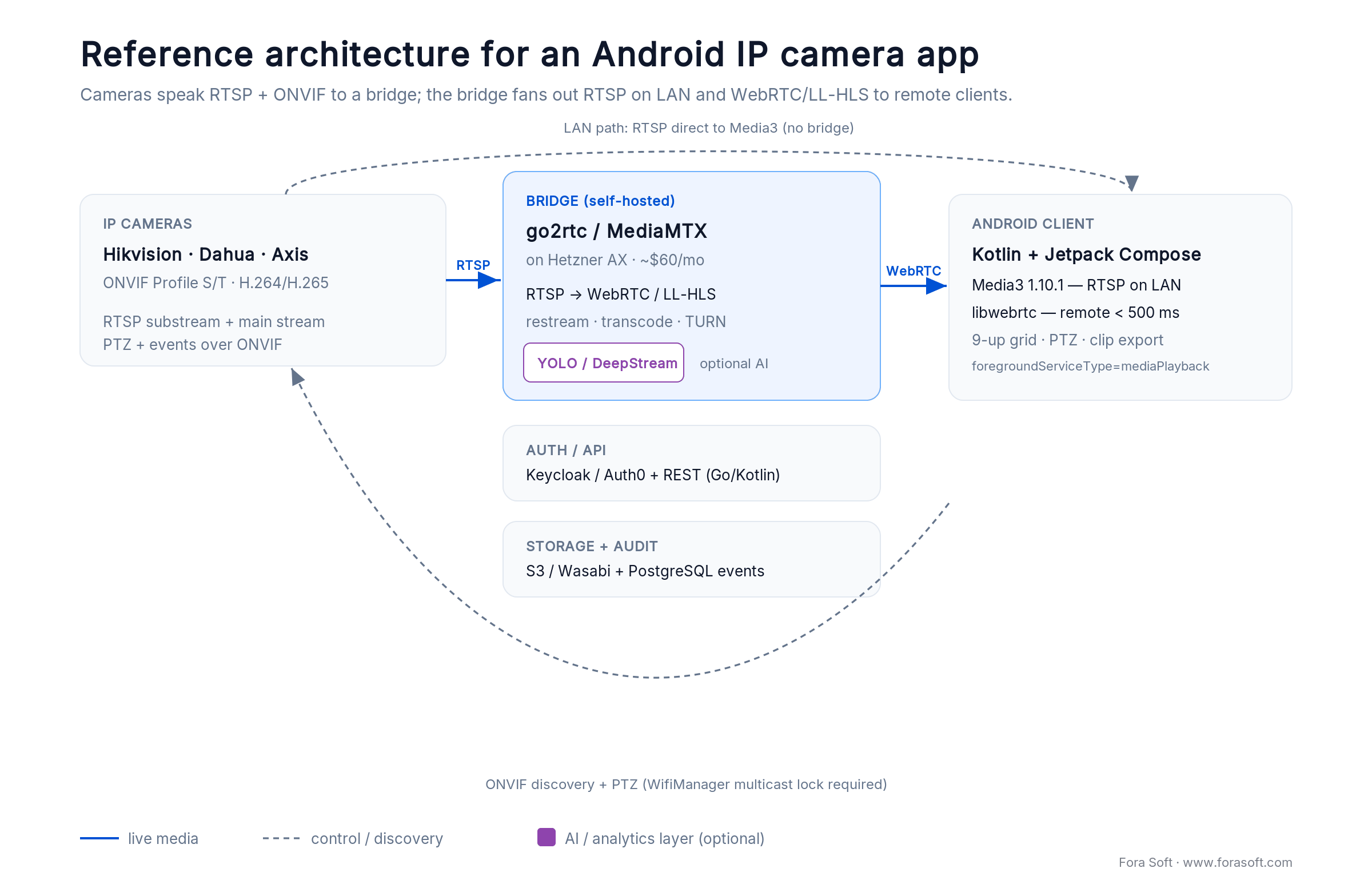
Figure 2. The default 2026 stack. Cameras speak RTSP and ONVIF to a self-hosted bridge; the bridge serves RTSP on the LAN and WebRTC or LL-HLS to remote Android clients.
For the AI layer, see our computer vision for video surveillance overview, the automated anomaly detection for security cameras guide and the edge-vs-cloud AI trade-off breakdown for where inference should live.
Must-have features in a 2026 Android IP camera app
1. Multi-camera grid with adaptive quality. 4-up, 9-up, and 16-up walls with low-res substreams; full-res on tap. This is exactly how V.A.L.T. scales to 9 HD feeds per screen without melting the device.
2. PTZ controls with gesture + button parity. Drag-to-pan, pinch-to-zoom, and on-screen buttons for users on gloves. Send PTZ commands via ONVIF; debounce them — cheap cameras fall over under rapid input.
3. Two-way audio where the camera supports it. ONVIF Profile T cameras expose it; pair with WebRTC audio on the client.
4. Event timeline with motion and AI detections. Scrubbable timeline with color-coded events; tap jumps to the clip. Both forensic reviewers and ops teams need this.
5. Clip export with chain-of-custody metadata. Sign and timestamp every export; hash the file; log who exported what. Non-negotiable for law enforcement, HR investigations, and insurance claims.
6. Offline-tolerant UI. Cache thumbnails and metadata; make reconnect transparent; show “last seen” timestamps when a camera drops.
Mini case: V.A.L.T. on Android for courtrooms and clinics
V.A.L.T. is Fora Soft’s video surveillance platform — today it serves 770+ organizations and 50,000+ active users across police interrogation rooms, courtrooms, and medical consultation spaces. The Android client does the exact work this article describes: discover IP cameras on-site via ONVIF, pull their RTSP streams, present a 9-up HD grid, offer full PTZ, and provide two-way audio for remote operators.
Technical shape: Media3 RTSP for LAN viewing, libwebrtc through a MediaMTX bridge for remote, ONVIF for discovery and PTZ, HIPAA-compliant storage for clinical sites, audit logging at every boundary. Typical session: an operator watches three rooms simultaneously, PTZes one, snaps a bookmark, and exports a signed clip — all in under 60 seconds, sub-second latency on the PTZ loop.
Want a similar assessment for your cameras? Grab a 30-minute call. Read the full platform story on the V.A.L.T. project page, and the engineering write-up on how we built custom AI video surveillance in the YOLO + DeepSORT guide.
Cost model: Android IP camera MVP in 2026
A realistic Android IP camera MVP — viewer, ONVIF discovery, RTSP + WebRTC playback, PTZ, event timeline, clip export, and basic cloud storage — lands in the $30–70 k range when delivered through our agent-engineering process. Timeline is typically 8 to 12 weeks for the MVP, another 8 weeks for analytics and hardening.
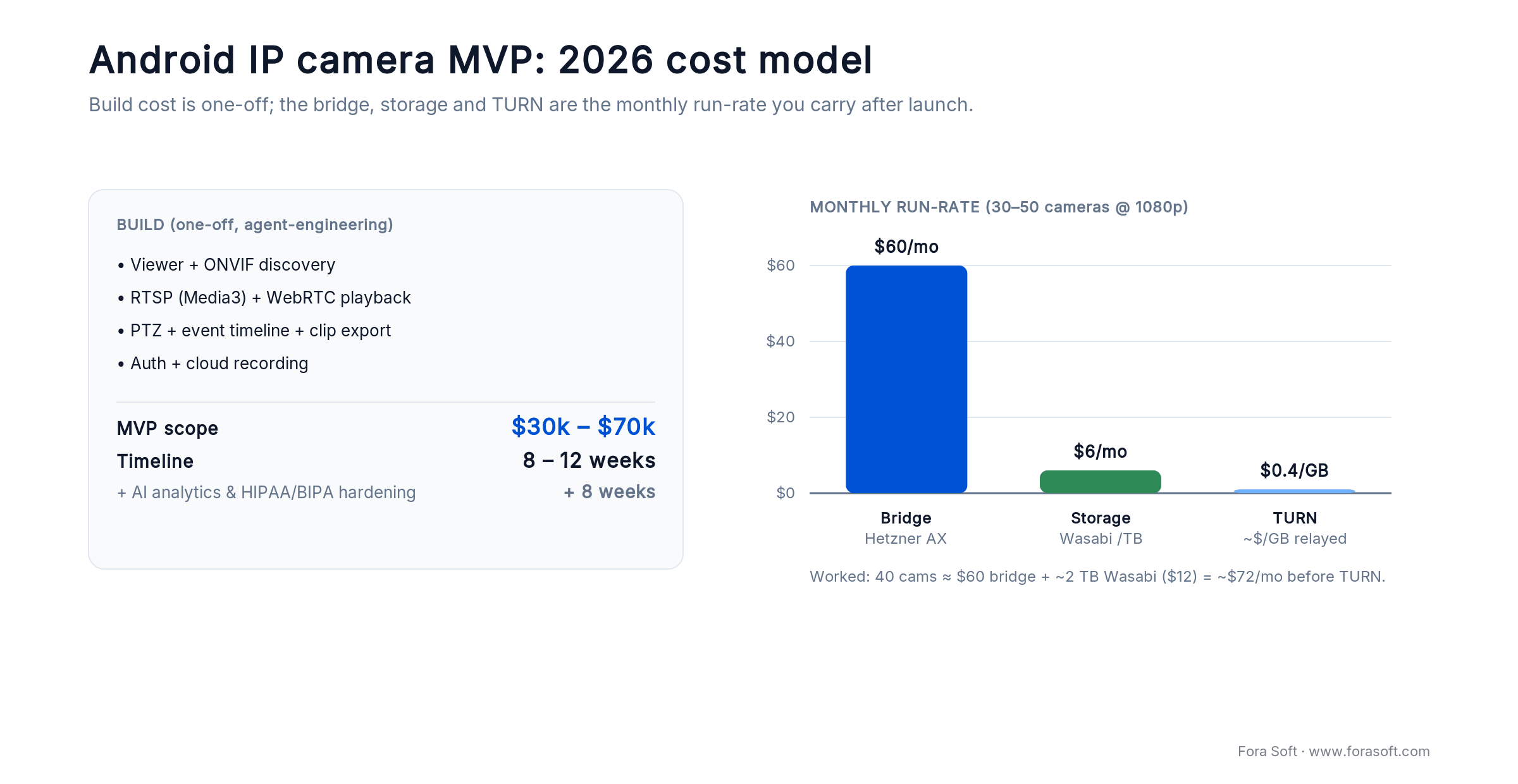
Figure 4. Build cost is a one-off $30–70k over 8–12 weeks; the bridge, storage, and TURN are the monthly run-rate you carry after launch.
Run-rate infrastructure. Bridge: Hetzner AX-32 class box at roughly $60 per month handles 30–50 concurrent camera streams at 1080p. Cloud storage: Wasabi S3-compatible around $6 per TB per month with no egress fees. TURN: Coturn on the same box; or a managed service around $0.40 per GB relayed.
Watch the hidden costs. App store review cycles, Google Play privacy declarations, per-country ONVIF-vendor QA, and the 2–4 weeks of buffer/codec tuning that always surface the week before launch. Scope it, don’t skip it.
For broader context, see our 2026 mobile app development cost guide and streaming app time-estimation benchmarks.
A decision framework: pick the stack in five questions

Figure 3. Pick the stack from one question — the latency your product actually needs — then branch on where the viewers sit.
Q1. What latency budget does the product actually need? Under 500 ms (interrogation, live PTZ over WAN): WebRTC via go2rtc or MediaMTX. 1–2 s (standard viewing on LAN): Media3 RTSP. 2–6 s is fine: LL-HLS.
Q2. Are clients on the same network as the camera? Yes: RTSP is likely enough, no bridge. No (remote / multi-site): you need a bridge and probably WebRTC. Don’t try to expose RTSP to the public internet.
Q3. What cameras will users bring? Hikvision / Dahua / Axis / Amcrest: Profile S covers you. Reolink and consumer brands: ONVIF is patchy — plan for vendor SDK fallbacks on the top two models your customers own.
Q4. Is there any biometric or facial-recognition feature? Yes: BIPA-class consent, opt-in flows, and auditable deletion are first-class scope items, not afterthoughts. No: CCPA and GDPR retention still apply, but the risk envelope is smaller.
Q5. Is sub-second PTZ a must-have in year one? Yes: commit to WebRTC + libwebrtc and budget for the bridge and TURN. No: ship RTSP first, add WebRTC in phase two once product-market fit is proven.
Want a candid review of your existing Android IP camera app?
30 minutes with an engineer who has shipped this stack in regulated environments — latency audit, codec audit, compliance gap list. Free and no obligation.
Five pitfalls we see in Android IP camera projects
1. Assuming RTSP will hit sub-second latency. It will not, reliably, over a consumer internet connection. If product needs <1 s, scope WebRTC from day one. Retrofitting a bridge after the contract is signed is the most expensive mistake we see.
2. Skipping the WifiManager multicast lock on ONVIF. Your discovery works on a laptop, silently fails on a phone. Happens every single Android ONVIF build we’ve audited.
3. Shipping H.265-only streams. About 35% of Android devices still can’t hardware-decode HEVC. Negotiate an H.264 substream on the camera, or plan for transcode on the bridge.
4. Leaking credentials via plaintext RTSP. Digest auth is not encryption. TLS-wrap the connection, or tunnel it via WireGuard; never pass a raw rtsp://user:pass@host over an untrusted network.
5. Ignoring foreground service types on Android 14+. Stream works in emulator, Play Store rejects the build. Declare mediaPlayback and the matching permission from day one.
KPIs to prove the integration is healthy
Quality KPIs. Glass-to-glass latency p95 (<2 s for RTSP, <500 ms for WebRTC), frozen-frame rate per 10-minute session (target <1%), codec fallback rate (share of sessions that dropped from H.265 to H.264/LL-HLS; target <10%).
Business KPIs. Daily active camera sessions, average minutes streamed per user, crash-free session rate (aim for 99.5%+), support-ticket rate per 1,000 streaming minutes.
Reliability KPIs. Reconnect success rate after network drop (>95%), ONVIF discovery success per site (>90% for supported vendor list), battery consumption per hour of live view (<7% on reference device).
When NOT to build a custom Android IP camera app
You have fewer than three distinct product differentiators. If the wish list is “view cameras, record, notify” and nothing else, a white-labeled tinyCam Pro or IP Cam Viewer will ship faster and cost less for years. Build custom when you need integrated AI, multi-tenant management, unique UX for a vertical, or chain-of-custody workflows.
You haven’t validated the regulatory path. HIPAA, BIPA, CJIS, and certain EU public-sector rules turn an “MVP in 10 weeks” into a 9-month certification drag. Validate the compliance path before the build starts.
Camera coverage is narrow and vendor-proprietary. If you only ever talk to a single vendor’s cameras and they ship a white-label SDK, use it. Custom work earns its keep when you need to span five or more vendors, or when the vendor SDK can’t do WebRTC.
What to ask a development partner before signing
Show me one RTSP latency measurement on a real device. Glass-to-glass, phone camera pointed at a millisecond timer on a laptop screen. Anyone can quote latency in a pitch deck; few partners can produce the video.
Show me your ONVIF coverage matrix. Which vendors, which firmware versions, which quirks. This is tribal knowledge — an honest partner will have a spreadsheet of “works / doesn’t / weird” cells.
Show me your agent-engineering workflow. Shipping a 1M+ line video platform in a quarter is not a solo-developer feat; it’s a process. Ours is documented in spec-driven agentic engineering and the case study on a real build. Ask your candidate partner for the equivalent.
FAQ
Can Media3 ExoPlayer really play RTSP from any IP camera?
Yes, for H.264 + AAC streams, which is the majority of cameras. Out of the box Media3 does not play H.265 over RTSP on every device, and some camera vendors push non-standard SDP extensions that the module ignores. For edge cases, plan to transcode on a go2rtc or MediaMTX bridge to a Media3-friendly profile.
Is WebRTC always better than RTSP for IP cameras?
Only when you actually need <1 s latency — interrogation rooms, live PTZ across the internet, two-way audio. For same-LAN viewing at 1–2 s latency, RTSP via Media3 is cheaper to run (no bridge, no TURN) and faster to build. Pick the protocol to match the latency requirement, not the demo.
How do I discover IP cameras automatically on the local network?
Use ONVIF’s WS-Discovery: multicast SOAP-over-UDP on 239.255.255.250:3702. On Android, acquire a WifiManager.MulticastLock first — without it the OS drops multicast packets and discovery returns nothing. Libraries like RootSoft/ONVIF-Java handle the SOAP envelope and response parsing.
How do I control PTZ from an Android app?
Send ONVIF PTZ SOAP commands (ContinuousMove, RelativeMove, AbsoluteMove) to the camera’s PTZ service URL from your Android client. Debounce aggressive user input — consumer cameras can’t handle 60 Hz gesture streams, and overdriving the ONVIF endpoint leads to dropped commands and “stuck” pans.
Is it safe to expose RTSP over the public internet?
No. Plain RTSP digest auth passes credentials and video in a way that is trivially observable on the wire. Wrap it with RTSPS/TLS if the camera supports it, tunnel it through a VPN like WireGuard or Tailscale, or bridge to WebRTC with DTLS/SRTP. Never publish an open rtsp://user:pass@host URL.
How long does it take to build an Android IP camera app?
A well-scoped MVP (multi-camera view, PTZ, event timeline, clip export, cloud recording) lands in 8–12 weeks for a two-engineer team using our agent-engineering workflow. Add 4–8 weeks for AI analytics, HIPAA/BIPA hardening, and multi-vendor ONVIF QA. Total typical cost: $30–70 k for the MVP.
How many concurrent cameras can a phone really show?
With low-resolution substreams and hardware-accelerated H.264 decoding, 9 to 16 tiles is comfortable on a modern mid-range device. Full-res HD on a dozen streams will thermal-throttle fast. V.A.L.T. caps at 9 simultaneous HD feeds per screen, which is the sweet spot we see across clinical and forensic deployments.
Can AI motion detection run on the phone?
For a single stream, yes — TensorFlow Lite and ML Kit can run YOLO-Nano class detectors at 5–10 fps on recent chipsets. For fleets, run inference on the bridge or cloud. See our edge vs. cloud AI breakdown for the economic trade-offs.
What to read next
Architecture
Custom VMS Development: Complete Guide
How to build a modern video management system end to end.
Android
Essential Android IP Camera App Features
The 2026 feature set for an Android IP camera app.
Guide
Building Mobile Apps for IP Cameras
The cross-platform engineering guide, iOS and Android.
AI playbook
Anomaly Detection Models for Video Surveillance
How to choose detection models that ship in production.
WebRTC
WebRTC Architecture: Custom vs SDK
When to build your own stack and when to buy — real numbers.
Ready to ship an Android IP camera app that actually scales?
The short version for any IP camera app for Android: pick Media3 RTSP for the LAN path, libwebrtc with a go2rtc or MediaMTX bridge for remote, ONVIF for discovery and PTZ only, H.264 as the safe codec baseline, and declare your foreground service type on Android 14+. Build compliance in from day one — GDPR retention, CCPA 2026 audits, BIPA for any biometrics — because retrofitting it later is a refund-scale mistake.
Fora Soft has been shipping exactly this stack for two decades, through V.A.L.T.’s courtrooms and clinics, a 1M+ line video platform rebuild, and dozens of custom integrations for regulated industries. If you’re scoping, auditing, or rescuing an Android IP camera project, we can save you a quarter of pain and a quarter of runway.
The next step takes 30 minutes. Bring the camera list, the latency target, the compliance constraints; leave with a concrete protocol pick, a staffing plan, and an honest timeline.
Let’s map your Android IP camera build in 30 minutes
A concrete protocol + library pick, a realistic delivery timeline, and a gap list for compliance and codec coverage. No pitch deck.

