

Key takeaways
• An intelligent video management system is a VMS with an AI layer. It ingests camera streams, records them, and runs detection, faces, and license-plate reads so operators search events instead of scrubbing footage.
• Custom pays off past the license wall. Genetec and Milestone bill $200–500 per camera; at 1,000 cameras that is $200k–500k in licenses alone before maintenance. A build removes that recurring line.
• Storage, not code, sets your running bill. Fifty 1080p cameras at 24/7 write ~36 TB a month on H.264. Switching to H.265 and hot/cold tiering takes a $828 cloud bill down to about $152.
• Decide edge vs cloud for AI before anything else. Running detection on-camera or on a $249 Jetson cuts bandwidth and GPU cost by an order of magnitude versus streaming every frame to the cloud.
• Budget in phases. A pilot VMS runs $40k–70k; add real AI analytics and you are at $90k–150k; a multi-tenant production system with HIPAA/GDPR lands around $180k–300k.
Most teams do not set out to build a video management system. They hit a wall with the one they bought: a per-camera license that scales faster than the deployment, an analytics module that cannot see the one thing they care about, or a workflow the vendor will not add. That is the moment a custom or intelligent video management system starts to look cheaper than the alternative, and it is the moment most of the mistakes happen too.
We are Fora Soft. We have built video software since 2005, 250+ projects across surveillance, streaming, and telemedicine, with 50+ in-house specialists. We wrote and still run VALT, a surveillance-and-observation platform used by 770+ US organizations and 50,000+ users, and we built Mindbox, an AI-powered VMS that runs facial recognition at 99.5%+ accuracy and reads 500,000+ license plates a day. This playbook is what we tell founders and CTOs before they commit a budget: the architecture, the standards, the honest cost math, and when you should not build at all.
Why Fora Soft wrote this playbook
Short answer: we have shipped both ends of this market, so we can tell you where the money and the risk actually sit. VALT started as a from-scratch build and we have been its sole development team for 10+ years; it is HIPAA/GDPR compliant, records from fixed IP cameras and phones, and searches spoken words inside footage with Amazon Transcribe. Mindbox took the same recording core and added an AI brain: anomaly detection, fire and intrusion alerts, PTZ control, an interactive camera map, and Smart Forensic Search across hours of video.
Those two systems bracket the decision you are about to make. One is an enterprise recorder that grew AI later; the other was analytics-first from line one. Both taught us the same lesson: the hard part of a VMS is not the live view everyone demos. It is the plumbing underneath, the retention bill nobody models, and the compliance work that has to be right before a single camera goes live. We link real numbers from these projects throughout, and if you want a second opinion on your own stack, our video surveillance team does exactly this kind of scoping.
What an intelligent video management system actually is
A video management system (VMS) is the software that connects to your cameras, streams them live, records them, and lets operators play back and manage the footage. An intelligent video management system adds an AI layer on top: instead of storing every frame for a human to scrub later, it watches the streams and tells you what happened. A person crossed a line. A vehicle stopped where it should not. That plate belongs to a flagged car.
The distinction matters commercially. A plain VMS is a cost center: it holds video until you need it. An intelligent VMS is an operator multiplier: one person can watch 200 cameras because the system surfaces the 12 clips that matter. That is the pitch behind the whole category, and it is why the video-management market sits around $6.0–6.9 billion in 2026 and keeps growing at roughly 17–19% a year across the main analyst estimates.
The word “custom” is doing work here too. You can buy an intelligent VMS off the shelf. You build one when the off-the-shelf analytics do not fit your world, when licensing at your camera count is punishing, or when the VMS is the product you sell.
Trapped by per-camera license fees?
Tell us your camera count and workflow. We will tell you honestly whether a build beats your current VMS bill, and what it would take.
VMS, NVR, and IVMS: what “intelligent” adds
These three terms get used interchangeably and they should not be. An NVR (network video recorder) is a box or an appliance that records IP cameras. Its job is capture and retention, with a basic viewer bolted on. A VMS is software, not a box: it manages many recorders and camera types, handles users and permissions, and runs on your own servers or in the cloud. An IVMS (intelligent VMS) is a VMS whose analytics are first-class, not an add-on.
Here is the practical test. If your software answers “show me camera 4 at 2 a.m.,” it is a VMS. If it answers “show me every time a person entered the loading dock after hours this week,” it is intelligent. The second question is the one buyers pay for, and it is the one that changes your architecture: you now need a detection pipeline, a metadata store, and a search index, not just a recorder.
When people search for a cloud video management system or an ai video management system, this is usually what they mean. They want the recorder table stakes plus the intelligence, delivered as software they can reach from a browser and a phone.
Reference architecture for a custom VMS
A custom video management system breaks into five layers: cameras, a media server, storage, AI analytics, and client apps. Keep them cleanly separated and you can swap any one without rewriting the others. Fuse them and every camera-firmware quirk leaks into your UI.
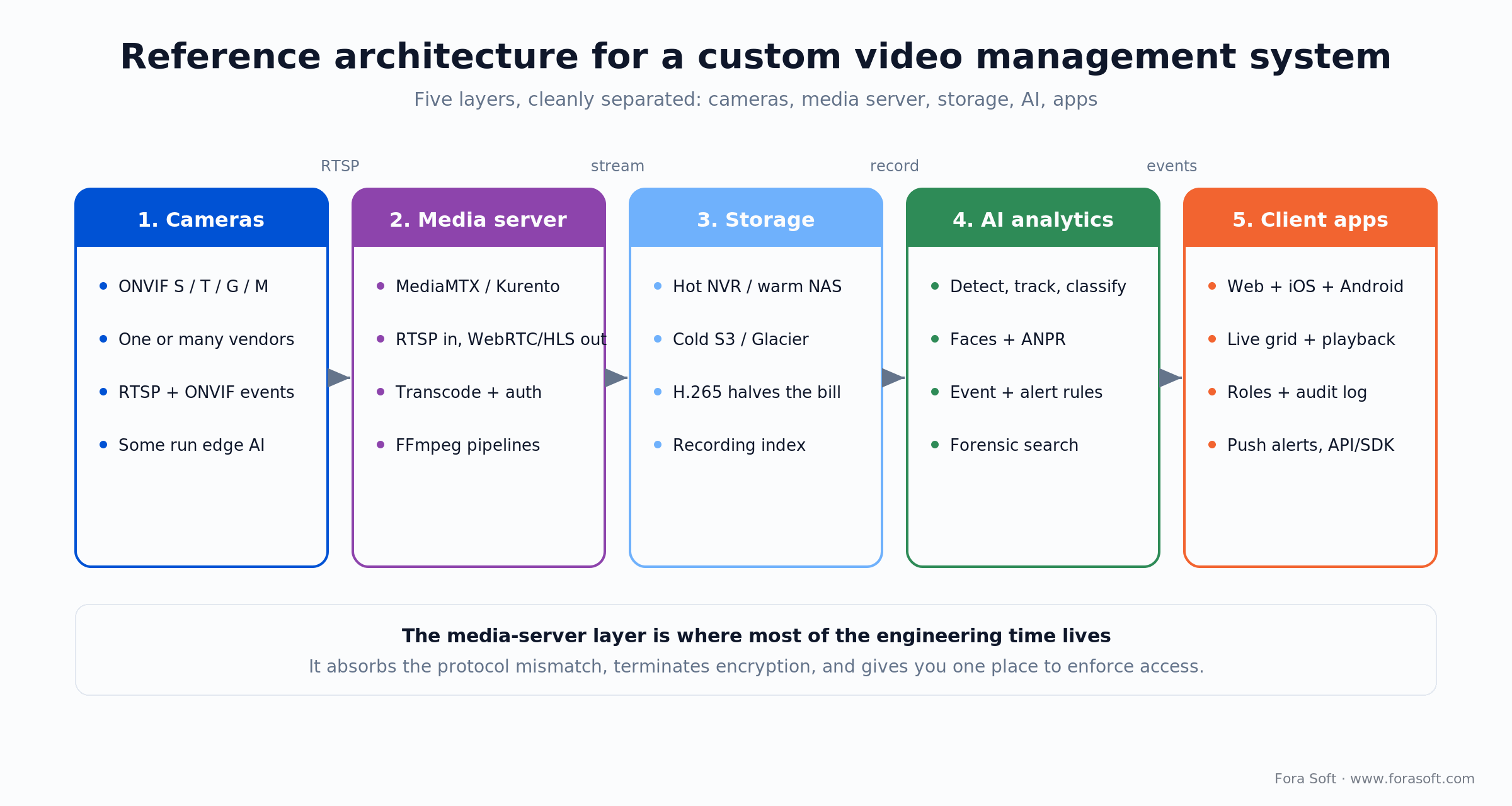
Figure 1. The five layers of a custom VMS. Most engineering time lives in the media-server layer, which absorbs protocol mismatch and enforces access.
Cameras. They speak RTSP for video and ONVIF for control and events. You rarely control which models a client already owns, so plan for a mixed fleet and treat the camera layer as untrusted input.
Media server. This is the heart of the build. It pulls RTSP from every camera, terminates encryption, and re-broadcasts to viewers as WebRTC (for sub-second live and two-way audio) or HLS (for scale and archive). Open-source MediaMTX is a strong single-binary starting point; on Mindbox we ran Kurento and FFmpeg pipelines for the heavier transcoding. A minimal camera-to-HLS relay is only a few lines:
# Pull an ONVIF/RTSP camera, restream as low-latency HLS
ffmpeg -rtsp_transport tcp -i rtsp://cam-01/Streaming/Channels/101 \
  -c:v copy -c:a aac -f hls -hls_time 1 -hls_flags delete_segments \
  /var/hls/cam-01/index.m3u8
Storage. Recordings land on a tier that matches how fast you need them back: hot local NVR or NAS for the last few days, cold object storage for the long tail. An index (who, what camera, when) makes it searchable.
AI analytics. Detection, tracking, faces, and plates run here, writing structured events back to the index. This layer is optional for a plain VMS and mandatory for an intelligent one.
Client apps. Web, iOS, and Android surfaces with a live grid, playback, role-based permissions, an audit log, and push alerts. Everything they do goes through one API, never straight to a camera.
We keep a live reference build behind our NetCam project, a multi-camera ONVIF VMS web UI, and go deeper on the trade-offs in our VMS architecture guide.
Camera integration: the ONVIF profiles that matter
If your VMS has to work with cameras from more than one vendor, ONVIF is not optional. It is the interoperability standard, run since 2008 by Axis, Bosch, and Sony, that lets a camera and your software agree on how to stream, record, and describe what analytics saw. Profiles are a menu you combine, not a ladder you climb.
Profile T is the 2026 baseline. It adds H.265 alongside H.264 and standardizes imaging settings, PTZ, motion and tampering events, metadata streaming, and two-way audio. Build to Profile T and you get access to the efficient codec that halves your storage bill. Profile S is the older H.264-only fallback for 2016-era hardware you cannot replace yet. Profile G covers recording, edge storage, and playback control. Profile M is the one intelligent systems live on: it standardizes analytics metadata, so a camera can report bounding boxes and classifications (human, vehicle, face, license plate) and events like line-crossing or loitering in a form your software understands. Profiles A, C, and D handle access and door control if you unify video with entry.
For a modern IP-camera VMS, support T for streaming, add G for recordings, and add M when analytics results must reach your software; keep S for legacy. The full breakdown is in our ONVIF profiles guide, and the standard itself is documented at onvif.org. The June 2026 spec (v26.06) added metadata aspect-ratio transformation and multi-dimensional sensor data, so keep your ONVIF client current.
The AI analytics layer that makes it intelligent
Intelligence in a VMS is a pipeline, not a single model. Every frame you care about flows through five stages: decode the stream, detect objects, track and classify them, apply event rules, then index the result so it is searchable. Get the ordering right and you can add a new analytic (say, PPE detection) without touching the rest.
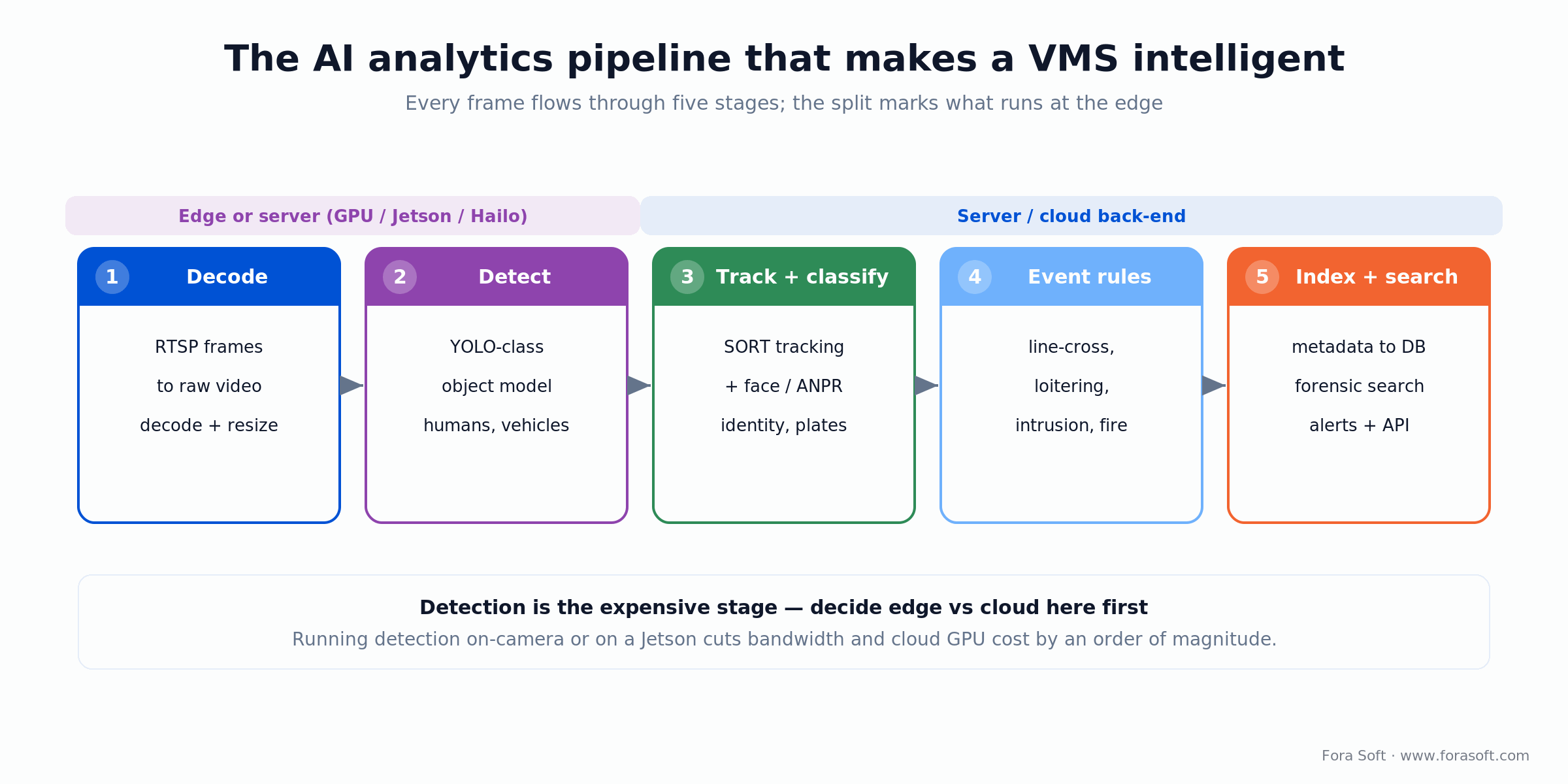
Figure 2. The AI analytics pipeline. Detection is the expensive stage; where you run it (edge or cloud) decides your bandwidth and GPU bill.
Detect. A YOLO-class object model finds people, vehicles, and other classes per frame. This is the compute-heavy step and the one that dictates your hardware.
Track and classify. A tracker (SORT-style) stitches detections into paths so “one person walking” is a single event, not 200. On top of that sit the specialist models: facial recognition and ANPR (automatic number-plate recognition). On Mindbox, facial recognition hits 99.5%+ with anti-spoofing that resists photo and video attacks, and the plate reader clears 500,000+ vehicles a day at about 95% accuracy.
Event rules and search. Rules turn classified tracks into alerts (line-crossing, loitering, intrusion, fire, crowd build-up) and every event is written to a database with a thumbnail and a timestamp. That is what powers forensic search: an operator types “red truck, north gate, last Tuesday” and gets clips, not tape. We cover the model side in depth in our guide to ML algorithms for surveillance anomalies, and our AI integration team builds these pipelines to order.
Edge, cloud, or hybrid: where inference runs
Answer first: run detection as close to the camera as you can afford, and send only events and clips to the cloud. Streaming every frame to a cloud GPU is the single most expensive mistake in an intelligent VMS. The math is stark, so decide this before you design anything else.
Hardware in 2026 makes edge inference easy. An NVIDIA Jetson Orin Nano Super runs a YOLO model in real time for about $249; the AGX Orin pushes 275 TOPS for dense sites. A Hailo-8 module delivers 26 TOPS at 2.5–3 watts for roughly $150–200 when power and heat matter. Smart cameras with Axis ACAP or Hanwha Wisenet silicon skip the box entirely at $300–800 per camera.
Reach for edge inference when: bandwidth is limited or metered, latency matters (live alerts, PTZ auto-follow), or privacy rules say raw video should not leave the site.
Reach for cloud inference when: you need models too large for edge hardware, you retrain often, or camera counts are small enough that a single GPU instance is cheaper than a fleet of edge boxes.
Reach for hybrid when: you want cheap edge detection for the common case and cloud escalation for the hard case, which is where most production intelligent VMS deployments land. We break the trade-offs down in our Learn note on on-camera edge AI.
Storage and retention: the number that sets your bill
Here is the number nobody models until it hurts. A single 1080p camera at ~2 Mbps (H.264, moderate frame rate) recording 24/7 writes roughly 0.8–1.2 GB per hour, call it 24 GB a day. Push to 1080p30 at a higher bitrate and that climbs, so treat this as a floor, not a ceiling. Fifty cameras is 1,200 GB a day, or about 36 TB across a 30-day retention window. Put that on hot cloud object storage at ~$0.023/GB and you are paying about $828 a month before you serve a single clip.
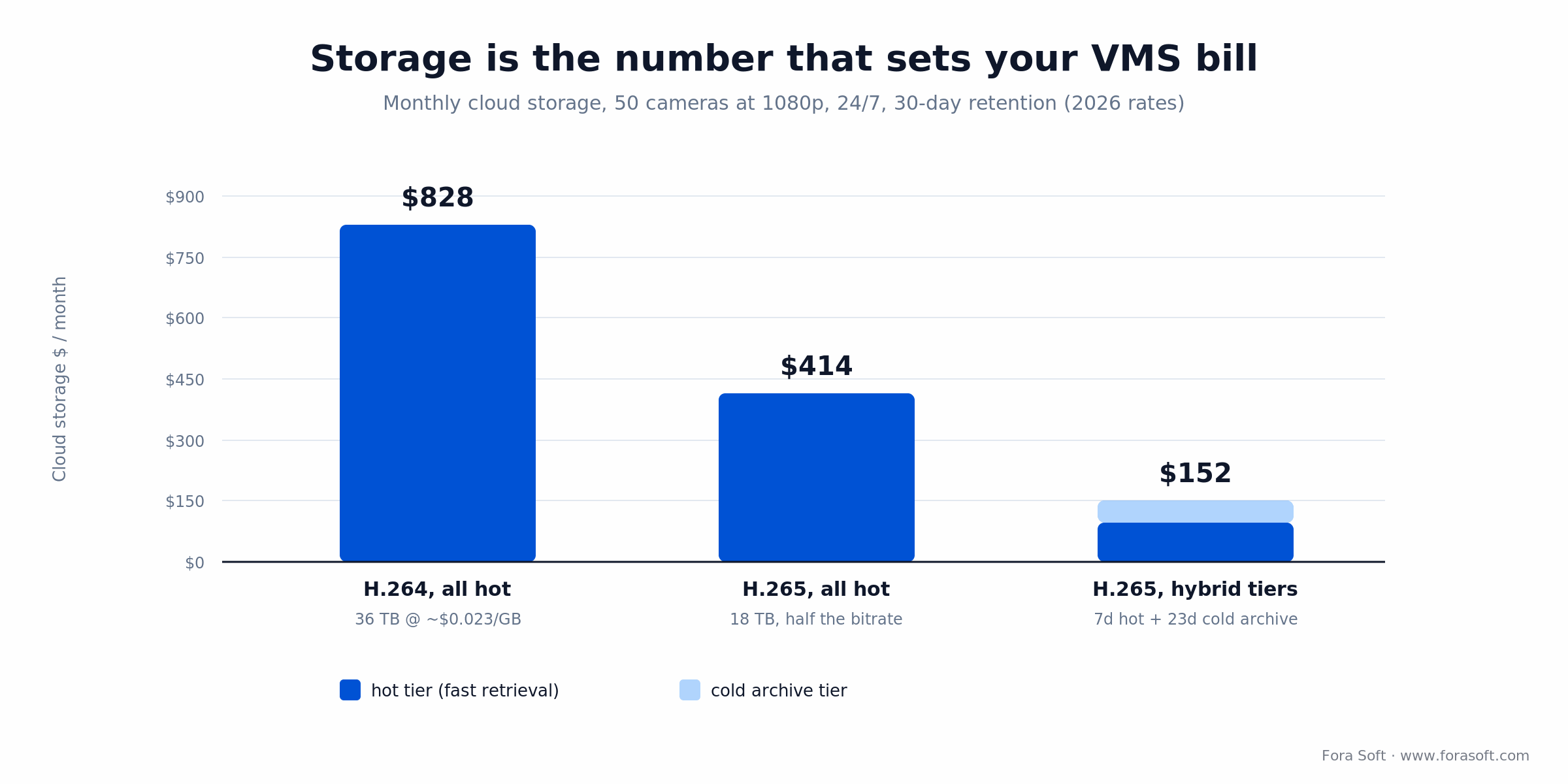
Figure 3. Storage dominates the running cost of a VMS. Codec choice and tiering move the monthly bill from $828 to about $152 for the same 50 cameras.
Two levers cut that bill hard. First, codec: H.265/HEVC halves the bitrate at equal quality, so the same fleet drops to ~18 TB and ~$414. Second, tiering: keep only the last 7 days hot (about 4.2 TB) and push the older 23 days to a cold archive tier at roughly $0.004/GB. Now you pay about $97 hot plus $55 cold, near $152 a month. That is the same footage at roughly a fifth of the naive cost, and it is a design decision you make on day one, not a discount you negotiate later.
Edge detection compounds the saving: if only flagged clips leave the site, your cloud storage and egress shrink again. We keep a fuller model in our Learn note on the surveillance cost model, and the codec fundamentals are in what is digital video.
Security and compliance you can’t skip
Surveillance video is sensitive by definition, so security is part of the build, not a hardening pass at the end. The baseline is TLS 1.2+ in transit, AES-256 at rest, multi-factor auth for operators, and RTSPS/RTMPS whenever streams cross an untrusted network. Role-based permissions and an immutable audit log are table stakes; in regulated settings, chain-of-custody export (who watched what, when) is a feature buyers ask for by name. VALT was built around exactly that for law-enforcement and medical use.
Supply-chain rules. In the US, the FCC Covered List (from the 2022 equipment-authorization order) keeps Hikvision, Dahua, and Hytera off new authorizations, and Section 889 with FAR 52.204-25 reaches federal contractors who use that gear. Legacy installs can usually stay, but new and replacement equipment is constrained. If your buyers touch government work, plan an NDAA-compliant camera path from the start.
Privacy law. Healthcare footage brings HIPAA; any EU faces or plates bring GDPR, and facial recognition specifically is treated as high-risk biometric processing. Bake in retention limits, consent handling, and data-minimization (store events, not raw video, where you can) rather than retrofitting them.
Build, buy, or open source
Not every camera problem needs a custom VMS. The honest answer for most generic security deployments under 500 cameras is: buy one. You build when off-the-shelf cannot model your workflow, when licensing at your scale is punishing, or when the VMS is the product you sell. Here is how the four paths compare.
| Path | Best for | Time to value | Control / UX | Ships as your product? |
|---|---|---|---|---|
| Vendor VMS (Genetec, Milestone, Verkada) | Generic security, <500 cams | Days | Low, hard UX ceiling | No |
| Vendor SDK shell (Milestone, Nx) | Custom UX on one ecosystem | 8–14 weeks | Medium, one vendor | Partly |
| Open source (Frigate, ZoneMinder) | <30 cams, technical operator | Days to weeks | High, DIY support | Risky (licensing) |
| Custom build | Vertical workflows, >1,000 cams, own product | 10–36 weeks | Full | Yes |
Reach for open source when: you run under ~30 cameras, have an engineer who enjoys the tooling, and do not need to sell the result. Frigate gives you on-device detection for free; ZoneMinder has run since 2003. Both trade polish and support for price.
Reach for a custom build when: the VMS is your product, your camera count makes per-seat licensing hurt, or your vertical (courtrooms, clinics, construction) needs workflows no shrink-wrapped tool models.
The commercial VMS pricing you’re up against
To know whether a build pays off, you need the number it replaces. These are the 2026 per-camera economics of the incumbents. Note how the model shifts from one-time license (Genetec, Milestone) to recurring subscription (Verkada), and how both punish scale.
| Vendor | Model | 2026 price | Watch for |
|---|---|---|---|
| Genetec Security Center | Perpetual license + maintenance | ~$200–300/cam base, $400+ enterprise | 50 cams / 3 yr ≈ $22–33k |
| Milestone XProtect | Perpetual license + care plan | ~$300–500/cam (Corporate) | Free tier discontinued in 2025 |
| Verkada | Cloud subscription | ~$199–400/cam per year | Multi-year license + locked hardware |
| Custom build (Fora Soft) | One-time build + your hosting | $40k–300k by phase, no per-cam fee | You own maintenance |
The break-even is a camera-count question. At 20 cameras, a vendor VMS is almost always cheaper than a build. At 1,000 cameras, Genetec or Milestone licenses alone reach $200k–500k plus $30k–100k a year in maintenance, and a one-time custom build with your own hosting starts to look conservative. Avigilon (Motorola Solutions), whose VMS page is the current top Google result for “intelligent video management system,” shows where the off-the-shelf ceiling sits.
Mini-case: how we built Mindbox and VALT
The situation. Two clients, two ends of the market. VALT’s owner needed a from-scratch platform to record and observe interviews across medical schools, law enforcement, and child-advocacy centers, with HIPAA compliance and courtroom-grade export. Mindbox’s team wanted an AI-first VMS for transport, pharma, and gated communities, where an operator could not possibly watch every feed.
The plan. Both got the same layered core: RTSP ingest through a media server, tiered recording with a searchable index, and role-based clients on web and mobile. VALT added Amazon Transcribe so operators search spoken words inside footage and export PDF reports. Mindbox added the analytics pipeline: YOLO-class detection, facial recognition with anti-spoofing, ANPR, and Smart Forensic Search, all reporting events through Profile-M-style metadata.
The outcome. VALT now serves 770+ US organizations and 50,000+ users, and we shipped VALT 6.5 in 2025; we have been the sole development team for 10+ years. Mindbox runs facial recognition at 99.5%+ accuracy and clears 500,000+ plates a day at ~95%, turning hours of scrubbing into a typed query. Want a similar assessment of your own build? Book a 30-minute scoping call and we will map it against your camera count.
Need a second opinion on build vs buy?
We have built intelligent VMS platforms at both ends of the market. Thirty minutes and you will know which path fits your scale and budget.
Development timeline and cost
A custom VMS is not one price; it is a set of phases you can stop between. We use agent-assisted engineering, so these bands run leaner than the traditional agency quote, but treat them as ballpark scoping figures, not a fixed bid. Any number we are unsure of, we would rather scope than guess.
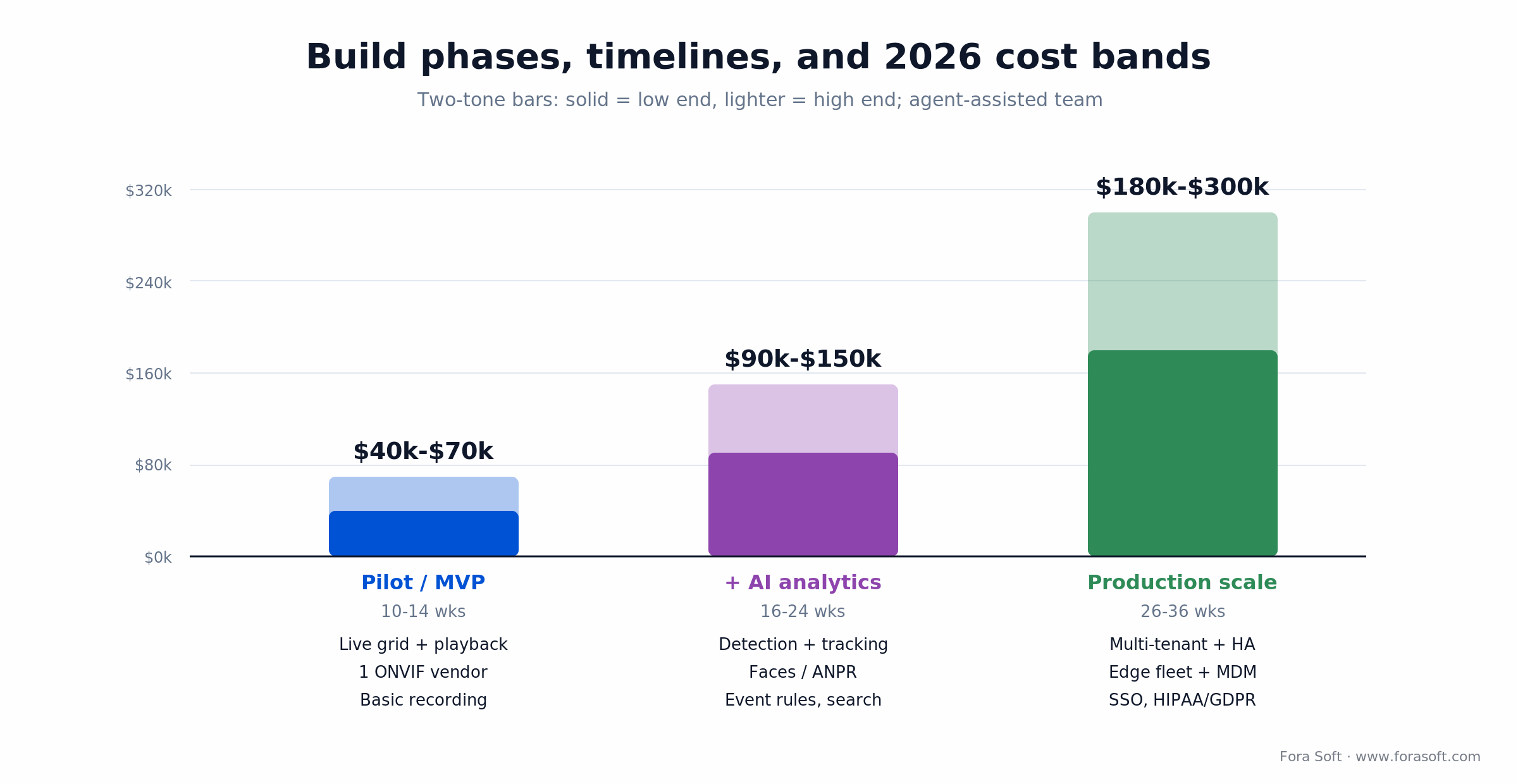
Figure 4. Three phases you can stop between. Each tier is cumulative scope, not a separate project.
Pilot / MVP — $40k–70k, 10–14 weeks. Live grid, playback, basic recording, and one ONVIF vendor. Enough to prove the core with real cameras and get operators using it.
Add AI analytics — $90k–150k, 16–24 weeks. Detection and tracking, faces or ANPR as your use case needs, event rules, and forensic search. This is the jump from a recorder to an intelligent VMS.
Production scale — $180k–300k, 26–36 weeks. Multi-tenant, high availability, an edge-device fleet with mobile-device management, SSO, and full HIPAA/GDPR. This is where a product-grade VMS you can sell actually lives.
Set that against the incumbents: a one-time $180k–300k build with your own hosting replaces a recurring line that, at 1,000 cameras, runs $200k–500k in licenses plus six figures a year in maintenance.
How to start your custom VMS project
Start narrow and real. The fastest way to waste a VMS budget is to design for 1,000 cameras before you have proven the pipeline on ten.
1. Inventory the cameras. List every model, its ONVIF profile, its codec, and where it lives on the network. This one document decides how much protocol work your media server needs.
2. Write the events you care about. “Person on the dock after 8 p.m.” is a spec. “AI security” is not. Your event list defines the analytics you build and the ones you skip.
3. Ship a ten-camera pilot. Prove ingest, recording, one analytic, and one client surface end to end. Measure the storage and GPU cost on that ten before you multiply it.
4. Decide edge vs cloud with real numbers. Use the pilot to see what one camera-day actually costs, then choose where inference runs before you scale.
5. Harden, then scale. Add roles, audit logging, encryption, and compliance while the system is small and cheap to change, not after 500 cameras are live.
A decision framework in five questions
Run your project through these five before you write a line of code. If you answer “build” to three or more, a custom intelligent VMS is likely the right call.
Q1. Is the VMS your product, or your tool? If you sell it, you build it. Off-the-shelf you cannot brand or extend is a dead end for a product company.
Q2. How many cameras, and growing how fast? Under ~50 and flat, buy. Past a few hundred and climbing, per-camera licensing is the argument for a build by itself.
Q3. Does an off-the-shelf analytic already see what you need? If a vendor detects your event well, use it. If your event is niche (specific PPE, a custom safety rule), you will end up building anyway.
Q4. What is your compliance surface? HIPAA, GDPR, NDAA, or chain-of-custody export push you toward a system you control end to end.
Q5. Do you have somewhere to run it? A build means you own hosting and maintenance. If you have no ops capacity and no partner, a managed cloud VMS may win on total cost.
Five pitfalls that sink custom VMS builds
1. Modeling storage last. Teams budget the code and forget that 50 cameras write 36 TB a month. Model retention and tiering on day one or the running bill will surprise the CFO.
2. Streaming every frame to a cloud GPU. It is the fastest way to a five-figure monthly inference bill. Decide edge vs cloud early and default to edge for detection.
3. Assuming all cameras speak the same ONVIF. A mixed fleet spans Profile S to T with vendor quirks in between. Test against the actual hardware, not the spec sheet.
4. Treating compliance as a final sprint. Retrofitting HIPAA, GDPR, or NDAA into a live system costs multiples of building it in. Bake it into the data model.
5. Chasing 99% detection accuracy in a demo. Lab numbers collapse on real footage in rain, at night, at odd angles. Budget for tuning against your own cameras, and be honest that day-one accuracy will trail the datasheet.
KPIs: what to measure after launch
Quality KPIs. Detection precision and recall on your own footage (not the vendor benchmark), false-alert rate per camera per day, and glass-to-glass latency for live view. If operators mute alerts, your false-positive rate is too high.
Business KPIs. Cost per camera per month all-in (storage, compute, hosting), operator-to-camera ratio, and time-to-find for a forensic query. The last one is the whole promise of an intelligent VMS: minutes to seconds.
Reliability KPIs. Recording uptime per camera (dropped segments are lost evidence), mean time to recover a failed node, and storage headroom before retention starts evicting footage early.
When not to build a custom VMS
We turn projects down when a build is the wrong tool, because a mismatched build is worse than an honest “buy this instead.” Skip the custom route if your deployment is generic security under a few hundred cameras and a vendor already detects your events; the license fee is cheaper than the engineering and the ops.
Skip it too if you have no home for the system. A custom VMS means you own hosting, updates, and on-call. Without an ops team or a long-term development partner, a managed cloud VMS will beat a build on total cost of ownership, even at a higher sticker price. And if you need something live next week, buy now; you can always build later once the requirements are proven. Under ~30 cameras with a technical operator, open-source Frigate or ZoneMinder may be all you need.
Ready to scope a build?
Bring your camera inventory and your event list. We will turn them into an architecture and a phased budget you can act on.
FAQ
What is an intelligent video management system?
An intelligent video management system is a VMS with a built-in AI layer. It ingests, records, and streams camera video like any VMS, and adds detection, tracking, facial recognition, and license-plate reading so operators search events instead of scrubbing footage. The AI is first-class, not an add-on module.
What is the difference between a VMS and an NVR?
An NVR (network video recorder) is a box or appliance whose job is to record IP cameras with a basic viewer. A VMS is software that manages many cameras and recorders, handles users and permissions, and runs on your servers or in the cloud. A VMS can control NVRs; an NVR cannot replace a VMS at scale.
How much does it cost to build a custom VMS?
A pilot VMS runs roughly $40k–70k over 10–14 weeks. Adding real AI analytics brings it to $90k–150k, and a multi-tenant production system with HIPAA/GDPR lands around $180k–300k. These are one-time build costs plus your own hosting, versus recurring per-camera license fees from vendors.
Do I need ONVIF support to build a VMS?
If you support cameras from more than one vendor, yes. Build to ONVIF Profile T for streaming (it includes H.265), Profile G for recording, and Profile M for analytics metadata. Profile S is the older H.264 fallback for legacy hardware. Single-vendor deployments can sometimes use that vendor’s SDK instead.
Can I run AI analytics on the camera instead of the cloud?
Yes, and usually you should. An NVIDIA Jetson Orin Nano Super (~$249) or a Hailo-8 module runs a detection model in real time at the edge, so only events and clips travel to the cloud. That cuts bandwidth and cloud GPU cost by an order of magnitude compared with streaming every frame up.
Is it cheaper to build a VMS or buy Milestone or Genetec?
It depends on camera count. Under ~50 cameras, buying is almost always cheaper. Past a few hundred and growing, per-camera licenses (Genetec and Milestone run $200–500 per camera, plus 15–20% annual maintenance) can exceed a one-time custom build. At 1,000 cameras, licenses alone hit $200k–500k.
How much storage does a 50-camera VMS need?
About 36 TB per month for 50 1080p cameras (at ~2 Mbps each) recording 24/7 on H.264 with 30-day retention. Higher bitrates push it up; switching to H.265 halves it to ~18 TB. Tiering the older days to cold archive cuts the monthly cloud bill from roughly $828 to about $152 for the same footage.
How long does it take to build a custom video management system?
A working pilot takes 10–14 weeks. A version with real AI analytics takes 16–24 weeks, and a full production-scale system with multi-tenancy and compliance takes 26–36 weeks. Because the phases build on each other, you can put the pilot in front of operators long before the full system is done.
What to read next
Architecture
VMS Architecture, ONVIF & Custom vs Off-the-Shelf
The deeper architecture and vendor-matrix companion to this build guide.
Features
VMS Software Features: 12 Must-Haves for 2026
The feature checklist to spec before you build or buy.
Standards
ONVIF Profiles S, T, G, M: A No-Nonsense Guide
Everything the camera-integration section here only had room to summarize.
AI
Anomaly Detection in Surveillance Footage
How the detection and event layer of an intelligent VMS actually works.
Services
Video Surveillance Development at Fora Soft
What it looks like to build your intelligent VMS with our team.
Ready to build your intelligent VMS?
Here is the whole playbook in five clauses. An intelligent video management system is a VMS plus an AI layer that turns footage into searchable events. Its architecture is five clean layers, and the media server is where the work lives. ONVIF Profiles T, G, and M are your camera contract. Storage, not code, sets your running bill, and codec plus tiering cut it roughly fivefold. And the AI is only worth it if you decide edge versus cloud before you scale.
Buy when your deployment is generic and small; build when the VMS is your product, your camera count makes licensing hurt, or your vertical needs workflows nothing off the shelf can model. We have shipped both Mindbox and VALT, so we can help you make that call honestly and then build the one you choose.


The handbook · 7 volumes
Fora Soft Video Engineering Handbook
With the ONVIF bridge, storage math and build-or-buy call settled, the analytics layer is what makes a VMS intelligent. We wrote seven volumes on the stack under it; start with the AI volume on detection, tracking, segmentation and search across a video archive, then read the encoding volume for retention and bitrate, and the real-time AI volume on serving and EU AI Act duties. Written by Nikolay Sapunov, CEO at Fora Soft.
Browse the handbook on Amazon →7 volumes · 9,000+ pages · Kindle & paperback
Let’s design your intelligent VMS
Thirty minutes with engineers who have built VMS platforms for 770+ organizations. Come with your cameras and your budget; leave with a plan.

