

Key takeaways
• Codec matrix fragmentation is the silent cost. iOS favors H.265; Android is H.264-everywhere; web needs AV1 support detection; desktop ignores H.265 on Windows. A single bitrate fails 40–60% of your viewers — our Learn: Video Streaming section breaks down each protocol end to end.
• Player engines are platform-specific. AVPlayer (iOS), ExoPlayer (Android), hls.js/Shaka (web), native tvOS/Tizen are not interchangeable. A bug in one player affects millions of viewers on that platform and invisible on others.
• DRM is not symmetric across platforms. FairPlay (Apple) needs its own deployment certificate and license server; Widevine (Google/Android) drops to L3 on budget devices; PlayReady covers roughly 5% of viewers. Designing DRM-lite for some platforms fails licensing audits.
• Background audio, PiP, and AirPlay/Cast are platform permissions, not SDK features. Shipping these requires platform-specific manifests, entitlements, and capability negotiation with the OS, not a cross-platform wrapper.
• Flutter & React Native save engineering at app level but lose platform integration at player level. Both require native modules for HLS/DASH playback; you own the glue layer’s bugs, not the team’s.
Cross-platform video streaming app development is really five platform-specific builds wearing one app shell: the codec ladder, player engine, DRM, system integrations, and framework choice all fork per platform. Get the forks wrong and 40–60% of viewers hit a black screen you never see in QA. This is the engineer’s version — the exact support matrix by platform, the 2026 codec and DRM facts, and where each shortcut breaks. Fora Soft is a video streaming app development company that has shipped 250+ products since 2005, including video and audio streaming apps across web, iOS, Android and tvOS.
Why Fora Soft wrote this guide
As a video streaming app development company, we treat cross-platform video streaming as a ship-multiple-times-per-platform problem masquerading as a “ship once” promise. Fora Soft has shipped BrainCert across web, iOS, Android, and tvOS with 100k+ customers, 500M+ minutes, and a streaming solutions practice spanning our work since 2005 (250+ products shipped). Every platform-specific codec bug, DRM quirk, and player freeze-frame in this guide has forced a shipping delay or caused silent user churn we had to isolate and fix.
The trap is thinking “cross-platform SDK” solves cross-platform streaming. It doesn’t. only iPhones from the 6s (A9, 2015) decode H.265 in hardware, and Apple gained AV1 hardware decode only with the A17 Pro (2023); Widevine L1 depends on a device’s hardware TEE, not its Android version, so many budget phones only ever report L3; web hls.js needs the W3C Encrypted Media Extensions API for DRM-wrapped content; smart TVs have no standard for IMSC captions. Unified playback requires knowing which platform you’re on and building conditional logic — for every feature.
This guide covers the five layers of cross-platform streaming: codec support by device, player engines and their quirks, DRM by platform, system integrations (background/PiP/AirPlay), and the choice between native, Flutter, React Native, and KMP. We ground it in the platforms you actually ship to: iOS 13+, Android 8+, web (Chrome/Safari), tvOS, and Tizen.

Figure 1. The five layers of cross-platform streaming. A shared SDK unifies the app shell; every layer below still forks per platform.
Building a streaming app across iOS, Android, and web?
We’ll walk you through the codec matrix, player engine choice, and DRM strategy in 30 minutes — and give you a platform-specific checklist.
The cross-platform reality — what each platform actually supports
No two platforms decode video the same way. Here is what the 2026 baseline looks like for iOS, Android, web, and TV:
| Platform | Codecs (native) | DRM | HLS / DASH | Quirks |
|---|---|---|---|---|
| iOS 13–16 | H.264; HEVC on iPhone 6s+ | FairPlay only | HLS (native); DASH via custom parser | AVPlayer freezes on segment errors; no AV1 |
| iOS 17+ | H.264, HEVC, AV1 (HW on A17 Pro+; else bundled SW) | FairPlay only | HLS (native); DASH via custom parser | AV1 in software on pre-A17-Pro drains battery; HW decode on iPhone 15 Pro+; FairPlay certificate required |
| Android 8–12 | H.264 (always); H.265 (device-dependent) | Widevine L3; L1 on flagships | DASH (ExoPlayer); HLS (custom or ExoPlayer) | L3 watermarks playback; no DRM fallback to clear on L3 |
| Android 13+ | H.264, H.265, VP9, AV1 (device-dependent) | Widevine L3 / L1 (per device) | DASH (ExoPlayer); HLS (custom) | AV1 on Pixel 6+ only; camera2 API issues on some ODMs |
| Web (Chrome) | H.264, VP9, AV1 | Widevine (via hls.js + eme shim) | DASH (native <video>); HLS via hls.js or Shaka Player | No DRM on http://; CORS needed; Widevine session limits |
| Safari | H.264, HEVC | FairPlay only | HLS (native); no DASH | Shaka runs via native HLS + EME (FairPlay); MSE support is limited |
| tvOS | H.264, HEVC | FairPlay only | HLS (same AVPlayer as iOS) | Text tracks (CEA-608) must be sidecar; no inline |
| Tizen / Roku | H.264; some H.265 | PlayReady (Tizen); PlayReady (Roku) | DASH preferred; HLS fallback | Subtitle support is SDK-specific; no standard WebVTT |
The unifier in 2026: CMAF (Common Media Application Format) segments with CBCS encryption let you serve HLS + DASH + DASH-CMAF from a single rendition set. FairPlay and Widevine both support CMAF-CBCS; PlayReady (for TV) supports it natively. One transcode, four protocols, three DRM systems.
Player engines — which one to use on each platform
There is no universal video player SDK. Every platform has a native engine or a popular open-source fallback, and they have different ABR logic, buffer tuning, and error handling.
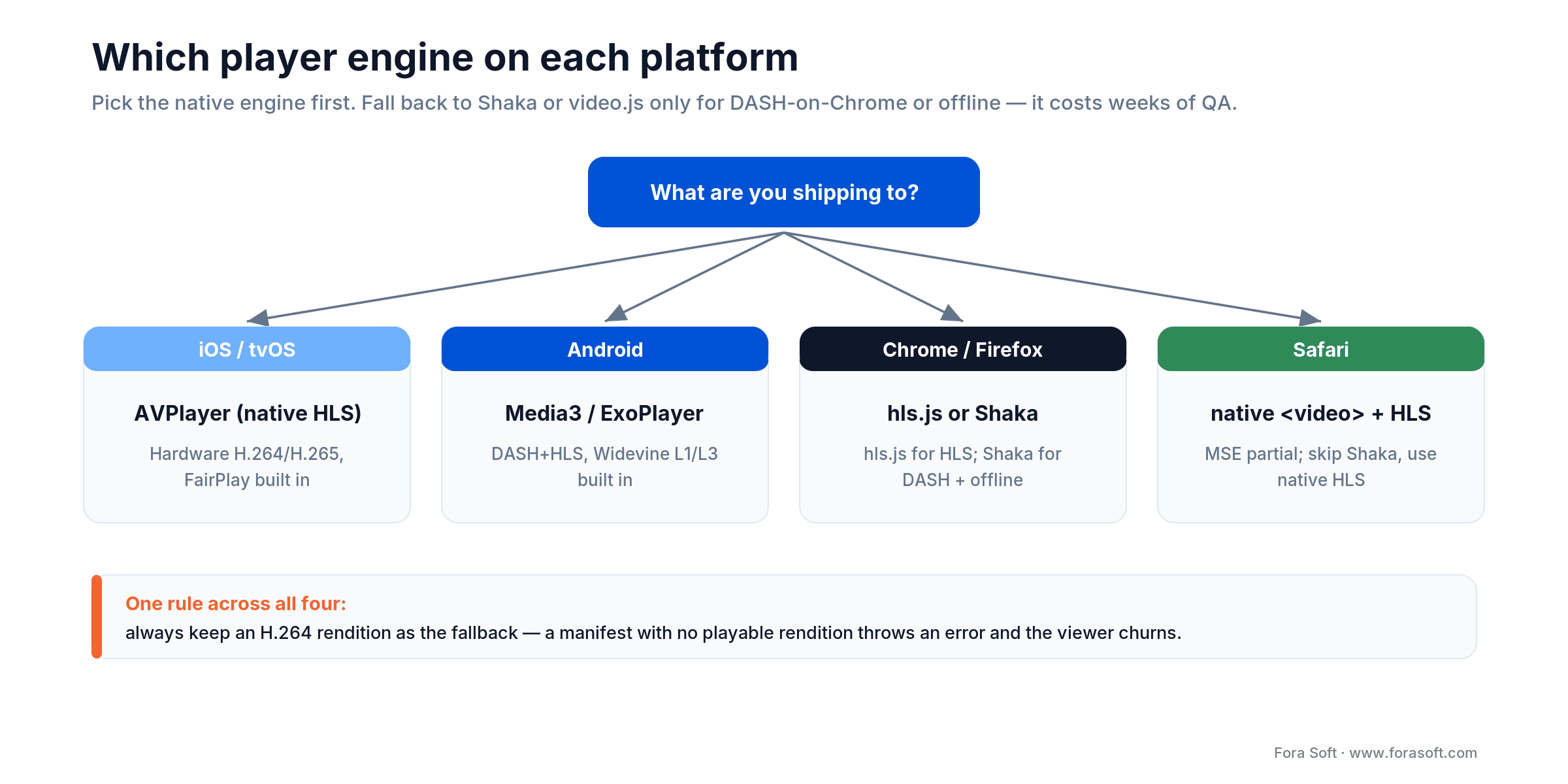
Figure 3. Which player engine to use on each platform. Pick the native engine first; fall back to Shaka or video.js only for DASH-on-Chrome or offline.
AVPlayer (iOS / tvOS)
What it is. Apple’s native HLS engine. Automatic for iOS 8+. Excellent hardware H.264/H.265 decoding; FairPlay DRM integrated; 2–3 second startup latency on good networks.
Pain points. Freezes on corrupt segments (no recovery); does not expose ABR state (you guess rendition from bitrate logs); no DASH support without custom parsing; segment duration variance breaks sync.
ExoPlayer (Android)
What it is. Google’s open-source DASH/HLS/SmoothStreaming player. DASH-native; Widevine L1/L3 support built-in; ~1.5s startup on 4G; CPU-efficient ABR.
What to know. Widevine L3 on budget devices means no offline downloads without separate DRM licensing; segment duration variance can cause sync drift; frame-drop reporting is noisy on low-end hardware; requires meticulous buffer tuning for 3G.
hls.js (Web)
What it is. Pure JavaScript HLS parser + MSE player. No external dependencies; works in any browser with MediaSource Extensions; ABR is pluggable.
Gotchas. DRM needs explicit EME wiring (Widevine/PlayReady via EME; FairPlay on Safari through native HLS). Safari plays HLS natively, so use the native player there rather than hls.js. Memory footprint is high on 4-hour streams.
Shaka Player (Web / DASH-native)
What it is. Google’s open-source DASH player for web. Widevine DRM built-in; offline playback via IndexedDB; 1.5–2s startup on broadband.
Tradeoff. HLS needs the videojs-http-streaming plugin; on Safari, native HLS often makes the plugin unnecessary; DRM requires a separate EME plugin.
Pick the native player first: AVPlayer for iOS/tvOS, ExoPlayer (now AndroidX Media3) for Android, native <video> + hls.js for Chrome, <video> native for Safari. Only fall back to Shaka or video.js if you need DASH on Chrome or offline playback; the added complexity costs 4–6 weeks of QA per platform.
Codec support by device and year — build a rendition ladder
Rule 1: Always ship H.264. It is in every device made after 2010 and has no patent trolls in 2026. Fallback rendition, safe harbor.
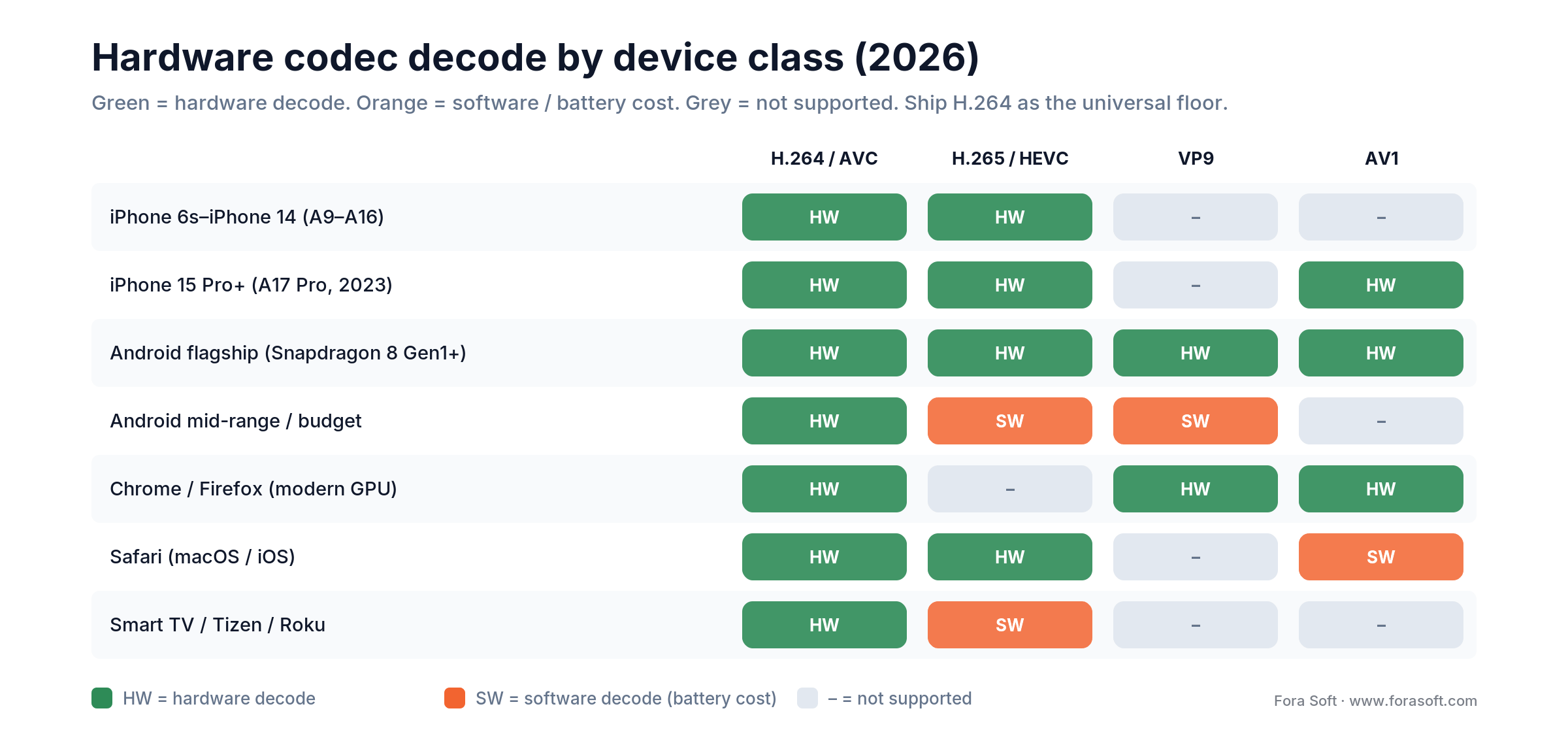
Figure 2. Hardware codec decode by device class (2026). Ship H.264 as the universal floor; add H.265 and AV1 only where the device decodes them in hardware.
Rule 2: H.265 is device-dependent. iPhone 6s+ (2015) and modern Android (Snapdragon 835+, 2017) decode H.265 in hardware. Mid-range Android cannot (e.g., Snapdragon 665). Safari decodes HEVC in hardware, and Chrome/Edge have supported hardware HEVC since Chrome 107 (2022); Firefox still does not. Do not assume H.265 decodes for every web viewer.
Rule 3: AV1 is 2026, but with caveats. iPhone 15 Pro and later (A17 Pro chip, 2023) decode AV1 in hardware; older iOS 17 devices have no hardware AV1 path, so you ship a bundled software decoder such as dav1d (battery drain). Android 13+ (Pixel 6+, Samsung S24) decode AV1 in hardware. Web Chrome/Firefox have hardware AV1 on newer GPUs. AV1 saves roughly 50% over H.264 and about 30% over HEVC at equal quality (AOMedia, 2024), but the CPU overhead on devices without a hardware decoder erases the saving.
Recommended ladder for 2026. 240p, 360p, 480p, 720p, 1080p in H.264 (mandatory). Add 720p, 1080p, 2160p in H.265 for iOS 10+ and Android 8+ (optional, savings-dependent). Add 480p, 720p in AV1 for Chrome 90+ and iPhone 15 Pro+ (optional; older iOS decodes AV1 in software).
Codec detection at play time: Never assume codec support from device name or OS version alone. Query the player at runtime: canPlayType(’video/mp4; codecs="hev1.1.6.L123.B0"’) on web, MediaCodecList.isFormatSupported() on Android, and VTIsHardwareDecodeSupported() on iOS.
DRM by platform — FairPlay, Widevine, PlayReady, and the gaps
FairPlay (iOS / tvOS / Safari). Apple’s proprietary DRM. Requires an Apple-issued FairPlay certificate (free but manual process). No license server standard; you build token-based auth yourself. Concurrency caps are app-defined — you enforce them in your license/entitlement server; there is no fixed per-device limit. No offline downloads without custom handling.
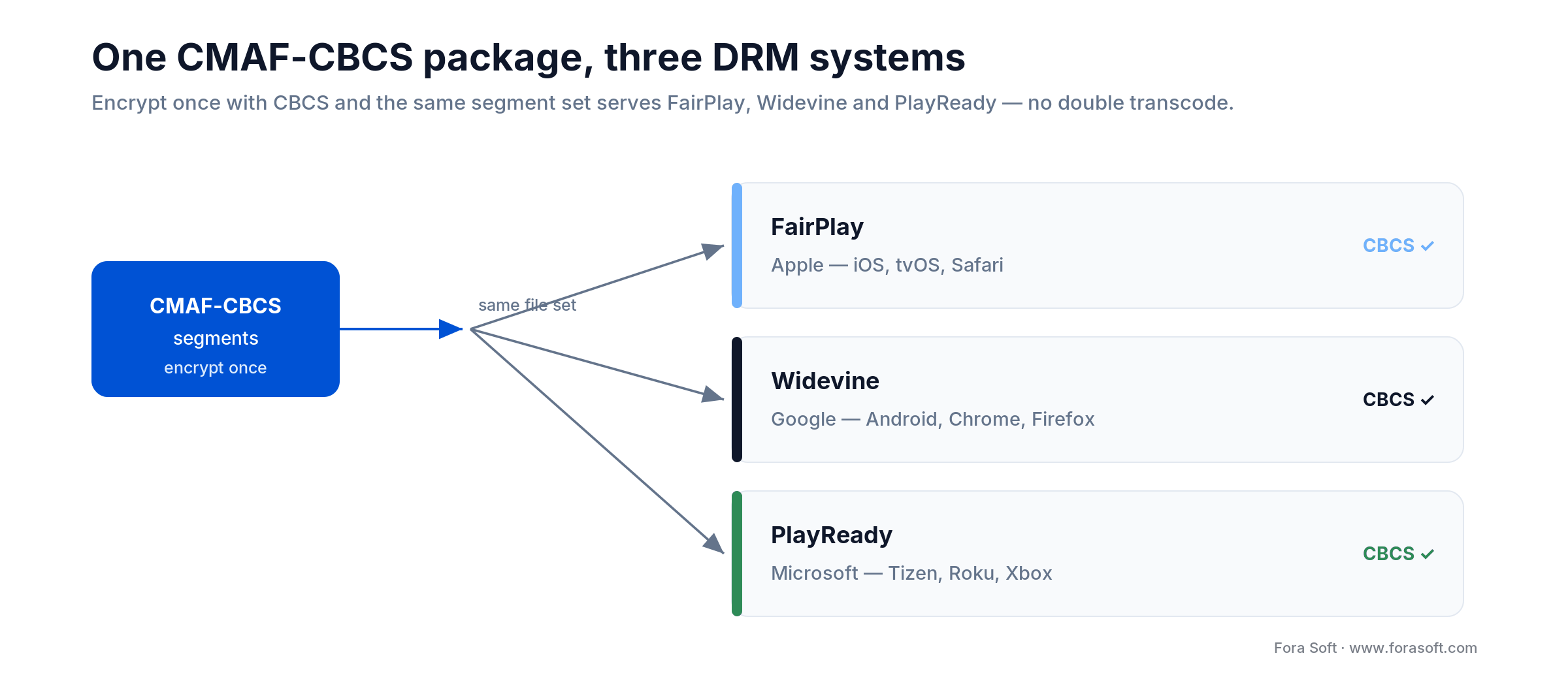
Figure 4. Encrypt once with CMAF-CBCS and the same segment set serves FairPlay, Widevine and PlayReady — no second transcode.
Widevine (Android / Chrome / Firefox). Google’s DRM. Three security levels: L3 (software decryption, all Android devices), L2 (partial hardware, rare), L1 (full hardware, flagships). L3 on older devices means streams are not watermarked and can be recorded. License server must be Widevine-licensed (Axinom, EZDRM, BuyDRM, PallyCon). Offline (persistent) licenses work on L3 too — the security level caps the maximum resolution a license will grant, not whether offline playback is possible.
PlayReady (Tizen / Roku / Xbox). Microsoft’s DRM, primarily for TV. Covers ~5% of global viewers but mandatory for licensed content on TV. License server provisioning is complex; most platforms provide a reference server (Tizen.PlayReady, Roku private API). Browser PlayReady exists but is uncommon.
CMAF-CBCS as the unifier. Segment-level encryption with CBCS (Cipher Block Chaining with encrypted sample boundaries) lets you encrypt once and serve FairPlay + Widevine + PlayReady from the same segments. This eliminates double-transcoding and cuts storage in half vs legacy (separate AES-128 CBC for HLS and separate DASH cenc for DASH).
If you need licensed content: Build multi-DRM from day one. Adding Widevine to a FairPlay-only iOS app later is a 4–6 week project. Mandate signed URLs with short TTL (5–15 min) at the manifest level, not the segment level (segment-level signing breaks CDN cache hit ratio).
WebRTC cross-platform — libwebrtc gaps and platform quirks
libwebrtc is a single codebase, not a single behavior. Google publishes the WebRTC source; each platform wraps and customizes it. iOS uses the AVFoundation codec pipeline; Android uses MediaCodec; Chrome uses its OS-level codec stack; Safari has no libwebrtc (uses native WebRTC API). This means a codec bug on Android is invisible on iOS.
Safari WebRTC (2026 state). No screen share on iOS (Safari limitation); no Insertable Streams (E2EE requires custom SFU); unified-plan SDP syntax not fully supported until Safari 16+; video constraints are partially ignored (let the OS pick camera resolution).
Android camera2 API conflicts. Some device ODMs expose both Camera (legacy, deprecated) and Camera2 APIs. libwebrtc defaults to Camera2, but on devices with camera2 bugs (e.g., some Xiaomi OEMs), you must fall back to Camera. No automatic detection; requires per-device allowlist or runtime fallback logic.
iOS background limitations. WebRTC audio will stop if the app backgrounding without background-audio entitlement. Entitlement requires Apple review and justification; “background video calls” is approved, “background music streaming” is often rejected.
For interactive (WebRTC) + broadcast (HLS) hybrid: Encode the WebRTC ingress stream to multiple bitrates, then bridge to CMAF/HLS via an RTMP or WHIP ingest server. Do not try to transcode bidirectional WebRTC on the client; that adds 200–500ms latency and burns battery.
ABR and buffering — tuning per player and platform
AVPlayer ABR is opaque. It switches renditions based on internal heuristics you cannot fully control. Override via preferredPeakBitRate, but the player may ignore you if it thinks buffering is imminent. Monitor via KVO on currentItem.accessLog.events and log the rendition shift pattern; it will surprise you.
ExoPlayer ABR is tunable. DefaultLoadControl lets you set min/max buffer thresholds, minimum bitrate for buffering, bandwidth estimation parameters. For 3G, set target buffer to 8–15 seconds (vs default 30+); for fiber, 45–60 seconds. Test on real devices; simulator bandwidth is fake.
hls.js ABR detects network jitter. It counts packet loss and RTT to decide rendition floor. On unstable Wi-Fi (loss > 2%), it locks to 480p until the network stabilizes. This is good for UX but can feel “stuck” to users. Expose a manual bitrate-lock in settings.
Platform-specific buffering rules. iOS backgrounding flushes the buffer (design for re-startup latency < 3s). Android can hold the buffer across an app pause, but a Widevine license expires after the duration your license server sets, so a long pause can force a re-license on resume.
Native vs Flutter vs React Native vs KMP — when each makes sense for streaming
Native (Swift / Kotlin). Pros: Full access to AVPlayer, ExoPlayer, platform ABR tuning, DRM APIs, background audio, PiP, AirPlay/Cast. Cons: Ship twice; ~30% longer build time. Streaming apps with high churn — live shopping, sports, tutoring — ship native because QoE bugs cost revenue in real time.
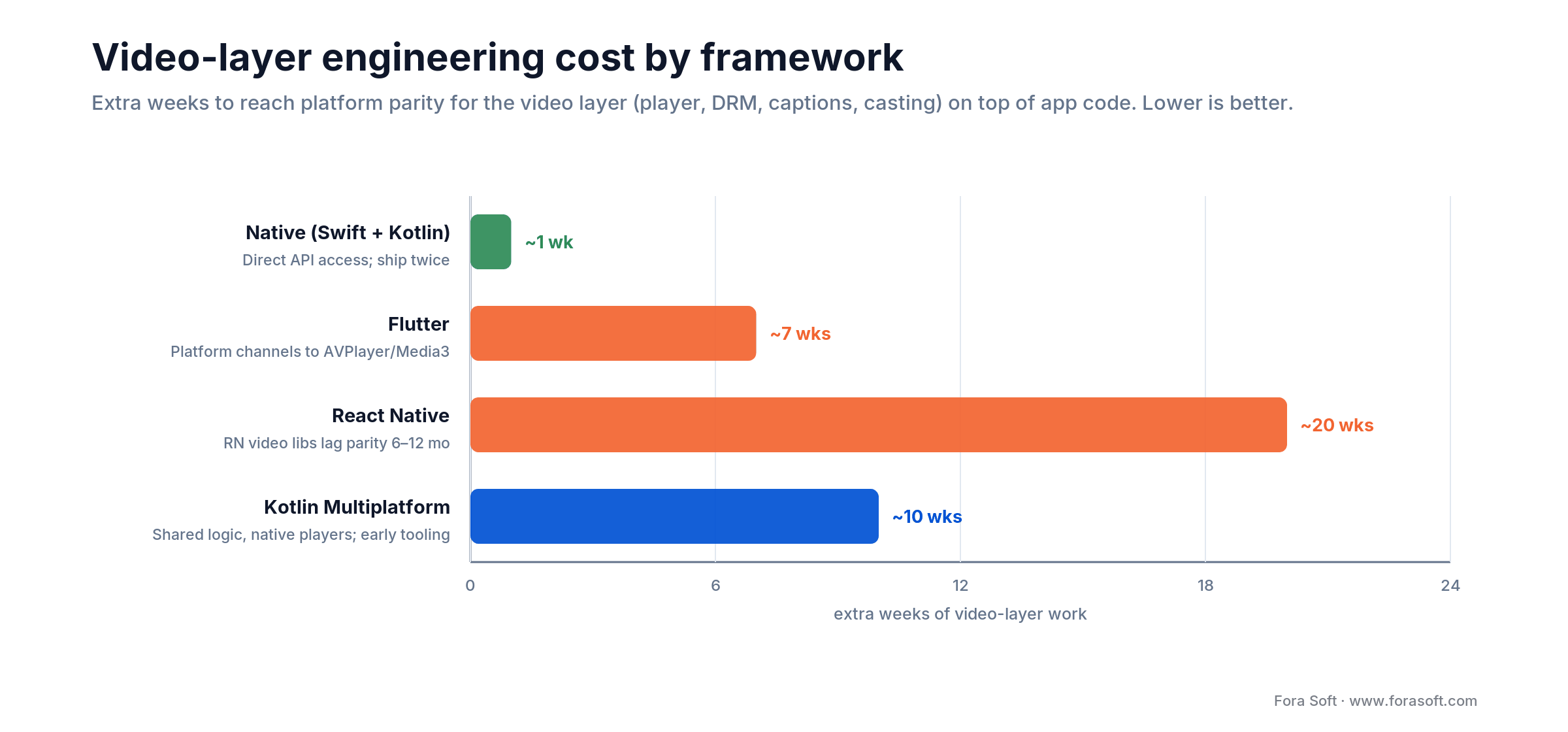
Figure 5. Extra weeks to reach video-layer platform parity by framework, on top of app code. Lower is better.
Flutter. Pros: Single codebase; hot reload. Cons: HLS/DASH playback requires platform channel to ExoPlayer/AVPlayer (you own the glue layer). Audio focus, background handling, DRM init all require custom Kotlin/Swift bridges. For BrainCert scale, we found Flutter video bridge bugs cost 2–3 weeks of QA per release; ship native instead.
React Native. Pros: Reuse JS web logic. Cons: RN video libraries (react-native-video, react-native-exoplayer) lag platform feature parity by 6–12 months. DRM, captions, casting are platform-specific add-ons. If you commit to RN, budget 4–6 months for video infrastructure alone.
Kotlin Multiplatform (KMP). Emerging option: share business logic, keep UI native. For streaming, this means shared manifest parsing, ABR state, DRM token logic, but platform-native players. Early tooling; not yet production-hardened at scale.
For video products: Native wins. The 2x cost is recouped in 2–3 months if you have 50k+ daily active users and live content. For enterprise apps with video as a feature (not the product), Flutter + custom video bridges is viable if the team is experienced with native modules.
Stuck deciding between native and cross-platform for your streaming app?
We’ll walk through the cost and timeline tradeoffs for your specific launch plan.
Apple TV, Android TV, Tizen, Roku, and console streaming
tvOS (Apple TV). Uses same AVPlayer as iOS; HLS-native. Requires TV-specific app icon (1920x1080 @ 32-bit) and remote-friendly focus engine. No Bluetooth headphone support for audio-only background. HDR support (if codec allows) is automatic.
Android TV / Google TV. Uses ExoPlayer. Cast protocol (Chromecast) integration is optional but expected by users. Timed metadata (ads, chapters) must be via EMSG boxes in HLS or EventStream in DASH. App must be certified for TV (TV-safe fonts, remote control flow) before Google Play approval.
Tizen (Samsung TV). Proprietary OS. Uses Tizen Player or custom HLS/DASH via AVPlay API. DASH is preferred (PlayReady support); HLS fallback is required. Subtitle support is SDK-specific; WebVTT parsing is not guaranteed. Test on real Tizen devices; simulator is incomplete.
Roku. Closed platform. Custom native SDK or web-based direct player (SceneGraph). DASH + PlayReady is the default; HLS fallback is expected. Remote control is gesture-based (no mouse). Monetization (ads, billing) is Roku-only; Apple in-app purchase cannot be used.
Constellation apps (Xbox, PlayStation). PlayStation uses Orbis OS; Xbox uses Windows-derived. Both expect native SDKs or Electron wrappers. DRM is platform-specific (PlayReady on Xbox, proprietary on PS5). Market is small (1–2% of viewers) but high-engagement (gamers watch longer).
Background audio, Picture-in-Picture, AirPlay, and Cast integrations
Background audio (iOS). Requires AVAudioSession category .playAndRecord or .playback + entitlement. AVPlayer respects this; streams continue when the app is backgrounded. Requires explicit plist entry and App Store justification (video calls, audio streaming, podcasts are approved; music playback without an approved use case is rejected).
Picture-in-Picture (PiP). iOS 13+: Use AVPlayerViewController with canStartPictureInPictureAutomatically = true. Android: ExoPlayer 2.16+ has native PiP via PictureInPictureParams. Web: Fullscreen API does not include true PiP (browser-provided button on some players, e.g. hls.js 1.4+).
AirPlay (Apple ecosystem). AVPlayer autodetects AirPlay-capable receivers (Apple TV, HomePod, AirPods). No explicit code needed; just expose the AVPlayerViewController route button. Casting works over local network; requires Local Network entitlement on iOS 14+.
Chromecast (Google ecosystem). Requires Google Cast Framework (on Android) or Cast Sender SDK (on web). ExoPlayer 2.17+ has built-in Cast integration; hls.js requires custom cast.js wrapper. Casting pauses the local playback and bridges to the Chromecast receiver (separate app); sync is not guaranteed.
For premium experience: Implement background audio, PiP, and AirPlay/Cast as table-stakes. Users expect to pause the app, lock the screen, or AirPlay to a TV without losing playback. It is a 1-week project per platform if you start early; retrofitting is a 2–3 week slog.
Accessibility and captions — WebVTT, CEA-608, and IMSC1
WebVTT (HLS + web standard). Plain-text subtitle format; sidecar file in HLS manifest. Works in AVPlayer (iOS), ExoPlayer (Android with plugin), and native <video> (web). No styling beyond basic alignment. Safe, universal choice.
CEA-608 (broadcast legacy, embedded in video). Closed captions in video bitstream. Required for US broadcast (FCC mandate). AVPlayer parses CEA-608 automatically; ExoPlayer requires subriploader plugin. tvOS sidecar support is poor; plan for manual captions on Apple TV.
IMSC1 (DASH + broadcast styling). Rich markup (bold, italic, color, positioning). DASH spec-compliant. ExoPlayer has limited IMSC support; AVPlayer does not parse IMSC natively. Web browsers have no standard IMSC parser; requires custom JavaScript library (ttml.js, niels-in-xsd). Tizen/Roku have vendor-specific parsers.
Accessibility beyond captions. WCAG 2.1 Level AA requires keyboard navigation (web), screen reader metadata (iOS VoiceOver, Android TalkBack), and color contrast ratio 4.5:1 on caption text. Most streaming players do not expose media state to AT (assistive technology); test with VoiceOver and TalkBack before shipping.
Testing and QA for cross-platform streaming apps
Device labs. You cannot test cross-platform video without real devices. Services like BrowserStack, Sauce Labs, and AWS Device Farm rent time on physical devices with real network conditions. Budget 2–3 weeks to set up a test plan (network profiles for 4G, 3G, unstable Wi-Fi, 5G home broadband) and run through each codec/DRM/player combination.
Critical paths to test. ABR switch (bitrate downgrade on packet loss), DRM license renewal (at whatever interval your license server sets), segment corruption recovery, PiP enter/exit, AirPlay/Cast connect/disconnect, captions enable/disable, background/resume, and orientation change (portrait to horizontal during playback).
Automation opportunities. Simulate slow networks (NetCat on iOS, tc qdisc on Android, Charles Proxy on web). Inject segment errors (return 404 or 500 for segment N) and measure recovery time. Monitor memory leaks across 4-hour playback (Instruments on iOS, Android Profiler on Android, Chrome DevTools on web).
Mini case — BrainCert shipping at scale across web, iOS, Android, tvOS
Challenge. BrainCert needed a virtual-classroom app for tutoring (1:1 video calls, whiteboard, recording) that worked on iPad in lecture halls (100-person passive viewers on HLS) and iPhones during commutes (bad Wi-Fi, battery-critical). Same app on Android needed to handle Widevine L3 and Chinese devices with non-standard mediacodec implementations. Web had to run on Chrome and Safari without codec parity.
What we did. Native iOS and Android; dedicated team per platform. AVPlayer + CMAF-CBCS for iOS (H.264 + H.265 renditions); ExoPlayer + Widevine + fallback H.264-only rendition for Android budget phones. Web: hls.js for Chrome (HLS via CMAF), native <video> + HLS.js for Safari. Captions via WebVTT sidecar (universal fallback). Background audio enabled for tutoring sessions.
Outcome. 100k+ customers, 500M+ classroom minutes, 95th percentile TTFF < 2.5s across platforms. Want a similar assessment for your stack? Book a 30-min platform strategy review.
A decision framework — five questions to scope your cross-platform build
Q1. Do you need live interactive (WebRTC) or broadcast (HLS/DASH)? Interactive → native Swift/Kotlin, budget for libwebrtc platform quirks. Broadcast → native players (AVPlayer, ExoPlayer), platform parity is easier.
Q2. Is DRM required for licensed content? Yes → multi-DRM from day one (FairPlay + Widevine + PlayReady if TV); CMAF-CBCS packaging. No → ship H.264 fallback only, skip DRM infrastructure.
Q3. What is your minimum iOS/Android OS version? iOS 13-16 → H.264 only; H.265 support is optional. iOS 17 (pre-A17 Pro) decodes AV1 in software; iPhone 15 Pro+ decodes it in hardware. Android 8-12 → H.264 mandatory; H.265 device-dependent. Android 13+ → add VP9/AV1 for moderns.
Q4. Is your team experienced with native video frameworks? Yes → native app. No → hire or use a dedicated team; avoid RN/Flutter video bridges unless you have 6+ months of ramp-up time.
Q5. Do you need background playback, PiP, or casting? Yes → native only (Flutter/RN platform channels are complex). No → cross-platform tools are viable if codec support is simple (H.264 only).
Confused by the cross-platform codec and player matrix?
We’ll audit your current player strategy and show you which platform is blocking QoE — usually it’s one you didn’t expect.
Pitfalls to avoid when shipping cross-platform video
1. Assuming cross-platform wrappers handle codec detection for you. They don’t. You must query each platform at runtime; device name and OS version are unreliable proxies. A Xiaomi running Android 12 may not decode H.265 while a Poco with the same OS does.
2. Designing DRM as v2 or v3 feature. Retrofitting DRM is 4–6 weeks per platform. Build CMAF-CBCS from day one; the manifest signing and license server are portable across platforms and reused forever.
3. Testing on simulators for network conditions. iOS simulator bandwidth is fake; Android emulator is CPU-starved and will drop frames that real devices play smoothly. Test on real 4G/3G via device lab; design for worst-case RTT and 2–5% packet loss.
4. Shipping without background-audio entitlement scope. You will get Apple rejections mid-launch if you declare background audio but use it for music streaming (rejected) instead of video calls (approved). Ask Apple first, get written approval, then ship.
5. Using the same caption format for all platforms. WebVTT works everywhere except Tizen/Roku and some TV platforms. Design captions as sidecar WebVTT + fallback CEA-608 or IMSC1 per platform; do not hardcode one format.
KPIs — what to measure once your cross-platform app is live
Quality KPIs. TTFF by platform (iOS < 1.5s, Android < 2s, web < 2s), rebuffering ratio < 1% by platform, avg rendition by codec (H.264 vs H.265 vs AV1), frame-drop rate on Android < 2%. Break these by network type (4G, Wi-Fi, 3G) and device class (flagship, mid-range, budget). One silent killer: average rendition drops 20% week-over-week on one platform (sign: codec fallback or player bug).
Business KPIs. Retention by QoE percentile (sessions with TTFF > 3s have 40% lower retention); watch time by platform (iOS watching longer than Android is normal; Android watching longer than iOS is a player bug). Cost per viewer-hour by codec (H.265 saves ~25–35% vs H.264 egress; AV1 more, where it decodes in hardware).
Reliability KPIs. Stream start success rate > 99% per platform, error-rate per error type (ABR switch failures, DRM license timeout, segment 404), and crash rate < 0.1% (measured per app build, not platform). Track DRM license errors per device; repeated failures usually mean your license server’s concurrency or renewal policy is too tight, not a fixed device cap.
When not to go cross-platform for video
Video is a feature, not the product. A CRM with video calls built in should use Daily or Twilio SDK, not build a custom player. Cross-platform video complexity is not worth it for one call button.
You don’t have a video specialist. Cross-platform video requires someone who knows codec quirks, DRM provisioning, and platform-specific player APIs. Hiring or contracting this expertise is cheaper than learning on the job and shipping broken video to half your users.
Your target is a single platform (e.g., iPad for enterprises, Chrome for web-only SaaS). Build native for that platform. Complexity scales linearly; one platform is 100% simpler than two.
FAQ
Why doesn’t AV1 save bandwidth on all devices?
AV1 is about 50% more efficient than H.264 (and ~30% beyond HEVC) in bitrate, but decoding is CPU-intensive. Before the A17 Pro (2023) Apple devices had no AV1 decoder at all, so you bundle a software decoder like dav1d, which burns 15–25% extra battery per hour. On Android, AV1 hardware support is device-specific (Pixel 6+, S24, Snapdragon 8 Gen 1+). Test AV1 with battery draw before shipping; for most catalogs today H.265 is still the safer default — not because it compresses better, but because hardware decode is far more widespread.
What’s the difference between Widevine L1 and L3?
L1 decrypts keys in a secure enclave (TEE); stream is never visible in RAM. L3 decrypts in software; the plaintext key is available to the OS. L3 on budget Android devices means streams can be recorded via screen capture. If you need studio-grade protection, L1 only — but design a fallback to clear (DRM-free) content for L3 devices, otherwise you lock out half of Android.
Can you use React Native for a streaming app in 2026?
Yes, if you accept that the video layer is not “cross-platform” — you will build Kotlin and Swift video bridges anyway. react-native-video is 6–12 months behind platform features. Budget 4–6 months for video infrastructure; the app code savings are real, but the player layer complexity is native.
How do you test codec support without buying every device?
Device labs (BrowserStack, Sauce, AWS Device Farm) rent access to hundreds of physical devices. For codec matrix testing, rent 20–30 devices (3 iPhones, 5 Android, 3 web browsers, TVs if applicable) and run 1-hour streams across each. Cost: ~$2k for a full test pass; schedule 2–3 weeks before launch.
What happens if a user’s device doesn’t support the codec in my manifest?
The player will request the manifest, parse it, find no playable rendition, and throw an error. Prevent this by always including an H.264 rendition as a fallback. If you ship only H.265 or AV1, 10–20% of your users will see a “video not available” error and churn.
Is CMAF the same as DASH?
No. CMAF is a packaging format (fragmented MP4 segments with optional encryption). DASH is a protocol (manifest + segment URLs). You can have CMAF packaged as HLS (via HTTP Live Streaming), DASH (via MPEG-DASH manifest), or both. CMAF + CBCS encryption lets one segment set serve HLS, DASH, and DASH-CMAF.
Why do you need a platform-specific checklist for captions?
Each platform has different caption renderers and support levels. iOS AVPlayer parses WebVTT natively; Android ExoPlayer requires a SubtitleProvider plugin; web <video> supports WebVTT in <track> tags; Tizen/Roku have vendor-specific parsers. Plan for WebVTT as the universal fallback; add platform-native formats (CEA-608 on iOS/tvOS, IMSC1 on DASH) for better UX.
What to Read Next
Server-side
Scalable Video Streaming App: Challenges & Solutions
Egress, SFU, transcoding, CDN — the backend half of this problem.
Strategy
Build vs Buy: Switching From SDK to Custom Video
The 5-question framework for choosing native, SaaS, or hybrid.
Cost
How Much Does It Cost to Build a Streaming App?
Budget by platform and phase: MVP, growth, scale.
Migration
Agora.io Alternative: Custom WebRTC + LiveKit
Playbook for moving off expensive SDK pricing.
Ready to ship a cross-platform streaming app that works everywhere?
Choosing a video streaming app development company is really choosing who owns the per-platform glue layer. Cross-platform video is a codec matrix (H.264 fallback + H.265 + AV1 renditions), a player matrix (AVPlayer + ExoPlayer + hls.js + Shaka), a DRM matrix (FairPlay + Widevine + PlayReady), and a features matrix (background audio, PiP, captions, accessibility). Get one matrix wrong and 30–50% of your viewers will silently churn.
Fora Soft has shipped the full matrix on BrainCert and six other products over 21 years. We know which platform is the bottleneck for quality, where cross-platform SDK promises break, and when native beats framework. If you’re planning a streaming app, migrating between platforms, or fixing QoE on one platform, the fastest path to a solid architecture is a conversation with our team.
Book a 30-minute call and we’ll map your specific codec, player, and DRM requirements against your target platforms — with a shipping timeline and cost model for each choice.
Get your codec and player matrix right the first time
30-minute platform strategy call: codec ladder for your platforms, player engine recommendations, and a checklist of platform-specific gotchas.

