


Key takeaways
• On-device neural speech recognition is production-ready on iOS in 2026. WhisperKit runs OpenAI’s Whisper models on the Apple Neural Engine with 2–8% WER, sub-200 ms latency, and zero per-minute cost. For most apps, it is the default starting point.
• iOS 26 ships SpeechAnalyzer, Apple’s replacement for SFSpeechRecognizer. Long-form audio, no 1-minute cap, on-device only, and contextual-string vocabulary biasing — its models are system assets (nothing in your bundle), and in Argmax’s 2025 benchmark its accuracy lands between Whisper base and small. Adopt it for new iOS 26+ features; keep SFSpeechRecognizer for iOS 18/17 backwards compatibility.
• Cloud still wins on messy audio. Deepgram Nova-3, AssemblyAI Universal-3.5/3.6 Pro, OpenAI GPT Transcribe and Google Chirp beat on-device in noisy, accented, or telephony audio. October 2026 list prices run from $0.15 to about $1 per audio hour, plus latency and privacy costs.
• Privacy-first use cases should go on-device by default. Healthcare, legal, finance, and regulated enterprise workloads are easier to ship on-device because the audio never leaves the phone — no BAA, no DPA, no cross-border data concerns.
• The hard engineering work is not the model — it is the pipeline. Audio capture, VAD, resampling, chunking, partial-result UX, error handling, and model download ergonomics consume 80% of the build effort. Plan accordingly.
Updated October 2026: new SDK and API comparison with October 2026 prices (OpenAI GPT Transcribe, AssemblyAI Universal-3.5/3.6 Pro, Argmax Pro SDK), corrected SpeechAnalyzer vocabulary and locale facts, iOS 27 and WhisperKit 1.1 notes.
Why Fora Soft wrote this iOS speech recognition playbook
Fora Soft has shipped iOS audio pipelines across video conferencing, streaming, telemedicine, e-learning, and creator-economy products for more than a decade. We have implemented on-device speech recognition for regulated contexts, real-time captioning for live events, voice search for consumer apps, and streaming transcription for proctoring and surveillance products. Along the way we have benchmarked every major ASR vendor against Apple’s first-party stack on our test corpus.
The playbook below is the shortlist of what actually works in 2026. A few concrete projects that inform the advice: BlaBlaPlay, an anonymous voice social app, runs Whisper on-device via Core ML to moderate voice notes in real time; VALT (770+ US organisations, 50,000+ users) indexes the spoken words inside recorded evidence for word-search and PDF export; TransLinguist runs live session transcription across Deepgram, Google Speech-to-Text and Speechmatics for 30,000+ certified interpreters. These workloads do not forgive sloppy audio pipelines.
If you want a partner to ship an ASR-powered iOS feature end-to-end — capture, model, pipeline, UX, ship — that is what our custom speech-to-text development team does, and we layer Agent Engineering on top of the audio-pipeline tests and model-regression work to cut scoping 30–40% versus a traditional agency.
Planning an ASR feature but stuck on on-device vs cloud?
30-minute call with a Fora Soft engineer who has shipped both — leave with a concrete framework mapped to your audio, privacy, and cost constraints.
Why iOS speech recognition matters in 2026
Two big shifts have changed the calculus since 2023. First, on-device speech recognition is now accurate enough for most real applications — OpenAI’s Whisper and Apple’s own neural models deliver 2–8% word-error-rate on clean English audio, running entirely on the Neural Engine. Second, privacy expectations have tightened: the EU AI Act, a wave of HIPAA enforcement actions, and plain customer preference have all made “this audio never leaves the device” a real product feature, not a nice-to-have.
The corollary is that the cloud-only playbook is now a minority pattern. The 2026 default is on-device first, with cloud as a selective accuracy or feature escalation. If you are still reaching for OpenAI’s Whisper API or Google Speech-to-Text as the first step, you are paying for latency, compliance paperwork, and per-minute fees that you did not need.
Reach for on-device ASR when: your app has real users, real audio, real privacy stakes, and any meaningful volume. Cloud earns its cost above ~98% accuracy requirements, multi-speaker diarization, or vertical-specific models (medical coding, legal forms).
Apple’s Speech framework — SFSpeechRecognizer and the new SpeechAnalyzer
Apple ships two first-party speech recognition stacks in 2026. SFSpeechRecognizer, the older API (iOS 10+), is still the default for most apps with broad device coverage. It supports on-device and server-side recognition, 50+ languages, and custom vocabulary hints, but caps at ~1 minute per request and streams with partial results. SpeechAnalyzer, released at WWDC 2025 and shipping in iOS 26, is Apple’s replacement: long-form audio with no duration cap, automatic language management, better distant-mic handling, and — critically — on-device only (no server fallback). iOS 27, released on 14 September 2026, runs on every iPhone that runs iOS 26 (iPhone 11 and iPhone SE 2nd gen onward), so an iOS 26 floor now means “current release minus one” (MacRumors, Sept 2026).
SFSpeechRecognizer setup (covers iOS 17/18 and everything else)
import Speech
import AVFoundation

final class SpeechCapture {
    private let recognizer = SFSpeechRecognizer(locale: Locale(identifier: "en-US"))!
    private let audioEngine = AVAudioEngine()
    private var request: SFSpeechAudioBufferRecognitionRequest?
    private var task: SFSpeechRecognitionTask?

    func start() async throws {
        let status = await SFSpeechRecognizer.requestAuthorization()
        guard status == .authorized else { throw ASRError.notAuthorized }

        let session = AVAudioSession.sharedInstance()
        try session.setCategory(.record, mode: .measurement, options: .duckOthers)
        try session.setActive(true, options: .notifyOthersOnDeactivation)

        let request = SFSpeechAudioBufferRecognitionRequest()
        request.shouldReportPartialResults = true
        request.requiresOnDeviceRecognition = true   // force on-device, no Apple servers
        self.request = request

        let input = audioEngine.inputNode
        let format = input.outputFormat(forBus: 0)
        input.installTap(onBus: 0, bufferSize: 1024, format: format) { buffer, _ in
            request.append(buffer)
        }
        audioEngine.prepare()
        try audioEngine.start()

        task = recognizer.recognitionTask(with: request) { result, error in
            if let result { print("partial:", result.bestTranscription.formattedString) }
            if error != nil || result?.isFinal == true { self.stop() }
        }
    }

    func stop() { audioEngine.stop(); request?.endAudio(); task?.cancel() }
}
The flag that matters most is requiresOnDeviceRecognition = true. Without it, Apple may route audio to its servers. For any privacy-sensitive use case, set it explicitly and check supportsOnDeviceRecognition before you trust the result.
SpeechAnalyzer (iOS 26+) — what changed
SpeechAnalyzer is a top-to-bottom rewrite. Its selling points are long-form audio (transcribe a 90-minute lecture in one go), better handling of distant microphones, and model assets that the system downloads and shares between apps through AssetInventory, so nothing ships in your bundle. You still pick a locale: both transcribers are created with init(locale:), and there is no automatic language detection. The modules are SpeechTranscriber (general conversation, long-form), DictationTranscriber (the same models as system dictation, works on older devices), and SpeechDetector (voice activity). SpeechTranscriber is not available on every device; check SpeechTranscriber.isAvailable and fall back to DictationTranscriber (Apple docs, 2026). Custom vocabulary did not go away: AnalysisContext.contextualStrings biases recognition toward your terms, and DictationTranscriber also accepts an SFSpeechLanguageModel custom language model. On accuracy, Argmax’s June 2025 earnings-call benchmark put SpeechTranscriber at 14.0% WER, between Whisper base (15.2%) and small (12.8%), at a 70× speed factor on an M4 Mac mini (Argmax, 2025). In the same test it scored lower than SFSpeechRecognizer on custom keywords. What you lose is the server fallback. For most new iOS 26+ features SpeechAnalyzer is still the default path; keep WhisperKit for accuracy-critical or multilingual work.
The quiet winner in iOS 26: because SpeechAnalyzer’s model ships with the OS, adopting it adds zero megabytes to your app download — unlike WhisperKit, where you ship or lazy-download 150 MB–1.6 GB of weights. If your floor is iOS 26, that alone can decide it.
WhisperKit — OpenAI’s Whisper on the Neural Engine
WhisperKit is an open-source Swift package from Argmax that runs OpenAI’s Whisper family of models on Apple Silicon using Core ML and the Neural Engine. It is MIT-licensed and, as of v1.0.0 (May 2026), ships inside the Argmax open-source Swift SDK (argmax-oss-swift) alongside SpeakerKit and TTSKit, with full Swift 6 concurrency. v1.1.0 (6 August 2026) added incremental, bounded-memory loading of long audio files, which Argmax says cuts peak memory by 70%+ on 3-hour recordings (release notes). It consistently benchmarks at the top of on-device ASR leaderboards. For 2026 it is the default on-device pick any time Apple’s first-party stack falls short — more languages, better accuracy on accented or noisy audio, and streaming that genuinely works at sub-100 ms latency on an iPhone 15 Pro.
| Whisper model | Params | Disk | WER (real-world EN) | Best for |
|---|---|---|---|---|
| tiny | 39 M | ~75 MB | 15–20% | iPhone SE, background transcription |
| base | 74 M | ~150 MB | 12–15% | Mid-range phones |
| small | 244 M | ~500 MB | ~10% | Balanced accuracy/speed |
| large-v3 turbo | 809 M | ~1.6 GB | ~8% | iPhone 15/16 Pro production default |
| large-v3 | 1.55 B | ~3 GB | 3–8% | Batch, highest quality only |
Our typical production recipe on iPhone 13+ is Whisper large-v3 turbo — it delivers near-large accuracy at ~5× the throughput, fits in ~1.6 GB of disk, and streams comfortably in real time. iPhone SE and iPhone 11 get base as a fallback. Ship tiny in the app bundle, lazy-download larger models on first use to avoid bloating the initial install — this is the same pattern we describe in our iOS app optimisation playbook.
WhisperKit integration sketch
// Package.swift — WhisperKit ships in the Argmax OSS Swift SDK (v1.0.0 May 2026, v1.1.0 Aug 2026)
.package(url: "https://github.com/argmaxinc/argmax-oss-swift.git", from: "1.0.0")

// Swift code
import WhisperKit

actor Transcriber {
    private let pipeline: WhisperKit

    init(model: String = "openai_whisper-large-v3-turbo") async throws {
        self.pipeline = try await WhisperKit(model: model)
    }

    func transcribe(audioURL: URL) async throws -> String {
        let results = try await pipeline.transcribe(audioPath: audioURL.path)
        return results?.first?.text ?? ""
    }

    // Real-time streaming via WhisperKit AudioStreamTranscriber
    // (handles mic capture, VAD, 30 s windowing and partial results).
    func startStreaming(onPartial: @escaping (String) -> Void) async throws {
        let streamer = AudioStreamTranscriber(
            audioEncoder: pipeline.audioEncoder,
            featureExtractor: pipeline.featureExtractor,
            segmentSeeker: pipeline.segmentSeeker,
            textDecoder: pipeline.textDecoder,
            tokenizer: pipeline.tokenizer!,
            audioProcessor: pipeline.audioProcessor,
            decodingOptions: DecodingOptions()
        ) { _, state in onPartial(state.currentText) }
        try await streamer.startStreamTranscription()
    }
}
iOS speech recognition SDKs and APIs compared (October 2026)
Short answer: the iOS speech recognition SDKs worth shortlisting in 2026 are Apple’s SpeechAnalyzer (iOS 26+, free, on-device), SFSpeechRecognizer (iOS 10+, free), WhisperKit (open source, on-device), Picovoice (commercial on-device), and four cloud APIs: Deepgram, AssemblyAI, OpenAI and Google. Free on-device options cover most apps; cloud APIs earn their per-minute fee on noisy audio, diarization and 100+ languages. Prices below are vendor list prices checked on 19 October 2026.
| SDK / API | Runs | Licence and price (Oct 2026) | Streaming | Min iOS |
|---|---|---|---|---|
| Apple SpeechAnalyzer (SpeechTranscriber, DictationTranscriber) | On-device only | Free, part of iOS | Yes, no length cap | iOS 26 |
| Apple SFSpeechRecognizer | On-device (opt-in) or Apple servers | Free; server path has per-device and per-app daily limits | Yes, 1-minute cap per task | iOS 10 |
| WhisperKit (Argmax OSS Swift SDK 1.1) | On-device | Free, MIT; Argmax Pro SDK $1 per active device per month, 1,000-device minimum | Yes | iOS 16 |
| Picovoice Cheetah / Leopard | On-device | Commercial licence | Cheetah: yes; Leopard: batch | iOS 16 |
| Deepgram Nova-3 | Cloud | $0.0077/min streaming (~$0.46/hr), $0.0043/min batch | Yes | Any (WebSocket) |
| AssemblyAI Universal-3.6 Pro Realtime / Universal-3.5 Pro | Cloud | $0.45/hr streaming, $0.21/hr batch; Universal-Streaming $0.15/hr | Yes | Any (WebSocket) |
| OpenAI GPT Live Transcribe / GPT Transcribe | Cloud | $0.017/min live (~$1.02/hr), $0.0045/min batch (~$0.27/hr) | Live: yes | Any (WebSocket) |
| Google Cloud Speech-to-Text V2 (Chirp) | Cloud | $0.016/min standard (~$0.96/hr), $0.003/min dynamic batch | Yes | Any (gRPC/REST) |
Sources: AssemblyAI pricing (updated 28 Sept 2026), Google Cloud pricing, Argmax pricing, Deepgram pricing; OpenAI released GPT Transcribe and GPT Live Transcribe on 28 July 2026. If you need offline transcription for a field-service or healthcare app, the free on-device trio (SpeechAnalyzer, SFSpeechRecognizer with requiresOnDeviceRecognition, WhisperKit) costs nothing per minute; pay for the Argmax Pro SDK or Picovoice only when you need their faster models, support terms or wake-word stack.
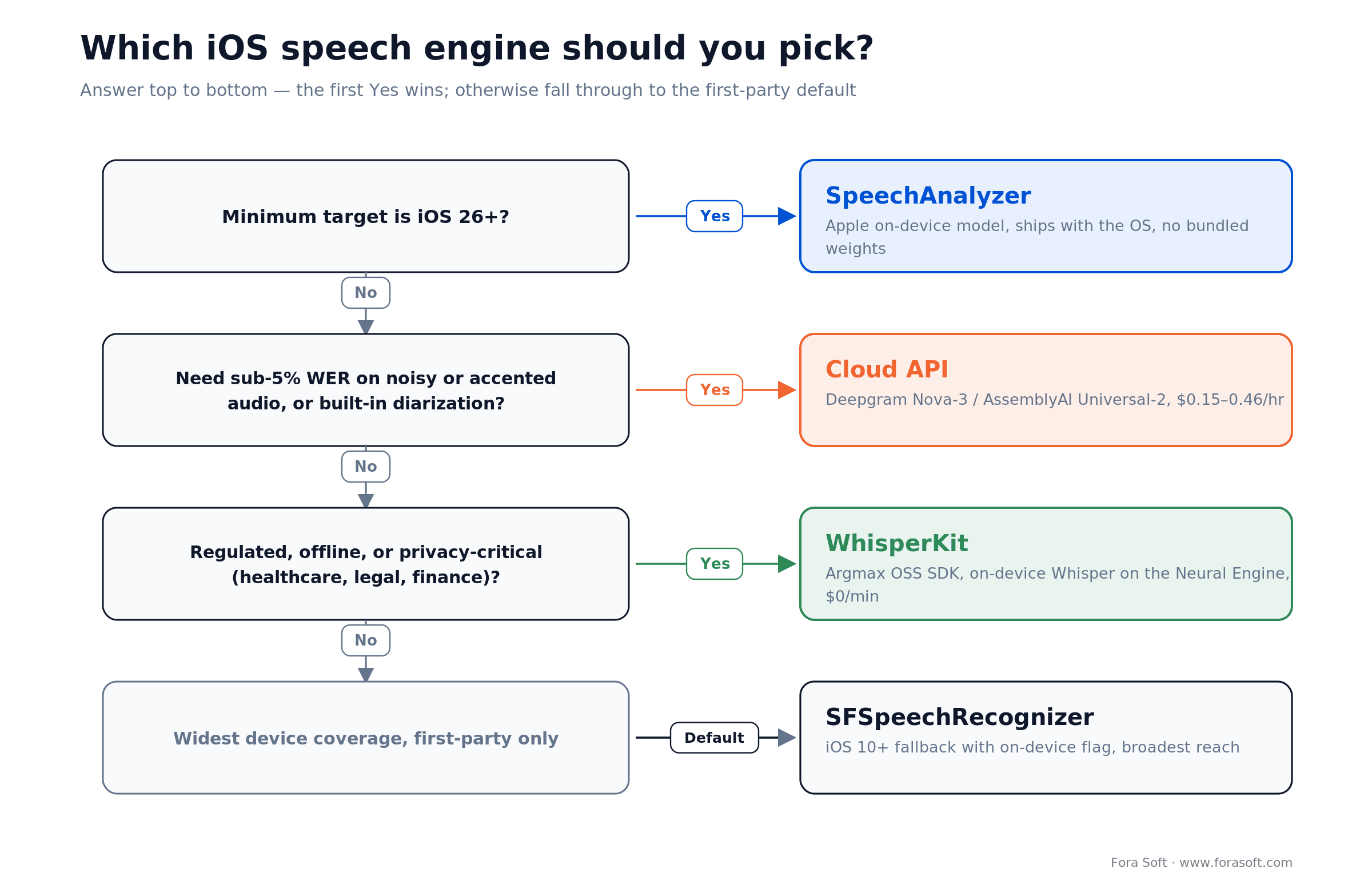
Figure 1. How we pick an iOS speech engine — answer top to bottom, the first Yes wins.
Cloud vendors are typically 1–3 points more accurate on messy real-world audio (background noise, heavy accents, telephony bandwidth), but the gap narrows year after year. The meaningful decision is no longer “which is most accurate” — it is “which is accurate enough and fits the privacy, latency, and cost envelope.”
The audio pipeline — where the real engineering lives
The ASR model is 20% of the build. The audio pipeline is the other 80%. Five stages, each with well-known traps:
1. Capture. AVAudioSession category .record or .playAndRecord, mode .measurement for clean mic input. Tap the input node on AVAudioEngine. Handle interruptions (phone call, Siri) and route changes (AirPods unplug) explicitly.
2. Resampling. All production ASR models want 16 kHz mono PCM16. iPhone mics sample at 48 kHz by default. Resample with AVAudioConverter on a background queue — never on the main thread.
3. Voice activity detection (VAD). Silero VAD is the 2 MB open-source model everyone uses in 2026. It cuts compute by 40–60% during natural pauses and lets you endpoint utterances cleanly. Without VAD you either miss turn-taking or you pay to transcribe silence. For detail on the adjacent “trim silence” workflow, see our silence-trimming iOS guide.
4. Chunking & streaming. Whisper works on 30-second windows; WhisperKit and SpeechAnalyzer both abstract this, but you still pick the partial-result cadence (200–400 ms is good for UX). Send partial results to the UI, reconcile with final results, and treat the final as authoritative.
5. Post-processing. Punctuation restoration, capitalisation, custom vocabulary substitution, profanity masking, and domain-specific spell-correction (medical codes, legal citations). This is where a lot of the “it just works” magic lives. Cloud providers bundle it; on-device stacks want you to do it yourself.
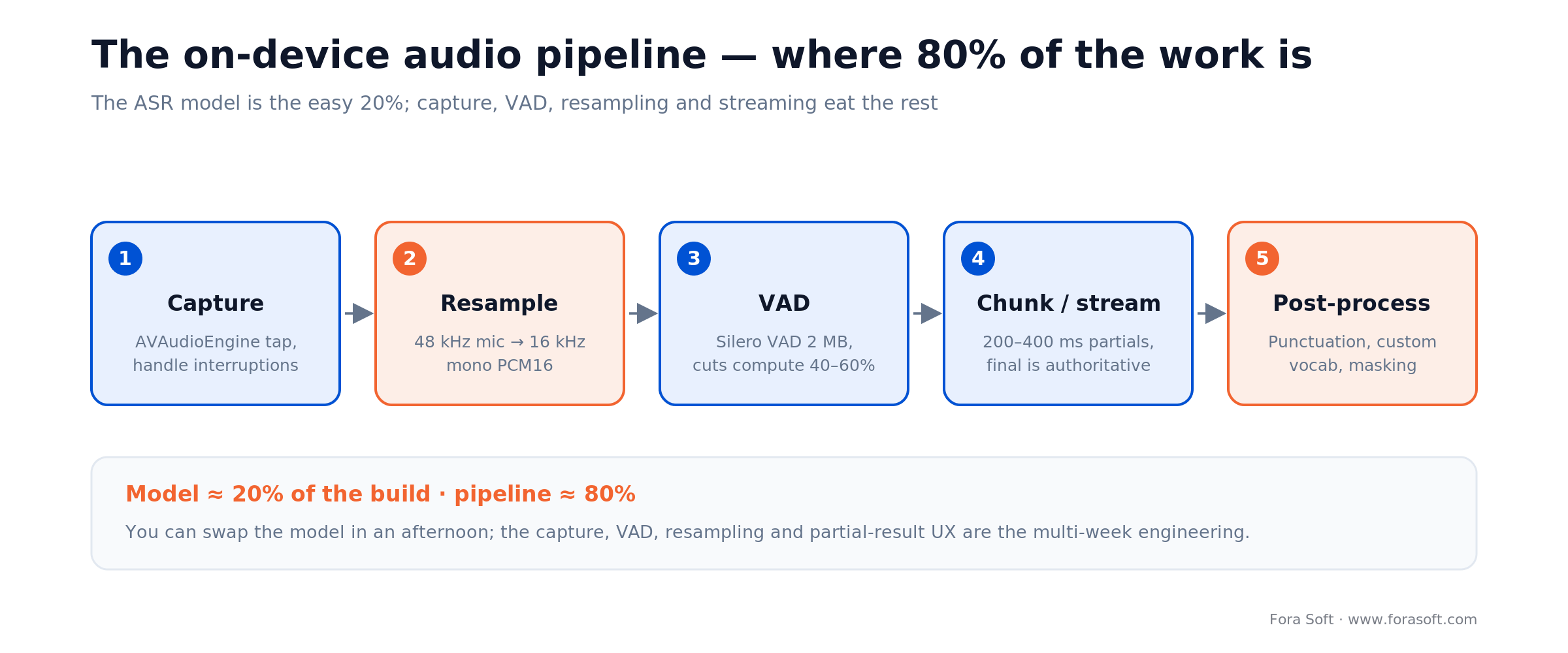
Figure 2. The five-stage on-device audio pipeline — the model is the easy 20%.
Go deeper on the audio layer: the capture, resampling and buffering discipline here is the same one we teach in our audio for video course — ASR just adds a model at the end of a pipeline you still have to get right.
Need a production-ready iOS audio pipeline done once, properly?
Fora Soft runs 3–5 week ASR sprints: capture, VAD, model integration, streaming UX, post-processing, tested against your real audio. Agent Engineering handles the test-corpus generation and the regression suite.
Custom Core ML speech models — when you need a domain fine-tune
For vertical domains — medical dictation, legal transcription, aviation comms, industrial logging — the general-purpose Whisper models plateau around 8–12% WER on domain terminology. A fine-tuned or domain-adapted model pushes that to 3–5%. Core ML is the on-device delivery path: train on a GPU cluster (or rent time on Apple’s M-series MLX), convert to Core ML with coremltools, quantise to 4-bit or 8-bit (palettization) for the Neural Engine, and ship in the app bundle or via on-demand resources.
Apple’s 2025 additions made this much easier. Quantisation-Aware Training and learnable weight clipping let a large-v3 Whisper distillation compress from ~3 GB to ~400 MB with < 2% accuracy loss on typical domain corpora. The Neural Engine runs those quantised models fast enough to stream in real time on iPhone 13+. The cost of fine-tuning itself has also fallen; a 10-hour domain fine-tune of Whisper small on a handful of A100 hours runs $50–200.
The tradeoff: you own the model lifecycle. Retraining schedule, A/B testing, rollback, device-specific performance tuning, and licensing (OpenAI’s Whisper is MIT-licensed, which makes this tractable). Reach for a custom Core ML model only when the general-purpose stack has visibly plateaued for your use case and the domain vocabulary is large and stable.
If you ship Android too — align your ASR strategy
iOS and Android ASR are converging in 2026 but not identical. On Android, the closest analogue to WhisperKit is whisper.cpp via JNI or MediaPipe’s LLM Inference API, and the closest to SpeechAnalyzer is the upgraded Google SpeechRecognizer with on-device Gemini Nano acceleration on Pixel and high-end Samsung devices. Whisper models run on both platforms with similar accuracy; the pipeline abstractions around them differ by more than most teams expect.
Two sensible architectures for cross-platform products:
1. Shared capture + platform-native ASR. Use a cross-platform audio capture abstraction (Kotlin Multiplatform, C++ core) but let each platform use its best native ASR. Accepts per-platform quality variance; maximises battery and latency.
2. Shared Whisper everywhere. Standardise on Whisper (WhisperKit on iOS, whisper.cpp on Android) with a single wrapper API. One transcript format, one post-processing pipeline, consistent accuracy across platforms. Costs slightly more battery on Android’s varied hardware.
If you need a fully self-contained offline engine that predates the Whisper era, Vosk (Kaldi-based) still ships small models for iOS, Android and desktop in 20+ languages. Accuracy trails Whisper, but the footprint is tiny and there are no cloud dependencies — a reasonable pick for embedded or bandwidth-constrained builds. For historical context and the Android-side thinking, see our older neural networks on Android primer.
“Characterising” speech — diarization, intent, sentiment, and keyword spotting
Recognising words is only half of what most products want. The other half is characterising the recognised speech: who spoke, what they meant, how they felt, and whether any trigger phrases came up. Four common additions:
1. Speaker diarization. “Who spoke when.” Pyannote is the state-of-the-art open model and runs on server/Mac. Since May 2026 Argmax’s SpeakerKit (part of the same open-source Swift SDK as WhisperKit) brings pyannote-based diarization on-device for Apple Silicon — try await SpeakerKit().diarize(audioArray:) — which is now the fastest path to on-device “who spoke when” on iOS. The older pattern (an ECAPA-TDNN speaker-embedding model converted to Core ML plus clustering) still works if you need full control. Cloud: AssemblyAI and Deepgram ship diarization as a flag — accuracy is excellent on calls, acceptable on meetings.
2. Intent classification. After transcription, a small on-device LLM (Apple’s Foundation Models, or a quantised Llama 3.2 1B via Core ML) handles intent mapping; budget a few hundred MB of memory for a 1B-class model, or use Apple’s system model at no bundle cost. For narrow command vocabularies, a simple keyword-spotting model works and is faster.
3. Sentiment and toxicity. Sentiment classifiers have converged on ~95%+ accuracy; toxicity is trickier and usually needs a domain-specific fine-tune. Our iOS accessibility playbook covers the UX patterns for presenting sentiment or moderation feedback without stigmatising the speaker.
4. Keyword spotting. “Hey app” wake words, regulatory-keyword flagging, or branded triggers. Apple’s SNClassifySoundRequest in Sound Analysis handles simple cases; WhisperKit plus a post-transcription regex covers the complex ones.
Privacy & compliance — why on-device is the 2026 default
Three regulatory realities push iOS teams toward on-device ASR in 2026. First, HIPAA: as of early 2026, Apple Intelligence itself still does not offer a Business Associate Agreement, which means clinical voice features have to either stay on-device (no BAA needed) or use an explicitly HIPAA-compliant cloud vendor. Our HIPAA-compliant video platform guide covers the larger compliance pattern; the same principles apply to voice, and our HIPAA-compliant voice AI for healthcare guide covers the phone-agent side. When the voice feature sits inside a clinical app, our telemedicine software development team ships it with on-device ASR so the BAA question never comes up.
Second, the EU AI Act — but be precise about what on-device actually buys you. The Act’s high-risk tier is defined by use case (its Annex III list), not by where inference runs, so on-device processing does not by itself change an ASR feature’s risk class. What it does remove is the GDPR (and CCPA) cross-border-transfer and data-processing-agreement burden: “we don’t send audio anywhere” is the simplest answer to a data-protection review. Note that emotion or sentiment inference is separately restricted under the Act regardless of where it runs.
Third, plain customer preference. Enterprise buyers ask “where does the audio go?” on every procurement call in 2026. “Nowhere, it stays on the phone” closes deals that “it goes to our cloud provider” does not.
Procurement shortcut: “the audio never leaves the device” removes the BAA, the DPA and the cross-border-transfer review from your security questionnaire in one line. On regulated deals that is often worth more than a point of WER.
On-device vs. cloud — the honest trade-off table
| Dimension | On-device | Cloud |
|---|---|---|
| Accuracy (clean EN) | 3–8% WER | 2–5% WER |
| Accuracy (accented/noisy) | 8–15% WER | 5–10% WER |
| First-word latency | 50–200 ms | 300–1000 ms |
| Cost / 1M min | $0 (compute only) | $2.5k–17k (Oct 2026 list prices) |
| Privacy | Audio never leaves device | Audio transits vendor infra |
| Offline | Works | Fails |
| Languages | Whisper: 99 / Apple: 50–100 | Up to ~125 incl. dialects |
| Speaker diarization | Extra engineering | Usually a flag |
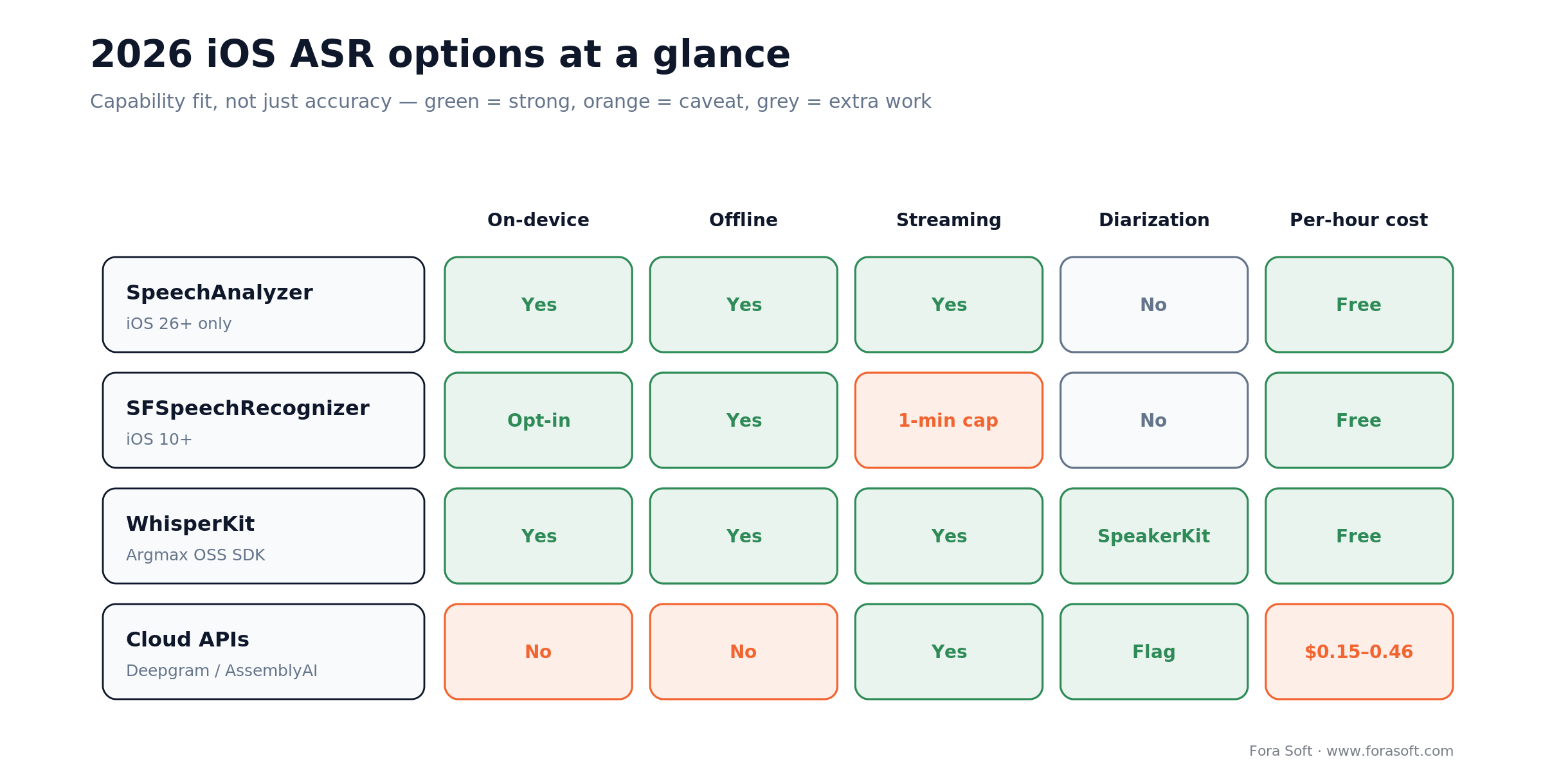
Figure 3. Capability fit across the four options — a complement to the accuracy table above.
Real-time UX patterns — making the transcript feel instant
A 200 ms transcript arriving with no UI state will feel slow. A 500 ms transcript with a well-designed progressive reveal will feel instant. Four UX patterns that our clients consistently ship on production iOS apps:
1. Progressive partials with confidence styling. Render partial transcripts in a lighter grey; promote to full ink when the result finalises. Users immediately understand that early text is tentative.
2. Reveal words as they arrive, not in chunks. Stream the partial results as they come — typically every 200–400 ms. An animated reveal (word-by-word fade-in at 80 ms per word) feels responsive without being distracting.
3. Never erase characters. Whisper sometimes revises the last few words when new context arrives. Fade the old words to grey and fade the new words in, rather than deleting and re-typing. Users tolerate revision; they hate flicker.
4. Show the mic state explicitly. A live level meter, a subtle pulse when the model is processing, an explicit “waiting” state when audio is silent for more than 2 s. Voice interfaces that don’t communicate state feel broken even when they work.
Mini case — a live-captions iOS feature that replaced a $28k/month cloud bill
Situation. A Fora Soft client shipped a live-captioning feature inside a video-first iOS app. Their v1 used a third-party cloud ASR API, streamed audio over WebSockets, and paid ~$28k/month on roughly 95,000 hours of captioning. Two problems: the bill grew linearly with product adoption, and the compliance team flagged cross-border audio transfer for their EU user base.
4-week sprint. Week 1: audit the existing pipeline, benchmark WhisperKit large-v3 turbo against the incumbent cloud provider on 20 hours of real user audio. WER gap was 1.8 points — acceptable. Weeks 2–3: rebuild the audio pipeline with Silero VAD, WhisperKit streaming, 200 ms partial-result cadence, and background model loading. Week 4: phased rollout (10% → 50% → 100%) with Sentry monitoring for latency and error regressions.
Outcome. New monthly cloud bill: $0 for captioning (only model CDN bandwidth, negligible). First-word latency improved from 780 ms to 140 ms. Battery impact: <4% extra drain on a 60-minute session on iPhone 15. EU compliance concern closed entirely. Payback on the 4-week engineering sprint: inside the first billing cycle. Want a similar cloud-to-on-device migration scoped?
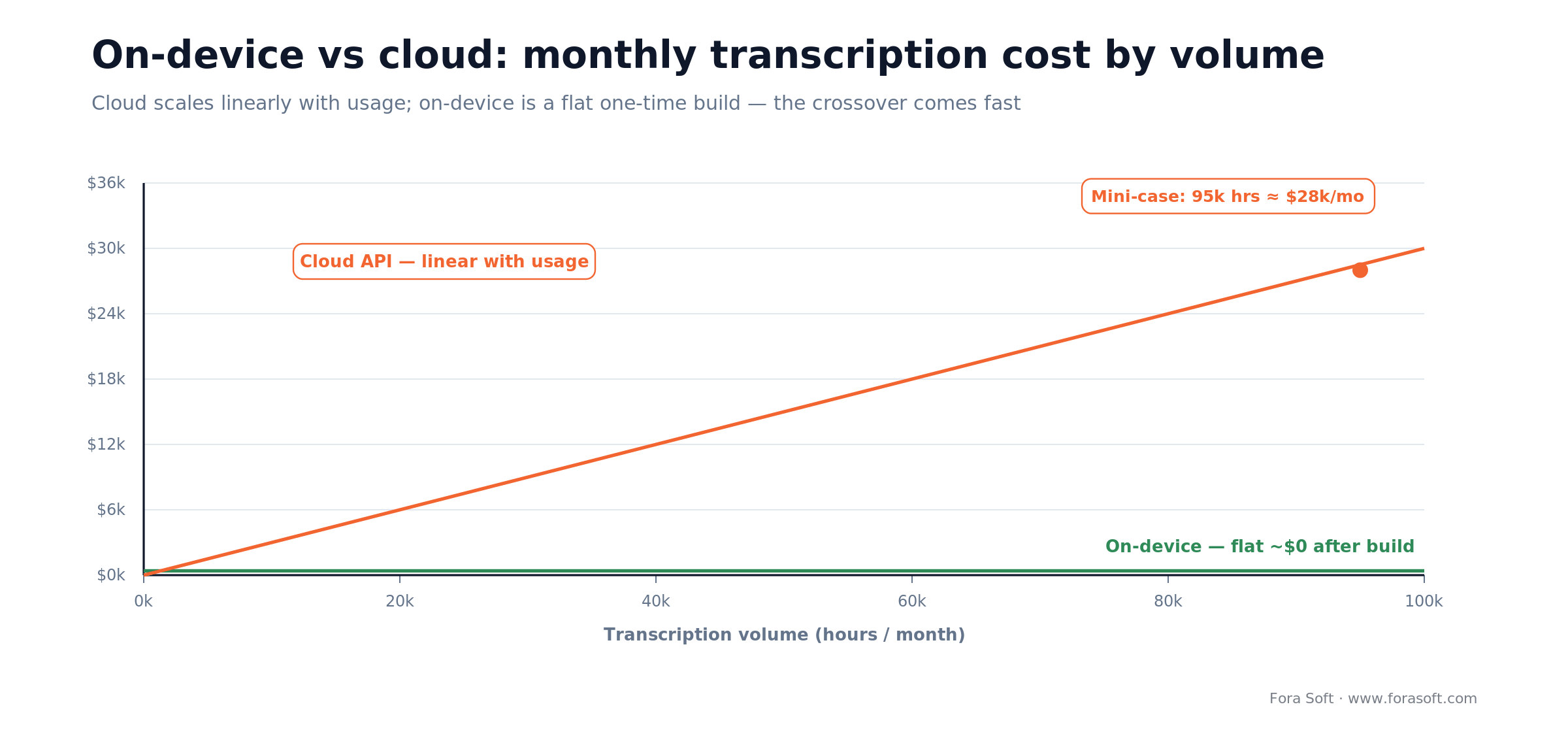
Figure 4. Why the migration paid back inside one billing cycle — cloud cost scales with volume; on-device does not.
A decision framework — iOS ASR in five questions
Q1. What is your minimum iOS version? iOS 26+ → SpeechAnalyzer for most cases (with iOS 27 out since September 2026, that is current minus one). iOS 17/18 still in the support matrix → WhisperKit or SFSpeechRecognizer with on-device flag.
Q2. Do you need <5% WER on accented or noisy audio? Yes → evaluate cloud (Deepgram Nova-3, AssemblyAI Universal-2). No → on-device Whisper or Apple native is fine.
Q3. Is there any regulated or sensitive audio? Healthcare, legal, financial, HR, or kids → on-device only. Everything else → cloud is on the table.
Q4. What is your volume? < 100 hours/month → cloud pay-as-you-go is fine; engineering ROI of on-device migration is low. > 1000 hours/month → on-device pays back in weeks.
Q5. Do you need offline support? Yes → on-device only. Cloud fails on airplane mode, subway, rural areas.
Five iOS speech recognition pitfalls to avoid
1. Forgetting requiresOnDeviceRecognition. SFSpeechRecognizer defaults to server-side if the device does not support on-device. If privacy matters, set the flag explicitly and check supportsOnDeviceRecognition; bail out if false rather than silently leaking audio. Also declare both NSMicrophoneUsageDescription and NSSpeechRecognitionUsageDescription in Info.plist: SFSpeechRecognizer needs both the microphone and the speech-recognition permission.
2. Shipping the full Whisper large model in the app bundle. 3 GB is too big for the App Store cellular cap, and most users do not need it. Ship tiny or base; lazy-download larger models on Wi-Fi after first launch.
3. Skipping VAD. Without voice-activity detection you transcribe silence, burn battery, and produce awkward partial results. Silero VAD is 2 MB and runs in under a millisecond; there is no reason not to use it.
4. Measuring latency wrong. “Time from audio start to transcript” includes the user’s silence before speaking. The KPI that matters is “time from last spoken phoneme to final result” — that is what users perceive. Measure it that way or you will ship a slow feature and believe it is fast.
5. Not handling audio-session interruptions. Phone calls, Siri, alarms, and AirPods routing all interrupt capture. Handle AVAudioSession.interruptionNotification and routeChangeNotification explicitly, pause and resume the recogniser, and let the user know what happened.
KPIs — what to measure on an iOS ASR feature
Accuracy KPIs. Word-error-rate on your real user audio (target < 8% clean, < 15% noisy), punctuation F1 (target > 0.85), speaker-attribution accuracy if you diarize (target > 90%). Build a held-out 20–50 hour test set from your own users; do not trust benchmark numbers on your use-case.
Latency KPIs. First-partial latency (< 200 ms on-device, < 500 ms cloud), final-word latency after speech end (< 300 ms on-device, < 800 ms cloud), partial-to-final reconciliation (< 1 s).
Resource KPIs. Battery impact (< 5% per 30-minute session on iPhone 15), peak memory footprint (< 1 GB on iPhone 15 Pro, < 400 MB on iPhone SE), thermal throttling rate (0% on continuous 15-minute sessions at 22°C ambient). Our iOS optimisation playbook covers how to instrument these cleanly.
When NOT to build iOS speech recognition
1. Your audio is short and infrequent. Voice-to-text on rare occasions — a weekly voice memo, a once-per-session search — does not justify the pipeline cost. Use iOS’s built-in dictation keyboard and hand the text to your app for free.
2. You need conversational AI, not transcription. Speech-to-text alone is only part of a voice agent. If your real goal is an agent that listens, thinks, and responds in voice, transcription is step one of four; the LLM and TTS pieces dominate the complexity. That is a job for a custom voice assistant development team, with ASR as one stage of the agent.
3. Your primary audience is outside the iOS ecosystem. If 70%+ of users are on Android or web, ship a cross-platform ASR and reuse it on iOS — WhisperKit is iOS-specific and duplicating logic across platforms burns more engineering time than it saves. That shared on-device layer is the kind of work our AI mobile app development team does, on Core ML for iOS and Gemini Nano for Android.
4. You lack a test corpus from real users. Benchmark numbers on LibriSpeech do not predict real-world quality on your microphones, rooms, and accents. Collect 10–50 hours of real audio first; decide on the model second.
FAQ
Is Apple’s SFSpeechRecognizer still worth using in 2026?
Yes, if you need iOS 16–18 support or you want a zero-dependency first-party API. For iOS 26+ new features, SpeechAnalyzer is the better choice. For ultimate accuracy and flexibility across all iOS versions, WhisperKit is the 2026 default for most teams.
Can WhisperKit really run in real time on iPhone?
Yes. WhisperKit with the large-v3-turbo model on iPhone 15 Pro runs faster than real time and streams with first partial results in about 200 ms in our builds. On iPhone 13, use small or base. On iPhone SE 3 use tiny or base.
What is SpeechAnalyzer and how is it different?
SpeechAnalyzer is Apple’s iOS 26 replacement for SFSpeechRecognizer. It supports long-form audio (no 1-minute cap), better distant-mic handling, vocabulary biasing through AnalysisContext, and runs entirely on-device. You still choose a locale, and there is no server-side fallback. For most new iOS 26+ features, it is the natural default.
Is on-device ASR actually HIPAA-compliant?
If the audio never leaves the device, there is no Business Associate Agreement needed because there is no third party handling PHI. WhisperKit, SpeechAnalyzer, and SFSpeechRecognizer with requiresOnDeviceRecognition all meet this bar. The rest of the HIPAA security rule (access controls, audit logs, encryption at rest) still applies to your app as a whole.
How do I measure word-error-rate on my own audio?
Collect 10–50 hours of real user audio, pay a transcription service for human ground-truth reference transcripts, then score your model output against the reference with jiwer (Python) or an equivalent WER calculator. Report WER broken down by subset (clean vs noisy, different accents, phone bandwidth) — aggregate WER hides a lot.
Do I need speaker diarization?
Only if your audio contains more than one speaker and you need to attribute lines. Meetings, interviews, podcasts, courtroom recordings — yes. Single-user voice input, dictation, command & control — no. Diarization adds cost and accuracy risk; skip it unless the product requires it.
Which cloud ASR provider is most accurate?
There is no single winner in October 2026: AssemblyAI Universal-3.5 Pro, Google Chirp, Deepgram Nova-3 and OpenAI’s GPT Transcribe (July 2026) trade places by language and audio type. Deepgram Nova-3 remains the usual pick for low-latency streaming. Test two or three on 10–20 hours of your own audio and pick on WER for your data, latency, and price.
Which iOS speech recognition SDK is best in 2026?
For iOS 26+ start with Apple’s SpeechAnalyzer: free, on-device, no length cap. If you support iOS 16–25 or need better accuracy on accented or multilingual audio, use WhisperKit; move to a cloud API (Deepgram, AssemblyAI, OpenAI, Google) only for noisy audio, diarization or languages the on-device models miss.
Which speech recognition SDKs work offline on iPhone, and what do they cost?
Apple SpeechAnalyzer, SFSpeechRecognizer with requiresOnDeviceRecognition, and WhisperKit all run offline at no per-minute cost. Commercial on-device options are the Argmax Pro SDK ($1 per active device per month, 1,000-device minimum, October 2026) and Picovoice Cheetah and Leopard under a commercial licence.
What is the best API for iPhone speech-to-text?
For on-device work the best API is Apple’s SpeechAnalyzer on iOS 26+ and WhisperKit below that. For cloud, Deepgram Nova-3 ($0.0077/min streaming) is the common real-time choice and OpenAI GPT Transcribe ($0.0045/min) one of the cheapest batch options as of October 2026.
How much does adding speech recognition actually cost to build?
A production iOS ASR feature — capture pipeline, VAD, WhisperKit integration, streaming UX, post-processing, error handling, and a real test suite — is typically a 3–5 week effort for a senior iOS engineer. Our 2026 mobile cost guide gives cost ranges; Agent Engineering typically shaves 30–40% off the scoping time.
What to Read Next
iOS
How to optimise iOS apps for speed and stability
The companion playbook for keeping your ASR-powered app fast and crash-free at scale.
Audio
Silence trimming in iOS apps
Audio preprocessing techniques that pair naturally with on-device ASR and save real compute.
Swift
Swift 6 must-have features
Strict concurrency for the actor-heavy audio pipelines you’ll write around any ASR stack.
AI
AI language translation for live streaming
Downstream use case for ASR: feed transcripts into translation for real-time multilingual events.
Compliance
HIPAA-compliant video platform
The compliance patterns that determine when on-device ASR is not a preference but a requirement.
Ready to ship iOS speech recognition that actually works?
On-device neural speech recognition is the 2026 default for iOS. WhisperKit, SpeechAnalyzer, and SFSpeechRecognizer each have a clear place: SpeechAnalyzer for iOS 26+ where long-form and privacy win; WhisperKit for the broadest accuracy and language support across iOS 16+; SFSpeechRecognizer for the widest device coverage with a first-party guarantee. Cloud earns its cost only when you need the last 1–3 points of accuracy on accented or noisy audio, diarization out of the box, or vertical-specific post-processing.
The model is not the hard part. The audio pipeline — capture, VAD, resampling, chunking, partial-results UX, error handling, post-processing — is where 80% of the engineering goes. Plan a 3–5 week build, gate it on a real test corpus from your real users, and measure WER and latency the way the user experiences them. If you want a partner who has shipped this at scale across video, surveillance, e-learning, and live-event products, that is the shape of what Fora Soft does — and Agent Engineering compresses the pipeline-and-regression work by 30–40% versus a traditional agency.

The book · Volume 6 of 7
AI for Video: A Complete Guide to Intelligence in Video Products: From Models and Inference to Computer Vision, Speech, Search, and Generative Video
On-device or cloud, an iOS transcription feature rests on the same speech stack. Volume 6 covers it in depth: ASR, TTS and diarization, deployment topologies from device to cloud, model artifacts, and the ML minimum product teams need for model decisions, alongside computer vision and search across recorded video. Written by Nikolay Sapunov, CEO at Fora Soft.
Read it on Amazon →Kindle & paperback · Fora Soft Video Engineering Handbook
Let’s scope your iOS speech recognition feature.
30-minute call with a senior Fora Soft iOS engineer — you leave with a concrete on-device vs. cloud recommendation, a model choice mapped to your devices, and an honest 3–5 week build estimate, whether or not we end up working together.

