

Key takeaways
• Generic conferencing breaks at broadcast quality. Zoom and Google Meet drop frames under 40% packet loss (20→13 fps for Zoom H.264, halving to 8 fps on VP9). For Netflix, HBO and Paris Fashion Week productions, that is unshippable footage.
• Local-recording “double-ender” takes the network out of the master. Speed Space records on each participant’s device at 1080p / 8 Mbps (3–4× a typical conferencing capture) and syncs to AWS, so network-caused frame loss in the final master goes to zero. Local failure modes such as thermal throttling and disk pressure still exist and are handled with chunked writes and resumable upload.
• One platform, full crew workflow. Multi-stream switching, codec/bitrate/FPS controls, role-based access (Admin / Production Member / Talent / Representative), background overlays, animations, drawing tools and AWS-backed post-production storage replace the 4–6 tools Revo Studio juggled before.
• Outcomes Revo measures. Up to 25 production participants, no dropped sessions reported to date, network-caused frame loss in deliverables down to zero, per-participant tracks handed straight to editors, and a single-app workflow that has shipped content for Netflix, Apex Legends, Electronic Arts, HBO, Paris Fashion Week and Live Nation Urban events.
• Custom beats SaaS for serious production. Riverside / StreamYard / Frame.io all record locally and hand you separate tracks; where they stop is crew direction, codec choice and brand surface. A custom WebRTC + NDI/SRT + edge-recording stack does not repay itself on cancelled subscriptions (run the math in the cost section), it repays itself on capability: per-camera crew control of resolution, framing and bitrate, multi-cam ISO switching with overlays, a four-role permission model, and a product you can white-label.
Why Fora Soft built Speed Space
We built Speed Space because a client needed a recording that survives a bad connection, and nothing on the market sold one. Fora Soft is a software development company working on video and real-time communication since 2005, with 250+ projects delivered and 50 in-house engineers across real-time video, AI and streaming products for e-learning, telemedicine, video surveillance, OTT, marketplace and live entertainment. Long before remote production became a category, we were already operating on WebRTC SFUs, NDI bridges, multi-codec recording pipelines and AWS-grade media storage. Speed Space is the product where all of that came together for one of the most demanding clients in the field: Revo Studio, a Southern California video production agency that has shot for Netflix, Apex Legends, Electronic Arts, HBO, Paris Fashion Week and Live Nation Urban events.
This article is not marketing copy. It is the engineering story of how a hybrid Zoom-plus-radios-plus-spreadsheets workflow became a custom remote video production platform with frame-accurate local recording, role-based crew controls and an integrated post-production store. We share the architecture, the trade-offs, the realistic cost shape for similar custom builds in 2026, and where SaaS is still the right call. If you are a producer, a CTO at a broadcaster, or a founder building a remote-production product, the playbook below is the one we hand to clients on day one.
For the full Speed Space project page (clients, screens, capabilities) see forasoft.com/projects/speed-space. For an in-platform feature tour, the companion overview is at Speed Space: Streamlining Remote Video Production.
Building a remote production tool of your own?
Thirty minutes with a senior video engineer: architecture sketch, codec / SFU choice, realistic cost range, frame-loss strategy. No slideware.
The problem: Zoom-plus-duct-tape doesn’t ship broadcast content
Revo Studio’s pre-Speed Space stack was the same one most production agencies inherit during the cloud-production scramble: a video-conferencing app for the live discussion, a separate tool for recording, a third for screen sharing, radios for crew comms, and a spreadsheet to coordinate cameras and timecodes. The setup “worked” in the way duct tape works — until the deliverable was a Netflix or HBO master.
The technical floor of generic conferencing is the bigger problem. Zoom drops from 20 fps to 13 fps under 40% packet loss because its concealment machinery spends frame rate to keep the call continuous, which is the wrong trade when the recording, not the conversation, is what ships. Its H.264 encode allocates only ~2.5 Mbps for 720p / 25 fps to begin with. Google Meet’s VP9 fares worse: VMAF scores fall from 70 to 20 and frame rate halves to 8 fps. (Those figures come from a third-party 2026 video-call quality comparison by Axis Intelligence, not a controlled study. Treat them as indicative; the direction is not in dispute.) It isn’t that these stacks lack error correction. They all run it: Opus in-band FEC (RFC 6716), ULPFEC (RFC 5109) or FlexFEC (RFC 8627), plus NACK and RTX retransmits. The problem is what that machinery optimises for: it protects the conversation, and the conversation is not what you ship. On top of that there is no broadcast metadata layer (SMPTE 2110 ANC, BWF audio), no isolated per-talent ProRes/DNxHR capture, and certainly no role-based crew permission model. For a Sunday-night family Zoom that’s fine. For a documentary where one frame drop on the talent close-up is a re-shoot day, it is not.
Revo searched for an off-the-shelf tool that combined production-grade capture, multi-cam switching, role-based controls and cloud post-production. Nothing on the market did all four at the quality bar required for major-brand deliverables. So they came to us.
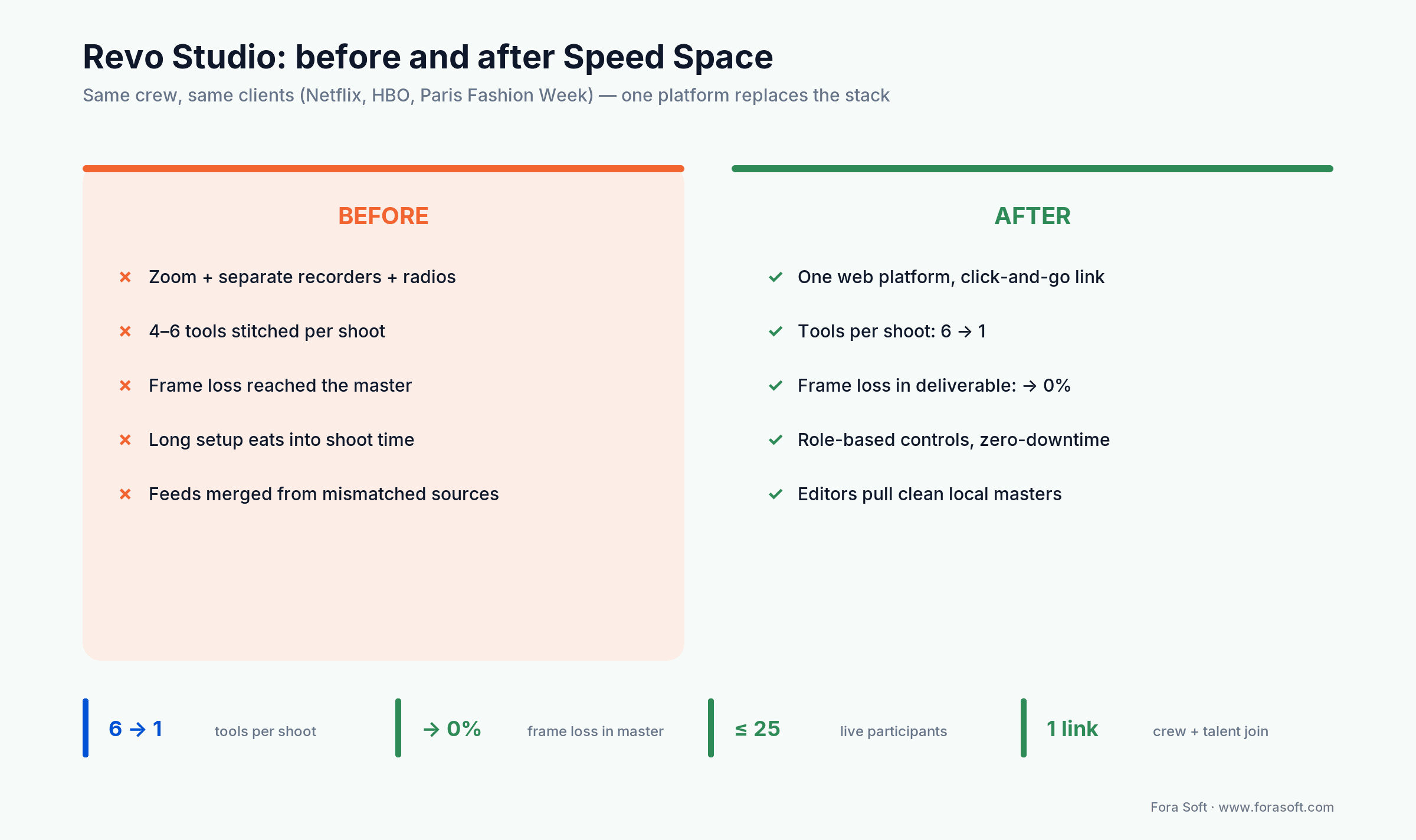
Figure 1. What Revo measures after Speed Space: one platform replaces the stack, and network-caused frame loss in the master goes to zero.
Remote production market: what the numbers actually say in 2026
The remote video production market was worth about USD 2.5B in 2024 and is projected to reach USD 6.1B by 2033, a ~10.5% CAGR (Verified Market Reports, 2026); virtual production sits at about USD 3.67B in 2026 growing ~16.1% a year to USD 7.75B by 2031 (Mordor Intelligence, 2026). Remote and virtual production stopped being COVID-era exceptions some time ago. Here is the full data set we hand clients when they pitch budget:
| Metric | 2026 value | Why it matters |
|---|---|---|
| Remote video production market | ~USD 2.5B (2024) → ~USD 6.1B by 2033, ~10.5% CAGR (Verified Market Reports, 2026) | Demand is growing on both the broadcaster and SMB side — not a niche. |
| Virtual production market | ~USD 3.67B (2026), ~16.1% CAGR to USD 7.75B by 2031 (Mordor Intelligence, 2026) | LED-volume sets and remote-camera workflows ride the same software stack. |
| REMI infra savings (broadcast) | Up to 70% infrastructure cost reduction; production cost cut 40–70% (Grabyo REMI reporting, 2026) | Why broadcasters are not going back — remote integration is the default. |
| Live events / sports broadcast (REMI) | ~28.4% CAGR through 2030 (Grand View Research, 2026) | Real-time set extensions and audience-responsive content drive growth. |
| Generic conferencing under 40% loss | Zoom 20→13 fps; Meet 16→8 fps; VMAF 70→20 (Axis Intelligence video-call quality comparison, 2026) | Why “just use Zoom” isn’t an answer above SMB scale. |
| SaaS competitor entry pricing | Riverside Pro USD 29/mo (USD 24 billed annually), 15 separate-track download hours; StreamYard sells Core and Advanced to personal accounts and requires a Business plan on company email domains; its published rates move with billing period and promotion, so price it from its own page on the day you buy (both checked Sept 2026) | The cap lands on the thing you actually ship — per-participant master tracks, not minutes of talking. |
Every row above carries its own source and year in the cell, because a number without a publisher is a number you can’t defend in a budget meeting. Market sizing from different houses rarely agrees to the decimal; what matters is that three independent research firms — Verified Market Reports, Mordor and Grand View — all put remote and virtual production on a double-digit growth curve through the early 2030s. The REMI cost-reduction figure is Grabyo’s, and Grabyo sells REMI tooling, so read that row as a vendor claim rather than research.
What Speed Space actually is, end to end
Speed Space is a custom remote video production platform Fora Soft built for Revo Studio: every participant’s browser records its own 1080p / 8 Mbps master locally and syncs it to AWS, while crew direct the shoot live over a separate WebRTC preview feed. In one line, it gives a distributed crew the same control surface they would have inside a physical studio. Pull it apart and there are six functional layers, each replacing one or more of the off-the-shelf tools Revo had been juggling:
1. Custom video conferencing with text chat
A WebRTC-based conferencing layer holds up to 25 simultaneous participants — producers, directors, talent, talent representatives. All discussion, decisions and notes stay inside the platform. No tab-switching to Slack or Teams during a take.
2. Pro-grade recording controls (1080p / 8 Mbps, 3–4× a typical call)
Producers configure resolution, frame rate, codec and container per session. The default is 1080p at 8 Mbps, roughly three to four times the bitrate of a typical conferencing capture (YouTube’s own live-encoder guidance puts 1080p at 60 fps between 4.5 and 9 Mbps), and the headroom needed for editorial colour grading without compression artefacts. Codec, FPS and bitrate are all adjustable per shoot.
3. Real-time multi-stream switching, overlays, drawing tools
Producers cut between cameras live, push backgrounds, animations, text and image overlays into the feed, share screens and use on-screen drawing tools to direct talent. From a creative-control standpoint this is the closest a remote crew gets to a physical control room.
4. Role-based access (Admin / Production Member / Talent / Representative)
Granular permissions stop the on-set chaos that breaks pure-conferencing setups. Admins manage everything. Production Members create sets, run recording sessions, control camera and audio streams. Talent join via unique invite link as featured participants. Representatives observe but do not interfere. Each role sees exactly the controls they need.
5. Studio & set management for up to 25 participants
Each project lives inside a virtual studio — think of it as a Google-Drive-shaped folder for a production. Sets within that studio carry their own recording configuration, codec / resolution / FPS, participant list and post-production assets. Crews flip between active sets without losing context.
6. AWS-backed cloud post-production store
After the live session, recorded files are written to AWS storage where producers can search, organise and download masters. The platform’s recording-on-device + sync-to-cloud architecture means the masters available to editors are the locally captured files — not the network-degraded conference stream.
Reach for a Speed Space-shaped build when: the deliverable is broadcast or premium digital, you need crew to control talent cameras remotely, and frame loss in the master is an automatic re-shoot.
The double-ender: how Speed Space eliminates frame loss
A double-ender is a recording pattern in which every participant’s own device records the full-quality master locally, while the live stream everyone sees is a separate, lower-bitrate feed used only for preview and direction; the local files are uploaded after the take and conformed into the edit. Film calls the same idea double-system recording, podcasting calls it a double-ender, and it is the single most important architectural decision in Speed Space, borrowed from professional podcasting and adapted for multi-camera video. Each participant’s browser captures locally to disk at full quality. The conference stream they push to the SFU for previewing and crew direction is a separate, lower-bitrate signal. When the take ends, the local high-quality file is uploaded to AWS storage where it becomes the editorial master.
The implication is sharp: network conditions during the live session do not affect the master. A talent on a wobbly hotel Wi-Fi looks rough on the producer’s preview, but the file uploaded post-session is the same crisp 1080p / 8 Mbps capture as the talent on a fibre connection. Network-caused frame loss in the deliverable goes to zero. What remains are local failure modes: CPU and thermal throttling, disk pressure, a background tab being throttled by the browser. That is exactly why the capture writes chunks to IndexedDB as it goes and the upload is resumable. Network wobble stops being a re-shoot; a laptop cooking itself still can be. (Our primer on digital video foundations covers how bitrate maps to perceived quality.)
Compare that to a pure conferencing capture, where the recording is whatever the network allowed to land at the SFU after FEC, NACKs and retransmits. That is the workflow Riverside, Zencastr, Squadcast and similar SaaS tools converged on for the same reason.
In Speed Space, the double-ender is invisible to talent. They click an invite link, allow camera and microphone, and start. All the local-capture, sync, and AWS-upload heavy lifting is automated.
Reference architecture: what powers a production-grade remote stack
Whatever brand you build under, a Speed-Space-class platform is shaped like this:
| Layer | Default tech | Why it’s the right call |
|---|---|---|
| Capture (browser) | MediaRecorder API, getUserMedia, IndexedDB chunk store | Local recording at full quality; resilient to mid-take crashes via chunk replay. |
| Live preview / conference | WebRTC + SFU (mediasoup, LiveKit or Janus) | Sub-second latency at 25-participant scale. An SFU forwards packets; an MCU decodes and re-encodes every feed, which is roughly an order of magnitude more CPU per room. |
| Broadcast egress (optional) | NDI for LAN, SRT for WAN, RTMP fallback | Lets producers push the live feed to vMix, OBS, AWS MediaLive, social platforms. |
| Storage | S3 (or S3-compatible) with multipart upload, lifecycle to Glacier | Cheap (~USD 0.023 /GB/mo S3 Standard, 2026). Note what the browser can actually hand you: MediaRecorder writes H.264, VP8/VP9 or (Chromium only) AV1, never ProRes. ProRes 422 appears later, after a transcode on ingest or from a native capture agent, and at ~65 GB/hr for 1080p those masters are still cheap to keep. |
| Post-production handoff | Proxy generation (FFmpeg, MediaConvert), AAF/EDL/XML export | Lets editors pull projects into Premiere, Avid Media Composer or DaVinci Resolve. |
| Identity / roles | Auth0 / Cognito + RBAC layer, magic-link guest invites for talent | Talent friction-free, crew permission-tight; SOC 2 / SSO ready for enterprise. |
| Observability | getStats() WebRTC telemetry, OpenTelemetry, Sentry | You see packet loss, RTT and bitrate per participant in real time and post-mortem. |
Latency budgets you must design for
There are two budgets, and they are independent. The preview latency budget — what the producer sees on screen when directing talent — should land under 500 ms glass-to-glass on WebRTC, ideally below 200 ms inside a single AWS region. The master quality budget is the local recording: that is frame-accurate and free of any additional network-induced loss. It is still a lossy H.264 or VP9 encode at the bitrate you set; the point is that nothing the network does during the take degrades it further. Designing them as one budget is the most common architectural mistake we see in remote-production startups.
SFU, not MCU, for 25-participant production
An SFU forwards each participant’s stream without transcoding; an MCU decodes, mixes and re-encodes every feed server-side. On our own 25-participant 720p rooms a mediasoup-class node idles in the low-teens percent of a core while the MCU equivalent saturates most of one. Call it an order of magnitude. The gap widens with participant count because transcode cost scales with streams while forwarding cost scales with bandwidth. For Speed Space’s 25-participant ceiling and the option for crews to scale up to 50 with cascading SFUs, MCU is uneconomic. We use mediasoup-class SFUs in production. Where legacy SIP / H.323 bridging is required — some broadcaster control rooms still need it — a small MCU sidecar handles only that traffic. More on the SFU choice in our Agora alternatives playbook.
Stuck deciding SFU vs MCU vs hybrid?
We’ll walk you through the trade-offs we made for Speed Space — and the ones we’d change for your concurrency, codec and broadcast needs.
Speed Space vs SaaS: the honest comparison matrix
For most teams the first question isn’t “custom or nothing” — it’s “why not Riverside / StreamYard / Frame.io C2C?” The cheat sheet we share with clients on day one:
| Tool | Strength | Production-grade limit | Pricing (2026) |
|---|---|---|---|
| Riverside.fm | Strongest double-ender for podcast/video; 4K capture; 16-bit WAV. | Hour caps on entry plans; no real multi-cam switching with overlays; per-seat at scale. | Pro USD 29/mo (USD 24 annual) with 15 separate-track download hours; Grow USD 39 with 20; Webinar USD 99 with 25; Business on quote, and that is the tier with producer mode and uncapped downloads (Sept 2026). |
| Zencastr | 4K video, 16-bit / 48 kHz WAV, no recording-time cap. | Limited live-switch, weak crew permissions; podcast-first product surface. | Restructured in 2026 to a free tier plus custom Enterprise; the old USD 18/mo paid tier is gone (Sept 2026). |
| StreamYard | Excellent multi-destination live-streaming UX; built-in branding. | It does record locally per participant, with separate audio and video tracks for the edit (up to 4K on Advanced). Credit where it is due. What it doesn’t give you is crew control of talent cameras, granular production roles, or multi-cam ISO switching with overlays. | Core and Advanced for personal accounts; a company email domain requires the Business plan. Rates move with billing period and promotion — price it on the day you buy (Sept 2026). |
| Frame.io Camera-to-Cloud | Real-time proxy ingest into Premiere / Final Cut / Resolve; review tooling. | No live conferencing layer; not a remote-production crew tool. | Sold standalone as Free (2 members, Camera to Cloud included), Pro, Team and a custom Enterprise tier, and also bundled into some Creative Cloud plans (Sept 2026); price is per member, per month. |
| vMix / OBS + NDI | Broadcast-grade switching, ISO recording, full codec control. | Heavy desktop install; no native cloud sync; complex for distributed crews. | vMix from USD 60 (Basic HD); OBS free. |
| Custom (Speed Space-class) | All-in-one capture + switch + role + storage + brand control. | Higher upfront build cost; requires partner with deep WebRTC/codec experience. | USD 80–700k upfront depending on tier (see cost section). |
Reach for Riverside / Zencastr when: you produce <20 hours/month, your output is podcast or interview-style, you don’t need crew-controlled talent cameras, and per-seat SaaS economics are fine.
Reach for StreamYard when: you push live-to-multi-destination (YouTube, LinkedIn, Twitch) and a local per-participant recording plus separate tracks covers your edit. It genuinely does that part; it just has no crew-direction layer on top.
Reach for Frame.io C2C when: editorial review is the bottleneck and you already live in Adobe Creative Cloud.
Reach for a custom Speed-Space-class build when: you ship for major brands, juggle multiple SaaS tools today, need granular crew roles, want a branded white-label product, or scale past ~50 producers / 500 hrs of content per month.
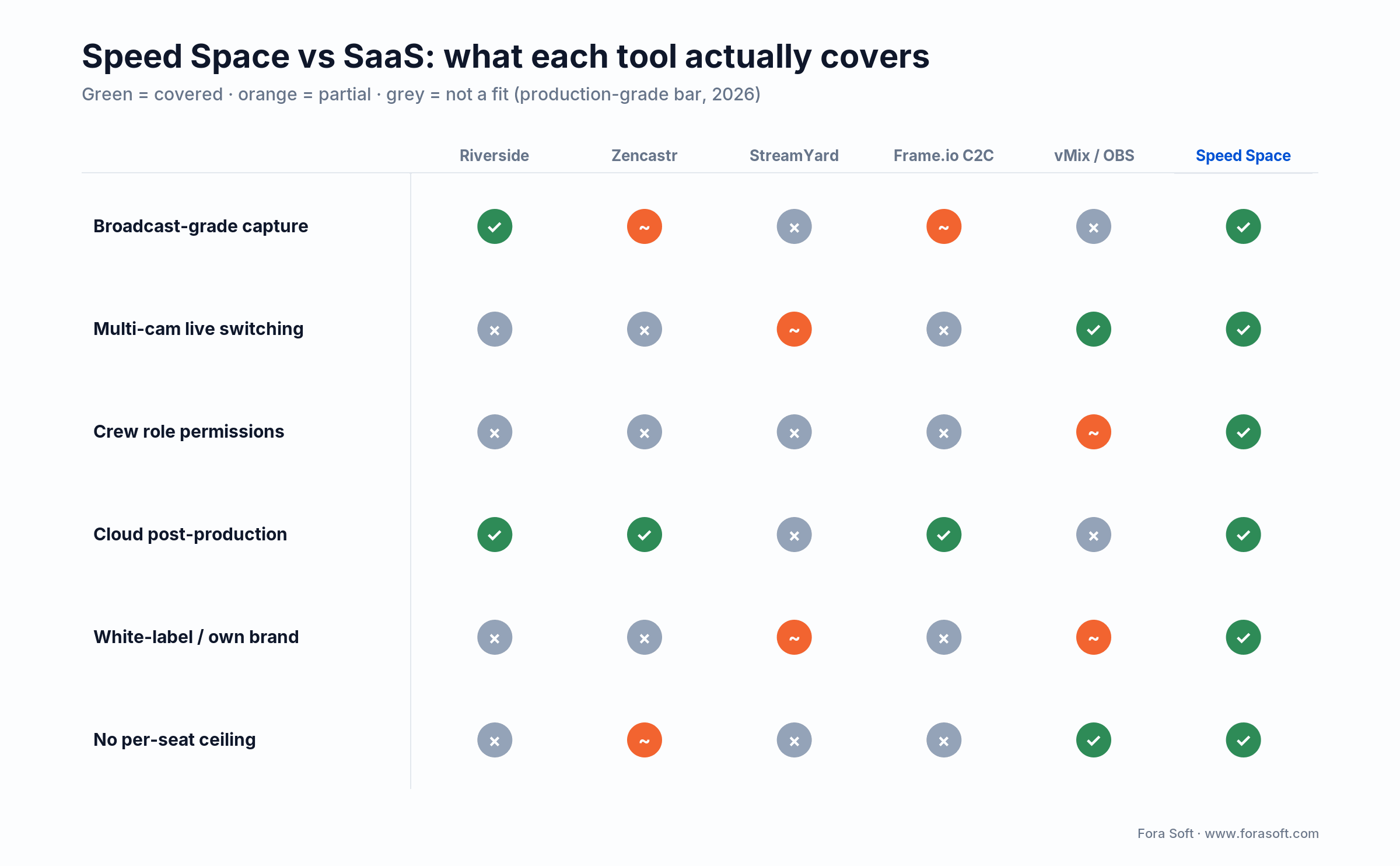
Figure 2. Where each tool wins and where it breaks against the production-grade bar.
Realistic cost math for a custom remote production platform
A custom remote video production platform costs USD 80–140k for a pilot (8–12 weeks), USD 180–320k for a production-grade build (14–22 weeks) and USD 350–700k for a broadcast-SLA build (24–36 weeks), plus USD 4–25k/month to operate, at Fora Soft 2026 rates. Those are the ranges we actually quote, with Agent Engineering used to accelerate prototyping, transcoder pipelines and front-end work, and they are deliberately conservative — if a number isn’t certain we leave it out.
| Tier | Scope | Build (Fora Soft + Agent Engineering) | Timeline |
|---|---|---|---|
| Pilot | 5–10 concurrent producers, double-ender capture, basic role model, single region. | USD 80–140k | 8–12 weeks |
| Production-grade (Speed Space-class) | Up to 25 participants, multi-cam switching, overlays, role-based access, AWS post-production store. | USD 180–320k | 14–22 weeks |
| Broadcast SLA | 50+ participants, NDI/SRT egress, multi-region failover, SMPTE 2110 metadata, SOC 2 / data-residency. | USD 350–700k | 24–36 weeks |
| Ongoing ops (any tier) | CDN, AWS storage, SFU compute, support, codec licenses. | USD 4–25k/month | Continuous from launch |
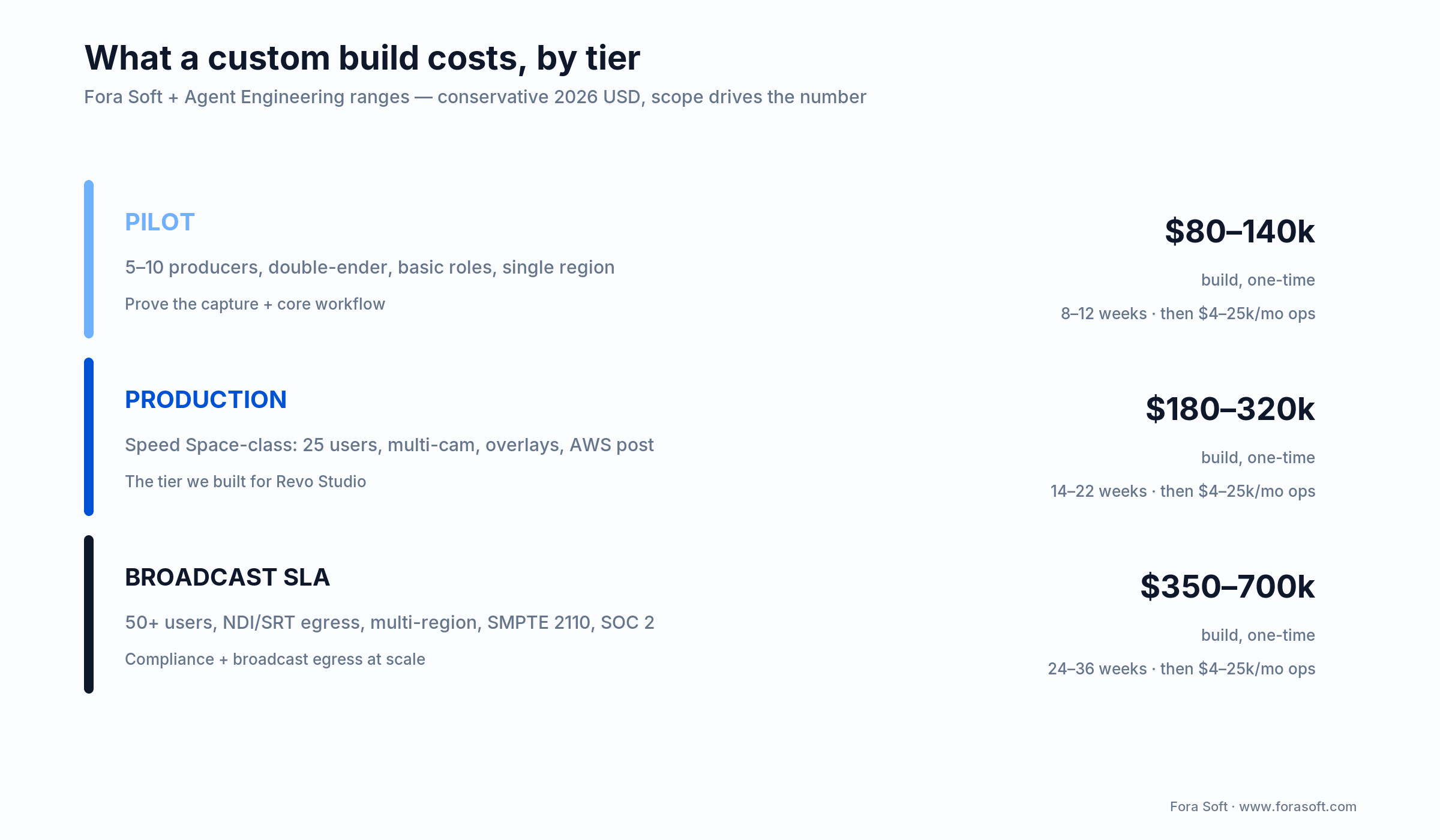
Figure 3. Build cost by tier — scope drives the number; ops runs $4–25k/month on top.
When custom pays off — the napkin
Here is the arithmetic, and it does not say what vendor blogs usually say. Fifty producer seats on Riverside Pro at USD 29/mo is USD 17.4k/yr on capture alone (50 × 29 × 12), or USD 14.4k on annual billing at USD 24. In practice a team that size is on a Business quote, not Pro, so treat either figure as a floor. Add Frame.io, Creative Cloud, vMix licences and SSO add-ons and the all-in subscription bill for a 50-seat agency lands around USD 60–90k/yr.
Now put the build next to it. The production tier is USD 180–320k up front and ops runs USD 4–25k/month, so USD 48–300k/yr. Take the friendliest corner of both ranges, USD 90k/yr of SaaS replaced against USD 48k/yr of ops, and you clear USD 42k/yr, which repays a USD 180k build in about 51 months. Take an unfriendly corner and annual ops alone exceeds the entire subscription bill and the build never repays itself on subscriptions at all.
So we’ll say the unfashionable thing: a custom remote production platform does not pay for itself by cancelling subscriptions. It pays for itself when the capability is worth money: a master that survives a bad hotel Wi-Fi, crew control of talent cameras, a white-label product you can sell, multi-cam ISO switching with overlays, and codec choices no vendor will expose. If the only argument on the table is seat cost, buy the SaaS.
If you want a sharper version of this number plugged into your seat count, recording volume and CDN footprint, our team will run it for you for free on a 30-minute call.
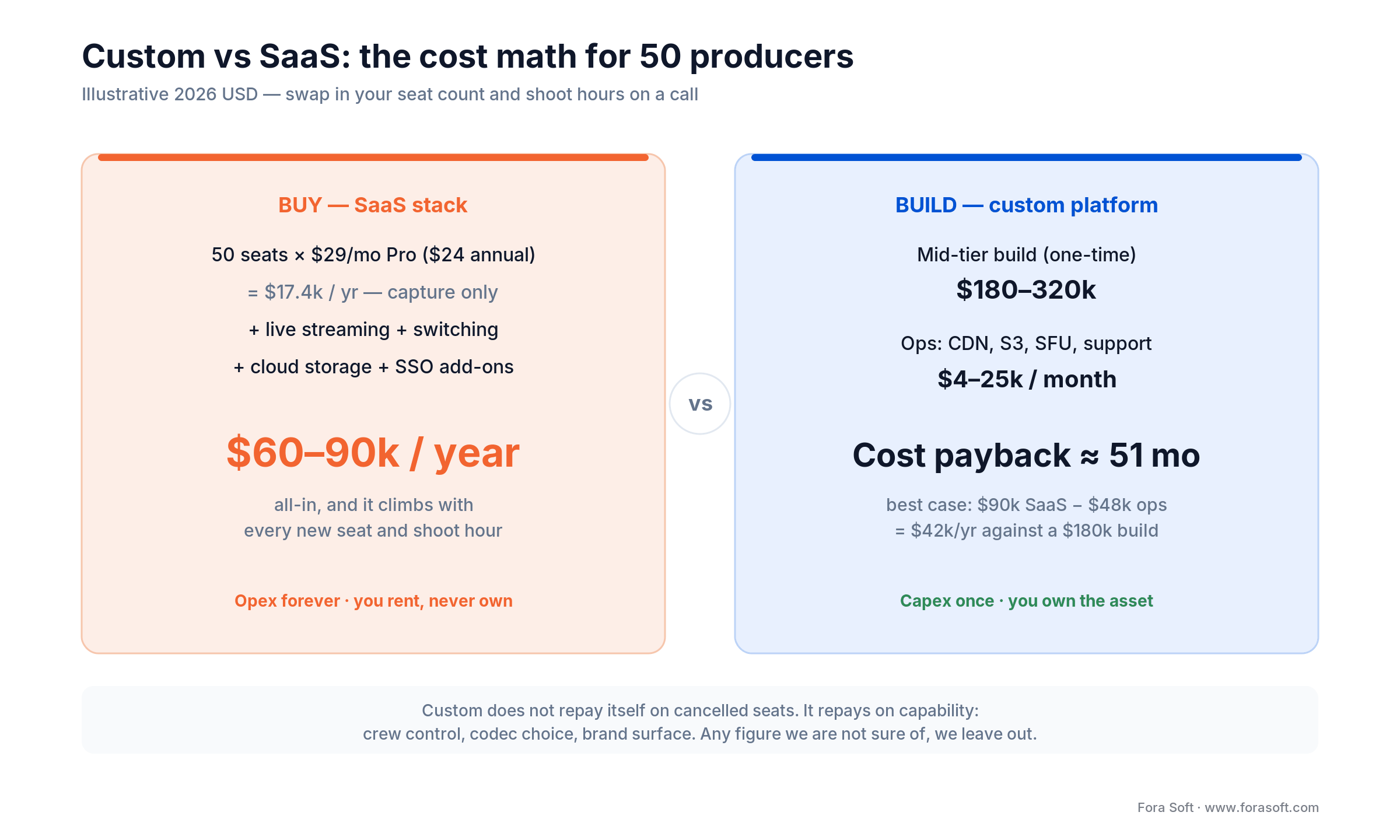
Figure 4. The buy-vs-build arithmetic for a 50-producer team: the payback is slow, which is why capability, not seat cost, is the reason to build (illustrative, 2026).
Mini case: Revo Studio — before and after Speed Space
Situation. Revo Studio shoots high-profile content for Netflix, Apex Legends, Electronic Arts, HBO, Paris Fashion Week and Live Nation Urban events. Pre-Speed Space, a single shoot meant Zoom for the live discussion, separate recorders, radios for crew, multiple devices per participant, and a post-production process where data was merged from inconsistent feeds. Frame loss showed up in the masters. Setup overheads ate into shoot time.
Approach. We worked with Revo across the architecture, UX and engineering passes. Three commitments anchored the design: enhance recording and streaming quality with bespoke codec / bitrate handling, simplify the recording process into a single platform, and transition the hybrid Zoom-plus-radios setup into a fully online format with role-based controls. Built on WebRTC SFU + double-ender local recording + AWS post-production storage.
Outcome. Speed Space is now the platform Revo runs shoots on, and the specifics are the point. One browser tab replaced the Zoom call, the separate recorders, the radios and the shot spreadsheet. Capture moved to 1080p at 8 Mbps written locally on every participant’s device, three to four times the bitrate a conferencing capture lands, and the master stopped depending on the link. Sessions carry up to 25 participants under four roles (Admin, Production Member, Talent, Representative), so crew can change a talent camera’s resolution, framing or bitrate remotely and talent cannot change anything by accident. Editors receive isolated per-participant tracks from the AWS store instead of one merged feed, which is what removed the merge-and-repair step from post. The platform has since carried work for Netflix, Apex Legends, Electronic Arts and HBO productions and was used at Paris Fashion Week and Live Nation Urban events.
For a deeper feature tour: Speed Space: Streamlining Remote Video Production. For adjacent builds in the same lane: TradeCaster, a WebRTC live-streaming platform carrying 46,000+ traders, and our enterprise webcasting playbook for the one-to-ten-thousand broadcast case.
A decision framework — pick your remote-production shape in five questions
Q1. What is your monthly recording volume? Below ~20 hours, SaaS is the right answer almost always. 20–100 hours puts you in the “heavy SaaS user” zone where you’ll start to feel the per-seat ceiling. Above 100 hours, custom math starts winning.
Q2. Is the deliverable broadcast or premium digital? If yes, frame loss in the master is non-negotiable. That alone forces a double-ender architecture and rules out generic conferencing. SaaS like Riverside / Zencastr work for podcast-style. Anything multi-cam with crew direction needs Speed-Space-class control.
Q3. Do you need to control talent cameras remotely? Crew remotely tweaking talent camera settings (resolution, framing, exposure assist), switching between feeds, drawing on shared screens? Riverside’s Business tier gets closest, since its producer mode can manage guest inputs, but no SaaS we have tested hands crew a per-camera control surface for resolution, framing and bitrate, multi-cam switching with overlays, and a four-role permission model at the same time. That combination is a production tool surface, not a conferencing one.
Q4. Brand & white-label? If your studio sells the platform to clients (or wants to embed it inside an internal tool), a custom build is the only path that gives you brand surface, custom domains, embedding, and SSO with your client’s identity provider.
Q5. Compliance / data residency? Healthcare, government, financial-services productions usually need data-resident storage, SOC 2, signed BAAs, and sometimes E2EE on the conferencing channel. SaaS handles “normal” SOC 2 fine. Anything beyond it is a custom build.
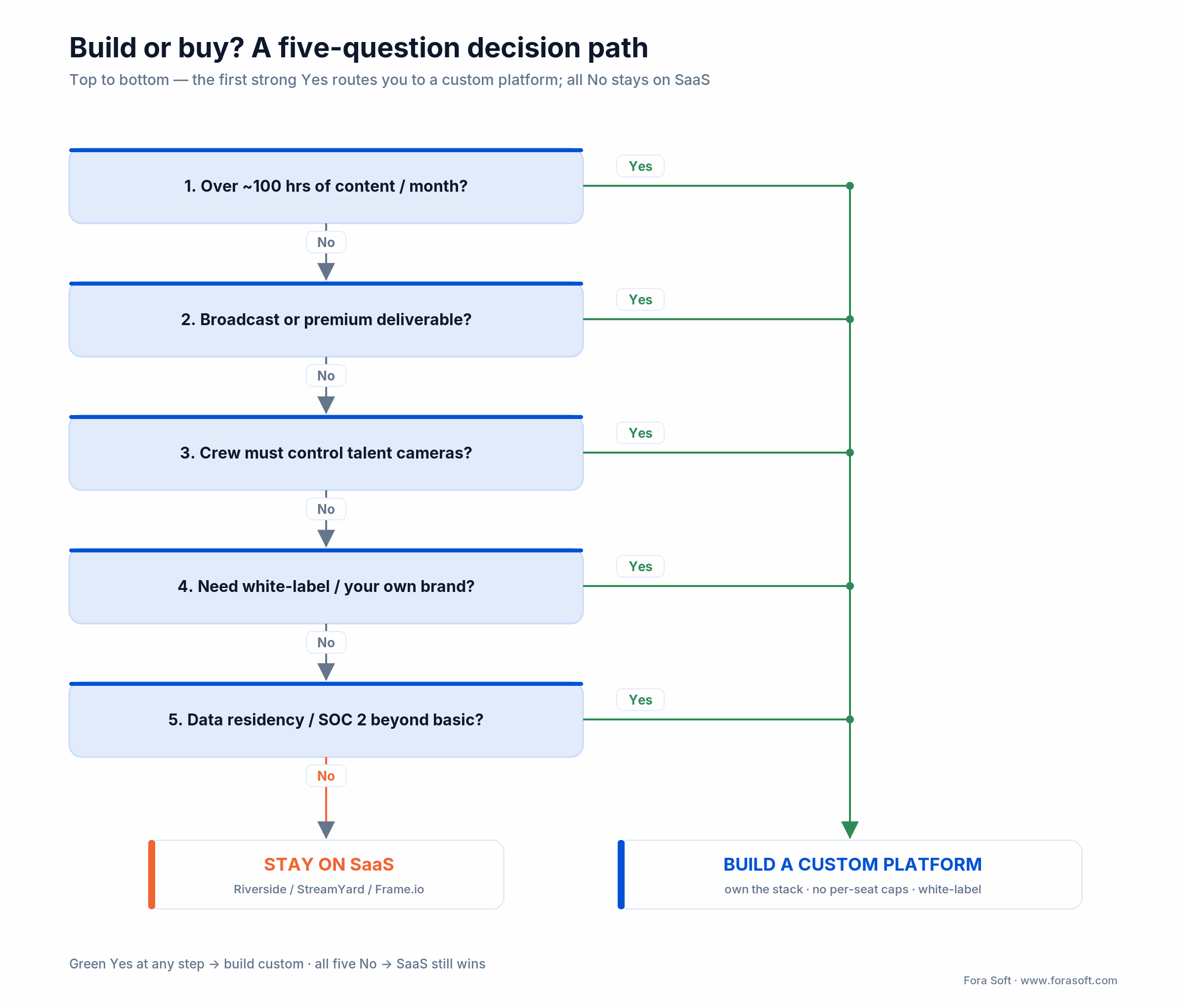
Figure 5. Five questions — the first strong Yes is your signal to build.
Talent UX: why a click-and-go invite link matters more than features
The single most under-rated part of a production-grade remote tool is what the talent experiences. They are not engineers. They are an actor in a hotel room ten minutes before call time, or a product spokesperson at home with no IT support. If the platform requires installing a desktop client, signing into an SSO portal, or fiddling with codec dropdowns, you have already lost the shoot.
Speed Space’s talent flow is deliberately bare: a unique invite link, a single browser permission prompt for camera and microphone, an automatic background bandwidth and codec test, and the talent is on. Crew handles every recording configuration, layout switch and overlay from their side. Talent never sees the controls.
This is also where role-based access does its quiet work: even if talent panics and clicks around, the only buttons available are “leave” and “raise hand.” The same shoot run on Zoom requires the talent to remember to start local recording, not screen-share by accident, and not change resolution mid-take. We have watched real productions die from any one of those. Speed Space removes the failure modes by removing the controls.
What’s next on the Speed Space roadmap (and what we’d build differently in 2026)
Three areas where we are actively iterating with Revo Studio and where we’d push harder if we shipped a Speed-Space-class platform from scratch today:
1. AV1 capture, not just H.264. AV1 buys roughly 50% off H.264 at the same quality (about 30% against VP9 or HEVC), which on a 1080p / 8 Mbps stream is real storage and CDN money. The catch is that AV1 decode is broad in 2026, though on Apple hardware it still wants A17 Pro or M3-class silicon, while AV1 encode in the browser is not: MediaRecorder will give you AV1 in Chromium, while Safari and Firefox still cap browser capture at H.264 and VP8/VP9. A crew on mixed laptops therefore still records H.264, so we ship AV1 as an opt-in for Chromium clients on high-spec machines and transcode the rest.
2. Generative-AI background and noise removal at the edge. WebGPU-based noise suppression and background replacement (Krisp-class) running locally on the talent device, not in the cloud, keep the master clean without adding latency or compromising the local recording. Our AI Video Quality Enhancement playbook covers the trade-offs.
3. Real-time multilingual captions and translation. For Paris Fashion Week-class international productions, embedding LiveKit-class multimodal agents for live captions and dub-track generation is the obvious next layer. We have shipped this pattern in adjacent products — see our LiveKit Multimodal Agents Guide.
Whatever the version-N feature, the architecture stays the same: WebRTC SFU for live, double-ender for the master, role-based access on top, and AWS for storage. Everything else is icing.
Five pitfalls we see in almost every remote-production build
1. Confusing preview latency with master quality. Teams design one budget for both, end up with a network-degraded master, and discover the problem in editorial. Architect the live SFU stream and the local-master capture as independent pipelines from day one.
2. Underestimating CDN egress at scale. Do this one on paper before you ship. A 1080p viewer at 6 Mbps consumes 6 × 3600 ÷ 8 = 2,700 MB, so 2.7 GB per viewer-hour. At commodity CDN rates near USD 0.01/GB that is USD 0.027 per viewer-hour; at AWS CloudFront first-tier rates near USD 0.085/GB it is USD 0.23. Half a million viewer-hours a month is therefore anywhere from USD 13.5k to USD 115k depending purely on which contract you signed. Edge caching, SFU tiering and bitrate ladders are not optional.
3. Ignoring codec licensing. The Access Advance HEVC pool raised rates and caps 25% for licensees signing after 30 June 2026. That window has closed: sign now and you are on the raised schedule, so budget for it rather than for the legacy rate you may have been quoted last year. Licensees who signed before the deadline hold the old rates through 2030. Pre-launch due diligence on AV1 / VP9 / H.264 / H.265 royalties is now mandatory.
4. NTP drift breaking multi-track sync. Without hardware-grade timecode, audio and video timestamps drift across participants. 100 ms drift is audible. Inject timecode in the local-recording chunk metadata and reconcile during post-process.
5. SFU saturation under participant growth. CPU inflection lands around 150–200 participants per single SFU instance. Cascading SFUs add latency and complexity if you wait until the wall hits. Plan the cascade before you need it.
KPIs: what to measure every week
Quality KPIs. Master frame-drop rate (target: 0%), local-recording bitrate vs target (95th percentile within 5% of configured), audio sync drift across tracks (<30 ms), proxy generation time (< 2× recording duration). Anything outside these tells you something is rotten in capture or sync.
Reliability KPIs. Session uptime (hold a new build to 99.9%; Revo reports no dropped sessions to date, but commission against a number, not an anecdote), upload success rate post-shoot (> 99.5%), SFU CPU per 25-participant room (< 20% of a core on the SFU node, not per participant, because forwarding cost scales with bandwidth rather than head count), p95 preview latency (< 500 ms intra-region, < 800 ms inter-region).
Business KPIs. Hours of content captured / month, number of active studios, post-production cycle time (target: 30–50% faster than pre-platform baseline), per-shoot tool cost (target: at least 30% lower than the prior multi-tool stack).
Security and compliance in 30 seconds
Production teams handle pre-release content under NDA and increasingly regulated data — talent contracts, child-talent age verification, healthcare or government context for branded content. The shortlist of what you actually have to address:
End-to-end encryption on the conferencing channel (E2EE WebRTC via SFrame / Insertable Streams) for sensitive shoots. Encryption at rest with KMS-managed keys for AWS storage. Watermarking on proxies sent to external editors. Audit trails on who downloaded which master, when, and from where.
SOC 2 Type II for any enterprise customer. SSO via SAML / OIDC for crew accounts. Data residency — if a Netflix shoot is for the EU market the masters typically need to live in eu-west-1 or eu-central-1. Architect for it on day one; retrofitting region pinning is painful.
When NOT to build a custom remote-production platform
Do not build a custom remote video production platform if you produce under roughly 20 hours of content a month, your deliverable is podcast or interview style, your crew is small and stable, or your bottleneck is editorial review rather than capture. In each of those cases an off-the-shelf tool wins for years. In detail, custom is a poor fit when:
- You produce under ~20 hours of content a month and the deliverable is podcast / interview — Riverside or Zencastr will save you six figures.
- Your output is single-platform live streaming (LinkedIn Live, Twitch, YouTube) with light editing — StreamYard will out-compete a custom MVP for years.
- You don’t have a partner with deep WebRTC, codec, AWS Media and broadcast experience. Building this stack with a generalist team is the most expensive way to learn the trade-offs.
- Your crew is <5 people and stable — the marginal value of role-based access doesn’t exceed the build cost.
- Your editorial team is happy with Frame.io C2C and the bottleneck is review, not capture — fix review first, then revisit capture.
How to actually evaluate a remote-production platform before committing
The 30-minute frame-drop test. Run a 30-minute multi-participant session at 1080p with deliberate network impairment (Charles Proxy, Network Link Conditioner, or tc on Linux). Compare the local master to the streamed recording. If the platform doesn’t do double-ender, the loss is visible.
The role-permission walkthrough. Have a producer, a talent and a representative join. Try to push the talent into actions only producers should do (change a recording config). The platform should refuse cleanly. SaaS tools without proper RBAC will let everyone do everything.
The post-production handoff. Export from the platform into Premiere Pro / DaVinci Resolve / Avid Media Composer. Audit time-code accuracy, AAF / EDL fidelity, audio stem isolation. If editors can’t pick up clean tracks, the platform isn’t shippable.
Codec / license review. Ask the vendor for the codec licensing footprint and AV1 / H.265 / H.264 royalty handling. If they don’t answer cleanly, that bill will land on you later.
Want a frame-drop, role and post-production audit?
We’ll run the three tests on your current stack on a free 30-minute call — or use them to scope a custom build. Either way, you walk away with a prioritised gap list.
FAQ
How does Speed Space eliminate frame loss compared to Zoom or Google Meet?
Speed Space records locally on each participant’s device at the configured 1080p / 8 Mbps quality and uploads the file to AWS post-shoot. The conference stream used during the live session is a separate, lower-bitrate WebRTC feed for preview and direction only. Network conditions during the take don’t affect the master.
How many participants can Speed Space host?
Up to 25 simultaneous participants per session; Revo reports no dropped sessions to date, and a new build should be commissioned against a 99.9% uptime target rather than an anecdote. The same SFU + double-ender architecture scales to 50–100+ participants by cascading SFUs — that is the standard custom-build path for broadcasters needing larger crews.
What roles does the platform support and why does that matter?
Four roles: Admin (full platform control), Production Member (set creation, recording, stream control), Talent (joins via unique invite link as featured participant), Representative (observes the shoot without interfering). Role-based access prevents on-set chaos — talent can’t accidentally change codec settings, representatives can’t mute the talent, etc.
How does Speed Space compare to Riverside, Zencastr or StreamYard?
Riverside and Zencastr are great for podcast-style double-ender capture, but Riverside caps separate-track downloads by tier and neither offers multi-cam switching, overlays, drawing tools or crew-controlled talent cameras. StreamYard excels at multi-destination live streaming. Speed Space combines all of the above into a single workflow built for production agencies and broadcasters.
What does it cost to build a custom Speed-Space-class platform in 2026?
Pilot tier USD 80–140k in 8–12 weeks. Production-grade tier (Speed Space-equivalent) USD 180–320k in 14–22 weeks. Broadcast-SLA tier (NDI/SRT egress, multi-region failover, SMPTE 2110, SOC 2) USD 350–700k in 24–36 weeks. Ongoing ops USD 4–25k/month depending on volume. Numbers reflect Fora Soft + Agent Engineering — conservative ranges.
Which clients have used content shot via Speed Space?
Through Revo Studio, Speed Space has been used to produce content for Netflix, Apex Legends, Electronic Arts, HBO, Paris Fashion Week and Live Nation Urban events. The platform’s daily operational reliability is what earned those engagements.
Do we need broadcast-grade hardware to use a Speed-Space-class platform?
No. The whole point of the architecture is that talent uses a normal laptop or phone in their location, while the production crew controls the shoot from anywhere. NDI / SRT egress to broadcast hardware (vMix, AWS MediaLive) is optional and only needed when you push to traditional broadcast destinations.
Can we white-label a Speed-Space-class platform for our own brand?
Yes. A custom build gives you a branded domain, custom UI, embedded experiences, SSO with your client’s identity provider and the ability to resell the platform. SaaS tools cannot offer this; it is one of the strongest reasons production agencies move to custom.
What to Read Next
Companion piece
Speed Space: Streamlining Remote Video Production
Feature-by-feature tour of how Speed Space replaces Zoom + radios + recorders for distributed crews.
WebRTC architecture
Agora.io Alternative in 2026
Custom WebRTC with LiveKit, mediasoup, Jitsi, Janus — the SFU choices that power Speed-Space-class builds.
Scaling
Scalability in Video Streaming and Conferencing
SFU cascading, CDN egress and storage strategies for real-time video at production scale.
Low-latency video
Real-Time Video Streaming: Low-Latency Solutions
The latency budgets, codecs and protocols behind sub-second remote production preview.
Service page
Internet TV & Video Streaming Development
Our service page for OTT, live streaming, video conferencing and remote-production builds.
Ready to ship your own Speed-Space-class platform?
A production-grade remote video platform in 2026 is not a Zoom skin. It is a deliberately split architecture: WebRTC SFU for crew preview and direction, double-ender local recording for the master, role-based access for on-set discipline, NDI / SRT egress when broadcast destinations need it, and an AWS-backed post-production store that hands clean tracks to editors. Built that way, network-caused frame loss in the deliverable goes to zero, editors receive per-participant tracks instead of one merged feed, and a single platform replaces the four-to-six tools most production agencies juggle today.
SaaS tools (Riverside, StreamYard, Frame.io C2C) are still the right answer below ~20 hours of monthly content or for podcast-style output. Above that, custom starts winning on control and capability: crew direction, a four-role permission model, codec choice, and a product you can put your own brand on. On pure cost it takes far more volume than most vendors admit, past roughly 100 hours a month, and even then the saving comes from what you stop outsourcing, not from cancelled seats. Speed Space is the proof point. We’d like to build the next one with you.
Let’s scope your remote-production platform
Thirty minutes, a senior video engineer, and a one-page plan: architecture, codec / SFU choice, cost range, timeline, frame-loss strategy. No slideware.

