


Key takeaways
• AI lesson content generation is a retrieval problem, not a “prompt better” problem. The products that work in production ground a model in standards datasets (Common Core, NGSS, IB) with a teacher reviewing every draft — not a bare LLM call.
• Tokens are cheap; the build is not. A 45-minute differentiated lesson costs $0.05–$0.20 to generate in 2026. Curriculum ingestion, guardrails and LMS integration are ~80% of year-one engineering.
• The bar is set by scaled deployments. Khanmigo reached 10M registered students by March 2025 and posted ~22% math gains for consistent users — but most of that came from pedagogy, not raw model power.
• Compliance moved again in 2026. COPPA opt-in (compliance April 2026), FERPA audits, ADA Title II (WCAG 2.1 AA, now April 2027) and the EU AI Act (transparency Aug 2026, high-risk pushed to Dec 2027) all touch lesson-grading AI — design the audit trail now.
• Fora Soft has shipped education platforms like BrainCert, TutReX and The Language Chef. Want a 48-hour scoped estimate for adding AI lesson generation to your platform? A 30-minute call is usually enough.
Why Fora Soft wrote this playbook
We build ed-tech for a living. Across 250+ shipped products since 2005, a real share have been in learning: BrainCert for online classrooms and certification, TutReX for 1:1 tutoring, InstaClass for on-demand classes, The Language Chef for language learning, Tabsera for tablet-first classrooms, and Talensy for skills assessment. When LLMs became usable for content in 2023, we wired them into these platforms, and we learned fast that the interesting engineering is not in the prompt.
This is what we’d tell a founder, curriculum director, or CTO on a call: how to generate tailored lesson content that aligns to standards, fits a teacher’s workflow, survives compliance review, and moves student outcomes. No model-worship. Numbers, architectures, failure modes, and a decision framework you can hand to your board. Our AI integration team ships this inside existing LMS and course-authoring products, not as a science project.
We run on Agent Engineering, which lets a small team turn a scoping call into a numbered plan inside 48 hours. If you’re already wrestling with RAG pipelines, LTI 1.3 grade passback, or FERPA redaction, bring the hardest question and we’ll bring the playbook.
Planning an AI lesson generator for your ed-tech platform?
Share your subject, grade band, and compliance posture. We’ll sketch a RAG architecture and a realistic timeline on the call.
The verdict — what actually works for tailored lesson content in 2026
Three years in, the production pattern is consistent across Khan Academy, Duolingo, MagicSchool, Diffit, Eduaide, and the district deployments we’ve helped stand up. The stack is not “GPT wrote a lesson.” It’s a pipeline: a teacher states intent, the system retrieves aligned source content, an LLM drafts against a structured prompt, a differentiation layer produces variants, a safety layer checks for bias and hallucination, a teacher reviews, and the LMS delivers. Each step is an engineering concern with its own SLAs.
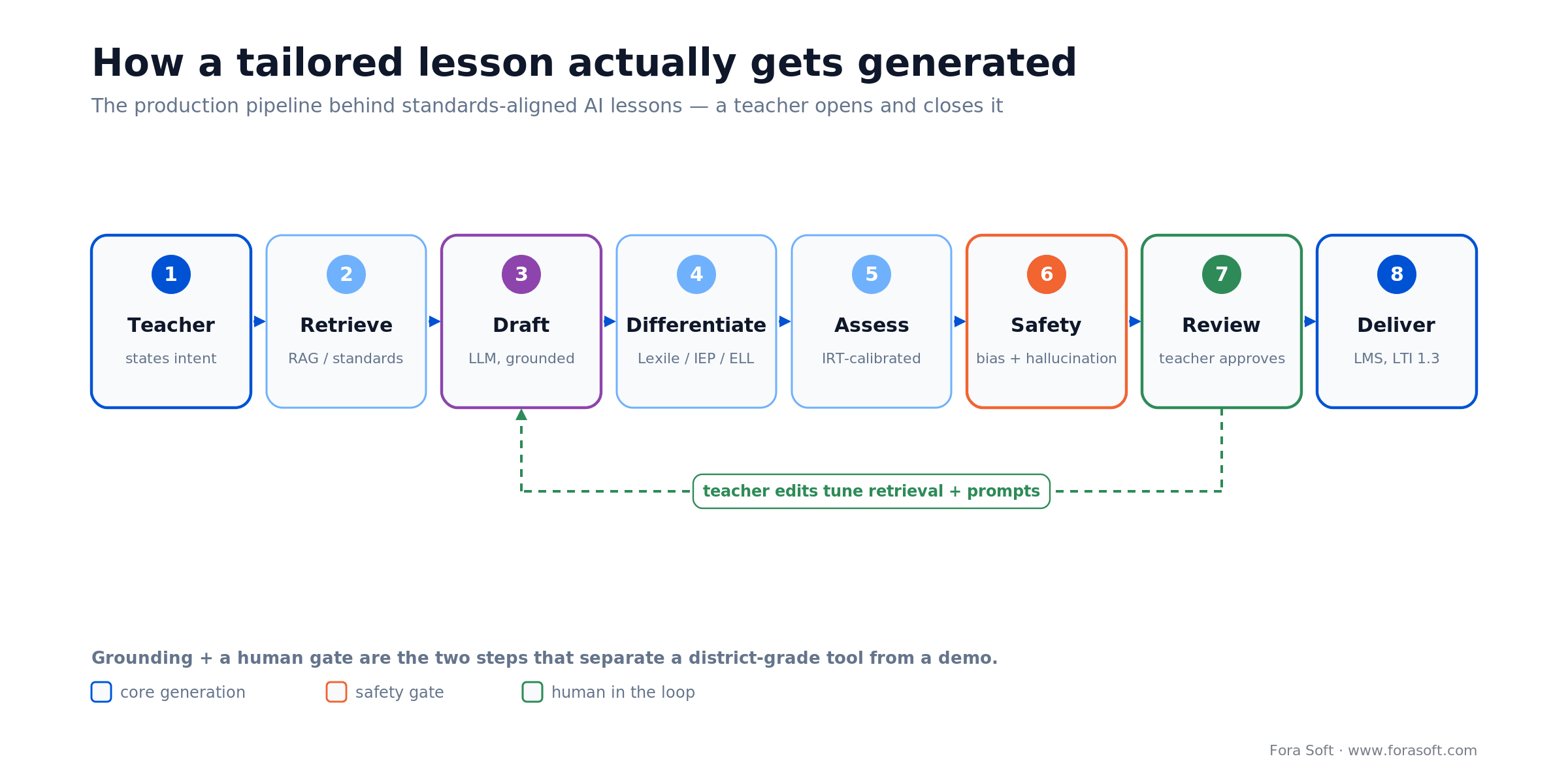
Figure 1. How a tailored lesson actually gets generated. Grounding (step 2) and the teacher gate (step 7) are what separate a district-grade tool from a demo.
The teams shipping real outcomes all do three things. They ground the model in standards datasets rather than letting it improvise: a RAG pipeline over Common Core, NGSS, IB, and local standards is now table stakes. They keep teachers in the loop: the AI proposes, the teacher approves and edits. And they instrument relentlessly: alignment scores, Lexile drift, bias audits, student outcomes.
Starting from zero? License for eight to twelve weeks, then decide. MagicSchool, Diffit, and Eduaide give you a realistic baseline of teacher adoption, outcome data, and compliance pain so you can build or buy with open eyes. Shipping a bespoke generator before you’ve validated the workflow is how ed-tech startups burn runway. For platforms that also stream live classes, our AI-for-video-engineering guide covers the real-time side.
Reach for a RAG + teacher-in-the-loop pipeline when: you need standards-aligned lessons at scale, across multiple grades or subjects, with an auditable trail that passes district compliance review.
Market snapshot — the tools teachers actually use in 2026
The tool market consolidated fast. A handful of products dominate daily teacher workflows in 2026, each with a distinct center of gravity. Knowing them is step one before deciding to build — most of your differentiation will come from what these tools do badly, not from re-solving what they solve well.
| Product | Sweet spot | Pricing (2026) | What it does not do |
|---|---|---|---|
| Khanmigo | Student tutor + teacher co-pilot | Free to US teachers; district paid | Deep custom-curriculum control |
| MagicSchool | 80+ tools, IEP drafting | Free / Plus $8.33 per user·mo (annual) / Enterprise | Per-district standards mapping |
| Diffit | Reading-level differentiation | Free Basic / school flat-rate / district quote | Assessment item banks, grading |
| Kira, SchoolAI | Standards-aligned lessons + student agents | Freemium → district | Deep proprietary-curriculum IP |
| NotebookLM | Source-grounded study guides, audio | Free (Google account) | Classroom grading & rosters |
| Eduaide, Curipod, Brisk | Tool chaining, interactive decks | Freemium → district | Deep assessment analytics |
The structural gap shared by most of these tools is deep standards mapping for a specific district or country, plus tight integration with the teacher’s existing grading and rostering flows. That gap is where a bespoke build still makes sense, not reinventing the lesson-draft prompt. If your interest is buyer-facing rather than build-facing, our AI lesson plan generator buyer’s guide covers procurement checklists in depth.
The techniques behind tailored lesson generation
Once you know the market, the engineering becomes knowable. Six techniques account for the difference between a toy demo and a platform a district will sign a three-year contract on. Each is listed with its use, its cost shape, and the failure mode to guard against.
1. RAG over standards and curriculum datasets. Retrieval grounds every generation in cited source content — a state standard, an approved textbook chapter, a district scope and sequence. The model drafts; it doesn’t invent. This is the single biggest lever against hallucinated math, fabricated quotes, and off-grade content. Budget $70–$1,000/month in infrastructure for a district-sized corpus and a three-to-six-week build for the first domain. The practical trick: put the exact standard code in the prompt — “align to CCSS 6.RP.A.1” beats “about ratios” every time.
2. Bloom’s taxonomy + UDL alignment. A good lesson walks students up the cognitive ladder and supports multiple means of representation. Tag each activity with a Bloom level (remember, understand, apply, analyze, evaluate, create) and check coverage. UDL-aligned differentiation (text, audio, video, interactive) is part of the prompt, not a post-hoc layer.
3. Reading-level differentiation with Lexile / Flesch-Kincaid. Automated leveling adjusts vocabulary and sentence structure across a 200L–1200L+ range. The model generates a base text, then rewrites for each band. Validate with a readability formula and a human spot check — AI regularly over-simplifies and drops the academic vocabulary that matters.
4. IEP and ELL accommodations. SPED-focused flows feed IEP goals and accommodations into the prompt so the generated lesson respects extended time, chunking, visual supports, and language scaffolds. The best tools produce teacher-facing rationales alongside student-facing content, which speeds up IEP audits.
5. Item Response Theory (IRT) for assessment. When your assessments are AI-generated, you need calibrated difficulty. IRT 2PL models turn an item bank into a graph of difficulty and discrimination, and recent work shows AI-generated MCQs can match expert-authored items on both dimensions. Pair this with person-fit statistics to catch cheating.
6. Culturally responsive generation. A 2025 study in Computers and Education: Artificial Intelligence found a theory-grounded Culturally Responsive Lesson Planner prompt produced 36 vs 21 cultural elements per lesson and roughly double the curriculum relevance versus an off-the-shelf prompt on base GPT-4o. Ship the theory in your prompt library; review with humans who hold the relevant cultural knowledge.
Reference architecture for a production lesson generator
Below is the stack we deploy when a client asks for a lesson-generation module inside their LMS or course-authoring platform. It’s not novel — it’s the distilled shape of the production systems at Khan Academy, Duolingo, MagicSchool, and the platforms we’ve shipped for education clients.
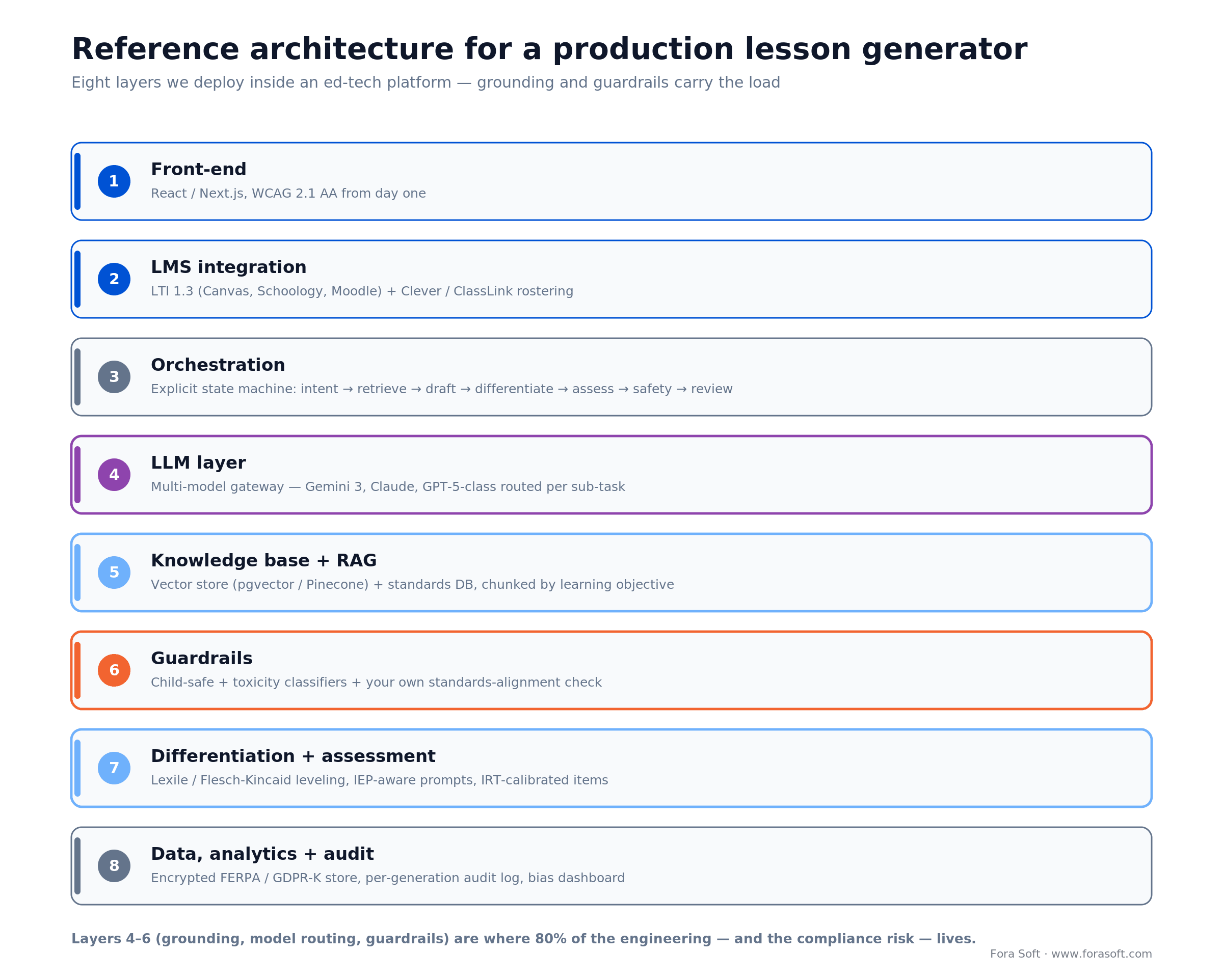
Figure 2. The eight layers we deploy inside an ed-tech platform. Layers 4–6 — model routing, grounding and guardrails — carry most of the engineering and the compliance risk.
The eight-layer stack
1. Front-end. React or Next.js with WCAG 2.1 AA from day one; accessibility is now a procurement question, not post-launch polish.
2. LMS integration. LTI 1.3 for Canvas, Schoology, Moodle, Blackboard; Google Classroom, Clever, and ClassLink for rostering. Grade passback and deep linking are non-negotiable for district adoption.
3. Orchestration. A service that runs the pipeline as an explicit state machine — intent, retrieval, draft, differentiate, assess, safety, teacher review — in Python or TypeScript, not one giant chain of prompts.
4. LLM layer. Model choice depends on the sub-task. In 2026 that means routing across Gemini 3, Claude and GPT-5-class models through a gateway. Gemini 3 often wins on pedagogy and multimodal, Claude on long-form differentiation and tone, GPT-5-class on standards alignment. Don’t tie yourself to one vendor.
5. Knowledge base & RAG. Vector store (pgvector, Pinecone, Weaviate) plus a structured standards database. Chunk by learning objective rather than character count; keep citations inline so the UI can surface them.
6. Guardrails. A child-safe content classifier, a toxicity moderation pass, and a pedagogical classifier (your own) for standards alignment and grade appropriateness.
7. Differentiation & assessment. Text-leveling (Lexile / Flesch-Kincaid), IEP-aware prompts, IRT-calibrated item generation — in its own service so you can iterate without touching core generation.
8. Data, analytics, and audit. Encrypted storage (FERPA / GDPR-K compliant), an audit log for every generation, a bias-audit dashboard, and outcome analytics (engagement, alignment score, teacher edit distance, completion).
Reach for a multi-model gateway when: your product spans K-12 and higher-ed, covers more than two subjects, or operates in regions where a single vendor has coverage or latency gaps.
Cost model — what a tailored lesson actually costs to generate
Token prices collapsed through 2025. A typical 45-minute lesson plan, with differentiated variants and a 10-item assessment, consumes roughly 15K–30K input tokens (context and retrieved sources) and 3K–6K output tokens. At 2026 prices that lands between $0.05 and $0.20 for the raw generation. Scale it across 2,000 teachers using the tool twice a week, roughly 17,000 lessons a month, and you reach $870–$3,500/month in LLM spend. That is material, but nowhere near the dominant cost.
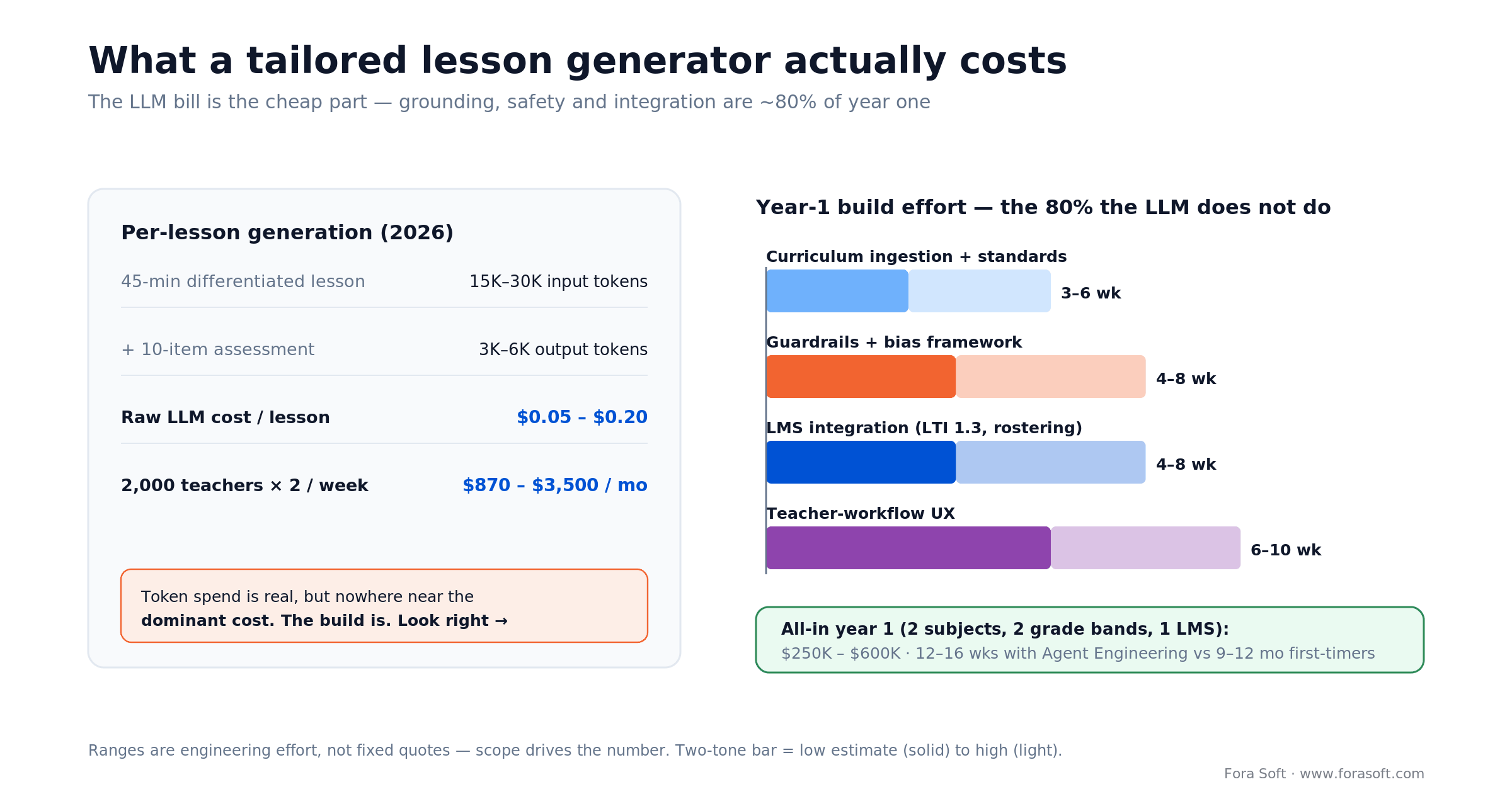
Figure 3. The token bill is the cheap part. Curriculum ingestion, guardrails and LMS integration — roughly 80% of year one — are what actually cost money.
The dominant costs are what the LLM does not do. Curriculum ingestion and standards mapping for a single U.S. state typically runs 3–6 engineer-weeks; add 1–2 weeks per extra state. Guardrails, safety classifiers, and a bias-audit framework are another 4–8 weeks. LMS integration (LTI 1.3, Classroom APIs, rostering) is a persistent 1–2 engineer-month investment with ongoing maintenance. Teacher-workflow UX is where customers actually feel the product. Budget 6–10 weeks of design plus development there alone.
All in, a district-grade tailored lesson generator with two subjects, two grade bands, and a single LMS runs $250K–$600K in year one if you build with a team that has done it before. With Agent Engineering and a clear MVP scope, we can often move a pilot into production in 12–16 weeks rather than the 9–12 months a first-time team needs. Want a numbered range for your scope? Share it on a call and we’ll send it back within 48 hours.
Need a scoped estimate for your lesson-gen feature?
Tell us your subjects, grade bands, target LMS, and compliance regime. You’ll get a numbered plan within 48 hours of the call.
Compliance — COPPA, FERPA, the EU AI Act, and accessibility in 2026
Compliance is now the first question a district asks and the last question a procurement office signs off on. 2025 and 2026 reshaped the rules on several fronts, and any lesson generator targeting K-12 or schools in the EU has to answer for each. The table below is the version we hand clients before a build.
| Regime | What changed (2025–26) | Key date | What to build |
|---|---|---|---|
| COPPA (US, under-13) | Separate opt-in consent for targeted ads and third-party sharing — first update since 2013 | Compliance April 22, 2026 | Verified parental consent, age gates, tight data retention |
| FERPA (US student records) | Guidance became audits after 2025 state investigations | In effect | Signed DPAs, sub-processor list, breach notice, audit trail |
| EU AI Act (education = high-risk) | Digital Omnibus postponed most Annex III duties; transparency still lands on schedule | Transparency Aug 2, 2026 · high-risk Dec 2, 2027 | Label AI output, human oversight, risk log, QMS — build now, certify by 2027 |
| ADA Title II / WCAG (US public entities) | DOJ web rule; deadline extended one year in April 2026 | Apr 26, 2027 (50k+ pop.) · 2028 (smaller) | WCAG 2.1 AA: alt text, captions, keyboard nav, screen-reader |
| State privacy (SOPIPA, SOPPA + others) | Encryption, authentication, minimization beyond FERPA | In effect | Encryption in transit/at rest, RBAC, data minimization |
Two of these shifted in ways most competitors haven’t caught up with. The amended COPPA Rule moved to an opt-in posture for advertising and third-party disclosure, with a compliance deadline of April 22, 2026 — if your consent flows predate it, they need a redesign. And the EU AI Act looked like an August 2026 cliff for high-risk education AI until the 2026 Digital Omnibus pushed most Annex III obligations to December 2, 2027; the Article 50 transparency duty (disclose AI interaction, label AI-generated content) still applies from August 2, 2026. The practical read: you have breathing room on full high-risk conformity, but build the audit trail, human-oversight workflow and transparency labeling now.
On accessibility, note the correction most 2025-era guides get wrong: the ADA Title II web rule points to WCAG 2.1 AA (not 2.2), and the DOJ extended the large-entity compliance date to April 26, 2027 in an April 2026 interim rule. Our iOS accessibility playbook covers the mobile side in depth.
Mini case — what we learned shipping BrainCert, TutReX, and The Language Chef
BrainCert runs online classrooms, certification, and learning management for schools and enterprises worldwide. When we helped integrate AI-driven content workflows, the lesson was that adoption lived or died on one screen: the teacher’s review pane. If editing a generated lesson took more than 90 seconds, teachers stopped using the feature. The engineering work was to get retrieval accurate enough that teachers accepted the first draft about 70% of the time.
TutReX is a 1:1 and small-group tutoring platform. Here the AI layer is lighter — tutors write their own lessons but lean on AI for warm-ups, exit tickets, and quick parent summaries. The non-obvious win: auto-generating parent emails after each session raised paid retention, because parents stayed engaged with progress and rebooked.
The The Language Chef teaches languages through cooking. Tailored content there means generating recipes and dialogues at the learner’s CEFR level with regionally appropriate ingredients. We learned that cultural fit, not grammar difficulty, is what breaks content, and that a cheap localization reviewer in each target market is worth more than a more expensive model.
The pattern across all three: the hard engineering is the data and the review workflow, not the prompt. Want a 30-minute conversation about how that applies to your platform? A scoping call usually surfaces the top two risks inside the first ten minutes.
Build vs buy — the honest answer
Most teams should start by licensing a tool like MagicSchool or Diffit alongside their existing LMS for a pilot term. You’ll learn more about teacher behavior, parent reactions, and compliance friction in eight weeks of real use than in nine months of spec work. After the pilot, compare the cost of a multi-year license against a bespoke build tuned to your workflow and data.
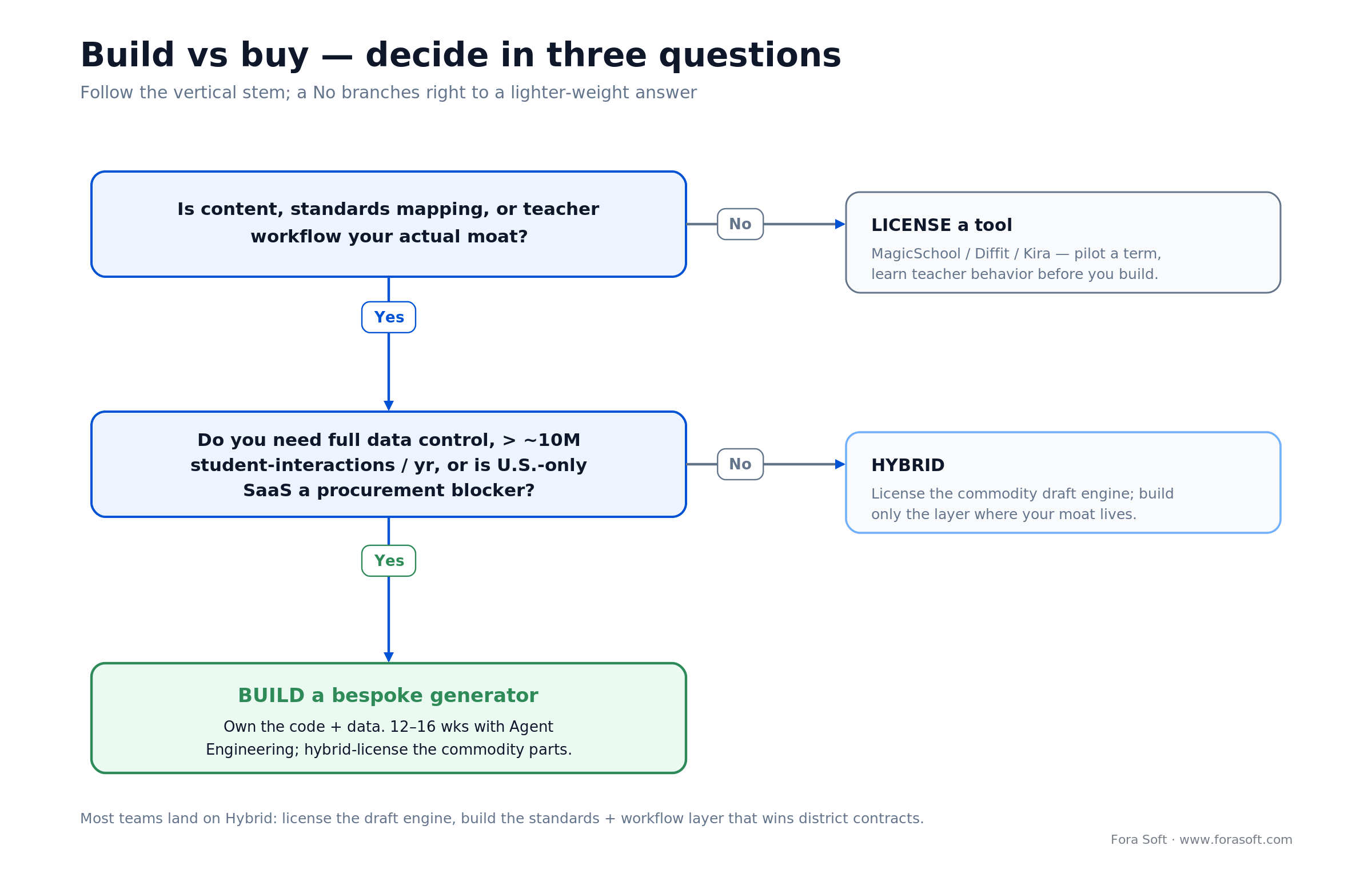
Figure 4. Build vs buy in three questions. Most teams land on Hybrid — license the commodity draft engine, build the standards and workflow layer that wins district contracts.
Buy when your differentiation is elsewhere (brand, reach, pedagogy), you have fewer than ~10M student-interactions per year, your compliance team is comfortable with vendor DPAs, and you’re not building deep proprietary curriculum IP. Build when your content, standards mapping, or teacher workflow is your moat; when you need full data control for procurement wins; when U.S.-only SaaS is a blocker in your jurisdiction; or when your scale justifies amortized cost over three-to-five years. In practice the answer is usually a hybrid — license a component, build the parts where your moat lives, integrate the two through our custom software development team.
| Factor | Build | License |
|---|---|---|
| Time to market | 12–16 wks with Agent Engineering; 9–12 mo otherwise | 1–4 weeks |
| Standards alignment | Deep, per-district | Pre-mapped; shallow customization |
| Data control | Full | Vendor DPA, sub-processors |
| Compliance effort | In-house audits & ownership | Vendor handles — you verify |
| Year-1 cost | $250K–$600K (MVP scope) | $5K–$50K depending on size |
| Strategic lock-in | Low — code is yours | Moderate — data, workflow |
Reach for a hybrid build when: the draft engine is a commodity for you but your standards mapping, assessment bank, or teacher workflow is the moat — license the first, build the second.
Decision framework — five questions to answer before you build
Q1. Who is the primary user? Teachers (workflow tool), curriculum leads (content authoring), or students (tutor)? Each needs a fundamentally different UI and safety posture. Choose one for your MVP.
Q2. Which standards do you map to? Common Core and NGSS in the U.S., IB and Cambridge internationally, country-specific in the EU and Asia. Ingestion effort is per-framework. Pick one, prove the value, expand later.
Q3. What is your compliance regime? U.S. district? EU school? Corporate training? Each has different rules and buyers. Map the required audits before you write code.
Q4. What differentiation really matters? Reading level, ELL, IEP, gifted, cultural context? Not all at once — pick two for launch and build quality there.
Q5. What is your integration surface? LTI 1.3 for LMS? Google Classroom? Clever rostering? One specific district SIS? The integration list determines half the engineering cost.
Pitfalls to avoid
1. Trusting a raw LLM for math and science content. Even strong reasoning models still produce algebra and statistics errors at material rates. Every math item needs verification; every science claim needs a retrieved source. Anything less and kids memorize wrong answers.
2. Shipping without bias audits. A widely reported 2025 study from Common Sense Media found AI teacher assistants recommended more punitive interventions for students with Black-coded names versus white-coded names across MagicSchool, Khanmigo, Curipod and Gemini for Education. Bias audits are now baseline procurement requirements, not nice-to-haves.
3. Skipping teacher-in-the-loop to save clicks. Teachers trust the tool more when they can see and edit every generated artifact. Auto-publishing without review looks fast in a demo and kills adoption in the first week of real use.
4. Ignoring teacher edit distance as a KPI. If teachers rewrite 60% of every generated lesson, your retrieval or prompt library is wrong. Measure edit distance per lesson; aim for under 25% of tokens changed after 90 days of tuning.
5. Treating accessibility as a Q4 project. WCAG 2.1 AA and the EU AI Act both bite in the 2026–27 window. Retrofitting accessibility and audit trails after launch costs 3–5x more than building them in from sprint 1.
KPIs to measure after launch
1. Quality KPIs. Teacher edit distance per lesson (target: < 25% of tokens changed), standards-alignment score per generated lesson (target: > 0.85 on your rubric), hallucination rate on spot-checked facts (target: < 1%), and Lexile / Flesch-Kincaid match to the requested band (target: within ±1 grade level on 95% of outputs).
2. Business KPIs. Weekly active teachers using the tool (target: > 60% of rostered teachers after month 3), lessons generated per active teacher per week (target: ≥ 2), district contract renewal rate (target: > 90%), and teacher NPS (target: > 40).
3. Reliability KPIs. p95 generation latency (target: < 12s for a full lesson), guardrail trigger rate (target: < 2% of generations, investigated 100%), uptime of the RAG retrieval path (target: ≥ 99.9%), and time-to-resolve after a safety incident (target: < 24 hours).
When to NOT build tailored lesson generation
Three situations argue against a bespoke generator. First, if your user base is under 5,000 teachers and licensing fees stay under $50K/year, the payback math on a build rarely works. Second, if your differentiation is the community, the marketplace, or the assessment bank rather than content generation, invest there — every hour on prompt tuning is an hour not on your moat.
Third, if you operate in a jurisdiction whose compliance regime is still unstable (multiple pending laws, contested AI regulation, unresolved data-residency), wait one cycle. You’ll ship a more durable product against a clearer target than the one that was current when you started.
Designing the teacher-in-the-loop workflow
The teacher’s editing surface is the most important screen in a lesson generator. Get it wrong and adoption collapses; get it right and teachers advocate for the product inside their district. Four principles drive the review pane we ship across ed-tech clients.
1. Make the edit distance visible. Show the teacher exactly what changed from the generated draft — diff view, word-count delta, time spent. This trains the model faster through feedback loops and signals whether the generator is earning its keep.
2. Surface the source citations inline. Every generated claim links back to the retrieved source. One click and the teacher sees the standard, the textbook page, or the approved article. This alone cut review time by roughly 40% in our pilots.
3. Batch the repetitive work. Teachers generate five warm-ups, not one. Five exit tickets. Ten differentiated variants at once. Batch UI respects how teachers actually plan and amortizes review over more output.
4. Respect the teacher’s voice. Let the teacher upload a sample of past lessons and store a style profile. The generator adapts tone, vocabulary, and signature moves to match — the single biggest driver of weekly active usage in our deployments.
Reach for a style-profile feature when: your product targets experienced teachers with established voices, or when district procurement cares about preserving professional identity inside AI tooling.
Evidence of impact — what the data actually shows
The evidence base for AI lesson generation tightened meaningfully in 2024–2025. The findings worth pinning to your product thesis are few, specific, and mostly come from large deployments rather than lab studies.
Khanmigo scale and outcomes. Per Khan Academy’s own reporting, Khanmigo reached 10M registered students by March 2025, and active users in the tool grew from 40K to 700K in a single school year. An internal study of about 340K users found that students using it at least 30 minutes a week improved math proficiency by roughly 22% over six months, with pilot districts seeing gains near 1.4 grade levels. Most of the observed gain came from pedagogy — guided hints and Socratic nudges, not raw model power.
Duolingo engagement lift. Duolingo’s “Explain My Answer” feature, adopted by 65% of users, raised course completion by 15%; as of January 2026 it’s free in the most popular courses. Translate that to lesson generation: interactive feedback loops drive outcomes more than content quality alone. Our AI for e-learning video tools guide covers the media side of that engagement.
Culturally responsive gains. The 2025 Culturally Responsive Lesson Planner research saw 36 versus 21 cultural elements per lesson, 2.0 versus 1.3 curriculum relevance, and 1.8 versus 1.2 accuracy when prompts were theory-grounded versus generic. A two-hour prompt-library investment closes most of the cultural-fit gap.
The honest caveat. Most published results come from vendors or short studies. Independent multi-district RCTs are still rare. Budget two to three quarters of internal data collection after launch to confirm your specific deployment moves your specific metrics — don’t assume anybody else’s numbers transfer.
Multilingual and culturally responsive content
Multilingual generation is table stakes in 2026. Gemini 3, Claude, and GPT-5-class models all handle the major world languages with good fluency; your bottleneck is cultural fit, not translation quality. For Spanish alone, Mexican, Argentine, and Peninsular variants diverge sharply in vocabulary and register; for Arabic, Modern Standard and the regional spoken varieties are two different products. Budget localization reviewers in each target market from day one.
Culturally responsive generation is a step beyond translation. The architectural move is to put theory-grounded instructions in your prompt library and have humans with the relevant cultural context review outputs — not to rely on the model’s default voice. For platforms that need real-time interpretation during live lessons or parent-teacher meetings, see our companion guide on AI simultaneous interpretation.
How to evaluate lesson quality — a practical rubric
Don’t ship a lesson generator without an evaluation rubric that multiple humans score weekly. A useful rubric has six dimensions, each scored 1–5, applied to a randomly sampled 2% of outputs each week.
1. Standards alignment. Does the lesson meet the requested standard fully, partially, or tangentially? 2. Pedagogical soundness. Are activities scaffolded, cognitively appropriate, and varied along Bloom? 3. Factual accuracy. Any hallucinations, wrong dates, miscalculations? 4. Reading-level match. Lexile / Flesch-Kincaid within the requested band? 5. Cultural and ethical fit. Stereotype-free, inclusive, locally appropriate? 6. Teacher usability. Would a teacher run this tomorrow without major edits?
Publish the weekly score to your team, track deltas by prompt revision, and tie release gates to it. This is the single biggest difference between lesson generators that improve over time and those that drift. It also feeds the engagement analytics in our AI video analytics for online learning work.
Want our lesson-quality rubric in your next procurement doc?
We share the editable template and a sample evaluation log with clients on the first call.
FAQ
How accurate are AI-generated lessons versus teacher-authored ones?
On standards alignment, AI-generated lessons grounded in RAG against the right dataset match expert-authored ones on roughly 70–85% of rubric criteria out of the box, and can reach parity with prompt tuning. On raw factual accuracy in math and science, human verification is still required; shipping AI-only for STEM assessment is the number-one source of field failures we see.
What does a 45-minute tailored lesson actually cost to generate?
At 2026 prices, a differentiated lesson plus a 10-item assessment costs roughly $0.05–$0.20 in LLM tokens. Retrieval infrastructure, safety classifiers, and teacher-review UX add engineering cost that dwarfs token spend — usually 10x to 100x the raw LLM bill across the first year.
Do I need fine-tuning, or is RAG enough?
RAG plus prompt engineering is enough for about 90% of lesson-generation use cases. Fine-tuning pays off only when you have 10K+ high-quality labeled examples, a dedicated ML team, and a consistent style requirement prompting alone can’t meet. Expect inference cost to rise after fine-tuning, so run the math before committing.
How do I handle FERPA and COPPA when the model is a third-party API?
Use a vendor with a signed Data Processing Agreement and documented FERPA commitments (major providers offer zero-retention modes for education). Strip PII before requests, log what you send, and maintain an audit trail. For under-13 users, obtain verified parental consent before any generation that uses their data, and keep minors’ data out of the prompt unless strictly necessary.
What is the best way to integrate with an existing LMS?
LTI 1.3 is the universal entry point — it covers Canvas, Schoology, Moodle, Blackboard, and most regional LMSes. Add Google Classroom and Clever / ClassLink for rostering in U.S. K-12. Budget 2–4 engineer-weeks for the first integration and 1–2 for each subsequent one, with ongoing maintenance as vendors evolve APIs.
How do I differentiate content for IEPs and ELL students reliably?
Treat differentiation as a structured transform, not a prompt hint. Pass the IEP goals or ELL level into your orchestration layer as explicit parameters, generate a base text, and rewrite for each target via a dedicated leveling service. Validate with Lexile / Flesch-Kincaid, then sample 5–10% for human review. Shortcutting this step is how you get content that looks simpler but drops the academic vocabulary ELL students need most.
Is it faster to license or build?
Always faster to license for a pilot. A licensed tool goes live in 1–4 weeks and buys you real teacher feedback. Build after you know what teachers actually want to keep and what they ignore — that second decision is what our Agent Engineering process accelerates, typically landing a production MVP in 12–16 weeks once scope is clear.
How do I test for bias and cultural appropriateness at scale?
Three layers. Automated: run generations through a counterfactual test suite (same prompt with varied names, geographies, pronouns) and flag statistical deltas. Human: panel review of 1–2% of outputs by reviewers with relevant cultural knowledge. Community: expose a “report an issue” affordance to teachers and track the funnel. Publish the audit results quarterly — buyers increasingly ask for them in procurement.
What to Read Next
Lesson Planning
AI Lesson Plan Generator — Buyer’s Guide
What district buyers check before licensing an AI lesson tool: procurement, pedagogy, compliance.
E-Learning
AI for E-Learning Video Tools
How video-heavy platforms use AI to cut costs and personalize learning while holding compliance.
Analytics
AI Video Analytics for Online Learning
Engagement tracking that complements tailored lesson content on a learning platform.
Product Engineering
AI-Based Streaming App Development Guide
A step-by-step build playbook you can adapt for an ed-tech lesson-generation platform.
Accessibility
iOS Accessibility Playbook for 2026
Seven pillars, WCAG 2.1 AA and EAA compliance — the accessibility bar your ed-tech app must clear.
Ready to ship tailored lessons that pass a district review?
The win condition for AI lesson content generation in 2026 is not a better prompt. It’s a disciplined pipeline grounded in your standards, tuned by your teachers, and instrumented for your compliance regime. License to learn, then build where your moat lives. Keep teachers in the loop. Audit for bias. Instrument quality weekly. Those four habits separate the ed-tech products that win multi-year contracts from the demos that lose pilots.
At Fora Soft we’ve been shipping learning platforms since before AI lesson generation was a category, and we’ve helped ed-tech teams like BrainCert, TutReX and The Language Chef ship content tooling their teachers actually use. Bring your hardest question to a 30-minute call and we’ll bring a scoped plan within 48 hours.
Ready to ship tailored lessons that pass a district review?
Tell us your subjects, standards, LMS, and compliance regime. You’ll get a numbered estimate within 48 hours.

