

Key takeaways
• WebRTC Android development is a solved problem in 2026, if you respect the platform. The media path is identical on every SDK: capture → PeerConnection → SDP offer/answer → ICE → media tracks. What breaks builds is Android, not WebRTC.
• Google no longer ships an official prebuilt Android library. The community-maintained getstream/webrtc-android fork is what most teams pull for direct libwebrtc work.
• Five Android-specific gotchas eat sprints. Foreground service for capture, audio focus, hardware-codec selection, simulcast tuning, and Doze-mode reconnects. Android 15 made the first one stricter.
• SDK choice is downstream of scale, compliance, and UI. LiveKit for Compose-first builds, Stream for chat-first, Daily for HIPAA, Agora for APAC volume, libwebrtc for a custom SFU.
• We have shipped this at scale. Fora Soft has delivered 250+ projects since 2005, and built the WebRTC infrastructure behind BrainCert: 500M+ classroom minutes across native Android, iOS, and web.
Why Fora Soft wrote this Android WebRTC playbook
We have shipped Android WebRTC clients on every credible engine: libwebrtc directly, the Stream, LiveKit, Daily, Agora, and 100ms SDKs, and bespoke SFU clients under NDA. BrainCert and ProVideoMeeting both run Android video clients we wrote. Fora Soft has delivered 250+ projects since 2005 with a 50+ person in-house team; real-time video is the core of what we do. Our video chat app development work covers the Android client, its iOS twin and the web room behind them.
This is the playbook we hand an Android engineer on day one of a WebRTC project. It walks the canonical flow, names the five Android-specific traps that quietly eat sprints, compares the SDKs on the axes that actually decide the pick, and shows the cost math with the arithmetic left in. If you want the conceptual primer first, read our plain-English “What is WebRTC?”; for topology and scaling, the WebRTC architecture guide. This one is about the client on the phone.
Building an Android WebRTC client?
Thirty minutes with our Android leads gets you an SDK pick, a camera and audio-focus plan, a Compose-friendly architecture, and a realistic calendar.
WebRTC Android core concepts every client needs
Every Android WebRTC client reuses the same five primitives, whether you build on libwebrtc directly or through an SDK. Learn them once and most of the head-scratching disappears. Here is the whole media path in one picture, with the Android concern that sits under each stage.
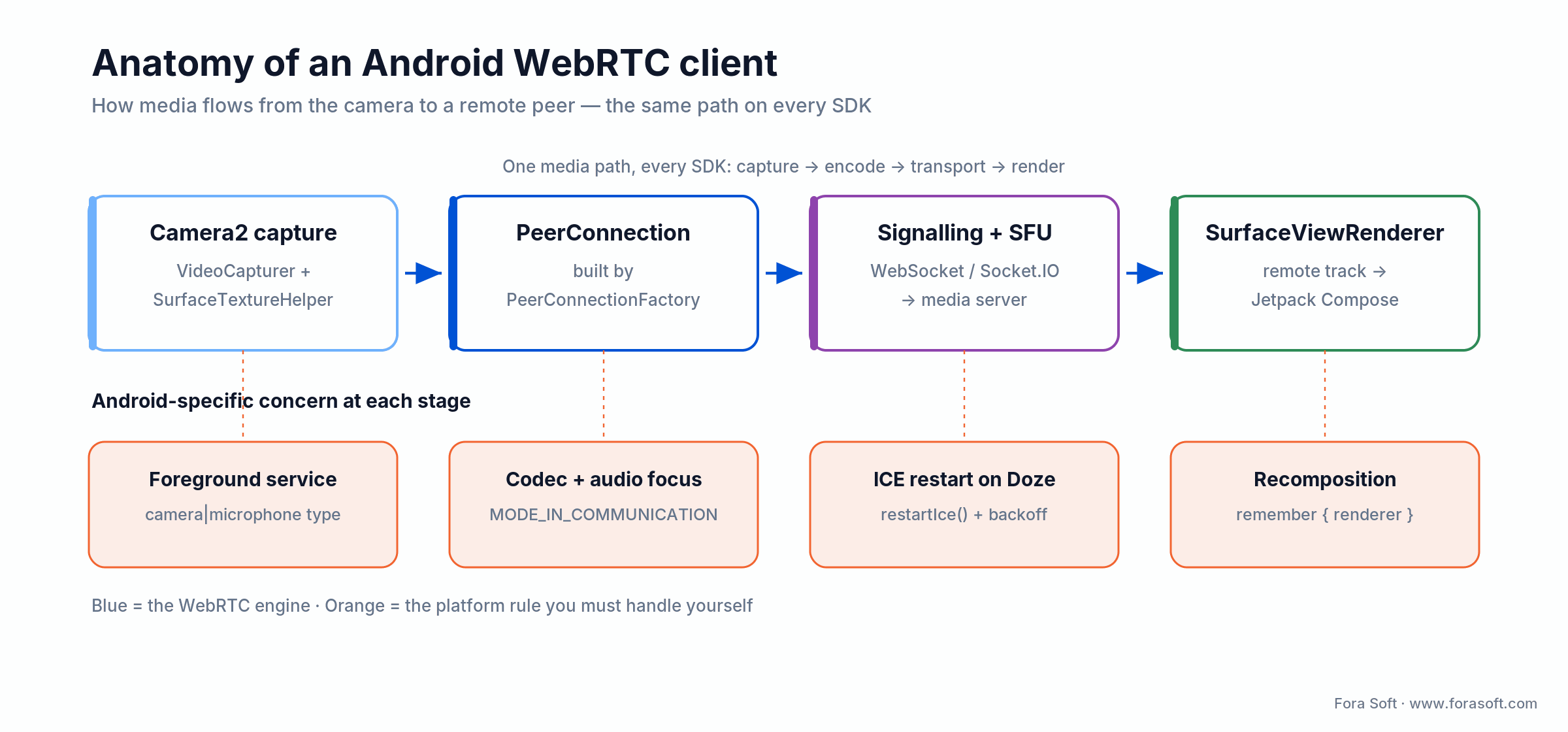
Figure 1. The Android WebRTC media path is the same on every SDK. The orange row is the platform work you own.
| Concept | Android API | Purpose |
|---|---|---|
| PeerConnectionFactory | org.webrtc.PeerConnectionFactory |
Boots libwebrtc, registers codecs, wires the EGL and capture devices |
| PeerConnection | PeerConnection |
The session: ICE candidates, SDP offer/answer, media tracks |
| MediaStreamTrack | VideoTrack, AudioTrack |
Wraps camera and mic capture for transmission |
| DataChannel | DataChannel |
Out-of-band messaging (chat, control, file transfer) |
| SurfaceViewRenderer | SurfaceViewRenderer |
Renders local or remote video to the UI |
One 2026 change trips up teams that last touched this a few years ago: Google stopped publishing an official prebuilt Android AAR. The library most teams pull today is the maintained getstream/webrtc-android fork: the same org.webrtc package, kept current and shipped as a Gradle dependency. The official reference is still worth a read: webrtc.org.
Camera capture — the part Android-specific bugs love
libwebrtc ships two camera enumerators: Camera1Enumerator (legacy) and Camera2Enumerator (API 21+). Pick Camera2 for anything new. The Camera1 path assumes device behaviour that newer handsets and codec paths no longer guarantee.
val enumerator = Camera2Enumerator(context)
val capturer = enumerator.deviceNames.firstOrNull { enumerator.isFrontFacing(it) }
  ?.let { enumerator.createCapturer(it, null) }
  ?: throw IllegalStateException("No front camera")

capturer.initialize(surfaceTextureHelper, context, source.capturerObserver)
capturer.startCapture(1280, 720, 30)
Mind the foreground service. Since Android 14 (API 34), a service that touches the camera or mic must declare its type (android:foregroundServiceType="camera|microphone") and hold the matching runtime permission, or the OS refuses to start it. Since Android 14, you also cannot start a camera or microphone foreground service while the app is in the background (it throws a SecurityException). Android 15 (API 35) added one more limit on top: you cannot start a camera foreground service from a BOOT_COMPLETED receiver. Google’s foreground-service type reference is the source of truth here.
Camera2 or CameraX? WebRTC’s capturer is built on Camera2, so that is what you feed the pipeline. CameraX is great for photo and preview apps, but for a live track you want the lower-level control Camera2 exposes: resolution, frame rate, and torch state that the SFU and your simulcast config actually depend on.
Signalling — SDP offer/answer and ICE candidates
WebRTC does not define the signalling channel; you bring your own. Most products use Socket.IO, plain WebSocket, gRPC, or a vendor SDK’s built-in signalling. Whatever the transport, it carries three message types between peers (or between a peer and the SFU): the SDP offer (the offerer’s media capabilities), the SDP answer (the answerer’s), and ICE candidates (network-path candidates, exchanged as each side discovers them).
peerConnection.createOffer(object : SdpObserver {
  override fun onCreateSuccess(sdp: SessionDescription) {
    peerConnection.setLocalDescription(this, sdp)
    signalingClient.sendOffer(sdp)      // your transport carries it to the peer/SFU
  }
  override fun onSetSuccess() {}
  override fun onCreateFailure(reason: String?) { /* surface, retry */ }
  override fun onSetFailure(reason: String?) { /* surface, retry */ }
}, MediaConstraints())
If you are choosing a topology behind that signalling layer — peer-to-peer, SFU, or MCU — our P2P vs SFU vs MCU comparison covers the trade-offs the Android client will inherit.
Android WebRTC SDKs compared — libwebrtc, LiveKit, Stream, Daily, Agora, 100ms
Most teams ship through an SDK rather than libwebrtc directly. An SDK buys you room concepts, adaptive bitrate, and a maintained path through Android API churn, not new physics. Here is the honest lay of the land, and a decision tree that gets you to a pick in about a minute.
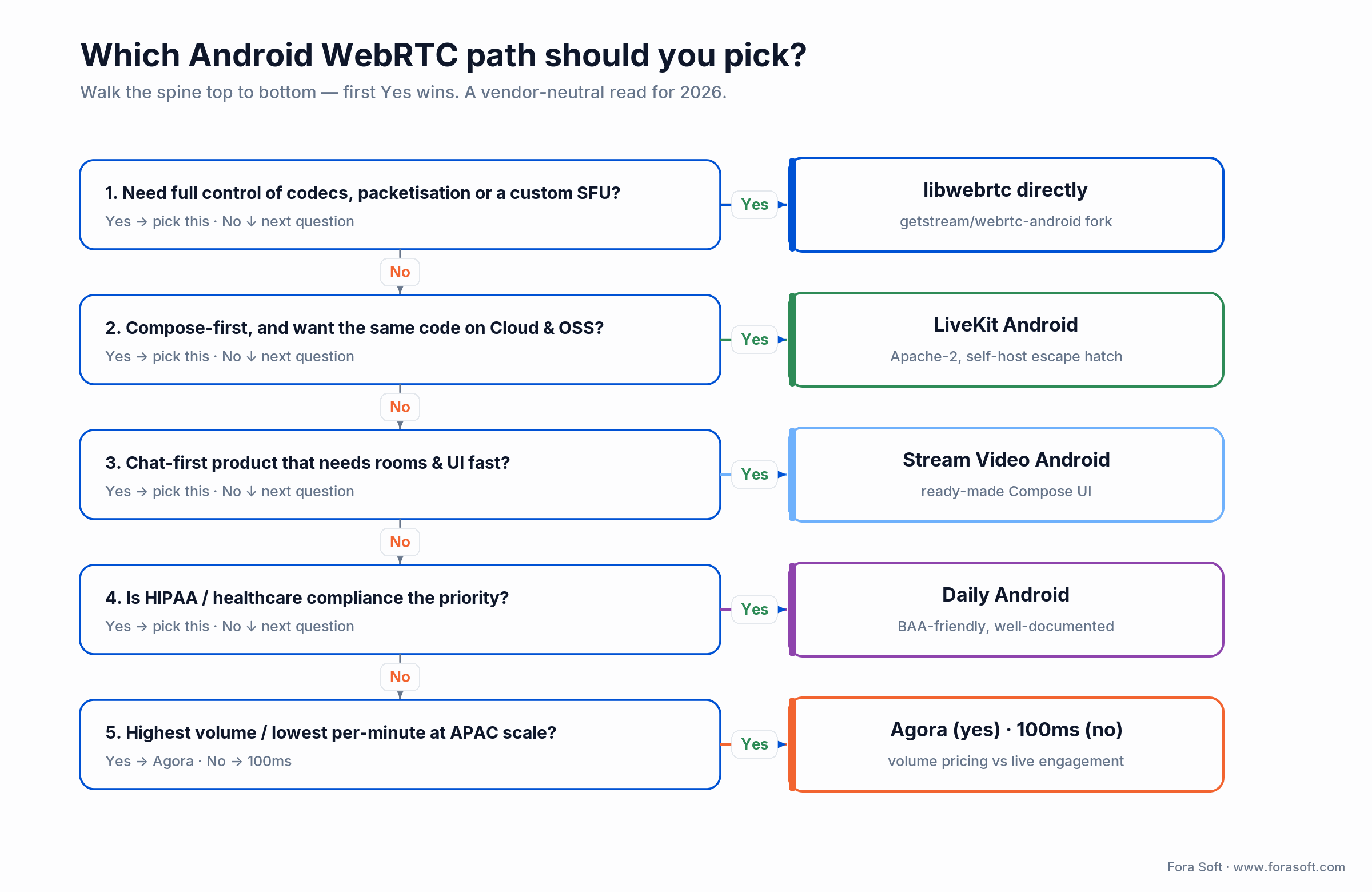
Figure 2. Walk the spine top to bottom — the first “yes” is usually your SDK.
| SDK | License | Where it wins | Where it breaks |
|---|---|---|---|
| libwebrtc (getstream fork) | BSD 3 | Total control, no per-minute fee, custom SFU | You own signalling, scaling, and every upgrade |
| LiveKit Android | Apache 2 | Same code Cloud ↔ OSS, Compose-friendly, AI agents | No prebuilt UI — you build the room screens |
| Stream Video Android | Mixed (free + paid) | Ready-made Compose UI, fast time-to-MVP | Per-MAU pricing climbs with a chat-heavy base |
| Daily Android | Proprietary | BAA-friendly, strong docs, ~$0.004/min | Recording fees add up if you budget only minutes |
| Agora Android | Proprietary | APAC infrastructure, HD video ~$3.99/1k min | Each service billed separately; costs surprise you |
| 100ms Android | Proprietary | Native polls, engagement analytics for live | Smaller ecosystem than the majors |
Reach for libwebrtc directly when: you are building or migrating to a custom SFU and need full control of the codec list, packetisation, and transport. Pull the getstream fork and expect to own signalling and scaling yourself. Otherwise an SDK saves weeks.
Reach for LiveKit when: you are Compose-first, want the same client code against LiveKit Cloud or your own OSS deployment, and value a modern API — especially if AI voice or video agents are on the roadmap.
Reach for Stream or Daily when: Stream if a chat-first product needs rooms and a ready-made Compose UI fast; Daily if you are healthcare-adjacent and want a BAA plus documentation that assumes compliance from the start.
Reach for Agora or a self-hosted SFU when: Agora if you need APAC reach and volume pricing; a self-hosted SFU once you are past roughly two million participant-minutes a month and can staff a 24/7 on-call. See the cost math below before you commit.
Stuck choosing an Android WebRTC SDK?
We have shipped Android clients on all of them. We will match the SDK to your scale, compliance, and language mix in one call — no vendor allegiance.
Five Android-specific gotchas that eat sprints
These five are where Android, not WebRTC, burns your calendar. None are hard once you know them; all are painful when you find them in QA. Build for them from sprint one.
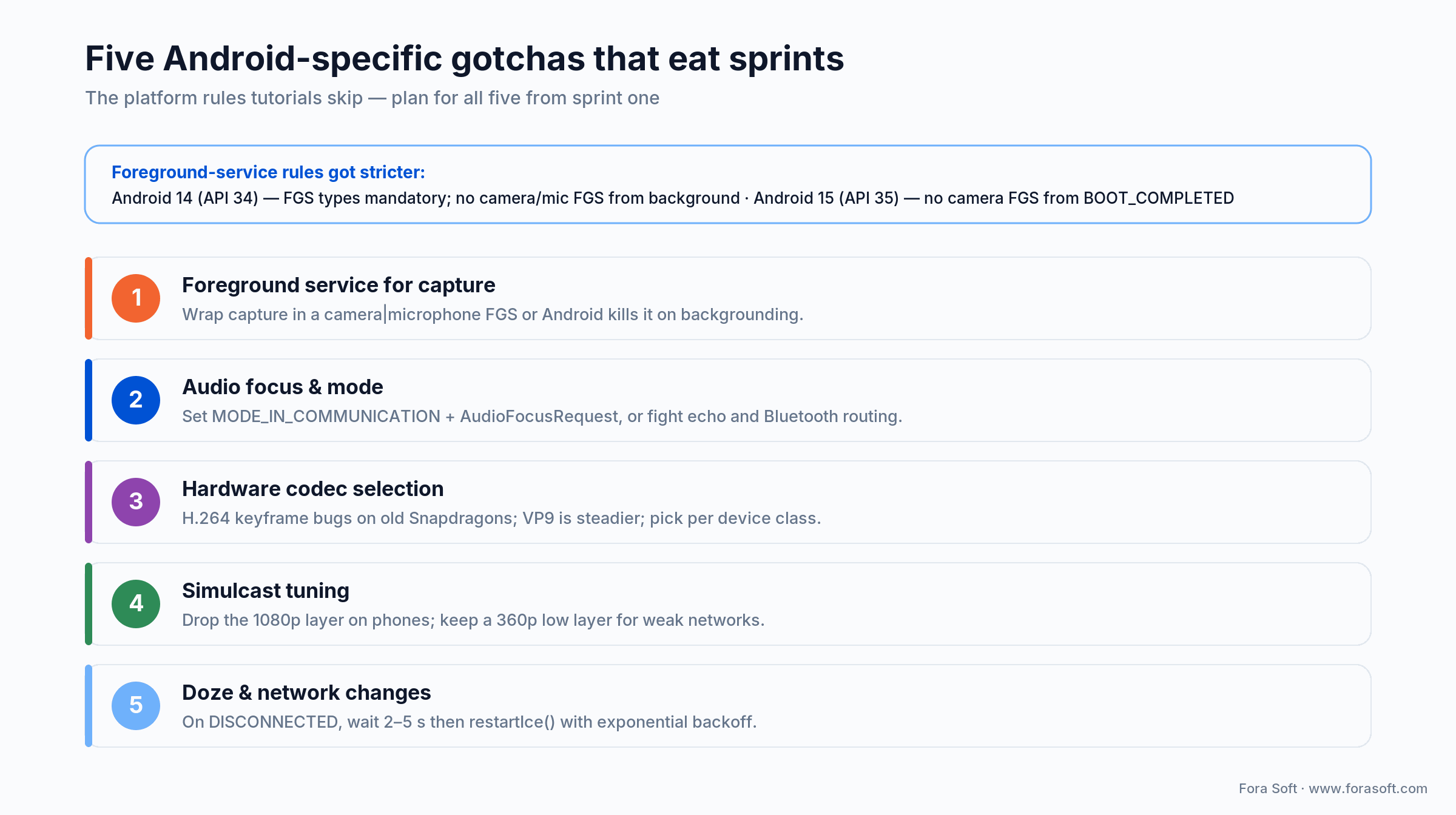
Figure 3. The five traps, with the one-line fix for each — and how Android 14 and 15 changed the rules.
1. Foreground service for camera and mic. Wrap capture in a camera/microphone foreground service and hold the full set (FOREGROUND_SERVICE_CAMERA, FOREGROUND_SERVICE_MICROPHONE, plus the runtime CAMERA and RECORD_AUDIO grants), or the OS kills your session the moment the user leaves the screen.
2. Audio focus and mode. WebRTC needs MODE_IN_COMMUNICATION on the AudioManager plus an AudioFocusRequest with USAGE_VOICE_COMMUNICATION. Skip it and you get echo, low volume, and Bluetooth-routing chaos.
3. Hardware codec selection. H.264 hardware encoders on some older Snapdragons mishandle keyframes; VP9 is steadier across a mixed fleet but costs more CPU. Override the codec preference list per device class rather than trusting the default. More on the codec picture in the next section.
4. Simulcast tuning. Default simulcast layers are set for desktops. On phones, drop the top (1080p) layer to hold your CPU and thermal budget, and keep the 360p low layer for receivers on weak networks.
5. Doze and network changes. Phones move between Wi-Fi and cellular constantly, and Doze suspends radios. When iceConnectionState goes DISCONNECTED, wait 2–5 s (many drops self-heal) then call restartIce() with exponential backoff.
Which video codec should you use on Android in 2026?
For real-time on the median Android phone in 2026, default to VP8 for reach and H.264 for hardware-encode efficiency; reach for VP9 when quality matters and you can spend the CPU; treat AV1 as decode-only for now. VP8 and H.264 are both mandatory-to-implement WebRTC video codecs (RFC 7742), so VP8 stays the safe default for reach across a mixed Android fleet.
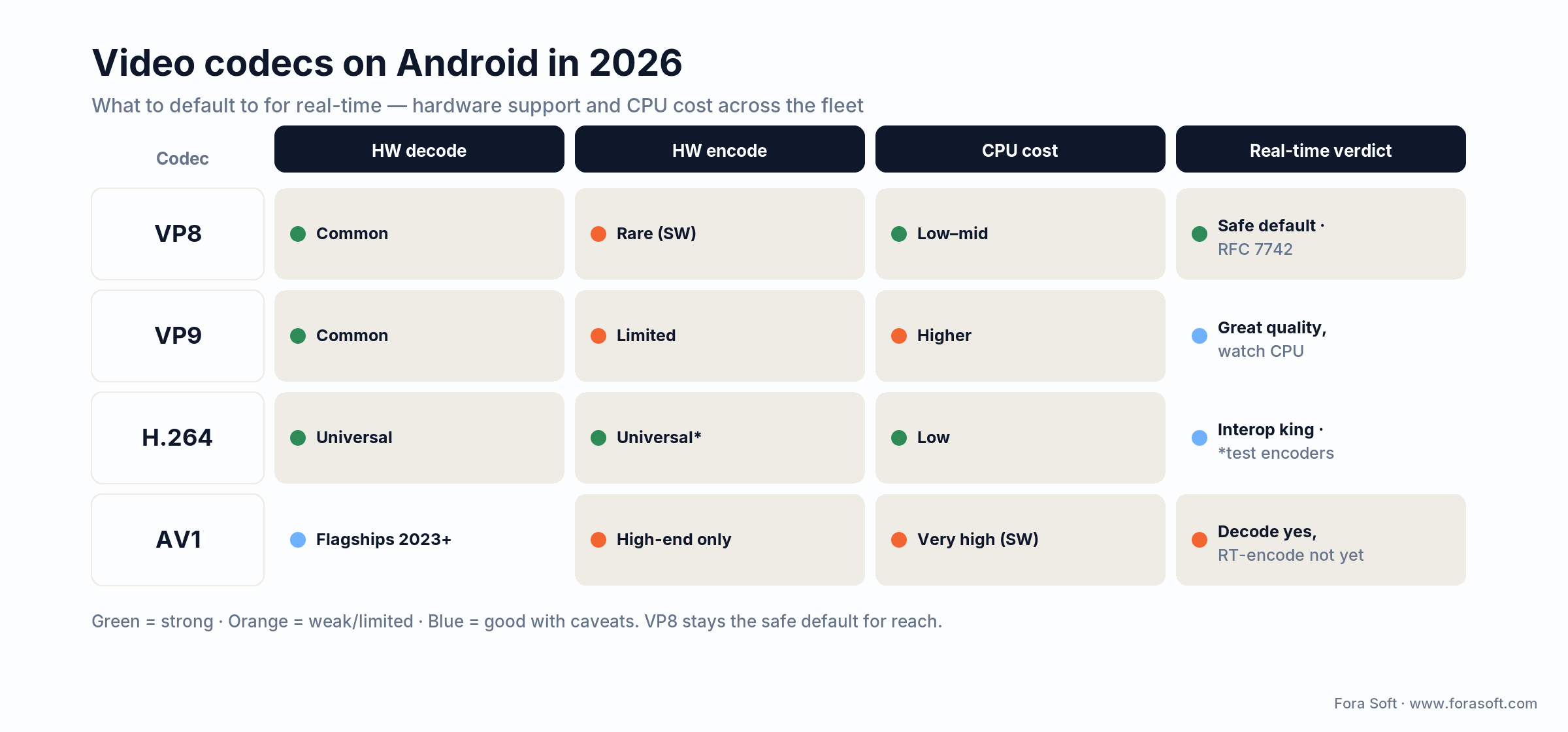
Figure 4. AV1 hardware decode is limited to recent flagships; real-time AV1 encode on the median phone is not there yet.
The AV1 reality check. AV1 has been in WebRTC since 2021, but its hardware decode is still concentrated on recent flagships (Snapdragon 8 Gen 2 and later from 2023, Google Tensor G3+, Apple A17 Pro and M-series), not the median Android phone. Hardware encode is rarer still, and software AV1 encode is too CPU-hungry for real-time on most handsets. So AV1 is a useful receive-side option and a poor default for the outbound track today. Let the SFU negotiate it only where both sides have hardware encode, and keep VP8 and H.264 as the floor.
Jetpack Compose UI — rendering remote video without recomposition jank
SurfaceViewRenderer is a View, not a composable. Wrap it in AndroidView, remember the renderer instance so it is not re-created on every recomposition, and release it in DisposableEffect.
@Composable
fun RemoteVideoRenderer(track: VideoTrack, modifier: Modifier = Modifier) {
  val renderer = remember {
    SurfaceViewRenderer(context).apply { init(eglBase.eglBaseContext, null) }
  }
  DisposableEffect(track) {
    track.addSink(renderer)
    onDispose { track.removeSink(renderer); renderer.release() }
  }
  AndroidView(factory = { renderer }, modifier = modifier)
}
Recomposition stability got easier in 2026: Strong Skipping is on by default since Kotlin 2.0.20, so restartable composables skip even with unstable params. It helps, but a WebRTC video grid still needs care — stable keys per participant, hoisted state, and no allocation in the composable body. Our Jetpack Compose performance guide covers the recomposition traps that hit video grids specifically.
Recording, screen sharing, and PiP on Android
Recording. Do it on the SFU (cloud or self-hosted), not the phone. The Android client only emits its own MediaStream; client-side MediaRecorder capture is possible but burns battery, disk, and sync budget. Reserve it for offline single-party cases.
Screen share. Use MediaProjection + VirtualDisplay; libwebrtc’s ScreenCapturerAndroid wraps the projection token, and you declare a mediaProjection foreground service. The full walkthrough is in our Android WebRTC screen sharing guide.
Picture-in-picture. Plan PiP on phones (Android 8+) and on Android TV. Pause the low-tier simulcast layers when you enter PiP to save battery — some SDKs do it for you, others need a hook.
Network handling — congestion, ICE restart, and weak-network UX
Three patterns keep sessions alive on a phone that keeps changing networks:
1. ICE restart with backoff. On DISCONNECTED, wait 2–5 s before restartIce(). Many transient drops self-heal, and an immediate restart just thrashes.
2. Let the SFU drive bitrate. Use simulcast and let the server pick the layer per receiver; do not try to out-guess the bandwidth estimator from the app.
3. Honest weak-network UX. Show a low-quality avatar or last-frame still when stats fall below a threshold, rather than freezing on a stale frame. Test it deliberately — our method is in simulating slow network connections.
Testing an Android WebRTC client — unit, instrumented, and load
Unit. Mock the SDP and ICE callbacks and test your signalling state machine independently of libwebrtc — that is where the reconnect logic lives.
Instrumented. Espresso plus UI Automator can drive a real client; pair it with a CI-controlled SFU sandbox to assert join, leave, and freeze metrics on every build.
Synthetic load. Generate hundreds to thousands of fake clients against the SFU to see how the real Android client behaves in a full room. The quality metrics and thresholds worth asserting are in how to test WebRTC stream quality.
What does an Android WebRTC client cost to build and run?
Build cost splits into two buckets: the one-time engineering to ship the client, and the ongoing per-minute or infrastructure bill to run it. Here are indicative 2026 build ranges, then the running-cost arithmetic with the numbers shown.
| Scope | Included | Indicative range | Calendar |
|---|---|---|---|
| SDK-based MVP (LiveKit / Stream) | 1:1 + group call, Compose UI, basic recording | $15K–$35K | 3–6 weeks |
| Custom UI on top of an SDK | Branded grid, custom controls, PiP, in-app chat | +$10K–$25K | +2–4 weeks |
| Direct libwebrtc client (custom SFU) | Bespoke signalling + capture + render | $40K–$80K | 8–12 weeks |
| Screen-sharing pack | MediaProjection wiring, FGS, simulcast tuning | $8K–$15K | 1–2 weeks |
| PiP + Android TV | Picture-in-picture, leanback, remote input | $10K–$20K | 1–3 weeks |
Running cost is where the build-vs-buy line lives. Take 1,000,000 participant-minutes a month of 720p group calls. On a managed SDK like LiveKit’s Ship tier that is a $50 platform fee plus 1,000,000 × $0.0005 = $500, so $550/month. A self-hosted SFU at that volume is roughly two Hetzner AX servers plus TURN egress (~$400) and amortised on-call (~$300), so ~$700/month, and you have taken on the pager. On these numbers the lines cross around 2M minutes/month; only past that does a self-hosted SFU start to pay for the ops burden it adds.
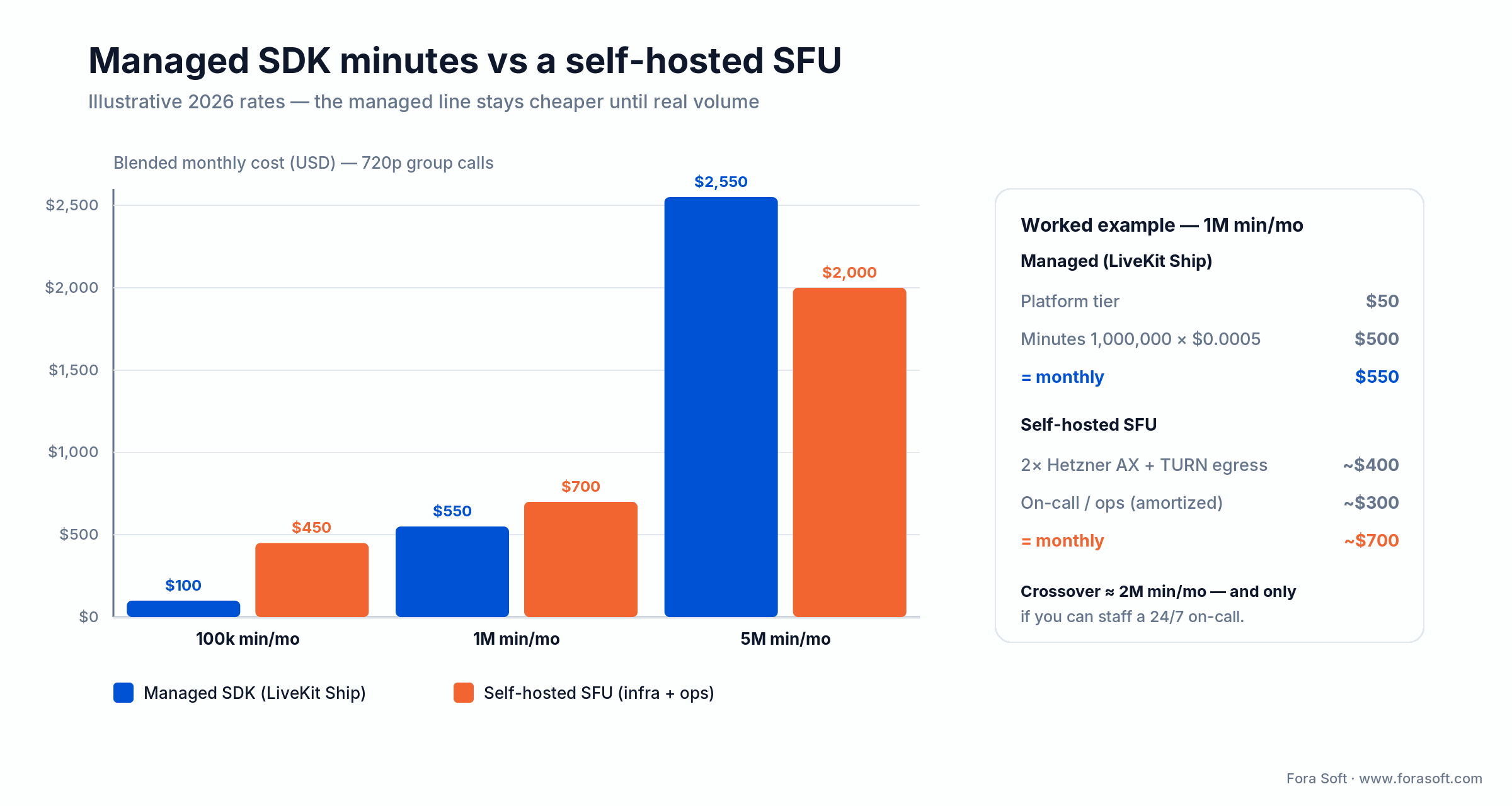
Figure 5. Managed minutes stay cheaper until real volume; the crossover only rewards you if you can staff a 24/7 on-call.
Mini-case: the Android WebRTC client behind BrainCert
The situation. BrainCert is the world’s first WebRTC + HTML5 virtual-classroom LMS, and it needed a native Android client that behaved on real hardware, not just a demo that worked on the newest Pixel. Live classes meant camera capture surviving backgrounding, clean audio routing over Bluetooth, and reconnects that did not drop a lesson mid-sentence.
The plan. We built the WebRTC infrastructure from the ground up and engineered the Android client around the five gotchas above: a camera/microphone foreground service so classes survived multitasking, MODE_IN_COMMUNICATION plus explicit audio-focus handling, per-device-class codec selection, phone-tuned simulcast, and restartIce() with backoff for Doze and Wi-Fi/LTE handoffs.
The result. BrainCert has delivered 500M+ real-time classroom minutes across 10 datacenters at 99.995% uptime, serving 100K+ customers on native Android, iOS, and web, and grew revenue from $1.5M (2021) to $1.9M (2023) to $3M (2024, a 58% jump year over year), bootstrapped, on the platform we built. Want a similar assessment of your Android stack? Book a 30-minute call.
A decision framework — pick your Android WebRTC path in five questions
Answer these five in order; the first strong signal usually settles the architecture.
1. Does your team have WebRTC experience? No → use an SDK (LiveKit, Stream, or Daily). Yes → libwebrtc directly is on the table.
2. What is the primary device class? Phones → default to 720p simulcast. Tablets or TV → bigger grid, plan for wide layouts, rotation, and PiP.
3. Compose or XML? Compose for new builds; XML only for legacy codebases or specific OEM constraints.
4. Do you need screen sharing? Yes → budget $8–$15K and plan a mediaProjection foreground service. No → defer to v2.
5. What is your concurrent-user target? Under a few hundred → SDK per-minute fees are fine. Past roughly two million minutes/month → pair the Android client with a self-hosted SFU, and staff the on-call.
Pitfalls we have watched Android WebRTC teams fall into
1. Skipping the foreground service. Sessions die on backgrounding and reviewers reject the app. Build it in sprint one, not after the first crash report.
2. Defaulting to 1080p. Phones overheat and drain. Default to 720p simulcast and opt up only on confirmed hardware.
3. Re-initialising EglBase on every recomposition. A classic Compose mistake; the second instance crashes the renderer. Wrap it in remember.
4. Ignoring AudioManager mode. Without MODE_IN_COMMUNICATION you fight echo, low volume, and Bluetooth routing forever.
5. Shipping Camera1 in 2026. It still runs, but newer devices and codec paths assume Camera2; you will hit obscure, hard-to-repro bugs.
KPIs — what to measure on the Android client
Quality KPIs. p95 join time under 4 s, freeze rate under 1%, audio MOS above 4.0, simulcast layer-up success above 90%.
Business KPIs. Crash-free sessions above 99.5%, day-1 retention movement after a performance release, Play Store “bad behaviour” Vitals under threshold.
Reliability KPIs. Reconnect success above 95%, Doze-mode session resumption under 5 s, foreground-service uptime 100% during active calls.
When NOT to use WebRTC on Android
Skip WebRTC when it is the wrong tool. Three cases: (a) one-way live broadcast to thousands — HLS or LL-HLS scales far cheaper; (b) a latency budget over about five seconds — LL-HLS is simpler and cheaper to run; (c) a team with neither SDK budget nor WebRTC experience and a tight deadline — a managed embed can buy you time while you plan the real build. Honesty here saves months.
Need a stage-matched Android WebRTC plan?
One call gets you an SDK pick, a Compose-friendly architecture, a screen-sharing budget, and an honest build-vs-buy read for your volume.
FAQ
What is the easiest Android WebRTC SDK to start with?
LiveKit Android for Compose-first builds, Stream Video Android for chat-heavy products, and Daily for HIPAA-friendly contexts. All three ship a 1:1 plus group-call MVP in roughly 3–6 weeks.
Does Google still provide an official WebRTC Android library?
Not as a maintained prebuilt AAR. In 2026 most teams pull the community-maintained getstream/webrtc-android fork, which tracks upstream libwebrtc and ships the same org.webrtc package as a Gradle dependency.
Does WebRTC work in the background on Android?
Only if you wrap camera and mic capture in a foreground service of the right type (camera, microphone). Since Android 14 the type is mandatory and you cannot start such a service from the background; Android 15 additionally blocks starting a camera foreground service from BOOT_COMPLETED.
Which codec should an Android WebRTC app use?
Default to VP8 for reach (it is mandatory-to-implement per RFC 7742) and H.264 for efficient hardware encode. Use VP9 when quality matters and you can spend CPU. Treat AV1 as decode-only for now; real-time AV1 encode is limited to recent flagship phones in 2026.
How do we handle network changes from Wi-Fi to LTE?
Watch PeerConnection.iceConnectionState. On DISCONNECTED, wait 2–5 s and call restartIce() with exponential backoff. Most transient changes self-heal before the restart fires.
Compose or XML for the video UI?
Compose for any new build. Wrap SurfaceViewRenderer in AndroidView, remember the renderer to avoid recomposition re-init, and lean on Strong Skipping (default since Kotlin 2.0.20) plus stable keys per participant.
How do we record an Android WebRTC session?
Record on the SFU (cloud or self-hosted), not the device. Client-side MediaRecorder capture is possible but burns battery and disk; server-side recording is the production default.
Has Fora Soft shipped Android WebRTC products at scale?
Yes. We built the WebRTC infrastructure and native Android client behind BrainCert — 500M+ classroom minutes, 100K+ customers — and ship the Android client for ProVideoMeeting, with more under NDA. We are a WebRTC development team with 250+ projects since 2005.
What to read next
Implementation
Android WebRTC screen sharing — the complete guide
MediaProjection, the foreground service, and simulcast tuning, worked end to end.
Compose performance
Jetpack Compose performance for video grids
The recomposition traps that hit WebRTC video grids specifically.
iOS counterpart
WebRTC in iOS — how to add video calls
The same playbook applied to iOS — useful when you build for both.
Topology
P2P vs MCU vs SFU for video conferencing
The topologies your Android client connects to, compared.
Security
WebRTC security in plain language
DTLS, SRTP, E2EE, and the holes you actually need to close.
Ready to ship a clean Android WebRTC client?
WebRTC on Android in 2026 is a solved problem when you respect the platform: a camera/microphone foreground service, audio focus, per-device codec selection, phone-tuned simulcast, and Doze-aware reconnects. SDK choice comes after those rules, not before — LiveKit for Compose-first, Stream for chat, Daily for HIPAA, Agora for APAC volume, libwebrtc for a custom SFU. Compose is the default UI; VP8 and H.264 are the default codecs; AV1 is decode-only for now.
If you want a stage-matched plan — SDK choice, screen sharing, recording, PiP, and a realistic calendar — the fastest next step is a 30-minute call. We will pick the path, scope the work, and tell you honestly when an SDK MVP beats a custom build. For the broader picture, our custom software development and video streaming Learn hub go deeper.

The book · Volume 3 of 7
Video Streaming: A Complete Guide to Video Delivery: From ABR and CDNs to Players, WebRTC, DRM, and the Economics of Streaming
A clean Android client still depends on what the network and the SFU do with its tracks. Volume 3 covers WebRTC and real-time delivery, simulcast and bitrate adaptation, player behavior under loss, and QoE monitoring, the background for the codec, congestion and ICE-restart choices in this playbook. It is the next read once your first call connects. Written by Nikolay Sapunov, CEO at Fora Soft.
Read it on Amazon →Kindle & paperback · Fora Soft Video Engineering Handbook
Talk to our Android engineering leads
Book a 30-minute call. We will scope the Android WebRTC client — SDK, capture, render, screen share, budget, and calendar — in one session.

