


Key takeaways
• Pick by stack maturity, not by hype. If you have a small team and want a recommender live in weeks, use Amazon Personalize or Google Vertex AI Recommendations. If you have ML engineers and a custom taxonomy, build on RecBole, Microsoft Recommenders, or NVIDIA Merlin.
• The 2026 default is retrieve-then-rerank. A vector database (Pinecone, Qdrant, Weaviate) finds candidates; a learned reranker or LLM (Cohere Rerank, BERT4Rec, GPT-4) orders them. This pattern beats single-algorithm baselines by 5–12% on completion-rate uplift.
• Cold-start is the eLearning killer. 40–60% of learners in any cohort are new. Without a content-based fallback and pedagogical sequencing logic, your recommender will recommend nothing useful for the first three weeks of every term.
• Watch the deprecations. Apache PredictionIO is in the Apache Attic. Azure Personalizer is being retired on October 1, 2026 (no new resources since 2023). Articles that still recommend either are out of date.
• Optimize for completion, not clicks. A recommender that maximizes session length but drops course completion is a failure in eLearning. Track completion rate uplift, time-to-mastery, and exam pass rate — not just CTR.
More on this topic: read our complete guide — AI Video Analytics for Online Learning (2026).
Why Fora Soft wrote this playbook
Fora Soft has been shipping multimedia and AI software since 2005. Of our 250+ delivered products a substantial slice runs in EdTech, where the gap between “a recommender that works in a notebook” and “a recommender that ships measurable completion-rate uplift” is wider than most teams expect.
Our case studies in this space include BrainCert (a WebRTC virtual classroom and LMS that scaled to multi-million-dollar revenue), Scholarly (an AI-driven learning platform serving 15,000+ users), Tutrex (a white-label virtual classroom), InstaClass (live tutoring on WebRTC), and Career Point (AI career coaching). The recommender layer is what holds these products together at scale: the difference between a course catalogue and a learning experience.
This guide is the playbook we hand to founders and product leaders evaluating which recommendation platform to put behind their LMS in 2026. It is opinionated, ranked by what holds up in production, and grounded in the trade-offs we use when scoping a build.
Choosing a recommendation platform for your LMS or EdTech product?
Tell us your learner count, content size, and personalization goal — we’ll come back with a 2-page architecture brief and a realistic estimate.
What “content recommender” actually means in eLearning
An eLearning recommender is not a Netflix clone. The reward signal is different, the constraints are different, and the failure mode is different. Get this taxonomy right and you save yourself the pain of optimizing for the wrong KPI.
1. Course discovery. A new learner lands on the platform and needs the next course to enroll in. Cold-start dominates. Content-based filtering on course metadata and learner profile signals is the fallback.
2. In-course sequencing. A learner is mid-course; the system has to pick the next module, video, or exercise. Pedagogical prerequisites matter. Graph-based models (LightGCN, PinSage) and reinforcement learning (contextual bandits) excel.
3. Adaptive review. Spaced repetition, knowledge tracing (DKT, BKT), and remedial-content recommendation. Classical recommenders fail here; you need a knowledge-tracing model in front of the recommender.
4. Search-time personalization. A learner queries “regression analysis”; the ranker should reflect their level, language, and history. This is where vector retrieval plus a learned reranker shines.
Reach for the right family when: you can name the moment in the learner flow, whether discovery, sequencing, review, or search, that single phrase tells you which platform family to short-list.
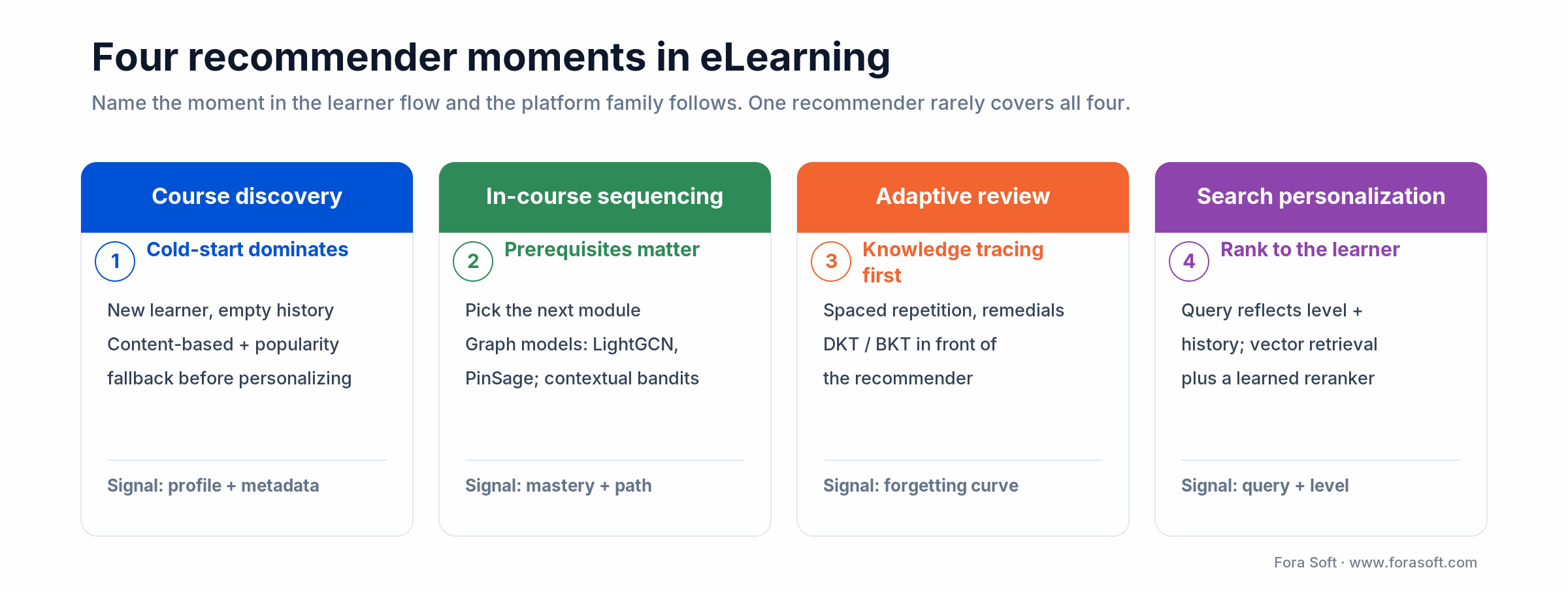
Figure 1. The four moments where an eLearning recommender earns its keep; each maps to a different model family.
A 60-second decision matrix
Ten platforms ago everyone wrote “evaluate Amazon Personalize, then build something custom.” In 2026 that is wrong half the time. Match your constraint to the family below and stop reading sales pages.
| Your constraint | Reach for | Why |
|---|---|---|
| Need a recommender live in 4–6 weeks | Amazon Personalize / Vertex AI Recommendations | Managed service, decent cold-start fallback, pay per call. |
| Search-driven personalization | Algolia Recommend / Coveo | Search and recommend in one API; strong UI components. |
| Custom taxonomy and pedagogy | RecBole / Microsoft Recommenders | 100+ algorithms, knowledge-graph support, full control. |
| Large-scale production with ML team | NVIDIA Merlin | End-to-end pipeline, GPU-accelerated, integrates with feature stores. |
| Embedding-based retrieval | Pinecone / Qdrant / Weaviate | Vector ANN search at scale; pluggable into any ranker. |
| LLM-quality reranking | Cohere Rerank / GPT-4o reranker | Best on noisy or text-heavy candidates, easy to swap in. |
| Adaptive review and knowledge tracing | Custom DKT/BKT + recommender | Off-the-shelf platforms don’t handle this; needs bespoke logic. |
Platform 1: Amazon Personalize — the managed default
Amazon Personalize is the AWS-managed recommendation service: you push events, it trains models behind a REST API, and it returns ranked items. Built-in recipes cover user-personalization, similar-items, popularity, and contextual recommendations.
Why pick it
If your team has 1–2 backend engineers and zero ML headcount, Personalize gets you to a working recommender in weeks. It handles cold-start with metadata fallback, supports A/B testing, and scales without you touching infrastructure. Public pricing in 2026 is $0.15 per 1,000 recommendation requests plus training-hour and data-ingestion costs, so budget around $600–900/month at 100K MAU for a typical eLearning workload. The full breakdown is in the cost model below.
Limits
Black-box: you can’t inspect or steer the model. Pedagogical sequencing (prerequisites, knowledge tracing) cannot be encoded directly. Vendor lock to AWS. If your eLearning product needs explainable recommendations for instructors, Personalize is the wrong layer.
Reach for Amazon Personalize when: you are already on AWS, your taxonomy is product-style (course = item), and you want a recommender shipped in a single sprint.
Platform 2: Google Vertex AI Recommendations — the GCP equivalent
Vertex AI Recommendations replaced the older standalone Recommendations AI console. Same model family Google uses for YouTube and Play Store, exposed via REST and BigQuery integration.
Why pick it
Strong if your warehouse is BigQuery and you want recommendations driven by SQL-defined event tables. Per-prediction pricing in the $0.10–$0.50 per 1,000 range depending on tier. Multi-objective optimization (engagement vs revenue vs diversity) is exposed as configuration rather than custom code.
Limits
Slower setup than Personalize the first time you do it; documentation is thinner. Same vendor-lock risk. Requires Google Cloud-native event ingestion to get the most out of it.
Reach for Vertex when: your data lives in BigQuery, your team prefers GCP, and you need multi-objective optimization out of the box.
Platform 3: Algolia Recommend and Coveo — search-meets-personalization
Algolia and Coveo come from the search world. Their recommendation modules are bolted onto an existing search index, which is exactly what most LMS products need: a learner searches, the index returns ranked results personalized to that learner.
1. Algolia Recommend. Algolia Recommend bills $0.60 per 1,000 recommend requests (first 10,000/month free); the base Grow plan starts around $99/month. Built-in “related products,” “trending items,” and “frequently bought together” recipes that map cleanly onto “related courses” and “trending lessons.” UI components ship for React, Vue, and vanilla JS.
2. Coveo. Enterprise tier; bundled with broader DXP capabilities; pricing typically $10K–$50K/month at enterprise event volumes. Strong if you need to merge content across multiple repositories (LMS + knowledge base + community).
Reach for Algolia/Coveo when: your dominant interaction is search-driven, you want UI components included, and personalization is one feature inside a broader discovery experience.
Platform 4: TensorFlow Recommenders — the open-source default
TensorFlow Recommenders (TFRS) is Google’s open-source two-tower retriever framework. The two-tower design — one tower for users, one for items, dot product or cosine in between, is the standard architecture for large-scale retrieval. TFRS is what Google uses internally and what most papers from 2022–2026 build on.
Why pick it
Production-proven, Keras-friendly, scales to millions of items. Plays well with Vertex AI for serving and ScaNN for fast ANN. If you already have a TensorFlow stack, the marginal cost is low.
Limits
Requires ML engineering. You write your own loss functions, negative samplers, and evaluation pipelines. Cold-start handling is on you. PyTorch teams should look at RecBole or Microsoft Recommenders instead.
Reach for TFRS when: you have a TensorFlow stack, an ML engineer or two, and you want a two-tower retriever you can take anywhere.
Platform 5: RecBole and Microsoft Recommenders — the algorithm libraries
RecBole is the de-facto academic standard: a single PyTorch framework that implements 100+ recommendation algorithms behind a unified API — collaborative filtering, sequence models (SASRec, BERT4Rec, GRU4Rec), graph neural networks (LightGCN, NGCF), knowledge-graph based recommenders. Microsoft Recommenders covers a similar surface area with stronger production patterns and notebook walkthroughs.
Why pick them
If your eLearning product needs a non-standard recommender — knowledge-graph aware, sequence-based, session-based — you will not find it on Personalize or Vertex. RecBole already implements it. You inherit benchmarked baselines, evaluation suites, and a path to publish a paper if that matters to your team.
Limits
Research-grade by default. You wrap it in your own serving layer, monitoring, and feature store. Plan 2–4 ML engineers ongoing.
Reach for RecBole/MS Recommenders when: you need a specific algorithm family (graph or sequence), you have an ML team, and you want full ownership of the model.
Platform 6: NVIDIA Merlin — production-scale, GPU-accelerated
NVIDIA Merlin is an end-to-end recommender stack: NVTabular for feature engineering on GPU, Merlin Models for training, Triton Inference Server for serving. It is what you reach for when your catalogue is millions of courses or videos and your event volume crosses 100M/day.
Why pick it
Training throughput on GPUs that off-the-shelf TensorFlow Recommenders cannot match. Best-in-class for large embedding tables (1B+ parameters). Used by major streamers and the NVIDIA team itself. Open source, free.
Limits
GPU-required end to end. Steep learning curve. Overkill for any LMS under 1M MAU.
Reach for Merlin when: you have an in-house ML platform team, your catalogue is huge, and your event volume justifies GPU training and serving.
Platform 7: Pinecone, Qdrant, Weaviate — the retrieval layer
In 2026, almost every modern recommender includes a vector database. You compute dense embeddings for users and items (with a two-tower model, an LLM, or a multimodal encoder), store them in a vector index, and retrieve the top-k candidates by approximate nearest neighbor in milliseconds.
1. Pinecone. Fully managed. Serverless Standard starts at a $50/month minimum, then usage-based: storage around $0.33/GB/month, reads $8.25 per 1M read units, writes $2 per 1M write units. Pod-based clusters are now legacy. Lowest engineering load.
2. Qdrant. Open source, Rust core, strong filtering primitives. Self-hosted Docker for free; Qdrant Cloud from ~$50/month. Popular in production EdTech.
3. Weaviate. Open source with a hybrid search story (BM25 + vector) and built-in modules for OpenAI, Cohere, Hugging Face embeddings. Cloud and self-hosted options.
Reach for vector DBs when: you generate embeddings, you need millisecond top-k retrieval, and you want the freedom to swap the ranker on top.
Platform 8: Cohere Rerank, OpenAI embeddings, GPT-as-ranker
The 2024–2026 wave is foundation models inside the recommendation pipeline. Three patterns matter:
1. Embedding generation. OpenAI text-embedding-3-large is $0.13 per 1M tokens in 2026; the lighter text-embedding-3-small is $0.02 per 1M. Cohere Embed v3 sits in the same band. Either is a good replacement for a custom item-tower when you have rich text content (course descriptions, transcripts).
2. Reranking. Cohere Rerank is $2.00 per 1,000 search queries in 2026, where one query reranks up to 100 candidates. Watch the model churn: rerank-3.5 was deprecated on July 1, 2026, and from August 1, 2026 requests are served by rerank-4-fast. Take 100 candidates from your retrieval layer, ask Cohere or GPT-4 to reorder them, return the top 10. This retrieve-then-rerank pattern beats a single-algorithm baseline by 5–12% on completion-rate uplift in the eLearning A/B tests we have run.
3. Generative recommendation. The frontier: ask the LLM to generate a recommended path (“here is the next module, here is why”) instead of returning a list. Useful for adaptive learning interfaces; expensive at scale.
Reach for LLM rerankers when: your content is text-heavy, your retrieval layer returns noisy top-k, and you can absorb 100–300 ms of additional latency.
Already shipped a recommender and not seeing completion-rate lift?
We have walked Scholarly and BrainCert through this. Bring your data and we’ll diagnose where retrieval, ranking, or evaluation is letting you down.
Reference architecture: from learner event to recommendation
A production-grade eLearning recommender has six stages. The pattern is the same whether you are on a managed platform or a self-built stack; only the components change.
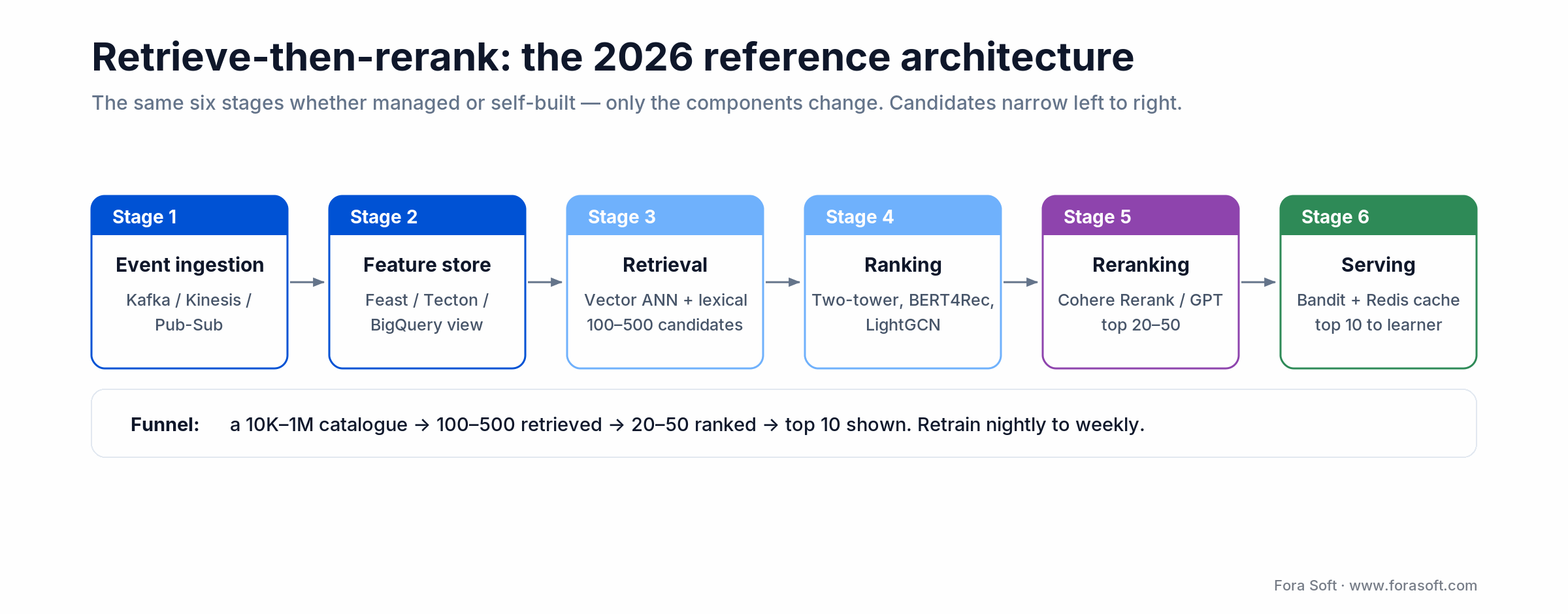
Figure 2. The six-stage retrieve-then-rerank pipeline; candidates narrow from a full catalogue to the top ten shown.
1. Event ingestion. Kafka, Kinesis, or Pub/Sub captures every learner interaction — video play/pause, quiz answer, time on page, course enrollment. Volume drives the rest of the pipeline.
2. Feature store. Tecton, Feast, or a BigQuery / Snowflake feature view. Maintains learner profiles, course embeddings, interaction histories. The single source of truth for online and offline.
3. Retrieval. Vector ANN (Pinecone / Qdrant / Weaviate) plus sparse lexical (Algolia / OpenSearch) returns 100–500 candidates from a 10K–1M course catalogue.
4. Ranking. A learned ranker (BERT4Rec, LightGCN, two-tower) scores the candidates. This is where most of your offline NDCG / recall@k gains live.
5. Reranking. Cohere Rerank or GPT-4 reorders the top 20–50 with cross-encoder attention. Optional but worth it on text-heavy content.
6. Exploration and serving. Contextual bandit or epsilon-greedy injects diversity. Redis caches results. A retrain job runs nightly or on a schedule keyed to fresh-content arrival.
For a deeper architectural read on the recommendation layer, see our companion guide on AI content recommendation systems for video, and our Learn primer on what eLearning video is.
The eight-platform comparison matrix
Side-by-side view across the dimensions that actually matter when scoping a build. Pricing is 2026 list pricing; treat it as a starting point for negotiation.
| Platform | Hosted | Time to first recommendation | Pricing (2026) | Best for | Avoid for |
|---|---|---|---|---|---|
| Amazon Personalize | Managed | 2–4 weeks | ~$0.15 / 1K recs | AWS shops, fast launch | Custom pedagogy |
| Vertex AI Recommendations | Managed | 3–6 weeks | ~$0.10–0.50 / 1K | BigQuery-native | Non-GCP stacks |
| Algolia Recommend | Managed | 1–2 weeks | From $99/mo | Search-led discovery | Sequence/graph models |
| Coveo | Managed (enterprise) | 8–12 weeks | $10K–50K/mo | DXP-bundled deployments | Small teams |
| TensorFlow Recommenders | Self-host | 6–10 weeks | Free (compute only) | TF stacks, two-tower | No ML team |
| RecBole / MS Recommenders | Self-host | 8–14 weeks | Free (compute only) | Custom algorithms | No ML team |
| NVIDIA Merlin | Self-host | 10–20 weeks | Free + GPU rental | Massive catalogues | < 1M MAU |
| Pinecone + Cohere Rerank | Hybrid | 3–5 weeks | $50+/mo + per-call | RAG-style retrieve+rerank | Pure structured data |
Cost model: what an eLearning recommender actually costs
A 100K MAU eLearning product with 5,000 courses is the line where the math flips between managed and self-hosted. Below is a back-of-envelope cost model we use in early scoping calls. Numbers are 2026 list prices; we typically come in lower in real estimates because Agent Engineering compresses the pipeline-build loop.
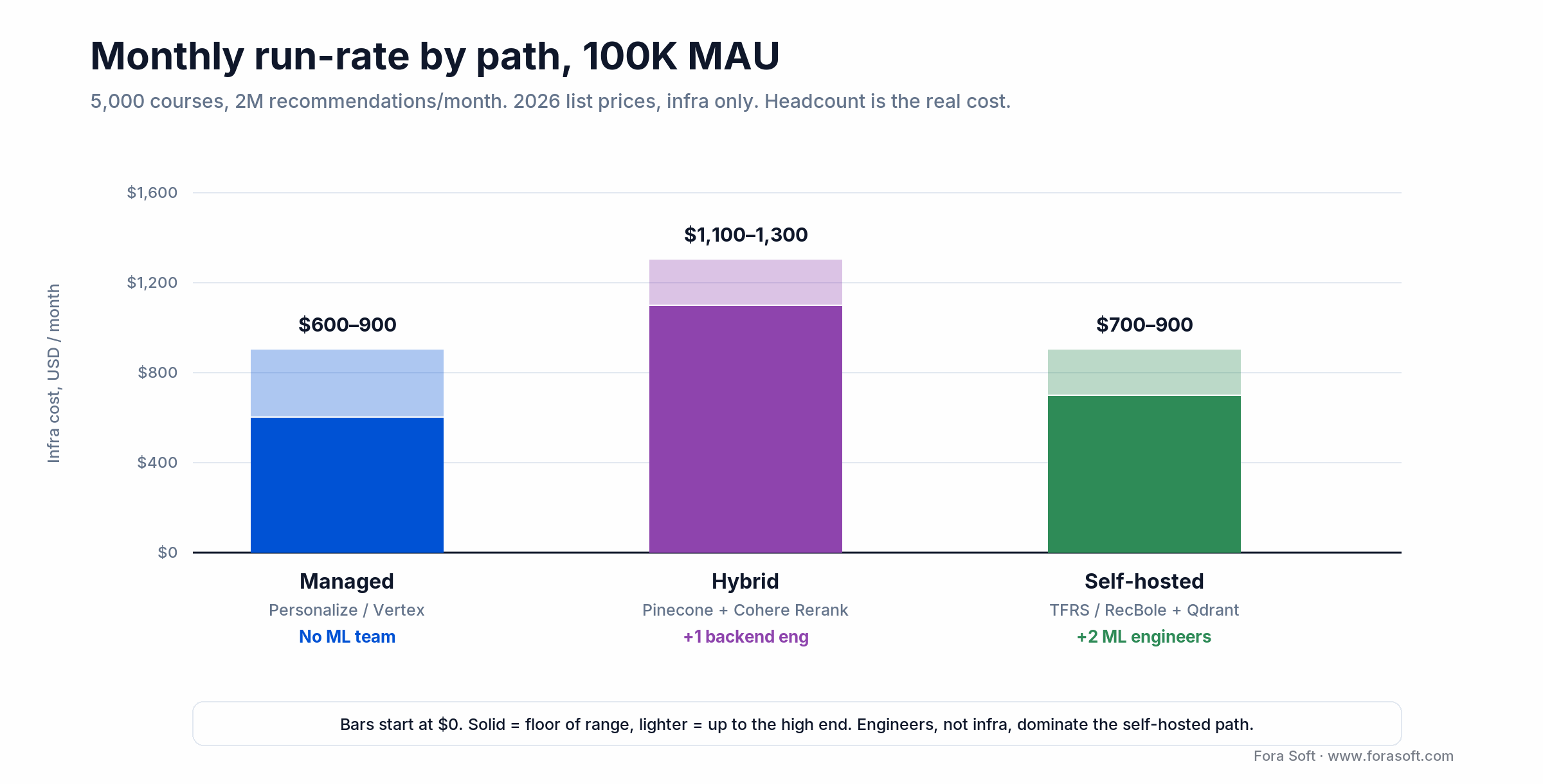
Figure 3. Infrastructure run-rate by path at 100K MAU (2026 list prices). Engineer headcount, not infra, drives the self-hosted total.
1. Managed path (Personalize or Vertex). 100K MAU at 5 recs each per session, 4 sessions / month = 2M recs / month. At $0.15 / 1K, that’s ~$300/month plus training. Add $200–500/month in event ingestion. Total: ~$600–900/month, no ML team needed.
2. Hybrid path (Pinecone + Cohere Rerank). Pinecone serverless ~$50–200/month. Cohere Rerank is the swing factor: at $2.00 per 1,000 queries, reranking once per session across ~400K sessions/month runs ~$800/month. Embedding generation via OpenAI ~$30–50/month. Add a small inference VM (~$200/month). Total: ~$1,100–1,300/month, plus 1 backend engineer. Hosted reranking makes this path pricier than managed, not cheaper; self-host a cross-encoder reranker and the bill drops back toward the managed range.
3. Self-hosted path (TFRS / RecBole + Qdrant). Two GPU training runs / week on an L4 spot instance ~$400/month. Qdrant self-hosted on a $200/month VM. Inference on CPU ~$300/month. Total compute: ~$900/month. Plus 2 ML engineers ongoing — this is where the real cost lives.
4. Build cost. A working recommender MVP — ingest, retrieval, ranker, dashboard, A/B test rig, takes our team roughly 10–16 weeks with Agent Engineering. We usually estimate before kickoff in a 30-minute scoping call rather than online; ranges thrown without your data would be off by ~40% in either direction.
Mini case: 15,000 learners on Scholarly
An EdTech client building Scholarly needed a recommender that would surface the right next module to a heterogeneous user base of 15,000+ learners across multiple curricula. They had budget for a backend team but no in-house ML engineers, and the LMS was already on AWS.
We shipped a two-stage stack: Amazon Personalize for the discovery surface (course-to-course similar items, popularity fallback for cold-start), and a custom retrieval-plus-rerank layer using Pinecone embeddings and Cohere Rerank for in-course module sequencing. Total time to first production traffic: 9 weeks from kickoff.
The custom rerank layer was the lever that moved completion rate. After 6 weeks of online tuning, course completion went up by double digits over the static-list baseline, and time-to-mastery on the early-funnel courses dropped meaningfully. The same pattern is now serving BrainCert’s LMS workflows. Want a similar diagnosis on your platform?
A decision framework — pick your platform in five questions
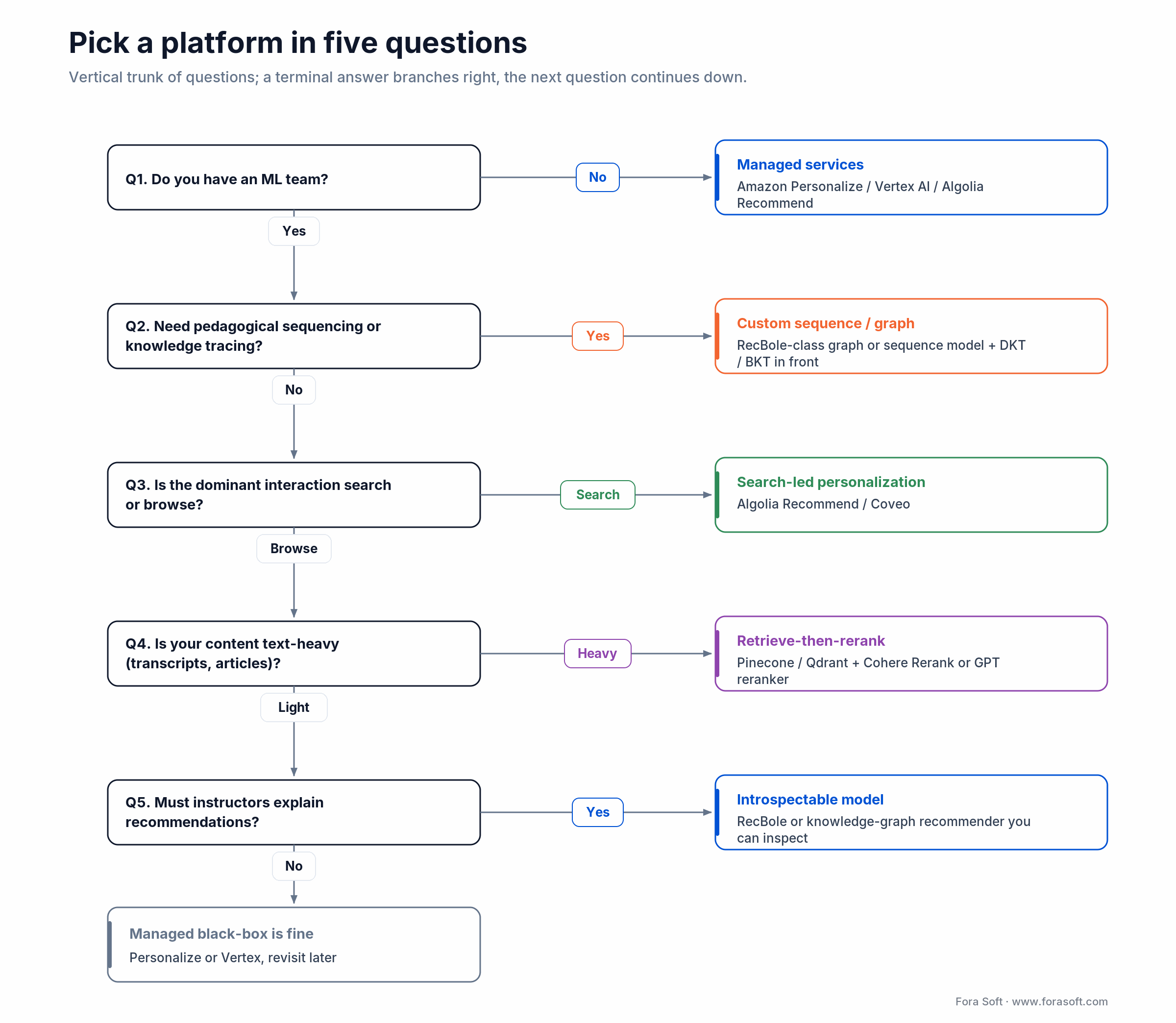
Figure 4. Five questions that route you to a platform family, from managed services to a custom introspectable model.
Q1. Do you have an ML team? No — Personalize / Vertex / Algolia. Yes — consider TFRS, RecBole, or Merlin.
Q2. Do you need pedagogical sequencing or knowledge tracing? No — managed platforms are fine. Yes — you need RecBole-class graph or sequence models, or a custom DKT/BKT layer in front.
Q3. Is your dominant interaction search or browse? Search — Algolia / Coveo. Browse — Personalize / Vertex / custom retrieve-then-rerank.
Q4. How text-heavy is your content? Heavy (transcripts, articles, captions) — LLM embeddings and rerankers pay off fast. Light (mostly metadata) — classical recommenders are enough.
Q5. Do instructors need to explain recommendations? Yes — build on RecBole or knowledge graphs where you can introspect the path. No — black-box managed services work.
Five pitfalls that kill eLearning recommenders
1. Optimizing for clicks, not completion. The recommender that maximizes session length often surfaces shallow content. Optimize for course completion rate, exam pass rate, and time-to-mastery — the actual learner outcomes.
2. Cold-start by default. If you do not ship a content-based or popularity-based fallback for new learners, the first three weeks of every term will produce empty recommendations. Build the fallback first, then the personalized layer on top.
3. Offline-online mismatch. A recommender that wins on offline NDCG@10 often loses on online completion-rate uplift. Build an online A/B test rig from day one and trust it more than offline numbers.
4. Filter bubbles and popularity bias. Popular courses get more popular; niche specialist content disappears. Mitigate with diversity constraints, inverse-popularity weighting, and a small exploration budget (5–10% of impressions).
5. Ignoring compliance until launch. COPPA if your audience is K-12, GDPR for any EU learner, FERPA for accredited US institutions. Decide your data-handling posture before you decide on a platform, because you may not be allowed to send learner events to a third-party API at all.
KPIs to track from day one
Quality KPIs. Course completion rate uplift versus a static-list control (target ≥ 8% absolute on a 30-day window), recall@10 (target ≥ 0.35 on a held-out test set), NDCG@10 (target ≥ 0.18).
Business KPIs. Time-to-mastery reduction (target 15–25%), exam pass rate uplift, learner retention at week 4 and week 12, paid course conversion uplift.
Reliability KPIs. p95 recommendation latency (target < 200 ms end-to-end including reranker), retraining cadence honored (target nightly or weekly), input-distribution drift score (alarm if PSI > 0.2 between two weekly snapshots), exploration budget honored (5–10% of impressions).
Compliance: COPPA, GDPR, FERPA, EU AI Act
1. COPPA. Any platform aimed at learners under 13 in the US must obtain verifiable parental consent before collecting personal information. Behavior-based personalization is allowed, but third-party recommendation services may not be permitted to receive identifiable learner events. Audit your data flow before signing with Personalize / Vertex.
2. GDPR. Article 6 requires a lawful basis (legitimate interest is the typical one; consent is safer). Profiling for educational outcomes is generally permitted but must be transparent and offer opt-out. Data subject access requests apply — you must be able to export and delete a learner’s recommendation history.
3. FERPA. US-accredited institutions cannot share student educational records with third parties without consent. If your LMS is sold to schools, your recommender architecture must keep events on-premises or in a clearly contracted processor relationship.
4. EU AI Act. Recommendation systems used to assess learners or determine educational outcomes are likely to be classified as high-risk. Plan for a documented impact assessment, audit logging, and human oversight.
When NOT to build a recommender
There are three situations where you should ship a curated list, not a recommender.
1. You have fewer than 200 courses or fewer than 1,000 active learners. A handcrafted curriculum and a curated “next up” list outperforms any algorithm at this scale. Recommenders earn their keep on long catalogues.
2. Your content is highly sequenced and prerequisite-heavy. A regulated certification course with a fixed module order does not benefit from a recommender. Use a knowledge-tracing model for adaptive review only.
3. You cannot commit to monthly retraining and an A/B test rig. A recommender without ongoing care drifts and starts producing worse results than a static list within a quarter. If you cannot dedicate the engineering, partner with someone who can — or ship a curated list and revisit later.
Ready to ship a recommender that lifts course completion?
21 years of multimedia and EdTech delivery, 250+ shipped products, BrainCert and Scholarly in production. Tell us your learner count and we’ll bring the architecture diagram to the first call.
FAQ
Should I still consider Apache PredictionIO?
No. Apache PredictionIO was retired in 2020 and moved to the Apache Attic in 2021. Migrate any active deployment to RecBole, Microsoft Recommenders, or a managed service. Articles that still recommend PredictionIO are out of date.
What is the cheapest way to ship a recommender for an early-stage LMS?
Algolia Recommend (base plan from ~$99/month plus $0.60 per 1,000 recommend requests) if your dominant interaction is search, or Amazon Personalize at a few hundred dollars/month if you are already on AWS. Both let you ship in a single sprint without an ML team. Move to a custom stack only when you have real data and a measurable ceiling on the managed approach.
Do I need a vector database to build a modern recommender?
If you generate dense embeddings (with a two-tower model, an LLM, or a multimodal encoder), yes. Pinecone is the lowest-effort managed option; Qdrant is the popular self-hosted choice. If you stay on classical collaborative filtering with low cardinality, you can skip the vector layer.
How much labeled data do I need before a deep recommender pays off?
Roughly 100,000 interactions and 1,000 active learners. Below that, classical baselines (Alternating Least Squares, popularity, content-based) usually win. Above that, two-tower retrievers and sequence models start to differentiate.
Can ChatGPT or Claude be your recommender?
As a final reranker on top of a retrieval layer, yes — that is what most modern stacks do. As the only ranker for thousands of items, no — latency and cost both blow up. Use the LLM where it earns its keep: cross-encoding the top 20 candidates, or generating a natural-language explanation of the recommendation.
How often should I retrain the model in production?
Daily for the retrieval layer, weekly for the ranker, monthly for any deeper feature engineering. Trigger out-of-cycle retrains if your input-distribution drift score (PSI on the user / item feature vector) crosses 0.2 between snapshots.
What KPI should I report to my CEO?
Course completion rate uplift versus a static-list control. It is a learner-outcome metric the business cares about, it’s simple to A/B test, and it correlates with paid retention. Offline NDCG and recall@10 are engineering metrics — share them in the team Slack, not in the board deck.
Where do graph neural networks fit in eLearning?
Anywhere prerequisites or knowledge-graph relationships matter. LightGCN, NGCF, and PinSage encode “course A is a prerequisite for course B” or “both courses share a topic” as graph edges, which classical collaborative filtering ignores. The trade-off is engineering effort — you need a maintained knowledge graph in your feature store.
What to read next
Buyer’s guide
AI Content Recommendation Systems for Video
A side-by-side comparison of recommendation engines for video platforms, with the same architectural lens applied.
Personalization
AI-Crafted Personalized Learning Materials in 2026
The 3-layer stack for adaptive learning materials — build, costs, and pitfalls.
Case study
Lessons from Building Scholarly for 15,000 Users
How we shipped the AI learning platform behind this case study, including the recommender layer.
eLearning
AI Video for E-Learning in 2026: A Buyer’s Guide
Tools, costs, and compliance for the multimedia layer that sits next to your recommender.
Multimedia
Building Powerful AI-Powered Multimedia for E-Learning
How recommendations sit alongside video, voice, and adaptive content in a modern LMS.
Ready to ship an eLearning recommender that lifts completion?
Pick by team shape, not by hype. No ML headcount — Amazon Personalize, Vertex AI Recommendations, or Algolia Recommend. ML team and a custom taxonomy — TFRS, RecBole, or Microsoft Recommenders. Massive catalogue — NVIDIA Merlin. Text-heavy content — retrieve-then-rerank with Pinecone and Cohere or GPT-4. Every successful eLearning recommender we have shipped has been a stack — not a single platform.
Plan from the start for cold-start fallback, online A/B testing, and a compliance posture that survives COPPA, GDPR, and the EU AI Act. Optimize for course completion uplift, not for clicks. If you want a partner that has done this in BrainCert, Scholarly, Tutrex, and InstaClass — and ships with Agent Engineering for faster, cheaper estimates — that is exactly what we built Fora Soft to do. We also handle the broader AI integration work that surrounds the recommender layer.
Want a 2-page architecture brief and an honest estimate?
Tell us your learner count, content size, and personalization goal. We’ll come back within two business days with a recommended platform stack, a reference architecture, and a realistic price range.

