

Key takeaways
• On-device AI leads the 2026 mobile app development trends. Apple’s on-device Foundation model (AFM 3 Core, ~3B parameters) and Google’s Gemini Nano v3 run common flows on the phone, trimming cloud-inference bills instead of adding a monthly API line.
• Swift 6 and Jetpack Compose are the default, not a choice. New iOS and Android apps start with strict concurrency and declarative UI; older stacks add roughly 15–25% refactor time on top of the build.
• Apple Intelligence shipped, contextual Siri arrived ~18 months late. Don’t tie a roadmap to one vendor’s unreleased AI feature. Plan hybrid inference you control.
• Fund phones and foldables, treat Vision Pro as a bonus. Vision Pro shipments fell from ~390k (2024) to an estimated ~45k in Q4 2025; the foldable iPhone lands September 2026. Budget adaptive layouts, not a headset app.
• Realistic 2026 cross-platform MVP: ~13 weeks, ~$45k–$95k with an Agent-Engineering team. Expect more for on-device AI or live video. Numbers and the worked math are below.
Every year a wave of “mobile app development trends” lists promises that this is the year everything changes. Most of them age badly. This one is different in one way: we’re writing it after the 2024 platform bets actually played out, so we can tell you which trends changed real budgets in 2026 and which stayed on the hype shelf.
We’re Fora Soft. We’ve shipped mobile products since 2005: 250+ projects across iOS and Android, with a 50+ person in-house team. This playbook is for founders, CTOs and product leads scoping a 2026 build who want to know what each trend does to hiring, spend and timeline, not another feature slideshow.
Why Fora Soft wrote this playbook
We build mobile apps on both platforms every week, so we get an honest read on which trends move money. Over the last year our teams shipped Swift 6 migrations, Jetpack Compose UIs, on-device AI features and live-video mobile clients across fitness, wellness, telehealth and productivity. Most of those AI features now come out of our AI mobile app development practice, which runs Core ML, Apple Foundation Models and Gemini Nano directly on the device.
The work behind this piece is concrete. AppyBee is an all-in-one management app used by 800+ Dutch fitness centers on iOS, Android and web, built in React Native. Perspire.tv is a live fitness streaming platform where trainers keep 80% of revenue. CirrusMED is a HIPAA telehealth product licensed in 48+ US states. Those constraints (app-store review, payments, offline behaviour, compliance) are where trends stop being slideware.
We build with Agent Engineering: our developers pair with AI copilots on the same codebase, so the estimates here sit below typical agency rates on purpose. Where we’re not confident in a number, we say so. We’d rather skip a figure than quote a made-up one. If you want a straight read on your build, our custom software development team does scoping calls, not sales decks.
Planning an iOS or Android build for 2026?
Tell us what you want to ship. We’ll come back with a 12-week plan, a realistic estimate and the exact stack we’d pick after a year of Swift 6 and Jetpack Compose in production.
The five trends that decide your 2026 mobile build
If you take five things away from this guide, take these. Every other section is a deeper cut on one of them, with the numbers and the trade-offs.
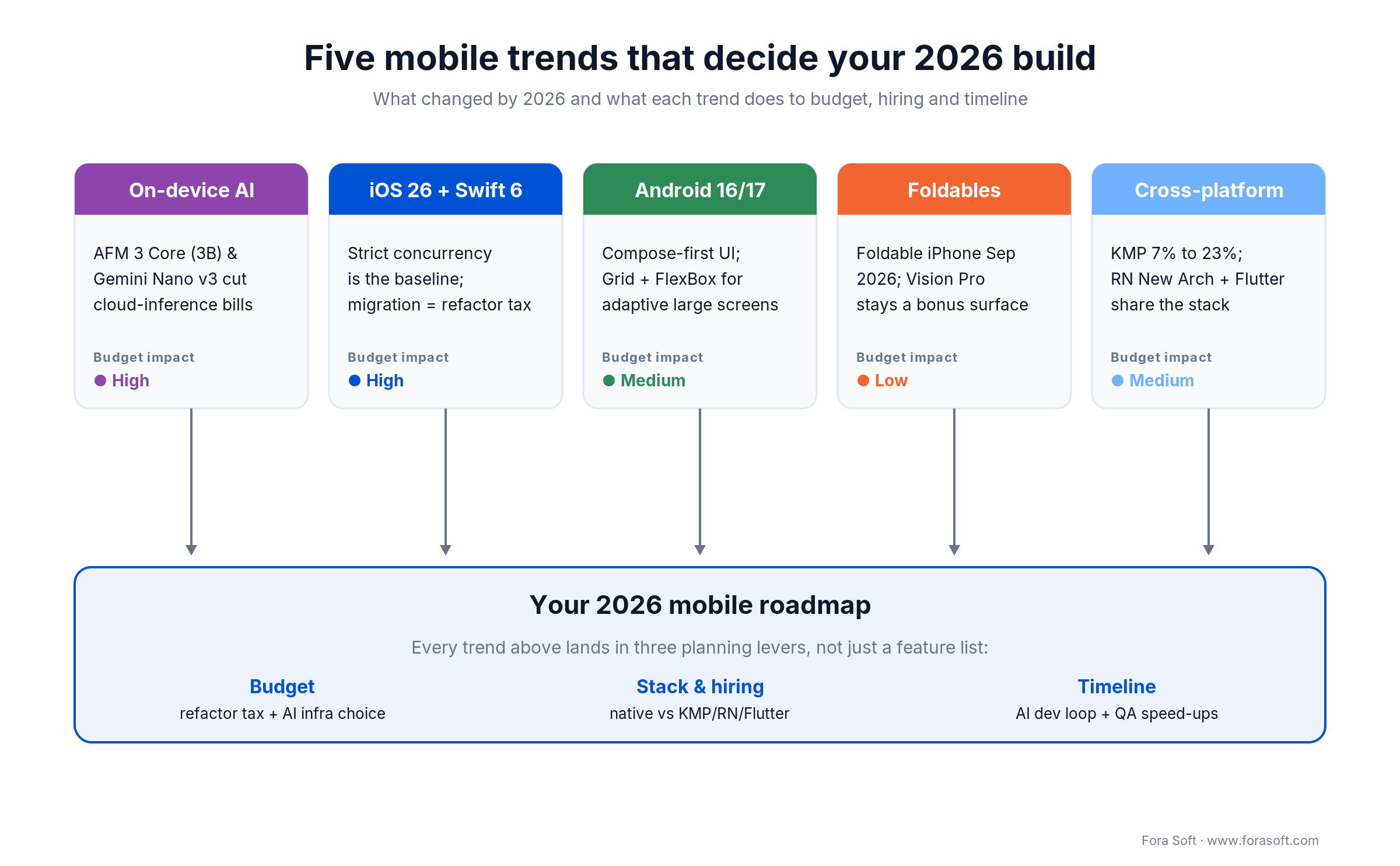
Figure 1. The five trends that actually reach your 2026 budget, hiring plan and timeline.
1. On-device AI changes the cost model. Apple Foundation Models and Gemini Nano v3 let you run drafting, summarising and classification on the phone. For apps with heavy per-user AI, that moves inference off a metered API and onto hardware you already shipped to.
2. Swift 6 and Jetpack Compose are the baseline. New projects start with strict concurrency and declarative UI. Writing Objective-C or XML layouts in 2026 signals a codebase that will cost more to hire for and maintain.
3. The Siri rollout slipped, and that’s the lesson. Apple shipped Writing Tools and summaries on time, but the contextual Siri it demoed in 2024 arrived about 18 months late. Any plan pinned to a single vendor’s unreleased feature is fragile.
4. Foldables are the form factor worth funding. The foldable iPhone ships in September 2026 and large-screen Android keeps growing. Vision Pro, by contrast, underperformed badly — treat it as a content showcase, not a platform.
5. AI moved into the build loop itself. Xcode’s in-IDE assistant, Gemini in Android Studio and AI test-selection compress delivery. Teams using them well ship noticeably faster than a 2023 baseline on comparable work.
Reach for this frame when: you’re scoping a new mobile product in 2026 and need to know which trend actually changes your budget, stack and hiring plan — not which one demos well on a keynote stage.
What the 2026 mobile market actually looks like
Before the tech, the context: mobile is still where the money and attention live, which is why getting the stack right pays off. Statista projects total app-market revenue of about $739.6 billion in 2026 — roughly $475.8 billion from in-app purchases and $256.9 billion from advertising.
Two economics shifts matter for planning. First, store commissions are no longer a flat 30%: both Apple and Google charge 15% on the first $1 million a developer earns per year through their Small Business programs. Second, the EU’s Digital Markets Act split Apple’s EU terms into a tiered model: a 5% Core Technology Commission plus 5–13% store fees, with alternative distribution allowed. Your take-home per sale now depends on where your users are, and it’s worth modelling before you price. We dig into the full breakdown in our 2026 mobile app development cost guide.
The practical read: revenue per install is healthier than it was, but only if your architecture keeps recurring costs down. That’s exactly where the on-device AI trend earns its place at the top of the list.
On-device AI: the trend that rewrites your P&L
The short version: in 2026 you can run many AI features on the phone instead of a paid cloud API, which cuts per-request cost, keeps data local and works offline. It won’t replace frontier models, so the winning pattern is hybrid: on-device for common flows, cloud for the hard stuff.
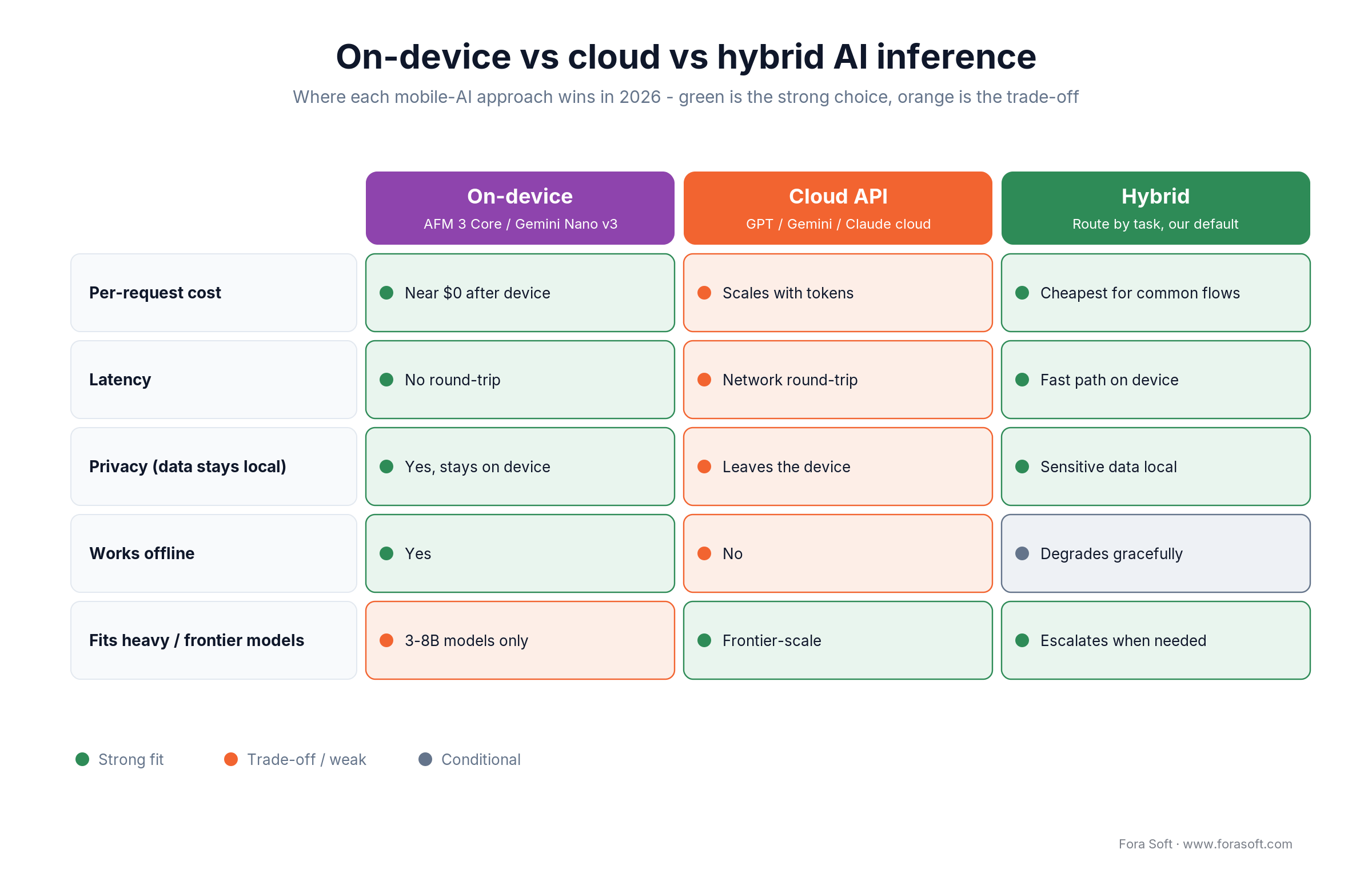
Figure 2. On-device, cloud and hybrid inference compared. Hybrid routing is our default for production apps.
What actually ships on the device now
On iOS, the Foundation Models framework exposes AFM 3 Core, a roughly 3-billion-parameter model that ships on every Apple-Intelligence iPhone, through a native Swift API, with Private Cloud Compute for bigger jobs. In 2026 Apple added third-party model routing (Gemini, Claude) and a Python SDK, and said it would open-source the framework core. On Android, the latest Gemini Nano (v3, 2026) reaches devices through the AICore system service; code written against AICore is forward-compatible as newer Nano models roll out.
Device support is still the catch. Gemini Nano runs only on recent flagship-class Android phones with enough RAM (roughly 12GB and up), and Apple’s on-device model runs only on Apple-Intelligence-capable iPhones. So on-device AI is a progressive enhancement, not a floor: you build the cloud path first, then light up the fast local path where the hardware supports it.
Where the savings are real
When a flow is high-volume and simple (reply suggestions, note cleanup, on-device summaries, smart categorisation), moving it on-device takes a metered API call to roughly zero marginal cost while cutting latency and keeping data on the phone. We treat “60–80% cheaper for common flows” as a directional range, not a promise: the real number depends on your traffic mix. For anything needing a frontier model, you still call the cloud. Our AI integration team builds this routing layer so the app picks the cheapest path that meets the quality bar.
Reach for on-device inference when: the feature is high-frequency, latency-sensitive or privacy-sensitive, and a 3–8B model is good enough — draft text, summarise, classify, transcribe. Keep the cloud for reasoning-heavy or long-context work.
iOS 26 and Swift 6: what adoption actually costs
The short version: on a greenfield app the 2026 iOS stack is a free win; on a mature codebase, Swift 6’s strict concurrency is a real refactor you should price before signing a fixed bid.
Apple moved to year-based versioning, so iOS 26 covers the Sept 2025–Sept 2026 season (iOS 26.6 is current as of summer 2026) and runs on iPhone 11 and later. The developer story that matters is Swift 6 with compile-time data-race safety and an Xcode assistant that now plugs into third-party models.
Swift 6 strict concurrency in practice
Swift 6 turns data-race detection on at compile time. On new projects that’s a small learning tax while the team gets comfortable with actors and Sendable. On older projects it’s work: in our migrations, any module built on ad-hoc DispatchQueue patterns, shared singletons or global mutable state adds roughly 15–25% engineering time. That’s a schedule risk, and it belongs in the estimate, not in a surprise change order.
The in-IDE AI assistant, observed
Xcode’s predictive completion and code assistant help on isolated tasks (boilerplate, model-to-view glue, test scaffolding), and it’s decent at surfacing SwiftUI patterns. It gets weaker inside large, deeply nested view hierarchies. Our honest read after a year: on its own it moves delivery by a single-digit percentage; paired with a real coding agent alongside it, the gain is bigger. That combined effect is the actual 2026 velocity trend, not any one tool.
Reach for a native iOS build when: the app leans on platform features (widgets, Live Activities, deep camera or sensor work, on-device ML), or you need the highest UX polish and can staff Swift talent. Otherwise weigh the cross-platform options below.
Apple Intelligence and Siri: plan for hybrid inference
The short version: the on-device writing, image and summarisation features shipped and are useful; the deep, context-aware Siri Apple demoed in 2024 only began rolling out in 2026, about 18 months late, and later still in the EU. Build so a single delayed feature can’t sink your roadmap.
Writing Tools, Image Playground, Genmoji and notification summaries landed on schedule in late 2024. The personal-context Siri, the one that reasons over what’s on your screen, slipped repeatedly and, when it arrived, leaned partly on Google Gemini through Private Cloud Compute. Details are in Apple’s Foundation Models research.
The takeaway for a 2026 build is a design principle, not gossip: keep your AI features behind an abstraction so you can route to on-device, Apple’s cloud, or a third-party model, and swap providers without a rewrite. Teams that pinned a launch to one unreleased assistant feature spent 2025 waiting. Teams that owned their inference path shipped.
Android 16, 17 and Jetpack Compose: the new default stack
The short version: Android UI is Compose-first in 2026, and the 2026 releases are mostly about adaptive layouts for the screens users actually carry — foldables, tablets and desktop windows.
Android 16 (2025) deepened WindowSizeClass, tightened predictive-back and refined desktop windowing; Android 17 arrived at Google I/O 2026 with new resizability and orientation rules for large screens. On the UI side, Jetpack Compose’s 2026 releases added Grid and FlexBox layout primitives, a new Navigation 3 with Scene Decorators, and an experimental MediaQuery API that lets a layout observe window size and pointer precision and adapt itself.
Why it matters for budget: Google is telling you, through the framework, that a single fixed-width phone layout is no longer enough. If you’re starting fresh, Compose plus the adaptive APIs is the cheapest way to cover phone, foldable and tablet from one UI. If you’re on an old View-based XML stack, plan a migration — it’s the Android equivalent of the Swift 6 refactor tax.
Foldables and large screens: the form factor that needs budget
The short version: fund the surfaces people hold every day. Phones are non-negotiable, foldables and large screens now deserve real adaptive-layout budget, and Vision Pro is a bonus: the 2024 “spatial computing” bet did not pay off.
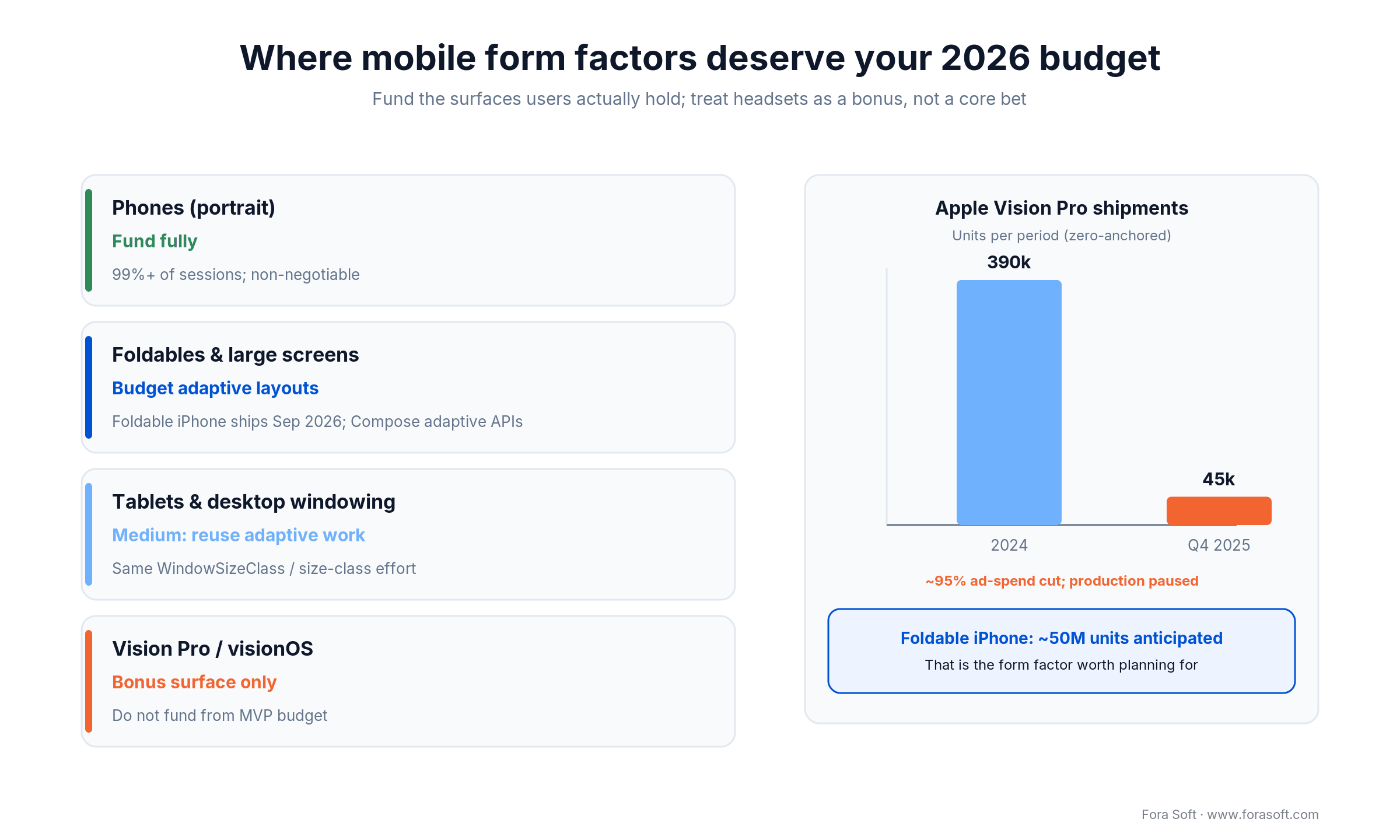
Figure 3. Fund phones and foldables; Vision Pro shipments collapsed while the foldable iPhone becomes the real large-surface story.
The numbers make the call for you. Apple shipped around 390,000 Vision Pro units in 2024; IDC estimated roughly 45,000 in Q4 2025. Apple cut Vision Pro ad spend by more than 95%, paused work on a high-end successor, and is redirecting toward cheaper hardware and ambient-AI glasses later. A native visionOS app is a showcase, not a revenue channel, so don’t fund one from an MVP budget.
Foldables are the opposite story. Apple has committed to a foldable iPhone in September 2026 and reportedly expects tens of millions of foldable units over time; Android foldables and large screens keep growing. The work this creates is concrete and reusable: adaptive layouts, sensible breakpoints, and testing the fold/unfold transition. Do it once with Compose size classes or SwiftUI adaptive layouts and it pays off across tablets and desktop windowing too.
Reach for adaptive-layout budget when: your audience skews premium (early foldable buyers), your app is content- or productivity-heavy, or you already support tablets — the same size-class work covers all three surfaces.
Not sure which surfaces are worth building for?
We’ll map your users to the form factors that matter, size the adaptive-layout work, and tell you where a headset or foldable build is a waste of money.
AR, 5G and the sensor stack: what is finally shippable
The short version: AR and 5G show up on every trends list; in 2026 they’re worth budget only when they do a real job. Ground them in a concrete feature, not a demo.
AR earns its keep in try-before-you-buy, spatial measurement, navigation and training. ARKit and ARCore are mature, and cloud-rendered AR lets mid-range phones run experiences that used to need a flagship. 5G matters less as a headline speed number and more for lower latency and steadier uplink, which is what real-time video and cloud AR actually need. We’ve shipped the demanding version of this in live fitness streaming and iOS communication apps; the media-engineering side is covered in our AI for video engineering guide.
The honest filter: if AR or a 5G-dependent feature isn’t tied to a measurable outcome — higher conversion, fewer returns, faster task completion — it’s a science project. Put it behind the core value, not in front of it.
AI in the dev loop: velocity and AI-powered QA
The short version: the biggest 2026 productivity trend isn’t a feature you ship — it’s AI inside your own build and test loop. Used well, it shortens delivery; used carelessly, it ships confident-looking bugs.
On the build side, coding agents and in-IDE assistants handle boilerplate, migrations and test scaffolding, which is where our Agent Engineering model gets its speed. On the QA side, AI test-selection runs the tests most likely to catch a regression from a given change instead of the whole suite, and visual-diff tools catch layout breakage across the growing matrix of screen sizes — which matters more now that foldables multiply the layouts you have to check.
The discipline that keeps this honest: a human reviews every AI-generated change, and estimates stay conservative because AI acceleration is uneven across a codebase. That’s the same standard we hold in our AI mobile app playbook.
What about wearables, IoT, super apps and low-code?
The short version: these show up on every trends list for a reason, but most are features inside your app, not the reason to build it. Here’s our honest take on the ones we’re watching versus the ones we’re not betting an MVP on.
Wearables and Health. Worth budget if your product has a genuine glanceable or health job — watchOS complications, Wear OS tiles, HealthKit or Health Connect data. Otherwise a watch app is a nice-to-have you can ship after product-market fit, not before.
IoT and connected devices. Real for anyone shipping hardware — BLE pairing, Matter/Thread support and a companion app are table stakes there. If you don’t ship a device, skip it. This is a “yes if it’s your business, no if it’s a buzzword” trend.
Super apps and mini-apps. The WeChat-style bundle works in a few markets and for platforms with real traffic to host third-party mini-apps. For most Western products it’s a distraction — nail one job before you host other people’s.
PWAs and web. A progressive web app is the right call when reach and update speed matter more than deep device features or store presence. We treat it as the honest default for content-first products, which is why it has its own section below on when not to go native.
Low-code and no-code. Gartner has projected that roughly 75% of new app development will use low-code by 2026, up from about 40% in 2021. It’s great for internal tools and prototypes; it hits a wall on performance, custom UX and anything with real-time media, which is where a custom build earns its cost.
Cross-platform in 2026: Flutter, React Native and KMP
The short version: the binary “native vs cross-platform” fight is over. In 2026 teams mix approaches: Kotlin Multiplatform for shared logic with native UI, React Native for React shops, Flutter for one shared UI across every screen.
The headline move is Kotlin Multiplatform’s jump from about 7% adoption in 2024 to roughly 23% in 2025, with Netflix, Google Workspace and Cash App running it in production. React Native’s New Architecture and Hermes narrowed its performance gap with native, and Flutter’s Impeller renderer keeps it the fastest path to a single UI everywhere. Here’s how we choose.
| Approach | UI model | Best for | Hiring | When it breaks |
|---|---|---|---|---|
| Native (Swift / Kotlin) | Per platform | Deep platform + sensor features, top polish | Two skill sets, priciest | Duplicated work across iOS and Android |
| Kotlin Multiplatform | Native UI, shared logic | Share business logic, keep native UX | Kotlin transfers from Android | UI still built twice; smaller ecosystem |
| React Native | Shared, near-native | React/TypeScript teams, fast iteration | Largest, easiest to hire | Heavy native modules; bleeding-edge OS APIs |
| Flutter | Single shared UI | One UI across phone, web, desktop | Dart is a learning step | Exact platform-native look; large binaries |
| Web / PWA | Browser | Reach + budget limits, simple apps | Web devs, cheapest | Background, deep hardware, store presence |
Reach for KMP when: you want one tested copy of business logic with genuinely native UI on each platform — fintech, marketplaces, anything where UX fidelity is the product. See our full native vs cross-platform stack guide for the deep decision.
Reach for React Native or Flutter when: speed to a single codebase beats last-mile native polish — content, booking, dashboards, most CRUD-plus-media apps. React Native if your team lives in React; Flutter if you want one UI across every screen.
Mini case: shipping cross-platform fitness on iOS and Android
Situation. Dutch gyms, martial-arts schools and boxing clubs were drowning in admin — paper memberships, manual payment chasing, no-shows — and needed one product on iOS, Android and web without funding two native teams.
Plan. We built AppyBee in React Native so a single codebase covered both stores plus web, then focused on the operational wins: QR-code access control instead of physical cards, automated payments with overdue follow-ups through Dutch systems like iDEAL and Bancontact, and class booking with targeted push notifications. Cross-platform was the right call precisely because the value was in shared business logic, not platform-specific UI flourish.
Result. AppyBee is now used by 800+ fitness centers and trainers, holds a 4.6-star rating across 57 reviews, saves owners a reported 10–15 hours a week on admin, and lifts member retention by about 20%. It’s live on both the App Store and Google Play from one team. Want a similar assessment of build-once-vs-native for your app? Grab a 30-minute scoping call.
The 2026 mobile build: realistic budget and timeline
The short version: a cross-platform MVP with an Agent-Engineering team runs about $45k–$95k over roughly 12–16 weeks. Native, AI-heavy or live-video apps cost more. Here’s the math, shown out loud.
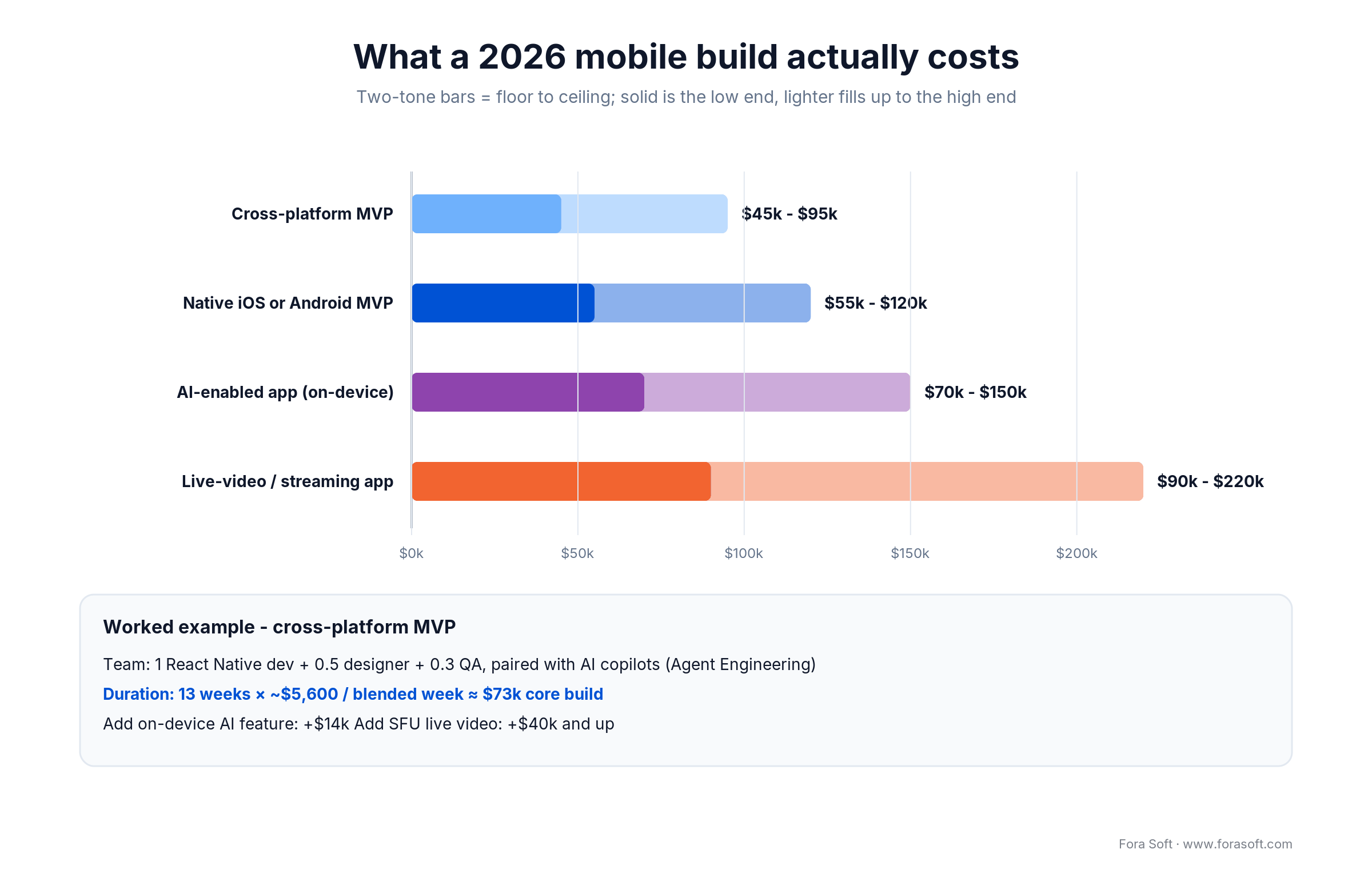
Figure 4. 2026 build-cost bands and the worked math behind a cross-platform MVP estimate.
These bands assume Agent Engineering — developers paired with AI copilots — which is why they sit below common agency quotes. They’re starting points for a conversation, not fixed bids; scope, compliance and integrations move the final number.
Worked example: a cross-platform MVP
Take a React Native MVP with one developer, half a designer and a third of a QA engineer, all paired with AI copilots. At roughly $5,600 per blended team-week over 13 weeks, the core build lands around $73k — inside the $45k–$95k band once you add project setup and store submission. Add an on-device AI feature and you’re looking at roughly $14k more; add SFU-backed live video and it’s $40k and up, because real-time media is its own discipline.
Two levers move this most. On-device AI trades a recurring cloud bill for a one-time build cost, so it pays back faster the more AI traffic you have. And a foldable/adaptive layout is cheap if you design for it from day one and expensive if you retrofit. For a full per-feature breakdown, see our 2026 mobile app development cost guide.
Want a realistic number for your build?
Send us the feature list. We’ll come back with a worked estimate like the one above — team shape, weeks and where the money goes — not a vague range.
A decision framework: pick your stack in five questions
Run your project through these five questions in order. The first “yes” that forces a native path usually decides it; otherwise cross-platform wins on cost and speed.
1. Does the app depend on deep platform or sensor features? Heavy camera/AR, background sensors, widgets, Live Activities, on-device ML — if yes, lean native (or KMP with native UI).
2. Is UX fidelity the product? If pixel-perfect, platform-native feel is a selling point (premium consumer, fintech), choose native or KMP; if the value is the workflow, cross-platform is fine.
3. What does your team already know? A React/TypeScript team is productive in React Native tomorrow; an Android team moves naturally into Kotlin Multiplatform. Don’t buy a stack you can’t hire for.
4. How many surfaces must you cover? Phone-only is simplest; phone + foldable + tablet + web pushes you toward Flutter or a shared-logic KMP core with adaptive layouts.
5. Where’s the AI, and how heavy is it? High-volume, simple AI favours on-device (and native access to the model APIs); occasional frontier-model calls are fine from any stack over the cloud.
If you’re still torn after five questions, that’s normal — the answer is usually “cross-platform core, native where it counts.” That’s the pattern we ship most in 2026, and it’s what our engineering team will map to your specific feature list.
Five pitfalls we keep seeing in 2024-to-2026 migrations
1. Underpricing the Swift 6 refactor. Teams sign a fixed bid, then discover strict concurrency turns every shared singleton into rework. Price the migration separately from new features.
2. Betting a launch on one unreleased AI feature. The delayed Siri taught this the hard way. Abstract your inference so a vendor slip is a config change, not a re-plan.
3. Funding a Vision Pro app from the MVP budget. The shipments say the audience isn’t there yet. Spend that money on foldable and tablet layouts your real users will touch.
4. Treating on-device AI as free. It’s cheap to run but not free to build, and it only covers small models on capable hardware. Design a cloud fallback from the start.
5. Skipping the adaptive-layout work until a foldable ships. Retrofitting responsive layouts after launch costs multiples of designing for size classes on day one. The foldable iPhone deadline is September 2026 — plan now.
KPIs: what to measure on a modern mobile app
Quality KPIs. Crash-free sessions above 99.5%, cold-start under ~2 seconds on mid-range hardware, and jank-free scrolling (few dropped frames) on both a flagship and a three-year-old phone. Add on-device-AI latency and fallback rate once you ship local inference.
Business KPIs. Day-1 and day-30 retention, activation rate to the core action, and revenue per install after the correct store commission for each region — not the headline 30%. These tell you whether the build is earning its keep.
Reliability KPIs. API error rate and p95 latency, successful-update adoption within two weeks of a release, and store-review turnaround so a hotfix isn’t stuck for days. Watch these across the full device matrix, foldables included.
When NOT to ship a native mobile app
Sometimes the honest answer is that you don’t need a native app at all — and saying so is how we keep trust.
If your product is content-first with no need for background work, deep hardware or an app-store presence, a fast responsive web app or PWA gets you to market cheaper and updates without review queues. If you’re validating an idea, a web MVP often answers the “will anyone use this” question before you commit to two app stores. And if your “app” is really a dashboard people open at a desk, mobile web may serve them better. We walk through this trade-off in our mobile build mistakes guide.
Reach for native or cross-platform mobile when you need offline behaviour, push notifications, deep device features, or the trust and discoverability of a store listing. If none of those apply yet, keep your money and ship on the web first.
FAQ
What are the biggest mobile app development trends for 2026?
On-device AI (Apple Foundation Models and Gemini Nano v3), Swift 6 and Jetpack Compose as the default stacks, the delayed-Siri lesson to plan hybrid inference, foldables and adaptive layouts as the form factor worth funding, and AI inside the build-and-test loop. Each one changes budget, hiring or timeline — not just features.
Is on-device AI actually cheaper than cloud APIs?
For high-volume, simple flows like drafting, summarising and classification, yes — it turns a metered API call into near-zero marginal cost and keeps data on the device. It doesn’t replace frontier models, so the winning pattern is hybrid: on-device for common work, cloud for reasoning-heavy tasks.
Should I build for Apple Vision Pro in 2026?
Usually not from an MVP budget. Vision Pro shipments fell from about 390,000 units in 2024 to an estimated 45,000 in Q4 2025, and Apple cut its ad spend by over 95%. Treat visionOS as a showcase and put the money into phone and foldable layouts instead.
Is cross-platform good enough in 2026, or do I need native?
Cross-platform is good enough for most apps. Kotlin Multiplatform adoption jumped from ~7% to ~23% in a year, React Native’s New Architecture narrowed the performance gap, and Flutter covers every screen from one UI. Go native only for deep platform features or top-tier UX fidelity.
How much does a mobile app cost to build in 2026?
A cross-platform MVP with an Agent-Engineering team runs roughly $45k–$95k over 12–16 weeks. Native MVPs, on-device AI features and live-video apps cost more. The worked example above shows a ~$73k core build broken down by team and weeks.
What is the foldable iPhone, and does it change my build?
Apple is set to launch its first foldable iPhone in September 2026, alongside iOS 27 interface modes for folded and unfolded states. It makes adaptive layouts a mainstream requirement rather than a nice-to-have — design for size classes now to avoid an expensive retrofit.
Do AR and 5G matter for a mobile app in 2026?
Only when tied to a concrete job. AR pays off in try-before-you-buy, measurement, navigation and training; 5G matters for lower latency and steadier uplink in real-time video and cloud AR. If a feature isn’t linked to a measurable outcome, it’s a science project.
Which cross-platform framework should I choose?
React Native if your team lives in React and you want the largest hiring pool; Kotlin Multiplatform if you need one tested copy of business logic with native UI; Flutter if you want a single UI across phone, web and desktop. Match the stack to your team and surfaces, not to hype.
What to read next
Cost
2026 Mobile App Development Costs: Real Estimates
Per-stage dollar figures and app-type cost bands for your budget.
Stack
Native vs Cross-Platform in 2026
The full decision playbook behind the scoreboard in this article.
AI
AI Mobile App Development: 2026 Playbook
How to add on-device and cloud AI without blowing the budget.
Pitfalls
Top Mobile App Development Mistakes to Avoid
A founder’s pre-build checklist so you don’t pay for them twice.
Ready to turn these trends into your 2026 app?
The 2026 mobile app development trends that matter aren’t a feature checklist — they’re four budget decisions. Put on-device AI where it cuts your inference bill. Start new work on Swift 6 and Jetpack Compose, and price the migration if you’re not. Fund phones and foldables, skip the headset. And treat AI in the build loop as the real velocity story.
Do that and you ship a modern app for a realistic number instead of chasing every keynote. We’ve done it 250+ times since 2005, on both platforms, with the honest estimates to match.



The handbook · 7 volumes
Fora Soft Video Engineering Handbook
On-device AI is the trend in this playbook that changes the most line items, and it is the core of our seven-volume video engineering handbook. Volume 6 explains deployment topologies, model artifacts, computer vision and speech on the device; Volume 3 covers mobile playback and WebRTC, and Volume 7 covers real-time AI pipelines and cost per stream-hour. Written by Nikolay Sapunov, CEO at Fora Soft.
Browse the handbook on Amazon →7 volumes · 9,000+ pages · Kindle & paperback
Let’s scope your 2026 mobile build
Send us your idea or feature list. You’ll get a straight recommendation on stack, form factors and AI approach, plus a worked estimate — from a team that ships this every week.

