

Key takeaways
• Two APIs, two jobs. Classic Video PiP (requestPictureInPicture()) floats a lone <video>. Document PiP (Chrome 116+) floats an entire detachable browser window you can render any React tree into — which is exactly what WebRTC, LMS, and live-shopping UIs need.
• Reach matters. Video PiP works in every modern browser; Document PiP now spans Chromium and Firefox 151+ on the desktop (Firefox shipped it in May 2026), while Safari and mobile still lack it. Always feature-detect and degrade gracefully.
• React 19 needs a real portal. createPortal(node, pipWindow.document.body) plus a manual stylesheet copy is the only pattern that survives hot-reloads, SSR hydration, and re-renders.
• User-gesture and focus are the #1 bug source. Both APIs demand transient activation and an unfocused page cannot request PiP. Pre-open when the page loses focus if you need PiP on screenshare start.
• Fora Soft ships PiP in production. We use both APIs on video-calling, e‑learning, and live-streaming products such as Meetric, Sprii, and TransLinguist. See § Mini case.
Why Fora Soft wrote this playbook
We have been building browser-based video products since 2005 — 250+ projects across video-conferencing platforms, streaming apps, telemedicine clients, live-shopping players, and interactive classrooms. Picture-in-Picture used to be a nice-to-have you tacked on at the end of a sprint. In 2026 it is a conversion lever: users in Google Meet, Twitch, YouTube, and Slack all expect to keep their video floating while they take notes.
The old guide on this page covered the classic requestPictureInPicture() API and stopped there. Since then, Chrome shipped the Document Picture-in-Picture API (August 2023) and Safari added iPhone web-video PiP (iOS 14). React 19 and the Concurrent renderer changed how you keep a portal alive across re-renders. This rewrite captures what we teach new frontend engineers joining our custom software team, with production-ready code and the gotchas we hit shipping it. If you want the layer underneath, our digital-video foundations primer explains how browser video works before the pixels reach a PiP window.
Need Picture-in-Picture in your React video product this sprint?
Fora Soft has shipped PiP in Meetric, Sprii, TransLinguist, and dozens of other WebRTC products. Tell us the UX and we’ll scope it in a single 30-minute call.
Two Picture-in-Picture APIs, two jobs
Browsers today ship two distinct PiP APIs. Knowing which one you actually need saves you from a Safari-only refactor three sprints in.
1. Classic Video Picture-in-Picture. Pops a single <video> element out of the page into a small floating OS window. APIs: video.requestPictureInPicture(), document.exitPictureInPicture(), events enterpictureinpicture/leavepictureinpicture. Works in Chrome, Edge, and Safari (iPhone since iOS 14, iPad earlier, macOS via Safari 14); Firefox exposes only its own built-in PiP button, not the JavaScript API, so a custom PiP button degrades to hidden there. Global support is roughly 93% (caniuse, 2026).
2. Document Picture-in-Picture. Opens a full always-on-top OS-level browser window that you can render any HTML — chat sidebar, code editor, whiteboard, call controls. API: window.documentPictureInPicture.requestWindow({ width, height }). Shipped stable in Chrome 116 (August 2023), Edge 116, Opera 102. Firefox shipped it in version 151 (May 2026); Safari still has no stable release as of 2026. That puts Document PiP across Chromium and Firefox on the desktop — but not on any Safari or mobile browser.
Reach for Video PiP when: you only need to float a single video (movie player, OTT, a YouTube-style lecture) and you need broad Safari + iPhone support.
Reach for Document PiP when: you want controls, chat, a whiteboard, transcripts, or a multi-stream grid in the floating window. Ship Video-PiP as a fallback for Safari.
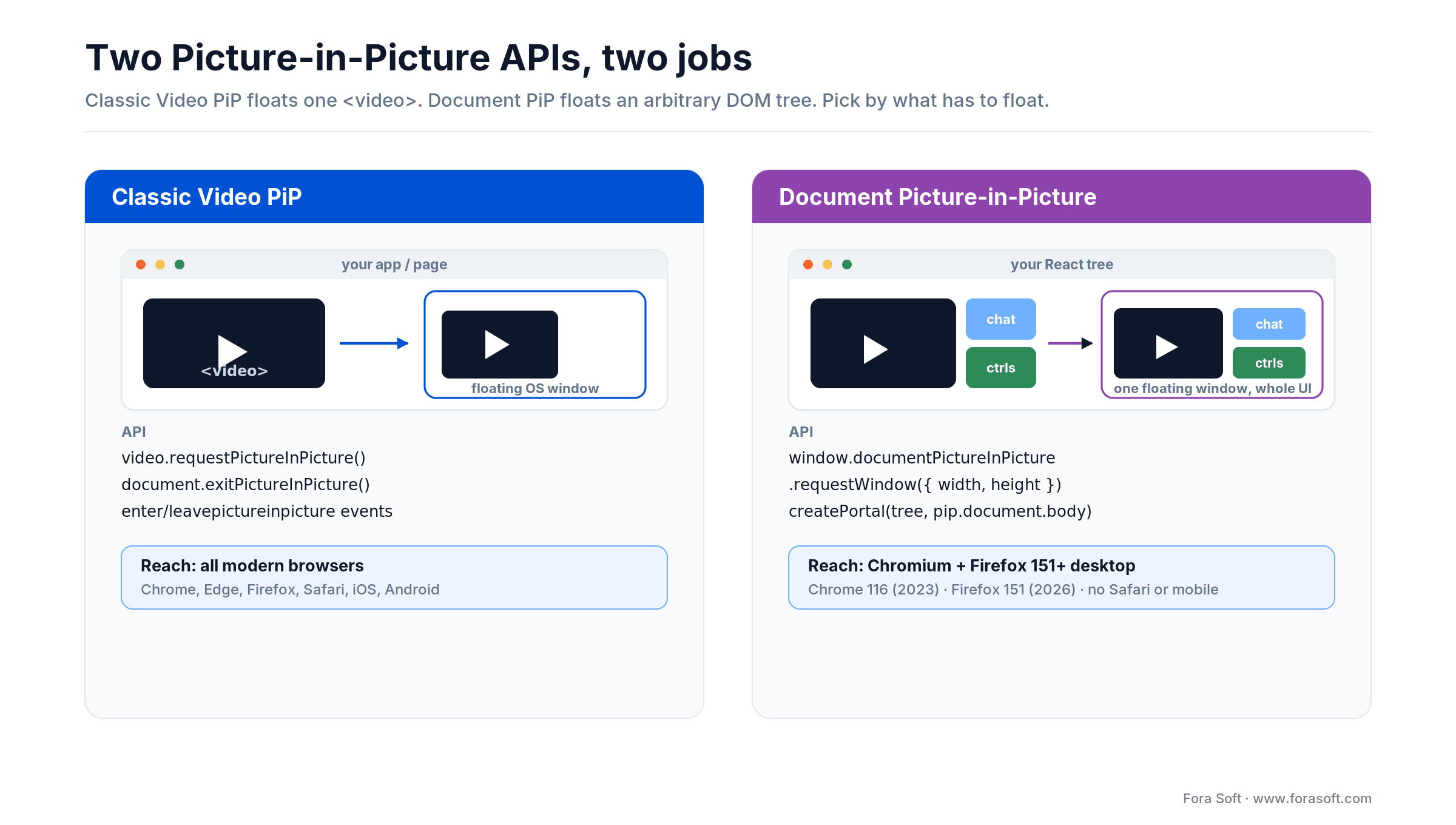
Figure 1. Two PiP APIs at a glance. Classic Video PiP floats one
Browser support matrix (August 2026)
| Browser | Video PiP | Document PiP | Notes |
|---|---|---|---|
| Chrome (desktop) | Yes (70+) | Yes (116+) | Reference implementation |
| Edge (Chromium) | Yes | Yes (116+) | Matches Chrome |
| Safari (macOS) | Yes (webkit prefix) | No (experimental) | Uses webkitSetPresentationMode |
| Safari iOS 14+ | Yes (iPhone) | No | Only in fullscreen → PiP |
| Firefox | Partial (own toggle) | Yes (151+, May 2026) | Document PiP shipped in Firefox 151 (May 2026); Firefox also ships its own built-in Video PiP button |
| Android Chrome | Yes | No | Document PiP is desktop-only |
Bottom line: ship Document PiP as the premium experience for Chromium desktop, keep Video PiP as the universal fallback, and never assume either API is present — feature-detect every call.
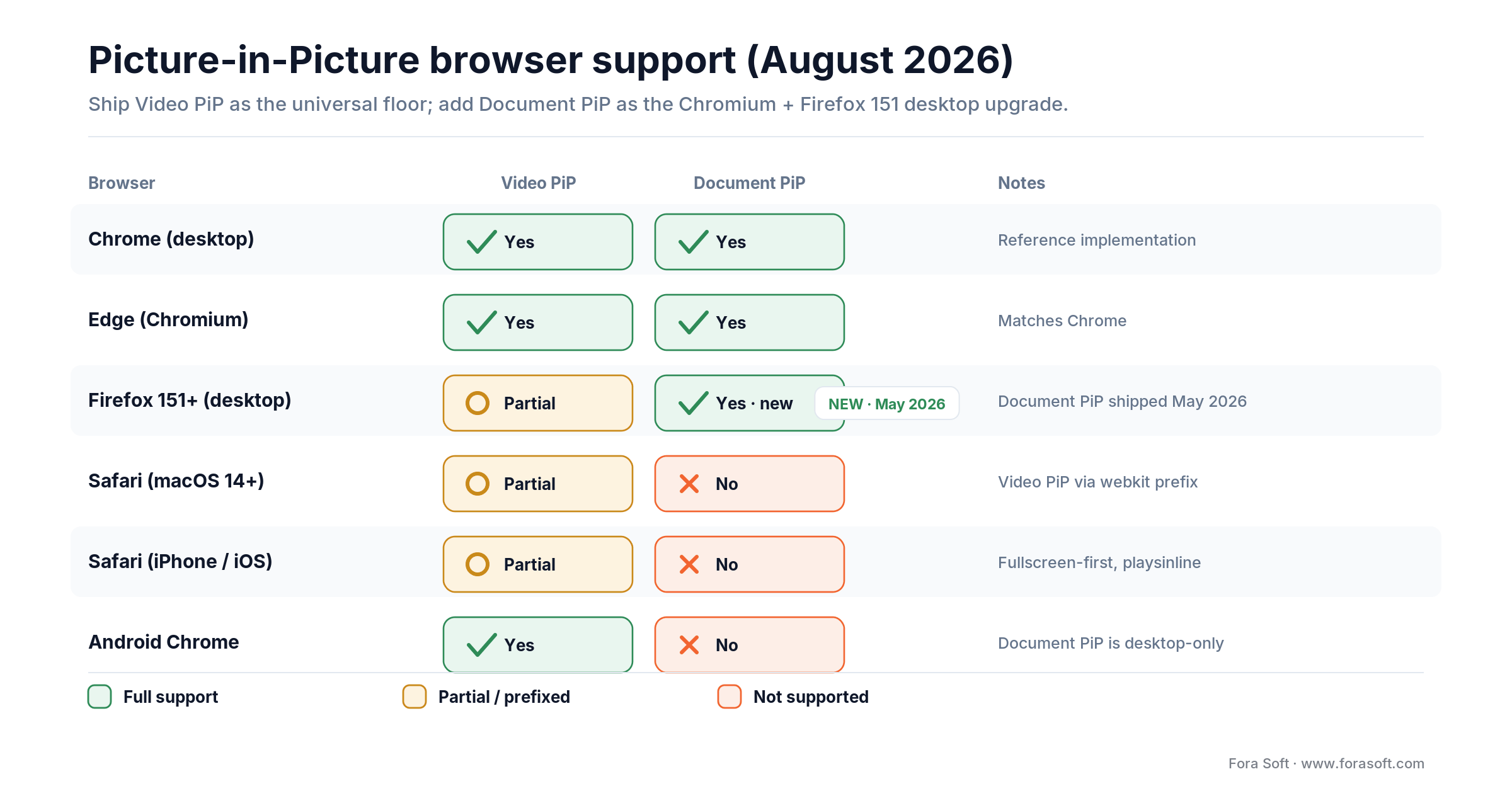
Figure 2. Browser support, August 2026. Firefox 151 added Document PiP in May 2026; Safari and mobile still lack it.
Feature detection done right
A single utility file covers both APIs and saves you from a hundred if branches elsewhere. This is the module we drop into every project.
// src/lib/pip.ts
export const canVideoPIP = (): boolean =>
  typeof document !== 'undefined' &&
  'pictureInPictureEnabled' in document &&
  document.pictureInPictureEnabled;

export const canWebkitPIP = (): boolean => {
  if (typeof document === 'undefined') return false;
  const v = document.createElement('video') as HTMLVideoElement & {
    webkitSupportsPresentationMode?: (m: string) => boolean;
    webkitSetPresentationMode?: (m: string) => void;
  };
  return (
    typeof v.webkitSupportsPresentationMode === 'function' &&
    v.webkitSupportsPresentationMode('picture-in-picture') &&
    typeof v.webkitSetPresentationMode === 'function'
  );
};

export const canDocumentPIP = (): boolean =>
  typeof window !== 'undefined' && 'documentPictureInPicture' in window;

export const isInVideoPIP = (): boolean =>
  typeof document !== 'undefined' && !!document.pictureInPictureElement;
Hide the PiP button until one of these returns true. Showing a button that throws NotSupportedError frustrates users and tanks your Core Web Vitals session-replay scores.
Classic Video PiP in React
Four things the hook has to do: enter, leave, sync state with browser events, and paper over Safari’s webkitSetPresentationMode.
// src/hooks/useVideoPIP.ts
import { useCallback, useEffect, useRef, useState } from 'react';
import { canVideoPIP, canWebkitPIP } from '../lib/pip';

export function useVideoPIP(ref: React.RefObject<HTMLVideoElement>) {
  const [isActive, setIsActive] = useState(false);

  const enter = useCallback(async () => {
    const video = ref.current;
    if (!video) return;
    try {
      if (canVideoPIP() && 'requestPictureInPicture' in video) {
        await video.requestPictureInPicture();
      } else if (canWebkitPIP()) {
        (video as any).webkitSetPresentationMode('picture-in-picture');
        setIsActive(true);
      }
    } catch (err) {
      console.warn('[PIP] enter failed:', err);
    }
  }, [ref]);

  const leave = useCallback(async () => {
    const video = ref.current;
    if (!video) return;
    try {
      if (document.pictureInPictureElement) {
        await document.exitPictureInPicture();
      } else if (canWebkitPIP()) {
        (video as any).webkitSetPresentationMode('inline');
        setIsActive(false);
      }
    } catch (err) {
      console.warn('[PIP] leave failed:', err);
    }
  }, [ref]);

  useEffect(() => {
    const video = ref.current;
    if (!video) return;
    const onEnter = () => setIsActive(true);
    const onLeave = () => setIsActive(false);
    video.addEventListener('enterpictureinpicture', onEnter);
    video.addEventListener('leavepictureinpicture', onLeave);
    return () => {
      video.removeEventListener('enterpictureinpicture', onEnter);
      video.removeEventListener('leavepictureinpicture', onLeave);
    };
  }, [ref]);

  return { isActive, enter, leave, toggle: isActive ? leave : enter };
}
Usage inside a component:
const videoRef = useRef<HTMLVideoElement>(null);
const { isActive, toggle } = useVideoPIP(videoRef);

return (
  <>
    <video ref={videoRef} src="/trailer.mp4" controls />
    {(canVideoPIP() || canWebkitPIP()) && (
      <button onClick={toggle} aria-pressed={isActive}>
        {isActive ? 'Exit PiP' : 'Open in PiP'}
      </button>
    )}
  </>
);
Document PiP in React 19
Document PiP requires three steps you don’t find in MDN quickly: open the window with a user gesture, copy the stylesheets, and portal your React tree into the new document. Google’s Chrome for Developers guide documents the raw API; below is the React 19 wrapper (tested on 19.2) we ship.
// src/hooks/useDocumentPIP.ts
import { useCallback, useEffect, useRef, useState } from 'react';

type PIPOptions = { width?: number; height?: number };

export function useDocumentPIP() {
  const [pipWindow, setPipWindow] = useState<Window | null>(null);
  const mountRef = useRef<HTMLDivElement | null>(null);

  const open = useCallback(async (options: PIPOptions = {}) => {
    if (!('documentPictureInPicture' in window)) return;
    const pip = await (window as any).documentPictureInPicture.requestWindow({
      width: options.width ?? 420,
      height: options.height ?? 300,
    });

    // 1. Copy all stylesheets from the opener into the PiP document
    [...document.styleSheets].forEach((sheet) => {
      try {
        const rules = [...(sheet.cssRules || [])].map((r) => r.cssText).join('');
        const style = pip.document.createElement('style');
        style.textContent = rules;
        pip.document.head.appendChild(style);
      } catch {
        // Cross-origin stylesheet: fall back to <link> clone
        if (sheet.href) {
          const link = pip.document.createElement('link');
          link.rel = 'stylesheet';
          link.href = sheet.href;
          pip.document.head.appendChild(link);
        }
      }
    });

    // 2. Mount a single div into the PiP body; our React tree will portal into it
    const mount = pip.document.createElement('div');
    mount.id = 'pip-root';
    pip.document.body.appendChild(mount);
    mountRef.current = mount;

    // 3. React to the window closing (user clicks the X or pagehide)
    pip.addEventListener('pagehide', () => {
      mountRef.current = null;
      setPipWindow(null);
    });

    setPipWindow(pip);
  }, []);

  const close = useCallback(() => {
    pipWindow?.close();
  }, [pipWindow]);

  return { pipWindow, mountNode: mountRef.current, open, close };
}
Use it to portal any React tree (call grid, chat, whiteboard) into the PiP window:
// src/components/CallWithPip.tsx
import { createPortal } from 'react-dom';
import { useDocumentPIP } from '../hooks/useDocumentPIP';

export function CallWithPip({ children }: { children: React.ReactNode }) {
  const { pipWindow, mountNode, open, close } = useDocumentPIP();
  const active = Boolean(pipWindow && mountNode);

  return (
    <>
      <button onClick={active ? close : () => open({ width: 420, height: 320 })}>
        {active ? 'Exit floating window' : 'Pop out'}
      </button>
      {active ? createPortal(children, mountNode!) : children}
    </>
  );
}
Two non-obvious details save days of debugging. First, cross-origin stylesheets throw when you read cssRules; wrap the copy in a try/catch and fall back to cloning the <link> by href. Second, React 19’s concurrent renderer reparents nodes aggressively; the portal target has to be a stable DOM node that lives for the lifetime of the PiP window, so we create the #pip-root div once and store it in a ref.
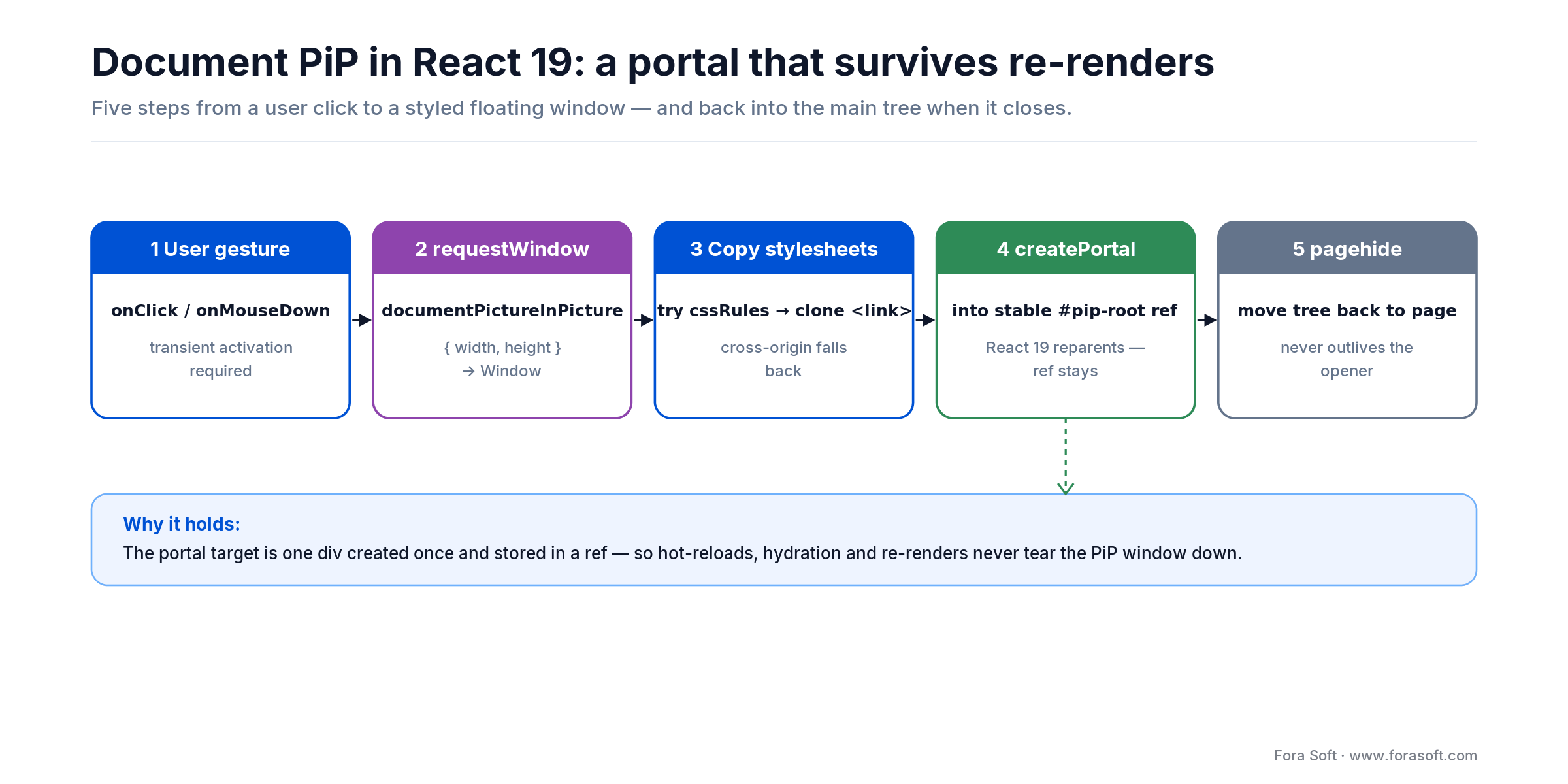
Figure 3. The Document PiP portal pattern that survives React 19 re-renders, from user gesture to teardown.
Shipping Document PiP and fighting stylesheets or focus bugs?
We’ve built PiP for live-shopping grids, pair-programming apps, and telemedicine consults. Share your component tree — we’ll return a working patch.
Auto-activate PiP on focus loss
Users rarely remember to press the PiP button; they tab to a browser window, the video vanishes, and they get annoyed. The polite fix is to open PiP automatically when the page loses visibility, and close it when the user returns.
// inside a React component
useEffect(() => {
  const handler = async () => {
    if (document.visibilityState === 'hidden') await enter();
    else await leave();
  };
  document.addEventListener('visibilitychange', handler);
  return () => document.removeEventListener('visibilitychange', handler);
}, [enter, leave]);

// autoPictureInPicture: now a standard attribute (Chromium 134+); on iOS Safari it still needs a fullscreen video
if (videoRef.current && 'autoPictureInPicture' in videoRef.current) {
  (videoRef.current as any).autoPictureInPicture = true;
}
Caveat: Chrome throws if you call requestPictureInPicture() after the page is hidden because transient activation has expired. Pre-open from a blur listener before visibility flips, or guard the call and silently fail back to an in-page mini-player.
Reach for auto-PiP when: users routinely tab away mid-video (calls, live commerce, long lectures). Open on visibilitychange, but guard for expired activation and fall back to an inline mini-player.
Wire up mediaSession for OS controls
A raw Video PiP window shows only a play/pause icon. Adding navigator.mediaSession handlers enable previous/next track, seek bars, and even hardware buttons on Bluetooth headsets.
useEffect(() => {
  if (!('mediaSession' in navigator)) return;
  navigator.mediaSession.metadata = new MediaMetadata({
    title: currentTitle,
    artist: channelName,
    artwork: [{ src: thumbnail, sizes: '512x512', type: 'image/png' }],
  });
  navigator.mediaSession.setActionHandler('play', () => videoRef.current?.play());
  navigator.mediaSession.setActionHandler('pause', () => videoRef.current?.pause());
  navigator.mediaSession.setActionHandler('previoustrack', goPrev);
  navigator.mediaSession.setActionHandler('nexttrack', goNext);
}, [currentTitle, channelName, thumbnail]);
WebRTC streams inside PiP
A WebRTC remote stream is just a MediaStream attached via video.srcObject. Two bugs bite every team:
1. The PiP window freezes on stream swap. Fix: give the <video> a React key tied to the stream ID; the unmount-remount cycle clears the PiP surface cleanly.
2. The local screenshare doesn’t auto-PiP in Chrome. When the user clicks the system picker to choose a screen, the page loses focus and the transient activation is consumed — so requestPictureInPicture() after getDisplayMedia throws. Fix: pre-open PiP on mousedown of the screenshare button, then swap srcObject after the picker returns.
<video
  ref={remoteRef}
  key={remoteStream?.id}   // critical: stable per-stream identity
  autoPlay
  playsInline
/>
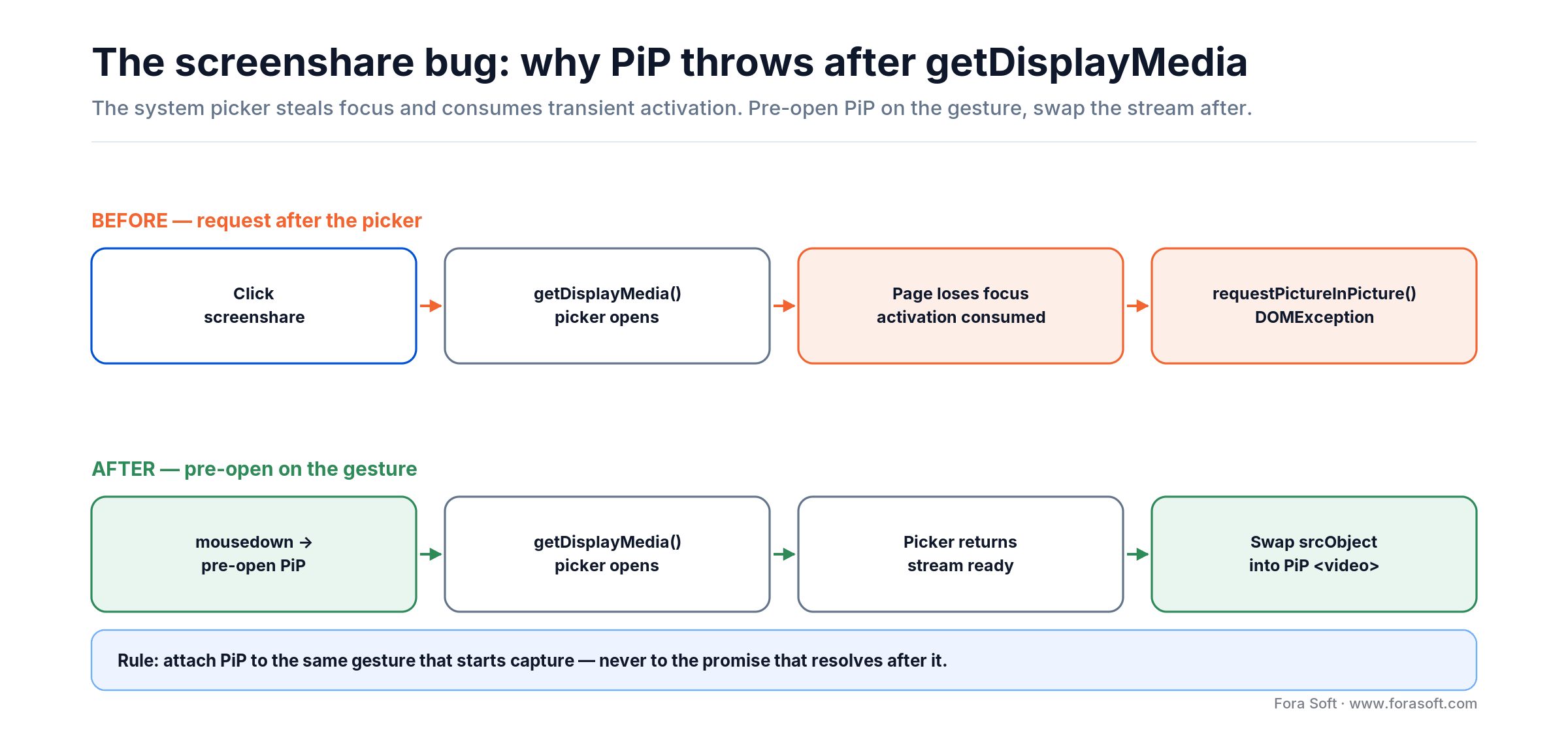
Figure 4. Why screenshare PiP throws — and the pre-open-on-gesture fix that makes it reliable.
Reach for pre-open-on-gesture when: the PiP surface is a screenshare or any flow that opens a system picker — the picker consumes transient activation, so open PiP on mousedown and swap srcObject once the stream is live.
Mini case — PiP for live shopping
On Sprii’s live-video shopping platform, viewers juggle a seller’s live stream, a chat feed, and a cart view simultaneously. Before PiP, 34% of sessions lost the stream the moment the shopper tabbed to checkout. We shipped Document PiP with the stream in the floating window and the chat+cart inline. Fallback on Safari is classic Video PiP of the stream alone.
The implementation used the useDocumentPIP hook above, a stable <div id="pip-root" /> as the portal target, a cloned stylesheet pass at window-open time, and the mediaSession wiring for play/pause. Scope: two engineers, two weeks — roughly 110 hours including QA across Chrome, Edge, Safari, and Firefox, accelerated with our Agent Engineering workflow. Checkout-to-watch continuation rose 27% on affected sessions. Want a similar scope for your player? Book a 30-min call.
iOS Safari — the quirks that trip everyone
iPhone has had system Picture-in-Picture since iOS 14 (2020). For web video, Safari’s reliable path is the webkit-prefixed webkitSetPresentationMode rather than the standard requestPictureInPicture() — so feature-detect both and fall back to the prefix on Safari. Three gotchas still hurt:
1. The video must be in fullscreen first. On iPhone, PiP only starts from an actively fullscreen video. Force video.webkitEnterFullscreen() and then request PiP, or rely on the system PiP button that Safari adds automatically.
2. playsInline is required. Without it, iOS opens its own fullscreen player and strips your controls.
3. autoPictureInPicture requires fullscreen. The attribute only takes effect while the user has actively expanded the video. Don’t expect it on a standard in-page player.
Security, privacy, and permissions policy
PiP is gated by a Permissions Policy directive. Cross-origin iframes are denied by default; if you embed a third-party player (Vimeo, Twitch) inside your app, add allow="picture-in-picture" to the <iframe>. Document PiP has no such delegation directive: requestWindow() can only be called from a top-level browsing context, so a cross-origin iframe cannot open one (iframe delegation is still a WICG proposal).
Additional privacy points worth knowing: the PiP window shares cookies, storage, and BroadcastChannel with the opener; it cannot be made always-on-top over another app’s secure input (e.g., password managers); and the window is tied to the opener — closing the original tab closes the PiP window. Don’t try to sneak a detached window past these limits; browsers treat it as an exploit.
Five pitfalls we keep finding in audits
1. DOMException: Must be handling a user gesture. You called the API from a timer, a fetch callback, or after the page lost focus. Always attach PiP to a direct onClick or onMouseDown.
2. Blank Document PiP window. You forgot to copy stylesheets. The DOM is there but unstyled. Copy every document.styleSheets entry into pipWindow.document.head; handle cross-origin by cloning <link> tags.
3. PiP closes on every React re-render. Your portal target isn’t stable. Store the mount HTMLDivElement in a useRef and keep the PiP window state outside the component if multiple trees share it (e.g. in a Zustand or Jotai atom).
4. Events don’t fire inside PiP. The PiP window has its own document. Keyboard listeners attached to the opener won’t hear keys pressed while PiP has focus. Attach listeners to pipWindow.document for the subset of shortcuts you need.
5. Autoplay blocked in Safari. If your video has audio and you call requestPictureInPicture before a user gesture, Safari silently fails. Combine a single user click that both unmutes and enters PiP.
Which PiP approach in five questions
1. Is the floating content a single video? Yes → classic Video PiP is enough. No → Document PiP.
2. Do you need Safari and iPhone coverage? Yes → ship Video PiP first, layer Document PiP for Chromium as an enhancement.
3. Do you need chat, transcripts, or call controls alongside the video? Yes → Document PiP with a React portal.
4. Is the PiP surface showing a WebRTC stream? Use srcObject with a stable React key tied to the stream id and pre-open on the gesture that starts capture.
5. Are hardware media keys important (Bluetooth headsets, car UI)? Add navigator.mediaSession action handlers.
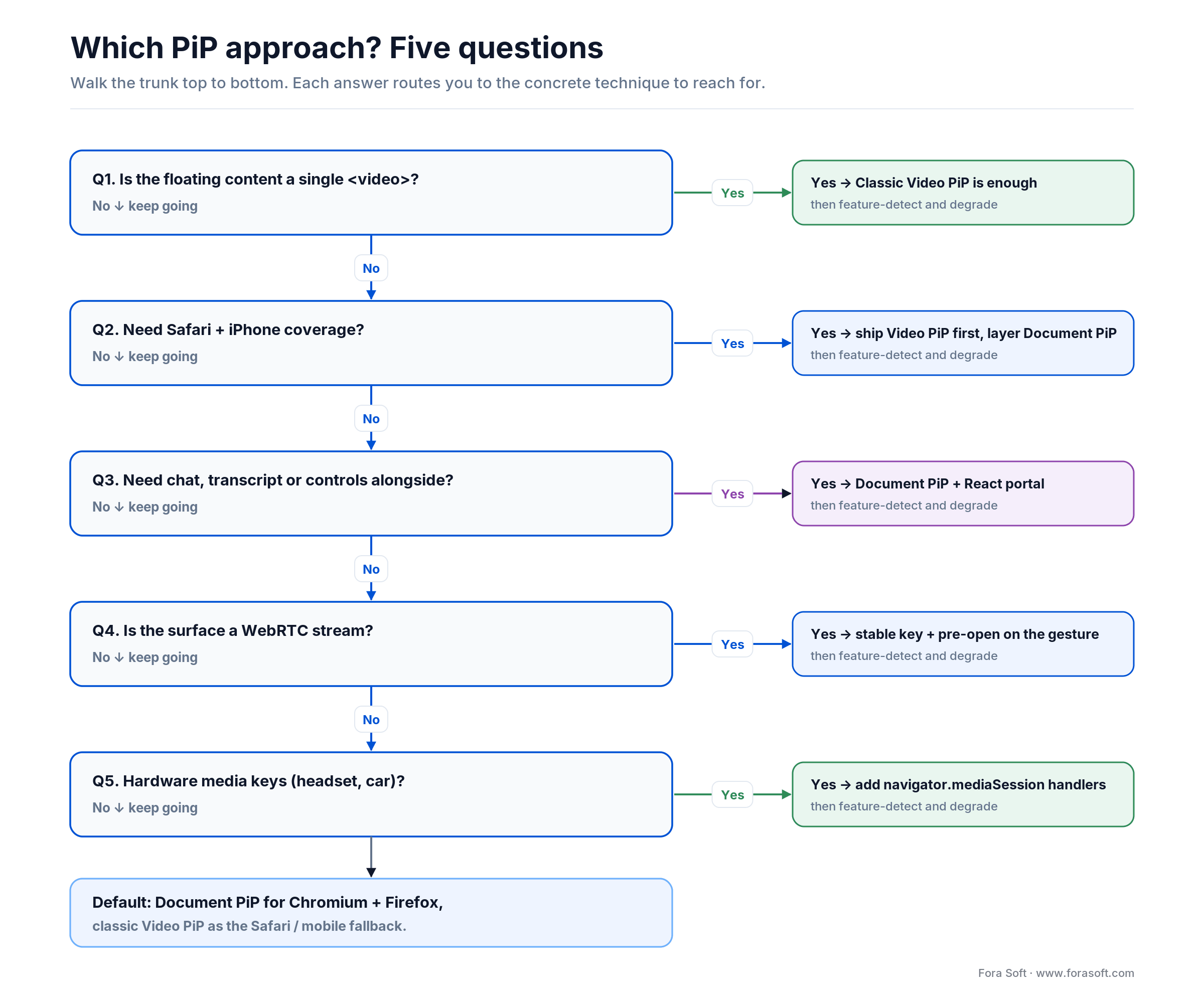
Figure 5. Which PiP approach to reach for, in five questions.
Accessibility and keyboard flow
PiP breaks the usual document-focus contract. Screen readers and keyboard users need explicit announcements when the content moves to a detached window.
- Set
aria-pressedon the toggle button; the label should announce entering / exiting PiP. - Provide a visible “Return to tab” button inside the PiP window for users who don’t know the OS close affordance.
- Mirror keyboard shortcuts to
pipWindow.document: Esc to close, Space to pause, M to mute. - Announce state changes via an
aria-live="polite"region that survives the portal move. - Never rely on color alone for the PiP indicator — add an icon and a text label.
KPIs to measure after shipping PiP
Quality KPIs. PiP open-error rate per 1,000 attempts (target < 0.5%), time to first frame in PiP (target < 500 ms on Chrome), and stylesheet-missing rate (target 0 after the first user session).
Business KPIs. Session duration delta for users who used PiP (we usually see +20–35%), tab-switch retention rate (percentage of users who stayed in the product after leaving the tab), and paid-conversion uplift on live-commerce flows.
Reliability KPIs. Unexpected PiP close rate (should trend to zero), React portal re-mount count per PiP session (target ≤ 1), and WebRTC stream freeze rate inside PiP (target < 0.1%).
When not to ship PiP
1. Your content is text- or chart-heavy. Small PiP windows murder readability. A dashboard > 14px body type does not survive a 320×240 window; users will close it immediately.
2. Your primary audience is mobile. Document PiP is desktop-only; Android has its own native PiP flow triggered by the OS when a video fullscreens. Don’t spend a sprint on something 70%+ of your MAU can’t see.
3. You don’t yet have a solid desktop video player. PiP inherits every bug of your normal player; stabilize the primary UI first.
Want a team that’s built PiP into real WebRTC and live-commerce products?
Fora Soft engineers have shipped PiP (both classic and Document) in production video platforms since 2005. Bring your design mock and we’ll estimate scope fast.
FAQ
When should you use Document Picture-in-Picture instead of the classic video API?
Pick Document PiP whenever the floating window needs more than a bare <video> — for example a chat panel, live transcript, whiteboard, or multi-stream WebRTC grid. Keep classic Video PiP for single-stream OTT or movie players, and as a Safari fallback. The two coexist in one app: feature-detect Document PiP first, degrade to Video PiP when absent.
Why does my Document PiP window look unstyled even though the DOM is correct?
Stylesheets do not cross the window boundary automatically. On requestWindow resolution, iterate document.styleSheets, copy each rule into a new <style> inside pipWindow.document.head, and clone any cross-origin <link> tags by href. Tailwind, CSS-in-JS, and styled-components all need the same treatment.
Why do I get “Must be handling a user gesture” when I call requestPictureInPicture?
Both PiP APIs require transient user activation — the current JavaScript call must originate from a recent click, keypress, or touch. If you call from a setTimeout, a promise chain after getDisplayMedia, or after the page lost focus, activation has expired. Fix: attach PiP directly to the click handler and pre-open before the system picker appears.
Does Document Picture-in-Picture work on Safari or iPhone in 2026?
As of 2026, Document PiP still isn’t shipping in stable Safari on macOS or iOS — only Chromium (Chrome 116+) and Firefox (151+, since May 2026) support it. Safari does support classic Video PiP on macOS and iPhone (iOS 14+). Ship Document PiP as the premium experience for Chromium and Firefox desktop, and degrade to Video PiP for Safari until WebKit catches up.
How do I handle React re-renders without the PiP window closing?
Store the PiP Window reference and its mount HTMLElement outside the component tree — either in a custom hook’s useRef or in a global state atom. Use createPortal to render into the stable mount node. The PiP window persists across component lifecycles as long as you don’t call pipWindow.close().
Does a WebRTC MediaStream work inside PiP?
Yes. Set video.srcObject = stream before entering PiP and the stream renders normally. Give the <video> a React key tied to the stream ID so the element remounts cleanly when the remote track changes, otherwise the PiP surface freezes on stream swap.
Can I make PiP open automatically when the user tabs away?
Yes in Chrome/Edge, conditionally. Listen to document.visibilitychange and call requestPictureInPicture when the page goes hidden — but be aware that transient activation may already have expired. For Safari with a fullscreen <video>, set the autoPictureInPicture attribute. Always guard with a try/catch and fall back to an inline mini-player when the request fails.
Does PiP affect performance or CPU usage noticeably?
Classic Video PiP is essentially free — the browser reuses the existing video decoder. Document PiP carries the cost of a second DOM and its own compositor layer; complex React trees can add 5–15% CPU in Chrome. Keep the PiP component lean (no charts, no heavy animations) and the experience stays smooth on mid-range laptops.
What to read next
VIDEO FUNDAMENTALS
How Video Technology Really Works
Codecs, containers, and streaming — the layer PiP sits on top of.
WEBRTC
How to Build Custom Video Conferencing Solutions
WebRTC architecture, SFU/MCU trade-offs, and where PiP fits the UX.
OTT
How to Develop an OTT Platform Like Netflix
Long-form video UX where PiP drives watch-time.
E-LEARNING
How to Develop a Corporate Training Video Platform
LMS patterns where floating lesson video changes engagement.
Ready to ship Picture-in-Picture in React this sprint?
Picture-in-Picture is no longer a toy. It drives watch-time on streaming products, reduces tab-switch churn in SaaS, and enables multi-stream layouts in WebRTC. The 2026 playbook is simple: layer classic Video PiP as your universal floor, add Document PiP for Chromium desktop as a premium experience, feature-detect aggressively, respect the user-gesture rule, and treat stylesheets as something you have to clone by hand.
If you want a team that has already built PiP for live-shopping, translation, and video-conferencing products to implement it alongside you, Fora Soft has the playbook, the hooks, and the QA matrix ready.
Book a 30-minute PiP design review with our frontend lead?
We’ll critique your component tree, recommend Classic vs Document PiP, and hand back a working snippet in the call itself. Agent Engineering-accelerated.

