


Key takeaways
• AI video analytics software turns streaming frames into decisions. On a streaming platform it powers recommendations, moderation, semantic search, ad targeting and quality telemetry, not surveillance cameras.
• The ROI is measured, not hoped for. Netflix’s own engineers credited recommendations with ~80% of hours streamed and ~$1B/year in retention (ACM TMIS, 2015); on mid-size catalogues we plan for 10–25% watch-time gains.
• Buy the models, build the pipeline. Twelve Labs, Google Video Intelligence, Azure Video Indexer, AWS Rekognition and Clarifai are commodity blocks, and in 2026 general VLMs such as Gemini read video for well under a cent a minute; the defensible product is the orchestration around them.
• Infrastructure dominates the bill. A 100k-MAU, 10M-hour platform can swing from ~$40k to ~$300k/month on the same features, depending on APIs vs a self-hosted GPU fleet. Self-hosting beats $0.05–0.10/min per-feature APIs past ~1M analyzed minutes/month.
• Compliance is a design decision. The EU AI Act (transparency duties from 2 August 2026; Annex III high-risk duties moved to 2 December 2027), DSA, UK Online Safety Act and the amended COPPA Rule all touch any platform doing face data or child-audience moderation. Wire it in on day one, or pay 3–5× to retrofit.
Updated October 2026: re-checked API prices per minute (Twelve Labs Marengo 3.5 and Pegasus 1.6, Gemini video input), GPU rates, and the EU AI Act dates after the Digital Omnibus; new section on streaming vs security-camera analytics.
Why Fora Soft wrote this playbook
Fora Soft has shipped video streaming software since 2005, with 250+ delivered projects and a 50-person team of senior video and ML engineers. We have built and run the exact AI video analytics software stacks this guide describes: real-time object detection, content moderation, recommendation systems, semantic search, quality-of-experience telemetry, dynamic ad insertion and GPU-scaled transcoding, on both cloud and bare metal, across OTT, e-learning, live events, fitness and telemedicine.
A few reference points, because claims without numbers are just adjectives. BrainCert, a WebRTC virtual-classroom platform we built, has delivered 500M+ minutes of live video across 100k+ organizations and reached $10M ARR. Worldcast Live streams concerts at 0.4–0.5s end-to-end latency to 10k+ concurrent viewers. MindBox runs a computer-vision pipeline at 99.5%+ recognition accuracy on a GPU fleet under $5k/month. These are live products where the analytics layer earns or saves money every day.
We also use Agent Engineering internally, so AI-assisted development shaves real weeks off greenfield video work. That is why the cost numbers here lean conservative: they reflect what we actually quote, not agency rack rates. When you need a partner rather than a reading list, our AI integration team picks up from any of the sections below.
Scoping an AI video analytics feature this quarter?
Bring us your streaming pipeline and a KPI target. We’ll sketch the analytics stack, the cost envelope, and a 12-week path to production on a 30-minute call.
What AI video analytics software actually is
AI video analytics software is the layer of a streaming platform that turns raw frames into structured data a product can act on. That data then drives recommendations, moderation, search, ad targeting, accessibility and delivery diagnostics. It is not a smart player skin or an “AI” badge on an off-the-shelf encoder. On a media platform the term overlaps with video content analysis and ai video analysis: the same computer-vision and language models, pointed at content instead of a CCTV feed.
Four capability buckets account for roughly 90% of production usage on streaming platforms today.
1. Content understanding. Object detection, scene segmentation, action recognition, speaker diarization, speech-to-text, translation and multimodal embeddings. The output is a rich metadata graph for every asset or live segment.
2. Moderation and compliance. NSFW, violence, hate-symbol, weapon and CSAM detection, plus consent controls for biometric data. Table stakes for any user-generated or live platform with minors or EU viewers.
3. Personalization and discovery. Recommendation systems, semantic search (“the scene where she opens the letter”), thumbnail selection, dubbing decisions and dynamic ad placement. The output is a personalized experience that lifts watch-time and lowers churn.
4. Telemetry and QoE. Rebuffering, startup time, bitrate, device heuristics, abandonment and anomaly detection along the delivery path. This is where Mux Data, Conviva and Bitmovin Analytics live.
Streaming vs security-camera video analytics
Short answer: the same detection, speech and embedding models power both, but streaming analytics reads finished content to grow watch-time and revenue, while security video analytics reads live camera feeds to raise alerts. Most “video analytics software” results in Google are the security kind; this guide covers the streaming kind, and the table shows where the two split.
| Dimension | Streaming and media analytics | Security and surveillance analytics |
|---|---|---|
| What goes in | Finished content: VOD titles, live events, classes, UGC | Camera feeds: IP cameras, NVRs, body-worn and drone video |
| Main jobs | Recommendations, moderation, search, captions, ad breaks, QoE | Intrusion and loitering alerts, ANPR, PPE checks, forensic search |
| Latency target | Hours for enrichment; 2–10 s for live moderation | Sub-second alerts at the edge, 24/7 |
| Typical tools | Twelve Labs, Azure AI Video Indexer, AWS Rekognition Video, Gemini, Mux Data | VMS-integrated analytics, YOLO-class detectors on Jetson or L4, ONVIF |
| Compliance hot spots | DSA, UK Online Safety Act, COPPA, ad targeting | Biometric rules under GDPR and the EU AI Act, retention limits |
| Success metric | Watch-time, churn, CPM, moderation SLA | False alarms per camera per day, time to evidence |
If your input is cameras rather than content, start with our guide to AI video analytics for security, and when you are ready to build, our video surveillance software development team ships VMS, NVR and edge-AI analytics on IP cameras; it is the team behind VALT, used by 770+ organizations.
Who to hire for live video analytics? A team that has shipped both halves: the media pipeline (ingest, transcode, delivery) and the inference layer on GPUs. Model-only shops stall on latency and egress; streaming-only shops stall on MLOps. Ask for a production reference with real minutes analyzed per month and its monthly inference bill. Ours: the BrainCert sidecar pipeline below analyzes about 1M minutes a month for under $3k of inference, and MindBox runs detection on an L4 fleet for under $5k a month.
Dashboards. Every platform in the API table below returns structured JSON rather than a finished dashboard. Customizable reporting usually sits in your own BI layer (Grafana, Looker, Metabase or a product admin panel) on top of the feature store, so plan it as a separate 2–4-week workstream.
The 2026 market snapshot
The AI analytics layer is one of the fastest-growing slices of the streaming budget. The overall video analytics market sits near $14.65B in 2026 and is tracked toward $41.39B by 2031 at a 23.1% CAGR, per MarketsandMarkets (2026). Anchor on that when you build the internal business case, and pair it with the price side: the cost of analyzing a minute of video fell faster than the market grew.

Figure 1. The market keeps growing while the list price of analyzing a minute of video keeps falling (October 2026).
| Segment | 2026 | 2031 est. | CAGR | Source |
|---|---|---|---|---|
| Video analytics (overall) | $14.65B | $41.39B | 23.1% | MarketsandMarkets, 2026 |
| Network cameras + video analytics | ~$18B (2025) | ~$52B (2035) | ~11% | MarketsandMarkets, 2026 |
The practical read: AI analytics is already a mid-seven-figure line item for a typical OTT at scale, and the growth is front-loaded into 2026–2028. Three years into a roadmap with no shipping analytics layer means you are behind the median. For the full feature map, our guide to the essential features of AI-powered streaming platforms sits one level up from this piece.
Seven use cases that pay for themselves
Every serious streaming product lands on some subset of these. Each is scoped so a mid-size platform can ship it in a 6–12-week increment rather than a two-year re-platform.
1. Personalized recommendations and thumbnails
Netflix’s recommender drives ~80% of hours streamed and is credited with ~$1B/year of retention, per Gomez-Uribe and Hunt (ACM TMIS, 2015). You won’t be Netflix, but hybrid content-based plus collaborative filtering with contextual bandits typically delivers a 10–25% lift in watch-time and a double-digit lift in thumbnail CTR. The build is dominated by feature engineering and a cold-start policy, not the model. Our buyer’s guide to AI content recommendation systems goes deep on model selection.
2. Automated content moderation
Modern NSFW and violence classifiers clear the bulk of the review queue automatically and flag live streams within seconds. That matters for UGC platforms, kids’ content and anything touching the EU’s DSA or the UK Online Safety Act. The hard part is the human-in-the-loop workflow, not the model.
3. Captions, translation and dubbing
Whisper-class ASR plus neural translation makes multilingual captions economical even for long-tail titles. Whisper large-v3 covers about 100 languages, but accuracy swings with language and audio quality, so budget a human pass on premium titles. For e-learning platforms the same stack powers searchable lecture transcripts, a decisive feature for enterprise LMS buyers. See our piece on AI simultaneous interpretation for the architecture.
4. Dynamic ad insertion and shoppable video
Server-side ad insertion with AI-driven targeting typically earns a 10–25% CPM lift over blind VAST: the analytics layer finds ad-safe break points, classifies scene context and picks creatives. On shoppable video, in-frame product detection adds incremental commerce revenue. Our deep-dive on AI monetization for streaming breaks down the models in play.
5. Semantic search inside video
Text-to-video retrieval (“find the moment the goalie saves the penalty”) used to be a research problem. It is now a ~$0.04-per-minute API call via Twelve Labs, or a 3–6-week build on open models. It converts passive archives (sports, education, legal, medical) into searchable assets. Tracking players and measuring the game itself is a different job, covered in our guide to AI sports video analysis software.
6. Quality-of-experience analytics
The boring, essential layer. Startup under 2s, rebuffering under 1%, playback failures under 0.5% — miss those and retention collapses. AI adds anomaly detection, proactive CDN switching and per-device bitrate tuning on top of baseline telemetry.
7. Engagement and learning analytics
For e-learning and fitness, AI analytics reads which sections lose the room. Engagement and attentiveness signals tell product teams where to cut or re-shoot. We walk through this in our online-learning analytics guide.
Reach for use-case investment when: you have >50k MAU, >500 hours of library content, and one clear number to move — watch-time or churn. Below that, fix fundamentals first.
The eight-layer analytics pipeline
Every production-grade AI analytics pipeline we’ve built (OTT, e-learning or telemedicine) collapses to the same eight layers. You can swap components, but the layering holds.
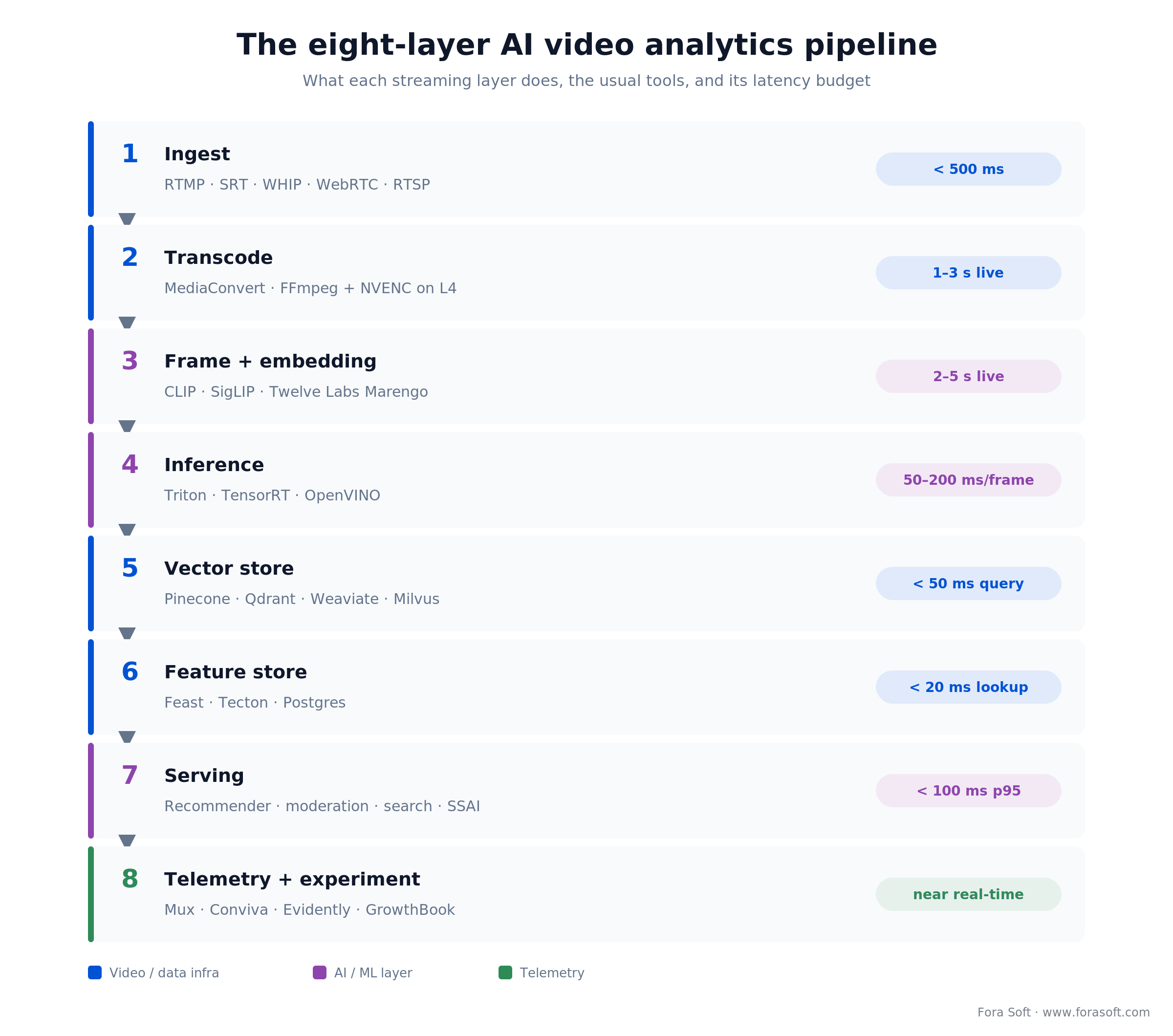
Figure 2. The eight layers, their usual tools, and the latency budget each has to hit.
Ingest terminates RTMP, SRT, WHIP or WebRTC inside your region for data-residency laws. Transcode generates the bitrate ladder on MediaConvert or FFmpeg with NVENC. Frame extraction and embedding samples at 1 fps for metadata, up to 30 fps for action, and embeds with a vision-language model such as CLIP, SigLIP or Twelve Labs Marengo. Inference runs detection, moderation and captioning in parallel on Triton or TensorRT.
The back half is where value compounds. A vector store (Pinecone, Qdrant, Weaviate, Milvus) keys embeddings by asset and timestamp for search and content-based recommendations. A feature store (Feast, Tecton or a Postgres table) holds the user and content features that feed the recommender. Serving exposes low-latency recommendation, moderation and search endpoints behind a cache. Telemetry and experimentation (Mux, Conviva, Evidently, GrowthBook) closes the loop back to retraining. On Worldcast Live we collapsed layers one to four onto a single GPU cluster for sub-second latency; on a multi-site surveillance build we split them across edge appliances so cameras keep working when the ISP drops. The right split is topology-dependent.
Five video-AI APIs we benchmark
These are the APIs we test against for new streaming projects. Prices are public list prices we re-checked in October 2026, and they move often — always pull a fresh quote before an annual commitment. Note that this is the media video-AI set; the surveillance-camera vendors are a different market.
| Vendor | Price (per analyzed min) | Best at | Watch out for | Where it fits |
|---|---|---|---|---|
| AWS Rekognition Video | $0.10 label / $0.05 shot / $0.10 moderation | Faces, labels, deep AWS integration | Cost climbs at scale; limited EU face features | Already on AWS |
| Google Video Intelligence | $0.05 shot / $0.10 label / $0.10 explicit content; 1,000 free min/mo | Moderation, shot detection, speech | Lighter custom-model training; celebrity recognition retired 16 Sep 2025 | Already on GCP |
| Azure Video Indexer | ~$0.10 blended (bundled) | Transcript + OCR + faces + topics in one; GPT-5-family summaries since March 2026 | Sales-led; less granular pricing | EU-heavy, Microsoft shops |
| Twelve Labs | ~$0.042 index (Marengo 3.5) / ~$0.029 analyze input (Pegasus 1.6) | Video-native semantic search, embeddings | Newer vendor; smaller compliance surface | Search-first products |
| Clarifai | ~$0.002/req pre-trained | Moderation, custom detection, on-prem | Per-request billing needs modelling | Bursty loads, self-host |

Figure 3. The same vendors placed by data-residency need and primary job — a map, not a ranking.
The sixth option: a general VLM. Gemini Flash-Lite-class models bill video input at $0.25–0.30 per million tokens, and Google counts about 100 tokens per second of video at default resolution, per the Gemini video docs (October 2026). That is roughly $0.0015 per minute of input before output tokens, about 60× below a $0.10 label call. The catch: free-text output is not deterministic, so you need a fixed JSON schema and an evaluation set before it replaces a classic label API.
Reach for Twelve Labs when: semantic search over video is the hero feature — sports, education, legal, media archives — and you’d rather pay per minute than build a CLIP-based stack.
Reach for Azure Video Indexer when: you need bundled transcription, OCR and moderation, you’re an EU-heavy tenant, or your buyer already holds a Microsoft enterprise agreement.
Reach for a self-hosted stack when: you process >1M minutes/month and commodity APIs cost more than a GPU fleet, or your data cannot leave your VPC — medical, defense, legal.
Reach for Clarifai when: workloads are bursty, you need on-prem inference on day one, or per-request billing gives cleaner unit economics at launch.
The GPU layer: hardware in 2026
Self-hosting inference gets cheaper than per-feature API calls once you cross roughly 1M analyzed minutes per month. The decision then collapses to three axes: GPU model, cloud vs bare metal, and batch vs real-time.
| GPU | Cloud on-demand | Sweet spot |
|---|---|---|
| NVIDIA T4 (16 GB) | ~$0.53–0.59/hr | 720p detection + moderation; ~39 HD transcodes/card |
| NVIDIA L4 (24 GB) | ~$0.80/hr | AV1 transcoding, embeddings, dense inference |
| NVIDIA A10 (24 GB) | ~$1.01/hr | Older Ampere card for 24 GB inference when L4 capacity is short; slower per dollar than L4 |
| NVIDIA L40S / H100 | ~$3–11/hr (H100 ~$11/hr on Google A3) | Model training, on-prem multimodal |
| NVIDIA RTX PRO 6000 (96 GB) | ~$0.65/hr for a 1/8 slice (Google G4) | Open VLM inference plus video in one card, fractional sizing |
On-demand rates are AWS and Google Cloud list prices in US regions, October 2026; Google’s one-L4 g2-standard-4 lists at ~$0.71/hr. One L4 handles roughly 130 concurrent AV1 720p30 transcodes (NVIDIA cites 1,040 across an eight-L4 server) or 100–200 concurrent inference slots, at about 120× the throughput of CPU for the same budget (NVIDIA Developer Blog). For a dedicated fleet, bare-metal hosts (Hetzner’s RTX Ada line, colocated L4/L40S) undercut hourly cloud rates once usage is steady. On MindBox we run TensorRT-compiled detection on L4s behind Triton for under $5k/month; the equivalent API stack would run $60–80k. Our AI video recognition software team builds exactly this layer: detection, tracking and recognition on YOLO26, RT-DETR and ByteTrack, compiled for your GPUs. Our piece on AI video surveillance in 2026 walks the trade-offs where cameras, not content, are the input.
Real-time vs batch: latency budgets
The single biggest cost lever in AI video analytics is how fresh the output has to be. Three latency budgets show up in practice, and each step tighter multiplies spend 2–5×.
Batch (hours to days). Nightly labelling, metadata enrichment, search-index rebuilds, offline recommendation training. Runs on spot GPUs at a 60–80% discount. Fits VOD catalogues and e-learning archives.
Near-real-time (2–10s). Micro-batch inference on live streams for moderation, captions and scene flagging. Common on news, UGC live, sports and education. It needs reserved GPU capacity and a ~6s window to collect enough frames for stable predictions.
True real-time (<500ms). Live moderation of interactive events, trigger systems and AR overlays. This demands edge inference on T4/L4 GPUs plus carefully budgeted model sizes. It is where most do-it-yourself stacks fail: the cost-latency curve is brutal past 500ms.
Stuck between buying APIs and building in-house?
We’ve shipped both. Bring us your volume and latency targets and we’ll model the two-year TCO, then tell you which curve crosses sooner.
The cold-start recommendation playbook
The cold-start problem, new users and new content with no history, kills more recommendation projects than any modelling issue. The playbook that works stacks four tactics.
1. Content-based seeding. Embeddings from the video itself (CLIP or SigLIP on keyframes, Whisper on audio) suggest similar titles from the first minute, no users required.
2. Contextual bandits. Thompson sampling or LinUCB ranks candidates using device, time-of-day, geography and last-session signals. That lifts CTR 5–15% versus a static ranker and adapts in minutes.
3. Hybrid collaborative filtering. Once you pass ~50k sessions, a two-tower retrieval model (TensorFlow Recommenders or LightFM) on top of content embeddings captures taste without overfitting to heavy users.
4. Explicit onboarding. Ask three taste questions at sign-up. Ugly, underrated, and worth 10–20% retention on week-one cohorts.
Moderation that survives an audit
Moderation is where AI video analytics earns trust and legal coverage. The 2026 reality: the EU AI Act (Regulation 2024/1689) has banned certain real-time remote biometric identification since 2 February 2025, its Article 50 transparency duties apply from 2 August 2026, and the Digital Omnibus (Regulation (EU) 2026/1744, in force since 27 July 2026) moved Annex III high-risk obligations to 2 December 2027; the DSA requires expeditious takedowns for UGC platforms; the UK Online Safety Act ties senior managers personally to breaches, with Ofcom enforcing its child-safety duties since 25 July 2025; and the FTC’s amended COPPA Rule has been fully enforceable since 22 April 2026. Even strong classifiers throw false positives at platform scale, which is exactly why the workflow, not the model, is the design problem.
1. Multimodal first. Combine frames, audio, overlay text and metadata. Text-only or image-only classifiers miss 20–40% of harmful content that a multimodal model catches.
2. Tiered actioning. Three bands: allow, human-review queue, block. Anything below ~80% confidence goes to the queue. The cost of a false positive is low; the cost of a false negative can be existential.
3. Auditable pipeline. Every decision logs model version, feature vector and reviewer ID. Regulators ask for exactly this in a DSA audit.
4. Consent and biometric controls. Under GDPR and the AI Act, biometric categorization is off-limits in many contexts without an explicit legal basis. Assume you don’t have one until your DPO says otherwise, and keep the day-one checklist below.
The compliance layer to wire in on day one
GDPR: a lawful basis for each processing step, a right-to-delete that cascades through vector stores and training data, and EU-region residency by default. EU AI Act: document bias tests, training-data provenance and human oversight before launch (EC regulatory framework). HIPAA: BAAs with every vendor touching PHI, AES-256 at rest, TLS 1.3 in transit — the pattern behind our HIPAA-compliant video platforms. COPPA and kids’ content: separate moderation thresholds, parental-consent flows, no targeted ads to under-13s. DSA and UK OSA: transparency reports, risk assessments and an operator kill-switch that pulls a live stream inside 30 seconds.
Where AI moves the revenue line
Every CFO asking about AI video analytics wants one number: what it does for ARPU or lifetime value. Here is the honest breakdown from deployments we’ve seen land.
Dynamic SSAI. Server-side ad insertion with AI targeting yields a 10–25% CPM lift over blind VAST, with better viewability and less ad-block leakage. It pays for the pipeline inside two quarters on any AVOD platform doing >$1M/year in ads.
Retention via personalization. The quiet winner. Churn reductions of 8–15% on well-instrumented streamers, driven by recommendation plus thumbnail personalization plus better search. On a $9.99 subscription with 1M subscribers and 5% monthly churn, a 10% churn cut keeps about 5,000 more subscribers every month, roughly $50k of extra monthly revenue that compounds as cohorts stack up.
Engagement-driven upsell. Fitness and education platforms use engagement tracking to trigger outreach right before the drop, lifting conversion to paid tiers 3–8%. Perspire, our live-fitness client, uses this pattern to keep trainers on high revenue share while growing ARPU.
Mini case: BrainCert’s 500M-minute pipeline
BrainCert runs virtual classrooms for 100k+ organizations across ten data centers and has delivered more than 500M minutes of live video. The original stack — WebRTC, a custom SFU and a flat recording pipeline — did its job, but buyers started asking for AI transcription, engagement analytics and content search in RFPs. We had 12 weeks to ship without touching the real-time path.
The plan was a sidecar analytics pipeline consuming the recording egress: Whisper-large for transcription batched across a GPU pool, CLIP embeddings for scene search, and a small engagement classifier running in 5-second micro-batches. Everything landed in Qdrant for search and Postgres for the dashboard. No change to the SFU, no change to the recording format.
After 12 weeks: multi-language search across the catalogue, a teacher-facing engagement score on every replay, and an 18% lift in the enterprise trial-to-paid rate on cohorts where the analytics were visible. The cost envelope was under $3k/month of inference for roughly 1M minutes analyzed. Want a similar 12-week roadmap for your stack? Book a 30-minute review and we’ll size it against your pipeline.
Cost model, priced end-to-end
Concrete math beats ranges. Here is a realistic monthly envelope for a mid-size platform (100k MAU, 10M hours/month, ~1M minutes analyzed) turning on an AI analytics layer, blended across live and VOD.
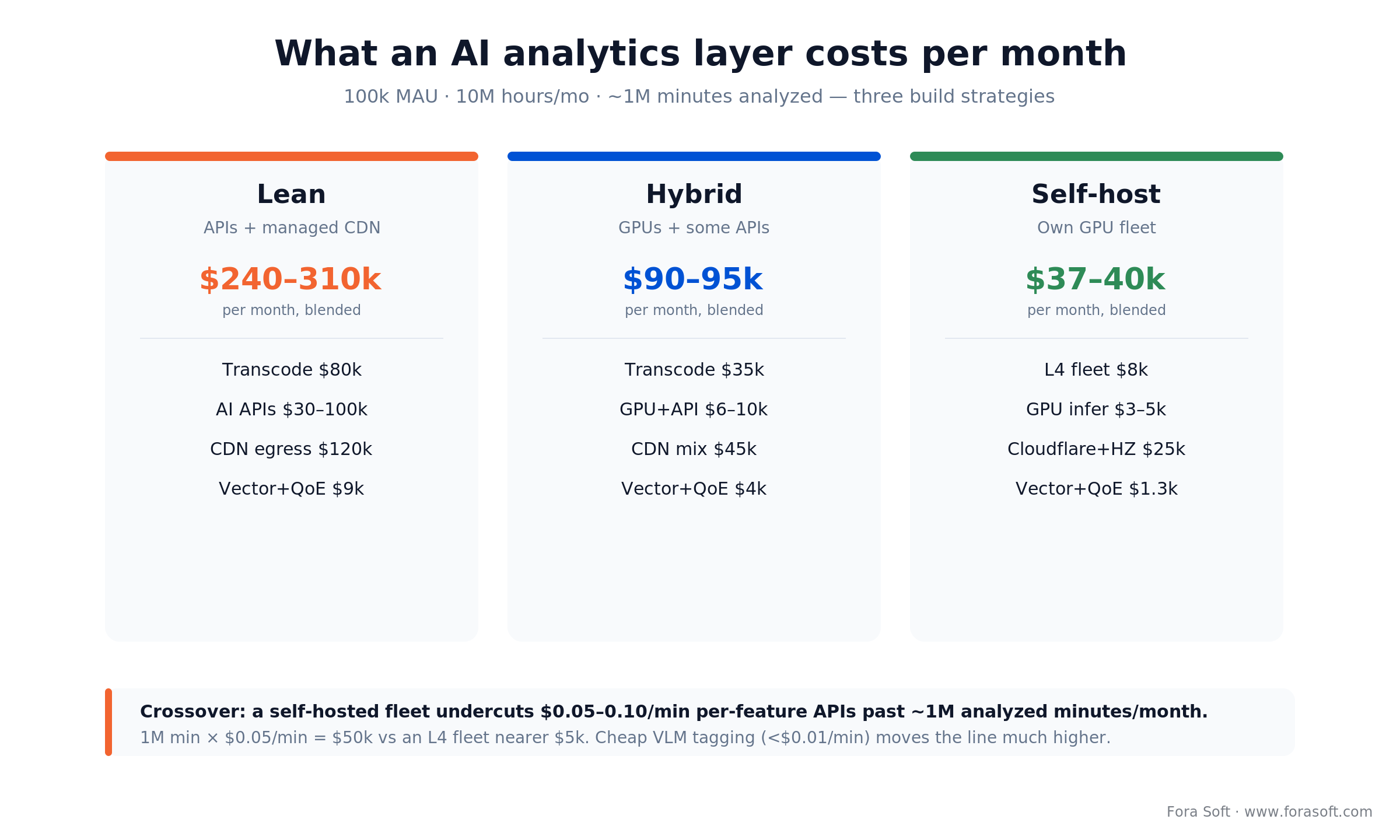
Figure 4. The same feature set at three build strategies, plus the ~1M-minute crossover where self-hosting wins.
| Line item | Lean (APIs + CDN) | Mid (hybrid) | Heavy (self-hosted) |
|---|---|---|---|
| Transcoding | $80k | $35k | $8k |
| AI analysis (~1M min) | $30–100k | $6–10k | $3–5k |
| Vector + feature store | $3.5k | $1k | $0.3k |
| CDN + egress | $120k | $45k | $25k |
| QoE telemetry + monitoring | $5.5k | $3k | $1k |
| Total (blended) | $240–310k/mo | $90–95k/mo | $37–40k/mo |
The lean column ships tomorrow on APIs; the heavy column is 18 months of disciplined engineering. Most serious platforms sit in the middle for the first two years, then graduate once unit economics demand it. The worked crossover is simple: 1M minutes at $0.05/min of API equals ~$50k, against an L4 fleet nearer $5k. The fleet line excludes the MLOps engineers who keep it running; count them and the break-even lands near 1M minutes, not 100k. Past roughly 1M minutes/month, per-feature APIs stop being the cheap option. If general VLM tagging covers your use case, input drops to about $1.5k per 1M minutes at Gemini Flash-Lite rates (October 2026, before output tokens), and the reasons to self-host become latency, data residency and deterministic output rather than price. The analytics build itself lands around $60–120k for a first production pipeline, and Agent Engineering has shaved two to four weeks off greenfield scopes that used to take twelve.
Track the layer on three KPI buckets. Quality: recommendation CTR >8% on the primary rail, thumbnail CTR lift ≥15%, moderation precision ≥0.95 and recall ≥0.92 on violence and NSFW, caption error rate ≤10% for English. Business: watch-time per session up 10–25% within two quarters, 30-day retention up 5–15%, ad CPM up 10–25% with SSAI. Reliability: startup p95 under 2s, rebuffer ratio under 1%, moderation-queue SLA under 5 minutes. Give each KPI a single owner — unowned KPIs regress.
A decision framework in five questions
Q1. What is the single metric you need to move? Watch-time points to personalization; churn to personalization plus engagement analytics; CPM to SSAI plus context detection; compliance risk to moderation plus audit logging. Optimizing three metrics at once means optimizing none.
Q2. How much video do you analyze per month? Under 200k minutes, commodity APIs win. From 200k to 1M, go hybrid. Over 1M or latency-critical, self-host on L4/T4, unless a VLM API at under a cent a minute already does the job. Crossing 1M minutes on pure APIs is the most common way a startup burns its Series A.
Q3. What is your latency budget? Overnight batch runs on spot GPUs; 2–10s on a shared dedicated fleet; sub-second on edge inference with reserved capacity. Pick the loosest budget you can live with.
Q4. Who sits downstream of the insight? A recommender feed tolerates fast-but-noisy; a moderation reviewer needs slower-but-precise; a clinician or regulator needs fully auditable with human sign-off. The consumer sets the precision/latency trade-off, not the model.
Q5. Where does the data have to live? EU-only rules out US-only vendors; HIPAA needs BAA-covered services in a private VPC; defense needs air-gapped on-prem. Data residency routinely kills vendor choices after the architecture is signed — check it first, and if you want a second opinion, our AI-for-video-engineering hub collects the reference patterns.
When to not invest yet
Not every streaming product needs an AI analytics layer, and bolting one on before the fundamentals are solid mostly wastes runway. Hold off if any of these apply.
You’re still fixing QoE. If rebuffering is >3% or startup is >3s, nobody cares how smart the recommender is. Fix the CDN and bitrate ladder first.
The catalogue is tiny. Under ~100 titles or ~20 hours, a well-designed static grid beats a recommender. Buy a merchandising tool, not a model.
You have <5k MAU. Collaborative filtering doesn’t converge below that, and personalization ROI is invisible. Put the money into content and distribution.
No one will own the retrain loop. If nobody will page-duty a drift alert at 3am, skip the pipeline and use per-minute APIs instead.
Five pitfalls to avoid
1. Over-tagging. Running every model on every frame produces a metadata soup nobody queries. Start with three high-confidence labels per asset, then expand based on what the product actually uses. Storage and retraining scale with tags, not traffic.
2. Ignoring model drift. A recommender trained in January is 10–15% worse by October once content trends shift. Wire up drift detection (Evidently or KS-tests) on day one; retrain monthly for fast-moving catalogues.
3. Skipping the feedback loop. If model output never re-enters training data, you’re building a dead system. Track every recommendation’s click and every moderation correction. Product and data science share that loop.
4. GPU blowouts on live. Reserving GPUs for peak live and letting them idle 70% of the day burns budgets. Use autoscaling pools, micro-batch inference and distillation. A 2×-smaller model at 95% accuracy usually beats a 2×-bigger one at 96%.
5. Treating compliance as the last sprint. GDPR, the AI Act, DSA, COPPA and HIPAA have to be designed in. The retrofit cost is typically 3–5× the original build. Talk to a DPO in the first design review.
Worried your analytics roadmap is about to burn Q3?
We’ll review your pipeline, flag the cost and compliance risks, and name the three highest-ROI features to ship first. Free 30-minute session.
What to plan for in 2026–2027
Three shifts are close enough to design around now, on top of the security baseline — encryption in transit and at rest, RBAC, and audit trails on every inference — that any production platform already needs.
1. Vision-language models go cheap. Open VLMs such as Qwen3-VL (Apache 2.0, September 2025; reads two-hour videos in a 256k-token context) and InternVL3.5 now trade blows with closed models on many vision benchmarks, while Gemini Flash-Lite-class APIs read video for well under a cent a minute. Plan a 2027 move of most label-and-tag workloads off per-feature APIs; our open-frontier VLM guide walks the model choice.
2. Media-over-QUIC eats WebRTC where it matters. MoQ gives broadcast-scale sub-second latency without SFU fan-out. Our MoQ architecture deep-dive covers the transport implications for analytics pipelines. The IETF transport spec is still a draft (draft-ietf-moq-transport-22, 1 October 2026), so treat production MoQ as early-adopter territory.
3. Contextual AI replaces flat tagging. Instead of labelling “car, blue, sedan,” the next VLMs describe “character arriving for an important meeting.” Our piece on generative AI and contextual video intelligence maps the pipeline.
FAQ
What is AI video analytics software for streaming?
It is software that applies computer-vision and language models to a streaming platform’s video to produce structured data — labels, scenes, transcripts, embeddings and moderation flags — that then powers recommendations, search, ad targeting, accessibility and quality telemetry. It differs from surveillance analytics: the input is content, not a security camera feed.
Is there an AI program that can analyze videos?
Yes. Managed APIs such as AWS Rekognition Video, Google Video Intelligence, Azure AI Video Indexer and Twelve Labs analyze uploaded or streamed video for labels, faces, text, speech and unsafe content at roughly $0.03–0.10 per minute for core features (list prices, October 2026; Google charges $0.15 for object tracking and text detection), and general models like Gemini answer free-form questions about a video. Security cameras are usually analyzed inside the video management system instead.
What is the best AI video analytics software?
There is no single best product; the right one depends on the input and the volume. For streaming content, Twelve Labs leads on semantic search, Azure AI Video Indexer on bundled insights, and AWS or Google if you already run there; past about 1M analyzed minutes a month, a custom pipeline on your own GPUs beats per-feature APIs on cost. If a general VLM such as Gemini covers the job, its API can stay cheaper than your own fleet, and you self-host for latency, data residency or deterministic output instead.
How much does AI video analytics cost per minute?
In October 2026 list prices run $0.05–0.10 per minute for per-feature APIs (AWS, Google), about $0.029 for Twelve Labs analysis input and $0.042 for indexing, and roughly $0.0015 of input for a Gemini Flash-Lite-class model before output tokens. A self-hosted L4 fleet lands near $0.005 per minute at 1M minutes a month.
Who should we hire to build live video analytics?
Hire a team that has shipped both the streaming pipeline and GPU inference in production, and ask for a reference with real minutes analyzed per month and its inference bill. Teams that only do models stall on latency and egress; teams that only do streaming stall on MLOps. Fora Soft’s own references are BrainCert (about 1M minutes a month analyzed for under $3k of inference) and MindBox (detection on an L4 fleet under $5k a month).
How long does a first AI video analytics feature take to ship?
A focused feature — automatic transcription, a simple recommender, or moderation for one content type — takes 6–10 weeks with a 3–4 person team when ingest and transcode are already solid. A full pipeline across recommendation, moderation and search is 12–20 weeks. Anything shorter is a demo, not a production feature.
Should we build on AWS, Google Cloud, or bare metal?
For the first year, AWS or GCP reach production fastest because transcoding, inference and observability fit together. Once you cross ~1M analyzed minutes/month or $50k/month in GPU spend, moving inference (and sometimes transcoding) to a dedicated fleet often saves 60–80% on that line item at the same latency.
Can we use open-source models instead of a paid API?
Yes, and increasingly it is the better call at volume. YOLO26 for detection (January 2026; AGPL-3.0 or a paid enterprise licence, so check before shipping it in closed-source products), Whisper for speech-to-text, CLIP or SigLIP for embeddings, and open VLMs like Qwen3-VL cover most commercial use cases at a fraction of per-minute API cost once volume is steady. You pay for it in team capacity and MLOps discipline instead of per-minute fees.
What is the minimum data for a useful recommendation system?
Content-based recommendations need only embeddings of the catalogue — zero user data. For collaborative filtering to converge, roughly 50k sessions and 5k active users over a 30-day window is a workable minimum. Below that, stick to content-based recommendations plus contextual bandits.
How do we handle the EU AI Act if we use face recognition?
Treat face recognition as high-risk and possibly prohibited depending on context, especially real-time remote biometric identification. Document a lawful basis, run a data-protection impact assessment, implement human oversight with a documented escalation path, and keep a kill-switch. Many EU tenants switch to pseudonymous re-identification or drop face recognition — the engineering cost is lower than the compliance cost.
Does AI video analytics help live events or only VOD?
Both, but the constraints flip. VOD is dominated by batch analysis for enrichment and personalization. Live needs real-time moderation, scene flagging for ad-break decisions and live captioning on tight latency budgets. Most production platforms run two pipelines that share a vector store but keep separate GPU fleets.
What is the biggest hidden cost nobody flags in the proposal?
Data egress. Pulling raw frames from object storage to GPUs, and shipping decoded video to moderation APIs, can double an AWS bill before anyone notices. Co-locate storage and GPU compute in the same region and VPC from the start, or use a host that doesn’t meter egress.
What to read next
Recommendations
AI Content Recommendation Systems for Video
Pick the recommender stack that fits your catalogue and audience size.
Monetization
AI Monetization Methods for Video Streaming
SSAI, personalization and the other levers on the revenue line.
Playbook
AI Streaming Platforms: The 2026 Playbook
End-to-end architecture for live, VOD and e-learning AI streaming.
Deep dive
Generative AI and Contextual Video Intelligence
Why VLMs are about to replace flat content tagging.
E-learning
AI Video Analytics for Online Learning
How engagement tracking and search reshape the LMS buying case.
Ready to make analytics your unfair advantage?
AI video analytics software is moving from nice-to-have to default layer faster than any other piece of the streaming stack. The winners pair one clear revenue or retention KPI with the right mix of commodity APIs and self-hosted GPUs, wire compliance in from the first sprint, and ship in 12-week increments instead of 18-month re-platforms.
If you already have a streaming product, the biggest lever is usually personalization plus moderation; if you’re greenfield, it is an analytics-native architecture that never needs a retrofit. When the analytics layer is part of a new OTT launch, our OTT and Internet TV development team builds recommendations, moderation and QoE telemetry into the platform from the first sprint. We’ve built both paths — from MVP to 500M+ minutes in production — and can help you pick, size and ship the next step on yours.

The book · Volume 6 of 7
AI for Video: A Complete Guide to Intelligence in Video Products: From Models and Inference to Computer Vision, Speech, Search, and Generative Video
The eight-layer pipeline above is where most streaming teams decide which models to buy and which to own. Volume 6 goes deeper into those models: computer vision for detection and tracking, speech recognition and diarization, search and RAG across a video archive, and the deployment topologies that keep inference costs predictable. Written by Nikolay Sapunov, CEO at Fora Soft.
Read it on Amazon →Kindle & paperback · Fora Soft Video Engineering Handbook
Ready to plan your AI video analytics stack?
Bring us your streaming platform and a KPI target. We’ll sketch the stack, size the fleet, and give you a 12-week plan to production on a 30-minute call.

